Trust.Zone is a budget, no-logs VPN registered in Seychelles. It sells itself on one thing above all: a low price. Our short verdict is that it is safe enough for everyday privacy. It is also genuinely cheap on a long plan. But the dated apps, the missing native Mac client, and the thin support hold it back from the top tier.
This review looks at what Trust.Zone actually delivers. We wanted to get past the pricing page and see the real service. We tested its speed on nearby and distant servers. We ran leak checks. We tried it with Netflix. And we dug into the security features, the no-logs policy, and the Seychelles jurisdiction. The goal is simple. We want to tell you whether this service is worth your money in 2026. Or whether the low price hides too many compromises.
A quick word on how we approach any VPN. We do not trust a marketing sheet. We install the apps. We connect to a spread of servers. We measure real download speeds. We run IP and DNS leak checks. Then we try the streaming services people actually use. Only then do we form a view. Everything below comes from putting Trust.Zone through that process. Our attention stayed on the Windows and Android apps, the platforms most buyers will actually use.
Pricing and Plans: Is Trust.Zone Really That Cheap?
Price is the reason most people look at Trust.Zone. So we will start there. The month-to-month plan costs $9.99. That is average for the industry. It is not the bargain the brand is known for. The savings come when you commit for longer. The 1-year plan works out to about $3.33 a month. The longest multi-year plans drop to roughly $2 a month. The exact figure depends on the current promotion.
That long-plan rate is where Trust.Zone earns its cheap reputation. It is one of the lower per-month prices you will find. Still, the exact number moves with plan length and whatever sale is running. We would treat the lowest advertised figure as a starting point. It varies by term and promotion. What looks like a headline bargain one week may shift the next. Always check the total you will actually be charged.
When it comes to value, the math is straightforward. Are you happy to pay upfront for two or three years? Then Trust.Zone is very cheap. Do you want month-to-month flexibility? Then it is priced like everyone else. Better all-round services exist at that rate. The monthly plan is the one to avoid. At $9.99, you pay a premium-tier price for a budget-tier experience.
One catch is worth flagging. The standard plans include 3 simultaneous connections. You only get 5 on the 2-year plan. That is a tight limit. Rivals often offer more devices, or even unlimited. It feels restrictive if you want to cover a household. A couple with two phones and two laptops will hit the ceiling immediately. This is a small service in more ways than one. The device cap is where you feel it first.
Trust.Zone bills the cheapest rates only on multi-year terms paid in one lump sum. Budget for the total upfront cost, not the tempting per-month figure the site shows first.
Free Trial and Money-Back Guarantee
Trust.Zone lets you try before you buy. We always appreciate that. There is a 3-day free trial. It needs no credit card. But it is capped at 1GB of data and a single device. That is enough to test connections and run a few speed checks. It is not enough to live with the service for a few days. We used the trial to confirm the apps installed cleanly. We also confirmed a nearby server connected without fuss. For that narrow purpose, it does the job.
The refund path is where we have concerns. There is a 10-day money-back guarantee. But the full refund only applies if you have used under 1GB of data. In practice, that makes the guarantee restrictive. Use the VPN the way you intend to, and you will likely blow past 1GB quickly. That happens well before you decide whether to keep it. The full refund no longer applies after that. A single evening of streaming can eat the 1GB allowance. So the guarantee protects the provider more than the buyer.
The lesson is simple. Do your real evaluation inside the free trial's data cap. Then commit only when you are confident. Treating the paid plan as a second trial period is risky. The refund terms may not have your back.
Read the refund terms before you commit to a long plan. The 10-day guarantee only pays out in full if you stay under 1GB of data, so heavy testing can void it.
Discounts and Crypto Payments
Privacy-minded buyers get a small bonus here. Trust.Zone offers a 10% discount for paying with Bitcoin or other crypto. That is a nice touch. It saves money. It also keeps a payment trail off your card statement. Combine it with a long plan, and the effective price drops further. It lands the service among the cheapest options for anyone paying that way.
Crypto payment fits the privacy pitch neatly. You may be choosing a Seychelles-based no-logs VPN partly to shrink your data footprint. Paying without a card is a logical extension of that goal. It is a small feature. But it signals that Trust.Zone understands its core audience.
Apps and Device Compatibility (Windows, Mac, Android, iOS)
Trust.Zone covers the major platforms, but not evenly. There are native apps for Windows, Android, and iOS. There are also browser extensions for Chrome and Firefox. You can set it up on routers, smart TVs, and consoles like Xbox, PS5, and Fire TV. Those routes rely on manual configuration rather than a one-click app. The spread of supported devices is broad on paper. It suits the technical user who does not mind some setup work.
The gap that matters most is macOS. There is no native macOS client. Mac users have to fall back on a manual third-party workaround such as Tunnelblick. That is a hassle. It is a poor look for a paid service in 2026. Setting up Tunnelblick means downloading configuration files, importing them, and managing connections through a tool. That tool is far less friendly than a purpose-built app. If you are a Mac household, this alone may be a dealbreaker.
Across the apps we used, the interface feels clunky and dated. There is noticeable lag when switching servers or settings. Menus respond a beat slower than you expect. The design language looks a generation behind the polished apps from bigger names. It works. Once connected, it stays out of your way. But it does not feel modern. For a budget service, this is forgivable. Still, it is another reminder that you are trading polish for price.
Want to run the VPN at the network level to cover devices without their own app? Our own step-by-step guide on setting up a VPN on your router walks through the manual process these devices need. Going router-first is also one way around the tight device limit. A router counts as a single connection while protecting everything behind it.
Setup and Ease of Use
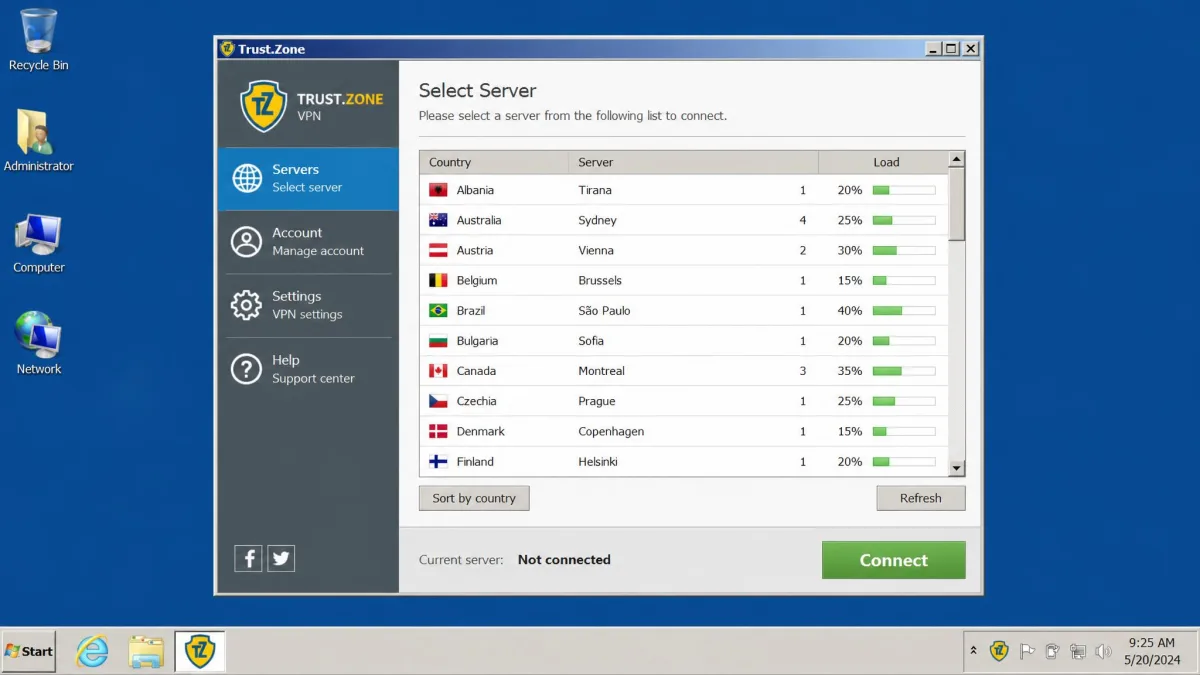
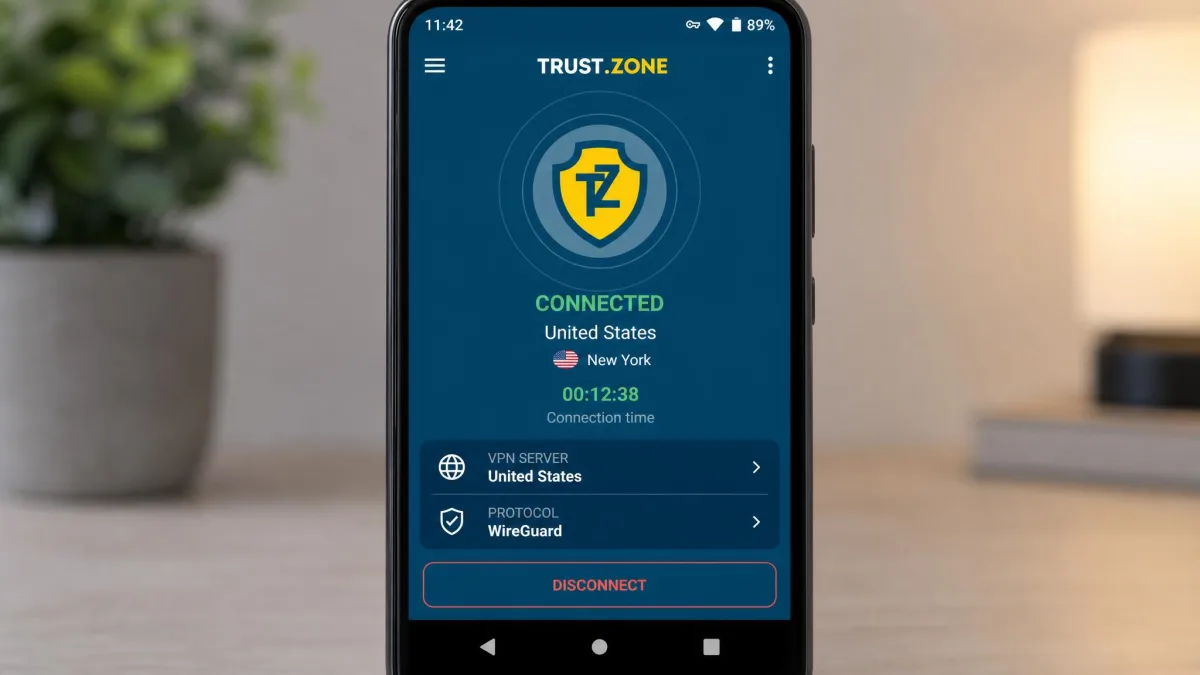
On Windows and Android, setup is simple enough. You download the app. You sign in. You pick a server. Then you connect. The trial makes it easy to get running without card details first. On those two platforms, a non-technical user will manage fine. We were online within a couple of minutes of installing the Windows client.
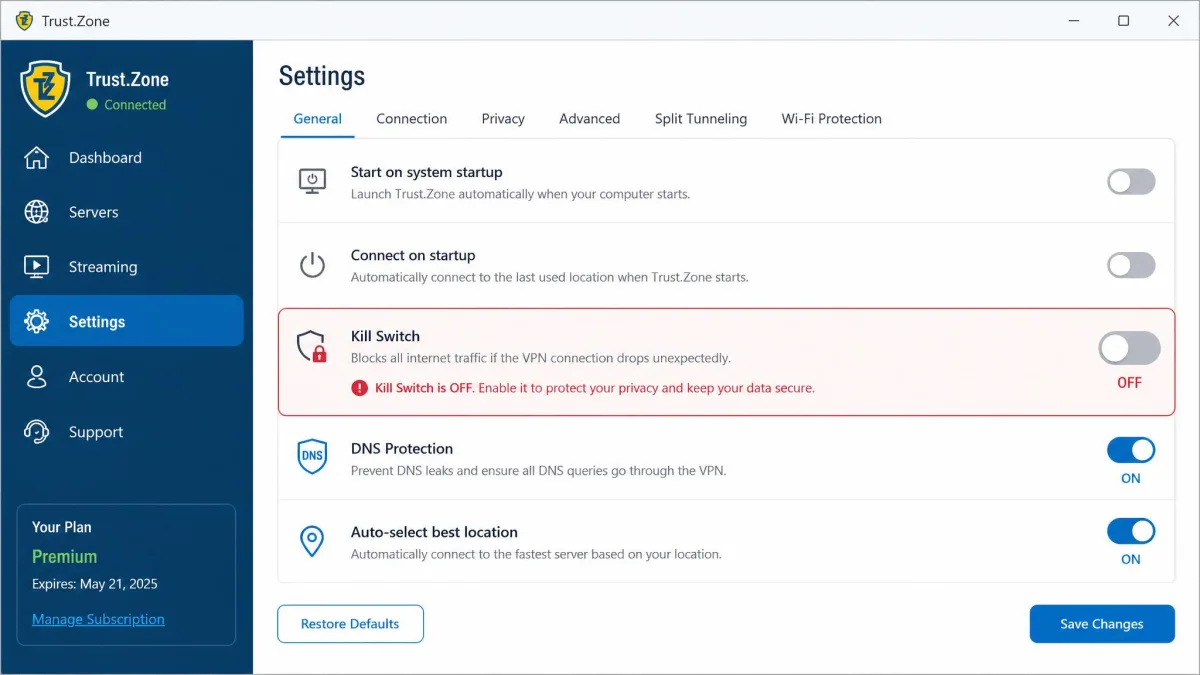
Everywhere else, the friction climbs. WireGuard is supported but needs manual configuration in some clients. The kill switch also has to be turned on manually. It is not active by default, which is easy to overlook. That default matters. A security feature you have to remember to enable is one that many people never turn on. None of this is beyond a confident user. But it is more fiddly than the plug-and-play experience most modern VPNs offer.
The help documentation does not smooth this over. The FAQ and support docs read as cluttered and poorly written. So when you hit a snag, solving it yourself is harder than it should be. We found ourselves guessing at settings more than once. Clear answers in the docs were hard to find. Pair that with weekday-only support. Less technical buyers are the ones most likely to feel stranded.
Security and Privacy
This is where Trust.Zone holds up better than its dated apps suggest. The core protections are all present. Our leak testing came back clean. For a budget VPN, the security fundamentals are the strongest part of the package. They are the main reason the service earns a passing grade despite its rough edges.
For a budget service, Trust.Zone gets the fundamentals right where it counts. AES-256 encryption and a no-logs Seychelles base make it safe enough for everyday privacy.
— From our hands-on testing
Encryption and VPN Protocols (OpenVPN, WireGuard)
Trust.Zone uses AES-256 encryption. That is the same standard the big providers rely on. It pairs the cipher with SHA256 authentication and an RSA-2048 handshake. That is a reassuring baseline. It leaves nothing to complain about on the encryption front. AES-256 is the accepted gold standard. A budget price does not mean a weaker cipher here. The AES-256-CBC cipher and RSA-2048 key exchange are exactly the combination we look for. The underlying tunnel is no weaker than what pricier services offer.
On protocols, the service is generous on paper. It supports OpenVPN, WireGuard, IKEv2, L2TP, PPTP, SSTP, and more. It also offers SOCKS5, ShadowSocks, and HTTPS proxy options. OpenVPN is the default and works out of the box. It is the protocol we would leave most users on. It balances speed and security well. WireGuard is the faster modern protocol. It is supported but can require manual setup depending on your client. That undercuts the convenience a little. It is the sort of hurdle a less technical buyer will skip. So many users never get the speed benefit WireGuard is meant to deliver. The older protocols like PPTP are best left alone for anything sensitive. They are dated and cryptographically weak by modern standards. Rather than trust the marketing sheet, test the protocols that matter to you during the trial.
Kill Switch and DNS/IP Leak Tests
A kill switch is included. It does its job of cutting your traffic if the VPN drops. The important caveat is scope. The kill switch is present on the desktop client but has to be enabled manually. The kill switch is missing from the mobile apps. Is a kill switch on your phone non-negotiable for you? For many people it should be. In that case, Trust.Zone may not fit. A phone that keeps sending data over the open network the instant the VPN drops defeats much of the point.
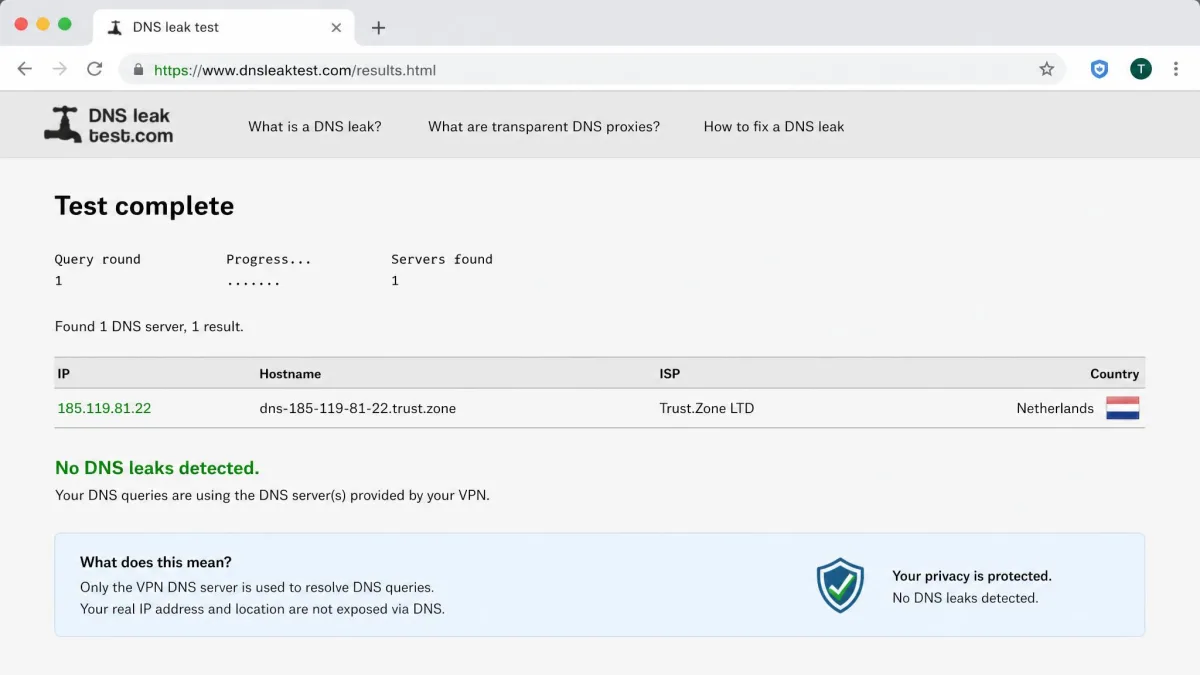
The leak testing is better news. We ran both IP and DNS leak checks across several sessions. We tested on nearby and distant servers. We also forced the connection to reconnect on purpose. We found no leaks at all. Your real IP address and DNS requests stayed hidden behind the VPN in every case. That is exactly what you want. It is the single most important safety test a VPN has to pass. A clean leak result means the encryption is doing its job in practice, not just on the spec sheet. This is the result that reassured us most. A VPN that leaks is worse than no VPN at all. It gives false confidence while exposing you. Leaks most often show up on IPv6 and during reconnects. Trust.Zone held tight in both scenarios during our checks.
No-Logs Policy and Seychelles Jurisdiction
Trust.Zone runs a no-logs policy. It stores only the account email tied to your subscription. It also publishes a warrant canary. That is a public notice that would quietly disappear if the company were served a secret government request. You can read the current no-logs and warrant-canary policy on Trust.Zone directly. The honest limitation is that this no-logs policy has not been independently audited. So you are trusting the provider's word rather than a third party's verification. Several premium rivals now pay for public audits. Trust.Zone has not. That is a meaningful gap for anyone who wants proof rather than a promise.
Jurisdiction is a genuine strength. The company is registered in Seychelles. Seychelles sits outside the 5, 9, and 14 Eyes intelligence-sharing alliances. There is no mandatory data-retention law there. Nothing forces the company to log and hand over your activity. Combined with the no-logs policy, the Seychelles base is a real privacy plus. It stands even without an audit to back it. There is no legal machinery compelling the provider to build the very logs it says it does not keep. For a privacy-first buyer, that framing matters as much as the software itself.
For a stronger privacy trail, pay with crypto and stick to the OpenVPN or WireGuard protocols. It keeps your payment off your card statement and uses the most trusted, modern encryption on offer.
Speed and Performance
Speed is where Trust.Zone gets genuinely inconsistent. It is the area where we would push you hardest to test it yourself. Our results were a real split. The gap depended on distance to the server. No single number tells the whole story.
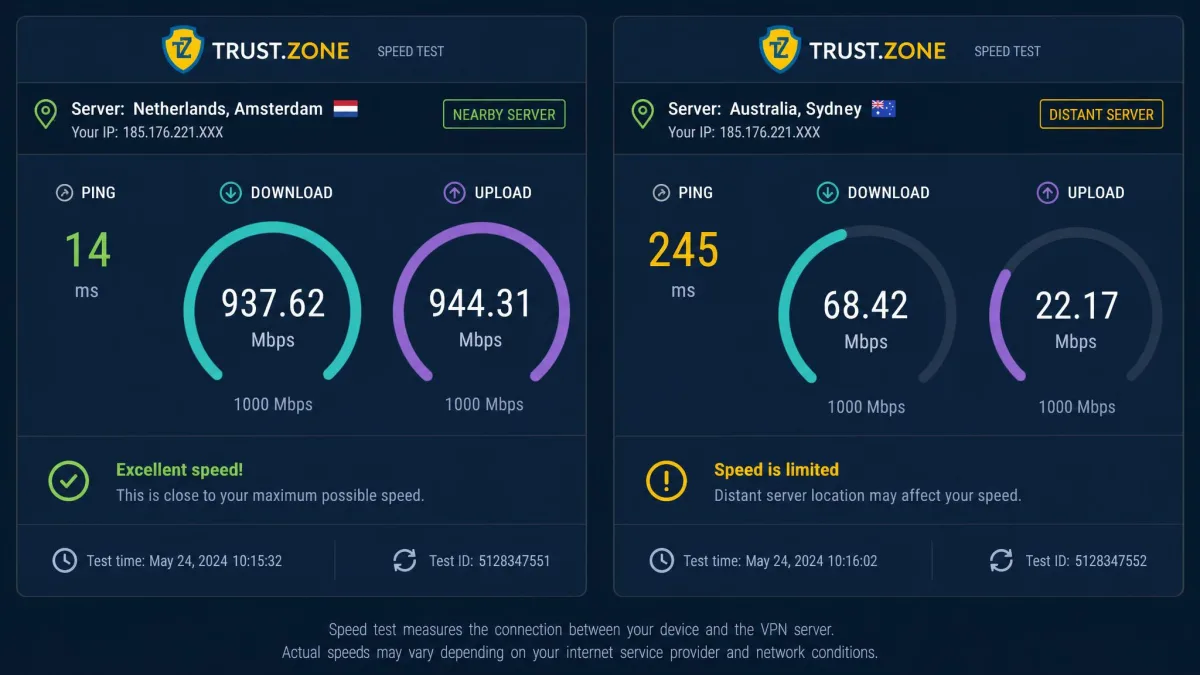
On nearby servers, performance is solid. On nearby European servers, we recorded roughly 145 to 155 Mbps. On US servers, the figures ran from about 112 to 152 Mbps. That is close to full line speed. It is more than enough for HD streaming, calls, and general browsing. You would not notice the VPN is on. Sit close to a server and you would struggle to tell it was running at all. That is exactly the result you want. The retained speed on those nearby European hops is genuinely competitive. For local use, it puts Trust.Zone in the same bracket as far pricier services.
Distant servers are a different story. In another round of testing, speeds dropped heavily. We saw around 80% loss on a local server and about 87% on a far one. Ping climbed many times higher on the distant connections. Those are steep losses. They make far-flung servers frustrating for anything time-sensitive, from video calls to gaming. The higher ping is the part you feel most. A video call becomes laggy. A game becomes unplayable long before the raw download figure looks alarming. Connection stability can also wobble. We hit occasional dropouts, and the apps crashed on us more than once after an update. That is not what you want from a tool whose whole job is a steady, protected connection.
The takeaway is that your experience hinges on which servers you use. Stay close to home and Trust.Zone feels fast. Reach across the world and the drops are severe. This kind of variance is common among budget providers that run smaller networks. But the size of the drop here is at the harsher end. Does speed on distant servers matter to you? Then test those specific locations during the trial before you commit. Averages will not warn you about the location you actually need.
Servers and Server Locations
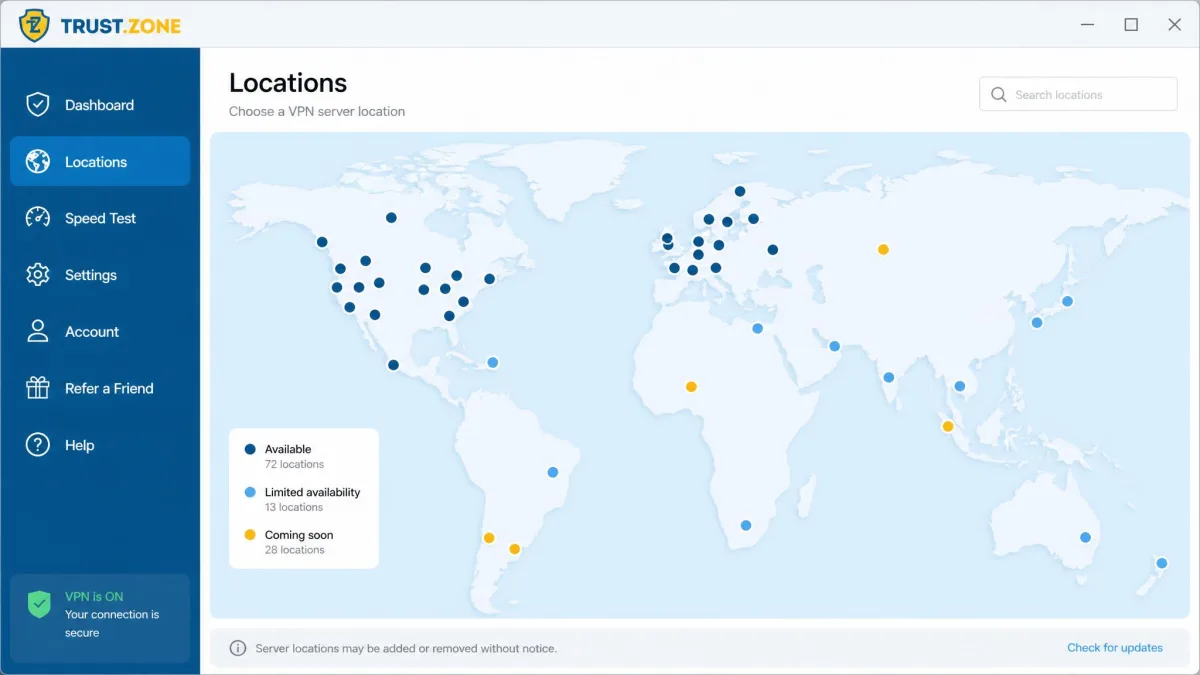
Trust.Zone runs a modest network of around 180 servers. It is not a huge fleet. It will not compete with providers that advertise thousands of servers. But for a budget service, it is workable. A smaller network can mean more congestion at peak times on popular locations. We did not find it unusable on the servers we tested.
Country coverage is harder to pin down. Sources disagree sharply. Figures range from the mid-30s to well over 90 countries. So we will not quote a hard number. What is fair to say is this. The coverage is modest rather than expansive. You will find the popular regions covered. But the long tail of smaller countries is thinner than the marketing might imply. Do you need a server in a specific, less common country? Check the live list before buying rather than assuming it is there.
Server spread matters for two reasons. It decides which streaming libraries and regional sites you can reach. It also affects how close you can stay for speed. With a network this size, most people will find a nearby option. But travelers and anyone chasing a niche location should confirm coverage first.
Streaming: Does Trust.Zone Work With Netflix?
Streaming is a mixed result. Trust.Zone does unblock Netflix in several regions. That includes the US, UK, Canada, and Australia. So for the biggest library, it works. The catch is quality. We ran into excessive buffering and long load times while streaming. That takes the shine off. It gets you in. But the experience is not always smooth. A show that stalls to rebuffer every few minutes is a poor way to spend an evening.
Beyond Netflix, the picture gets worse. Hulu, Disney+, Amazon Prime Video, and BBC iPlayer all failed to unblock in our testing. Are those services part of your routine? Then Trust.Zone will disappoint. Streaming platforms invest heavily in detecting and blocking VPN traffic. Smaller providers often cannot keep pace with the constant cat-and-mouse. As a Netflix-first, budget streaming option, it just about earns a pass. But it is not a reliable all-round streaming VPN. We would not buy it primarily for streaming.
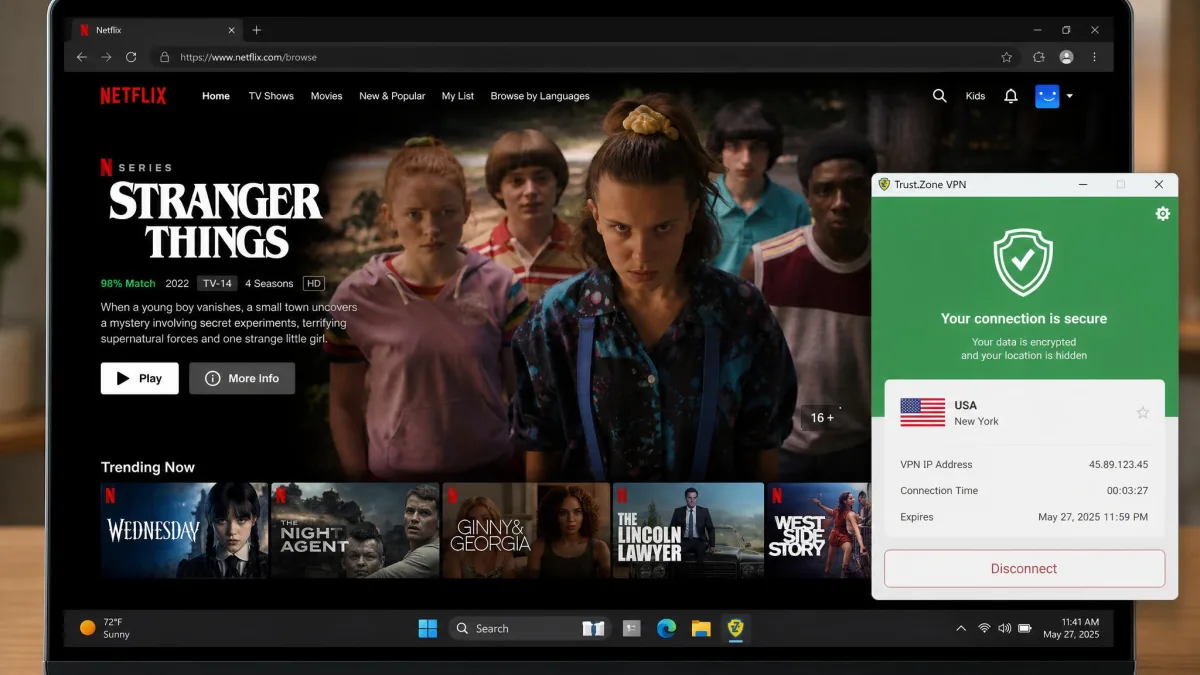
If streaming is your main reason for buying a VPN, use the free trial to confirm the exact services and libraries you care about actually work. Trust.Zone unblocks Netflix in some regions but fails on several other major platforms.
Torrenting and P2P Support
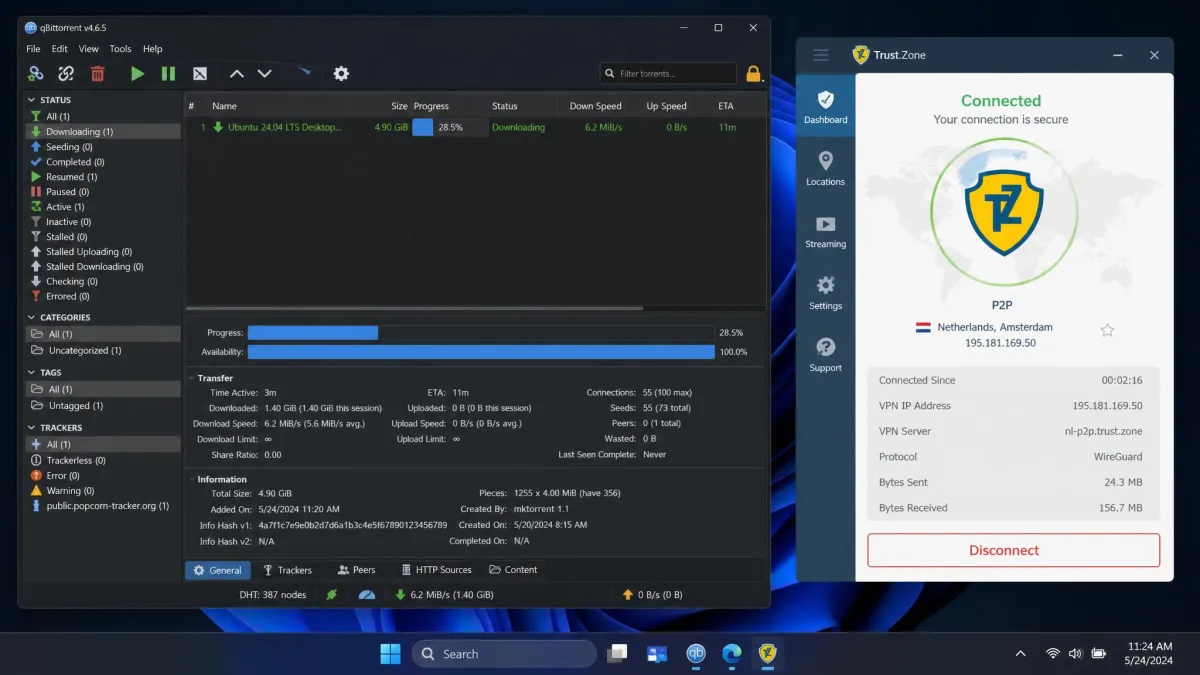
For torrenting, Trust.Zone is friendlier. P2P and torrenting are allowed across the network without restriction. So you are not funneled to a handful of special servers. Combine that with clean leak-test results and the no-logs policy. It makes a reasonable choice for privacy-conscious downloading. The Seychelles jurisdiction adds to the appeal here. There is no data-retention law hovering over your activity.
The usual speed caveat still applies. Throughput drops so much on distant servers that we would pick a nearby P2P server. That keeps download speeds usable. On close servers, torrenting performance was fine in our testing. We saw steady transfer rates and no leaks exposing the connection. Just remember to enable the kill switch manually on the desktop client first. That safety net is not on by default. It matters most during long downloads.
Customer Support
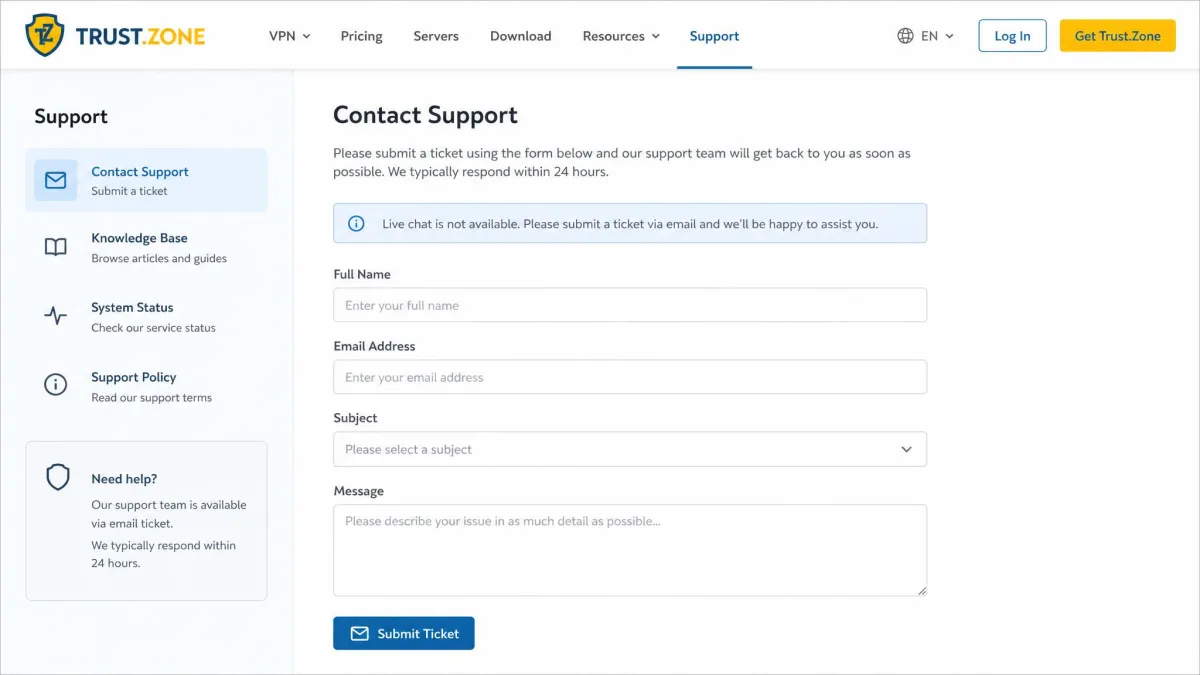
Support is one of the weakest links. Trust.Zone offers email and ticket support only. There is no live chat. Replies are limited to weekdays. Does something break on a Saturday? Then you wait until the working week resumes. This service is aimed partly at less technical buyers. The lack of live chat and weekend cover is a real gap. It can turn a minor setup issue into a lost weekend. Most competitors at this price now offer round-the-clock live chat. So the contrast is stark. It is felt most keenly by exactly the buyers a budget VPN tends to attract.
The self-help route does not fully make up for it. The FAQ and help docs are cluttered and hard to follow. When the documentation is thin and support is slow, you are left to work things out on your own. Not every buyer can do that. This is where the manual kill switch, the WireGuard configuration, and the Tunnelblick workaround all become bigger problems. The one place you would turn for help is the least equipped to give it quickly. On Trustpilot, user experiences are split. Many long-term users praise responsive technical support. A near-equal share report unresolved tickets and refund disputes. That polarization matches the service's overall Trustpilot score of 3.8 out of 5. It sits in balanced but divided territory rather than clearly good or bad.
How Trust.Zone Compares to Top Alternatives
Trust.Zone sits firmly in the budget tier. Against premium services, it trades several things for a lower price. It gives up polish, audited privacy, live support, and consistent global speed. That is a coherent trade. For the right buyer, it is a good one. But it is worth being clear-eyed about what you give up. The table below sums up where it lands on the features that matter most.
| Feature | Trust.Zone VPN |
|---|---|
| Monthly price | $9.99/mo |
| Cheapest plan | ~$2/mo (multi-year) |
| Free trial | 3 days, 1GB, 1 device |
| Money-back guarantee | 10 days, under 1GB used |
| Servers | Around 180 |
| Simultaneous connections | 3 (5 on 2-year plan) |
| Encryption | AES-256 |
| Jurisdiction | Seychelles |
| Netflix | Works in some regions, buffering |
| Torrenting | Allowed network-wide |
| Native Mac app | No, workaround required |
| Support | Email only, weekdays, no live chat |
Is your priority the lowest possible price on a long commitment? And do you mainly connect to nearby servers? Then Trust.Zone is competitive. Do you want a native Mac app, live chat support, audited no-logs, or dependable distant speed? Then a premium provider is the better spend. The gap in daily experience is noticeable. The bigger names cost more each month. But they smooth over almost every rough edge listed above. That runs from the missing Mac app to the weekend support blackout. Where you land depends on whether you value the saving or the polish more.
Trust.Zone at a Glance: Our Verdict
Trust.Zone is a cheap, privacy-focused VPN. It gets the security fundamentals right. It falls short on polish and support. It is safe to use. But it asks for patience in return for the low price. The best way to weigh it up is to look at the strengths and weaknesses side by side.
Pros
- Very low price on long, multi-year plans
- AES-256 encryption and a no-logs policy
- Seychelles jurisdiction outside the 5, 9, and 14 Eyes
- P2P and torrenting allowed network-wide
- 3-day free trial and a 10% crypto discount
Cons
- No native macOS app, only a manual workaround
- Dated, laggy apps and cluttered help docs
- Kill switch is manual and missing on mobile
- Speeds crater on distant servers
- Email-only support with no live chat or weekend cover
- Restrictive refund policy and a tight 3-device limit
Frequently Asked Questions
Is Trust.Zone safe and legit?
Does Trust.Zone keep logs?
Which device gives the best Netflix experience on Trust.Zone?
Does Trust.Zone work in China?
Is there a free trial for Trust.Zone?
What does the Seychelles base mean if someone requests my data?
How many devices can I use with Trust.Zone at once?
Final Verdict: Is Trust.Zone Worth It?
Trust.Zone is worth it for one specific buyer. That is someone who wants strong privacy fundamentals at the lowest possible price. They are comfortable with a bit of manual setup. And they mostly connect to nearby servers. For that person, the deal adds up. The long-plan price, the clean leak tests, the no-logs Seychelles base, and the crypto discount all count. You accept some rough edges and pocket the savings.
For everyone else, the compromises pile up. Mac users are stuck with a workaround. Mobile users lose the kill switch. Distant-server speeds collapse. Support is slow when you need it. Those are not deal-breakers for a bargain hunter. But they are exactly the things premium providers get right. Our advice is simple. Use the free trial honestly. Test the servers and streaming services you actually care about. Buy the long plan only once you are sure the trade-offs suit you.