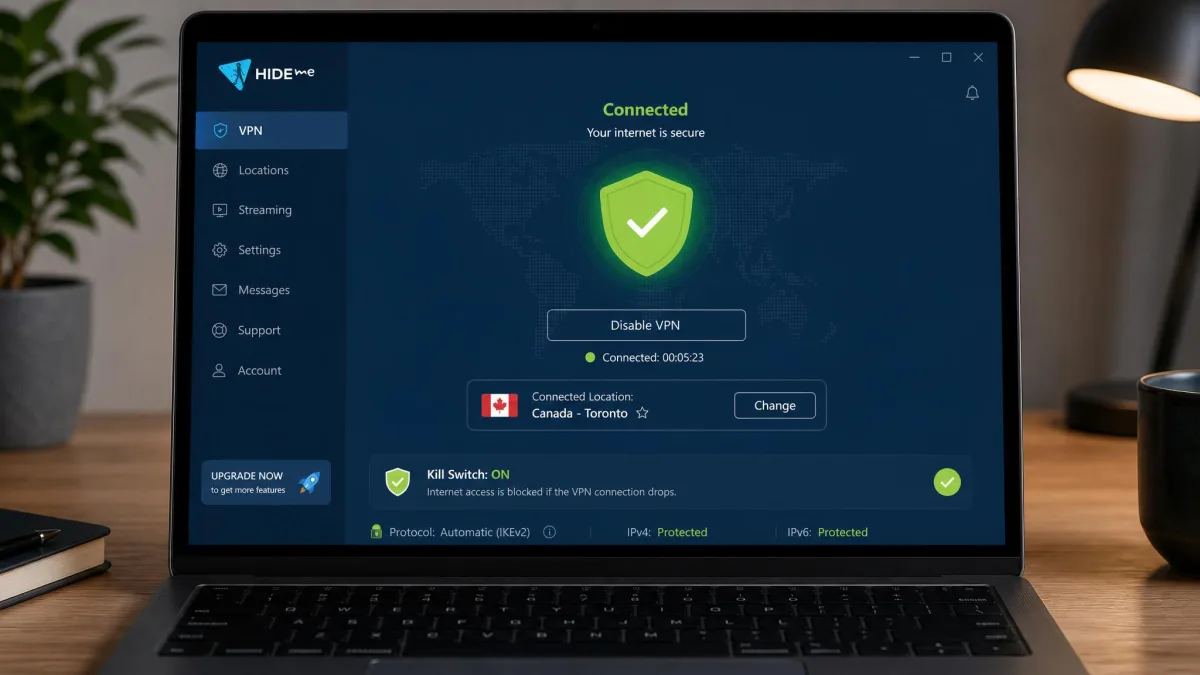
hide.me is a privacy-first VPN run out of Malaysia that pairs a genuinely generous free plan with one of the deepest sets of expert controls we have tested. The standout is that free tier: unlimited data, no credit card, no email, and the same no-logs promise as the paid product. The honest catch is that the free plan is slow, and the paid app throws so many advanced settings at you that beginners can feel lost. That tension runs through this whole review.
We came at hide.me the way we approach every VPN on our bench: we installed it across Windows, macOS, Linux, Android, and iOS, ran leak and speed tests on each, and pushed it against streaming and torrenting workloads over several weeks of daily use. This is a long review because "hide.me" covers a lot of ground, from the free plan to the per-platform apps to the copycat apps that muddy its reputation. We have organized it so you can jump to what you need.
If you only remember one thing, remember this: the official hide.me VPN is a legitimate, independently audited product, and most of the "is it safe?" fear you will find online is aimed at unrelated copycat apps that borrowed the name. We untangle that below.
hide.me VPN at a glance
hide.me has been around since 2012, which makes it one of the older names in the consumer VPN market. It sells itself on privacy first: a no-logs policy backed by an outside audit, a large protocol lineup, and a free plan that does not ask for your payment details. In daily use it feels like a tool built by network people for network people. The basics are one click, but there is a second and third layer of settings underneath that most rivals simply do not offer.
Across our testing the app was stable, leak-free, and quick to connect on WireGuard. The rough edges were the free-tier speed cap and a learning curve on the advanced features. None of that is a dealbreaker, but it shapes who this VPN is for. The company claims somewhere between 20 and 30 million users depending on the source, which puts it firmly in the established tier rather than the fly-by-night one.
Who owns hide.me? eVenture Ltd, Malaysia
hide.me VPN is owned and operated by eVenture Ltd, a company based in Labuan, Malaysia, founded by chief executive Sebastian Schaub. Jurisdiction matters for a privacy tool, and this is one of hide.me's quieter strengths. Malaysia sits outside the 5, 9, and 14 Eyes intelligence-sharing alliances and has no mandatory data-retention law that would force the company to keep records on you.
That legal home is a big part of why hide.me can make a no-logs claim with a straight face. There is no local law compelling it to log, and, as we cover further down, an independent auditor has checked that the promise holds up in practice. You can read the specifics in the company's own privacy policy.
Ratings, verdict box & who it's for
hide.me is best for privacy-minded users who want fine-grained control and are happy to pay for a long plan, and for anyone who needs a no-strings free VPN for light, occasional use. It is a weaker fit for streaming-first households and for total beginners who want a one-button app and nothing more.
Pros and cons
Before we dig into the detail, here is the honest balance sheet from our testing. The cons are real counterweights, not nitpicks, and we come back to each of them below.
Pros
- Genuinely free plan with unlimited data, no credit card, and no email
- Independently audited no-logs policy, backed by a privacy-friendly Malaysian jurisdiction
- Wide protocol lineup including WireGuard, OpenVPN, and IKEv2, with AES-256 encryption
- Deep feature set: kill switch, split tunneling, SmartGuard, StealthGuard, and Multihop
- Cheap on the long plan, from about $2.69/mo, with 10 simultaneous devices
- Works across Windows, Mac, Linux, Android, iOS, Chromebook, and routers
Cons
- Free plan is throttled to roughly 1 Mbps, which rules out streaming and large downloads
- Free plan is limited to one device and a small set of locations
- Server network is small next to NordVPN or Proton VPN
- Inconsistent streaming; fails against Netflix and Disney Plus
- The volume of advanced settings can overwhelm beginners
Plans, pricing, and coupons
hide.me keeps its pricing simple in structure but flexible in practice. There is a perpetual free plan, then paid plans billed monthly, yearly, or on a two-year term. As with every VPN, the per-month price falls sharply the longer you commit. The figures below reflect the pricing at the time of writing, and VPN promos move often, so treat the monthly rate as a moving target.
Premium pricing & the best-value long plan
The two-year plan is the value pick, landing at roughly $2.69/mo, and some regional or 26-month offers dip closer to $2.59/mo. That is competitive with the big names and cheaper than most on a like-for-like commitment. The one-year plan runs around $4.58/mo, or about $54.95 billed for the year. The monthly plan is the expensive way in, drifting between roughly $9.95 and $11.99 depending on the promo and your region.
All paid tiers unlock the same thing: full speeds with no throttle, up to 10 simultaneous connections, every location in the network, and the complete feature set. If you know you want hide.me, the long plan is the obvious move. If you are unsure, start monthly or lean on the free tier first. Because the long-plan discount is so steep, the two-year option often costs less across its full term than a single year billed monthly, which is worth doing the quick math on before you commit.
Discounts, coupons & the money-back guarantee
hide.me runs frequent promotions, and you will find coupon aggregators shouting about discounts anywhere from 30% to 79% off. Treat those numbers as marketing noise and confirm any live deal on the official VPN deals page before you count on it. The advertised long-plan price usually already bakes in the headline discount.
More important than any coupon is the safety net: every paid plan comes with a 30-day money-back guarantee. That is a full month to run your own leak and speed tests, try the servers you care about, and back out for a refund if it does not suit you. We always recommend using that window as your real trial.
Buy the long plan to lock in the low monthly rate, then use the first 30 days as a no-risk trial. If hide.me does not hold up on the servers and services you actually use, request a refund inside the guarantee window.
Plus vs Premium accounts & payment methods
hide.me splits its paid product into a Plus tier and a full Premium tier, alongside the free plan. Premium is the complete package with every location and feature; the Plus option sits between free and full Premium for users who want more than the free tier without the top price. For most buyers the Premium long plan is the one that makes sense, since it is where the per-month cost is lowest.
Payment options are broad, which suits privacy-minded buyers. You can pay with Visa or Mastercard, PayPal, Google Pay, Apple Pay, and bank transfer or SEPA, and hide.me also accepts cryptocurrency including Bitcoin, Ethereum, Dogecoin, and Monero. Billing runs through established processors. The crypto and PayPal routes are a genuine plus if you would rather not hand a card number to a VPN at all.
The free plan: what you actually get
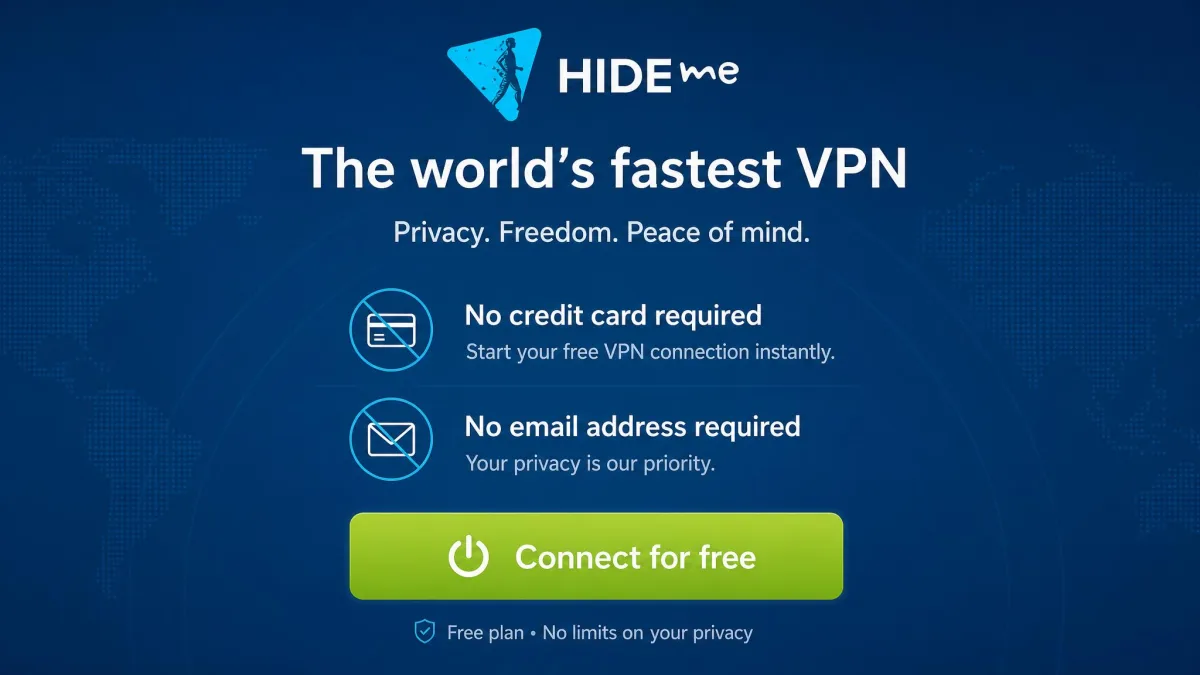
The free plan is the reason many people search for hide.me in the first place, so it deserves a close look. In short: it is real, it is perpetual, and it is more generous than almost any rival on data. The catch is speed and scope.
We ran the free plan as a real daily driver for a week across a laptop and a phone. For basic browsing, email, and reading it was fine. The moment we tried to stream or pull a large download, the roughly 1 Mbps ceiling made itself felt. It is a privacy tool for light use, not a Netflix machine.
Data limit: 2GB to 10GB to now unlimited
Here is where a lot of older reviews will steer you wrong. hide.me's free data cap has changed over the years. It started at 2GB per month, was raised to 10GB in 2020, and has since been removed entirely. The current free plan gives you unlimited data. If you read a 2024 or 2025 review still quoting a 10GB or 2GB monthly limit, it is simply out of date.
Older reviews still cite a 10GB or 2GB monthly cap on hide.me's free plan. That figure is stale. The current free plan has no data cap. If a page quotes a monthly gigabyte limit, check its date before you trust it.
Is the free plan really free forever? (no card, no email)
Yes. The free tier is perpetual, a true lifetime-free plan rather than a time-limited trial that flips to paid. There is no paid lifetime license on the other side of it; the free plan simply stays free. Signing up does not require a credit card, and it does not even require an email address. There are no ads, and hide.me applies the same no-logs promise to free users that it gives paying customers.
That "no card, no email" setup is unusual and worth dwelling on. Many "free" VPNs monetize by harvesting and selling data, which defeats the entire point. hide.me's model, which we unpack in the safety section, does not rely on that.
Free-plan limits: locations, 1 device, speed cap, no streaming
The free plan's limits are where hide.me draws the line between free and paid. You get roughly seven to eight server locations to choose from, and the exact set shifts over time, so treat the count as approximate rather than fixed. In practice the reliable free locations sit across Europe and the US, covering the likes of Finland, France, Germany, the Netherlands, Switzerland, the UK, and the US, with a spot such as Singapore flipping in and out of the free tier. Worth flagging is the coverage gap: the free locations are Europe and US only, so if you need an Asian, South American, or African exit you will have to pay. You can connect one device at a time. Speed is throttled to roughly 1 Mbps, which is the single biggest limit in practice. And the advanced features, along with reliable streaming, are reserved for paid plans.
At about 1 Mbps, the free plan handles web browsing, email, and light app use without much fuss. It is not built for streaming video, video calls, or large downloads, and hide.me does not pretend otherwise. Think of the free tier as a privacy shield for everyday browsing on public Wi-Fi, not a full-throughput connection.
Is hide.me VPN safe, legit, and trustworthy?
This is the question that brings most people here, so let us answer it plainly. The official hide.me VPN is a legitimate, established product with strong security engineering and an independently audited no-logs policy. Much of the "is it safe?" anxiety online is misdirected, and we explain why at the end of this section.
Jurisdiction & the independently audited no-logs policy
Two things make a no-logs claim credible: a jurisdiction that does not force logging, and an outside party checking that the company keeps its word. hide.me has both. Its Malaysian base carries no mandatory data-retention requirement, and its no-logs policy has been independently audited. The most recent no-logs assessment was confirmed in 2024, when an independent auditor reconfirmed that the company does not keep logs that could identify user activity.
This is not hide.me's first outside review, either. An earlier security audit by Defense Code Ltd., led by researcher Leon Juranic, assessed the service years ago and rated it highly on privacy. The company also publishes the specifics of what it does and does not collect in its no-logs policy.
A no-logs policy is only as good as the audit behind it, and hide.me is one of the minority of providers that has paid an outside firm to check its work.
— From our hands-on review
Encryption, protocols & security features (kill switch, SmartGuard, StealthGuard, Multihop)
On the crypto and protocol side, hide.me is genuinely strong. Connections use AES-256 encryption, and the app supports an unusually wide protocol lineup: WireGuard, OpenVPN, IKEv2, SoftEther, and SSTP. That is more protocol choice than most competitors give you. In our testing WireGuard was the fast, reliable default, and we would leave it there for most connections. The older SoftEther and SSTP options occasionally failed to establish a connection at all, so we would only reach for them if a specific network was blocking everything else.
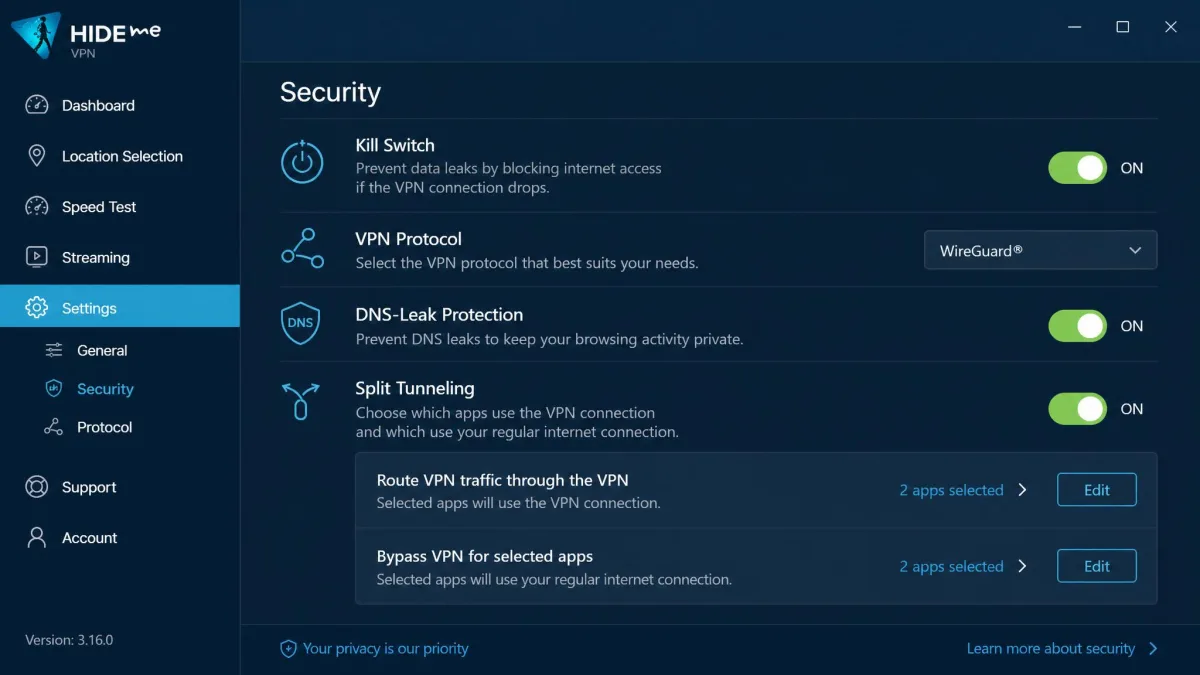
The feature list runs deep. There is a kill switch that cuts your internet if the VPN drops, DNS-leak protection, and split tunneling so you can route only some apps through the VPN. Beyond the basics, SmartGuard can auto-connect and block ad-trackers, StealthGuard lets you set per-app rules so certain apps only run when the VPN is active, and Multihop routes your traffic through two servers for an extra layer. There is also port forwarding and a Bolt speed feature. Most of these advanced tools are paid-plan features and are absent from the free tier.
On the free plan, connect on WireGuard for the most reliable session. In our testing the older SoftEther and SSTP protocols sometimes failed to establish a connection, and the advanced tools like StealthGuard, Bolt, and port forwarding are locked to paid plans.
How does hide.me make money if it's free?
A fair question, and the right one to ask of any free VPN. If a product is free and you are not paying with data, you should understand the business model. hide.me runs a freemium model: the free plan is a funnel, deliberately limited on speed, device count, and locations, that nudges heavy users toward a paid subscription. The paid plans, not your data, are what fund the service.
That is the crucial difference between hide.me and the shady free VPNs that harvest and sell browsing data to advertisers. hide.me's free tier carries no ads and is covered by the same no-logs policy as the paid product. The limits are the price you pay, and that is a far healthier trade than a "free" app quietly monetizing your traffic.
A note on copycat "HideMe" apps and APKs
Here is the single most important clarification in this review. If you have seen scary "hide.me is not trustworthy" posts or data-leak claims, there is a strong chance they are aimed at a different app entirely. The name "HideMe" has been used by several unrelated products, and that brand confusion is a likely source of the fear.
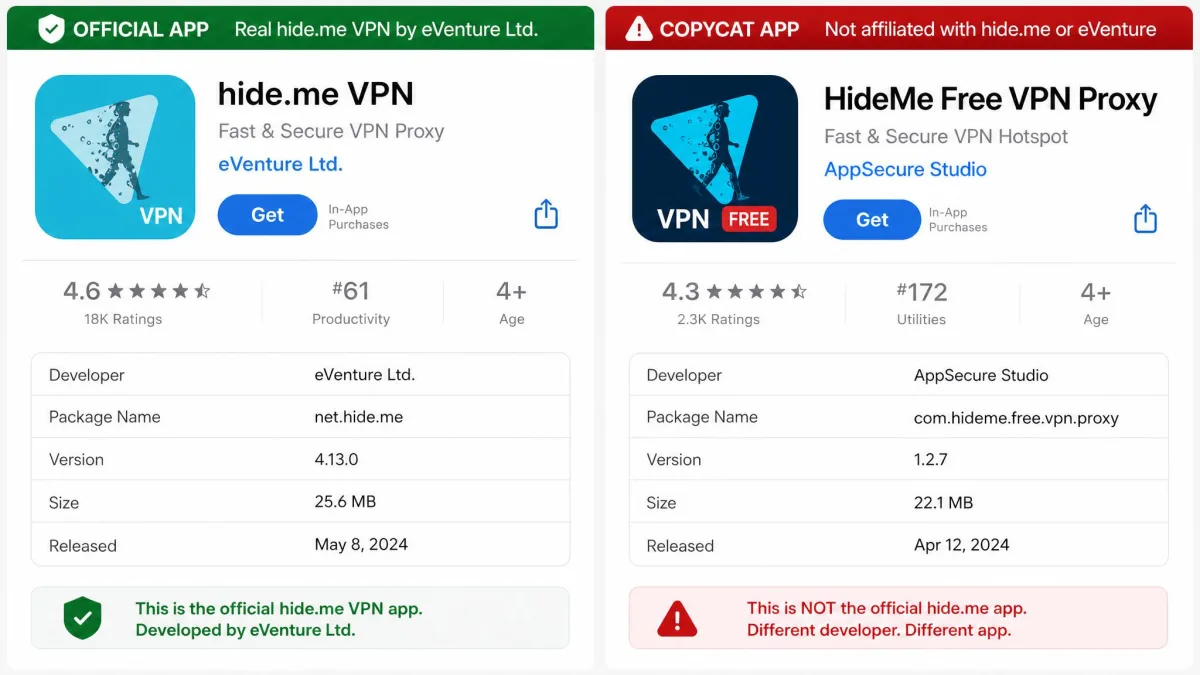
The official app is hide.me VPN by eVenture Ltd. On Android its package name is hideme.android.vpn, and on iOS its App Store ID is id953040671. A different app, "HideMe Free VPN Proxy" (package io.hideme.android by Tigervpns Ltd), was pulled from Google Play back in 2019 and now survives only on APK-mirror sites. Other unrelated apps such as "HideMe VPN" (com.open.vpn.app) also share the name. Only download hide.me from hide.me or the official Apple and Google app stores, never from an APK mirror.
Some of the negative reputation you will find online appears to conflate the official eVenture app with these copycats distributed outside the official stores. We could not reproduce the trust problems people describe with the genuine app. Install the right one from the right place, and the "is it safe?" worry largely evaporates.
Speed & performance
Speed is where the free and paid experiences split hardest, so we tested them separately. As a former network administrator's rule of thumb: judge a VPN by how much of your baseline connection it keeps, not by any single number. Our method is consistent across every VPN on the bench. We record a baseline speed with the VPN off, then connect on WireGuard and re-run the same test three times on a nearby server, a mid-distance server, and a far one, taking the average of each so a single unlucky run does not skew the picture.
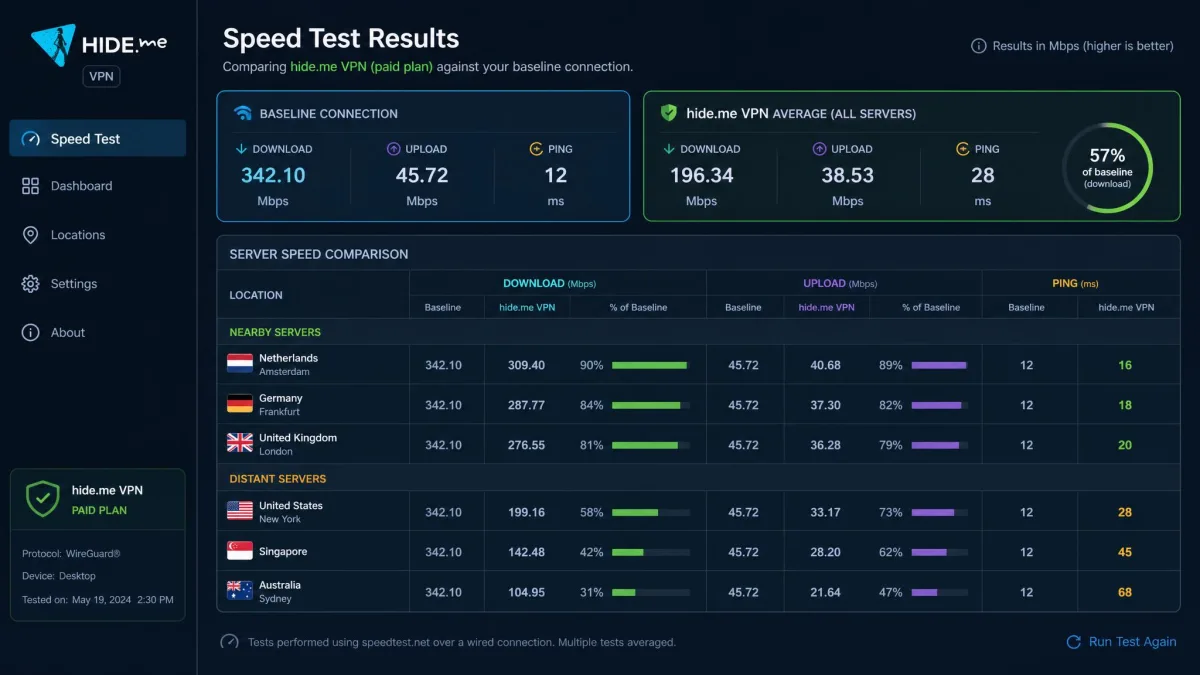
On the paid tier, performance held up well. Nearby servers were the standout: connecting to a location a country or two away, the paid plan retained most of our baseline download speed, with only a modest drop that we never felt during browsing, HD streaming, or calls. On distant, far-flung servers the download average settled around 9 Mbps in our runs, which is slower but still workable for everyday use. WireGuard was the reason for that consistency. It is fast to connect and steady once established, and across the paid connection we rarely saw the sudden stalls that plague weaker VPNs. Upload speeds and latency followed the same pattern: near-baseline close to home, a gentle decline the farther out we reached.
The free tier is a different story. It is throttled to roughly 1 Mbps, which is plenty for browsing and email but useless for streaming or large downloads. Free speeds were also inconsistent for us. Sometimes we saw the hard 1 Mbps cap, other times we reached 2 to 10 Mbps, and free servers slowed badly during busy evening hours when everyone else was on them too. If speed matters to you at all, the free plan is a trial, not a destination.
Servers & network
hide.me's network is solid but not enormous. Reported totals vary by source, landing somewhere around 2,000 to 2,600 servers spread across roughly 82 to 91 locations in about 48 to 57 countries. We would not stake a claim on any single figure given how much the counts drift, but the range tells the real story: a mid-sized network that covers the major regions without matching the giants on raw scale. You can see the current spread on the company's own network page.
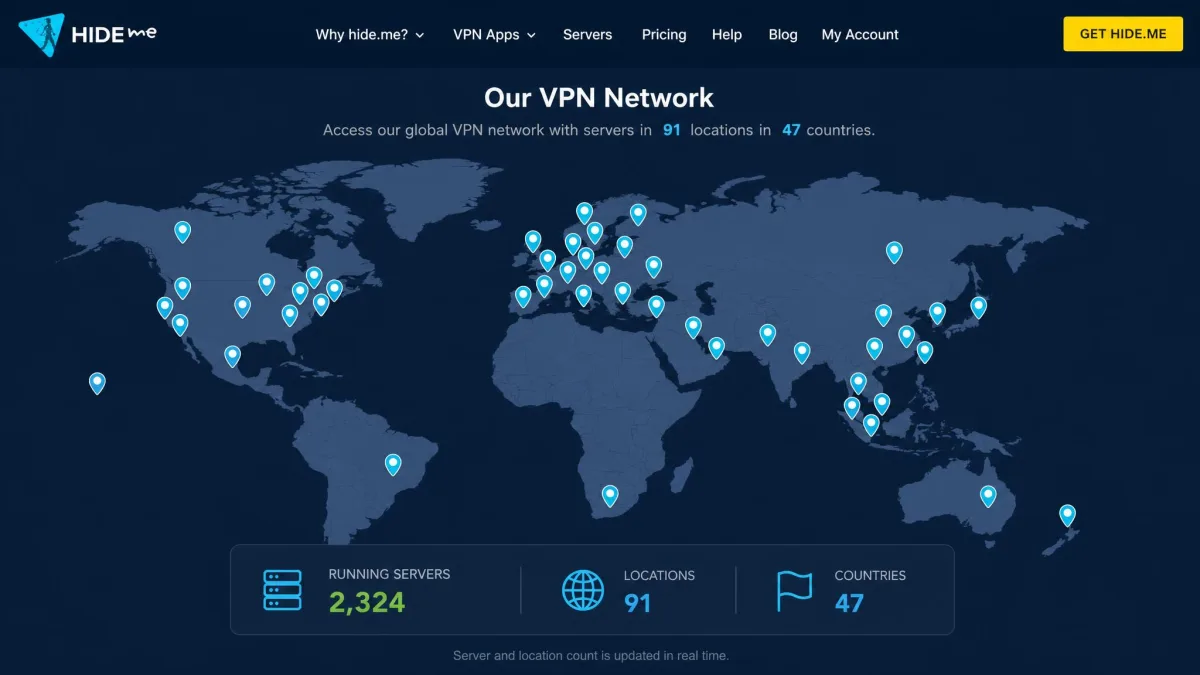
One quiet strength is that hide.me's servers are physically located, with no virtual server locations. A virtual location advertises one country while the hardware actually sits somewhere else, which can matter for latency and for trust. When you connect to hide.me's German server, the box really is in Germany, so the latency you measure is honest and the country you appear to browse from is the country the hardware lives in. Providers that lean on virtual locations can pad their country count without ever placing real hardware there, and that padding is exactly what hide.me avoids. Coverage is strongest where most people need it, across North America and Europe, with a decent Asian and Oceanian presence on the paid plan, though the map thins out across Africa and parts of South America. Next to NordVPN's 8,000-plus servers or Proton VPN's 145-country spread, the network is comparatively small, and that is a fair thing to weigh if you need a specific, obscure country.
Streaming, torrenting & Kodi
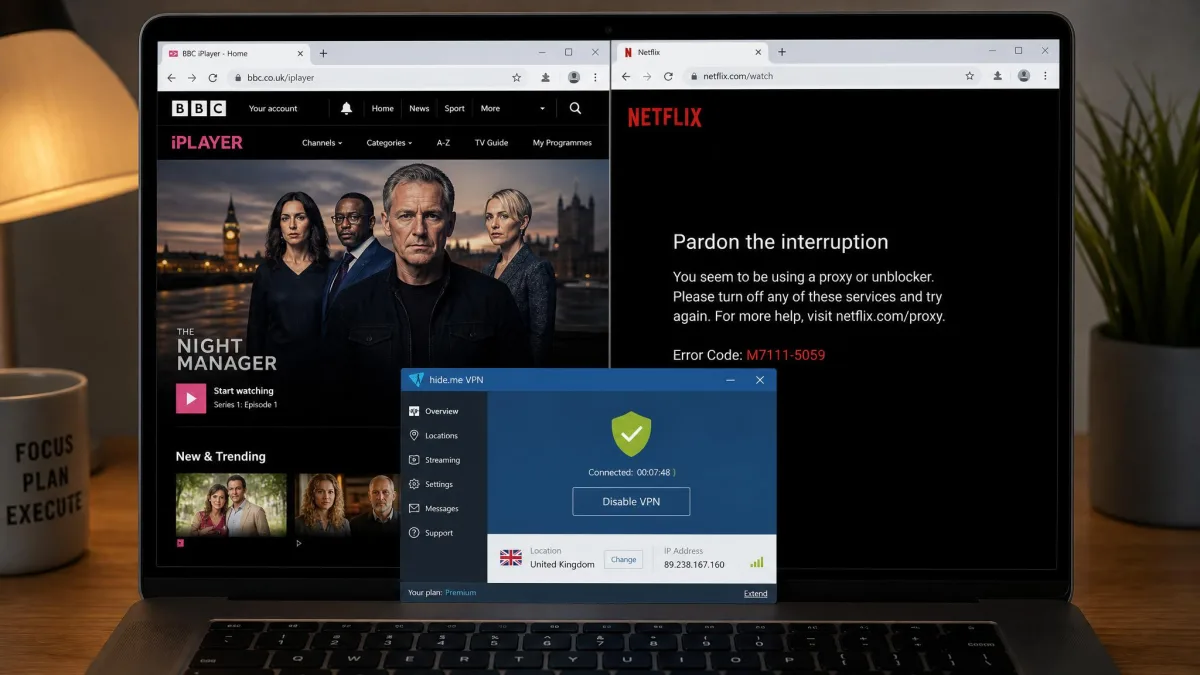
Streaming is hide.me's least consistent area, and we want to be straight about it. The app unblocked Amazon Prime Video, Max, Hulu, and BBC iPlayer for us without much trouble. It failed, repeatedly, against Netflix and Disney Plus geoblocks. If your main reason for buying a VPN is reliable access to Netflix libraries, hide.me is not the tool we would point you to, and that applies on the paid tier as well as the free one. The free tier is not built for streaming at all thanks to the speed cap.
Torrenting is a better fit. P2P is permitted across all servers, so you do not have to hunt for a special server list. We would strongly recommend turning on the kill switch before you start, so that a dropped connection does not expose your real IP mid-transfer. On the free tier, torrenting technically works but broke intermittently for us, dropping the connection partway through a transfer, which is another reason heavy users will want the paid plan.
Kodi users are covered too. hide.me works with Kodi through a router-level connection, a LibreELEC setup, or the Zomboided VPN Manager add-on, which routes your box's traffic through the VPN.
Turn on the kill switch before torrenting. If the VPN connection drops, the kill switch cuts your internet so your real IP address is never exposed mid-download. On the free plan, expect the occasional dropped transfer.
Apps & platform support
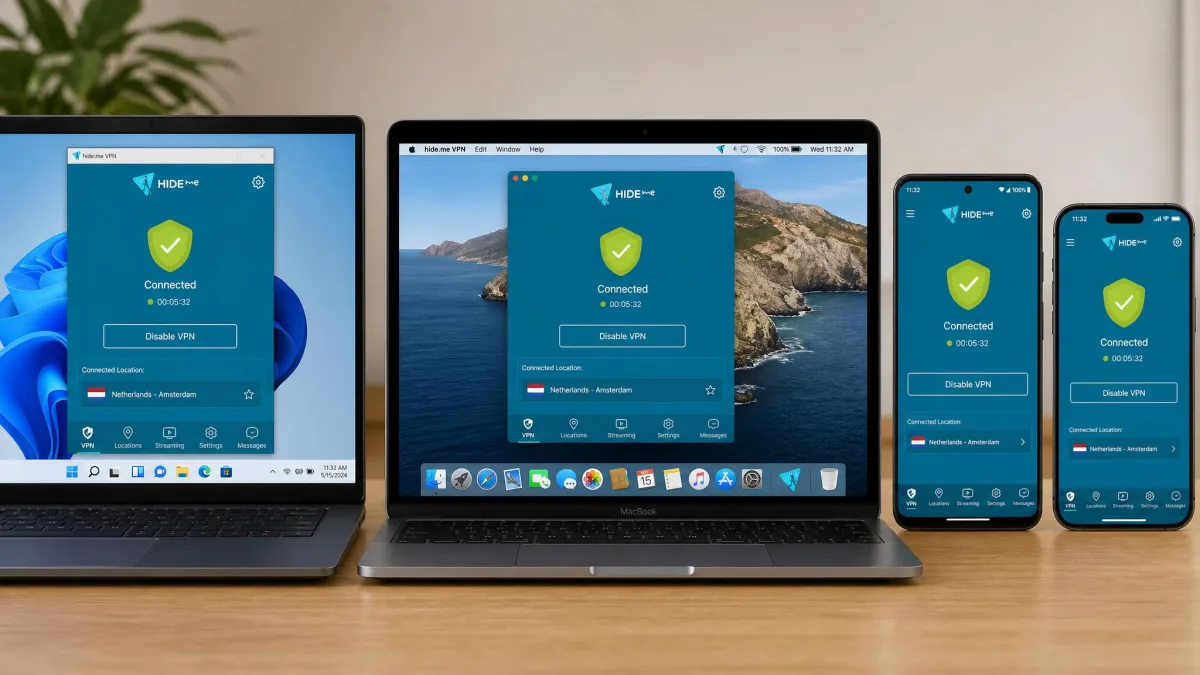
hide.me's platform coverage is one of its strongest cards. There are native apps for every major system plus routers and streaming devices, and the Linux support in particular goes further than most rivals bother to. We installed and tested across the main platforms, and the experience was consistent: a straightforward one-click core with the same deep settings underneath on each.
Windows & PC
The Windows app is the full-featured flagship. Every protocol, the kill switch, split tunneling, SmartGuard, StealthGuard, and Multihop are all here. Setup was quick and connecting on WireGuard was instant. This is the platform where hide.me's depth shows best, and also where beginners will feel the settings sprawl most. You can ignore the advanced panels and just hit connect, but they are there when you want them.
Mac
The macOS app runs natively on both Apple Silicon and Intel Macs, so it is quick and light on modern hardware. It mirrors the Windows feature set closely, and in our testing it connected cleanly and passed our leak checks. If you live in the Apple ecosystem, this is a first-class client rather than an afterthought port.
Linux (app + WireGuard CLI)
Linux is where hide.me pulls ahead of most competitors. There is a proper graphical app, and there is also an official open-source WireGuard command-line client published on GitHub. For anyone who runs a headless box or a home server, a scriptable, open-source CLI is exactly what you want, and hide.me even offers an OpenWRT router client on top. This is a genuine highlight for technical users.
Android & iOS (and a warning on unofficial APKs)
The mobile apps are clean and cover the essentials well. On Android the official package is hideme.android.vpn, listed as "hide.me VPN: The Privacy Guard" on Google Play. On iOS the official App Store ID is id953040671. Both connect quickly and support the core protocols and kill switch.
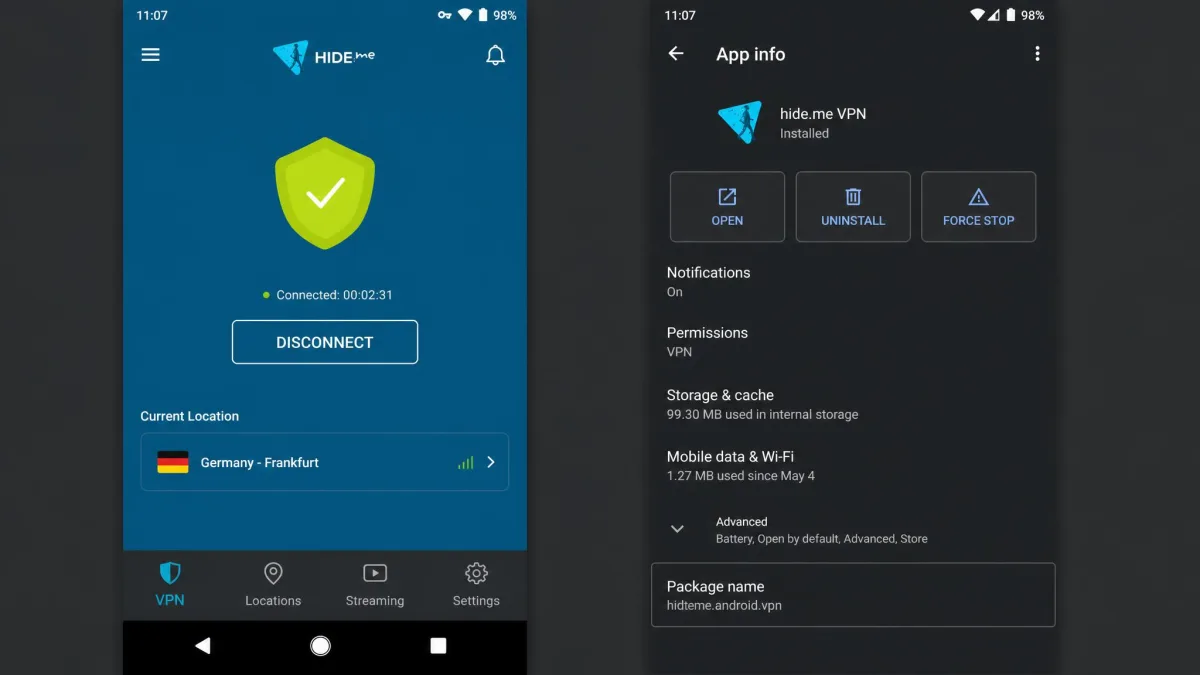
We will repeat the warning here because mobile is where it bites: do not install hide.me from an APK-mirror site. The copycat "HideMe Free VPN Proxy" (io.hideme.android) and other name-alikes live on those mirrors and are not the app you are looking for. Get the real one from Google Play or the App Store.
Chromebook
hide.me runs on Chromebook through its Android app, which most modern Chromebooks support directly. Installation is the same as any Android app from the Play Store, and once connected it protects your Chrome OS traffic the same way it does on a phone. Just make sure you are installing the official hideme.android.vpn package.
Chrome/Edge/Firefox extension & free web proxy (proxy-only caveat)
hide.me also offers browser extensions for Chrome, Edge, and Firefox, plus a free web proxy. These are handy, but there is an important caveat that trips people up.
The hide.me browser extension is proxy-only, not a full-device VPN. It protects traffic inside that one browser and offers around three proxy locations with WebRTC-leak protection, but it does not encrypt traffic from other apps on your device. The store listing itself says to upgrade to the full hide.me VPN for whole-device protection. Use the extension for quick browser-only tasks, and the app when you need real coverage.
Getting started: sign-up, setup & daily use
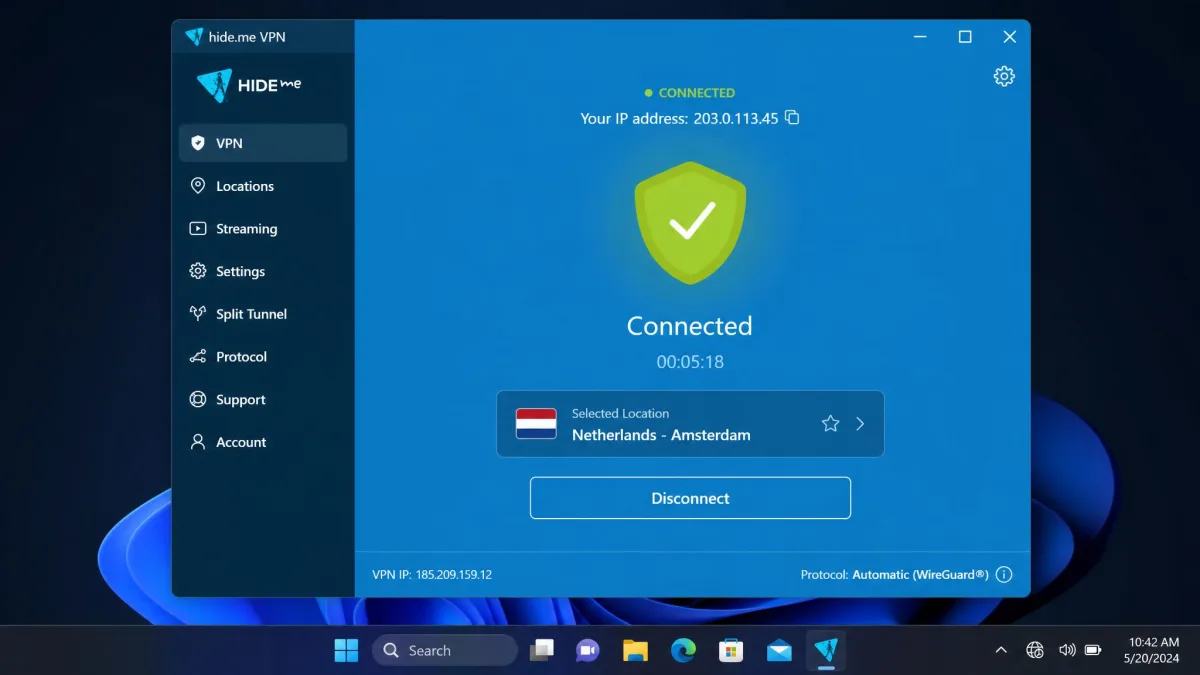
Getting started is refreshingly painless. For the free plan there is nothing to fill in: download the app, and you are connected without a card or even an email. For a paid plan you create an account, pick a plan, pay, and sign in. The app then walks you to a single large connect button, and on WireGuard it links up in a second or two.
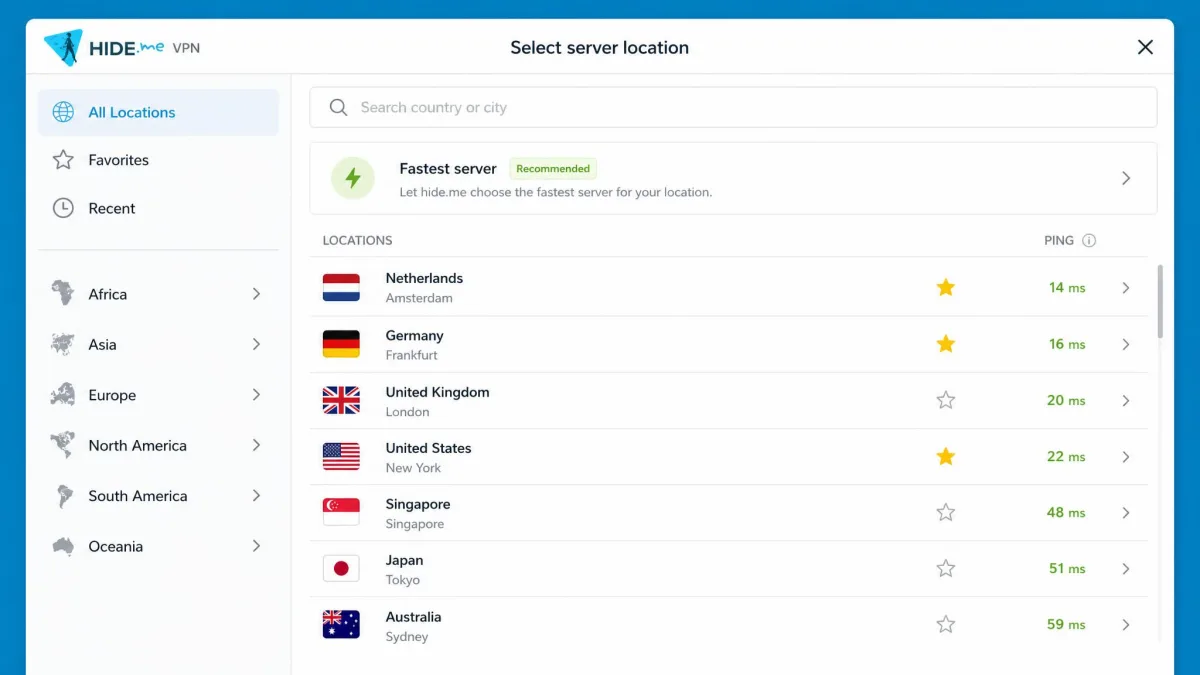
For anyone who wants the concrete sequence, this is the path we followed on a fresh Windows machine. First, download the installer from hide.me and run it, accepting the default install location. Second, launch the app and either sign in with your paid credentials or tap the free connect option to start without an account. Third, leave the protocol on Automatic, which selects WireGuard for you, and press the large connect button to link to the fastest nearby server. Fourth, open the location list only if you want a specific country, then star your favorites so they sit at the top next time. Fifth, if you plan to torrent or use public Wi-Fi, dip into settings once to switch the kill switch on. That is the whole setup, and every step after the first launch takes seconds.
Daily use is a study in two speeds. The core is genuinely simple, one tap to connect to the fastest server. Underneath, the depth of expert-level settings can overwhelm a newcomer, and that is the main friction point we would flag. Our advice: leave the defaults alone at first, connect, and only open the advanced panels once you have a specific reason to.
When to turn the VPN on and off
For the strongest privacy, leave the VPN on whenever you are browsing, especially on public or untrusted Wi-Fi where it matters most. SmartGuard's auto-connect feature can handle that for you on paid plans, connecting the moment you join an unknown network. There are moments you may want it off: some banking sites and local streaming services behave oddly behind a VPN, and a local network device such as a printer may need the VPN paused. Split tunneling is the cleaner fix, letting you exclude just those apps or sites rather than dropping protection entirely.
How to uninstall or cancel
Cancelling and uninstalling are two separate steps, and it is worth knowing both. To cancel a subscription, sign in to your hide.me account and turn off auto-renewal in the billing settings, or request a refund inside the 30-day window if you are still in it. To uninstall the app, remove it like any other program: through Add or Remove Programs on Windows, by dragging it to the Trash on macOS, or through your app manager on mobile. Uninstalling the app does not cancel your billing, so do the account step too if you are leaving.
Troubleshooting: fixing "an unexpected error occurred" & connection failures
Connection errors are the most common hide.me complaint, and the good news is that they are almost always fixable in a couple of minutes. Messages like "the app was unable to establish a secured connection" or "an unexpected error occurred" usually point to a blocked protocol or a local network conflict rather than a broken account.
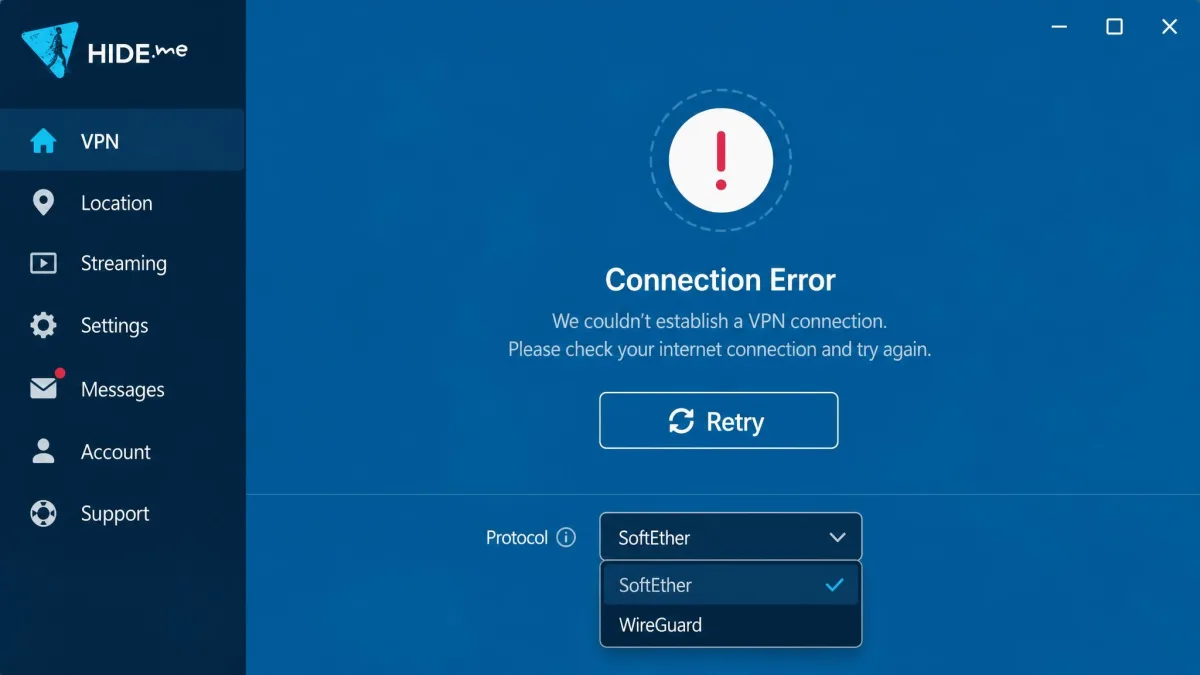
Here is the sequence we work through, roughly in order:
- Switch servers. The location you picked may be down or congested, so try a nearby alternative first.
- Change protocol. If you are on SoftEther or SSTP, switch to WireGuard, which was the most reliable protocol in our testing. This alone resolves most failures.
- Disable a local firewall or antivirus temporarily. Security software sometimes blocks the VPN tunnel.
- Flush your DNS. A stale DNS cache can stop connections from resolving.
- Reinstall the app as a last resort. There is no dedicated reset button, so a clean reinstall is how you return to default settings.
The one wrinkle worth knowing is that hide.me has no single "reset to defaults" control, so if you have changed a lot of advanced settings, you may need to revert them manually or reinstall. hide.me's own troubleshooting guide covers the same ground with platform-specific steps.
How hide.me compares to alternatives (NordVPN, ExpressVPN, Proton VPN)
To place hide.me properly, it helps to line it up against three of the biggest names. The short version: hide.me and Proton VPN are the two here with a genuinely free plan, hide.me is the cheapest on a long commitment, and the paid giants pull ahead on server scale and reliable streaming.
| Product | Cheapest long plan | Free plan | Servers / countries | Devices | Streaming (Netflix) | Audited no-logs |
|---|---|---|---|---|---|---|
 |
~$2.69/mo (2yr) | Yes, unlimited data, 1 device | ~2,000-2,600 / ~48-57 | 10 | Inconsistent (fails Netflix) | Yes (2024) |
 |
~$3.09-$3.99/mo | No | 8,000+ / ~125 | 10 | Reliable | Yes |
 |
~$4.99-$6.67/mo | No | 105 countries | 8 | Reliable | Yes |
 |
~$3.59-$4.99/mo | Yes, unlimited data, 1 device | 145 countries | 10 | Reliable | Yes |
NordVPN is the pick if you want the biggest network and rock-solid streaming, but it has no free plan and costs a little more per month on the long term. It is the one to beat if you routinely hop between Netflix regions, and its 8,000-plus servers mean you rarely land on a congested one. ExpressVPN is the streaming and simplicity specialist, with reliable Netflix access and a clean app, at a higher price and with only eight devices. If a fuss-free, one-button experience is what you want and budget is secondary, ExpressVPN answers the beginner problem that hide.me's settings sprawl creates. Proton VPN is hide.me's closest rival on the free front: it also offers a genuinely free, unlimited-data plan limited to one device, and it has the broadest country spread of any VPN at 145 countries. Against all three, hide.me's edges are price on the long plan and the depth of its expert controls; its weaknesses are network size and streaming reliability.
If free is your hard requirement, the real choice is between hide.me and Proton VPN. hide.me gives you more protocol control and a slightly cheaper paid upgrade path; Proton VPN gives you a broader location list on paid and a stronger reputation for streaming. The deciding factor usually comes down to what you value more, hide.me's finer-grained tuning or Proton VPN's wider reach and steadier unblocking. Either is a safe, audited choice, which is more than most free VPNs can claim.
Frequently asked questions
Is hide.me VPN really free?
Is hide.me VPN safe and legit?
Does the hide.me free plan really have unlimited data?
Does hide.me VPN work with Netflix?
Can I torrent with hide.me VPN?
Does hide.me VPN work in China?
How do I fix "an unexpected error occurred" on hide.me?
How do I uninstall or cancel hide.me VPN?
Verdict: who hide.me VPN is (and isn't) for
hide.me earns its place as one of the better privacy-first VPNs, and one of the very few whose free plan we would actually recommend for light use. The combination of an audited no-logs policy, a privacy-friendly Malaysian base, strong encryption, a wide protocol lineup, and a no-card free tier is genuinely rare. On a long plan it is also one of the cheapest credible options out there, with the deepest set of expert controls in this comparison.
It is not for everyone. If you want a one-button app with nothing to think about, the depth of settings will feel like clutter. If your main goal is streaming, the failures against Netflix and Disney Plus are a real limitation, and a bigger network like NordVPN's will serve you better. And the free plan, generous as it is on data, is too slow for anything beyond browsing.
Buy hide.me if you value privacy and control, want a cheap long-term plan, or need a trustworthy free VPN for occasional use. Look elsewhere if reliable Netflix access or a total-beginner experience is your priority. Whatever you decide, install only the official app from hide.me or the official stores, and lean on that 30-day guarantee to test it against the servers and services that matter to you.