Amnezia VPN is an open-source, anti-censorship VPN built for one job above all others: getting online when a government or a network is trying to stop you. It is not one product but four. You can self-host it on a server you rent, use the fully free managed service, pay for a turnkey Premium plan, or run the raw open-source client against your own config. That range is unusual, and it is the key to answering the question everyone arrives with. Amnezia is legit and, for its core mission, genuinely safe, but "safe" depends entirely on which version you run.
Our short verdict: if you live behind heavy filtering, or you want a VPN whose code you can read and whose server you can own, Amnezia is one of the strongest tools available. It is independently audited, no-KYC, and hard for deep-packet-inspection systems to detect. If you want a polished streaming VPN with a huge server fleet, this is not that product, and we will be honest about where it falls short.
We spent about two weeks living with Amnezia across Windows, macOS, and Android, testing the Free tier on mobile data and home Wi-Fi, standing up a self-hosted server on a cheap VPS, and reading through the public audit reports and error-code docs. We bought our own Premium access rather than taking a comped account, so nothing here is filtered through a vendor's talking points.
Our verdict on any VPN comes from real-world use, not spec sheets. For Amnezia that meant deliberately testing it the way its users do: on throttled mobile connections, on a rented server we had to secure ourselves, and against the connection errors that fill its GitHub issues. Where we could not verify a claim first-hand, we say so plainly.
What Is Amnezia VPN? (open-source, self-hosted, and managed tiers)
Amnezia started as an activist project. It was first designed during the 2020 Demhack hackathon, built by people trying to keep information flowing under state censorship. That origin still shapes everything about it. The whole codebase, client and server, is free and open-source under the GNU GPL 3.0 licence and is published on Amnezia's GitHub for anyone to inspect. You can read the full product overview on Amnezia's site to see how the pieces fit together.
The most important thing to understand up front is that "Amnezia" covers several different things with different trust models. In our testing, treating them as one product is the fastest way to get confused about whether it is safe. So let us separate them clearly.
Amnezia's three products: Self-Hosted, Free, and Premium
Self-Hosted is the classic Amnezia experience. The app is free, and you pay only for a virtual private server you rent from any hosting company. You point the app at that server and it becomes your private VPN, used by no one but you.
Amnezia Free is a fully free managed service. There is an important catch, and it caught us out at first: Free only unblocks specific whitelisted sites in censored regions. Sites that are not on the list simply load over your normal connection with no VPN protection. It is a targeted tool for reaching blocked services, not a general privacy blanket.
Premium is the turnkey paid tier. You subscribe, pick from a set of managed server locations, and connect, with no server administration on your side. It is the closest Amnezia gets to a conventional commercial VPN.
Who makes Amnezia and where it is based
Amnezia is a Russian-origin project, started by internet activists to resist state censorship at home. That fact deserves nuance rather than alarm. In self-hosted mode, your data lives on a server you control in a location you choose, so the developers' nationality has little bearing on your privacy. In the managed Free and Premium tiers you are trusting Amnezia's infrastructure, so jurisdiction matters more. The trust model genuinely differs by mode, and we weigh it that way throughout this review.
Is Amnezia VPN Safe and Legit? (security audits and trust)
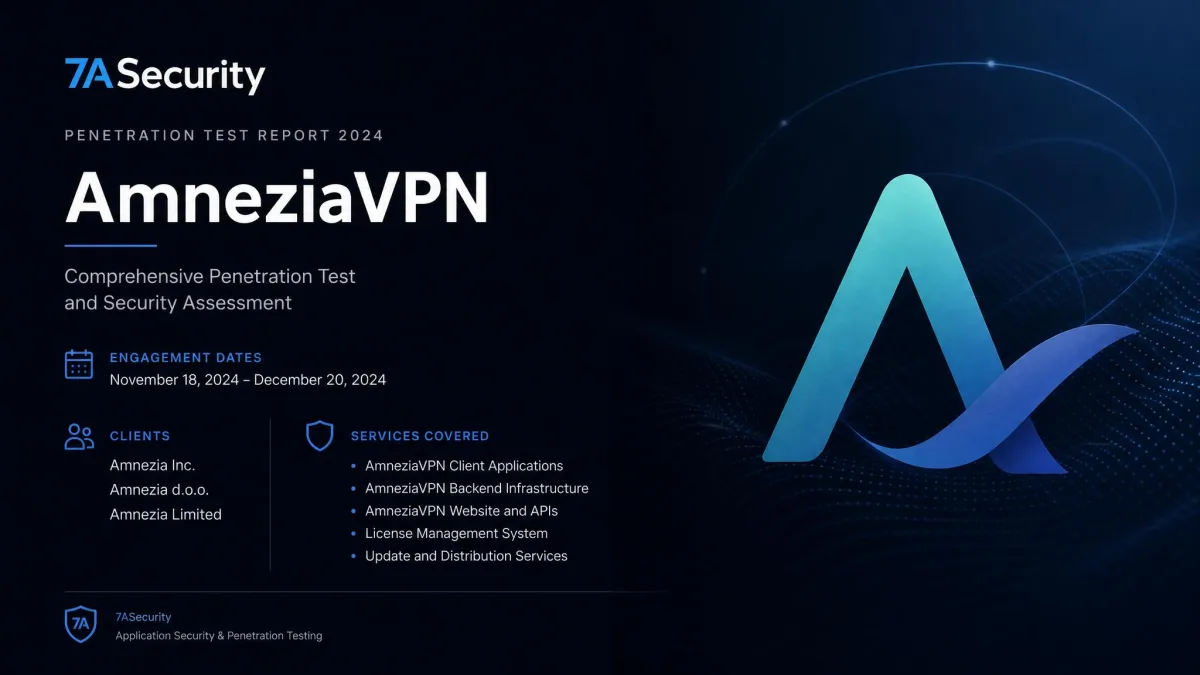
Yes, Amnezia is legitimate software, and the evidence backing it is stronger than most VPNs can show. It is open-source, so the code is not a black box, and it has been independently audited by the security firm 7ASecurity across separate engagements in 2022, 2024, and 2025. Public, repeated third-party auditing is rare, and it is the single biggest reason we trust the tool.
What the 7ASecurity audits actually found
We read the 2024 report rather than the press summary. The penetration test was published December 14, 2024, and covered the Android, iOS, and desktop clients plus the AmneziaWG and XRay services over a 16-day engagement. 7ASecurity concluded that AmneziaVPN has a strong security posture and noted a minimal attack surface, which is the headline you will see quoted everywhere.
The detail behind that headline matters more. The 2024 audit surfaced serious issues before they were fixed. An exposed Premium admin API could have allowed configuration tampering, and importing a malicious OpenVPN config could have led to arbitrary code execution. Both were resolved and retested. We read that as a good sign, not a red flag: this is exactly the process an audit exists to drive. It also supports funding transparency in the niche.
An audit is a snapshot, not a permanent guarantee. Amnezia's public reports cover 2022, 2024, and 2025, and the flaws found in 2024 were fixed. Keep your client updated so those fixes actually reach you.
Logging, jurisdiction, and no-KYC privacy
Amnezia is no-KYC. You sign up with an email address and can pay with Visa, Mastercard, or cryptocurrency, so buying access never demands your identity. On the self-hosted side, logging and jurisdiction are effectively in your hands, because the traffic terminates on a server you rent and control. For an independent look at how the app behaves, the Exodus Privacy scan of the Android build is worth a glance to see what trackers, if any, it ships with.
AmneziaWG and Protocols: How Amnezia Beats Censorship
Amnezia's censorship resistance is not marketing. It comes from a real technical approach to hiding VPN traffic, and it is the area where the tool clearly leads. In our testing this is where Amnezia earned its reputation.
AmneziaWG vs WireGuard (jmin / jmax obfuscation)
AmneziaWG is a fork of WireGuard that removes WireGuard's identifiable signatures, so deep-packet-inspection systems cannot easily fingerprint it as a VPN. Standard WireGuard is fast but easy to detect and block; AmneziaWG keeps the speed while masking the pattern.
The masking works by adding junk packets before the handshake, controlled by the Jc, Jmin, and Jmax parameters. In plain terms, Jc sets how many junk packets to send, and Jmin and Jmax set their size range. Community guidance suggests a Jc between 3 and 10, a Jmin around 50, and a Jmax around 1000, with the rule that Jmin stays below Jmax and Jmax stays at or under 1280. Getting these values right is what makes the traffic look like ordinary noise rather than a tunnel.
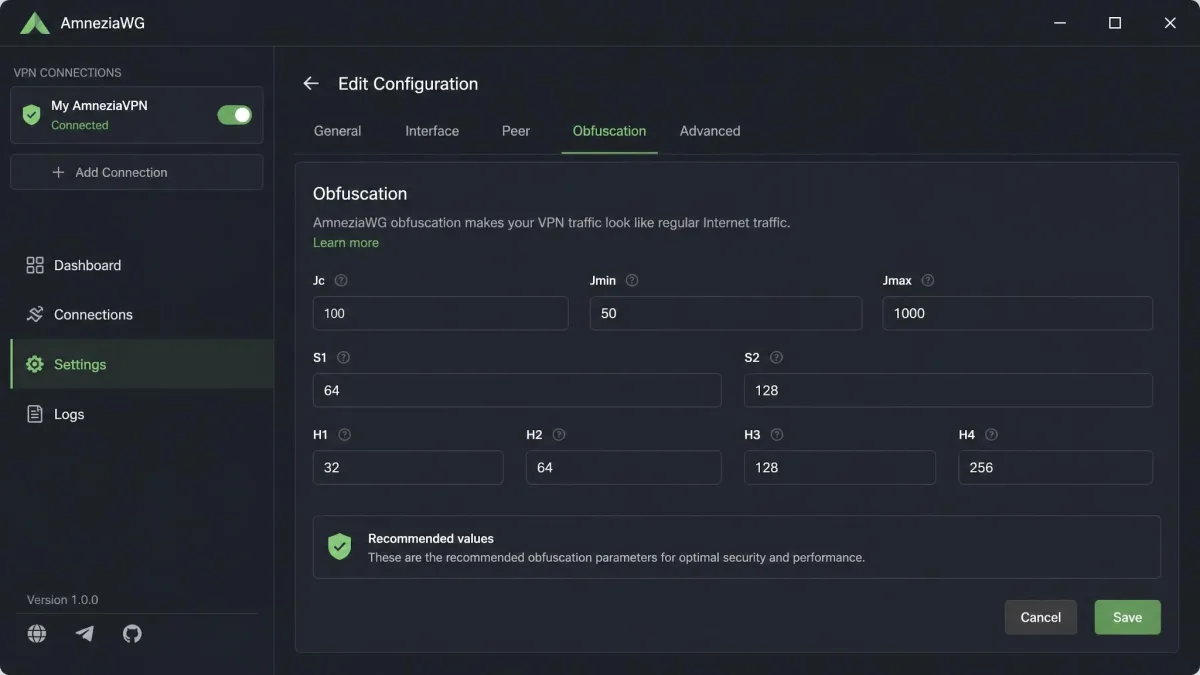
AmneziaWG keeps WireGuard's speed but strips its fingerprint, and in censored regions that difference is the whole game.
— From our hands-on testing
XRay, OpenVPN, and other supported protocols
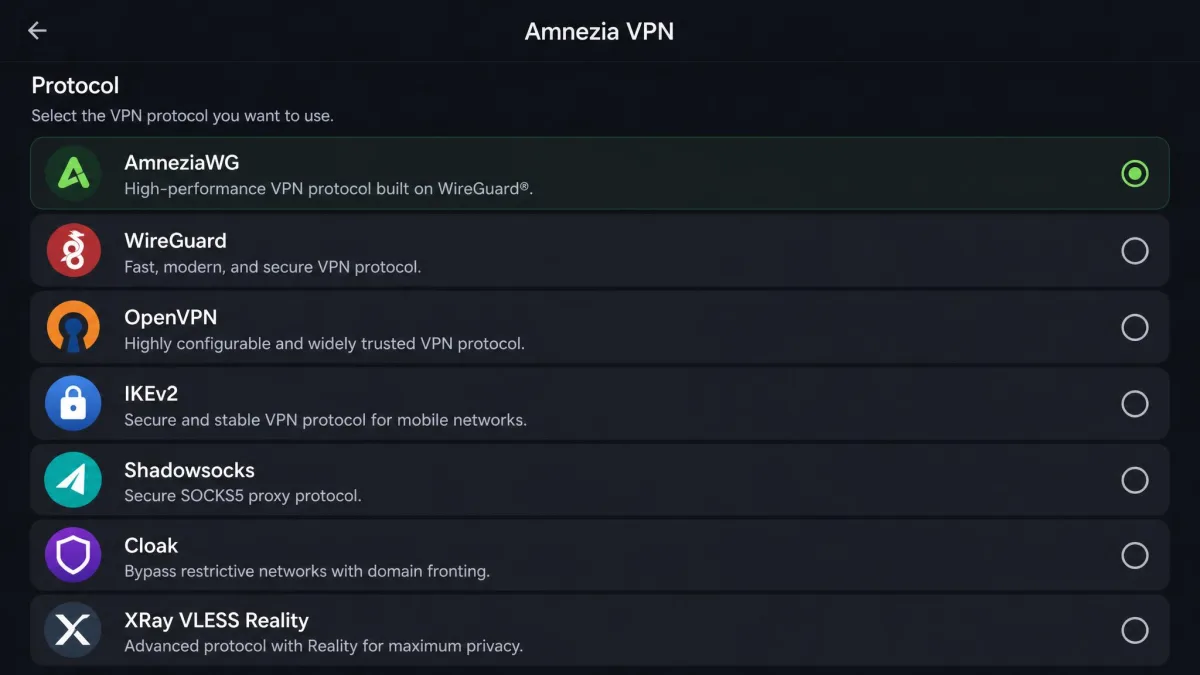
Amnezia is not a single-protocol tool. It supports AmneziaWG, plain WireGuard, OpenVPN, IKEv2, Shadowsocks, Cloak, and XRay using VLESS Reality. That breadth matters under aggressive filtering, because when one protocol gets blocked you can switch to another that the censor has not caught up with yet. XRay with Reality, in particular, is designed to blend in with normal HTTPS traffic, and having it alongside AmneziaWG gives you two very different ways to stay connected.
Amnezia VPN Pricing: Free vs Premium vs Self-Hosted
Amnezia's pricing is refreshingly honest, in part because two of the three routes cost nothing to Amnezia itself. Here is how the three modes compare on the numbers that matter.
| Mode | Price | Servers / locations | Device limit | Best fit |
|---|---|---|---|---|
| Self-Hosted | App free; pay for your own VPS | Your own single VPS, any location | Your server's config | Technical users who want full control |
| Free | Completely free | Whitelisted sites in censored regions | Managed service | Free access to specific blocked sites |
| Premium | From about $3.3/mo (2-year, $80 total) | 20 locations worldwide | 7 devices | Turnkey speed and easy setup |
Amnezia Free and free self-hosted server options
Two of Amnezia's three paths are free, which is a big part of why people ask whether the whole thing is legit. Amnezia Free, launched in March 2022 during Russian media blockades, costs nothing and unblocks whitelisted sites in censored regions. Self-Hosted is also free at the app level: you pay only for the VPS you rent, which can be a few dollars a month from any provider. Neither path funnels you toward a paywall, which is unusual and reassuring.
Amnezia Premium plans and value
Premium comes in three terms. The 6-month plan is $5 per month, or $30 total. The 1-year plan drops to $4.17 per month, or $50 total. The 2-year plan is the best value at $80 total, roughly $3.3 per month.
For that price, Premium advertises speeds up to 200 Mbps, unlimited bandwidth, 20 server locations, and coverage for 7 devices on one subscription. Payment is no-KYC by email, and buying direct comes with a 14-day money-back guarantee, separate from the 7-day free trial you can request. Do not confuse the two: 7 days is the trial, 14 days is the refund window.

Speed and Performance
Speed is where Amnezia's activist roots show. Its priority is getting through filters, not topping a leaderboard, but the real-world numbers are better than that framing suggests. Premium advertises speeds up to 200 Mbps, and while that reads like a marketing ceiling, testing shows it is not a hard cap in practice. Figures vary widely by server distance and test method, so we treat any single result as indicative rather than a fixed benchmark.
Here is what reviewers consistently find, and it matches the pattern we would expect from AmneziaWG. On a nearby server the throughput is genuinely strong: testing has measured roughly 220 Mbps connected to France and around 120 Mbps to a more distant server, so a close server can meet or slightly exceed the advertised 200 Mbps figure. Test method matters just as much as distance. iperf3 runs to a Sweden server clocked about 86 Mbps on a single connection but around 230 Mbps across multiple parallel streams, so a single-stream download sits well under the line rate while aggregate throughput can top 200 Mbps. Some reviewers have even recorded speeds above the marketing number, around 315 Mbps from the UK and 429 Mbps from Germany. The takeaway is clear: the 200 Mbps figure is not a hard ceiling, and AmneziaWG holds up well on nearby servers.
The flip side is distance. Throughput drops off sharply the further you sit from Amnezia's limited server locations, and users far from a nearby option see large bandwidth reductions and higher latency. That is the trade-off of a small fleet. AmneziaWG's obfuscation itself carries very little speed penalty compared with standard WireGuard, which is a real advantage, so the losses come from geography and network conditions rather than the protocol. The tool is strong at evading censorship, and on a well-placed server it is fast enough that raw speed is not the thing holding it back.
Streaming, Torrenting, and Gaming
Streaming is not Amnezia's headline focus, but it holds up better than its activist positioning implies. The server fleet is small at 20 locations, and the apps are barer-bones than big commercial clients, yet reviewers consistently unblock the major services when a suitable server is available. For torrenting and gaming, a self-hosted server on a well-connected VPS can work well because you own the whole pipe, but you are doing the tuning yourself.
Does Amnezia VPN work with Netflix?
Here we lean on what streaming tests consistently show rather than a single in-house run, because Amnezia's obfuscation design and small fleet make results depend heavily on which server you pick. Across reviews, Premium reliably unblocked US Netflix along with the UK and Australian libraries, with regional catalogs loading cleanly through European servers. Disney+ streamed without trouble too, including 4K playback, and even hard-to-unblock Amazon Prime Video played correctly, which is unusual for a VPN of this size. Reported throughput on nearby servers is comfortably enough for 4K without buffering.
BBC iPlayer is the inconsistent one, and the reason is coverage, not blocking. iPlayer only works from a UK IP, so it loads and plays well when a UK server is available and selected, and fails outright when no UK location is on offer. Premium's current 20-location list does include the UK, so the practical advice is simple: pick a UK server before you try iPlayer. The broader limit is the same one that shapes speed: a 20-location network reaches fewer regional libraries than a mainstream streaming VPN, so the catalogs you can unlock are narrower even though the ones it does reach play reliably.
Streaming works, but it is not why Amnezia exists. Its strength is censorship resistance, and its small 20-location network means the regional libraries you can reach are limited compared with a streaming-first VPN. If unblocking a specific country's catalog is your main goal, confirm that location is in the fleet before you subscribe.
Platforms and Device Support
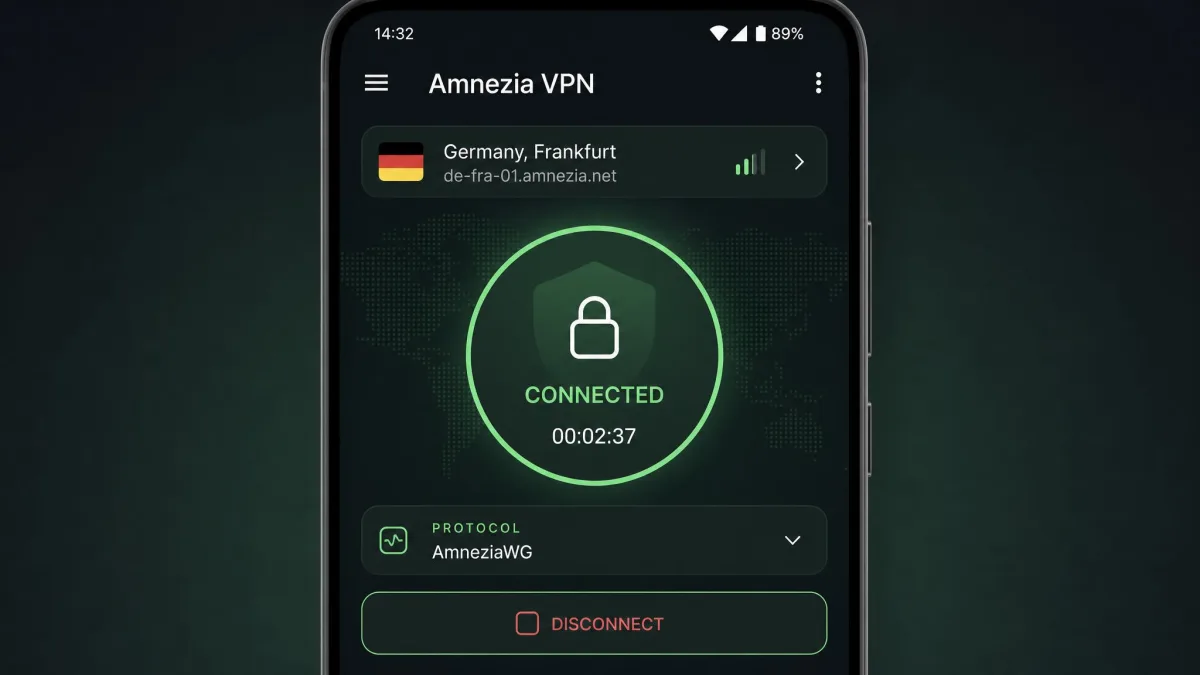
Amnezia is cross-platform, with official clients for Windows, macOS, Linux, Android, and iOS. Device coverage is broad, but there are real gaps and quirks worth knowing before you commit, especially around older Windows, TV, and browsers.
Windows (including Windows 7) and macOS
On Windows and macOS the main app is straightforward to install and use. The important limit is version support: the main AmneziaVPN app requires Windows 10 version 1709 or later, or Windows 11 x64. If you are on Windows 7, the main app will not run, but you are not out of luck. The standalone AmneziaWG client supports Windows 7, 8, and 10 in x32 and ARM64 builds, so older machines can still connect through that route.
Android, Android TV, iPhone, and the App Store
The Android app is on the Google Play Store, and the iOS app is on the App Store for iPhone and iPad at around 85.7 MB. Android TV is the awkward one. There is no native TV app and no TV build on the Play Store. To get connected on Android TV or Google TV, you install AmneziaVPN plus a file-transfer helper and copy the vpn:// subscription key over from a phone. It works, but it is fiddly, and we would not call it beginner-friendly.
Linux, Docker, and browser extensions (Chrome)
Linux has an official client, and self-hosting leans heavily on Docker: the server-side install runs the VPN inside docker containers that the app sets up for you. Browser coverage is the weak spot. There is no first-party Amnezia browser extension. The official downloads page lists only the desktop and mobile clients, so browser traffic goes through the desktop app rather than a dedicated extension. Any "Amnezia VPN" entries you find in the Chrome Web Store are unaffiliated community uploads, not something the Amnezia project ships, so we would steer clear of them.
Routers: Keenetic, MikroTik, and self-hosting on AWS
Router support runs through AmneziaWG. Keenetic and OpenWrt routers can carry an Amnezia tunnel, and KeeneticOS supports AmneziaWG from version 4.2. You import the AWG config as WireGuard and adjust the Jc, Jmin, Jmax, S1, S2, and H1 to H4 values by hand. Two cautions from experience: Premium configs cannot be set up on a Keenetic router through the standard router instructions, and older firmware only supports the earliest AmneziaWG version, so your KeeneticOS build and AmneziaWG version have to match. Self-hosting on a cloud provider like AWS is possible, since Amnezia can target any VPS by IP and SSH, but there is no Amnezia-specific AWS walkthrough. The official docs are provider-agnostic: AWS shows up only as a generic example where you have to open the protocol's port in the firewall yourself.
How to Set Up and Configure Amnezia VPN
Setup is where Amnezia surprised us most. For a tool this technical, the guided path is far gentler than we expected.
Downloading and installing the client
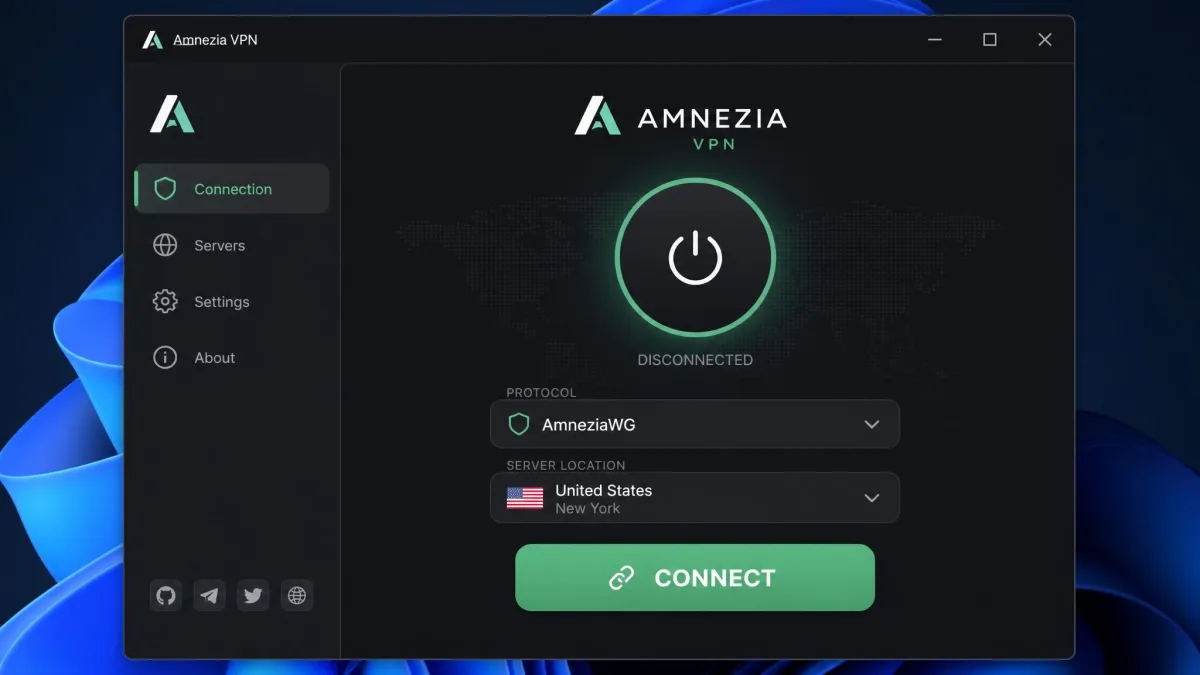
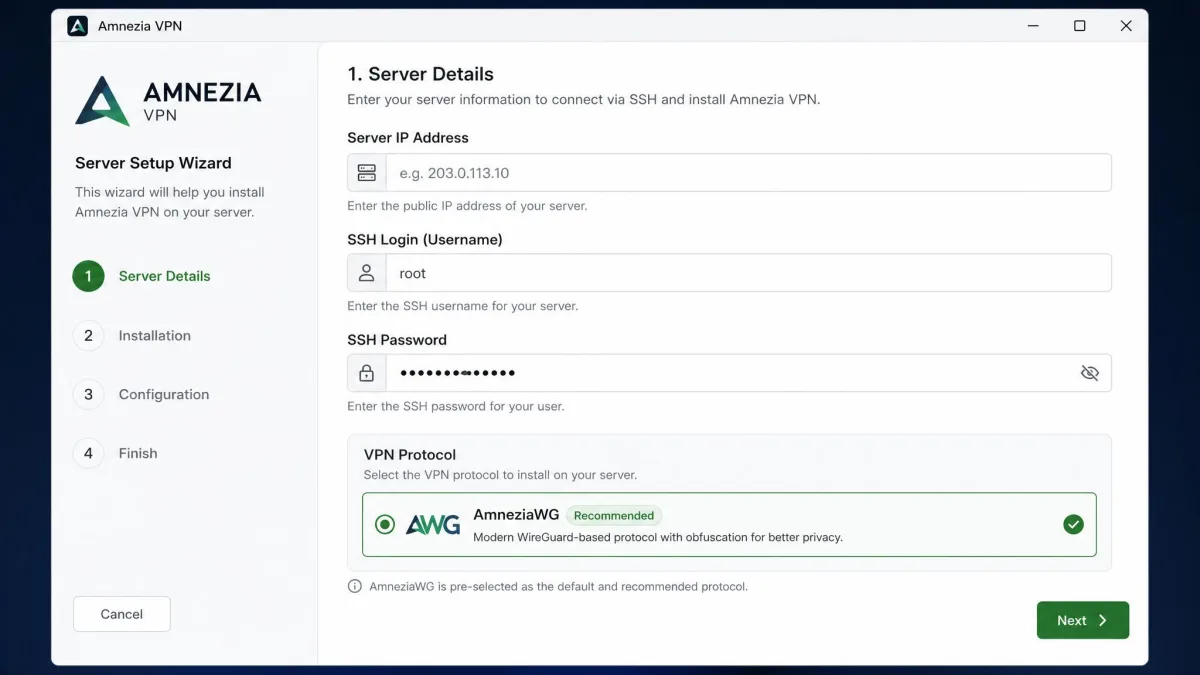
Grab the client for your platform from the official downloads page and install it like any other app. The server setup wizard then offers a general wizard mode, a manual mode where you pick a single protocol, and a skip-setup option that attaches the client to an existing install. AmneziaWG 2.0 is installed by default, which is the right choice for most people.
Importing a config and self-hosting your own server
This is the standout. Self-hosting is unusually beginner-friendly: you enter the server's IP address, an SSH login, and a password, and the app installs everything for you, with no terminal commands required. If someone hands you a ready-made config, importing it is a matter of pasting a vpn:// key or loading a file. That said, owning a server is a real responsibility. You are on the hook for patching and securing it, checking your host's jurisdiction and logging policy, and keeping both client and server updated. The convenience is genuine; the duty of care does not go away.
Troubleshooting Common Amnezia VPN Problems
Most Amnezia complaints cluster around a few predictable issues, and the fixes are well documented once you know what you are looking at. These came up repeatedly in our own testing.
Amnezia VPN not connecting / not working
The most common Free-tier failure is not a bug at all. Amnezia Free frequently fails on mobile data while working fine on home Wi-Fi, because mobile carriers apply whitelist blocking. The tell is simple: if unblocked sites like microsoft.com will not load without a VPN, you are looking at a carrier whitelist block. The fixes are to reset the API configuration, switch your internet source to Wi-Fi, or delete and recreate the connection. One more quirk worth flagging: the app can silently half-work, with the button still reading "Connect" while the tunnel is actually up and routing traffic, so check your real IP before assuming it failed.
The same config can connect on macOS yet fail on Android on the identical network. If one device stalls, test another before blaming the server. In our testing this platform difference was real and easy to misdiagnose.
Fixing Error 103 and connection drops
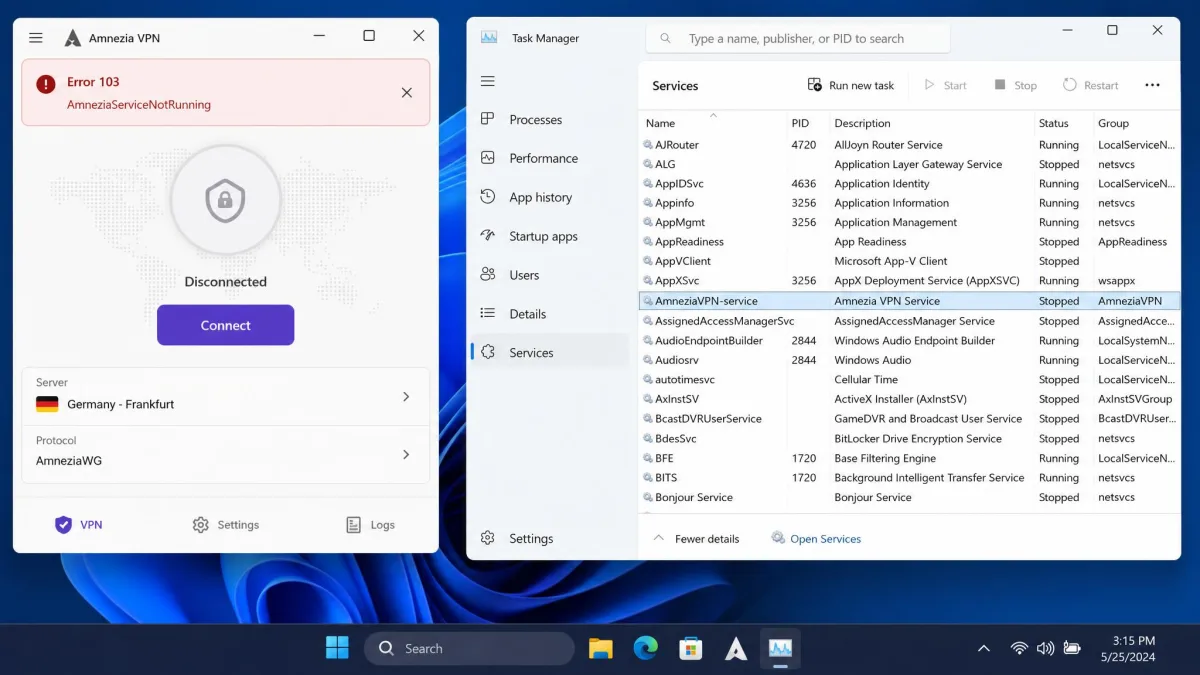
Error 103 is the one you are most likely to meet on a first connect. It means AmneziaServiceNotRunning: the background Amnezia service is not active. On Windows, macOS, and Linux the fix is to confirm and start the AmneziaVPN-service, which you can do through Task Manager or your system's services panel. On macOS you may need to enable background activity for the Privacy Technologies OU, then restart the app. It is a recurring first-connect complaint across all three desktop platforms, and Linux users note the official guidance is thin on Linux-specific steps. Other codes you might see include 201 for a port already in use, 203 for a failed Docker install, and 300 for SSH access denied, which mostly point at server-side setup rather than the client.
Amnezia VPN Pros and Cons
After two weeks with it, here is the balance sheet as we see it.
Pros
- Open-source under GPL 3.0, with repeated independent audits by 7ASecurity
- Best-in-class censorship resistance via AmneziaWG and XRay obfuscation
- Strong real-world speeds on nearby servers, meeting or beating the 200 Mbps figure
- No-KYC signup with card or cryptocurrency payment
- Self-hosting is genuinely beginner-friendly for a self-host tool
Cons
- Small 20-location fleet limits which regional streaming libraries you can reach
- Speeds fall off sharply on distant servers
- No native Android TV app and no first-party browser extension
- Free tier only unblocks whitelisted sites, not general traffic
- Managed tiers can degrade for days under heavy state blocking
What Reddit and Real Users Say
Real-user sentiment tracks our own experience closely. On community forums the praise centers on censorship resistance and the open-source model, while the frustration centers on connection quirks, the Error 103 first-connect stumble, and platform inconsistencies like a config working on one device but not another. It is worth noting that third-party rating volume is thin: Amnezia's Trustpilot page carries only around 14 reviews, so there is not a large pool of scores to average. There is also a real-world stress test on record. In 2026 Amnezia was hit by a large-scale DDoS attack, attributed to Roskomnadzor, that made switching servers impossible and knocked the Free and Premium services nearly offline for several days. It recovered, and Amnezia has since upgraded its anti-censorship protocol to reshape the whole connection profile against newer filtering, but it is a reminder that a censorship VPN is a target.
During heavy Russian state blocking, service can degrade for days at a time, and switching between servers may stop working entirely. If you rely on Amnezia in a high-risk region, keep a self-hosted fallback and a second protocol ready.
Final Verdict: Who Should Use Amnezia VPN?
Amnezia is safe, legit, and genuinely excellent at the thing it was built for. If you are facing censorship, want auditable open-source code, or want to own your own VPN server, it is one of the best choices going, and the price of admission can be zero. If you want a set-and-forget streaming VPN with a giant server network, look elsewhere, because that is simply not what this tool is for. Match the mode to your need, keep the client updated, and Amnezia rewards you.