CyberGhost is a Romania-based VPN with one of the largest server networks in the business, a long list of streaming-ready servers, and a price on its longest plan that undercuts almost every big-name rival. Our bottom line up front: it is a genuinely safe, easy-to-use VPN that is worth it if you want cheap, reliable streaming and everyday privacy, but power users who need port forwarding or advanced automation on Mac and iOS will feel the gaps.
We spent time with CyberGhost across Windows, macOS, Android, and iOS, running speed tests on nearby and far-flung servers and pushing its streaming and torrenting servers with real downloads. This review pulls all of that together, along with the details buyers ask about most: whether it is safe, what the plans actually cost when they renew, how the free trial works on each platform, and what to do when the app throws an "API not reachable" error.
We paid for our own subscription and tested the apps we recommend from, so nothing here rides on a vendor demo. Below you will find our ratings, the full pricing picture, our security and speed findings, and clear fixes for the problems that send most people searching for help.
Verdict at a Glance (Ratings, Pros and Cons)
CyberGhost earns a solid recommendation from us for mainstream users. It is one of the easiest VPNs to install and use, its streaming servers do their job, and the long-term price is hard to beat. It loses points for a couple of rough edges we hit in testing, including a false "no internet" message on macOS and a brief drop when you switch servers.
Our overall rating is 8.4 out of 10. It scores highest on value, streaming, and ease of use, and lowest on advanced features and consistency across platforms. If you want a set-and-forget VPN for privacy and unblocking, it is an easy pick. If you want granular control, keep reading before you commit.
We weighted the score across the things that actually matter day to day: security and privacy design, real speed on nearby and distant servers, streaming and torrenting performance, price and refund terms, and how the apps behave across platforms. CyberGhost is strong on most of these and merely average on advanced control, which is exactly why it suits casual users better than tinkerers.
Pros
- Very low price on the long plan, with a 45-day money-back guarantee
- Independently audited no-logs policy and Romanian jurisdiction
- Dedicated streaming servers labeled by platform and region
- Fast on nearby servers and easy to install in about two minutes
- 9,700+ servers across 100 countries, including Canada
Cons
- No port forwarding, which limits torrent seeding
- macOS and iOS apps miss the Windows client's advanced automation
- Speeds fall off sharply on distant servers
- No true lifetime plan despite what some ads suggest
- Only 7 simultaneous device connections
What Is CyberGhost VPN?
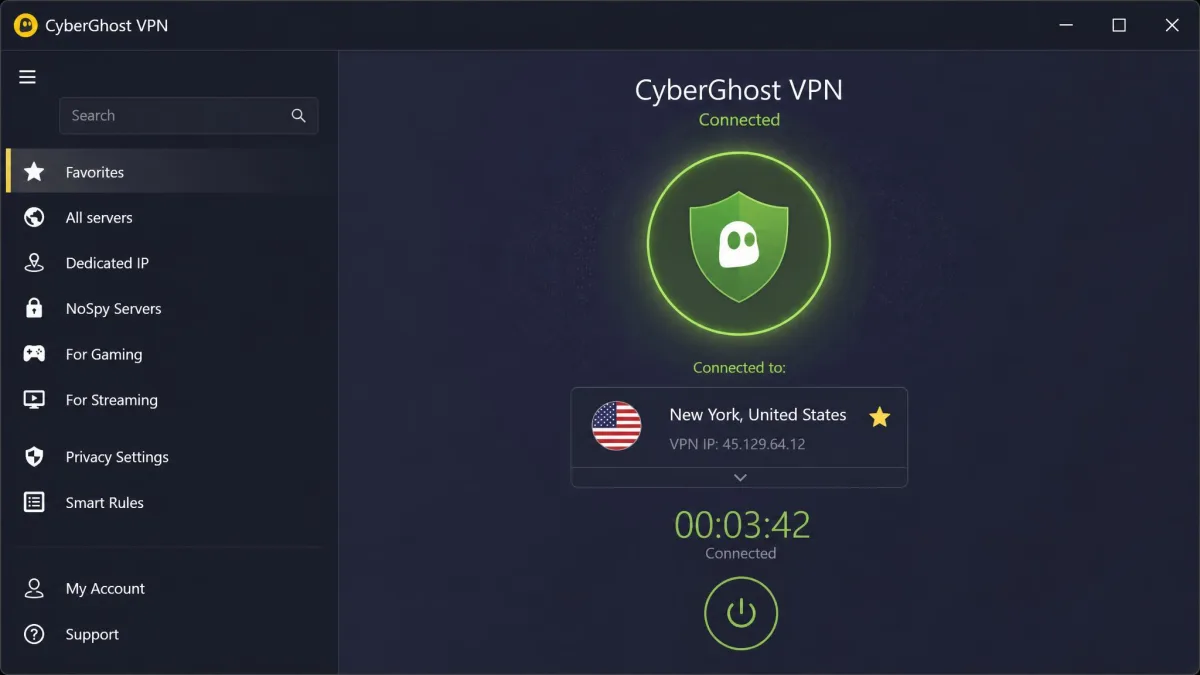
CyberGhost is a consumer VPN service that encrypts your internet traffic and routes it through one of its servers, hiding your real IP address and shielding your activity from your internet provider and network snoops. It handles the everyday jobs people buy a VPN for: private browsing, safer public Wi-Fi, streaming region-locked content, and torrenting without your ISP watching.
The service runs native apps for Windows, macOS, iOS, and Android, plus Chrome and Firefox proxy extensions and router support. It leans on a big server fleet and a set of purpose-built servers for streaming, gaming, and P2P, which is where a lot of its appeal comes from. In daily use it feels aimed squarely at people who want protection without fiddling with settings.
A single subscription bundles the core VPN, the ad, tracker, and malware blocker, split tunneling, and access to the specialized servers, with dedicated IP and antivirus available as paid add-ons. That packaging keeps the main app simple: you connect, and the protective features are already on. It is a deliberately beginner-friendly product, and that shapes both its strengths and its limits.
Where CyberGhost stands out is scale and simplicity. Where it holds back is depth: there is no port forwarding, and the Mac and iOS apps are more basic than the Windows client. That trade sits at the heart of this review.
Who owns CyberGhost and where is it based?
CyberGhost is operated by CyberGhost S.R.L. and is legally based in Bucharest under Romanian jurisdiction. That location matters for privacy. Romania sits outside the 14-Eyes intelligence-sharing alliance and has no mandatory data-retention law forcing VPNs to log users, which is a genuine advantage over providers based in surveillance-heavy countries.
The brand itself is owned by Kape Technologies, which acquired CyberGhost in 2017. Kape also owns other VPN brands, and its ownership history has drawn scrutiny over the years because of the group's earlier ad-software past. We think the more relevant question for buyers is what the service does today, and on that front the independent audits carry more weight than the corporate lineage.
For most users the practical takeaway is simple: the jurisdiction is genuinely privacy-friendly, the ownership is a fair thing to be aware of, and the audited no-logs record is the evidence that settles it either way.
CyberGhost CEO and company history
CyberGhost was founded in 2011 in Bucharest by Robert Knapp, who has long led the company as CEO and co-founder. The service grew from a free-focused privacy tool into a large paid VPN, and the Kape acquisition in 2017 gave it the resources to expand its network and app lineup.
Over the years CyberGhost has pushed hard on the beginner-friendly angle, layering in specialized servers and yearly audits rather than chasing the power-user feature race. That history explains the product you get today: broad, polished, and easy, rather than deep and configurable.
Corporate roles at large groups can shift between years, so treat the CEO title as accurate at the time of writing rather than a permanent fixture.
Is CyberGhost Safe, Good, and Trustworthy?
Yes, CyberGhost is safe to use, and we would trust it with everyday privacy. It uses AES-256 encryption, runs its own DNS servers, and includes a kill switch and DNS leak protection. Because it routes DNS through its own servers with leak protection and a kill switch behind it, your real IP and DNS queries stay inside the tunnel, and you can confirm there are no leaks on your own connection with a free DNS leak test tool.
The stronger evidence sits in its independent audits and its infrastructure. CyberGhost runs RAM-only servers, which means data lives in memory and is wiped on every reboot rather than written to disk. Combined with the Romanian base and a published no-logs policy, that is a credible privacy setup, not just marketing.
"Trustworthy" also depends on how a company behaves over time, and here the recurring pattern helps. Two Deloitte audits, ongoing transparency reports, and a running bug bounty all point to a provider that keeps testing itself rather than auditing once and coasting. That consistency is what moved CyberGhost firmly into the safe tier for us.
One caveat from testing: switching server locations briefly drops the tunnel, which creates a short window where traffic could be exposed before the kill switch and new connection settle. It is a small risk, but worth knowing if you change servers often.
CyberGhost's independent audit history (Deloitte)
CyberGhost has had its no-logs claims verified by Deloitte Romania, with independent audits completed in 2022 and again in 2024, the second finished by mid-May 2024. Both were conducted under the ISAE 3000 (Revised) assurance standard, which is the same class of engagement serious VPNs use for this kind of review.
The scope of the latest independent audit went beyond a quick log check. It covered the VPN network, the no-logs systems, incident management, and the token-based dedicated IP system, which is the mechanism that lets you have a static IP without CyberGhost tying it to your account. That breadth is a good sign, because it means an outside firm looked at how the whole service handles data, not just one claim.
We should be clear about the limit here: only the 2022 and 2024 audits are documented. If you see a claim of a newer audit, verify it before relying on it.
No-logs policy and transparency reports
CyberGhost's no-logs policy states it does not record what you do online, the sites you visit, or your real IP address while connected. The RAM-only server setup backs this up technically, and the Deloitte audits back it up independently, which is the combination we look for before trusting a no-logs claim.
The company also publishes quarterly and annual transparency reports that tally legal requests for user data and how it responded, and it runs a bug bounty program that pays researchers to find flaws. None of this makes any VPN bulletproof, but the ongoing disclosure and outside testing put CyberGhost in the trustworthy tier for us.
Run your own leak test after you connect. Open a DNS leak test in your browser, note the results, then connect CyberGhost and refresh. If your ISP's name disappears and only the VPN location shows, your DNS is protected.
CyberGhost Pricing, Plans, and Free Trial
Pricing is CyberGhost's headline strength, but the checkout can confuse first-time buyers, so let us lay it out plainly. There is a monthly plan, a 6-month plan, and a long multi-year plan, and the per-month cost drops steeply as the term gets longer.
The monthly plan costs $12.99 per month. The 6-month plan works out to about $6.99 per month, billed $41.94 up front. The long plan is where the value lives, and it is also where the fine print matters most, so we break that out below.
One of the most common complaints we have seen centers on checkout pricing not being clearly presented, and we understand why: the big per-month number is the intro rate, not the renewal rate, and the add-ons are offered during checkout. Read the total billed today and the renewal line before you confirm, and you will avoid the surprise that trips people up.
CyberGhost 1-year and 3-year plans (and renewal pricing)
CyberGhost's long plan is usually sold as a roughly 26-month term, which is around two years plus two free months, at about $2.19 per month billed as one payment of $56.94 for the first term. Some reviews describe a 28-month term at closer to $2.03 per month, so the exact length and rate move with whatever promotion is live when you sign up.
Here is the part buyers miss: that low rate is an intro price for the first term only. After the intro term, the long plan renews at about $56.94 for the year, so the effective monthly cost jumps once the first term ends. It is still competitive, but it is not the sub-$3 rate forever. Set a reminder before renewal so the change does not surprise you.
The math still favors the long plan for anyone who plans to keep a VPN for more than a few months. Even at the higher renewal rate, CyberGhost stays cheaper than the standard renewal on most rivals, and you can always claim a refund inside 45 days if it does not work out.
The eye-catching per-month price applies to the first term only. Renewal is billed at roughly $56.94 per year, and the exact intro term length and rate change with promotions. Check the total shown at checkout, not just the monthly figure.
CyberGhost free trial: 24 hours, 3 days, and 7 days by platform
CyberGhost does offer a free trial, but the length depends on your platform, and no card is required to start it. On Windows and macOS you get a 24-hour trial. On Android you get 3 days. On iOS you get 7 days, the most generous of the three. You can start any of them from the free trial page.
If you want more time to evaluate, the smarter route is to buy a plan and lean on the money-back guarantee, which gives you far longer than any trial. Start the iOS trial first if you own an iPhone, since a week is enough to test streaming and speed properly before you spend a cent. We cover the guarantee next.
The 45-day money-back guarantee (and 14-day monthly exception)
The long and standard plans come with a 45-day money-back guarantee, which is one of the longest in the industry and effectively a six-week risk-free trial. The monthly plan is the exception: it carries a 14-day guarantee instead of 45 days.
In testing we found the refund process straightforward, and money was returned within a few days of the request rather than dragged out. That matters, because a guarantee is only as good as how easily you can actually claim it. Request it through 24/7 live chat, say you want to cancel under the guarantee, and keep the confirmation for your records.
Does CyberGhost offer a lifetime subscription?
No. Despite ads and third-party listings that mention a "lifetime" CyberGhost deal, there is no true lifetime subscription sold by CyberGhost today, and there is no "12 months free" or "30-day free trial" offer either. Those are misconceptions, often recycled from old promotions or affiliate pages.
What actually exists is the tiered subscription plus the platform-based trials (24 hours, 3 days, or 7 days) and the 45-day refund window. If a page promises a one-time lifetime payment, treat it as a red flag rather than an official deal, since a VPN that never charges again has no revenue to keep servers running.
Ignore any "CyberGhost lifetime subscription," "12 months free," or "30-day free trial" offer. None of these are real CyberGhost plans. The genuine options are the monthly, 6-month, and long plans, the 24h/3d/7d trials by platform, and the 45-day money-back guarantee.
CBA*CYBERGHOST and CBI*CLEVERBRIDGE charges explained
If you see a charge labeled CBA*CYBERGHOST or CBI*CLEVERBRIDGE on your card statement, that is your CyberGhost payment, not fraud. Cleverbridge is CyberGhost's payment reseller, so its name can appear on the billing descriptor instead of, or alongside, the CyberGhost name.
The exact prefix varies by card issuer and how the payment is routed, so treat the specific string as illustrative rather than fixed. If the amount matches your plan, it is legitimate. If you do not recognize the amount, that is when to contact support and, if needed, ask about the 45-day guarantee.
Dedicated IP cost and Security Suite add-on
Two paid add-ons sit on top of the base plans. A dedicated IP costs from about $5 per month and gives you a static address that is yours alone, which helps with services that block shared VPN IPs. CyberGhost assigns it through a token system, so the IP is not linked to your account, a detail the audit specifically covered.
The Security Suite for Windows, which adds antivirus powered by Intego, costs from about $4.50 per month. It is optional, and we cover what it actually includes in the security section below. Neither add-on is needed to use the VPN safely, so add them only if you have a specific reason.
Security Features: Protocols, Encryption, and the Security Suite
CyberGhost covers the security fundamentals well. You get AES-256 encryption, a kill switch, DNS leak protection with CyberGhost's own DNS servers, split tunneling, and an ad, tracker, and malware blocker. Because it runs its own DNS with leak protection and a kill switch, your real IP and DNS details stay inside the tunnel on a stable connection, and you can verify that on your own line with a free DNS leak test tool.
The protocol lineup is modern, and the encryption is standard-strong. The main thing to configure on some setups is IPv6, which we explain below because it is the single most common cause of the "connected but no internet" complaint.
Split tunneling deserves a mention because it is genuinely useful: it lets you route some apps through the VPN while others use your normal connection, which is handy for keeping a banking app on your real IP while everything else stays private. The ad and malware blocker, meanwhile, cuts down on trackers and blocks known malicious domains at the DNS level, which speeds up page loads as a side benefit.
Does CyberGhost support OpenVPN?
Yes, CyberGhost supports OpenVPN, the long-trusted open-source protocol that many privacy-focused users prefer for its track record and auditability. It is available in the apps alongside the newer options, so if you want OpenVPN specifically, you can select it.
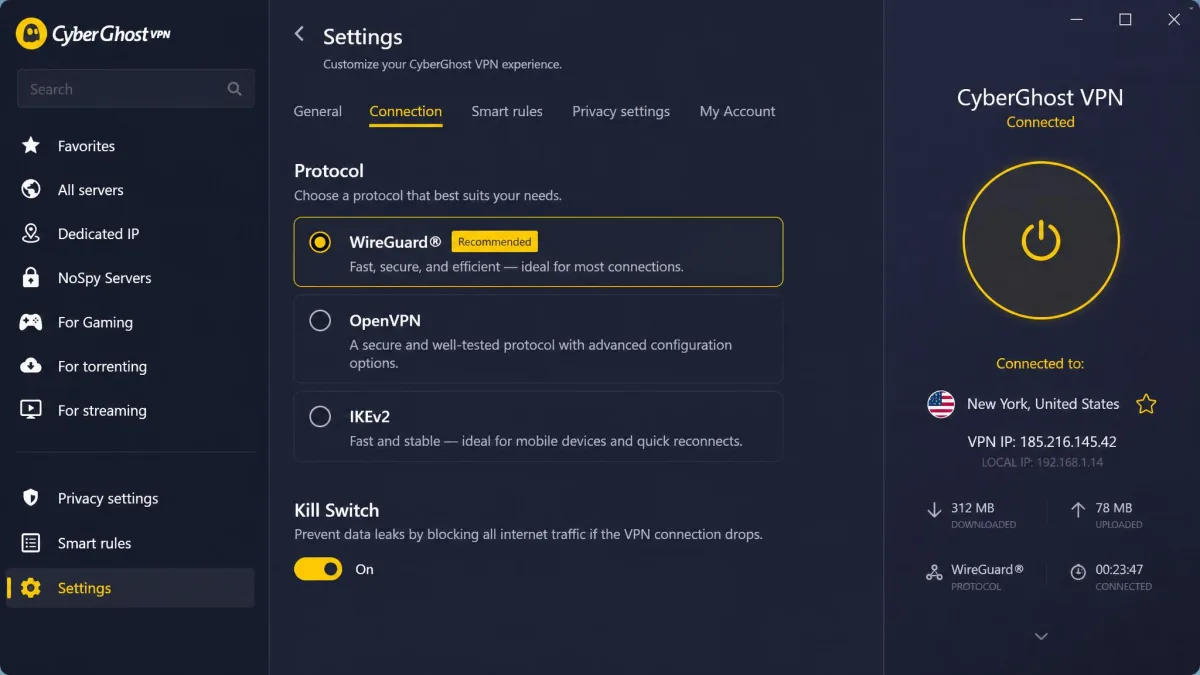
To switch, open Settings, go to the connection or protocol section, and choose OpenVPN. On slower or restrictive networks, OpenVPN's TCP mode can connect where other protocols stall, so it is a useful fallback when a network is actively blocking VPN traffic.
WireGuard, IKEv2, and encryption
For most people we recommend WireGuard, which CyberGhost supports and which delivers the best speed in our tests while keeping strong security. IKEv2 is also available and is a good choice on mobile because it reconnects quickly when you switch between Wi-Fi and cellular. There is no L2TP, which is fine, since L2TP is dated and slower.
All protocols run over AES-256 encryption, the same standard used to protect sensitive data across the industry. To change protocol, open Settings, go to Connection, then Protocol, and pick WireGuard, OpenVPN, or IKEv2. If you are unsure, leave it on WireGuard and only change it if a connection misbehaves.
If a server feels slow, switch your protocol before you blame the VPN. Set the protocol to WireGuard for the best speed on most connections, or fall back to OpenVPN (TCP) on networks that block VPN traffic.
Kill switch, DNS, and leak protection
The kill switch cuts your internet if the VPN connection drops, so your real IP is not exposed during an unexpected disconnect. CyberGhost also routes DNS requests through its own servers, which prevents the DNS leaks that quietly reveal your browsing to your ISP even while a VPN is on.
One nuance we hit: because switching server locations briefly disconnects the tunnel, there is a short exposure window during the change. The kill switch handles a hard drop well, but the deliberate reconnect on a location switch is quicker than the switch can always catch. If you are on a sensitive network, disconnect, switch, then reconnect deliberately, and confirm the new location shows connected before you resume.
CyberGhost antivirus and Security Suite
The Security Suite is an optional Windows add-on that layers Intego-powered antivirus and a security-update scanner on top of the VPN. It is not part of the core VPN and is not needed to use the VPN safely, so treat it as an extra rather than a reason to buy.
If you already run a good antivirus, you can skip it. If you want one bill for VPN plus antivirus on Windows, it is a reasonable convenience, but weigh the added monthly cost against standalone antivirus you may already own. On Mac, Android, and iOS the Suite is not the point, so those users should base the decision purely on the VPN.
CyberGhost Servers, Countries, and Locations
CyberGhost runs one of the biggest networks around, and the sheer spread means you will almost always find a nearby server. The trade-off is that a meaningful share of locations are virtual servers, so the country you pick is not always where the hardware physically sits.
We break the numbers down below, along with the specialized servers that are the real reason to choose CyberGhost over a cheaper generic VPN.
Server count and country list (including Canada)
CyberGhost officially lists 9,700+ servers, though some third-party reviews count 11,000 or more; the live total fluctuates and sources disagree, so treat it as a large-network ballpark rather than a fixed figure. The country count is more stable at 100 countries, and that spread includes major hubs like Canada, the US, the UK, and across Europe and Asia.
Canada is well covered with multiple city options, which is useful for Canadian users who want a local connection or for anyone who wants a Canadian IP for content. One thing to know from testing: some South American servers physically route through Miami, and a share of locations are virtual, so if physical server location matters to you, check the specific city before relying on it. We also found connections to China unreliable, and CyberGhost's own support confirms frequent connection problems there, so it is not the VPN to pick if getting online inside China is your main goal.
Specialized servers: streaming, gaming, P2P, and NoSpy
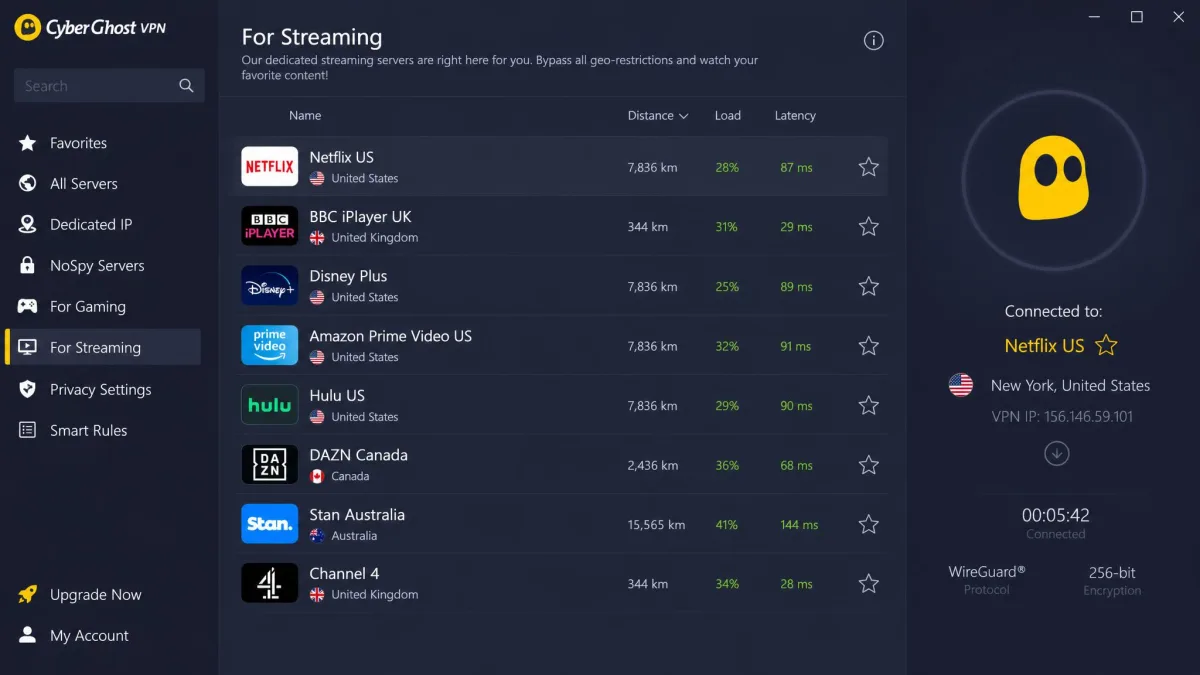
The specialized servers are CyberGhost's signature feature. There are streaming-optimized servers labeled by the exact platform and region they unblock, gaming-optimized servers, P2P/torrenting servers, and NoSpy servers housed in CyberGhost's own Romanian data center for an extra layer of control.
The labeling is the part we appreciated most. Instead of guessing which server unblocks a given service, you pick the one named for the platform and region you want. It removes the trial-and-error that makes streaming on other VPNs a chore.
NoSpy servers are worth a note for privacy-minded users. Because CyberGhost owns and operates them directly in Romania rather than renting rack space from a third party, there is one fewer outside party with physical access, which is a small but real hardening step for sensitive use.
CyberGhost Apps: Windows, Mac, iPhone, Android, and Browsers
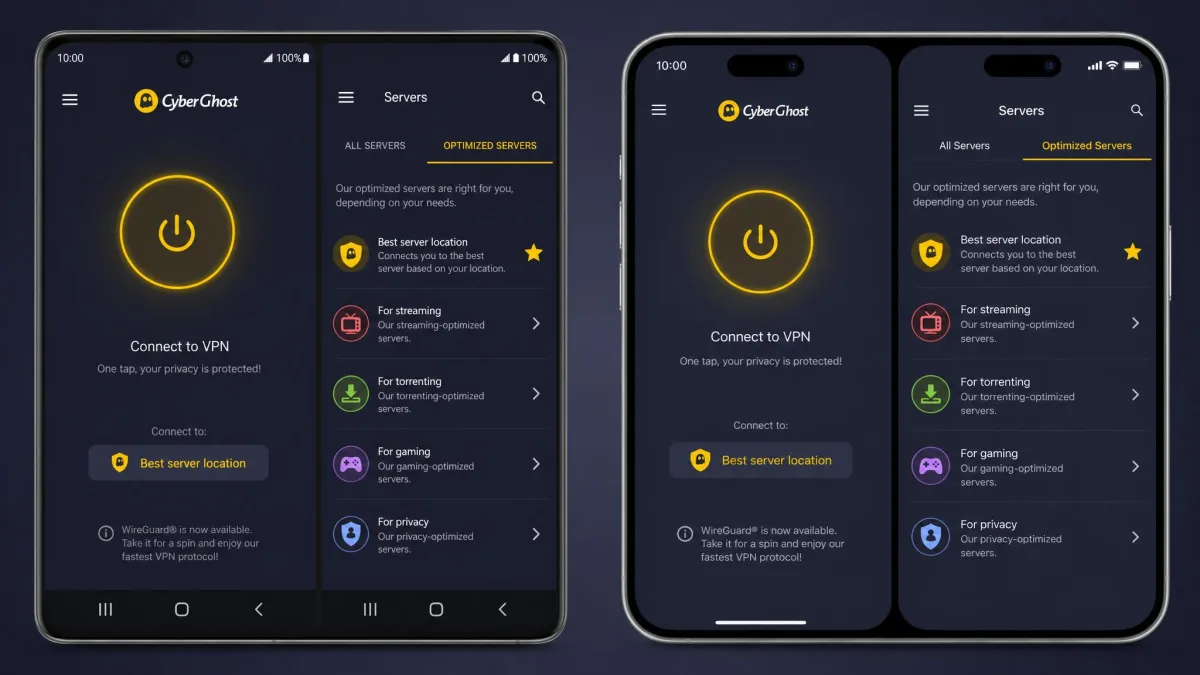
CyberGhost offers native apps for Windows 10 and 11, macOS 10.13 and later, iOS and iPadOS, and Android, plus Chrome and Firefox proxy extensions and router support. The apps share a clean, friendly design that makes connecting a one-tap affair.
The catch is consistency. The Windows client is the most capable, and the Mac and iOS apps are noticeably more basic, which we detail below. For casual use the difference barely registers; for power users it does.
How to set up and use CyberGhost
Setup is genuinely quick. In our testing, installation finished in about two minutes on both Windows and macOS, and the interface is intuitive enough that we were connected without reading a single help page.
To get running, buy or start a trial, download the app for your platform, sign in, and click the big connect button for the fastest server. To choose a specific location, open the server list and pick a country or a specialized server. To change protocol, open Settings, go to Connection, then Protocol.
One rough edge appeared on macOS: the app sometimes showed a false "no internet connection" error even when the connection was actually working. It cleared on reconnect, but it is annoying, and it is worth knowing before it worries you. We also found that the advanced Smart Rules automation, which triggers actions like auto-connecting on untrusted Wi-Fi, is missing on macOS and iOS, so those apps feel more basic than the Windows client.
How many devices can you use at once?
CyberGhost allows 7 simultaneous device connections on one account. That covers a typical household or a solo user with a laptop, phone, and tablet, but it trails rivals: ExpressVPN allows 8 and NordVPN allows 10.
The 7-device registration system is also a recurring source of complaints, usually around managing which devices are active. If you have a device-heavy home, factor the limit in, or plan to install CyberGhost on a router so it protects everything behind it as a single connection. A router install is the cleanest fix, since it covers smart TVs and consoles that cannot run the app directly.
The discontinued CyberGhost Private Browser
If you went looking for the standalone CyberGhost Private Browser, it is gone. CyberGhost discontinued the Private Browser on March 28, 2024, removing the installer and ending updates. Running an unsupported browser is a security risk, so do not hunt down an old copy.
For private browsing today, use the VPN app together with a mainstream, actively updated browser, or use CyberGhost's Chrome or Firefox proxy extension. That gets you the privacy benefit without relying on abandoned software.
Speed and Performance Tests
Speed is where CyberGhost's big network both helps and hurts. On nearby servers it is quick, and on distant ones it slows down more than we would like. We ran our tests with an Ookla-style benchmark, and you can replicate our method with Ookla Speedtest on your own line.
We measured baseline speed without the VPN first, then reconnected to each test server and re-ran the same benchmark, so every figure below is a percentage change against that baseline rather than a raw number that depends on our line. That is the only fair way to compare VPN speed, since your own base connection sets the ceiling.
Close to home, performance was excellent. A nearby Seattle server lost under 5% of our download speed, which is effectively unnoticeable for browsing, streaming, and video calls. That is the range you want from a VPN on servers near you.
Over long distances the picture changed. A South Africa connection dropped about 42% of our download speed, a real hit that you would feel on large downloads. The lesson is simple: pick the nearest server that meets your need, and only reach for far-flung locations when the content or IP location requires it.
On a nearby Seattle server we lost under 5% of our download speed, but a long-haul South Africa connection shed about 42%. With CyberGhost, distance is the single biggest factor in how fast you feel.
— From our hands-on speed tests
Streaming and Unblocking (Netflix and More)
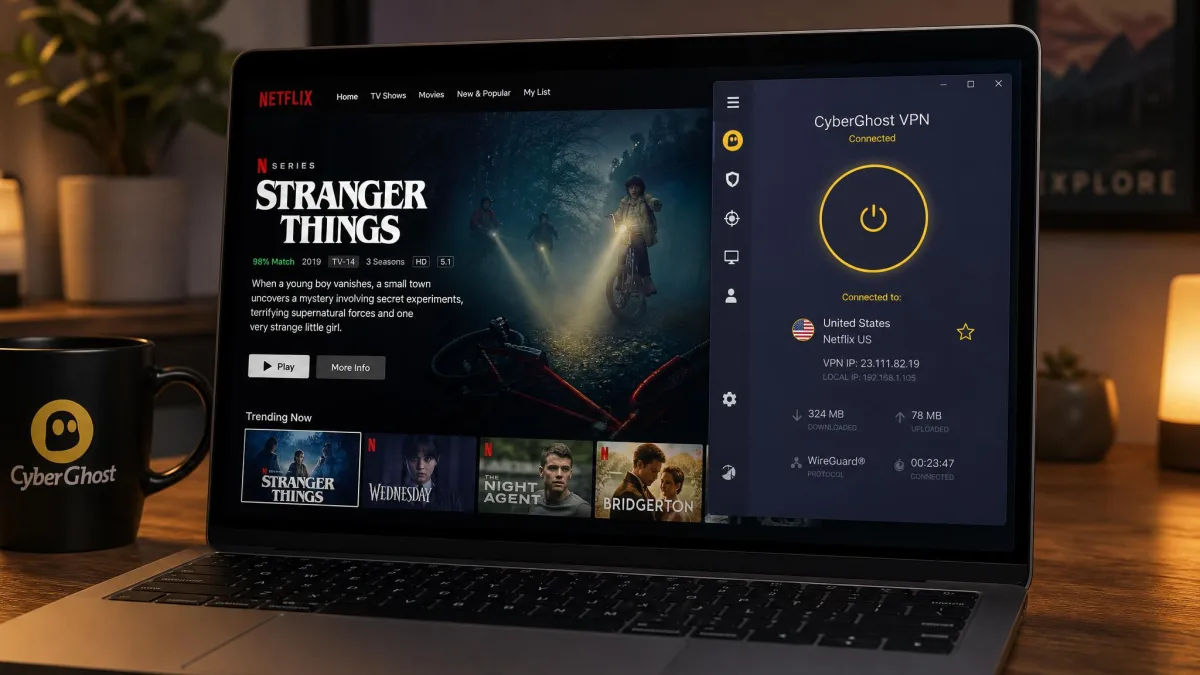
Streaming is the reason many people buy CyberGhost, and it delivers here. Its streaming-optimized servers unblocked Netflix reliably across many regions in our testing, along with Disney+, BBC iPlayer, Hulu, Amazon Prime Video, and Max.
The labeled servers make this painless. Because each streaming server names the platform and region it targets, you connect, open the app, and watch, without cycling through a dozen locations hoping one works. For a streaming-first VPN at this price, that is a strong combination.
Playback quality held up too. On nearby streaming servers the low speed loss meant HD and 4K streams started quickly and did not buffer, which is where a slow VPN usually shows its weakness. If a stream ever fails to load, disconnect, pick a different server for the same platform, and clear your browser cache before trying again. Services rotate their VPN blocks, so a second server for the same region usually gets you through.
CyberGhost for Torrenting and P2P
CyberGhost is a good torrenting VPN with one clear limitation. Its P2P-optimized servers download quickly and without throttling: in testing we pulled a 1.1GB file in under two minutes, which is exactly the kind of speed torrent users want.
The limitation is no port forwarding. That reduces your ability to seed and can lower peer connectivity, so heavy seeders who care about ratio will notice. For downloading, it is a non-issue; for seeding-heavy use, it is a real drawback worth weighing against cheaper unlimited plans.
Privacy for torrenting is well covered by the kill switch, DNS leak protection, and no-logs policy, so your activity stays private while you download. Just keep the kill switch on so a dropped connection never exposes your IP mid-transfer, and remember that switching servers mid-download will interrupt the transfer because of the brief reconnect gap.
Best CyberGhost server for torrenting
Use a P2P-labeled server for torrenting rather than a generic or streaming server. CyberGhost marks its torrent-friendly servers clearly, and picking one that is geographically close to you gives the best combination of speed and reliability.
To find them, open the server list and choose the "For downloading" or P2P category, then sort by the nearest low-load option. That is the setup that gave us the fast 1.1GB result, and it beats picking a distant server just because it is in a torrent-friendly country.
For the fastest torrents, connect to a nearby P2P-labeled server, set your protocol to WireGuard, and confirm the kill switch is on before you start a download. Distance hurts speed more than anything else on CyberGhost.
CyberGhost for Gaming
Gaming is a quiet strength for CyberGhost thanks to low latency on nearby servers. In our tests, latency averaged around 266ms globally but stayed near 21 to 23ms on a nearby server, which is low enough for smooth online play when you connect close to home.
The gaming-optimized servers are aimed at reducing lag and can help you connect to game servers in other regions or dodge IP-based restrictions. Just remember that connecting far away raises your ping, so for competitive play you want the nearest server, not the most exotic one.
CyberGhost will not speed up a slow base connection, but for protecting against DDoS attacks, accessing region-locked game content, or playing on public networks, it does the job without adding noticeable lag nearby. For console gaming, a router install is the way to route your console through CyberGhost, since there is no native console app.
CyberGhost Not Working? Common Problems and Fixes
Most CyberGhost problems come down to a handful of causes: security software blocking the app, an IPv6 conflict, or a stuck process. Below are the specific errors people search for and the fixes that worked for us, drawn from our testing and CyberGhost's own official support guides.
Work through these in order. In most cases the fix is quick, and you will not need to contact support at all.
"API not reachable" / "Checking connection to CyberGhost API failed"
This error usually means antivirus, firewall, or ISP router security is blocking the app from reaching CyberGhost's servers. It is the most common CyberGhost error, and it is almost always a blocking issue rather than an outage.
To fix it, try these steps in order:
- Temporarily disable your antivirus or firewall and test the connection.
- Add a firewall exception for CyberGhost if disabling fixes it.
- Update the CyberGhost app to the latest version.
- Switch to a different protocol or a different server.
- Flush your DNS and restart the app.
Disabling your antivirus or firewall to test the "API not reachable" error leaves your device exposed while it is off. Turn it back on the moment you finish testing, and prefer adding a firewall exception over leaving protection disabled.
Connected but no internet
If the app shows "connected" but nothing loads, the usual culprit is an IPv6 conflict, because CyberGhost does not support IPv6 traffic. The fix is to disable IPv6 on your network adapter.
On Windows, open your network adapter settings, open the adapter's properties, uncheck Internet Protocol Version 6 (TCP/IPv6), and reconnect. That single change resolves the "connected but no internet" problem in most cases. If it persists, switch protocol or server as a second step, and restart the app so it picks up the adapter change.
CyberGhost crashing or won't launch
When the app will not launch or keeps crashing, the fastest fixes are to end the CyberGhost process in Task Manager and reopen it, run the app as administrator, or let the background service finish updating before you launch.
If none of that works, reinstall the app cleanly. A fresh install clears a corrupted update or a broken service, and it typically gets a stubborn install working again without losing your account, since your login is tied to your subscription rather than the local files.
CyberGhost blocking your internet / firewall conflicts
Sometimes CyberGhost itself, or its kill switch, appears to block your internet, especially after a crash or a failed connection. If the kill switch is on and the app crashed, it can leave your connection cut until you reopen and reconnect the app.
Reopen CyberGhost and connect, or exit the app fully to release the kill switch. If your third-party firewall is the conflict, add CyberGhost as an allowed app rather than turning the firewall off. Firewall conflicts are the same root cause as the API error, so the same exception fixes both.
Is CyberGhost down? Checking status
If nothing connects across multiple servers and devices, it may be an outage rather than a local problem. Check CyberGhost's status by contacting its 24/7 live chat, which will confirm known issues quickly, or by testing whether a different server or protocol connects.
Before assuming CyberGhost is down, rule out the common local causes above, since an IPv6 conflict or a firewall block looks identical to an outage from the user's side. A quick test on mobile data instead of Wi-Fi also tells you fast whether the issue is your network or the service.
Customer Support
CyberGhost offers 24/7 support through live chat and email, backed by a searchable support center and knowledge base. Live chat is the fastest route for connection problems, and the knowledge base covers the common errors, including the "API not reachable" and IPv6 fixes above, well enough that many issues never need an agent.
The support center is also where the setup guides live, so if you are configuring CyberGhost on a router or a less common device, start there. For billing questions, including the Cleverbridge charges we covered earlier, chat can confirm and resolve a charge quickly, and it is also how you claim the 45-day refund.
The 24/7 chat and email coverage means help is available whatever your time zone, and the knowledge base doubles as a self-service option when you would rather solve it yourself than wait for an agent. For a mid-problem connection failure, chat is the channel that gets you to a fix fastest.
CyberGhost vs ExpressVPN and NordVPN
CyberGhost's pitch against its two biggest rivals is price and streaming; their pitch back is features and consistency. On the long plan, CyberGhost is the cheapest of the three, and its labeled streaming servers make unblocking easier than the more manual approach on some competitors.
ExpressVPN counters with strong cross-platform consistency, a wide multi-firm audit trail, and its fast Lightway protocol. NordVPN counters with more servers in more countries, 10 device connections, and its own audited no-logs record. Both allow more simultaneous devices than CyberGhost's 7, and both offer port forwarding options that CyberGhost lacks. The table below lays out the head-to-head.
| Product | Buy | Price (2-yr/mo) | Servers | Countries | Devices | Protocols |
|---|---|---|---|---|---|---|
|
Check price → | $2.19intro | 9,700+ | 100 | 7 | WireGuard, OpenVPN, IKEv2 |
 |
Read review | $3.19 | ~3,000 RAM-only | 105 | 8 | Lightway, OpenVPN, IKEv2 |
 |
Read review | $3.49 | 9,500+ | 149 | 10 | NordLynx, OpenVPN, IKEv2 |
Who should pick which? Choose CyberGhost if price and easy streaming top your list and you want an audited, Romania-based no-logs VPN. Choose ExpressVPN if you want the most polished, consistent apps across every platform. Choose NordVPN if you want the widest country coverage and the most device connections. All three are audited and safe; the decision is about priorities and budget. On jurisdiction, CyberGhost sits in Romania, ExpressVPN in the British Virgin Islands, and NordVPN in Panama, all privacy-friendly homes outside mandatory data-retention regimes.
Final Verdict: Is CyberGhost Worth It?
CyberGhost is worth it for the buyer it is built for: someone who wants cheap, reliable streaming and solid everyday privacy without fiddling with settings. The long-plan price is excellent, the streaming servers work, the no-logs policy is independently audited, and setup takes about two minutes. For most people, that is a genuinely good deal.
It is not the pick for everyone. If you need port forwarding for heavy seeding, want advanced automation on Mac and iOS, or need more than 7 device connections, ExpressVPN or NordVPN will serve you better. And you should go in clear-eyed about the intro-versus-renewal pricing and the couple of rough edges we hit, like the false "no internet" message on macOS.
Our advice: use the 45-day money-back guarantee as your real trial. Buy the long plan, test streaming, speed, and torrenting on your own connection, and if it does not fit, claim the refund, which in our experience came back within a few days.