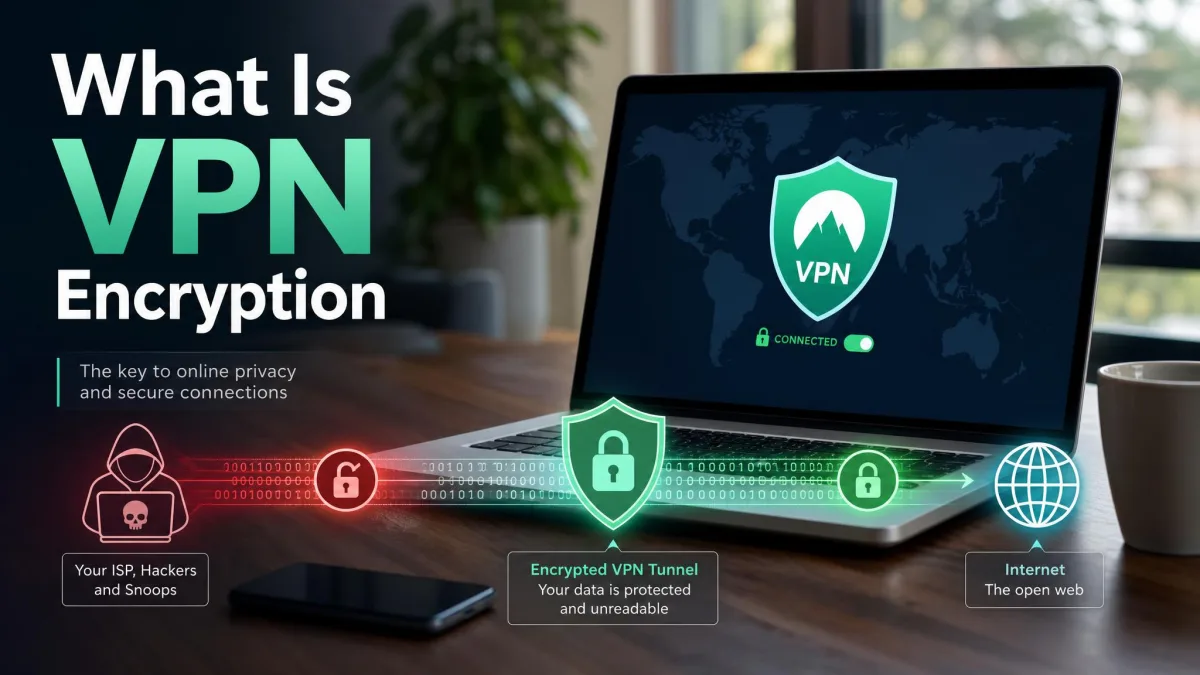
A VPN, or virtual private network, is a service that encrypts your internet traffic and routes it through a server run by the VPN provider, so websites see that server's address instead of your real IP address. That single change does two useful things at once. It stops your internet provider and anyone sharing your Wi-Fi from reading what you do online, and it makes your connection appear to come from wherever the server sits.
We have spent years connecting to VPN servers on laptops, phones, routers and work networks, and the gap between what people expect a VPN to do and what it actually does is wide. This guide covers the plain definition, the encrypted tunnel behind it, the types of VPNs you can buy or be issued, and what the technology genuinely protects.
What Is a VPN?
A VPN is a private, encrypted connection built on top of a public network, usually the internet. Instead of your device talking directly to a website, it opens a protected link to a VPN server first, and everything you send and receive travels inside that link. The standards bodies describe it in almost the same terms. NIST's glossary of the term "virtual private network" collects several definitions, including SP 800-113, which calls a VPN a virtual network built on top of existing networks that can provide a secure communications mechanism for data and IP information transmitted between networks. SP 800-77 Rev. 1 widens that to secure communication between networks or between different nodes on the same network, and CNSSI 4009-2015 describes a protected system link built from tunneling, security controls and endpoint address translation, giving the impression of a dedicated line.
The consumer version of all that is a small app with a connect button. Under the surface, it is the same idea businesses have used for decades.
What "virtual", "private" and "network" actually mean
Each word in the name is doing real work, and pulling them apart is the fastest way to understand the product.
- Virtual. No new cable is run anywhere. The connection is software defined and layered over the public internet you already pay for, which is why engineers call it an overlay network.
- Private. Traffic inside the link is encrypted, so anyone who can see the packets going past, including your internet provider, cannot read the contents.
- Network. You are not just protecting one app. Your device joins the provider's network and takes on an address and a location that belong to that network rather than to your home connection.
How Does a VPN Work?
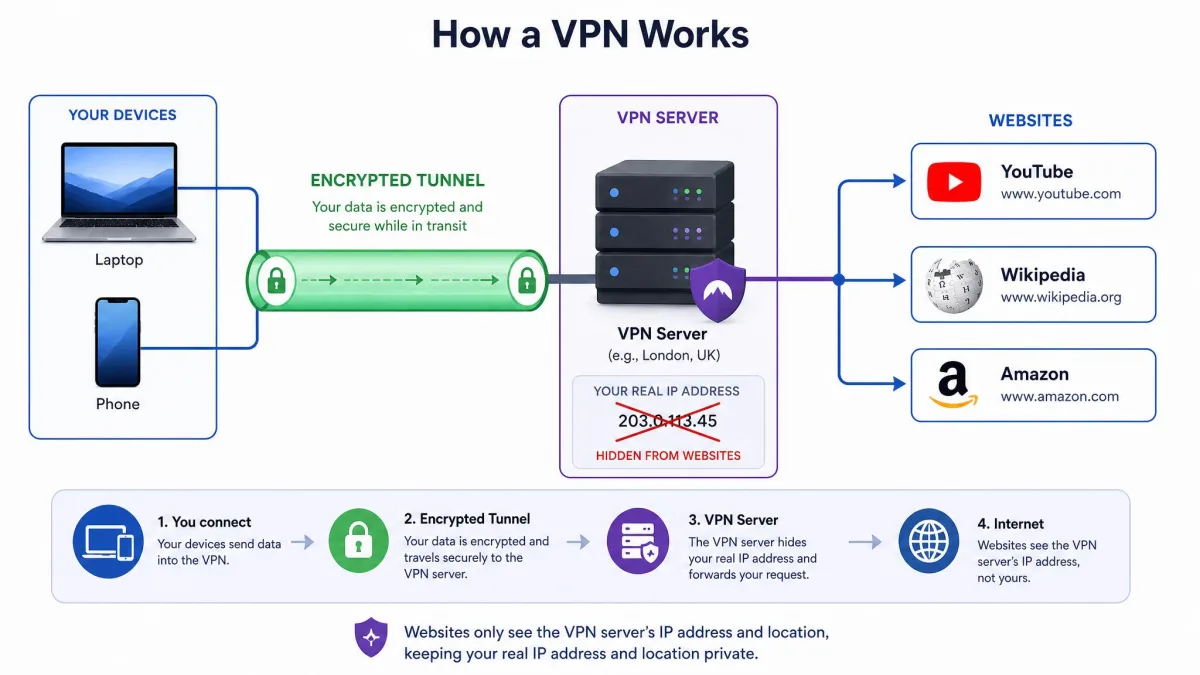
A VPN works by wrapping your internet traffic in encryption on your device, sending it to a VPN server, and letting that server pass it on to the site you asked for. The website replies to the server, the server encrypts the reply and sends it back down the same protected path.
The encrypted tunnel, step by step
Here is what happens between tapping connect and loading a page.
- The app authenticates. Your VPN client proves who it is to the chosen server and the two sides agree on encryption keys. WireGuard finishes this handshake in roughly 100 milliseconds, where OpenVPN can take several seconds.
- The encrypted tunnel opens. A virtual network adapter appears on your device and becomes the default route for outgoing traffic.
- Your traffic is encrypted and encapsulated. Each packet is scrambled and then placed inside another packet addressed to the VPN server, which is the part that makes the connection a tunnel rather than plain encryption.
- The server decrypts and forwards. It unwraps your request and sends it to the website using its own IP address.
- The reply comes back the same way. The server encrypts the response and returns it to your device, which decrypts it and hands it to your browser.
Steps three and four are the whole trick. Your internet provider carries the outer packet and can see only that you are talking to a VPN server, while the website receives a request that appears to come from that server.
What your ISP and websites see when a VPN is on
Your ISP sees encrypted traffic going to one address, and websites see the VPN server rather than you. That is a genuine split in visibility, and it is worth being precise about which side loses what.
| Observer | Without a VPN | With a VPN |
|---|---|---|
| Your internet provider | Every domain you visit, connection times and data volumes | An encrypted connection to a single VPN server |
| The public Wi-Fi operator | The sites you reach and any unencrypted content | Encrypted traffic they cannot read or reshape |
| The website you visit | Your real IP address and rough location | The VPN server's IP address and its location |
| Advertisers and trackers | Your IP address plus cookies and account activity | Cookies and account activity, but not your home IP address |
The bottom-right cell is the one people miss. Changing your address does nothing about the identifiers you carry with you.
What a VPN hides and what it does not
A VPN hides the contents and destination of your traffic from the network you are using, and hides your real IP address from the services you connect to. It does not hide who you are from a site you log into, and it does not remove tracking that lives in your browser. The Electronic Frontier Foundation's work on privacy and ISP surveillance covers the whole tracking stack, and a tunnel only protects one layer of it.
Your VPN provider now sits where your ISP used to sit. It can technically see the traffic your ISP no longer can, which is why the provider's logging policy and audit history matter more than any feature on the box.
Why Would You Use a VPN?
People use a VPN for four broad reasons: privacy from their internet provider, safety on public networks, access to services that are geo-restricted, and secure remote access to a private network. VPN use is no longer a niche habit either. A Forbes Advisor poll of UK internet users in June 2025 found 49% of respondents used a VPN on at least one device.
Privacy from your ISP and advertisers
Your internet provider can log every domain you request, and in many countries it can share or sell aggregated versions of that record. A VPN removes that view, because the provider only ever sees an encrypted connection to one server. Advertisers lose one of their more durable signals too, since your home IP address is a stable identifier that survives cookie clearing.
Safety on public Wi-Fi
Airport, hotel and cafe networks are shared networks, and you have no idea who else is on them or how the router is configured. Running a VPN on public Wi-Fi means the local network carries traffic it cannot read, which neutralises casual snooping and the more awkward tricks that involve a hostile access point injecting content into pages.
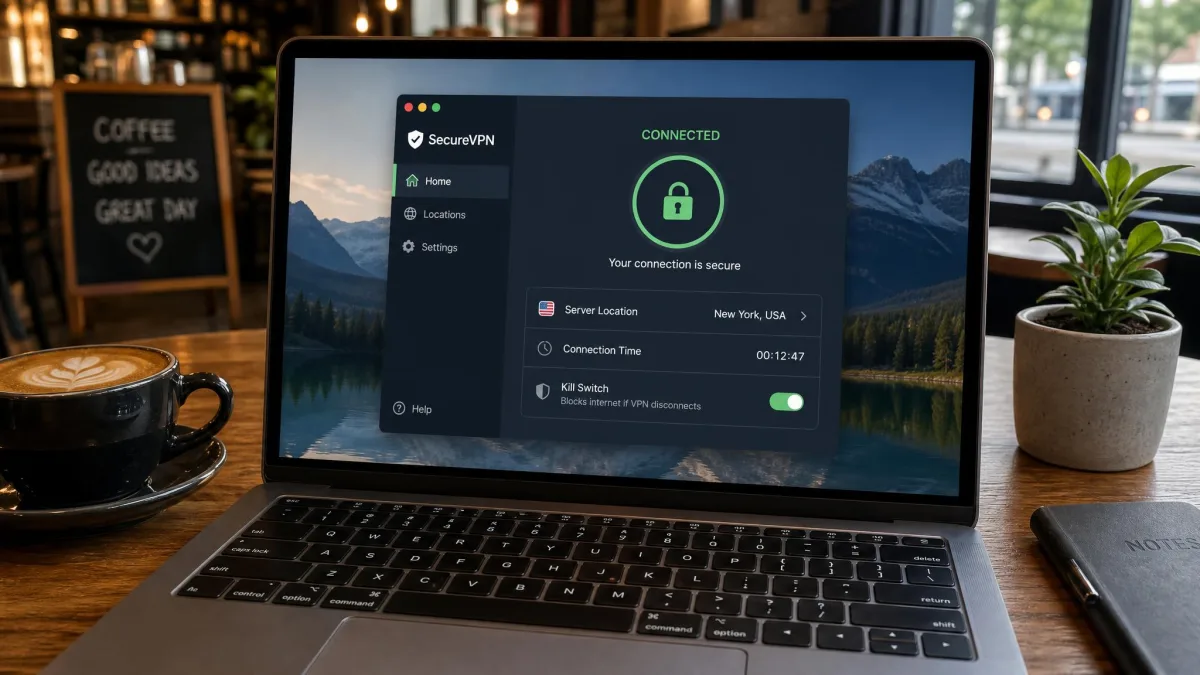
Turn on your VPN app's auto-connect for unknown Wi-Fi networks and enable the kill switch. The kill switch cuts all internet access if the tunnel drops, which looks alarming the first time because the connection appears dead, but that is the feature working exactly as intended.
Access to region-restricted content and services
Because websites see the server's location, connecting to a server in another country makes services behave as if you were there. That covers streaming libraries, sports coverage, news sites and the ordinary annoyance of a banking or government portal that refuses to load while you are abroad.
This is also the use case with the least reliable results. Streaming platforms detect and block shared VPN IP ranges aggressively, and in our experience a server that worked fine one week returns a proxy-detected error or a region-locked message the next.
Remote access to a work or home network
The original purpose of the technology was to let a person outside a private network behave as though they were inside it. That is still how corporate access works, and Microsoft's Always On VPN documentation describes the modern Windows Server version, with a device tunnel that connects before sign-in and a user tunnel for the person. The same idea scales down to a home server or a NAS you want to reach from a hotel room.
When Should You Turn a VPN On?
Turn it on whenever you are on a network you do not control, whenever you want your provider kept out of your browsing, and whenever you need a service to see a different location. Beyond that, leaving it on permanently is a reasonable default, and the cost is a modest speed reduction plus the occasional site that argues with you.
There are moments to switch it off. Online banking sometimes trips fraud rules when your address jumps countries, local devices such as printers and NAS boxes can vanish while the tunnel is up, and some workplaces block VPN traffic outright.
What Types of VPNs Are There?
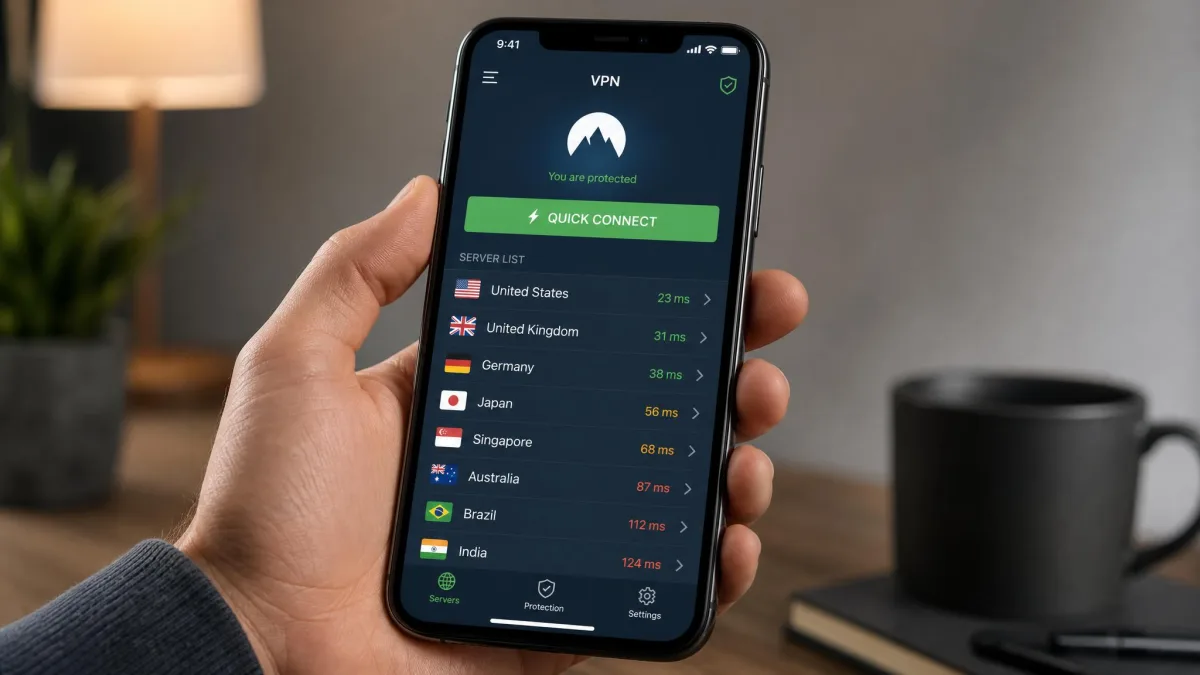
There are four types you will run into: remote-access VPNs for individuals, site-to-site VPNs joining whole networks, SSL or portal VPNs that run inside a browser, and router-level VPNs that cover every device in a home. The consumer apps most people mean by "VPN" are only the first category.
Remote-access (consumer) VPNs
A remote-access VPN connects one device to a network. That is the model behind every consumer service and behind the client your employer installs on a work laptop. You install an app, sign in, choose a server, and the whole device routes through it.
Site-to-site (business) VPNs
A site-to-site VPN links two networks through gateway devices, so a branch office and a head office behave like one network without either end running client software. Nobody taps a connect button here, because the tunnel lives in the routers and stays up permanently. The IETF's generic requirements for provider-provisioned VPNs in RFC 3809 came out of exactly this world.
Browser extensions and router-level VPNs
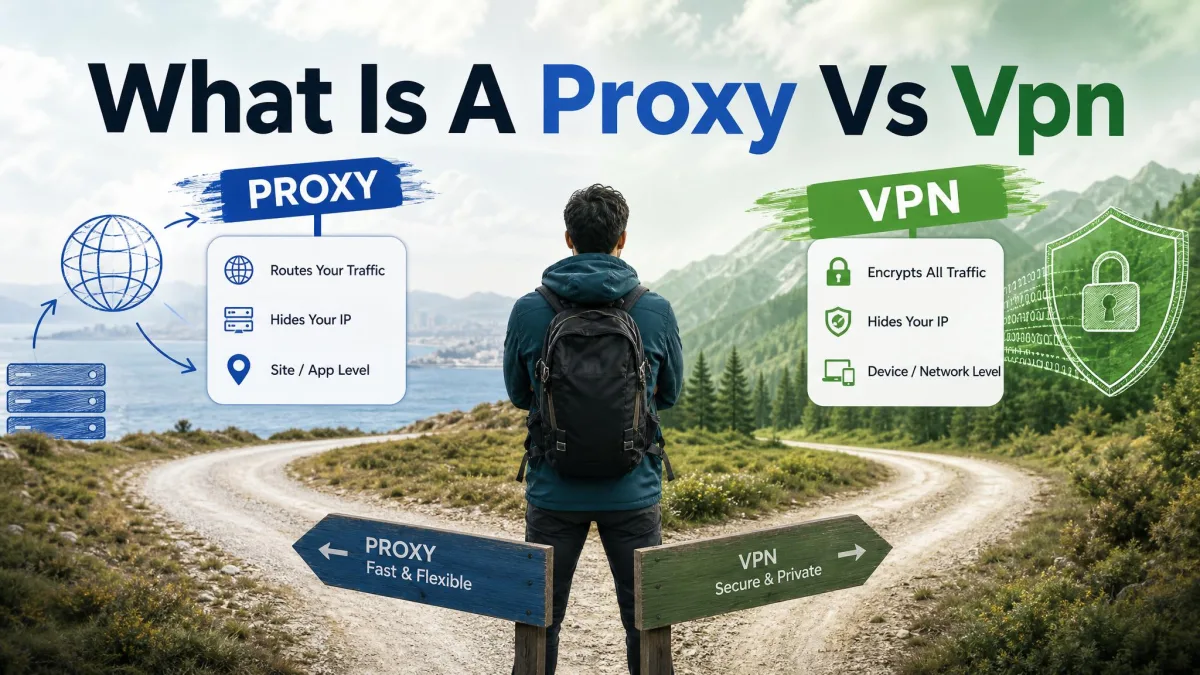
Browser extensions are usually encrypted proxies rather than full VPNs. They protect traffic from that one browser and leave everything else on your device unprotected, which is fine if you understand the boundary and misleading if you do not.
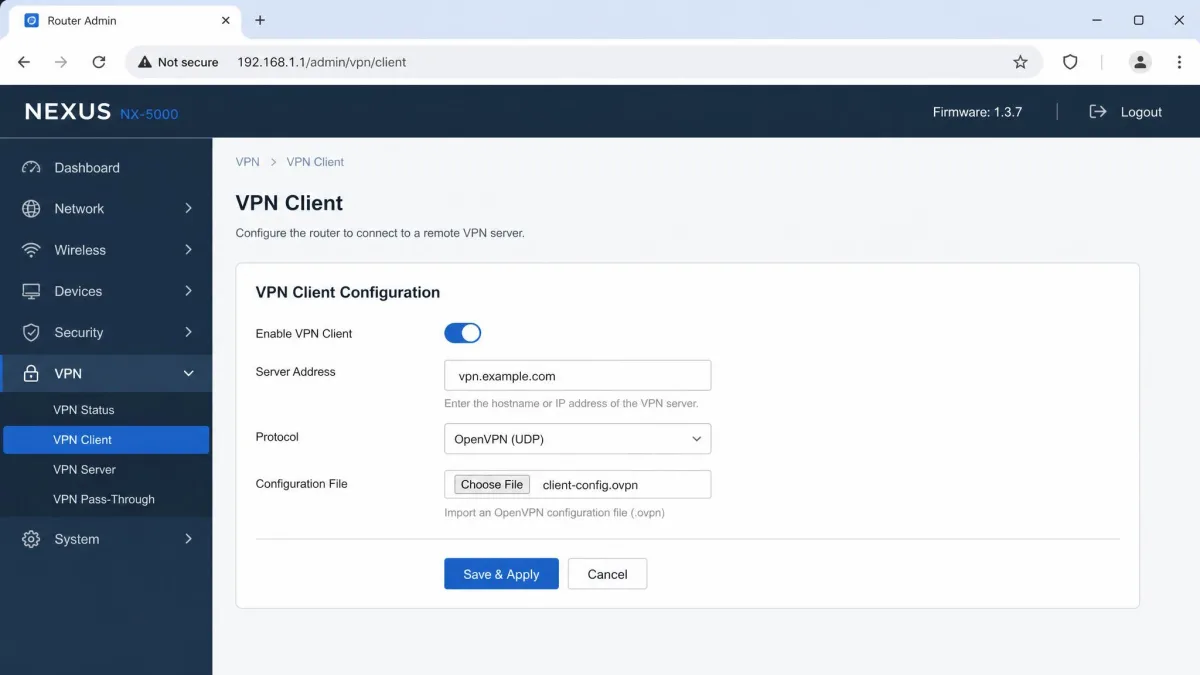
Router-level VPNs sit at the other extreme. Configuring the tunnel on the router covers smart TVs, consoles and any other device with no VPN app of its own. The trade is control, because everything in the house then goes through the same tunnel.
VPN Protocols and Encryption Explained
A protocol is the ruleset that decides how the tunnel is built and which encryption it uses, and your choice affects speed, stability and security more than the provider's marketing does. Most apps ship with a sensible default and let you change it in settings.
| Protocol | Speed | Security | Stability | Best use case |
|---|---|---|---|---|
 |
Fastest, connects in about 100 ms | ChaCha20/Poly1305, Curve25519, BLAKE2s | Very good, resumes quickly | Everyday browsing, streaming, gaming |
 |
Moderate, around 17% overhead over UDP | TLS-based with a long audit history | Good, TCP mode survives poor networks | Restrictive networks, using TCP port 443 |
 |
Fast | IPsec suites, strong | Best when a phone switches networks | Mobile devices moving between Wi-Fi and cellular |
 |
Slow, traffic is encapsulated twice | Depends entirely on the IPsec layer | Fair | Legacy device support only |
 |
Fast but insecure | Cryptographically broken | Fair | None |
WireGuard
WireGuard is the modern default and the one we reach for first. WireGuard's own protocol documentation sets out a deliberately small cipher list: ChaCha20 for symmetric encryption authenticated with Poly1305, Curve25519 for the elliptic-curve Diffie-Hellman key exchange inside a Noise_IK handshake, and BLAKE2s for hashing. An optional pre-shared key can be mixed into the handshake for extra resistance to future quantum attacks.
The practical payoff is speed and a near-instant reconnect. Independent 2026 benchmarks all put WireGuard ahead of OpenVPN, though the size of the gap swings widely with server distance, hardware and whether OpenVPN is running over UDP or TCP, so treat any single multiplier with suspicion.
OpenVPN
OpenVPN is the old reliable option. It is open source, TLS-based, runs over UDP or TCP, has been audited repeatedly and is supported by essentially every provider and platform. Its best feature is camouflage, because running over TCP port 443 makes the traffic look like ordinary HTTPS, which is often the difference between connecting and not connecting on a restrictive network. The cost is overhead, measured at roughly 17% over UDP and 20% over TCP in one test rig against about 4.5% for WireGuard, though that figure moves with MTU and packet size.
IKEv2/IPsec
IKEv2 paired with IPsec is the mobile specialist. It handles network changes gracefully, so a phone moving from home Wi-Fi to mobile data reconnects without dropping your session, and it is supported natively on iOS and Windows without extra software.
Older protocols you should avoid
PPTP is a legacy Microsoft protocol now considered cryptographically broken and unsafe for any privacy use. L2TP on its own provides no encryption at all and has to be paired with IPsec, and even then it is slower because traffic is encapsulated twice. SSTP tunnels PPP through SSL/TLS but is proprietary and effectively Windows-only.
Do not use PPTP for anything you would describe as private. It connects quickly and it appears in a lot of old router firmware, and neither of those facts makes its encryption safe today.
What a VPN Does Not Protect You From
A VPN hides your IP address and encrypts traffic in transit, and that is the full extent of the promise. It does not stop cookie and account-based tracking, browser fingerprinting, malware or phishing.
It does not make you anonymous
Anonymity means nobody can connect an action to you, and a VPN cannot deliver that. Your provider knows who is paying and which server you used, the site you visit still receives your browser fingerprint, and your traffic emerges from a real machine in a real jurisdiction. What you get is privacy from specific observers, which is genuinely useful and is not the same thing.
A VPN is a privacy tool, not a legal shield. Activity that is illegal without one stays illegal with one, and the marketing language around anonymity has done a lot of damage to how people judge their own risk.
It does not stop malware or phishing
Encrypting a download does not inspect it, and a phishing page loads exactly as convincingly over an encrypted tunnel as it does without one. Some providers bundle a blocklist that filters known malicious domains and ads, and those are worth enabling, but they are a separate feature bolted onto the VPN rather than a property of the tunnel.
You can still be tracked while logged in
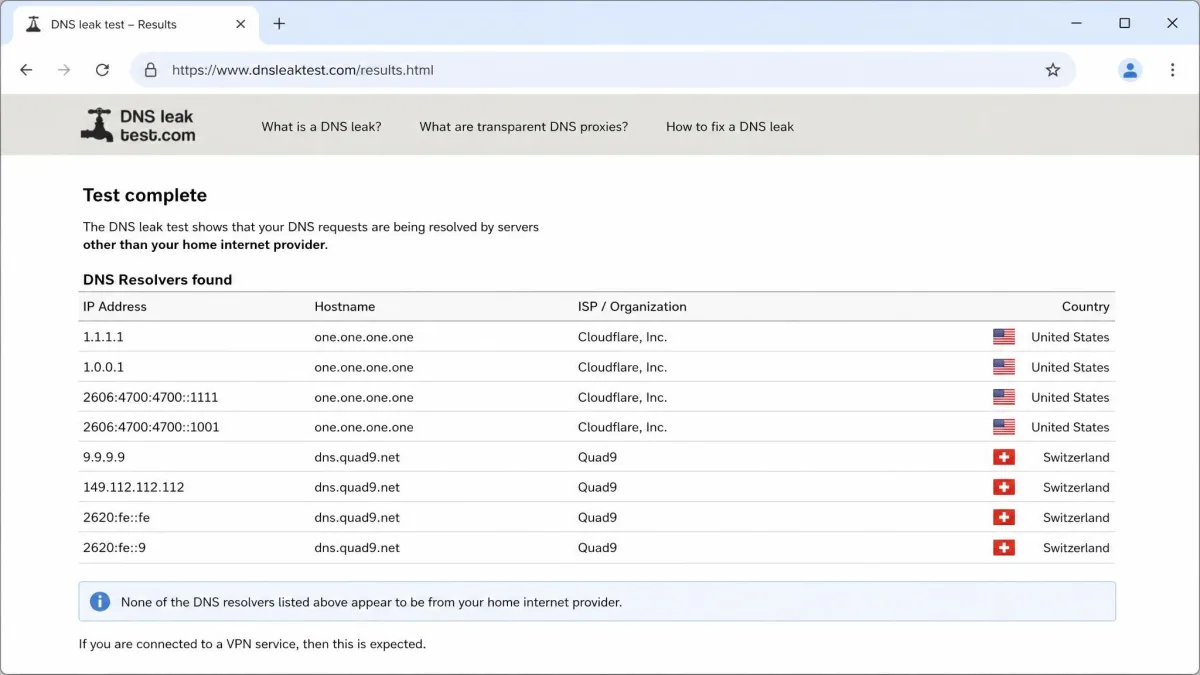
Sign into an account and you have identified yourself, whatever your IP address says. Cookies, local storage and fingerprinting all survive a server switch. The other quiet failure is DNS, because if your app leaks lookups outside the tunnel your ISP still learns which sites you visit even though the app reports a connected state. That is a documented problem in free apps in particular, and you can run a DNS leak test in under a minute to confirm your own setup is clean.
How to Choose a Good VPN
Choose on three things: a no-logs policy that has been independently audited, a server network and speed profile that suits where you live, and device limits that cover your household. Everything else on a features page is secondary.
No-logs policies and independent audits
A no-logs claim is worth exactly as much as the audit behind it, and the leading services now compete on audit frequency. NordVPN has completed six independent no-logs audits, the most recent by Deloitte in February 2026. Surfshark has had its policy verified twice, most recently by Deloitte in June 2025. Proton VPN's fourth consecutive no-logs audit, carried out by Securitum and published in 2025, found no user activity logging, no connection metadata storage and no traffic inspection.
Look for the report itself, a date within the last two years, and a named auditing firm. A policy page with no audit attached is a promise, not evidence.
Server network, speed and device limits
Server count matters less than server placement. Distance to the chosen server dominates the speed penalty far more than the provider brand does, so a service with a nearby city on its list will beat a bigger network with nothing close to you.
Device limits are worth checking before you pay. NordVPN and Proton VPN both allow 10 simultaneous connections, while Surfshark allows unlimited devices, which is the deciding factor in a house full of phones and laptops. Look for a kill switch, split tunnelling, working DNS leak protection and a dedicated IP option as well. That last one is underrated, because banks, email providers and shopping sites throw extra captchas, verification codes and occasional account lockouts when hundreds of people share one exit IP. Moving to a dedicated address removes most of that friction while keeping the tunnel encrypted.
Why free VPNs are usually a bad trade
Running servers costs money, so a free service is monetising something, and the research on what that something is makes uncomfortable reading. A 2026 study of 281 free Android VPN apps with over 2.4 billion installs found 29 apps leaking traffic outside the tunnel, including DNS lookups, and 61 apps sending some data in plain text. A Top10VPN investigation found 71% of the top 100 free Android VPNs shared personal data with third parties and 67% carried third-party tracking libraries, and its risk index rated 85% of 150 tested apps unsafe.
The performance picture matches. Speed and uptime problems cluster heavily on free and budget services rather than on the paid top tier, so you are usually trading privacy for a slower connection as well.
A free VPN that leaks DNS is worse than no VPN, because the app reports a connected state while your ISP still sees every site you visit. If you cannot pay for a service, use the free tier of a reputable paid provider rather than a standalone free app.
How Much Does a VPN Cost?
Expect to pay roughly $2 to $4 a month on a long-term plan, or around $10 to $13 a month if you pay month to month. On current two-year plans, Surfshark works out at $2.49 per month, Proton VPN at $2.99 and NordVPN at $3.39, while NordVPN billed monthly is $12.99.
Two things about those numbers. They are promotional rates that renew higher, and they change by region and campaign, so treat them as the introductory price rather than the long-run cost. NordVPN, Surfshark and Proton VPN all advertise a 30-day money-back guarantee, though refund mechanics differ in practice: Surfshark gives a full refund on plans longer than one month, while some providers, Proton VPN included, pro-rate the amount returned depending on region and plan length.
Are VPNs Legal?
VPNs are legal in the US, UK, EU and Canada, and in most of the world. Businesses everywhere depend on them, which is a large part of why blanket bans are rare.
The exceptions are specific and worth knowing before you travel. VPNs are effectively banned or criminalised in 4 countries, namely North Korea, Belarus, Turkmenistan and Iraq. China permits only state-licensed services and Iran permits only government-approved ones. Russia ordered a large number of VPN apps removed from app stores in 2024, though the removal list has been revised repeatedly since, so the count is approximate rather than fixed. Install and test your app before you fly, because the app store you need may not be reachable once you land.
Will a VPN Slow Down Your Internet?
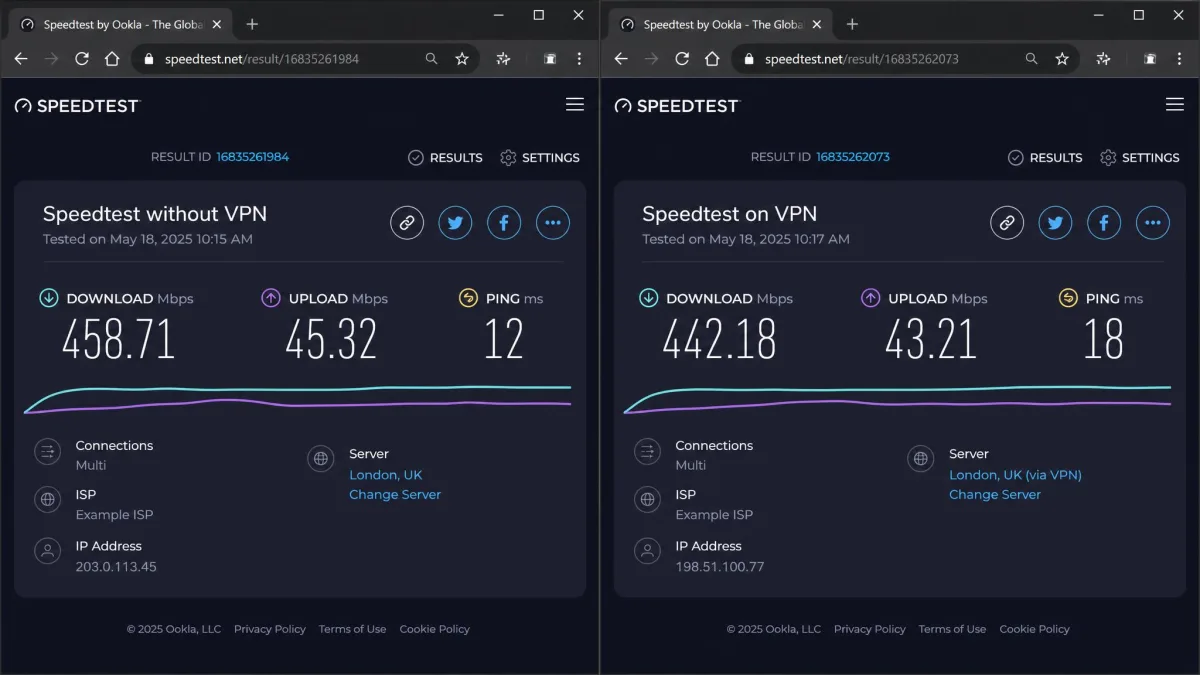
Yes, a little, and how much depends mostly on how far away your server is. Encryption adds processing and the detour adds distance, so some loss is unavoidable. On a nearby server running a modern protocol, a 5% to 15% loss is typical and most people will not notice it during normal browsing or streaming.
The spread between providers is wider than that. Across 30 providers tested on a roughly 250 Mbps line in early 2026, the average speed loss was about 21%, with the best provider losing 6.26% and the worst 62.77%. Security.org's testing recorded NordVPN download and upload speeds that never dropped more than six percent even on distant servers, which is the top of the range rather than the norm.
If your connection feels sluggish, work through this order:
- Switch the protocol to WireGuard, which is the single fastest fix for a slow tunnel.
- Change to the nearest server rather than the one your app picked automatically.
- Try a different server in the same city, since individual servers get congested.
- Test on a wired connection to rule out Wi-Fi as the real cause.
- Restart the app so the tunnel rebuilds from scratch.
Pros and Cons of Using a VPN
Pros
- Encrypts your traffic so your ISP and public Wi-Fi operators cannot read it
- Hides your real IP address from the websites and services you use
- Unlocks geo-restricted content and services while you travel
- Gives secure remote access to a work or home network
- Prevents price and availability changes based on your location
- Costs only a few dollars a month on a long-term plan
Cons
- Reduces your connection speed, typically by 5% to 15% on a nearby server
- Does not make you anonymous or stop tracking of logged-in accounts
- Does nothing about malware or phishing on its own
- Streaming services actively detect and block VPN addresses
- Shared exit IPs trigger extra captchas on banking and shopping sites
- Moves your trust from your ISP to your VPN provider
How to Set Up and Use a VPN
Setting up a consumer VPN now means installing an app, signing in and tapping connect. Manual configuration only comes up for router-level tunnels and for work VPNs where an administrator hands you a profile.
On Windows
Download the installer from your provider's own site rather than a download portal, run it, sign in and pick a server. Then open Settings, then Network and internet, then VPN to confirm the adapter is present. In the app itself, enable the kill switch and set WireGuard as the protocol before you do anything else. For a work connection, your IT team will either supply a client or issue a profile you add through that same Windows VPN settings page.
On macOS
Install the provider's app from its site or the Mac App Store, then approve the network extension prompt macOS shows the first time you connect, because the connection will silently fail without it. Turn on connect-on-launch so the tunnel comes up with the machine. Manual profiles go in System Settings, then Network, then VPN, and are mostly a work-network requirement.
On iPhone and Android
Install the app from the App Store or Google Play, sign in and allow the VPN configuration prompt your phone shows on first connection. Both platforms then show a small VPN indicator in the status bar. Enable auto-connect on untrusted Wi-Fi here more than anywhere else, since phones join public networks constantly without being asked. On a phone that moves between Wi-Fi and mobile data all day, IKEv2 is worth trying if WireGuard drops sessions.
On a router
Router setup is the most work and the widest coverage. Check that your router supports a VPN client, either in stock firmware or through something like OpenWrt, then load your provider's configuration file and enter your service credentials. Every device on the network is then covered, including smart TVs and consoles that have no VPN app at all. A common approach is to run the router tunnel for the living room and keep apps on the laptops.
Two failures account for most VPN complaints once you are set up. Office networks and censored national networks block VPN ports outright, so the app hangs on connecting or drops repeatedly, and the fix is to switch to OpenVPN over TCP port 443 or to an obfuscated server. The other is a site refusing to work, which changing servers usually clears.
Frequently Asked Questions
Are VPNs legal?
Will a VPN slow down my internet?
Does a VPN make you anonymous?
Are free VPNs safe?
Do VPNs stop viruses or malware?
Can I use one VPN on multiple devices?
Can my ISP still see what I do?
Can I use a VPN on my phone?
Should I leave my VPN on all the time?
The Bottom Line
A VPN is a straightforward tool with a clear job: encrypt your traffic between your device and a server, and swap your real IP address for the server's. That is worth having for public Wi-Fi, for keeping your internet provider out of your browsing, for reaching services from another country and for connecting to a work network from outside it.
Choose a paid provider with a recent independent no-logs audit, servers near where you actually live, and enough device slots for your household. Set the protocol to WireGuard, turn on the kill switch, run a DNS leak test once and then largely forget about it. Just keep the boundary in mind: a VPN protects your connection, not your accounts, your downloads or your judgement about which links to click.
We test VPN services against real speed, leak and streaming checks before recommending anything, and the pattern that repeats across every round is that server distance and protocol choice decide the experience far more than brand or server count.