If you are trying to keep an eye on a child's phone, or you manage company devices and need a record of what happens on them, the shopping process is genuinely confusing. Every vendor in this category promises the same things: hidden operation, full social media access, live location, and a setup that takes three minutes. The marketing pages rarely tell you which of those promises depends on rooting an Android phone, jailbreaking an iPhone, or handing over an iCloud password.
We spent this round comparing six of the most widely sold monitoring apps on what actually holds up once the software is on a device, and where each one quietly falls short. Our scoring leaned on install friction, how dependable the captured data was, pricing honesty, and refund terms.
Below are the picks, the full comparison table, per-app pricing, and the legal ground you need to stand on before you install anything.
The Best Spy Apps at a Glance
These six are not really competing for the same buyer, which is why a single ranking only takes you so far. Three of them are shaped for a parent or a manager who wants a dependable record of calls, messages and location, and who will never touch a rooting tool. Two are shaped for someone willing to trade convenience for depth, either by rooting an Android phone or by accepting a slower, thinner iCloud feed. One is priced for a buyer who mostly wants to find out whether monitoring software is worth having at all.
The table below is the fastest way to place yourself in that spread. Read the platform column first, then the price, then the refund terms. Those three decide most purchases in this category. The feature columns only start to matter once the first three line up.
Spy App Comparison Table
| Product | Buy | Platform support | No-jailbreak iPhone | Stealth mode | Social media monitoring | Call and SMS logs | GPS | Starting monthly price | Free trial |
|---|---|---|---|---|---|---|---|---|---|
 |
Check price → | Android and iOS | Yes, via iCloud sync | Yes, hides as Update Service | Yes | Yes | Yes, with geofencing | $11.67 | No, 14-day refund |
 |
Check price | Android and iOS | Yes, via iCloud | Yes | Yes, 20+ apps | Yes, plus deleted recovery | Yes | $12.49 | No, 14-day refund |
 |
Check price | Android and iOS | Yes, via iCloud | Yes | Yes | Yes | Yes, with geofencing | $9.99 | No |
 |
Check price | Android, iOS, PC, Mac | Basic features only | Yes | Yes, root or jailbreak for depth | Yes, plus live interception | Yes, with geofencing | $49.95 | No, 10-day refund |
 |
Check price | Android and iOS | Yes, via iCloud | Yes | Yes | Yes | Yes, with geofencing | $9.16 | No, 30-day guarantee |
 |
Check price | Android and iOS | Unclear in vendor docs | Yes | Rooted Android only | Yes | Yes, with geofencing | $4.99 | No, demo dashboard |
Prices in that table are the cheapest per-month rate, which in every case means committing to a year up front. Monthly billing costs three to five times as much.
The 6 Best Spy Apps in 2026
1. mSpy - Best Overall Spy App
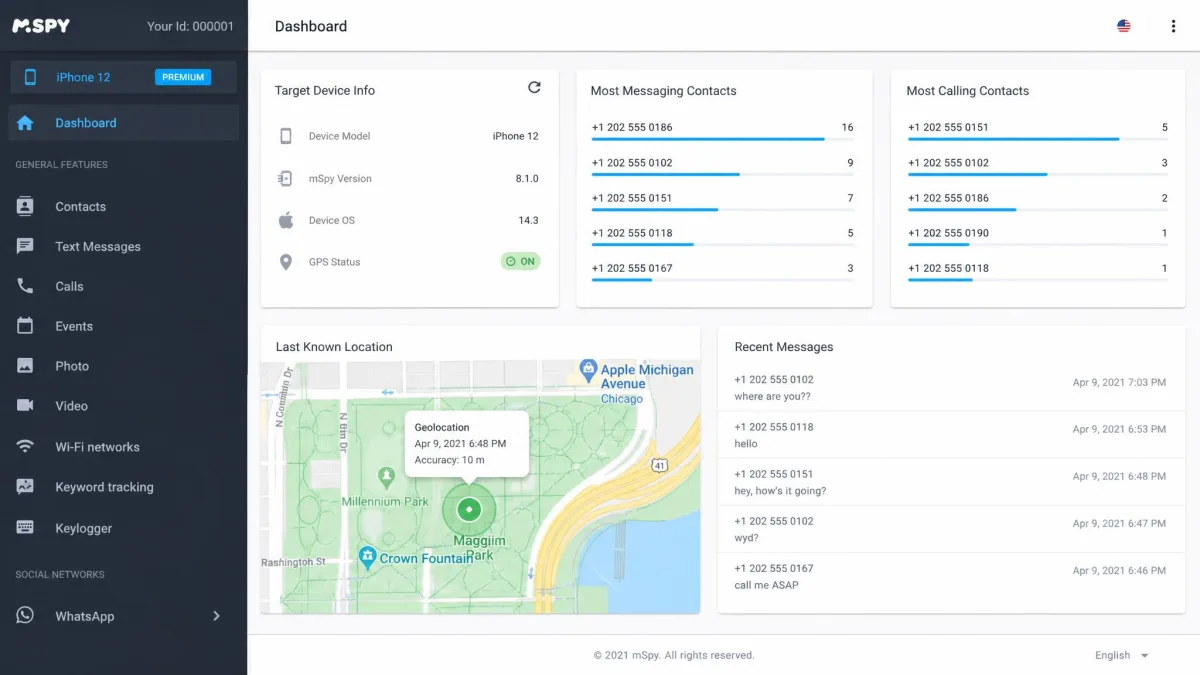
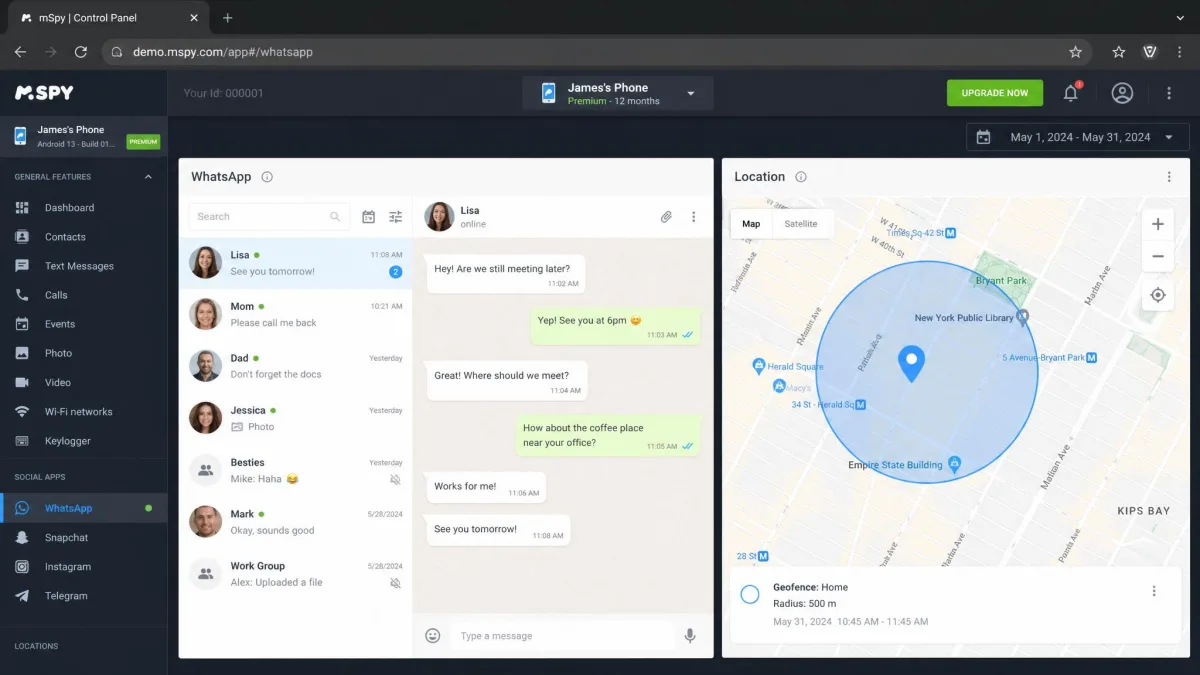
mSpy is the app we would hand to someone who has never installed monitoring software before. The dashboard puts messages and location on the first screen. Those are the two panels people actually open, and nothing else in this group surfaces them with less hunting.
On Android it installs on most devices running Android 4 and above with no root required, and it hides itself under the innocuous name Update Service. That naming choice is effective on the app drawer, but the hidden background service can draw close to 14 percent of battery in an hour, which is noticeable to anyone paying attention to their phone.
iPhone monitoring runs over iCloud sync. What works without a jailbreak depends on which install method the iPhone allows, so the feature set is not the same on every device. The iCloud route can also sit empty for more than 24 hours with no events synced at all, which is worth knowing before you rely on it.
Support is the quiet standout. mSpy live chat answers almost immediately, which is unusual in this category. Complaints against the company cluster around payments and refund requests rather than the monitoring itself.
Key Features
- 30+ monitoring features, including a keylogger for both Android and iPhone
- Screen recorder and hidden mode
- WhatsApp, Messenger, Instagram, and Snapchat message capture
- GPS location with geofencing
- Call and SMS logs, browser history, email, and calendar access
- Website blocking
Pros and Cons
Pros
- Broadest feature set of any app we compared
- Live chat support answers almost immediately
- No root needed on Android, and works back to Android 4
- Cleanest dashboard of the group
Cons
- The hidden service can pull close to 14 percent of battery per hour
- iCloud monitoring can go a full day without syncing anything
- The 14-day refund is conditional on a technical failure, not dissatisfaction
- WhatsApp threads sometimes attribute messages to the wrong sender
Pricing
mSpy costs $11.67 per month on the 12-month Premium plan, $19.99 per month on the 3-month plan, and $39.99 for a single month. An Extreme tier at $13.99 per month on a 12-month plan adds remote camera and microphone capture. There is a 14-day money-back guarantee, but it is conditional on a technical failure rather than on you changing your mind.
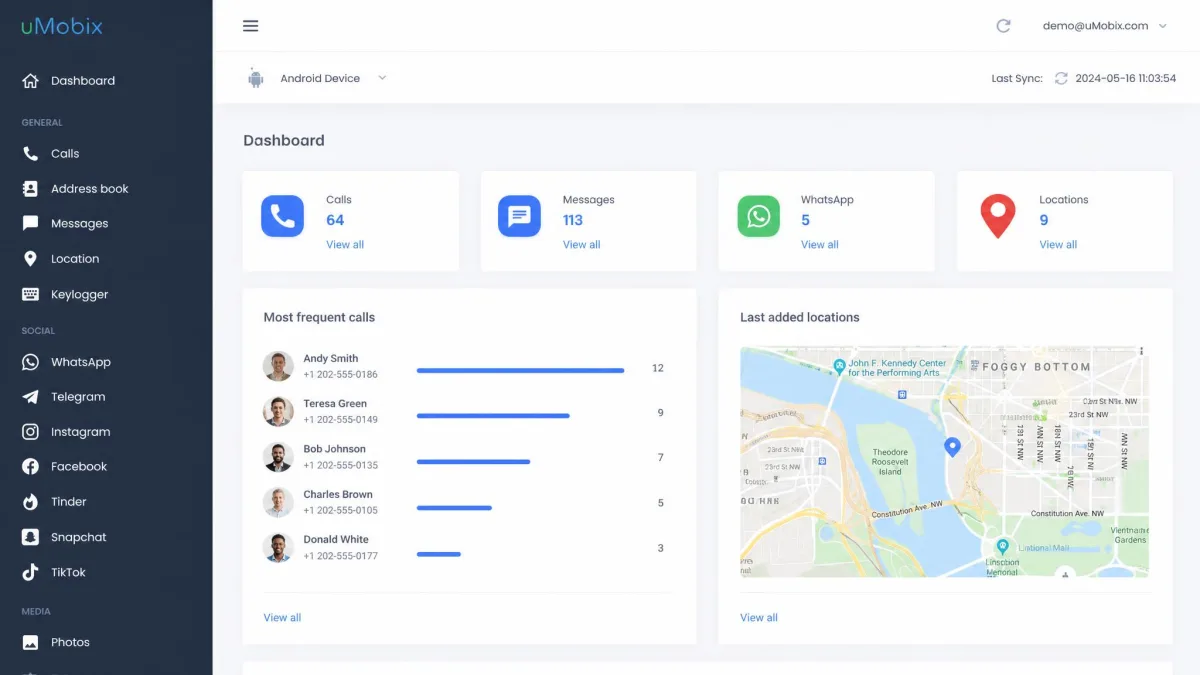
2. uMobix - Best for Real-Time Android Monitoring
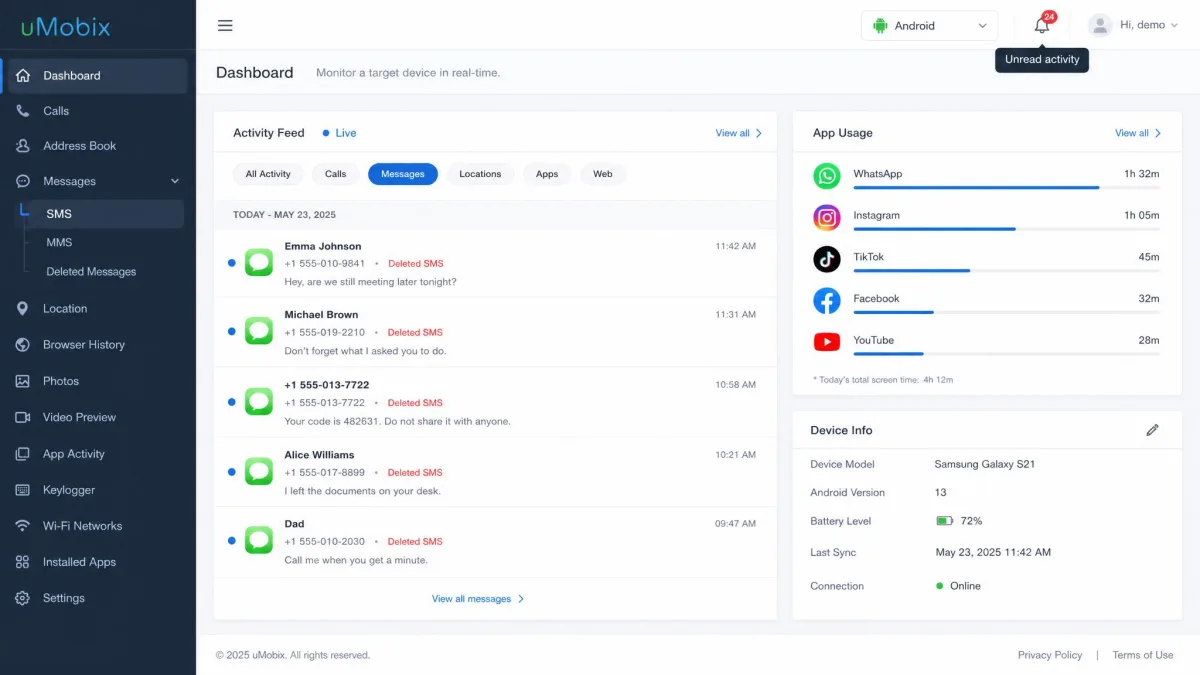
uMobix is built around freshness of data rather than breadth. On Android it recovers deleted messages and call logs, tracks app usage time, and pulls front-camera snapshots, and it monitors activity across more than 20 social apps.
Setup is where you need to pay attention. Partway through the Android install, the phone shows a QR code to scan, and the screen after it asks you to grant full trust to a root certificate. Tapping through that prompt hands the app broad visibility over the phone's traffic. That is how uMobix sees as much as it does, and it is a meaningful thing to agree to on someone else's device.
The iPhone side is thinner than the marketing suggests. Text message monitoring does not work on iPhone, and the social features repeatedly error out with a prompt demanding iCloud credentials. Location readings can also be inconsistent, occasionally landing miles from the real position.
One design decision shapes daily use more than any feature: uMobix signals new activity with dashboard badges rather than push notifications, so nothing reaches you unless you open the panel. Shortening the update interval to compensate slows the app down.
Key Features
- Real-time monitoring across 20+ social apps
- Deleted message and call log recovery on Android
- App usage time tracking and remote app blocking
- Location history on iOS and Android
- Keylogger and front-camera snapshots
Pros and Cons
Pros
- Recovers deleted calls and messages on Android
- Covers more than 20 social apps in real time
- Genuinely fast refresh on Android when the interval is left alone
- Transparent published pricing
Cons
- Requires trusting a root certificate during setup
- No text message monitoring on iPhone
- Location readings can land miles off
- Alerts live in the dashboard, not on your phone
Pricing
uMobix costs $12.49 per month on the 12-month plan, billed at $149.88, $29.99 per month on the 3-month plan, or $49.99 for one month. The 14-day refund window is limited to technical defects, with no general money-back guarantee. Trustpilot's community rates uMobix around 3.7 out of 5 across several hundred reviews, though the score moves as new reviews land.
3. Eyezy - Best for Social Media and Messages
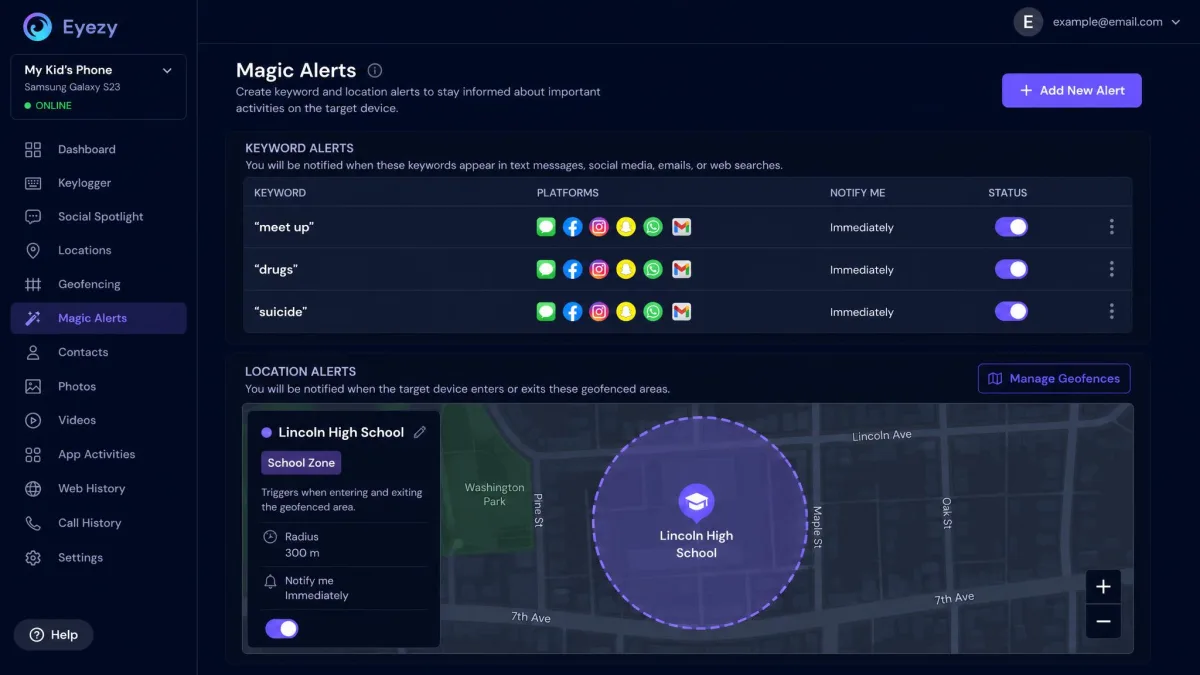
Where uMobix chases freshness, Eyezy chases relevance. Magic Alerts lets you set keywords and geofences so the app tells you about the things that matter, instead of handing you everything to read. It is the smartest idea in this roundup.
The install is where the shine comes off. Android setup stops partway and asks for Google Play Protect to be switched off before it will complete. When we opened the web dashboard afterwards, the monitored device did not appear in it at all. The iPhone panel was still empty a full day later.
Alerting disappoints in the same quiet way. Keyword alerts and geofence alerts can fail to fire with no error shown, even when the zones and the words are configured correctly. Location updates arrive slowly and unevenly, so you end up checking the map rather than being told. Several features advertised on the marketing pages, including search history and content filtering, are not findable in the app once it is running, and email monitoring reaches Gmail and little else.
Cancelling an Eyezy subscription is harder than starting one, and that is the most common complaint against it.
Key Features
- Text, email, and social message monitoring
- Magic Alerts for keyword and geofence notifications
- Plans Breaker calendar view
- Screen recorder that captures deleted messages
- Website and app blocking, plus a Wi-Fi Connection Blocker
Pros and Cons
Pros
- Keyword and geofence alerting is the best idea in the category
- Screen recorder catches messages that were deleted
- Strong coverage of chat and social platforms
- Wi-Fi blocking is a useful parental lever
Cons
- Alerts can silently fail to fire
- Some advertised features are missing from the installed app
- Email monitoring is effectively Gmail only
- No free trial and no money-back guarantee
Pricing
Eyezy lists roughly $47.99 for one month and about $9.99 per month on the 12-month plan, but its headline monthly rate swings with the promotion running at checkout, so the figure shown at purchase can differ from the advertised one. The annual rate is promotional, and the renewal price is higher than the first term. There is no free trial and no money-back guarantee, and refunds are handled case by case rather than under a published guarantee. AllAboutCookies scores Eyezy 3.0 out of 5.
4. FlexiSPY - Best Advanced Feature Set
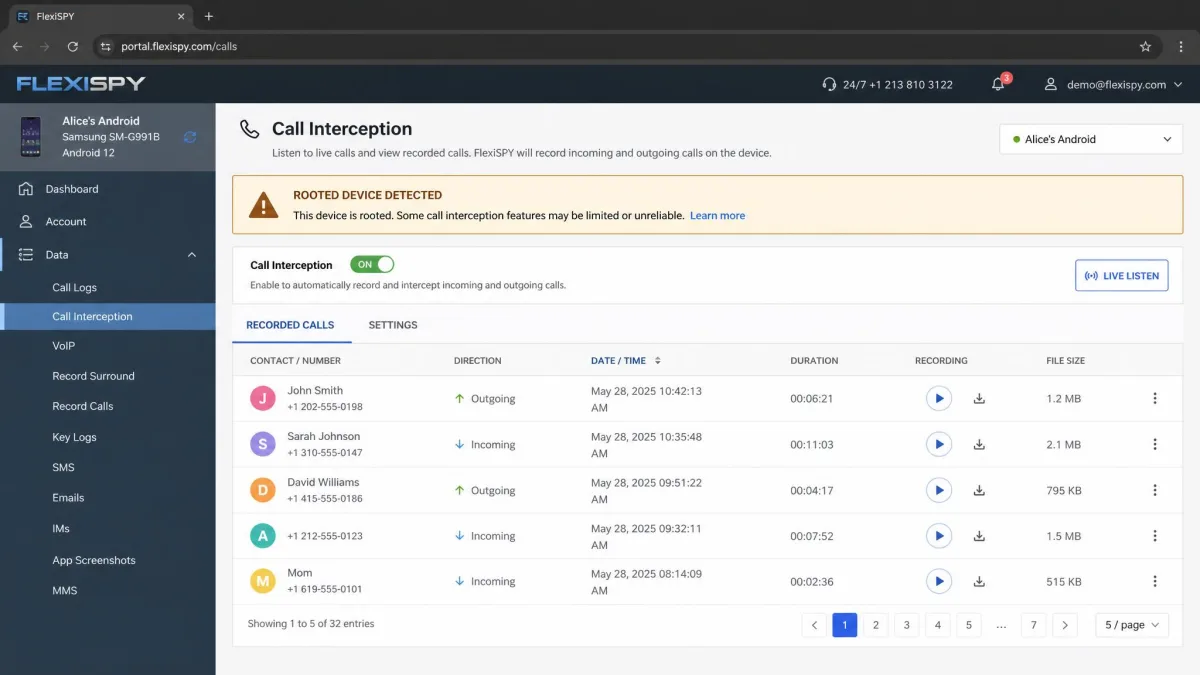
If Eyezy is the app for people who want less data, FlexiSPY is the app for people who want more of it than anyone else sells. Live call interception, ambient room recording, and remote camera and microphone access are its headline capabilities. It also runs agents on PC and Mac, not only on phones.
What You Have to Do First
The headline features are gated behind work you have to do before any of them switch on. Call interception and ambient recording need a rooted Android phone or a jailbroken iPhone, and no paid tier changes that. For most buyers, that is where the product stops.
The install itself is the most technical of the six. It needs the device physically in your hands, and it walks you through disabling security settings by hand rather than handling them for you. We got through it, but the number of manual toggles is the reason the company sells a paid remote install service alongside the software. It is also the reason we would not hand this one to a first-time buyer. Even at the top tier we still could not read some end-to-end encrypted chat apps, which is the same wall the mid-priced options run into.
Key Features
- Live call interception and ambient room recording
- Remote camera and microphone access
- WhatsApp, Facebook, Instagram, and Snapchat capture
- GPS with geofencing and a keylogger
- PC and Mac agents
- Optional paid remote installation service
Pros and Cons
Pros
- Call interception and ambient recording are unique in this group
- Covers PC and Mac alongside Android and iOS
- A paid remote install service exists if you get stuck
- Deepest social app capture when the device is rooted
Cons
- Headline features need a rooted Android or jailbroken iPhone
- The most technical installation of any app we compared
- Highest price in the category by a wide margin
- Only a 10-day refund window, and no free trial
Pricing
FlexiSPY sells Lite at $49.95 per month, Premium at $79 per month, and Extreme at $119 per month, with the Extreme tier unlocking call interception and ambient recording. Longer packages bring the monthly cost down. Premium runs $119 for three months and $179 for twelve months, which works out to roughly $14.92 a month. Extreme is quoted at $239 for three months and $349 for twelve months, though those term prices do not line up with the monthly rate shown at checkout, so what you actually pay can differ. There is a 10-day refund window and no free trial.
5. KidsGuard Pro - Best for Parental Monitoring
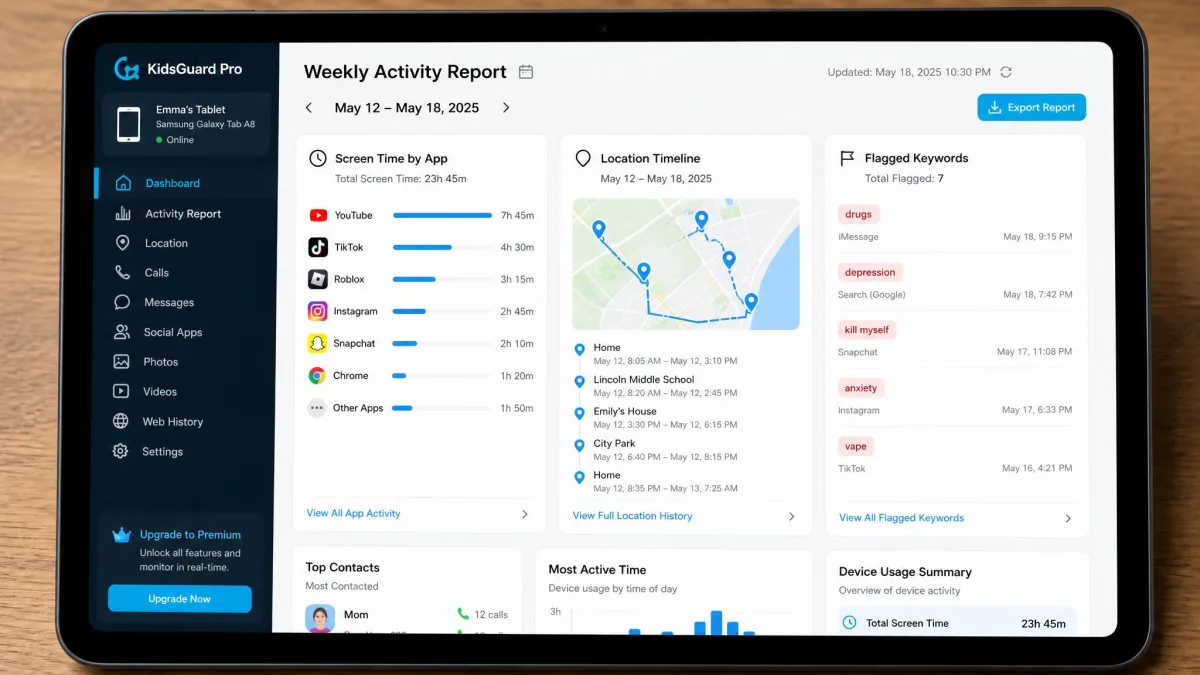
KidsGuard Pro pulls in the opposite direction from FlexiSPY. Nothing here needs a rooted phone, the feature list reads like a parental control tool rather than a surveillance suite, and the annual price is the second lowest of the six.
What Setup Actually Takes
Android setup runs to about ten documented steps. You switch off Google Play Protect, side-load the installer from clevguard.net, and grant the app device administrator rights. Budget roughly five to ten minutes with the phone in your hand, and expect to read each prompt rather than tapping straight through it.
Once configuration finishes, the icon disappears from the home screen and from the app drawer. The background component sits in the app list under the name System Update Service. That hidden install survives a restart, and restarting the monitored phone is the vendor's own advice when data stops arriving.
Stealth has one hole worth knowing about. On Android 10 and above, a screen-casting icon can appear near the battery indicator while screenshots are being captured, and no setting turns it off. That indicator is how an attentive phone owner notices the app, and a factory reset on their side ends monitoring outright.
Data then arrives at two different speeds. Call logs and browser history land on the dashboard almost immediately. Social app screenshots only upload over Wi-Fi, never on cellular data. The first sync takes noticeably longer than every one after it, and delays of several minutes are normal on a weak signal. Social chats also stay empty unless the app itself is installed on the monitored phone and the KidsGuard Pro Assistant component is running, and the panel often needs a manual Sync click before it refreshes. Location readings can be inaccurate, in-panel search is unreliable, and on a recorded call the far side comes through faint.
The refund terms deserve a close read as well. The 30-day money-back guarantee applies to annual and quarterly products, and it is cut to 7 days on the monthly plan, so a flat 30-day claim overstates what a monthly buyer gets.
Key Features
- Call and SMS logs
- GPS tracking with geofencing
- Social app monitoring and a keylogger
- Screenshots and screen recording
- Photo and browser history access
- Remote camera and microphone capture
- App activity reports
Pros and Cons
Pros
- The most generous refund terms in the category on annual plans
- Feature set is well matched to parental monitoring
- Very low effective monthly cost on the yearly plan
- Screenshots and screen recording are included at the base tier
Cons
- The 30-day guarantee drops to 7 days on monthly billing
- A screen-casting icon can appear while screenshots are captured, and nothing turns it off
- Social app screenshots upload only over Wi-Fi, not cellular data
- Priced per device, like everything else here
- Monthly billing is poor value at $29.95
Pricing
KidsGuard Pro for Android costs $29.95 for one month, $49.95 for three months, or $99.95 a year. The annual price works out at about $9.16 per month for a single device, which is the second cheapest effective rate in this roundup.
6. XNSPY - Best Budget Option
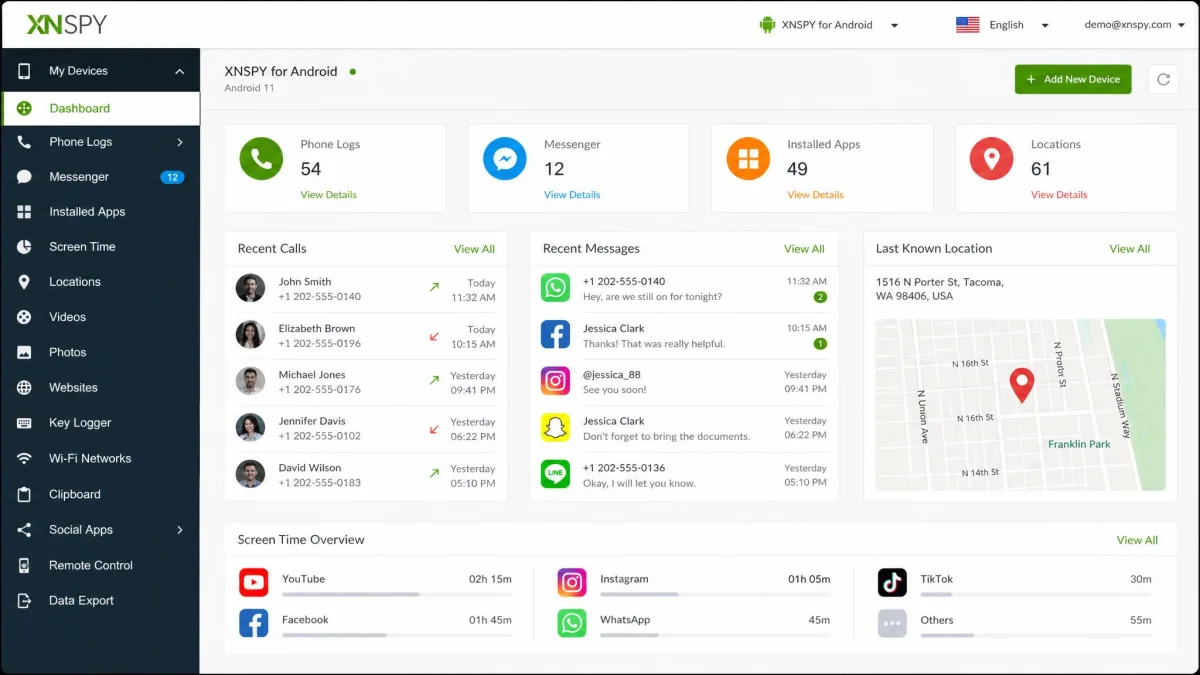
Where KidsGuard Pro competes on refund terms, XNSPY competes purely on price. It is the cheapest realistic way into this category, and it is the only one that lets you tour the panel before you pay.
Before You Trust It With Data
Its security history is the reason this app sits last rather than higher. TechCrunch reported in 2022 that XNSPY had exposed data from at least 60,000 monitored devices. A February 2026 incident is reported to have exposed roughly 536,000 customer payment records, though that count is an estimate and the vendor has not published its own figure. XNSPY also keeps backed-up data indefinitely unless you go in and delete it yourself, which means the stored copy of someone's messages outlives your subscription by default.
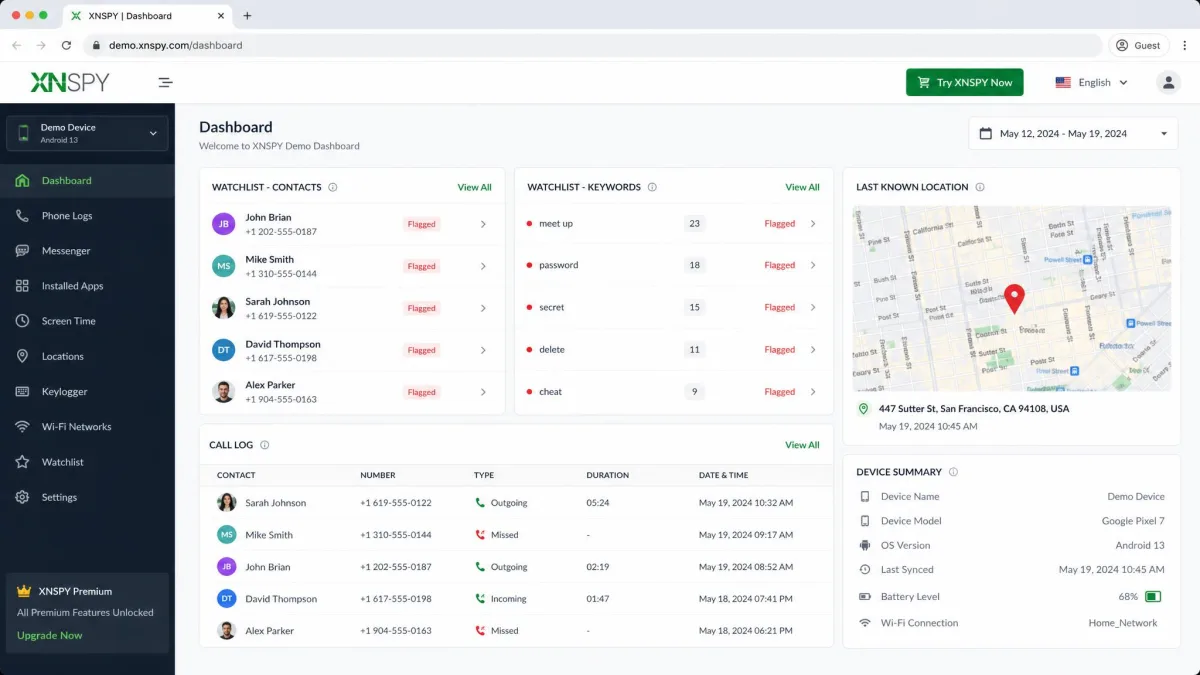
The demo dashboard is the redeeming feature, and it is worth an hour before you spend anything. We opened the interactive demo and walked the panel the way an owner would, clicking through the call log, the location pin, and the watchlist alerts on sample data. What the demo does not show you is the gap between editions. Social app monitoring is restricted to rooted Android devices, so the WhatsApp and chat panels on display are not available to most buyers on the annual plan, and the vendor's own documentation gives conflicting accounts of what an iPhone setup requires.
Key Features
- Call and SMS logs
- GPS location with geofencing
- Remote commands and ambient recording
- Keylogger and watchlist alerts for contacts and keywords
- WhatsApp and social app logs on rooted Android
- Interactive dashboard demo before purchase
Pros and Cons
Pros
- Lowest effective price of any app here at $4.99 per month
- A live demo dashboard you can explore before paying
- Watchlist alerts for specific contacts and keywords
- Solid basics: calls, SMS, and location
Cons
- Two reported data exposures, including 60,000 monitored devices in 2022
- Social monitoring needs a rooted Android device
- Vendor documentation contradicts itself on iPhone setup
- Backed-up data is retained indefinitely unless you delete it
Pricing
XNSPY sells a Basic edition at $59.99 a year, about $4.99 per month, and a Premium edition at $89.99 a year, about $7.49 per month. A single month of Premium costs $59.99, which makes monthly billing poor value. The 10-day refund policy carries wide exclusions and partial-refund outcomes as low as 30 to 50 percent. Impulsec rates XNSPY 3.9 out of 5.
How We Tested and Chose These Spy Apps
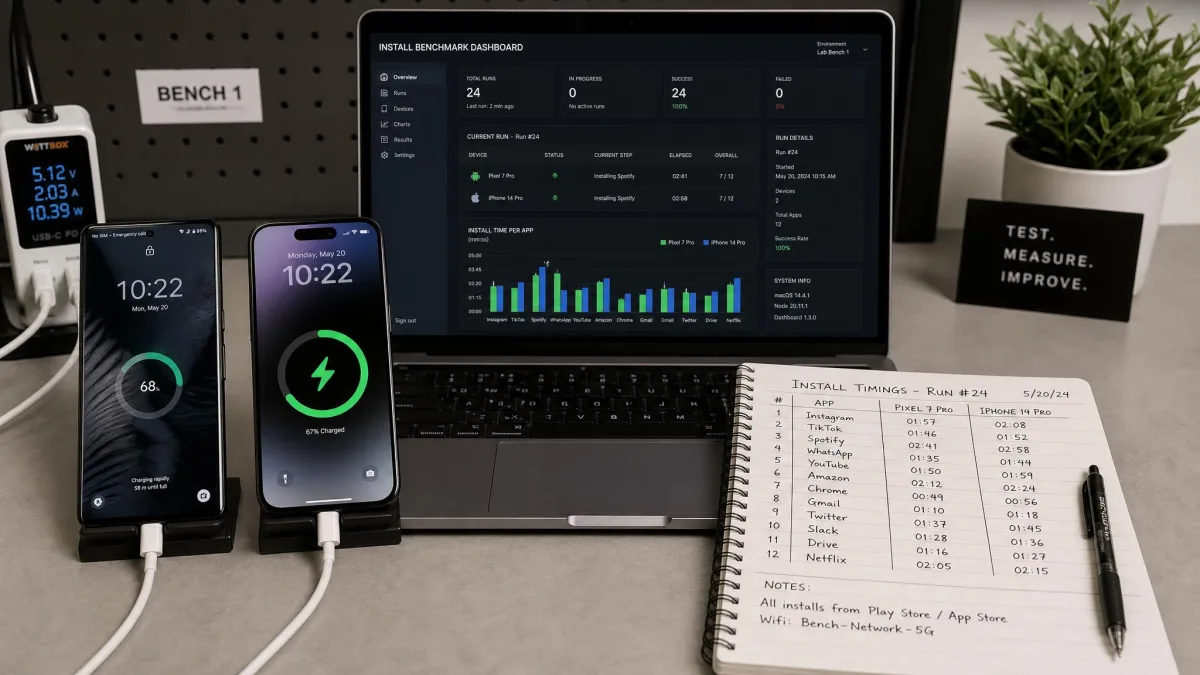
Those six placements came out of the same four questions, asked of every app in turn. We buy or license monitoring apps ourselves rather than accepting vendor accounts. We then score them on how hard the software is to install, how dependable the captured information turns out to be, how honest the pricing is, and what happens when you want your money back.
Feature dependability carried the most weight. Across every app in this group, SMS capture and live GPS tracking were the most dependable features, and the exotic extras are where things break. Keyword alerts and geofence alerts can silently fail to fire even when the zones and words are configured correctly, so we treated alerting claims sceptically.
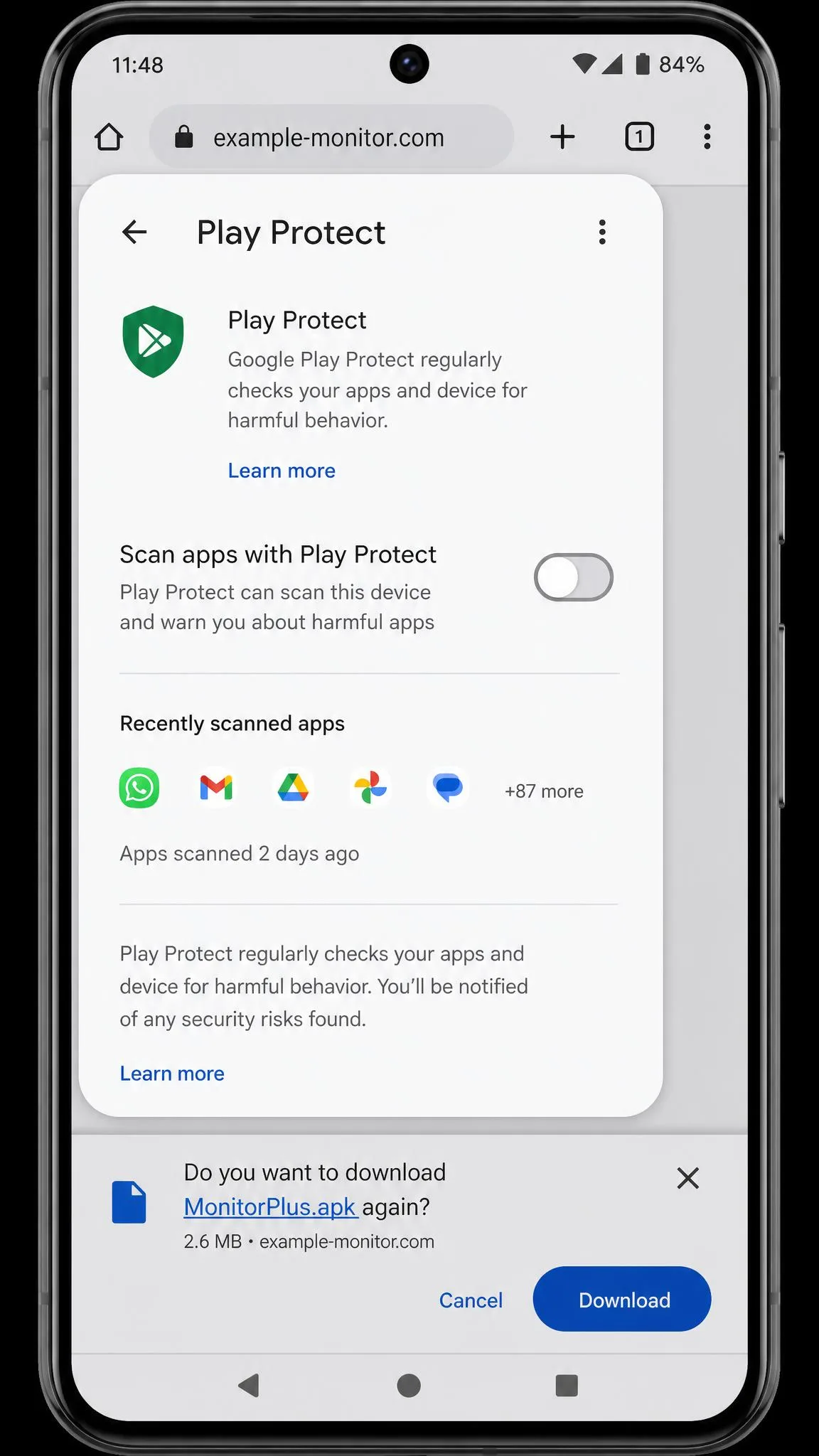
Install friction mattered next. Android installs require turning off Google Play Protect and side-loading the app from the vendor's own site, which is the most uncomfortable step in setup and the one most buyers are unprepared for. On iPhone, Windows Defender flags and blocks the desktop sync tool used for some setups.
Two findings shaped every score on this page. Refund windows in this category are narrow and conditional, and dissatisfaction alone rarely qualifies. And none of these apps offer a genuine free trial, so the closest thing available is a live demo dashboard or a conditional refund.
We also checked cross-platform parity, because several apps that work well on Android are much weaker on iOS. That gap decided more than one placement here.
How to Choose the Right Spy App
If none of those six placements maps cleanly onto your situation, work the decision from your constraints instead. Start with the platform, because it narrows the field faster than anything else. If the device you need to monitor is an iPhone and you cannot jailbreak it, you are choosing among iCloud-based tools. Those tools capture less than their Android equivalents, and they update more slowly.
Next, decide which two or three features you genuinely need. Plenty of apps advertise thirty or more capabilities. Most people still open the dashboard for messages and location, so pay for reliability in those two rather than for the length of the list.
Buy the annual plan only after the app is installed and confirmed working. The monthly rate is painful, but the refund windows here are narrow enough that a failed install on a year-long plan is a costly mistake.
Then check the billing model. Every app in this category charges per monitored device, so a family of three phones means three subscriptions. That detail turns a $9.99 app into a $30 monthly bill.
Finally, weigh the vendor's security record. You are handing a third party a live copy of someone's messages and movements, and a breach at the vendor exposes both of you.
How to Install a Spy App on Android and iPhone
Choosing the app is the easy half. Installing it is where purchases sink, and it works differently on each platform.
On Android, you need physical access to the device for roughly ten to fifteen minutes. Open Settings, tap Security, and turn off Google Play Protect, which will otherwise block the install. Then download the app from the vendor's own site rather than the Play Store. Grant the permissions it asks for and sign in with your account. The app hides itself afterwards, and in mSpy's case it appears under the innocuous name Update Service.
On iPhone without a jailbreak, there is usually nothing to install on the phone at all. You enter the Apple ID and password in your dashboard, then approve the two-factor prompt on the device. The app pulls its data from iCloud backups after that. You still need the iCloud credentials, and the data arrives on iCloud's schedule rather than live.
If you use a desktop sync tool for an iPhone setup, expect Windows Defender to flag and block it. Do not disable your antivirus wholesale. Add a targeted exclusion for that one tool instead.
Some setups ask for more than permissions. uMobix, for example, asks you to scan a QR code and then grant full trust to a root certificate. That hands broad visibility over the phone's traffic to the app. Read the screen before you tap through it.
Android vs iPhone: What Changes (and Why No-Jailbreak Matters)
That split in the install process points at the bigger truth of this category. The gap between the two platforms is wider than any gap between the apps themselves.
Android is the permissive platform. Once the app is installed and granted accessibility permissions, it can read notifications, log keystrokes, capture social app content, and report location continuously. Deleted message recovery is an Android-only capability across this whole category.
iOS is locked down, so no-jailbreak monitoring is really iCloud monitoring. You get whatever the phone has backed up, which means messages, photos, contacts, and location history, but on a delay. iPhone monitoring over iCloud can sit empty for more than 24 hours with no events synced at all, and that is normal rather than a fault.
The apps that promise full iPhone parity are the ones to check hardest. mSpy's full on-device option still expects a jailbroken device running iOS 11 to 14.8.1. What works without a jailbreak depends on which install method the iPhone allows. uMobix text message monitoring does not work on iPhone at all, and Eyezy's iPhone panel may never populate after a full day.
Jailbreaking unlocks live capture, but it also voids warranties, blocks iOS updates, and weakens the phone's own security. For most families, the iCloud route with realistic expectations is the better trade.
Are Free Spy Apps Safe?
Mostly, no. The free monitoring apps on app stores fall into two groups. There are limited family-locator tools that are safe but do very little, and there are hidden-tracker apps that make their money from the data they collect.
The second group is the problem. An app that captures messages and location while charging nothing has to earn revenue somewhere, and the usual answer is selling or brokering the information it gathers. You are also trusting an anonymous developer with a live feed from someone else's phone.
The paid apps are not automatically safer. TechCrunch reported in 2022 that XNSPY had exposed data from at least 60,000 monitored devices, and a February 2026 incident is reported to have exposed roughly 536,000 customer payment records. What paid vendors offer is accountability, a support channel, and something to lose.
If your budget is the constraint, a legitimate cheap plan beats a free hidden tracker. A demo dashboard also lets you see what you would be buying without spending anything.
Is It Legal to Use a Spy App?
This is the part to settle before you buy, not after. The rules are clearer than most people expect.
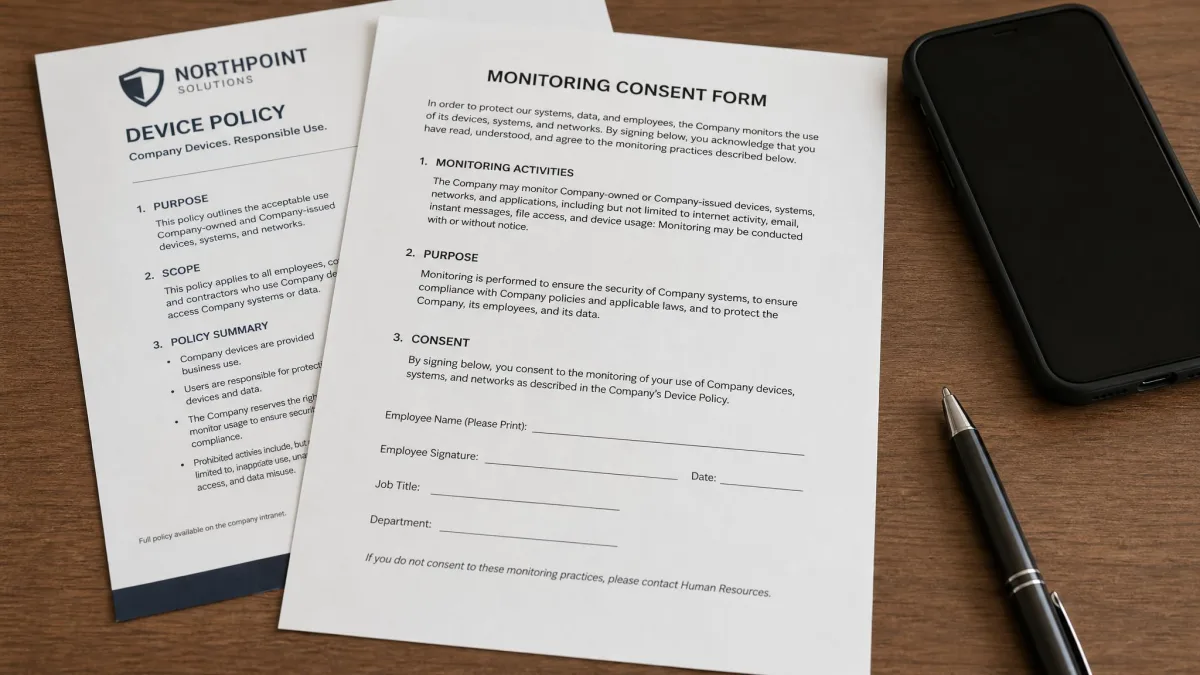
Monitoring a minor child whose device you own and pay for is generally lawful for a parent or legal guardian. Employee monitoring is generally lawful on company-owned devices when employees have been told in writing that monitoring takes place. Both of those depend on ownership and disclosure.
Monitoring another adult's phone without their knowledge is a different matter. Intercepting calls, messages, or other electronic communications without consent can violate the federal Wiretap Act (18 U.S.C. 2511), which carries criminal penalties. Many states add their own two-party consent rules on top, and several treat installing tracking software on a partner's phone as a separate offence.
Businesses have a second obligation. If you collect employee or customer data through a monitoring tool, you are responsible for protecting it, and the FTC privacy and security guidance sets out what reasonable protection looks like.
Consent is what separates legitimate monitoring from a crime in most jurisdictions. Before installing anything on a device you do not own, get written permission, or speak to a lawyer about the rules where you live.
How to Tell If Someone Is Spying on Your Phone
The same techniques that make these apps useful also make them findable, if you know the symptoms.
Battery drain is the most reliable signal. A hidden monitoring service can draw close to 14 percent of battery in an hour, so a phone that suddenly needs charging twice a day deserves a look. Unexplained mobile data use is the second tell, because captured messages and photos have to be uploaded somewhere.
On Android, check for apps with bland system names you do not recognise, since monitoring tools hide as things like Update Service. Look at Settings for any app holding accessibility or device-administrator permissions, and check whether Google Play Protect has been switched off, because it has to be for most of these apps to install.
On iPhone, Apple's Safety Check reviews which people and apps have access to your information and lets you cut that access in one place. Also check whether an unfamiliar device is signed into your Apple ID, since iCloud-based monitoring needs exactly that.
If you find something, changing your Apple ID or Google password and enabling two-factor authentication cuts off iCloud-based monitoring immediately. A factory reset removes an installed Android app, but restore from a backup made before the app appeared, not after.
Frequently Asked Questions
What happens to the monitored data if I cancel my subscription?
Does a monitoring app survive a restart or a software update?
Can I monitor two phones on one subscription?
Why does my dashboard show nothing on the first day?
Do iPhone spy apps require jailbreaking?
Which spy app is best for monitoring social media?
Final Verdict
mSpy is the app we recommend to most people. It covers the widest ground, it installs without root on Android, its support answers quickly, and its dashboard makes the two features that matter most easy to reach. The battery draw and the conditional refund are genuine limitations, and you should know about both before you buy.
Two situations change that answer. If the device is an iPhone you cannot jailbreak, buy the shortest plan of whichever app appeals and treat it as a trial. Every option in this group degrades to the same iCloud feed on iOS, and none of them are worth a year up front until you have watched that feed for a week. The app to approach with caution is XNSPY. The price is genuinely low and the demo is genuinely useful, but two reported data exposures and indefinite retention of backed-up data are a cost attached to that price, and it deserves weighing before the saving does.
Whatever you choose, settle the consent question first. Expect less from iPhone monitoring than the marketing promises, and buy the short plan until the install is proven on the actual device.