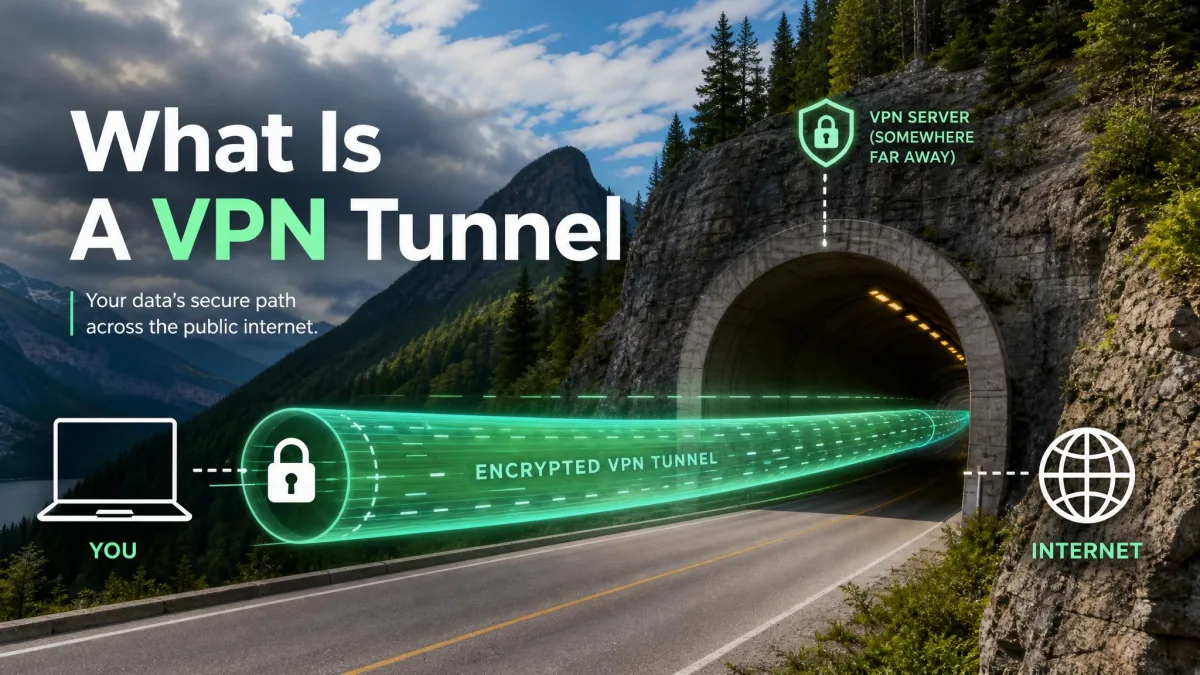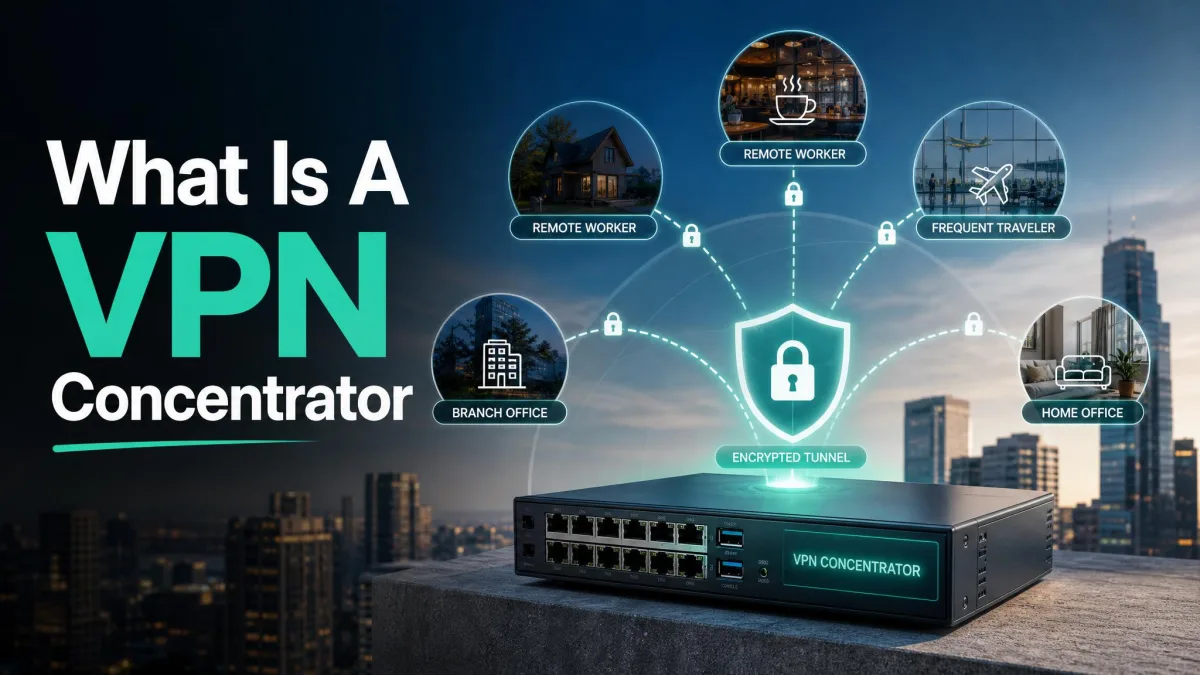
FortiClient VPN is Fortinet's remote-access VPN client. It builds an encrypted tunnel from your laptop or phone to a FortiGate firewall at your workplace. The free VPN-only build does one job. It connects you to the corporate network over SSL or IPsec. That is different from the full FortiClient endpoint suite, which adds antivirus, web filtering, and central management. Most people searching for "FortiClient VPN" want the free client. That is the version we anchor this review on.
We tested the free VPN-only client because it is what most remote workers and small IT teams deploy. Across our sessions we connected to a FortiGate gateway from Windows and macOS. We ran both SSL and IPsec tunnel modes. We also worked through the setup and troubleshooting paths that trip people up. The goal was practical. Can a non-specialist download it, connect, and stay connected through a normal workday?
The short answer is yes, with caveats we will get to. This review covers what FortiClient VPN is and how it rates. It walks through the features, the pricing, every supported platform, and step-by-step download, configuration, and troubleshooting guidance. We also cover a change that matters for 2026 planning. Fortinet is removing SSL VPN tunnel mode in a coming FortiOS release, so IPsec is the safer long-term choice.
What is FortiClient VPN? (free VPN-only client vs the full endpoint suite)
FortiClient VPN is the remote-access component of Fortinet's endpoint software. It connects a user's device to a FortiGate firewall, and from there to the resources on the network behind it. In our testing it behaved like a focused, single-purpose tool rather than a security suite. That is exactly what the free build is meant to be.
There are two versions worth understanding. The free, standalone VPN client supports basic IPsec and SSL VPN tunnel modes and does not require EMS registration, according to FortiClient's standalone VPN client documentation. Because it has no central management, it also comes with no technical support. You configure it yourself and lean on community resources when something breaks. That trade is fine for individuals and small teams.
The full FortiClient, which Fortinet markets as the Fabric Agent on its FortiClient product page, is a different animal. It bundles VPN and ZTNA tunnels with endpoint protection, web filtering, an application firewall, and vulnerability scanning. All of it is managed centrally through FortiClient EMS and gated behind a licence. If your organisation wants to push policy to every device, that is the version you buy. If you just need to reach the office network, the free VPN client is enough.
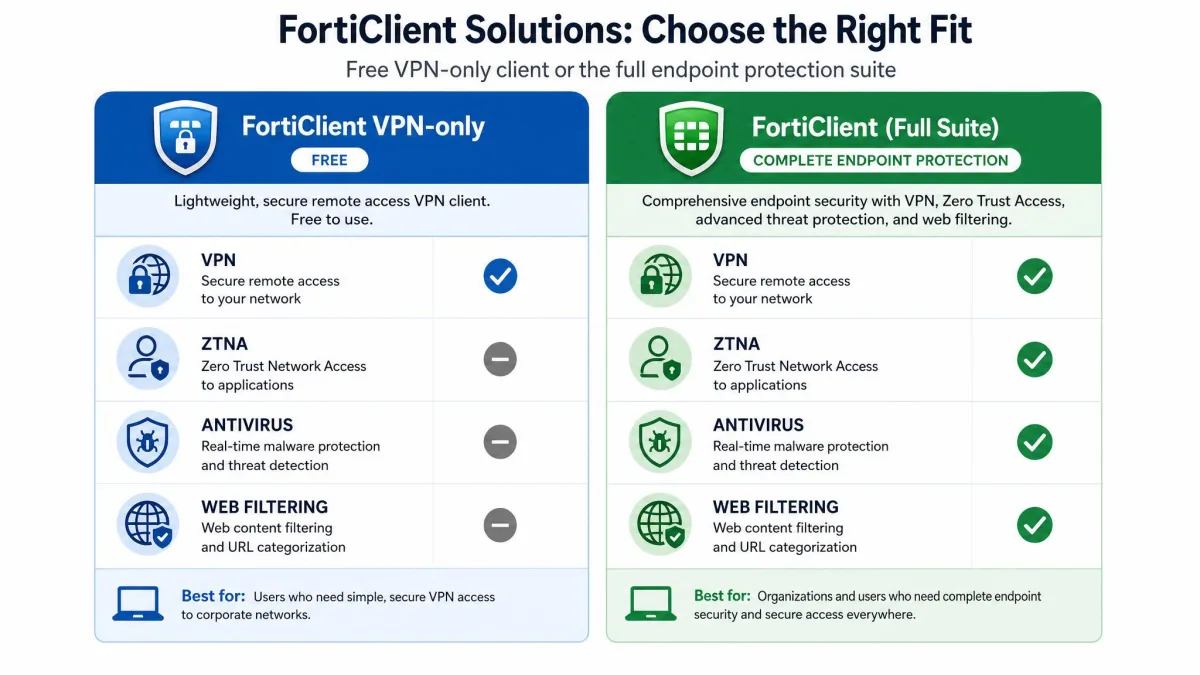
The free VPN-only client is genuinely free for commercial use, but it deliberately omits central management and vendor support. If you need managed profiles, ZTNA, or antivirus on the same agent, that is the licensed full FortiClient managed through EMS.
FortiClient VPN review at a glance (our verdict & rating)
FortiClient VPN earns its place as a dependable, no-cost way to reach a FortiGate-protected network. It is a workhorse rather than a delight. The software is unglamorous, clearly built for IT teams rather than consumers, and it fades into the background once a profile is in place. The rough edges cluster around first-time setup and the download itself rather than in daily use.
Ratings summary (ease of use, reliability, security, support)
We score four areas that matter for a remote-access client. Ease of use is only fair. Connecting is simple once a profile exists, but first-time setup and troubleshooting are not beginner-friendly. Reliability scores well. Security is the standout, thanks to SAML single sign-on, FortiToken two-factor, and certificate support. Support is the weak spot on the free client, because there is none beyond the community. The Capterra subscores line up with our read. Value, Functionality, and Ease of Use each sit at 4.4, with Customer Service at 4.2.
Pros and cons of FortiClient VPN
The balance here is easy to summarise. FortiClient VPN is free, secure, and stable, and it is the natural client for any FortiGate shop. The costs land mostly around support and setup rather than the connection itself.
Pros
- Free VPN-only client with no EMS registration required
- Supports both SSL and IPsec tunnel modes from one client
- Strong authentication: SAML single sign-on, FortiToken, and client certificates
- Stable connections over long remote-work sessions
- Clean integration with FortiGate and the wider Fortinet Security Fabric
Cons
- No vendor technical support on the free VPN-only build
- The download flow often pushes you to the full client instead of VPN-only
- Occasional connection drops interrupt work mid-session
- Interface feels dated and troubleshooting is not beginner-friendly
- SSL VPN tunnel mode is being retired, forcing an IPsec migration
What users like
Here is a moment that captures why FortiGate shops stick with it. We closed the lid on a Windows laptop mid-afternoon, reopened it two hours later, and the saved SSL profile picked back up with a single click and one FortiToken prompt. No re-entering the gateway address, no rebuilding the profile. Day to day, the client asks almost nothing of you once it is configured, and it slots into an existing Fortinet environment as if it were part of the firewall rather than a separate download.
What users dislike
The gripe we felt most was a drop that arrived at the wrong time. Partway through a screen-share, the tunnel went quiet. The client did not warn us. The shared window simply froze until we noticed the status had flipped to disconnected, clicked reconnect, and re-authenticated. It came back in a few seconds, but the interruption was ours to catch, not the software's to flag. That pattern, a silent mid-session drop that you fix by hand, is the recurring complaint we can confirm.
Key features
FortiClient VPN packs more into a free client than its plain interface suggests. The core is dual-protocol tunneling. Around that sit the authentication, split-tunnel, and provisioning features that enterprises need. The documented feature set spans SSL and IPsec tunnel modes, FortiToken two-factor, SAML single sign-on, client-certificate authentication, split-tunnel and split-DNS, auto-connect, VPN before Windows logon, and XML-based tunnel provisioning, per Fortinet's guide to configuring an SSL VPN connection.
For a free client, FortiClient VPN carries a genuinely enterprise feature set: dual-protocol tunnels, SAML single sign-on, certificate auth, and pre-logon connectivity all ship at no cost.
— From our hands-on testing
SSL VPN and IPsec VPN tunnel modes
The client supports both IPsec and SSL VPN tunnel modes, which is the feature most people care about. SSL VPN is the simpler, portal-driven option and is quick to stand up for remote access. IPsec offers generally higher throughput and is the right choice for long-term and site-to-site links. Given the coming removal of SSL VPN tunnel mode, we now lean toward IPsec for any new deployment.
FortiToken / SAML / MFA and certificate support
Security is where the free client punches above its price. It supports SAML and single sign-on through the mobility agent, so you can tie VPN access to your existing identity provider. FortiToken adds two-factor authentication, and client certificates let you bind access to a trusted device. Together these let a small team run genuinely modern access controls without paying for the full suite.
Integration with FortiGate and FortiClient EMS
FortiClient VPN talks to a FortiGate firewall as its gateway. In a managed environment, FortiClient EMS can provision profiles and push VPN lists to endpoints. In EMS, you open VPN Tunnels, choose Add Tunnel, then create an SSL VPN tunnel through manual configuration or XML. That central provisioning is a licensed capability, but it is why larger Fortinet shops standardise on the client.
FortiClient VPN pricing and licensing (free vs licensed)
Pricing is refreshingly simple at the entry point. The VPN-only client is free and does not require EMS registration, though it comes with no central management or technical support. You can download it, install it, and connect without a licence key or an account. That is unusual for enterprise networking software.
The cost appears when you want more than a tunnel. The full FortiClient endpoint suite adds EMS management, endpoint protection, ZTNA, and support. It is licensed per endpoint and quoted through Fortinet or a partner. We do not publish a per-seat figure here because it varies by edition, term, and volume. Treat the free client and the licensed suite as two separate purchases rather than tiers of one product.
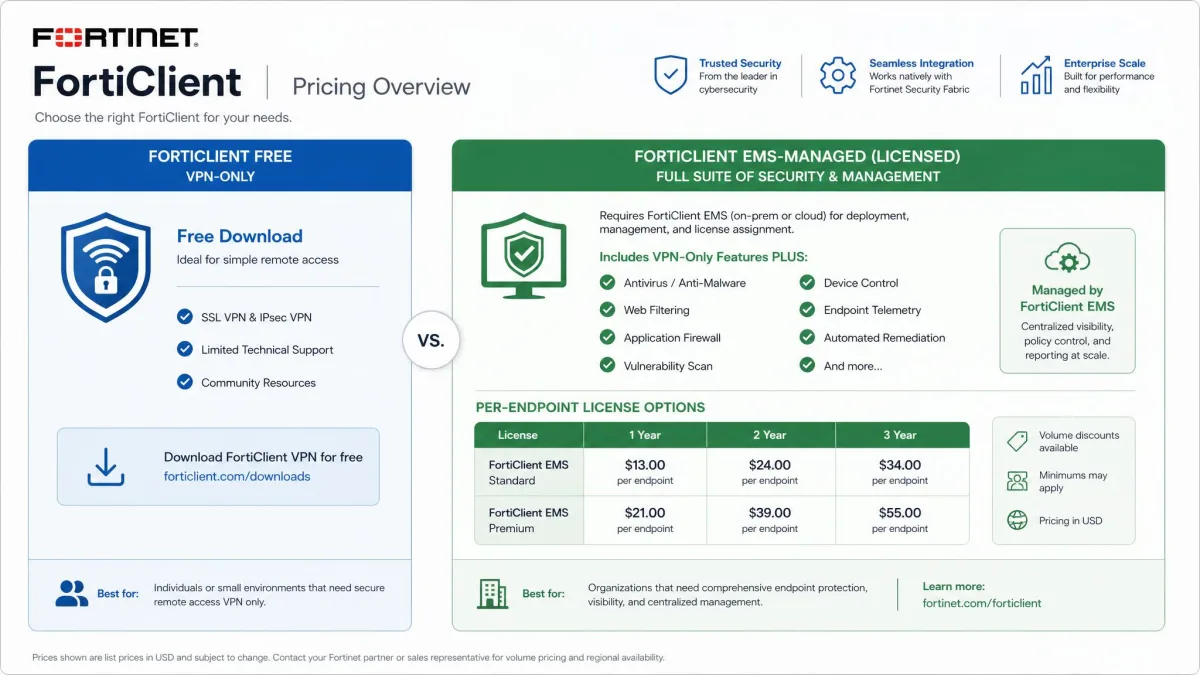
If you only need remote access to a FortiGate, the free VPN-only client is the whole product for you. Licensing enters the picture only when you want EMS-managed profiles, ZTNA, or endpoint security on the same agent.
How FortiClient VPN compares to alternatives
Because this is a single-product review, we compare FortiClient VPN against its closest enterprise peer rather than a field of consumer VPNs. The natural comparison is Cisco AnyConnect, now sold as Cisco Secure Client, which fills the same remote-access role in Cisco networks. The deciding factor is almost always which firewall you already run. FortiClient pairs with FortiGate, AnyConnect pairs with Cisco ASA and Firepower.
| Feature | FortiClient VPN | Cisco AnyConnect / Secure Client |
|---|---|---|
| Cost (VPN-only) | Free, no EMS registration | Requires Cisco licensing |
| Gateway | FortiGate | Cisco ASA / Firepower |
| Protocols | SSL + IPsec | SSL (TLS/DTLS) + IPsec/IKEv2 |
| Rating | 8.8/10 | Verify separately |
The headline difference is cost. FortiClient's VPN-only client is free, whereas AnyConnect requires Cisco licensing even for basic remote access. If you are choosing a firewall and client together, that free client is a real point in Fortinet's favour. If you already run Cisco gear, stay with AnyConnect. For a deeper primer on the underlying technology, our guide to what is an IPsec VPN and how a VPN tunnel works explain the protocols both clients rely on.
Supported platforms: Windows, macOS, Linux, Android, iOS
FortiClient VPN is broadly cross-platform, and the free VPN-only builds cover the systems most people use. FortiClient VPN, along with several other Fortinet tools, is downloadable from the Fortinet product downloads portal for Windows, macOS, Android, and iOS. A VPN-only installer exists for Windows and macOS, and one can also be created through FortiClient EMS.
Linux is the exception to watch. The standalone VPN client for Linux does not support IPsec VPN, so on Linux you are limited to SSL VPN. Given that SSL VPN tunnel mode is being retired, Linux users in particular should confirm their gateway's roadmap before standardising on the standalone client.
FortiClient VPN on Android
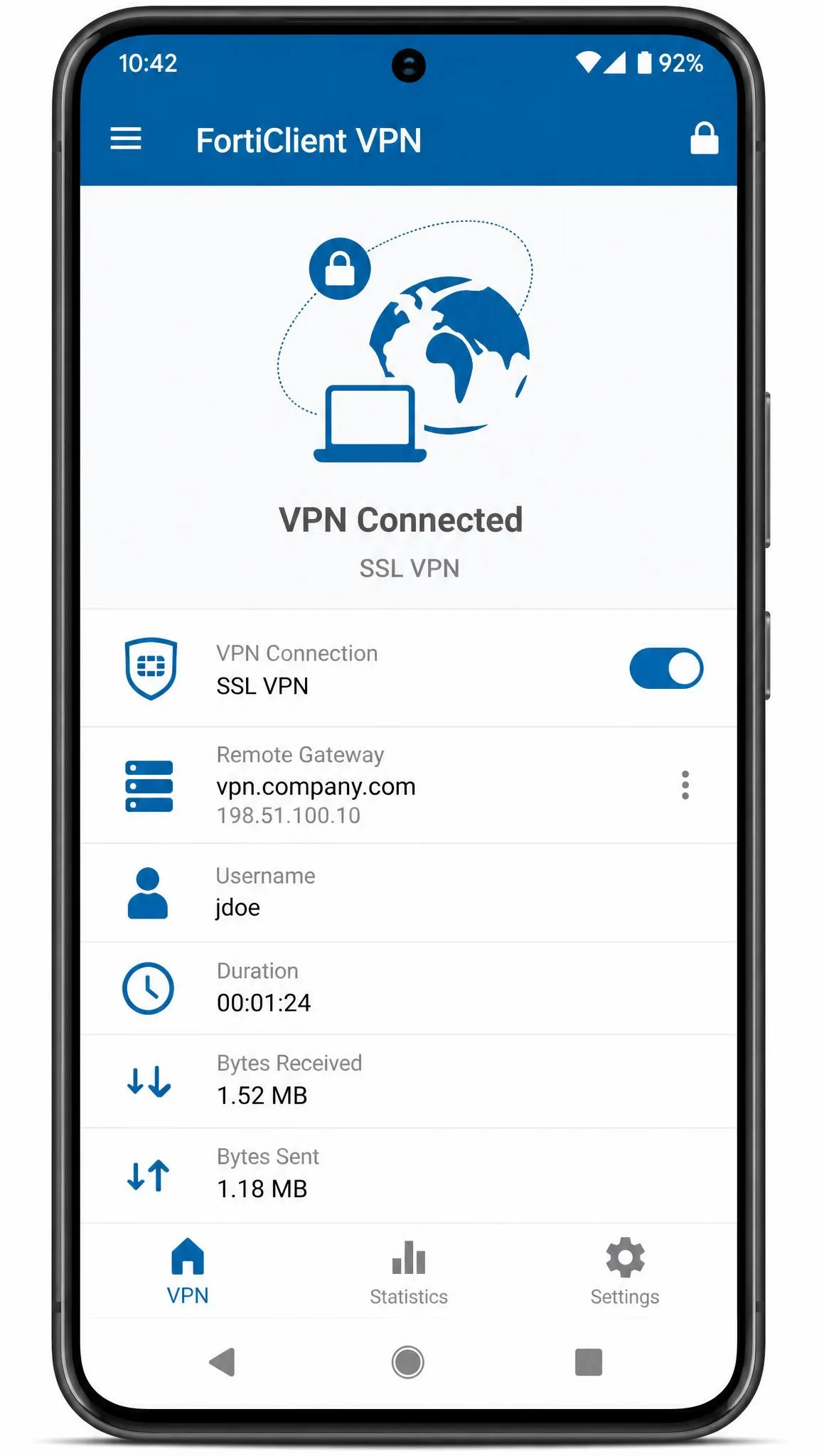
The free FortiClient VPN app on Google Play creates IPsec or SSL VPN tunnel-mode connections to a FortiGate firewall. It supports FortiToken, client certificates, and multiple languages, though its feature set is limited compared with the desktop client. With more than 1,000,000 downloads, it is a well-worn tool. In practice it works mainly as a tunnel to a FortiGate rather than a full endpoint agent.
FortiClient VPN on iOS
On Apple devices, FortiClient VPN is available on the App Store. Like the Android app, it functions as a focused VPN client rather than a full agent. In our use the mobile apps were perfectly usable for connecting on the move, but you should not expect the configuration depth of the Windows or macOS builds.
How to download FortiClient VPN
Downloading FortiClient VPN is where most people stumble, so it is worth slowing down. The public download flow often lands users on the full client rather than the VPN-only build, and reliable VPN-only downloads come from the support portal with an account. Knowing which link you want before you start saves a reinstall.
Download FortiClient VPN only (without the full endpoint suite)
To get the free, standalone client rather than the managed suite, look specifically for the "FortiClient VPN" installer, not "FortiClient" or the Fabric Agent. The Fortinet product downloads portal lists the VPN-only builds for Windows and macOS. The standalone VPN client documentation confirms this build supports SSL and IPsec without EMS registration, which is your sign you have the right one.
If a download page offers "FortiClient" and "FortiClient VPN" side by side, choose "FortiClient VPN" for the free, tunnel-only build. The plain "FortiClient" download is the full endpoint agent and expects EMS management.
Download FortiClient VPN for Windows
For Windows, download the VPN-only installer from the product downloads portal, then run it and accept the defaults. Installation is quick and does not require a licence key. Once it finishes, open FortiClient VPN, and you are ready to create your first connection profile, which we cover in the configuration sections below.
Install FortiClient VPN with winget
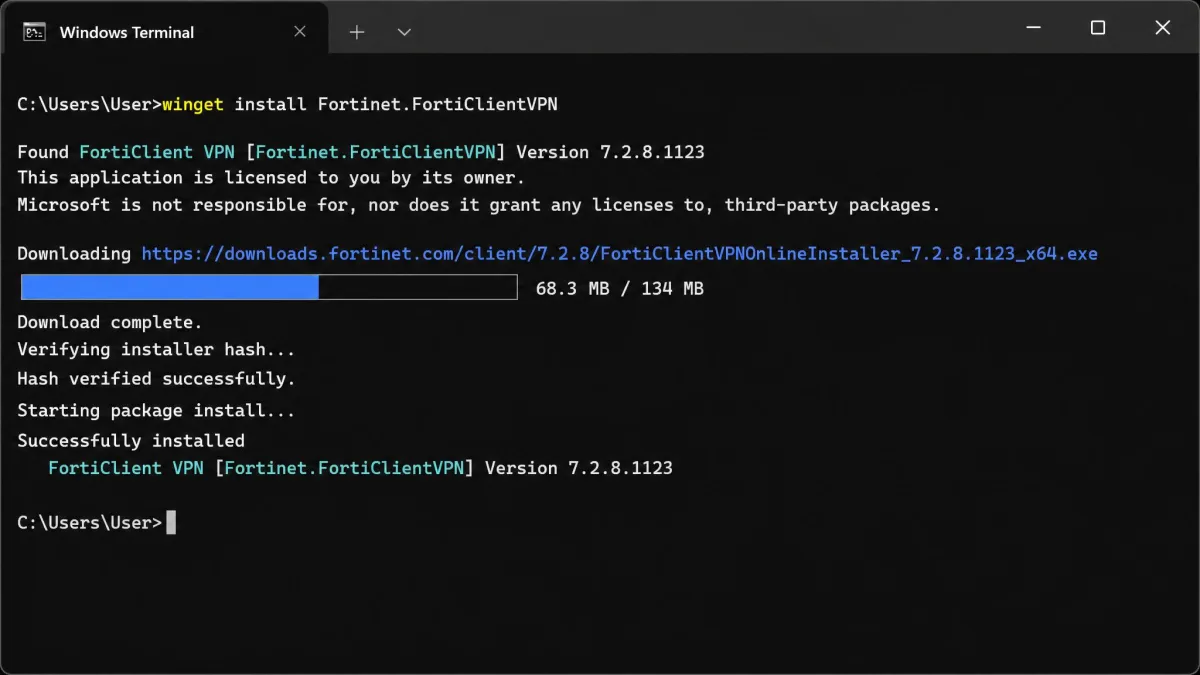
If you prefer the command line, Windows Package Manager can install the client. Open a terminal and run winget install -e --id Fortinet.FortiClientVPN to pull the FortiClient VPN winget package. One caveat: the winget-published version trails Fortinet's current release and shifts over time, so cite the package ID rather than a fixed version number, and update from within the client afterward if you need the latest build.
Silent / MSI deployment for IT admins
Admins who want to push the client across many machines usually reach for an MSI and a silent switch. Be aware that the silent-deploy MSI is only available with a Fortinet Support subscription and is not public, which is also why winget cannot host the MSI directly. If you have that subscription, pull the MSI from the support portal. If you do not, you will script around the public executable installer instead.
How to configure FortiClient SSL VPN
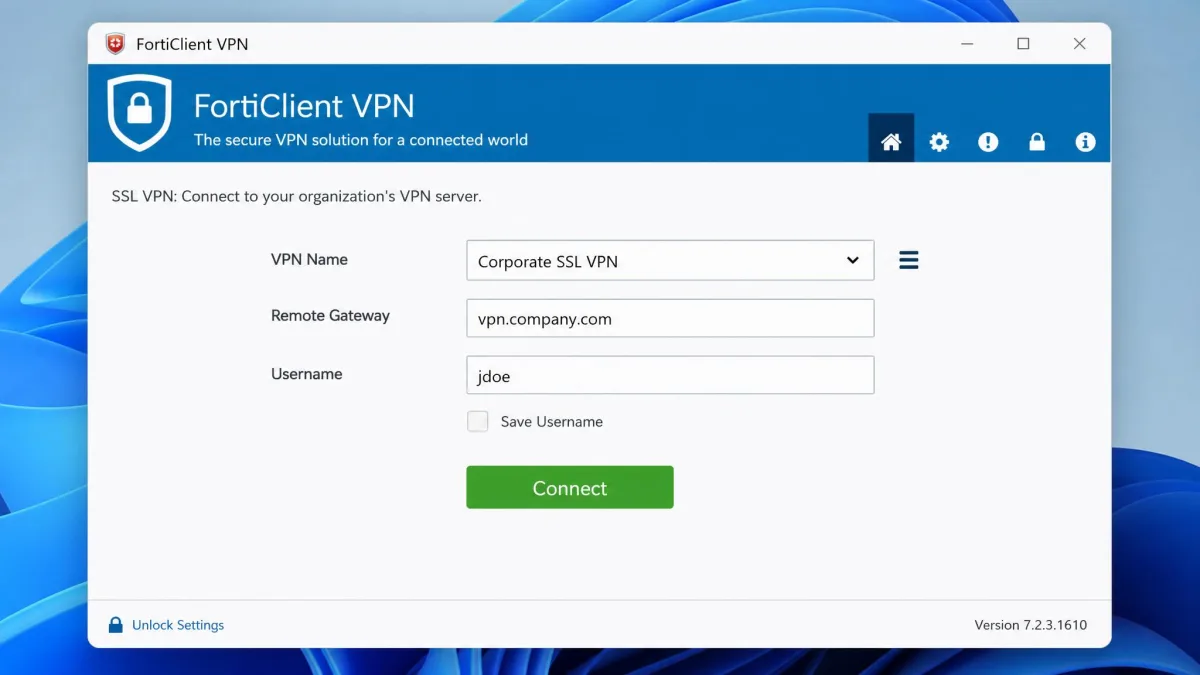
Setting up an SSL VPN connection is the fastest way to get online, and it is well documented. Open FortiClient VPN, go to the VPN configuration screen, then choose to add a new SSL-VPN connection. Give the connection a name, enter the remote gateway address of your FortiGate, set the port if your admin uses a non-default one, and choose your authentication method. Save the profile, enter your credentials, and connect.
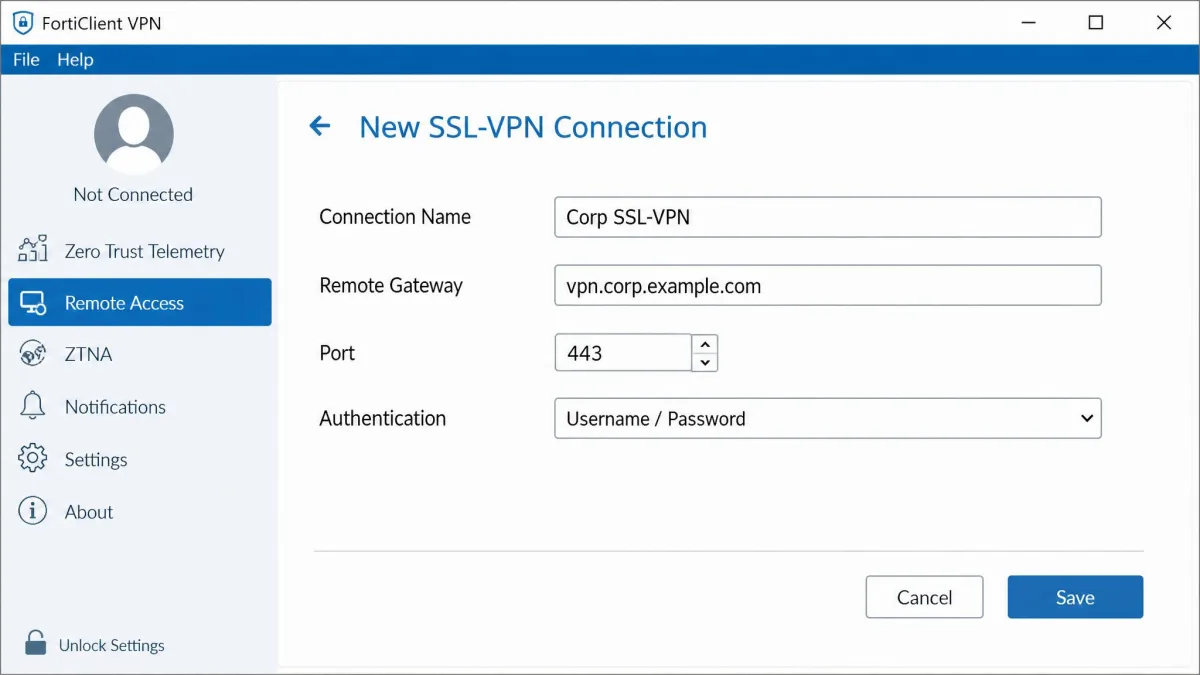
Fortinet's own walkthrough for configuring an SSL VPN connection covers the certificate and SAML options in depth, and we recommend following it step-by-step if your organisation uses single sign-on. For a general primer that is not FortiClient-specific, our guide on how to connect to a VPN walks through the same concepts.
How to set up FortiClient IPsec VPN
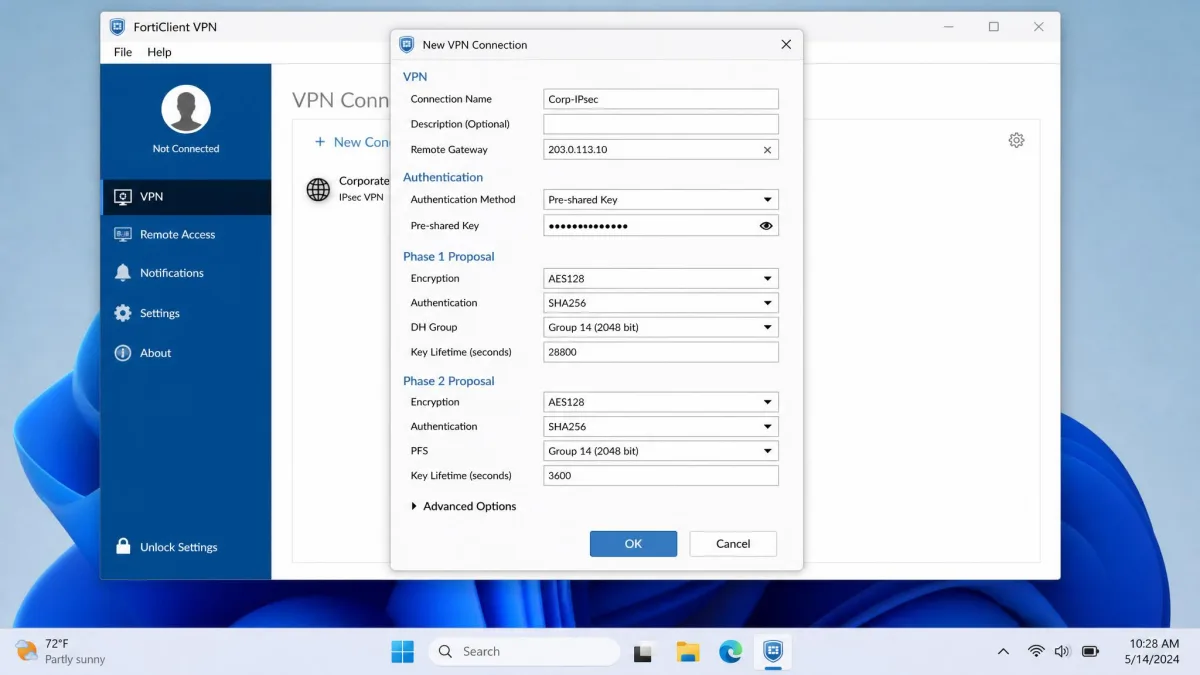
IPsec takes a few more fields but rewards you with higher throughput and a future-proof tunnel. Open FortiClient VPN, add a new IPsec VPN connection, then enter the remote gateway, choose your authentication method, and fill in the Phase 1 and Phase 2 proposals to match your FortiGate. Because IPsec exposes more parameters than SSL, the values must line up with the gateway configuration, so coordinate with whoever manages the firewall.
IPsec vs SSL VPN: which should you use?
For a quick decision, the table below sums up the trade-offs we weighed. Both modes are secure, so the choice comes down to setup effort, throughput, and longevity.
| Attribute | SSL VPN (tunnel mode) | IPsec VPN |
|---|---|---|
| Security model | TLS/SSL tunnel to FortiGate | IPsec (IKE) tunnel |
| Performance | Good, slightly more overhead | Generally higher throughput |
| Client setup | Simpler, portal-driven | More parameters (Phase 1/2) |
| Use case | Quick remote access | Long-term, site-to-site, migration target |
Our recommendation for 2026 is to favour IPsec for anything new. It offers higher throughput, it works for site-to-site links, and it is the migration target now that SSL VPN tunnel mode is being removed. SSL VPN remains fine for quick, short-lived remote access on gateways that still support it, but we would not build a new long-term deployment on it.
FortiClient site-to-site VPN
Although FortiClient is a remote-access client, IPsec is also the basis for site-to-site VPNs between FortiGate devices. When you are linking whole networks rather than individual laptops, IPsec is the only sensible choice, and it is another reason we point new projects toward it. If you are planning network-wide access, our overview of what is a VPN concentrator explains where a gateway aggregates many tunnels.
EMS-provisioned SSL VPN (FortiClient EMS)
In managed environments, you do not configure each client by hand. FortiClient EMS provisions profiles centrally and pushes VPN lists to endpoints, so users receive a ready-made connection. To build one, open EMS, go to VPN Tunnels, choose Add Tunnel, then create an SSL VPN tunnel through manual configuration or XML. That XML-based provisioning is how large fleets stay consistent, and it is documented for administrators who manage many devices.
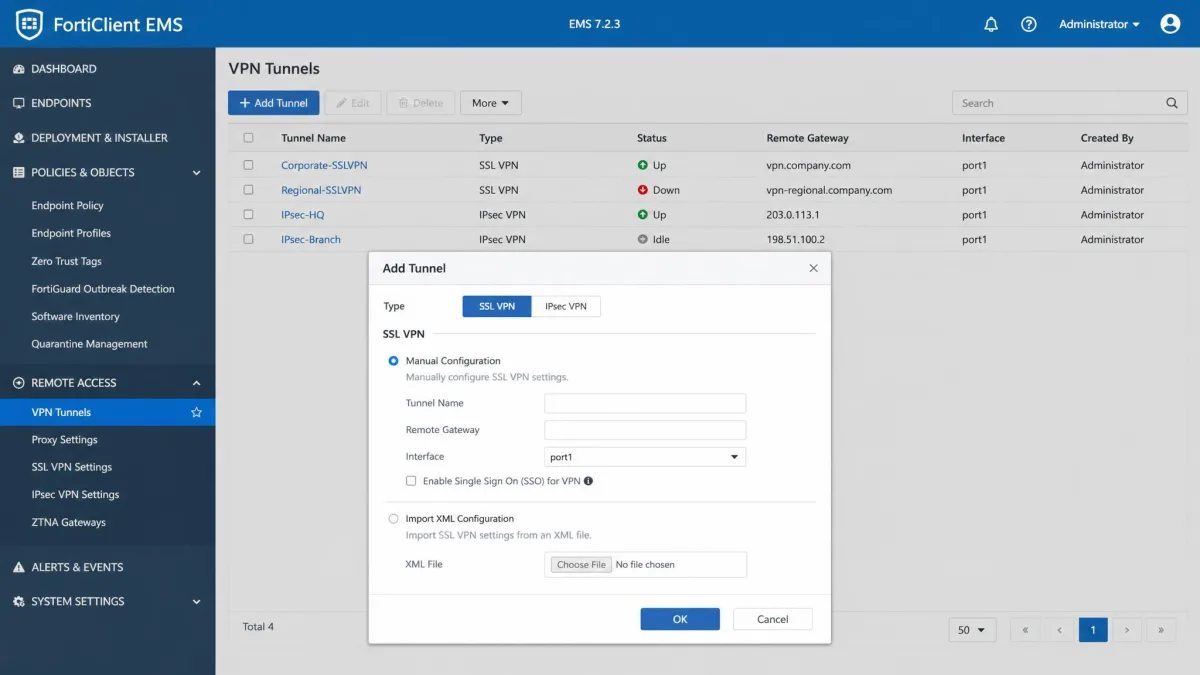
The trade is that EMS provisioning is a licensed feature, tied to the full FortiClient rather than the free VPN-only build. If a user's client is EMS-managed, their available features, including whether the VPN tab appears at all, depend on the profile the administrator pushes.
Enable VPN before Windows logon (registry / EMS)
A common enterprise requirement is connecting the VPN before the user logs in, so domain authentication happens over the tunnel. Enabling it takes three coordinated changes. The practical fix that trips people up involves a registry edit.
In our experience the "Show VPN before logon" option frequently fails to appear after syncing with EMS until three things are corrected together: the EMS profile setting is enabled, Windows is set to require credentials via netplwiz, and the registry value DevicePasswordLessBuildVersion is changed from 2 to 0 under HKLM\SOFTWARE\Microsoft\Windows NT\CurrentVersion\PasswordLess\Device. Miss any one of the three and the option stays hidden.
Editing the registry carries risk: back up the key before you change DevicePasswordLessBuildVersion, and make the change only on machines you manage. A wrong edit under this hive can affect Windows sign-in behaviour.
Troubleshooting FortiClient VPN
Most FortiClient VPN problems fall into a few buckets: a missing VPN option, a connection that stalls or drops, and authentication errors. The client rarely tells you the root cause outright, so the fix usually starts with reading logs and checking gateway-side settings.
FortiClient shows no VPN option: how to fix it
If the VPN tab is missing entirely, the cause is almost always how the client was deployed. Typically the full endpoint installer was installed and VPN was disabled in the EMS profile, or an EMS-managed profile lacks the VPN feature. The reliable fix is to install the standalone VPN-only client, which restores the VPN tab. Causes vary, so confirm whether the machine is EMS-managed before you reinstall.
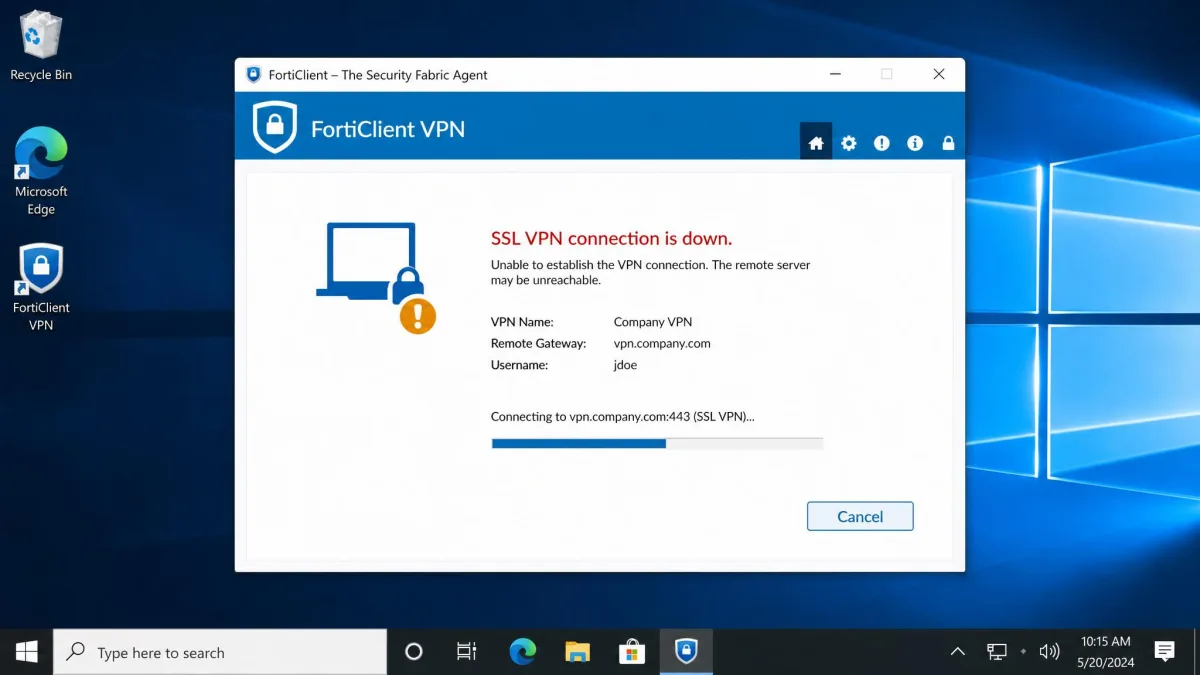
"SSL VPN connection is down" and common connection errors
Two patterns cover most connection failures. First, an SSL VPN connection that stalls at 40 to 45 percent after authentication succeeds usually points to IP allocation, routing, firewall-policy, or portal issues on the FortiGate rather than a login failure. Second, a "SSL VPN connection is down" error with LDAP authentication is often fixed by resetting and unlocking the user's Active Directory account. If the tunnel authenticates and then dies, look at the gateway, not the client.
Reading FortiClient SSL VPN logs
When nothing else explains a failure, the logs do. SSL VPN client logs are located at %APPDATA%\Roaming\Fortinet\SslvpnClient\LogFile, and full-client diagnostics sit under %LOCALAPPDATA%\FortiClient\tmp. The exact log path varies by FortiClient version and by whether you installed the standalone SSL VPN client or the full client, so if the folder is not there, check the alternate location. Opening the log file and searching for the timestamp of your failed connection is the fastest way to find the real error.
Is SSL VPN going away? (FortiOS 7.6.3 end-of-life and migrating to IPsec)
Yes, in part, and this is the single most important planning item for 2026. Fortinet is removing SSL VPN tunnel mode from FortiOS 7.6.3 onward, in both the GUI and CLI. Existing configurations do not auto-upgrade, and Fortinet recommends migrating to IPsec VPN. If your remote access relies on SSL VPN tunnel mode, you need a migration plan before you move to that release.
It is not a total removal, though. SSL VPN web mode continues under the name Agentless VPN for browser-based access, so only tunnel mode is going away. The Agentless VPN rebranding and the exact carve-outs are still rolling out across FortiOS releases, so confirm the specifics for your target version. Our practical advice stands regardless: build new deployments on IPsec, and treat any SSL VPN tunnel-mode setup as something to migrate.
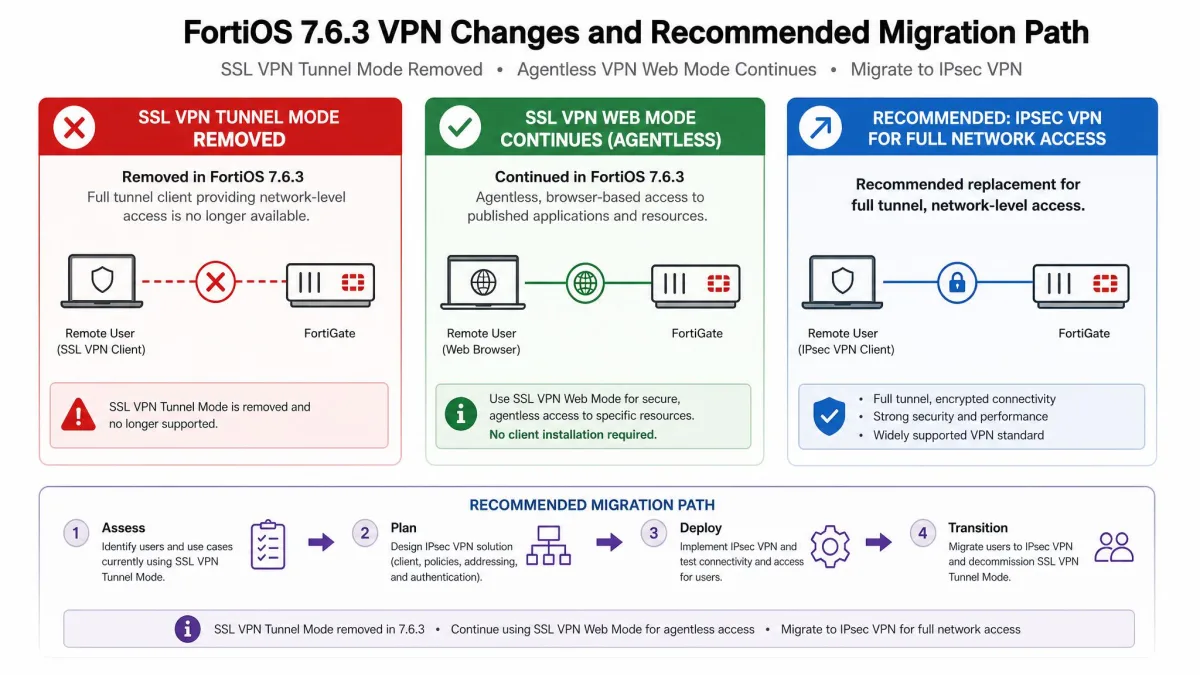
Plan your SSL-to-IPsec migration before upgrading to FortiOS 7.6.3. Because existing SSL VPN tunnel-mode configs do not carry forward automatically, an unplanned upgrade can leave remote users unable to connect.
Frequently asked questions
Is FortiClient VPN free?
Why is there no VPN option in my FortiClient?
Is SSL VPN being removed from FortiClient?
How do I download the VPN-only client without the full suite?
winget install -e --id Fortinet.FortiClientVPN. VPN-only installers exist for Windows and macOS, and IT teams can build one through EMS.Does FortiClient VPN work on Android and iOS?
IPsec vs SSL VPN, which should I use?
Verdict: is FortiClient VPN worth it?
FortiClient VPN is an easy recommendation for anyone connecting to a FortiGate network, and the price makes it hard to argue with. The free client is genuinely capable, with SAML, FortiToken, and certificate support that most free VPN clients cannot match. Its weaknesses are the ones you would expect from free enterprise software: the polish is thin and you are on your own for support. None of that outweighs a secure tunnel at no cost, as long as you go in with an IPsec plan for the road ahead.
If you are comparing lightweight options for smaller networks, our reviews of Radmin VPN and LogMeIn Hamachi cover simpler peer-to-peer tools, and our guides on how to set up a VPN and how to check if your VPN is working round out the practical basics.