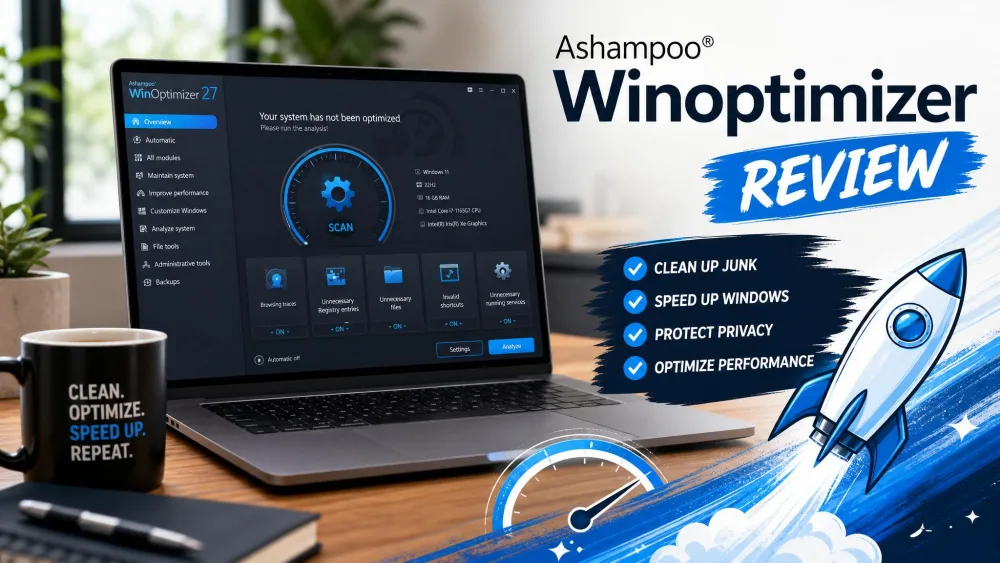
Ashampoo WinOptimizer is an all-in-one Windows tune-up utility that cleans junk files, tidies the registry, manages startup programs, and wipes privacy traces from one dashboard. Version 29 is the current release. The pitch is simple: point it at a slow PC, run a scan, and let it free up space and trim the clutter Windows leaves behind.
We spent a week running WinOptimizer 29 through real before-and-after cleanup scenarios. This review covers what it does, how its main modules perform, what it costs, and how it compares to CCleaner, Glary Utilities, and the free tools built into Windows.

We installed WinOptimizer Pro 29 on a working, everyday Windows 11 machine that had not been cleaned in months, the kind of neglected setup most people are trying to rescue. The first scan surfaced concrete clutter fast: roughly 2.3 GB of junk files, 847 registry issues, and 156 duplicate files taking up about 1.8 GB. That gave us a clear baseline to test every claim against.
What Is Ashampoo WinOptimizer?
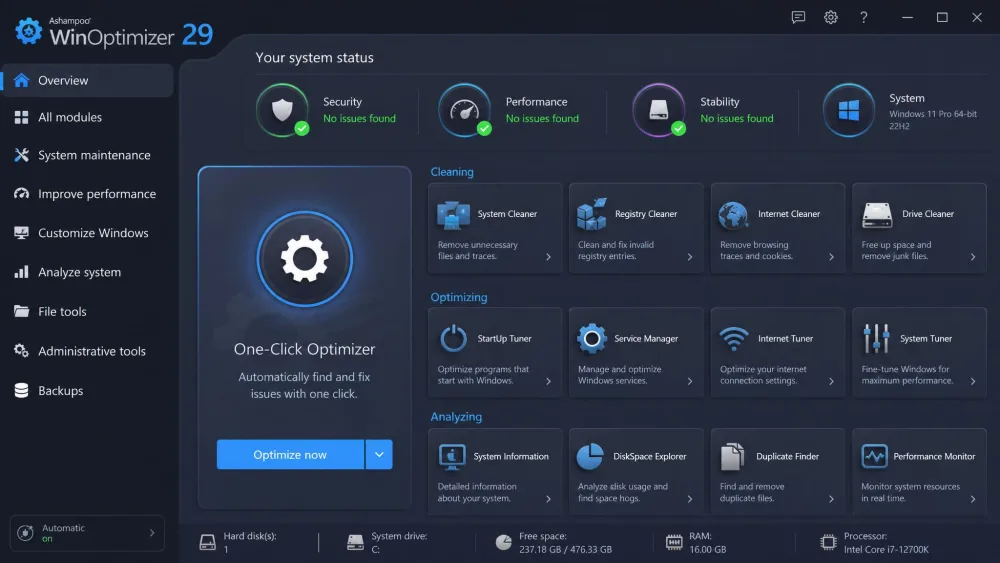
Ashampoo WinOptimizer is a Windows maintenance suite that groups system cleanup, performance tuning, and privacy tools into a single interface. It runs on Windows 10 and Windows 11, and version 29 carries the modules most people reach for: a Drive Cleaner, a Registry Optimizer, an Internet Cleaner, a Startup Tuner, and a one-click optimizer that chains the common tasks together.
Rather than a single cleaner, it is closer to a toolbox. The suite ships with well over 25 modules, and depending on how you count the sub-tools, marketing puts the tally at around 30. Alongside the everyday cleaners you get a Defrag tool, an SSD Wizard, a DiskSpace Explorer, and a System Benchmark. You can open a single utility or let the front end handle the routine work.
Ashampoo WinOptimizer at a Glance (Pros and Cons)
Here is the short version of what we found after a week of hands-on testing.
Pros
- Broad module suite covering cleanup, tuning, privacy, and analysis in one place
- Effective one-click cleanup that surfaces real clutter on a neglected PC
- Clean, easy interface with a simple front end over the advanced tools
- An automatic restore point is created before optimization, so changes can be undone
- Strong customer sentiment, with a 4.6 out of 5 official rating
Cons
- Many functions overlap with free Windows built-in tools like Disk Cleanup and Storage Sense
- The dense module grid can feel overwhelming to beginners
- Bundled security element is weak and feels like an afterthought
- Setup requires a mandatory Ashampoo Account signup, even for the free version
Key Features
We focused on the modules most people will actually open. Here is how the core tools held up.
One-Click Optimizer
The one-click optimizer is the headline feature and the tool most first-time users will run. It bundles the common cleanup and tuning tasks into a single guided pass. In our testing, the one-click optimization ran smoothly and the initial system analysis completed surprisingly fast. It flags what it plans to remove before it acts, and because it sets a restore point first, an overzealous cleanup is easy to roll back.
Drive and Registry Cleaner
The Drive Cleaner hunts down temporary files, caches, and leftover installer data, while the Registry Optimizer scans for broken or orphaned entries. On our neglected test machine these two tools did the heavy lifting, clearing the bulk of that 2.3 GB of junk and the 847 registry issues. In version 29 the Drive and Internet cleaners feel near-instant, matching Ashampoo's claim that the cleaner modules run up to 50% faster than version 28.
Startup and Service Manager
The Startup Tuner and Service Manager let you see what loads with Windows and switch off the entries you do not need. This is where a tune-up utility earns its keep, because trimming startup items reliably shortens boot time on a cluttered machine.
Privacy and Internet Cleaner
The Internet Cleaner and Privacy Traces Cleaner wipe browsing history, cookies, and usage records across browsers and Windows itself. These ran quickly and did what they promised.
File Tools and System Analysis
Rounding out the suite are analysis and file utilities: DiskSpace Explorer, HDD Inspector, a System Benchmark, a duplicate finder, and a basic file recovery and uninstaller pair. The analysis tools are handy for spotting what is eating your storage. The file recovery and uninstaller feel basic next to dedicated tools, so treat them as convenience extras.
How to Use Ashampoo WinOptimizer (Step by Step)
Getting started is straightforward, though the account requirement adds a step.
- Download and install WinOptimizer from the official Ashampoo WinOptimizer page, then sign in with a free Ashampoo Account when prompted.
- Open the app and run the one-click optimizer, or pick a single module such as Drive Cleaner.
- Let the analysis finish, then review the items it proposes to remove before you confirm.
- Apply the cleanup. A restore point is created automatically, so you can undo the changes if anything misbehaves.
- Revisit the Startup Tuner and privacy cleaners periodically to keep the machine tidy.
Performance: Does It Really Speed Up Your PC?
This is the question the marketing leans on, so we tested it directly. The honest answer is that it depends on your starting point. On our cluttered test machine, clearing gigabytes of junk and trimming startup items produced a tidier, more responsive system. Clearing the DirectX shader cache even produced a small gaming and display improvement.
On an already-fast, well-maintained PC, the gains are far more modest. The boot optimizer made little noticeable difference on a machine that was already quick, and the biggest speed-ups show up on older hardware. Be realistic about a couple of modules, too. The RAM optimizer's value is questionable, because modern Windows already manages memory well, and you should never run defrag on an SSD. Used sensibly, WinOptimizer helps most where there is genuine neglect to clean up.
Pricing: Free vs Pro and Licensing
WinOptimizer is competitively priced. The full version starts at $14 as a promotional price, and existing owners can move up to the latest release for a $16 upgrade. There is a 30-day free trial with no payment required, and purchases are covered by a 30-day money-back guarantee, so you can test the full suite before committing.
A limited free edition also exists, though its scope is narrower and appears to vary by promotion and region. Either way, expect the mandatory Ashampoo Account signup even for the free tier. The official listing does not spell out clearly how many PCs a license covers, so confirm the current license terms on Ashampoo's page before you buy.
Interface, Ease of Use, and Support
The interface is one of WinOptimizer's strengths. A simple one-click front end sits over the deeper toolset, so casual users are not forced to learn every module on day one.
Support is email-only, with no live chat or phone line. That reads as a limitation on paper, but in our testing an email reply came back within about 17 minutes, which is faster than plenty of suites that advertise premium tiers. Resource use is light in normal operation, though the interface can freeze when indexing directories with more than 10,000 files.
How It Compares to Alternatives (CCleaner, Glary Utilities, Windows Built-in Tools)
WinOptimizer competes with a crowded field: CCleaner, Glary Utilities, Advanced SystemCare, and the free tools already in Windows. We also compare it against Avast Cleanup and BleachBit if you want a closer look at specific rivals.
| Product | Buy | One-click optimizer | Registry cleaner | Privacy cleanup | Modules | Price | Support |
|---|---|---|---|---|---|---|---|
|
Check price → | Yes | Yes | Yes | Around 30 | From $14 | Email only |
 |
Learn more | Yes (Health Check) | Yes | Yes | Suite | ~$29.95 to $44.95/yr | Priority (Pro) |
 |
Learn more | Yes (1-Click) | Yes | Yes | Over 20 | Paid | Email/forum |
 |
Learn more | Yes (AI Mode) | Yes | Yes | 23 | $29.99/yr | Email/ticket |
 |
Learn more | Partial | No | Limited | A handful | Free | Microsoft support |
On price, WinOptimizer undercuts the subscription-based rivals: CCleaner Professional runs roughly $29.95/year on promotion and up to $44.95/year at list, and Advanced SystemCare Pro lists at $29.99/year for 23 tools. Glary Utilities is the closest match in breadth, with over 20 tools. Against the free Windows built-in tools the honest caveat is that many of WinOptimizer's functions overlap with Disk Cleanup and Storage Sense. What you pay for is one dashboard, the registry cleaner Windows lacks, and finer-grained privacy and startup controls.
Frequently Asked Questions
Is Ashampoo WinOptimizer safe?
Is Ashampoo WinOptimizer free, or how much does it cost?
Does it actually speed up your PC?
Is it better than Windows built-in tools?
How do I uninstall it?
Verdict: Is Ashampoo WinOptimizer Worth It?
Ashampoo WinOptimizer 29 is a capable, well-priced tune-up utility that does what it sets out to do. It surfaced real clutter on our test machine, its cleaners are fast, the one-click optimizer is genuinely easy, and the safety net of automatic restore points makes it low-risk to run. The weak points are honest ones: heavy overlap with free Windows tools, a throwaway bundled security element, and a module grid that can intimidate newcomers.
For anyone maintaining an older or neglected PC who wants one tidy dashboard instead of a scattering of separate tools, the low starting price and generous trial make it easy to recommend. If your machine is already fast and you are comfortable with Disk Cleanup and Storage Sense, the built-in tools may be enough.