Glary Utilities is a Windows maintenance suite that bundles more than 20 cleanup, registry, startup and privacy tools into a single free app. It clears the junk files, broken registry entries and unwanted startup programs that build up on a Windows machine over time. The free version is useful on its own; a paid Pro tier adds automation. So how much does it actually help, and is Pro worth paying for? We installed Glary Utilities 6 on a Windows test machine and ran it through everyday cleanups, scans and startup tweaks.
We worked through repeated rounds of cleanups, scans and startup tweaks rather than a single pass, so we could judge whether the gains held up over time instead of fading after the first run. The question we cared about was whether a machine stayed snappy after a week of normal use, not just immediately after one cleanup.
What Is Glary Utilities? (Overview)
Glary Utilities is a freemium app from Glarysoft for Windows users who want a cleaner PC without juggling separate tools. Version 6 gathers disk cleanup, a registry cleaner, a startup manager, privacy tools, a file shredder, file recovery and a duplicate finder into one window. Glarysoft markets the suite as trusted by around 200 million users, which is a vendor headline figure rather than an audited count, but it signals how long this product has been a fixture on Windows.
The version you install today is part of the Glary Utilities 6 line, with point releases shipping roughly monthly, so the exact build number moves while the major version stays put. It runs on Windows, and reviewers commonly cite Windows 10 and 11 support, though the official page lists "for Windows" without spelling out an exact version matrix.
Plans and Pricing: Free vs Pro
Glary Utilities runs on a freemium model. The free tier is generous, and Pro mostly buys you automation rather than a deeper toolset.
What You Get in the Free Version
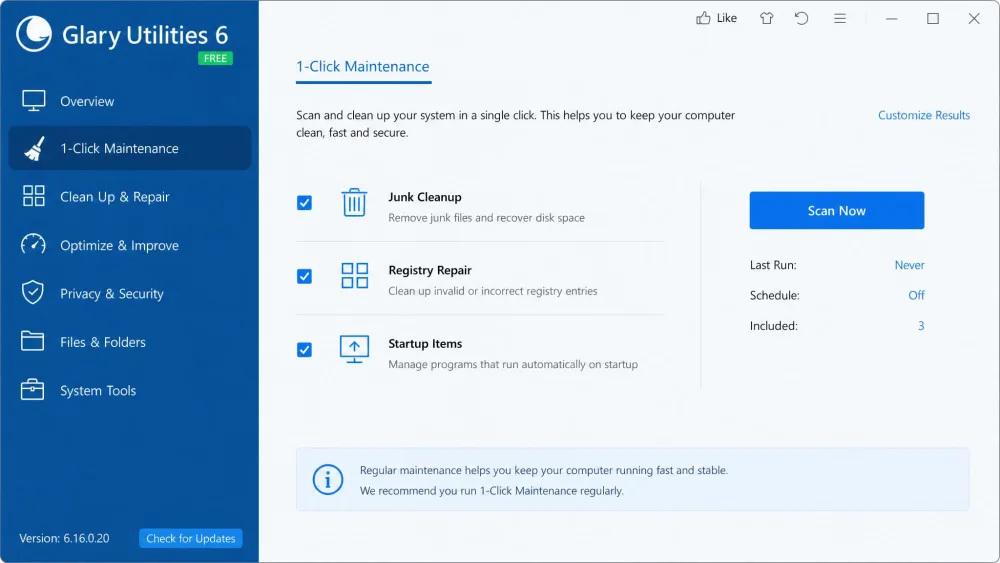
The free tier is more capable than most, with 1-Click Maintenance, disk cleanup, the registry cleaner, the startup manager, privacy protection and the file shredder. The catch is that everything runs manually, because automatic and scheduled cleanups sit behind Pro. The free version also throws occasional pop-up reminders to upgrade, which grate but never block your tools. Crucially, the free release is not a time-limited trial; it stays available indefinitely, so you can run the core maintenance tools for as long as you like without paying.
What Pro Adds, and Is It Worth Paying For?
Pro costs $39.95 per year and covers up to three PCs, with a 90-day money-back guarantee. It adds automatic background maintenance, real-time optimization, automatic program updates and priority support, so you pay for hands-off convenience, not a deeper toolset. Glarysoft also sells a Technician edition at $169 per year aimed at service providers who manage many machines. For a single household PC, the value of Pro comes down to whether you want to remember to run maintenance yourself or have it happen quietly in the background.
| Feature | Free | Pro |
|---|---|---|
| 1-Click Maintenance | Yes (manual) | Yes |
| Automatic cleanup | No | Yes |
| Real-time optimization | No | Yes |
| Automatic updates | Limited | Yes |
| Priority support | No | Yes |
| Price | $0 | $39.95/yr (3 PCs) |
| Money-back | n/a | 90-day |
Key Features
1-Click Maintenance and Junk/Registry Cleanup
1-Click Maintenance is the headline tool. You tick boxes for junk files, registry issues, broken shortcuts and tracks, then run one scan that handles the lot. Disk cleanup reliably finds temporary files, browser caches and installer clutter, and it is the part of the suite we leaned on most. The registry cleaner works well and clears genuinely invalid entries, though it gives a smaller speed gain than the marketing suggests; modern Windows is far less sensitive to registry cruft than it once was, so treat this as tidying rather than a turbocharge.
Startup Manager and Boot-Time Optimization
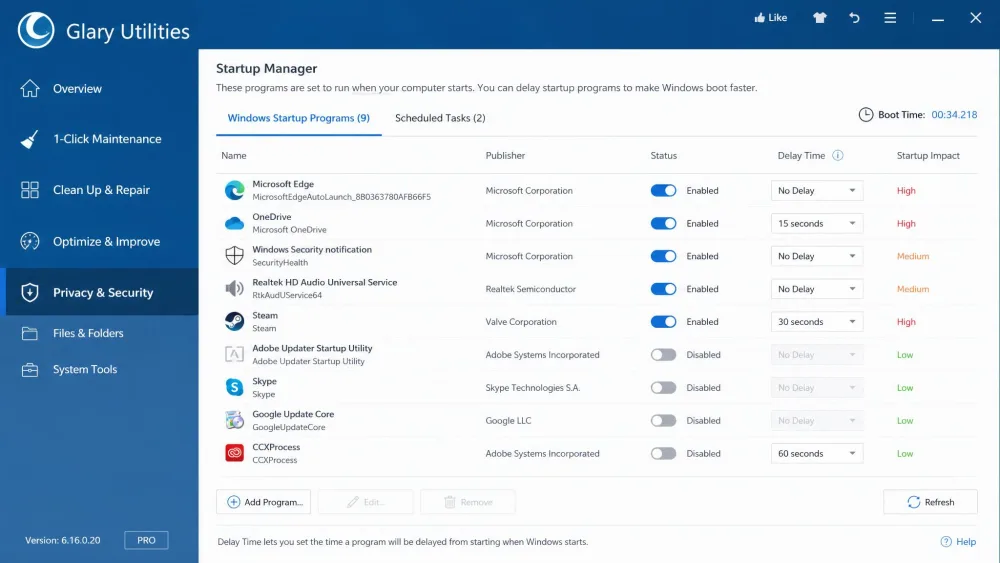
The startup manager lists every program set to launch with Windows and lets you disable what you do not need. It itemizes startup programs, scheduled tasks, services and plugins, and shows how many seconds each one adds to startup, which makes the worst offenders obvious at a glance. It is the tool most likely to make a measurable difference, since trimming startup items genuinely speeds up boot times, and it does so without uninstalling anything you might want back later.
Privacy, File Shredder, and Other Utilities
The suite also covers a lot of ground beyond cleanup. Privacy tools erase activity traces, the file shredder securely deletes sensitive files, and there is a duplicate finder, a disk space analyzer and a file recovery tool. Round it out with a software update finder and a context-menu manager, and you have a comprehensive set of utilities. In our testing these replaced several single-purpose apps, and the file recovery, duplicate finder and trace-erasing tools all worked well enough that we stopped reaching for separate downloads.
Interface and Ease of Use
The interface is the most divisive part of Glary Utilities. It looks dated, with a busy layout that has barely changed in years. Even so, it stays surprisingly easy to use once you find the tool you want; the tools are clearly grouped into tabs for quick access, and the app stays ad-light compared with rivals. The downside of bundling so much is clutter that can confuse newcomers, and too many overlapping functions in one window is exactly the kind of thing that makes a first-time user hesitate. Installation has minor friction too, so watch the default options during setup and decline anything you did not come for.
Performance: Our Hands-On Testing
We ran Glary Utilities through repeated scans on our test machine and watched how it behaved across everyday cleanups.
Cleanup and Scan Results
In testing, the first 1-Click Maintenance pass flagged a sizeable batch of junk files and invalid registry entries. After we ran it, apps that had been slow to open launched almost instantly, and overall responsiveness improved. Glary stayed light on system resources throughout, cleaning fairly quickly without bogging down whatever else we had open.
Disk cleanup can wipe stored system restore points, so over-cleaning carries a real cost. Review what each scan plans to remove, and keep at least one recent restore point.
On a typical, somewhat-cluttered Windows system the files cleaner tends to surface on the order of a gigabyte or more of temporary files to clear, though the exact haul depends entirely on how long the machine has gone without a cleanup, so treat that as a ballpark rather than a guarantee. A full 1-Click Maintenance scan generally lands in the rough range of two to five minutes, scaling with how much clutter has built up rather than settling on a fixed time. We would not call either figure a benchmark; both move with the state of your drive.
Boot-Time and Speed Impact
Startup management is where the suite earns its keep at boot. The startup manager itemizes every program, scheduled task, service and plugin that loads with Windows and flags how much each one adds to startup, which makes it easy to see what to trim. After we disabled the items we did not need, startup felt noticeably quicker on our test machine. The app itself stayed light while it worked: scans ran without dragging the system down, and we never caught it hogging resources in the background.
After everyday cleanups on our test PC, our take is that the startup manager and disk cleanup do the heavy lifting, while the registry cleaner is more housekeeping than horsepower. There is real gain, but it is a tune-up you repeat now and then, not a one-time fix.
Pros and Cons
Glary Utilities earns a solid 7.8 out of 10 from us, a score pitched at the everyday Windows user who wants routine maintenance handled without paying for it.
Pros
- Lightweight footprint that runs well on modest hardware
- One-click maintenance handles junk, registry and startup in a single pass
- More than 20 tools bundled into one app
- Generous, genuinely usable free tier with no time limit
Cons
- Pro upsell pop-ups nag in the free version
- Overlapping, redundant modules make the suite feel cluttered
- No real-time protection, so it is not a security tool
- Dated interface that has barely changed in years

Glary Utilities vs. the Competition
Glary Utilities vs. CCleaner
CCleaner is the better-known app, and its free registry cleaner and junk removal are excellent. Professional costs $44.95 per year for one device, with a 30-day guarantee, and a Professional Plus tier runs $64.95 per year for up to three devices. Glary counters with a wider toolbox and a Pro license covering three PCs for less than CCleaner charges for one. For tools per dollar, Glary wins on value; for a leaner, more focused app, CCleaner has the edge.
Glary Utilities vs. IObit Advanced SystemCare
IObit Advanced SystemCare leans into one-pass optimization and adds real-time protection at the Pro level, listing at $29.99 per year for one PC with a 60-day guarantee. IObit markets aggressive boot-speed gains of up to 2x, which is a vendor claim rather than a measured figure. It is flashier than Glary, but more promotional, with heavier upsells. Glary feels calmer and clearer about what each tool does.
| Feature | Glary Utilities | CCleaner | IObit ASC |
|---|---|---|---|
| Junk cleanup | Yes | Yes | Yes |
| Registry cleaner | Yes | Yes (free) | Pro-only |
| Startup manager | Yes | Yes | Yes |
| Real-time monitoring | No | Pro only | Pro only |
| Driver updater | Pro | Pro | Pro |
| Free-tier limits | Manual only | Manual only | Basics only |
| Paid price | $39.95/yr (3 PCs) | $44.95/yr (1) | $29.99/yr (1) |
| Money-back | 90-day | 30-day | 60-day |
What Real Users Say
Independent sentiment leans positive. On Software Advice, users rate Glary Utilities 4.6 out of 5 across 16 verified reviews, with value and functionality highest at 4.8 each. Ease of use sits at 4.6, while support is the weakest dimension at 4.2, which fits with priority support sitting behind Pro. The picture is more mixed elsewhere: Trustpilot reviews sit lower, around 3.3 out of 5, while G2 lands near 4.1 from a small sample. Across all three, the theme is consistent: people like what the tools do and what they cost, and the main thing they would change is a smoother installer.
Frequently Asked Questions
Is Glary Utilities safe?
Is the free version enough?
Glary Utilities vs CCleaner, which is better?
Does Glary Utilities slow down your PC?
How do I uninstall Glary Utilities?
Final Verdict: Should You Use Glary Utilities?
So when should you actually pay? For a single, lightly used laptop, the free version is plenty, and you will rarely notice the missing automation. Pro earns its $39.95 a year in one specific case: when you are looking after several household PCs and would rather cleanups ran on a schedule than depend on you remembering to launch them. Outside that situation, the free build is the one we would leave installed and run by hand every few weeks.