Ashampoo WinOptimizer is a German-made optimization suite that bundles more than 30 cleaning, tuning, and privacy tools into one dashboard. Advanced SystemCare is IObit's flagship optimizer, free to use and packed with junk cleaning, startup tuning, and real-time protection. If your PC has slowed to a crawl, both tools promise the same fix, but they go about it differently. We ran both side by side on the same test laptop and compared cleaning results, pricing, and ease of use.
The Bottom Line: Which One Should You Choose?
Ashampoo WinOptimizer and Advanced SystemCare both promise a faster, cleaner Windows PC, and both deliver. They are built on opposite philosophies. WinOptimizer is a one-time purchase whose license covers up to 10 PCs for life, with a deep privacy toolkit. Advanced SystemCare is free to start, sells extras as a subscription, and is the only one of the two with real-time protection.
To compare them fairly, we ran both tools on the same test laptop, scanned for junk, watched boot times, and checked security and privacy features. Our scorecard covers cleaning depth, performance impact, protection tools, ease of use, and price, the criteria that decide most purchases.
| Ashampoo WinOptimizer | Advanced SystemCare | |
|---|---|---|
| Cleaning & junk removal | 1.8 GB in our test, over two passes | 1.8 GB in the same test; 1.6 GB in another round; 3 GB+ hidden junk in 2026 |
| Speed & performance | Boot Center, Live-Tuner, Game Booster; no measured boot-time figures | Boot cut from about 3 min to under 90 s; Turbo Boost |
| Security & privacy | Privacy Manager (13 categories, 73 settings), File Wiper; no real-time protection | Real-Time Protection, DNS Protector, FaceID; Bitdefender engine in Ultimate |
| Interface | Modern dashboard, light and dark themes; module grid can overwhelm beginners | Clean, modern dashboard, one-click Scan then Fix; ads in the free version |
| Pricing & free tier | Free version based on v17, missing 39 features; one-time $49.99, often $29.99 | Free version with 12 tools; Pro from $29.99/yr, promoted from $16.77/yr |
| Multi-PC licensing | One license covers up to 10 PCs for life | Pro tiers for 1, 2+1, 3, or 5 PCs, yearly subscription |

Ashampoo WinOptimizer: Features, Performance & Pricing
We started the way most people will, with the 1-Click Optimizer, and the first scan came back with just over 1 GB of junk. A second, dedicated cleaning pass was needed to surface the rest. It is a quirk worth knowing: one click alone understates what the tool can do.
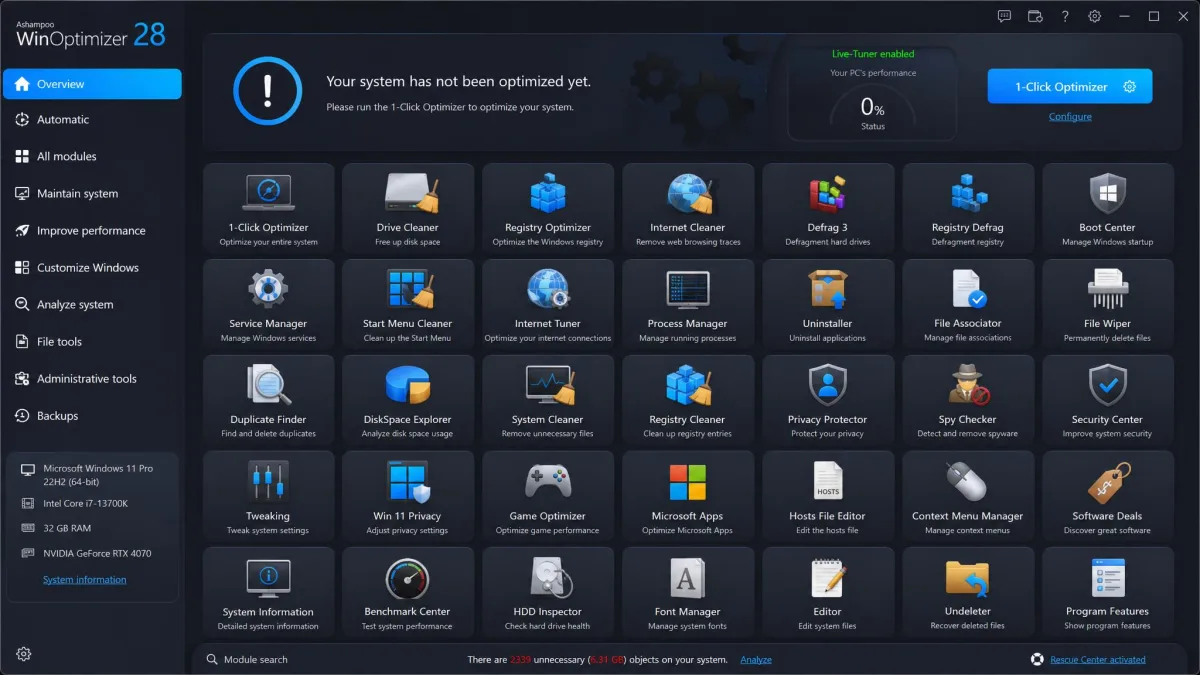
The main dashboard is modern, with light and dark themes, and the module grid puts more than 30 tools at your fingertips: Registry Cleaner, Disk Doctor, Duplicate Finder, Uninstall Manager, File Wiper, and a Boot Center for startup control. That breadth has a cost. The grid can overwhelm beginners, the Clean tab looks plainer than the dashboard and ignores the dark theme, and menu navigation feels slower than the competition. There is also no tray app, no driver updater, and no real-time protection.
Pricing is WinOptimizer's strongest argument. It is a one-time purchase, normally $49.99 and frequently promoted at $29.99. Upgrades from older versions cost $14.99, and a 30-day trial covers the full version. One license covers up to 10 PCs for life. There is no single-PC option, so you pay for the multi-PC tier even with one machine. Ashampoo's own customers rate the suite 4.7 out of 5.
The free version, based on WinOptimizer 17, never expires but lacks 39 features, including the 1-Click Optimizer and Boot Center. Ashampoo's current edition is WinOptimizer 26, and the promotional price on Ashampoo's official WinOptimizer page has dipped to $14, though it changes often.
Ashampoo WinOptimizer Pros & Cons
Pros
- One-time purchase, no subscription, one license for up to 10 PCs
- Deep privacy toolkit with trace cleaning, file wiping, and encryption
- More than 30 modules for cleaning, tuning, and maintenance
Cons
- The first 1-Click scan misses junk; a second pass is needed
- Free version lacks 39 features and pushes paid upgrades
- No single-PC license, no tray app, and no real-time protection
Advanced SystemCare: Features, Performance & Pricing
Advanced SystemCare made the strongest impression when we ran its one-click Scan then Fix workflow on a laptop buried in accumulated junk. The pass found more than 3 GB of hidden junk that manual cleanup and Disk Cleanup had missed.
It cut boot time from about 3 minutes to under 90 seconds and dropped Chrome's launch from 8 seconds to 2. The same session halted 45 background programs and freed 734 MB of RAM.
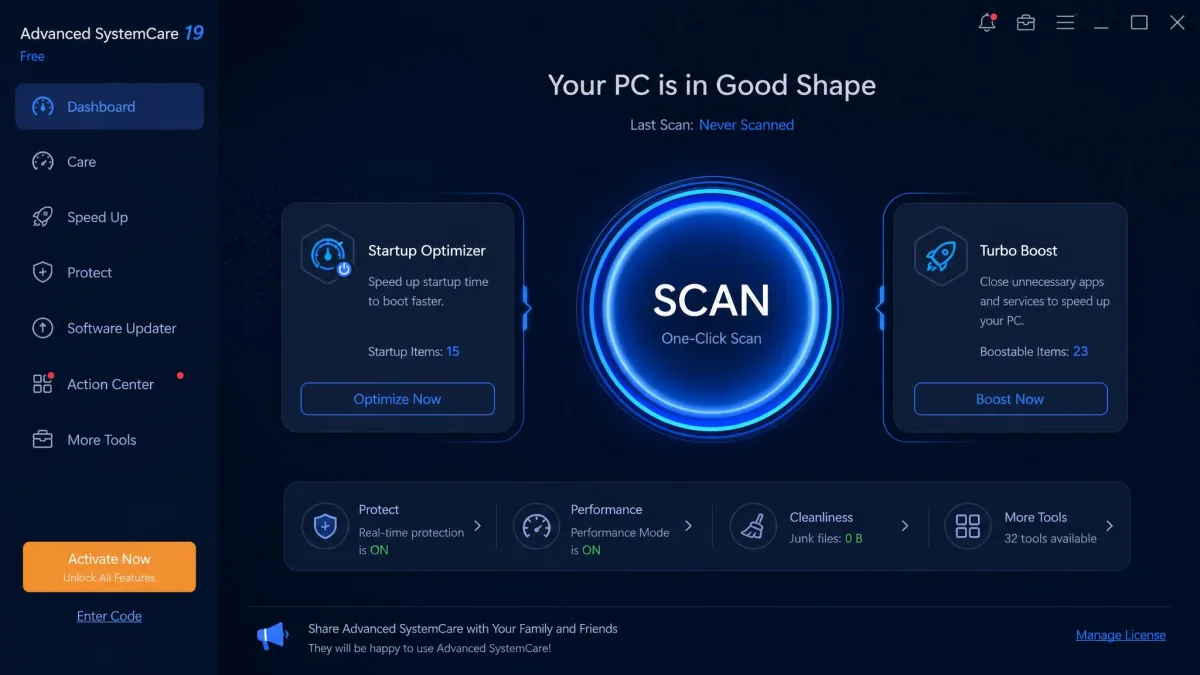
Installation is easy and quick, and the dashboard is clean, modern, and comfortable for beginners and experts. The free tier includes 12 tools, among them Disk Cleaner, Registry Cleaner, Startup Optimizer, Turbo Boost, Real-Time Protection, and DNS Protector.
Watch the installer, though: it bundles extra software, including a VPN, by default, and choosing the custom install path avoids it. The free version also carries in-app ads and constant upgrade prompts.
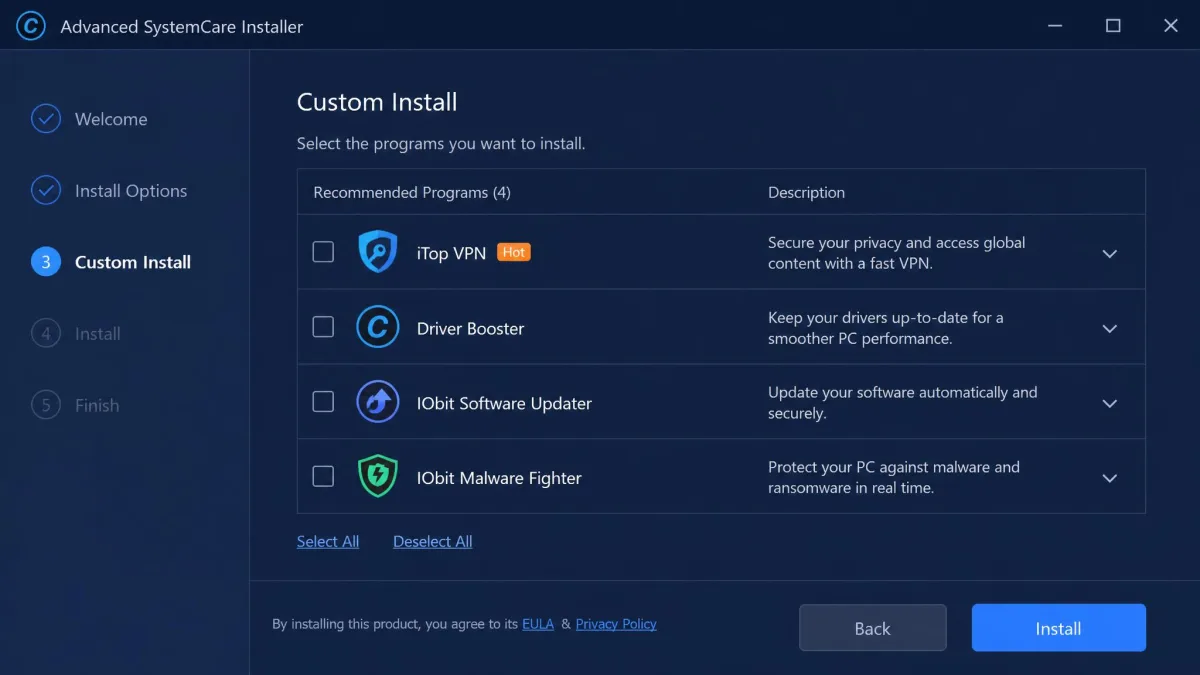
The current edition is Advanced SystemCare 19, released in October 2025, at version 19.5.0. Pro adds deep registry cleaning, defragmentation, a RAM booster, and automatic driver updates. The Ultimate edition bundles Bitdefender's antivirus engine. Third-party scores sit at 4.3 out of 5 for the free tier, with CNET Download users averaging 3.8 out of 5.
Advanced SystemCare Pros & Cons
Pros
- One-click Scan then Fix workflow that finishes in minutes
- Real-Time Protection, DNS Protector, and FaceID included free
- Free tier covers cleaning, startup, and performance tuning
Cons
- In-app ads and constant upgrade prompts in the free version
- Installer bundles a VPN and other extras by default
- Little control over which junk files the cleaner removes
Ashampoo WinOptimizer vs Advanced SystemCare: Head-to-Head
Cleaning & Junk Removal
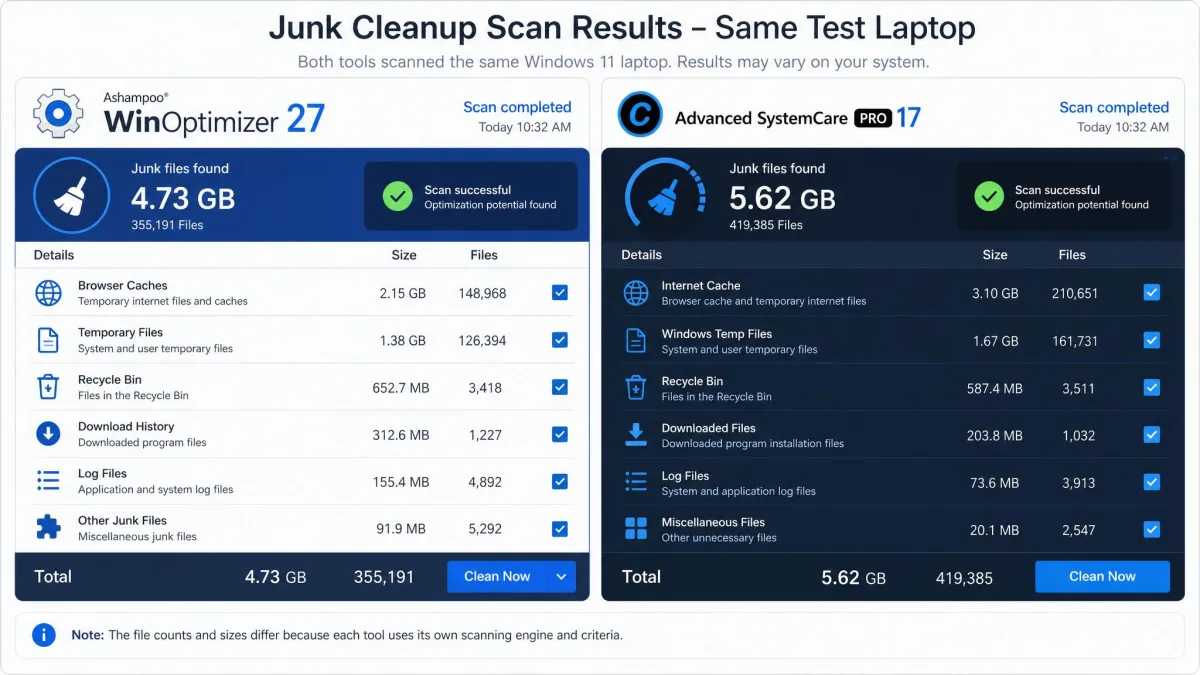
Cleaning is the core job, and the two tools finish close. In our same-machine test, both cleared 1.8 GB of junk, with SystemCare then at version 14. In a separate round on a different machine, SystemCare found more: 1.6 GB against WinOptimizer's 1.03 GB. The difference is workflow: WinOptimizer's first 1-Click scan found just over 1 GB, and a second dedicated scan was needed to reach the full total. SystemCare surfaces everything in one pass, though you get limited control over what gets deleted. Both flag hundreds of registry issues. SystemCare also out-finds Windows' built-in Disk Cleanup tool, which missed the 3 GB of hidden junk a single pass removed from a heavily used laptop.
Speed & Performance Optimization
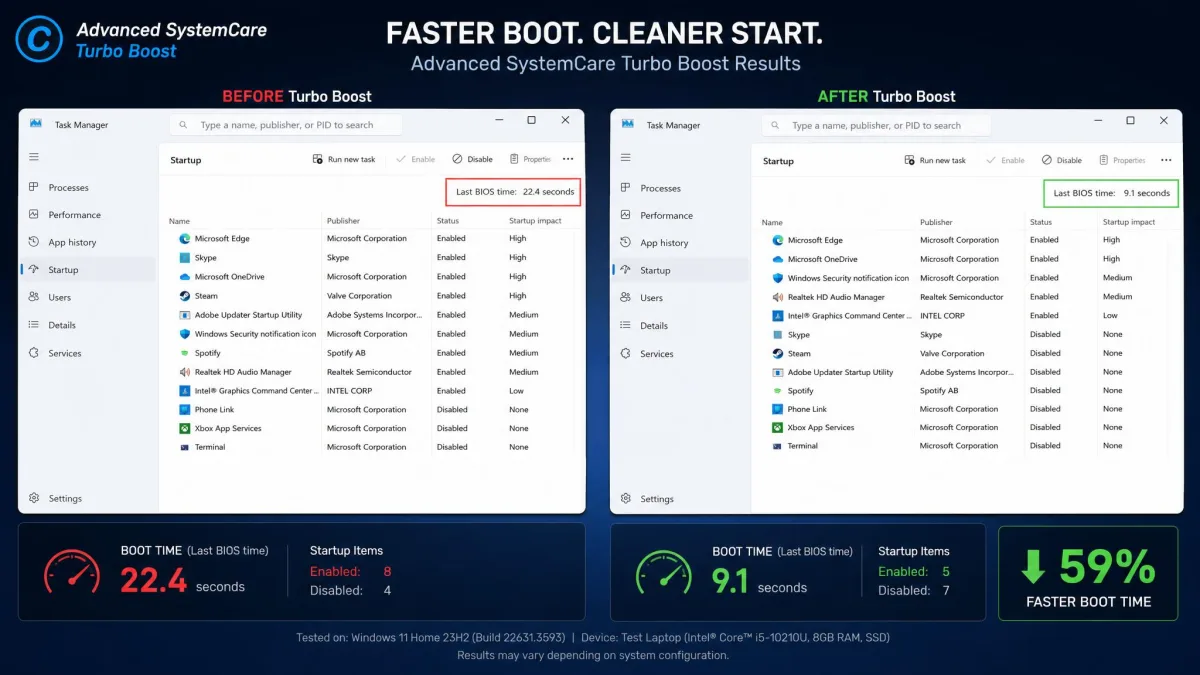
Both promise to make an old PC feel new, and our results favor SystemCare. Its Turbo Boost pass halted 45 background programs and freed 734 MB of RAM in one session. After a cleanup pass, boot time on a test laptop dropped from about 3 minutes to under 90 seconds. IObit claims Pro can cut startup times by up to 50 percent, though independent testing reports smaller, machine-dependent gains. WinOptimizer has no measured boot-time figures; its speed story rests on its toolkit: Boot Center, Live-Tuner, Game Booster, and startup management.
Security, Privacy & Real-Time Protection
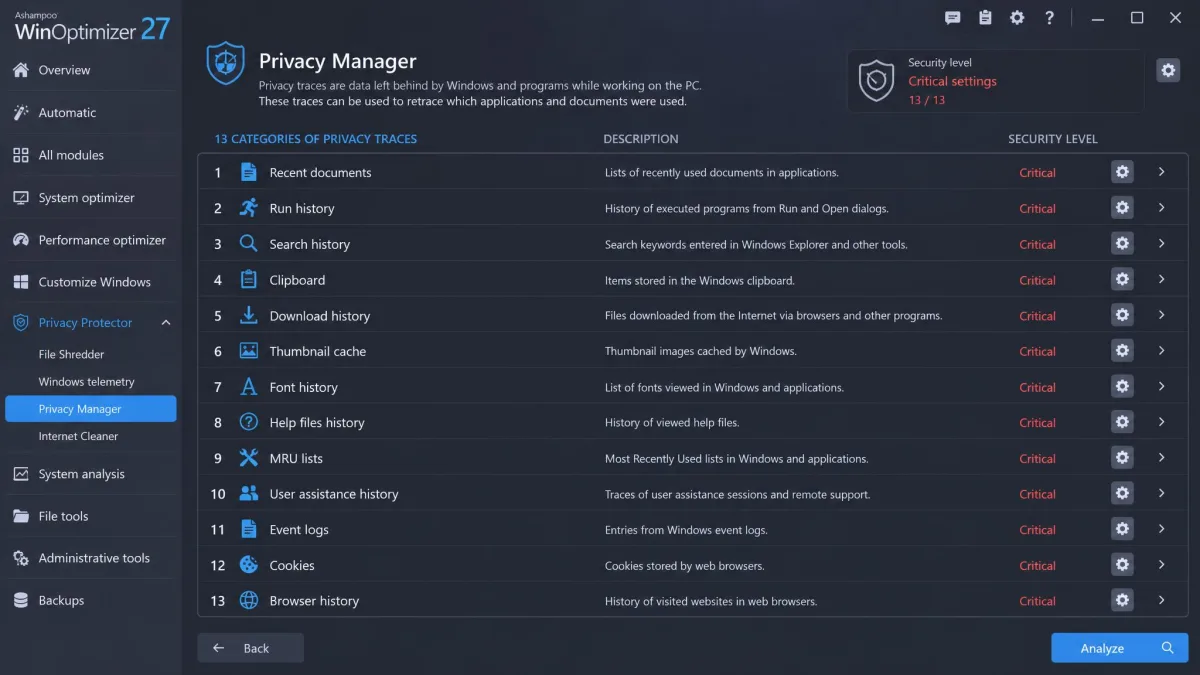
Security is where the two tools diverge most. Advanced SystemCare includes Real-Time Protection, DNS Protector, and FaceID in the free version, and the Ultimate edition bundles Bitdefender's antivirus engine. Even so, comparative testing rates its malware blocking below average, so treat these layers as extras, not antivirus replacements. WinOptimizer takes a privacy-first approach: its Privacy Manager covers 13 categories and 73 critical settings, with a Privacy Traces Cleaner and File Wiper, and it ships with no real-time protection at all. In short, SystemCare adds protective layers, while WinOptimizer scrubs what your PC leaves behind.
Ease of Use & Interface
Advanced SystemCare is the friendlier tool. Installation is quick, the dashboard is clean and modern, and the one-click Scan then Fix workflow suits beginners. WinOptimizer's dashboard is equally polished, but the full grid of 30-plus modules can overwhelm newcomers, and its Clean tab is plainer, ignores the dark theme, and is harder to navigate.
Pricing & Free Versions
Pricing separates them cleanly. WinOptimizer is a one-time purchase with no subscription; Advanced SystemCare is a yearly subscription with a genuinely free tier underneath.
WinOptimizer's free version behaves more like a teaser, while Advanced SystemCare Free is a real free tier with cleaning and startup tools included. Pro is a subscription, with list prices at $29.99 per year for one PC and tiers for two, three, or five PCs, plus a 60-day money-back guarantee. Promotional pricing has dipped to $16.77 per year, though countdown offers change frequently.
If licensing is the deciding factor, WinOptimizer wins for households with several PCs, and SystemCare wins if you want to start free.
The Main Alternatives
Neither tool is the only option. CCleaner Professional found 3.09 GB in the same test where both of these cleared 1.8 GB, making it the better choice for raw cleaning volume. AVG TuneUp is the other big subscription rival, and Wise Disk Cleaner is a lighter, free alternative for single-purpose cleaning. Norton's optimizer lives inside Norton 360, and BleachBit covers the open-source crowd. Our side-by-sides dig deeper: CCleaner vs Advanced SystemCare, AVG TuneUp vs Ashampoo WinOptimizer, and Ashampoo WinOptimizer vs CCleaner.
Which PC Optimizer Should You Pick? (Verdict by Use Case)
No single pick suits everyone, but these use cases cover the common ones.
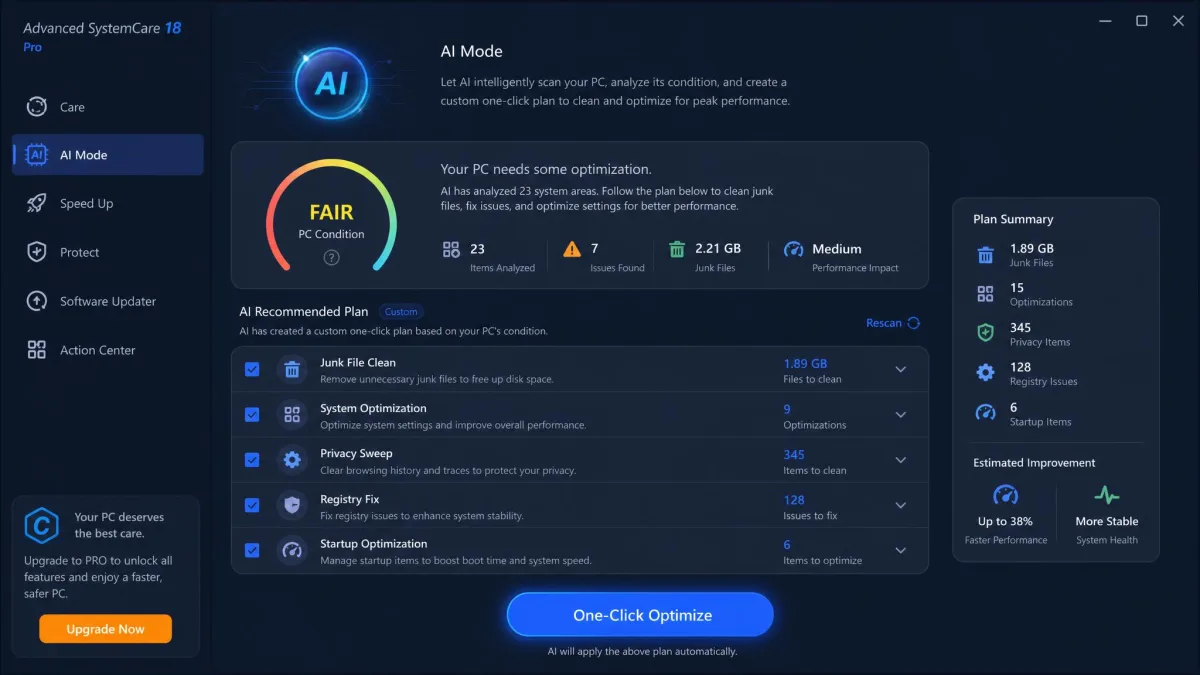
For most people: Advanced SystemCare. The free tier handles daily cleaning and startup tuning, real-time protection is included, and our tests found its cleaning matched or beat WinOptimizer's.
For multi-PC households that want to pay once: Ashampoo WinOptimizer. One license covers up to 10 PCs for life, and the one-time price usually lands around $29.99. It also suits you if privacy scrubbing matters more than protection.
For beginners: Advanced SystemCare's one-click workflow wins easily. WinOptimizer's 30-plus module grid assumes some familiarity with what each tool does.
If security matters most: neither tool replaces an antivirus. SystemCare's free protection layers are a genuine bonus; WinOptimizer offers none.
Ashampoo WinOptimizer vs Advanced SystemCare: FAQ
Is Advanced SystemCare really free?
Which tool removes more junk files?
Can Advanced SystemCare replace a dedicated antivirus?
Do I need to buy both tools?
Final Verdict
The honest caveat is that modern Windows already handles a lot of this. The built-in cleanup and startup tools cover the basics, and registry cleaning and RAM boosting deliver negligible gains on current hardware. Both tools earn their keep through thorough junk removal and startup tuning, and on a neglected machine the payoff can be dramatic. Set expectations before the first scan: a well-maintained PC will yield far less than what we removed from a heavily used one. Create a restore point or back up your files first, because an aggressive clean can remove system restore points along with the junk.