Is LocaChange actually safe and legit? On the trust question the answer is straightforward. It is a real product from an established developer, it changes the GPS position your phone reports without touching the operating system, and its public review profile is genuinely positive.
This review covers what real users report, how the features hold up, what setup involves, what it costs, and where it falls short. We keep vendor marketing and independent evidence separate, and we say plainly when a number could not be pinned down.
Is LocaChange Legit or a Scam? What Real Users Say
Start with the trust question, because it is the one most people arrive with.
LocaChange is not a scam in any meaningful sense. It has an official product site, published pricing, a written refund policy, a public review profile, and a developer with a long product history behind it. What it does have is a set of recurring complaints worth knowing before you pay.
Who Makes LocaChange? The iMyFone Connection
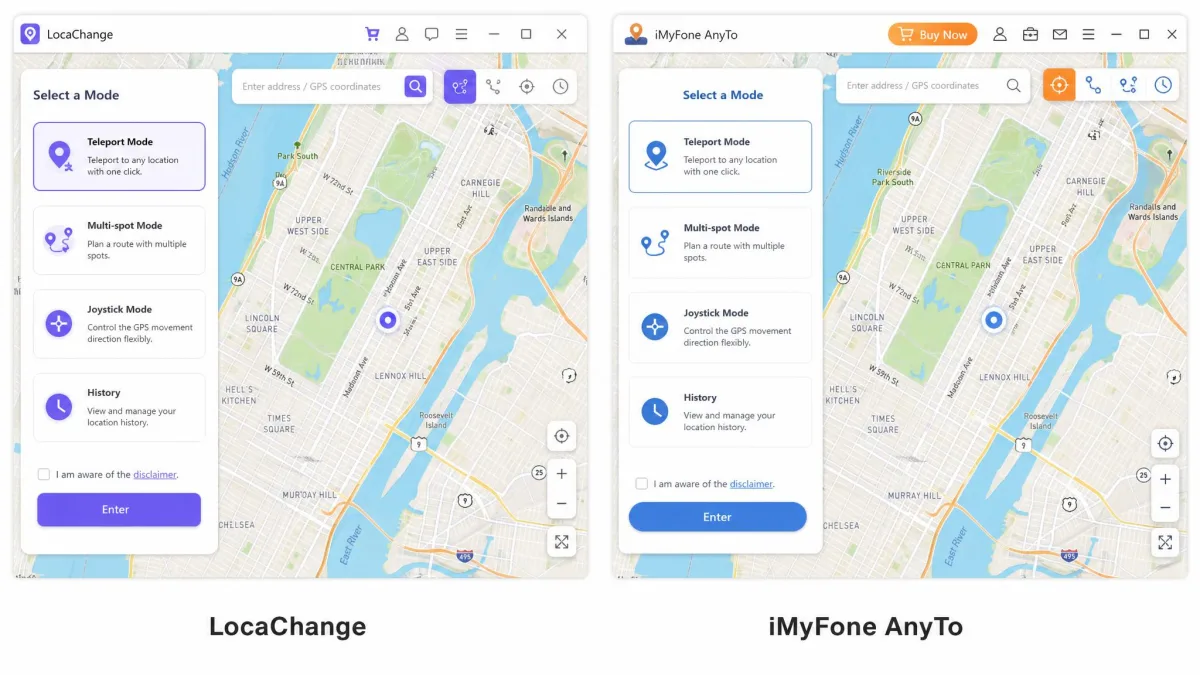
LocaChange's own terms name the operator: CLEVERGUARD TECHNOLOGY CO., LIMITED, a Hong Kong company with registration number 72039776 and a UK office registered as 13291377. Its affiliate and order infrastructure runs on iMyFone domains, which places the product inside a large software house rather than a one-person operation, and explains why LocaChange behaves so much like iMyFone AnyTo, LocaChange's sibling app, which shares its mode set almost feature for feature.
The registered addresses are Unit 720, 7/F Star House, 3 Salisbury Road, Tsim Sha Tsui, Hong Kong and Rf001, 1st Floor Front, 36 Gerrard Street, London W1D 5QA. The iMyFone relationship, by contrast, is documented through the footer and the order domains rather than a corporate disclosure, so treat the two as separate facts.
What the Trustpilot Rating Actually Tells You
LocaChange's Trustpilot profile is rated Excellent, with a TrustScore of roughly 4.7 to 4.8 out of 5. The score shifts between those figures depending on which page of the profile and which regional Trustpilot domain loads, so treat it as a band rather than a fixed number.
The review total is shakier. Roughly 170 or so reviews are published, but cached snapshots show 172, 173, 170, 130, 128, 104 and 58 across different views of the same profile. That is not evidence of fakery, since regional domains genuinely segment their data, but a headline count is not something to anchor a purchase to.
Trustpilot's AI summary of 58 reviews on the Canadian profile reports that reviewers overwhelmingly had a great experience, and singles out helpful, personalised customer service as the standout theme.
The vendor also cites 96% to 98% five-star reviews. That share moves between the two figures and is not independently auditable, so we would not repeat it as a fact.
Common Complaints We Found
The negatives cluster tightly, and they recur across independent accounts often enough to be characteristic rather than one-off.
- The desktop app can fail to recognise a plugged-in phone, which blocks location changing until the connection is re-established.
- Location changes fail intermittently, with the spoofed position not applying on some attempts.
- Cancelling a subscription is harder than it should be, and refund requests can stall, including cases where a paying customer got no refund at all.
- Support responses can be slow, and sometimes unhelpful on genuine technical faults.
- Route and snapshot features have shown minor glitches, some of which later updates addressed.
What Is LocaChange?
With the trust question answered, here is what the product does.
LocaChange changes the GPS position your iPhone or Android phone reports to apps. It simulates GPS rather than modifying iOS, so no jailbreak or root is required. People use it with Pokemon GO, Monster Hunter Now, Life360, Tinder, Snapchat and WhatsApp, either to play location games without walking or to control what a social app shows about where they are.
The interface is clean and modern, and the mode switcher is easy to navigate without documentation. The full mode set, though, feels overwhelming on first use for anyone who has not spoofed a location before.
Every experiential observation here traces to documented, checkable behaviour from independent hands-on accounts and to LocaChange's published specifications. Where a figure could not be verified, we say so rather than rounding it into a claim.
Is LocaChange Safe and Legal to Use?
Safety splits into two questions, and conflating them is how people get burned.
On the device side, the app leaves the operating system untouched, which keeps it clear of the biggest security risk in this category. Simulating location is a documented first-party capability on both platforms: Apple's own location-simulation documentation and Android's mock location provider exist for developers. For background, we cover how GPS spoofing works and its risks separately.
Legality is different from platform policy. Changing your own device's reported location is not generally illegal, but it very often breaks the terms of service of the app you point it at. The consequence is enforcement by the app, not by a court.
Account Bans and Detection Risk
Spoofing location in Pokemon GO violates Niantic's rules, and enforcement is graduated. Under Niantic's three-strike discipline policy, strike 1 is a 7-day warning that blocks rare Pokemon encounters and EX Raid Pass eligibility, strike 2 is a 30-day account suspension, and strike 3 is permanent termination. Some behaviour triggers immediate termination without earlier strikes.
LocaChange markets an anti-detection engine and a cooldown timer, and accounts can run for months without a strike when cooldown timings are respected between jumps. That is not immunity. Detection remains possible, and enforcement can follow quickly once spoofing is flagged. No credible source quantifies how often apps detect LocaChange specifically, so anyone quoting you a detection rate is guessing. If a game account matters to you, read the Pokemon GO spoofers we ranked first.
Key Features We Tested
The mode list is where LocaChange earns most of its price.
Teleport Mode
Teleport changes your position instantly to any point you drop on the map, and the new location carries through to Apple Maps, Instagram and other location-aware apps without a restart. That is the behaviour you want, and not every tool in this category manages it cleanly. A Jump Teleport variant moves you in staged hops rather than one leap.
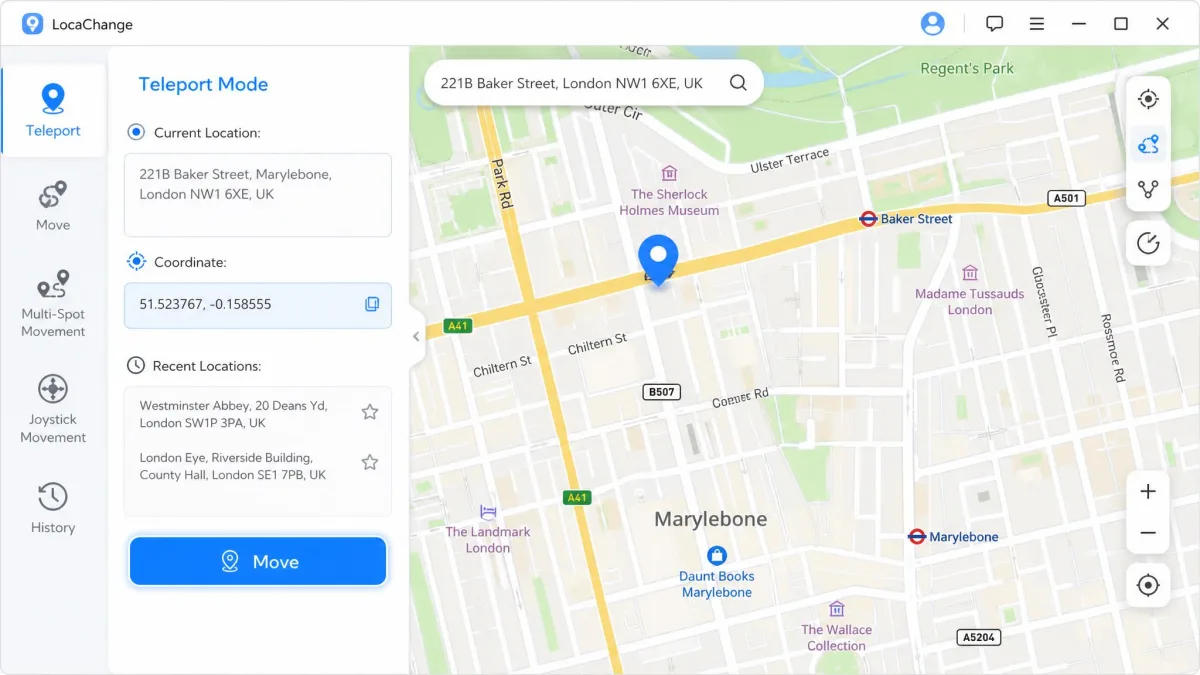
Two-Spot and Multi-Spot Routes
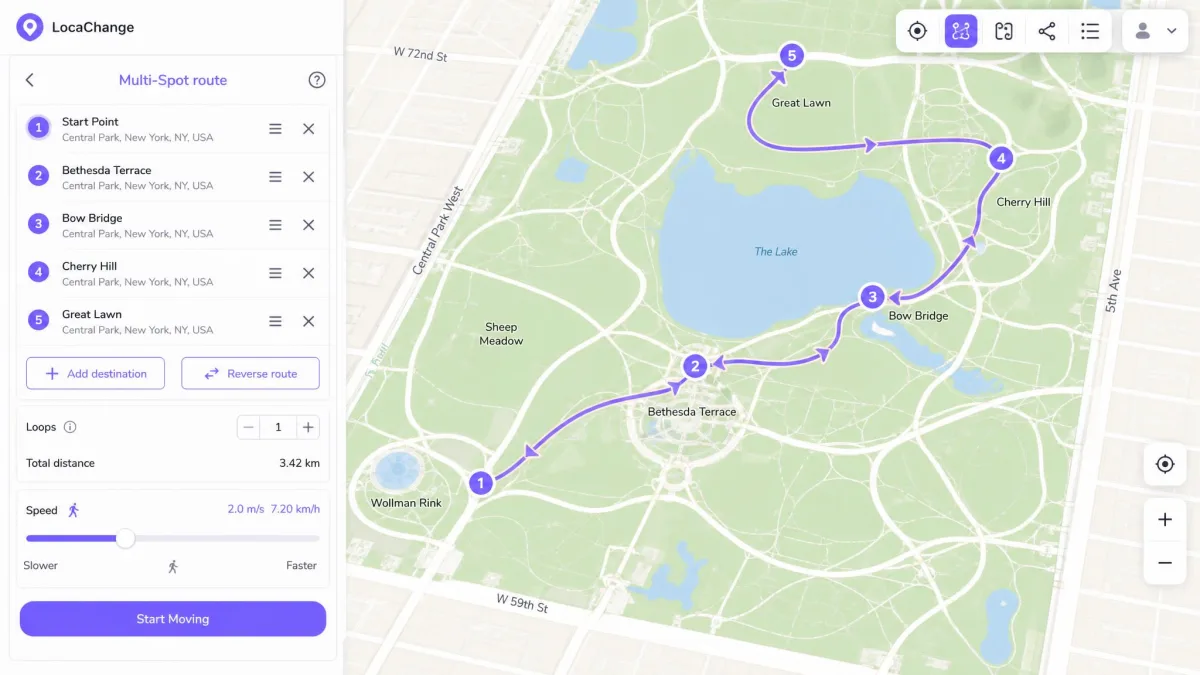
Two-Spot walks a straight route between a start and an end point. Multi-Spot strings several waypoints into a longer path. Both let you set movement speed from 3.6km/h to 120km/h, covering a walking pace up to highway driving, and both can loop the route.
Joystick Mode
The 360-degree joystick gives free directional control in real time, by dragging on screen or with the keyboard. It is the mode most people want for games, and the one the free trial restricts hardest.
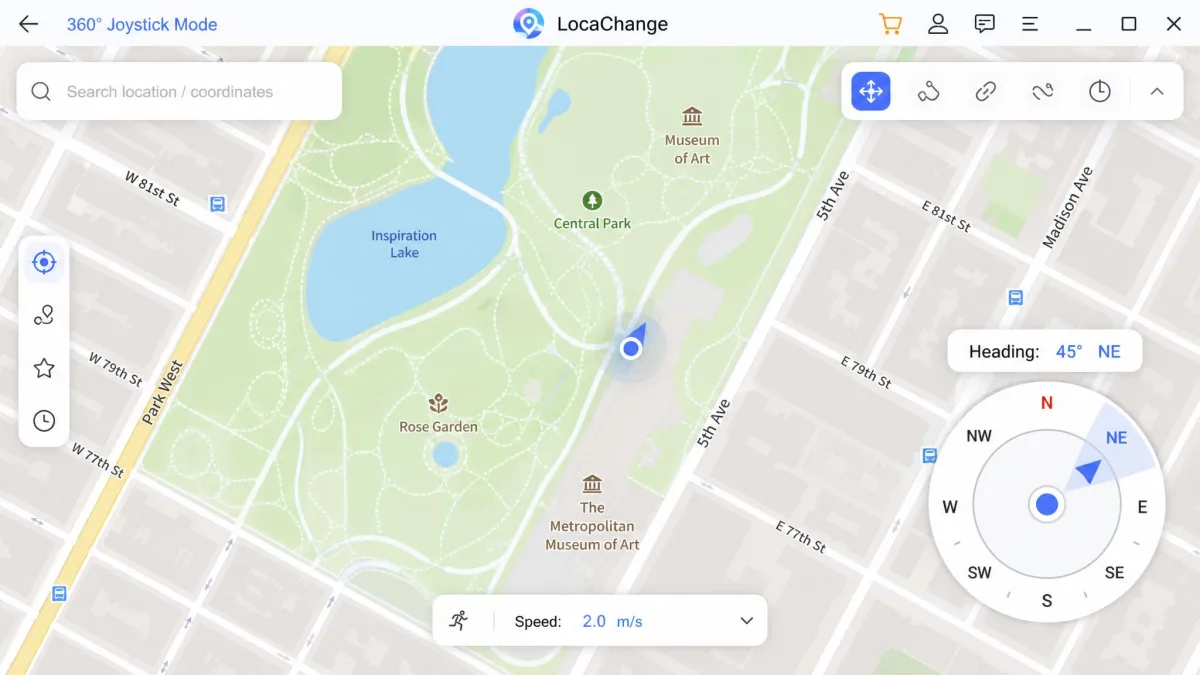
GPX Import and Route History
LocaChange keeps a location history and a favourites list, so you can return to saved spots without re-pinning them. GPX handling is full two-way: the PC, Android and iOS clients all import and export GPX route files, and you can batch-export straight from the Favorite Routes list. That matters if you already have routes drawn in another tool, or if you want to keep a copy of a route outside the app.
Setup and Ease of Use
Setup is straightforward, with one structural catch that shapes the whole experience.
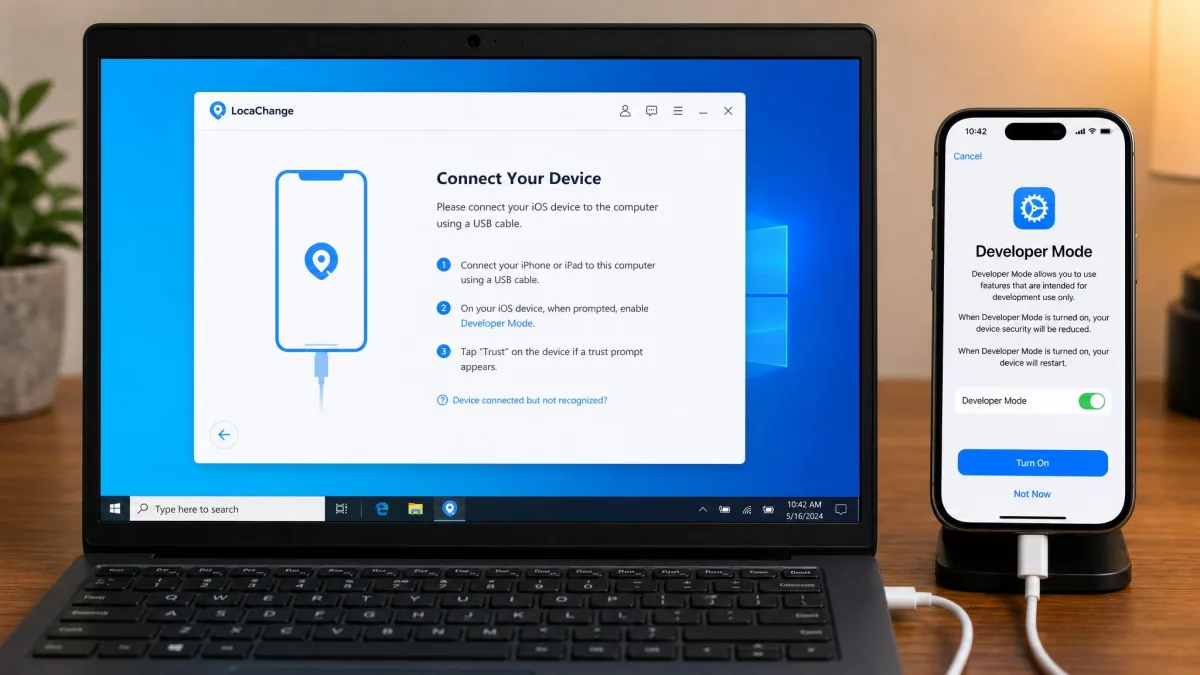
Nothing works on the phone alone for most workflows. The desktop app has to be installed and running to drive the change, so a computer is part of the setup rather than an optional extra. The first connection has to be made over USB. After that the phone reconnects wirelessly over the same Wi-Fi network, which makes repeat sessions far less tedious than the first.
iOS Setup
On iPhone, you install the desktop app, connect over USB, and enable Developer Mode when prompted. That step takes under a minute and the on-screen prompts are clear. From there you pick a mode and drop a pin.
Android Setup
Android follows the same shape: install the desktop client, connect the handset by USB, allow debugging, and let the app configure the mock location provider. If you are shopping by platform, our roundups of location spoofers for iPhone and location spoofers for Android cover the alternatives in each camp.
Keep the original cable that came with your phone for the first pairing. A charge-only cable connects for power but not for data, and it is a common reason the desktop app never sees the handset.
Device and App Compatibility
Coverage is broad, and this is where LocaChange clearly beats the cheaper competition.
LocaChange supports iOS 14 through iOS 27 Beta and Android 8 through Android 17. The desktop app runs on Windows 11, 10, 8 and 7, and on macOS 10.9 through macOS 26. One subscription covers up to 10 devices driven from a PC or Mac, while the standalone iOS app covers a single iPhone.
LocaChange Pricing and Plans
Pricing is where the value case gets difficult.
| Plan | Price | Billing | Devices | Refund |
|---|---|---|---|---|
| 1-Month | $19.99 | Recurring | 10 devices | 30-day |
| 1-Quarter | $39.99 | Recurring | 10 devices | 30-day |
| 1-Year | $79.99 | Recurring | 10 devices | 30-day |
| Lifetime | $119.99 | One-time | 10 devices | 30-day |
There is a free tier, but it is a capped trial rather than a usable free version: 1 Teleport use, 1 Jump Teleport use, and 15 minutes of Joystick mode. It runs out almost immediately, which is fine as proof that the connection works and useless for evaluating the routing modes.
The refund policy is a 30-day money-back guarantee across all tiers, and an unintended auto-renewal charged without prior email notice is refundable within 7 days. Read the exclusions first: there is no refund for a change of mind, for user error, or for what the policy calls a misunderstanding or lack of understanding of the product's functions. Refusing to cooperate with support troubleshooting also voids eligibility, and refunded licences are deactivated.
Subscriptions renew for the same period you bought, and auto-renewal is on by default. The catch is that the renewal amount and billing interval are shown only during the order process, not on any published rate card, and they vary with the plan and whatever promotion applied at purchase, so no single renewal figure holds. Read the checkout screen carefully and note what it says, because the charge can land later without a fresh price reminder. You can cancel at any time through customer service or the unsubscribe link in the subscription emails, and paid access runs to the end of the term you already paid for; app-store purchases are cancelled in the Apple or Google subscription settings instead.
Is It Worth the Money?
Here is the comparison against the two closest rivals.
| Product | Monthly | Yearly | Lifetime | iOS | Android | Devices |
|---|---|---|---|---|---|---|
 |
$19.99 | $79.99 | $119.99 | iOS 14 and up | Android 8 and up | 10 devices |
 |
from $14.99 | Promo-dependent | Promo-dependent | iOS 5 and up | Android 6.0 and up | 5 or 10 devices |
 |
$9.95 | $39.95 | $59.95 | iOS only | None | 5 devices |
MockGo costs half as much monthly and around a third as much for a lifetime licence, though it is iOS-only. AnyTo advertises entry pricing from $14.99, but its listed prices swing with rolling promotions and VIP versus SVIP tiering, so no single figure stays current. Against that field, LocaChange sits above the average rate for comparable location changers. The premium buys the broadest device coverage, a 10-device licence and the fullest mode set. If you only need one iPhone spoofed occasionally, that premium is hard to justify.
You can confirm the tiers on LocaChange's official site, which is also where the 30-day guarantee terms are published.
LocaChange Pros and Cons
Pros
- Widest OS coverage in its class: iOS 14 and up, Android 8 and up
- No jailbreak or root needed on either platform
- One licence covers up to 10 devices
- Full mode set: teleport, jump teleport, two-spot, multi-spot and 360-degree joystick
- Clean interface with an easy mode switcher
- 30-day money-back guarantee in writing
Cons
- Priced above the category average, roughly double MockGo monthly
- A Windows or Mac computer is required for most workflows
- Connection failures and intermittent non-applying location changes are recurring complaints
- Cancellation and refund requests can stall
- The free trial is too limited to evaluate anything but the connection
- Refund exclusions are broad and written in the vendor's favour
Best LocaChange Alternatives
If the price or the desktop requirement is the sticking point, two products are worth a look.
Foneazy MockGo is the budget pick at $9.95 monthly and $59.95 for a lifetime licence, covering 5 devices with a 30-day guarantee, and it handles teleport, multi-spot routes and joystick control. The catch is that it is iOS-only. Our MockGo review goes deeper.
iMyFone AnyTo is the closest functional match: teleport, two-spot, multi-spot and joystick modes, GPX import and export, cloud-saved routes, and support back to iOS 5 and Android 6.0. Its SVIP tier includes an iGo app for PC-free iOS use, which addresses LocaChange's biggest weakness directly.
For a wider field, see our tested roundup of virtual location changers and the best GPS spoofing apps we tested.
One note on reading reviews in this category, including the negative ones we cite: most sites publishing LocaChange reviews sell a competing location changer.
Frequently Asked Questions
Is LocaChange safe to use?
Can LocaChange get you banned from Pokemon GO?
Can I use LocaChange without a computer?
What if my auto-renewal charge already went through?
Does the 10-device limit mean 10 phones at once?
Does the spoofed location stay put after I unplug or restart?
Verdict: Should You Buy LocaChange?
LocaChange is legitimate, capable, and expensive. It does what it advertises, and the public review profile is genuinely positive even after you discount the vendor-promoted percentages.
What holds it back is the price against a field where a direct rival charges half as much, the dependency on a desktop computer, and a complaint pattern around connection failures, cancellation friction and slow support that shows up too often to dismiss. Try the free tier first, expect it to run out inside a few minutes, and buy only if the multi-device coverage is something you will actually use.