A virtual location changer is an app that feeds your phone a fake GPS position, so every app on the device believes you are somewhere else. Some run on your computer and control a connected iPhone. Others install straight onto an Android phone and take over the mock location slot.
People use them to reach geo-restricted content, to play location-based games, to widen the radius on dating apps, and to keep a real address out of social posts.
We spent this round comparing ten of them on price, platform support, route control, and how much friction each one adds before the pin actually moves.
How We Tested and Chose These Location Changers
We scored each tool on five things. Setup friction came first, meaning how many taps stand between install and a moved pin. After that we weighed route and joystick quality, platform coverage, licence terms, and price honesty.
Desktop location changers all need the phone connected by USB or Wi-Fi before the map will load, so setup takes longer than the one-click marketing suggests. We counted that setup time against every desktop tool here.
Free trials were the hardest part of the process. They are tightly capped, sometimes to a single hour or two uses, which is not enough to test a route properly.
We also read the small print. Subscriptions renew automatically by default, and the recurring charge is easy to miss at checkout, so refund windows and device limits carried real weight in the ranking.
The 10 Best Virtual Location Changers
1. Dr.Fone Virtual Location - Best Overall for iOS and Android
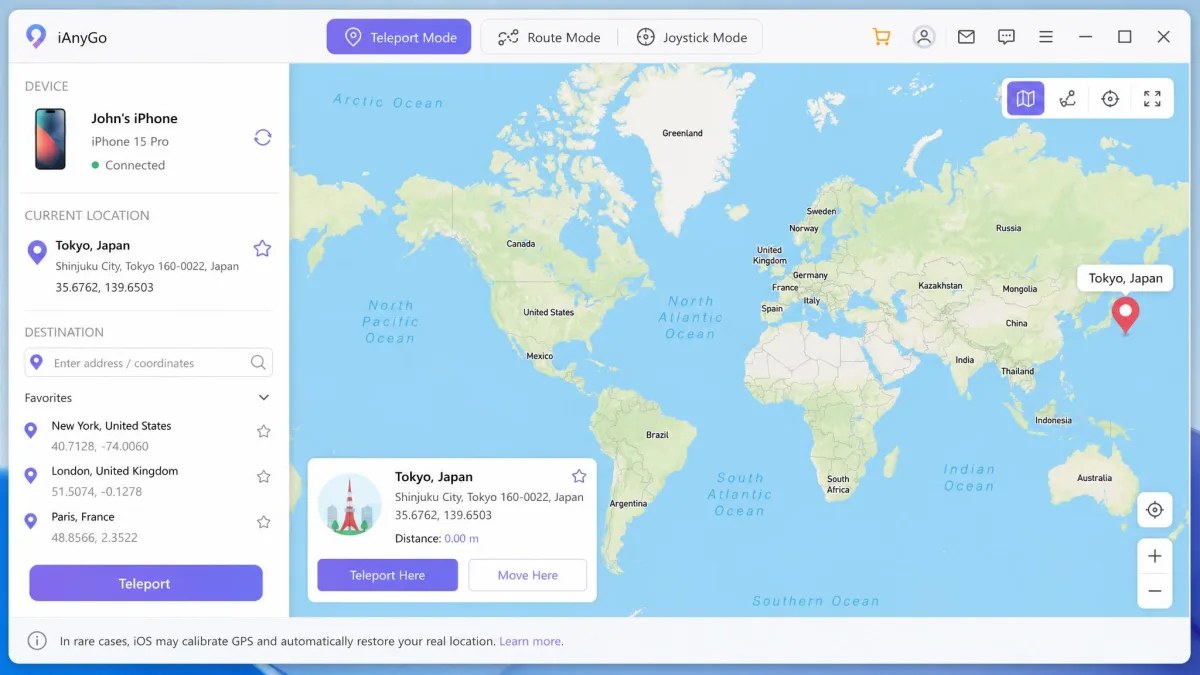
Dr.Fone covers the widest ground of anything we looked at. It handles one-stop and multi-stop routes, a jump teleport mode, a 360-degree joystick with W/A/S/D keyboard control, GPX import and export, an adjustable speed dial, and a cooldown timer for games.
Supported systems run from iOS 5.0 and Android 5.0 upward. One licence drives up to 5 iOS devices at once from a single PC or Mac. Simulated speeds run from 3.6 km/h to 108 km/h, which is enough range to look like walking, cycling or driving.
Pricing starts at $4.97 per month, with $9.97 billed quarterly and $19.97 billed annually.
One caveat shapes our advice here. The refund window differs between Wondershare's general policy and this product's own store page, so the term you actually get depends on which page took your money. Check the figure shown at checkout rather than the one in the marketing copy.
That is why we point new users at the monthly plan rather than the annual one.
Pros
- Lowest entry price of any paid tool we compared
- Full route, teleport, joystick and GPX feature set in one app
- Works on both iOS and Android with no jailbreak and no root
- Drives up to 5 devices from one computer
Cons
- No longer on an active update track
- Store page lists a short money-back window
- Needs a computer, so nothing works from the phone alone
Best for people who want every mode in one place and plan to pay month to month.

2. iMyFone AnyTo - Best for Simulated Movement
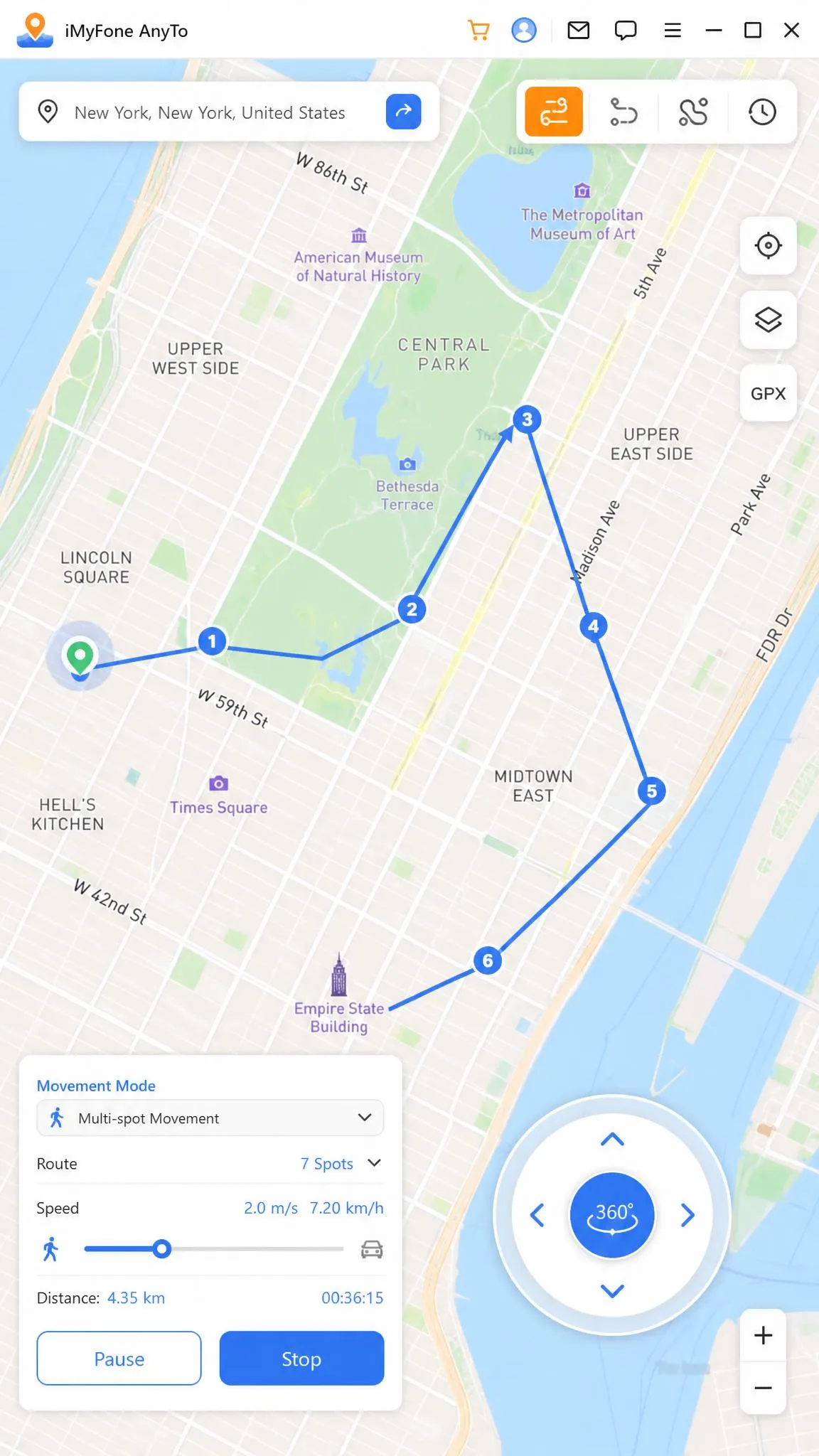
Where Dr.Fone leads on breadth, AnyTo leads on how convincing the movement looks. Two-spot and multi-spot route simulation, an adjustable speed dial and a 360-degree joystick give you a path that bends and slows the way a real walk does.
It connects over USB or Wi-Fi and adds a cooldown timer and GPX support. Both iOS and Android are covered from the same app. A VIP licence covers unlimited PCs or Macs plus 5 iOS or Android devices, and the SVIP tier raises that to 10.
Listed pricing is $20 billed annually on the VIP plan, or $30 one-time on the VIP lifetime plan. Lifetime pricing swings widely between the VIP and SVIP tiers and promotional periods, so the checkout figure often differs from listed prices. Annual pricing varies by tier and region too. There is a 30-day money-back guarantee behind both.
Our first session did not start cleanly. We opened the desktop app with the phone paired and then waited on a map panel that rendered blank, which left the spoofed position sitting on our real one until we reloaded. The second snag arrived on long jumps. Anything past roughly a 20 km radius failed while the phone was paired over Bluetooth, and the move only went through after we corrected the DNS settings.
Pros
- The most natural-looking simulated walking of the group
- 30-day money-back guarantee
- Unlimited computers on one licence
- Covers iOS and Android from the same app
Cons
- The map panel sometimes loads blank and strands the pin
- Long jumps can fail over Bluetooth pairing until DNS is fixed
- Listed and checkout prices do not always match
Best for Pokemon GO and other games that watch your movement pattern.
3. iToolab AnyGo - Best for Route Customization
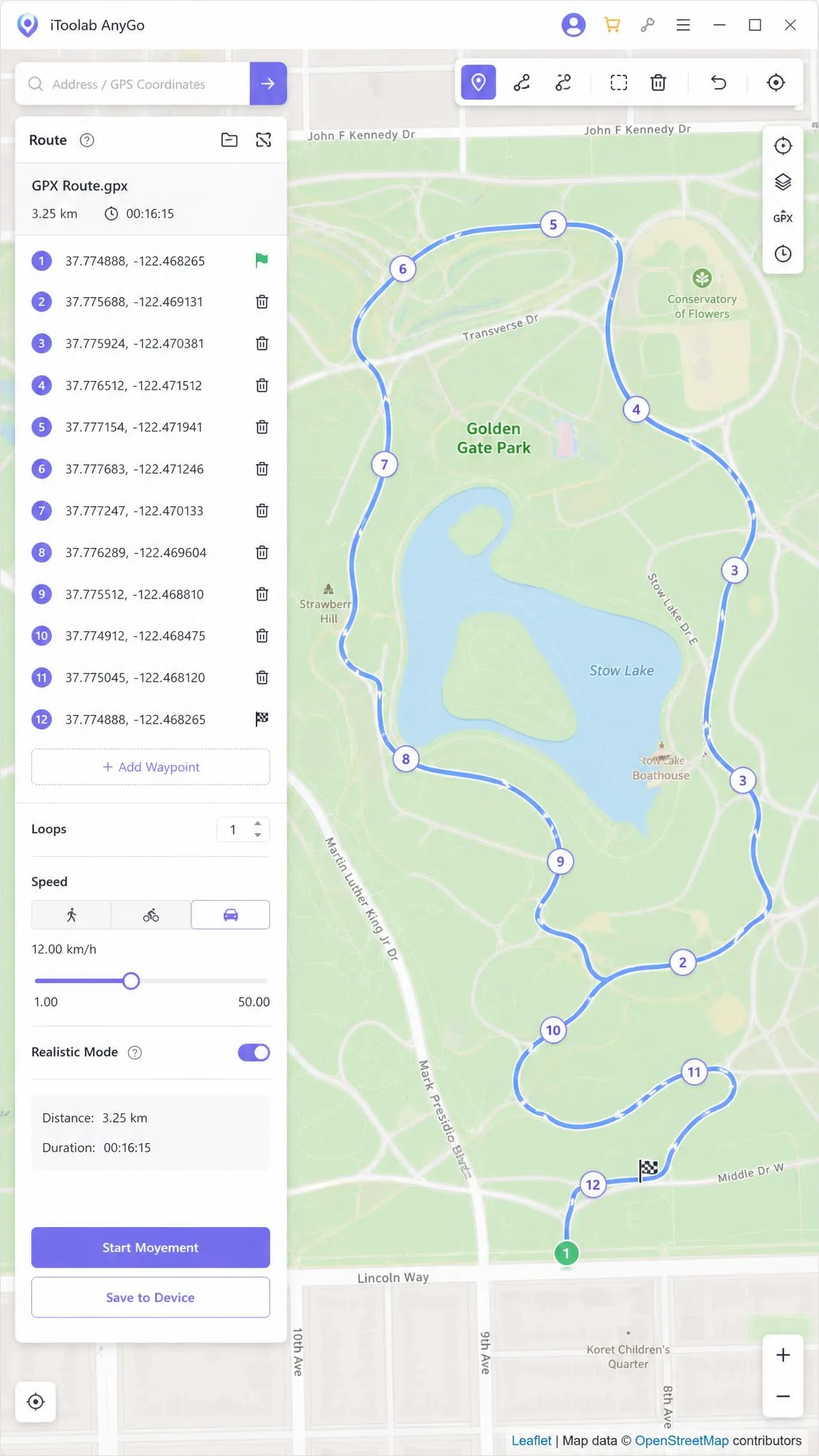
AnyGo takes route building further than the rest. You can draw a path or import a GPX file. Speed sets anywhere from 3.6 km/h to 100 km/h, and a virtual joystick takes over when you want to steer manually. A Pokemon GO cooldown timer sits alongside it.
Compatibility is unusually broad, covering iOS 7.0 through iOS 27 and Android 7.0 and later, with no jailbreak and no root needed. A personal licence covers up to 15 devices.
The desktop version costs $9.95 per month against a regular price of $19.95, and the Android app is $14.95 per month. Every iToolab purchase carries a 30-day money-back guarantee, so there is room to try it on your own device before you commit.
Pros
- Deepest route editing and GPX import of the mid-price tools
- Covers 15 devices on one personal licence
- Supports very old and very new iOS releases
- 30-day money-back guarantee on every iToolab purchase
Cons
- The Android app costs more than the desktop version
- Desktop and Android licences are sold separately
Best for anyone who wants a repeatable, saved path rather than a single jump.
4. Tenorshare iAnyGo - Best for One-Click Spoofing
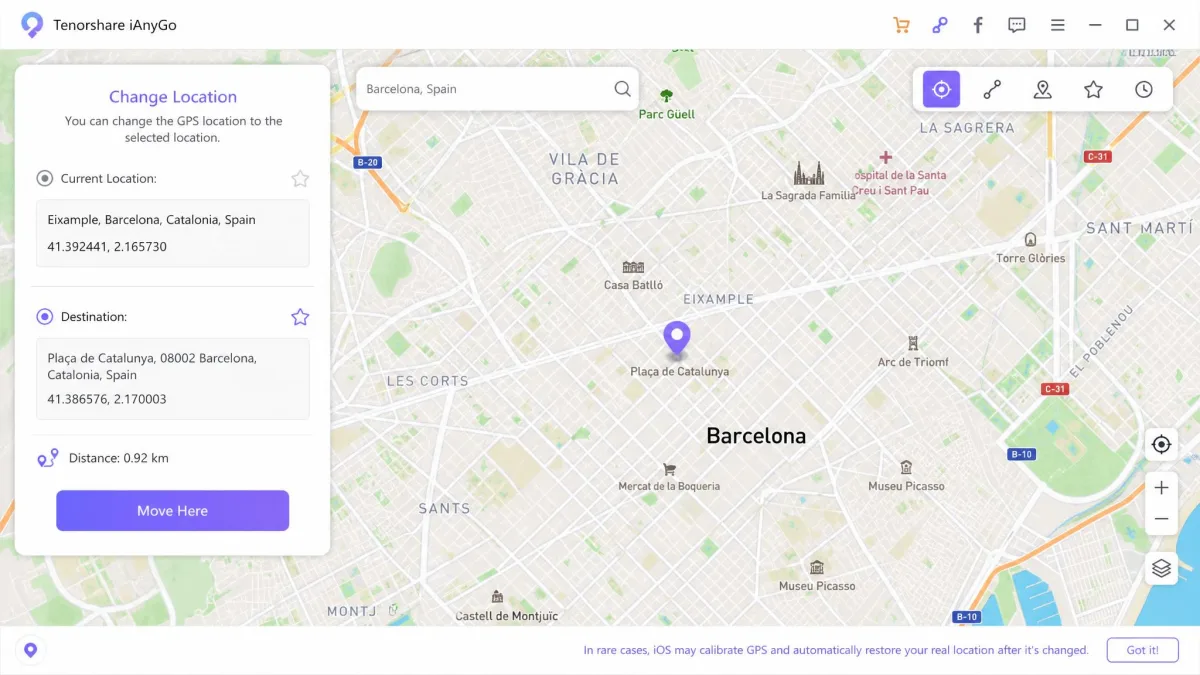
If AnyGo rewards patience, iAnyGo rewards speed. Location changes happen in one click, and everything else sits one layer down. Multi-spot routes run to 99 points, and there is a 360-degree GPS joystick, GPX import and export, and an auto-catch mode for Pokemon GO.
It runs on iOS 14 through iOS 27 and Android 4 through Android 16 with no jailbreak or root. One licence covers up to 15 devices simultaneously.
The desktop version is $12.95 per month, reduced from $19.95, and the iOS and Android apps are $14.99 per month. A free 1 Hour trial opens up 5 modes, and there is a 30 Days money-back guarantee.
Mode switching is where it slowed us down. We dropped a pin in teleport mode, moved across to route mode and then to the joystick, and every switch cost us a beat instead of flipping cleanly. The walking speed is fixed as well, so the route we ran tracked along at one unvarying pace and looked mechanical to the games watching it.
Best for users who want a new location set before they have finished reading the menu.
5. UltFone iOS Location Changer - Best for Location-Based Games
UltFone iOS Location Changer is built around the same set of ideas as iAnyGo, but tuned for gameplay. It offers one-click teleport, single and multi-spot routes, a joystick, and natural movement simulation. A cooldown timer sits behind those, aimed at keeping you from tripping distance checks.
Pricing runs $9.95 per month, $19.95 per quarter, $39.95 per year, or $69.95 lifetime. Every plan carries a 30-Day money-back guarantee and covers 5 devices, with free upgrades included during the licence term.
Pros
- Cooldown timer and natural movement aimed squarely at games
- Four pricing tiers including a lifetime option
- 30-day refund on every plan
Cons
- iOS focused, so Android users should look elsewhere
- Battery drain is heavy while a mock position is held
Best for Pokemon GO, Monster Hunter Now and similar games played from one iPhone.
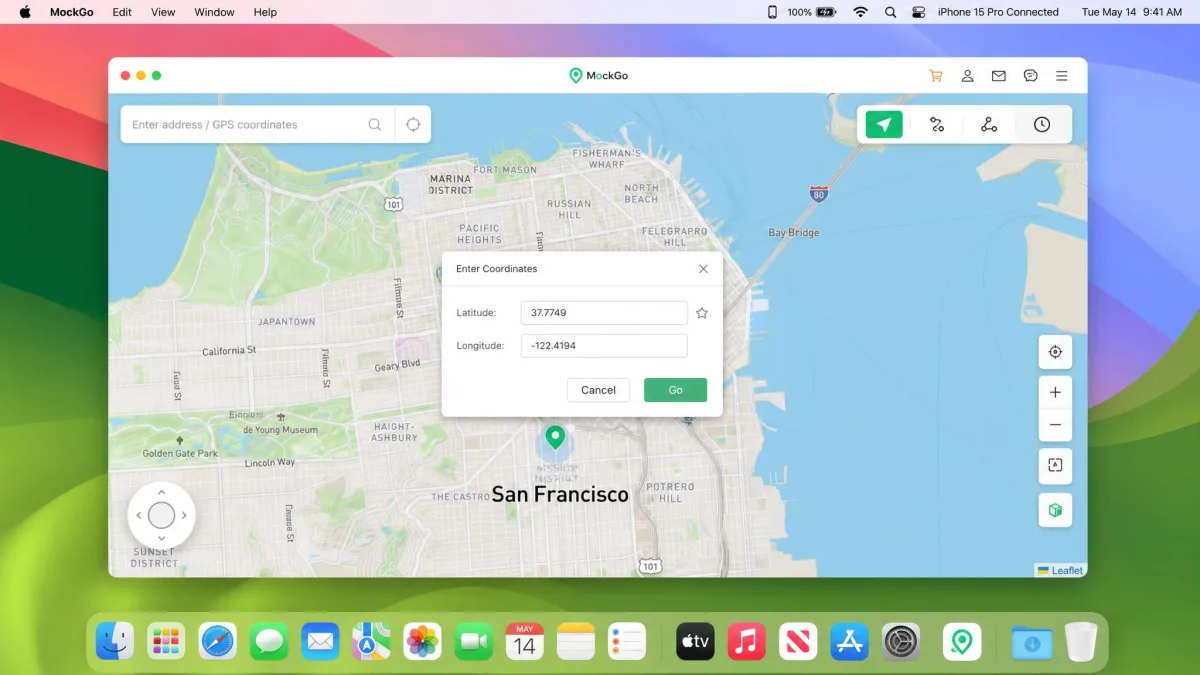
6. MockGo - Best Desktop iOS Location Control
MockGo keeps the whole job on the computer. One-click teleport, multi-stop routes, a joystick and manual coordinate entry are all driven from the desktop app, with speeds from 3.6 km/h to 108 km/h and no jailbreak required.
It is iOS only, and it covers 5 devices per licence. Plans are $9.95 for the 1-month plan, $39.95 for the 1-year plan, and a $59.95 lifetime plan, with a 30-day money-back guarantee.
The connection is the part to plan around. We had the desktop app driving a paired iPhone, and partway through a session it lost the handset without warning. Re-pairing brought the phone back within seconds, but the drop repeated often enough that we would keep the cable within reach for any long run.
Best for people who prefer typing exact coordinates to dragging a pin.
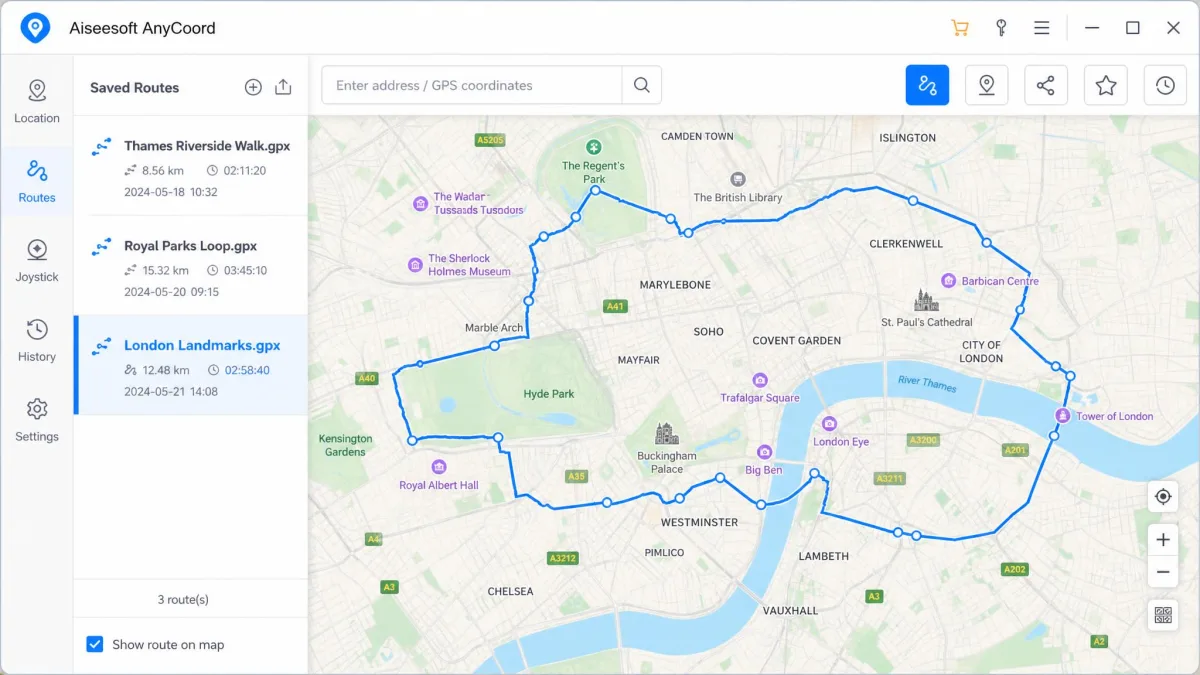
7. Aiseesoft AnyCoord - Best for GPX Import and Export
Aiseesoft AnyCoord treats routes as files. GPX import and export, saved historical routes, a location search bar, one-stop mode, multi-stop mode and joystick mode all sit in the same window, on Windows and Mac, for iPhone and Android.
It costs $9.95 per month, or $49.96 for a one-time lifetime licence. A 7-day free licence opens it up, and a 30-day money-back guarantee covers 6 devices with free upgrades.
Best for anyone who wants to reuse the same route next month without redrawing it.
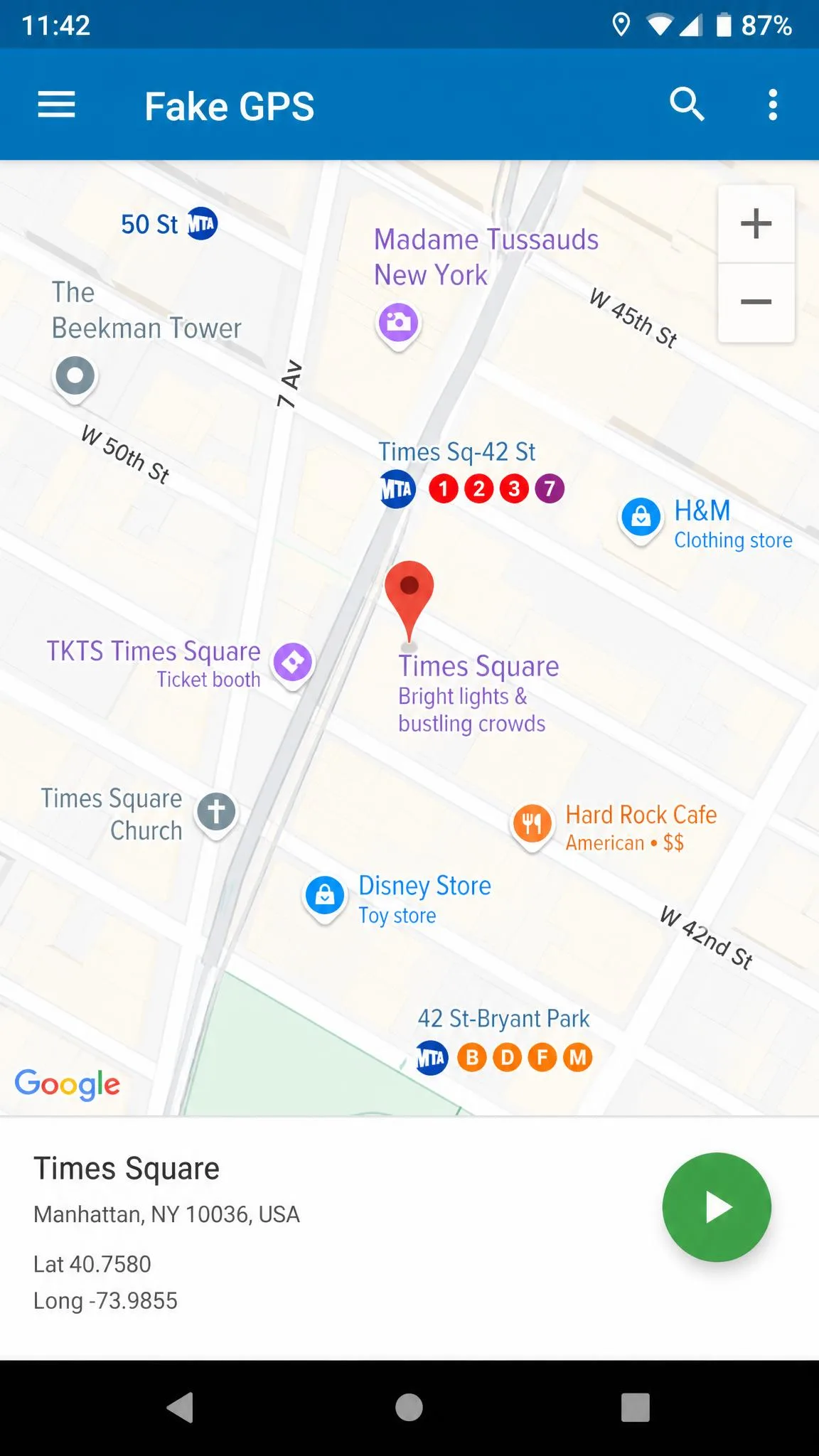
8. Fake GPS Location by Lexa - Best Free Android Option
Nothing paid here beats Lexa's app on value, because it is FREE on Google Play. It sets a mock location through Android developer options, saves favourites, lets you pick a spot from the map, and shows no ads.
It requires Android 5.0 or later. Google Play's community rates it 4.65 out of 5 across roughly 610,000 ratings, and it has around 56 million downloads, though the last release was version 2.1.2 in August 2022.
Two rough edges stand out. The in-app setup instructions point at a developer options menu that no longer matches newer Android builds, so we ended up hunting the path down by hand through Settings, then System, then Developer options. Once the app was selected there, the pin held exactly where we put it. The second edge showed up the next time we opened the app, because the location we had set was gone and the whole selection had to be made again.
Set up properly, it holds a fake position reliably and runs without ads.
Pros
- Completely free with no advertising
- Holds a mock position reliably once set up
- Saved favourites for places you use often
Cons
- Setup instructions inside the app are out of date
- Forgets the chosen location after a restart
- Android only, with no route or joystick modes
Best for a quick, no-cost location change on Android.
9. Mock GPS with Joystick - Best Joystick Control on Android
GPS JoyStick by The App Ninjas adds the one thing Lexa's app leaves out, which is movement. An overlay joystick floats above whatever app you are in, and route recording, playback, timed jumps and favourites fill out the rest.
It is FREE to download with paid in-app upgrades, requires Android 6.0 or later, and works without root on most devices. Google Play's community rates it 4.05 out of 5 across roughly 100,000 ratings, from about 9.2 million downloads.
Best for Android gamers who want to steer rather than teleport.
10. NordVPN - Best for IP-Level Location Change
NordVPN belongs on this list for what it deliberately does not do. It changes the IP-based location only, not the device GPS signal, which makes it the right tool for geo-restricted streaming and the wrong tool for maps and games.
The apps cover iOS, Android, Windows and macOS, with split tunnelling, Threat Protection and a kill switch, plus 10 simultaneous device connections and a 30-day money-back guarantee.
It costs $14.99 per month on the rolling monthly plan, or from $3.49 per month on the 2-year plan. NordVPN's headline monthly rate changes with promotions and the tier selected, so the price shown at signup often differs.

Virtual Location Changers Compared
| Product | Buy | Platforms | Jailbreak or root | Routes | Joystick | Price | Best for |
|---|---|---|---|---|---|---|---|
|
Check price → | iOS + Android | No | Yes | Yes | $4.97/mo | Cross-platform all-rounder |
|
Check price | iOS + Android | No | Yes | Yes | $20/yr | Simulated movement |
 |
Check price | iOS + Android | No | Yes | Yes | $9.95/mo | Route customisation |
 |
Check price | iOS + Android | No | Yes, 99 points | Yes | $12.95/mo | One-click spoofing |
 |
Check price | iOS + Android | No | Yes | Yes | $9.95/mo | Location-based games |
 |
Check price | iOS only | No | Yes | Yes | $9.95/mo | Desktop iOS control |
 |
Check price | iOS + Android | No | Yes | Yes | $9.95/mo | GPX import and export |
 |
Check price | Android only | Developer options | No | No | Free | Free Android option |
 |
Android only | Developer options | Yes | Yes | Free | Joystick control | |
|
Check price | All (IP only) | No | No | No | $14.99/mo | IP-level change |
What a Virtual Location Changer Actually Does
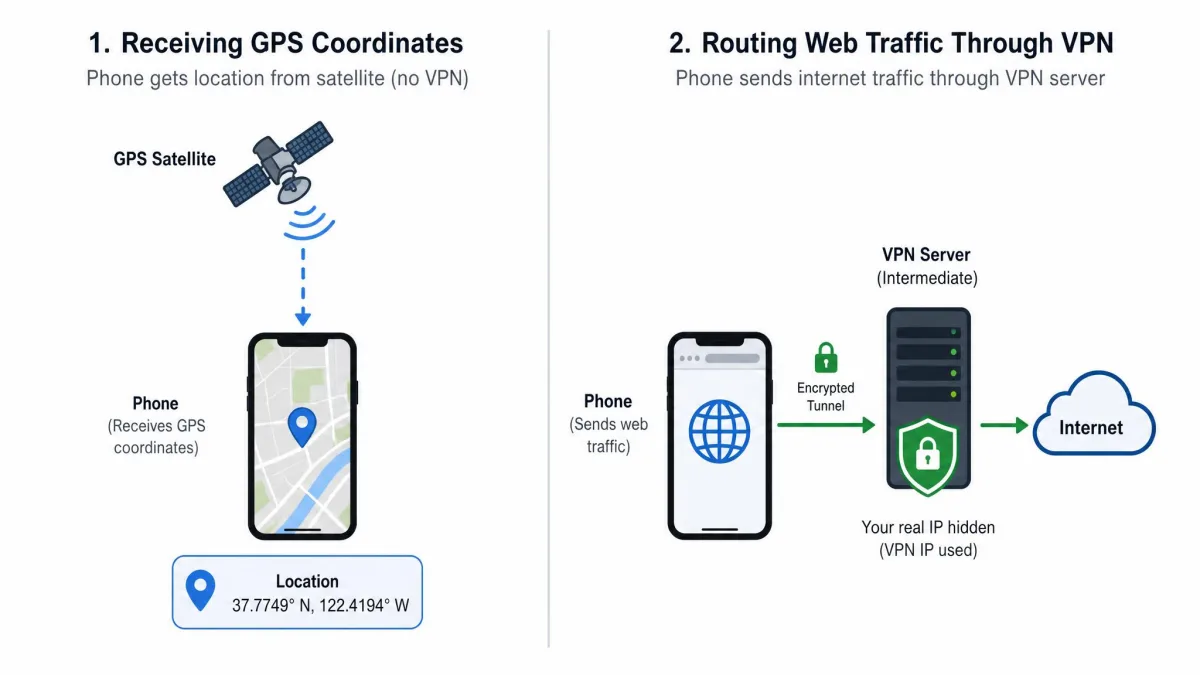
Your phone works out where it is by combining satellite signals with Wi-Fi and cell tower data, and that mix is usually accurate to a few metres.
A location changer replaces the answer. On Android it registers itself as the system's mock location provider, and every app that asks the operating system for coordinates receives the fake ones.
On iOS there is no equivalent setting, so desktop tools create a developer image on the connected device and feed coordinates through it. That is why the iPhone side of this category is almost entirely computer-driven.
Why People Change Their Virtual Location
Location-based games
Games built on real-world movement are the biggest single driver, and they are also the strictest about it. Cooldown timers, route simulation and speed control exist because those games measure how fast you appear to travel.
Social and dating apps
Dating apps rank matches by distance, so changing the pin changes who you see. Social apps use location for filters, stickers and local content.
Streaming and geo-blocked content
Streaming catalogues differ by country. A VPN handles most of this, because streaming services check your IP address rather than your GPS chip.
Privacy and location tracking
Some users simply want fewer apps holding a precise home address. Apple's location privacy controls let you cut apps down to an approximate position without any third-party tool.
Virtual Location Changer vs VPN: Which Do You Need?
A VPN moves your IP address. A location changer moves your GPS coordinates. They are different signals, and most apps read both.
Streaming, region-locked stores and websites follow the IP address, so a VPN is the correct tool. Maps, weather, dating apps, fitness trackers and games follow the GPS signal, so a location changer is the correct tool.
Use both together and the two answers should agree. A New York IP address paired with a Berlin GPS pin is a mismatch that some apps will notice.
Google's location accuracy settings are worth checking if your maps app keeps snapping back to your real position. Wi-Fi scanning often overrides a mock location until you switch it off.
How to Change Your Virtual Location on iPhone
Install the desktop app on your PC or Mac first, then connect the iPhone by USB cable and trust the computer when the prompt appears.
Open the app, wait for the map to finish loading, and choose teleport mode. Search for the place you want or drop the pin manually, then confirm the move.
Check the result in Apple Maps before you open anything else. If the pin has not moved, disconnect and reconnect the cable, because the desktop connection drops intermittently and needs re-pairing mid-session.
For route mode, place a start point and an end point, set the speed, and press start. Leave the app open, because closing it hands control back to the real GPS signal.
Turn off Wi-Fi calling and significant locations before a long session. Both keep pulling the device back toward its real position.
How to Change Your Virtual Location on Android
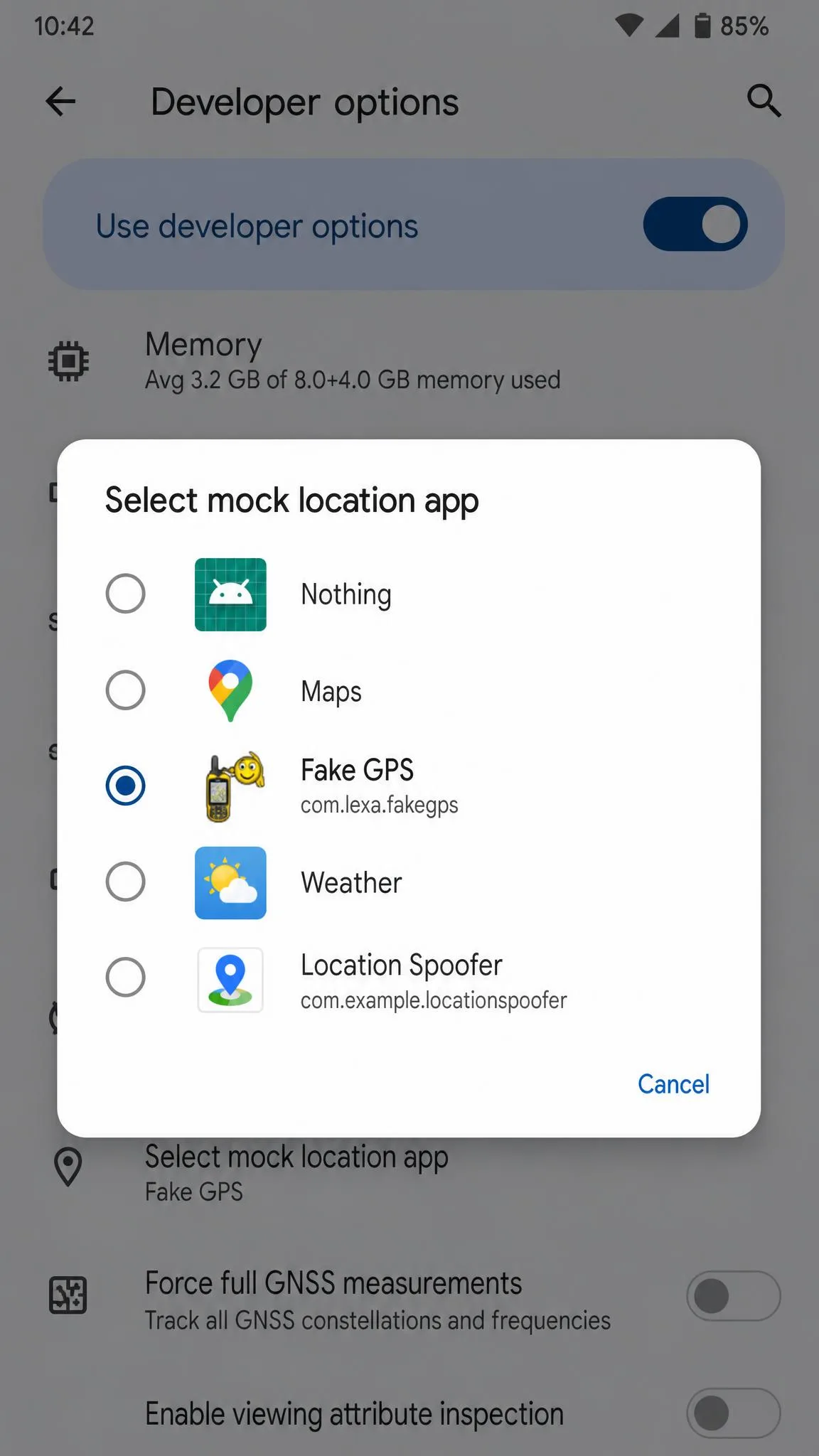
Install the app from Google Play, then open Settings, then About phone, and tap Build number seven times to switch on developer options.
Go back to Settings, then System, then Developer options, and find Select mock location app. Choose your location changer from the list. In-app instructions for this step are out of date on newer Android builds, so expect to hunt for the menu path yourself.
Return to the app, search for a destination or drag the pin, and tap start. The fake position takes effect immediately across every app on the device.
Address search is missing from some free Android spoofers, leaving map-pin dragging as the only way to pick a spot, which makes precise placement slower than it should be.
Do You Need Jailbreak or Root?
No. Every tool on this list works without jailbreak on iOS, and none of the paid apps need root on Android.
The desktop tools sidestep the question by acting through a trusted computer connection rather than modifying the phone. The free Android apps use the mock location setting that Google built into developer options for app testing.
Some location changers are absent from Google Play and have to be side-loaded, which adds an install step and a trust decision. That is the closest thing to a root-style compromise you will meet here, and it is worth avoiding unless you know the developer.
Risks, Bans, and Common Problems
Niantic defines falsifying location, including GPS spoofing, as cheating under the Pokemon GO Terms of Service and Trainer Guidelines. Niantic's three strike discipline policy sets out what follows. A first strike is a warning with degraded gameplay for about 7 days. A second strike is a temporary suspension of about 30 days, and a third strike is a permanent ban.
Pokemon GO also throws Error 12 when the spoofed coordinates and the device's own location services disagree, which stops the game cold.
Battery drain is heavy while a location changer holds an active mock position. Step counters and fitness apps register inaccurate step totals while a mock location is running, so expect your health data to need cleaning up afterwards.
Side-loaded spoofing APKs from outside Google Play are the single riskiest part of this category. An app granted mock location rights sees a lot about your device, so install only from the store or the developer's own site.
Pros and Cons of Using a Location Changer
Pros
- Reaches geo-restricted apps and content from anywhere in the world
- Keeps a real home address out of social posts and app profiles
- Route and joystick modes make movement look natural to games
- No jailbreak required on iOS and no root on Android
Cons
- Breaks the terms of service of most games and some social apps
- Heavy battery use while the fake position is held
- Corrupts step counts and fitness history
- Paid tools renew automatically unless you cancel
Free vs Paid Location Changers
Free tools spoof one thing well, which is a fixed position. They set a static pin on Android and hold it, which is enough for a dating app radius or a privacy tweak.
Paid tools buy you movement, iOS support and saved routes. That is the whole difference, and it is the reason a games player ends up paying while a casual user does not.
Refunds matter more than headline prices here. Refund requests can be denied when support classifies a limitation as expected behaviour rather than a technical fault, so a 30-day guarantee is worth more than a small discount.
Watch renewals as well. A paid location feature can be discontinued mid-subscription, leaving the tool working only until the term expires.
How to Choose the Right Virtual Location Changer
Start with the device. An iPhone user needs a desktop tool, and an Android user has free options that iPhone users do not.
Then decide which features you actually need, since movement is the line between free and paid. If a static pin is enough, stop at the free tier and save the money.
Match the licence to the device count next, because the range across this list runs from 5 devices to 15. Finally, read the renewal terms before you enter a card. The recurring charge is easy to miss at checkout.