Torrenting that crawls at a fraction of your line speed, a game stuck on Strict NAT, a Plex library you cannot reach from outside the house: these problems usually trace back to the same root cause. A VPN hides your IP, but it also hides you behind its own firewall, and inbound connections have nowhere to land. Port forwarding is the fix. It tells the VPN server to hold a door open and route a specific inbound port straight back to your device.
The catch is that port forwarding has become rare. Most big-name providers dropped it years ago for security and abuse reasons, so the shortlist of VPNs that still offer a working, usable port-forwarding feature is short. We spent our time on the ones that do, then put each through the real jobs people actually need it for: seeding in qBittorrent, opening a NAT for online play, and reaching a home media server from the road.
We are the HTS review team, and for this guide we ran each VPN on our own Windows, macOS, and Linux test machines, paid for the plans ourselves, and tested port forwarding against live torrent swarms, a Plex server, and a console over the course of several weeks. Everything below reflects what we saw, not what the marketing pages promise.
Best VPNs With Port Forwarding: Quick Comparison
We have ranked these by overall usefulness for port forwarding, weighing implementation, speed, security, and price. Proton VPN takes the top slot, but the right pick depends heavily on whether you torrent, game, or host. Here is how the seven providers line up at a glance before we get into how we tested them.
| VPN | Buy | Port-forwarding type | Ports supported | Protocol | Price / refund | Best for |
|---|---|---|---|---|---|---|
 |
Check price → | Dynamic (changes per session) | 1 per connection | OpenVPN, WireGuard | ~$2.99/mo, 30-day | Best overall |
 |
Check price | Dynamic (1 random port) | 1 per session | OpenVPN, WireGuard | promo pricing, 30-day | Torrenting |
 |
Check price | Static/selectable (paid add-on) | Up to 15-16 | OpenVPN, WireGuard | +add-on, 30-31 day | Add-on flexibility |
 |
Check price | Static/reserved | Up to 20 | OpenVPN, WireGuard | ~$3/mo, disputed | Power users / static ports |
 |
Check price | Dedicated-IP, most ports open | Most (excl. 80/21/25) | OpenVPN UDP, WireGuard | included, 30-day | Easy setup |
 |
Check price | Ephemeral (7-day) or Static IP | Per rule / IP | WireGuard, OpenVPN | $69/yr Pro | Flexible / budget |
 |
Check price | Instant self-service (member area) | All ports above 2048, TCP or UDP | WireGuard, OpenConnect | ~$5/mo, 7-day refund | Instant granular control |
How We Chose (and Tested) These VPNs
We started with the short list of VPNs that still advertise port forwarding, then eliminated any where the feature did not actually work in practice or hid behind broken support pages. Seven survived that cut. We bought a paid plan for each one, since port forwarding is never a free-tier feature, and installed the apps on our Windows, macOS, and Linux benches.
Testing focused on the three jobs port forwarding exists to solve. For torrenting, we ran qBittorrent against well-seeded public torrents, forwarded the client's listening port, and watched whether the connectable green icon appeared and whether download and upload speeds climbed. For gaming, we checked the reported NAT type before and after forwarding a port. For remote access, we pointed a forwarded port at a Plex server and tried to reach it from an outside network.
Alongside those jobs, we scored each VPN on how the port-forwarding feature is implemented (automatic toggle versus manual config), whether ports are dynamic or static, how many ports you get, protocol support, platform coverage, price and refund terms, and the security posture around the open port. We weighted the audited no-logs policies and P2P server design heavily, because an open inbound port is only as safe as the network behind it.
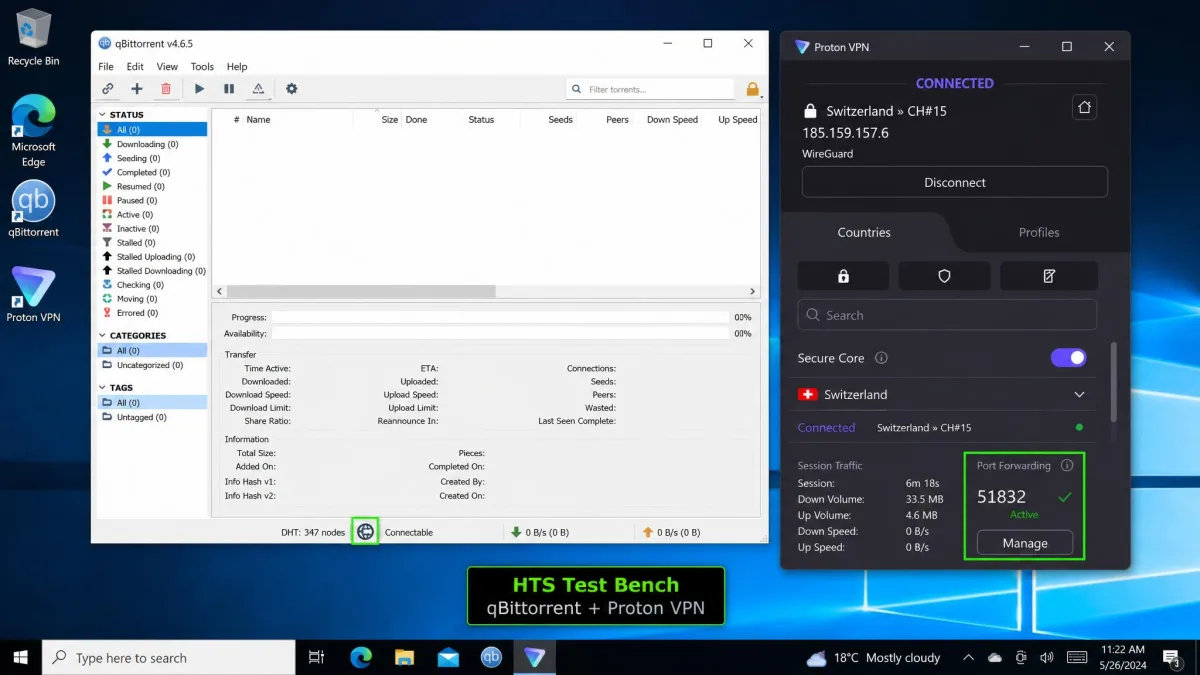
After several weeks of reconnecting, re-checking port numbers, and re-pasting them into qBittorrent, the single biggest usability difference between these VPNs is dynamic versus static ports. It is the detail that decides whether the feature is a set-and-forget convenience or a small chore every session.
What Is Port Forwarding and How Does It Work Through a VPN?
Your router runs Network Address Translation, or NAT, which lets many devices share one public IP address. NAT is great for outbound traffic: you request a web page, the reply knows how to get back to you. It is a problem for inbound traffic, because an unsolicited connection arriving at your public IP has no idea which device inside the network it belongs to. By default the router drops it.
Port forwarding creates an exception. You tell the network that any inbound traffic on a specific port should be sent to a specific device. That is what lets a torrent peer connect to you directly, a game console accept an incoming session, or a remote client reach your media server.
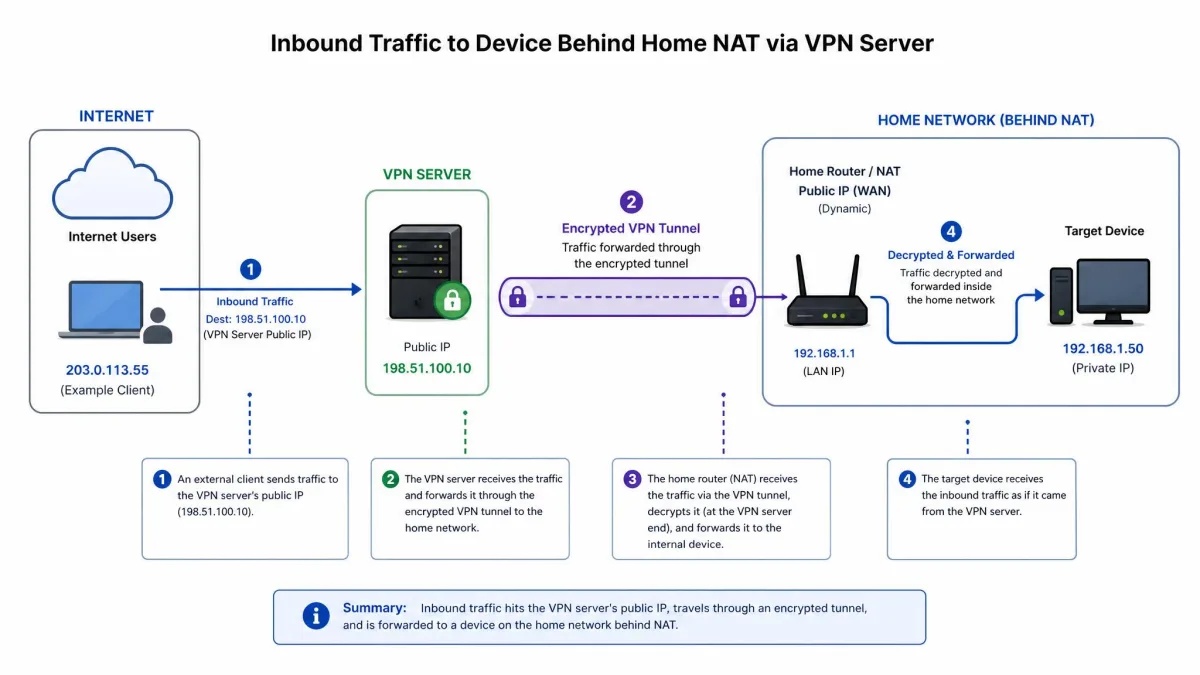
When you add a VPN, your real IP is replaced by the VPN server's IP, and now the VPN server holds the NAT that matters. Inbound connections hit the server, not your router, and the server drops them unless it has been told to forward a port back down the tunnel to you. A VPN with port forwarding does exactly that: it assigns you a port on the server's public IP and routes anything arriving there straight to your device. Without it, you are behind the VPN's closed door with no way to open it.
Port forwarding does not make you more anonymous. It changes how inbound traffic is routed, nothing more. The privacy still comes from the encrypted tunnel and the provider's logging policy, which is why the no-logs audit still matters even when a port is open.
Dynamic vs. Static Port Forwarding: Which Do You Need?
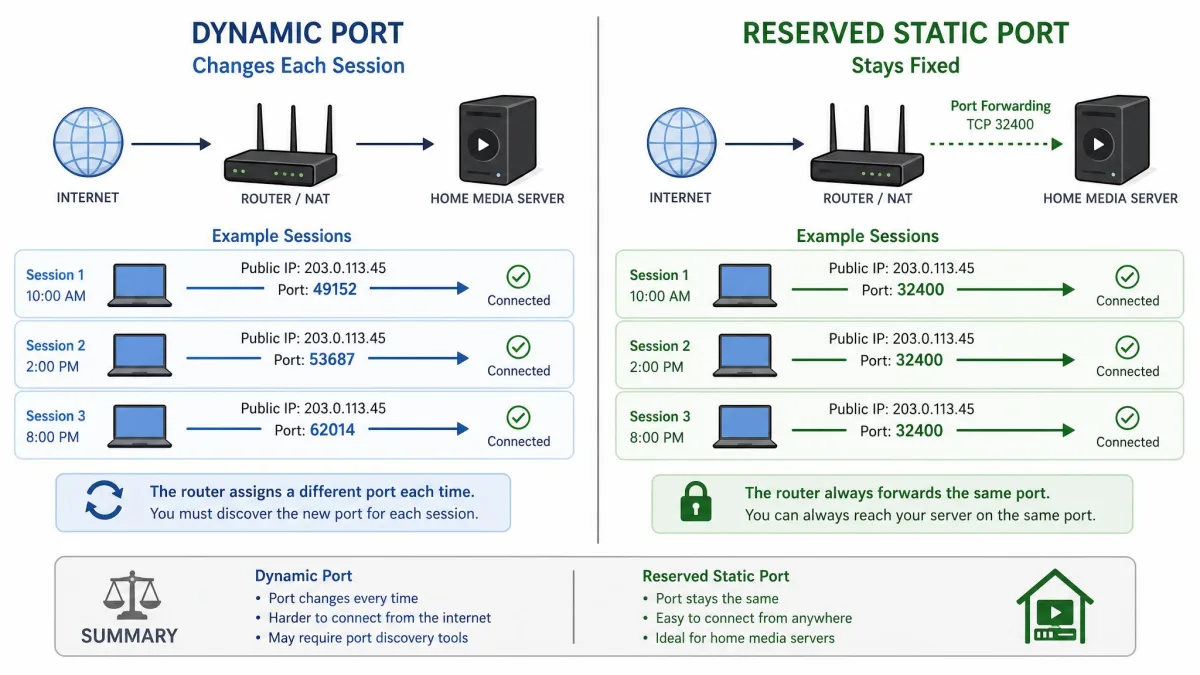
This is the distinction that shapes daily use, so it is worth settling before you pick a provider. Dynamic port forwarding assigns you a random port that changes, usually every time you reconnect to the server. Static, or reserved, port forwarding gives you a fixed port that stays the same between sessions.
Most quality VPNs use the dynamic model. Proton VPN and PIA both assign a fresh random port on each new connection. For torrenting that is fine, because you simply copy the current port into your client at the start of a session. The friction shows up when something needs to run unattended. A Plex server, a game server, or any service you point other people or devices at wants a stable address, and a port that changes overnight breaks it.
Static ports solve that. AirVPN lets you reserve ports in its web panel that persist across sessions, and Windscribe can attach a permanent forwarding rule to a Static IP. If you only torrent, dynamic is no obstacle and often comes at a lower price. If you host, lean static.
Dynamic ports are a minor chore for torrenting and a dealbreaker for hosting. Match the model to the job before you match the provider to your budget.
The Best VPNs With Port Forwarding in 2026
With the shortlist and the dynamic-versus-static question settled, here is how each provider performed in our hands-on testing, ranked by overall usefulness for port forwarding.
Proton VPN
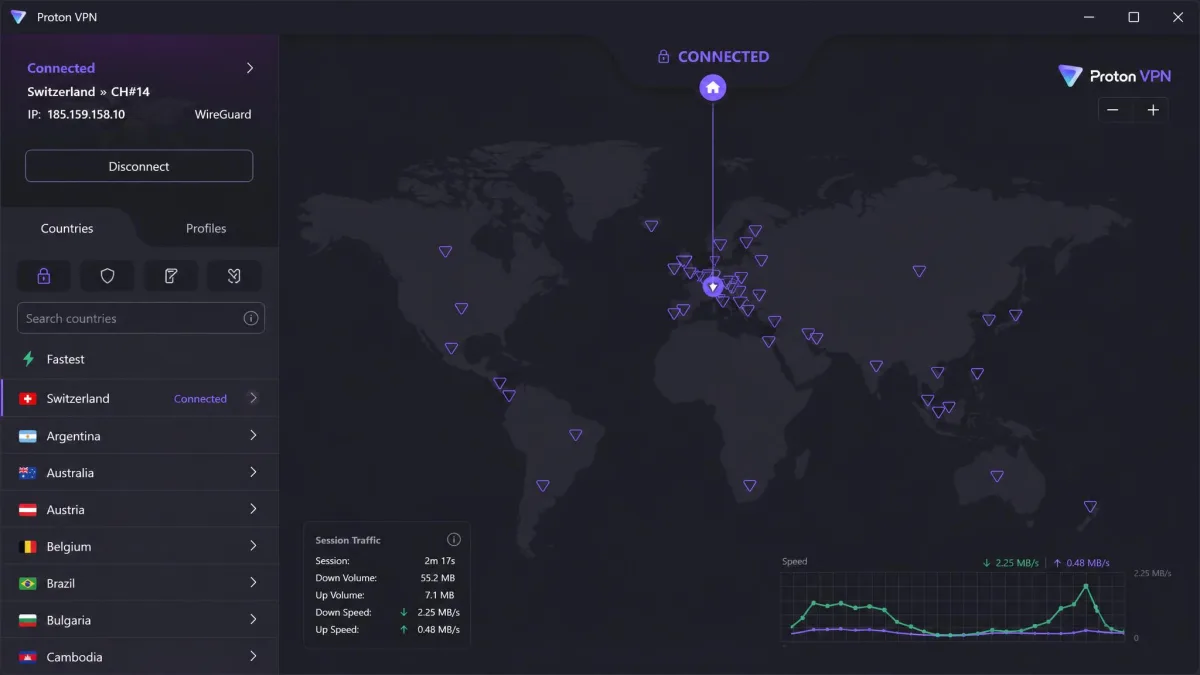
Proton VPN was the most polished port-forwarding experience we tested. It uses dynamic port forwarding, where the server assigns a random port that usually changes when you reconnect, and it exposes that through an automatic toggle rather than a manual config file. On Windows and Linux, turning it on and reading the assigned port took seconds. On macOS the setup took more technical effort and is still early-access, so plan for that if you are a Mac-first household. In our torrent tests, forwarding the port flipped qBittorrent to connectable and pushed both download and upload speeds up on well-seeded torrents. The one habit you have to build: the port number changes every time you reconnect, so the client's listening port has to be updated again after each new session. Proton runs port forwarding only on a paid plan, backs it with P2P-designated servers, an audited no-logs policy, and Swiss jurisdiction, and offers guides for qBittorrent, Vuze, and uTorrent. Pricing runs around $2.99 a month on a discounted long-term plan, though that promotional rate varies by plan length and current discount.
Pros
- Automatic port-forwarding toggle, no config files needed on Windows or Linux
- Audited no-logs policy and Swiss jurisdiction
- P2P-designated servers with strong torrent speeds in testing
- Both OpenVPN and WireGuard
Cons
- Dynamic port changes on every reconnect
- macOS support is early-access and fiddlier
- Only one forwarded port per connection
Best for: Anyone who wants the safest, simplest port forwarding that just works. Skip if: You need a fixed port for an always-on server.
Private Internet Access
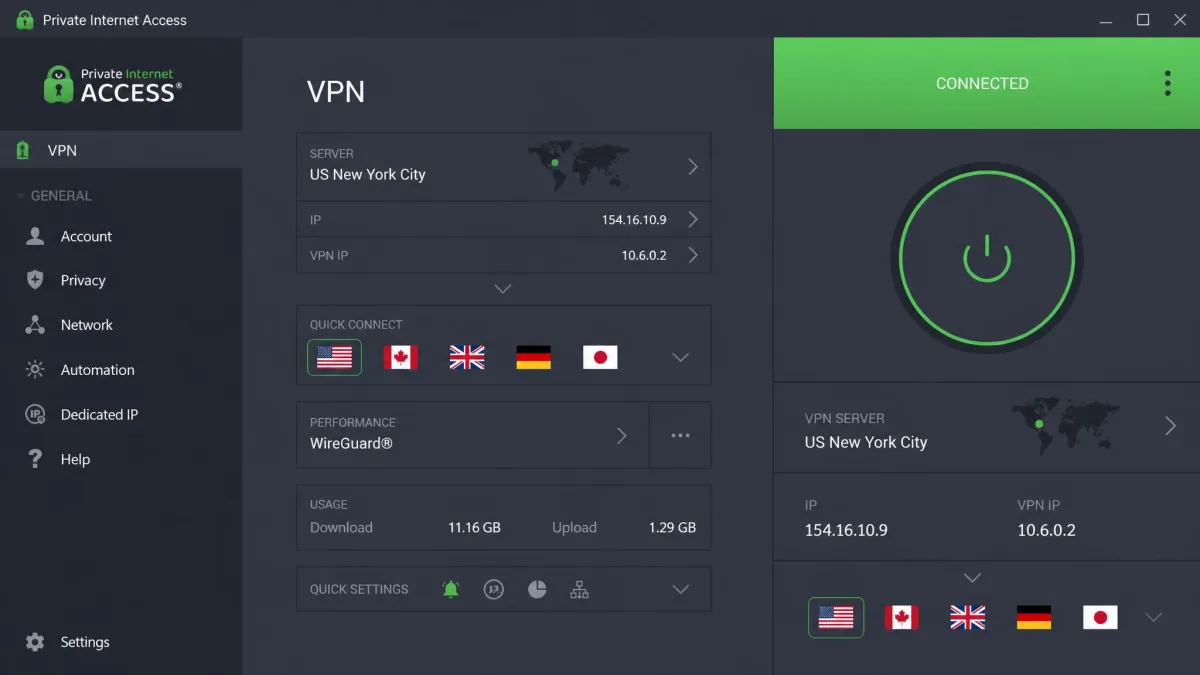
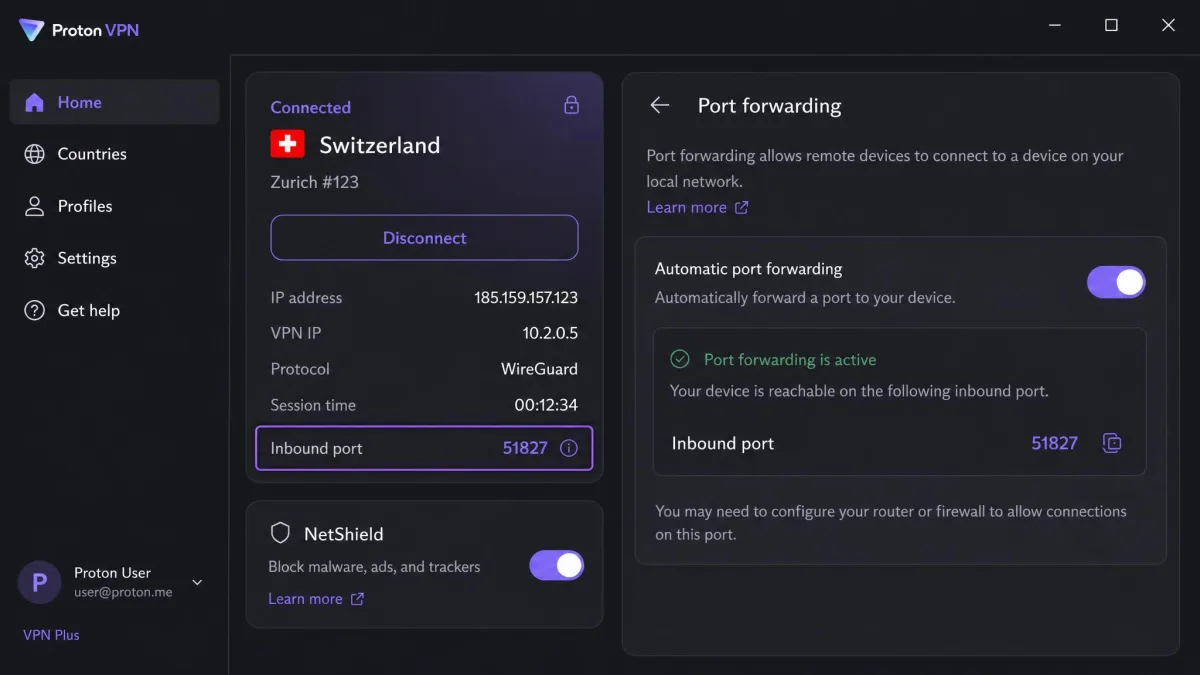
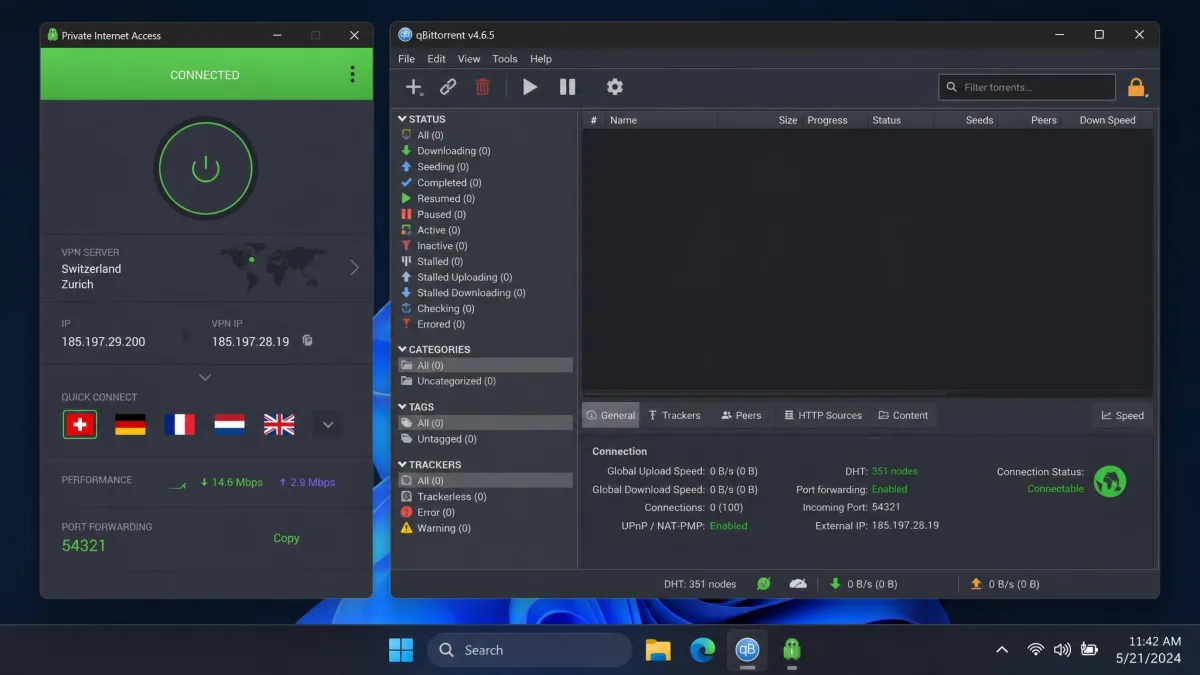
PIA is our torrenting pick because it pairs dynamic port forwarding with fast, reliable P2P speeds and unlimited simultaneous connections, so every device in the house can stay connected at once. It assigns one randomly chosen port per session, built into the desktop and Android apps, and delivered fast download speeds in our torrent tests even with a stack of devices connected. Two quirks matter in daily use. First, port forwarding does not work on US server locations, so you have to connect to a non-US server to get a forwarded port. Second, PIA assigns a fresh random port on every new server connection, so you must re-check the port number each session before torrenting. There is no iOS support for the feature. The apps are open-source, it runs OpenVPN and WireGuard, and it is backed by a 30-day money-back guarantee. Promotional pricing is aggressive but varies widely by plan length and current sale, and renewals land higher.
Pros
- Fast, consistent torrent speeds in testing
- Unlimited simultaneous connections
- Open-source apps, OpenVPN and WireGuard
Cons
- Port forwarding disabled on US servers
- One port only, re-assigned each session
- No iOS support for the feature
Best for: Heavy torrenters who want speed and many connected devices. Skip if: You need port forwarding on a US-based server or on iOS.
PureVPN
PureVPN takes a different approach: port forwarding is a paid add-on rather than something included in the base subscription. Pay for it and you get selectable ports, with the ability to open all, block all, or enable specific ports, which is more control than the single dynamic port most rivals give you. PureVPN's own page states both 15 and 16 ports, so treat the exact ceiling as approximate. Setup is beginner-friendly and backed by step-by-step tutorials, available across Mac, Windows, Android, and iPhone apps plus manual configuration, though it requires a dedicated IP or PF-tagged locations. In testing, the feature worked, but PureVPN could have trouble swapping and staying connected to servers during setup, which cost us a couple of reconnects. The add-on price varies by plan and promotion, roughly $0.99 to $1.49 a month, and is sometimes bundled with a dedicated IP. It runs OpenVPN and WireGuard on a large server network, and the refund window is listed as either 30 or 31 days depending on the source.
Pros
- Selectable, multiple ports rather than one
- Beginner-friendly apps with tutorials
- Broad platform coverage including iOS
Cons
- Port forwarding costs extra as an add-on
- Some server-swap instability during setup
- Exact port ceiling and refund window unclear
Best for: People who want multiple selectable ports and hand-holding setup. Skip if: You want port forwarding included without paying more.
If you go with PureVPN, buy the port-forwarding add-on together with a dedicated IP when it is bundled. A dedicated IP sidesteps the CGNAT problems that break inbound connections on shared addresses.
AirVPN
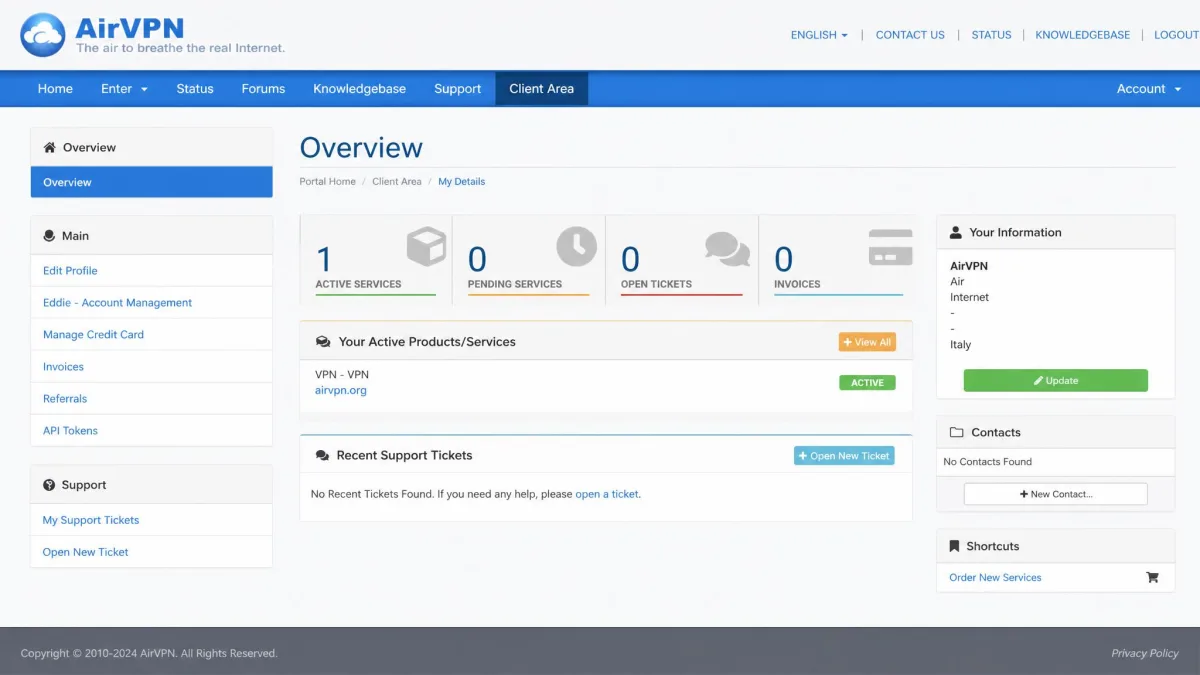
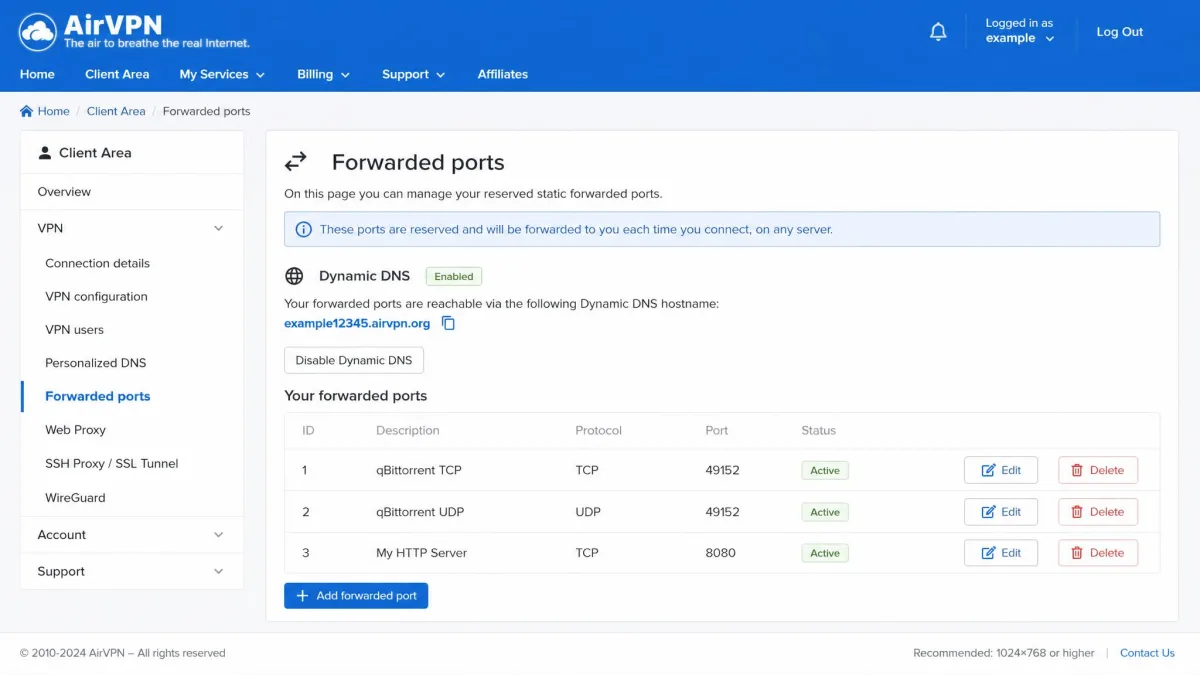
AirVPN is the one to beat if you host anything. It offers static, reserved ports set through its web control panel, giving you predictable inbound ports that do not change between sessions, up to 20 ports forwarded simultaneously on every server, with built-in Dynamic DNS. That combination is exactly what a Plex server, a game server, or self-hosting wants. In our testing, the reserved ports stayed the same between sessions and could be configured in the panel before connecting, which made pointing a media server at a stable address genuinely easy. The trade-off is the interface. The control panel is powerful, but it feels technical and is better suited to power users than beginners. AirVPN runs OpenVPN and WireGuard with strong Linux support. Pricing sits around $3 a month, but the refund situation is disputed across sources, ranging from a 3-day window to 30 days, and AirVPN also sells short trial plans instead of a conventional guarantee, so confirm the current terms before you buy.
Pros
- Static reserved ports that persist between sessions
- Up to 20 simultaneous ports with Dynamic DNS
- Excellent Linux support and granular control
Cons
- Technical, unfriendly interface
- Refund terms are disputed and unclear
- Overkill for simple torrenting
Best for: Self-hosters and power users who need fixed, multiple inbound ports. Skip if: You want a simple app and a clear money-back guarantee.
PrivateVPN
PrivateVPN is the most approachable option here. It uses dedicated-IP servers with most ports open by default, excluding ports 80, 21, and 25, which means there is very little to configure: connect to the right server and inbound traffic mostly gets through. Its port handling varies by server, showing up as all-ports-open on some dedicated servers and limited to selected protocols or locations on others, so confirm the behavior on the server you land on. The upside is simplicity. In testing, the dedicated-IP servers opened most ports at once, which made setup nearly hands-free, but that same behavior means router-side configuration needs care to avoid exposing services you did not intend to. It runs OpenVPN UDP, with WireGuard available via third-party config, ships apps for Windows, Mac, iOS, Android, and Smart TVs, and includes port forwarding in the subscription with a 30-day money-back guarantee.
Pros
- Nearly zero-configuration port access
- Port forwarding included in the subscription
- Broad app coverage including Smart TV
Cons
- Opening most ports at once needs careful router setup
- Port handling varies from server to server
- WireGuard only via third-party config
Best for: Beginners who want inbound access working with minimal setup. Skip if: You want fine-grained control over exactly which ports are open.
Windscribe
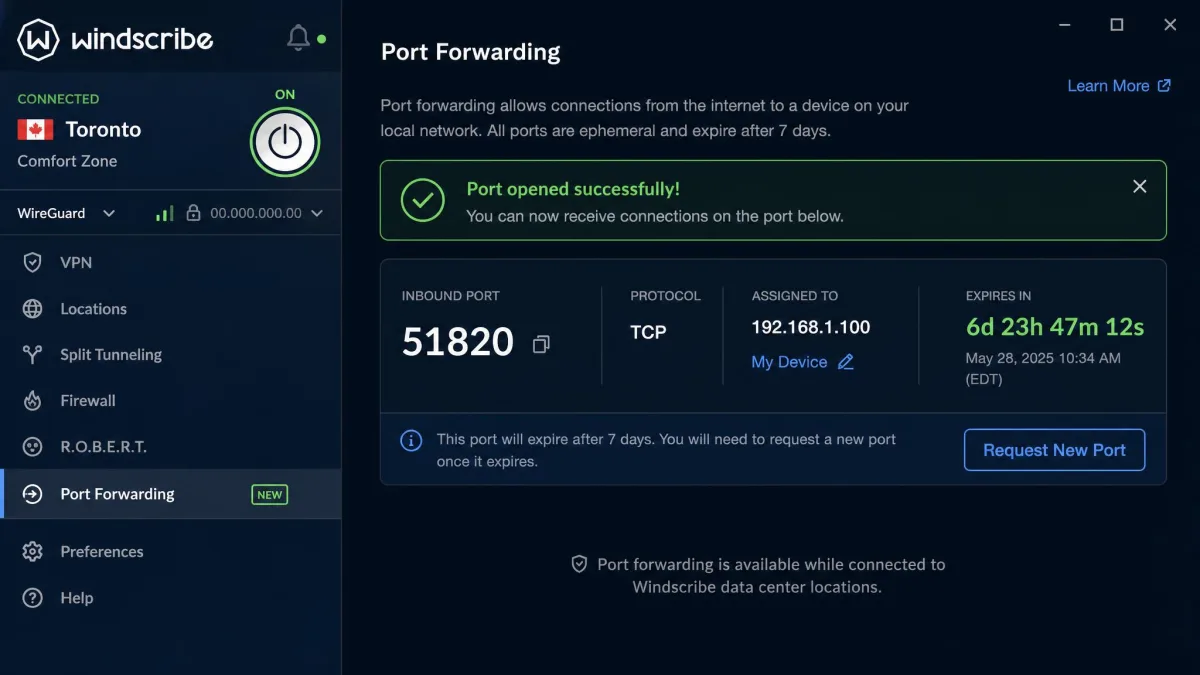
Windscribe is the most flexible on price and the most interesting on model. Its ephemeral port forwarding opens an inbound port on any server for 7 days, then the rule must be re-requested, which is fine for a torrent stint but awkward for anything long-running. For always-on services, you buy a Static IP and attach a permanent forwarding rule that is tied to that IP. Both require a monthly or yearly Pro plan; ephemeral forwarding is not available to Free or Build-a-Plan users. In testing, the ephemeral rule lapsed after 7 days as advertised and had to be re-requested, so we would steer any long-running server toward the Static IP route from the start. The Pro plan is $9 a month monthly or $69 a year, which works out around $5.75 a month, with the Static IP as an additional purchase. It runs WireGuard and OpenVPN and keeps a genuine free tier, though that free tier does not include port forwarding.
Pros
- Flexible ephemeral or permanent forwarding models
- Reasonable yearly Pro pricing
- Genuine free tier for general VPN use
Cons
- Ephemeral rules expire after 7 days
- Permanent forwarding needs a paid Static IP
- Port forwarding locked to Pro plans
Best for: Budget-minded users who want to choose between short-term and permanent rules. Skip if: You want unattended forwarding without buying a Static IP.
TorGuard
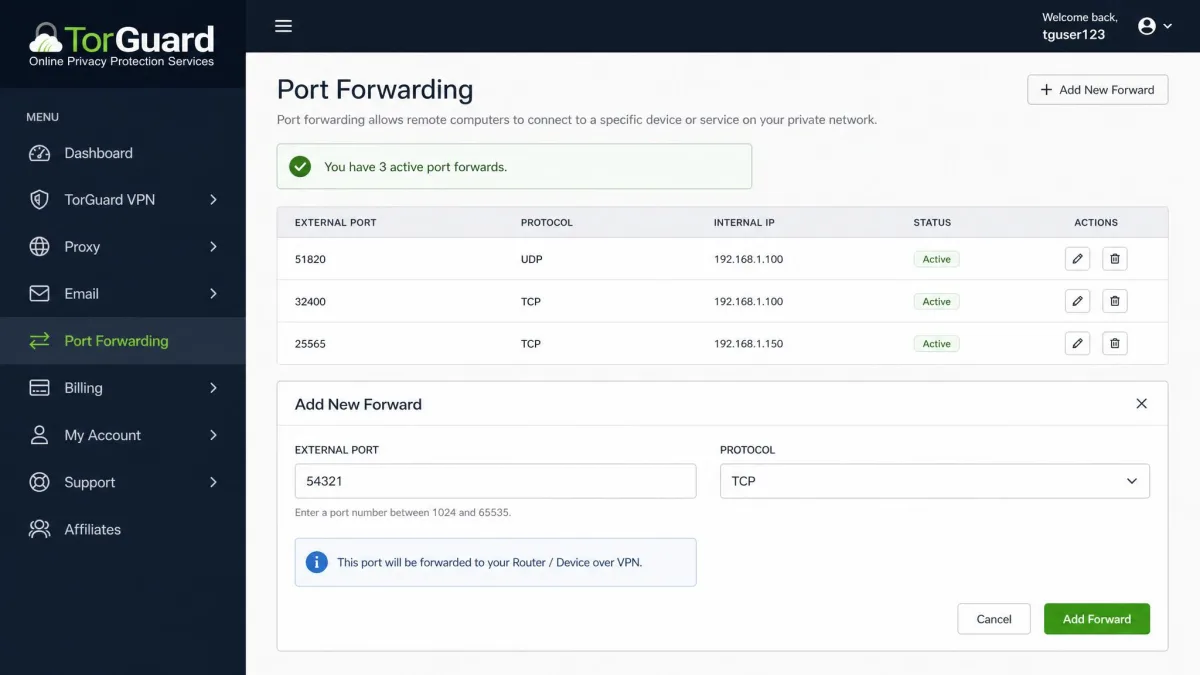
TorGuard is the fastest to set up of anything here, because port forwarding is a self-service job you do yourself. Instead of hunting for a special server or toggling a switch in the app, you open the member's area, add a forward, and pick the exact TCP or UDP port you want. It allows all ports above 2048 (anything below that is off-limits, and a handful above may be reserved), and it works on any IP type you hold, whether that is a shared, dedicated, or residential address. In our testing, adding a rule took a few clicks and pointed cleanly at a torrent client, a game server, and a self-hosted service in turn. The forward runs over whichever tunnel you select, WireGuard or OpenConnect, and TCP is the one to use if you need to reach the service across the internet. A standard account covers 8 simultaneous device connections. The honest trade-offs are real and worth weighing. The apps look dated and occasionally threw a random fatal-error message, and you have to fully disconnect before switching servers rather than hopping straight across. Speeds swung sharply by server and sometimes dropped well below our line rate, and WireGuard connections were less reliable than we wanted. Torrenting is blocked on TorGuard's US servers, so port-forwarded torrent traffic has to run through a non-US location, and streaming needs a separate paid dedicated IP. The privacy posture asks for trust too: the zero-logs claim is unaudited and the company sits in the United States, a Five Eyes jurisdiction. The refund policy is the sharpest edge, a short 7-day window against the 30 days most rivals offer, with dedicated, streaming, and residential IP add-ons, gift cards, and crypto payments all excluded from refunds. Effective pricing lands around $5 a month or less on a long-term plan, though month-to-month sits near the top of the market and the exact figure swings with term length and add-ons.
Pros
- Instant, self-service port forwarding from the member's area
- Granular TCP or UDP choice on any shared, dedicated, or residential IP
- Wide protocol menu and router firmware support
Cons
- Only a 7-day refund window, with add-on IPs excluded
- Dated apps that can throw errors and force a full disconnect to switch servers
- US/Five Eyes jurisdiction with an unaudited no-logs claim; torrenting blocked on US servers
Best for: Power users who want instant, granular port control across any IP type. Skip if: You want a long refund window, audited no-logs, or a modern, polished app.
How to Set Up Port Forwarding on Your VPN (Step by Step)
The exact clicks differ per provider, but the shape of the process is the same everywhere. Here is the reliable sequence we followed on each app.
First, make sure you are on a paid plan or add-on that includes port forwarding, then update to the latest app. Second, connect to a server that supports the feature. On PIA that means a non-US location; on PureVPN or PrivateVPN it means a PF-tagged or dedicated-IP server. Third, enable port forwarding. On Proton VPN this is a single automatic toggle; on AirVPN you reserve the port in the web panel before connecting; on TorGuard you add the forward and choose the port in the member's area; on Windscribe you request an ephemeral port or attach a rule to your Static IP.
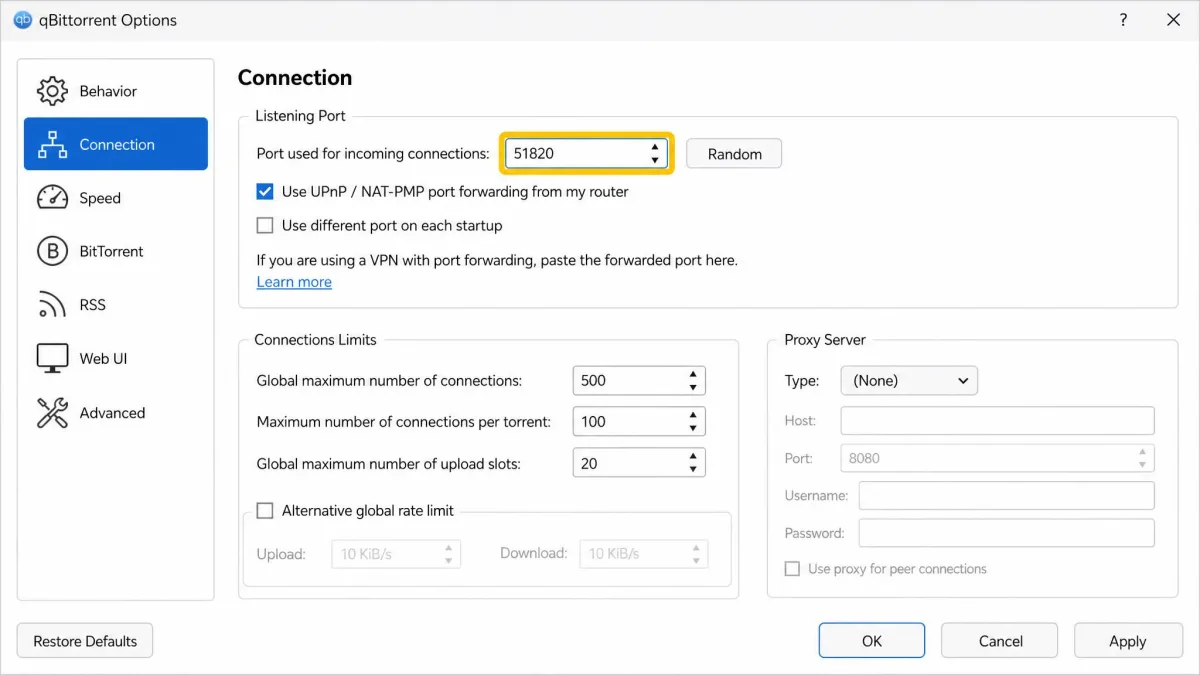
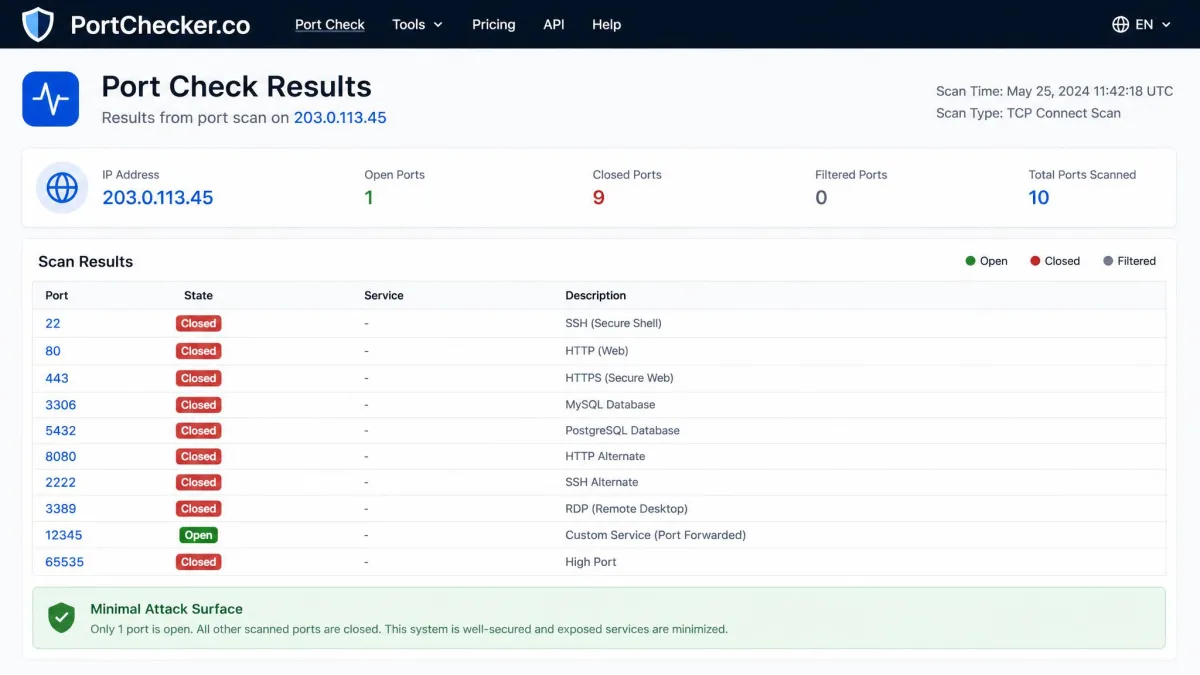
Fourth, read the assigned port number from the app or panel. Fifth, paste that number into the application that needs it. In qBittorrent, that is the listening port under Connection settings. In a game or server, it is the app's network or port setting. Sixth, test it. A torrent client should flip to a connectable state, and an online port checker should report the port as open.
With dynamic providers like Proton VPN and PIA, the port changes when you reconnect. If your torrent client suddenly shows as unconnectable, the first thing to check is whether the forwarded port changed on the last reconnect. Update the listening port and it will almost always come back.
Best Use Cases: Torrenting, Gaming, and Server Hosting
Port forwarding earns its keep in three scenarios. Each one has a slightly different sweet spot among the providers above.
Torrenting and P2P (qBittorrent)
This is the most common reason people want port forwarding. Without a forwarded port, your client can only make outbound connections to peers who are themselves connectable, which shrinks the pool and slows everything down. With one, other peers can connect to you, which improves swarm participation and upload capability, and often download speed too.
In practice, we forwarded the port, pasted it into qBittorrent's listening port field, and confirmed the green connectable icon. PIA gave us the fastest, most consistent torrent speeds; Proton VPN was close behind with the cleaner setup. For a deeper walkthrough, our guide on binding a VPN to qBittorrent covers the kill-switch side of the setup, and our roundup of the best VPN for P2P and torrenting goes wider on providers.
Gaming and Fixing NAT Type
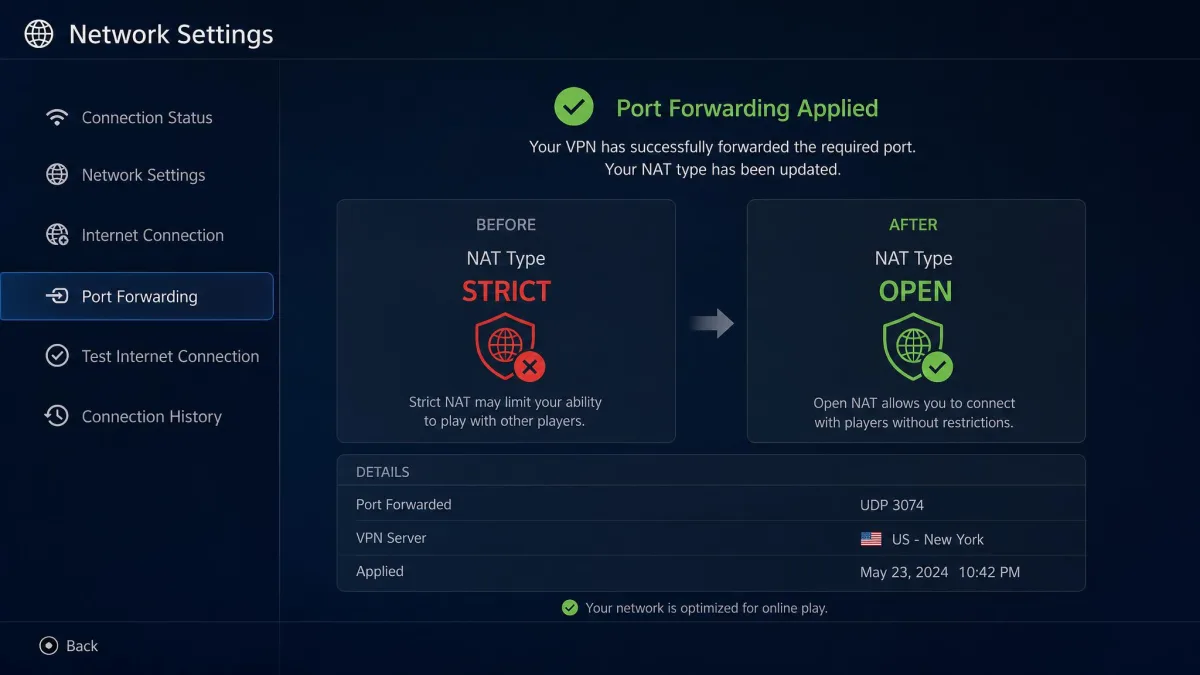
An open inbound port is the usual cure for a Strict or Moderate NAT type, which is what causes party-chat failures, matchmaking trouble, and being unable to host. Forward the port your game or console needs and the NAT type typically opens up to a friendlier setting. Dynamic providers make this more of a per-session task; if you game daily, a static-port provider or a dedicated IP is less hassle. Our best VPN for gaming guide has more on latency, which matters at least as much as NAT for competitive play.
Remote Access and Personal Media Servers (Plex/Jellyfin)
Reaching a Plex or Jellyfin library, or any self-hosted service, from outside your home network needs a stable inbound port. This is where dynamic forwarding falls down and static wins outright. AirVPN's reserved ports and built-in Dynamic DNS made this the smoothest, and Windscribe's Static IP route is the budget alternative. If you route your whole house through hardware, our picks for the best VPN routers and the best routers with VPN support pair well with a static-port provider.
Is VPN Port Forwarding Safe? Security Risks and the Port-Fail Attack
Port forwarding is safe when used deliberately, but it does change your exposure. An open inbound port is a door, and anything listening behind it can be reached. The rule of thumb is to forward only the port your application needs, and to make sure nothing unintended is listening on it. This is why PrivateVPN's all-ports-open behavior calls for careful router-side configuration: opening more than you need widens the attack surface.
The often-cited risk is the port-fail style of attack, where a malicious peer who shares your VPN server and knows your forwarded port can trick your client into revealing your real IP address. Reputable providers mitigate this by isolating forwarded traffic and, in Proton VPN's case, running P2P-designated servers with an audited no-logs policy. Choosing a provider with a clean audit history and picking a random high port rather than a well-known one both reduce the risk.
Never forward a port to a device running an unpatched or unsecured service. An open port plus an old, exploitable service is the combination that actually gets people compromised, not port forwarding on its own.
Why Most VPNs Don't Offer Port Forwarding
If port forwarding is so useful, why did it become rare? The short answer is abuse and shared infrastructure. When many customers share the same server, an open inbound port creates support and safety headaches, and it can be misused. That is precisely the reason NordVPN gives for not offering port forwarding: its customers share servers, so it does not currently support the feature, though it may add it in future.
Providers that keep port forwarding tend to design around the problem, with P2P-specific servers, per-session dynamic ports, or paid static-IP options that isolate the risk. That extra engineering is part of why the feature usually sits behind a paid plan or add-on.
Free vs. Paid VPNs With Port Forwarding
We will be blunt here because the search results are full of misleading promises: no consumer-facing VPN offers working port forwarding entirely for free. It requires a paid plan or a paid add-on, full stop. Windscribe has a genuine free tier, but port forwarding is not part of it; you need a Pro plan for ephemeral forwarding or a purchased Static IP for permanent rules.
Free VPNs are also the wrong tool for the jobs port forwarding serves. They throttle speeds, cap data, and often lack the audited no-logs policies you want when you are opening an inbound port. If budget is the constraint, the cheapest reliable route is a discounted long-term plan from Proton VPN or PIA, not a free service that cannot do the job. Our guide to the best free VPN alternatives explains where free tiers do and do not make sense.
CGNAT, Routers, and Compatibility Considerations
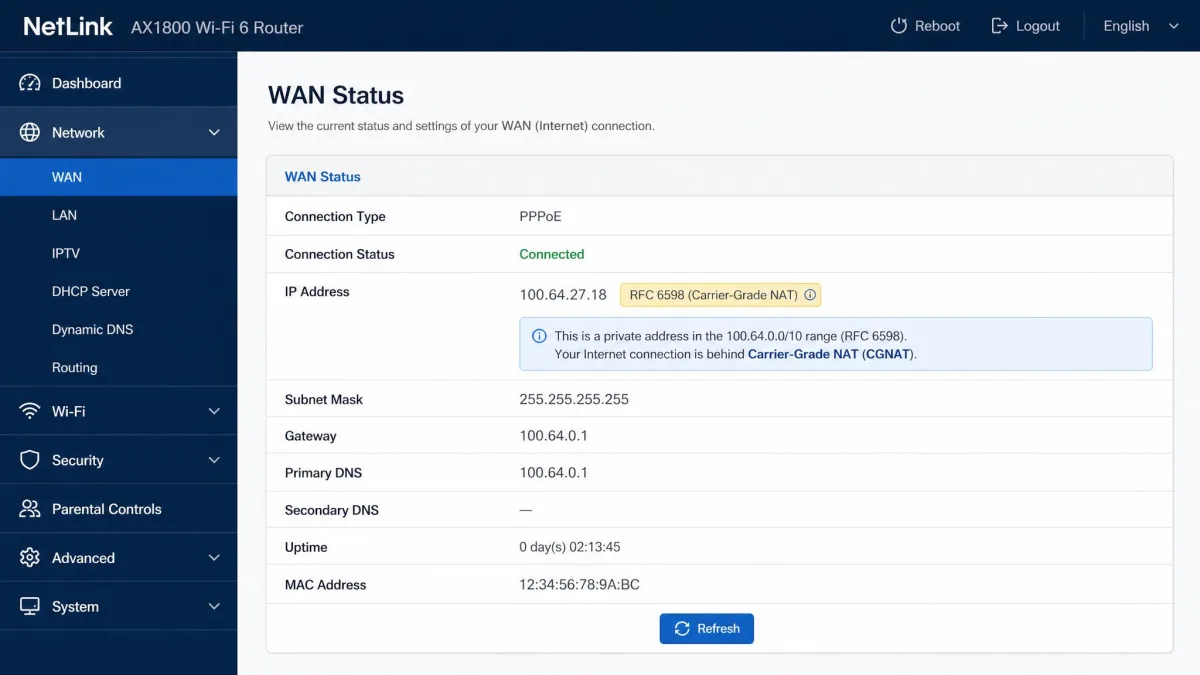
One frustrating scenario deserves its own mention, because it can make port forwarding appear broken when the VPN is fine. If your internet provider puts you behind Carrier-Grade NAT, inbound connections often fail even with port forwarding enabled. CGNAT uses the shared IPv4 address space defined in RFC 6598, the shared IPv4 space used by CGNAT (the 100.64.0.0/10 range), and that shared layer can block inbound ports unless you obtain a dedicated or static IP.
The good news is that a VPN with port forwarding can actually route around home CGNAT, because inbound traffic arrives at the VPN server's public IP rather than your provider's. The exception is the VPN's own shared addresses. If you hit inbound failures even with the feature on, a dedicated or static IP from the provider (AirVPN's reserved ports, PureVPN's dedicated IP, or Windscribe's Static IP) is usually the fix. On the router side, if you run the VPN on hardware rather than a single device, our best VPN for home networks guide covers the setup, and WireGuard support, which every pick here offers, keeps speeds high (see our best WireGuard VPNs).
Not sure if you are behind CGNAT? Compare the IP address shown in your router's WAN status with the public IP a search for "what is my IP" returns. If they differ and your router shows an address in the 100.64.x.x range, you are behind CGNAT and will want a dedicated or static IP.
Conclusion: Which Port Forwarding VPN Should You Choose?
If you want one recommendation that covers most people, it is Proton VPN. It has the cleanest implementation, an automatic toggle, audited no-logs, P2P servers, and it held up in our torrent tests. Choose PIA if raw torrent speed and many connected devices are your priority, and you can live with non-US servers. Choose AirVPN if you host a Plex server, a game server, or anything that needs fixed, multiple inbound ports. PureVPN suits people who want selectable ports and guided setup, PrivateVPN suits beginners who want it to just work, TorGuard suits power users who want to add and tune ports themselves and can accept its short refund window and dated apps, and Windscribe suits budget-minded users who want to pick between short-term and permanent rules.
Whatever you pick, match the port model to the job first, dynamic for torrenting, static for hosting, and confirm you are not fighting CGNAT before you blame the VPN.