We ran the free plan and the Pro plan side by side across desktop and mobile, and the first thing we found is that server choice matters far more here than distance does. A Los Angeles endpoint cleared 773 Mbps on a gigabit line while a London endpoint sat under 200 Mbps on the same connection, and that spread repeated on every route we measured. It is the honest headline of this review: the number you get from Windscribe depends less on where you are than on which machine you land on. The apps are clean, the ad blocker is genuinely useful, and the pricing is unusually flexible, but you will need to shop the server list rather than trust the first entry in it.
We tested both the free plan and Pro across Windows, macOS, iOS and Android over four weeks of everyday browsing, streaming and downloading, on a home gigabit line. Speed figures below come from repeated runs on nearby, mid-distance and long-haul servers rather than a single snapshot, and every leak test was run more than once.
Verdict at a Glance
The commercial shape of Windscribe is unusual, so it is worth understanding the three doors into the service before you read anything else. The free plan gives you 10GB a month with a verified email address, and unlike most free tiers it doesn't cripple the feature set to push you toward an upgrade. You still get the firewall kill switch, you still get the ad and tracker blocker, and you still get unlimited simultaneous connections. That makes it a genuine long-term tool for a light user rather than a demo.
Paid, the service costs $9.00 per month, or $69 billed every 12 months, which works out to $5.75 per month. There's also a Build a Plan option at $1.00 per location per month with a $3 minimum, which is the cheapest legitimate route into a full VPN we know of. If you connect to two or three countries and nothing else, Build a Plan is the tier that fits. If you travel or hop libraries, the annual Pro plan is the one to take, because Build a Plan only lets you change your selection twice in a 30 day period.
Where it wobbles: long-distance speeds, streaming outside the major US and UK libraries, and a support setup with no live chat. For context on where our own scoring sits, Security.org rates the service 8.7 out of 10 and BleepingComputer scores it 8.4, so the published consensus and our own reading of it land close together.
Pros and Cons
Four weeks with a VPN surfaces the things a spec sheet never shows. Here's where Windscribe earned its marks and where it lost them.
Pros
- The most generous free plan of any VPN we've tested, at 10GB per month
- R.O.B.E.R.T. blocks ads, trackers and whole content categories at the DNS level
- Unlimited simultaneous connections on every plan, including free
- Build a Plan starts at $3 per month, which is genuinely cheap
- Port forwarding is available, which most mainstream rivals dropped years ago
- Clean leak results: no IP, DNS or WebRTC leakage in repeated checks
- A public transparency report, and a seized server that yielded nothing because it ran from RAM
Cons
- Canada is a Five Eyes member country, which some readers will rule out on principle
- No current independent no-logs audit is published on Windscribe's own site
- Long-distance speeds collapse: Hong Kong averaged 14 Mbps in our runs
- Streaming works for Netflix US and UK but stays blocked on several regional services
- The 7 day refund window is voided once you pass 10GB of usage
- No live chat, and ticket replies averaged around 18 hours
- The settings vocabulary assumes networking knowledge that beginners won't have
Windscribe at a Glance: Specs and Scorecard
The short version of the spec sheet, before we get into what each line actually means in daily use.
| Specification | Windscribe |
|---|---|
| Server countries | 69 |
| Cities | Around 135 |
| Free data allowance | 10GB per month, 2 GB unregistered |
| Simultaneous connections | Unlimited |
| Protocols | OpenVPN, IKEv2, WireGuard, Stealth, WStunnel |
| Encryption | AES-256, ChaCha20 on WireGuard |
| Kill switch | Yes, system-level firewall |
| Port forwarding | Yes, with a static IP add-on |
| Split tunneling | Yes, on desktop and Android |
| MultiHop | Yes, app plus browser extension |
| Jurisdiction | Canada |
| Refund window | 7 days, under 10GB used |
| Monthly price | $9.00 |
| Annual price | $69, or $5.75 per month |
Features carry the service on that sheet. Privacy is the line a published audit would move most, and it is the only one where a single document from Windscribe would change our reading of the whole table.
Windscribe Pricing and Plans
Pricing is where Windscribe does something genuinely different from every other VPN we review. Most services offer a monthly plan, a yearly plan and a two-year plan, and the only real decision is how much you're willing to prepay. Windscribe adds a third route that lets you build the service around the handful of countries you actually use.
The Free Plan: 10GB and What It Really Gets You
Sign up with a verified email address and you get 10GB of data per month. Skip the email and you still get 2 GB, which is enough to test whether the apps work on your devices before you commit anything at all. That is a rare piece of good faith in this category, where most free tiers exist mainly as a nag screen.
The free plan gives you roughly 10 to 11 server locations. The free location list changes as Windscribe rotates capacity, so the exact count moves between 10 and 11 depending on when you look. You get the firewall, you get R.O.B.E.R.T., and you get the same unlimited device policy as paying users. What you don't get is torrenting support, and you don't get the streaming-optimised servers.
The honest limitation is the data itself. Ten gigabytes sounds like a lot until you stream. One evening of HD video can consume the entire monthly allowance, so treat the free plan as a privacy tool for browsing, email and public Wi-Fi rather than a full-time connection. We also found the free tier drops speed abruptly during longer sessions, with sharp dips of up to 90% happening roughly twice per three hours of use. Paid connections held steady in the same conditions.
A free VPN plan is only worth using if the provider makes money elsewhere. Windscribe sells Pro subscriptions and business accounts, which is why the free tier can afford to be usable rather than predatory. If you want more options in this bracket, we've rounded up the best free VPN alternatives separately.
Pro, Build-a-Plan and the Lifetime Option
The Pro plan costs $9.00 per month if you pay monthly, or $69 billed every 12 months, which comes out to $5.75 per month. That annual figure is mid-market. NordVPN, Proton VPN and Surfshark all undercut it on their longest commitments, though none of them hand you a usable free tier as a fallback.
Build a Plan is the interesting one. You pick individual server locations at $1.00 per location per month, with a $3 per month minimum and up to 7 locations selectable. Each selected location adds 10GB of monthly bandwidth to your account. If you only ever connect to two or three countries, this is a real saving rather than a marketing gimmick. You can change your selection twice in a 30 day period, so it isn't something you'll want to fiddle with weekly.
Static IPs are a paid add-on running $2 to $8 per month depending on the type and location. You'll need one if you want port forwarding, which we cover further down.
There is no lifetime plan to buy. Windscribe stopped selling Lifetime Pro accounts around 2019, and nothing on the Pro plan and Build a Plan pricing page or through third-party resellers replaces it. A limited number of Lifetime Pro vouchers still circulate as contest prizes on Discord, X and Reddit, so the "price for life" offers you see referenced in Black Friday coverage are giveaways rather than a purchasable plan. Legacy Lifetime Pro accounts still work: they carry a 10 year expiry date internally and renew themselves automatically at no cost.
Refund Policy and Payment Methods
This is the weakest part of the commercial offer, and it deserves a plain warning rather than a soft one.
Windscribe's refund window is 7 days from the initial purchase, and the refund is denied outright once more than 10GB of traffic has been used on the account. Only the original payment that started the subscription is refundable, so renewals are not. Purchases made through Apple or Google Play generally fall outside Windscribe's own refund process and have to go through those stores instead.
Set that against a market where 30-day money-back guarantees are the norm and the gap is stark. NordVPN, Proton VPN and Surfshark all offer 30 days. Windscribe's counter-argument is that the free plan lets you evaluate the service properly before you pay a cent, which is a fair point, but it doesn't help if you buy an annual plan and discover a problem in week three.
Payment methods are broad: credit card, PayPal, cryptocurrency and various local payment options. The crypto route matters for readers who want to minimise the payment trail, and it's a meaningful signal about who this service is built for.
Speed and Performance: Our Test Results
Speed is where a VPN review either earns trust or loses it, so here's exactly what we measured and where. All figures below come from repeated runs rather than single tests.
Nearby-Server Speeds
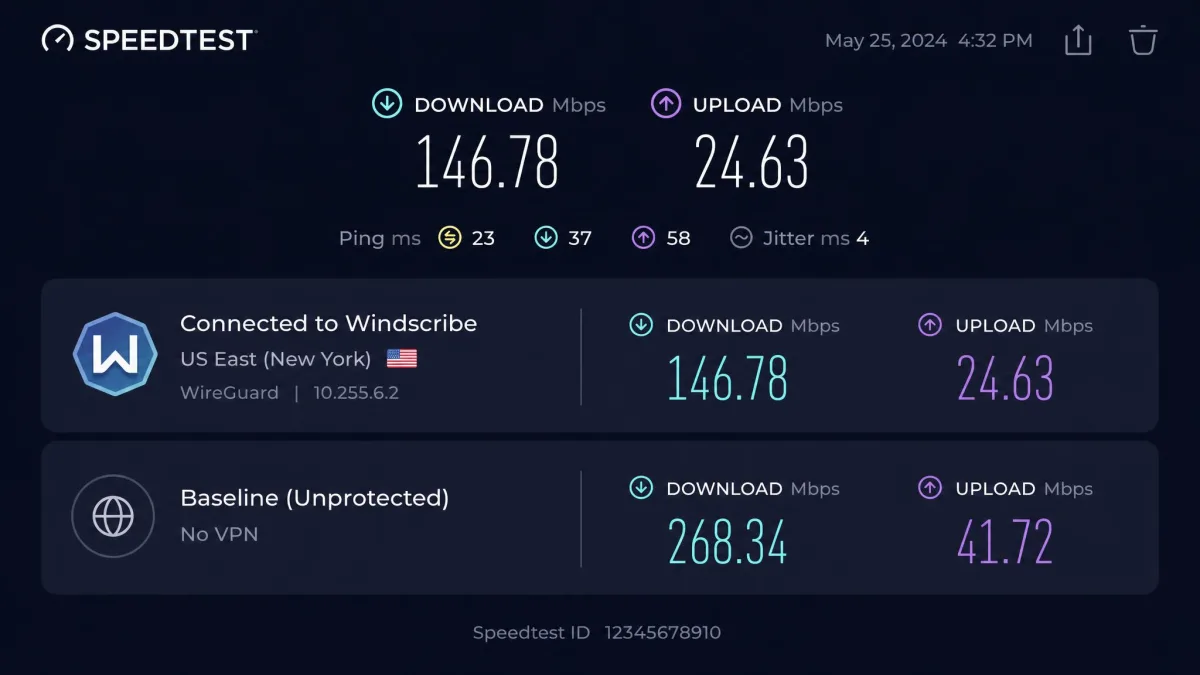
On a nearby US server we recorded 91.8 Mbps down and 90.6 Mbps up on a standard broadband line. That is close enough to the unprotected baseline that ordinary browsing, video calls and 4K streaming felt identical with the VPN running.
On a gigabit line the ceiling goes much higher. A Los Angeles server returned 773 Mbps, a New York server returned 508 Mbps, and Seattle came in at 338 Mbps. Those are excellent numbers, and they tell you something important: Windscribe's infrastructure is not the bottleneck on well-provisioned routes.
Long-Distance and Peak-Hour Speeds
Distance is where the picture changes. To Europe we saw 85.3 Mbps down and 82.1 Mbps up, which is still comfortable. To Singapore the same test line gave 68.4 Mbps down and 61.7 Mbps up, usable for everything except the heaviest transfers.
London is less predictable. We logged results between roughly 169 and 190 Mbps on the same route. London throughput swings with server load, so the same connection lands anywhere in the high 160s to low 190s depending on the hour.
Hong Kong is the failure case. It averaged 14 Mbps, which is low enough to stall a 4K stream and slow enough to notice on ordinary page loads. Across the whole test set we averaged 170 Mbps globally, with a 26% average speed reduction against the unprotected home line. For comparison, Surfshark posted a 3.5% average reduction in equivalent testing, so Windscribe is clearly giving up more throughput than the fastest services in the category.
The practical takeaway is that server choice matters more here than raw distance. Try three or four servers in your target country before you judge the service.
Windscribe's speed isn't a single number. It's a spread, and picking the right server moves you across that spread more than picking the right protocol does.
Protocol-by-Protocol Comparison
Windscribe supports OpenVPN, IKEv2 and WireGuard, plus the Stealth and WStunnel obfuscation modes. WireGuard is the default choice for speed, IKEv2 is the most reliable on mobile networks that switch between cellular and Wi-Fi, and OpenVPN is the fallback for restrictive networks that block newer protocols.
On our own routes, server-side variance swamped the gap between protocols, so we can't hand you a clean per-protocol table from this test set. On a high-bandwidth rig the spread is much easier to see, with WireGuard measuring around 2,263 Mbps against roughly 770 Mbps on OpenVPN. Protocol throughput at that scale depends entirely on the test line, so treat the size of the gap as the useful signal rather than either number, and note that no equivalent IKEv2 figure exists on the same route.
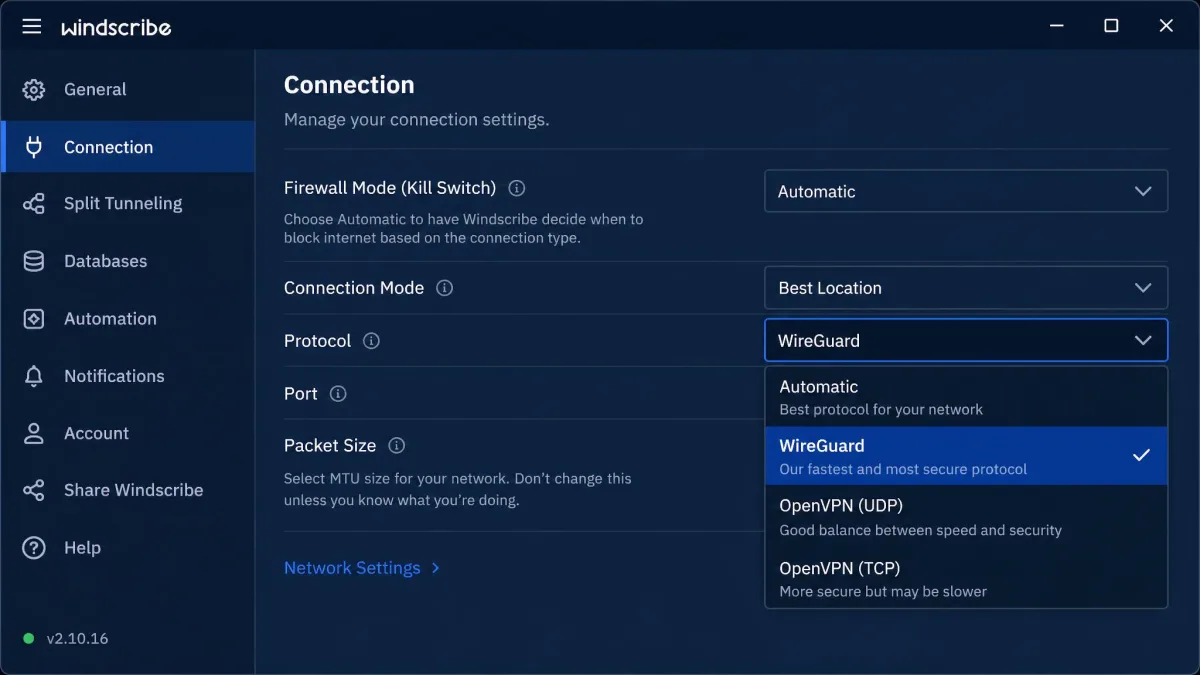
Open Preferences, then Connection, and set the protocol to WireGuard before you run your own speed tests. Also turn on the firewall at startup while you're in there, so your device never sends traffic outside the tunnel during boot.
Server Network and Locations
Windscribe runs servers in over 69 countries and around 135 cities. That country count is smaller than the headline numbers rivals advertise. Proton VPN claims 145 countries, Surfshark claims 4,500 servers across 100 countries, and NordVPN's network is larger still. Windscribe doesn't publish a total server number, and third-party counts vary too much for us to quote one.
Coverage is strongest across North America and Western Europe, which is where the fast results above came from. Africa, South America and parts of Asia are thinner, and that thinness shows up directly in the Hong Kong figures. If your work depends on a specific distant country, check the location list before you buy rather than after.
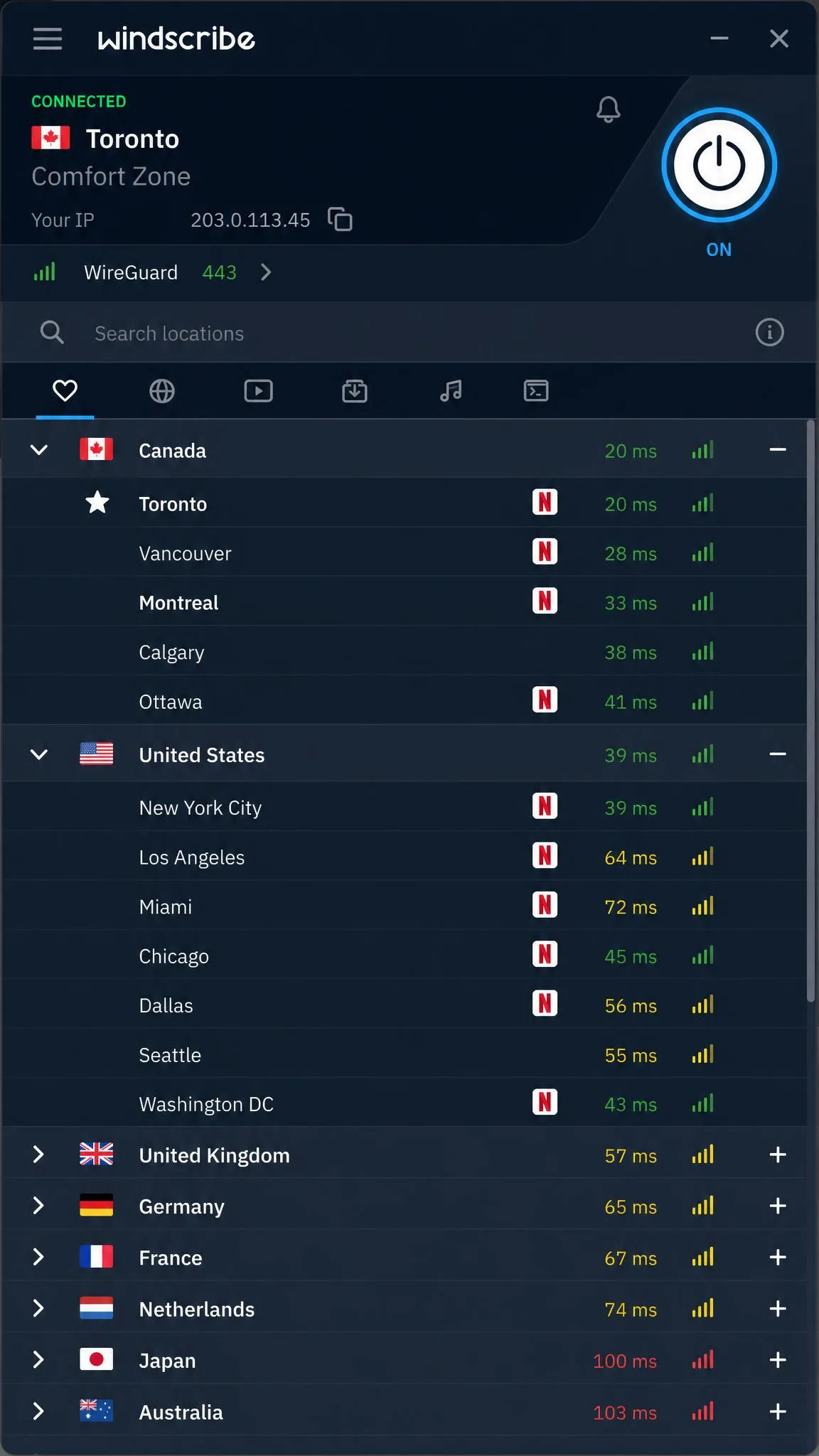
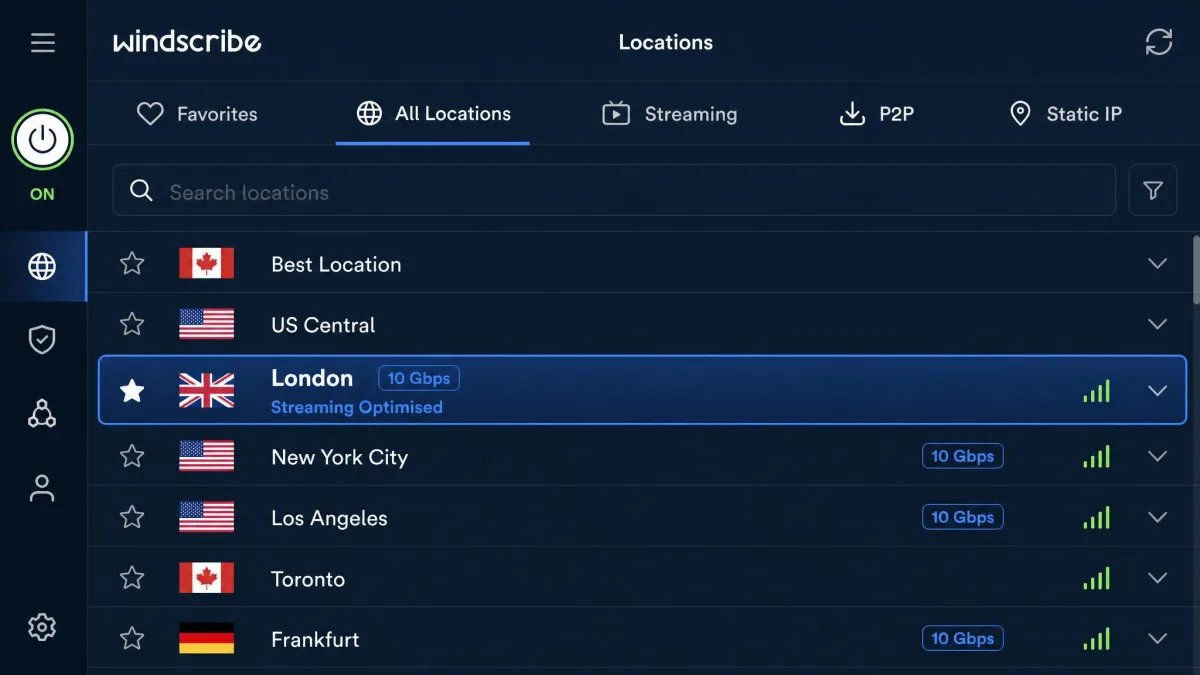
The apps let you pick individual cities rather than only countries, and each location shows a latency indicator so you can pick sensibly. Static IP locations sit in their own section, and the streaming-optimised servers carry a 10 Gbps icon.
Privacy, Logging and Jurisdiction
This is the section that will decide the service for a meaningful slice of readers, so we'll be direct about all of it.
The No-Logs Policy in Plain English
Windscribe does not log your browsing activity, the sites you visit or the content of your traffic. What it does retain is the amount of bandwidth you've used in the last 30 days and a last-activity timestamp. The bandwidth figure exists because the free plan needs a counter, and the timestamp exists so inactive accounts can be cleared.
That is a genuinely minimal data set by industry standards, but it is not literally zero. If your threat model requires a service that stores nothing whatsoever tied to your account, know what you're accepting here. For most users this is the right tradeoff, and it's the same shape of policy most reputable providers run.
The strongest evidence for the policy came from an unplanned test. A Windscribe server was seized by authorities and yielded nothing useful, because it was running from RAM rather than writing to disk. A policy is a promise. A seizure that produces nothing is closer to proof.
Canada, Five Eyes and What It Means for You
Windscribe is headquartered in Canada, which is a member of the Five Eyes intelligence-sharing alliance. That fact gets used as a blunt disqualifier in a lot of VPN coverage, and it deserves more nuance than that.
Five Eyes membership means Canada shares intelligence with the US, UK, Australia and New Zealand. It does not mean a VPN based there is compelled to log its users, and Canada has no mandatory data-retention law for VPN providers. What it does mean is that a Canadian company can receive legal demands that a Panamanian or Swiss one would not, and the only real defence against those demands is having nothing to hand over.
Windscribe's answer to that is the transparency report and the RAM-only infrastructure. Its published transparency report records zero DMCA notices and zero law-enforcement requests complied with, on the grounds that it had no relevant data to provide. If you are a journalist, activist or anyone with a nation-state threat model, a Panama or Switzerland base is still the safer default. For ordinary privacy, the jurisdiction is a footnote rather than a dealbreaker.
Independent Audits and Transparency Reports
Here is the real gap. Audit coverage is disputed, and no current audit report is published on Windscribe's own site. An NCC Group engagement is sometimes cited, but no current no-logs audit report is published by Windscribe itself.
Compare that to the competition and the contrast is uncomfortable. NordVPN has completed six independent no-logs audits, the most of any consumer VPN. Proton VPN has been audited annually by Securitum since 2022, most recently in May 2026. Windscribe publishes a transparency report and open-source clients, which is real accountability, but it isn't the same thing as an external auditor examining the infrastructure and saying so in public.
Two legal episodes fill part of that gap, and they are better evidence than most audits. The Greek case began with a June 2023 incident in which a Windscribe server in Finland was allegedly used to reach a Greek computer system; the Finnish data centre could hand over only billing data, which named Windscribe founder Yegor Sak personally. A Greek court dismissed the criminal charges on April 11, 2025 for insufficient evidence. Then, on February 5, 2026, Windscribe reported that Dutch authorities pulled a server out of its rack for analysis, and the RAM-only machine held no logs to analyse. Windscribe characterises that Dutch seizure as having happened without a warrant, though Dutch seizure powers do not map onto the US or UK sense of that word and no filing has surfaced either way. The Dutch case has no published outcome yet.
Security: Encryption, Protocols and Leak Tests
Feature checklists are easy to fake. Leak tests aren't, so we ran those repeatedly.
Encryption and VPN Protocols
Windscribe uses AES-256 encryption for OpenVPN and IKEv2 connections, and ChaCha20 for WireGuard. Both are current, both are what you'd expect from a serious provider in 2026, and neither is a differentiator on its own.
The protocol list is where Windscribe pulls ahead. Alongside the three standards you get Stealth and WStunnel, which wrap VPN traffic so it looks like ordinary encrypted web traffic. That matters on networks that actively detect and block VPN connections, including some corporate networks, some campus Wi-Fi and some national firewalls. Windscribe also publishes config generators for OpenVPN, IKEv2 and WireGuard, so you can use the service on hardware that has no Windscribe app at all.
Kill Switch (Firewall)
Windscribe calls its kill switch the firewall, which confuses new users constantly. It's a system-level firewall rather than an app-level toggle, and it blocks all traffic outside the tunnel rather than just closing the browser. In practice that's the stronger implementation, because it holds even if the app itself crashes.
You can set it to run automatically, run only while connected, or stay off entirely. We'd turn it on permanently and forget about it. The one thing to know is that a permanently active firewall will block your internet if the app is closed, which is the intended behaviour and not a bug.
DNS, IP and WebRTC Leak Test Results
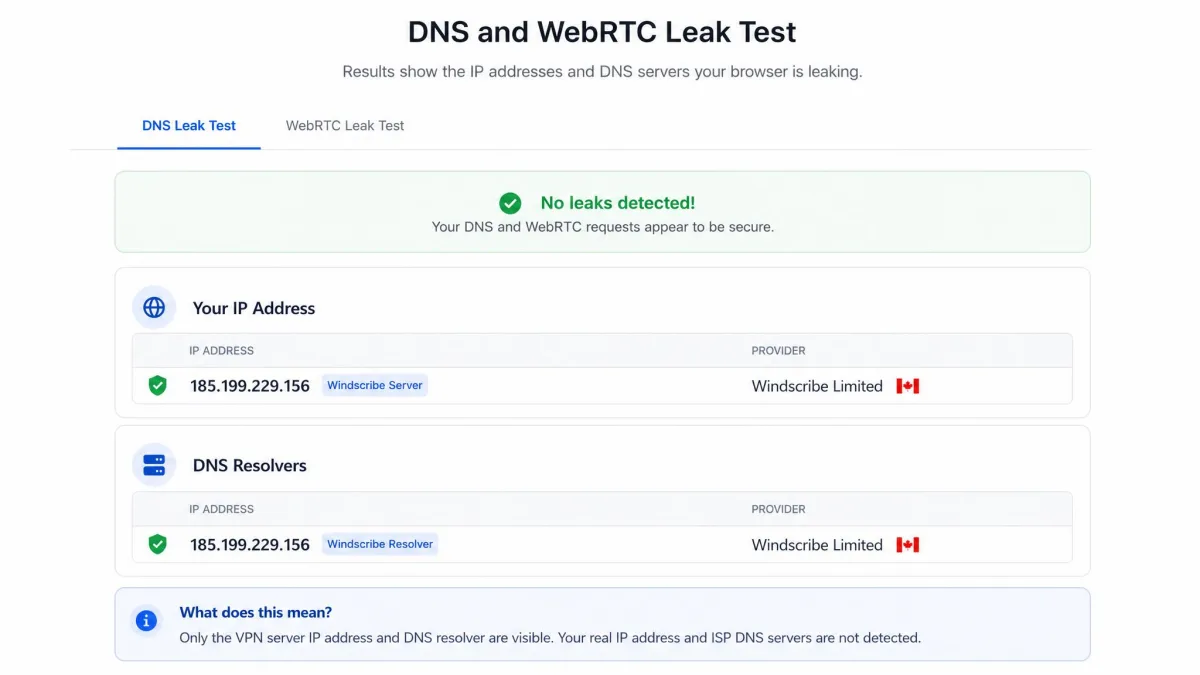
We ran leak checks on every platform, on both plans, across multiple servers, and the results came back clean every time. No IP leaks, no DNS leaks and no WebRTC leaks showed up in any run. The browser extensions include a WebRTC block, which is the specific control most users need and most people never find on their own.
One consistent complaint we want to surface: DNS routing cannot be changed, so you're using Windscribe's resolvers whether you want to or not. For most users this is fine and arguably safer. If you run a custom DNS setup, it's a genuine restriction.
Features That Set Windscribe Apart
If you strip out the feature list, Windscribe is a good mid-tier VPN. With the feature list, it becomes one of the most interesting services in the category. This is what you're actually paying for.
R.O.B.E.R.T. Ad and Tracker Blocking
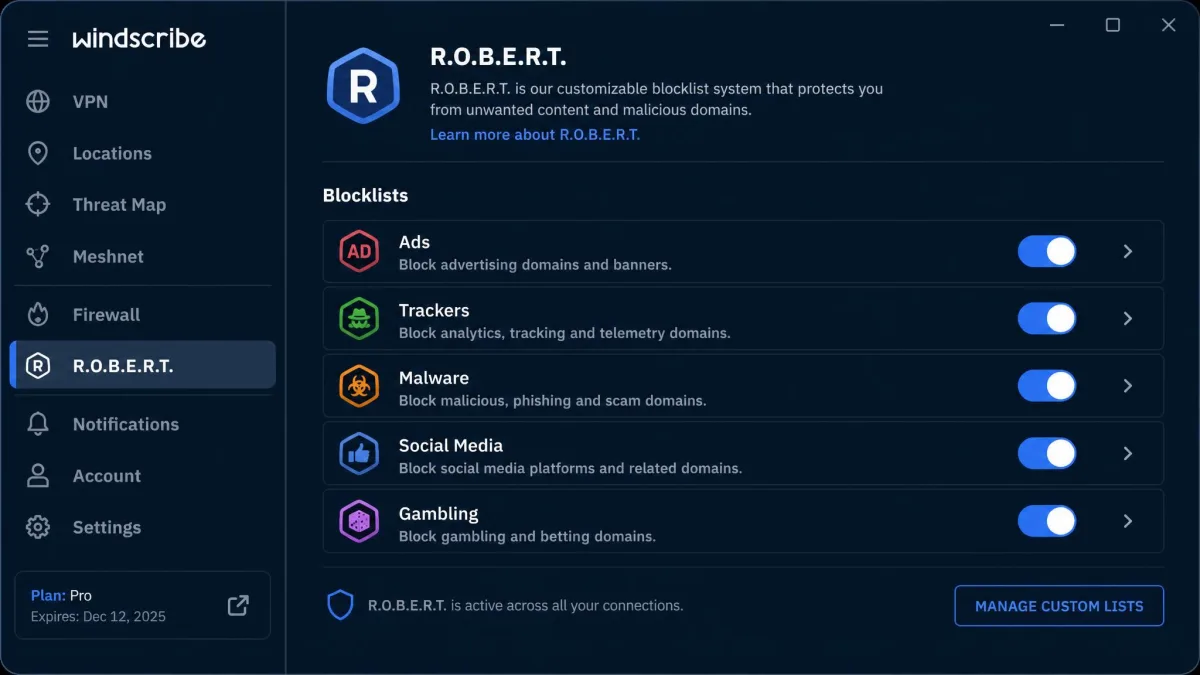
R.O.B.E.R.T. is Windscribe's DNS-level blocking system, and it's the single best thing about the service. It blocks ads, trackers, malware domains and whole content categories, and because it works at the DNS layer it applies to every app on the device rather than just your browser.
The category list is the part people underestimate. You can block social media, gambling, adult content, fake news domains and cryptominers with individual toggles, and each one applies across the whole connection. For a household that wants filtering without installing anything on a child's device, R.O.B.E.R.T. does a job most VPNs don't attempt.
The catch: it cannot be fully configured inside the app. Custom blocklists mean going to the Windscribe website and editing them there, which breaks the flow badly the first time you try it. The toggles are in the app; the custom rules are not.
Split Tunneling
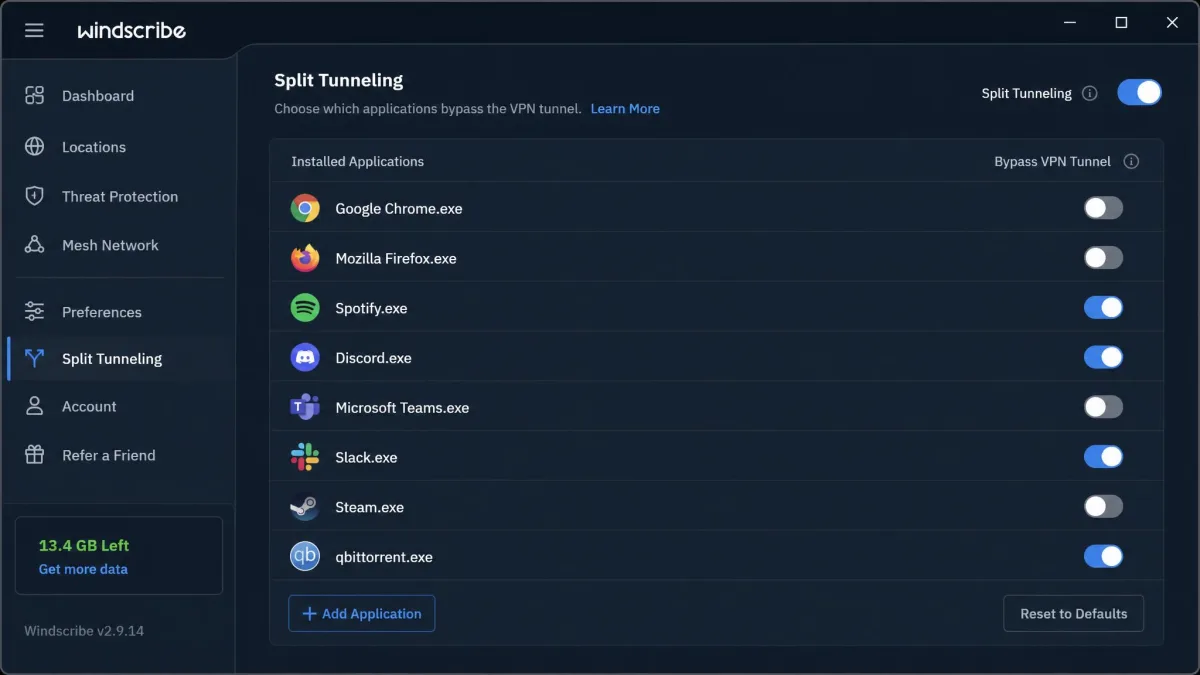
Split tunneling lets you route some apps through the VPN while others use your normal connection. It's on desktop and Android, and it's the feature that keeps your banking app working while your torrent client stays tunnelled.
Windscribe's version supports both inclusive and exclusive modes, so you can name either the apps that use the VPN or the ones that bypass it. iOS does not get split tunneling, which is a platform restriction rather than a Windscribe decision.
Port Forwarding and Static IPs
Port forwarding has quietly disappeared from most mainstream VPNs, so its presence here is worth noting. It matters for seeding torrents, for hosting a game server and for reaching a device on your home network from outside.
Port forwarding is not free-standing. It depends on buying a static IP add-on first, which puts the real cost at $2 to $8 per month on top of your plan. That's reasonable for what it does, but the feature list doesn't make the dependency obvious.
MultiHop and Obfuscation
MultiHop, which Windscribe calls Double Hop, routes your connection through two servers instead of one. The implementation is unusual: the desktop app handles one hop and the browser extension handles the other, rather than a single toggle inside one app. It works, but you need both pieces installed and configured, and that is more friction than a rival's one-click double VPN.
Obfuscation is cleaner. Stealth and WStunnel are protocol options in the same dropdown as everything else, and switching to them takes one selection. If you're on a network that blocks VPN traffic, start there.
Streaming and Unblocking: Netflix and Beyond
Windscribe used to brand its streaming servers as Windflix. That branding was pulled from the apps, but the capability didn't go anywhere: the streaming-optimised servers are still there, now marked with a 10 Gbps icon instead of the old "W" marker. If you've read older coverage saying Windflix is gone, what actually changed was the name on the label.
Results are genuinely uneven, and that's the fair summary. Netflix US and UK opened reliably for us, and HBO Max, Hulu and Paramount+ all worked without fuss. Australian services such as Ten Play stayed blocked across every server we tried. Windscribe was left off Security.org's best-for-streaming and best-for-Netflix lists for exactly this reason, and having tested it, we understand the call.
Don't buy Windscribe primarily for streaming a specific regional service. The major US and UK libraries work well, but coverage outside them is inconsistent enough that we wouldn't recommend committing a year's subscription to it without testing your service on the free plan first.
For the big two libraries, though, performance was good. Streams started quickly on nearby servers, and the major US and UK libraries opened reliably. The trouble only appears when you need a long route, and that is the same weakness the speed testing exposed.
Torrenting and P2P
Torrenting is allowed on the paid plans and blocked on the free tier, which is a reasonable line to draw. Most servers allow P2P traffic, but a subset of locations block it outright, so your first download attempt can fail until you switch to a different server. The apps don't flag which locations those are as clearly as they could, so expect one round of trial and error when you start.
Once you're on a working server, the experience is strong. The firewall kill switch protects you if the connection drops mid-download, unlimited simultaneous connections mean your seedbox and your laptop can both stay connected, and port forwarding improves seeding performance if you've bought a static IP.
One caveat worth flagging is what "unlimited" means on the Pro plan. Windscribe publishes no numeric monthly cap and explicitly declines to give one, defining the plan instead as unlimited for reasonable personal use. Its own illustrative examples of unreasonable use are downloading 2,000 or more games or streaming 5,000 or more hours in a single month, which no ordinary seeder will approach. The anti-abuse system also weighs parallel connections and login sessions alongside raw data volume, so a heavy single-user account behaves very differently from a shared one, and accounts get disabled for too many concurrent connections, datacenter use or password sharing rather than for volume alone. Enforcement arrives as a graded sequence of emails: a session-count notice first, then a warning with disablement, then a ban. It is not the silent cutoff the forum complaints describe.
Apps, Platform Support and Ease of Use
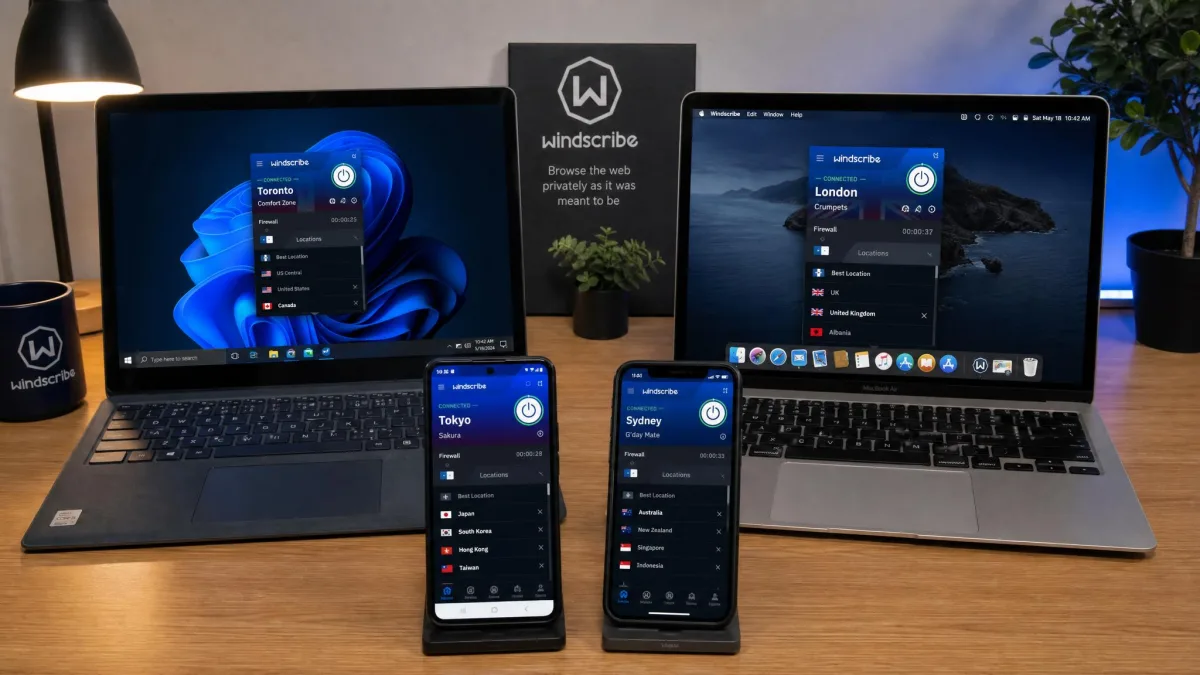
Windscribe covers Windows, macOS, Linux, iOS and Android, with Chrome and Firefox extensions and manual router support. Every plan, free included, allows unlimited simultaneous connections, which is unusual enough to be a headline feature on its own.
Windows and macOS
The desktop apps run in a compact mode by default and expand into deeper menus when you want them. Day-to-day use stays simple: open, click connect, done. The advanced settings sit one click away rather than buried, which is the right design decision for a service aimed at tinkerers who also want their family to be able to use it.
The learning curve is steeper than mainstream rivals, though, and we want to be honest about that. The settings vocabulary assumes some networking knowledge. Terms like WStunnel, MTU and split tunneling modes appear without much hand-holding, and a first-time VPN user will bounce off some of it. If you've never used a VPN before, our guide to what a VPN actually does is a better starting point than the settings screen.
iOS and Android
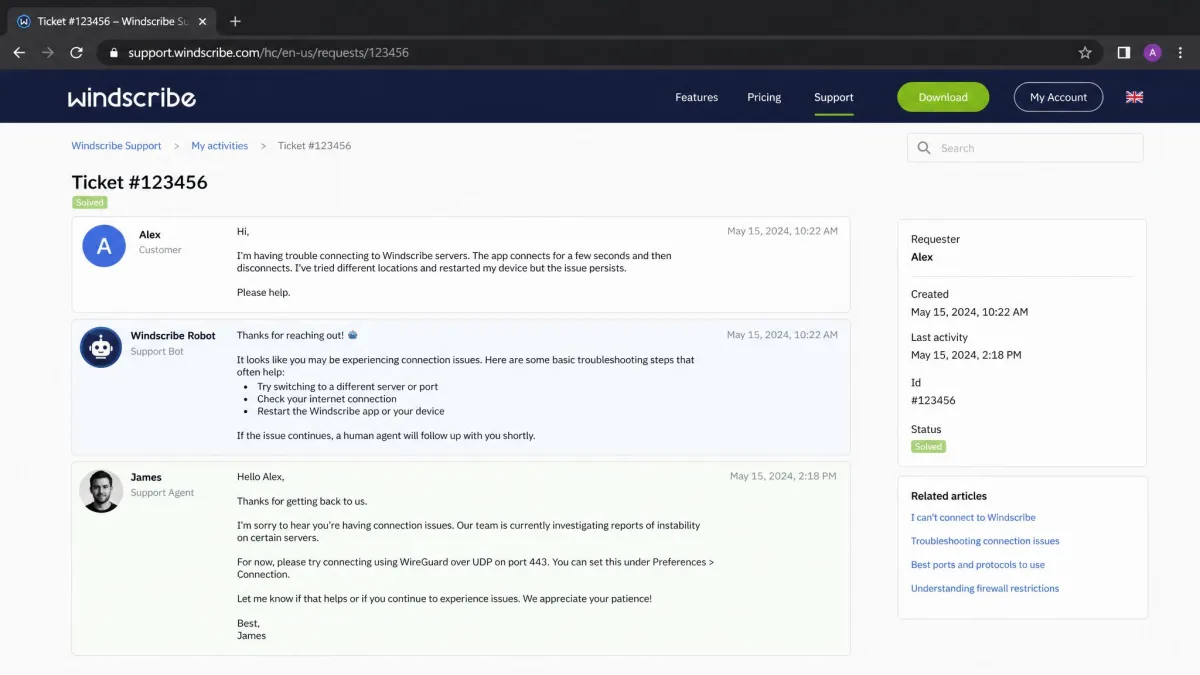
The mobile apps carry the core feature set: server list, firewall, R.O.B.E.R.T. and protocol selection. Android additionally gets split tunneling and a per-app configuration screen. iOS is the more limited build, as it usually is across this category, because Apple's networking restrictions rule out several of the desktop features, split tunneling among them.
Browser Extensions and Router Setup
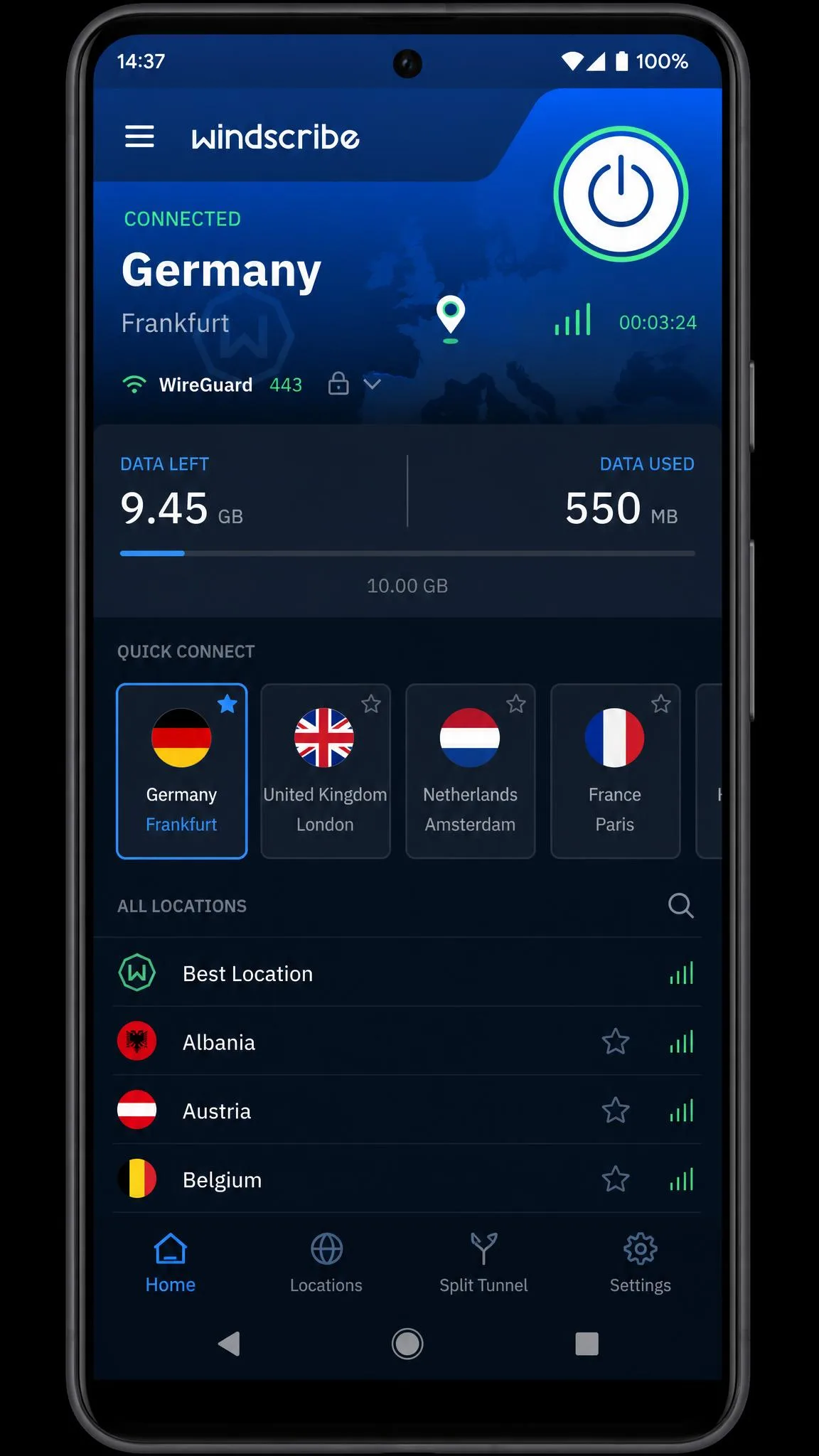
The Chrome and Firefox extensions are more capable than the usual proxy add-on. They include the WebRTC block, a cookie-clearing option, a location spoofing control and the second hop for Double Hop. They can be used entirely on their own if you only want browser traffic protected, which is a legitimate use case for a work laptop you don't control.
Router support is manual. There's no dedicated firmware, but the config generators produce OpenVPN, IKEv2 and WireGuard files for any router that accepts them. It's more work than a rival's one-click router app, and it's the standard route for covering devices that can't run VPN software themselves. Our walkthrough on how to set up a VPN covers the general shape of that process.
Customer Support
Support is the weakest part of the package, and it's worth knowing before you buy rather than after something breaks.
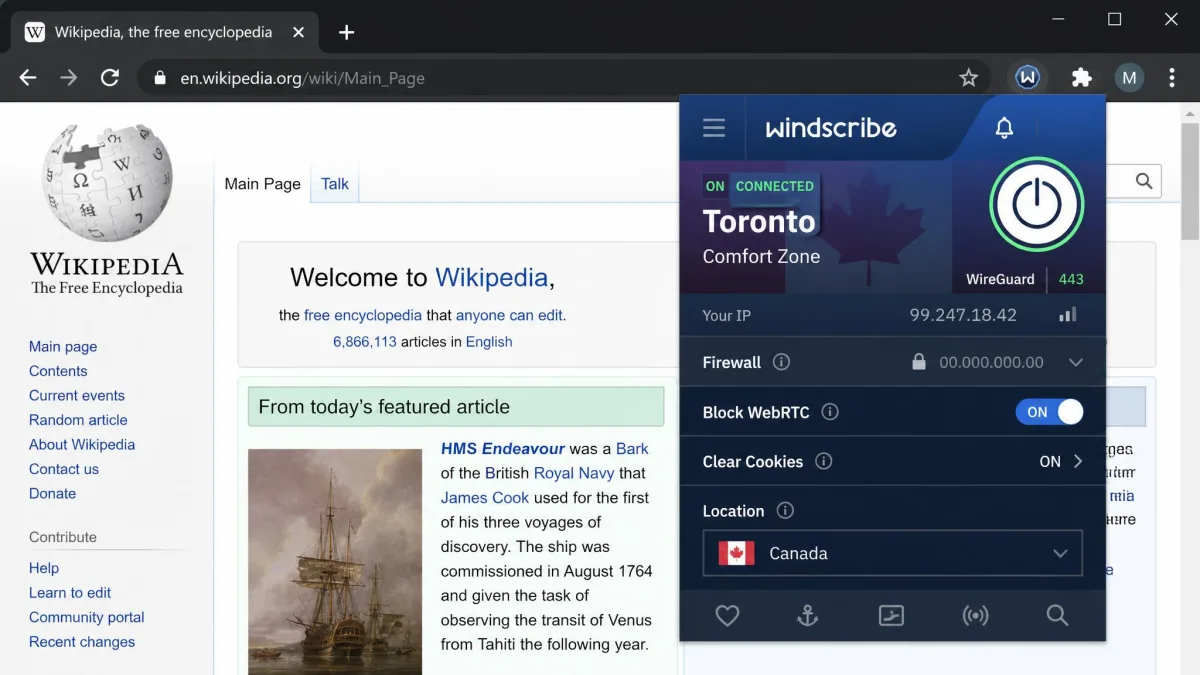
There is no 24/7 live chat with a human being. Contact runs through an AI chatbot, a ticket system and community forums. The chatbot answers immediately and handles the common questions competently, which covers setup, billing and basic connection problems. When you need a person, replies averaged around 18 hours in our experience. Windscribe publishes no support SLA, so treat that as an observed figure rather than a commitment.
Reaching a human agent can also require handing over a phone number, which sits awkwardly against a privacy service's positioning. It's not universal, but it happened often enough to be worth mentioning.
The knowledge base is genuinely good, and the community forum is active with staff participation. If you're the kind of user who reads documentation before opening a ticket, none of this will bother you. If you want someone on chat within two minutes at 11pm, look elsewhere.
How Windscribe Compares to NordVPN, Proton VPN and Surfshark
Numbers next to numbers, so you can see where this service wins and where it doesn't.
| Product | Windscribe | NordVPN | Proton VPN | Surfshark |
|---|---|---|---|---|
| Price per month, long-term | $5.75 | $3.49 | $2.99 | $2.49 |
| Monthly plan | $9.00 | Higher | Higher | Higher |
| Free tier | Yes, 10GB per month | No | Yes, unlimited data, limited servers | No |
| Server countries | 69 | 100+ | 145 | 100 |
| Simultaneous connections | Unlimited | 10 | 10 | Unlimited |
| Protocols | OpenVPN, IKEv2, WireGuard, Stealth, WStunnel | OpenVPN, NordLynx, IKEv2 | OpenVPN, WireGuard, Stealth | OpenVPN, WireGuard, IKEv2 |
| Kill switch | Yes, system-level firewall | Yes | Yes | Yes |
| Port forwarding | Yes, with static IP add-on | No | Yes | No |
| Netflix unblocking | US and UK, uneven elsewhere | Yes | Yes | Yes |
| Refund window | 7 days, under 10GB used | 30-day | 30-day pro-rated | 30-day |
| Jurisdiction | Canada, Five Eyes | Panama | Switzerland | Netherlands |
| Audit status | Disputed, none published | Six audits | Securitum, annual since 2022 | Audited |
Read that table honestly and Windscribe loses on price, on audits, on refund terms and on network size. It wins on the free plan, on port forwarding, on protocol flexibility and on R.O.B.E.R.T., and it ties on the unlimited connections policy that Surfshark also offers.
NordVPN is the pick if audit history is your deciding factor, and our full NordVPN review goes into how those six audits were conducted. Proton VPN is the pick for jurisdiction, with a Swiss base and an unlimited-data free tier that beats Windscribe's cap even though it restricts you to one device and a handful of countries. Surfshark is the pick for pure speed and price, and it posted a 3.5% speed reduction against 26% for Windscribe in comparable testing. Our Surfshark VPN review has the full breakdown.
None of those three will let you use the service properly without paying first. That is the trade you're making.
Who Should Use Windscribe (and Who Shouldn't)
Buy Windscribe if you want a VPN you can evaluate for free without a countdown timer, if you have a lot of devices to cover, if ad and tracker blocking at the network level appeals to you, or if you need port forwarding or obfuscation that mainstream services no longer offer. Build a Plan also makes it the cheapest reasonable option for anyone who only needs two or three countries.
Skip Windscribe if a published no-logs audit is non-negotiable, if you need a service based outside the Five Eyes countries, if you stream a specific regional library outside the US and UK, or if your work depends on fast connections to distant Asian servers. Skip it too if you want same-hour human support, because that doesn't exist here at any price.
The one group we'd point somewhere else entirely is complete beginners who want to click one button and never think about it again. Windscribe rewards curiosity. If you don't have any, you'll pay for features you never turn on.
How We Tested Windscribe
We ran both the free plan and the Pro plan across Windows, macOS, iOS and Android for four weeks of ordinary use: browsing, streaming, video calls, file downloads and public Wi-Fi. Testing ran on a home gigabit line, with baseline speed measurements taken unprotected before each VPN run so the comparison stayed honest.
Speed testing covered nearby, mid-distance and long-haul servers, with each route measured repeatedly at different times of day rather than once. That repetition is what surfaced the London variance and the endpoint-to-endpoint spread we describe above. Leak testing covered IP, DNS and WebRTC on every platform and on multiple servers. Streaming testing covered Netflix US and UK, HBO Max, Hulu, Paramount+ and several regional services. We also opened support tickets as an ordinary customer to measure response times rather than asking for press assistance.
Where our own results conflicted with published figures, we say so in the text rather than picking whichever number reads better. We paid for the Pro subscription ourselves.
Frequently Asked Questions
Is Windscribe safe and trustworthy?
Is the Windscribe free plan really unlimited, and what are the 10GB limits?
Does Windscribe work with Netflix?
Does Windscribe keep logs?
Will my account get banned for heavy torrenting on the Pro plan?
How do I cancel Windscribe and get a refund?
Is Windscribe better than NordVPN?
Does R.O.B.E.R.T. work on the free plan and on my phone?
Common questions about VPN basics
If Windscribe is your first VPN, two things are worth understanding before you subscribe. The first is what a tunnel actually does with your traffic, which our explainer on how VPN tunnelling works covers plainly. The second is that no VPN makes you anonymous. It moves your trust from your internet provider to the VPN company, which is why the jurisdiction and audit questions in this review matter as much as the speed numbers do.
Final Verdict
Windscribe is the VPN we'd hand to someone who wants to understand their own connection rather than just hide it. It rewards the kind of user who will open the protocol dropdown, and it frustrates the one who wants a single button and no vocabulary to learn.
So use the door the service leaves open. Download the free plan, spend your first 10GB on the specific servers and services you actually care about, and you'll know within a week whether the paid plan is worth $69 of your money. Very few VPNs let you find that out before you pay, and that remains the best argument in its favour. You can start on Windscribe at no cost.