PrivadoVPN is a Switzerland-based service that pairs one of the most generous free plans in the market with premium pricing that drops to a little over a dollar a month on a long commitment. It suits budget-minded users, streamers who want US and UK Netflix, and anyone testing the water with a no-cost tier before paying. The tension is worth stating up front: you get a friendly app, strong nearby speeds, and 10 simultaneous connections, but the server network is small next to the big names, there is no live chat, and the no-logs policy has not been independently audited. We spent time with the apps, the free tier, and the paid plans to work out who should sign up and who should look elsewhere in 2026.
We ran PrivadoVPN across Windows, macOS, and mobile, connecting from several regions to measure speed, check for DNS leaks, and see which streaming libraries opened. The notes below reflect how the apps behaved for us in day-to-day use rather than what the marketing pages promise.
PrivadoVPN at a Glance
PrivadoVPN launched with a simple pitch: give people a capable VPN they can actually afford, and let them try it free first. That pitch mostly holds up. The paid plan lands at $1.11 per month on the two-year term, which undercuts most rivals, and the free tier hands you 10GB of monthly data across servers in 10 countries with no account payment required.
You also get the security basics done properly. Connections use 256-bit AES encryption, with ChaCha20 available on mobile, and the app carries a kill switch, split tunneling, and an ad and malware blocker. Ten simultaneous connections is generous, matching services that cost far more.
Where it slips is breadth and reassurance. The network covers 49 countries, which is fine for most people but modest against providers listing well over a hundred. Support runs through email and a knowledgebase with no live chat, and the no-logs claim has never been checked by an outside auditor. None of these are dealbreakers on their own, but together they explain why PrivadoVPN sits just below the elite. Think of it as a strong value pick rather than an outright leader, and the rest of this review fills in exactly where that line falls.
Pros and Cons
Before the section-by-section detail, here is the balance sheet as we see it after testing.
Pros
- Genuinely useful free plan with 10GB monthly data and 10 country options
- Very low two-year pricing at $1.11 per month
- Strong nearby download speeds, holding around 80% of baseline
- 10 simultaneous connections, well above the usual limit
- Reliable US and UK Netflix unblocking in our testing
- Easy, uncluttered apps that new users can pick up quickly
Cons
- Small network of 49 countries compared with larger rivals
- No live chat; support is email and tickets only
- No-logs policy has not been independently audited
- macOS app lacks WireGuard and can stumble on OpenVPN
- Linux needs manual OpenVPN setup with no dedicated app
- Speeds fall off sharply on distant servers
Features Overview
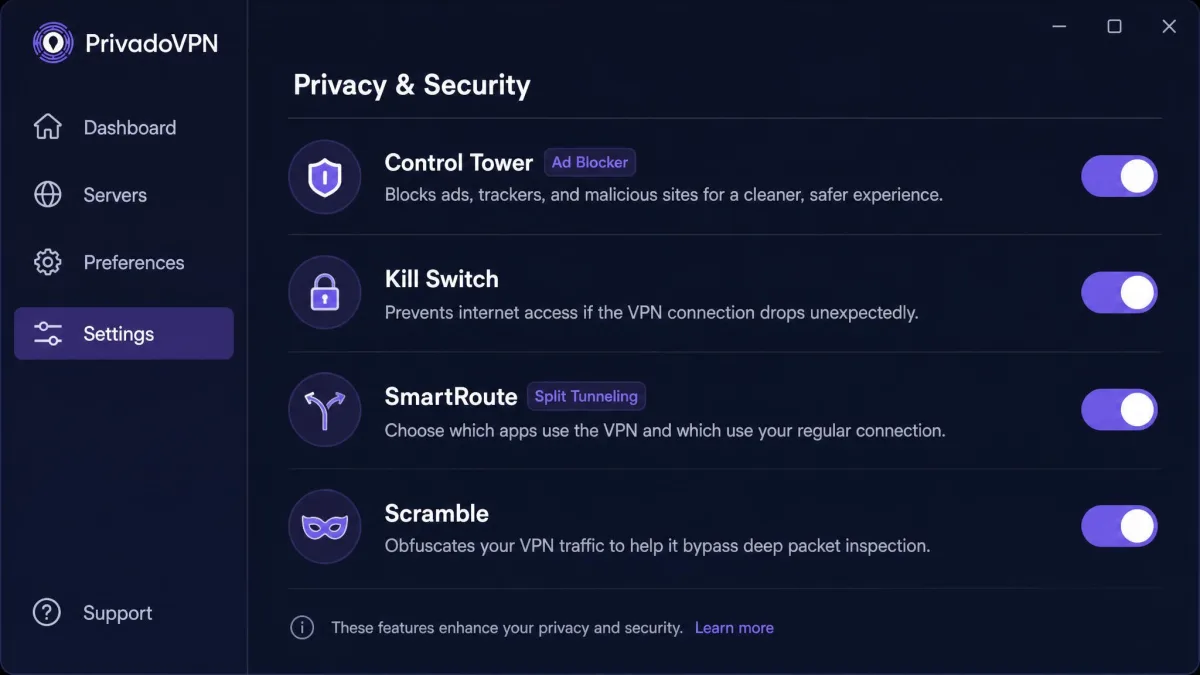
PrivadoVPN covers the features most people actually reach for, and it puts them where you can find them rather than burying them in menus. The headline additions are Control Tower for blocking, SmartRoute for split tunneling, a system and app level kill switch, and Scramble for obfuscation. Encryption is 256-bit AES with ChaCha20 on mobile, and the protocol lineup includes OpenVPN, WireGuard, and IKEv2/IPSec. You also get dedicated apps plus router and Smart TV support, so the coverage reaches beyond phones and laptops.
The point of a feature list is not the count but whether each item works when you need it. Plenty of VPNs advertise the same bullet points and then bury a kill switch three menus deep or ship a split tunneling tool that quietly ignores half your apps. We looked at the three features that shape daily use most and checked how they behaved rather than how they were marketed.
Control Tower (Ad & Malware Blocker)
Control Tower is PrivadoVPN's built-in filter for ads, trackers, and known malware domains. It runs at the network level. That means it strips a lot of clutter before your browser ever loads it, and you can toggle it without leaving the main screen. In practice it trims banner ads and cuts down on tracker calls across regular browsing. It is one of the features Privado users single out most often as worth having, and Trustpilot reviewers name the ad-blocking among the most-praised points.
It is not a full replacement for a dedicated content blocker, and it will not stop in-video ads on streaming platforms. But as a bundled extra that costs nothing to switch on, it earns its place. Having the blocker live inside the VPN also means it keeps working on every device you connect. That includes a phone browser that would otherwise have no ad blocker at all.
The malware side of Control Tower is the part that quietly matters more. It blocks connections to known bad domains at the network level. As a result, it can stop a device from reaching a phishing page or a malware host before anything loads. It is not antivirus and should not be treated as one, but it adds a useful layer on top of whatever protection your device already runs.
Kill Switch & Split Tunneling (SmartRoute)
The kill switch is the safety net that matters most, and PrivadoVPN offers it at two levels. There is a system-wide switch that cuts all traffic if the tunnel drops, and an app-level version that only blocks the programs you choose. That flexibility is useful if you want your torrent client protected but do not want your whole connection dropping during a brief reconnect. Most services give you one mode or the other, so having both is a small point in PrivadoVPN's favor.
SmartRoute is the split tunneling feature. It lets you send some apps through the VPN while others use your normal connection. This is handy when a banking app dislikes VPN traffic or when you want local services to see your real location. Setup is a matter of ticking the apps you want to route, and it held steady for us once configured. The one thing to watch is that changes sometimes need a reconnect to take effect, so set your rules before a session rather than mid-stream.
Split tunneling behaves differently across platforms, so the app you exclude on Windows may not have an exact equivalent on mobile. Test the ones that matter to you rather than assuming parity across every device.
Scramble / Obfuscation
Scramble is PrivadoVPN's obfuscation option. It is meant to disguise VPN traffic as ordinary HTTPS so it can slip past networks that try to block VPNs. This is the feature to lean on in restrictive regions or on networks that throttle or blacklist VPN connections, such as some school and office setups.
One caution is worth flagging. PrivadoVPN markets Scramble as an obfuscation tool, but its behavior and availability appear to vary by platform and app version. In our checks obfuscation was not available everywhere we expected it. If defeating VPN blocks is your core reason for subscribing, verify Scramble works on your specific device during the refund window before you commit. Obfuscation also tends to slow a connection, so treat it as a tool for tough networks rather than an always-on setting.
Apps and Ease of Use
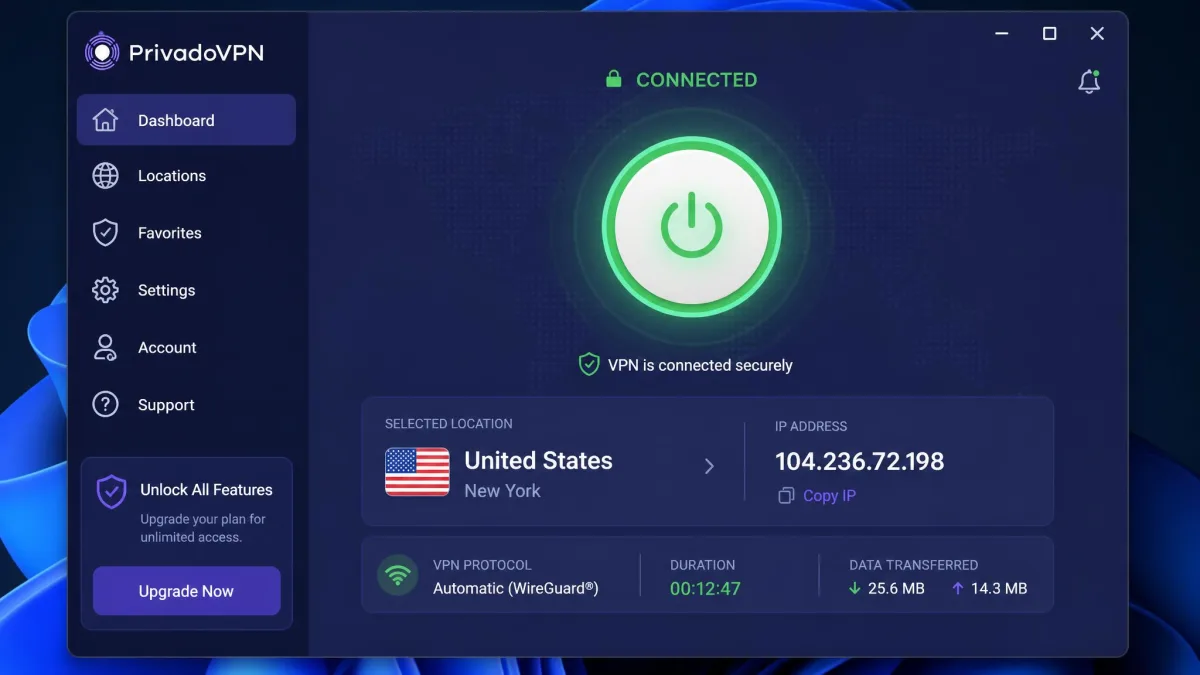
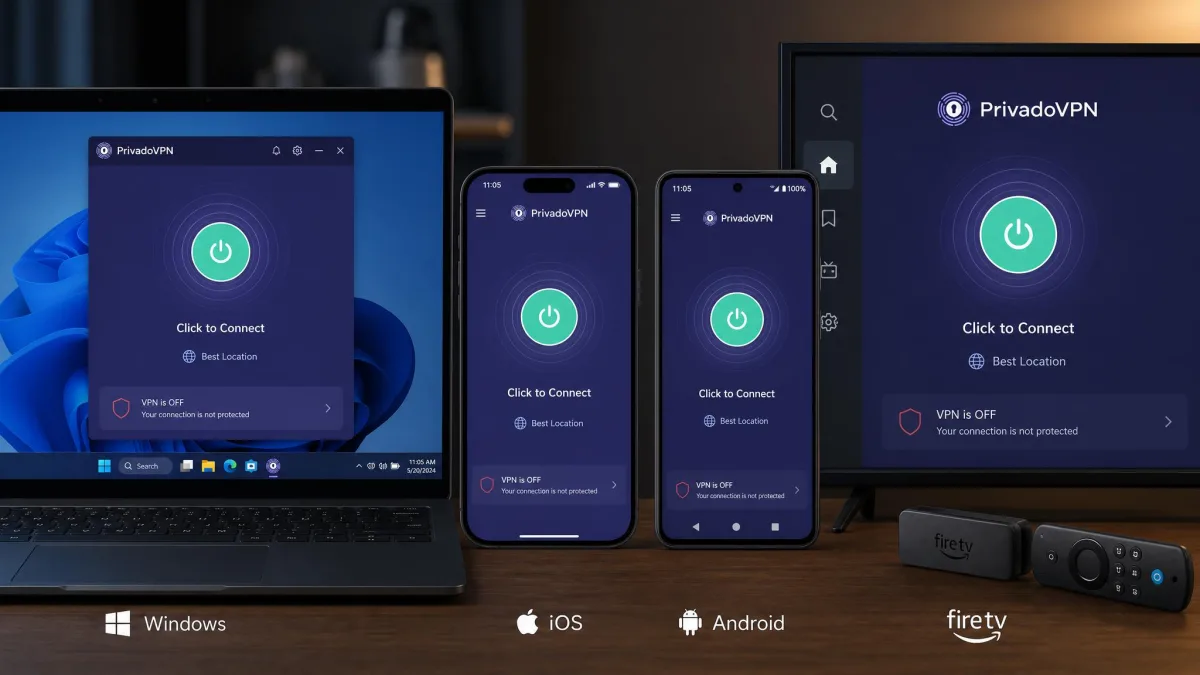
PrivadoVPN clearly designed its apps for people who do not want to think about VPNs. The main screen is a single large connect button, a location picker, and little else, so a first-time user can be protected in a couple of taps. That simplicity is one of the two strengths that come up most often, alongside the free plan, and it matches what we saw: the Windows client in particular is friendly and dependable, and it passed our DNS leak checks cleanly using an independent DNS leak test.
The experience is not identical everywhere. The Windows app is the most complete and the one we would point most users toward, with every protocol and feature present and stable. The macOS app is a step behind. It lacks WireGuard support and can run into connection trouble on OpenVPN, which matters if you want the fastest modern protocol on a Mac. Mobile is generally smooth, though connectivity can be intermittent, with the app occasionally failing to connect on repeated attempts, an issue we noticed most on Android. A retry usually sorted it, but it is the kind of friction you do not see on the top providers.
Linux is the weak spot. There is no dedicated GUI app, so setup means manual OpenVPN configuration, which is fine for a comfortable Linux user but a wall for anyone else. None of this makes PrivadoVPN hard to use overall. It just means the polish is uneven, and Windows users get the best of it while Mac and Linux users make small compromises.
Platform and Device Support
Coverage is broad on the platforms most households use. PrivadoVPN offers apps for Windows, macOS, iOS, and Android, plus Amazon Fire TV and Firestick, Smart TVs, and routers. Router support is the one that stretches the value furthest, because a single router connection protects every device behind it while only counting once against your limit.
That limit is a highlight in itself. You get 10 simultaneous connections, which is enough for a phone, laptop, tablet, TV stick, and a few extras without logging anything out. For a family or a device-heavy home, that headroom is a quiet but real advantage, and it is the sort of thing pricier services often cap at five.
PrivadoVPN Pricing and Plans
Pricing is where PrivadoVPN makes its strongest case. Paid monthly, the plan runs $10.99 per month, which is unremarkable and roughly in line with the rest of the market. The savings arrive when you commit. The 15-month annual plan works out to $1.33 per month, and the two-year plan drops to $1.11 per month. At that rate PrivadoVPN is one of the cheaper credible VPNs you can buy, and the value looks even better once you factor in the 10 connections and the router support.
Every paid plan carries a 30-day money-back guarantee. That means you can test the parts that matter to you, whether that is streaming, obfuscation, or a specific server, and back out if they fall short. We would treat that window as an active test period rather than a formality, especially given the platform quirks on macOS and the uncertainty around Scramble. Run the exact tasks you bought the VPN for in those first few weeks.
One honest note on billing: auto-renewal can catch people off guard when the introductory term ends, and there is no self-service account deletion, so cancellation needs a little attention rather than a single click. Set a reminder before the renewal date if you only want the promotional term, and contact support ahead of time if you want the account itself removed.
The very low monthly rate applies to the long two-year term. When it renews, it renews at standard pricing, so the headline figure is an entry price, not a permanent one.
Free Plan vs Premium
The free plan is the reason many people find PrivadoVPN at all, and it deserves the attention. It gives you 10GB of data each month across servers in 10 countries, with no payment details required to start. That is a freemium model done more generously than most. 10GB is enough for regular browsing, email, and a fair amount of standard-definition streaming, where many rivals cap free users at a fraction of that or lock them to a single location.
Premium removes the data cap, opens the full 49-country network, and unlocks the features that make the service worth paying for, including the complete streaming performance and priority routing. If the free tier covers your needs, there is no pressure to upgrade, which is rare and welcome. If you stream in HD or travel across regions, the paid plan is the version that delivers, and at $1.11 per month the jump is easy to justify.
One caveat on availability: reporting through 2026 has been inconsistent about whether the free plan is offered to every new signup, so if the free tier is your reason for choosing PrivadoVPN, confirm it is available at signup before you rely on it.
Speed and Performance
Speed is the test we care about most, because a VPN that slows you to a crawl gets switched off, and a switched-off VPN protects nothing. We measured throughput with speed test across nearby and distant servers to see how far performance held. We ran each server twice and took the steadier result, so a single noisy sample would not skew the picture.
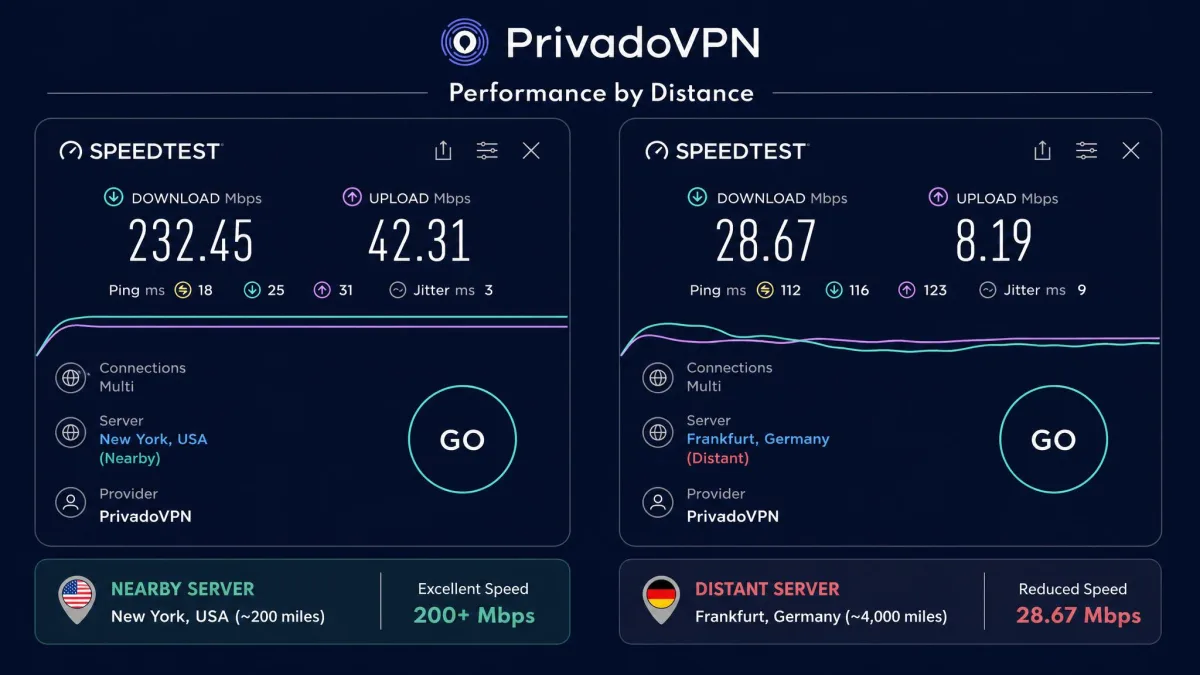
The short version: PrivadoVPN is fast where it counts and weaker where distance stacks up. On nearby servers it held roughly 80% of our baseline download speed. That is a comfortable result that keeps HD streaming and large downloads smooth. The further out we reached, the more the picture changed. Throughput dropped sharply on distant servers, in the range of 25% to 75% loss. That is a wider spread than the best providers, whose long-haul speeds stay steadier.
The reason the swing matters is that VPN speed is really two questions, not one. A nearby server mostly measures how efficient the app and protocol are, and here PrivadoVPN does well. A distant server also measures routing quality and how loaded the far-end hardware is, and this is where a smaller network shows its limits. Fewer servers per region means more people share each one at peak times, and long-haul routes have fewer paths to fall back on. For context, a premium rival like Proton VPN gave up only about 10.2% of a 190 Mbps baseline in recent testing, which is the kind of consistency PrivadoVPN cannot yet match on far routes.
If most of your connections are to servers in or near your own region, the day-to-day experience is quick and unremarkable in the good way. If you routinely connect across oceans, expect noticeable slowdown, and choose the closest server that still gives you the region you need. WireGuard is the protocol to pick when you want the best numbers, since it consistently outran OpenVPN in our runs on the platforms that support it.
Speed Test Results
The regional numbers tell the story better than an average would. US servers were the standouts, delivering strong real-world speeds of 200 Mbps and above in Seattle, Los Angeles, and New York. A UK server came in around 129 Mbps, which is plenty for 4K streaming and video calls. Those are results that hold up against pricier competitors on nearby routes, and they explain why US and UK streaming felt so smooth. WireGuard speeds are also one of the points Trustpilot reviewers praise most, which lines up with what we saw.
The takeaway is consistency by distance rather than a single headline figure. Pick a server close to where you actually are, and PrivadoVPN feels fast. Reach for one on the far side of the world, and you will feel the tunnel working against you. Bandwidth-heavy tasks like 4K video and big game downloads are the ones that expose a slow long-haul server first, so keep those on nearby endpoints. For most users, whose traffic stays regional, that trade-off rarely bites.
Security and Encryption
On the core security question, PrivadoVPN does what a trustworthy VPN should. Traffic is protected with 256-bit AES encryption. This is the standard used across the industry and by governments for sensitive data, and it is not realistically brute-forced with current hardware. ChaCha20 is available as an alternative on mobile, where it can be faster on some phone chipsets that lack dedicated AES acceleration. Paired with the kill switch, that gives you a solid baseline against snooping on public Wi-Fi or from your network provider.
Our leak testing backed this up on Windows. The client passed DNS leak checks and kept the real IP address hidden throughout a session. That is the outcome you want, and it is the one many cheaper services fail. A VPN that leaks your DNS requests quietly hands your browsing history to your provider, which defeats much of the point of running one. It is one more reason we point Windows users to that app first. We ran the leak test on both a fresh connection and after a forced reconnect, and the app held the tunnel both times.
Protocols
PrivadoVPN supports three protocols: OpenVPN, WireGuard, and IKEv2/IPSec. WireGuard is the one most people should default to, since it is fast, modern, and light on battery, and it is among the features users praise most. Its smaller codebase is also easier to audit than OpenVPN's, which is a quiet security win on top of the speed. OpenVPN remains the reliable, widely compatible fallback for networks that block newer protocols. IKEv2 is a strong choice on mobile, where it reconnects quickly as you move between Wi-Fi and cellular.
The gap to know about is on macOS, where WireGuard is not available and OpenVPN can be temperamental. If you want WireGuard specifically, Windows, iOS, and Android are the platforms where you will reliably get it. On a Mac, plan to use OpenVPN or IKEv2 and accept a small speed cost. It is worth choosing your protocol deliberately rather than leaving the app on automatic, since the default does not always pick the fastest option your device can run.
Privacy and Logging Policy
Privacy is where PrivadoVPN earns real credit and also where it leaves a question open. The credit is the location and the stated policy. The open question is verification, and it is the single most important thing to understand before you trust it with anything sensitive.
Jurisdiction (Switzerland) & No-Logs
PrivadoVPN is based in Switzerland, one of the better homes for a privacy service. The country sits outside the major intelligence-sharing alliances, so it is not part of the Five, Nine, or Fourteen Eyes arrangements that route requests between member states. Switzerland also has strong data protection law and no mandatory data-retention rule for VPN providers. A Swiss base is therefore a genuine advantage rather than marketing dressing. The company states a no-logs policy, meaning it says it does not record what you do or where you go while connected.
A Swiss jurisdiction matters because it shapes what a company can legally be compelled to hand over. It does not, by itself, prove that no logs are kept. That proof comes from an audit.
Independent Audits
Here is the honest limitation. PrivadoVPN's no-logs claim has not been verified by any published independent audit. Rivals in the same price bracket, and Proton VPN above it, have paid outside firms to inspect their systems and publish the results. PrivadoVPN has not done so, at least not publicly, so its privacy promise currently rests on trust rather than proof. An audit is the difference between a company saying it keeps no logs and an outside expert confirming the servers are actually built that way.
That does not mean the company logs your activity. It means we cannot confirm it does not, and neither can you. For casual privacy, unblocking, and public Wi-Fi safety, that gap may not bother you. For high-stakes anonymity, an unaudited policy is a reason to choose a service that has opened its books. We would also avoid claiming any track record either way on breaches, since there is no confirmed history to point to in either direction.
Streaming and Unblocking
Streaming is a major reason people buy a VPN, and PrivadoVPN handles the big libraries better than its price suggests. It is a practical pick for anyone whose main goal is watching content from another region without paying flagship money, and the strong US and UK speeds do a lot of the heavy lifting here.
Netflix and Other Platforms
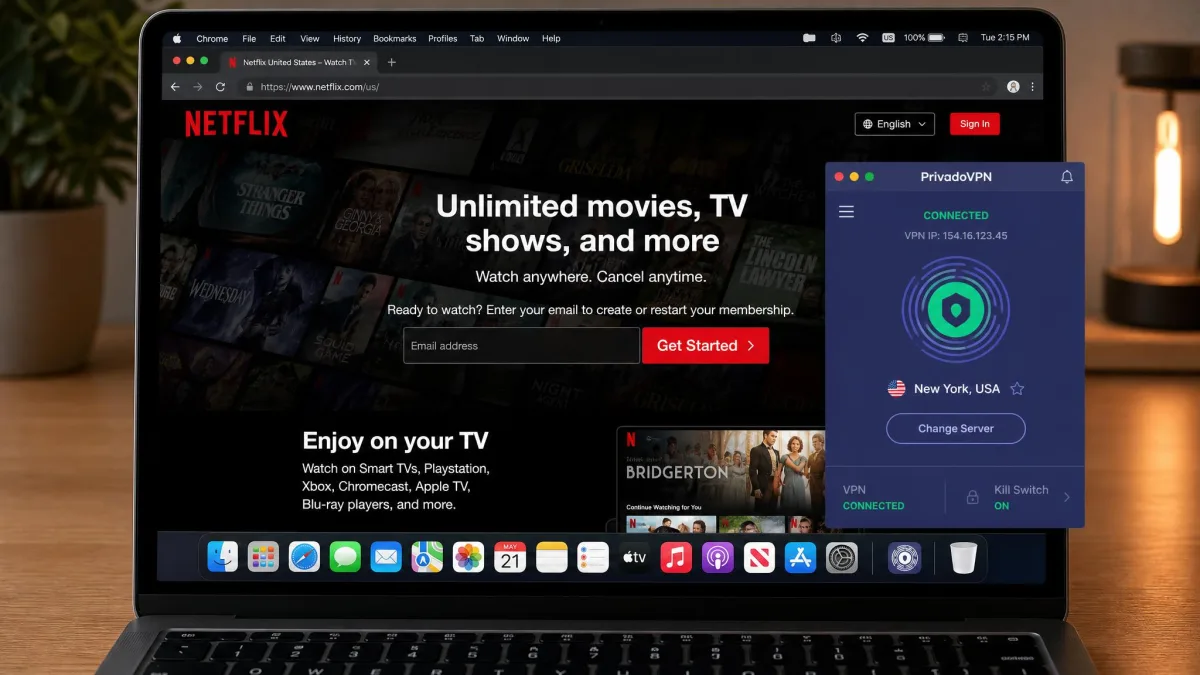
In our testing, PrivadoVPN reliably unblocked the US and UK Netflix libraries. It loaded region-specific catalogs and played them without the dreaded proxy error. That alone covers what most subscribers want, since those two libraries are the ones people ask about most, and playback stayed smooth in HD on nearby servers. The 200 Mbps-plus US speeds meant titles started fast and did not buffer when we skipped around.
The results are platform-dependent beyond Netflix. BBC iPlayer was inconsistent and failed to unblock in some of our attempts. If iPlayer is your priority, treat it as unproven and test it inside the refund window. Streaming success on any given platform can shift as services tighten their VPN detection. When a library is blocked, it is usually because the service has flagged the server IP, not because the VPN has broken, so switching to another city in the same country often clears it. The sensible approach is to confirm the specific service you care about works from your device before you rely on it, rather than trusting a general promise.
Server Network and Locations
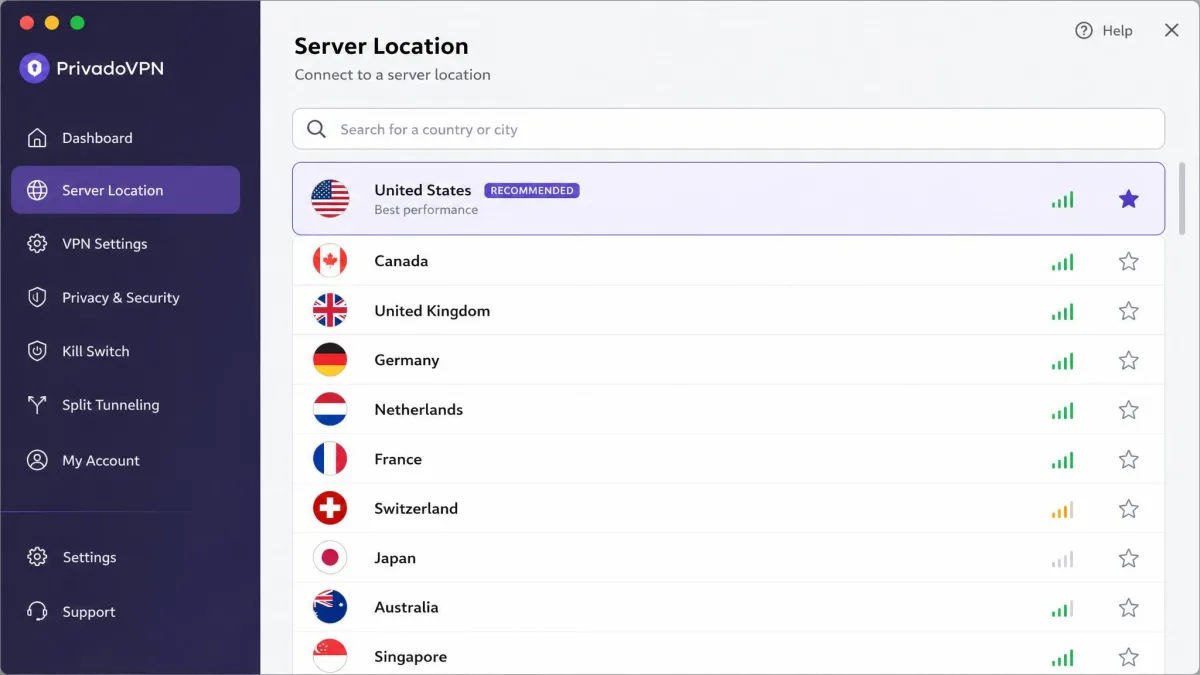
The network is where PrivadoVPN shows its size. It runs servers in 49 countries, spread across around 60 cities, though the exact city count varies by source and shifts as the network grows, so treat it as a ballpark rather than a fixed figure. That footprint comfortably covers North America, Europe, and the main hubs in Asia and Oceania.
For most users, 49 countries is more than enough, because the locations that matter, the US, UK, and major European and Asian cities, are all present and performed well for us. The limitation shows if you need a specific, less common country, where larger networks listing well over a hundred countries have the edge. It is a question of breadth versus depth. PrivadoVPN's servers are fewer but cover the popular routes capably, and for the price that is a fair trade.
Customer Support
Support is the softest part of the package. PrivadoVPN offers help through email and a ticket system alongside a searchable knowledgebase, but there is no live chat, which is increasingly the norm among competitors. If you like solving problems in real time with an agent, that absence will frustrate you. It also means an urgent connection problem can leave you waiting rather than getting an answer while you are still online.
Response experiences vary widely. Some interactions run slow, with email-only support taking a while to reply. Other reports describe quick turnarounds of just a couple of minutes, so the experience is not uniformly poor. The knowledgebase covers common setup and troubleshooting questions well enough that many issues never need a ticket. How much the gap matters depends on how self-sufficient you are. For a technical user the documentation may be enough. For someone who wants hand-holding, the lack of live chat is a real drawback that pricier rivals do not have. It is worth noting that PrivadoVPN's Trustpilot standing, a 3.8 out of 5 across more than 2,400 reviews, reflects a service most users are happy with even with these support limits in place.
How PrivadoVPN Compares to Other VPNs
The most useful comparison is with Proton VPN, another Swiss service that people cross-shop against PrivadoVPN. The two share a jurisdiction and a strong free tier but pull in different directions on price, network size, and privacy proof.
| Product | Buy | Cheapest price | Servers / countries | Free-tier data | No-logs audit |
|---|---|---|---|---|---|
 |
Check price → | $1.11/mo (2-year) | 49 countries | 10GB/month | Unaudited |
 |
Read review → | $2.99/mo (2-year) | 145 countries | Unlimited (no streaming) | Independently audited |
Where PrivadoVPN optimizes for price and a stream-friendly free plan, Proton VPN optimizes for scale and proven privacy. PrivadoVPN is cheaper at $1.11 per month against Proton's roughly $2.99, gives you a free tier that actually allows streaming within its 10GB cap, and offers 10 simultaneous connections. Proton counters with a far larger network of more than 20,000 servers across 145 countries, an independently audited no-logs policy, and Secure Core multi-hop routing for higher-risk users. Proton's own free plan offers unlimited bandwidth but blocks streaming and limits you to a single connection.
The choice comes down to what you value. For the lowest price and casual streaming, PrivadoVPN wins. For audited privacy and the widest server list, Proton is worth the extra dollars, and you can read our full Proton VPN review for the detail on how it performed in the same tests.
Frequently Asked Questions
Is PrivadoVPN free?
Is PrivadoVPN safe and legit?
Does PrivadoVPN keep logs?
Does PrivadoVPN work with Netflix?
Does PrivadoVPN work in restricted regions?
Final Verdict: Is PrivadoVPN Worth It?
PrivadoVPN is worth it for the right buyer, and the right buyer is easy to describe. If you want cheap, uncomplicated protection, a free plan that genuinely lets you try before you buy, and reliable US or UK Netflix, it delivers well above its price. The two-year rate of $1.11 per month, the 10 simultaneous connections, and the strong nearby speeds make it a smart value pick for households and casual users who connect close to home.
It is not the choice for everyone. The 49-country network is modest, support is email-only with no live chat, the macOS and Linux experiences trail Windows, and the no-logs policy remains unaudited. If you need proven privacy, the widest possible server list, or real-time support, a pricier provider like Proton VPN, or one of the other PrivadoVPN alternatives, will serve you better and justify the difference.
For most people who want a dependable, low-cost VPN and are willing to test the specifics that matter to them inside the refund window, PrivadoVPN earns a recommendation. Start on the free plan, run your own streaming and speed checks, and upgrade only once it has proven itself on the tasks you actually care about.