Your VPN connects without a problem at home, then fails the moment you join school, work, or hotel Wi-Fi. Sometimes it never finishes connecting. Other times it connects, but a streaming site throws a "VPN or proxy detected" error and refuses to play anything.
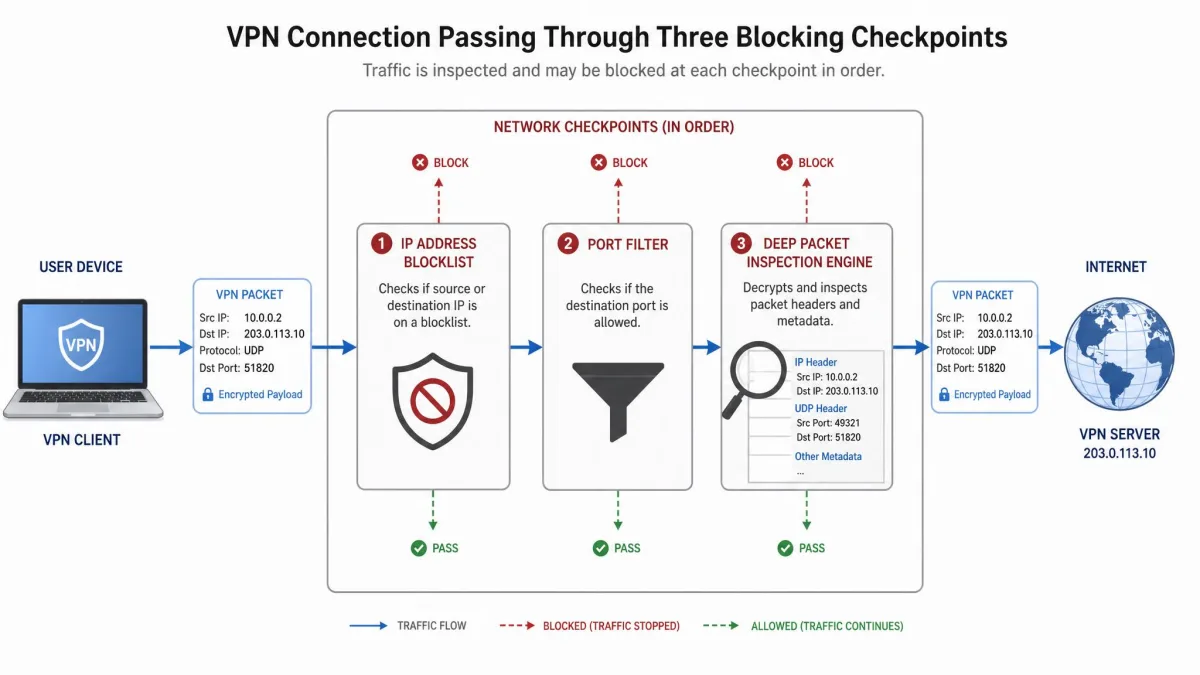
The cause is almost always one of three things: the network keeps a list of known VPN server addresses, it blocks the ports VPNs use, or it inspects your traffic and recognizes the VPN protocol itself.
The good news is that most blocks can be worked around by changing your server, protocol, port, or obfuscation setting. Below, we explain how VPN blockers work, show you how to confirm which one you are up against, and walk through each fix in the order we'd try it.
What Is a VPN Blocker?
A VPN blocker is any system that detects VPN traffic and stops it, slows it down, or refuses service to it. It can sit on a school or office firewall, inside an internet provider's equipment, or on a website's servers.
Network-level blockers stop the tunnel from forming. Site-level blockers let you connect but refuse to serve content to a VPN address.
Why VPNs Get Blocked
The reason behind a block usually predicts how aggressive it will be.
Streaming and copyright licensing
Streaming services license shows country by country. A VPN lets users appear to be somewhere else, which breaks those deals, so services such as Netflix, Prime Video, and BBC iPlayer refuse to stream to known VPN addresses. Netflix keeps one of the most aggressive blocklists of any service.
School and workplace networks
Schools and employers block VPNs to enforce content filters and keep bandwidth for work. A VPN hides your traffic from those filters, which is exactly what their security policy is meant to prevent. Our guide to VPNs that work on school Wi-Fi covers the services that hold up on campus networks.
Government censorship
Some governments block VPNs because a VPN lets people reach news, social media, and messaging apps the state has banned. These restrictions are the hardest to get around, because state filtering can inspect traffic across a whole country. We track which services still connect there in our roundup of VPNs that still work in China.
Fraud prevention on banking and payment sites
Banks and payment processors treat a VPN address as a risk signal, since fraudsters use VPNs to hide their location. A login from a known VPN range can trigger extra verification or a locked session.
How VPN Blockers Detect VPN Traffic
Most VPN blocks work in layers. Some networks keep a list of known VPN server addresses and refuse connections from them. Others inspect the traffic itself to spot a VPN protocol, then slow it down or cut it off. Many streaming sites use several methods at once.
IP address blacklisting
The simplest and most common method is a blocklist of IP addresses that belong to VPN servers. Commercial VPNs put many users on each server address, a pattern that is easy to spot. Once an address lands on a list, everyone using it gets blocked. Blocklists work well against small VPN networks but struggle against providers running thousands of servers, where a fresh server often gets through.
Port blocking
Every VPN protocol talks over a known port. OpenVPN's default is 1194, WireGuard conventionally uses 51820, IKEv2 uses UDP ports 500 and 4500, L2TP uses 1701, and PPTP uses 1723. A firewall that closes those ports stops the matching protocol cold.
Deep packet inspection (DPI)
Deep packet inspection looks inside the data packets crossing a network, not just at their addresses and ports. OpenVPN packets start with recognizable opcode bytes (usually 0x06 to 0x09) that a DPI system can match without decrypting anything.
TLS fingerprinting, DNS and GPS signals
Advanced blockers add secondary signals. TLS fingerprinting methods such as JA3 and JA4 read the order of ciphers and extensions a client offers, and they flag handshakes that do not look like a normal browser. A DNS leak can reveal your real resolver even with the VPN on. On phones, apps can compare GPS location with IP location: a US address paired with French GPS data points straight at a VPN.
First, Confirm It Is Actually a VPN Block
Before changing settings, make sure the VPN block is really the problem. The way a connection fails usually points to the block type. An instant drop typically means the protocol signature was caught. An endless "connecting" spinner usually means the server IP or handshake is blocked. A tunnel that connects but loads nothing usually means DNS trouble.
Run through these quick checks first:
- Rule out your own device. Your firewall or antivirus can be what blocks the VPN. Disable it briefly, then allow the VPN app through in both directions if that fixes it.
- Check for a managed device. On school- or company-managed laptops and phones, the block often lives in device-management (MDM) software, so no network-level trick gets around it.
- Read the error. Netflix shows a message along the lines of "You seem to be using a VPN or proxy," though Netflix has reworded this error over time, so the exact text can differ by app version. Cloudflare-protected sites answer a flagged VPN IP with an endless "Checking your browser" loop or an error 1020 page. YouTube rarely says "VPN detected" at all; you get a generic playback error or a spinner that never stops.
If the tunnel is up but nothing loads, our walkthrough on how to check if your VPN is working helps separate a dead tunnel from a DNS problem.
How to Bypass a VPN Blocker: 9 Methods
Work down this list in order. The early fixes take seconds and handle most school and office filters, while the later ones are built for heavy filtering.
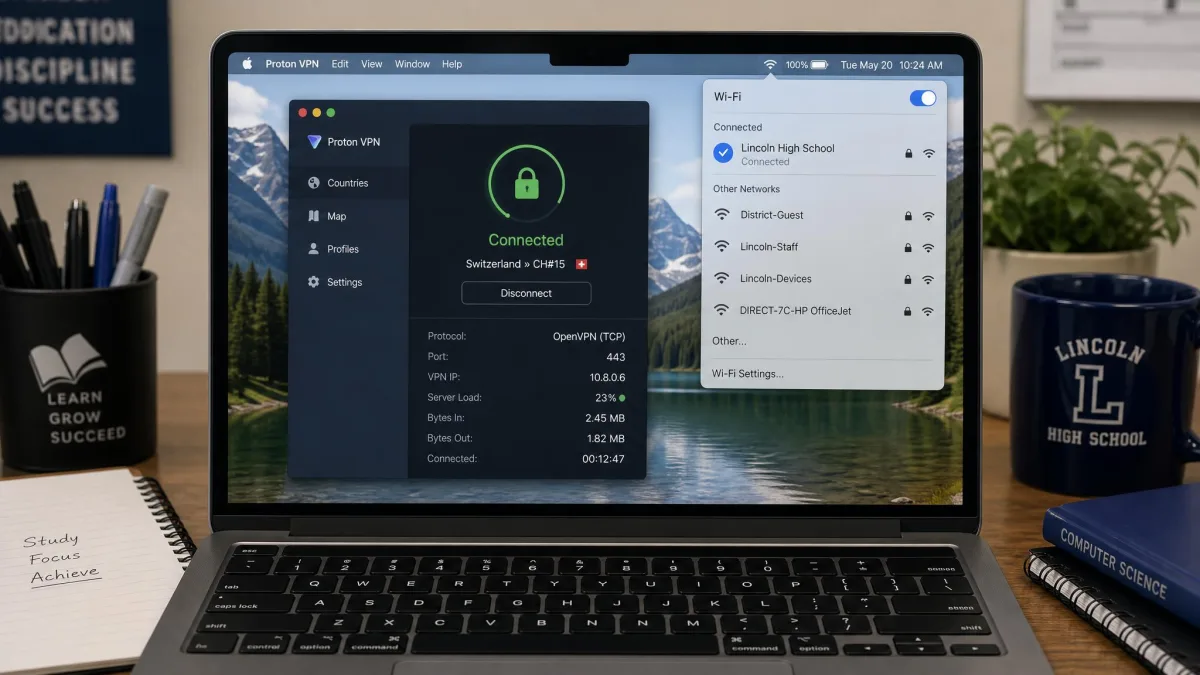
If you only try one thing, switch to OpenVPN over TCP port 443 and turn on obfuscation. That combination most often gets through school network filters, because it makes your VPN look like regular HTTPS traffic.
1. Switch to a different VPN server or location
Switching servers beats IP blacklisting, because a new server usually means an address that is not on the list yet. Disconnect, pick another server in the same country, and reconnect. If that fails, try a smaller city or a neighboring country. Our guide on how to change your VPN location shows the steps in the major apps.
Big-name VPNs with well-known server ranges can all fail on a strict school network while a lesser-known service still connects, because the blocklist targets the popular providers.
2. Change your VPN protocol (TCP vs UDP)
Changing protocol beats blocks aimed at one protocol. UDP is faster, while TCP confirms every packet, which makes it slower but less easy to tell apart from web traffic. Open your VPN's settings and switch from WireGuard or OpenVPN UDP to OpenVPN TCP.
This matters most with WireGuard, which runs over UDP only. On a network that drops UDP, a WireGuard connection fails outright, and the fix is OpenVPN TCP or a TCP-based stealth protocol. See our guide to which VPN protocol to switch to for the trade-offs.
3. Move to port 443 over TCP
Moving to port 443 beats port blocking. Port 443 carries all secure web traffic, so a network cannot close it without breaking ordinary HTTPS browsing. Open your VPN's connection settings, choose OpenVPN TCP, and set the port to 443. If 443 is unavailable, try TCP 80.
Port 443 alone fools port filters but not DPI, which can still recognize OpenVPN. That is why it pairs so well with the next method.
4. Turn on obfuscation or stealth mode
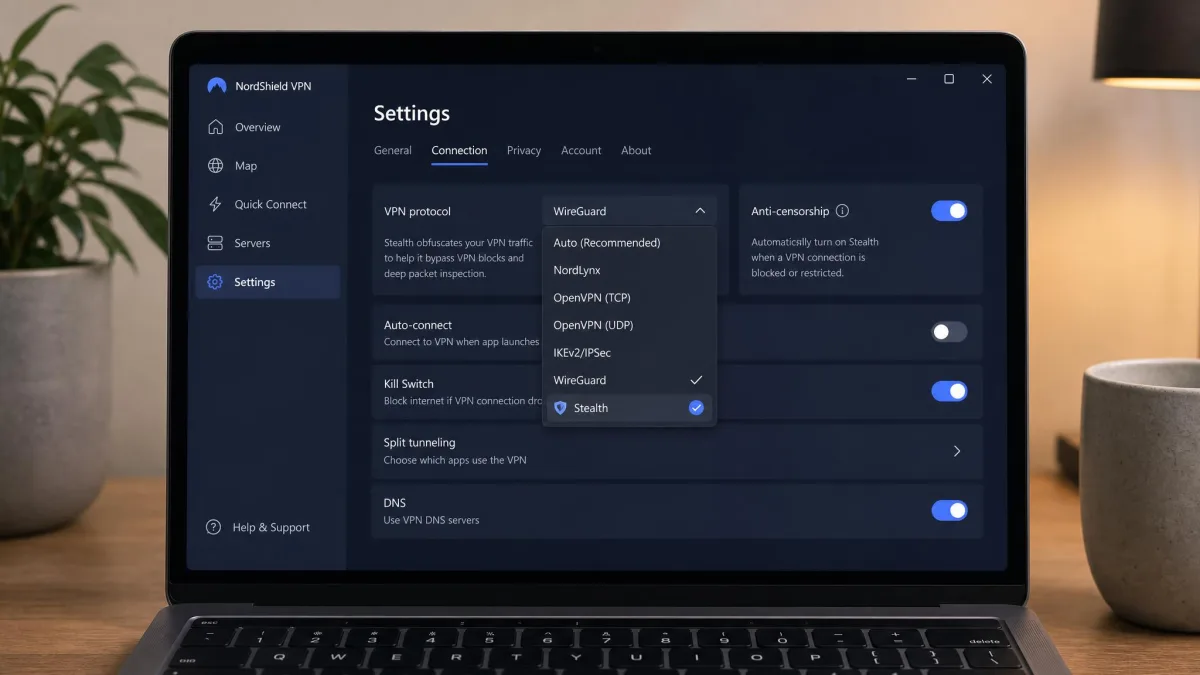
Obfuscation beats deep packet inspection. It wraps or scrambles your VPN traffic so it loses its protocol signature and looks like regular HTTPS traffic. Open your VPN's settings and switch on the obfuscation, stealth, or anti-censorship option.
Providers name this feature differently. Proton VPN's Stealth runs WireGuard over obfuscated TLS over TCP and is available on all plans, including Free. NordVPN's obfuscated servers now run on NordWhisper, so they no longer accept a manual OpenVPN config. Mullvad offers 4 anti-censorship methods, which we break down in our explainer on how VPN obfuscation modes work. Surfshark and ExpressVPN apply obfuscation automatically.
Obfuscation adds processing overhead, so stealth connections run slower than a plain tunnel. The hit is barely noticeable on a fast connection and more obvious on a slow one, and it can raise CPU and battery use.
5. Get a dedicated IP address
A dedicated IP beats IP blacklisting on sites that block shared VPN addresses. Only you use it, so it stays off shared blocklists unless your own activity gets it flagged. Buy the dedicated IP add-on from your VPN provider, choose a location, and connect to it. This is often the best bet for Netflix and banking sites.
6. Change your DNS settings
Changing DNS beats DNS-level filtering, the cheapest block a network can run. Open your network settings (or your VPN's DNS option) and switch to a public resolver such as Cloudflare's 1.1.1.1 or Google's 8.8.8.8. Changing DNS alone does not encrypt anything, and it adds no privacy on its own. It only gets around filters that block lookups.
A VPN tunnel can also connect cleanly and still fail to open sites when DNS leaks or is blocked locally. After changing settings, test your connection for DNS leaks to confirm your requests go through the tunnel.
7. Switch to mobile data
Switching to mobile data sidesteps a Wi-Fi block entirely. Turn off Wi-Fi and connect the VPN over cellular, or share your phone's hotspot with your laptop. Your traffic never touches the school or office firewall, so nothing on that network can block it.
8. Use Shadowsocks or a SOCKS5 proxy
A proxy can beat DPI and port blocks when a regular VPN protocol cannot connect. Shadowsocks is a fast tunnel proxy built to get past firewalls, with clients for Windows, macOS, Linux, Android, iOS, and OpenWRT routers. Install a client, add your server details, and route your browser or apps through it.
Some VPNs build this in: Mullvad offers Shadowsocks on port 443, and PIA can route multi-hop connections through a Shadowsocks server. A plain SOCKS5 proxy changes your IP but does not encrypt traffic. Our explainer on the difference between a proxy and a VPN covers that trade-off.
9. Use Tor with bridges
Tor bridges beat blocks on the Tor network itself and hold up against heavy DPI. Plain Tor is easy to block because its relay addresses are public, but Tor bridges and pluggable transports disguise the connection. The obfs4 transport makes traffic look like random data, Snowflake makes it look like a video call, and WebTunnel makes it look like an ordinary HTTPS connection.
Open Tor Browser's menu, go to Settings > Connection > Bridges, and choose a built-in bridge. Connection Assist often picks a bridge for you when plain Tor is blocked. For fresh bridges, visit bridges.torproject.org, message @GetBridgesBot on Telegram, or email bridges@torproject.org from a Gmail or Riseup address. Avoid meek unless nothing else works, because it is very slow.
Which Fix Works for Which Type of Block
Once you know how the network is detecting you, skip straight to the fix that targets it.
| Block type | How it detects you | Fix that works | Effort |
|---|---|---|---|
| IP blacklist | Refuses connections from known VPN server addresses | Switch server or location; dedicated IP | Low (server) / Medium (paid dedicated IP) |
| Port block | Drops traffic on VPN ports (1194, 500/4500, 1701, 1723, 51820) | Move to TCP 443 (or 80); OpenVPN TCP | Low |
| Deep packet inspection | Matches protocol signatures, such as OpenVPN opcode bytes | Obfuscation or stealth mode; Shadowsocks; Tor bridges | Medium |
| TLS fingerprinting | JA3/JA4 hash of the TLS handshake flags non-browser clients | Stealth protocols that mimic browser TLS | Medium to high |
| DNS / GPS checks | DNS leaks reveal your real resolver; GPS and IP locations disagree | Fix DNS and leak protection; turn off location services | Low |
No method is foolproof. Sophisticated blockers can still detect a VPN after you have changed servers, ports, and protocols. Streaming services can restrict accounts under their terms of use, and getting around a work or school block can break an acceptable-use policy you agreed to.
How to Choose a VPN That Gets Past Blockers
If your current VPN keeps failing, look for these features before you switch. Simple fixes handle most school and office filters, but government-level blocking, such as in China or Iran, generally needs real obfuscation.
- Obfuscation built in. This is the most important feature. Check whether the stealth mode turns on automatically or needs a toggle.
- TCP and port options. You want OpenVPN TCP or another TCP option, with port 443 selectable.
- A large server network. More servers means more fresh addresses to get past IP blocklists.
- A dedicated IP add-on. Worth having if streaming or banking blocks are your main problem.
- Automatic network detection. Proton VPN's Smart protocol and Surfshark's NoBorders mode try other settings for you on restrictive networks.
If an app cannot even log in on a restrictive network, retry a few times: some apps, including Mullvad's, rotate through different bridge servers for their login system.
Is It Legal to Bypass a VPN Blocker?
In most countries, using a VPN is legal, and getting around a VPN block is not a crime in itself. The risk usually comes from the rules of the network or service. Breaking a school or employer's acceptable-use policy can cost you network access or lead to disciplinary action.
The picture changes where VPNs are restricted. A handful of countries, including China, Iran, and Russia, restrict or ban VPNs, though VPN laws change often and enforcement differs from the letter of the law. If you are traveling, check the current rules before you rely on a VPN there.
FAQ
Is it illegal to bypass a VPN block?
Why is my VPN blocked on school or work Wi-Fi?
Can Netflix detect and block my VPN?
What is the best VPN protocol to avoid blocks?
Will a free VPN bypass blockers?
Does switching to mobile data fix a blocked VPN?
Why do I keep getting CAPTCHAs with my VPN on?
Can a government block VPNs?
Bottom Line
Most VPN blocks come down to a blocked address, a closed port, or a recognized protocol. Start with a new server, OpenVPN TCP, and port 443, then move to obfuscation, Shadowsocks, or Tor bridges when the network is inspecting your traffic. No method is guaranteed, but matching the fix to the block gets you past most of them.