CCleaner is a system-cleaning utility for Windows, Mac, and Android that removes junk files, clears browser history, and tidies up registry entries to free up disk space. It has long been one of the most recognized PC cleaners, but plenty of people now want something different, so we tested nine alternatives covering free, open-source, and paid options for Windows and Mac.
Why look for a CCleaner alternative? Some users never fully trusted the brand after its 2017 supply-chain breach, when attackers slipped a backdoored installer to roughly 2.27 million users. Others simply find the current app heavier or pushier than they want. We ranked the alternatives by cleaning power, safety, and speed, and the three quick picks below cover the most common situations: a full paid replacement, a free tool, and a Mac.
CCleaner Alternatives Compared (At a Glance)
Here is how the alternatives stack up against CCleaner on the factors that matter most. Prices are the entry prices we saw in September 2026, and ratings match our full reviews where we have one.
| Tool | Model | Platform | Registry | Price | Buy |
|---|---|---|---|---|---|
 |
Paid | Windows | Yes | $14one-time | Check price → |
 |
Free | Win, Linux | No | $0 | Download |
 |
Freemium | Windows | Yes | $29.96/yr | Check price |
 |
Freemium | Windows | Yes | $39.95/yr | Check price |
 |
Freemium | Windows | Yes | $16.77/yr | Check price |
 |
Paid | Windows | Yes | $39.97first yr | Get 50% off |
 |
Paid | Mac | n/a | $39.95/yr | Check price |
 |
Free | Windows | Yes | $0 | Download |
 |
Freemium | Win, Mac | Yes | $44.95/yr | Our review |
The 9 Best CCleaner Alternatives
Each entry below opens with what stood out in our hands-on testing, then covers the key features and current pricing, and closes with a scorecard you can act on. Scores match our full reviews where we have published one.
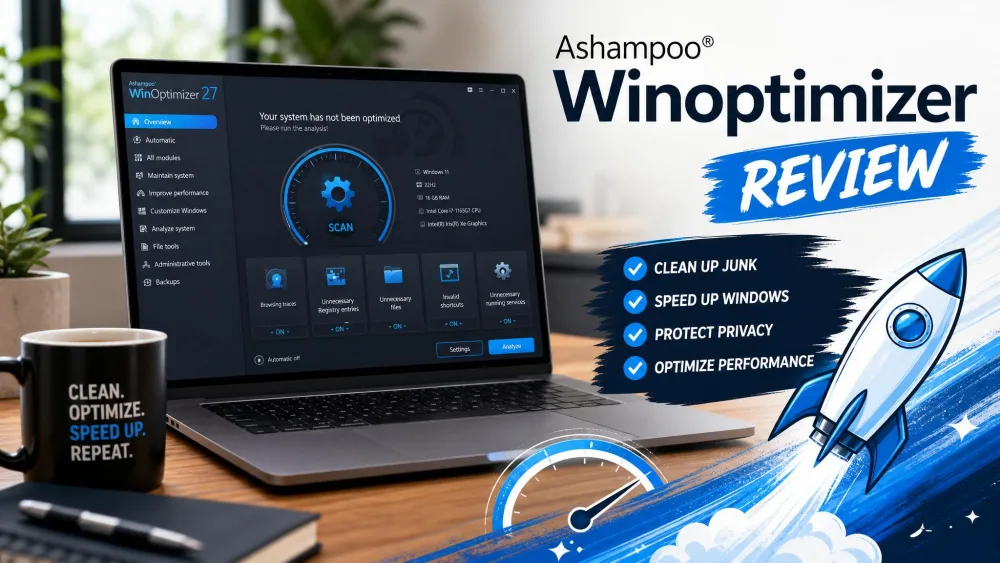
1. Ashampoo WinOptimizer: Best Overall
Ashampoo WinOptimizer is the pick for people who dislike subscriptions, since it is sold as a one-time license rather than a yearly fee. It is a mature, full-featured Windows optimizer with a clean, modern interface, and it covers the same ground CCleaner does: junk files, browser traces, registry cleanup, and startup management, all behind a single one-click front end.
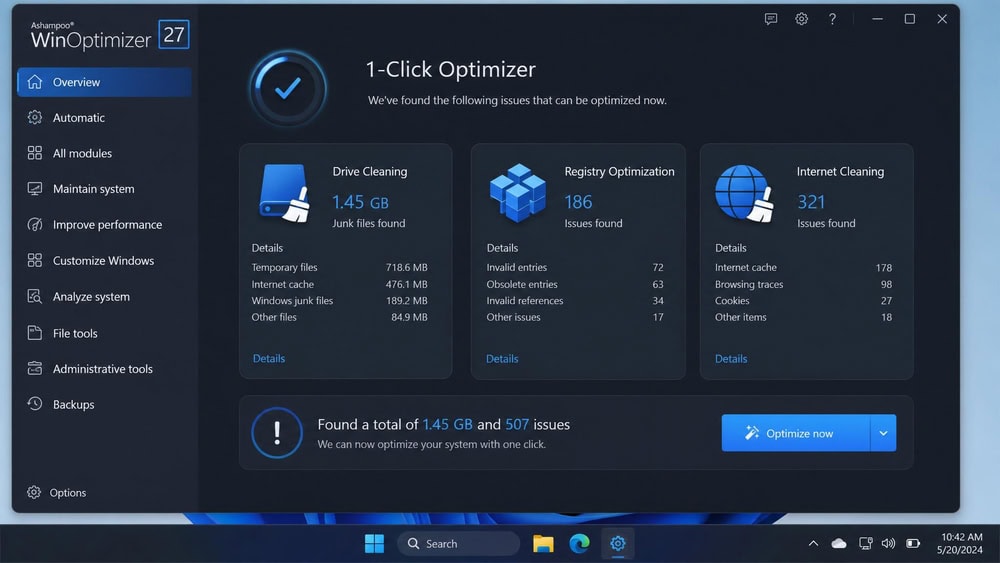
In our testing the 1-Click Optimizer grouped drive cleaning, registry optimization, and internet-trace cleanup into a single pass and listed what it had found before removing anything. The one friction point was the mandatory Ashampoo account signup before the trial would run, and the window paused briefly while indexing a folder with more than 10,000 files. Support is email only, but a reply came back in about 17 minutes when we tried it.
Key features
The suite includes a 1-click optimizer, a drive and junk cleaner, an internet and browser-trace cleaner, a registry optimizer, a privacy-traces cleaner, a startup manager, a crash analyzer, file encryption with secure deletion and recovery, and background auto-optimization. It supports Windows 10 and 11, with a 30-day free trial. The one-time license is the real differentiator in a category full of subscriptions.
Pricing
Ashampoo WinOptimizer is sold as a one-time license from $14, with a $16 upgrade price for owners of an older version, a 30-day free trial, and a 30-day money-back guarantee. The list price is higher outside promotions, but the $14 entry price held across our checks in July and September 2026.
Ashampoo WinOptimizer
The most complete CCleaner replacement we tested, with a polished one-click front end over a deep toolkit and no subscription to manage. It backs up the registry before making changes and the 30-day trial means you can confirm the gains on your own PC before paying.
Pros
- One-time purchase, no subscription
- Polished, modern interface
- Broad optimization toolkit
- 30-day trial and 30-day money-back guarantee
Cons
- Windows only
- No meaningful free tier, and an account is required
- Some modules duplicate Windows built-ins
Best for: A like-for-like CCleaner replacement without a subscription. Skip if: You want a permanently free tool, or you are on a Mac.
2. BleachBit: Best Free and Open Source
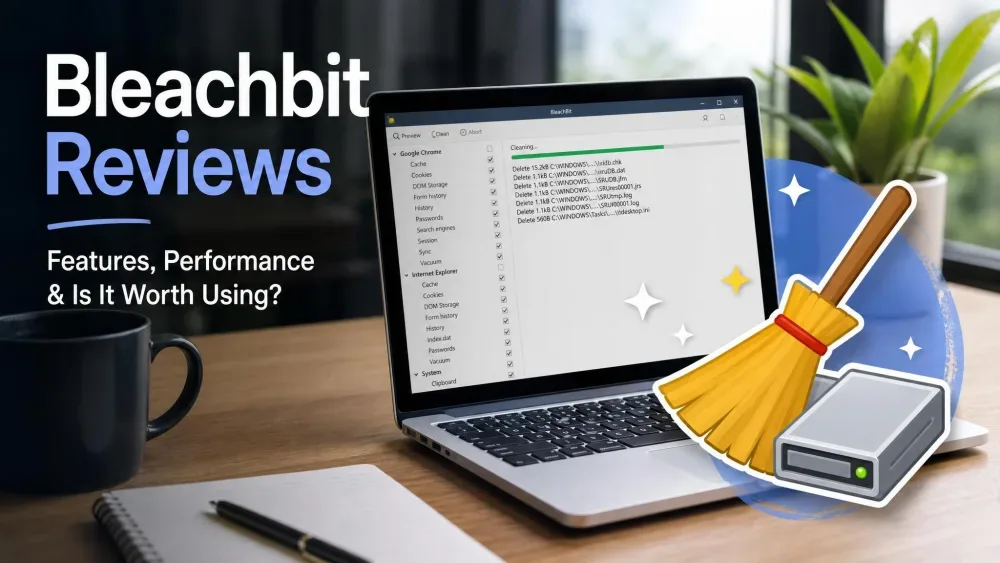
BleachBit is our top pick for anyone who wants a powerful cleaner that costs nothing and hides nothing. It is 100% free and open source under the GPLv3 license, with no ads and no upsells, and because the code is open, security-minded users can audit what it does.
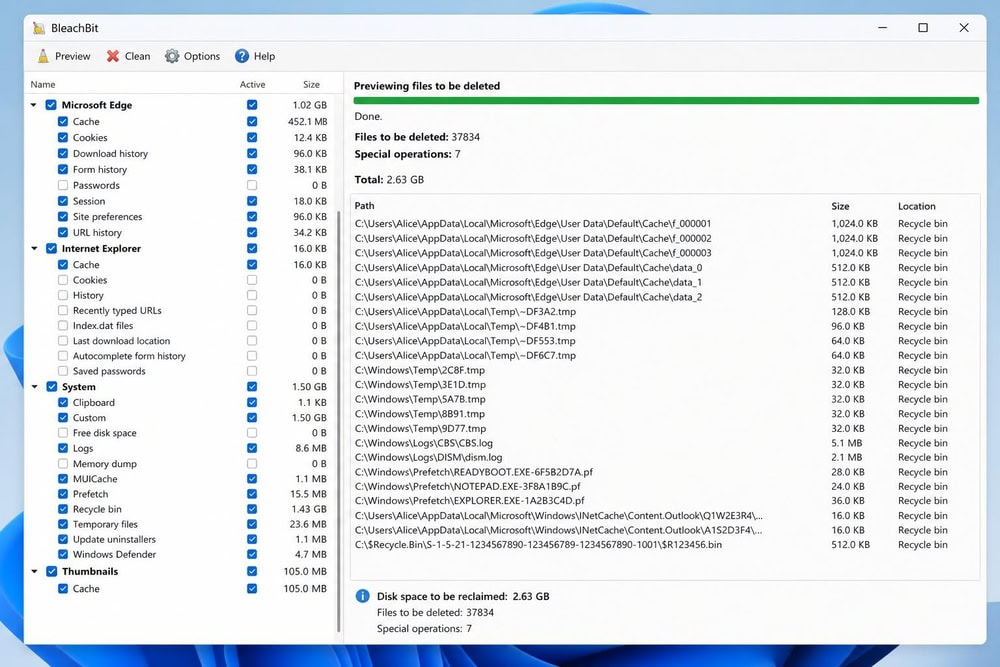
When we ran a first scan on a Windows 11 test machine, nothing happened until we said so. BleachBit listed everything it intended to remove, mostly browser caches, system temp folders, and thumbnail data, and let us untick anything we wanted to keep in the preview pane before committing. The installer was refreshingly plain, with no bundled add-on to decline. The interface is utilitarian and the full scan ran a little slower than the polished commercial dashboards, but you get full visibility into what is deleted.
Key features
BleachBit handles junk and temporary file removal, browser cache, history, and cookie cleaning, and secure file shredding with free-space wiping, plus command-line automation and custom CleanerML rules for advanced users. It does not include a registry cleaner, a deliberate choice in line with the cautious approach we recommend. It supports Windows and Linux; there is no native macOS build on the official site, so Mac users should look further down.
Pricing
BleachBit is free: no paid tier, no premium unlock, no nag screen.
BleachBit
The highest-rated tool in this roundup and the one to install if you only want the cleaning half of CCleaner. It previews every deletion, bundles nothing, and costs nothing, but it deliberately leaves the registry alone and has no Mac version.
Pros
- Completely free and open source, no ads or bundled software
- Transparent preview before deletion
- Secure shredding and free-space wiping
- Command-line automation for power users
Cons
- No native macOS version
- No registry cleaner included
- Interface is more utilitarian than polished
Best for: Anyone who wants a free, transparent cleaner and does not need registry tools. Skip if: You want a registry cleaner, a startup manager, or a Mac build.
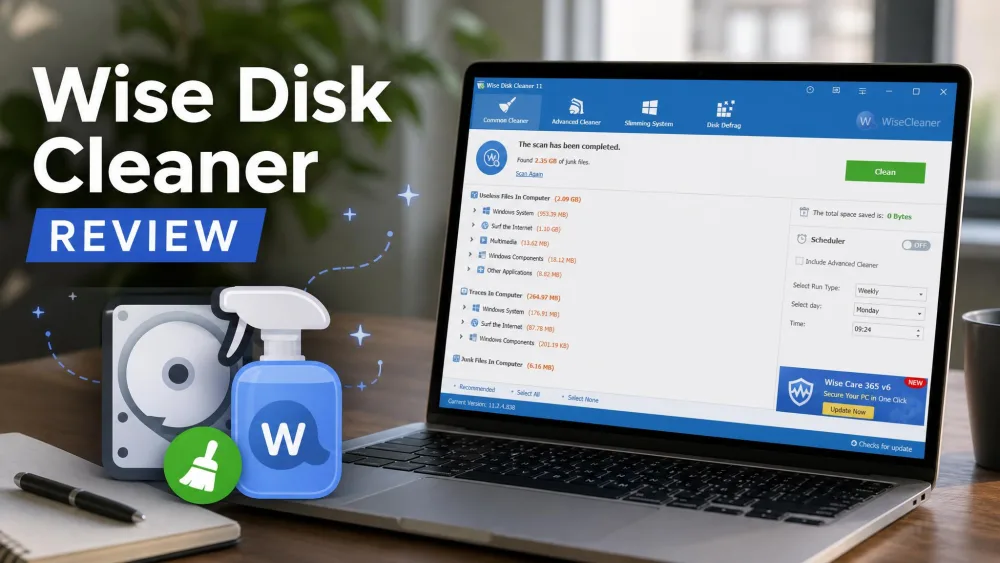
3. Wise Care 365: Fastest Scans
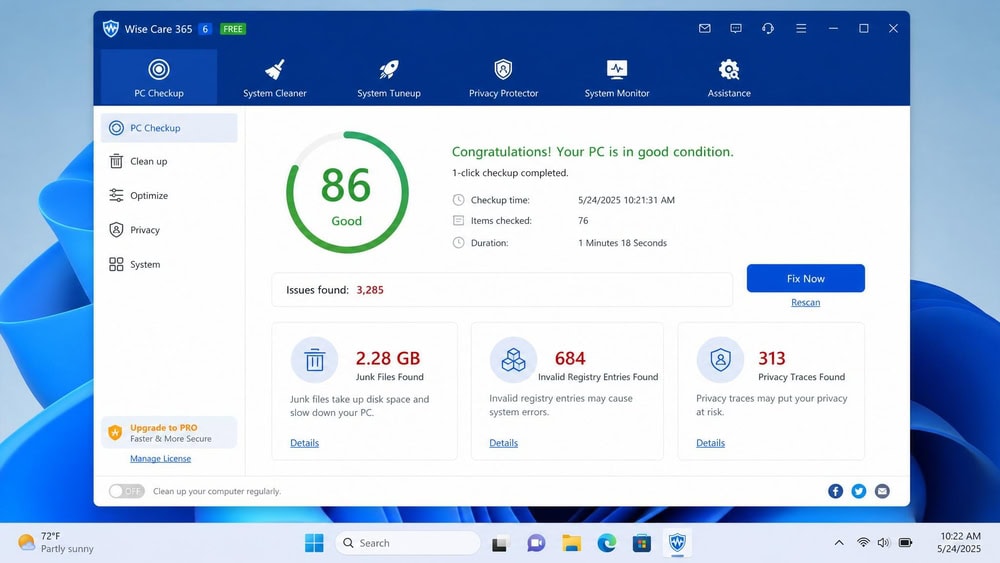
The fastest scan in our roundup belonged to Wise Care 365, which is why it sits this high. Its 1-click PC checkup on our Windows 11 test machine returned a health score tallying junk files, invalid registry entries, and privacy traces in noticeably less time than the heavier suites. Before applying the registry fixes it created a backup we could roll back to. The only real friction was an occasional prompt nudging us toward Pro, which we declined without losing the core cleaning.
Key features
You get a 1-click PC checkup, a registry cleaner with backup and restore, junk, temp, and browser cleanup, a privacy eraser, registry and disk defragmentation, startup optimization, a system monitor, and a file shredder. The Pro tier adds real-time protection, and the app is Windows only.
Pricing
The free version handles everyday cleaning. Wise Care 365 Pro lists at $39.95 per year for up to three PCs, and WiseCleaner's own store showed it discounted to $29.96 when we checked in September 2026, with a 60-day money-back guarantee. The sale price moves around, so confirm it on the store page.
Wise Care 365
A quick, tidy freemium dashboard that backs up the registry before it touches it. The free tier covers routine cleaning, and Pro adds real-time protection for three PCs at a fair price, with the occasional upsell prompt the only real annoyance.
Pros
- Fast scans and a clean dashboard
- Registry cleaner with backup and restore
- Free version covers the essentials
- 60-day money-back guarantee on Pro
Cons
- Windows only
- Some optimization claims oversell the benefit
- Occasional upsell prompts
Best for: A fast freemium dashboard with registry backup built in. Skip if: Upsell prompts annoy you, or you want a one-time license.
4. Glary Utilities: Most Tools in One App
Glary Utilities packs more than 20 maintenance tools into one app, the closest thing on this list to a CCleaner-style all-in-one toolkit. A free version sits alongside a paid Pro tier, so you can try the essentials before upgrading.
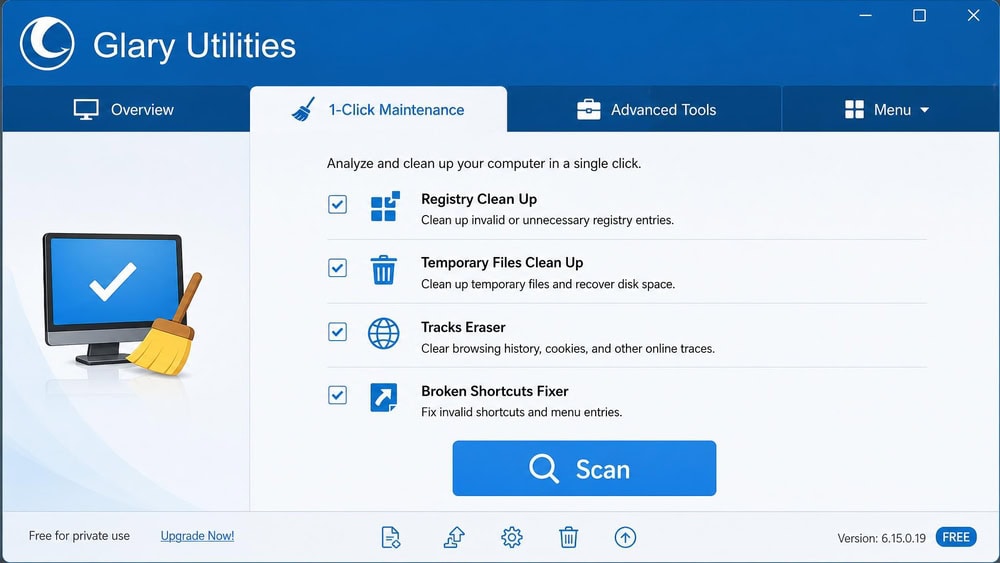
We started with the 1-Click Maintenance tab, which found the usual suspects on our test PC, temporary files, broken shortcuts, invalid registry entries, and browser traces, all under one Scan button. The registry module backed up the entries it planned to remove before touching anything, exactly the safety net we want. The installer did offer an extra Glarysoft utility we did not need, so we unticked it before continuing.
Key features
The toolkit covers 1-click maintenance, a registry cleaner and repair module, junk and disk cleanup, a duplicate-file finder, a file shredder, a startup manager, privacy and browser-trace cleaning, disk analysis, a software-update manager, and file recovery. It runs on Windows only, with a current version released in mid-2026.
Pricing
The free version is enough for routine cleaning. Glary Utilities Pro lists at $39.95 per year on the official store, covering up to three PCs; Glarysoft also runs a recurring 50%-off promotion on its upgrade page that drops it to about $19.97 per year. The broad feature set and three-PC coverage make it one of the better-value paid suites here.
Glary Utilities
The broadest toolkit in the roundup, with a usable free tier and a Pro plan that covers three PCs. The interface is busier than the others, and the installer offers an optional extra you will want to untick, but the registry backup and the sheer range of modules make it a solid CCleaner stand-in.
Pros
- Over 20 tools in a single Windows app
- Free version covers core cleaning
- Registry cleaner with repair and backup
- Beginner-friendly 1-click mode
Cons
- Windows only
- Interface can feel cluttered
- Installer offers an optional bundled extra
Best for: The broadest free toolkit, with a Pro tier that covers three PCs. Skip if: You want a minimal, uncluttered interface.
5. Advanced SystemCare: Best Automation on a Budget
IObit's Advanced SystemCare leans on automation and AI-assisted cleanup to keep a Windows PC tuned with minimal effort. A free version is available and a Pro tier adds active protection. See our Advanced SystemCare review for a deeper look.
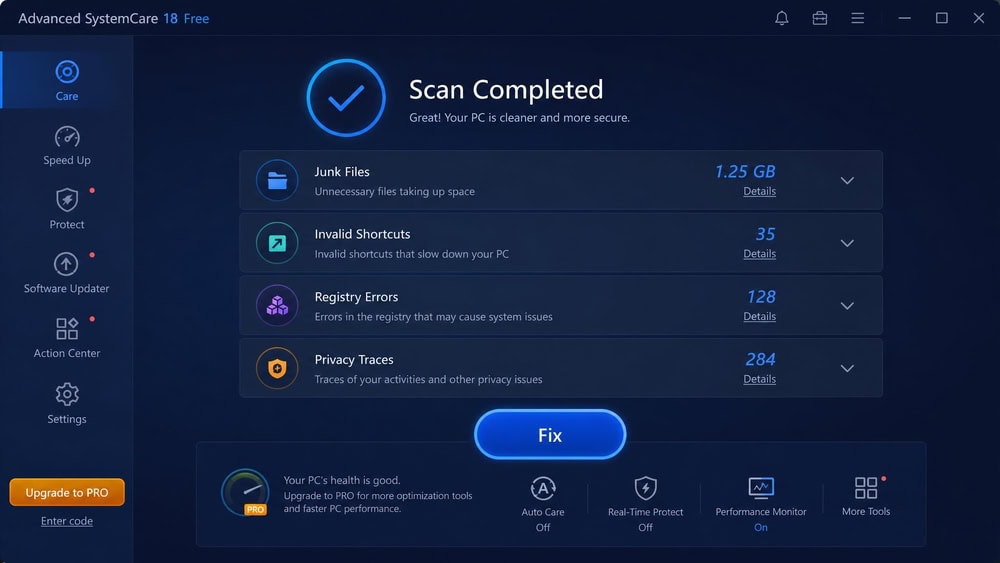
Setup is where Advanced SystemCare asks the most of you. On our Windows test machine the installer pushed IObit's own browser tools and additional IObit products during the flow, so we declined those extras before continuing. Once inside, the scan grouped its findings cleanly into junk files, invalid shortcuts, registry errors, and privacy traces behind a single Fix button. The automatic-optimization mode is the genuine draw: enable it once and it works quietly in the background, which suits anyone who would rather not think about maintenance.
Key features
Advanced SystemCare offers AI deep junk cleaning, registry cleaning, startup and memory optimization, ransomware protection with a Safe Folder, privacy and anti-tracking tools, real-time protection, software updates, and automatic optimization. It is Windows software; IObit handles Mac through its separate MacBooster product.
Pricing
Advanced SystemCare Free covers a lot. The Pro tier shows a promotional $16.77 per year for one PC, roughly 40% off, with a multi-PC plan and a 60-day money-back guarantee. These discounted figures fluctuate, so check the price first.
Advanced SystemCare
The cheapest route to hands-off maintenance, with a genuinely useful free tier and an automatic mode that runs quietly in the background. The installer's push toward other IObit products is the price you pay, so read each screen before you click Next.
Pros
- AI-driven deep cleaning and automation
- Ransomware protection with Safe Folder
- Free tier is genuinely useful
- 60-day money-back guarantee on Pro
Cons
- Windows only (Mac needs MacBooster)
- Installer pushes other IObit products
- Performance claims can be optimistic
Best for: Set-and-forget automation on a free or cheap plan. Skip if: You dislike installers that push extra products.
6. iolo System Mechanic: Best for Hands-Off Households
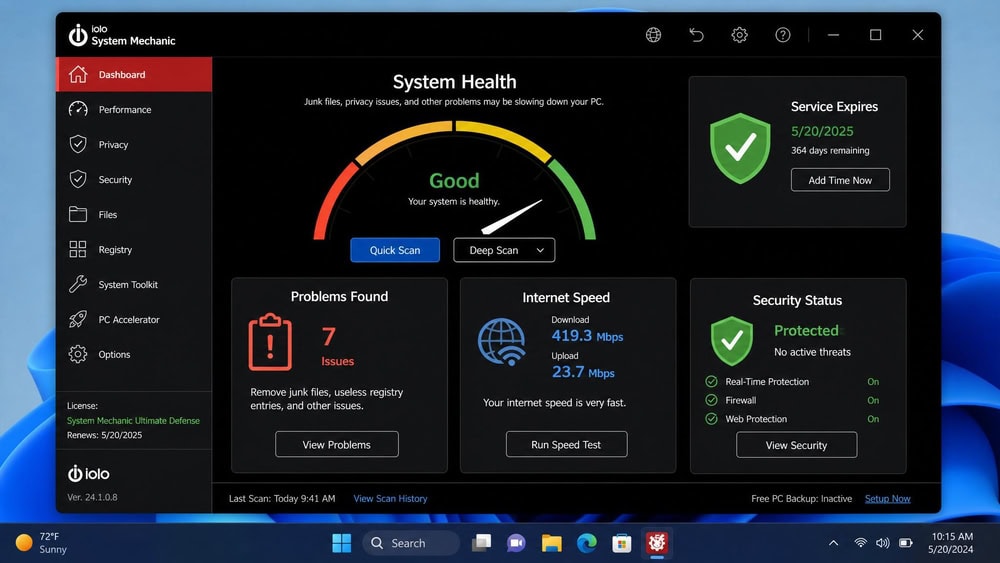
iolo System Mechanic is a long-running, premium Windows optimizer for people who want a hands-off, do-everything maintenance suite. It is paid software with a free scan and one of the deepest feature sets here, and every tier covers up to 10 PCs, which is why it suits a household of ageing machines better than a single new laptop. Our iolo System Mechanic review goes deeper, including the test results and the billing complaints that keep its score modest.
Key features
System Mechanic includes Smart ActiveCare AI repair, DeepClean junk removal across more than 50 file types, LiveBoost CPU and RAM optimization, NetBooster for connection tuning, startup and bloatware management, privacy protection, and security patching. The Ultimate Defense tier adds real-time malware protection and a password manager. It supports Windows 11 down to 7, and the automation is the selling point: set it and the suite keeps your PC tuned on its own.
Pricing
System Mechanic lists at $54.95 per year, Pro at $74.95, and Ultimate Defense at $79.95, each covering up to 10 Windows PCs. iolo attaches a 50% coupon to our link, which brought Ultimate Defense down to $39.97 for the first year when we checked on September 7, 2026. Subscriptions renew at the full list price unless you switch auto-renewal off in your iolo account, and there is a 30-day money-back guarantee.
iolo System Mechanic
A capable, deeply automated suite that is worth it on a household of older Windows PCs and hard to justify on a new one. The 10-PC allowance and the 50% first-year coupon make the value case; the renewal jump and the upsell prompts are why it sits mid-table.
Pros
- Deep, automated maintenance suite
- Smart ActiveCare runs in the background
- Every tier covers up to 10 PCs
- 30-day money-back guarantee
Cons
- Windows only
- Renews at full list price after the first year
- Heavier than a simple cleaner, with frequent upsell prompts
Best for: A household of older Windows PCs that wants maintenance handled automatically. Skip if: Your PC is new, or renewal-price jumps put you off.
7. CleanMyMac: Best for Mac
CleanMyMac is the standout choice for Mac owners and the only Mac-native tool in this roundup. MacPaw built it specifically for macOS and it is Apple-notarized, so it suits Apple's security model. If you have been weighing CleanMyMac alternatives, it helps to understand what the original does well first.
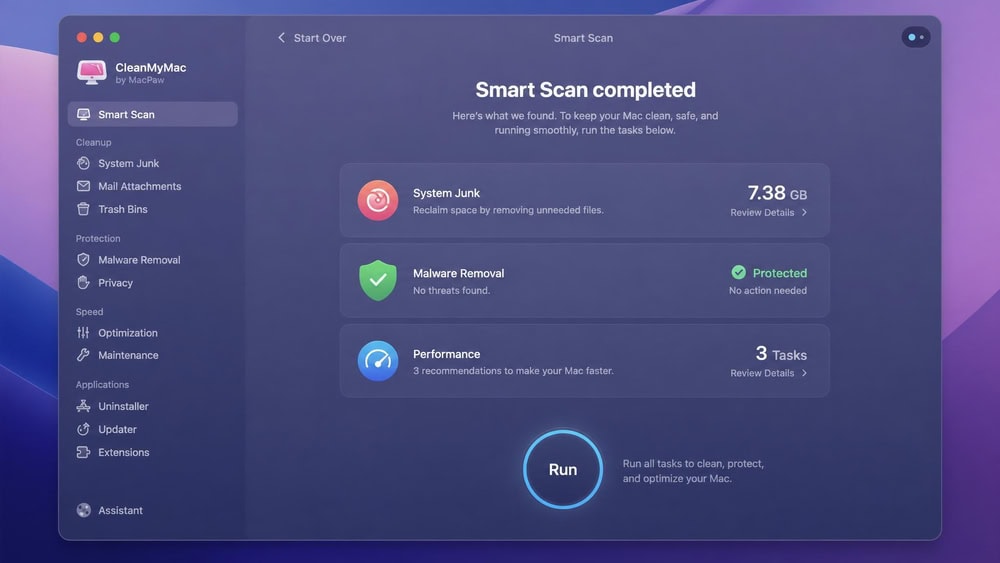
Running Smart Scan on our test Mac felt closer to a tidy-up assistant than a raw cleaner. The single pass rolled system-junk detection, a malware check, and performance suggestions into one screen, and because the app is notarized it installed without the Gatekeeper friction we sometimes hit with cross-platform tools. We could expand the system-junk results and deselect categories such as user caches before letting it remove anything, rather than giving blanket approval. The friendly interface makes it an easy recommendation for Mac owners who do not want to fiddle with modules.
Key features
CleanMyMac handles system junk and deep cleaning, malware detection and removal, performance and memory optimization, a full app uninstaller that removes leftovers, a duplicate and similar-photo finder, and cloud and storage cleanup. It requires macOS 11 or later and runs on Mac only.
Pricing
CleanMyMac offers a free trial so you can test it first. MacPaw lists the subscription from $3.33 a month for one Mac, billed annually, which works out to about $39.95 a year. Multi-Mac plans cost more, and the store shows the exact figure for your region before you pay.
CleanMyMac
The only Mac-native pick here and the easiest to recommend to a Mac owner: one notarized app that combines cleanup, a malware check, and tuning, with a free trial to prove it on your own machine. The subscription is the main sticking point.
Pros
- Built specifically for macOS, Apple-notarized
- Combines cleanup, malware removal, and tuning
- Clean, friendly interface
- Free trial available
Cons
- Mac only
- Subscription pricing
- Some features overlap with macOS built-ins
Best for: Mac owners who want cleanup, malware checks, and tuning in one notarized app. Skip if: You are on Windows, or you only want a free tool.
8. PrivaZer: Best for Privacy
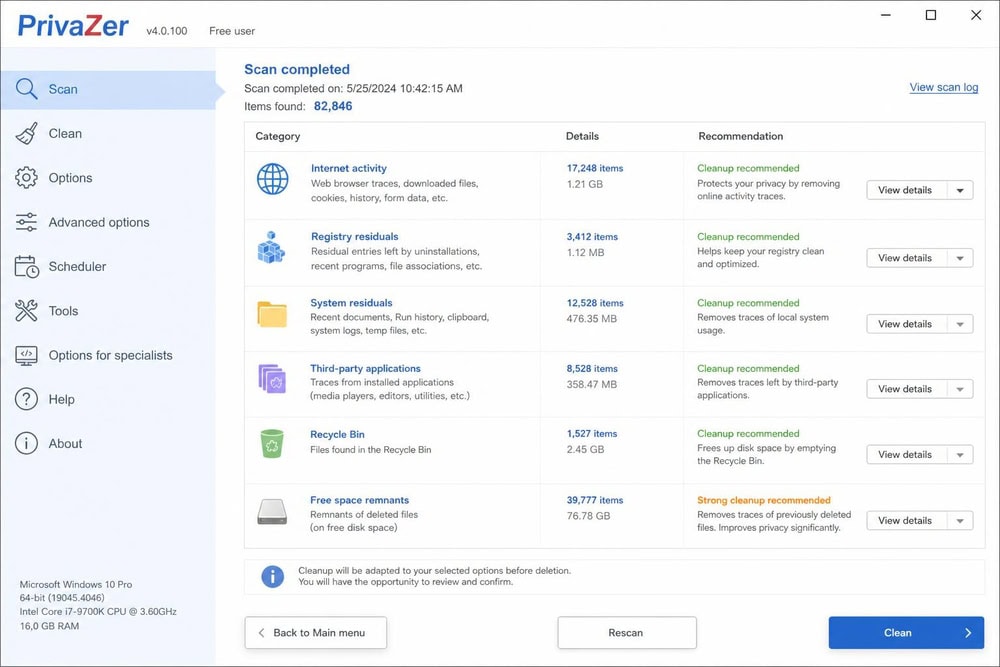
PrivaZer is the privacy specialist of this roundup. Where other tools clean broadly, it deeply scrubs activity traces so deleted data cannot be recovered. It is free for home and personal use, with a PRO/Donors edition for contributors and business users.
Key features
PrivaZer performs deep cleanup of activity traces, secure overwriting tuned to your disk type (different methods for HDD versus SSD), free-space wiping, residual-trace detection, FAT and MFT file-table cleanup, registry cleanup, browser cleaning, and file shredding across more than 100 trace types. It is Windows only, and the disk-aware overwriting is a thoughtful touch, since blindly overwriting an SSD wastes write cycles.
Pricing
PrivaZer is free for home use, which covers most readers. The PRO/Donors edition has no fixed price: it uses a pay-what-you-want donation model, so you choose any amount with no set minimum and receive your license by email. That makes the upgrade as cheap or as generous as you decide, a refreshing change in this category.
PrivaZer
The deepest trace cleaner here and the one to run before you sell or hand over a PC. It is free for home use and adapts its overwriting to the disk type, but the dense interface and slow deep scans make it a specialist tool rather than an everyday cleaner.
Pros
- Free for home and personal use
- Deep, disk-aware secure cleaning
- Over 100 trace types covered
- Strong for privacy and resale prep
Cons
- Windows only
- Interface can overwhelm newcomers
- Deep scans take time
Best for: Scrubbing activity traces before selling or handing over a PC. Skip if: You want a simple one-click cleaner.
9. CleanMyPC: Discontinued, What to Use Instead
We need to be straight about this one: CleanMyPC, MacPaw's Windows cleaner, was officially discontinued on April 22, 2025, with support and distribution stopped. You will still see it recommended on older lists, and our own CleanMyPC review covers the legacy product, but it is no longer a current purchase option.
Key features
The legacy app offered a registry cleaner, a multi-uninstaller, junk and cache cleanup, browser privacy cleanup, a file shredder, and hibernation and Windows-Store cleanup, running on Windows 7 through Windows 11 as legacy software only.
Because it is no longer supported, you should not install it on a current system. The closest replacements here are Ashampoo WinOptimizer for a one-time license, Wise Care 365 for a polished freemium experience, or Glary Utilities for a broad toolkit. Mac users who confused it with MacPaw's Mac product should skip to CleanMyMac above.
CleanMyPC appears here only because older roundups still list it. It receives no security updates, so we recommend a supported alternative above instead of installing discontinued software.
Pricing
CleanMyPC is no longer sold, so there is no price to quote.
What to Look for in a CCleaner Alternative
Picking a cleaner is not just about which one deletes the most junk files; the right tool depends on your operating system, how much control you want, and your comfort with paid software.
Cleaning power and performance
The core job of any cleaner is to remove clutter without breaking anything, so we looked at how thoroughly each tool cleared temporary files, browser caches, and leftover installer data, and how fast a full scan ran. Performance also covers extras like startup management, memory tuning, and disk defragmentation, which help an older machine but matter less on SSDs.
Features and customization
CCleaner's appeal has always been its breadth, so a credible alternative needs a comparable toolkit: a registry cleaner, a duplicate-file finder, a startup manager, and privacy-trace cleaning at minimum. Some tools lean toward one-click simplicity while others expose every setting; if you like to review what a tool plans to delete, look for a preview step.
Safety, privacy, and bloatware
Safety is where this category earns its bad reputation. Cleaners touch sensitive parts of your system, so we favored apps that back up changes, offer a restore option, and avoid bundling unrelated software at install.
Before you run any registry cleaner for the first time, create a backup or a system restore point. Most tools here export the registry automatically before they make changes, but confirm the option is enabled. A bad registry edit can stop Windows from booting, so the extra minute is worth it.
Registry cleaning deserves special mention. Microsoft's long-standing support policy on registry-cleaning utilities states that it does not support these tools and cannot guarantee that problems they cause can be fixed without reinstalling the OS. Treat registry cleaning as a minor convenience, not a performance miracle, and lean on tools that back up first.
Pricing and platform support (Windows / Mac)
Your platform narrows the field fast: several options are Windows only, one is Mac only, and a couple span both. Price ranges from free and open source to one-time licenses and yearly subscriptions, and the free tier of a freemium app is often enough for routine cleaning.
How We Chose These CCleaner Alternatives
We did not pick these tools off a press release. Our team installed each one on test machines, ran full scans, and noted how much clutter it cleared, how long it took, and whether the installer tried to sneak in extra software. We weighed cleaning power most heavily, then safety features such as registry backups and restore points, then speed and ease of use. We also checked platform support and whether a freemium app's free version is usable. Tools that bundled unrelated software or lacked basic safety nets lost points, and where we have published a full review of a tool, the score here matches it.
Conclusion: Which CCleaner Alternative Should You Pick?
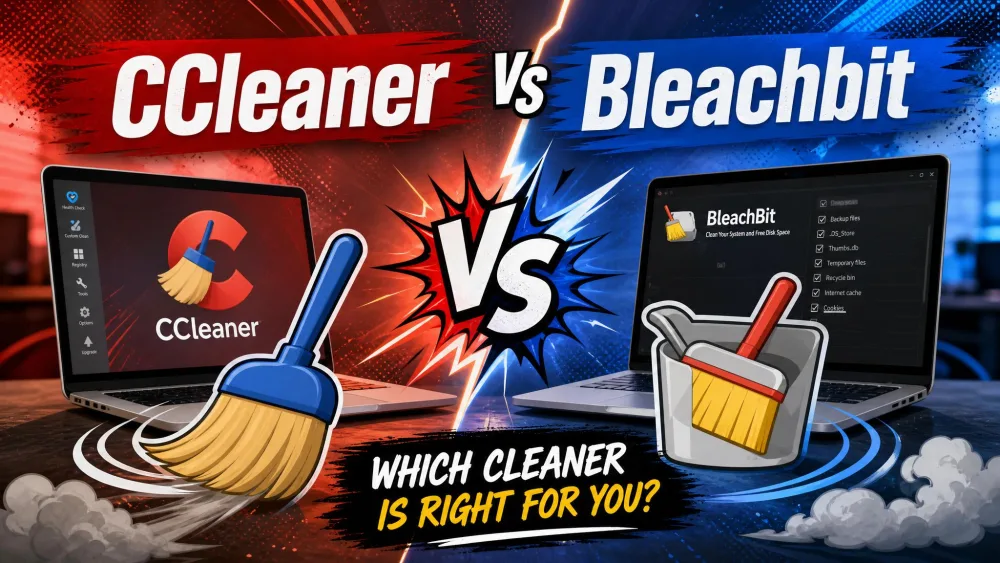
If you want a single answer, Ashampoo WinOptimizer is the closest like-for-like replacement for CCleaner: the same breadth of cleanup, registry, and startup tools, sold as a one-time license with a 30-day trial. BleachBit is the highest-rated tool in this roundup and the one to install if you only want the cleaning half of CCleaner for free, but it skips registry cleaning and has no Mac build, which is why it is our free pick rather than our overall pick.
From there, match the tool to your situation. For a fast freemium dashboard, try Wise Care 365; for the broadest free toolkit, Glary Utilities gives you more than 20 utilities in one app. Privacy-focused users should grab PrivaZer, a household of older PCs gets the most automation from iolo System Mechanic, and on a Mac, CleanMyMac is the clear choice. Just remember CleanMyPC has been discontinued, so skip it in favor of any supported option above.