
Best Registry Cleaner for Windows in 2026 (Free & Paid, Tested)
A slow or error-prone PC sends a lot of people hunting for the best registry cleaner, and the choices range from genuinely useful to outright junk. We installed and ran six of the most-recommended tools on Windows 11 and Windows 10, scanned the same machines with each, and compared what they flagged, how they backed up, and what they cost. This guide covers every tool we tested, plus a comparison table and safety guidance.
What Is a Registry Cleaner (and Do You Actually Need One)?
The Windows registry is the central database where Windows and your programs store configuration settings, file associations, and system options. Over time it collects invalid, leftover, or orphaned registry entries from software you uninstalled and updates that came and went. A registry cleaner scans that database, flags entries that point to nothing useful, and offers to remove them.
The honest answer to "do you need one" is probably less than the marketing suggests. Microsoft is direct, stating that registry cleaners do not speed up your PC and that it does not support third-party registry-cleaning utilities. To understand the database itself, Microsoft's reference on how the Windows Registry works is the authoritative primer.
How We Tested and Chose These Registry Cleaners
We started from the tools that appear most often across reputable roundups, then narrowed to six covering the main categories: dedicated registry cleaners, all-in-one optimizers, and lightweight free utilities. For each, we installed the current build and ran a full registry scan on both machines. We weighted whether the tool backs up before changes, how conservative its default scan is, how clearly it explains its findings, and its real cost once promo pricing is set aside. The prices below are regular list prices.
The Best Registry Cleaners for Windows
Each entry below lists verified features, a pros and cons summary, the regular price, and a link to the official download.
1. Auslogics Registry Cleaner - Best for Deep Cleaning
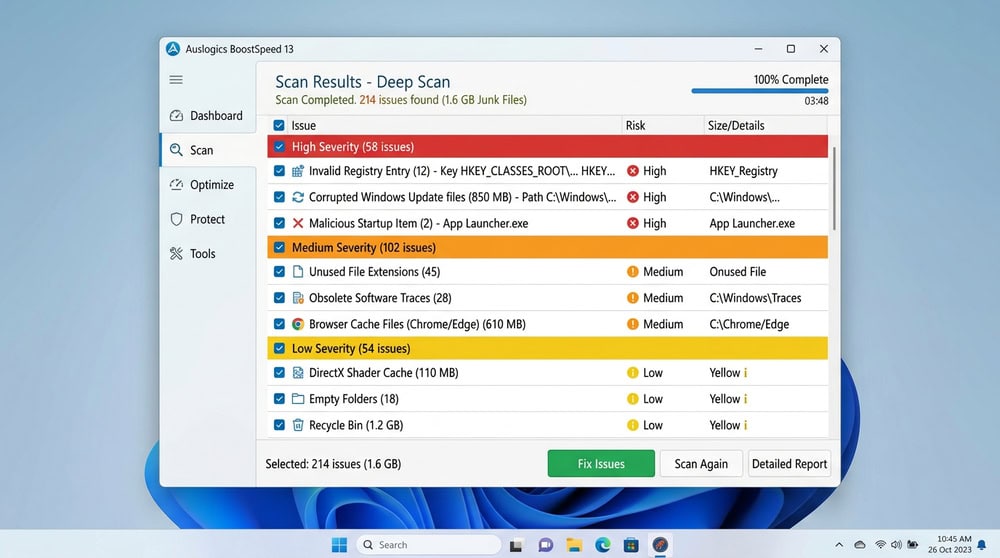
Auslogics Registry Cleaner is the tool for a thorough sweep. It runs a deep scan and repair, creates an automatic registry backup before changes, and groups flagged entries by severity so you can see which are low-risk. The version we tested was 11.2.0.6. A free version handles basic scanning, while the Pro tier regularly runs $29.95/year for a 3-PC license, with a full refund within 30 days. It supports Windows 7 through 11, with rescue-center restore and scheduled scans.
Pros
- Deep scan with severity grouping for informed decisions
- Automatic registry backup plus a rescue-center restore
- Broad Windows support and a 30-day refund
Cons
- Deep scans flag more borderline entries than casual users need
- Pro pricing fluctuates heavily with promotions
2. IObit Advanced SystemCare - Best All-in-One Optimizer
IObit Advanced SystemCare is less a registry cleaner and more a complete optimization suite that includes registry cleaning. Its registry module cleans entries to reduce crashes and errors, alongside AI-powered deep cleaning, junk-file cleanup, and real-time protection. A free edition covers core cleaning; the Pro tier lists at $29.99/year for one PC, with a 60-day money-back guarantee that beats most rivals. It supports Windows 11 and 10. The trade-off is convenience over granular control.

Pros
- All-in-one dashboard covering registry, junk, startup, and privacy
- Generous 60-day money-back guarantee
- One-click optimization is beginner-friendly
Cons
- Registry cleaning is buried inside a large suite
- Aggressive in-app upselling of other IObit products
3. Glarysoft Registry Repair - Best Lightweight Tool
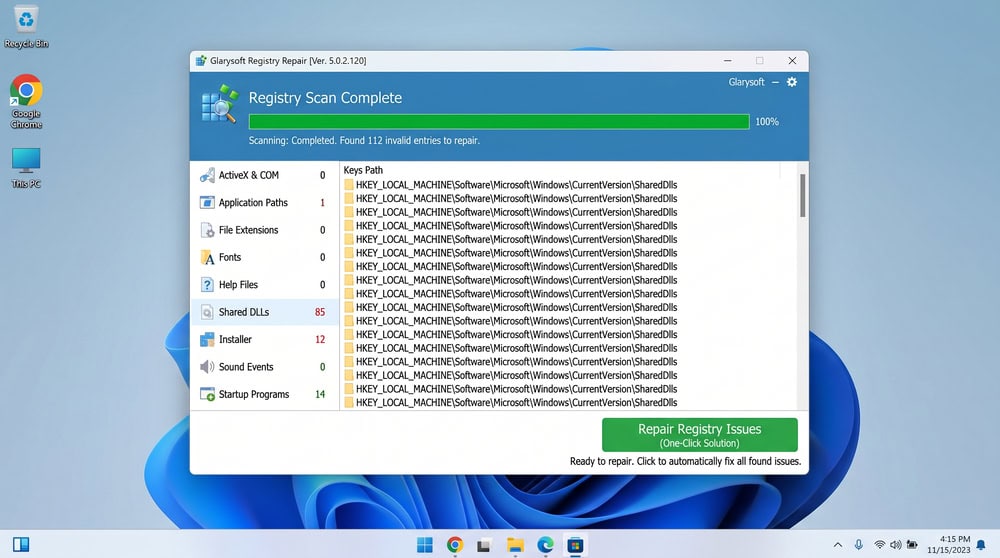
Glarysoft Registry Repair is the most no-frills option we tested, and it is completely free. It scans, cleans, and repairs registry problems without trying to be more, ideal for an older or lower-spec machine. The version we tested was 6.0.1.19. The broader free Glary Utilities suite bundles registry cleaning with disk cleanup and twenty-plus tools, and offers a Pro upgrade reported by aggregators at around $19.97/year for three PCs, though Glarysoft does not publish that figure. It supports Windows 11 and 10.
Pros
- Completely free dedicated registry repair tool
- Tiny footprint, well suited to older or low-spec PCs
- Optional free Glary Utilities suite adds 20+ tools
Cons
- Sparse interface with little hand-holding for beginners
- Glary Utilities Pro price is not published officially
4. Iolo System Mechanic - Best for Scheduled Maintenance
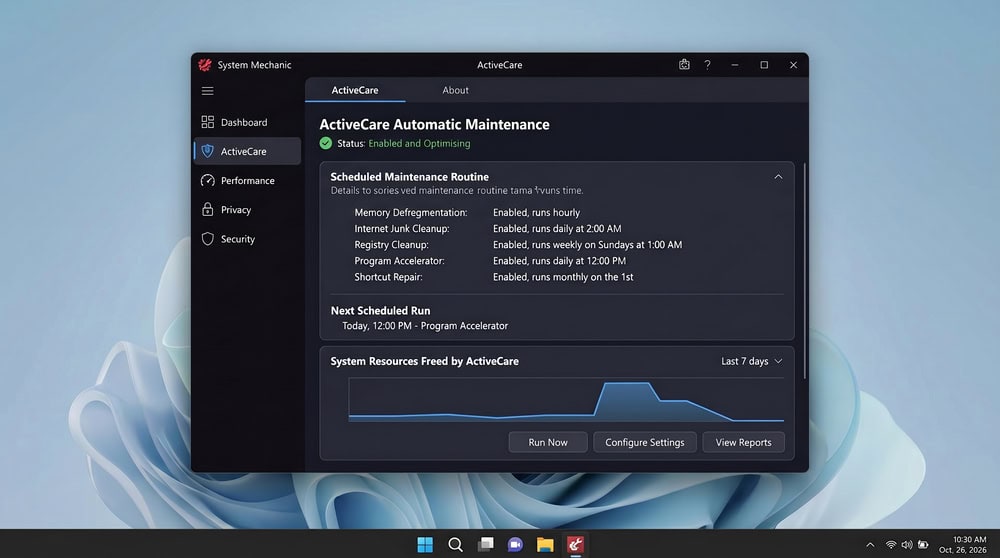
Iolo System Mechanic folds a Registry Cleanup module that finds and repairs registry files into a broad maintenance suite. Its standout is automation: the ActiveCare feature runs scheduled, hands-off maintenance, so registry cleanup, junk-file removal, and startup optimization happen on a cadence you set. There is a free version plus a 30-day money-back guarantee. Regular pricing starts at $54.95/year, with Pro at $74.95/year and Ultimate Defense at $84.95/year. It supports Windows 11, 10, 8.1, 8, and 7, and is the priciest entry here.
Pros
- Automated, scheduled maintenance via ActiveCare
- Broad toolkit beyond the registry (RAM tuning, bloatware removal)
- Wide Windows support and a 30-day refund
Cons
- The most expensive option in this roundup
- Registry cleanup is one module inside a large suite
5. CCleaner - Best Interface
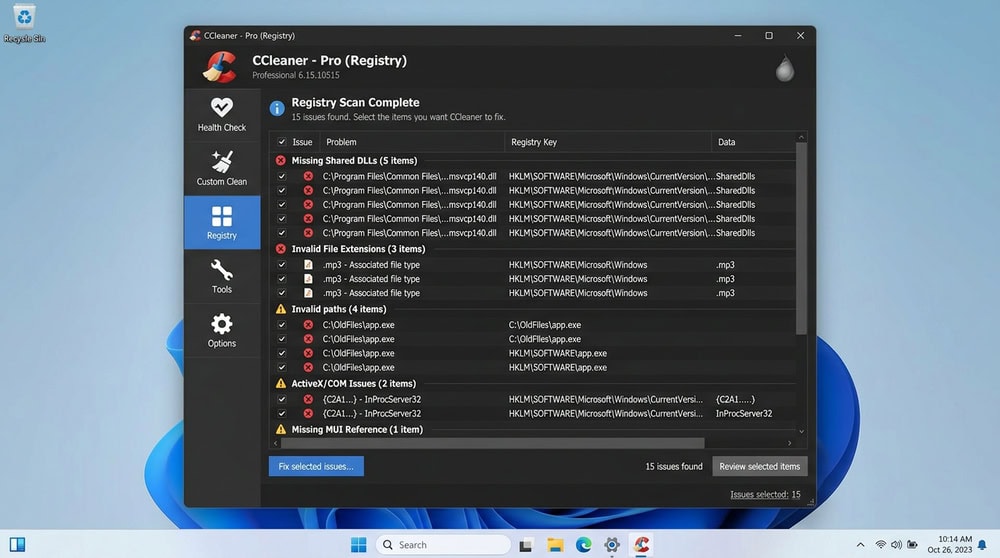
CCleaner is the most recognizable name here, and our testing backs up its reputation as the most user-friendly option. It pairs a patented registry cleaner with junk-file cleaning, a Health Check overview, and privacy cleaning, and the scan was quick and clearly grouped. The free version costs $0 for one device; Professional lists at $44.95/year and Pro Plus at $64.95/year for up to three, with a 30-day money-back guarantee. It supports Windows 11, 10, 8.1, and 8.
Pros
- Beginner-friendly interface with clearly grouped results
- Free version handles basic registry and junk cleaning at $0
- Wide Windows support plus a 30-day refund
Cons
- Best features (real-time monitoring, scheduling) are paid
- Per-device licensing gets expensive across multiple PCs
6. Wise Registry Cleaner - Best Free
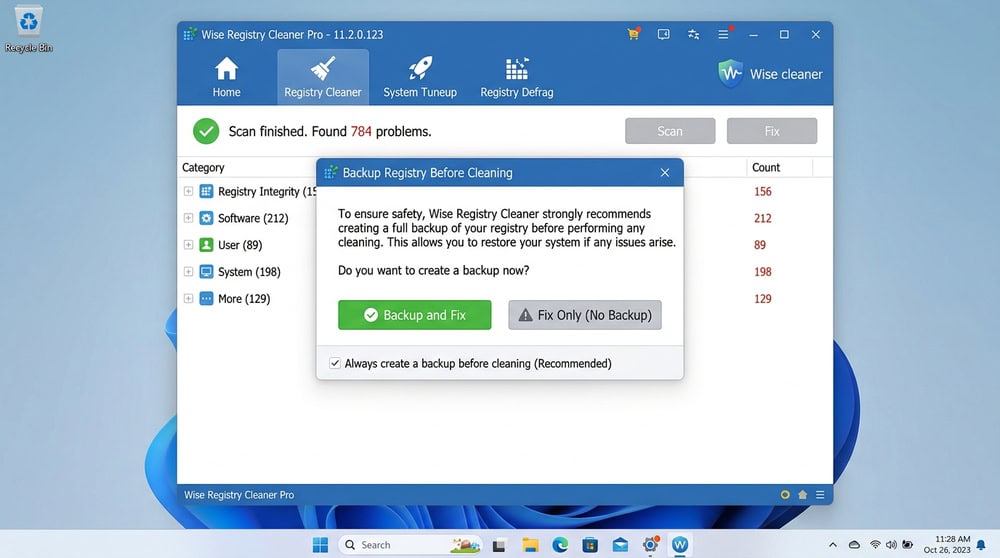
If you want a tool focused purely on the registry, Wise Registry Cleaner is our best free pick. It scans for errors and leftover items, and the standout was that it automatically creates a system backup before cleaning. The build we tested was version 11.3.2, a roughly 10.7 MB download with Fast and Deep scan modes. A paid Pro upgrade adds a 60-Day Money-Back Guarantee, though the vendor shows its price only at checkout. It supports Windows 11 and 10.
Pros
- Capable free version focused only on the registry
- Automatic registry backup before every clean
- Lightweight with Fast and Deep scan modes
Cons
- Pro price is not published on the product page
- Interface feels more utilitarian than CCleaner's
Registry Cleaner Comparison Table
Here is how the six tools compare on the factors that matter most. Prices shown are regular list prices, not promotional discounts.
| Tool | Price (Free/Paid) | Platform (Win 10/11) | Key feature | Safety/backup | Rating |
|---|---|---|---|---|---|
| Auslogics Registry Cleaner | Free; Pro $29.95/yr | Win 7 through 11 | Deep scan, severity grouping | Auto backup + restore | 8/10 |
| IObit Advanced SystemCare | Free; Pro $29.99/yr | Win 11, 10 | All-in-one + AI cleaning | 60-day refund | 8/10 |
| Glarysoft Registry Repair | Free | Win 11, 10 | Lightweight dedicated repair | Free; minimal extras | 8/10 |
| Iolo System Mechanic | Free; from $54.95/yr | Win 7 through 11 | Scheduled ActiveCare | 30-day refund | 8/10 |
| CCleaner | Free; Pro $44.95/yr | Win 11, 10, 8.1, 8 | Patented cleaner + Health Check | 30-day refund | 9/10 |
| Wise Registry Cleaner | Free; paid Pro | Win 11, 10 | Dedicated Fast/Deep scan | Automatic backup | 9/10 |
How to Choose the Right Registry Cleaner
Start with what you want. For an occasional tidy-up, a free dedicated tool such as Wise Registry Cleaner or Glarysoft Registry Repair covers it; for whole-system maintenance, an all-in-one optimizer such as Advanced SystemCare or System Mechanic makes more sense. Then weigh three factors. Prefer a tool that backs up the registry automatically, since that is your safety net. Favor one that groups results by type or severity. And look past the promo price to the regular yearly figure and the refund window.
How to Use a Registry Cleaner Safely (Back Up First)
Whatever tool you pick, back up before you clean. Most cleaners we tested do this automatically, but confirm it happened. You can also create your own restore point first: open the Start menu, search for "Create a restore point," and click Create on the System Protection tab. Be conservative with removals, prefer the recommended selection over an aggressive "select all," and skip anything tied to software you still use. Avoid tools that pressure you with alarming "thousands of errors found" warnings and demand immediate payment, a common pattern in scam optimizer software. The FTC's guidance on how to spot and avoid scam optimizer software is worth a read first.
Are Free Registry Cleaners Safe & Do They Actually Speed Up Your PC?
A reputable free registry cleaner is safe as long as it backs up first and you stay conservative with removals. Several of our top picks, including Wise Registry Cleaner and Glarysoft Registry Repair, are free and trustworthy; the risk is the source, so download from the official vendor page. On speed, Microsoft states plainly that registry cleaners do not speed up your PC, and our testing agrees. Removing invalid registry entries can reduce certain errors and tidy your configuration, but it will not transform a slow machine. For real gains, free up drive space, manage startup programs, and add RAM or an SSD.
Built-in Windows Alternatives (Storage Sense, Disk Cleanup)
Windows 11 has no built-in registry cleaner, and Microsoft confirms none exists. What Windows does include are disk-space tools people sometimes confuse with registry cleaning. Storage Sense frees drive space by clearing temporary files, the Recycle Bin, and optionally old Downloads and OneDrive cloud files, but it does not touch the registry and works only on the system drive. To enable it, open Settings, then System, then Storage, and turn on Storage Sense. Disk Cleanup, the older cleanmgr tool, removes temporary files without editing the registry. To run it, press Win+R and type cleanmgr.
Conclusion: Our Top Pick
After testing all six on Windows 11 and Windows 10, CCleaner is our overall winner for most people. It balances a clear, conservative registry cleaner with a usable free tier, broad Windows support, and a recognizable maintenance suite. If you specifically want a free, dedicated registry tool, Wise Registry Cleaner is the one we would download first, thanks to its automatic backup. Either way, keep expectations grounded: a registry cleaner is a maintenance habit, not a performance fix.
Frequently Asked Questions
Is it safe to use a registry cleaner?
Yes, as long as it backs up the registry before making changes and you stay conservative with removals. Stick to the recommended selection, download only from the official vendor, and create a System Restore point first as a backstop.
Do you need a registry cleaner on Windows 11?
Not strictly. Windows 11 has no built-in registry cleaner, and Microsoft says they do not speed up your PC. They can still tidy invalid or leftover entries, but treat them as optional maintenance.
How often should I clean my Windows registry?
A scan every few months, or after uninstalling several programs, is plenty. Cleaning daily adds no benefit and only raises the chance of removing something you needed.
Can a registry cleaner damage my computer?
It can if it removes an entry Windows or a program still relies on, which is why a backup is essential. Use a tool with an automatic backup, avoid "select all" cleaning, and keep a System Restore point.
Are free registry cleaners as good as paid ones?
For pure registry cleaning, yes. Free tools such as Wise Registry Cleaner and Glarysoft Registry Repair do the core job well. Paid suites add value mainly through scheduled maintenance and whole-system optimization, not better registry cleaning.

 Wise Registry Cleaner Review
 Best Computer Cleaner
 CCleaner Review
 Best Disk Cleaner Software
 Best Free Computer Cleaner
 How to Fix a Slow Computer
 Glary Utilities Review
 Advanced System Optimizer Review