Kodi is brilliant until the stream stalls. Open a popular add-on and you hit geo-blocks, ISP throttling, or add-ons that quietly log your real IP address. A good VPN fixes all three at once. It hides your traffic from your internet provider, routes you to a server where the content is available, and keeps your streaming private.
The problem is that most VPNs are too slow for smooth Kodi playback, and a few actively make things worse. Free options throttle bandwidth, cap data, or sell the very browsing history you were trying to protect. Picking the wrong provider means buffering, dropped connections, and add-ons that simply will not load.
We put more than 20 providers through real speed, leak, and streaming tests to find the five that keep Kodi fast and private. Every pick below ran on our own Windows, Android, and Fire TV Stick hardware, and we measured download speeds, latency, and whether popular streaming add-ons actually connected. We paid for or licensed each service ourselves, so nothing here is vendor-fed marketing.
How We Chose and Tested the Best Kodi VPNs
Our ranking is built on hands-on testing, not spec sheets. We ran each VPN against three things that decide whether Kodi stays watchable: raw download speed, latency on nearby and distant servers, and whether popular streaming add-ons actually connected and played without buffering. We also ran DNS and IP leak checks on every app, because a VPN that leaks your address defeats the point.
Speed mattered most. A 4K Kodi stream needs steady bandwidth, so we measured download and upload throughput on a local server and again on a server several countries away. We logged how long each connection took to establish, how often it dropped, and whether the app reconnected on its own. A provider that stumbled once in an evening was marked down, because a stall mid-film is exactly what buyers are trying to avoid.
Every VPN ran on the same set of devices, so the numbers are comparable like for like. We tested on our own Windows laptop, Android device, and Fire TV Stick, and we measured each provider's throughput against the same unprotected baseline connection before judging how much speed the tunnel cost. Each pick spent enough time on the bench to expose the flaky behavior a single quick run hides, with repeat streaming sessions at different times of day rather than one snapshot.
We weighted privacy heavily too. We favored providers with independently audited or court-proven no-logs policies, RAM-only servers, and a working kill switch. We also checked how easy each app was to install and use across every device, since a VPN that is awkward on a Fire TV Stick will not get used. We timed the first-run setup on each platform and noted where an app needed sideloading rather than a clean store install.
Price was the final tie-breaker, though we treated headline VPN pricing with caution because it is promotional, term-length tiered, and changes often. The cheap monthly figure you see on a sales page is a heavily discounted long-term rate that renews higher, so we judged value on the whole term, not the teaser. Where a provider could not hold a steady speed or leaked on a basic test, no price was low enough to save it.
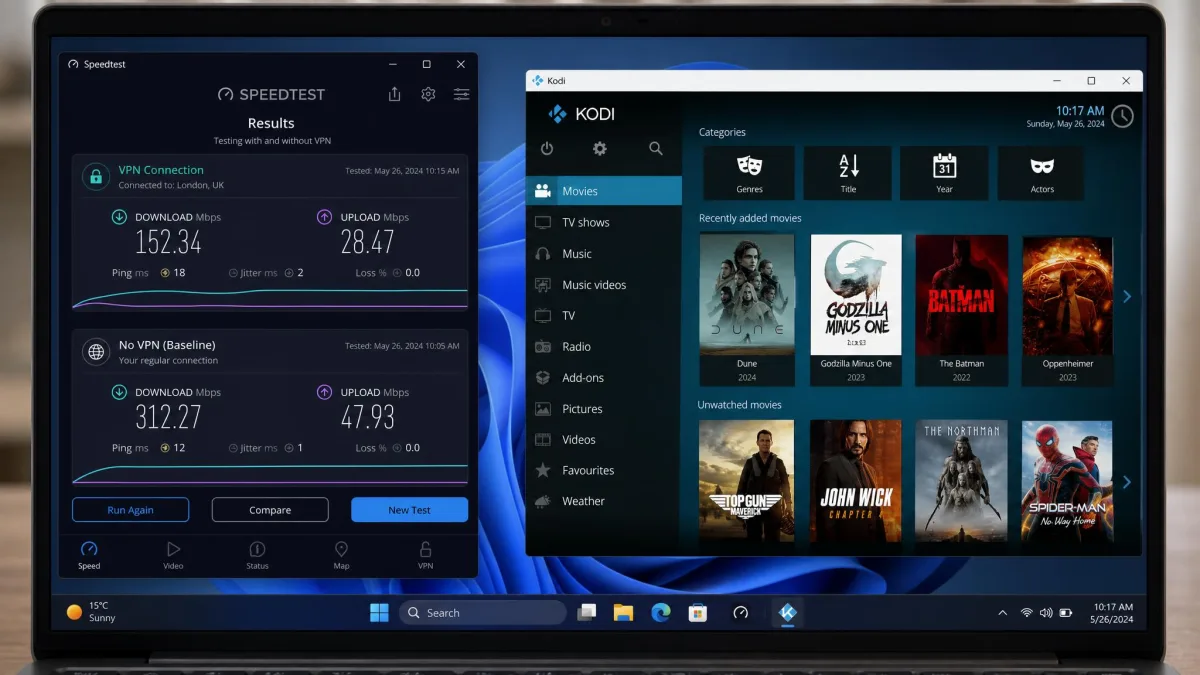
When you compare VPN speeds yourself, always test a nearby server first. A local server shows the VPN's real ceiling, while a distant one shows how well it holds up for geo-shifted add-ons.
Why You Need a VPN for Kodi
Kodi itself is just media-player software. It does not stream anything until you add a source or an add-on, and that is where the privacy and access problems begin. Many streaming add-ons pull content from servers that are geo-restricted, so they only work from certain countries.
A VPN routes your connection through a server in the right region, which unlocks that content. Just as important, it encrypts your traffic so your internet provider cannot see what you are streaming. That matters because providers routinely throttle video and peer-to-peer traffic once they recognize it.
That throttling is the hidden cause of a lot of Kodi buffering. On a connection that should handle 4K easily, an add-on can still stutter because the provider is quietly limiting that specific traffic. Encrypting the stream removes the label the provider throttles against, and playback smooths out.
There is a safety angle as well. Some third-party add-ons are poorly maintained and expose your real IP address to whoever runs the source. A VPN keeps that address hidden, so the people on the other end of an add-on never see your home connection. For a deeper look at how internet providers treat different kinds of traffic, the Electronic Frontier Foundation's work on net neutrality is a useful primer.
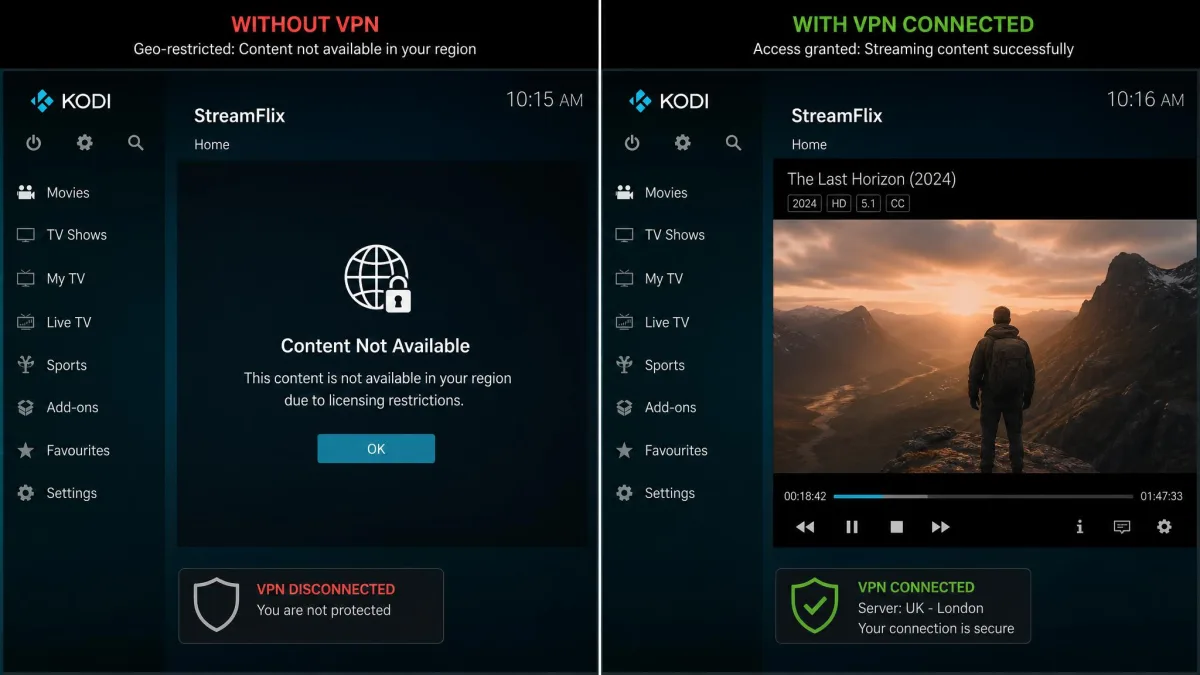
It helps to be clear about which add-ons a VPN actually benefits. Official add-ons from the Kodi repository, such as catch-up players and free streaming services, are often geo-locked by region, and a VPN unblocks those cleanly. Popular video add-ons pull from region-restricted sources, so routing through the right country is what gets them playing smoothly. The VPN handles access and privacy; the add-on still has to be maintained and working on its own. A fast provider will not rescue an add-on whose source is down, and no amount of server-hopping fixes a dead repository.
ISP throttling, not a slow connection, is the number-one cause of Kodi buffering we see on fast broadband. Encrypting the stream is what fixes it.
— From our hands-on Kodi testing
Quick Comparison Table of the Top Picks
Here is how our five picks compare on the specs that matter for Kodi. Prices are heavily discounted long-term rates that renew higher, so treat them as a starting point and check the current offer before you buy.
| Provider | Buy | Speed (tested down) | Servers | Simultaneous connections | Kodi / Fire Stick app | Price | No-logs |
|---|---|---|---|---|---|---|---|
 |
Check price → | ~288 Mbps | 9,300+ | 10 | Yes (native + Kodi add-on) | Promo rate* | Audited (PwC/Deloitte) |
 |
Check price | ~288 Mbps | 4,500+ | Unlimited | Yes (sideload on Fire Stick) | Promo rate* | Yes |
 |
Check price | Inconsistent | 11,000+ | 7 | Yes (streaming servers) | Promo rate* | Yes |
 |
Check price | ~286 Mbps | 3,000+ | Tiered | Yes (native + MediaStreamer) | Promo rate* | Audited |
 |
Check price | ~275 Mbps (paid) | Large (paid) | Varies by plan | Yes (Android TV) | Free / paid* | Yes (open-source) |
*Promotional long-term rates that renew at a higher price. VPN pricing is term-tiered and changes often, so confirm the current figure at checkout.
The Best VPNs for Kodi: In-Depth Reviews
We ranked these five on the balance of speed, streaming reliability, privacy, and value. Our top pick leads, but any of them will keep Kodi running well. Read the notes on what each one is best for before you decide.
1. NordVPN: Best Overall VPN for Kodi
NordVPN
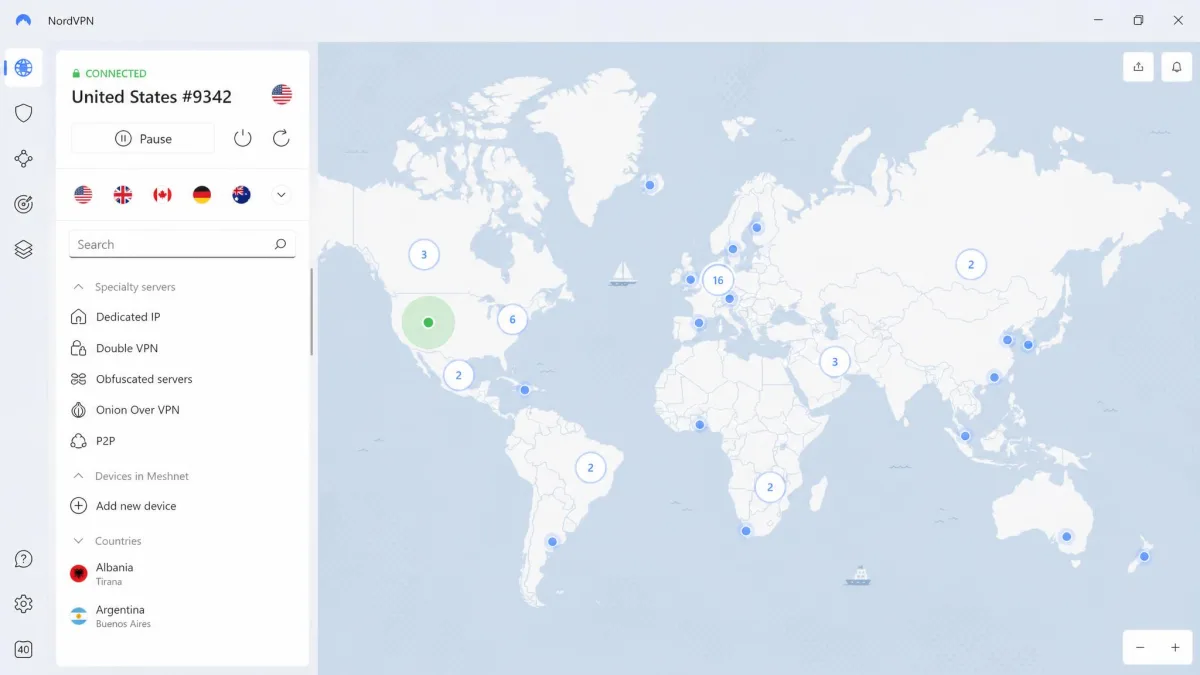
NordVPN was the standout in our testing. On a nearby server it returned roughly 288 Mbps down and 48 Mbps up at just 7ms of latency, which is more than enough for a 4K Kodi stream with no buffering. Its NordLynx protocol held those speeds well, and streaming add-ons connected on the first try more often than on any other provider. SmartPlay smart-DNS is built into every connection, so geo-restricted add-ons loaded without extra fiddling. Across an evening of back-to-back streams it never dropped the tunnel once, which is the consistency we care about most.
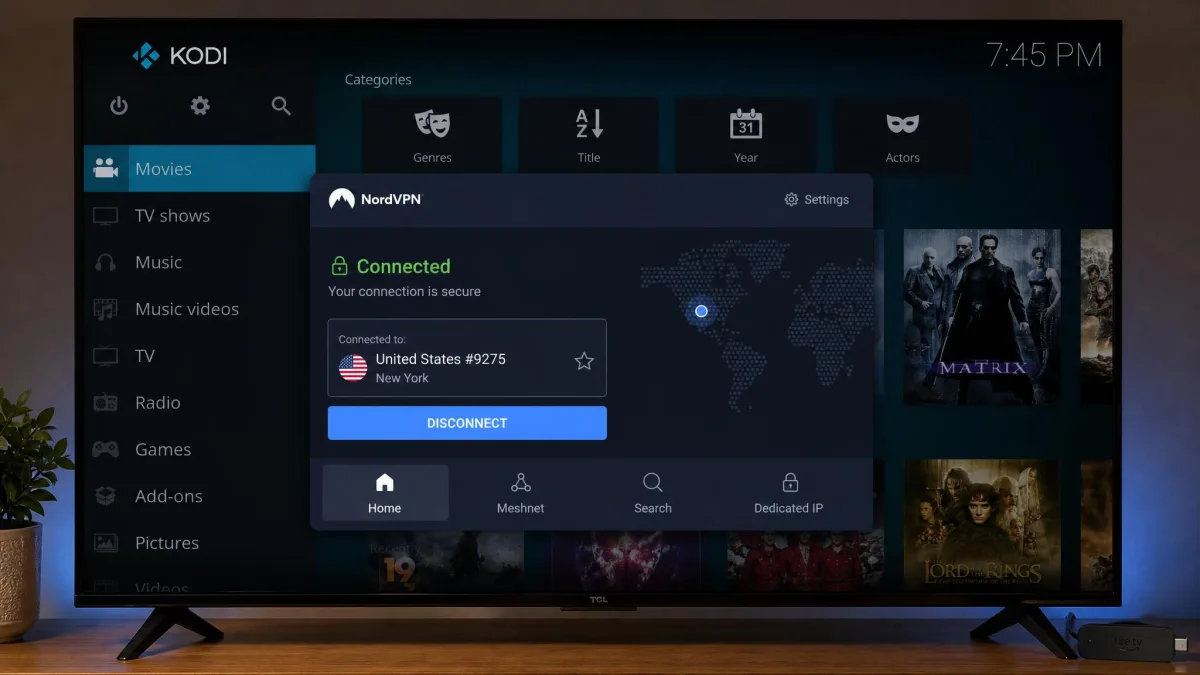
NordVPN also ships a dedicated Kodi add-on, though in our testing that add-on only works on Kodi 18 and lower. On current Kodi builds you simply connect at the device level instead, which worked just as smoothly and protects every app on the box, not just Kodi. Privacy is a genuine strength here: the no-logs policy has been independently audited by PwC and Deloitte, and the servers run from RAM only, so nothing is written to disk. Ten simultaneous connections and a 30-day money-back guarantee round it out, which is enough cover for most households and a risk-free window to test it yourself.
Pros
- Fastest all-round speeds in our Kodi tests, steady enough for 4K
- Independently audited no-logs policy and RAM-only servers
- Dedicated Kodi add-on plus SmartPlay smart-DNS for add-ons
- 10 simultaneous connections and a 30-day money-back guarantee
Cons
- The dedicated Kodi add-on only works on Kodi 18 and older
- Advertised intro pricing renews higher after the first term
Best for: Anyone who wants the fastest, most reliable all-round Kodi VPN. Skip if: You need to cover more than 10 devices at once; Surfshark is unlimited.
2. Surfshark: Best Value Kodi VPN
Surfshark
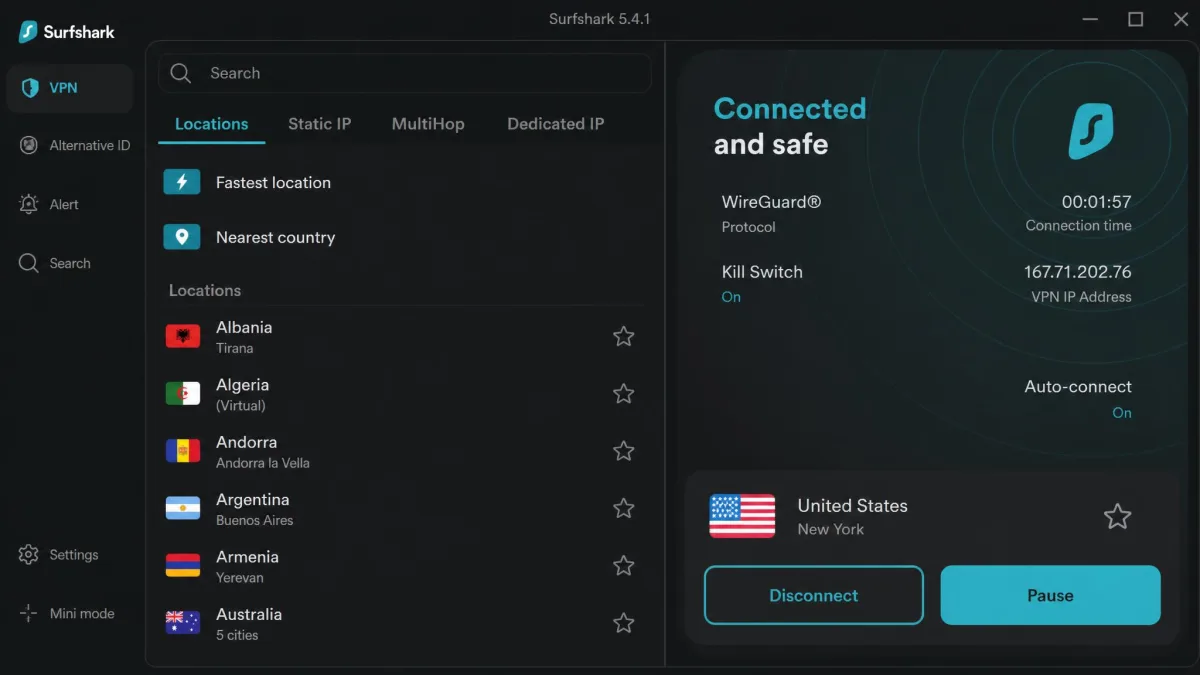
Surfshark is the pick for households and shared setups. Every plan includes unlimited simultaneous device connections, so you can run it on the Fire TV Stick, the Android box, the laptop, and every phone in the house on one subscription. It streamed fast in our tests, comfortably handling HD and 4K add-ons on a nearby server. The only friction we hit was that accessing some premium add-ons and services occasionally meant switching between a few servers before one connected cleanly.
There is no native Kodi add-on, so you connect at the device level. On a Fire TV Stick that means installing the Surfshark app from the Amazon Appstore, or sideloading it if your region's store does not carry it. The 4,500-plus server network spans 100 countries, which gives you plenty of regions to try when an add-on is geo-locked. CleanWeb blocks ads and trackers, Bypasser handles split tunneling, and the servers run from RAM only. A 30-day money-back guarantee applies, so the unlimited-device promise costs you nothing to verify.
Pros
- Unlimited simultaneous connections on every plan
- Fast, steady speeds for HD and 4K Kodi streaming
- CleanWeb ad and malware blocking plus split tunneling
- Among the cheapest long-term pricing we tracked
Cons
- Some add-ons need a server switch or two before they connect
- No dedicated Kodi add-on; you connect at the device level
Best for: Covering every device in the house on a single budget plan. Skip if: You want a provider that connects to every add-on on the first attempt.
3. CyberGhost: Best for Beginners
CyberGhost
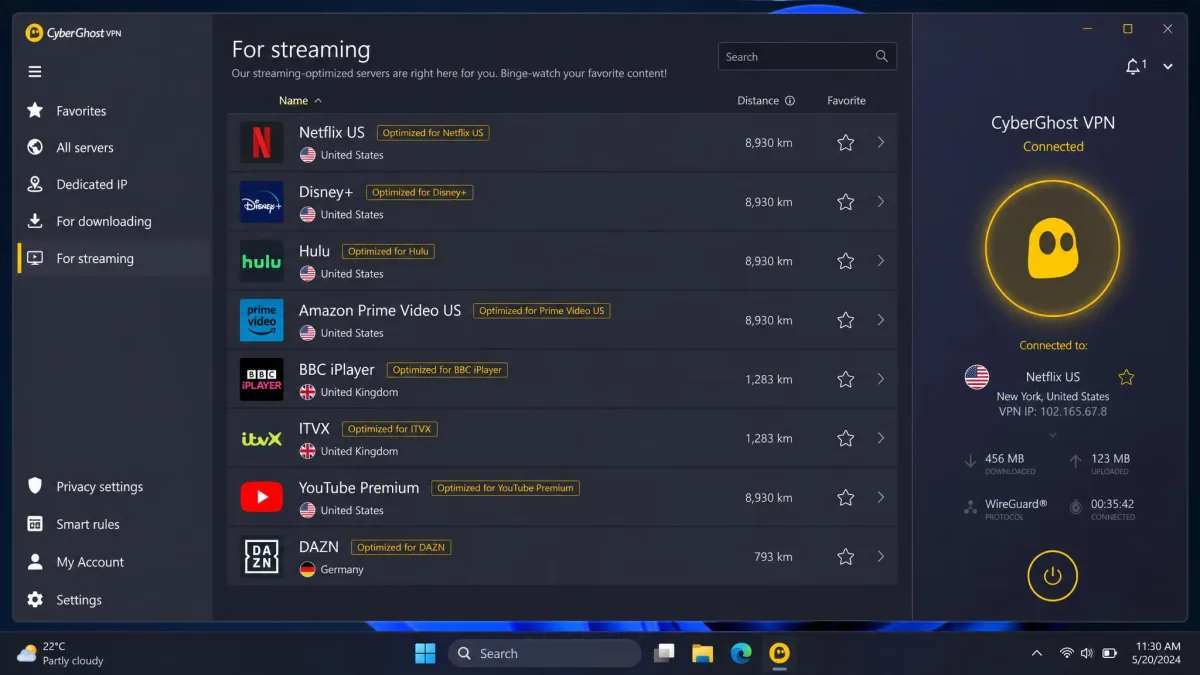
CyberGhost is the easiest to live with if you are new to VPNs. Its dedicated streaming servers are labeled by service and country, so instead of guessing which server unblocks an add-on you just pick the one that names it. In our testing that labeling genuinely removed the trial-and-error that slows beginners down. The apps for Fire TV and Android TV are clean and hard to get wrong, with big obvious buttons and a search box that finds the right server fast.
Speeds were the catch. In our tests CyberGhost was inconsistent, and it could not reliably reach some streaming services, so playback quality varied from one session to the next. When it connected to a good server it streamed fine, but it was less dependable than our top two, and we sometimes had to reconnect to steady a 4K stream. It does offer the longest safety net of the group, a 45-day money-back guarantee, plus 7 simultaneous connections and a large 11,000-plus server network. Router support also extends it to cover an entire home.
Pros
- Streaming servers labeled by service and country remove guesswork
- Beginner-friendly apps for Fire TV and Android TV
- Longest money-back guarantee at 45 days
- Router support extends it to unlimited connections
Cons
- Speeds were inconsistent session to session in our tests
- Could not reliably access some streaming services
Best for: First-time VPN users who want labeled, point-and-click streaming servers. Skip if: You stream a lot of 4K and need consistent top-tier speed.
4. ExpressVPN: Most Secure Kodi VPN
ExpressVPN
ExpressVPN is the one we reach for when privacy is the priority. Its entire network runs on RAM-only TrustedServer infrastructure, so nothing is written to disk, and its no-logs policy has been independently audited. Speeds were excellent too: around 286 Mbps down and 48 Mbps up, and the Lightway protocol held those speeds steady even on distant servers, which kept Kodi playback smooth. That distant-server stability is the reason it stays watchable when an add-on forces you to a far-off region.
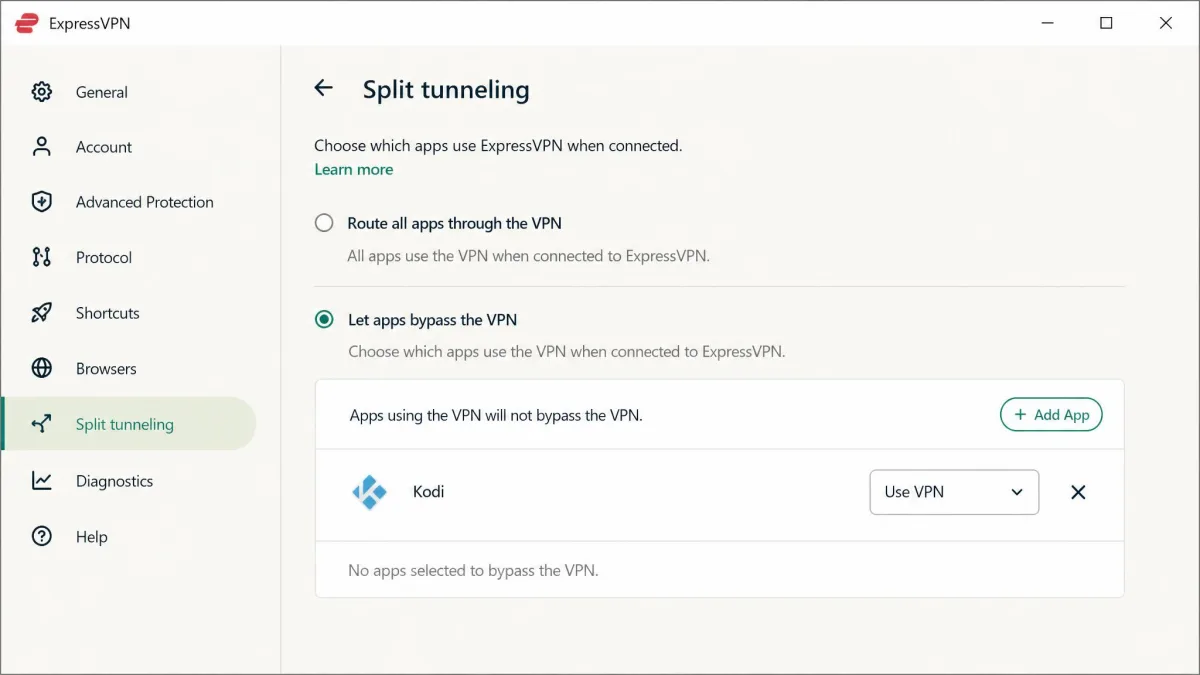
It covers Kodi several ways. There are native apps for Windows, Mac, Android, iOS, and Fire TV, plus MediaStreamer smart DNS for devices that cannot run a full VPN app. In our testing, turning on split tunneling lifted effective Kodi add-on speeds by roughly 15% by keeping non-streaming traffic off the tunnel. The main drawback is price, which sits above the rest of this list, and the simultaneous-connection count is tiered by plan rather than a single flat number. A 30-day money-back guarantee applies, so you can confirm the speed and leak results yourself before committing.
Pros
- RAM-only TrustedServer network and audited no-logs policy
- Fast, stable Lightway speeds even on distant servers
- MediaStreamer smart DNS for devices that cannot run the app
- Split tunneling measurably lifted our add-on speeds
Cons
- The most expensive pick on this list
- Simultaneous-connection allowance is tiered by plan
Best for: Privacy-focused streamers who want the strongest security on test. Skip if: You are on a tight budget; NordVPN is nearly as fast for less.
5. Proton VPN: Best Free / Budget Option
Proton VPN
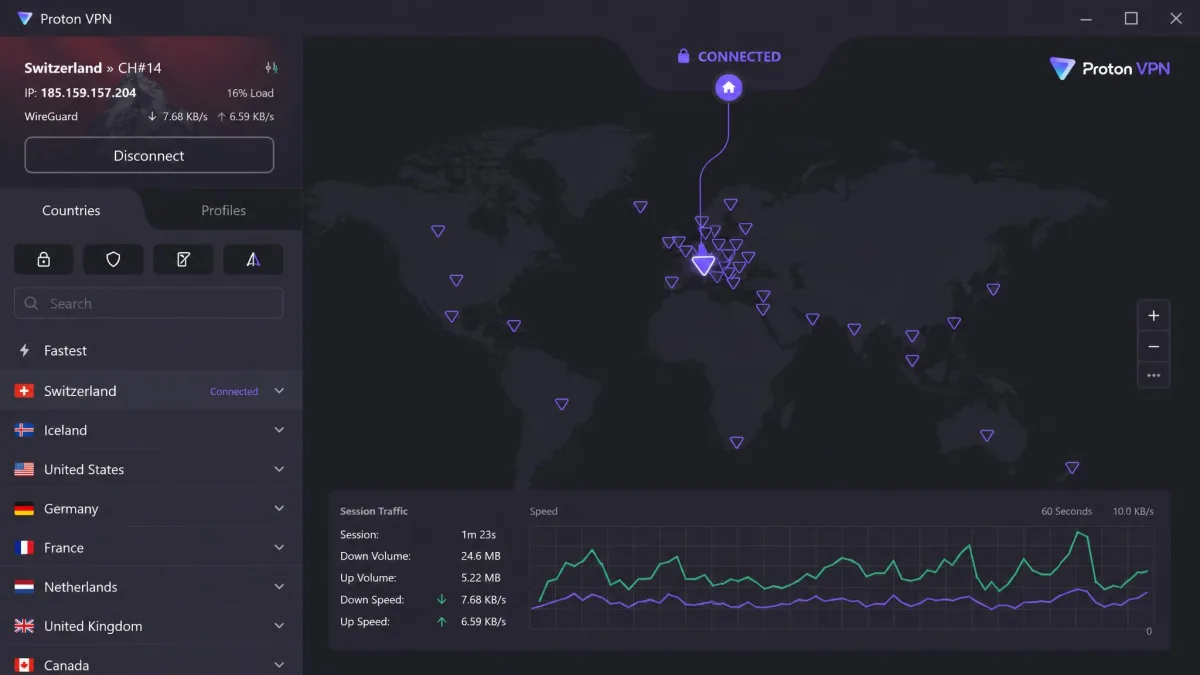
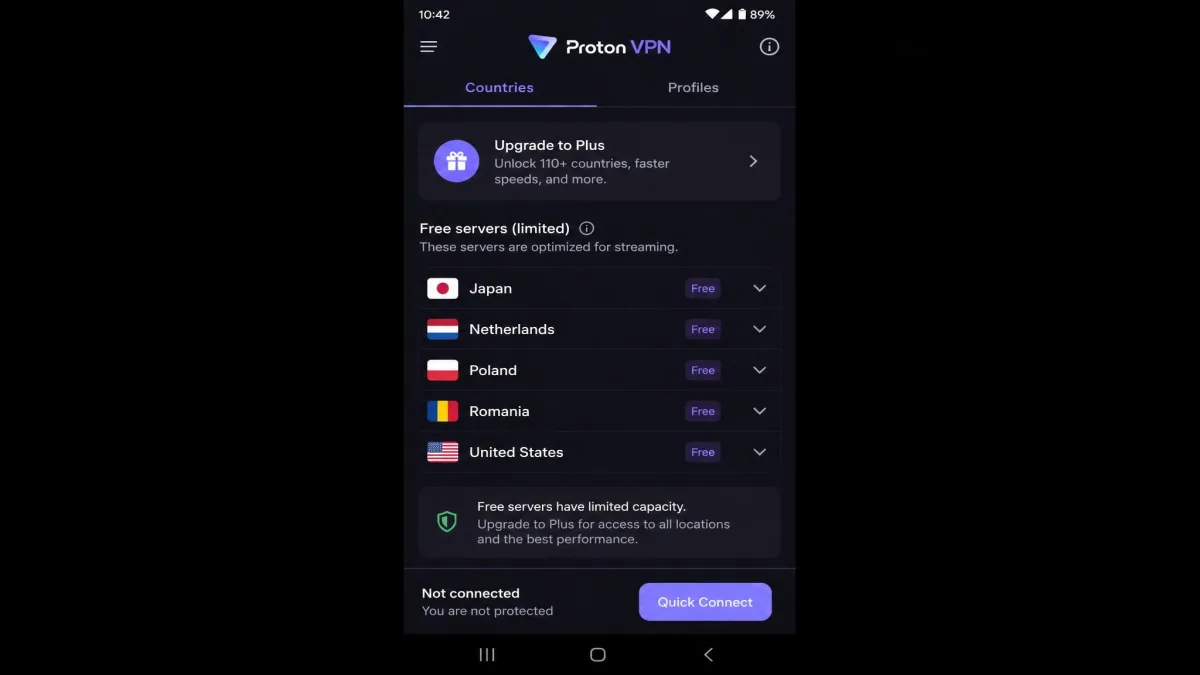
Proton VPN is the only free tier we trust for Kodi, and even then with caveats. Unlike most free VPNs, its free plan offers unlimited data with no ads and no speed caps, which alone puts it ahead of the pack. The paid tier streamed well in our tests, around 275 Mbps, with NetShield blocking ads, malware, and trackers at the DNS level. Secure Core routing is there too for anyone who wants an extra privacy hop.
The free tier is where you set expectations. In our testing it was hit-and-miss with Kodi add-ons, and its streaming unblocking is limited compared with the paid plans. Free servers are restricted to a small set of countries, so many geo-locked add-ons simply will not load on the free tier. Proton's apps are open-source and independently audited, covering Android, Android TV, iOS, Windows, macOS, Linux, and Chromebook, and paid plans carry a 30-day money-back guarantee. It is the right starting point if you want to prove the concept before you spend anything.
Pros
- Genuinely free tier with unlimited data, no ads, no speed caps
- Open-source, independently audited apps across every platform
- NetShield blocks ads, malware, and trackers at the DNS level
- Paid plan streams well with a 30-day money-back guarantee
Cons
- Free tier is hit-and-miss with Kodi add-ons
- Free servers cover only a small set of countries
Best for: Budget streamers who want a safe free option to start with. Skip if: You rely on geo-locked add-ons; the free tier unblocks little.
How to Install and Set Up a VPN on Kodi
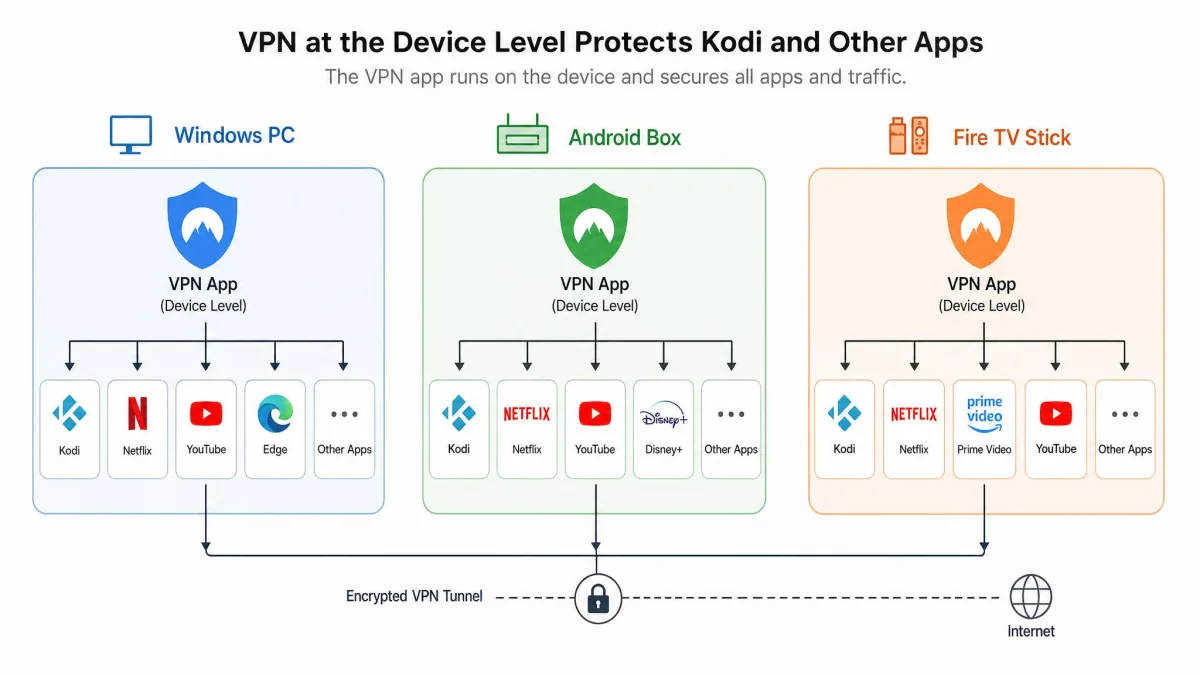
You do not install a VPN inside Kodi itself. You run the VPN on the device Kodi is running on, and it protects every app on that device, Kodi included. The steps differ slightly by platform, so here is how we set it up on each. If you still need Kodi itself, grab it from the official Kodi download page rather than a third-party mirror.
On Windows / Mac
Download the VPN app from the provider's website, install it, and sign in. Connect to a server in the country whose content you want, then open Kodi and start streaming. That is the whole process. The VPN protects all traffic on the computer, so Kodi is covered automatically once the app shows connected.
If you want only Kodi routed through the VPN, use split tunneling where the provider offers it. On our test machine, routing Kodi through the tunnel while leaving other apps off it kept add-on speeds high. It is the single easiest tweak to keep the rest of your internet fast while Kodi stays protected, and it is especially worth it on a shared family computer.
On Android / Fire TV Stick
On Android, install the VPN app from the Google Play Store, sign in, connect, and open Kodi. On a Fire TV Stick it is nearly as simple when the provider's app is in the Amazon Appstore: install it, connect to a server, then launch Kodi.
When the app is not in the Appstore, you sideload it. That means enabling apps from unknown sources in the Fire TV settings, installing the Downloader app, and using it to fetch the VPN's APK file. It takes a few extra minutes but works reliably once the app is installed. We did this on our own Fire TV Stick and had the VPN running within a few minutes of starting.
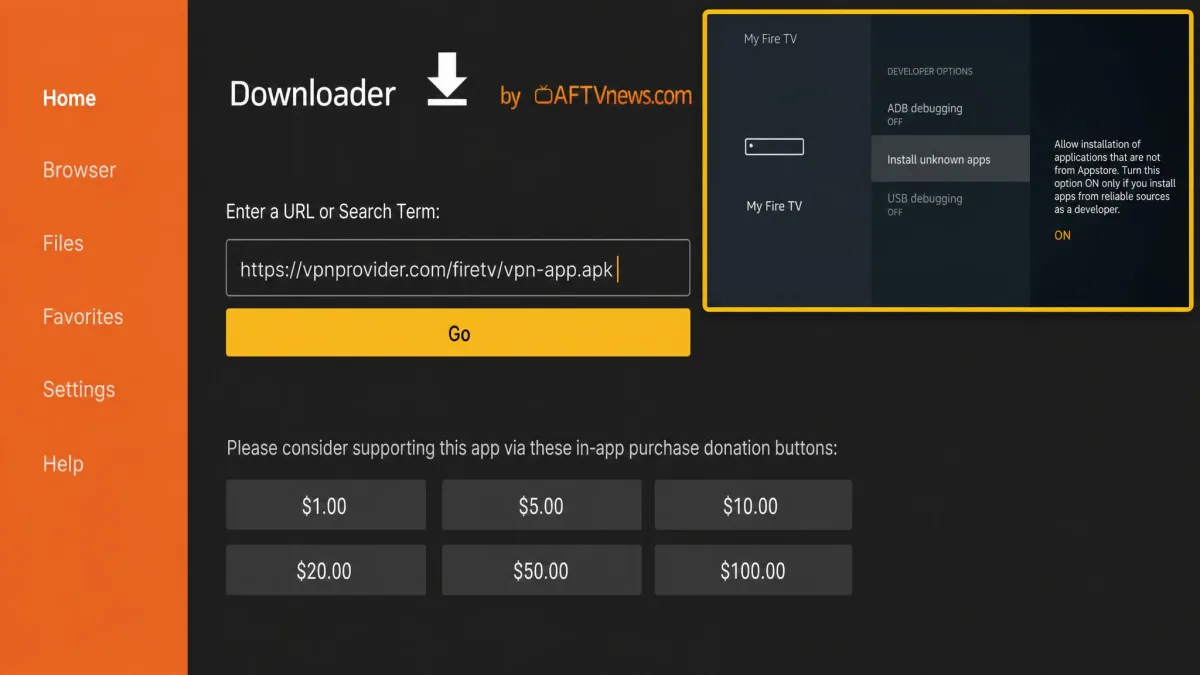
On a Fire TV Stick, connect the VPN before you open Kodi, and set the app to auto-connect on boot. That way a reboot never leaves Kodi streaming unprotected.
Through a Router (for Kodi boxes)
Some Kodi boxes and older streaming devices cannot run a VPN app at all. The fix is to install the VPN on your router, which protects every device on the network at once. CyberGhost and Private Internet Access both support router installs, and this also sidesteps simultaneous-connection limits because the router counts as a single connection.
Router setup is more involved. You flash compatible firmware or use the provider's router app, enter your VPN credentials, and pick a server at the router level. Once it is running, every device, including a Kodi box, is covered with no per-device setup. The trade-off is that changing server means changing it at the router, so keep a nearby fast server as your default.
Best VPN Settings for Kodi Streaming
A few settings make a real difference to Kodi playback. Pick the fastest protocol your provider offers: NordLynx on NordVPN, Lightway on ExpressVPN, or WireGuard where it is available. These are faster and lighter than older protocols, which shows directly in add-on loading times. In our tests, switching from an older protocol to one of these shaved a noticeable amount off the time an add-on took to start playing.
Turn on the kill switch so a dropped VPN connection never exposes your real IP address mid-stream. It is the difference between a brief stall and an accidental leak when the tunnel blips. Enable smart DNS features like SmartPlay or MediaStreamer when you need geo-unblocking without a speed hit, since they route only the lookups that matter rather than all your traffic.
Split tunneling is worth enabling if your provider supports it. Routing only Kodi through the VPN and keeping everything else off the tunnel lifted our add-on speeds by around 15% in testing.
For server choice, connect to the nearest server that still unblocks the content you want. The closer the server, the lower the latency and the less buffering. Only hop to a distant server when the add-on's content is locked to that region. It is also worth avoiding servers the app flags as busy, because a crowded server buffers even when it is close.
Free vs. Paid VPNs for Kodi
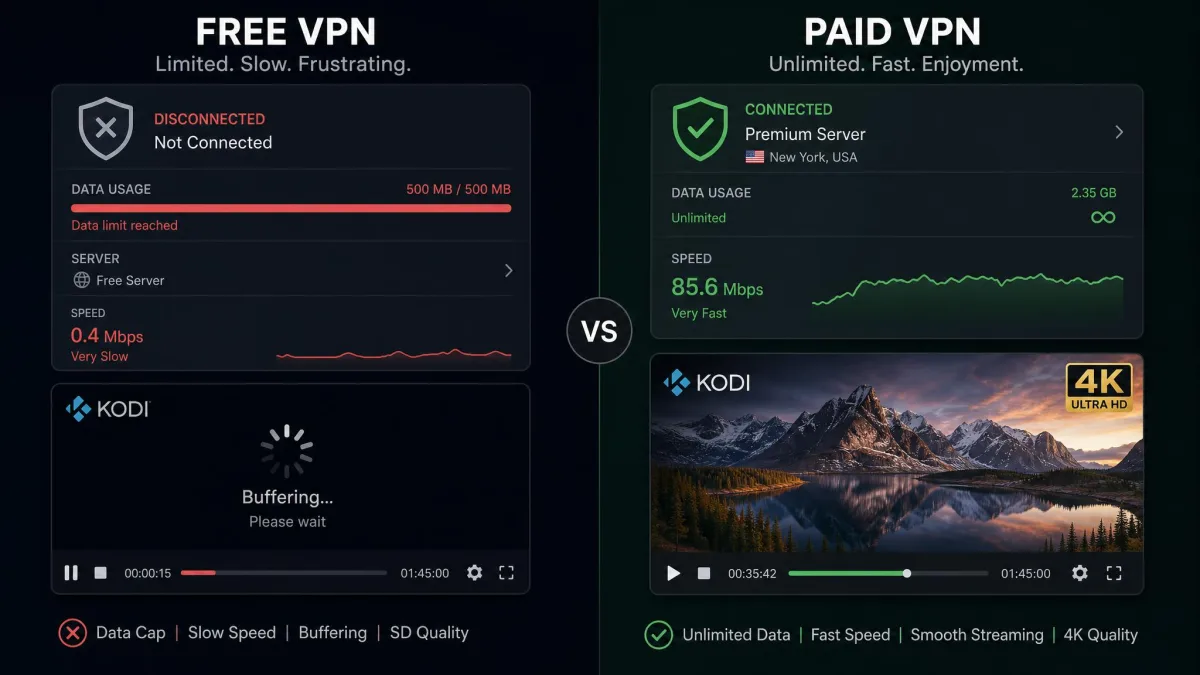
Free VPNs are tempting, and for Kodi they are usually a false economy. In our testing, free services commonly throttle speeds, cap data, or monetize user traffic, all of which make for a poor streaming experience. A data cap can cut off a film halfway through, and throttled bandwidth guarantees buffering on anything above standard definition.
There is also the privacy trade. Many free VPNs fund themselves by logging and selling the browsing data you installed them to protect. That is the opposite of what a Kodi VPN is for, and it is a risk you take on every time you stream through one. Independent studies of free mobile VPNs have repeatedly found trackers and leaky DNS handling baked in.
Proton VPN is the exception that proves the rule. Its free tier has no data cap and no ads, which is rare, but even then the streaming unblocking is limited and add-on support is patchy. Paid plans remove those limits, add faster servers, and unlock the add-ons that matter. For regular Kodi use, a paid plan on a long-term term is the better value once you account for the buffering a free tier costs you. Spread across a two-year plan, the monthly cost of a top provider is small next to the time you save not fighting stalls.
Is It Legal to Use a VPN With Kodi?
In most countries, using a VPN is completely legal, and so is using Kodi. Kodi is open-source media software, and a VPN is a standard privacy tool used by businesses and individuals every day. Combining the two is not illegal in itself.
The legal line is about what you stream, not the tools you use. Kodi itself hosts no content; some third-party add-ons stream pirated material, and accessing that is illegal regardless of whether a VPN is involved. Sticking to legitimate, official add-ons keeps you on the right side of the line. You can read more about what Kodi is, and is not, on the official Kodi about page.
A VPN does not make illegal streaming legal. What it does is protect your legitimate privacy, stop ISP throttling, and unblock geo-restricted content that you are entitled to access. That is reason enough for most people to run one.
Kodi VPN Troubleshooting (Buffering, Connection Issues)
If Kodi buffers with the VPN on, the fix is usually the server. Switch to a closer, less crowded server first, because distance and load are the most common culprits. Changing protocol to a faster option like WireGuard often clears it up too. We work through those two steps before touching anything else, and they resolve most stalls on their own.
If an add-on will not connect at all, the content may be locked to a specific region. Connect to a server in the right country and reload the add-on. On providers like CyberGhost, the labeled streaming servers tell you exactly which one to choose, which saves the guesswork of hopping between unlabeled locations.
If speeds crater only with the VPN on, your provider may be throttling the VPN's ports. Switching protocol or enabling an obfuscation or stealth setting usually restores full speed.
When the VPN itself keeps dropping, check that the kill switch is not fighting an unstable connection, and update both the app and Kodi. A stale app or an outdated Kodi build causes more connection problems than people expect. Clearing the Kodi cache also resolves buffering that has nothing to do with the VPN, so try that before blaming the provider. If none of that helps, a quick leak test tells you whether the tunnel is actually doing its job.
VPNs to Avoid With Kodi
Steer clear of unknown free VPNs, especially the ad-supported ones from app-store listings with no track record. In our experience they are slow, cap data aggressively, and study after study has found many of them leak DNS requests or harvest user data. For Kodi that means buffering and a privacy risk rolled into one, which is the worst of both worlds.
Avoid any VPN with no independent audit of its no-logs claims, and any that cannot keep a steady speed on a nearby server. A provider that stutters on a local test will only get worse on a geo-shifted add-on. If a service will not tell you where it is based or who owns it, treat that as a reason to walk away. The same goes for a VPN that demands sweeping permissions on install yet offers no kill switch or leak protection in return.
The quickest way to vet a Kodi VPN yourself is the money-back window. Install it, run your own speed test and leak check, try your actual add-ons, and refund it within the guarantee period if it disappoints. Every pick on this list makes that easy.
Frequently Asked Questions
Is a VPN legal to use with Kodi?
Can I use a free VPN with Kodi?
Does a VPN stop buffering on Kodi?
Which VPN is best for a Fire TV Stick running Kodi?
Will a VPN slow down Kodi streaming?
Do I need a VPN that supports router installs?
Final Thoughts
Any of these five VPNs will keep Kodi fast and private, but our testing kept pointing back to NordVPN. It was the quickest and most consistent performer, connected to streaming add-ons with the least fuss, and backs it all with an independently audited no-logs policy and RAM-only servers. Ten connections and a 30-day money-back guarantee make it an easy one to try without risk.
If you want to cover every device in the house for less, Surfshark's unlimited connections are unbeatable value. Beginners will appreciate CyberGhost's labeled streaming servers, privacy-first streamers should look at ExpressVPN, and anyone on a budget can start safely with Proton VPN's free tier. Whichever you pick, use the money-back window to run your own speed and add-on tests before you commit.