AVG Secure VPN is the standalone VPN from AVG, the antivirus brand now owned by Gen Digital, and our verdict is that it's a competent, beginner-friendly connection let down by a small server network and a privacy record that gives us pause. It does the basics well. In our testing the apps were tidy, the kill switch did its job when a connection dropped, and we saw no DNS or WebRTC leaks. But it isn't a class leader, and if privacy is your main reason for buying a VPN, the company's history and logging practices matter more than the polish.

This review is written for people weighing AVG against the big names. We'll walk through pricing, security and privacy, speed, servers, streaming, and torrenting, then compare it directly with NordVPN and Surfshark so you can see where it lands. Where our test results and vendor claims disagree, we'll tell you plainly rather than paper over the gap. VPNs are one of the few products where the marketing page and the real experience routinely diverge, so we lean on what actually happened when we connected.
We tested AVG Secure VPN across Windows and macOS desktop apps plus the Android and iOS mobile apps, running leak checks, kill-switch drops, streaming attempts, and repeated speed runs against nearby and distant servers. The goal was simple: does this thing protect you, and is it fast enough that you'll actually leave it on? A VPN you switch off because it's slow protects nothing, so speed and reliability weigh as heavily in our scoring as the security features themselves.
We license and pay for every VPN we review, and we test each one against real speed, leak, and streaming benchmarks before it earns a recommendation. Nothing here is based on the marketing sheet alone.
Verdict at a Glance
AVG Secure VPN is a good choice for a casual user who already trusts the AVG brand and wants a simple, no-fuss connection on up to 10 devices. It's easy to install, the mobile apps are genuinely well built, and the core protection held up in our leak and kill-switch tests. Where it struggles is everything the enthusiast cares about: the server network is small, speeds are middling rather than fast, Netflix access is inconsistent, and the privacy story is complicated by connection logging and the parent company's past. At its intro price it's fair value; at renewal it's harder to justify when NordVPN and Surfshark do more for less.
AVG Secure VPN Pros and Cons
Before we dig into the details, here's the shape of what we found across every platform we tested. The pros are real conveniences; the cons are the reasons this doesn't top our charts.
Pros
- Clean, beginner-friendly apps on Windows, Mac, Android, and iOS
- Covers up to 10 devices on a single account
- Kill switch worked reliably when our connection dropped
- No DNS or WebRTC leaks in our testing
- Strong, well-reviewed mobile apps
- Long 60-day free trial and a 30-day money-back guarantee
Cons
- Small server network compared with major rivals
- Only average speeds, with large upload drops on Windows
- Netflix access is inconsistent across servers
- Keeps connection logs, and no routine no-logs audit is published
- Parent company has a data-selling history
- No Linux, router, Firestick, or browser-extension support
AVG Secure VPN Pricing and Plans
AVG Secure VPN uses the familiar VPN pricing model: a low headline rate if you commit to a multi-year term, and a much higher renewal once that first term ends. On the lowest multi-year plan you're looking at around $4.39 per month at the intro rate, billed up front for the full term. That's competitive on paper, though not the cheapest in this class, and it's worth remembering the per-month figure only applies because you've prepaid for years at once. Shorter terms cost more per month, so the headline rate assumes the longest commitment.
The catch is renewal. Like most VPNs, AVG renews well above the intro rate, and multi-year terms bill as a lump sum rather than monthly. The exact recurring price is hard to pin down: it varies by plan length and region, and has been reported as both roughly $100 and about $114.99 per year, so treat those as a ballpark rather than a fixed number. Either way, the second-term price is where the value case gets thin. Read the renewal line before you commit. If you're the type who forgets to cancel, set a reminder before the first term ends so the renewal doesn't surprise you.
You can pay across Windows, Mac, Android, and iOS, and a single subscription covers up to 10 devices at once, which is generous and matches NordVPN's allowance. For a household that wants one VPN on laptops, phones, and tablets, that device count is one of AVG's stronger selling points. Ten connections cover most families with room to spare. Surfshark goes further with unlimited connections, but 10 is comfortably ahead of the five-device cap some rivals still impose. Unless you're kitting out a very large household, you're unlikely to run out.
Free Trial and Money-Back Guarantee
Here's where AVG is genuinely reader-friendly. It offers a 60-day free trial, which is far longer than the norm and gives you two full months to see whether the speeds and streaming work for your setup before you pay anything. If you buy and change your mind, there's also a 30-day money-back guarantee on top.
That combination lowers the risk considerably. Most VPNs give you a week or two to decide; two months is enough to test AVG through real daily use, on your real network, with the services you actually watch. Our advice: use the trial to run your own tests on the servers and services you care about, rather than trusting any review, ours included, to match your local network conditions.
Start the 60-day trial and immediately test the two or three things you need most, like your usual streaming service and a speed run to a nearby server. If they don't hold up, you've lost nothing.
Features and Usability
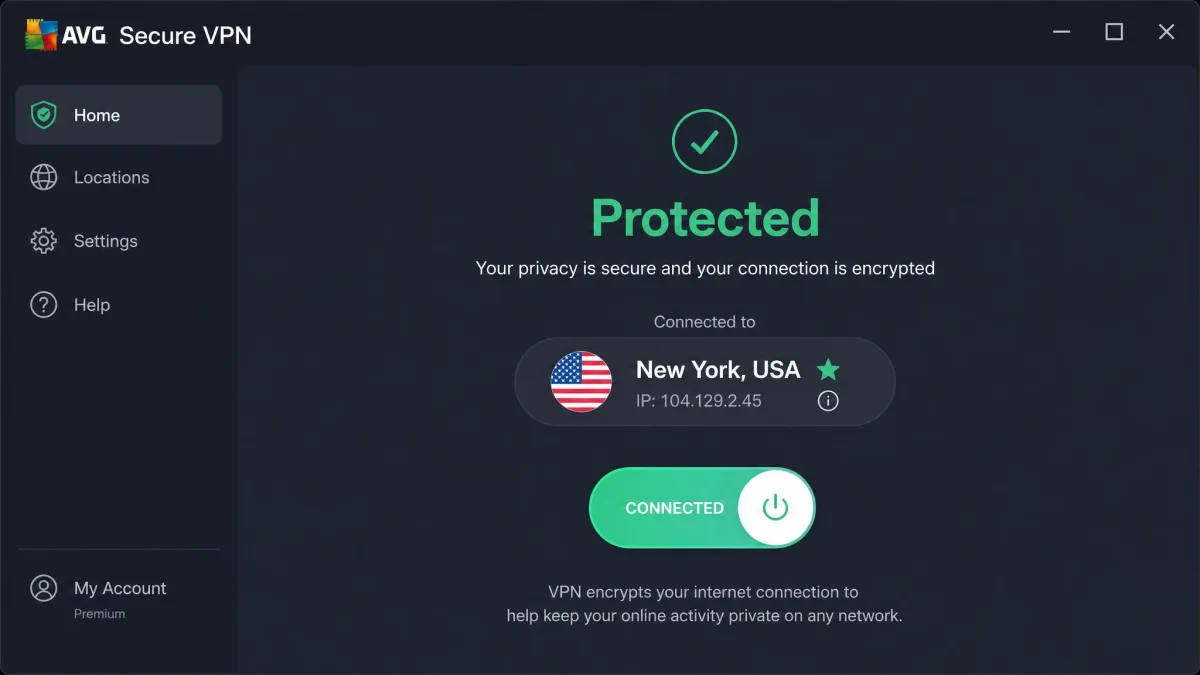
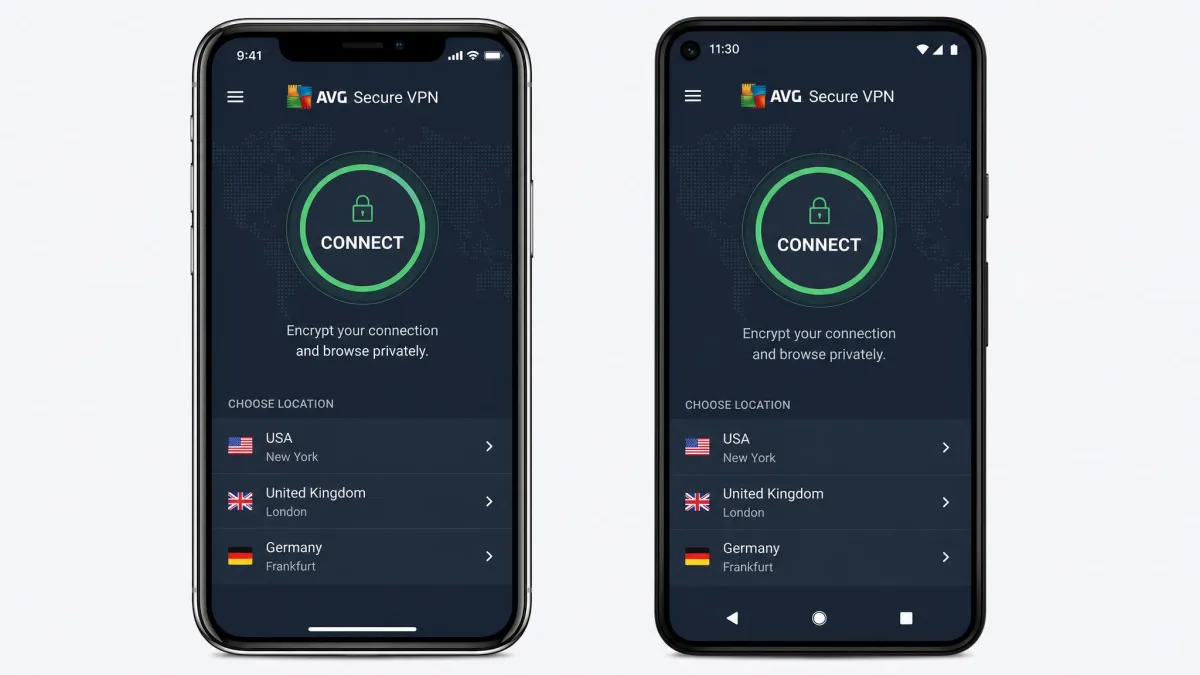
AVG keeps the feature set deliberately simple, and that's mostly a good thing. The apps lead with one big connect button, an obvious location picker, and a settings panel that won't intimidate a first-time user. When we installed it on Windows and macOS, setup took a couple of minutes and connecting was a single click. There's no account maze, no confusing protocol jargon on the front screen, and no upsell wall between you and the connect button.
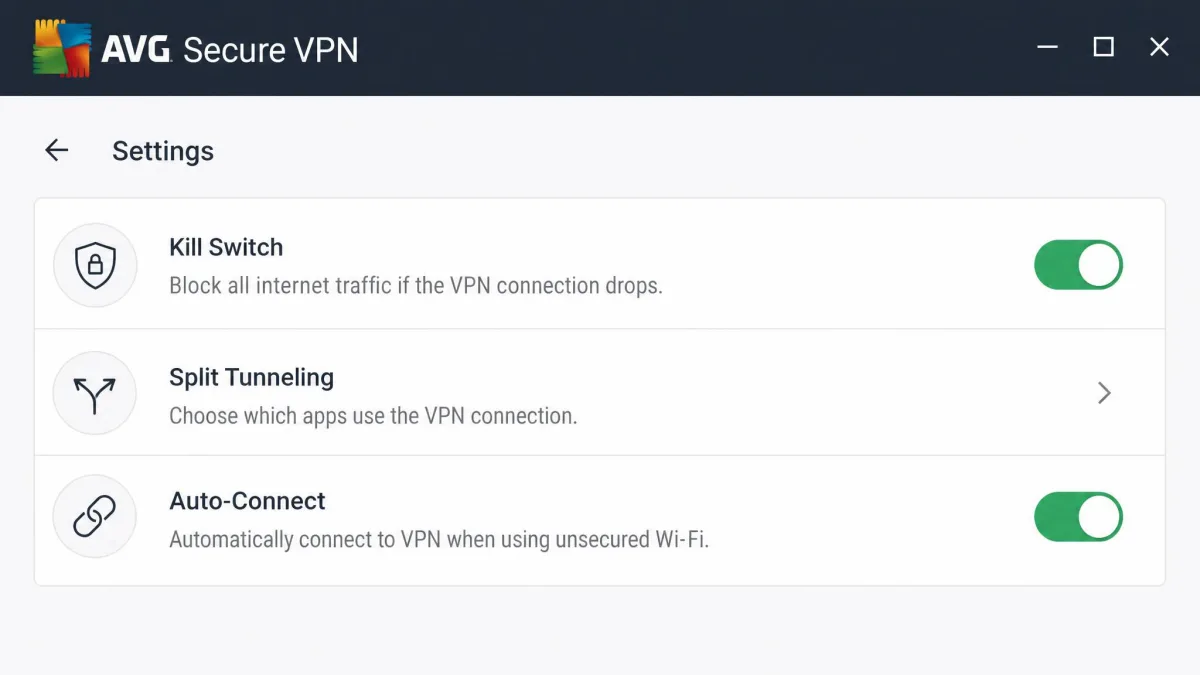
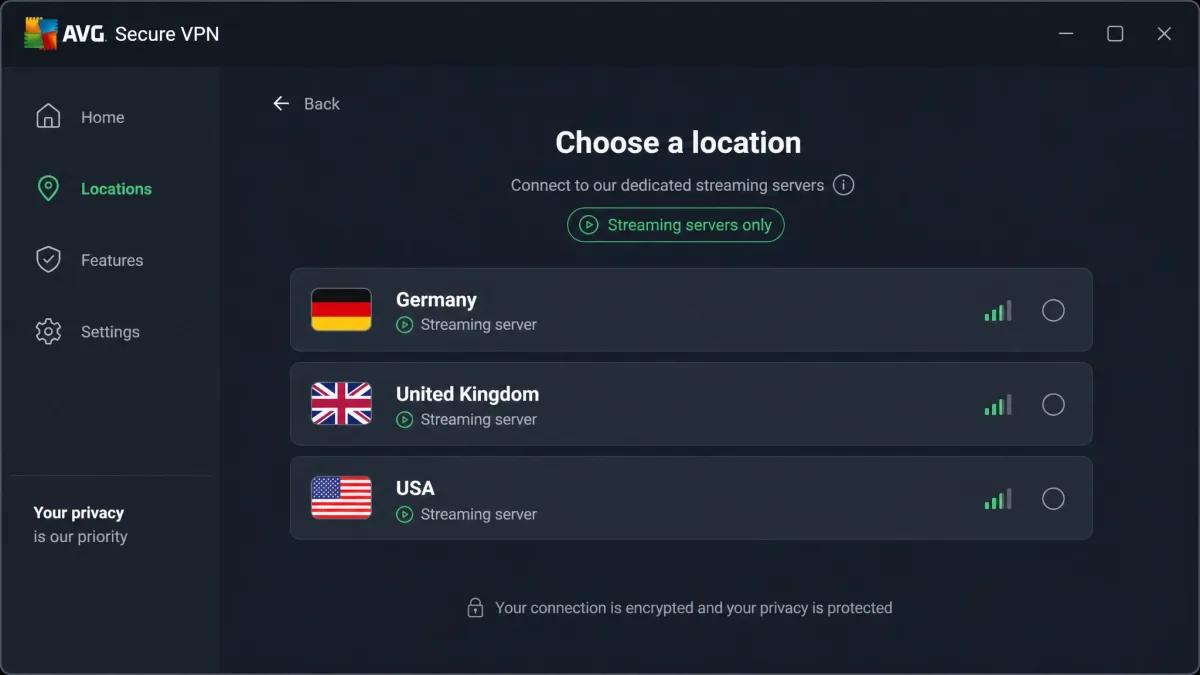
Under that simplicity sit a few useful extras: a kill switch, split tunneling so you can route some apps outside the VPN, auto-connect on untrusted networks, dedicated streaming servers in three countries, and dedicated P2P servers for torrenting. It's a focused toolkit rather than a sprawling one, and for the target user that focus is a feature, not a gap. Power users will notice the absence of things like multi-hop, obfuscated servers, and a built-in ad blocker, but casual users won't miss them.
Apps and Device/Platform Support
You get native apps for Windows (7, 8, 10, and 11), Mac, Android 10.0 and up, and iOS. All four are clean and consistent, and the mobile apps in particular are well received: they rate 4.7 out of 5 on iOS and 4.4 out of 5 on Android, and in our hands they were the nicest way to use the service. Switching locations, toggling auto-connect on open Wi-Fi, and checking your status all felt smooth on a phone.
The coverage gaps matter, though. There's no Linux app, no router support, no Firestick app, and no browser extensions, so AVG only reaches mainstream desktop and mobile platforms. If you want a VPN on your router to protect a whole network, or on a Fire TV Stick for streaming, AVG can't do it, and rivals can. That single limitation rules it out for a lot of home-network and home-theater setups, and it's the kind of thing you only discover after buying if you don't check first.
VPN Protocols and Kill Switch
On protocols, AVG uses OpenVPN with AES-256 on Windows and Android, and IKEv2 with AES-256 on iOS and Mac, with WireGuard reported as being added. That's a reasonable, secure set, though the absence of WireGuard across the board today is part of why speeds aren't leading-edge. WireGuard is the protocol most of AVG's faster rivals lean on, so a full rollout would help close the gap.
The kill switch deserves a specific note, because it's the feature that either works or fails you at the worst moment. During testing our Wi-Fi connection dropped unexpectedly, and AVG shut down active browsers to stop any unprotected traffic from leaking out. That's exactly the behavior you want. The one caveat: the kill switch is switched off by default, so you have to enable it manually during setup. Don't assume it's protecting you until you've turned it on.
AVG's kill switch is off by default. If you rely on a VPN to prevent your real IP from leaking when the connection drops, open settings and enable it before your first real session.
Security and Privacy
Security and privacy are two different questions for AVG, and it scores very differently on each. On raw security, the encryption is solid and our leak tests came back clean. On privacy, the picture is murkier, and it's the single biggest reason we hold this VPN back from a higher rating. It's worth separating the two, because a VPN can lock down your traffic technically while still keeping more records about you than you'd like.
Logging Policy and Jurisdiction
AVG Secure VPN is based in the Czech Republic and owned by Gen Digital, the company formerly known as Avast Software. The Czech Republic sits outside the core intelligence-sharing alliances, which is a point in its favor on paper.
The logging is where it gets uncomfortable. AVG markets itself as not logging your browsing activity. But a closer look at AVG's policy shows connection-level logging: connection timestamps, a subnet of your original IP address, the VPN server IP, and the amount of data transferred. Whether that bothers you depends on your threat model. It's not the same as recording the sites you visit. But it's more than a strict no-logs provider keeps, and you can read the details in AVG's own logging policy before deciding.
There's a bigger shadow here too. In 2019, AVG's parent company was caught collecting and selling user browsing data through a subsidiary, a scandal you can revisit in the reporting on Avast's Jumpshot data-selling scandal. The business has changed since, and the subsidiary was shut down. But for a product whose entire job is privacy, that history is hard to fully set aside.
If your reason for buying a VPN is to keep your activity private from your provider, weigh the connection logging and the 2019 data-selling history carefully. A strict no-logs provider is a better fit for that specific goal.
Encryption, Leak Tests, and Audits
The encryption itself is standard-strong: 256-bit AES, the same cipher grade the leading VPNs use. On the technical protection front, AVG holds its own, and there's nothing outdated or weak in the cipher choice.
Our leak testing backs that up. Across repeated checks we detected no DNS or WebRTC leaks, meaning your real IP and DNS requests stayed inside the tunnel where they belong. That's the result you want, and it's the same clean outcome we look for from any VPN we'd recommend. A VPN that leaks DNS quietly undoes the whole point, so this is a test we never skip.
Where AVG falls short is independent verification. NordVPN and Surfshark both run regular published independent audits. AVG's app is reported to have failed an independent audit, and it doesn't publish routine no-logs audits. Trust in a VPN increasingly rests on third-party proof, and AVG simply offers less of it. If you want disclosure numbers and law-enforcement handling, the parent group publishes a transparency report, but that's not the same as a recurring no-logs audit of this VPN.
Speed and Performance
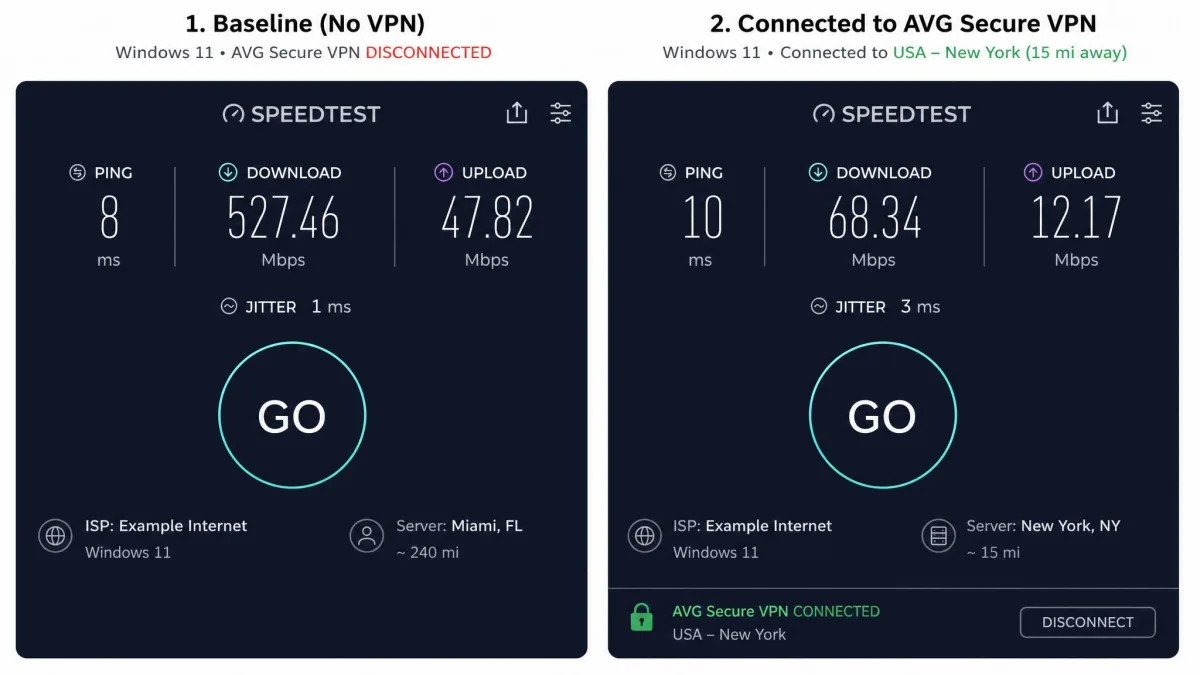
Speed is where AVG lands squarely in the middle of the pack, but with a big asterisk: the results swing wildly. We ran repeated tests against nearby and distant servers and what stood out was the variability rather than any single headline number. Reported speed loss ranges enormously across servers, protocols, and devices, from single-digit drops on a good connection to well over 90 percent on a bad one, so we won't quote one figure as representative when the reality is this inconsistent.
Two patterns held up in our runs. Download speeds took a noticeable hit. Upload speeds dropped very sharply on Windows in particular. And we generally saw better results on Mac than on Windows, so your platform affects what you'll get. For everyday browsing, streaming in HD, and video calls, the speeds were usually fine and we rarely felt held back. But because throughput can crater on the wrong server, chasing maximum speed for large downloads or 4K on a fast line is a gamble. Part of the reason is protocol: without WireGuard live across every platform, AVG can't match the speed of rivals that run it.
There's a practical wrinkle in how the swings play out. A distant server that felt sluggish on one run sometimes recovered on the next, which suggests server load matters as much as raw distance. Switching to a nearby, less crowded location usually steadied things. That trial-and-error step is easy on a phone but tedious if you just want to connect once and forget it. So the honest read is this: AVG is fast enough to leave on for normal use, but the wide swings mean heavy uploaders, especially on Windows, will sometimes feel real drag. If you regularly push large files, back up to the cloud, or livestream, test those specific tasks and servers during the trial before you commit.
Servers and Server Locations
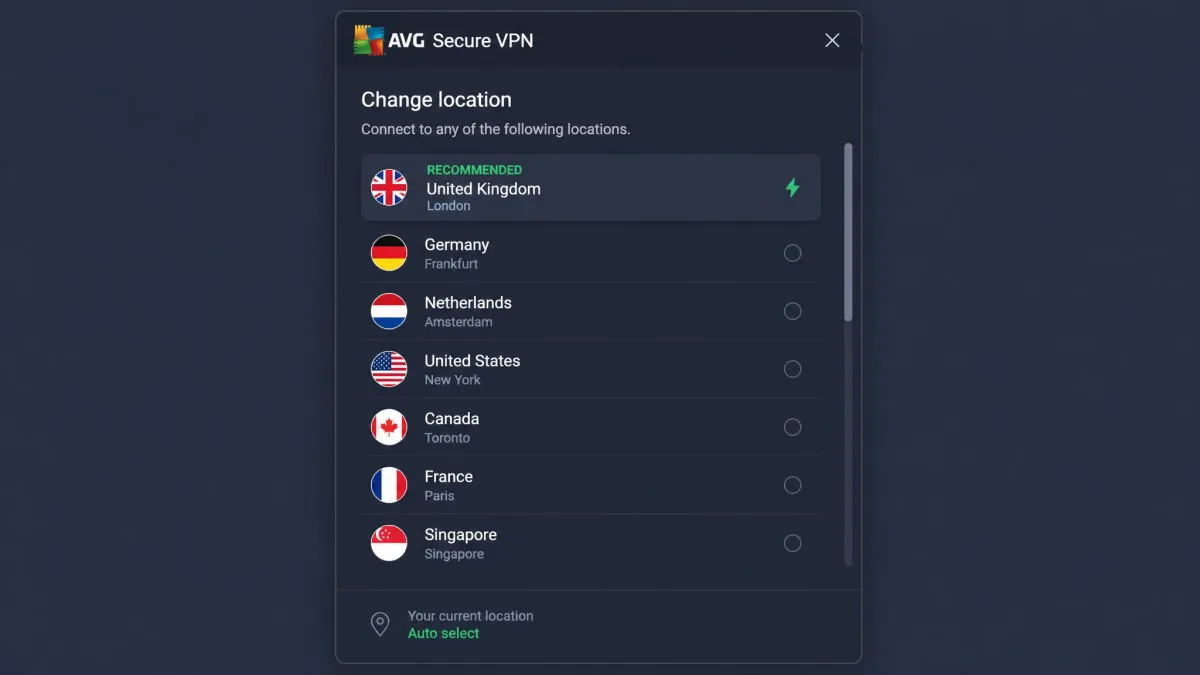
If there's one number that defines AVG's ceiling, it's the size of its server network. It feels small next to major rivals, and that limits your location choice in a way you'll notice. Reported counts differ sharply across sources: figures range from roughly 58 locations in 34 countries up to 700-plus servers, and AVG's own page advertises 100-plus locations. We won't pin a single number on it, because the sources genuinely disagree, but the direction is consistent. This is a compact network.
Why does that matter? Fewer locations means fewer options for finding a fast, uncongested server. It also means fewer countries to appear from for geo-restricted content, and more crowding on the servers that do exist. When we compare AVG's footprint with NordVPN's 9,300-plus servers or Surfshark's 3,200-plus, the gap is stark. For a user who only ever connects to one or two nearby countries, it's a non-issue. For anyone who hops between regions, it's a real constraint.
The thin coverage also shows up in edge cases. If your nearest AVG location is a country or two away, your baseline latency starts higher than it would on a denser network. Gamers and video callers feel that first. And when a popular server gets busy in the evening, there isn't always a nearby alternative to fall back on, so you either wait it out or connect somewhere farther afield. Server count isn't everything, of course. A smaller, well-provisioned network can outperform a bloated one on paper. But AVG's network is small in both servers and countries, so the limitation shows up as fewer places to appear from, not just fewer machines.
Streaming and Torrenting
AVG can stream and can torrent, but both come with asterisks. It routes this traffic through dedicated servers rather than letting you use any location, so your experience depends heavily on which of those specialized servers you land on.
Netflix and Amazon Prime
Netflix is the honest sticking point. In practice, access is hit or miss: sometimes AVG's servers stream Netflix without complaint, and other times Netflix blocks them outright. We couldn't get consistent results, and that inconsistency is the story. Part of the reason is that dedicated streaming servers are limited to just three locations, Germany, the UK, and the USA, which restricts which libraries you can reach in the first place.
So if your main goal is unblocking a specific foreign Netflix or Amazon Prime library reliably, AVG is a gamble. It might work today and fail after the next server-side crackdown. This is precisely the scenario where the 60-day trial earns its keep: test your service before you commit, and don't take a single successful stream as proof it'll hold up next week.
P2P / Torrenting Support
Torrenting is supported, and more cleanly than streaming. AVG provides a small set of dedicated P2P servers, about 8 locations, and directs torrent traffic through those. In use it worked without fuss, and the kill switch plus clean leak results mean your real IP stays covered while you download.
The limitation, again, is choice. Eight P2P locations is a short list, so if a particular country's server is slow or busy you don't have many alternatives. For occasional torrenting it's perfectly adequate; for heavy, latency-sensitive P2P use you'll feel the small network. Just remember to enable the kill switch first, since it's off by default and it's the safety net that matters most while torrenting.
How AVG Secure VPN Compares to Competitors
The fastest way to see where AVG sits is to line it up against the two VPNs most people cross-shop it with. NordVPN and Surfshark both beat AVG on network size, streaming reliability, and audited privacy, and Surfshark undercuts it on price while adding unlimited devices.
| Product | Buy | Price (2-yr, per month) | Servers / locations | Speed | Streaming | Logging / jurisdiction | Devices |
|---|---|---|---|---|---|---|---|
 |
Check price → | ~$4.39 intro | Small network (~58 locations / 34 countries reported) | Average | Hit or miss, 3 streaming locations | Connection logs; Czech Republic; parent data-selling history | 10 |
|
Check price → | ~$3 to $3.50 intro | 9,300+ servers / 100+ countries | Fast | Reliable | No-logs (audited); Panama | 10 |
 |
Check price → | ~$2.49 intro | 3,200+ servers / 100 countries | Fast | Reliable | No-logs (audited); Netherlands (Nine Eyes) | Unlimited |
The takeaway is blunt. AVG matches NordVPN on device count and offers the longest free trial of the three, but on the metrics that separate a good VPN from an average one, network size, speed, streaming, and audited privacy, it trails both. Surfshark is cheaper with unlimited connections, and NordVPN is the all-round performance pick. The one place AVG can win is familiarity: if you already run AVG antivirus and want everything under one brand, that convenience has real value even if the raw specs don't lead.
On the metrics that separate a good VPN from an average one, network size, speed, streaming, and audited privacy, AVG trails both NordVPN and Surfshark.
— From our hands-on testing
Customer Support
Support covers the essentials, though it's less polished than the apps and the picture on live chat is muddy. What we can confirm is a knowledge base and FAQ, an email or online ticket form, and phone support, and email replies tend to land the same day or within about a day. Live chat is the sticking point: it exists, but it's buried on a hard-to-find page, and reviews disagree on whether there's a genuine dedicated 24/7 VPN chat at all. Some describe decent round-the-clock chat while others found it effectively absent, so we wouldn't count on instant live help being there when you need it.
What we can say with confidence is that the apps themselves are simple enough that most users won't need support for day-to-day use. Installation, connecting, and switching servers are all self-explanatory, and the settings that matter, like enabling the kill switch, are easy to find once you know to look. For a beginner-focused product, that low support burden counts for something, though it's no substitute for responsive help when a payment or connection problem does come up.
Is AVG Secure VPN Right for You?
AVG Secure VPN is right for a specific kind of buyer. If you already use and trust AVG's antivirus, want a genuinely easy VPN across up to 10 devices, and mostly need everyday privacy on public Wi-Fi rather than airtight anonymity or reliable streaming, it fits. The long trial lets you confirm that before paying, and the clean apps make it painless to live with.
It's the wrong pick if privacy from your own provider is the whole point, if you stream foreign libraries and need that to just work, if you want router or Firestick coverage, or if you care about maximum speed. In those cases the connection logging, inconsistent Netflix access, missing platforms, and average speeds all push you toward NordVPN or Surfshark. At the intro price AVG is fair; at renewal, given what the competition offers, it's a harder sell. Our honest recommendation: take the free trial, test the things you personally need, and let your own results decide.