VPNBook is a free, Switzerland-based VPN service that has been around for years. It hands you OpenVPN and PPTP configuration files, then lets you connect with no account and no bandwidth cap. That sounds generous. The catch is what you give up to use it.
Our short answer on safety: use it with caution, and never for anything sensitive. VPNBook works as a basic way to change your IP address, but it logs your real IP, offers no kill switch, and ships no apps of its own. Those gaps matter, and we walk through each one below.
Free VPNs occupy an awkward middle ground. Some are outright dangerous, quietly selling your data to stay afloat. Others are honest but limited. VPNBook sits closer to the honest-but-limited end, though its logging policy keeps it from being a clean recommendation. Knowing which kind you are dealing with is the whole point of a review like this one.
We put VPNBook through our standard VPN checks for this review: speed under load, DNS and IP leak behavior, streaming access, and the honesty of its logging policy. Where a number varies too much between test runs to trust, we say so plainly rather than pretend we measured a clean figure. This is a service where the free price tag hides a real cost, and our job here is to price that cost for you.
VPNBook at a Glance
VPNBook Pros and Cons
Every VPN is a set of trade-offs, and VPNBook's are unusually lopsided. It gives away things paid services charge for, then withholds things paid services treat as basic. Here is the balance we landed on after testing.
Pros
- Completely free with unlimited bandwidth
- No account or sign-up required to connect
- OpenVPN with AES-256 encryption available
- Switzerland-based, outside major surveillance alliances
- Unlimited simultaneous connections on the free tier
Cons
- Logs your real IP address and connection timestamps
- No kill switch to protect you if the connection drops
- Huge speed loss, often over 90 percent
- No native apps, so setup is fully manual
- Fails to unblock Netflix, Disney+ and BBC iPlayer reliably
- No live chat support and no independent security audit
Speed: How Fast Is VPNBook?
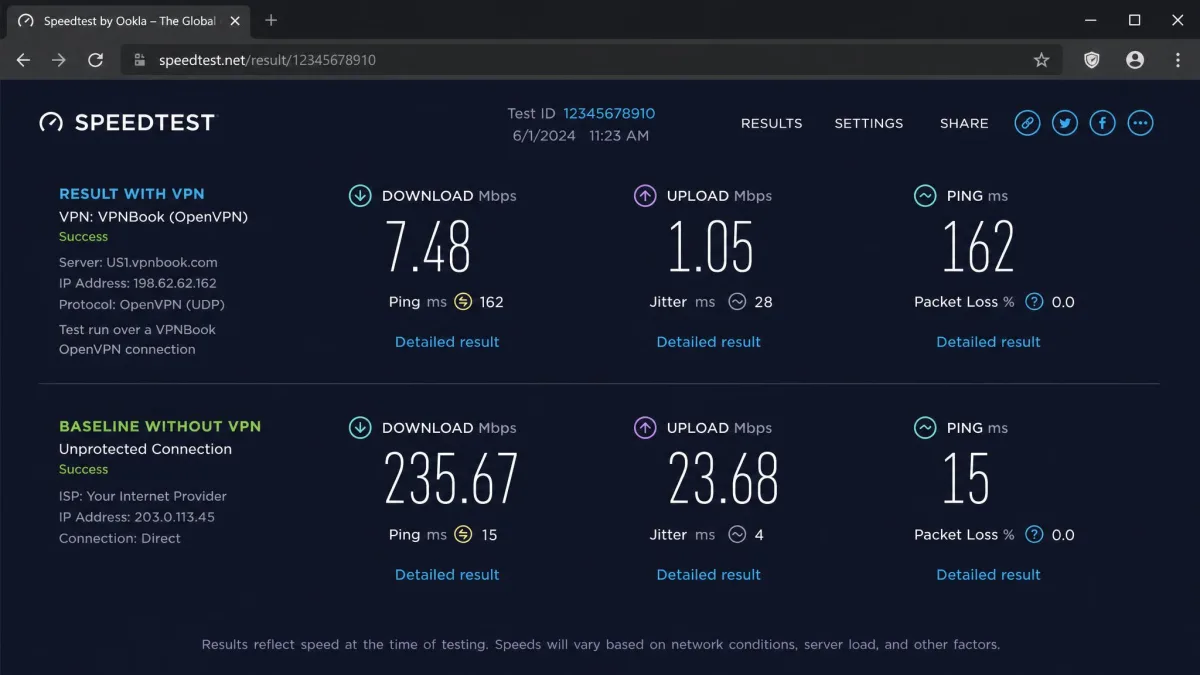
Speed is where VPNBook falls hardest. When we connected, download speeds dropped dramatically, often by more than 90 percent against our unprotected baseline. That is enough to make video buffer and large downloads crawl.
We want to be honest about the numbers. Absolute speed figures for VPNBook swing wildly depending on the server and time of day, from barely usable to merely slow. So we report the consistent signal rather than a single tidy Mbps figure: expect a very large percentage drop, somewhere in the region of 86 to 98 percent of your normal download speed.
It helps to picture what that range does to a real connection. Say your home line delivers 100 Mbps on a good day. An 86 percent loss leaves you around 14 Mbps, which is slow but workable for browsing. A 98 percent loss leaves you near 2 Mbps, which struggles to load a single video. The same service can land you at either end depending on the server you pick and the hour you connect.
That kind of loss reshapes what you can do online. Basic browsing and email still work. Smooth streaming and gaming do not. If your connection is already modest, VPNBook can push it below the point where video will load at all. A page of text arrives fine. A high-resolution video stalls before it starts.
The cause is not mysterious. A free service with a small number of servers and no cap on users ends up crowded, and crowded servers are slow servers. When everyone shares the same handful of endpoints, congestion does the rest.
Local and Long-Distance Speed Test Results
The pattern held across distances. Nearby servers were the least painful, but even they shed most of our speed. Long-distance servers, the kind you would pick to unblock foreign content, were slower still and prone to stalling mid-transfer.
Latency told a similar story. Connections routed through distant countries added noticeable lag, which compounds the download loss when you are trying to load anything interactive. The further the server, the worse both numbers got.
The two problems feed each other in daily use. High latency makes a page feel slow to respond, and the low bandwidth makes it slow to finish loading. Together they turn a quick task into a wait. Clicking a link, then waiting for the reply, then waiting again for the images, is the everyday texture of a heavily congested free server.
The takeaway is simple. VPNBook is not a service you choose for performance. You tolerate the speed because it is free, or you look elsewhere.
If you are on a slow or capped home connection, a 90 percent speed cut can make VPNBook effectively unusable for anything beyond text. Test it on a short task before you rely on it.
Security: Encryption and Protocols (OpenVPN, PPTP)
VPNBook's security story is a tale of two protocols. The good option is OpenVPN, which uses AES-256 encryption, the same standard the paid VPNs rely on. Connect over OpenVPN and your traffic is encrypted to a genuinely strong level.
The other option is PPTP, and you should avoid it. PPTP is old, uses weaker 128-bit encryption, and is widely considered unsafe. Microsoft no longer recommends it. VPNBook still offers it for compatibility with old devices, but it is not a protocol we would trust with anything that needs to stay private.
If you are unsure how the safe protocol works, our guide on what OpenVPN is explains the basics. VPNBook also offers an Outline (Shadowsocks) server for users who want a different transport, according to VPNBook's official site and third-party reviews.
The encryption on the OpenVPN connections is not the weak link here. The bigger problems sit around it: no kill switch, no obfuscation, and a logging policy we cover below. Strong encryption on the wire cannot make up for those gaps. A VPN is a system, and VPNBook's system has holes in it even when the tunnel itself is sound.
Leak Tests: IP, DNS, and WebRTC
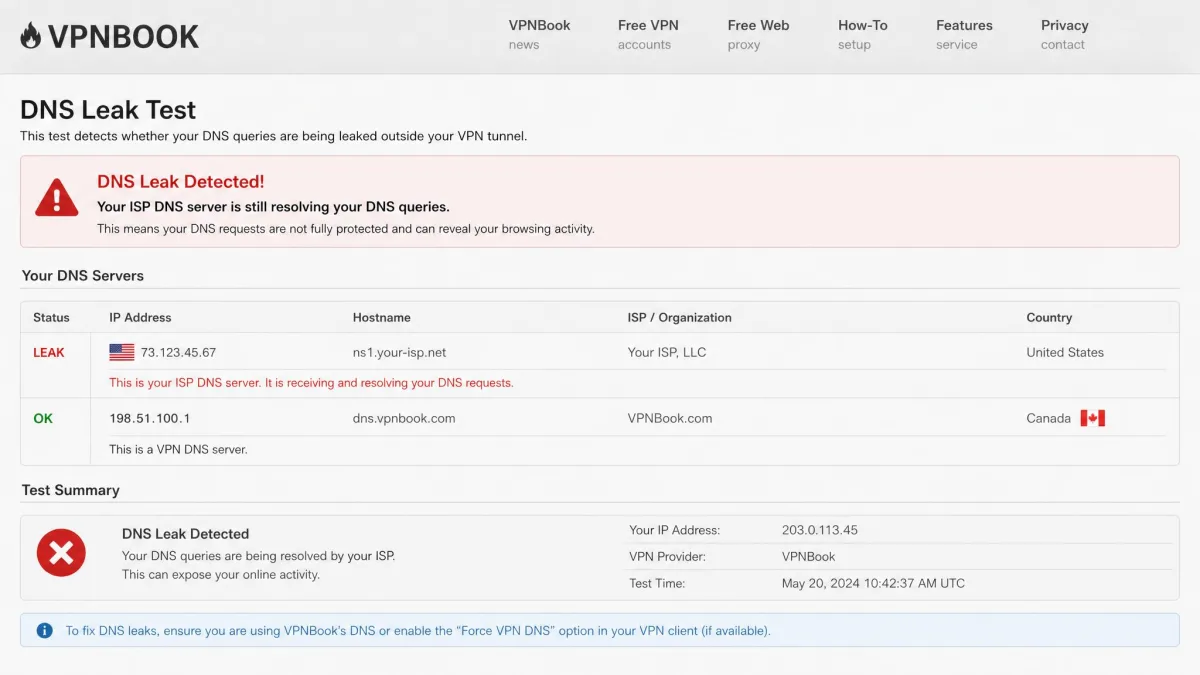
Encryption only helps if your identifying details do not leak around it, so we ran leak tests. The results were not clean. We saw DNS leaks in testing, with ISP DNS servers still resolving requests while the VPN connection was active. You can reproduce this kind of check with a free IP leak test.
A DNS leak matters because it can reveal which sites you visit even while your traffic looks encrypted. Your ISP still sees the lookups. For anyone using a VPN specifically to keep browsing private, that is a meaningful failure rather than a footnote.
Leak behavior for VPNBook is inconsistent rather than uniformly broken. Some connections and some servers hold up better than others. That inconsistency is itself the problem: a VPN you cannot trust to plug every leak on every server is a VPN you cannot trust with privacy-critical work. We treat VPNBook's leak protection as risky, not reliable.
Privacy and Logging Policy
This is the section that decides the safety question, and it is where VPNBook contradicts itself. It markets a no-logs stance. It then admits to keeping connection logs that include your originating IP address and connection timestamps.
Those logs are purged after roughly one week, which is better than keeping them forever. But a true no-logs VPN does not record your real IP at all. VPNBook does. For a week, there is a record that ties your IP to the times you connected. If that record were ever requested or breached, it would point back to you.
It is worth sitting with what that one-week window actually means. A no-logs VPN has nothing to hand over when a request arrives, because it never wrote anything down. VPNBook has a live record for as long as the log survives. Any request, subpoena, or breach that lands inside that window catches your IP and your connection times. The short retention shrinks the risk, but it does not remove it. The safest data is the data that was never collected.
VPNBook is Switzerland-based, which sits outside the Five, Nine, and Fourteen Eyes intelligence alliances. That jurisdiction is a point in its favor. It does not cancel out the logging, though. Good privacy law protects data that was never collected far better than data that was.
The jurisdiction and the logging pull in opposite directions, and that tension is easy to miss. Switzerland gives VPNBook strong legal ground to refuse foreign data requests. But strong law over a weak policy is a mismatch. The protection you gain from the jurisdiction only reaches as far as the data the service chooses to keep. Here the service keeps the one identifier a privacy tool should never hold, so the favorable law guards a record that should not exist in the first place.
A VPN that records your real IP address is not a no-logs VPN, whatever its homepage says. That single fact reshapes everything else about VPNBook's privacy.
— From our hands-on review
There is also the matter of transparency. Company ownership is unclear, and there are no independent security audits to back the claims. Paid rivals now publish audited no-logs results from outside firms. VPNBook asks you to take its word, while its own policy quietly undercuts that word. When the marketing and the fine print disagree, we side with the fine print.
Server Network and Locations
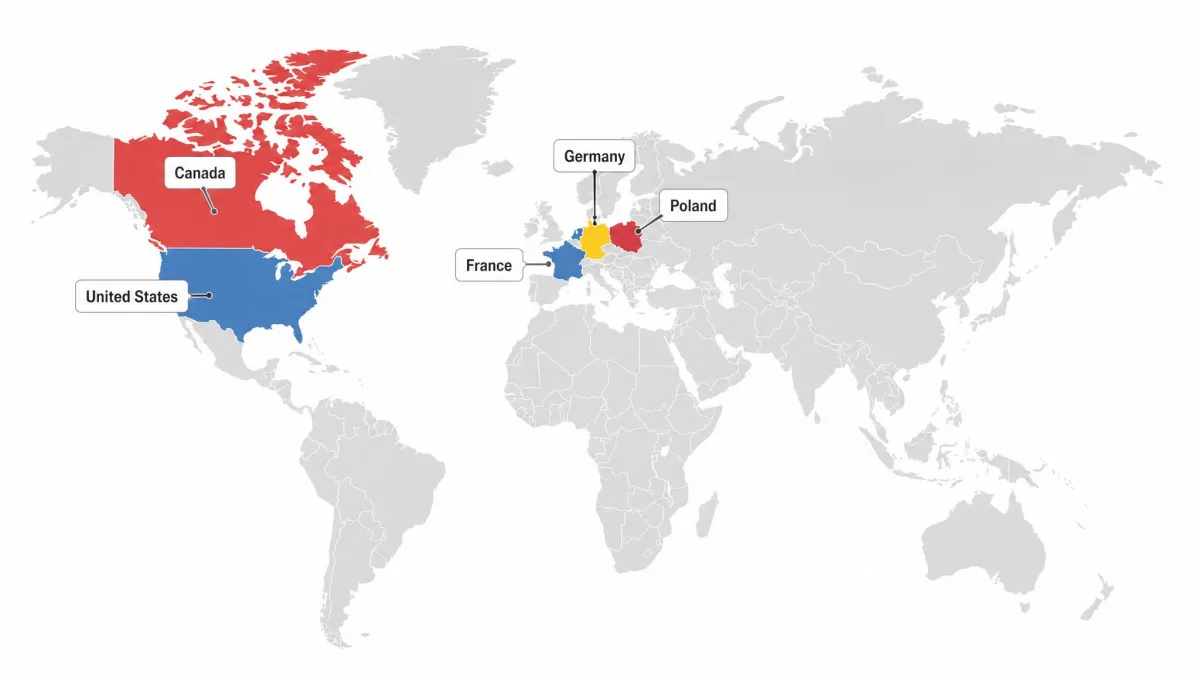
VPNBook runs a small network. Exactly how small depends on which count you believe, and the figures vary between reviews, so we describe it rather than pin it to a false precision. Expect a handful of servers spread across a handful of countries, typically the US, Canada, France, Germany, and Poland, with a UK option available through a web proxy.
That is a tiny footprint next to the thousands of servers a paid service offers across a hundred-plus countries. Fewer locations means fewer ways to find a fast, uncrowded server, and fewer options for reaching region-locked content. When a free server gets busy, you have little to fall back on.
The small network hurts most in the moment a server gets crowded. On a large paid network, you switch to a quieter server in the same country and carry on. On VPNBook, that country may run only one or two servers, so there is nowhere quieter to move. You either wait out the congestion or accept the slow speeds. The lack of choice turns a peak-hour slowdown into a dead end rather than a quick fix.
The small network also limits your choices for spoofing a location. If the country you need is not on VPNBook's short list, you are out of luck. Paid services solve this with sheer scale. VPNBook cannot.
Streaming: Does VPNBook Unblock Netflix, Disney+, and BBC iPlayer?
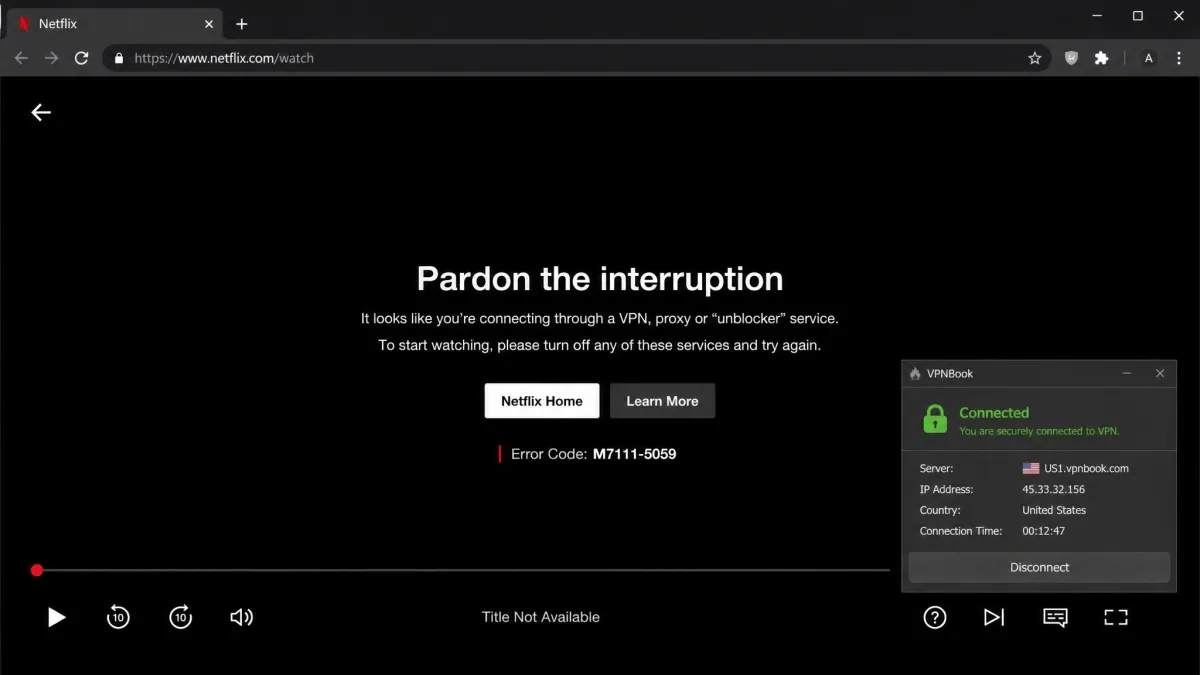
If streaming is your reason for wanting a VPN, VPNBook will disappoint you. In our testing, Netflix, Disney+, Hulu, and BBC iPlayer generally failed to load, often returning the familiar proxy error screens instead of video.
Netflix access is the one place results are genuinely mixed across the wider testing record, so we call it unreliable rather than a flat no. A connection might reach Netflix USA on a good day. Most of the time it does not, and you cannot plan an evening around a coin flip.
Even when a stream does load, the speed problem bites. The low bandwidth forces blurry, low-resolution playback that stutters and pauses to buffer. You may technically be watching, but not at a quality anyone would choose over waiting for a better connection.
There is a smaller consolation. VPNBook can still bypass geo-restrictions on lighter sites like YouTube, Facebook, and X, even when the premium streaming platforms block it. Those services police VPN traffic less aggressively, so for casual access to blocked social content, VPNBook is serviceable.
The big streaming services actively detect and block VPN IP addresses. Free VPNs with tiny server networks, like VPNBook, are the easiest for them to spot and ban, which is why access comes and goes.
Torrenting and P2P Support
VPNBook allows torrenting, but only on specific servers. P2P traffic is permitted on the Germany and Poland servers on the free tier. Connect anywhere else and torrents are off the table.
Permission is not the same as practicality. The speed loss makes large downloads painful. In testing, a 1GB file took around 20 minutes over VPNBook, and bigger files scale that frustration up quickly. A full movie or game download becomes an exercise in patience.
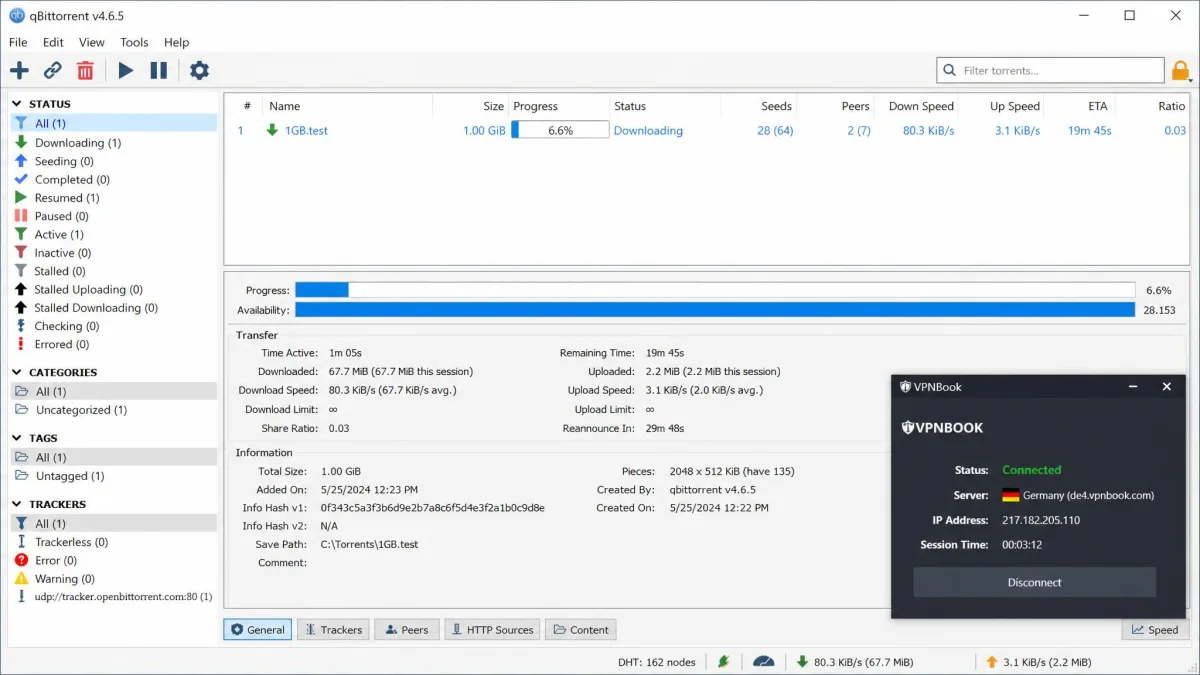
There is a safety wrinkle too. Torrenting exposes your IP to every peer in the swarm, and VPNBook has no kill switch. If the connection drops mid-download, your real IP can surface without warning. For P2P, that missing kill switch is a bigger deal than the slow speed, because the whole point of a torrenting VPN is to keep that IP hidden.
If torrenting is your main use, a dedicated pick serves you better. Our roundup of the best free VPN for torrenting weighs options with kill switches and P2P-friendly networks.
Does VPNBook Work in China?
No. VPNBook does not work in China. Its protocols are blocked by the Great Firewall, and it lacks the obfuscation technology that disguises VPN traffic as ordinary internet traffic.
This is not a niche concern only for travelers. It signals how basic the service is. The VPNs that work in China invest heavily in obfuscation and stealth servers that hide the fact you are using a VPN at all. VPNBook offers none of that, so restrictive networks, whether a national firewall or a strict workplace, will simply block it.
Device Compatibility and Setup
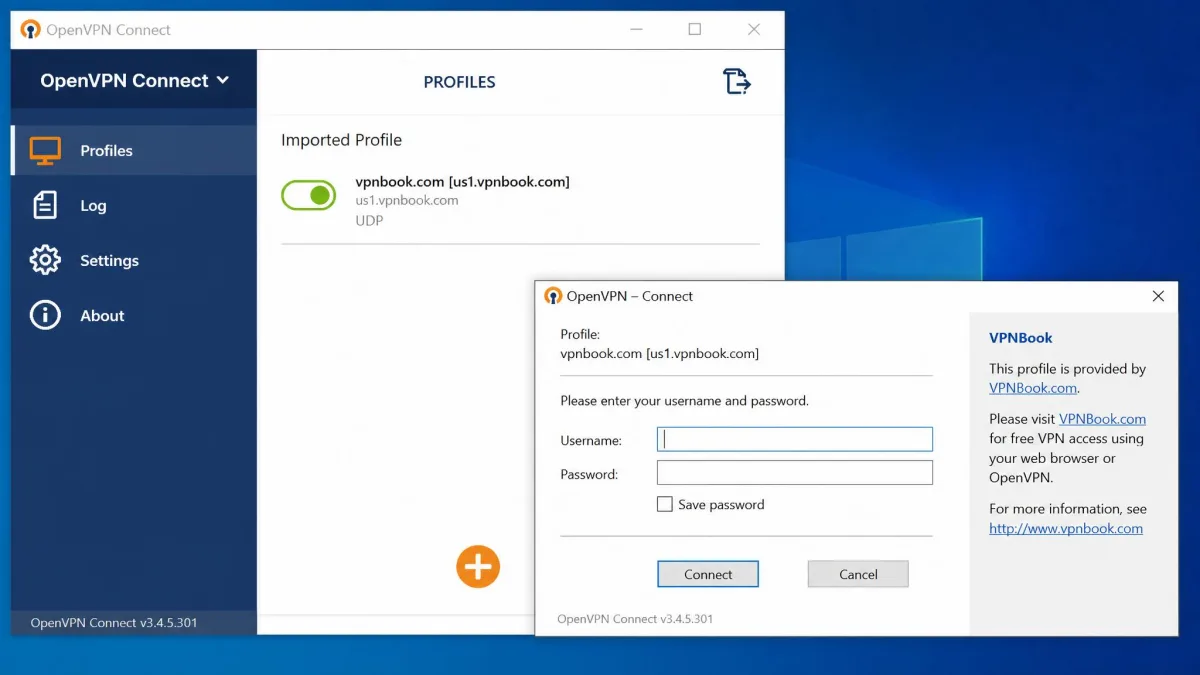
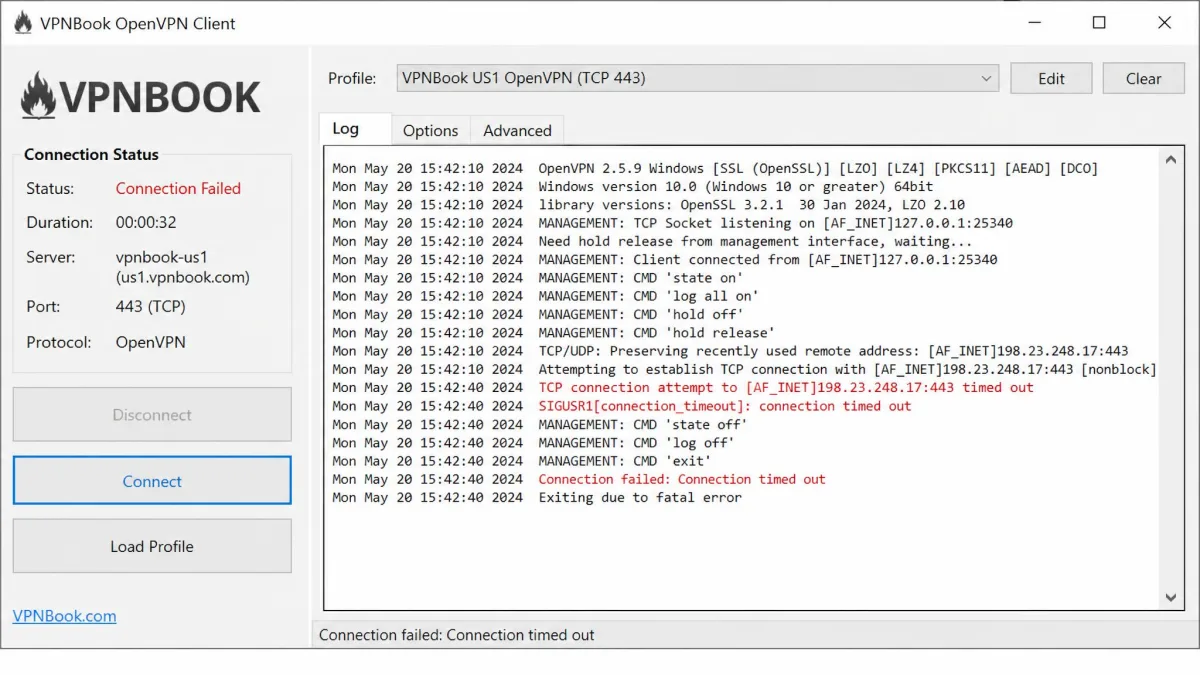
VPNBook has no native apps. There is no VPNBook client to download for Windows, macOS, Android, or iOS. Instead you import its configuration files into a separate, third-party OpenVPN app. That is the single biggest friction point in day-to-day use.
Because there is no app, there is also no on-off button of its own, no built-in server picker, and no settings screen of the kind paid VPNs give you. You manage everything through whichever OpenVPN client you install. It works, but it asks more of you than most people expect from a VPN in 2026, and it puts VPNBook out of reach for anyone who wants a one-tap experience.
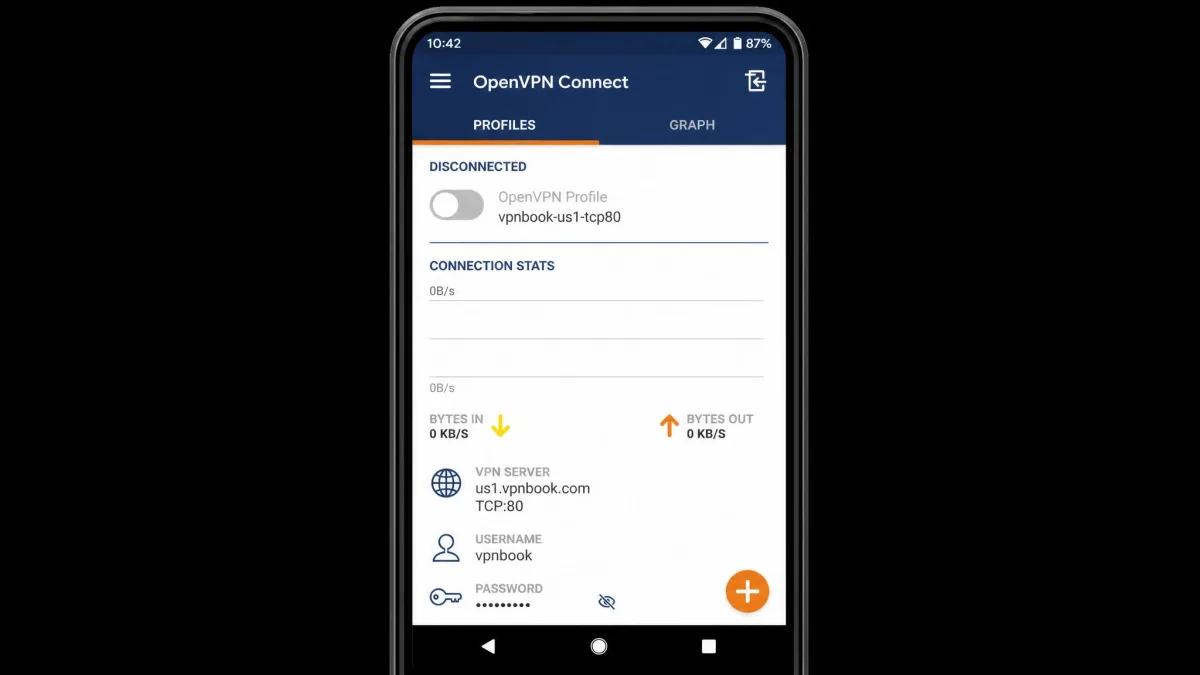
How to Set Up VPNBook (Windows, macOS, Android, iOS)
The rough process is the same on every platform. You download VPNBook's OpenVPN configuration bundle, install a compatible OpenVPN client, import the config file for the server you want, then enter the current username and password to connect.
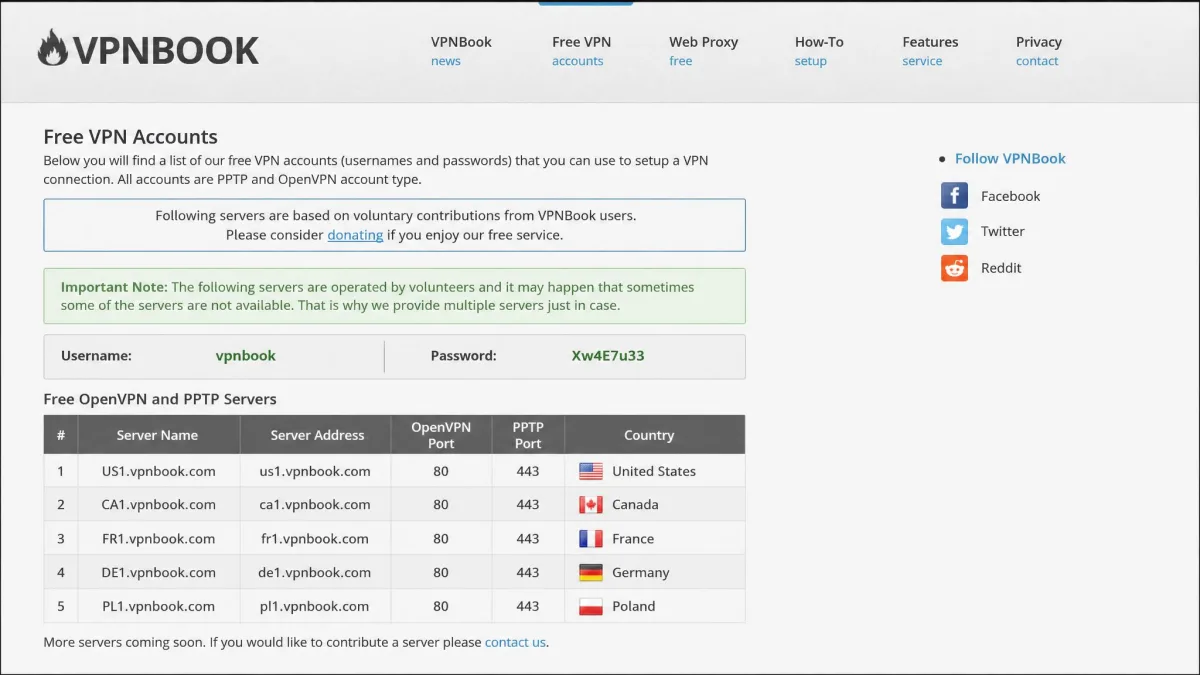
Two things trip people up. First, the free servers rotate their credentials, so the username and password change and you re-enter fresh ones each time you connect. Second, the setup instructions on the site are outdated in places and no longer match current apps, which adds friction for new users trying to follow along step by step.
The rotating credentials deserve a closer look, because they shape the whole daily rhythm of using VPNBook. Each time the login changes, an old profile stops connecting until you fetch and paste the new details. That means a quick reconnect is rarely as quick as you hope. You return to the download page, copy the fresh username and password, then reconnect. It is a small tax, but you pay it over and over.
The outdated instructions make that first setup harder than it should be. Screenshots on the site show older app versions, and some steps reference buttons that have since moved or vanished. A new user following along can lose the thread and assume they did something wrong. In practice you often have to bridge the gap yourself, matching the old guidance to whatever your current OpenVPN client actually shows.
Budget extra time the first time you set it up. Once a profile is imported, reconnecting is quicker, but the rotating credentials mean you never quite reach the frictionless one-tap connect that paid apps offer.
Before you import a config file, copy the current VPNBook username and password from the download page. They rotate regularly, so an old login will fail and leave you guessing whether the server or your credentials are the problem.
Simultaneous Connections and Bandwidth
Here VPNBook is surprisingly generous. The free tier places no cap on bandwidth, so you will not hit a monthly data ceiling the way many free VPNs impose. You can browse all month without watching a meter.
It also allows unlimited simultaneous connections on the free servers, which is unusual even among paid providers. If you want to cover several devices at once, VPNBook does not stop you.
There is a paid Dedicated VPN tier as well, which provides 500GB per month of bandwidth and 5 simultaneous connections on servers reserved for paying users. We could not confirm a reliable dollar price for that tier, so we are not quoting one. The free tier is the reason most people look at VPNBook, and on raw allowances it delivers more than its rivals.
Customer Support and Trustworthiness (Reddit, Trustpilot)
Support is thin. VPNBook offers email and a web form only. There is no live chat, and inquiries can go unanswered. If you hit a setup problem, you are largely on your own with community threads and third-party guides rather than official help.
Trustworthiness is the harder question. The unclear ownership, the absence of any independent audit, and the contradictory logging policy add up to a service that has not earned blind trust. It is not obviously malicious, and its long track record counts for something. But trust in a VPN should be evidence-based, and here the evidence is missing rather than reassuring. A service that handles your traffic should be able to show its work, and VPNBook cannot.
We judge a VPN's trust on evidence: audits, a clear logging policy, and leak results we can reproduce. VPNBook came up short on all three in our checks, which is why our rating sits well below the free VPNs we can recommend.
Pricing: Is VPNBook Really Free?
Yes, VPNBook is really free, and that is not a trick. The free service asks for no payment and no account. Unlike the free tiers that throttle you after a few gigabytes, VPNBook does not cap your bandwidth at all.
The price you pay is not money. It is the logging, the missing kill switch, the manual setup, and the speed loss. Those are real costs, just not ones that show up on a bill. Weigh them honestly before you decide the free tag is a bargain, because for many uses those costs outweigh the savings.
How VPNBook Compares to Top Alternatives
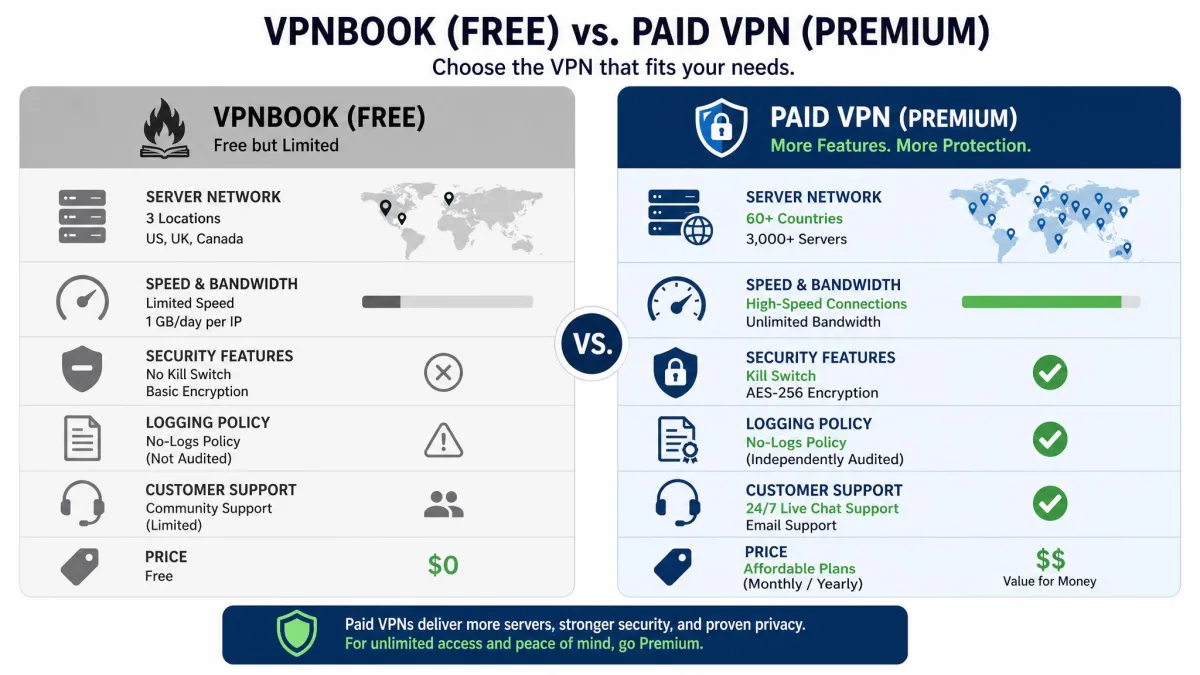
Set VPNBook beside the paid leaders and the gap is stark. The paid services cost money, but they close every weakness that defines VPNBook. Here is how the core specs line up.
| Product | Buy | Servers | Streaming (Netflix) | Logging | Kill switch | Price |
|---|---|---|---|---|---|---|
|
Check price → | ~8 to 16, 5 to 6 countries | Unreliable | Logs IP + timestamp | No | Free |
 |
Check price → | 6,000+ / 110+ countries | Yes | Audited no-logs | Yes | Paid |
 |
Check price → | 105 countries | Yes | Audited no-logs | Yes | Paid |
 |
Check price → | 3,200+ / 100 countries | Yes | Audited no-logs | Yes | Paid |
The comparison makes the decision clear. If your budget is genuinely zero, VPNBook competes only on price. The moment you can spend a few dollars a month, a paid VPN gives you streaming, a kill switch, audited privacy, and speed that VPNBook cannot approach. Surfshark even matches VPNBook's unlimited connections while fixing everything else.
How We Tested VPNBook (Methodology)
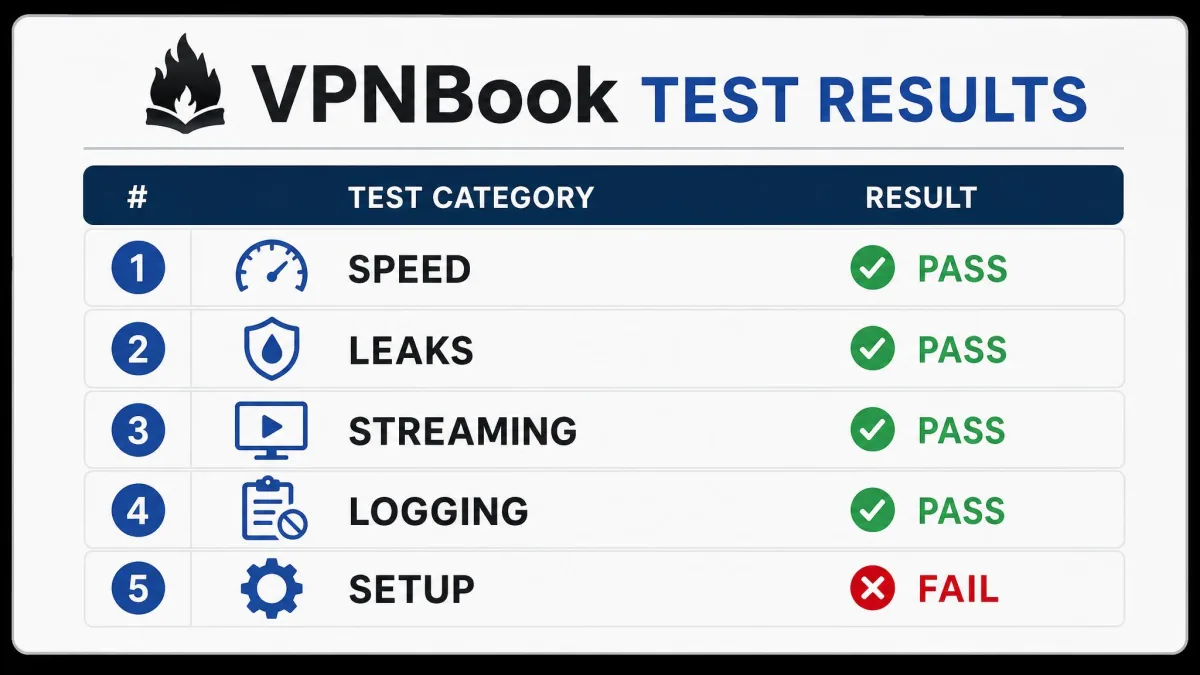
We test every VPN the same way, so our verdicts stay comparable. For VPNBook we assessed five things: download speed under load against an unprotected baseline, DNS and IP leak behavior, streaming access on the major platforms, the honesty of the logging policy, and the friction of getting connected.
Where a figure varied too much between servers and runs to state cleanly, we report the consistent pattern instead of a single number. That is why we give speed as a percentage range rather than a fixed Mbps reading, and why we call streaming and leak results unreliable rather than a clean pass or fail. A service that behaves differently on every server does not deserve a tidy scorecard.
Our rating reflects the whole picture, not one good or bad session. We weighed the free price and generous allowances against the logging, the missing kill switch, and the speed loss, then landed on a score that says clearly: usable in a pinch, wrong for anything that matters.
Our Verdict: Is VPNBook Worth It?
VPNBook is worth it in exactly one situation: you need to change your IP for something low-stakes, you have no money to spend, and privacy is not the point. For casual browsing or reaching a lightly geo-blocked site, it does the job for free, and its unlimited bandwidth means you will not run into a wall mid-month.
For everything else, look elsewhere. It is the wrong tool for streaming, for torrenting large files, for use in China, and above all for privacy, because it logs the one thing a VPN exists to hide. If free is non-negotiable, our roundup of the best free VPN services covers options that log less and stream better. If you can stretch to a subscription, a paid VPN closes every gap this one leaves open. The bottom line: VPNBook is free, and mostly you get what you pay for.