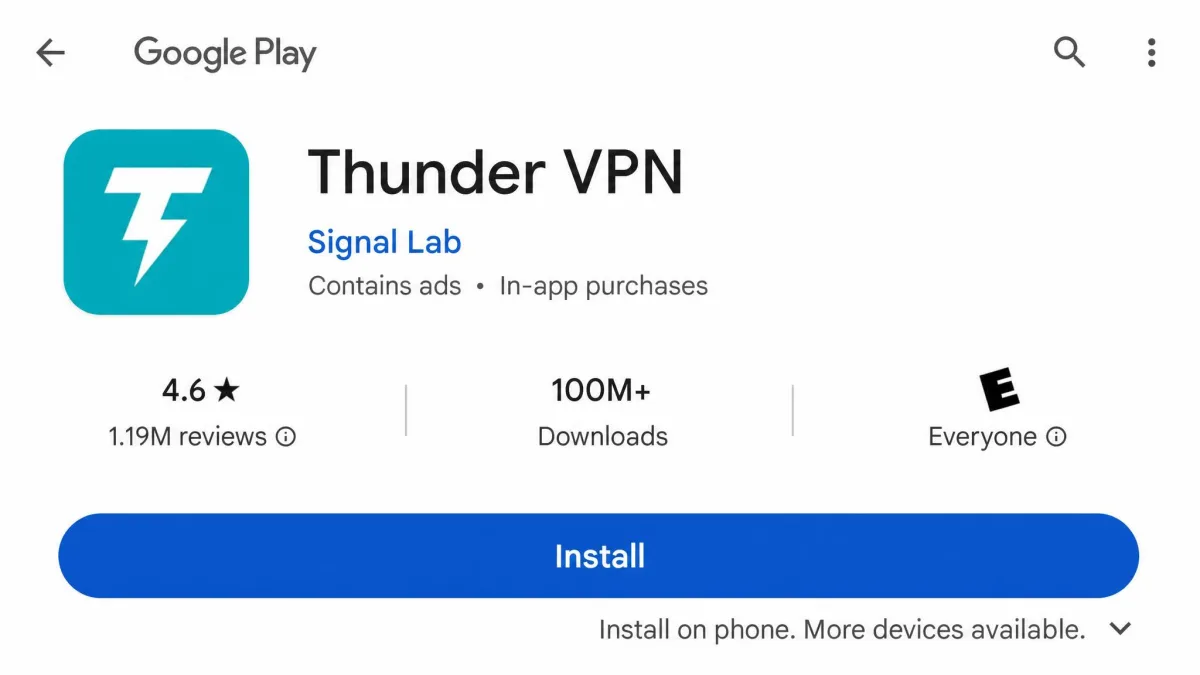
Thunder VPN is a free, Android-only VPN from a developer called Signal Lab. It promises unlimited bandwidth, one-tap connection, and no signup, and its Google Play listing badges more than 100 million installs. That reach makes it one of the most downloaded free VPNs on the platform.
The bottom line is less flattering. We put it through our usual speed, leak, and streaming checks. It connects fast, but it falls short everywhere it counts: no kill switch, dated SSL-only encryption, a logging policy that contradicts its own no-logs marketing, and support you cannot actually reach. It is fine for a quick, low-stakes connection on a phone. It is not a tool we would trust with anything private.
We tested the current Android app on a mid-range handset over several days. We checked speed on near and distant servers, watched for DNS leaks, and tried the usual streaming platforms. Here is what we found, starting with the quick verdict.
Thunder VPN at a Glance (Quick Verdict & Rating)
Thunder VPN is a free VPN built for one job: flipping on a quick connection from an Android phone without creating an account. Setup is genuinely fast. For casual browsing on public Wi-Fi it does technically encrypt your traffic. That is where the good news ends.
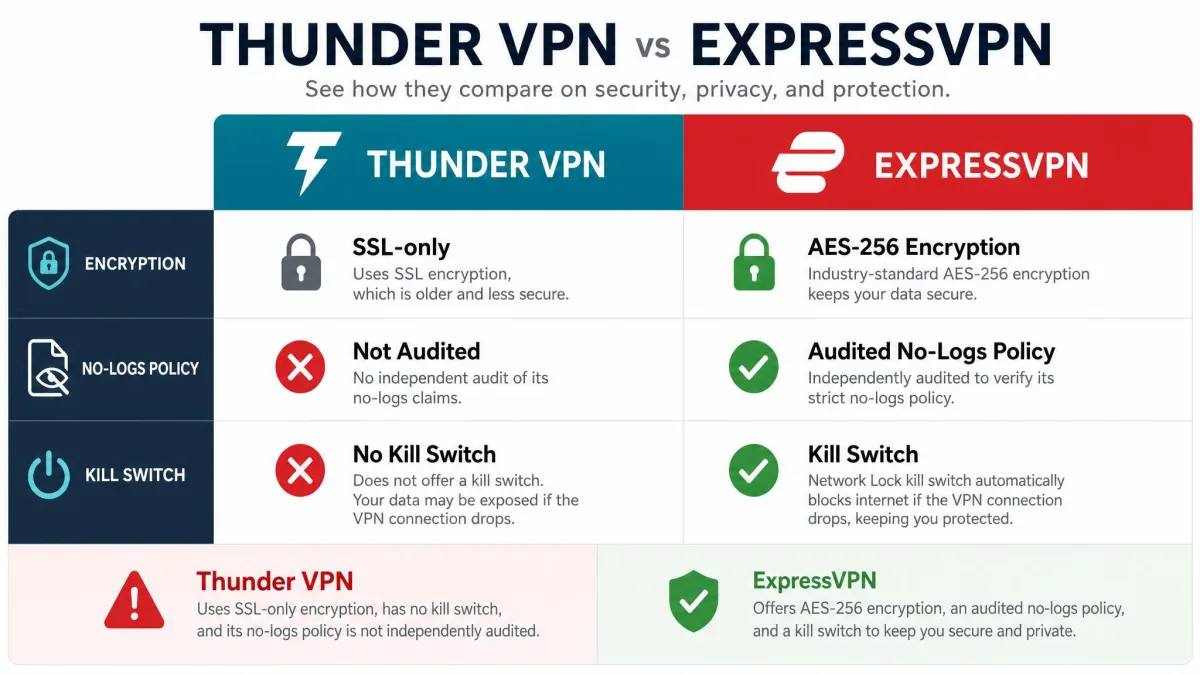
The service uses only SSL encryption and offers no kill switch. It logs connection data despite claiming otherwise. It cannot unblock Netflix, its server network is small and shrinking, and speeds collapse the moment you connect to anything far from home. There is no iOS app, no desktop client, and no working support channel.
We rate it 3.5 out of 10. It clears the lowest bar of encrypting a casual connection. But it misses the security, privacy, and streaming marks that separate a usable VPN from a risky one.
Thunder VPN Pros and Cons
Thunder VPN's strengths are shallow but real. It is free, it installs in under two minutes, and it asks for nothing personal up front. The weaknesses run deeper. They touch the core of what a VPN is supposed to do. We have summarized both sides below before digging into each area.
Pros
- Completely free with unlimited bandwidth on the basic tier
- Installs and connects in under two minutes, with no account or signup
- Simple, beginner-friendly interface anyone can use
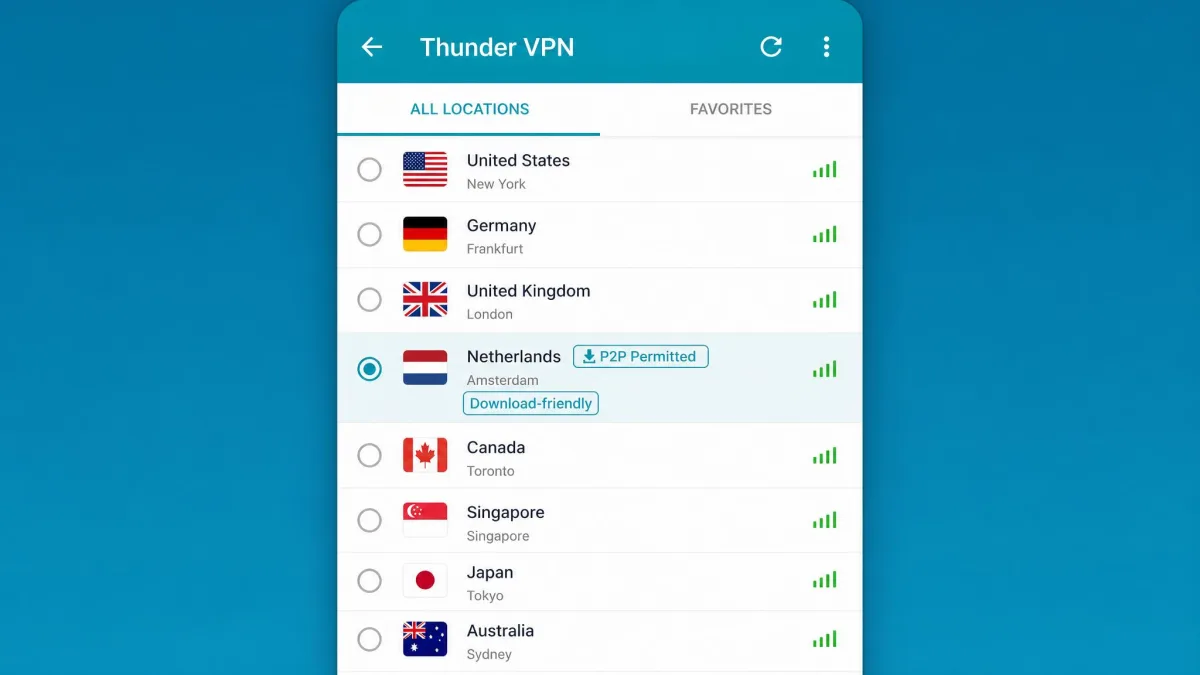
- Servers that permit P2P traffic
- Up to 5 simultaneous connections
Cons
- SSL-only encryption, with no OpenVPN, WireGuard, or IKEv2
- No kill switch to protect you if the connection drops
- Logs connection data despite its no-logs claims, with no independent audit
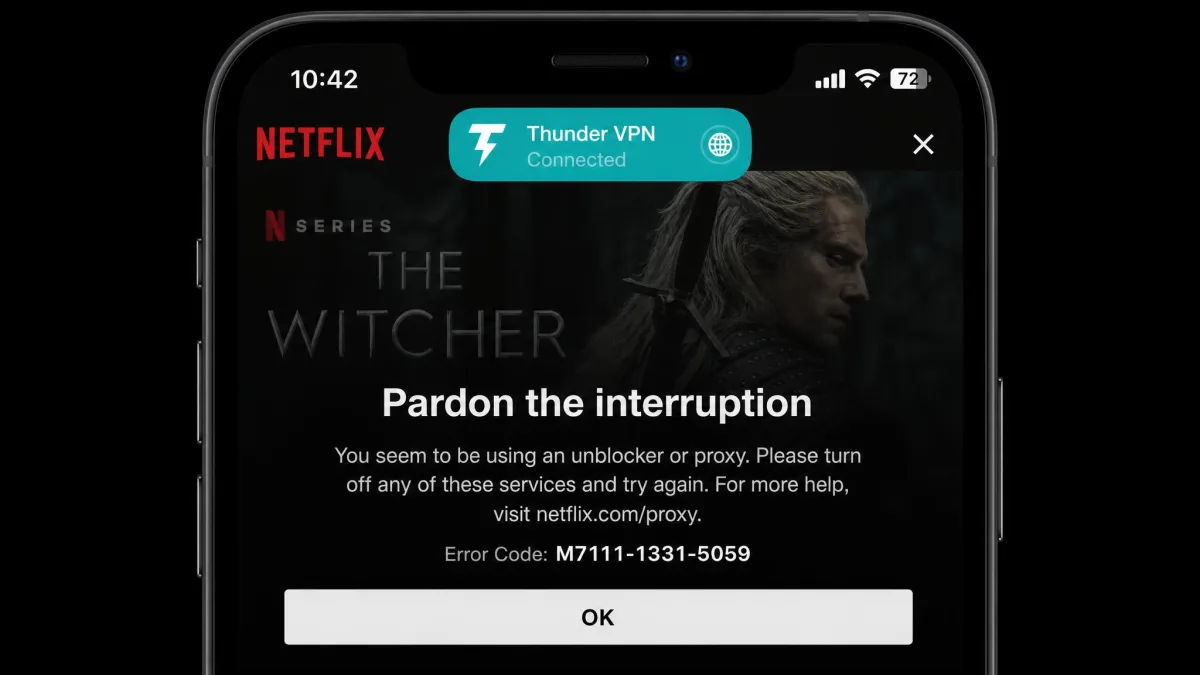
- Cannot unblock Netflix or other major streaming services
- Android only, with no iOS, Windows, or Mac client
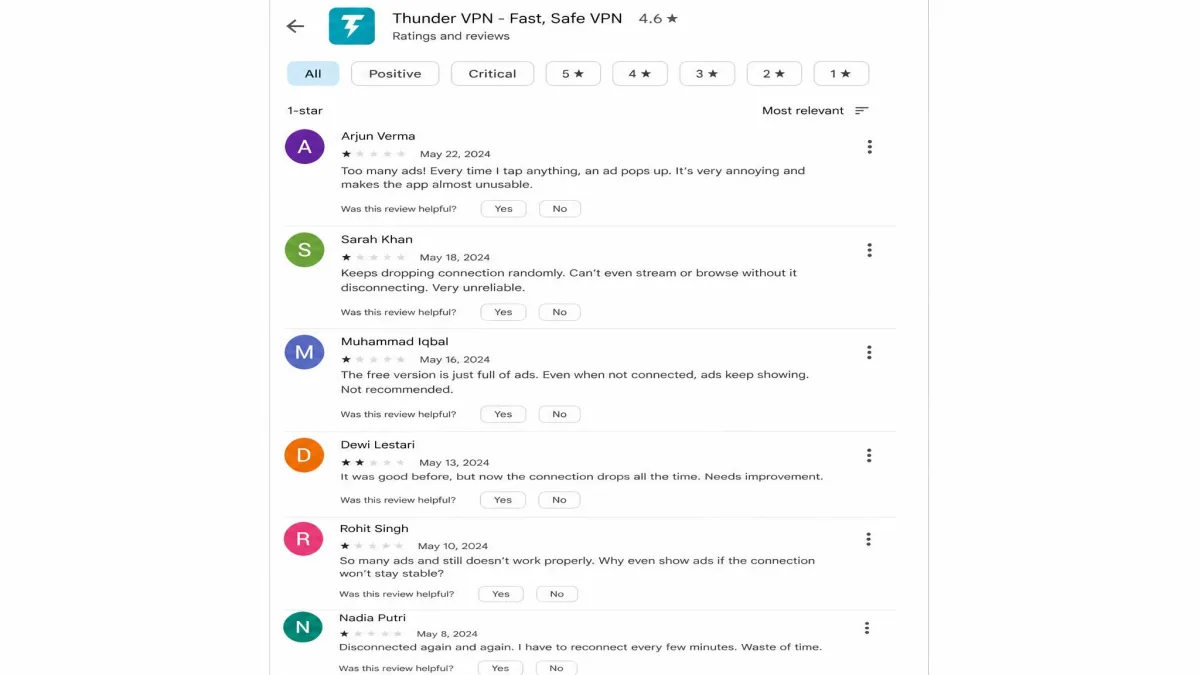
- Intrusive pop-up ads on nearly every connect and disconnect
- No working customer support channel
We judge every VPN against the same real-world benchmarks: measured speed on near and far servers, DNS and IP leak tests, and live streaming checks. Thunder VPN was quick to set up, which counts for something. But it failed the tests that decide whether a VPN is actually safe to rely on.
What Is Thunder VPN and Who Owns It?
Thunder VPN is a free mobile VPN developed by Signal Lab and distributed through the Google Play Store. It launched around 2017, though some sources put it a year later, so the exact start date is not firmly established. Its pitch has stayed consistent since then: free, unlimited, one-tap protection with no registration and no strings.
Ownership is where the questions begin. Signal Lab is the consistent developer name. But the company's location is reported inconsistently across sources, variously tied to the United States, California, Arkansas, and Hong Kong. That opacity is itself a red flag for a privacy tool. Jurisdiction determines which authorities can compel a provider to hand over data. A VPN based in a surveillance-friendly country behaves very differently from one based in a privacy haven, and here you cannot even tell which applies.
The app's Google Play page badges more than 100 million installs, which would put it among the most downloaded free VPNs on Android. The exact figure is disputed and may be considerably lower, so treat the count as unsettled. By any measure, though, the reach is large. You can see the current listing on Thunder VPN on Google Play, which also confirms the Android-only distribution. Popularity, though, is not the same as trustworthiness, and a big install count does not offset the transparency problems.
A free VPN still has to make money somewhere. When a provider will not clearly say who owns it or where it operates, and it logs more than it admits, the safest assumption is that your data is part of the business model.
Security and Encryption
Security is the category where a VPN either earns trust or loses it, and Thunder VPN loses it. The encryption is dated. The protocol options are nonexistent. The one feature that protects you during a dropout is missing entirely. We will take each piece in turn.
Encryption and Protocols
Thunder VPN relies on SSL encryption and offers no choice of protocol. There is no OpenVPN, no WireGuard, and no IKEv2, which are the standards modern VPNs are built on. SSL can secure a tunnel. But without AES-256 and a current protocol, you are trusting a design that the rest of the industry moved past years ago. The paid services we recommend later all default to AES-256 with an audited modern protocol, and they treat that as a baseline rather than a selling point.
For casual browsing on an untrusted network, that encryption is better than nothing. For anything you genuinely need kept private, it falls short of what even budget paid VPNs deliver as standard. The gap is not a rounding error. It is a generation of security engineering.
Kill Switch
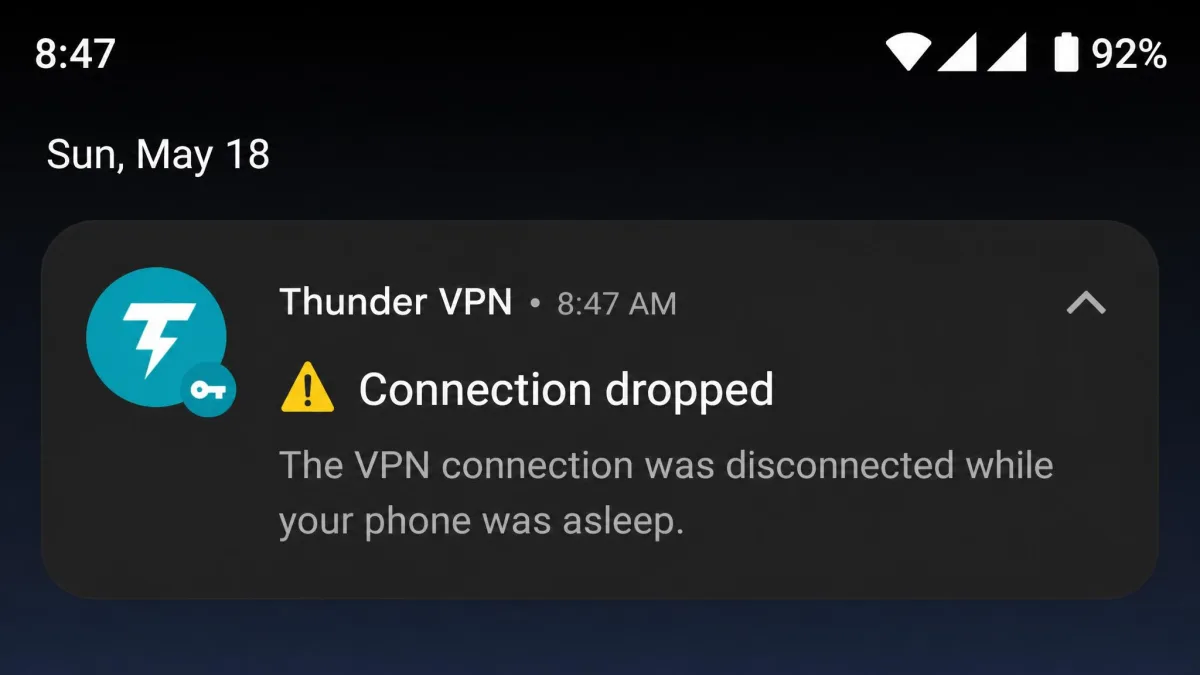
Thunder VPN has no kill switch. A kill switch cuts your internet the instant the VPN connection drops, so your real IP address is never exposed. Without one, any dropout silently leaks your traffic back onto the open network while the app still looks connected.
This matters more than it sounds. We found the connection can drop at random when the phone goes to sleep. On a VPN with no kill switch, that means your data can be exposed without any warning on screen. For anyone using a VPN to stay private rather than just unblock a site, a missing kill switch is close to a dealbreaker on its own.
Privacy and Logging Policy
Thunder VPN markets itself as a no-logs service. In practice, it collects a lot. It records connection timestamps, the amount of data you transfer, device identifiers, your operating system and ISP details, and the servers you select. That is a meaningful amount of metadata for a tool that claims to keep none. The mismatch between the marketing and the behavior is the review's central problem.
Look closely at what each of those data points reveals. The "no-logs" label starts to look hollow. Connection timestamps show when you were online. Bandwidth and data-transfer totals hint at what you were doing, whether that was a quick email check or a long streaming session. Device identifiers can tie a session back to your specific handset. The OS and ISP details narrow that further, right down to who provides your internet. Pair that with the server selections you make. The app is quietly assembling exactly the kind of activity trail a VPN is supposed to erase. An audited no-logs provider, by contrast, keeps none of that connection metadata and pays an outside firm to prove it, so there is nothing to hand over even if a court asks.
None of this has been checked by an independent auditor. There is no third-party confirmation of what is or is not retained. Combined with the unclear jurisdiction, that gap is the single biggest reason we cannot recommend Thunder VPN for privacy. A no-logs claim is only as good as the audit behind it, and here there is no audit at all. The services we recommend as alternatives have all submitted their no-logs policies to independent firms, which is exactly the accountability Thunder VPN lacks.
A no-logs promise means nothing without an independent audit, and Thunder VPN has none, while quietly logging the very connection data it says it does not keep.
— From our hands-on review
Speed and Performance
Speed is the one place a free VPN can still win, and Thunder VPN starts well before falling apart. On nearby servers the connection is usable for browsing and light streaming. The problem is distance.
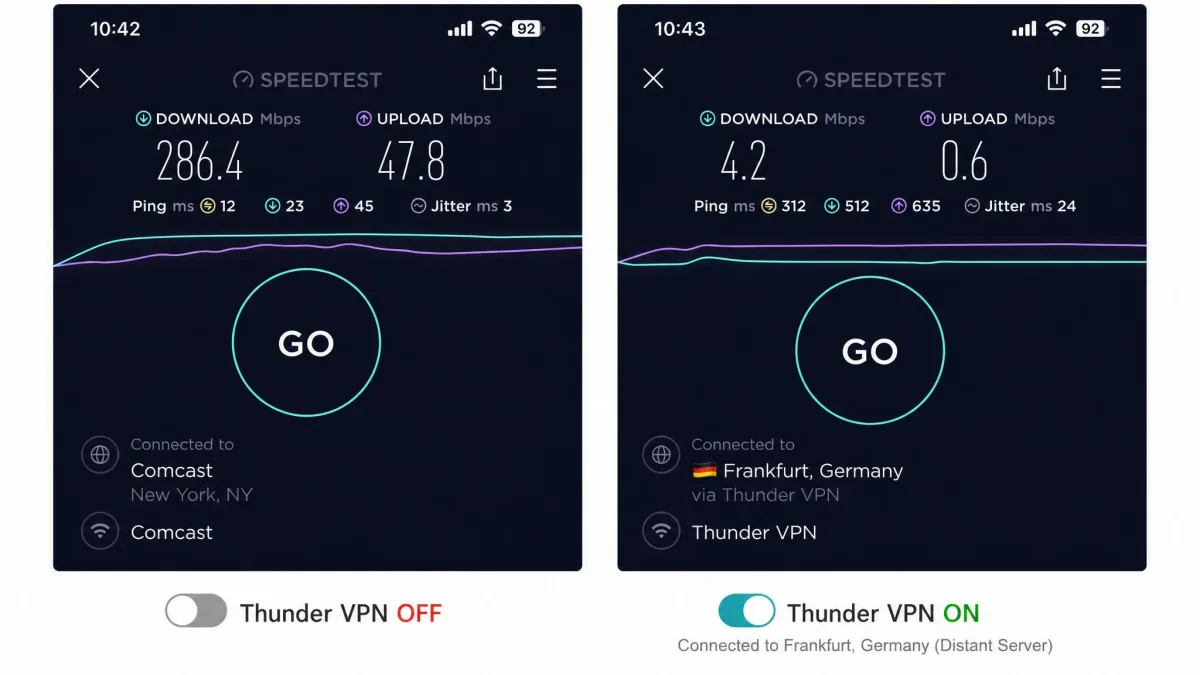
Speeds collapse on distant servers. The connection often drops to a fraction of the baseline, leaving nearby servers as the only practical option. International servers were slow enough to make gaming lag badly and stall video playback in our checks. Speeds also sag during peak afternoon and evening hours on the free servers. That is when the network is busiest and the free tier gets the leftover capacity.
Put a number on it and the picture stays grim, though the exact figure depends on the test. Reported speed loss runs from roughly 37 to 53 percent on nearer servers in the kinder measurements. On distant servers it climbs to around 87 to 89 percent in the harsher tests. At least one test saw throughput fall under a usable threshold on any server at all. Treat any single number with caution. The magnitude swings hard with the server, the time of day, and the tester. The direction is what stays consistent: the further you connect, the worse it gets. In practice the peak-hour sag stacks on top of the distance penalty. A late-evening connection to an overseas server is the worst of both worlds, and that is exactly when many people reach for a VPN to stream. Connect only to a server in your own region during quieter hours and the app is serviceable. Reach across an ocean at prime time and it becomes painful.
How We Tested Thunder VPN
We installed the current Thunder VPN app from Google Play on a mid-range Android phone. We used it as a daily connection over several days. We measured speeds on both nearby and distant servers, ran DNS and IP leak checks, and tried to stream from the major platforms. We also timed the setup, watched how the app behaved when the phone slept, and noted the ad behavior on connect and disconnect.
We do not accept vendor perks for the tools we review. We used the free tier exactly as a typical user would, without special access. That means the friction we hit, from the pop-up ads to the sleep-time dropouts, is the same friction any new user will run into.
Server Network and Locations
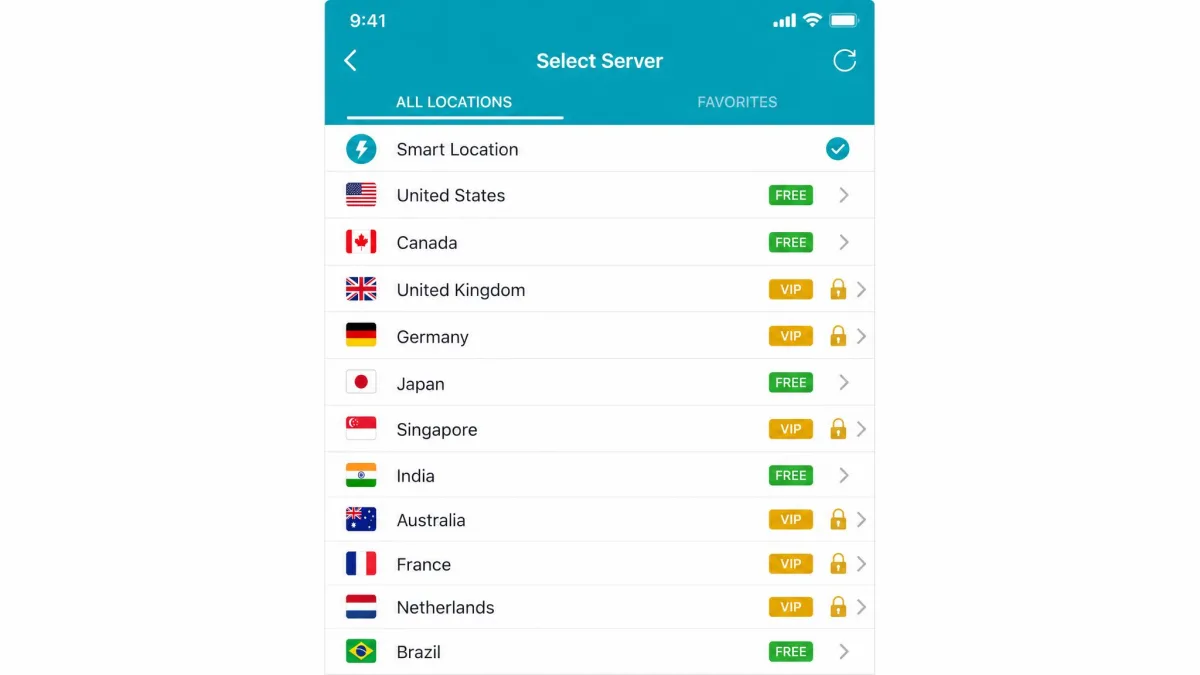
Thunder VPN runs a small server network, and its size is hard to pin down. The free tier offers around 8 countries and the VIP tier around 20, though the usable count may be as low as 4. The count differs sharply between sources and appears to have shrunk over time. The network size is unstable, so check the app before you rely on any particular location.
The app does not disclose an actual server count. Its claim of thousands of servers does not hold up, and there is no credible discrete figure to cite, so we treat the raw number as unknown. For context, the paid services we recommend below operate in 100 countries or more. That is why finding a fast, nearby server on Thunder VPN is often a matter of luck. A thin network also means the servers you can reach fill up faster, which feeds straight back into the peak-hour slowdown.
Streaming and Netflix Support
Streaming is a flat failure. Thunder VPN does not unblock Netflix, and the free tier is blocked from the major streaming platforms outright. In our checks, Netflix, Disney+, Hulu, BBC iPlayer, and HBO Max all failed to load through the VPN.
If your goal is watching a library from another region, this is not the tool for it. Even setting aside the block, the speeds on distant servers would not sustain smooth playback, so you would trade a proxy error for constant buffering. Any VPN bought primarily for streaming should be judged on whether it actually loads Netflix, and this one does not. The alternatives in the next section all pass that test as a matter of course.
Torrenting and P2P
Thunder VPN does allow P2P traffic on its servers, which is more than some free VPNs offer. On paper, that makes torrenting possible, and the app will not block the traffic outright.
In practice we would not recommend it. Torrenting exposes your real IP address the moment the tunnel fails. With no kill switch here, a dropout does exactly that. Add the logging of connection data and the unclear jurisdiction. The privacy protection you actually want while torrenting is the protection Thunder VPN does not provide. P2P support without a kill switch is a half measure, and for anything sensitive that half measure is not enough.
There is a practical problem on top of the privacy one. Torrenting large files is exactly the workload that punishes a slow, congested network. Thunder VPN's speeds already collapse on distant servers and sag during peak hours. A download that stalls halfway, or crawls for hours because the only usable server is overloaded, is a poor experience before you even get to the safety question. The audited VPNs we recommend below pair P2P-optimized servers with a kill switch and consistent throughput. You get both the protection and the speed the task actually needs. For occasional, non-sensitive downloads on a nearby server, Thunder VPN will technically work. But that is a narrow window, and it is not one we would stake anything private on.
Pricing, Plans, and Value
Thunder VPN is free to use, with unlimited bandwidth on the basic tier and no signup required. It also sells a paid VIP tier that unlocks additional server locations and removes some limits. There is no free trial and no money-back guarantee, so the VIP tier is a commitment with no safety net if you decide it was not worth it.
VIP pricing is reported anywhere from about $4.16 to $9.99 per month across reviews, and because billing runs only through Google Play, no single figure is reliable. Whatever the exact number, we would not pay it. At that price you are within reach of established, audited VPNs that outclass Thunder VPN on every metric that matters, from encryption to streaming to support. Paying for the VIP tier buys more servers on the same weak foundation, not a better VPN.
Free Version Limitations
The free version is the version most people will use, and it comes with real trade-offs. Expect intrusive pop-up ads on nearly every connect and disconnect, some running five seconds or longer. The free tier also has fewer server locations, is blocked from streaming, and shares the speed sag during peak hours.
None of these limits is unusual for a free VPN on its own. Taken together, though, they make the free tier a tool for occasional, low-stakes use rather than a daily driver. If you plan to leave a VPN on all day, the ad interruptions alone will wear thin quickly.
Thunder VPN supports up to 5 simultaneous connections, so a single install can cover a few Android devices at once. It requires Android 4.1 or newer, which covers almost any phone still in use.
Device Compatibility and Ease of Use
Thunder VPN is Android only. The official app runs on Android 4.1 and newer, and there is no first-party client for iOS, Windows, or Mac. A separate iOS app using the same name is an unrelated product, so do not assume the two are the same service. If your household runs iPhones or laptops, Thunder VPN simply does not cover them, and that alone rules it out for most people who want protection across devices.
Installation and App Interface
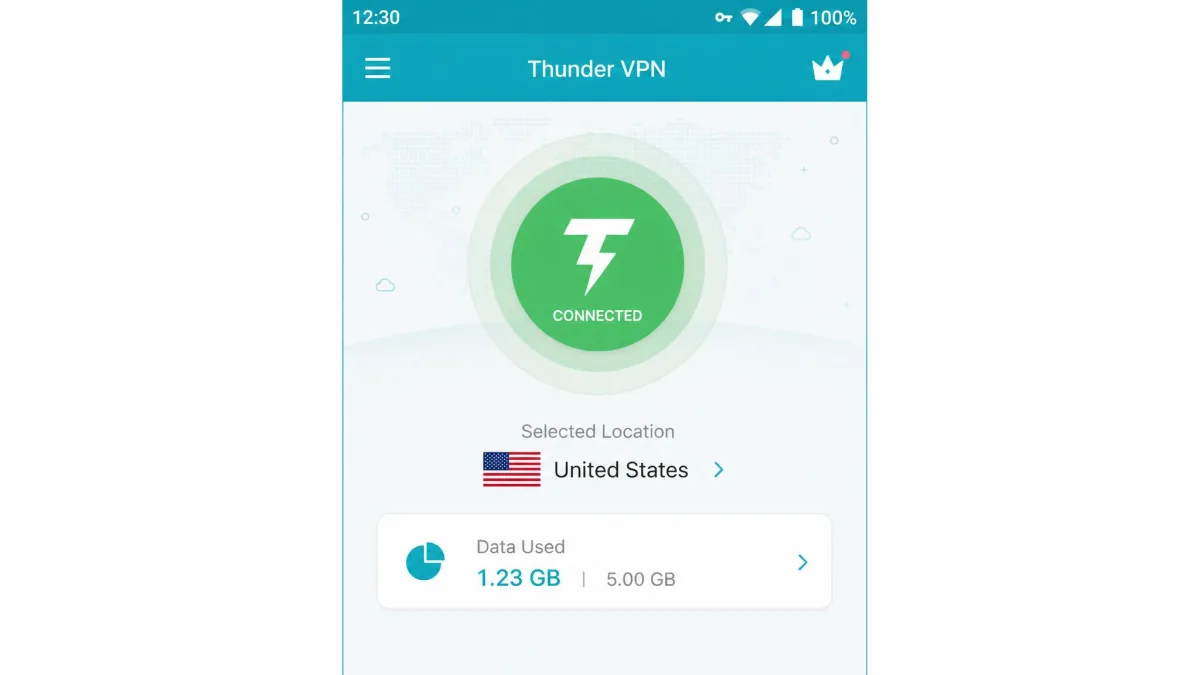
Setup is the app's strongest moment. Installation is genuinely fast: install, open, tap once to connect, with no account or signup, and you are protected in under two minutes. For a first-time VPN user, that friction-free start is a real point in its favor, and it is easy to see how the app racked up so many downloads.
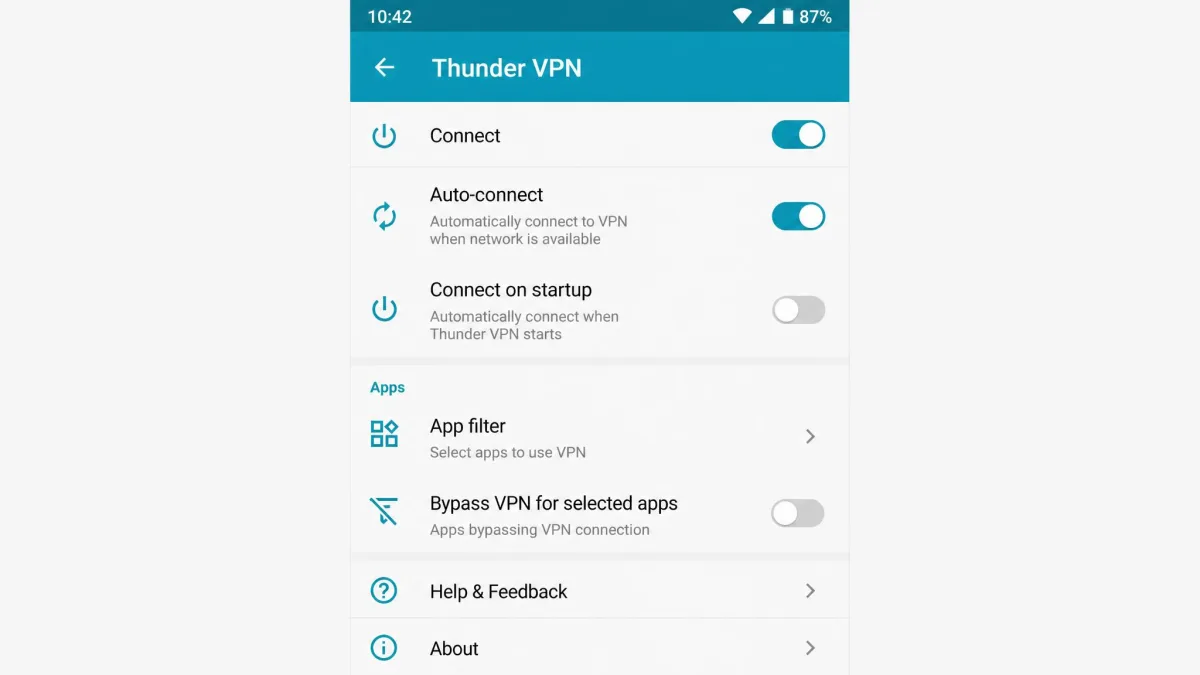
The interface is simple and beginner-friendly, but it offers almost no configuration. There is no protocol selector and little to adjust beyond a few toggles like auto-connect and an app filter for split tunneling. That simplicity suits newcomers and frustrates anyone who wants control. If you are new to VPNs generally, our guide to what a VPN is and how it works covers the basics before you install anything.
Customer Support
Support is effectively nonexistent. At best there is an email address, with no live chat and almost no help resources to speak of. We looked for a working way to reach the developer and came up empty. Users are largely left to vent through app-store reviews instead of getting a reply.
For a free app that is unfortunate but common. The real concern is the paid tier. If something goes wrong with a VIP subscription, there is no reliable channel to sort it out. There is no refund to request either, since the service does not offer one. That alone is reason to be cautious about paying. A paid product with no support is a paid product you cannot get help with. It also changes how you have to treat the app day to day. With no support and no documentation to fall back on, every problem becomes yours to solve alone. That could be a server that will not connect, a billing charge you did not expect, or the random dropouts we saw when the phone slept. The audited VPNs we recommend run live chat around the clock and searchable knowledge bases. That rarely feels important until something breaks. But that is exactly the moment when free stops looking cheap. For a tool you are trusting with your traffic, being able to reach a human when it misbehaves is not a luxury. It is part of the product.
Thunder VPN Alternatives
If Thunder VPN's gaps concern you, and they should, the fix is a paid VPN with real encryption, a kill switch, and an audited no-logs policy. The prices below are low enough that the free-versus-paid gap is smaller than it looks, especially once you factor in what the free tier costs you in speed, ads, and privacy. We rank more options in our full list of Thunder VPN alternatives.
| Product | Buy | Price | Servers | Streaming | Kill switch | Logging | Platforms |
|---|---|---|---|---|---|---|---|
 |
Free (VIP varies) | ~4-20 countries | Blocked | No | Logs data | Android only | |
 |
Check price → | ~$6.67/mo | 105 countries | Works | Yes | Audited no-logs | All major + routers |
 |
Check price → | ~$3.39/mo | 100+ countries | Works | Yes | Audited no-logs | All major + routers |
 |
Check price → | ~$2.19/mo | 100 countries | Works | Yes | Audited no-logs | All major + routers |
ExpressVPN is the pick we would hand a Thunder VPN user first. It runs the Lightway protocol with AES-256, an audited no-logs policy, a kill switch, and servers in 105 countries, and it works across every platform plus routers. NordVPN and Surfshark are strong, cheaper options that also unblock Netflix and carry independent audits, so the choice between them comes down to price and features rather than trust.
The Bottom Line: Is Thunder VPN Worth It?
Thunder VPN is easy to install, free, and fine for a quick, low-stakes connection on an Android phone. If all you want is basic encryption on public Wi-Fi for a few minutes, it does that much, and it does it without asking for your details.
For anything more, it is not worth it. The SSL-only encryption, missing kill switch, logging that contradicts the no-logs claim, unclear ownership, and blocked streaming add up to a service we cannot recommend for privacy, streaming, or torrenting. A little money spent on an audited VPN like ExpressVPN, NordVPN, or Surfshark buys a dramatically safer and faster experience. Free is only a bargain when the product does its job, and here it does not.