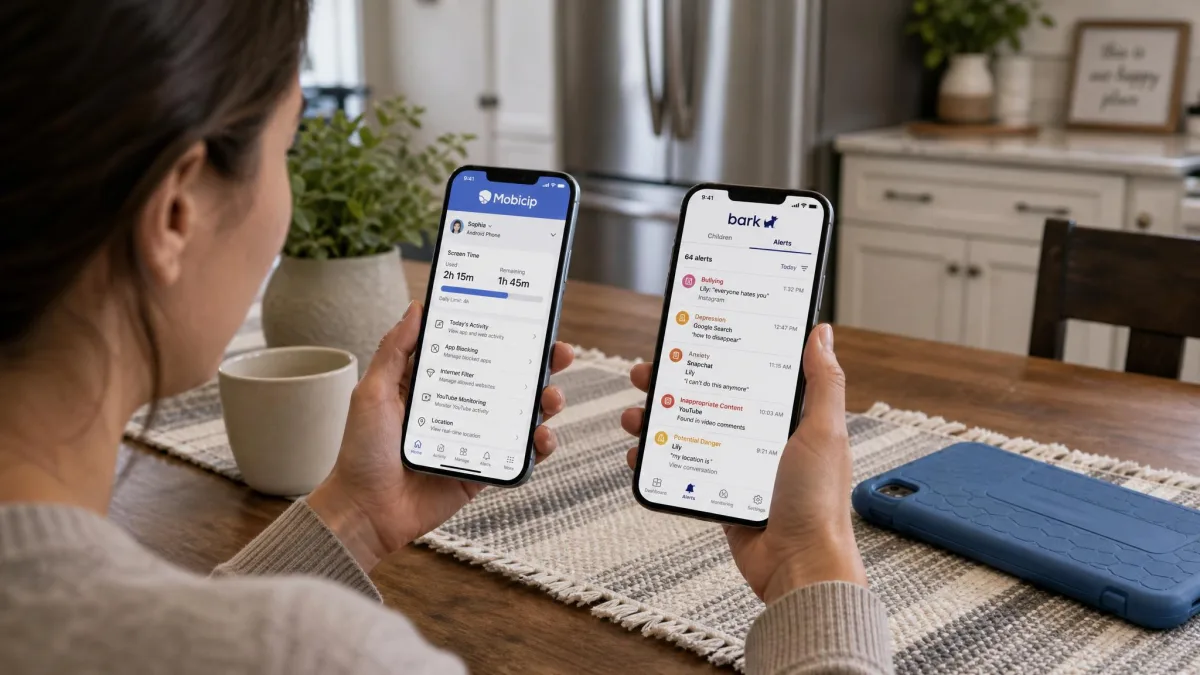
Mobicip is a device management and filtering app that blocks websites and apps and puts hard limits on screen time. Bark takes the opposite approach, using AI to read what your child sends and receives and then alerting you only when something looks wrong. That difference shapes everything else about the two products.
Mobicip suits parents who want visible controls on younger children's devices, at a low monthly price, across a wide mix of platforms. Bark suits parents of older kids and teens who want monitoring and alerts rather than lockdowns, and who will pay considerably more for that breadth.
Here is how the two compare on the features that decide most purchases.
| Product | Buy | Web filtering | App blocking | Screen time scheduling | Social and text monitoring | Alerts | Location and geofencing | Platforms supported | Parent accounts | Price |
|---|---|---|---|---|---|---|---|---|---|---|
 |
Check price → | Category filtering plus a profanity filter, VPN profile required | Category blocking, whitelist-only mode, install alerts | Daily and weekly schedules, age-based recommendations, Lock All Devices, Vacation Mode | Snapchat and Facebook only | Activity reports and app install alerts | Real-time location, location history, geofencing alerts | iOS, Android, Windows, Mac, Chromebook, Kindle Fire | 2 parents, separate logins | From $2.99/mobilled annually |
 |
Check price | Category-based website blocking | Individual app blocking, installs flagged after the fact | Daily schedules only, no overall device time cap | Texts, email, YouTube and 30+ apps | AI alerts for bullying, self-harm, predators, profanity and violence | Geofencing and check-in requests, no location history | iOS, Android, Amazon devices | Shared login or Bark hardware | $14/mo Android, $20/mo iOS |
Mobicip vs Bark at a Glance
The table above is the short answer, but the shape of the difference matters more than any single row. Mobicip is built around control, so the parent decides in advance what the child can reach and for how long.
Bark is built around visibility. It mostly lets the child use their device normally and tells you when the content crosses a line you would want to know about.
Neither one is strictly better. A nine-year-old with a first tablet is a filtering problem, while a fifteen-year-old with a group chat is a monitoring problem, and the two apps solve different halves of that.
If you have children at both ends of that range, price the two plans against each other carefully. Mobicip charges by device count while Bark charges per family, so the maths flips depending on how many screens are in the house.
Pricing and Plans Compared
Price is where the two apps separate most sharply, and it is the reason many families settle the question before comparing a single feature.
Mobicip pricing
Mobicip runs three tiers, all billed annually. Lite is $2.99 per month and covers up to 5 devices, Standard is $4.99 per month for up to 10 devices, and Premium is $7.99 per month for up to 20 devices.
The device count is the only thing that changes between tiers on Mobicip's pricing plans, so a small family gets the full feature set at the lowest price.
There is a 7-day free trial with access to premium features, backed by a 30-day money-back guarantee if you change your mind after paying.
Bark pricing
Bark's price depends on which phone your child carries, which catches a lot of parents out. On Android the Bark app is $14 per month or $99 per year, while on iOS it is $20 per month or $148 per year with the Bark Sync smart charger included.
Bark's plan tiers also include a lighter option, Bark Jr, though the quoted figure varies between $5 and $5.99 per month depending on where you buy it and whether tax is shown.
Bark's own hardware sits alongside the app. Bark Home is $6 per month or $79 as a one-time purchase, and Bark Phone service plans run from $29 per month on Starter up to $79 per month on Advanced with unlimited data.
Bark also offers a 7-day free trial, but it asks for payment details before the trial starts. Cancelling is straightforward, so that is a friction point rather than a trap.
Which offers better value
| Plan | Monthly (billed annually) | Devices covered |
|---|---|---|
| Mobicip Lite | $2.99 | Up to 5 |
| Mobicip Standard | $4.99 | Up to 10 |
| Mobicip Premium | $7.99 | Up to 20 |
| Bark app, Android | $14 ($99/year) | Unlimited |
| Bark app, iOS | $20 ($148/year) | Unlimited |
| Bark Home hardware | $6 (or $79 one-time) | Home network devices |
On raw cost, Mobicip wins by a wide margin. Its top tier covers 20 devices for less than half of what Bark's cheapest app plan costs a single family.
Bark's counter-argument is that its subscription covers unlimited devices and accounts, so a large family with several teenagers narrows the gap. The monitoring breadth is what you are paying for, not the device allowance.
Device and Platform Compatibility
Mobicip covers more ground. It runs on iOS, Android, Windows, Mac, Chromebook and Kindle Fire, which matters if your child does homework on a laptop and gaming on a tablet.
Bark's app covers iOS, Android and Amazon devices, and it reaches computers, TVs and consoles only through the Bark Home hardware you buy separately.
There is a deeper split underneath the platform list. Bark's monitoring runs noticeably deeper on Android, where browser tracking works across Chrome, Firefox and the default browser, while on iPhone it leans on Apple's own parental controls.
That gap is not a small one, and it is worth knowing before you subscribe in an iPhone household. It is also worth checking whether the free tools already on the device, such as Google Family Link, cover part of what you need.
Content and Web Filtering
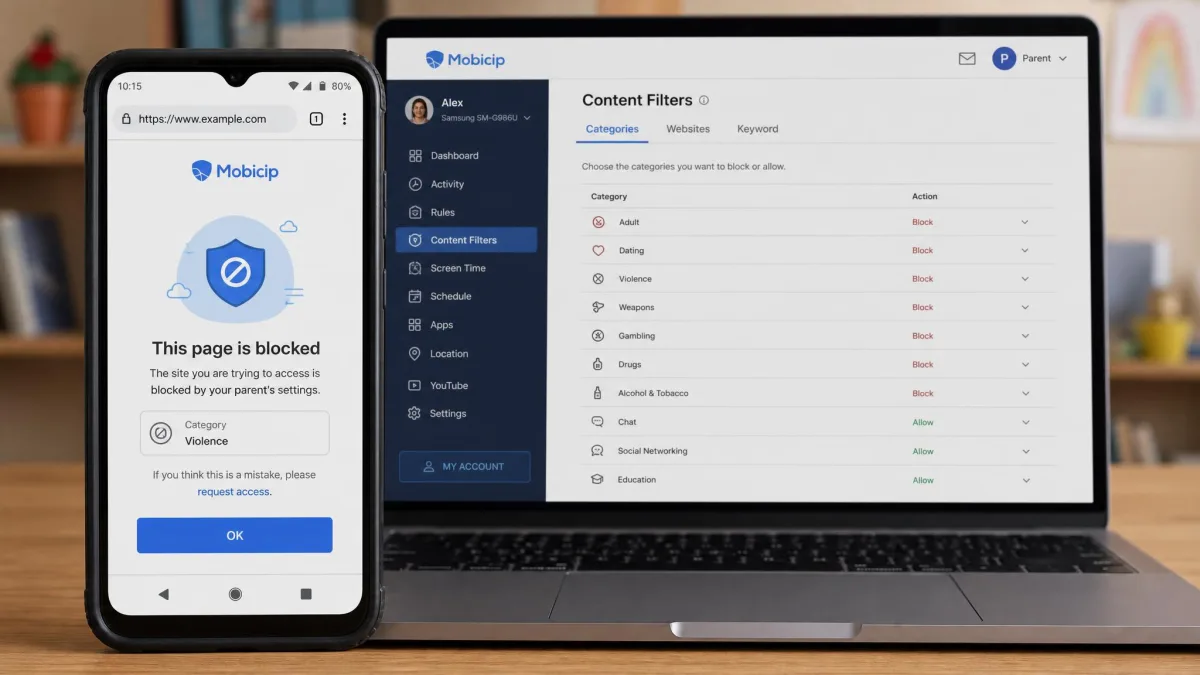
Mobicip filters by category and adds a profanity filter on top. The published category count varies between roughly 15 and 20 depending on which list the app surfaces, so treat the headline number loosely.
In practice the filter is dependable in the mainstream browsers. Mobicip blocks inappropriate content reliably in Chrome, Edge and Firefox, though it occasionally blocks safe sites by mistake.
The custom blacklist is the weaker half. Some manually blocked sites still load, and recurring parent complaints centre on the filter missing sites they asked it to block while blocking sites they had already allowed.
One setup detail decides whether any of this works at all. Mobicip's internet filtering only starts once the VPN profile is installed on the child's device, and skipping that step quietly leaves filtering switched off.
Bark filters websites by category too, though it does not publish a firm category count. Filtering is the supporting act in Bark's design rather than the main event.
After installing Mobicip on a child's phone, open a browser on that device and try to reach a site you know should be blocked. It is the fastest way to confirm the VPN profile actually took.
Screen Time Limits and Scheduling
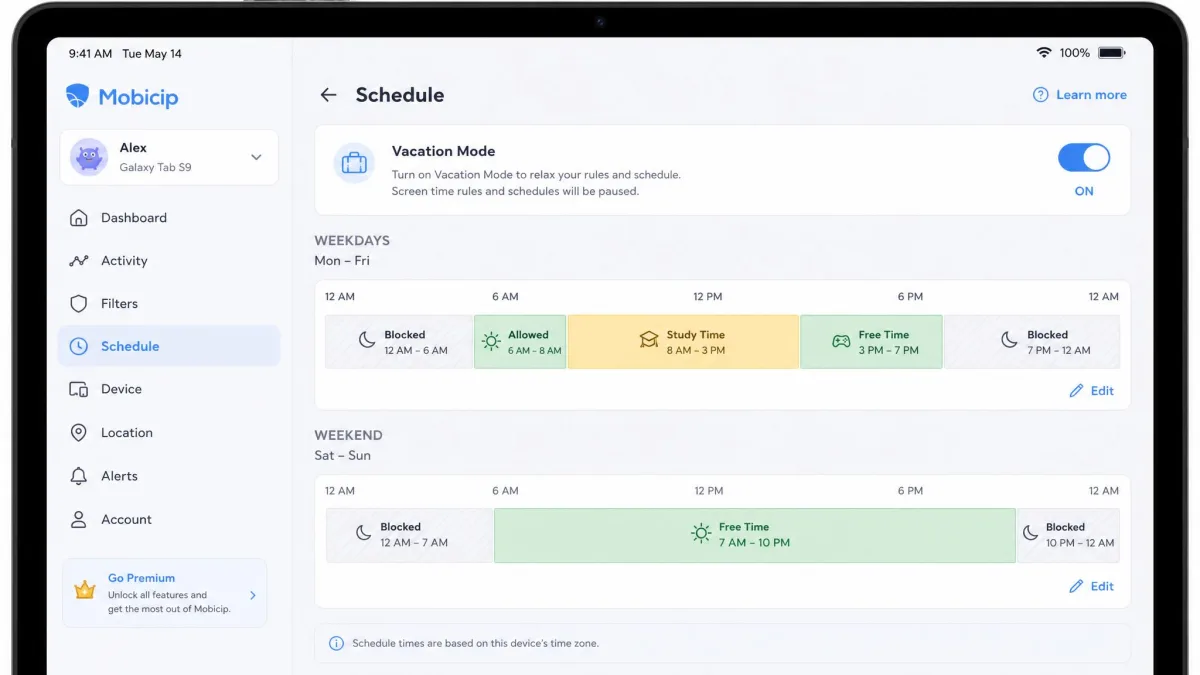
This is Mobicip's strongest area. It offers daily and weekly schedules, age-based screen time recommendations, a Lock All Devices button and a Vacation Mode for school holidays.
The scheduled lockdowns fire on time, and both the Lock All Devices button and Vacation Mode work as advertised.
Children can also request extra time through a notification the parent approves or denies, which turns a hard cutoff into a short conversation instead of an argument.
Mobicip has one real limitation here. It cannot set time limits on individual apps, only on the device overall, so a child who must use one app for schoolwork is limited on everything or nothing.
Bark handles daily schedules but has no overall device time cap and no equivalent to any of those four scheduling tools, so it is the weaker option when your goal is simply less screen time.
App Blocking and Device Management
Mobicip blocks apps by category, supports a whitelist-only mode where nothing runs unless you approve it, and sends alerts when a new app is installed.
Bark blocks individual apps and flags installs after the fact rather than before. For a teenager that is often enough, and for a younger child it usually is not.
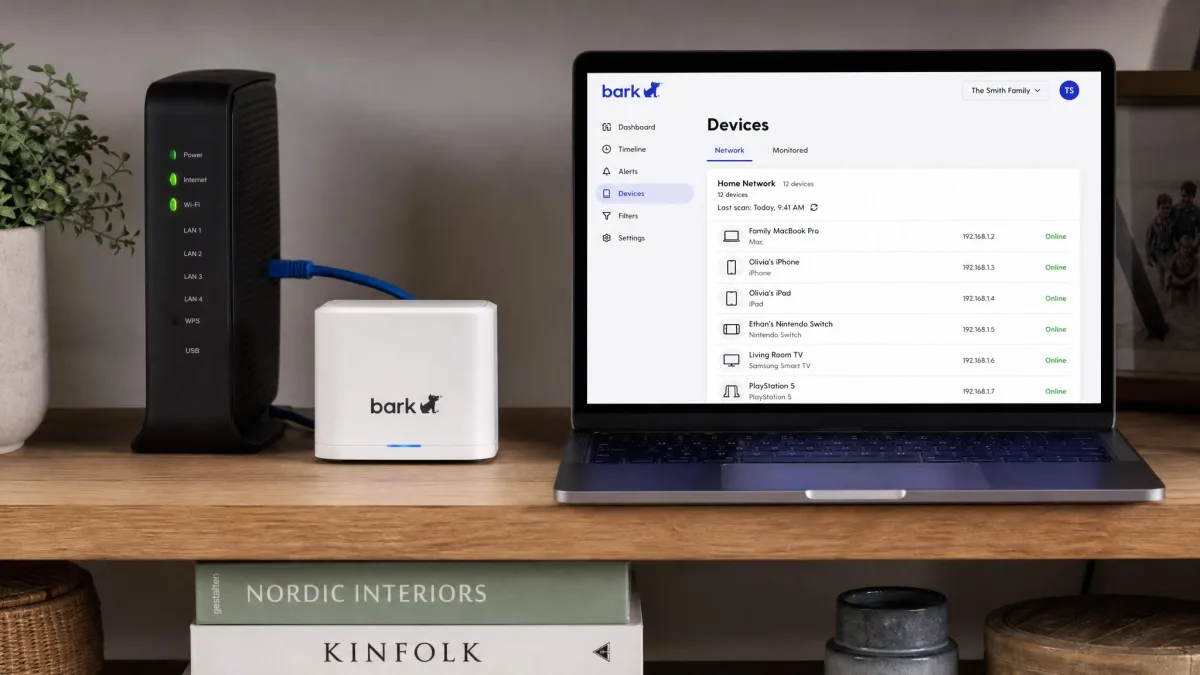
Bark's broader device management lives in hardware. Bark Home extends blocking and schedules to TVs, consoles and computers on your home network, which is the piece the app alone cannot do.
Social Media, Text and Message Monitoring
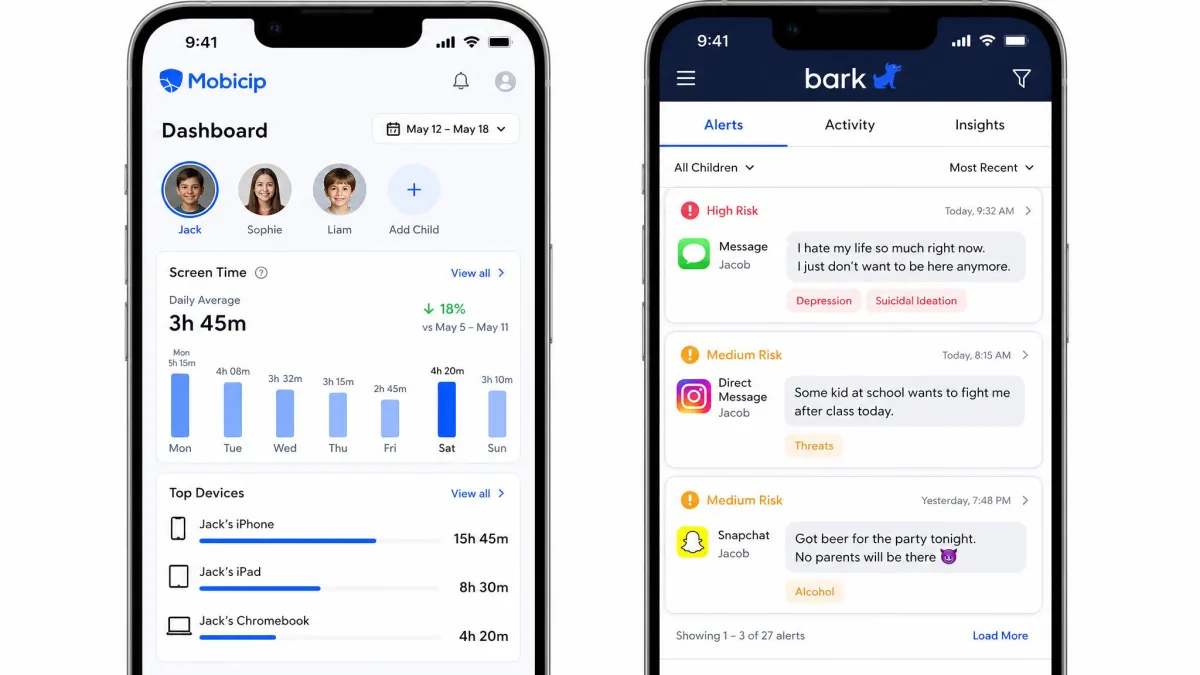
Here the ranking reverses completely. Bark's headline figure is texts, email, YouTube and 30+ apps and social media platforms, and that breadth is the entire reason the product exists.
The platform breakdown behind that figure is uneven. Bark's social monitoring covers 15 apps on both iOS and Android plus 8 additional apps on Android only, a list that includes Instagram, TikTok, Discord and Snapchat.
Expect a wait when you first connect an account. Bark scans about 60 days of back social media history on the first connection, so the initial sync is not instant.
Mobicip's social media monitoring covers Snapchat and Facebook only, with no TikTok or Instagram support. For most families with teens, that is not enough to call it monitoring at all.
If message monitoring is the reason you are shopping, the Surgeon General's advisory on social media and youth mental health is worth reading first, because it frames what to watch for rather than how much to watch.
Alerts and Reporting
Mobicip's alerting is activity-based. You get activity reports summarising what was visited and used, plus notifications when a new app is installed.
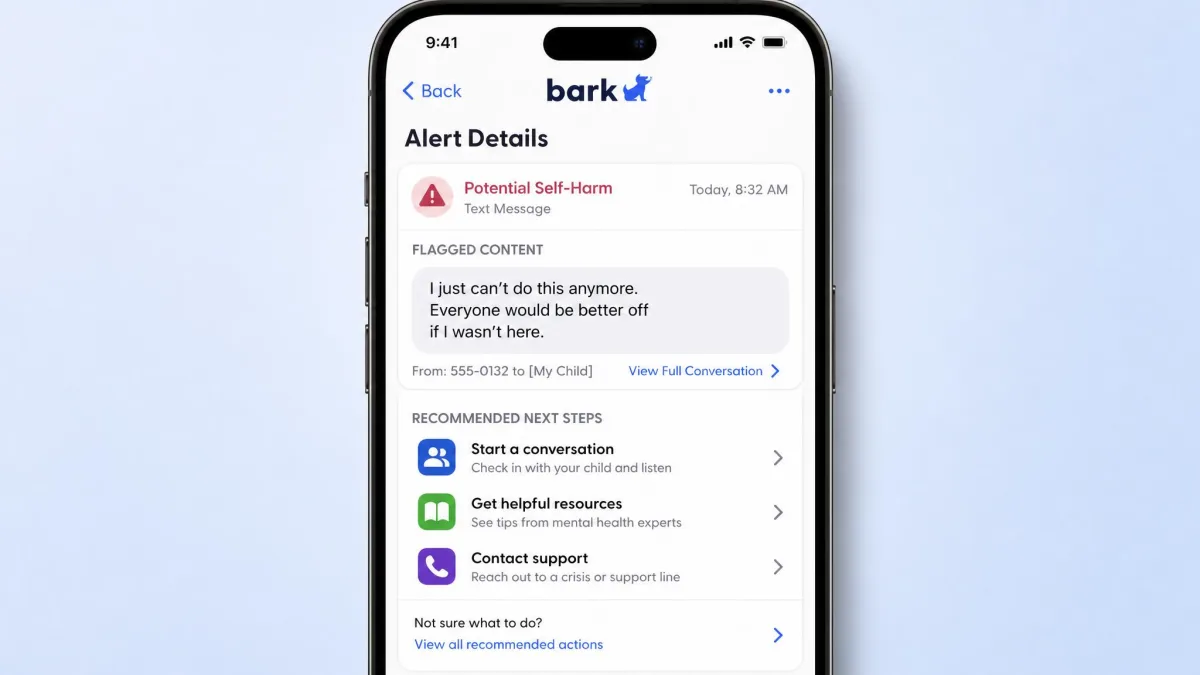
Bark's alerting is content-based. Its AI flags bullying, self-harm, predators, profanity and violence, then sends you the excerpt and some guidance on how to respond.
The alerts are not always right. In our testing an emoji-heavy text with a beer mug triggered an alcohol alert, and a haircut appointment email came through flagged as a self-harm risk.
That noise is manageable. Alert sensitivity can be dialled down with help from support once the false-positive rate gets tiring.
Mobicip tells you what your child did. Bark tells you what your child said, and then guesses at what it meant.
Location Tracking and Geofencing
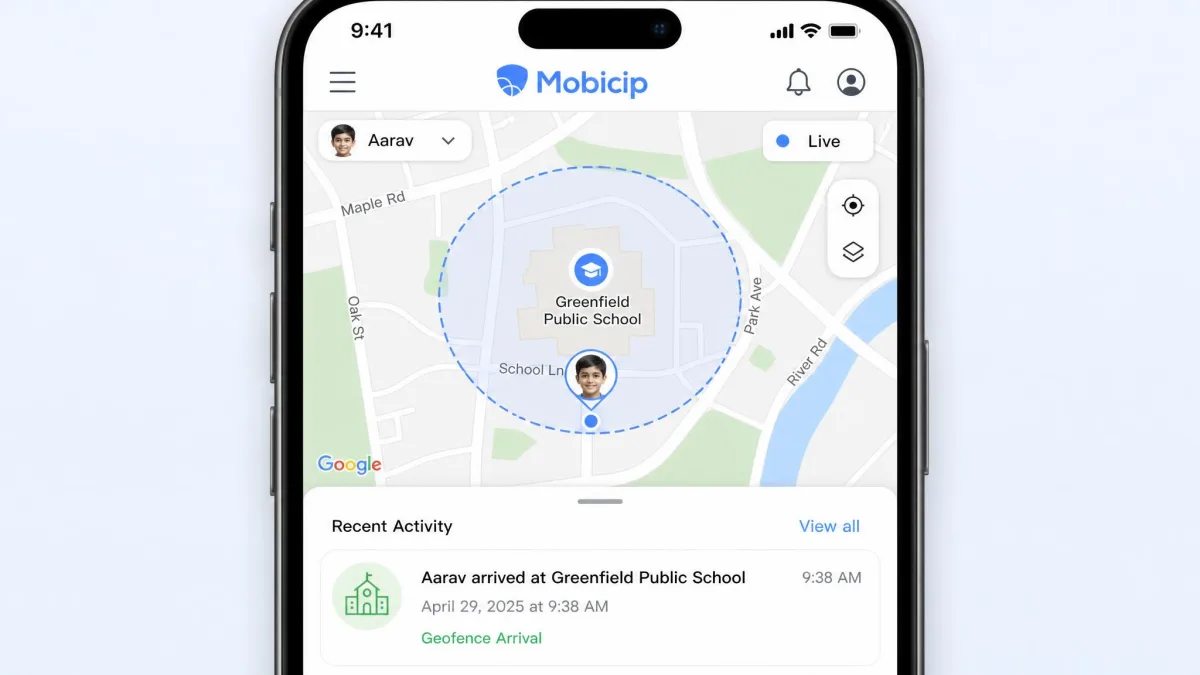
Mobicip has the fuller location toolkit. It offers real-time location, location history and geofencing alerts, and the live location reads accurately with geofence zones triggering reliably.
Bark covers geofencing and check-in requests but keeps no location history, so you can see where a child is now without reconstructing where they were yesterday.
For most parents that history is the deciding detail. Knowing whether a child actually arrived at practice last Tuesday is a different question from knowing where they are right now.
Setup and Ease of Use
Neither app installs in two minutes, and both have specific prerequisites worth knowing before you start.
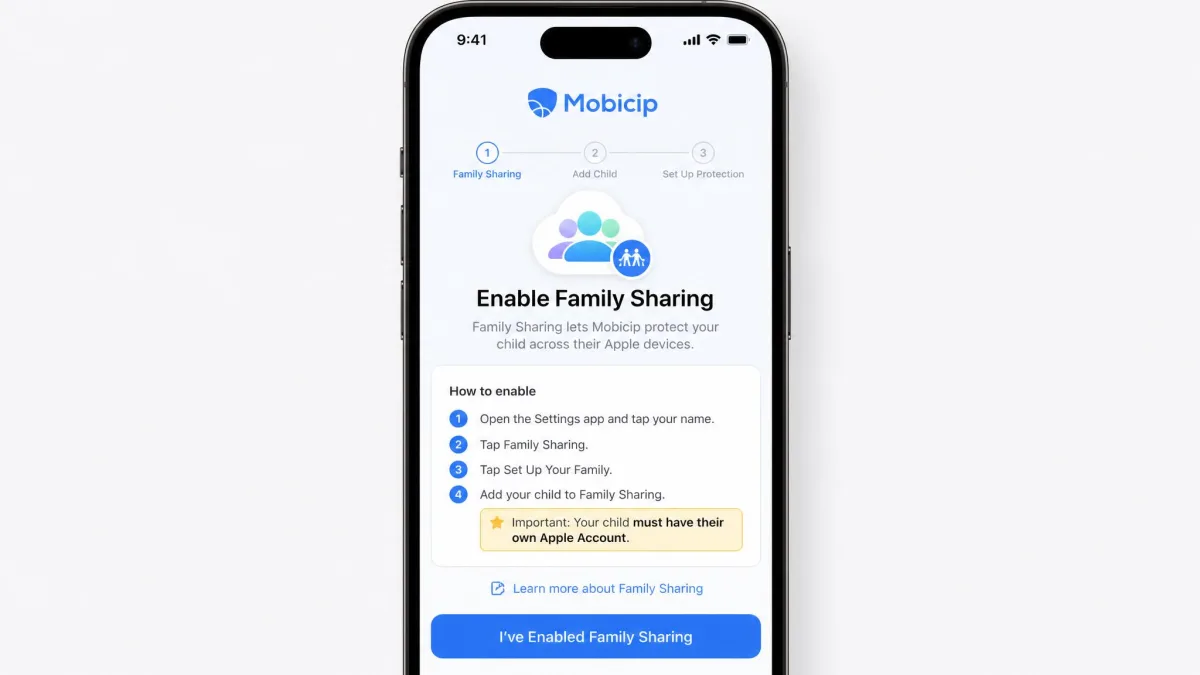
Mobicip's iOS setup requires Family Sharing to be turned on and a proper child Apple account in place. On mobile the process is guided, with QR-code login and short video walkthroughs for some steps.
Installation can still stall. Progress bars sometimes barely move past the ten-minute mark, and removing an old VPN MDM profile is the usual fix when the connection will not complete.
The in-app settings come with little explanation once you are in, so a few features take trial and error before they make sense.
Bark's iPhone setup is slower. It takes roughly 20 minutes per child, requires several account passwords entered by hand, and often has to be done from a desktop computer rather than a phone.
The trade is that Bark asks more of you once and less afterwards, because there are fewer rules to maintain. Mobicip asks less up front and more on an ongoing basis as schedules and categories need tuning.
Customer Support
Setup is where you will need help, and Bark comes out ahead on service. Its support is the better of the two in practice, and the fact that an agent will tune your alert sensitivity for you is the clearest example.
Mobicip covers the basics well enough on paper. You can reach the company by live chat, email, a web contact form or a scheduled call with a support specialist, and there is a knowledge base and a community forum alongside those. Email to support@mobicip.com is answered within 24 business hours. What you cannot do is pick up the phone and get a person, because there is no live inbound phone line; phone help happens only as a call you book in advance through the support team. Live chat runs roughly from 7:00 AM to midday EST on most days of the week, though the exact window varies.
Both companies handle children's data, so read each privacy policy before you install, particularly if you plan to monitor a teenager's messages.
Pros and Cons
Mobicip pros and cons
Pros
- Far cheaper, starting at $2.99 per month billed annually
- Widest platform coverage including Windows, Mac and Chromebook
- Strongest screen time scheduling, with Vacation Mode and a Lock All Devices button
- Real-time location plus location history and geofencing
- 2 parents get separate logins, with a 30-day money-back guarantee
Cons
- Social monitoring stops at Snapchat and Facebook
- Filtering only works once the VPN profile installs correctly
- No per-app time limits, only device-wide limits
- Custom blacklist behaves inconsistently
Bark pros and cons
Pros
- Monitors texts, email, YouTube and 30+ apps and social platforms
- AI alerts flag bullying, self-harm, predators, profanity and violence
- Unlimited devices and accounts on one family subscription
- Support that will tune alert sensitivity for you
- Optional Bark Home, Bark Phone and Bark Watch hardware
Cons
- Much more expensive, and priced differently on iOS and Android
- False positives are common until sensitivity is adjusted
- No overall device screen time cap
- iPhone coverage is thinner than Android coverage
- No location history
What Real Users Say
The recurring Mobicip complaint is consistency rather than capability. Parents report the filter missing sites they asked it to block while blocking sites they had already allowed, along with failed installs on Android.
The Google Play community rates Mobicip 3.2 out of 5, though store ratings move continuously as new reviews land, so treat that as a snapshot.
Bark's user feedback splits along the same line our own use did. The alerts catch things parents would never have found, and the false positives wear thin until sensitivity is dialled back.
Who Should Choose Mobicip
Choose Mobicip if your children are younger, if you have a lot of devices, or if the family budget is the deciding factor. It is the better app for setting boundaries and keeping them.
It also wins when the devices are mixed. A household running Windows laptops, Chromebooks and a Kindle Fire has no realistic alternative between these two.
Pick it as well in these cases:
- Two parents need separate logins rather than a shared one
- Location history matters as much as live location
- You want a money-back window after the trial ends
Who Should Choose Bark
Choose Bark if your child is a teenager with real social independence and the question you are trying to answer is what is happening in their messages, not how long they are on the phone.
Bark is also the better fit for large families, since one subscription covers unlimited children and devices. If your teen carries an Android phone, you get the deeper version of the product for the lower of the two prices.
Bark is worth the extra outlay when:
- Your child's risk is content and contact, not hours on a screen
- The phone in question runs Android, where coverage is deepest
- You have more devices than any Mobicip tier would cover
Be ready to spend an evening on setup and a week tuning alerts before it settles.
Verdict: Mobicip vs Bark
These two apps answer different questions, so the winner depends on which question is yours.
Frequently Asked Questions
What happens to monitoring when my child turns 18 or leaves the family plan?
Do either of these work on a school-issued Chromebook with a managed profile?
Do I need Bark Home if every device in the house is a phone?
Does Bark block websites and apps?
Does Mobicip monitor text messages?
Which works better on iPhone?
Can a child bypass either app?
Do Mobicip and Bark offer a free plan?
Whichever you pick, install it on one device first and live with it for a week before rolling it out to the whole family. The app is only part of the answer, and the conversation around it does the rest.