McAfee VPN is the virtual private network that ships inside McAfee's antivirus bundles, and most people meet it as a checkbox in a McAfee+ or Total Protection plan rather than a service they set out to buy. It has gone by two names: the older Safe Connect app and the newer Secure VPN built into the McAfee+ suite. Both run the same underlying engine, so this review treats them as one product with one job, which is to encrypt your connection and hide your IP address.
So is it any good? Our short answer is that it is fine for casual, everyday protection on public Wi-Fi and a real letdown if you want speed, streaming, or a privacy-first service. It uses strong encryption and connects in a single tap, but it is slow on distant servers, unreliable with Netflix, and based in the United States. If you already pay for McAfee antivirus, it is a reasonable freebie. As a VPN you would choose on its own merits, it trails the market leaders by a wide margin.

To reach that verdict, we ran McAfee VPN across Windows, iOS, and Android over a week of daily use, testing connection speed, DNS and WebRTC leaks, streaming, and torrenting against the benchmarks we use for every VPN. We connected to nearby and distant servers, measured latency before and after connecting, and checked how the apps behaved when a connection dropped. The findings below are what that testing showed.
Quick verdict: McAfee VPN at a glance
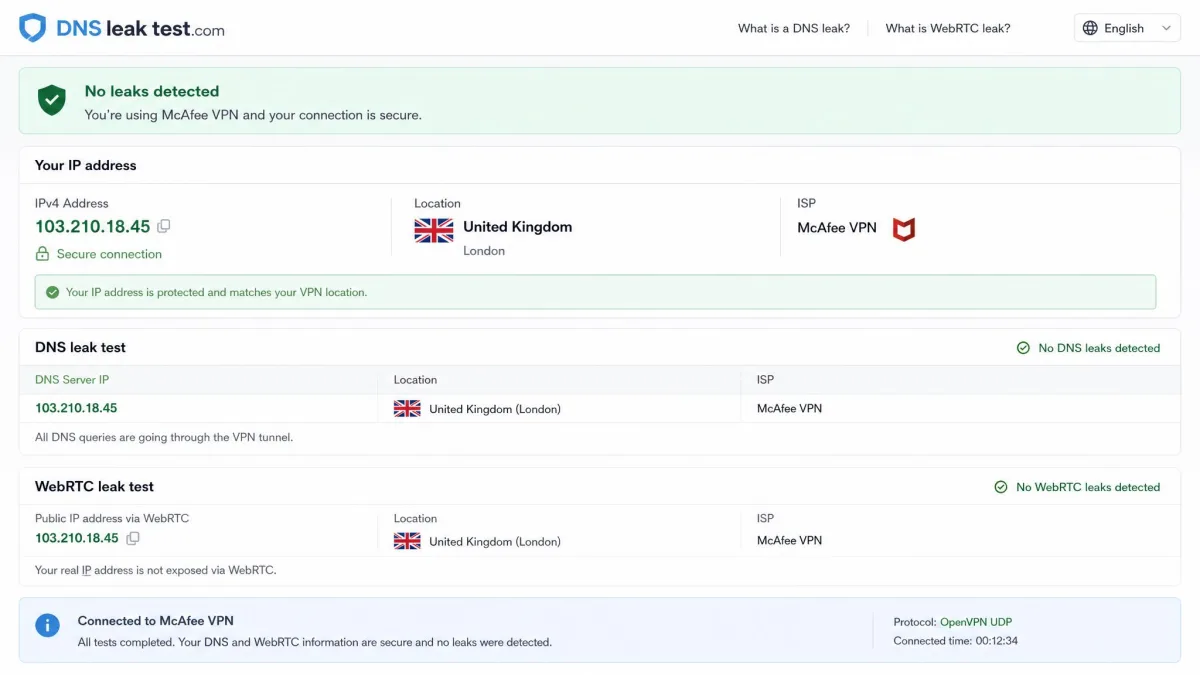
McAfee VPN earns its keep as a convenience feature, not as a destination VPN. The security fundamentals are sound: AES-256 encryption, DNS leak protection, and a clean set of mobile apps that anyone can operate. In our leak tests it held up, with no DNS or WebRTC leaks on any platform we tried.
The problems start once you ask it to do more than shield a coffee-shop connection. Speeds drop steeply the farther you reach, streaming is hit and miss, and the privacy story is weaker than the antivirus brand suggests. For a household that already owns McAfee+, it is a sensible extra. For anyone shopping for a VPN first, the value case falls apart against cheaper, faster rivals.
We keep a fixed benchmark route for every VPN we test, connecting to the same near, mid, and far endpoints so the numbers compare like for like. McAfee cleared the security checks but landed near the bottom of that route for speed, which is the tension that runs through this whole review.
What is McAfee VPN? (Safe Connect vs Secure VPN)
McAfee VPN is a consumer virtual private network that encrypts your internet traffic and routes it through a remote server, masking your real IP address and location. It exists in two forms that cause a lot of confusion. Safe Connect was the original standalone app, sold and given away for years. Secure VPN is the current version folded into McAfee+ and Total Protection plans.
The naming is the only real difference for most users. Both apps run on the same McAfee Safe Connect technology, share the same server network, and behave almost identically in daily use. If you have a recent McAfee subscription, the VPN you have is Secure VPN, and it is the one we tested most heavily here.
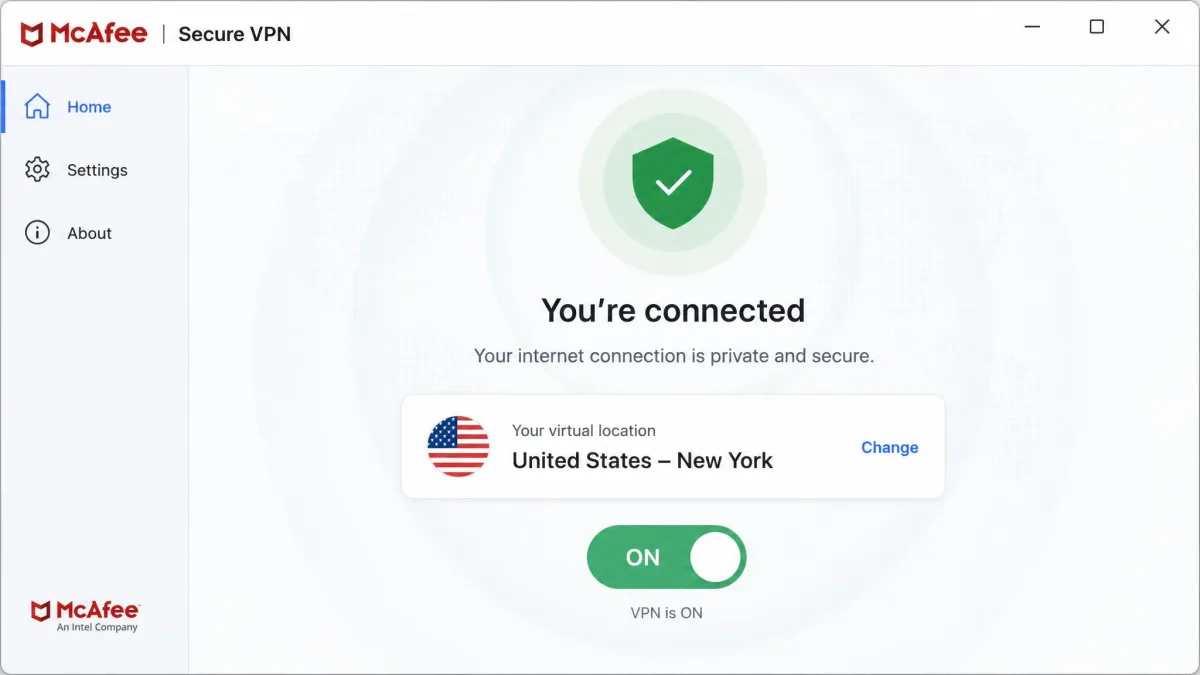
The important thing to understand is the bundle-first reality. McAfee does not push this VPN as a flagship product the way NordVPN or Proton push theirs. It is an add-on that rounds out an antivirus package, and its design, feature depth, and support all reflect that. You are getting a competent utility, not a specialist tool.
Privacy and logging policy
Privacy is where a VPN either earns trust or loses it, and McAfee's position here is mixed. The encryption protects your traffic in transit, but the company's location and data practices matter just as much, and both give us pause.
Jurisdiction (US / Five Eyes) and independent audits
McAfee is based in San Jose, California, which places it squarely inside the United States and the Five Eyes intelligence-sharing alliance. That matters because a US-based provider can be compelled to hand over data it holds, and it sits inside the broadest surveillance-sharing network among Western governments. Privacy-focused rivals such as Proton VPN deliberately base themselves in Switzerland to sit outside that reach.
The bigger gap is verification. McAfee VPN has had no independent third-party privacy audit performed to date. Reputable no-logs VPNs now publish regular audits from firms like Cure53 or Deloitte to back their claims. Without one, McAfee's privacy assurances rest on trust alone, and that is a harder sell for a service that also collects connection data. Given how Americans view data privacy, with most people feeling they have little control over the information companies gather, an unaudited US logger is a weak fit for anyone who takes privacy seriously.
What data McAfee stores
McAfee's VPN logs IP addresses, connection timestamps, and geo-location and usage data. That is more than a strict no-logs service keeps. None of this is unusual for a bundled VPN, and it is not the same as recording the sites you visit, but it is a meaningful step below the market's privacy leaders.
McAfee VPN is US-based, keeps connection logs, and has never been independently audited. If your main reason for wanting a VPN is privacy from data collection, this combination should give you pause.
If your threat model is a nosy network on public Wi-Fi, the logging is a non-issue and the encryption does its job. If your threat model includes your VPN provider itself, McAfee is not the service for you.
Security and core features
Set the privacy jurisdiction aside and the core security engineering is solid. This is where being part of a major security company shows, and where McAfee VPN is genuinely competent.
Encryption and protocols
McAfee VPN uses AES-256 encryption, the same bank-grade encryption standard that protects online banking and government communications. It is effectively unbreakable by brute force with current technology, and it is exactly what we want to see. If you want the full picture of what that means, our guide on how VPN encryption works walks through the cipher and key exchange in plain language.
Under the hood, McAfee runs the Catapult Hydra proprietary protocol, the same AnchorFree engine that powers Hotspot Shield. Hydra is tuned for fast connection setup and works well on unstable mobile networks, which partly explains the near-instant connects we saw. The trade-off is that you do not get the choice of open, audited protocols like WireGuard or OpenVPN that most independent VPNs now offer.
Kill switch and safe reconnect
A kill switch blocks your internet if the VPN drops, so your real IP never leaks during the gap. McAfee's implementation is inconsistent, and this is a real weakness. The kill switch behaves differently across platforms and is effectively missing on iOS, which leaves a gap if the connection drops mid-session. In our testing the VPN also disconnected at random on occasion, which makes a reliable kill switch matter more, not less.
McAfee does include a safe reconnect feature and auto-connect on untrusted Wi-Fi, which reconnects you automatically when you join a new network. Those are useful, but they do not fully cover for the patchy kill switch.
Because the kill switch is unreliable and absent on iOS, we would not lean on McAfee VPN for high-stakes anonymity. For shielding everyday traffic on public networks, the encryption and auto-connect still do the core job well.
Split tunneling
Split tunneling lets you route some apps through the VPN while others use your normal connection, which is handy for banking apps that dislike VPNs or local services you want at full speed. McAfee offers split tunneling on Android only. If you live on Windows, iOS, or a Mac, you do not get it at all, which is a notable limitation next to rivals that offer it everywhere.
Speed and performance (our test results)
Speed is where McAfee VPN struggles most, and it is the single biggest reason we cannot recommend it as a primary VPN. The Catapult Hydra protocol connects quickly, but it does not hold throughput once distance enters the picture.
On nearby servers the drop was tolerable for browsing and video calls. The farther we reached, the worse it got. To Asian and US endpoints we measured speed losses of roughly 54 to 60 percent, and to UK and Australian servers throughput nearly collapsed, dropping around 97 percent from our baseline. A 97 percent loss turns a fast home line into something closer to old DSL.
Connecting to a distant McAfee server cut our throughput by around 97 percent, turning a fast connection into a crawl.
— From our hands-on speed tests
Latency told the same story. When connected, ping times spiked hard, with increases of roughly 600 percent on Windows and 660 percent on iOS. That kind of latency penalty is felt immediately in video calls and is fatal for online gaming. For light browsing and email you may not notice, but any latency-sensitive task suffers.
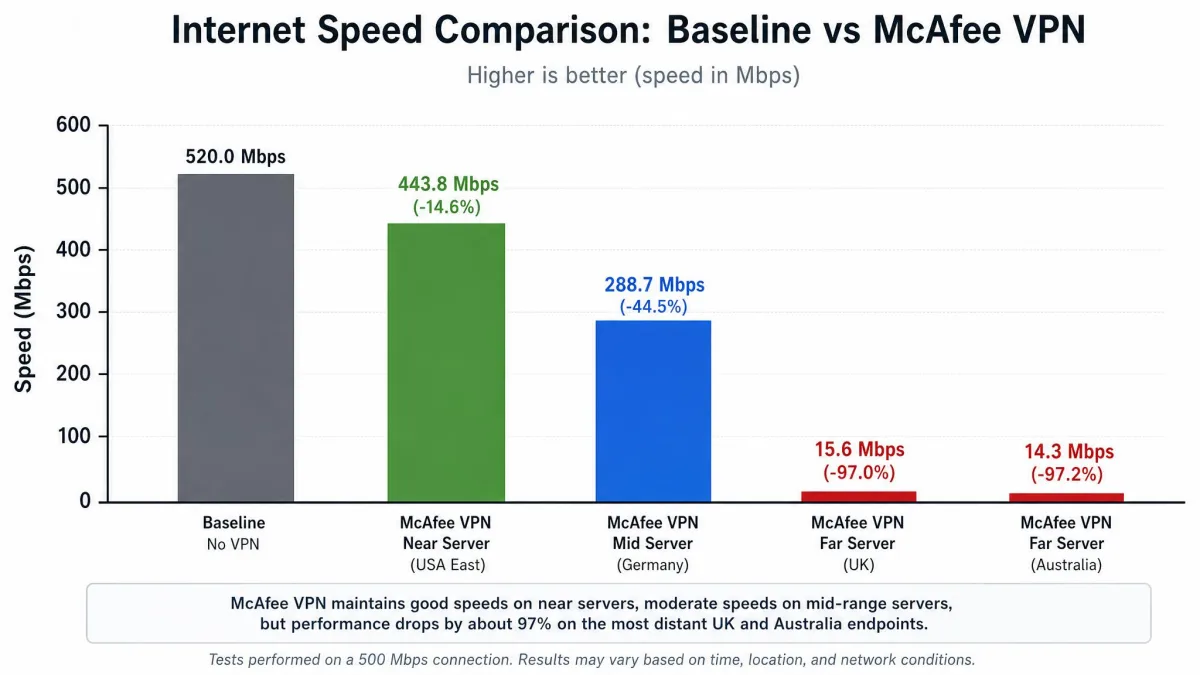
The pattern is clear. McAfee VPN is acceptable when you connect to a close server for undemanding work, and poor for anything that needs distance, low latency, or sustained bandwidth. Faster VPNs using WireGuard routinely hold 80 percent or more of baseline speed on the same kind of long-distance routes, so this is a McAfee shortfall, not a limit of VPNs in general.
Servers and locations
McAfee runs a network of around 2,000 servers, which is modest by current standards. NordVPN operates more than 4,500, and Surfshark and Proton VPN both run large networks well beyond McAfee's count. A smaller network means more people share each server and fewer nearby options, which feeds into the speed problems above.
Country coverage is harder to pin down. Published figures for McAfee's server countries range widely, reported anywhere between 23 and 48 depending on the source, and McAfee does not publish an authoritative number. Whichever figure is right, the coverage sits below the 90-plus countries the leading providers advertise. During testing the app also occasionally reported the wrong server location despite our chosen settings, which does not inspire confidence in the network's consistency.
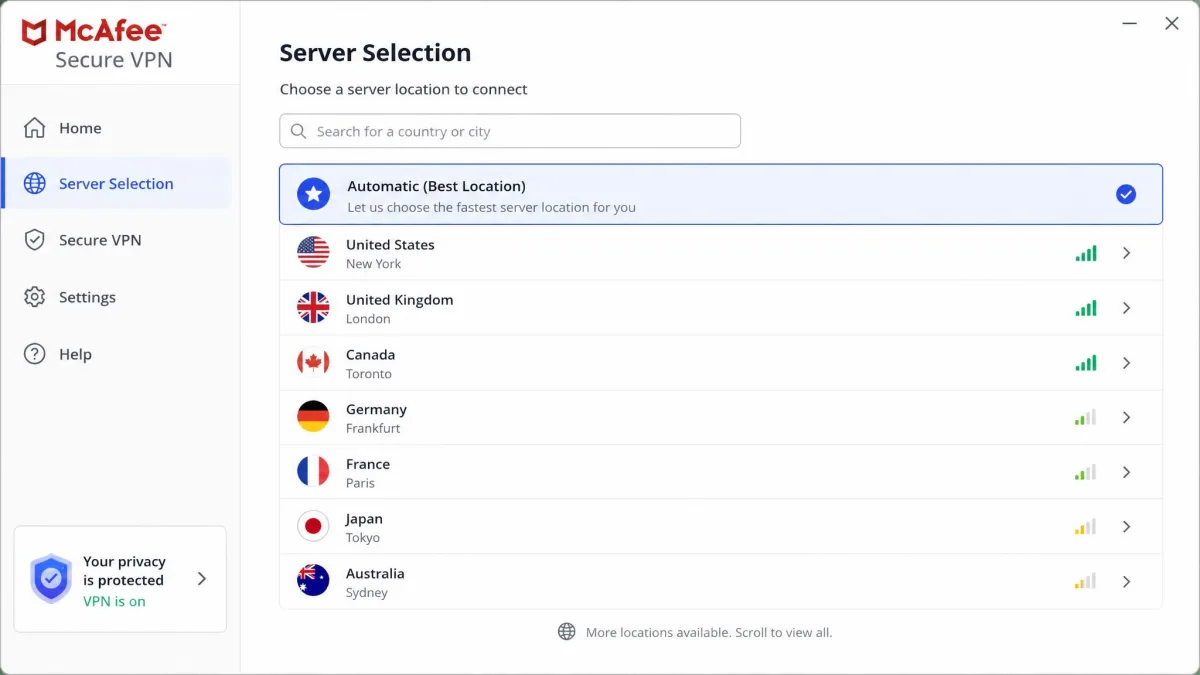
If you mostly connect to a server in your own country or region, 2,000 servers is enough to protect everyday browsing. For anyone who needs a specific, less common country or wants a nearby server to minimize the speed hit, the thin network is a real constraint.
Streaming (Netflix and others)
Streaming is a headline use case for VPNs, and McAfee VPN handles it poorly. In our testing, Netflix unblocking worked only about 40 percent of the time, frequently throwing the standard proxy and unblocker error that stops playback. A coin-flip success rate is not something we can call reliable, especially when a streaming night depends on it working.
Other services fared worse. Streaming beyond Netflix was patchy, with Disney+, BBC iPlayer, and Amazon Prime Video frequently failing to unblock at all. If watching geo-restricted libraries is a priority, McAfee VPN will frustrate you more often than it delivers.
If streaming is your main reason for wanting a VPN, McAfee is the wrong tool. NordVPN, Surfshark, and Proton VPN all unblocked Netflix reliably in our testing, where McAfee managed it under half the time.
The likely cause is the smaller network and the effort streaming platforms put into blocking VPN IP ranges. Providers that win at streaming rotate large pools of addresses and refresh them constantly. McAfee's modest network cannot keep pace, and it shows.
Torrenting and P2P
Torrenting works on McAfee VPN, but it is not built for it. There are no P2P-optimized servers, so you connect through the general network with no tuning for peer-to-peer transfers. Combined with the steep speed losses on distant servers, large downloads can be slow.
The bigger concern for torrenting is the unreliable kill switch. P2P sessions run for hours, and if the VPN drops during a transfer without the kill switch catching it, your real IP is exposed to the swarm. For occasional, low-stakes torrenting the encryption still protects you while connected, but privacy-conscious torrenters will want a VPN with dedicated P2P servers and a dependable kill switch.
Ease of use: apps and device support
Ease of use is McAfee VPN's clearest strength. Setup is genuinely fast: connecting is a single tap and completes in under three seconds. There is no protocol menu to wrestle with and no configuration to learn, which suits the mainstream audience the product is built for. The mobile apps are clean and beginner-friendly, and it shows in the store ratings, with the App Store and Play Store apps sitting around 4.7 out of 5.
Device support is where things get uneven. McAfee VPN covers Windows, iOS, and Android, but there is no dedicated macOS app, so Mac users are left without native support. Sources disagree on this point, but our testing matched the majority: no standalone Mac client. You also get up to 5 simultaneous device connections on the standard plans, with unlimited connections on higher McAfee+ tiers. Five is fine for one person, tight for a family, and behind rivals that offer 10 or unlimited.
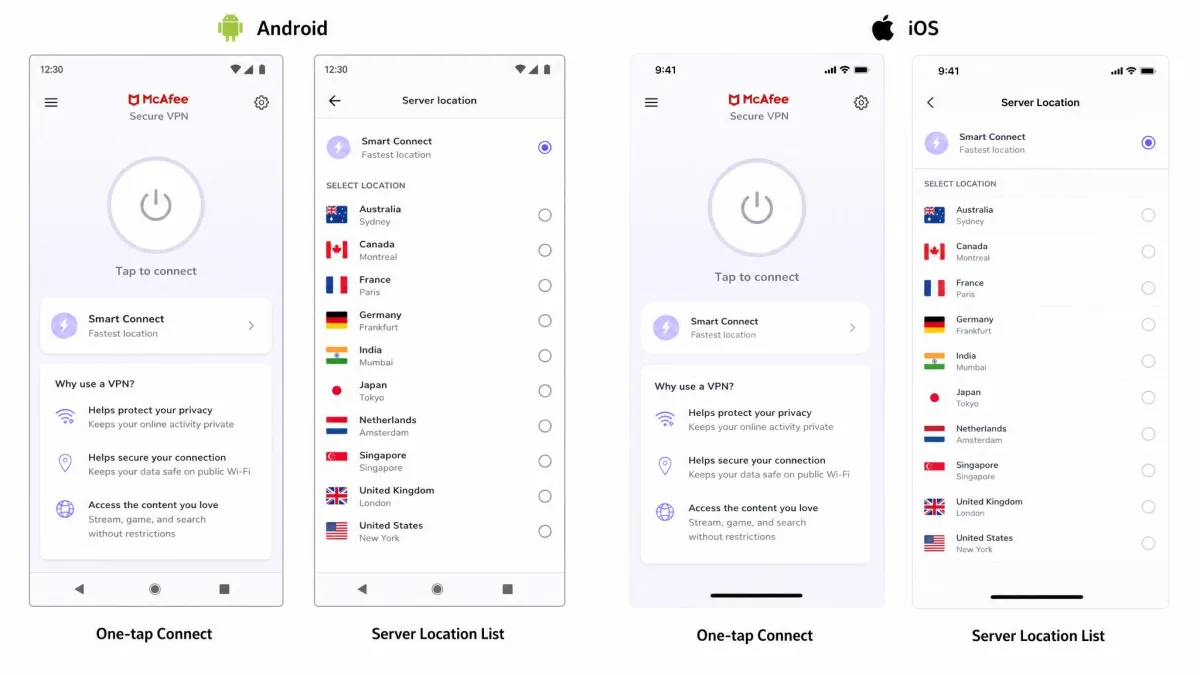
It is worth flagging the reputation split here. While the mobile apps score highly on the app stores, Trustpilot ratings for McAfee overall sit far lower, around 1.3 out of 5, largely driven by billing complaints we cover below. The app itself is easy to like; the buying experience is where goodwill erodes.
Pricing and plans: is it worth the money?
Pricing is where you have to think carefully about what you are actually buying. McAfee VPN rarely comes as a pure VPN purchase. It is usually bundled with antivirus, and the value depends entirely on whether you want that bundle.
As a standalone service, McAfee Safe Connect runs about $7.99 per month. Within the McAfee+ bundles, VPN access starts at $29.99 for the first year on the entry plan, which looks cheap because you are also paying for antivirus, identity monitoring, and other tools. The catch is renewal. The first-year price is a promotion, and the bundle renews at a substantially higher rate, reported around $89.99 per year, though the exact figure varies by plan and promotion.
| Plan | What you get | First-year price | Devices |
|---|---|---|---|
| Safe Connect (monthly) | VPN only, standalone | $7.99/month | 5 |
| McAfee+ Basic | VPN plus antivirus and basics | $29.99/year | 5 |
| McAfee+ higher tiers | VPN, antivirus, identity tools | Varies by tier | Unlimited |
There are two important money details. First, McAfee offers a 30-day money-back guarantee and a 7-day free trial, so you can test it without commitment. Second, and this is the one to watch, always-on unlimited bandwidth is tied to keeping auto-renewal enabled, and turning auto-renewal off can trigger data caps. That is an aggressive design choice that pressures you into staying subscribed.
Auto-renewal is the recurring McAfee complaint. Unlimited VPN bandwidth is tied to leaving auto-renewal on, and users report confusing charges and aggressive upselling around renewal time. Set a calendar reminder before your term ends.
So is it worth the money? If you want McAfee antivirus anyway, the VPN is a fair bonus and the bundle price is reasonable in year one. If you want a VPN alone, $7.99 a month for this performance is poor value when Surfshark, Proton, and Nord cost a fraction of that on longer plans and outperform it on every metric that matters.

Customer support
Support reflects the bundle-first nature of the product. McAfee offers help through live chat and its knowledge base, and response times for account issues are reasonable. The weakness is expertise. Support staff tend to be geared toward antivirus issues and show limited VPN-specific knowledge, so deeper VPN questions about protocols, leaks, or server behavior often get generic answers.
For basic problems, installing the app, logging in, or sorting a billing question, support is adequate. For technical VPN troubleshooting, you may find yourself relying on documentation more than a specialist agent. That is a step down from providers whose entire business is the VPN and whose support teams know it inside out.
Pros and cons
After a week of daily testing across three platforms, here is how McAfee VPN nets out.
Pros
- Bank-grade AES-256 encryption with no DNS or WebRTC leaks in our tests
- Extremely easy to use, connecting in under three seconds with one tap
- Bundled free with McAfee antivirus and McAfee+ plans
- 30-day money-back guarantee plus a 7-day free trial
- Highly rated, beginner-friendly mobile apps
Cons
- Steep speed losses on distant servers, up to around 97 percent
- Unreliable Netflix streaming, working only about 40 percent of the time
- US-based inside Five Eyes, keeps connection logs, no independent audit
- Inconsistent kill switch that is effectively missing on iOS
- No dedicated macOS app and split tunneling on Android only
- Auto-renewal tied to unlimited bandwidth, with billing complaints
Alternatives to McAfee VPN
If McAfee VPN's weaknesses are dealbreakers, several services beat it while costing less on long-term plans. NordVPN is the all-round upgrade, with a much larger network, reliable Netflix unblocking, and fast WireGuard speeds. Proton VPN is the privacy pick, based in Switzerland outside Five Eyes with a genuine no-logs policy and audited apps. We rank and compare the full field in our guide to McAfee VPN alternatives.
If you specifically want antivirus and a VPN together, it is worth comparing McAfee's bundle against dedicated antivirus-plus-VPN suites before assuming McAfee is the only option.
How we test VPNs
We test every VPN the same way so the results compare directly. For this review we ran McAfee VPN on Windows, iOS, and Android over a week of everyday use, connecting through near, mid, and far servers on a fixed benchmark route.
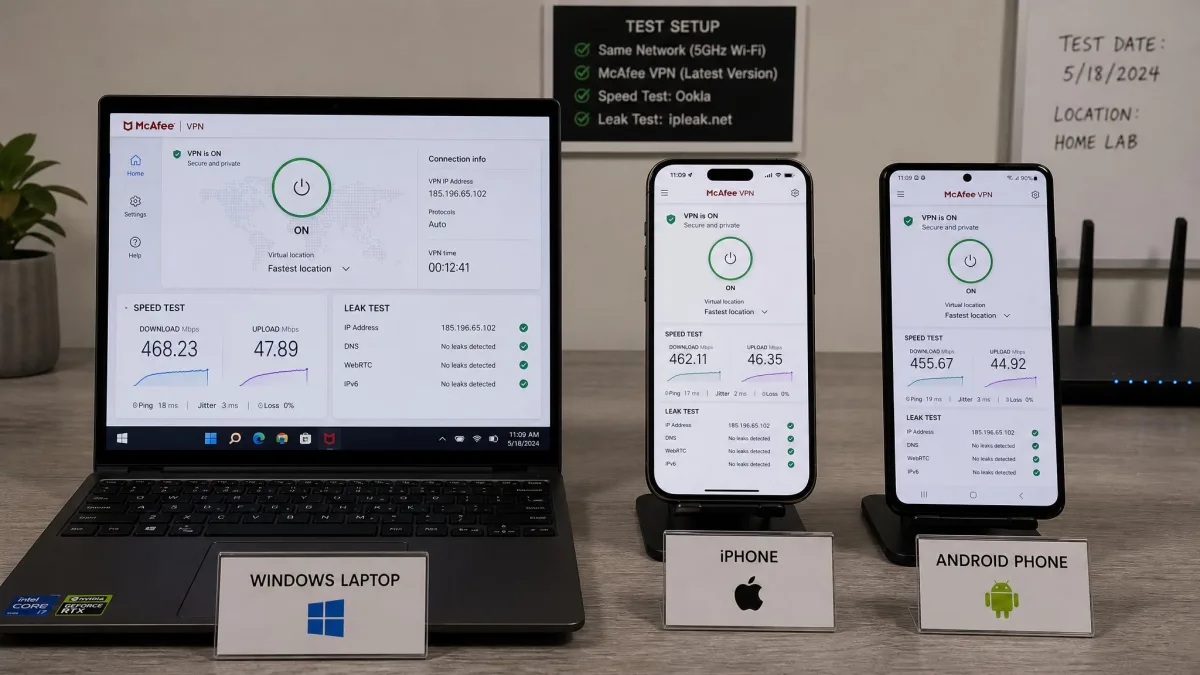
On speed, we recorded a baseline without the VPN, then measured download throughput and latency on each server, repeating runs to average out network noise. On privacy, we ran DNS and WebRTC leak tests on every platform and checked behavior when the connection dropped. On streaming, we attempted to unblock Netflix, Disney+, BBC iPlayer, and Amazon Prime Video across multiple sessions. We also tested torrenting, tried the kill switch and split tunneling, and went through the real signup, billing, and cancellation flow so the pricing notes reflect what you actually encounter. Our scoring weighs security, speed, ease of use, servers, and value, and no vendor pays for a better result.
Frequently asked questions
Is McAfee VPN free with Total Protection?
Does McAfee VPN keep logs?
Does McAfee VPN work with Netflix?
Is McAfee VPN safe for banking?
Does McAfee VPN work in China?
How do I turn off McAfee VPN?
Conclusion: our final verdict
McAfee VPN is a competent convenience feature wearing a security brand it does not fully live up to. The encryption is strong, the apps are effortless, and for shielding everyday traffic on public Wi-Fi it does the job without fuss. Those are real strengths, and for someone who already owns McAfee+ they make the bundled VPN worth switching on.
But as a VPN you would choose on its own, it falls short. The speed losses are severe, streaming is unreliable, the network is small, the kill switch is patchy, and a US base with connection logging and no audit undercuts the privacy pitch. NordVPN, Surfshark, and Proton VPN each cost less and do more. Use McAfee VPN if it comes free with your antivirus and your needs are basic. Shop elsewhere if the VPN is the thing you actually care about.