Monitoring a child's TikTok means seeing how long they spend in the app, who can reach them, and what kind of content their feed serves up. It does not mean reading their private messages, because TikTok never hands message content to a parent account.
If you can see the videos your teen posts but not who is messaging them, that gap is the whole problem. Most parents land here after noticing a late-night scroll habit or a follower they do not recognise.
The good news is that you have more control than you think, and most of it is free. This guide covers six methods, including TikTok's own Family Pairing, your phone's built-in limits and a paid monitoring app. Read them in order, then pick the two or three that suit your household.
What Monitoring TikTok Actually Means for a Parent
TikTok gives parents real control over reach and time, and almost none over private conversations. Knowing where that line sits saves a lot of wasted effort.
What you can see, and what TikTok keeps private
You can see how long the account was used, who it follows, who follows back, and which accounts are blocked. Liked videos and watch history are visible too, but only from inside your child's own logged-in account.
The inbox stays private. When we walked through Family Pairing on a test account, the parent side reported a screen time total and a usage dashboard, never the watch history or the content of a single direct message.
Monitoring vs. spying: setting the boundary before you start
Checking a dashboard your teen knows about is a habit you can keep up for years. Reading messages behind their back usually ends in a fight and a second, secret account. Every method below works better when your child knows it exists.
Why TikTok Is Worth Monitoring
TikTok is not dangerous by default, but it holds attention unusually well and is easy for strangers to use as a doorway.
What the algorithm serves a teen account
The feed learns fast. A few pauses on diet videos or on a bleak creator is enough to tilt what shows up next, and a teen rarely notices the drift.
The Surgeon General's advisory on social media and youth mental health points to heavy use as a risk factor for anxiety and poor sleep. The calm response is not deleting the app. It is capping the hours and knowing what the feed is feeding them.
Contact from strangers: DMs, duets, and LIVE
Direct messaging is unavailable to accounts registered as under 16, and hosting a LIVE stream requires an account holder aged 18 or over. Those gates only work if the birthday on the account is honest. Duets, stitches and public comments are the other contact routes, and all of them are adjustable.
What TikTok collects about your child
TikTok collects usage data on your child, and its reach extends past the app. BBC's reporting on TikTok's pixel tracking explains how the tracking pixel follows people across ordinary websites, whether or not they ever open TikTok.
Open TikTok's own ad and data settings, switch off personalised ads and off-app activity, then do the same on your child's account.
Method 1: Turn On TikTok Family Pairing
Family Pairing links your TikTok account to your child's and moves the key controls onto your phone. It is free, and it is the highest-value step here.
Step by step: linking your phone to your child's account
You need both phones in hand. On your own phone, open TikTok, tap Profile, then the menu icon, then choose Settings and privacy, then Family Pairing, then tap Parent.
TikTok shows you a QR code. On your child's phone, open the same screen, tap Teen, and scan your code. When we ran the pairing flow, the scan took a couple of minutes across both phones.
Do the pairing together, out loud, and let your child watch every screen. A link they helped create is one they are far less likely to quietly undo.
What Family Pairing controls, and what it misses
Once paired you get screen time limits you can vary by day of the week, a usage dashboard, scheduled muted notifications, Restricted Mode, search visibility, DM controls for 16 and 17 year olds, and visibility of who they follow and who they have blocked.
What it misses matters just as much. It governs who may send a message but never exposes message content, and it only reaches TikTok, so a conversation can move to Snapchat or Discord and leave the TikTok side looking spotless.
A teen can also unlink pairing from their end, and although TikTok notifies the parent account, a missed notification leaves the link quietly broken.
Method 2: Use TikTok's Built-In Screen Time and Content Controls
Even without pairing, TikTok applies limits automatically to younger users. Knowing the defaults tells you what you still need to change.
Daily screen time limits and Restricted Mode
Accounts registered to under-18s get an automatic 60-minute daily screen time limit. For under-13 accounts, a parent passcode unlocks 30 extra minutes once the cap is hit.
Treat that default as a prompt rather than a wall, because an over-13 account can enter the passcode and keep scrolling. The limit only bites if you set the passcode yourself.
Restricted Mode sits in the same menu and filters mature content. In our checks it filtered unevenly and let some borderline videos through, so it works best alongside locked-down privacy settings.
Restricting DMs, comments, duets, and stitches
Open Settings and privacy, then Privacy, and work down the list. Set who can send direct messages, who can leave comments, and who can duet or stitch your child's videos, choosing Friends or No one for each.
Age tiers do some of this for you. Accounts for ages 13-15 are private by default, with no DMs and no push notifications after 9pm, while ages 16-17 have DMs available but notifications switch off from 10pm.
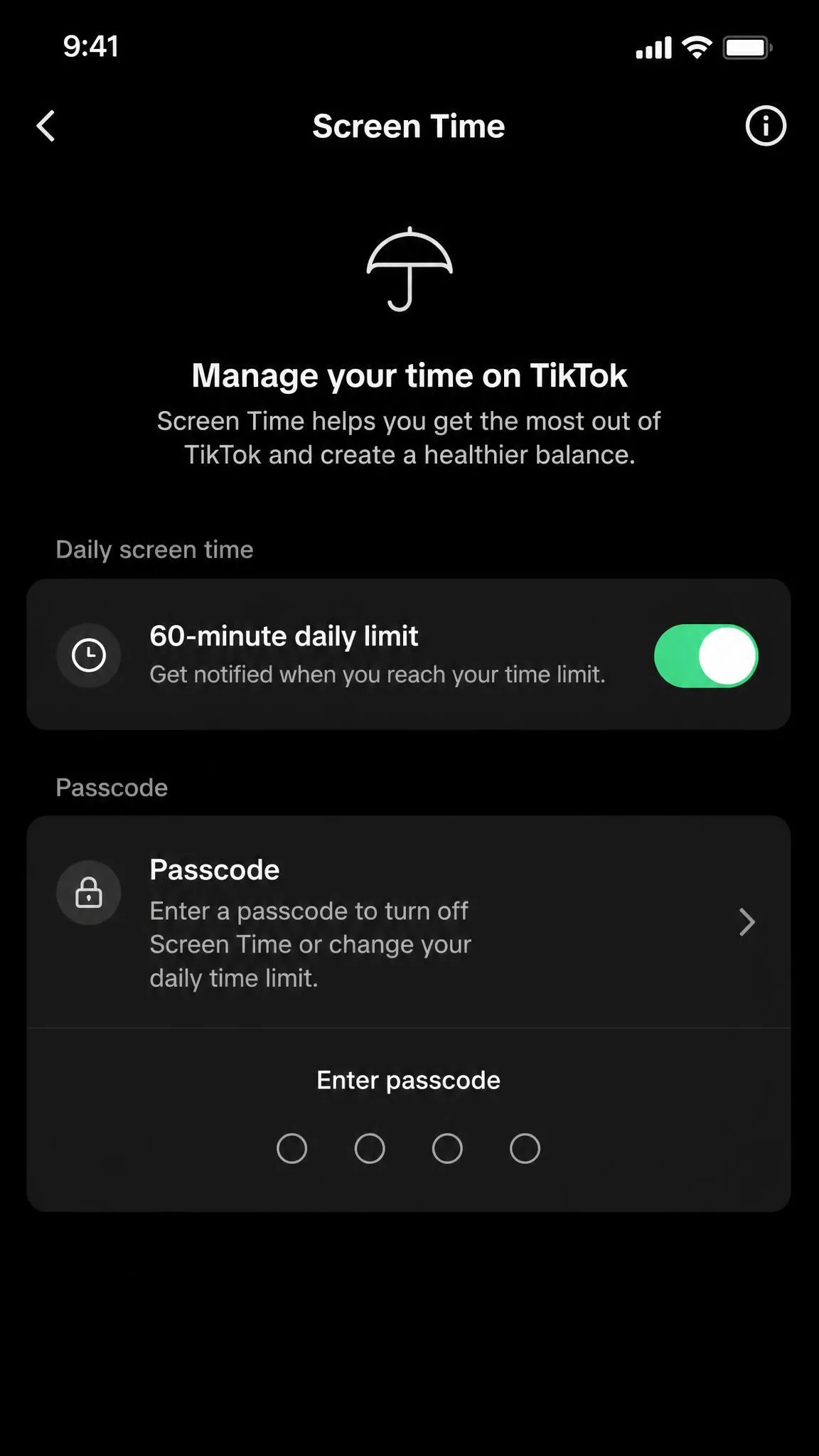
Method 3: Check Watch History, Liked Videos, and Following
The most honest picture of what your child sees is free and already on their phone.
Where to find watch history in the app
On your child's phone, open TikTok, tap Profile, then Settings and privacy, then Content and Display, then Activity center, then Watch history.
The list covers roughly the last 180 days, with older entries rolling off. It is only visible from inside the child's own logged-in account, so reading it means having the unlocked phone in front of you.
Reading the liked and following lists for red flags
Liked videos and the following list tell you what the algorithm is being trained on. Scan for accounts pushing extreme diet content, self-harm framing, gambling, or adults with no reason to be talking to teenagers. One odd video is noise, but a pattern across ten of them is a conversation worth having tonight.
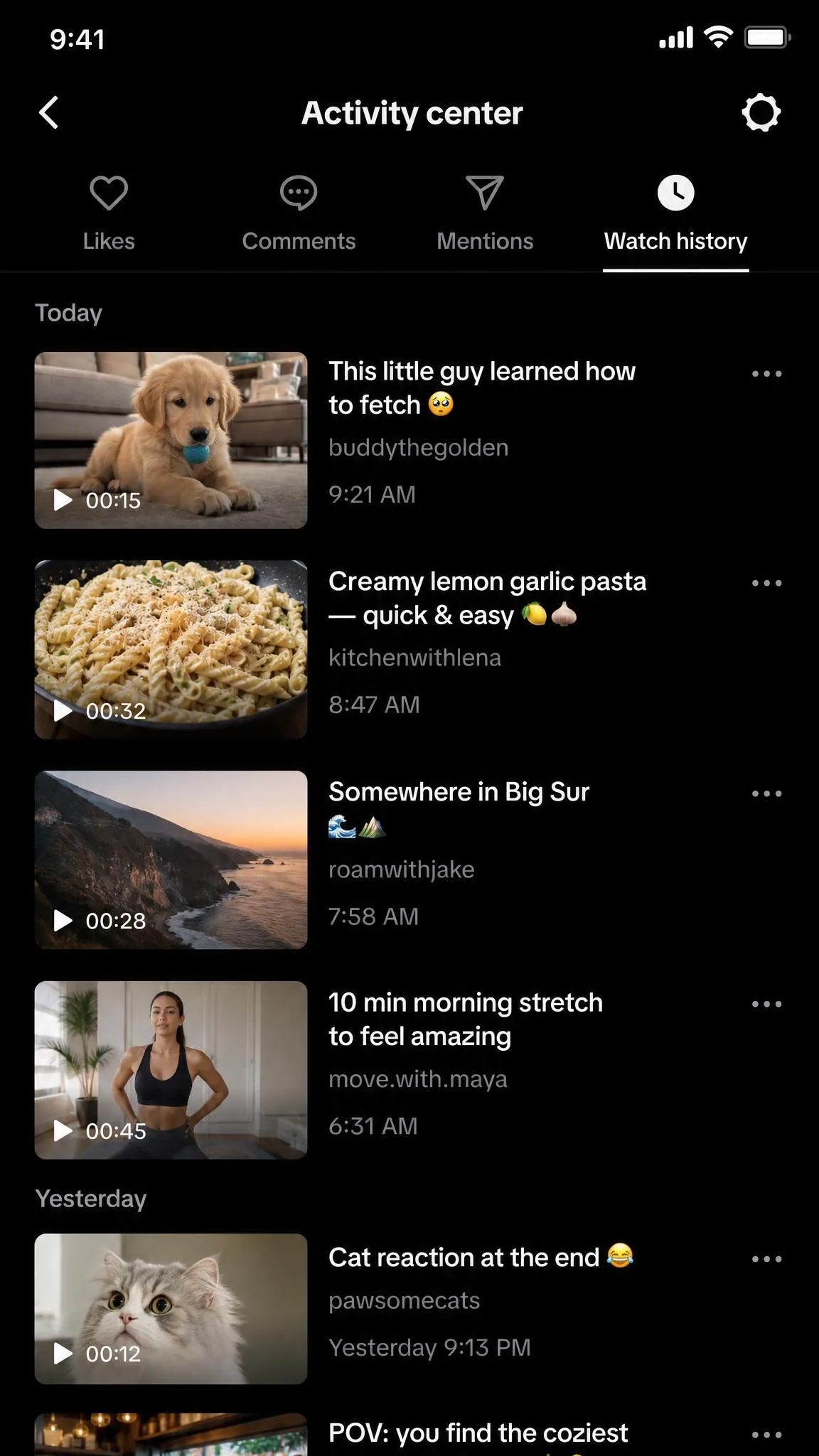
Method 4: Lock Down the Account's Privacy Settings
Prevention beats review, so we set these before touching anything paid.
Private account, follower approval, and profile visibility
In Settings and privacy, open Privacy and switch on Private account. Every new follower then needs approval, and the videos stay invisible to the wider public. TikTok's Guardian's Guide walks the same menu with screenshots.
Turning off suggest-your-account-to-others
Open Suggest your account to others and uncheck each source in turn: contacts, Facebook friends, people who open shared links, and people with mutual connections. Switching off only the first still leaves the account discoverable.
While you are there, confirm that anyone your child blocked has stayed blocked.
Method 5: Use a Parental Monitoring App for Full Visibility
If Family Pairing leaves you with questions it cannot answer, a third-party tool is the next step. It is the only method here that costs money, and the only one that looks beyond TikTok.
What a monitoring app shows that TikTok's own tools do not
A monitoring app watches the whole phone rather than one platform: flagged messages across apps, usage totals, web activity and location, in one place.
Bark scans 30+ apps and platforms for bullying, self-harm and predatory contact, sending flagged phrases rather than a full transcript. Qustodio is stricter and can block or time-limit TikTok, Instagram, Snapchat and YouTube, though it does not surface what happens inside those apps message by message.
Coverage differs by phone platform, so an iPhone household sees far less than an Android one. Bark's TikTok content monitoring is Android-only, and its iOS coverage stops at texts, photos, email and Safari.
What to look for when choosing one
Check five things before you pay: platform coverage, TikTok reporting, monthly cost, whether the child gets told, and battery use.
Bark Premium is $14.00 per month, or $8.25 per month on the annual plan, and Bark Jr starts at $5.00 per month. Qustodio Basic on the 1-year plan is $4.37 per month and Qustodio Complete is $8.04 per month, though its checkout sells annual subscriptions only.
Qustodio's VPN profile and GPS tracking noticeably shorten battery life on older phones, and cancelling is harder than signing up. Bark's iOS setup is the fussy part, since it leans on a Bark-supplied charger accessory to work around Apple's restrictions.
Setup in outline: install, pair, review
Create the parent account on your own phone, install the companion app on your child's device, grant the permissions it asks for, and confirm the pairing from your dashboard. Then leave the rules alone for a fortnight, because reading the first weekly report before you tighten anything saves a lot of arguments.

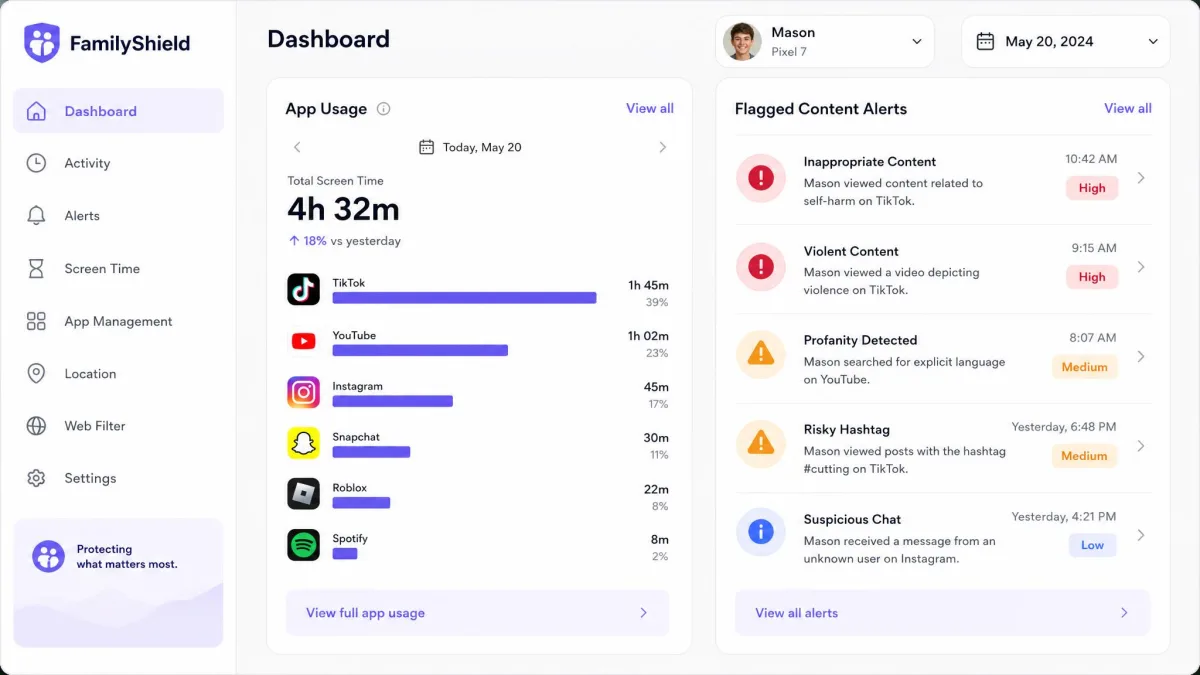
Method 6: Use Your Phone's Own Controls: iOS Screen Time and Google Family Link
Your child's phone has free parental controls built in, and they work on every app rather than one. Use them as the outer fence.
iPhone: Screen Time limits and content restrictions
Apple Screen Time is built into iOS at no cost. Open Settings, tap Screen Time, then App Limits, set a daily cap on TikTok, and use Downtime to switch the phone off for schoolwork and sleep.
It reports no in-app TikTok content, only minutes. Its best-known workaround is the device clock, since changing the time zone can reset a daily limit, so lock Date and Time to automatic.
Android: Google Family Link
Google Family Link is free and does the same job on Android, with app-level time limits, blocking and daily reports, though setting changes sometimes take a while to land on the child's device.
On an iOS child device it does much less: no screen time limits, no app blocking, no downtime, just SafeSearch and YouTube content tiers.
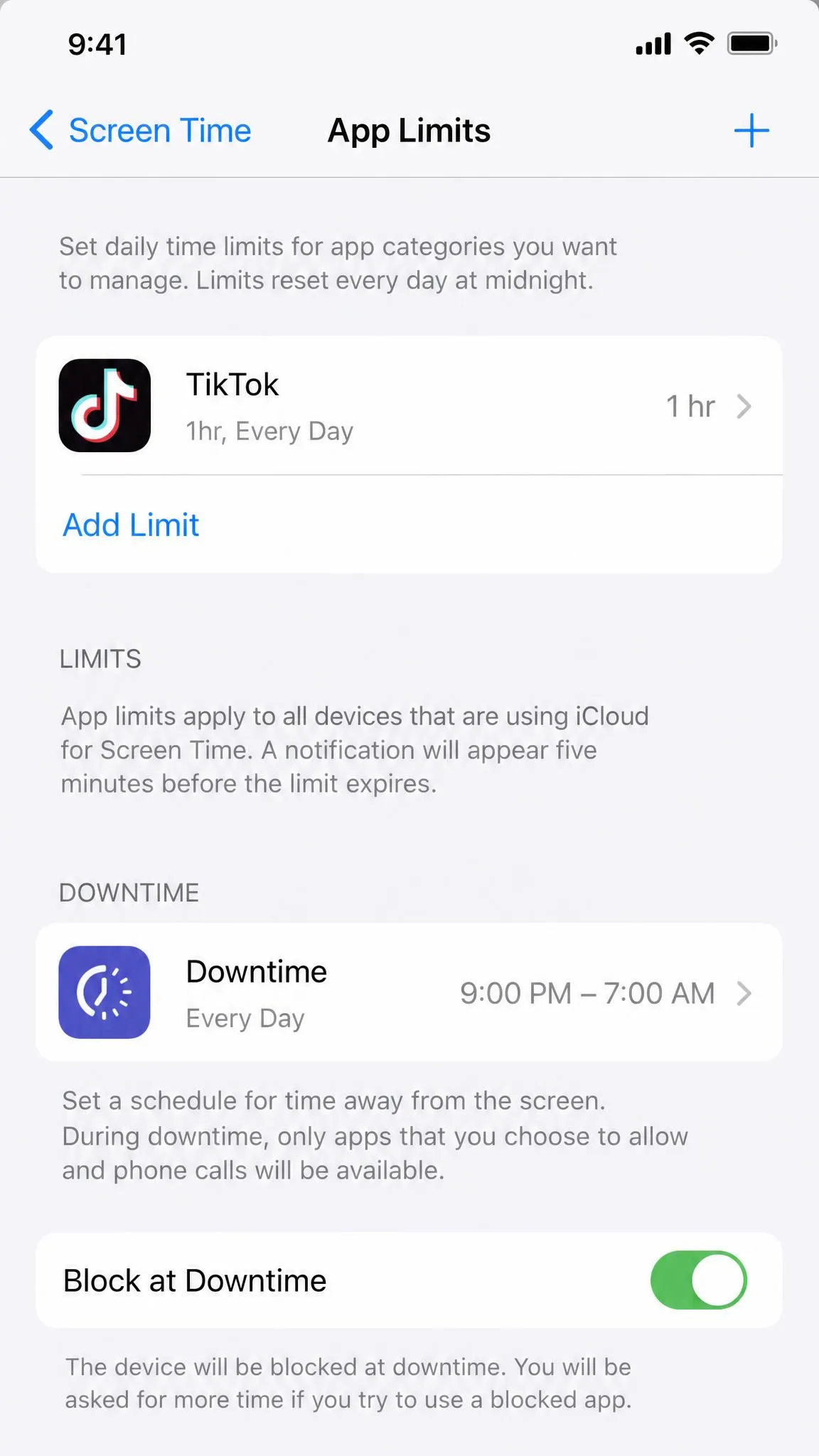
Comparing Your Options: Which Method Fits Your Situation
Most families combine two or three of these. Here is what each one buys you.
| Method | What it shows you | Cost | Does your child know? | Setup effort |
|---|---|---|---|---|
| Screen time totals, followers, following and blocked accounts, content and DM settings, but no DM content | Free | Yes, and they can unlink | Low, a QR scan on both phones | |
| Daily usage against the 60-minute default, plus filtered content | Free | Yes | Low | |
| Videos watched over roughly 180 days, liked videos, following list | Free | Only if you ask for the phone | Low, but needs the unlocked phone | |
| Nothing after the fact, it prevents contact instead | Free | Yes | Low | |
| Flagged messages, app usage, location, with depth varying by platform | Bark $14.00/mo, Qustodio from $4.37/mo | Depends on setup, disclosure recommended | Medium to high | |
| App time totals and blocks, but no in-app TikTok content | Free | Yes | Medium |
Is It Legal to Monitor Your Child's TikTok?
For a minor in your own household, generally yes. Parents are entitled to supervise a child's use of a social platform, and children's data online carries extra legal protection.
Monitoring a minor vs. an adult
The age of the account holder changes the answer. The FTC's children's privacy rules put strict duties on services that collect data from under-13s, which is one reason TikTok's minimum age to hold a standard account is 13.
Monitoring an adult's account or phone without their consent is illegal in most jurisdictions, even when that adult is your own child. Agree a new arrangement together before their eighteenth birthday.
Consent, disclosure, and the case for telling them
Telling your child is the safer route legally and the better one practically, because covert tools get discovered and the fallout costs more trust than the information was worth. Frame it as a shared rule with an end date. "We check this together until you are sixteen" is a sentence most teenagers can live with.
Warning Signs to Watch For
You do not need a tool to spot most of these. You need to know what you are looking at.
In their feed and their following list
Watch for clusters of extreme diet content, self-harm framing, gambling pitches, and adults who message teenagers directly. Repeated comments from one unknown account is another signal worth checking. A second profile they never mentioned is the clearest flag of all, so ask why it exists before you delete anything.
In their behavior off the app
Look for phone-hiding, sleep loss, a sharp mood change after being online, or a sudden drop in a hobby they loved. Any of these is a reason to talk, not to confiscate. Common Sense Media's TikTok review is a useful second opinion on age-appropriateness.
How to Talk to Your Child About TikTok Monitoring
Lead with the boundary, not the tool. Say what you will check, how often, and what you will not read, then hold to it exactly.
Give them a route to report things themselves: how to block an account, how to report a video, and what TikTok's Community Guidelines actually ban. Then review the arrangement every few months and loosen it as they earn it.
Frequently Asked Questions
Can I see my child's TikTok DMs?
Can I see what they watch without them knowing?
Does TikTok notify my child if I turn on Family Pairing?
What is the minimum age for TikTok?
Can I monitor TikTok without their password?
Is it legal to monitor my teenager's TikTok?
How do I see deleted TikTok videos or messages?
Do I need a paid app if I use Family Pairing?
The Bottom Line
Start free and start today. Turn on Family Pairing, set the screen time passcode, make the account private, and switch off the suggest-your-account toggles, which together take about fifteen minutes.
Add a paid tool only if you need visibility beyond TikTok, and tell your child either way. The point is not to catch them out. It is to help them use the platform safely while they are still young enough to want your help.