TunnelBear is a beginner-friendly VPN built around a map-based, one-click interface and a genuinely usable free plan. It handles the core job of a VPN well: it encrypts your connection, hides your IP address, and lets you appear to browse from another country. Our bottom line after testing is simple. TunnelBear is safe, honest, and easy to live with, but it is not the fastest or the most reliable choice for streaming, and its network is smaller than the big names.
If you want a VPN that a first-time user can install and understand in five minutes, TunnelBear earns a recommendation. If your priority is unblocking every Netflix library or squeezing out the last megabit of speed, one of its rivals will serve you better. The sections below break down security, speed, streaming, pricing, and setup so you can decide where you land.
How we tested: we ran TunnelBear on Windows and Android over several weeks, measuring download speeds against a wired baseline, checking for DNS and IP leaks, and running streaming, torrenting, and connection-stability trials across nearby and long-distance servers. We paid for the plan ourselves and used the free tier the same way a new user would.
TunnelBear at a Glance (Our Verdict)
TunnelBear leans hard into approachability, and that focus shapes everything about it. The apps are cheerful and simple, the security fundamentals are solid, and the free plan is honest about what it holds back. Living with it day to day felt frictionless in a way most rivals do not manage. The trade-off shows up when you push past casual use, and the sections below spell out exactly where.
Pros & Cons
Pros
- Map-based interface is genuinely beginner-friendly and quick to set up
- Independently audited every year, which is rare in this price bracket
- Honest free plan with 2GB per month and no credit card required
- AES-256 encryption plus WireGuard, OpenVPN, and IKEv2 protocols
- Unlimited simultaneous device connections on paid plans
Cons
- Speeds drop noticeably over long-distance connections
- Streaming support is inconsistent and can fail on Netflix
- Smaller network at 47 countries than most rivals
- Free tier lost split tunneling and manual country selection in early 2026
- Email-only support with no live chat
What Is TunnelBear VPN?
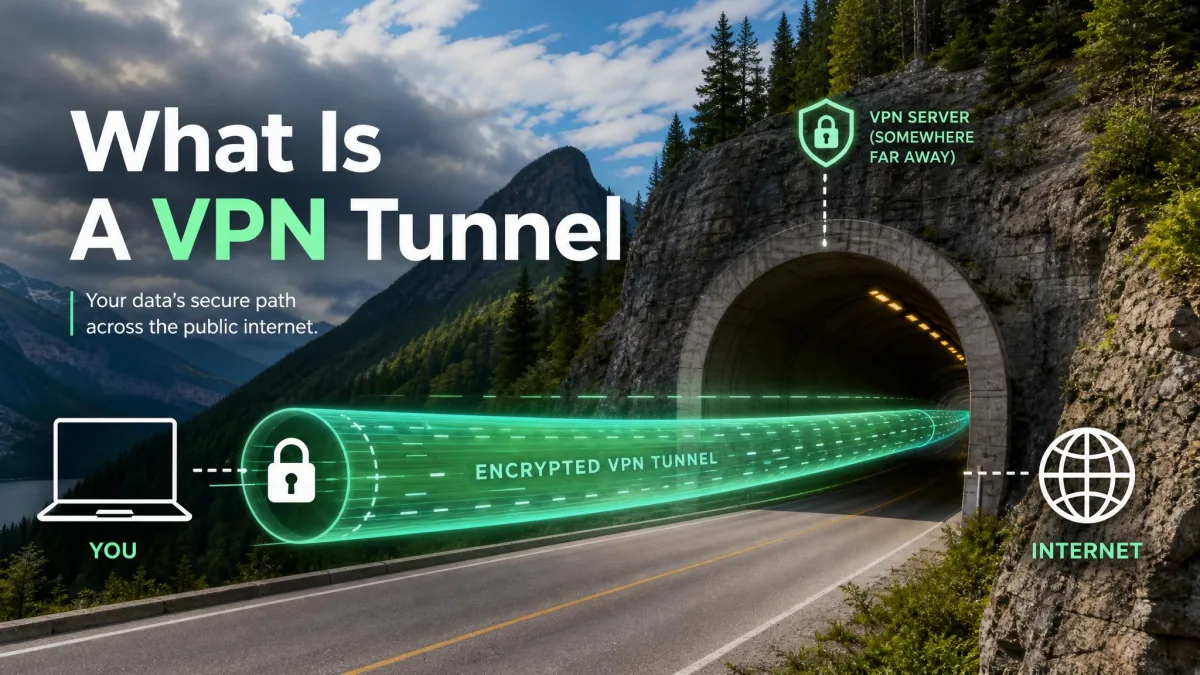
TunnelBear is a consumer VPN service that routes your internet traffic through an encrypted tunnel to a server in a country of your choice. That does two things at once. It hides your real IP address and location from the websites you visit, and it scrambles your traffic so that your internet provider or anyone on the same network cannot read it.
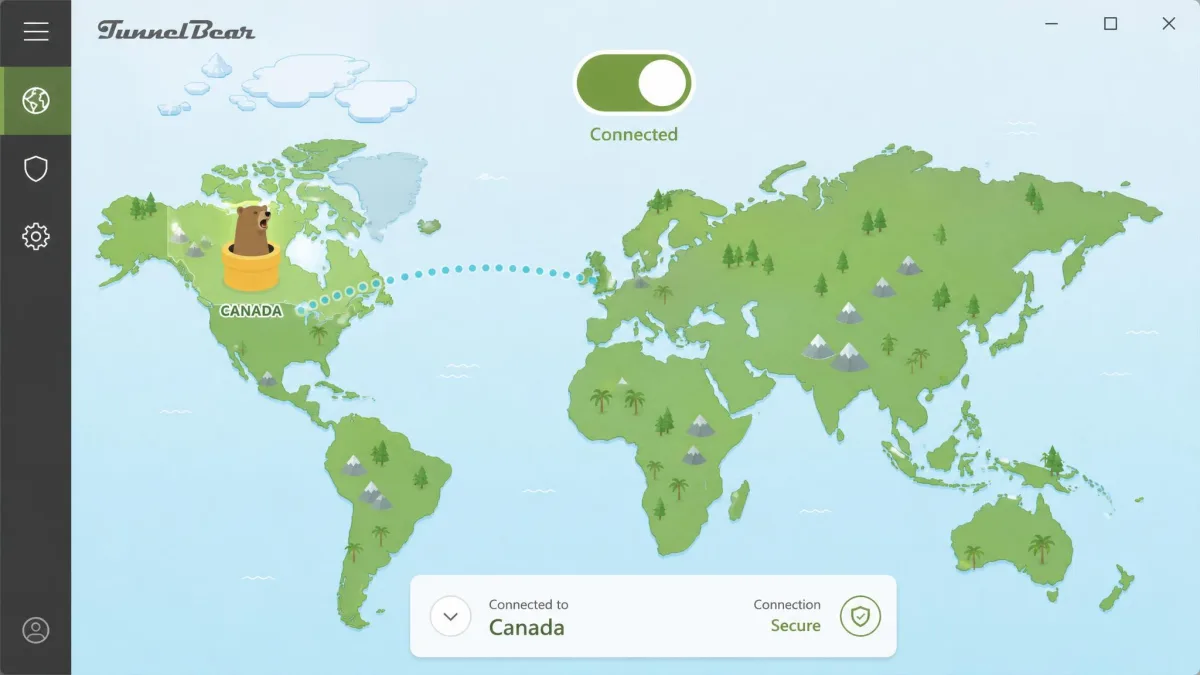
The product is best known for its playful design. Instead of a dense list of servers, you get a world map with tunnelling bears, and connecting is a single click on the country you want. Under that cartoon surface sits a competent security stack, which we cover in detail below. The feature set that most users touch includes the VigilantBear kill switch, GhostBear obfuscation, SplitBear split tunneling, two-factor authentication, and browser extensions.
What Is TunnelBear Used For? (Key Use Cases)
Most people reach for TunnelBear for one of four reasons. The first is privacy on untrusted networks: connecting from a coffee shop, airport, or hotel Wi-Fi without exposing your traffic. The second is hiding your IP address and location from advertisers and websites during everyday browsing.
The third use case is accessing content and services that are restricted by region or by network. That covers appearing to browse from another country, and it also covers getting past network blocks, such as unblocking a site on a restricted school or office connection. The fourth is light streaming and the occasional download, though as we explain later, TunnelBear is uneven at both. For heavy streaming or constant torrenting, it is not the tool we would choose.
Worth adding is what TunnelBear is not built for. It is not a tool for evading serious censorship at scale, running a home media server through a router, or protecting a games console, none of which it supports. Set your expectations around personal privacy and casual location changing, and the app delivers reliably on those jobs. The trouble users run into almost always comes from asking it to be a heavy-duty streaming or torrenting machine, which is not what it was designed to be.
Who Owns TunnelBear & Where Is It Based? (Toronto, Canada · McAfee 2018)
TunnelBear was founded in 2011 by Ryan Dochuk and Daniel Kaldor, and the company is headquartered in Toronto, Canada. It built an early reputation on transparency and friendly design, and it was one of the first consumer VPNs to commission public independent security audits.
In 2018 TunnelBear was acquired by McAfee, and it continues to operate as a McAfee-owned subsidiary. The acquisition gave the service the backing of a large security company while keeping the TunnelBear brand and apps intact. The Canadian base matters for one reason we return to below: Canada is part of the Five Eyes intelligence-sharing alliance.
TunnelBear Free Plan, Pricing & Data Cap
Since pricing is the first thing most readers want pinned down, start here. TunnelBear is unusual in offering a free plan that is a genuine part of the product rather than a crippled teaser. It is also refreshingly clear about what that free plan costs you, which is data. The paid plans then remove the cap and add a few extras.
Free Plan: 2GB/Month Data Cap & Limits (Split Tunneling / Country Selection)
The current free plan gives you 2GB of data per month with no credit card required to start. That figure is worth pinning down because older reviews still quote 500MB, which was the historical allowance before TunnelBear raised it. The current, correct number is 2GB per month. What has changed is the feature set: the free tier is no longer the full app it once was. In a change TunnelBear announced on its official blog in December 2025 and rolled out in early 2026, free accounts lost SplitBear split tunneling and manual country selection. Free users now get 2GB per month with an automatically assigned server location, and both split tunneling and choosing your own country are reserved for the paid Unlimited plan. If picking a specific server or splitting traffic matters to you, plan on the paid tier rather than expecting it free.
There is also a bonus route worth knowing about. Users in censored regions can earn extra data, which can raise the free cap to roughly 10GB, though bonus eligibility varies by region and promotion. For everyday use, treat 2GB as your working figure. That is enough for occasional secure browsing or checking email on public Wi-Fi, but it will not cover streaming or large downloads. To put 2GB in context, that is roughly an hour or two of standard-definition video, or many days of ordinary browsing and messaging. Stream a single HD film and the month's allowance is gone. We treat the free plan as a safety layer for sensitive tasks on untrusted networks rather than an all-day connection.
Paid Plans, Free Trial & Payment Options (incl. UK Availability)
The paid Unlimited plan removes the data cap entirely, and it is also where split tunneling and manual country selection now live. According to TunnelBear's pricing page, the Unlimited plan starts from around $3.33 per month, though the exact headline rate depends on the billing term you choose and on any active promotion. Shorter terms cost more per month, and a monthly rate in the region of $9.99 has appeared in third-party reviews, so budget according to the commitment you are willing to make. There is also a Teams plan at $5.75 per user per month for businesses. Website subscriptions are billed in US dollars, and there is no separate UK GBP pricing tier, so UK customers pay the same USD rates with their bank handling the currency conversion. On payment methods, cards are the confirmed route at website checkout: Visa, Mastercard, and American Express. TunnelBear once accepted more anonymous options, but Bitcoin and PayPal appear to have been dropped from website checkout, so we would not count on paying anonymously; confirm the current list at checkout. The pricing gap between the monthly and multi-year terms is large, so if you know you will keep the service, the longer commitment is the only way to reach that headline rate.
TunnelBear does not run a separate paid free trial, because the free plan already serves that purpose: it is open-ended and needs no card, so you can try the app before paying. On refunds, TunnelBear's terms grant a 30-day money-back guarantee on annual subscriptions bought directly from its site, while monthly and third-party store purchases are generally non-refundable except on a case-by-case basis. The service is fully available in the UK, and the free plan there also requires no credit card to begin.

Is TunnelBear Safe? Security, Encryption & Audits
Safety is where TunnelBear punches above its price. The short answer is yes: it is one of the safer VPNs you can buy in this bracket, mostly because it backs its claims with published, independent audits rather than marketing alone. The longer answer depends on how much the Canadian jurisdiction bothers you.
AES-256 Encryption & Protocols (WireGuard, OpenVPN, IKEv2)
TunnelBear encrypts with AES-256 by default, the same standard trusted across the security industry. That is the tunnel that keeps your traffic unreadable to anyone watching the network, and it is table stakes done right rather than a differentiator.
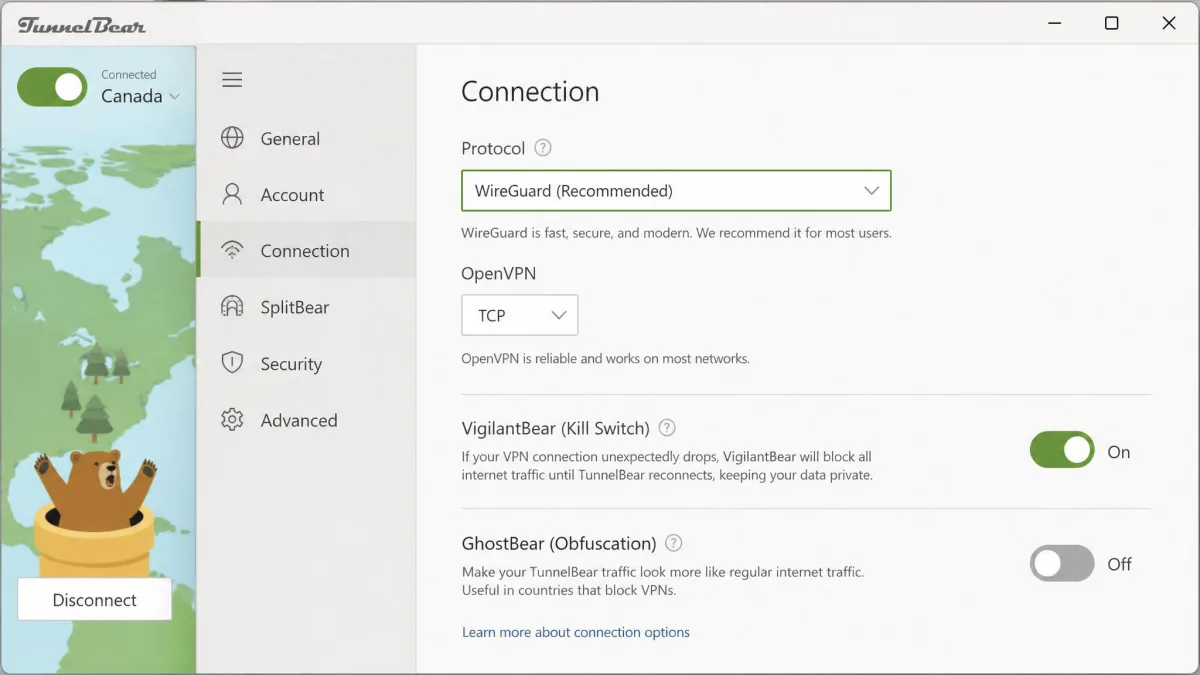
On protocols, TunnelBear supports OpenVPN, IKEv2, and the modern WireGuard protocol. WireGuard is the one that matters most for day-to-day use, because it delivers better speeds and quicker reconnections than the older options. It is also the protocol we left selected for most of our testing, and switching between them took a single tap in settings. TunnelBear's apps are built to keep DNS and IP requests inside the tunnel, which is the behaviour a leak-free setup depends on.
No-Logs Policy & Independent Audits
TunnelBear operates an advertised no-logs policy, meaning it does not record what you do while connected. Plenty of VPNs make that claim. What sets TunnelBear apart is that it has commissioned annual independent security audits by the respected firm Cure53, published every year since 2016, with the most recent covering Q4 2023.
That audit history is the single strongest reason to trust the service. It is a rare commitment at this price, and it is worth reading alongside the company's public annual transparency report, which details government data requests and how the company responds to them. The auditor itself, the Berlin-based security firm Cure53, publishes its penetration-testing methodology, so you can see the kind of scrutiny the apps are put through rather than take the badge on faith.
The pattern that matters is consistency rather than any single result: a company that expects to be checked builds its systems accordingly, and that habit is the reason we rate TunnelBear's trustworthiness above its raw feature set.
An annual, published third-party audit is the closest thing a VPN has to showing its work, and TunnelBear has done it every year since 2016.
— From our security review
Kill Switch (VigilantBear) & GhostBear Obfuscation
TunnelBear's kill switch is branded VigilantBear, and it is available on Windows, Mac, Android, and iOS. Its job is to block all internet traffic if the VPN connection drops, so your real IP is never exposed during a reconnection. We recommend leaving it on. In our stability testing we did see occasional dropped servers and random connection errors, which is exactly the situation a kill switch exists to cover.
GhostBear is TunnelBear's obfuscation feature. It disguises your VPN traffic so it looks like ordinary encrypted web traffic, which helps on restrictive networks that try to detect and block VPNs. It can slow your connection, so turn it on only when you need it.
Jurisdiction: Based in Canada (Five Eyes)
The one caveat on safety is jurisdiction. TunnelBear is based in Canada, which is a member of the Five Eyes intelligence alliance, a group of countries that share surveillance data. Some privacy purists avoid VPNs based in any Five Eyes country on principle.
Our view is more measured. A jurisdiction only matters if a provider actually holds data to hand over, and TunnelBear's audited no-logs policy is designed so that there is little to surrender. If your threat model involves nation-state surveillance, a provider based outside the alliance may suit you better. For the average user protecting privacy on public Wi-Fi, the Canadian base is a minor point against a strong audit record. It is also worth separating two ideas that often get blurred: jurisdiction governs what a company can be compelled to disclose, while a no-logs design governs what it holds in the first place. TunnelBear's audits speak to the second, which is the part most within the company's control.
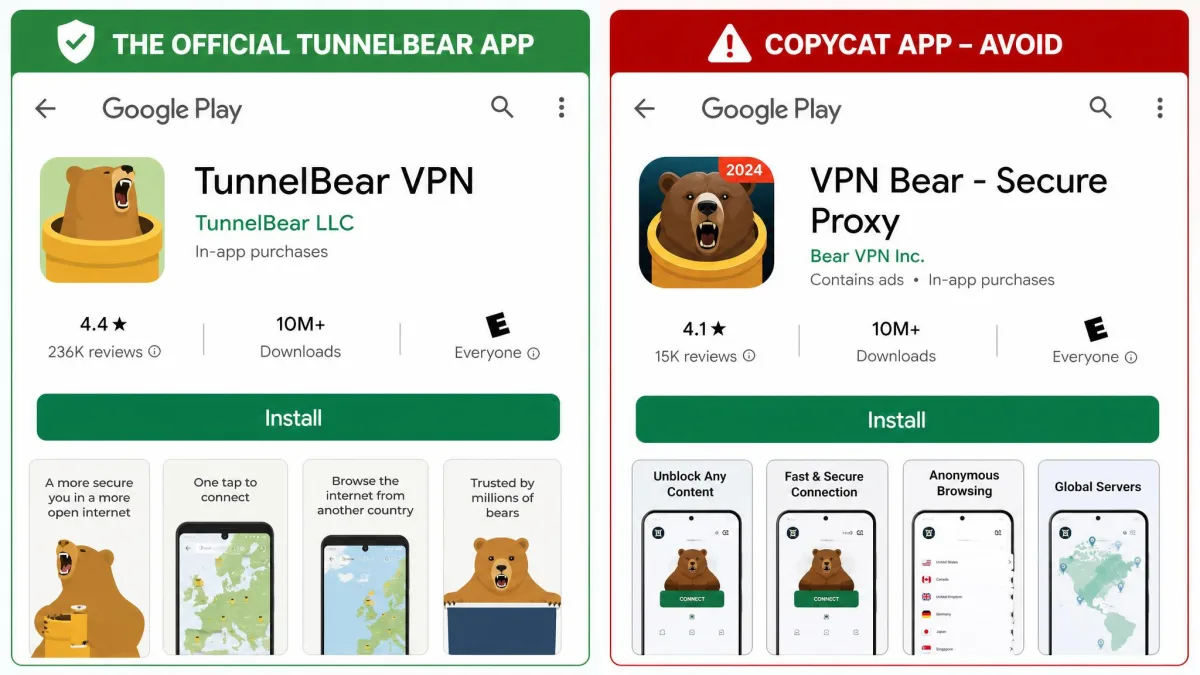
Only download TunnelBear from tunnelbear.com or the official app stores. Copycat apps such as "Bear Tunnel VPN" and "Tunnel-Bear Free & Unlimited" are not made by TunnelBear. Also weigh the Canadian Five Eyes jurisdiction if avoiding surveillance-alliance countries is part of your privacy plan.
Server Network (8,000+ Servers, 45+ Countries)
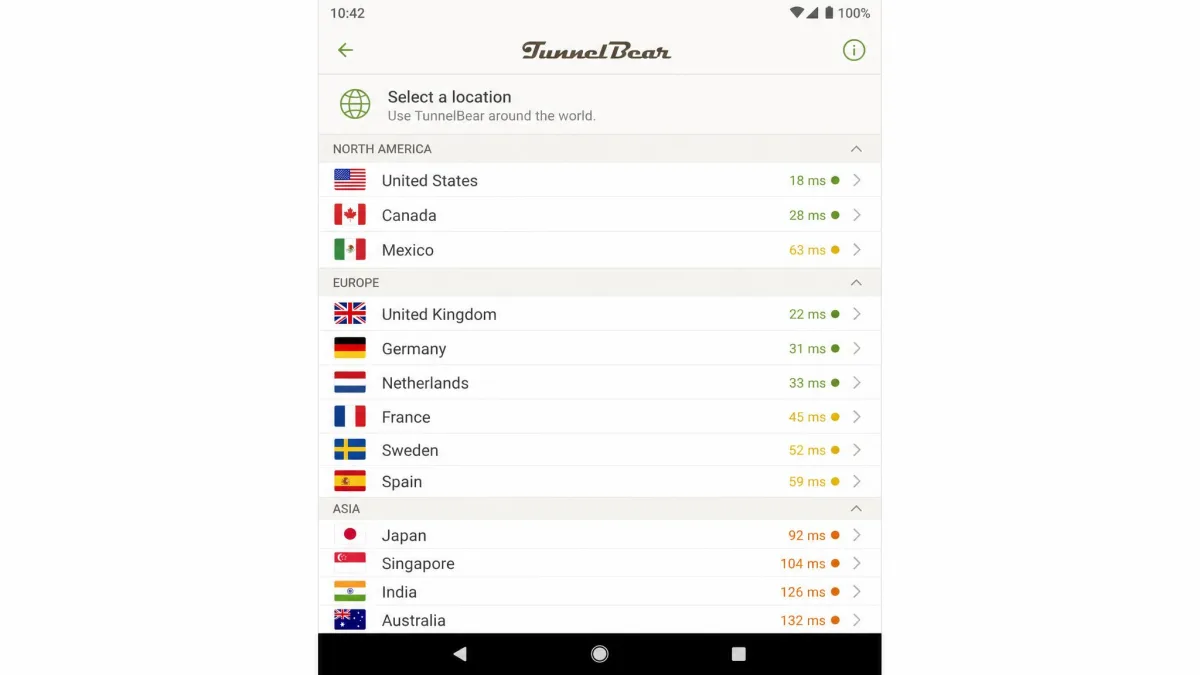
TunnelBear runs 8,000+ servers across 47 countries. The server count is high, but the country spread is where it trails rivals. At 47 countries it covers the major regions of North America, Europe, and parts of Asia and Oceania, but it lacks the reach of networks that span 100 countries or more.
The regional balance leans heavily toward North America and Western Europe, where you will find the connection points most people actually use, including the US, Canada, the UK, Germany, the Netherlands, and France. Coverage of Asia-Pacific is thinner but present, with locations such as Japan, Singapore, and Australia carrying the region. Where the network shows its age is Latin America, Africa, and the Middle East, which are represented by only a handful of countries between them. If your work or family ties pull you toward those regions, check the live list before you commit.
For most users the country list is enough, because the places people most often connect to are well covered. If you need a server in a specific, less common country, check the list before you buy. That combination of a large raw server count inside a modest country list means each location tends to be well provisioned, which helps keep individual servers from becoming overcrowded. The weakness is purely geographic reach. If you regularly need to appear in a specific smaller country, confirm it is on the list first, because the gaps are in the long tail rather than the popular regions.
Does TunnelBear Work for Streaming & Unblocking (Netflix, Roblox)?
Streaming is TunnelBear's weakest area, and we want to be honest about it. Results are genuinely inconsistent. In one test set the apps unblocked Netflix, Peacock, Max, BBC iPlayer, and Amazon Prime, but failed on Disney+ and Hulu. In another round, the US Netflix server returned proxy errors, and a separate test found both Netflix and Amazon Prime blocked outright on the servers available.
The pattern is clear: TunnelBear can work for streaming, but you cannot count on any given service or server on any given day. If reliable streaming is your main reason for buying a VPN, this is not the one. For occasional access it may do the job, provided you are willing to switch servers when one is blocked.
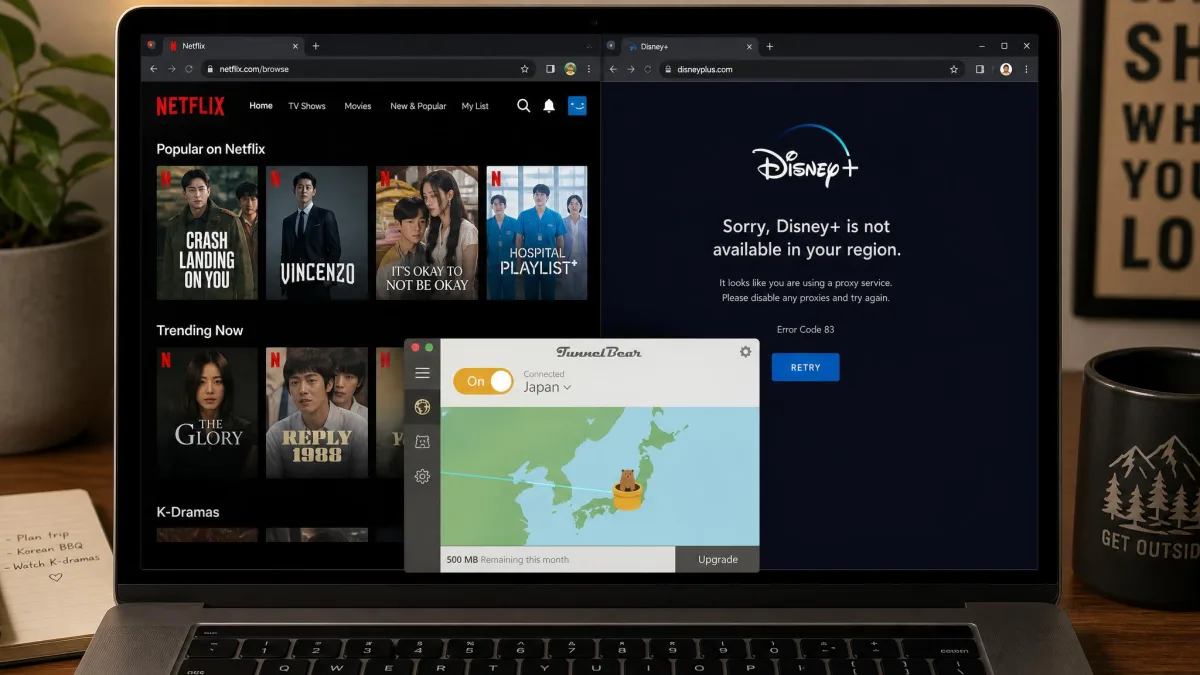
TunnelBear does not market itself as a streaming-first VPN, and it does not maintain the dedicated, frequently rotated streaming servers that the specialists in this space run. That is the underlying reason for the unevenness we saw: streaming platforms block VPN IP ranges aggressively, and TunnelBear does not chase that arms race as hard as its larger rivals do.
On the Roblox question that brings many people here, one clarification is important. This is about unblocking Roblox on a restricted school or office network, not the in-game "Tunnel Bear" boss in Bee Swarm Simulator, which has nothing to do with the VPN. Used to bypass a network block, TunnelBear can restore access to Roblox where the site is filtered, and GhostBear can help on networks that actively block VPNs.
Speed & Performance
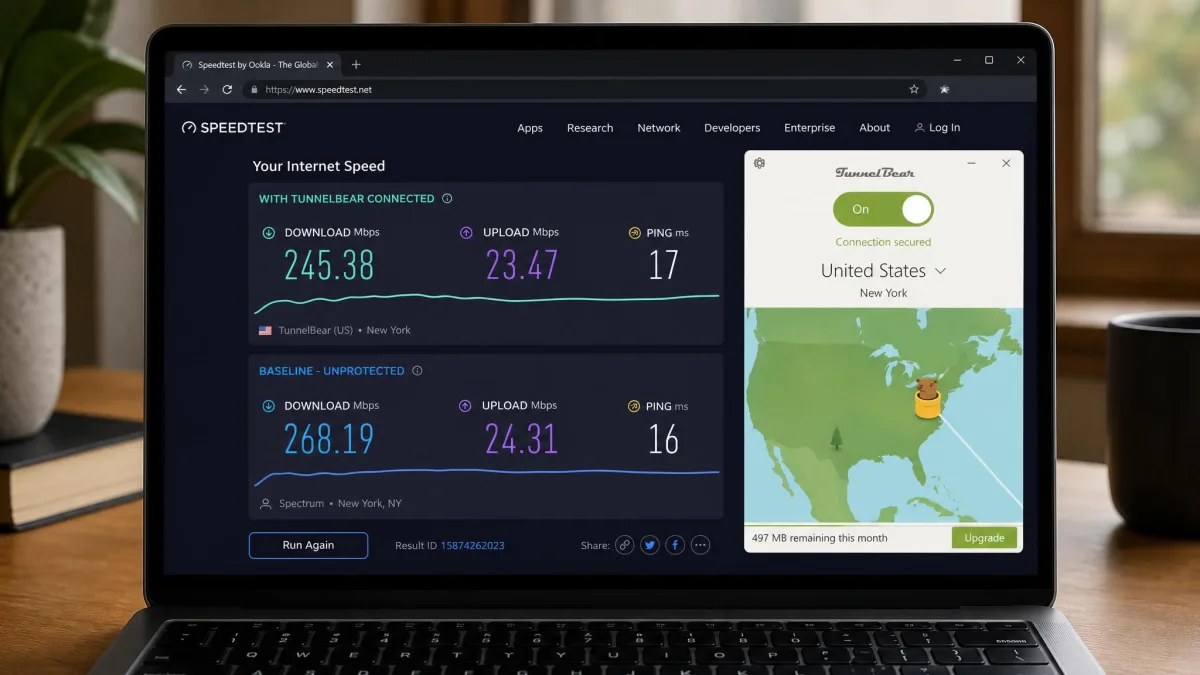
Speed is the other area where distance matters. Our method was consistent across servers: we measured each location three times, in both morning and evening windows, and averaged the results against a wired baseline taken with the VPN switched off. On nearby servers TunnelBear performs well. In our testing a nearby US server measured about 245 Mbps, which is plenty for browsing, calls, and HD video. The picture changes over distance: a far Japan server fell to around 128 Mbps, a noticeable but still usable drop that roughly halves the local figure. That decline scales with distance in the way you would expect, so a transatlantic hop lands somewhere between the two extremes rather than off a cliff.
The concern is the outliers. Some servers throttle heavily, and in one round a UK connection dropped to single-digit Mbps, which is close to unusable. A result that low is not about distance at all, since the UK is a mid-range hop from our test bench; it points to a specific overloaded or misbehaving server rather than the network as a whole. Speeds hold up well on nearby servers but sag over long distances, and the occasional bad server means you sometimes need to reconnect to get a good one. For a reference point, you can benchmark your own results with a tool like Speedtest by Ookla before and after connecting.
The takeaway from our speed testing is that TunnelBear is fast enough for everyday use but not a performance leader. WireGuard on a nearby server gives you headroom for 4K video and video calls without a second thought. Push the distance, and you should expect a real reduction, along with the occasional dud server that makes reconnecting worthwhile. For a household on a fast connection, TunnelBear will rarely be the bottleneck for local browsing; over long international hops, a faster rival will pull ahead.
For the best speeds, connect to the nearest server that meets your needs and use the WireGuard protocol. Only reach for GhostBear obfuscation on networks that actively block VPNs, since it adds overhead that lowers throughput.
Torrenting & P2P
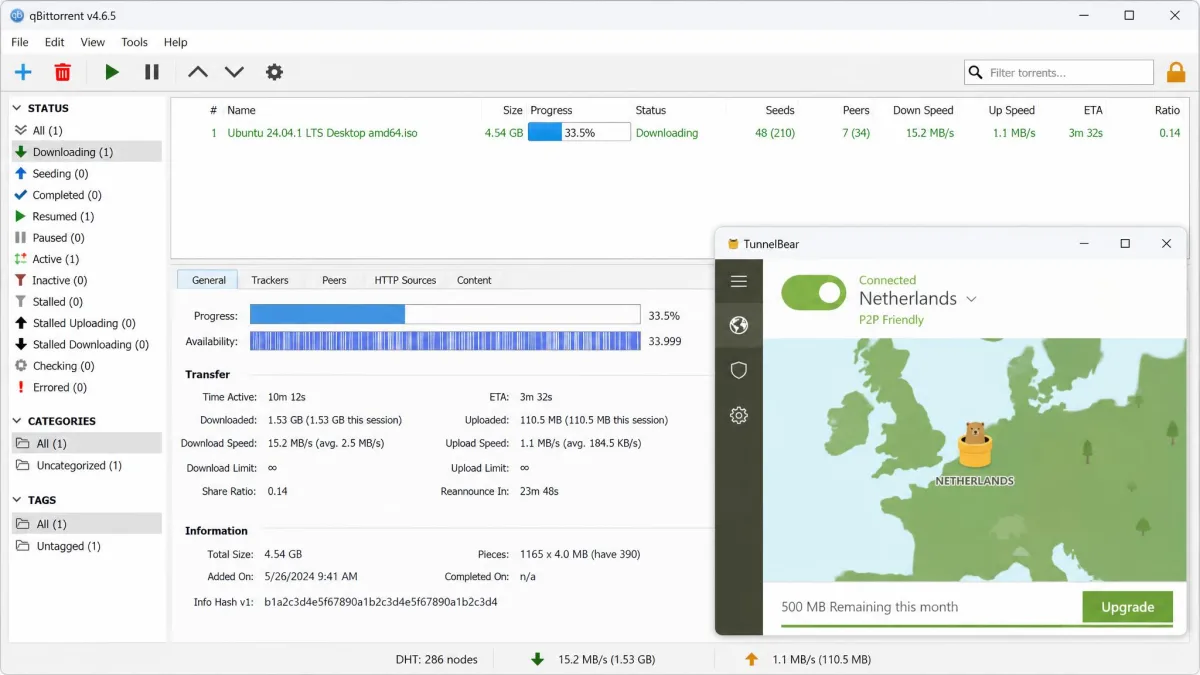
Because P2P support is narrower than it looks, this section is worth reading before you rely on it. TunnelBear allows torrenting, but only on a limited set of servers. P2P is supported in about 7 countries, including Canada, the US, the UK, Romania, the Netherlands, Germany, and Sweden. If you connect to a server outside that group, torrent traffic will not route properly.
In practice, downloads on a P2P-allowed server were reasonable rather than remarkable: we pulled down about 1.5GB in 10 minutes in one session. The catch is stability. Torrenting can disconnect when a client uses random ports, so pin your client to a supported configuration if you rely on it. TunnelBear will cover casual torrenting, but dedicated downloaders will prefer a VPN with broader P2P support and port forwarding. There is also no port forwarding, which advanced torrenters often rely on for better seeding and connection rates. For someone grabbing the occasional large file over a supported server, TunnelBear is fine, and the kill switch gives you a safety net if the connection drops mid-download. For anyone who torrents daily, the country restriction and the missing power features will quickly feel limiting.
How to Download TunnelBear (Windows, Mac, Android, iOS & Browser)
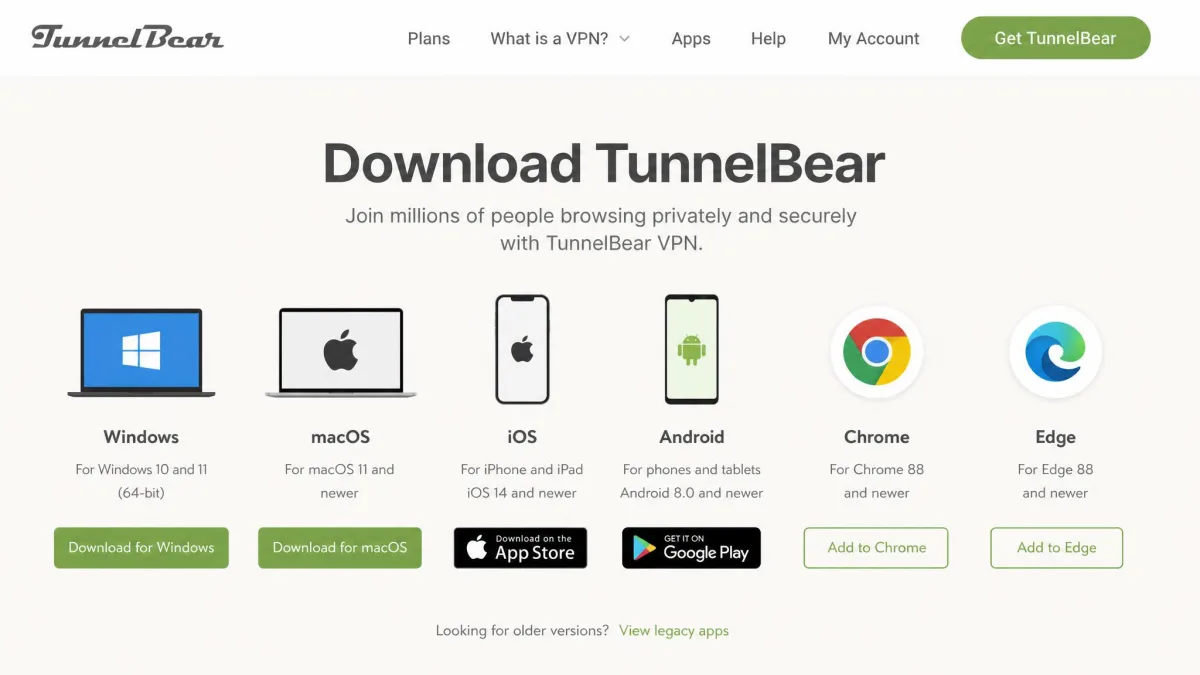
TunnelBear offers native apps for Windows, macOS, iOS, and Android, plus Chrome and Edge browser extensions. Linux is supported only through manual configuration, and there are no dedicated apps for routers, Apple TV, Kindle, or game consoles. The current desktop app is around version 5.10.x. Whichever platform you use, download only from tunnelbear.com or the official app stores.
TunnelBear for Windows (PC)
On Windows, download the installer from the official site, run it, and sign in or create an account. The app installs in a couple of minutes and opens to the world map. From there, a single click on a country connects you. This is the platform where you get the full feature set, including VigilantBear and protocol selection.
TunnelBear for Mac (macOS)
The macOS app mirrors the Windows experience closely, with the same map interface and one-click connection. Download it from the official site or the Mac App Store, grant the VPN configuration permission macOS requests on first launch, and you are ready. Feature parity with Windows is good.
TunnelBear for Android (Official APK & Copycat-App Warning)
On Android, install from the Google Play Store, or if you need the APK directly, use a trusted mirror that lists the official package by TunnelBear LLC, which shows more than 10M downloads. Be careful here: copycat apps such as "Bear Tunnel VPN" and "Tunnel-Bear Free & Unlimited" are not official and should be avoided. Verify the developer name before installing.
TunnelBear Browser Extension (Chrome/Edge Proxy) vs. the Full VPN App
The Chrome and Edge extensions are not full VPNs. They are lightweight proxies that encrypt only your browser traffic, leaving the rest of your device unprotected. That is fine if all you want is to change your browser's apparent location, but it is not the same as running the desktop or mobile app, which protects your whole device. For real privacy, use the full app; treat the extension as a convenience tool.
How to Use TunnelBear VPN (Step by Step)
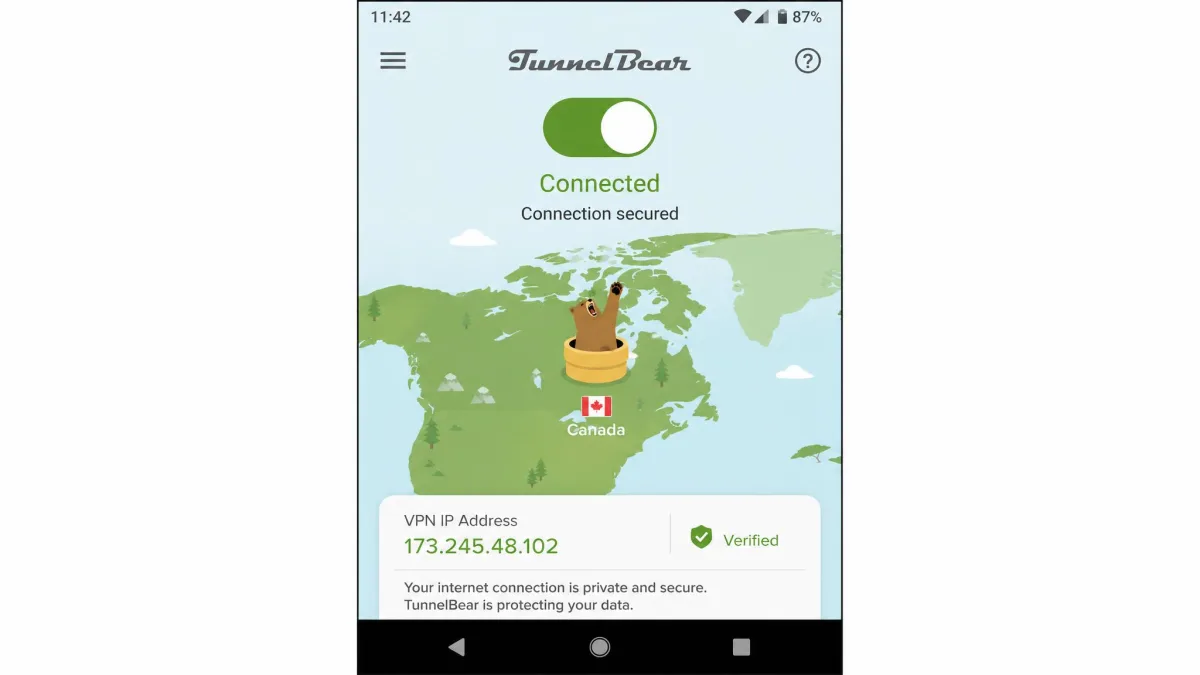
Getting connected takes about a minute. The map-based interface is genuinely beginner-friendly and quick to set up, which is TunnelBear's headline strength. Here is the flow we followed.
First, install the app for your platform and sign in. Second, open the app to the world map. Third, either click the country you want on the map or pick it from the list, keeping in mind that manual country selection is a paid-plan feature now. Fourth, toggle the connection on, and wait for the tunnel to complete and the status to show as secure. Fifth, if you plan to torrent or need obfuscation, open settings to enable a P2P-friendly server or GhostBear before connecting. To confirm it is working, check that your public IP now shows the country you selected.
Customer Support, Company Mission & Social Channels
Support is functional but basic. TunnelBear offers email and web-form support only, with no live chat, and the help desk can be a little hard to find on the site. When we did reach out, email replies typically arrived within a few hours to about half a day, which is acceptable for non-urgent issues but slow if you are stuck mid-connection. Without a chat window, that email queue is the only direct line to a person, so plan around it for anything time-sensitive.
The knowledge base is where most people will find their answer first, and it is the stronger half of TunnelBear's support offering. It is organised around the common tasks, such as installing on each platform, turning on the kill switch, fixing connection errors, and understanding the free data cap, and the guides are written in the same plain, friendly tone as the app. The knowledge base covers routine problems, so for those most users will find an answer there sooner than by waiting on the email queue. The gap is depth: the articles cover the basics well but thin out quickly once your problem is unusual, and that is the point where the slow email loop becomes your only option.
The company presents a clear mission built around a more open and private internet, and it has a history of advocacy for internet access in censored regions. It maintains social channels under the TunnelBear brand, which it also uses for product updates. We would like to see live chat added, since a stuck connection is the moment a user most wants immediate help, and a few hours of waiting is a poor fit for that scenario. On the other hand, the app is simple enough that most people never need to contact support at all, which softens the impact of the basic help options.
How TunnelBear Compares (Alternatives: NordVPN, ExpressVPN, Surfshark)
Placed next to the leading VPNs, TunnelBear is friendlier and audited, but smaller and less consistent. NordVPN and ExpressVPN win on network size and streaming reliability, while Surfshark undercuts everyone on price. The table below sets the key numbers side by side.
| Product | Buy | Starting price | Servers / Countries | Streaming | Audits |
|---|---|---|---|---|---|
|
Check price → | ~$3.33/mo | 8,000+ / 47 | Inconsistent | Cure53 (annual) |
 |
~$3.99/mo | 9,200+ / 137+ | Reliable | 4 no-logs audits | |
 |
~$6.67/mo | 3,000+ / 108 | Reliable | 18+ audits | |
 |
~$2.49/mo | 3,000+ / 100 | Reliable | Deloitte + Cure53 |
If your priority is streaming or the widest country list, NordVPN or ExpressVPN are the stronger buys, and both offer a 30-day money-back guarantee. If you want the lowest price, Surfshark leads. TunnelBear's case is different: it wins on simplicity, its free plan, and a longer public audit track record than any of them. Choose it for trust and ease rather than raw performance. One more practical point favors TunnelBear here: because the free plan lets you test the real app at no cost, you can verify its speeds and streaming on your own connection before committing, which none of the paid-only rivals allow without first taking your card.
Is TunnelBear a Good VPN? Our Test Verdict
Yes, with a clear profile of who it suits. TunnelBear is a good VPN for privacy beginners and light users. It nails the fundamentals of security, it is the easiest VPN we have tested to set up and understand, and its annual audits give it a credibility that most budget rivals cannot match. The free plan lets you confirm all of that before spending anything.
It is not a good VPN for power users. If you need dependable streaming across many services, the fastest possible long-distance speeds, heavy torrenting, or a server in an unusual country, you will feel the limits quickly. Match the tool to your needs, and TunnelBear is a satisfying, trustworthy choice at a fair price.
Frequently Asked Questions
Is TunnelBear safe to use?
Is TunnelBear really free, and what is the data cap?
Does TunnelBear work with Netflix?
Who owns TunnelBear and where is it based?
Can TunnelBear unblock Roblox at school or work?
Is TunnelBear based in a Five Eyes country?
Does TunnelBear allow torrenting?
How do I pay for TunnelBear, and is there UK pricing?
How many devices can I connect at once?
Final Verdict: Is TunnelBear Worth It?
TunnelBear is worth it for the right person. If you value a VPN you can install and understand in minutes, backed by a rare record of annual public audits and an honest free plan, it is one of the easiest recommendations we can make in the budget tier. At around $3.33 per month on longer terms, it is fairly priced for what it delivers.
It is not worth it if you need dependable streaming, top-tier long-distance speeds, or heavy torrenting, because those are exactly the areas where its smaller network and uneven performance show. Our advice is to start with the free 2GB plan and test it on your own connection and the services you care about. If it does what you need, the paid plan removes the cap without changing the friendly experience that makes TunnelBear special. We keep coming back to the same summary. TunnelBear does the core job of a VPN safely and with less friction than almost anything else in its class, and it proves its claims with audits. Accept its limits on speed, streaming, and reach, and it is a genuinely likeable tool worth paying for.