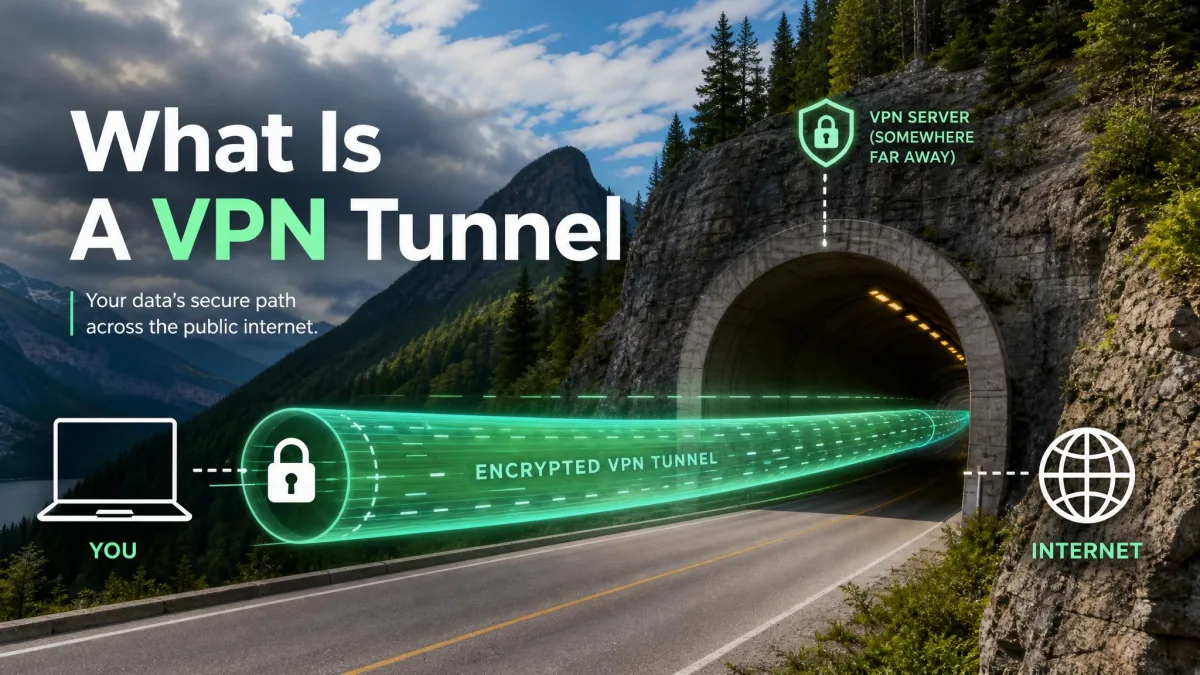
A VPN tunnel is an encrypted connection between your device and a VPN server that keeps your traffic unreadable while it crosses your local network and your internet provider. Think of it as an analogy: instead of sending your data down an open public road where anyone alongside can see the cargo, you send it through a private tunnel that only you and the server at the far end can open.
That is the whole idea, but the details are where people get stuck. This guide covers how a tunnel is built, what it hides and what it does not, the tunneling protocols in your app's settings screen, and how full and split tunneling change what stays protected.
What Is a VPN Tunnel?
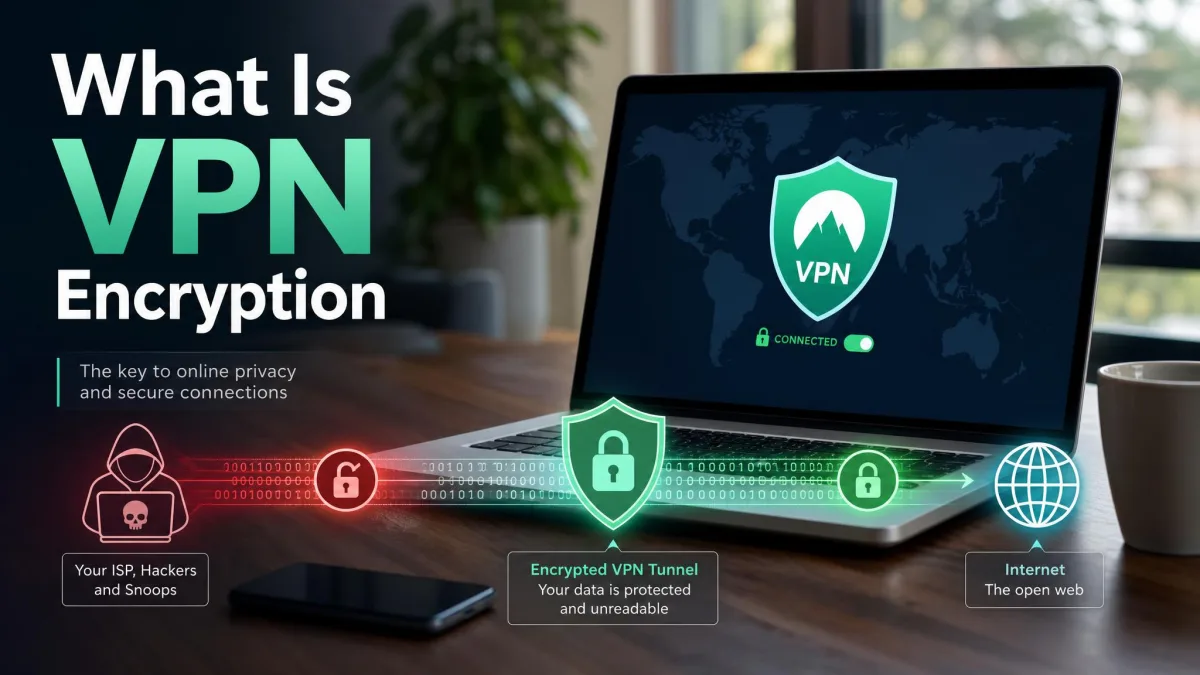
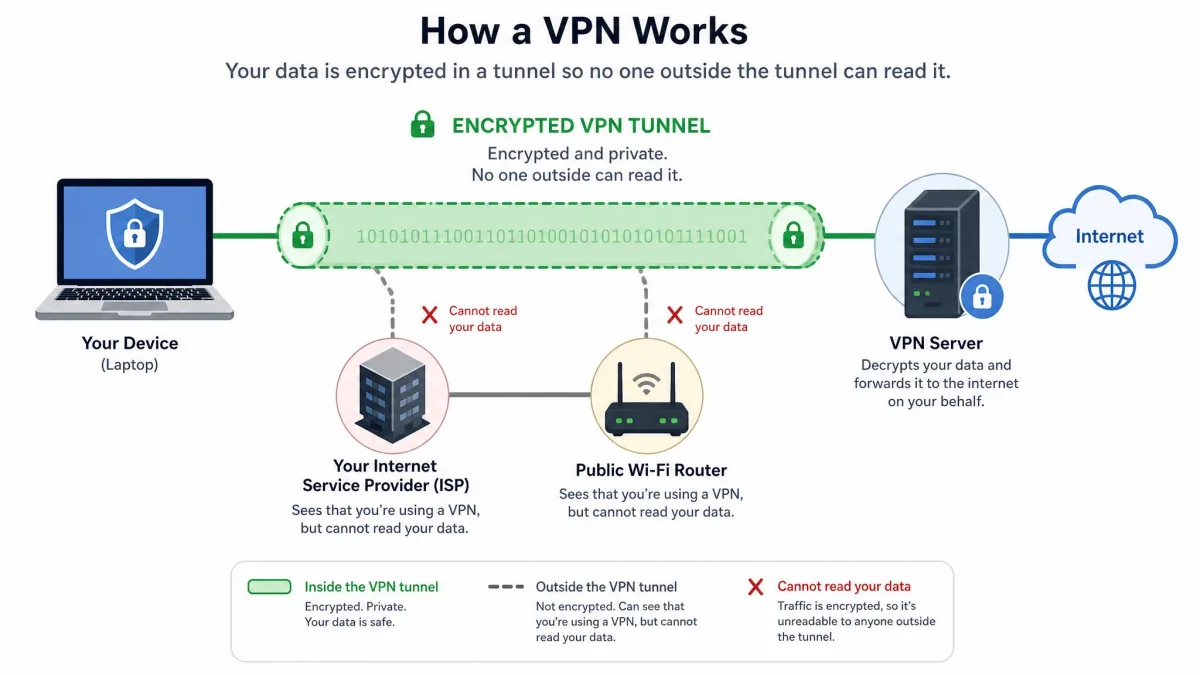
A VPN tunnel is the protected path your data takes between your device and a VPN server. Your client encrypts each packet before it leaves, wraps it inside a new packet addressed to the server, and sends that out through your normal internet connection. Anyone watching in between, including your internet provider and whoever runs the Wi-Fi you are on, can see that packets are travelling to a VPN server, but not what they contain or where they are headed.
The word "tunnel" describes the wrapping, and the word "VPN" describes the private network you have joined at the far end. If you want the wider picture of what a VPN is and how it works, the tunnel is the piece doing the actual protecting.
Encapsulation and encryption are not the same thing. Encapsulation puts your packet inside another packet so it can be routed to the VPN server, while encryption scrambles the contents so nobody along the way can read them. A protocol has to do both to be useful for privacy, which is why L2TP on its own is not a security protocol.
How Does a VPN Tunnel Work?
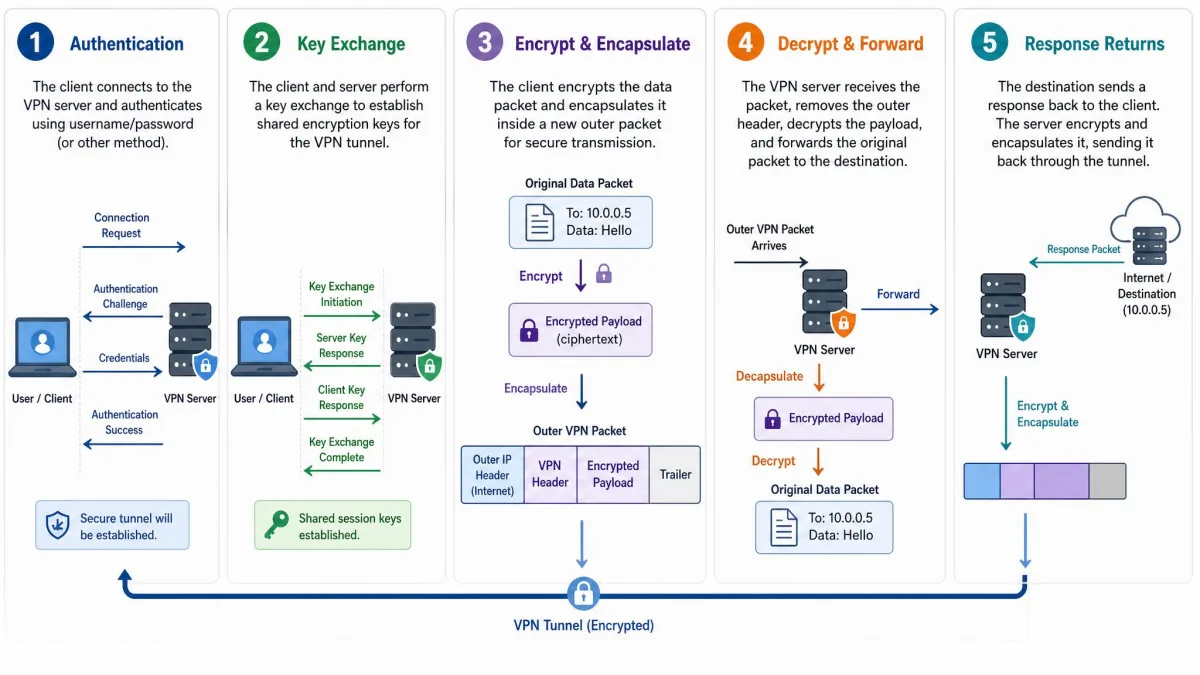
A tunnel is built in a short sequence that finishes in a second or two, and it repeats every time you connect.
Step 1: Your device authenticates with the VPN server
Your client proves it is allowed to connect, using a certificate, a username and password, or a public key the server already knows. WireGuard identifies peers by their keys rather than by an account credential, while OpenVPN more commonly uses certificates issued by the provider.
Step 2: The tunnel is established and keys are exchanged
Both ends agree on the secret keys that will encrypt the session. WireGuard uses the Noise_IK handshake from the Noise protocol framework, where two messages establish the symmetric session keys before any data moves. OpenVPN handles its key exchange over TLS encryption, the same layer that protects a banking site in your browser.
Step 3: Data is encrypted and encapsulated
Every packet is encrypted with the session key, then placed inside an outer packet addressed to the VPN server. That outer packet is all your network sees. The inner packet, carrying the site you are visiting and the data you are sending, stays sealed, and that is what makes public Wi-Fi safe for anything sensitive.
Step 4: The VPN server decrypts and forwards your traffic
The server strips the outer packet, decrypts the inner one, and forwards your request using its own IP address. From the website's point of view the connection comes from the VPN server, which is why a tunnel changes what location a service thinks you are in.
Step 5: Return traffic travels back through the tunnel
The response follows the same path in reverse, and your client unwraps it before handing it to your browser. Session keys do not stay static: WireGuard rotates them on a timer every few minutes, though the specification describes that rotation in minutes without publishing a fixed interval, and each app sets its own timer constants.
What a VPN Tunnel Hides (and What It Does Not)
A tunnel hides the contents of your traffic from your local network and your internet provider, hides which sites you visit from those same parties, and hides your real IP address from the services you connect to.
It does not hide your behaviour from the sites you actually visit. The moment you sign in, that service knows who you are, and browser fingerprints identify you across sessions regardless of which address you arrive from. Deep packet inspection can also identify which tunneling protocol you are using, though it cannot see the sites inside the tunnel.
A VPN tunnel is not anonymity. It moves trust from your internet provider to your VPN provider rather than removing it, and it does nothing about logged-in accounts, cookies, or browser fingerprints. Treat it as protection for your connection, not as a cloak for your identity.
Benefits of Using a VPN Tunnel
- Safety on untrusted networks. On public Wi-Fi, the network operator sees encrypted traffic to one server and nothing more.
- Privacy from your internet provider. Your provider sees that you are connected to a VPN, not which sites you load.
- Access to your work or home network. A remote-access tunnel puts you inside a private network as though you were in the office.
- A different apparent location. Services see the server's address, which changes the regional content you are shown.
- Cover for unencrypted services. Anything that would otherwise travel in the clear is wrapped in the tunnel's encryption.
Limitations and Downsides of a VPN Tunnel
A tunnel always costs some speed. No configuration removes the encryption overhead entirely, so anyone promising a VPN that makes your connection faster is selling something. Stacking tunnels, as in a double-VPN connection, compounds the slowdown rather than adding a small increment.
Full tunneling also breaks things on your own network. Printers and NAS boxes stop responding once every packet is routed to a remote server, which is the usual reason people go looking for split tunneling. Some services also block known VPN addresses, and a tunnel that looks connected can still leak.
Types of VPN Tunnels
Remote Access vs Site-to-Site
A remote-access VPN connects one device to a network, which is what a consumer app builds and what a company gives an employee working from home. A site-to-site tunnel connects two whole networks, usually router to router, so an office in one city can reach servers in another as if they shared a building. Those tunnels are permanent, run on network hardware, and are almost always built on IPsec.
Voluntary vs Compulsory Tunneling
Voluntary tunneling is what you do when you open your app and choose to connect: your device starts the tunnel and you control whether it exists. Compulsory tunneling is arranged by the network instead, where a provider or corporate gateway forces your traffic into a tunnel whether or not you asked. Most consumer use is voluntary, while managed corporate devices often use the compulsory model.
VPN Tunneling Protocols Explained
The protocol is the ruleset both ends follow to build and maintain the tunnel, and the differences are more than cosmetic.
WireGuard
WireGuard is the modern default, and it is deliberately small. It uses ChaCha20 for symmetric encryption, authenticated with Poly1305, Curve25519 for elliptic-curve Diffie-Hellman key agreement, BLAKE2s for hashing, and HKDF for key derivation. Those choices are fixed rather than negotiated, which removes a whole class of downgrade attacks. The WireGuard protocol specification documents each of them, and its cryptographic design is short enough to read in an evening.
It runs over UDP only, with a default listen port of 51820 in the reference configuration, and full IP roaming is built in, so moving between networks does not break the session. Its codebase is roughly 4,000 lines against figures around 100,000 for OpenVPN and 400,000-plus for common IPsec stacks, though those counts shift depending on which build and which libraries you count, so treat them as orders of magnitude. A smaller codebase is easier to audit, which is a genuine security argument.
Fixed cipher suites raise one future question. When post-quantum cryptography becomes the expected baseline, a protocol with no negotiation has to update rather than adapt, which means new client releases rather than a settings change.
OpenVPN
OpenVPN is the older, heavier, and considerably more flexible option. Its default negotiated data ciphers are AES-256-GCM, AES-128-GCM and CHACHA20-POLY1305, and it authenticates with certificates or with a username and password. The OpenVPN manual documents the full option set, which is large.
Its real advantage is transport. OpenVPN runs on UDP 1194 by default but will happily run over TCP 443, where it blends in with ordinary HTTPS traffic and passes firewalls that block everything else. TCP mode is more reliable through restrictive networks and slower. Speeds are reasonably high and the blend of speed and security is good, but it is not the fastest option available.
IKEv2/IPSec
IKEv2 is specified in RFC 7296, and the wider IPsec security architecture is defined in RFC 4301. Negotiation runs on UDP 500 and moves to UDP 4500 when NAT traversal is needed, with IPsec ESP doing the encryption.
Its standout quality is mobile behaviour. Switching from Wi-Fi to mobile data drops some tunnels, and IKEv2 clients recover from that handover more cleanly than most, thanks to the roaming work of the IETF MOBIKE working group. Native support exists on Windows, iOS, macOS and Android. The trade-off is a reliance on fixed UDP ports, which makes it easy to block.
L2TP/IPSec
L2TP provides no encryption on its own and must be paired with IPsec to be secure, which is why you always see the two names together. The design dates to the 1990s and is widely considered outdated. Microsoft announced on October 8, 2024 that PPTP and L2TP are deprecated in Windows Server and that RRAS no longer accepts incoming connections on them, although outgoing client connections from Windows still work.
SSTP
SSTP tunnels over TLS on TCP 443, so it looks like ordinary HTTPS and passes most firewalls. It is Microsoft-controlled, best supported on Windows, and closed source, so it cannot be independently audited the way OpenVPN and WireGuard can. Microsoft recommends moving to SSTP and IKEv2 as the replacements for the two deprecated protocols.
PPTP
PPTP should not be used. MS-CHAPv2, the authentication it relies on, was broken publicly in 2012 when Moxie Marlinspike released chapcrack at Defcon. The attack reduces the handshake to a single 56-bit DES key, recoverable in a worst case of about 23 hours on dedicated hardware. Speeds are very high, because the encryption effectively is not there.
If your VPN app still offers PPTP, treat that as information about the provider rather than a useful option. Its security has been defunct since 2012, and Microsoft deprecated it in 2024.
Proprietary and Obfuscated Protocols
Several services ship their own protocols, usually a WireGuard or OpenVPN core wrapped in extra obfuscation so the traffic does not look like VPN traffic to deep packet inspection. These are genuinely useful on networks that block VPNs outright, but a proprietary wrapper cannot be reviewed by anyone outside the company.
VPN Tunneling Protocols Compared
| Protocol | Speed | Encryption/Security | Stability on mobile | Firewall evasion | Best use case |
|---|---|---|---|---|---|
| Fastest of the mainstream set | ChaCha20-Poly1305, Curve25519 | Strong, IP roaming built in | Weak, UDP 51820 is easy to block | Default choice for speed and security | |
| Reasonably high | AES-256-GCM, TLS key exchange | Good, reconnects more slowly | Strong on TCP 443 | Restrictive networks and routers | |
| High, very quick to connect | IPsec ESP per RFC 4301 | Best across Wi-Fi and mobile data | Weak, fixed UDP 500 and 4500 | Phones that switch networks | |
| Reasonably high | None alone, needs IPsec | Fair | Weak | Legacy gear only | |
| Moderate, TCP overhead | TLS over TCP 443 | Fair | Strong, looks like HTTPS | Windows behind strict firewalls | |
| Very high, but insecure | Broken: a 56-bit DES key | Fair | Weak, needs GRE | Nothing; deprecated in 2024 |
Which VPN Tunneling Protocol Should You Use?
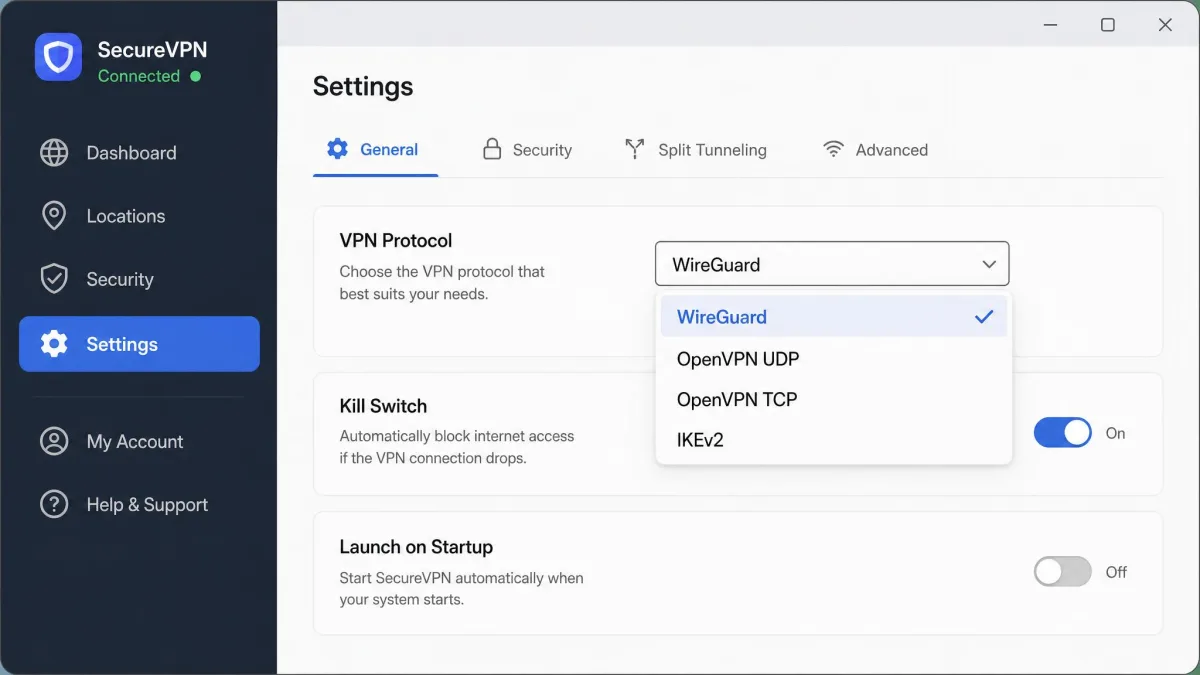
Start with WireGuard and change only if something breaks. If your network blocks or throttles UDP, switch to OpenVPN on TCP 443, where a TCP-based or obfuscated protocol connects while the default UDP profile stalls. On a phone that moves constantly between Wi-Fi and mobile data, IKEv2 is worth trying.
One thing is worth knowing before you spend an afternoon benchmarking: the protocol name is often not the biggest factor in your real speed. Server distance, congestion, routing, Wi-Fi quality and your device hardware can all matter more than the setting you changed. If you are still working out how to set up and use a VPN, leave the protocol on automatic until you have a specific problem to solve.
Whatever protocol you pick, turn on the kill switch. Without a working one, a dropped tunnel leaves your browsing unprotected with no visible signal that anything changed.
Full Tunneling vs Split Tunneling
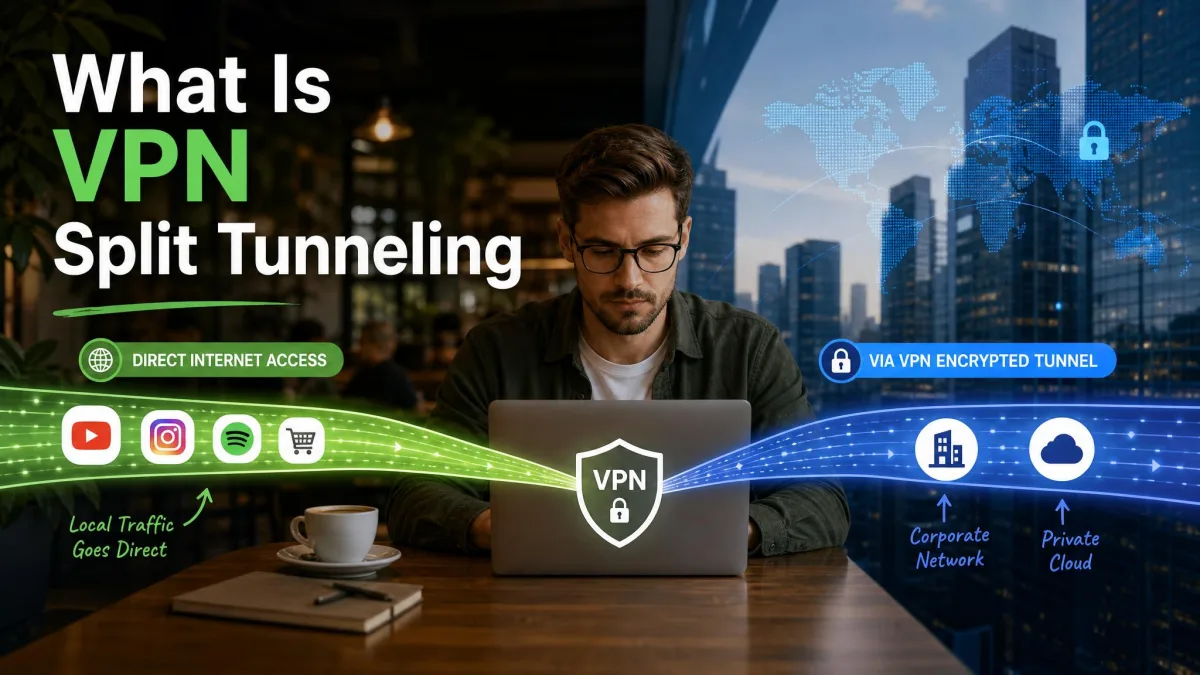
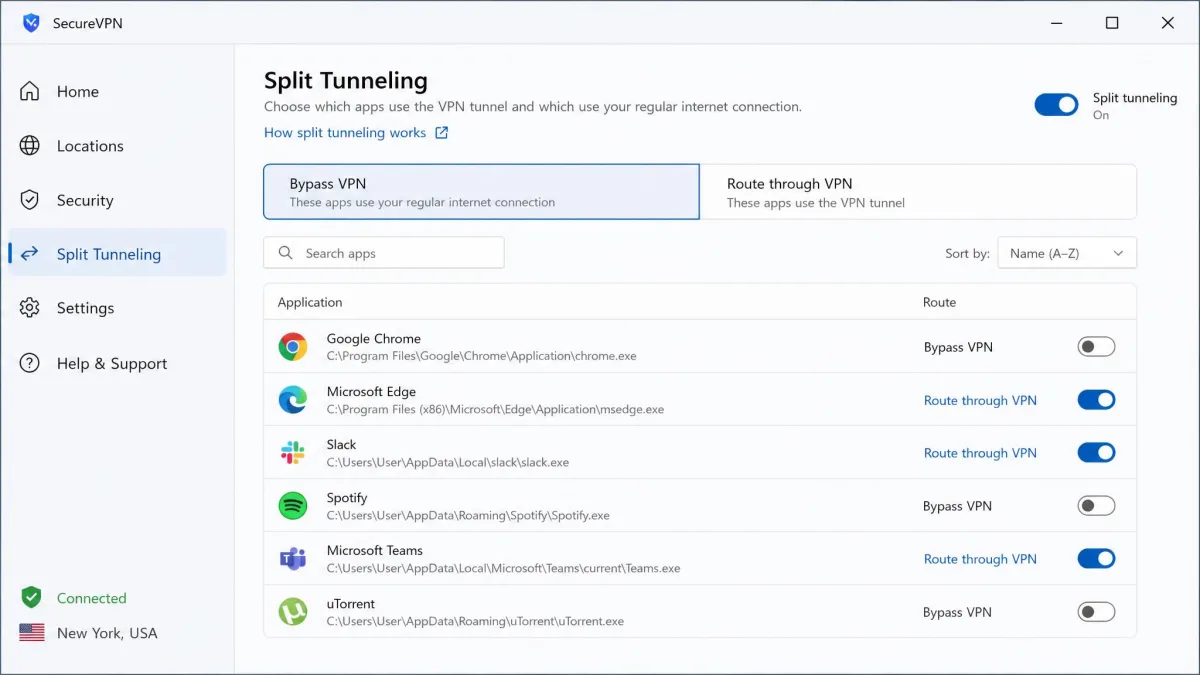
Full tunneling sends every packet your device produces through the VPN. Split tunneling encrypts only selected traffic, which means the rest of your traffic is not encrypted at all. That is the whole trade in one sentence, and it is worth reading twice.
| Full tunneling | Split tunneling | |
|---|---|---|
| What is protected | All traffic from the device | Only the apps you select |
| Speed | Everything carries the overhead | Excluded traffic runs at normal speed |
| Local devices | Printers and NAS boxes stop responding | Local devices keep working |
| Risk | Low, nothing escapes by design | New apps can sit outside the tunnel |
When Split Tunneling Is Useful
Split tunneling earns its place when full tunneling breaks something you need: printing to a network printer, reaching a NAS, or using a banking site that blocks VPN addresses. One failure mode is worth watching. App-based rules do not automatically cover newly installed programs, so a new app can sit outside the tunnel unnoticed. Review the rules whenever you install something that handles anything sensitive.
When to Keep the Full Tunnel On
On any network you do not control, keep everything inside the tunnel. Public Wi-Fi is the obvious case, but so is a rented apartment's router, a conference network, or a hotel connection. Split tunneling means making a per-app judgement in advance, and those judgements age badly.
How to Check Whether Your VPN Tunnel Is Working
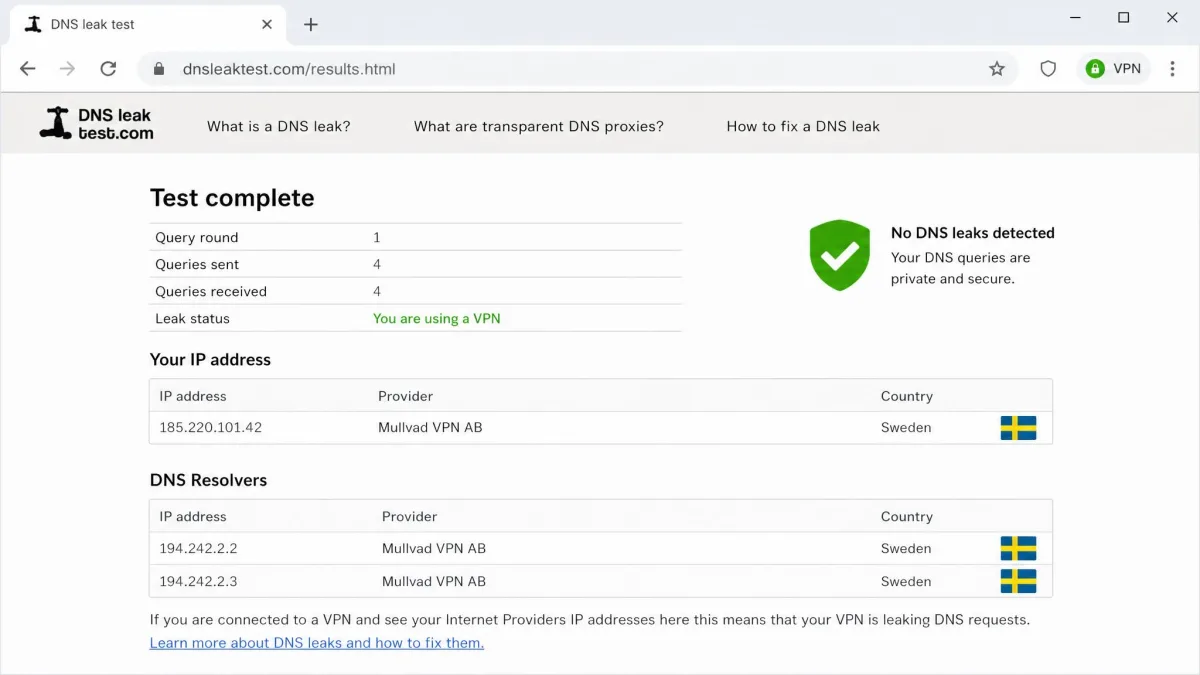
A connected badge in the client is not proof. DNS leaks, IPv6 leaks, WebRTC leaks, and kill-switch failure are the four ways traffic escapes a tunnel that looks fine, so we check all four rather than trusting the status icon. Record your public IPv4 and IPv6 address before connecting, connect, then record both again, and run a DNS leak test and a WebRTC test after any protocol change. A service like ipleak.net will check whether your tunnel is actually carrying your traffic across those vectors in one page load.
- IPv6. IPv6 traffic can bypass a tunnel that only handles IPv4, exposing your real address while the client still shows as connected.
- DNS. DNS requests can route outside the tunnel when the provider does not run its own resolvers or the configuration is wrong.
- WebRTC. WebRTC in the browser can reveal your real IP address even while the tunnel is up, and it has to be tested per browser.
For the kill switch, interrupt the connection deliberately and check that protected apps lose internet access before the tunnel reconnects.
Common VPN Tunnel Problems and Fixes
- Frequent disconnects. Switch server, switch protocol, restart the client, or move from UDP to TCP.
- Connects but nothing loads. Often a DNS problem. Try the provider's own resolvers, or switch protocol and test again.
- Will not connect on this network. The network is likely blocking UDP or the protocol's fixed ports, and OpenVPN on TCP 443 is the workaround.
- Everything is slow. Try a closer server before you touch the protocol setting.
- A local printer or NAS disappeared. That is full tunneling working as designed, and split tunneling brings them back.
Frequently Asked Questions
What is the difference between a VPN and a VPN tunnel?
Is a VPN tunnel secure, and can it be hacked?
Does a VPN tunnel slow down my internet?
What is a site-to-site VPN tunnel?
Can VPN tunnels be tracked or blocked?
Which tunneling protocol is best?
Do all VPNs use tunneling?
The Bottom Line
A VPN tunnel is a narrow, useful tool. It encrypts your traffic between your device and a VPN server, hides the contents from your network and your internet provider, and swaps your IP address for the server's. It does not make you anonymous, and it will cost you some speed no matter what you choose.
Set the protocol to WireGuard, turn on the kill switch, and run a leak test to confirm the tunnel is carrying what you think it is. Keep the full tunnel on whenever you are on a network you do not control, and reach for split tunneling only when something on your own network genuinely needs to stay outside.