Choosing a parental control app is harder than it should be, because two apps can look nearly identical on a feature list and behave very differently once they are running on a child's phone. Qustodio and FamiSafe are two of the names parents keep landing on, and both promise the same thing: a simple way to keep your kids safe online without hovering over every tap. The question is which one actually delivers that in daily use, and for which kind of family.
We installed both apps and ran them side by side on a small mix of family devices, including newer and older Android phones, an iPhone, and a Windows laptop. We paid for the plans ourselves, set up real child profiles, and lived with the alerts, the reports, and the occasional bug for long enough to see where each app is genuinely strong and where the marketing runs ahead of the experience. This comparison is the result, written to help you match the right app to your own needs rather than crown a single winner for everyone.
Both apps cover the core parental control checklist: web filtering, screen time limits, location tracking, and app management. The differences that matter are in the details, so that is where we will spend most of our time.
Qustodio vs FamiSafe At a Glance (Comparison Table)
Here is the short version before we get into detail. The table below sums up how the two parental control apps compare across the features most parents ask about, from pricing and supported devices to filtering, location tracking, and free access.
| Feature | Qustodio | FamiSafe |
|---|---|---|
| Pricing | $54.95/yr (5 devices) up to $137.95/yr | $9.99/mo, $19.99/qtr, $59.99/yr |
| Devices per plan | 5 (Basic) to unlimited (Complete) | 5 monthly, 8 quarterly, 10 annual |
| Web/content filtering | 29 categories, strong explicit detection | AI detection, weaker on odd domains |
| Screen time | Limits, schedules, pauses | Limits plus reliable 30-day history |
| Location & geofencing | GPS tracking plus geofenced place alerts | Real-time GPS plus geofencing (100 to 1000m) |
| App blocking | Full app blocking | Usage limits and blocking |
| Social/message monitoring | WhatsApp, Instagram, Line, SMS (Android) | YouTube monitoring, no SMS |
| Platforms | Windows, Mac, iOS, Android, Kindle, Chromebook | iOS, Android, Windows, Mac, Chromebook, Kindle Fire |
| Free plan | Yes, 1 device | No, 3-day trial only |
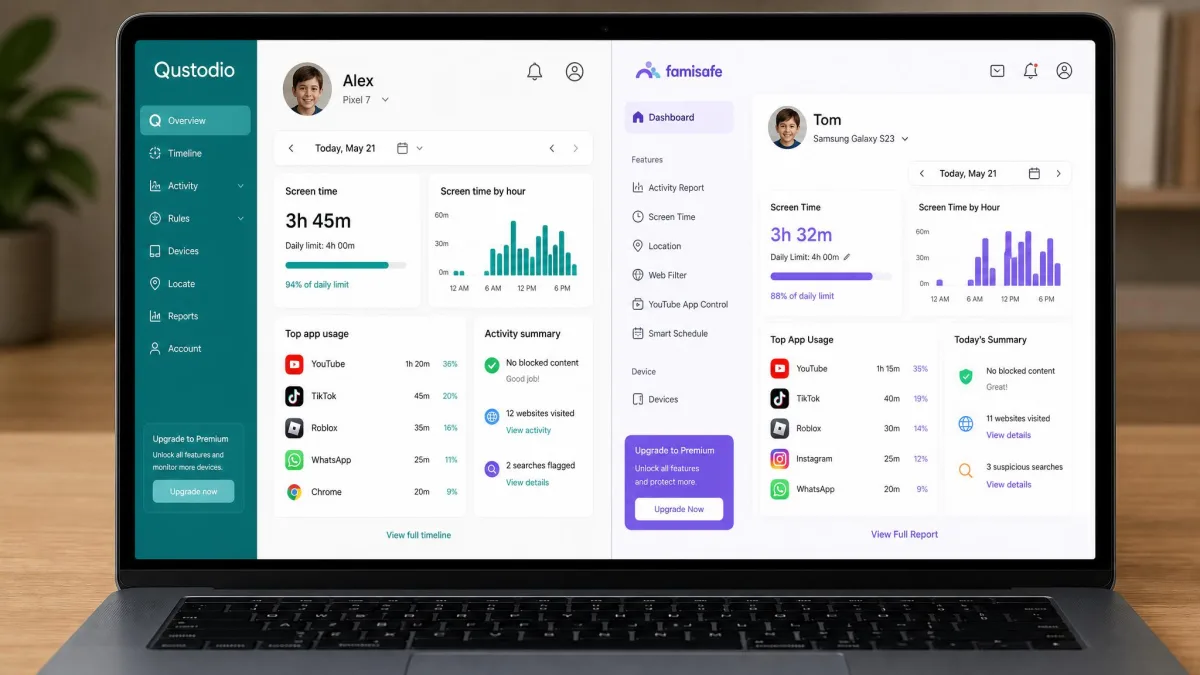
Qustodio Overview
Qustodio is a long-running parental control app that leans toward comprehensive monitoring across a wide range of devices. It is the kind of app that tries to do everything: filter the web, cap screen time, track location, block apps, and report on activity, all from one parent dashboard. In our testing it felt like the more mature, feature-complete of the two, though that breadth comes with a slightly dated interface in places.
Key Features
Qustodio filters the web using 29 content categories with age-based profiles, so you can set a sensible baseline and then tighten or loosen individual categories. Its screen-time controls cover daily limits, per-app schedules, and an instant pause button that locks the device on demand. Location tracking is included, with geofenced place alerts that notify you when your child arrives at or leaves a saved spot such as home or school.
On Android, Qustodio also monitors calls and SMS and reaches into social and message activity across WhatsApp, Instagram, and Line, plus games and voice-chat alerts. There is an SOS panic button on Android that lets a child signal for help, and daily and weekly activity reports pull it all together. The one caveat worth flagging early is iOS: Apple's privacy rules strip out SMS monitoring, granular app blocking, and much of the app-usage insight, so an iPhone-only setup gives you a noticeably thinner version of the app.
One thing we appreciated is how well the content filter holds up. Qustodio catches explicit content based on what a page actually contains, not just whether the domain name looks suspicious, so it blocked material that a domain-only filter would wave through.
Qustodio's activity reporting can lag roughly 10 to 15 minutes behind real time. It is fine for reviewing habits and history, but do not expect it to be a live, second-by-second feed of what your child is doing.
Pricing & Plans
Qustodio's premium pricing is billed annually only. The Basic plan runs $54.95 per year and covers 5 devices, which is enough for most single-child or two-child households. The Complete plan steps up to $99.95 per year with more features and unlimited devices, which is the tier to reach for if you are outfitting a large or blended household. Above that sits the top-tier Large plan at $137.95 per year, aimed at families who want the fullest feature set. Paid plans come with a 30-day money-back guarantee, which gives you a real window to test drive it on your own devices.
There is also a free premium trial at signup: a 3-day, no-credit-card Premium trial, which is separate from the 30-day money-back guarantee on paid plans.
The standout here is the free plan. Qustodio offers genuine free access for 1 device, including web filtering, screen-time limits, and 7-day activity reports. It is one of the few parental control apps that lets you protect a single device at no cost, which makes it easy to try before you commit.

FamiSafe Overview
FamiSafe, made by Wondershare, is a newer and more affordable parental control app that focuses tightly on the essentials and does them well. It covers filtering, screen time, location, and app management, and it adds a couple of features Qustodio does not, most notably a driving report. In our testing it felt lighter and more modern than Qustodio, with especially strong screen-time tracking.
Key Features
FamiSafe handles web and content filtering, screen-time limits and scheduling, real-time location tracking with geofencing, and app blocking with usage limits. Its geofencing lets you set a radius from roughly 100 to 1000 meters, which is handy for tuning how tight or loose an alert zone should be. It leans on AI to flag explicit content and suspicious text, and it monitors the YouTube app with alerts, which is a smart focus given how much time kids spend there.
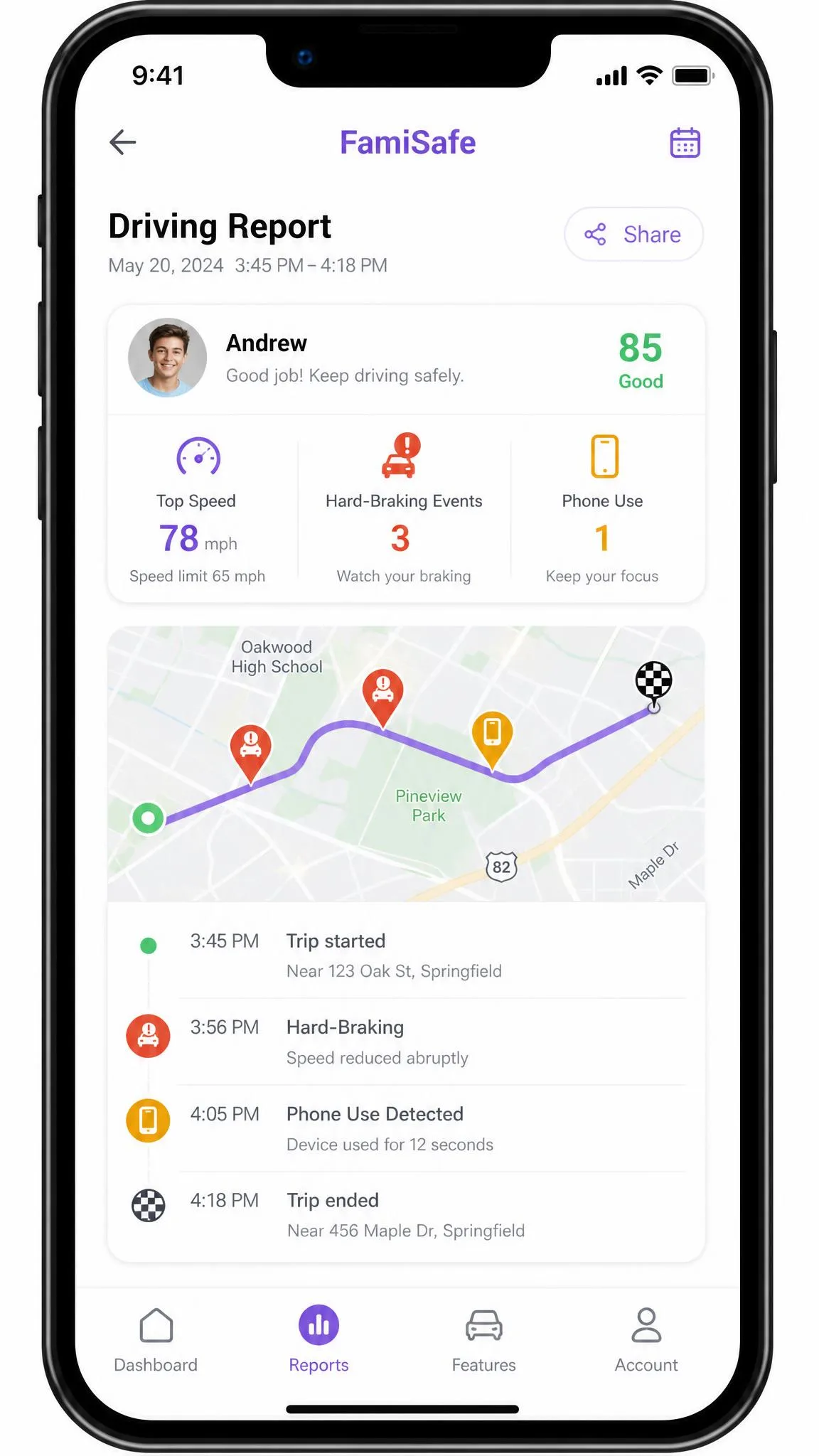
The feature that sets FamiSafe apart is the driving report, which tracks speed, hard braking, and phone use while driving. For parents of new teen drivers, that alone can justify the app. On the monitoring side, FamiSafe keeps a reliable 30-day history of activity, and in side-by-side use its screen-time data ran more accurate than Qustodio's.
Where FamiSafe is weaker is content filtering nuance and messaging. Its web filter mainly blocks sites whose domain names look inappropriate, so it misses material hosted on innocent-looking URLs that Qustodio caught. It also does not monitor SMS, so if text-message oversight matters to you, that is a real gap.
FamiSafe concentrates its social monitoring on the YouTube app, which is a sensible bet given how much time kids spend there. Just go in knowing that focus comes at the cost of SMS oversight, which FamiSafe does not cover at all.
Pricing & Plans
FamiSafe is priced to undercut most of its rivals, and it offers more billing flexibility than Qustodio. The monthly plan is $9.99 per month and covers up to 5 devices, the quarterly plan is $19.99 for three months covering up to 8 devices, and the annual plan is $59.99 per year covering up to 10 devices. That monthly option is genuinely useful if you only need coverage for a short stretch, such as a summer break or a single trip.
So the device allowance rises with the term: 5 on the monthly plan, 8 on the quarterly plan, and 10 on the annual plan. FamiSafe does not offer a free plan, but the annual plan includes a 3-day free trial, and there is a 7-day money-back guarantee if you change your mind after paying.
On raw price, FamiSafe is the cheaper app, especially at the annual tier, and the monthly option gives you a low-commitment way in that Qustodio's annual-only billing cannot match.

Head-to-Head Comparison
Feature lists only tell you so much. This section is where we compare the two apps on the jobs parents actually care about, based on how each one behaved on our test devices.
Web & Content Filtering / Blocking
This is Qustodio's clearest win. Its filter judges pages by what they contain, so it blocked explicit content regardless of how a site's URL was named. FamiSafe's filter leans on domain names and AI text detection, which works for obvious cases but let through material on ordinary-looking URLs that Qustodio stopped. Both let you block and unblock categories, but for reliable content filtering, Qustodio is the safer choice.
Screen Time Management
FamiSafe edges ahead here. Both apps offer daily limits, schedules, and the ability to pause a device, and both cover the basics well. The difference is in the data: FamiSafe keeps a reliable 30-day history and, in our side-by-side use, its screen-time numbers ran more accurate than Qustodio's. If understanding and shaping usage habits over time is your goal, FamiSafe gives you the better record to work from.
Location Tracking & Geofencing
This one is close. Both apps offer real-time GPS location and geofencing. Qustodio sends geofenced place alerts when a child arrives at or leaves a saved location, and FamiSafe lets you set a geofence radius between roughly 100 and 1000 meters for finer control. One trade-off we noticed on Qustodio: GPS location tracking drained roughly 10 to 15 percent more battery on the child's phone, so heavy use has a real cost to battery life.
An older claim floating around says Qustodio lacks geofencing entirely. That is out of date. In our testing, Qustodio's geofenced place-arrival and departure alerts worked as advertised.
App Blocking & Management
Qustodio offers full app blocking on Android, letting you switch off individual apps outright, while FamiSafe combines usage limits with blocking. Both work well on Android. The important caveat is iOS again: Qustodio's granular app blocking largely disappears on iPhone because of Apple's restrictions, so this comparison holds mainly on Android and other platforms.
Social Media & Message Monitoring
Qustodio does more here. On Android it monitors calls and SMS and reaches into WhatsApp, Instagram, and Line, plus games and voice-chat alerts. FamiSafe focuses on YouTube app monitoring and does not monitor SMS at all. That said, we want to be honest about the ceiling: deep monitoring inside encrypted social platforms stays limited on both apps, so neither gives you a full window into private messaging.
Alerts, Notifications & SOS
Qustodio includes an SOS panic button on Android that lets a child signal for help, which FamiSafe does not match directly. Both apps push alerts for geofence events and flagged content. Bear in mind Qustodio's reporting can trail real time by 10 to 15 minutes, so its alerts are prompt enough for oversight but not instantaneous.
Compatibility & Supported Platforms
Both apps are broad. Qustodio runs on Windows, Mac, iOS, Android, and Kindle, with Chromebook noted on its site. FamiSafe covers iOS, Android, Windows, Mac, Chromebook, and Kindle Fire. The platform lists are close, so the deciding factor is not which devices are supported but how well each app works on them, and that is where iOS limits Qustodio the most.
Ease of Setup & Use
Both apps take about 5 to 7 minutes to set up and demand extensive permissions plus hands-on access to the child's device, so plan to have the phone in your hands. Qustodio installs fastest on Android, around 10 minutes end to end, while Windows and Mac need system-level permissions and multiple restarts, and iOS adds a VPN configuration step. Qustodio ran smoothly on newer phones but lagged on older Android devices during app launches and multitasking. Its Windows app also feels dated and carries minor bugs, including one case where monitoring briefly became visible to the child, which is not ideal for discreet oversight.
Customer Support
Both apps offer help through their websites, knowledge bases, and email or ticket support. Neither stood out as dramatically better in our experience, so support is unlikely to be the feature that decides this for you. If hands-on responsiveness matters, use each app's trial or money-back window to test the support you would actually receive.
Pros and Cons
Here is the quick balance sheet for each parental control app, drawn from everything above.
Qustodio Pros & Cons
Pros
- Stronger explicit-content filtering that judges pages by content, not just domain
- Genuine free plan for 1 device
- Broad Android monitoring including SMS, WhatsApp, Instagram, and Line
- SOS panic button on Android
- 30-day money-back guarantee
Cons
- Heavily limited on iOS because of Apple's privacy rules
- Reporting can lag 10 to 15 minutes behind real time
- Dated Windows app with minor bugs
- Location tracking adds noticeable battery drain
- Annual-only billing on premium plans
FamiSafe Pros & Cons
Pros
- Lower price with flexible monthly, quarterly, and annual billing
- Reliable 30-day screen-time history that ran more accurate in testing
- Driving report tracking speed, braking, and phone use
- Adjustable geofence radius from 100 to 1000 meters
- Modern, lighter interface
Cons
- Weaker web filter that misses odd-domain sites
- No SMS monitoring
- No free plan, only a 3-day trial
- Shorter 7-day money-back guarantee
- Limited deep monitoring inside encrypted apps
Alternatives to Consider
If neither app fits, a few others are worth a look. Bark leans hard into message and social monitoring with content alerts, which suits parents whose main worry is what kids are saying and seeing rather than screen time. Net Nanny is known for strong real-time web filtering and a polished interface. Canopy focuses on filtering explicit images and sexting prevention with on-device AI. For a free starting point on Android and iOS, Google Family Link covers screen time and app approval, though it is thinner on filtering and monitoring than either app here.
Quick Verdict: Who Should Pick Which
Short on time? Here is the fast scan. Pick Qustodio if you are mainly on Android, you want the deepest content filtering and message monitoring, or you want to protect one device for free. Pick FamiSafe if price and billing flexibility matter most, if you want the most dependable screen-time history, or if you have a teen driver in the house. If your family runs entirely on iPhones, know that Apple's rules limit both apps, so lean on the trials before you pay.
Verdict: Which Should You Choose?
After living with both, we lean toward Qustodio as the better all-round parental control app for most families, because its content filtering is more reliable and its monitoring reaches further, especially on Android. It is the app we would trust more to actually catch the things you set it up to catch. The free plan and 30-day guarantee also make it low-risk to try, and on Android its broad reach into calls, SMS, and chat apps is the widest safety net either app casts.
That recommendation flips in two cases. If price and billing flexibility are your priority, or if you have a teen driver, FamiSafe is the better fit: it is cheaper, its screen-time history is more dependable, and the driving report is a feature Qustodio simply does not offer. And if your family is entirely on iPhones, know that Apple's rules limit both apps, so temper your expectations either way and use the trials before you commit.