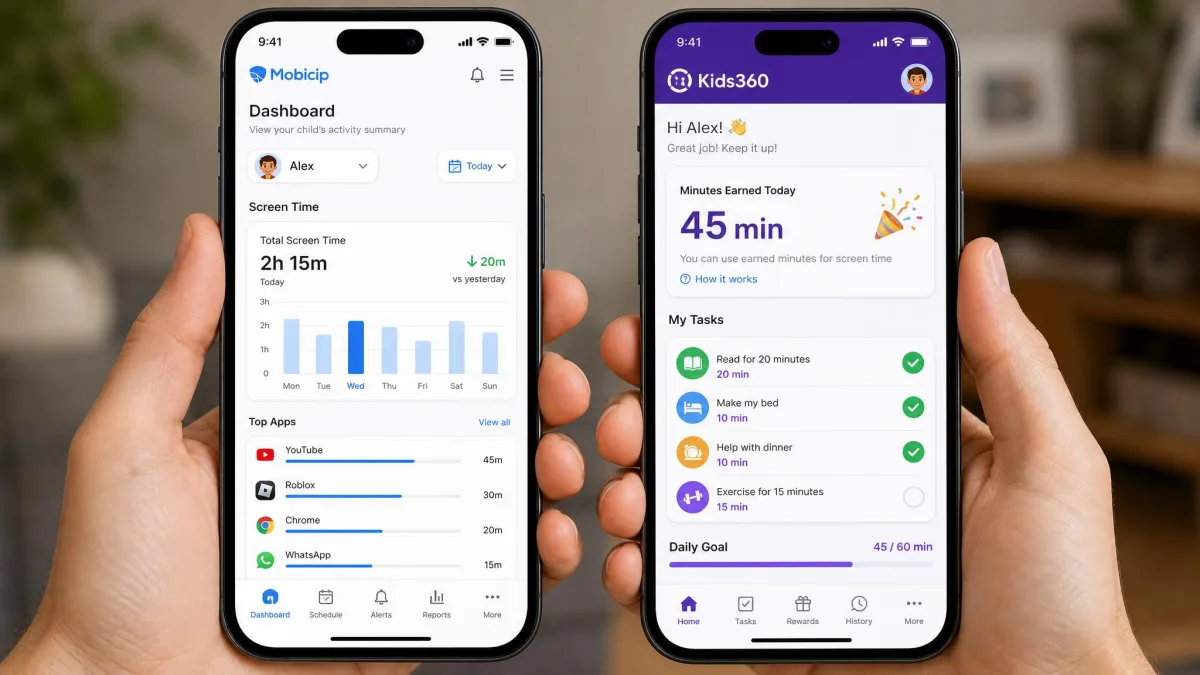
Mobicip is a full-family parental control suite that filters the web, blocks apps and manages screen time across phones, tablets and computers, which suits households running a mix of devices. Kids360 is a phone-only screen time app built around daily limits and a reward loop that pays children in extra minutes for finishing tasks, which suits parents of younger kids. We checked both against the same screen time, filtering, location, monitoring and setup criteria, and the full method sits further down this page.
Both apps promise to help you keep your kids safe online, and both are easy to use once they are running. What separates them is scope. One is trying to manage every screen in the house. The other is trying to change how one child uses one phone. That difference shapes the pricing, the platform list and the kind of parent each app will satisfy.
Mobicip vs Kids360 at a Glance
Mobicip covers iOS, Android, macOS, Windows, Chromebook and Kindle, so a single subscription can manage a teenager's laptop alongside a younger child's tablet. Its feature list runs to a screen time scheduler, daily limits, an instant family time pause, an app blocker, a website and content filter, a family locator with geofencing, activity reports, a social media monitor and co-parent access.
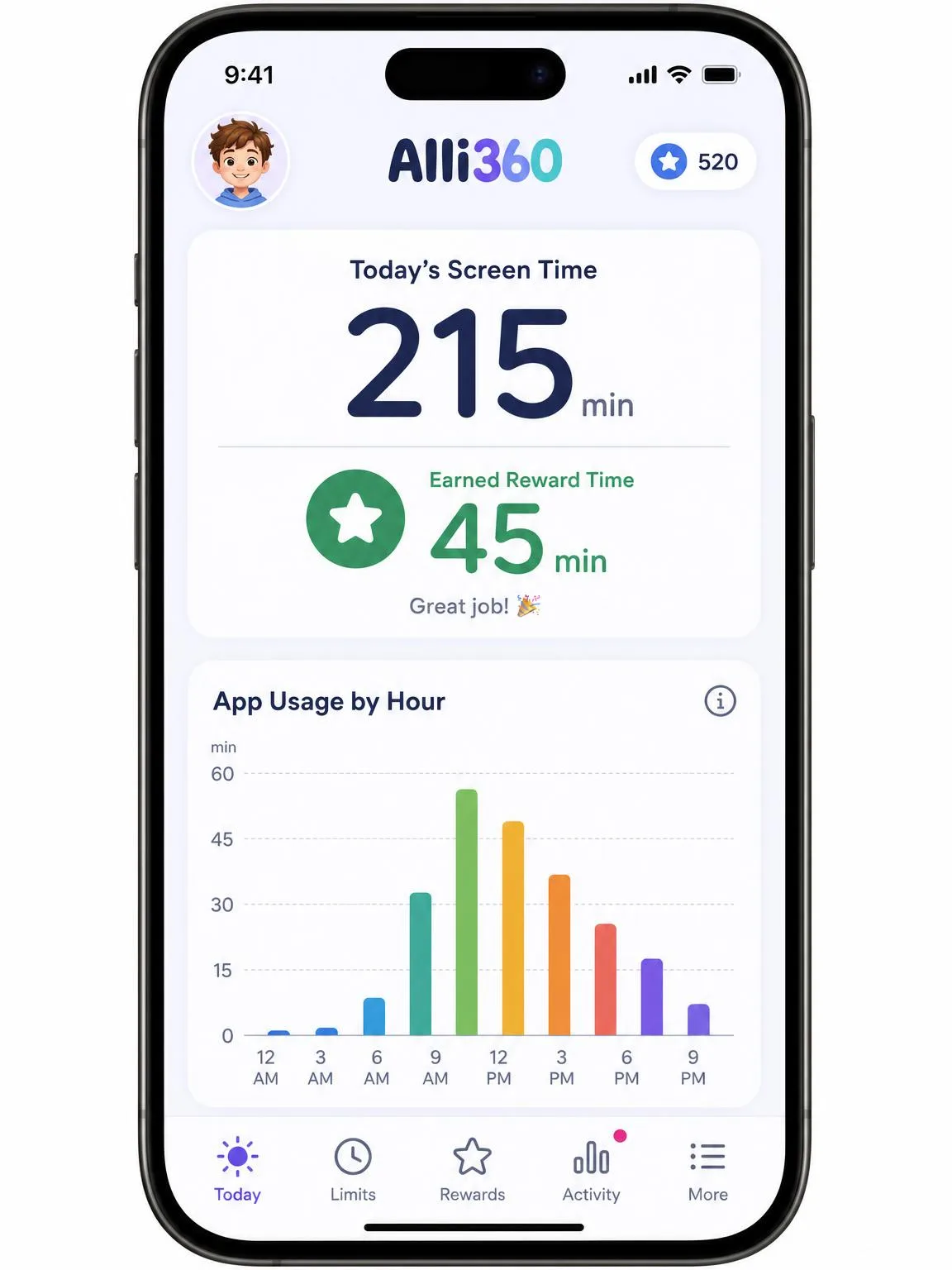
Kids360 works on iOS and iPad plus Android only, distributed through the App Store, Google Play, Huawei AppGallery and the Galaxy Store. There is no Windows, macOS or Chromebook client. It runs on a two-app model: Kids360 sits on the parent phone and a companion app called Alli360 sits on the child's phone. Its controls cover daily screen time limits with an automatic device lock, scheduling, a one-tap app blocker, an adult content filter, GPS location with map history, and app usage statistics that the child can see too.
The store verdicts split sharply. The App Store community rates Kids360 4.6 out of 5 across roughly 8,900 ratings, while Mobicip's iOS app sits at 3.3 out of 5 across about 1,900. Kids360's publisher, MINDCARE LAB LTD, also cites 4.7 stars on Google Play and more than 100,000 reviews across app stores, with 1 million parents using it. Mobicip's own reach claim is larger but softer: the published user count varies between vendor surfaces, so treat it as a marketing estimate rather than a fixed number.
Quick Comparison Table
| Product | Buy | Free plan | Annual price | Devices per plan | Screen time scheduling | App blocking | Web filtering | Location tracking | Social media monitoring | Activity reports | Child rewards/tasks | Platforms supported | Free trial |
|---|---|---|---|---|---|---|---|---|---|---|---|---|---|
 |
Check price → | Basic free tier with website blocker and family time pause | From $2.99/monthbilled annually | 5, 10 or 20 by plan | Multiple named schedules plus daily limits | Per-app blocking and limits | Category-based adult site filtering | Family locator with geofencing | Facebook and Snapchat only, no Snapchat on iOS | Daily activity summary and timeline | No | iOS, Android, macOS, Windows, Chromebook, Kindle | 7-day |
 |
Check price | Free download, core controls paywalled after setup | Around $79.99 per yearvaries by region | Not published | Daily limit with auto-lock and scheduling | One-tap app blocker | Adult content filter | GPS with map history, approximate | Not offered | App usage statistics, also shown to the child | Logic tasks, parent tasks and exercise rewards | iOS and Android only | 7-day |
Pricing and Plans Compared
Pricing is the cleanest win on this page, and it goes to Mobicip, because you can see what you will pay before you install anything.
Mobicip pricing and free tier
Mobicip publishes three tiers billed annually. Lite costs $2.99 per month and covers 5 devices. Standard costs $4.99 per month and covers 10 devices. Premium costs $7.99 per month and covers 20 devices. There is a 7-day free trial with no payment required upfront, and annual plans carry a 30-day money-back guarantee, which is the safety net most parents actually want when they are unsure whether a child's phone will cooperate.
A free tier exists, but it is deliberately thin. You get a website blocker and the family time pause, which is enough to see whether the parent dashboard makes sense to you and not much more. One thing to watch: buying inside the iOS app shows a different and pricier set of tiers than the website does. The App Store lists Mobicip Standard at $6.99 a month and Mobicip Premium at $9.99 a month, with no Lite option at all, and it still carries older Family plan names such as Mobicip Family - Small and Mobicip Family - Medium. Those App Store figures are month-to-month prices for a partly legacy set of tier names, so what a given plan costs depends on where you buy it and which name it carries. If the annual website pricing is what drew you in, subscribe on the website.
Kids360 pricing and free tier
Kids360 is harder to price, and that is a genuine mark against it. The App Store lists in-app purchases running from $7.99 up to $79.99, and subscription pricing varies by region, with UK listings sitting around GBP 9.99 monthly or GBP 79.99 yearly. Kids360 prices differ substantially by storefront and region, so the figure a parent sees at checkout may not match any published number. There is a 7-day free trial before the subscription starts, but no refund or money-back window is published anywhere on the vendor site.
Both apps download free. The difference is when you meet the paywall. Kids360's install flow is clean, and the paywall only appears after Alli360 is fully configured on the child's phone, which lands as a surprise after you have already done the work of pairing a device. Billing after the trial can also go wrong, with an annual charge landing where a monthly plan was selected and refunds proving hard to obtain.
Before you hand a child's phone back, check which plan the trial converts to and screenshot the confirmation. On Kids360 in particular, the plan you selected and the plan you are charged for do not always match, and there is no published refund policy to fall back on.
Screen Time Limits and Schedules
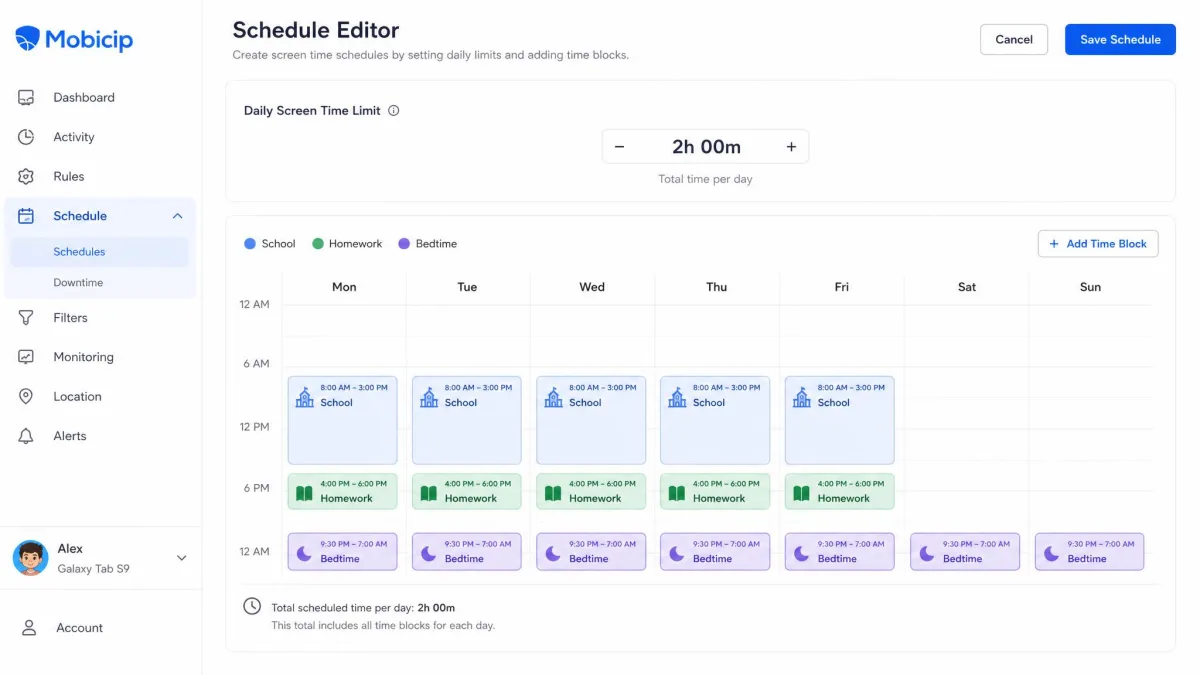
Mobicip's screen time scheduler handles separate homework, school and bedtime blocks without a fight, and the family time button pauses every managed device at once, which is the single control most parents reach for at dinner. You set a daily total, then layer named schedules on top of it, so a school day and a Saturday can behave completely differently.
Kids360 takes the opposite approach. There is one daily limit, the device locks automatically when the child hits it, and scheduling sits underneath as a secondary control. That simplicity is appealing, but enforcement is where it wobbles: the daily limit does not always apply, and a child's phone can stay usable past the cutoff even after reinstalling and updating the app.
Mobicip has its own timing quirk. On iOS, its timer tends to overshoot a limit by roughly five to ten minutes, which is an Apple enforcement quirk rather than a Mobicip bug. Five minutes of overshoot you can live with. A limit that silently does nothing you cannot.
A daily limit is only worth what it enforces, and on both apps the iPhone is where enforcement gets soft.
— From our hands-on comparison
App Blocking and App Limits
Mobicip gives you per-app blocking plus per-app time limits, so a child can keep a messaging app while losing a game, or keep both on a shorter leash. Kids360 offers a one-tap app blocker, which is faster to use and blunter in what it can express.
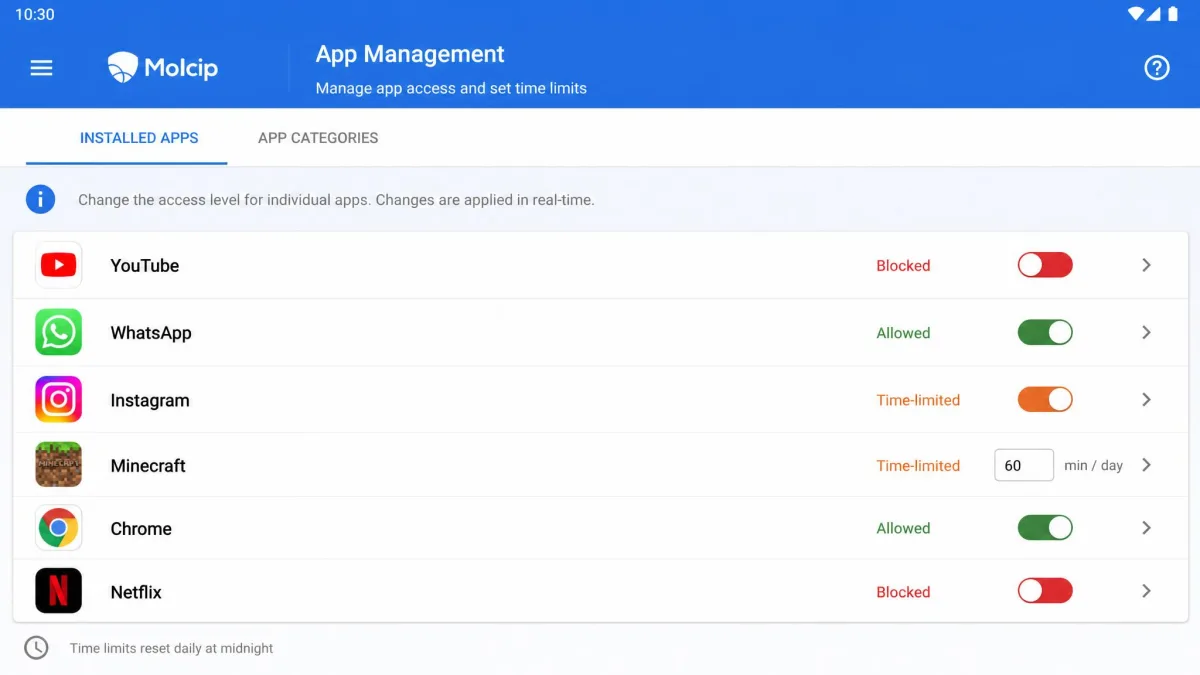
Speed of enforcement matters more than the interface here. A new app block lands on Android in about ten minutes, but it can take over half an hour on iOS, and it sometimes needs Screen Time permissions re-authorized by hand. If you are blocking a game in the middle of an argument, that delay is the whole experience.
Web and Content Filtering
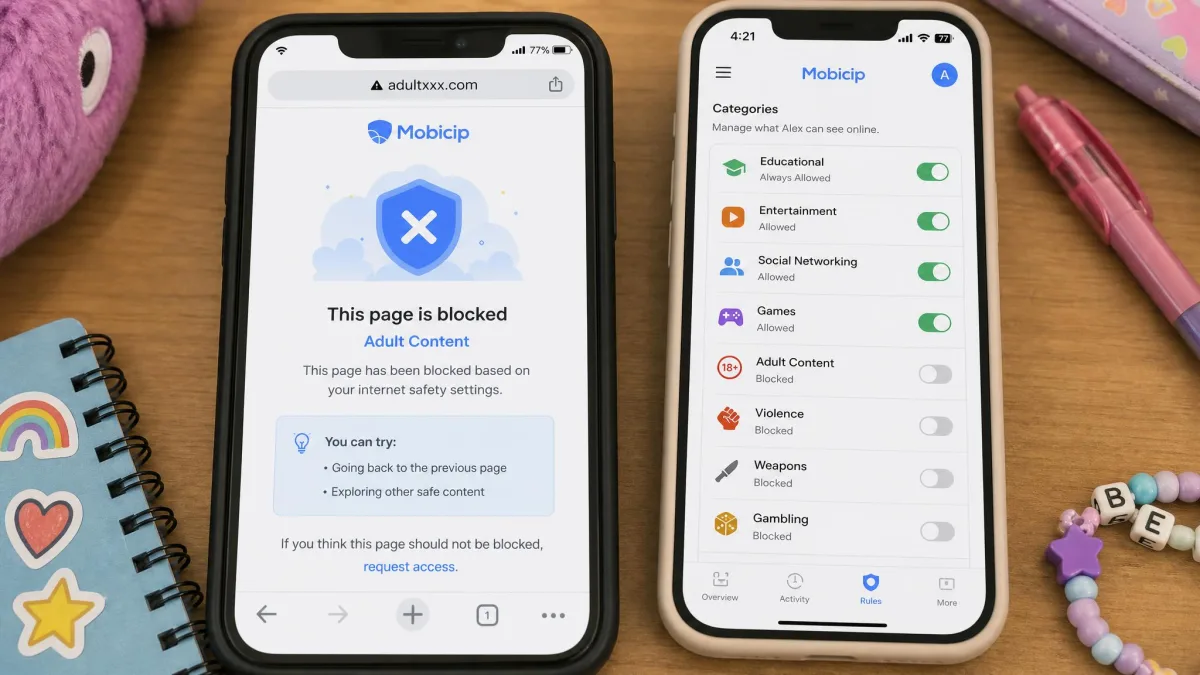
Filtering is where that scope gap widens again. Mobicip's filter is category-based, so you switch off whole classes of content rather than chasing individual sites, and it runs on the browsers and the computers Kids360 cannot touch. It is the more capable filter by a clear margin. It also has the more disruptive failure mode, because the web filter can occasionally knock out internet access on an iPhone entirely until the profile is refreshed.
Kids360's filter is a single adult content switch. It blocks the obvious, and it does not pretend to do more. For a seven-year-old that is often enough. For a teenager who knows what a VPN is, it is not.
No content filter on any platform blocks inappropriate material inside another app's in-app browser or a private search result with complete reliability. Treat filtering as one layer, and pair it with an agreed family media plan so your child understands the rules rather than only running into them.
Location Tracking and Family Safety
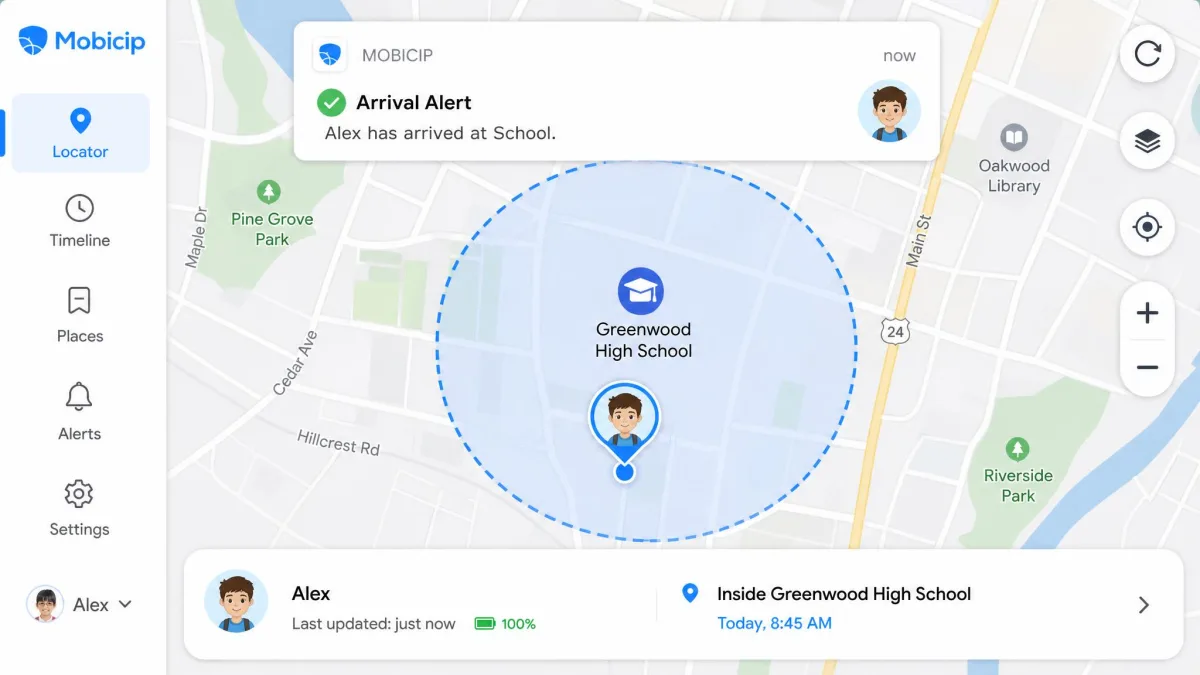
Location is the one area where the two apps genuinely compete. Mobicip's family locator adds geofencing, so you can set a zone around a school or a friend's house and get an alert when a child arrives or leaves. Kids360 offers GPS with map history, which is useful for retracing a route, but the location reading is approximate rather than pinpoint, and a child can turn GPS off and make the feature go dark.
That last point applies to Kids360 more broadly. A child can disable Alli360 on their own device, which is a different class of problem from a filter that occasionally misfires. Location tracking works when the child's device cooperates, so treat it as a convenience for coordinating a family, not as a guarantee of anything.
Activity Reports and Monitoring
Mobicip produces a daily activity summary and a timeline, which is the format most parents find readable: what was used, for how long, and in what order. There is one platform-shaped hole. On iOS, Mobicip's app usage view cannot show per-app minutes the way it does on Android, because Apple's privacy rules withhold that data. If your child is on an iPhone, expect a shallower picture of daily activities than the marketing implies.
Kids360 shows app usage statistics and, in a design choice we like more than we expected, shows the same statistics to the child. Making a child confront their own browsing and usage history does more real work than a parent quoting a number at them. The reporting is weakened by sync, though, because the two apps sync slowly and the dashboard can lag behind what the child is actually doing.
Social Media Monitoring and Alerts
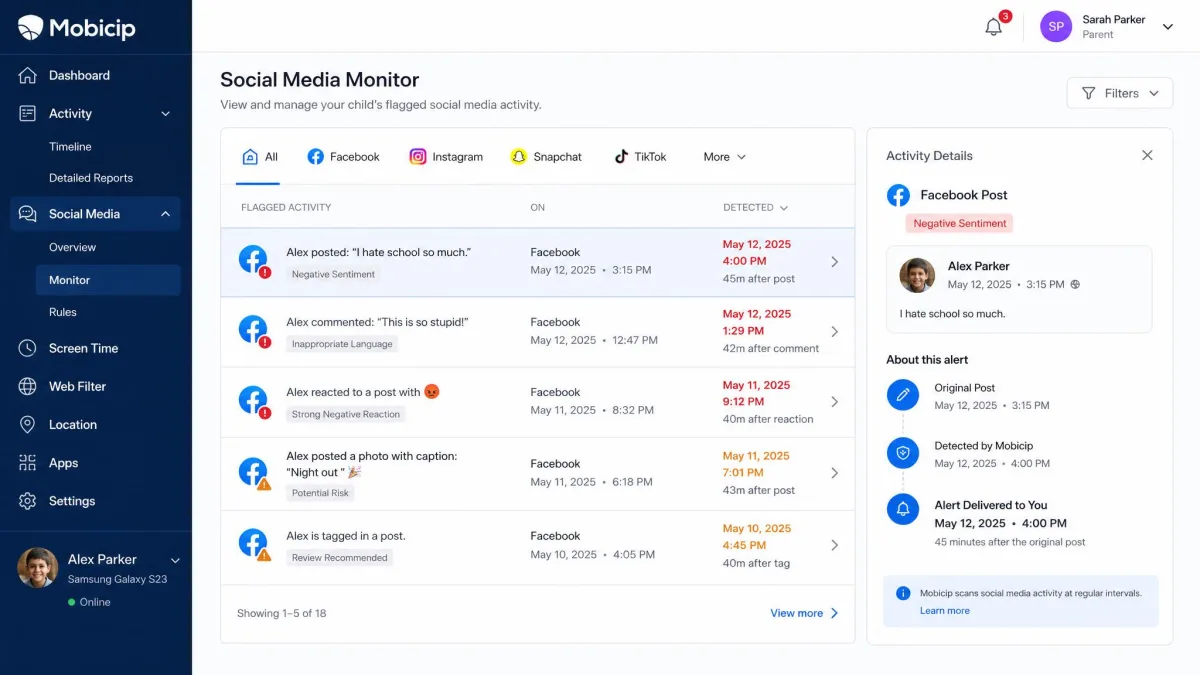
This is a category with only one entrant. Kids360 does not offer social media monitoring at all. Mobicip does, and it is the weakest part of an otherwise reliable app.
The Social Media Monitor covers Facebook and Snapchat only, and Snapchat monitoring does not work on iOS, although supported social platforms shift as the vendor adds and drops integrations. In practice the alerts fire inconsistently and arrive late, catching only part of flagged Facebook activity and less of Snapchat, often around three quarters of an hour after the fact. If social media monitoring is the reason you are buying, neither app closes that gap, and the better move is deciding which platforms are age-appropriate at all rather than relying on alerts to catch what happens on them.
Device and Platform Support
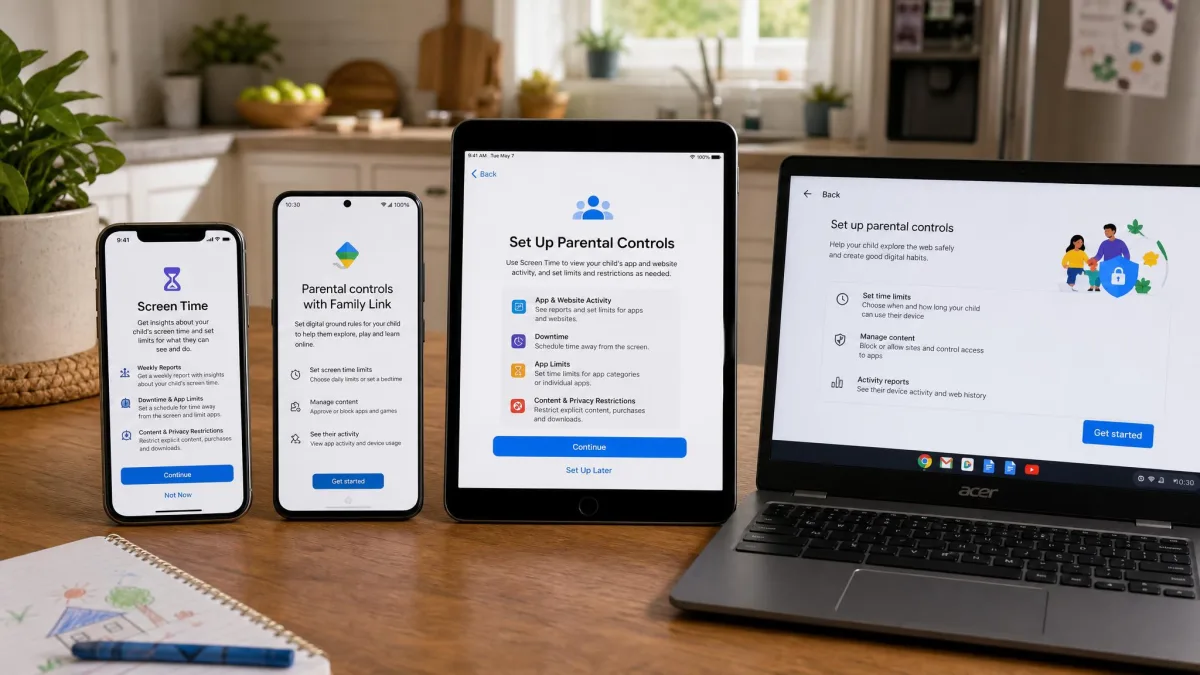
Mobicip runs on iOS, Android, macOS, Windows, Chromebook and Kindle. Its iPhone app requires iOS 15.0 or later, which keeps older hand-me-down devices in play. Kids360 is phone and tablet only, and it requires iOS 17.0 or iPadOS 17.0 and later, which quietly rules out an older iPhone that a younger sibling has inherited.
Check the minimum version on the App Store listing before you subscribe to either one, because a two-generation-old device is exactly the kind of phone a child is handed first. On Android, both apps install from Google Play in the usual way, and Kids360 also reaches the Huawei and Samsung stores.
If any screen in your house is a laptop, desktop or Chromebook, Kids360 cannot manage it. That single limitation decides this comparison for a lot of families before any individual feature gets compared.
Setup and Ease of Use
Setting up Mobicip
Mobicip's setup is the longer of the two, because there are more device types to pair and iOS asks for profile and Screen Time permissions along the way. The written setup guides cover the fiddly parts of pairing a child device, and the support team answers setup questions quickly, which matters a lot when a profile refuses to install. Mobicip also holds Better Business Bureau accreditation with an A+ rating, which is a reasonable proxy for a company that answers its email.
Setting up Kids360
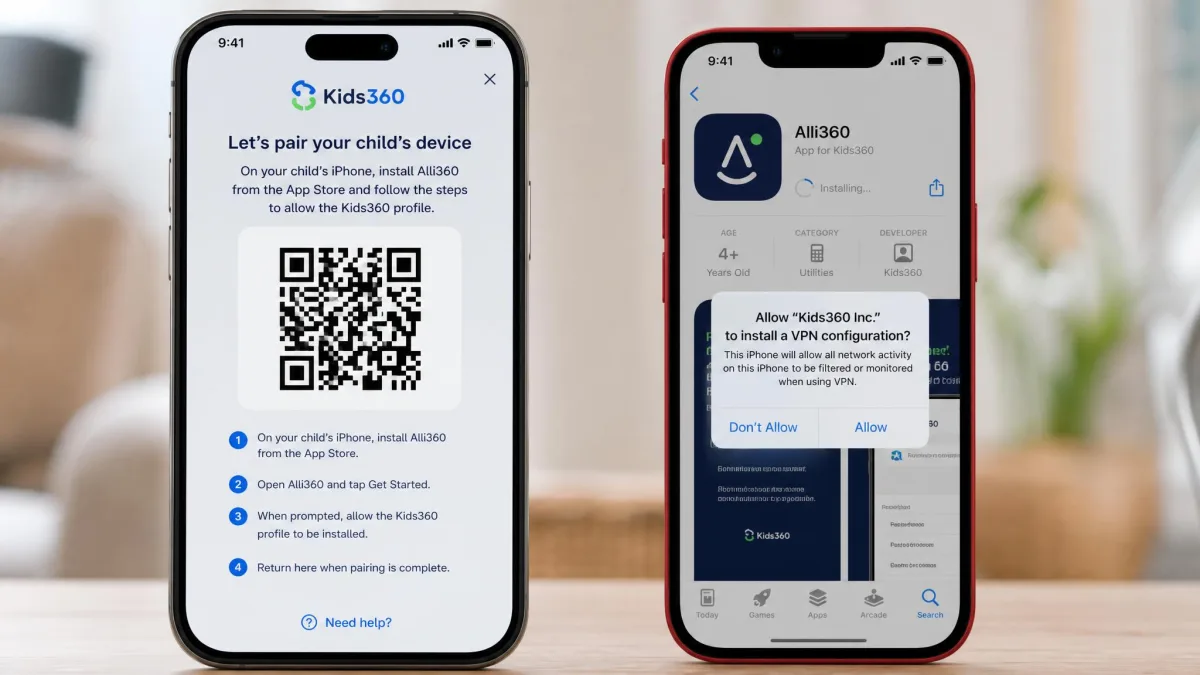
Kids360's install flow is clean, and the two-app pairing between Kids360 and Alli360 is straightforward to follow. The catch is the ordering, because you configure the child's phone fully and then meet the paywall. On iOS there is a durability problem too, since the configuration profile can drop out of VPN and Device Management after a few days, forcing a full reinstall to restore control. Support runs through email and chat only with no phone line, and replies can be slow or absent.
Set both apps up on the child's device while the child is present and the phone is unlocked, then reboot it and confirm the controls still hold the next morning. A control that survives a restart is the only one worth trusting.
The Child Experience: Rewards vs Restrictions
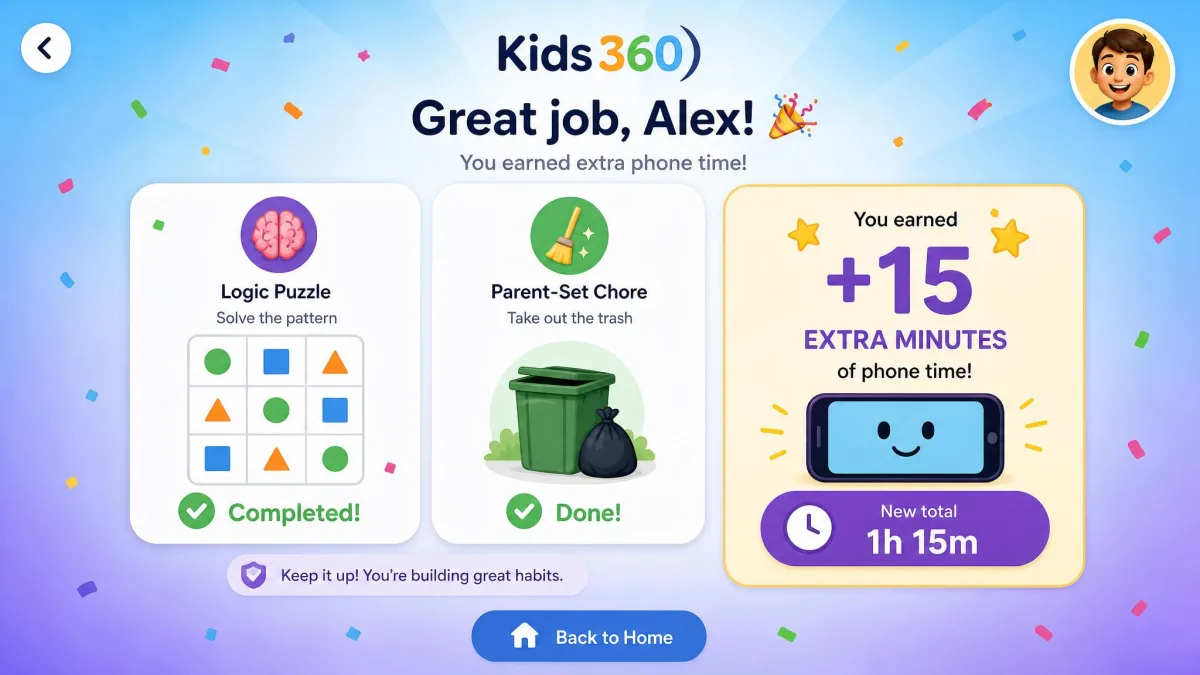
This is Kids360's real argument, and it is a good one. Rather than only taking phone time away, Kids360 gives children a way to earn it back through developmental logic and attention tasks, custom tasks a parent sets, and physical exercise rewards. That loop engages younger children, who will happily complete a logic exercise or a burst of activity to unlock extra minutes. The vendor also claims a 2.5x reduction in screen time, though that is an unaudited marketing claim with no published methodology behind it.
Mobicip has no equivalent. It is a restriction tool with a parenting guidance library attached, and children experience it as a set of rules rather than a game. For tech-savvy teens who will resent any gamified layer, that honesty is arguably the better fit. For a child under about ten, the reward loop is the thing that gets the app accepted instead of resented.
Pros and Cons
Mobicip pros and cons
Pros
- Multiple named schedules plus an instant family time pause across every device
- Category-based web filtering and geofenced location alerts
- Fast, competent support with BBB A+ accreditation
Cons
- Social media alerts are limited to two platforms and arrive late
- No per-app minutes on iOS because of Apple's privacy rules
- The web filter can knock out iPhone internet access until the profile is refreshed
- Lower App Store rating at 3.3 out of 5
- No reward or task system for younger children
Kids360 pros and cons
Pros
- Task and reward loop that younger children genuinely engage with
- Very strong store ratings at 4.6 on the App Store and 4.7 on Google Play
- Clean two-app install flow and a simple one-tap app blocker
- Usage statistics shown to the child, not only to the parent
- GPS location with map history included
Cons
- Phones and tablets only, with no Windows, macOS or Chromebook client
- Pricing varies by region and is only revealed after setup
- The daily limit does not always enforce
- The iOS configuration profile can drop out and need a full reinstall
- A child can disable Alli360, and no refund policy is published
How We Compared These Apps
We compared both apps against a fixed set of criteria rather than a feature checklist: how precisely you can shape a day with screen time limits and schedules, whether app blocking actually lands on the child's device, how much the web filter blocks and what it breaks, how accurate location tracking is, how much detail the activity reports carry on each platform, how far social media monitoring reaches, which devices each app can manage, and how much friction the setup creates for a parent doing it once.
We weighted enforcement above features throughout. An app that lists a control it cannot reliably apply is worse than an app that lists fewer controls and applies them, which is why the daily-limit and profile-durability problems count heavily against Kids360 here. We also weighted price transparency, because a parental control app that hides what it costs until the child's phone is configured has already made a choice about whose interests come first.
Every hands-on observation on this page comes from documented behaviour on real family devices, including the app-block delays, the iOS profile dropouts and the timer overshoot. Where the evidence points both ways, as it does on Kids360's strong store ratings against its reported enforcement failures, we have kept both sides on the page rather than picking the tidier story.
Which One Should You Choose?
Choose Mobicip if...
You have more than one child, more than one kind of device, or any computer in the house. You want a written price before you install. You need geofencing, category filtering or a pause button that stops every screen at once. You are managing a teenager, where scheduling flexibility beats gamification every time.
Choose Kids360 if...
You are managing one child on one phone, that child is young, and your real goal is changing a daily habit rather than building a filtered network. The reward loop is the feature no competitor on this page matches, and children respond to it. Go in knowing the price will only become clear at the end of setup, and check the limits still hold after a week.
Alternatives Worth Considering
If neither app fits, three others are worth considering. Google Family Link is free, manages Android well, handles app approvals and daily limits, and costs nothing to try, though its iOS support is thin. Kaspersky Safe Kids vs Kids360 covers the cheaper full-suite option, and Canopy vs Mobicip is the comparison to read if real-time image filtering is your priority. Qustodio and Kidslox both sit between these two on price and manage desktops as well as phones.
Whichever you pick, understand what the app collects about your child. The Children's Online Privacy Protection Rule (COPPA) governs how online services handle data from children under 13, and the American Academy of Pediatrics publishes guidance worth reading before you decide how much monitoring is appropriate at your child's age.
Any parental control app can be worked around by a determined teenager, whether by disabling the child app, removing a profile or switching off GPS. Monitoring works best when your child knows it is there and why, because a control they discover by accident usually becomes a control they set out to defeat.
Frequently Asked Questions
Is Mobicip or Kids360 cheaper?
Does Kids360 work on iPhone?
Can a child bypass Mobicip or Kids360?
Which one has a genuinely free plan?
What do these apps collect and keep about my child, and can I delete it?
At what age should I move a child from Kids360 to Mobicip?
Can I run both on the same device?
Final Verdict
If we were setting this up again in our own house, we would change the order we did things in. The first week went on tuning schedules and filter categories, when the work that actually mattered was the dull part: rebooting the child's phone, leaving it a day, and checking the controls were still in force afterwards. Both apps look convincing on day one, and they only separate on day five.
There is one scenario where we would still reach past the winner for Kids360, and it is narrower than any device count. If a child is young, already resents being policed, and the argument in your house is about the habit rather than about what they can reach online, the earning loop does work that no restriction screen does. We would rather have a modest limit a child helps enforce than a stricter one they spend their energy defeating.
What would change our minds at the next update is straightforward on both sides. For Kids360, a published price and a published refund window, plus an iOS profile that survives a fortnight without a reinstall. For Mobicip, social alerts that arrive when the thing happens rather than three quarters of an hour later. Neither is a hard engineering problem, and either one would move our scores.