IVPN is a privacy-first VPN service built in Gibraltar around one idea: collect as little about you as possible. You sign up with an auto-generated account ID instead of an email, you can pay in cash or Monero, and the apps are open-source and audited by an outside security firm every year. That focus shapes everything, from the feature set to the streaming results.
This review is the product of hands-on testing across desktop and mobile. We ran IVPN on Windows and Android for two weeks, checked its speeds against nearby and distant servers, ran leak tests, pushed it at Netflix and other streaming platforms, and tried it with torrents. Below we cover privacy, security, speed, streaming, the server network, pricing after the May 2026 plan changes, device support, setup, support, and how it stacks up against Mullvad, NordVPN, and Surfshark.
The short version: IVPN is one of the most trustworthy VPNs you can buy, and one of the weakest at the everyday stuff many people actually want. Whether that trade is worth it depends entirely on why you want a VPN in the first place.
Verdict at a Glance
Every VPN buyer eventually hits the same fork. Do you want the service that hides you best, or the one that unblocks the most? IVPN forces that question more sharply than most. It pours everything into the privacy column and leaves the entertainment column thin. So the review below works through one thing above all: whether IVPN's privacy strengths are worth what you give up on streaming, server reach, and everyday polish.
We scored it on privacy, security, speed, streaming, network, pricing, and ease of use. The verdict box captures where it landed. The sections that follow show the testing behind each mark, so you can weigh the trade against your own reasons for wanting a VPN in the first place.
How We Tested IVPN
We approached IVPN the way we test every VPN: with real benchmarks, not vendor claims. Over two weeks we ran it on Windows and Android, connected through nearby and distant servers, and logged download speeds and latency against an unprotected baseline. We ran DNS and IP leak tests on every protocol, and we forced disconnects to see whether the kill switch leaked in the gap. We pushed it at Netflix, BBC iPlayer, Disney+, Hulu, Max, Prime Video, and Peacock, and we tested torrents on both US and non-US servers.
We paid for the account ourselves and signed up with the account-ID flow rather than a press comp, so the experience matches what you would get. Where facts were unstable, such as the exact server count or the current audit tally, we flagged them rather than picking a convenient number.
IVPN Pros and Cons
Here is the balance sheet from our two weeks with the service. The strengths cluster around privacy and security; the weaknesses cluster around convenience and reach.
Pros
- No-email signup with an auto-generated account ID, plus cash and Monero payment options
- Open-source apps independently audited by Cure53 on an annual basis
- Multi-hop routing included on every plan, not locked to a premium tier
- Clean DNS and IP leak tests, including when the connection drops with the kill switch active
- AntiTracker blocks ads and trackers at the network level, with a hardcore mode
- Strong download speeds on nearby servers
Cons
- Streaming is unreliable, with inconsistent US Netflix and most other platforms blocked
- Small server network that has barely expanded in years, thin outside North America and Europe
- Speeds fall off sharply on distant servers
- No free trial, only a 30-day refund
- The desktop app feels cluttered and logs you out on a regular basis
IVPN Pricing and Plans (Standard vs Pro)
IVPN restructured its plans in May 2026. The lineup is now Standard, Plus, and Pro Suite, and the old two-device and seven-device tiers you may see in older reviews are gone. If you read a review quoting a two-device Standard plan, it predates the change.
The Standard plan is $6 a month billed monthly, or $60 a year, which works out to about $5 a month. It covers 5 simultaneous devices and, importantly, now includes multi-hop routing, which used to be a premium-only feature. For most people, Standard is the plan to buy. You get the full protocol set, the kill switch, AntiTracker, and multi-hop with nothing held back.
The Plus plan is $80 a year, roughly $6.67 a month, and adds extra privacy services on top of Standard. Pro Suite sits at the top: $100 a year or $10 a month billed monthly, with 10 simultaneous devices and the full set of add-ons, including Mailx, modDNS, and Portmaster Pro. If you want the extra services or need to cover a large fleet of devices, Pro Suite is the tier that makes sense; otherwise the jump is hard to justify.
There is no free trial. Instead you get a 30-day money-back guarantee, which is the real way to test the service risk-free. Payment is where IVPN separates itself. You can pay with cash, Monero, Bitcoin, credit card, or PayPal. Cash and Monero let you keep the account almost entirely detached from your identity, which fits the no-email signup. It is a small detail that speaks to the whole design philosophy.
| Product | Annual price | Devices | Multi-hop | Extra privacy services |
|---|---|---|---|---|
 |
$60/year | 5 | Yes | No |
 |
$100/year | 10 | Yes | Mailx, modDNS, Portmaster Pro |
Because there is no free trial, the 30-day money-back guarantee is your test window. Sign up on the monthly plan, run your own speed and streaming checks in the first week, and request a refund if it does not fit.

Privacy and Logging (No-Email Signup, Cure53 Audits, Gibraltar Jurisdiction)
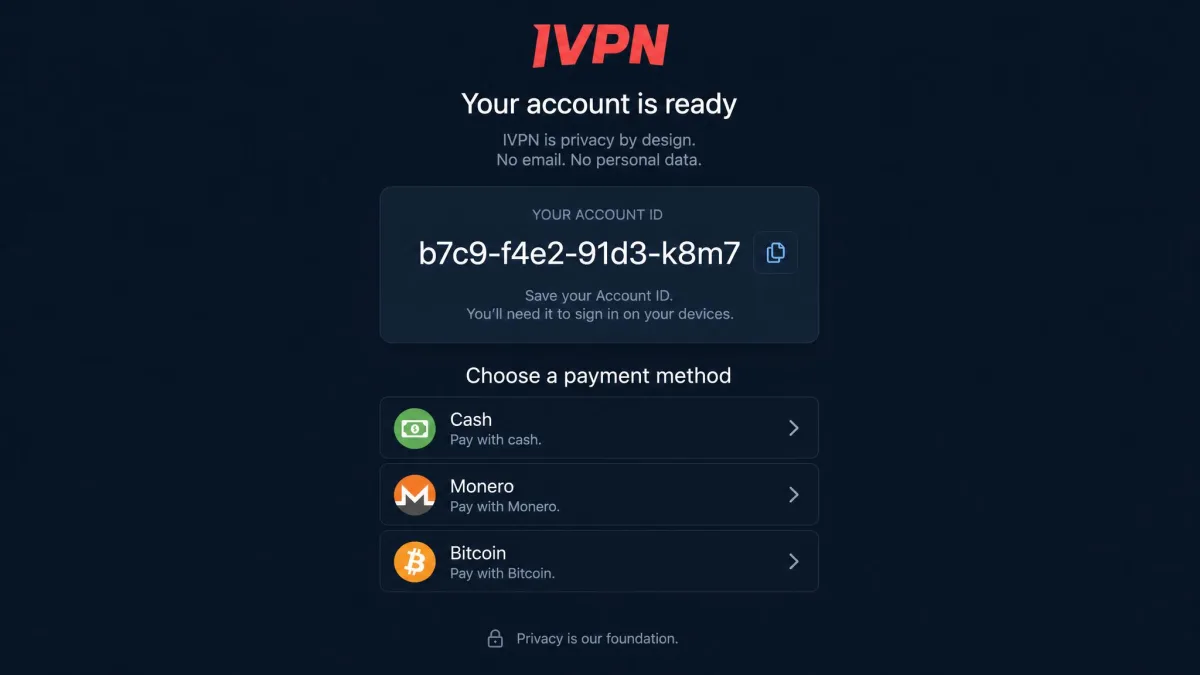
Privacy is IVPN's whole reason to exist, and this is where it clearly earns its keep. You can visit IVPN and create an account with nothing more than an auto-generated account ID. No email, no name, no username. You store the ID, and that is your login. It is a small thing that changes the whole relationship: there is simply less data for anyone to lose, sell, or hand over.
The company is based in Gibraltar, outside the major surveillance-sharing alliances, and its no-logs stance is spelled out in IVPN's privacy policy. More important than the policy text is the verification behind it. IVPN's open-source apps and infrastructure are audited by the security firm Cure53 on a regular annual basis, and the results are published rather than summarized. The most recent audit we can confirm is the 7th, conducted in May 2025, with an 8th scheduled for July 2026 whose result was not yet published when we tested. Because the count climbs every year, treat the exact tally as a moving figure rather than a fixed number. The company also runs a warrant canary and a public server status page.
The real product here is not a server list. It is the ability to run a VPN account that is barely connected to your identity, and to have outside auditors keep checking that the claim holds.
— From our hands-on testing
In practice, the privacy features are not just marketing. The account ID login means we never handed over an email. The cash and Monero options mean the payment trail can be broken too. For anyone whose threat model includes their own VPN provider, that combination is rare and valuable. It is the same set of reasons longtime users give for staying: the crypto and cash payment options, the account-ID login, and audited no-logs infrastructure are the features they point to first.
If privacy is your priority, pay with Monero or cash and store your account ID in a password manager. That keeps both your identity and your payment method detached from the account.
Security and Protocols (WireGuard, OpenVPN, Multi-Hop, AntiTracker)
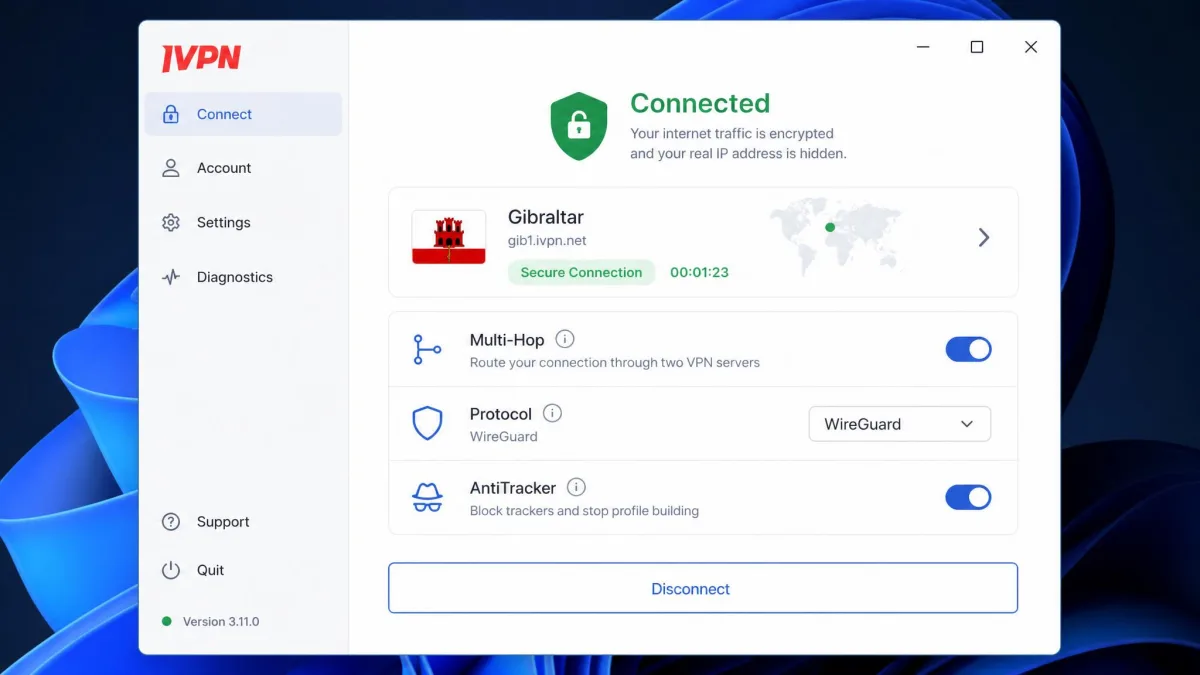
On the security side, IVPN gives you WireGuard and OpenVPN across platforms, plus IKEv2 on iOS. WireGuard is the default for most people and delivers the best speeds. The apps include a kill switch and firewall, split tunneling on Windows, and self-hosted bare-metal servers rather than rented cloud boxes, which reduces how many third parties touch your traffic.
Multi-hop is the standout security feature, and after the May 2026 changes it is included on every plan. It routes your connection through two servers in different locations, so the entry server never sees your destination and the exit server never sees your real IP. It costs speed, which we cover below, but as a privacy tool it is the real deal.
AntiTracker is IVPN's network-level ad and tracker blocker, with a stricter hardcore mode that blocks more aggressively. It runs at the DNS level, so it works across every app on the device, not just the browser. Note that port forwarding was removed in 2023, so if your setup depends on it, IVPN is not the right pick and you will want a VPN with port forwarding.
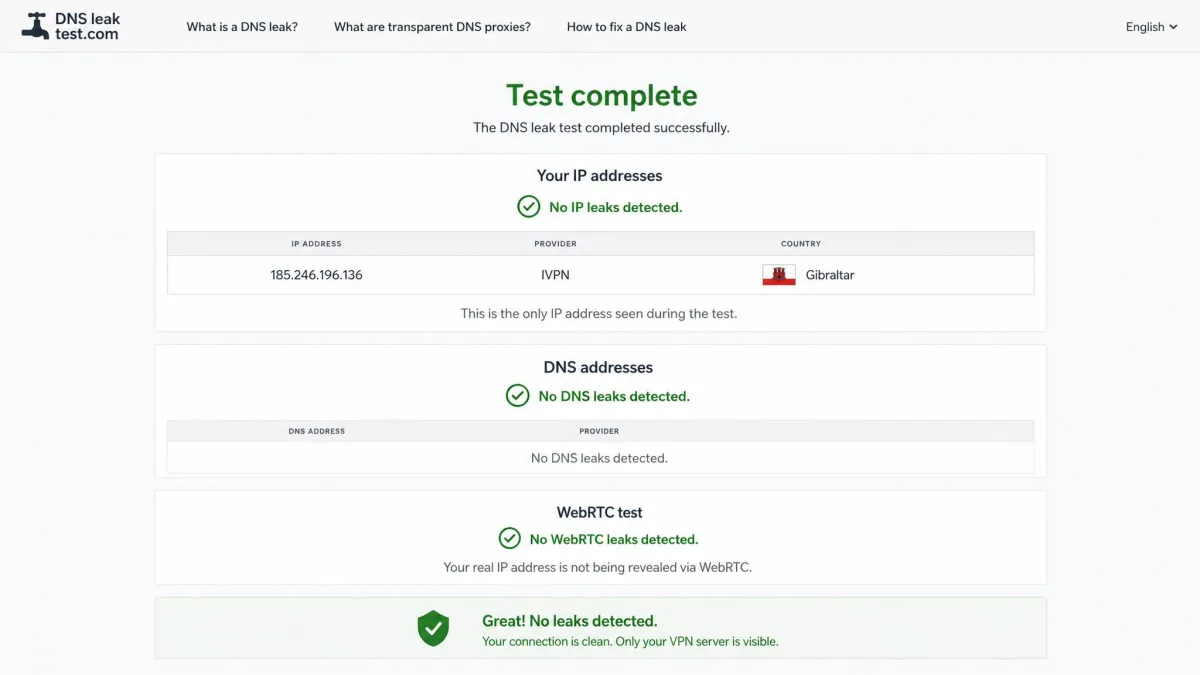
The leak testing is where security claims either hold or fall apart, and IVPN held. Our DNS and IP leak checks came back clean, including when we deliberately dropped the connection to see whether the kill switch would leak during the gap. It did not. You can run the same check yourself with a DNS leak test after connecting.
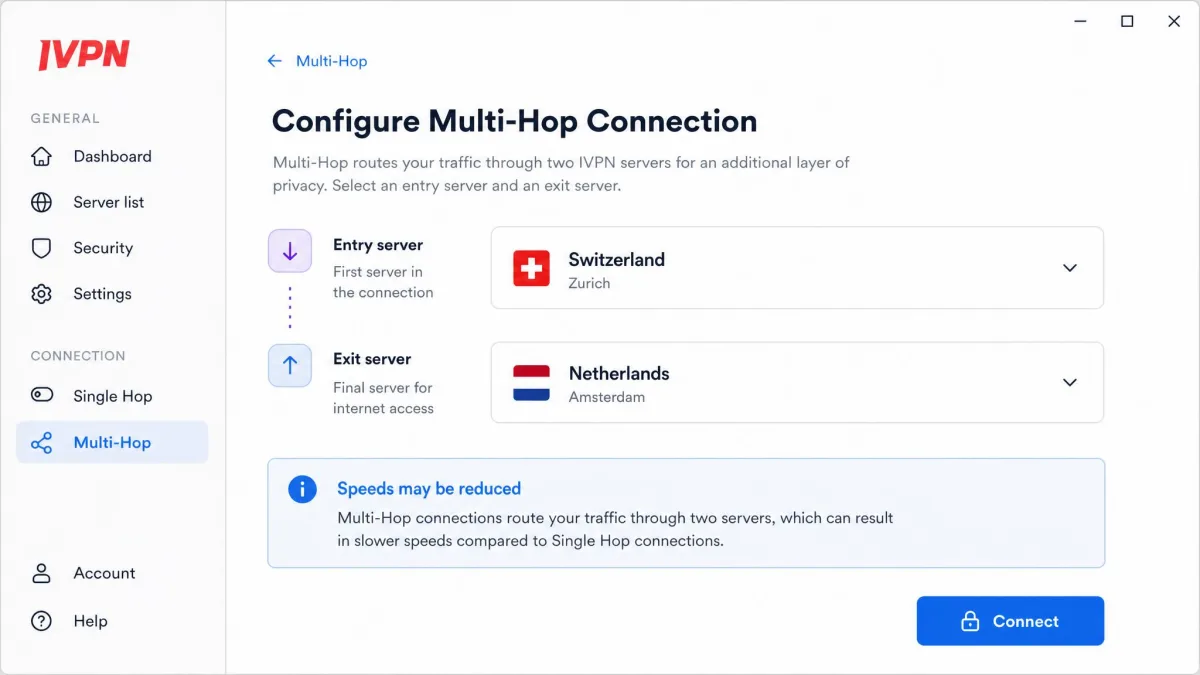
Multi-hop is genuinely useful for high-stakes privacy, but you do not need it running all the time. For everyday browsing, a single WireGuard hop is faster and still fully encrypted.
Speed and Performance
Speed is where a former network administrator's instinct kicks in. We benchmarked IVPN the way we benchmark every VPN: nearby first, then across an ocean, then with the privacy features stacked on. Each server got two runs. We compared every result against an unprotected baseline on the same line.
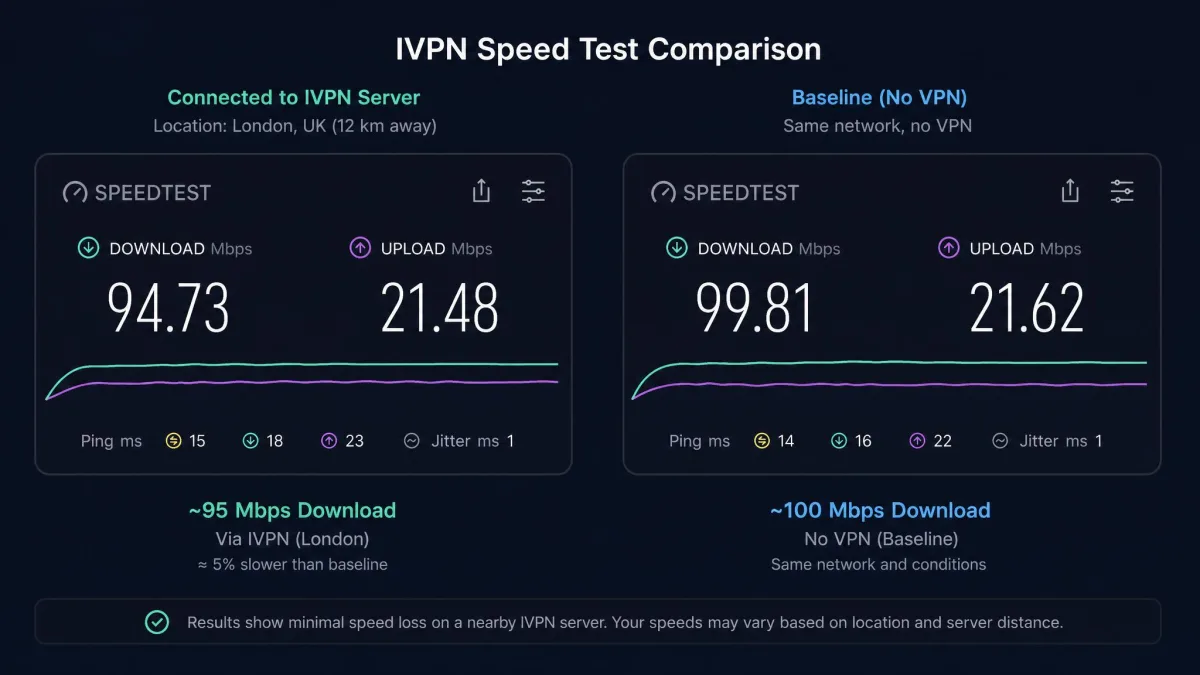
On a nearby server, download speed held around 95 Mbps. That is only a small loss from our baseline. It is a strong result, and plenty for streaming, calls, and large downloads. In practice, a nearby connection felt no different from a naked line. That is exactly what you want from a daily driver. The problem shows up at distance. On far-flung servers, throughput dropped by more than half. That is a bigger fall than we see from the top all-rounders. A 50% cut still leaves enough headroom for HD video, but big downloads and cloud backups start to drag.
The extremes tell the story. Connecting to Australia was the slowest location we tested, at roughly a 22% speed reduction relative to what that route should deliver. In day-to-day terms, pages still load fine. A large file transfer, though, takes noticeably longer than it should. Brazil was the latency problem rather than the throughput problem. Latency there climbed past 110 ms. That is high enough to feel in anything interactive, from video calls to competitive gaming to a remote desktop session. For casual browsing you will not notice it. But responsiveness suffers the moment a task needs a quick round trip.
Then we stacked the privacy features. Enabling multi-hop with obfuscation dropped speeds by around 45%. That is expected given the double routing, but still worth planning around. It is close to half your bandwidth gone, so it is not a setting to leave on by default. The practical read is simple. Run a single hop for everyday use. Reserve the multi-hop plus obfuscation combination for the sessions where hiding the route matters more than raw speed.
One quirk worth flagging: the app's built-in "fastest server" recommendation was sometimes wrong. It pointed us to a slower location than one we picked manually. If speed matters for a session, choose the server yourself and test it rather than trusting the auto-pick. It is the kind of small rough edge that a more polished app would have ironed out. Over two weeks it cost us a few slow sessions before we learned to ignore the suggestion and select by hand.
Streaming and Unblocking (Does IVPN Work with Netflix?)
This is the section where IVPN falls short of what most shoppers expect from a VPN. IVPN does not market itself as a streaming service, and the testing shows why.
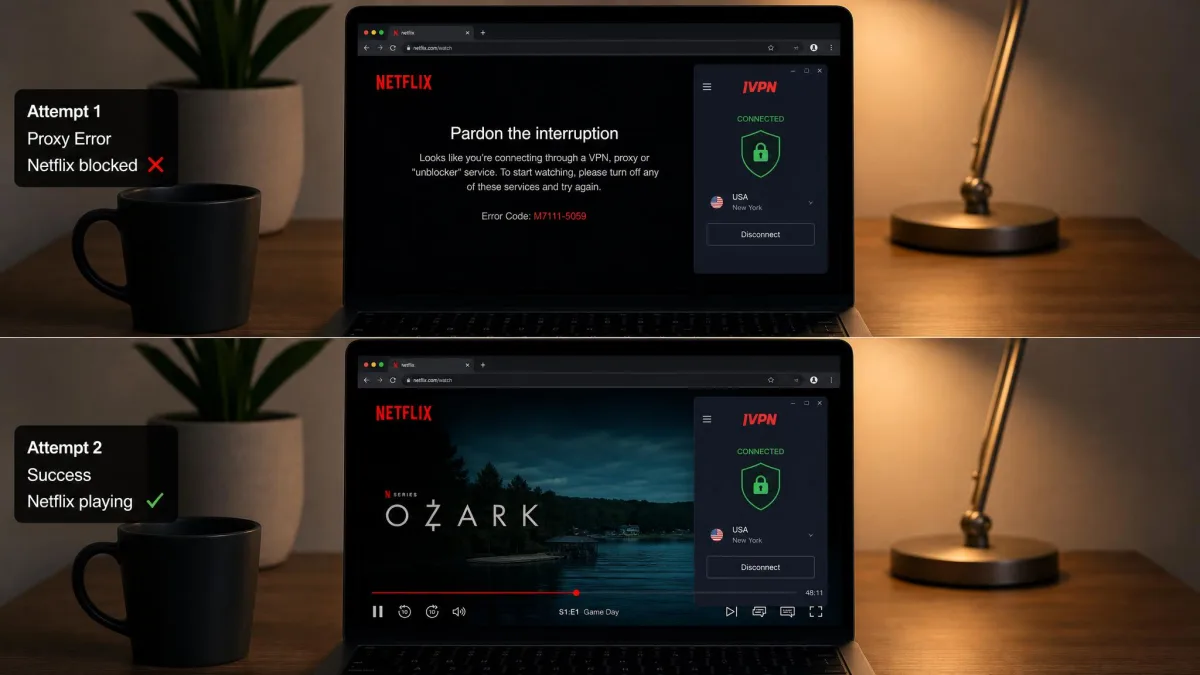
US Netflix unblocking was inconsistent. It often needed several connection attempts before a title would play, and just as often it did not play at all. Netflix UK stayed blocked throughout. Beyond US Netflix, the picture got worse: BBC iPlayer, Disney+, Hulu, Max, and Prime Video all stayed blocked in our testing. The one bright spot was Peacock TV, which unblocked cleanly through US servers even when other platforms failed.
It is worth being honest about how unstable this is. Streaming results shift depending on when you test, which tells you the outcome is not something you can rely on. If your main reason for buying a VPN is streaming, this is close to a dealbreaker, and there are much stronger options below. The takeaway is simple: treat any streaming success as a bonus, not a feature you are paying for.
Do not buy IVPN as a streaming VPN. In our testing, most major platforms stayed blocked, and the ones that worked did so inconsistently. If Netflix and iPlayer are the goal, choose a service built for unblocking.
Server Network and Locations
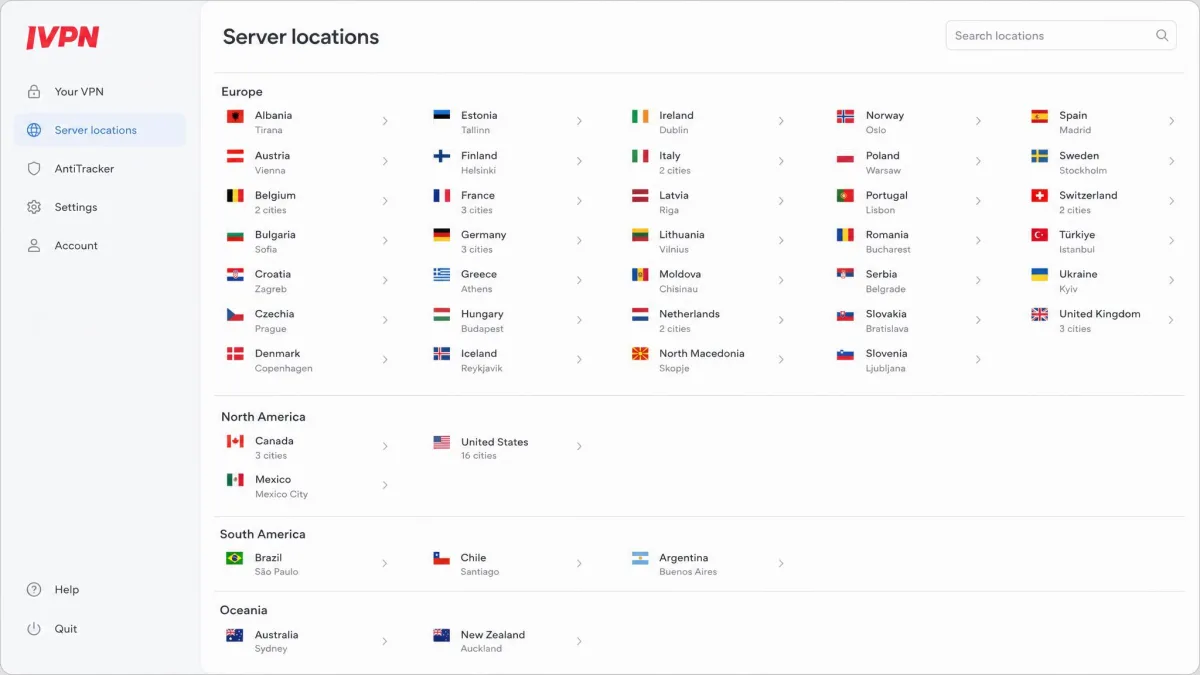
IVPN's network is small, and it has stayed small. Its own server status page lists 89 gateways across 58 locations in 41 countries, hosted with 17 datacenter partners. That is enough to cover the routes most people use. But coverage is thin once you leave North America and Europe. Places like Australia have just a single location. That is part of why distant speeds suffer: with one gateway to hand, there is nowhere to reroute when it gets busy.
The raw server total is harder to pin down. Reviewers count servers, gateways, and locations differently, and the third-party numbers disagree widely. Third-party counts range from 80 to 166 depending on how you count; the official page reports 89 gateways. The figures that hold up are the official ones: 89 gateways across 58 locations in 41 countries. When a headline server count varies that much between sources, the country and gateway totals are the numbers we trust.
What we can say plainly from testing is that the network has barely expanded in years. That is not automatically a problem. IVPN deliberately prioritizes running its own bare-metal hardware over inflating a server count with rented boxes. Bare-metal means IVPN controls the physical machines rather than spinning up virtual servers on infrastructure someone else owns. The tradeoff is genuine. Rented cloud servers let a provider add dozens of countries overnight and paint an impressive coverage map. They also put your traffic on hardware the VPN does not fully control. IVPN takes the slower, smaller path, and for a privacy service that logic holds together.
The cost lands on reach. If you need a specific, less common location, the small footprint is a real limit. The same is true if you want lots of nearby options to load-balance around congestion. For users in Europe or North America it rarely bites, since those regions carry the densest coverage. For everyone else, it can. The thin map is one more reason IVPN suits a privacy-first shopper more than someone chasing a long country list.
Torrenting
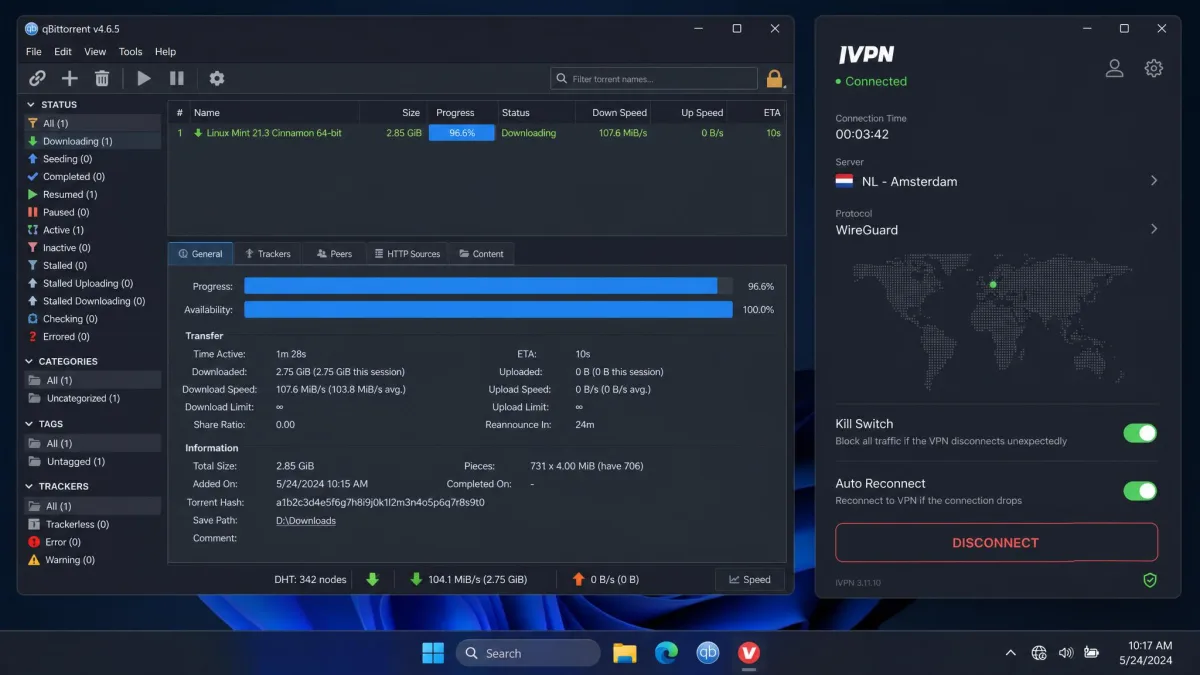
For torrenting, IVPN is quietly good, with one catch. P2P traffic barely dented our speeds, so downloads ran at close to full throughput on a suitable server. The catch is that P2P is blocked on US servers because of DMCA pressure, so you have to pick a non-US location before you start.
That is a reasonable trade, and it is clearly documented rather than hidden. Combined with the clean leak tests and the kill switch, IVPN is a safe torrenting choice as long as you remember to connect somewhere outside the US first. The privacy-first design that limits streaming actually works in your favor here: no logs, no email, and a kill switch that held in testing are exactly what you want for P2P.
Before you start a torrent, connect to a non-US server and confirm your IP with a leak test. P2P is blocked on US locations, so a US connection will simply fail to move data.
Device Compatibility and Simultaneous Connections
IVPN covers the main platforms with apps for Windows, macOS, Linux, Android, and iOS. The Standard plan allows 5 simultaneous devices, and Pro Suite raises that to 10. For a single person or a couple, 5 is comfortable; for a whole household stacking phones, laptops, and a TV box, you may bump into the ceiling, and that is where Pro Suite's 10-device limit starts to matter.
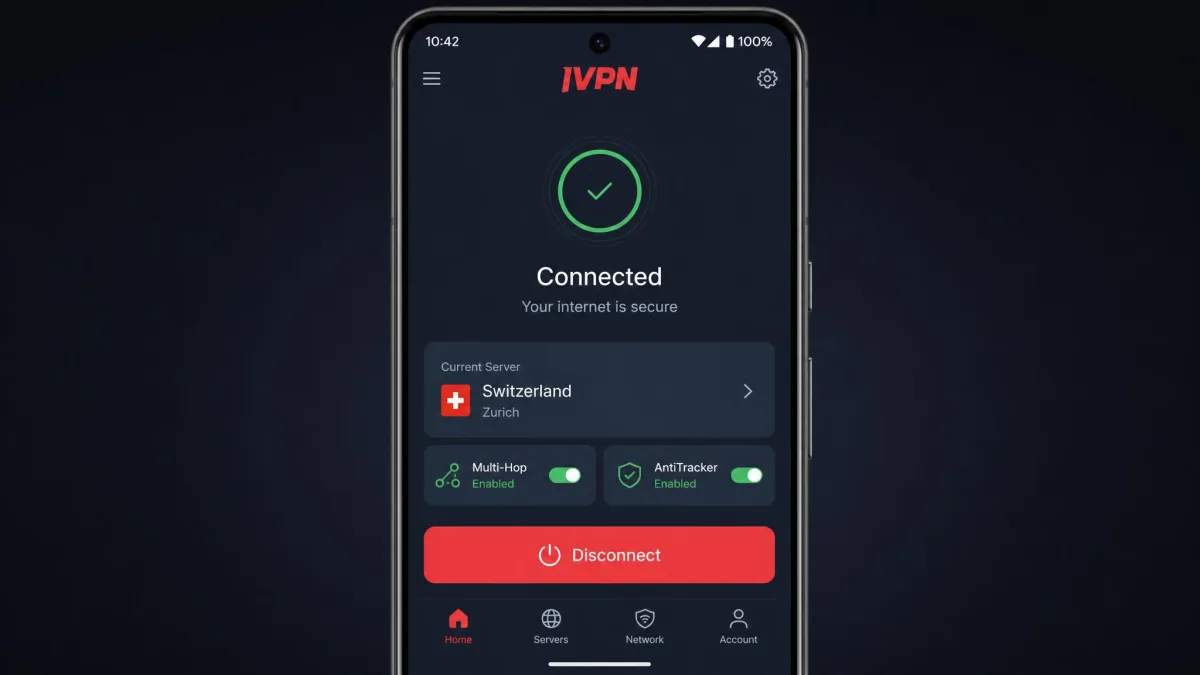
The apps are not identical in quality. The mobile apps are cleaner and better laid out, while the desktop interface feels cluttered, with tab organization that took us longer than it should to learn. It works, but it is not the polished experience some rivals offer. If most of your usage is on a phone, this matters less; if you live in the desktop app, the friction adds up.
Setup, Apps and Ease of Use
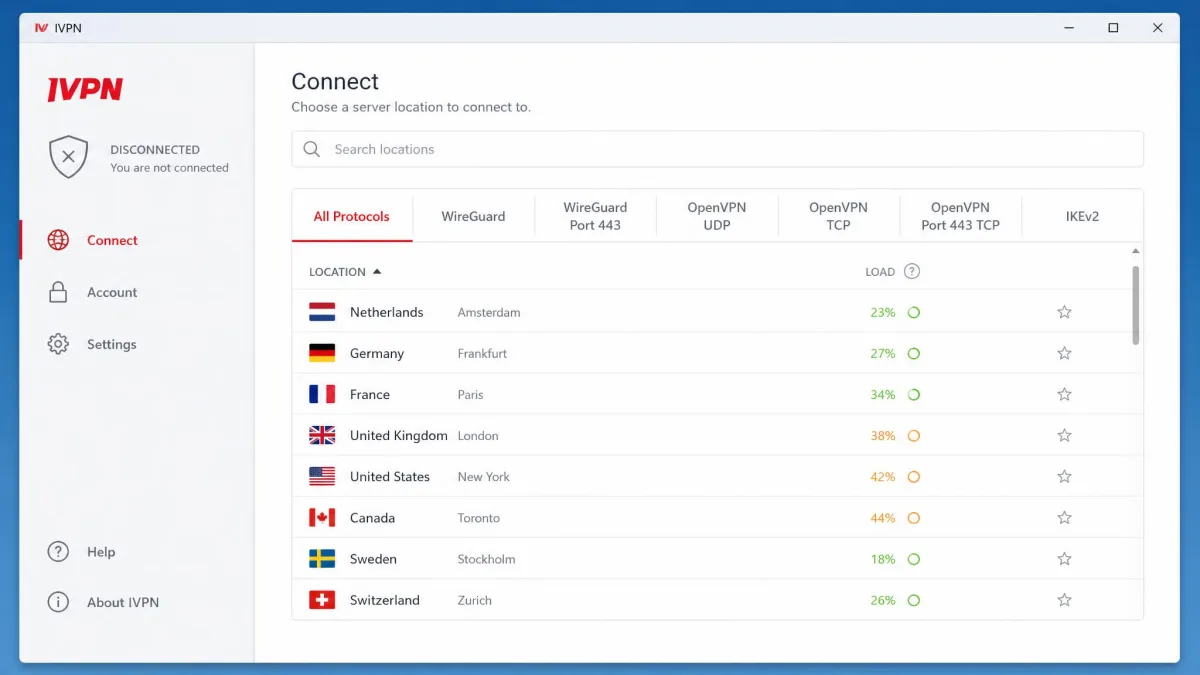
Getting started is fast, mostly because there is no account form to fill out. You generate an account ID, add time to it, and connect. That removes the usual friction of email verification and password creation. It is genuinely refreshing. From download to first connection took us only a couple of minutes, with no inbox to check and no confirmation link to click.
The daily experience is a mixed bag. Selecting a server location sometimes required an extra manual toggle to actually connect. That is not obvious the first time. We spent a moment on our first session wondering why picking a country did nothing, until we found the second step. The desktop app also logs you out automatically on a regular basis. That became a minor but persistent annoyance over two weeks. Each time it happened we had to re-enter the account ID before reconnecting. It interrupted the flow just often enough to notice.
The mobile side is smoother. The Android app kept us connected without the surprise logouts. Its toggles for multi-hop and AntiTracker sit right on the main screen where you expect them. That gap between platforms shapes our advice. If you mainly use a phone, the rough edges rarely show. If you spend your day in the desktop client, the friction is genuine. None of this is a dealbreaker, but it keeps IVPN from feeling as effortless as the best consumer apps.
The account-ID approach is refreshing after the tenth VPN signup form of the month, but the desktop app is where IVPN shows its enthusiast roots. It rewards patience more than it rewards a first-time user in a hurry.
Customer Support
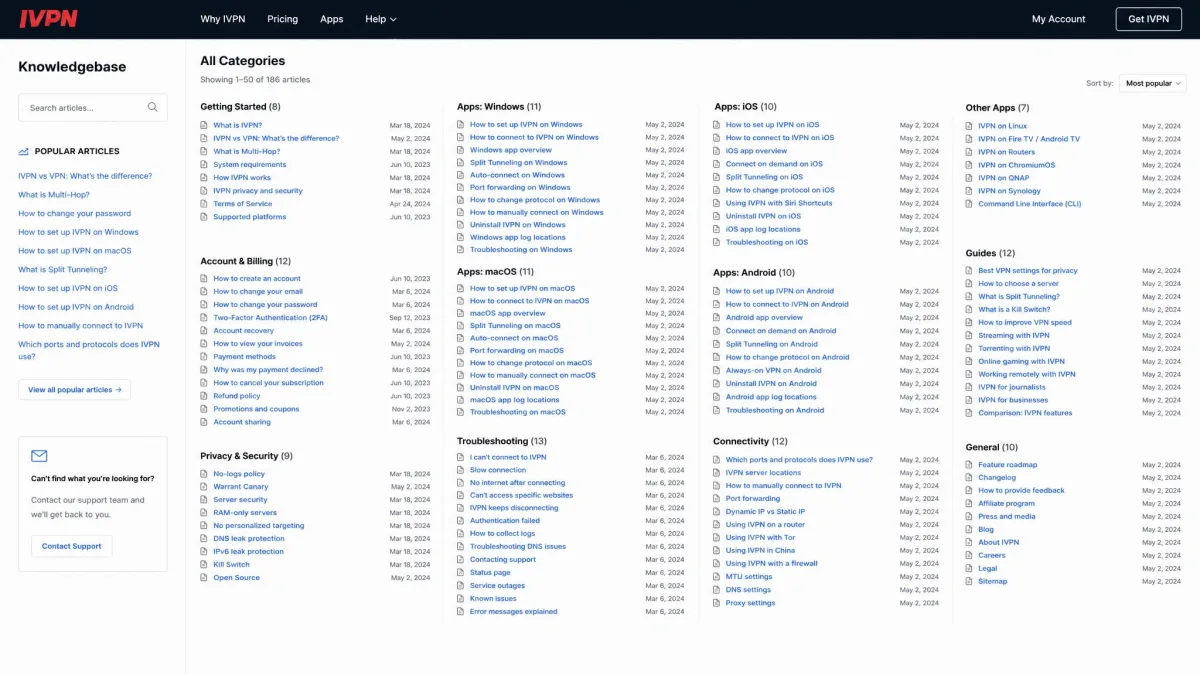
Support leans on self-service, and that is the weak part. The knowledgebase is dense and poorly organized, which made troubleshooting harder than it needed to be. When you know the exact term to search, the answer is usually there; when you are trying to learn how something works, the structure fights you. Articles sit in long, minimally grouped lists, so browsing for a topic means scanning rather than navigating.
We ran into this firsthand while chasing the manual-connect toggle behavior. The information existed, but it took several searches with different wording before the right article surfaced. Someone who already speaks the vocabulary will manage; someone learning the ropes will feel lost. A cleaner layout with clear categories would fix most of the pain, and it is the kind of polish a privacy-focused audience often forgives but a newcomer will not.
For a technical audience that prefers to solve problems itself, this is survivable. For a newcomer who wants a quick, guided answer, it is a gap. If you are the type who likes to dig, IVPN's documentation will eventually get you there. If you want hand-holding, this is not the service's strength, and it is one more reason IVPN suits the tinkerer more than the beginner.
How IVPN Compares (Alternatives)
IVPN's closest sibling is Mullvad, which shares the privacy-first DNA: anonymous numbered-account signup, no email, cash accepted, open-source apps, and a flat price of about 5 EUR a month with no multi-year discounts. If you want IVPN's ethos with even simpler pricing, Mullvad is the obvious cross-shop. IVPN counters with multi-hop on every plan and a larger set of privacy add-ons on Pro Suite.
For everything IVPN is weak at, NordVPN and Surfshark are the answer. NordVPN runs servers in 100+ countries, a far larger network than IVPN, with strong, reliable streaming unblocking. Surfshark offers unlimited simultaneous connections and equally reliable streaming at budget multi-year prices. Neither matches IVPN on anonymous signup, since both require an email, but both crush it on server count and entertainment.
| Product | Entry price | Devices | Servers | Streaming | Anonymous signup |
|---|---|---|---|---|---|
|
$6/mo | 5 to 10 | 41 countries | Weak | Yes (account ID) |
 |
~$5/mo | 5 | ~40 countries | Weak | Yes (account number) |
 |
Budget multi-year | 6 to 10 | 100+ countries | Strong | No (email) |
 |
Budget multi-year | Unlimited | 100 countries | Strong | No (email) |
The pattern is clean. Choose IVPN or Mullvad for privacy and transparency. Choose NordVPN or Surfshark for reach, streaming, and everyday convenience. IVPN sits firmly on the privacy side of that line, and it is happy to be there.
Who IVPN Is For / Final Verdict
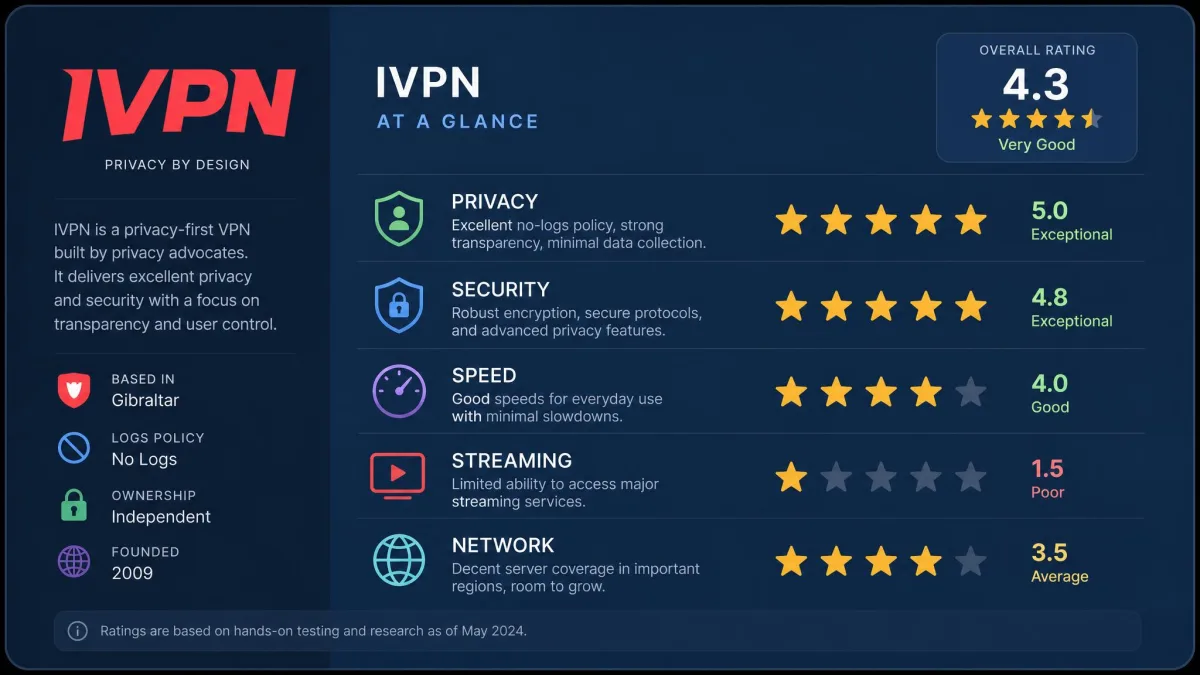
IVPN is for the user who treats a VPN as a privacy tool first and an entertainment tool a distant second. If you want a no-logs service that lets you sign up without an email, pay in cash or Monero, run multi-hop on any plan, and see published audits from an outside firm, IVPN is one of the best options on the market. The clean leak tests and self-hosted infrastructure back the marketing up.
It is not the VPN for someone whose main goal is watching region-locked shows, or who wants a huge server list and a polished, hand-holding app. Streaming is unreliable, the network is small, distant speeds fall off, and support leans hard on dense documentation.
So, is this privacy-first VPN worth it? For the right person, yes, comfortably. Buy IVPN for what it is genuinely great at, and skip it if you want an all-rounder that does a bit of everything well.