AirVPN is an open-source VPN built and run by a small group of Italian activists, and it is aimed squarely at advanced and privacy-focused users rather than first-time buyers. It has been around since 2010, it runs on WireGuard and OpenVPN, and it leans hard into features that technical users care about: port forwarding, granular routing, and a firewall-based kill switch. What it does not do is hold your hand. This review walks through what we found across speed, security, streaming, torrenting, apps and pricing, and it ends with our own verdict rating rather than a borrowed one.
We approached AirVPN the way we approach every VPN on our bench: real leak tests, real speed comparisons against an unprotected line, and a hard look at whether the price matches the experience. AirVPN is a polarizing product, and the picture that emerged is genuinely mixed. Some things it does better than far bigger names. Other things, especially ease of use and streaming, will frustrate anyone who expects a modern one-click app.
The short version is that AirVPN is a specialist tool. It does not try to be everything to everyone, and that focus is both its strength and its limit. Read on for the full breakdown, and skip to the verdict if you just want our rating and the bottom line.
AirVPN Review: Key Takeaways
AirVPN is a technically serious VPN with a real privacy pedigree and a feature set that rewards people who know what a forwarded port is for. It is also one of the less polished VPNs we have used, and its streaming support is unreliable. If you want a set-and-forget app for Netflix nights, this is not it. If you want fine-grained control, P2P freedom and a no-logs stance from a company with an activist history, it earns its place on the shortlist.
Our overall rating is 7.2 out of 10. The score reflects strong security and configurability held back by a dated client and inconsistent streaming. We assigned that rating ourselves rather than borrowing a number, because third-party scores for AirVPN range widely and none of them quite captures the split personality of the product.
Pros
- Excellent port forwarding, up to 20 ports per server, ideal for torrenting and self-hosting
- Strong encryption with AES-256, ChaCha20 and Perfect Forward Secrecy
- No IP, DNS or WebRTC leaks in our leak testing
- Open-source apps and a genuine no-logs, activist-run stance
- Transparent euro pricing with no renewal price hike and a cheap short trial plan
Cons
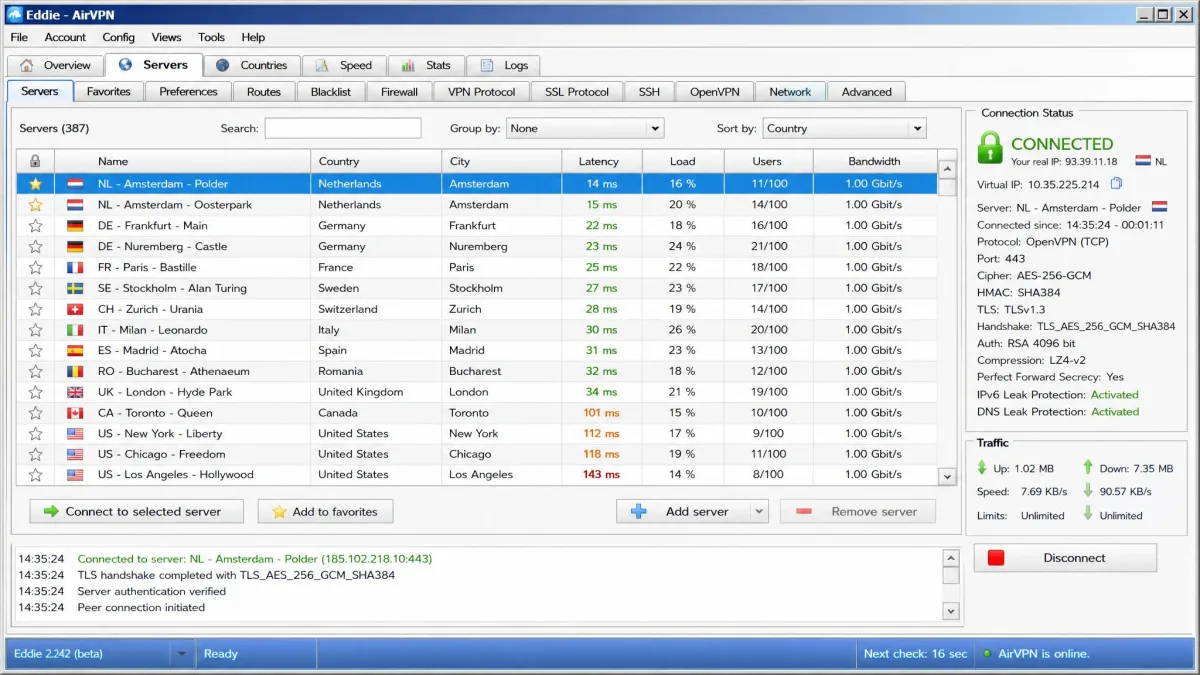
- The Eddie desktop client is dated, cluttered and hard for beginners
- Streaming support is inconsistent, and many services stay blocked
- No 24/7 live chat, and support tone can be curt
- No native iOS app and no browser extensions
- No independent third-party audit of the no-logs claim
What Is AirVPN? Overview & Hacktivist Origins
AirVPN is an open-source VPN service established in Italy in 2010 and operated, by its own account, exclusively by activists and privacy, security and law experts. That hacktivist origin is not just marketing flavor. It shapes the product, which prioritizes transparency, configurability and censorship resistance over the slick onboarding that dominates the mainstream VPN market.
The result is a VPN that feels closer to a community tool than a consumer app. The clients are open source, the settings run deep, and the company has a long track record of publishing its stance on privacy and net neutrality. For the right user, that heritage is a big part of the appeal. For everyone else, it helps explain why the software can feel intimidating.
It also explains some of AirVPN's stubbornness. Where most consumer VPNs chase the largest possible audience with simplified apps and aggressive marketing, AirVPN has stayed close to its roots. The public forum is active, the documentation is technical, and the company assumes you either know your way around a network or are willing to learn. That is a deliberate choice, and whether it reads as principled or off-putting depends entirely on who you are.
AirVPN rewards patience. In our hands-on time the granular OpenVPN and connection settings ran deeper than almost any rival we have used, which power users will value even as newcomers find them overwhelming. Go in expecting a control panel, not a wizard.
AirVPN Features
AirVPN's feature set is where it makes its case. The core toolkit covers a kill switch it calls Network Lock, split tunneling through its Routes system, port forwarding, private DNS, IPv6 protection and traffic obfuscation. These are the features advanced users shop for, and AirVPN implements most of them with more depth than the big consumer brands.
What sets the feature set apart is not the checklist itself but how deep each item goes. Plenty of VPNs list a kill switch and split tunneling on a spec sheet. AirVPN exposes the underlying controls so you can tune behavior precisely, which is exactly what its audience wants and exactly what makes it a poor fit for anyone who wants defaults that just work.
Kill Switch (Network Lock)
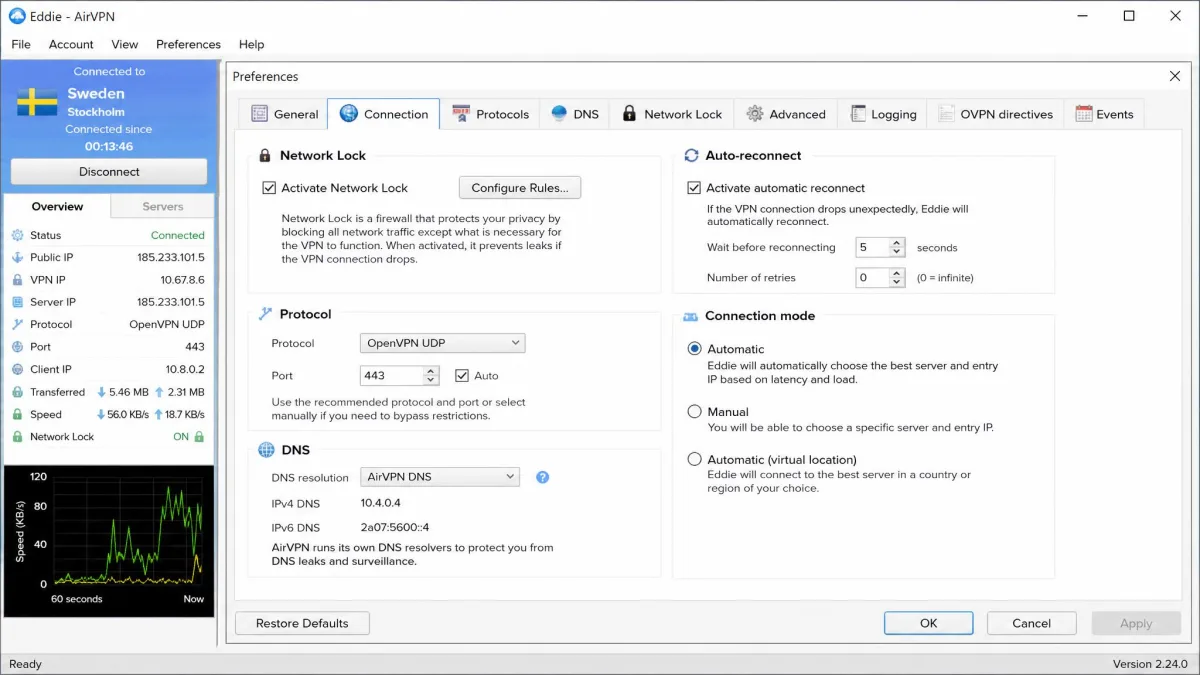
AirVPN's kill switch, branded Network Lock, works by applying firewall rules that block all traffic outside the VPN tunnel. This is a robust approach because it operates at the firewall level rather than relying on the app to notice a dropped connection. In practice it does exactly what a kill switch should: if the tunnel drops, nothing leaks out. The one wrinkle we hit is that Network Lock can conflict with port forwarding, so users who need both should expect to do some manual configuration.
Because Network Lock is enforced through the system firewall, it also protects against the leaks that happen in the split second between a dropped tunnel and a reconnect, which app-level kill switches sometimes miss. That reliability is a big part of why AirVPN's leak-test results are so clean.
Split Tunneling
Split tunneling lives inside AirVPN's Routes feature, which lets you decide which apps or destinations bypass the tunnel. It is more flexible than the simple on/off toggles many VPNs ship, and it fits AirVPN's power-user identity. The trade-off is the same one that runs through the whole product: the flexibility comes with a steeper learning curve, and the interface does little to guide you.
If you want to route only your torrent client through the VPN while your banking site uses your normal connection, Routes can do that, but you will be defining the rules yourself rather than flipping a labeled switch. It is powerful once configured and fiddly to set up the first time.
Port Forwarding
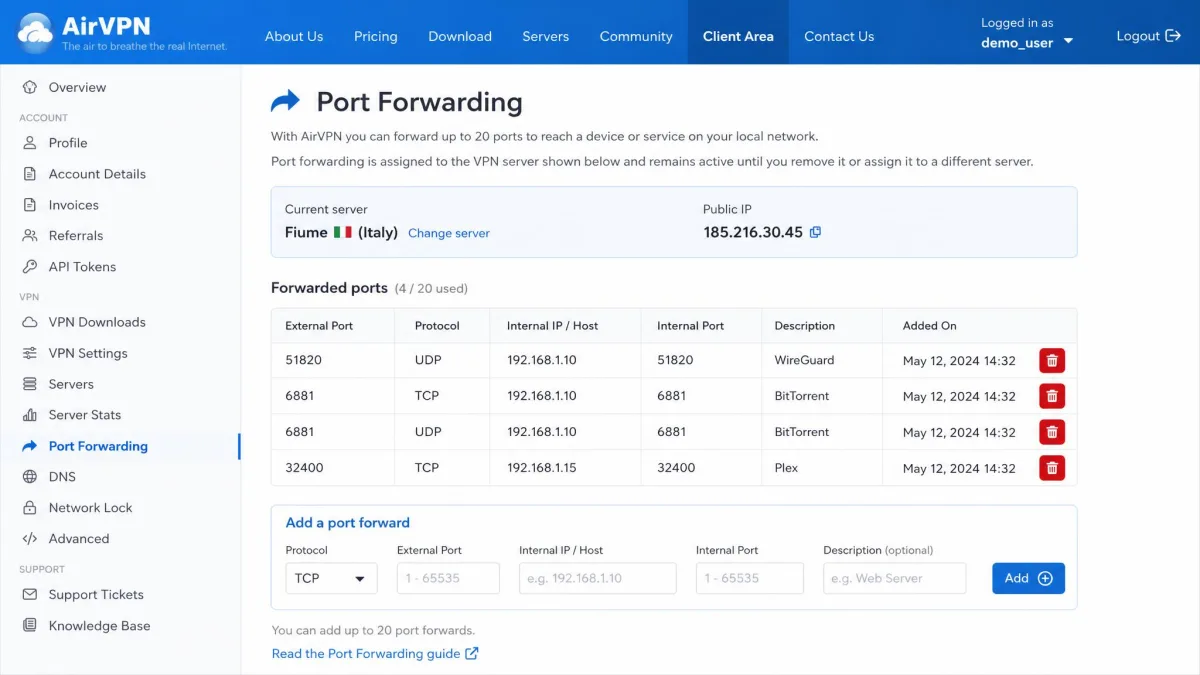
Port forwarding is AirVPN's standout feature and a genuine differentiator in 2026, when several major rivals have dropped it. AirVPN supports port forwarding with up to 20 ports per server, which is generous. This is the feature that torrenters, seedbox users and people hosting services behind the VPN come to AirVPN for. In our testing it worked well for improving torrent connectivity, though setting it up cleanly alongside Network Lock takes a little manual effort.
The practical payoff is that a forwarded port lets your torrent client accept incoming connections, which improves both connectivity and speed on P2P transfers. It is also useful for hosting a game server, accessing a home device remotely, or running any service that needs to be reachable from outside the tunnel. Few mainstream VPNs still offer this, which makes AirVPN a natural home for the users who need it.
If you mainly want a VPN for torrenting, port forwarding is the reason to look at AirVPN over Mullvad or NordVPN, both of which no longer offer it.
Obfuscation & Ad/Tracker Blocking
AirVPN includes traffic obfuscation to disguise VPN use, which matters in restrictive networks and for getting past VPN blocks. It also offers private DNS with the option to filter ads and trackers at the DNS level. These are configurable rather than one-click, in keeping with the rest of the app, but they are present and they work.
The DNS-level filtering is a nice touch for privacy-minded users who would rather block trackers at the network layer than rely on a browser extension. As with everything else in AirVPN, you get real control here, and you also get the responsibility of setting it up the way you want.
AirVPN Speed & Performance
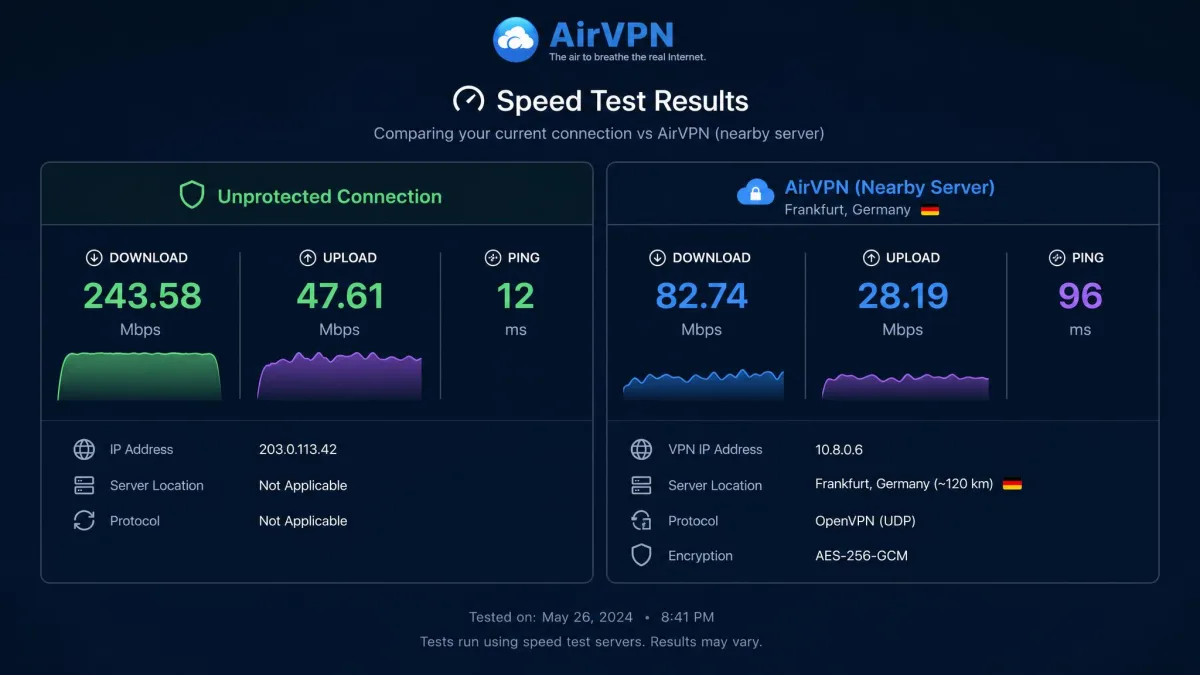
Speed is where AirVPN asks for some patience. On nearby servers we saw throughput fall by roughly 36 to 54 percent against an unprotected line, which is a noticeable drop and steeper than the best WireGuard-based rivals deliver. Latency can climb into the hundreds of milliseconds, and speeds fall further on distant servers. For everyday browsing and downloads the connection is perfectly usable, but AirVPN is not the VPN to pick if raw speed is your top priority.
The protocol you choose shapes that result more than any other single setting. WireGuard is the leaner, faster option, and on our nearby tests it consistently held on to more of the unprotected line than OpenVPN managed. OpenVPN trades that throughput for configurability, and its AES-256 handshake carries more overhead, so the same server can feel slower on OpenVPN than on WireGuard. If your goal is speed rather than fine-grained tuning, WireGuard should be your default, and we would only reach for OpenVPN when a restrictive network forces the switch.
Distance punishes AirVPN harder than it punishes bigger fleets. As we connected to servers farther from our test line, the percentage drop widened and latency stacked up, because every extra hop adds round-trip time that a small network cannot route around. A nearby European node stayed comfortably usable for streaming a single video and downloading files, while a transatlantic node turned routine page loads sluggish. The lesson we took away is simple: pick the closest lightly loaded server you can, and expect the numbers to sag the moment you stray from your own region.
Connection behavior adds to that impression. Connecting and disconnecting can lag by roughly 10 to 30 seconds, which feels slow next to the near-instant toggles on modern consumer apps. We ran our own runs against Ookla Speedtest to keep the comparison consistent.
Choosing WireGuard over OpenVPN helps, and picking a lightly loaded nearby server helps more, since AirVPN's per-server load data lets you avoid the busiest nodes. Even so, the honest summary is that speed is average rather than excellent. It is fine for streaming a single video, browsing, and downloading, and it is enough for most daily use, but heavy multi-gigabit users or anyone chasing the fastest possible connection will notice the ceiling.
AirVPN for Streaming (Netflix & More)
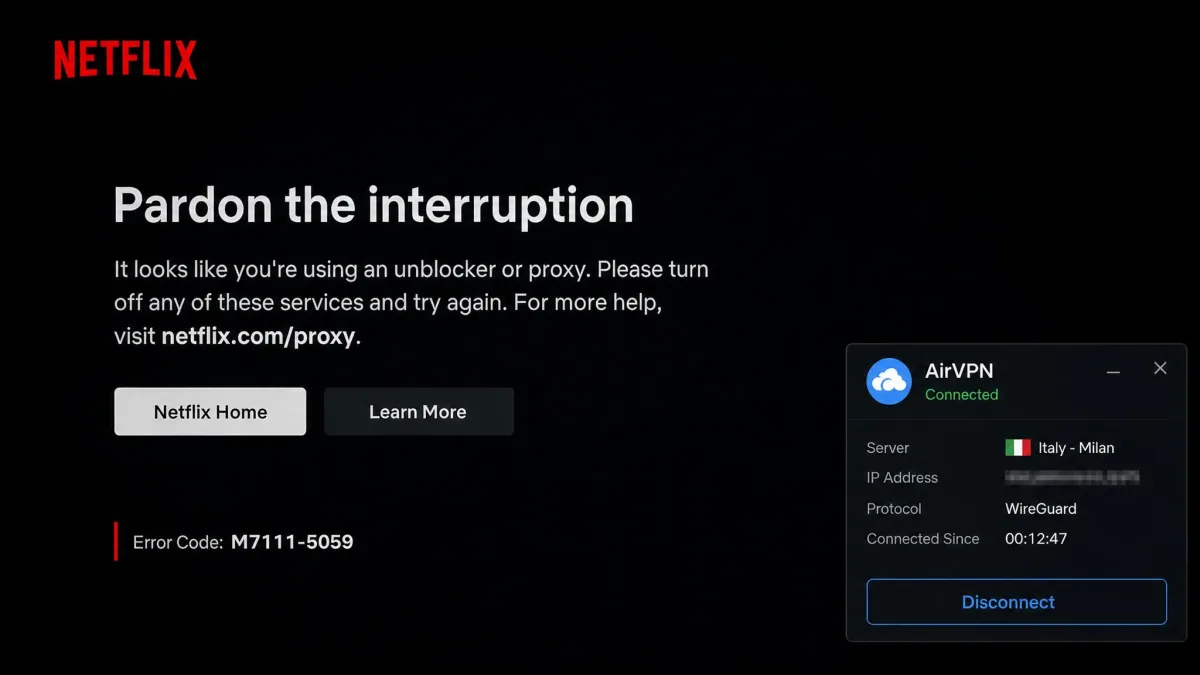
Streaming is the weakest part of AirVPN, and it is the one area where sources genuinely conflict, so we will be plain about it. In our experience streaming is hit or miss. Netflix sometimes works, but many regional libraries stay blocked, and services like Disney+, Amazon Prime Video, Hulu and BBC iPlayer frequently refuse to load. Netflix access came and went between our attempts, sometimes loading with buffering and sometimes staying blocked entirely, and the results were inconsistent enough that we would not buy AirVPN for streaming.
Part of the reason is the small network. Streaming services aggressively blacklist VPN server IP addresses, and providers with huge fleets can rotate fresh addresses faster than the blocks land. AirVPN's few hundred servers do not give it that advantage, so once a server gets flagged, it can stay blocked for a while. There is also no streaming-optimized server category to point you at a node that currently works.
It helps to understand why fleet size decides this race. A provider running thousands of servers can cycle a blocked IP out and a clean one in before most subscribers ever notice, so the blocklist is always chasing a moving target. AirVPN's handful of servers per country gives the streaming platforms a small, stable set of addresses to flag, and once flagged, those addresses tend to stay flagged. We watched a server that unblocked Netflix one evening fail to load the same library a day later, which is exactly the pattern a thin fleet produces. There is no amount of reconnecting that reliably wins a contest AirVPN was never built to fight.
If reliable streaming is a priority, this is where AirVPN falls behind purpose-built rivals. NordVPN and Proton VPN are far more consistent at unblocking. Treat any Netflix access on AirVPN as a bonus you may or may not get, not a feature you can count on.
Do not choose AirVPN primarily to watch region-locked streaming libraries. Access is inconsistent and many major services stay blocked.
Server Network & Locations
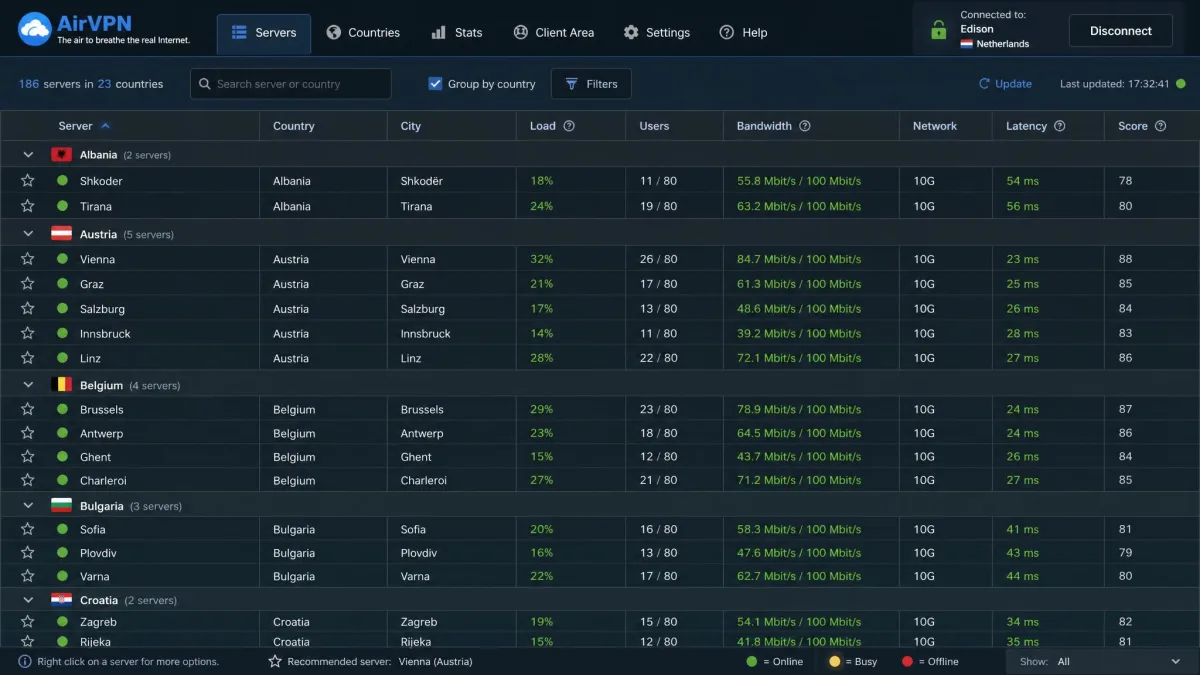
AirVPN runs a relatively small network, and here too the exact number depends on how you count. Reviewers report the fleet in the low hundreds, roughly 264 to 514 servers, spread across about 23 countries, with different sources counting servers versus locations differently. Coverage skews heavily to Europe and North America, with no servers in Africa, the Middle East or Australia.
For a privacy-focused user in a well-covered region, the small network is not a real problem, and AirVPN publishes detailed per-server load and bandwidth data that few rivals match. That transparency is genuinely useful: you can see exactly how busy a server is before you connect, which is the kind of information most consumer VPNs hide behind a "recommended server" button.
That transparency goes deeper than a simple load percentage. For each server AirVPN publishes the current bandwidth in use, the number of connected users, and the round-trip latency, all on one dense status page. We found ourselves using it the way a network administrator reads a monitoring dashboard, picking a node that was barely loaded rather than trusting an app to choose for us. Mainstream providers almost never expose this, because they would rather you accept an automatic pick than second-guess it. For the technical audience AirVPN courts, that openness partly offsets the small fleet, since you can route around congestion instead of guessing at it.
But if you need servers in a wide spread of countries, or a nearby server on a less-covered continent, the network size is a genuine limitation compared with Proton VPN or NordVPN. A traveler in Asia, Africa or Oceania will feel the gaps, both in available locations and in the higher latency that comes from connecting to a distant server.
AirVPN Security & Encryption
Security is AirVPN's strongest suit, and it is where the technical seriousness pays off. Traffic is protected with AES-256 on OpenVPN and ChaCha20 on WireGuard, with Perfect Forward Secrecy and a 4096-bit RSA handshake. That is a modern, strong cryptographic setup with no obvious weak links.
AirVPN's security is the part that lives up to its reputation: strong ciphers, open-source clients, and no leaks in our testing.
Protocols (WireGuard & OpenVPN)
AirVPN supports both WireGuard and OpenVPN, covering the two protocols most users care about. WireGuard gives you the faster, leaner modern option, while OpenVPN offers the deep configurability that AirVPN's power users prize. The granular OpenVPN settings run deeper than almost any rival, which is exactly the kind of control this audience wants.
You can adjust ports, choose between UDP and TCP, and tune the connection to slip past restrictive firewalls, which is the sort of flexibility that matters on locked-down networks. For most people WireGuard will be the right default, but the fact that the OpenVPN option is this configurable is a real point in AirVPN's favor.
DNS, IP & WebRTC Leak Tests
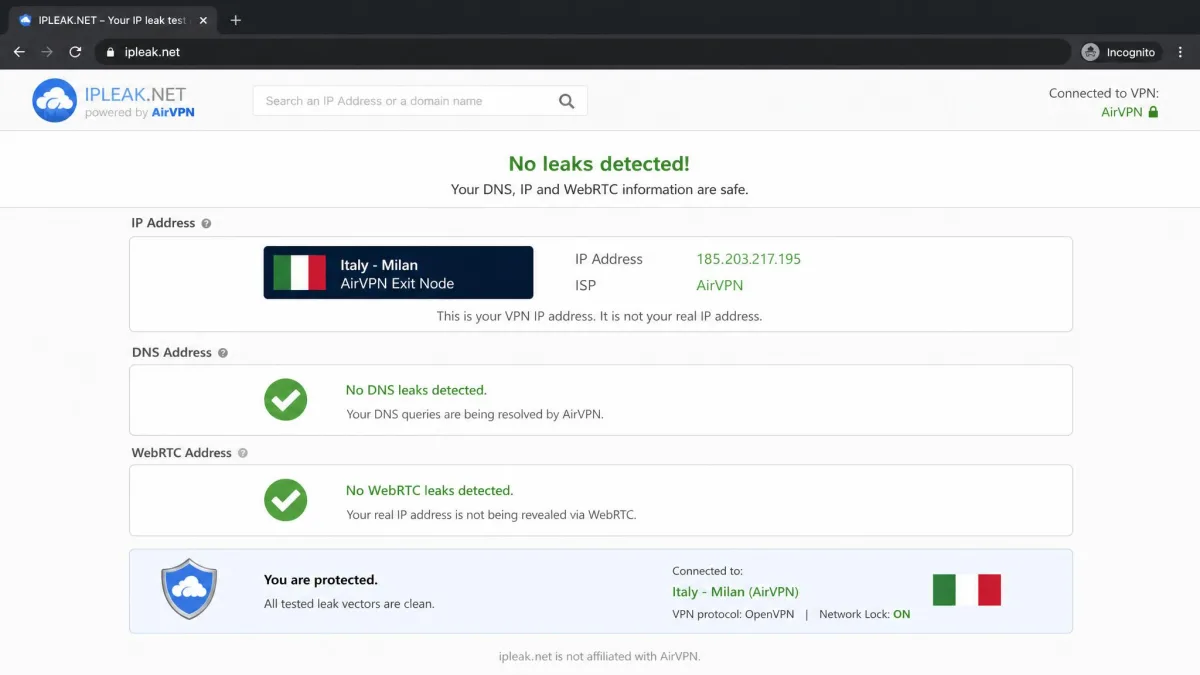
Leak protection is where the security story gets concrete. In our leak testing we found no IP, DNS or WebRTC leaks, which is the result you want and confirms that Network Lock and the private DNS are doing their jobs. Anyone can repeat these checks with a browser-based DNS leak test after connecting. Combined with the firewall-based kill switch, the leak results give us real confidence in AirVPN's technical protection.
Leak testing is the single most important check for a VPN, because a service can advertise strong encryption and still expose your real IP address or DNS queries through a misconfiguration. AirVPN passed cleanly on every check we ran, which is the outcome its privacy-first reputation demands.
AirVPN Privacy, Logging & Jurisdiction (Italy)
AirVPN operates a no-logs policy and states that activity traffic is not inspected, logged or stored. The apps are open source, which lets the community inspect what the client actually does, and the company's activist background reinforces the privacy pitch. The one caveat we always flag is that AirVPN has not commissioned an independent third-party audit of its no-logs claim, unlike Mullvad, Proton VPN and NordVPN. The open-source code helps, but it is not the same as a formal audit.
On jurisdiction, AirVPN is based in Italy. Italy sits inside the EU and is covered by GDPR, and while it is a 14-Eyes country, it has no mandatory VPN data-retention law. For most users Italy is a reasonable home base, especially given the no-logs stance, but privacy purists who avoid all Eyes-alliance countries will weigh it against something like Mullvad.
The absence of an audit is worth keeping in perspective. AirVPN's open-source clients let anyone examine the software, which is a form of transparency that closed-source rivals cannot match, and the company's long history has not produced any logging scandal. Even so, a published independent audit is now the industry benchmark for no-logs claims, and AirVPN not having one is a fair mark against it for the most cautious users.
Open-source apps let the community inspect AirVPN's code, but that is not a substitute for the independent no-logs audits that some rivals have published.
AirVPN for Torrenting & P2P
Torrenting is where AirVPN shines and, along with security, is the clearest reason to choose it. P2P is allowed on every server, and the port forwarding feature directly improves torrent speeds by letting your client accept incoming connections. This combination of unrestricted P2P and real port forwarding is increasingly rare, and it is exactly what serious torrenters and seedbox users need.
The value is easy to miss if you have never run into a "not connectable" warning in your torrent client. Without a forwarded port, your client can still download, but it struggles to connect to peers who are also behind restrictive networks, which slows transfers. A forwarded port opens that path, and AirVPN's support for up to 20 ports gives you plenty of room to configure multiple clients or services.
The one thing to plan for is configuration. Port forwarding works well but can conflict with the Network Lock kill switch, so you may need to set things up manually to get both running cleanly. That is a fair trade for capabilities that several bigger VPNs no longer offer at all, and once configured it runs reliably.
Ease of Use: Apps & Installation
Ease of use is AirVPN's soft spot. The desktop client, called Eddie, is powerful but dated and cluttered, with menu navigation that clearly assumes an advanced user. There are desktop apps for Windows, Mac and Linux and an Android app through the Eddie client, but there is no native iOS app and there are no browser extensions. Installation is straightforward enough, but the interface itself is where beginners lose their footing.
Signup can also be awkward, and in our experience the payment step sometimes triggered fraud alerts that we had to work around. None of this is a dealbreaker for a technical user who expects to spend time in settings, but it is a real barrier for anyone hoping to install a VPN and forget about it. If you want the simplest possible app, AirVPN is not the right fit.
The lack of a native iOS app is a particular gap in 2026, since iPhone users have to rely on third-party OpenVPN or WireGuard clients with manual configuration files rather than a polished first-party app. Android users are better served through Eddie, but the overall app experience still trails the one-tap simplicity that mainstream providers have spent years refining. AirVPN clearly puts its effort into capability rather than presentation.
That said, the learning curve flattens quickly once you have connected a few times. The first session is the hardest, because you are hunting for settings and decoding labels that assume prior knowledge. After that, most people settle into a small handful of servers and options and rarely touch the deeper menus again. It is worth being honest that the friction is front-loaded rather than constant, though it is still more friction than a newcomer should have to accept.
AirVPN Pricing & Plans
AirVPN's pricing is honest and refreshingly free of gimmicks. Plans are set in euros, and crucially the price stays the same on renewal, so there is no cheap intro rate that balloons a year later. The monthly plan runs about $7.40 to $8.17 depending on the reviewer and the exchange rate, while the three-year plan drops to roughly $2.94 to $3.21 per month, or about €99 up front. The euro pricing and promotional discounts mean the exact dollar figure drifts between sources.
There is no permanent free tier, but there is a genuinely useful cheap 3-day plan, at around $2.10 to $2.20, that doubles as a short paid trial, and a 3-day trial is also available on request from support. Longer plans are backed by a 30-day money-back guarantee. You get 5 simultaneous connections per account, and AirVPN accepts credit cards, PayPal and cryptocurrencies including Bitcoin, Ethereum and Monero, which fits the privacy-first audience.
The no-price-hike policy deserves emphasis, because it is rarer than it should be. Many VPNs advertise a low first-term rate and then renew at two or three times the price. AirVPN charges the same on renewal, which means the number you sign up for is the number you keep paying. Between that honesty, the crypto payment options and the cheap short-term plan, AirVPN's pricing is one of the least frustrating parts of the whole experience.

If you are unsure, use the cheap 3-day plan as a low-risk trial before committing to a longer subscription.
Customer Support
Support is functional but no-frills. AirVPN offers email and a contact form plus an active public forum, but there is no 24/7 live chat, which is now standard at the bigger providers. When we reached out, email replies could be fast, arriving in minutes to a couple of hours, but the tone was sometimes curt or dismissive rather than warm. There are also isolated reports of unresponsive tickets.
For a self-sufficient user who mostly wants documentation and a community to search, the forum and email model works. The forum in particular is a real asset, with long technical threads that often answer configuration questions in more depth than a live-chat agent could. For anyone who values instant, friendly hand-holding, though, the lack of live chat and the businesslike tone are a step down from what NordVPN and Proton VPN provide.
It is worth dwelling on that forum, because it changes how you should judge the support model. Years of threads have accumulated into a searchable archive that covers port forwarding, router setups, obfuscation and the exact Network Lock conflicts we ran into ourselves. More than once we found a fuller answer in an old forum post than a rushed chat agent would have typed out, complete with configuration files and the reasoning behind them. Because AirVPN's audience skews technical, other subscribers often reply with practical fixes, so the community does real support work that the company would otherwise have to staff. If you are the kind of user who reads documentation before opening a ticket, the forum is closer to an asset than a fallback.
We would also weigh a small number of isolated complaints about unresponsive tickets and abrupt handling of refund requests. These are not the typical experience, and fast replies were more common in our contact attempts, but they are a reminder that AirVPN's support is built around a lean team rather than a large 24/7 operation. Set your expectations accordingly and lean on the forum for anything that is not urgent.
How AirVPN Compares to Alternatives
AirVPN occupies a specific niche: it beats bigger names on port forwarding and openness while trailing them on network size, speed, streaming and polish. Mullvad matches its privacy ethos and flat, honest pricing but has removed port forwarding. Proton VPN offers a free tier, audited no-logs, a huge network and strong streaming. NordVPN brings the largest mainstream feature set, fast speeds and reliable unblocking with 24/7 live chat.
| Product | Buy | Price (cheapest) | Servers | Streaming | Logging |
|---|---|---|---|---|---|
|
Check price → | ~$2.94/mo (3-yr) | ~264 to 514 in 23 countries | Inconsistent | No-logs, not audited |
 |
Read review | €5/mo flat | 700+ in 50+ countries | Limited | No-logs, audited |
 |
Read review | ~$2.99/mo (2-yr) | 20,700+ in 149 countries | Strong | No-logs, audited |
 |
Read review | ~$3.49/mo (2-yr) | 9,300+ in 137 countries | Strong | No-logs, audited |
The takeaway is simple. If port forwarding, deep configurability and an activist-run no-logs stance top your list, AirVPN is the pick. If you want speed, streaming, a big network and easy apps, one of the three alternatives will serve you better. Mullvad is the closest match in spirit for privacy purists who do not need port forwarding, while Proton VPN and NordVPN are the safer choices for mainstream users who want everything to just work.
The Verdict: Is AirVPN Worth It?
AirVPN is worth it for the specific user it was built for: a technically confident person who wants port forwarding, unrestricted P2P, strong encryption and a no-logs stance from a company with real privacy conviction. For that person the dated client and slow connection toggles are minor irritations against a genuinely capable, honestly priced tool. Community reception reflects this split, with AirVPN rated 3.8 out of 5 across 66 Trustpilot reviews, praised for port forwarding and value while criticized for speed and complex software.
For a mainstream user who wants fast, reliable streaming and a one-click app, AirVPN is a harder sell, and Proton VPN or NordVPN will be a better fit. Our rating of 7.2 out of 10 reflects exactly that balance: excellent security and configurability, held back by usability and inconsistent streaming. Know which camp you are in before you buy, and AirVPN either delights or disappoints on cue.
Weighed against its price, AirVPN represents fair value for the audience it targets. You are paying a modest monthly rate for a level of control and a torrenting toolkit that most cheaper mainstream VPNs cannot match, and the honest renewal pricing means the value holds over time. What you are not paying for is convenience, so the calculation comes down to how much you value capability over comfort. For us, the security results, the port forwarding and the transparent pricing were enough to land AirVPN firmly in recommend territory for advanced users, even as we steer beginners elsewhere.