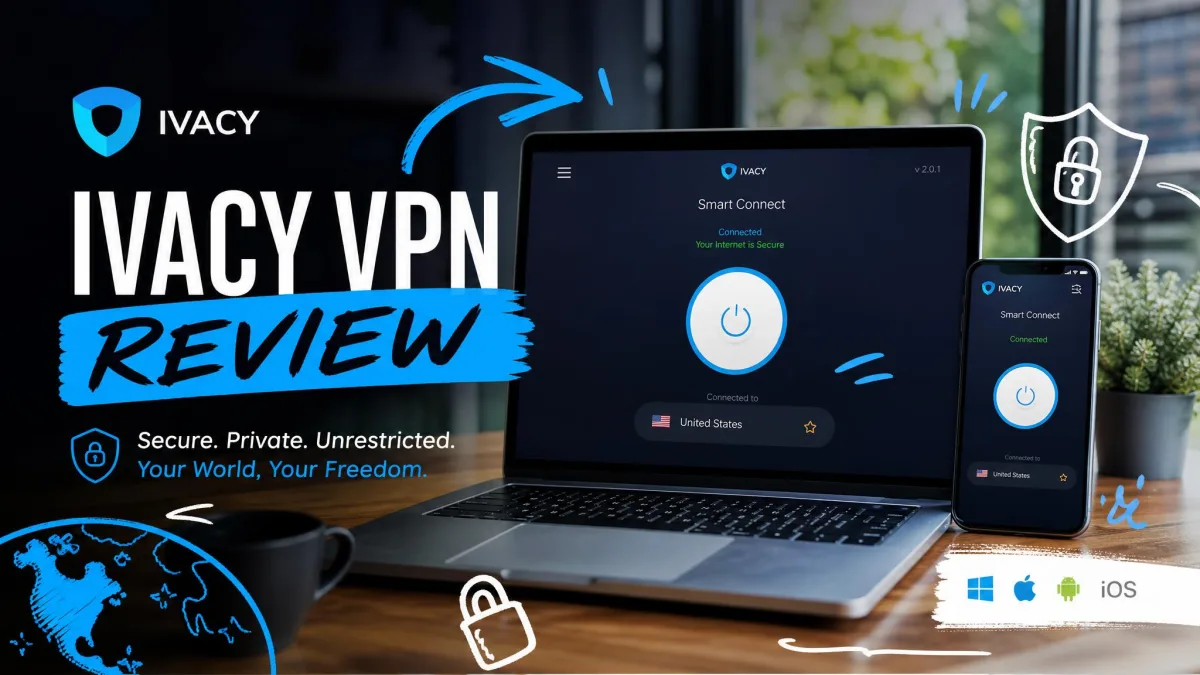
Ivacy VPN is a Singapore-based service that sells cheap multi-year plans, a large server network, and Netflix unblocking as its main draw. So is it actually worth signing up for in 2026, or does the low headline price hide too many compromises? We spent a stretch of testing putting it through real speed, leak, and streaming checks to answer exactly that.
The short version is that Ivacy does the everyday jobs well. It unblocks the streaming libraries most people want, it holds a solid connection on nearby servers, and its long-term pricing undercuts almost every premium rival. The catch is a set of gaps that matter more the closer you look, including a missing kill switch on Mac and iOS, no published independent audit, and speeds that fall off hard over long distances.
This review walks through what we found in each area, from pricing and protocols to logging and customer support, so you can decide whether the savings are worth the trade-offs.
Ivacy VPN at a Glance (verdict + rating summary)
Ivacy positions itself as a budget VPN that still ticks the feature boxes buyers care about. On paper it offers a large server fleet, 256-bit AES encryption, a no-logs policy, split tunneling, and support for up to 10 simultaneous device connections. Most of those claims held up when we tested them, though a few came with caveats worth knowing before you pay.
What stands out first is the price. Long-term plans are advertised from roughly $1 per month, which puts Ivacy among the cheapest names in the category. What stands out second, less happily, is the uneven feature coverage across platforms. The Windows and Android apps are fuller and safer than the Mac and iOS versions, and that split shapes who should buy this VPN.
We rate Ivacy a solid mid-tier pick. If you mainly want to stream, torrent, or browse privately on Windows or Android without spending much, it earns its keep. If you rely on a Mac, want an audited privacy record, or need consistent long-distance speed, the gaps below will bother you.
To put a number on it, Ivacy lands at 7.2 out of 10 in our scoring. It loses points for the platform gaps and the missing audit, and it gains them back for value, streaming, and the sheer size of its network. That score reflects a VPN we are comfortable recommending with clear conditions, not one we would hand to everyone without caveats. The rest of this review is the evidence behind that number, section by section, so you can weigh the areas that matter most to you.
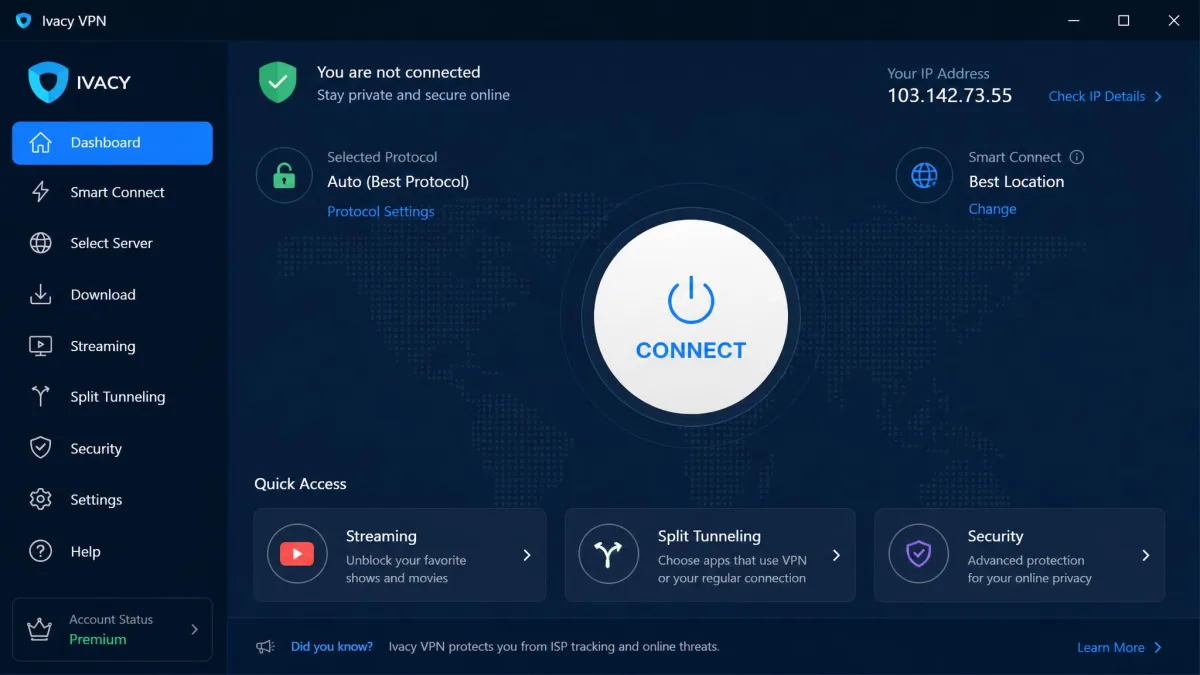
We ran Ivacy through our standard VPN bench, checking real download speeds against a baseline, running DNS and WebRTC leak tests on multiple servers, and confirming streaming access on the libraries people actually ask about. Where our hands-on findings differ from the marketing, we say so plainly below.
Pros and Cons
Here is the balance sheet after our testing. The pros are genuine and the cons are the kind that decide whether this VPN fits your setup.
Pros
- Very cheap on multi-year plans, among the lowest per-month prices around
- Unblocks Netflix and other major streaming libraries reliably
- Strong 256-bit AES encryption with modern protocol support on Windows
- Up to 10 simultaneous device connections
- Split tunneling, P2P support, and dedicated streaming and torrenting servers
- Registered in Singapore, outside the 5, 9, and 14 Eyes alliances
Cons
- No kill switch on Mac or iOS, a real leak risk on those platforms
- No published independent privacy audit
- Speeds drop sharply on distant servers
- Opaque corporate structure with links to the PureVPN group
- The client can be slow to connect and the app was flagged by Windows Defender
Features Overview
Ivacy's feature list reads like a premium VPN despite the budget price. You get split tunneling, dedicated servers tuned for streaming and torrenting, a dedicated IP add-on, port forwarding, P2P support across the network, 1TB of Internxt cloud storage on some plans, and DNS and WebRTC leak protection built in. As always, we recommend testing the ones that matter to you rather than trusting the marketing sheet.
In practice, the headline features work as advertised on Windows and Android. The weak spots are not in the feature count but in how those features are distributed across platforms, which the sections below make clear.
The Internxt cloud storage deserves a quick mention, since 1TB of encrypted storage bundled with a VPN plan is an unusual perk at this price. It is not a reason to buy on its own, and it is a separate service you activate rather than something baked into the VPN client, but it adds value if you were already looking for encrypted backup. Leak protection is the feature we care about more, and Ivacy builds in DNS and WebRTC leak protection that held up in most of our tests, with the one exception we describe in the privacy section.
Servers and Locations
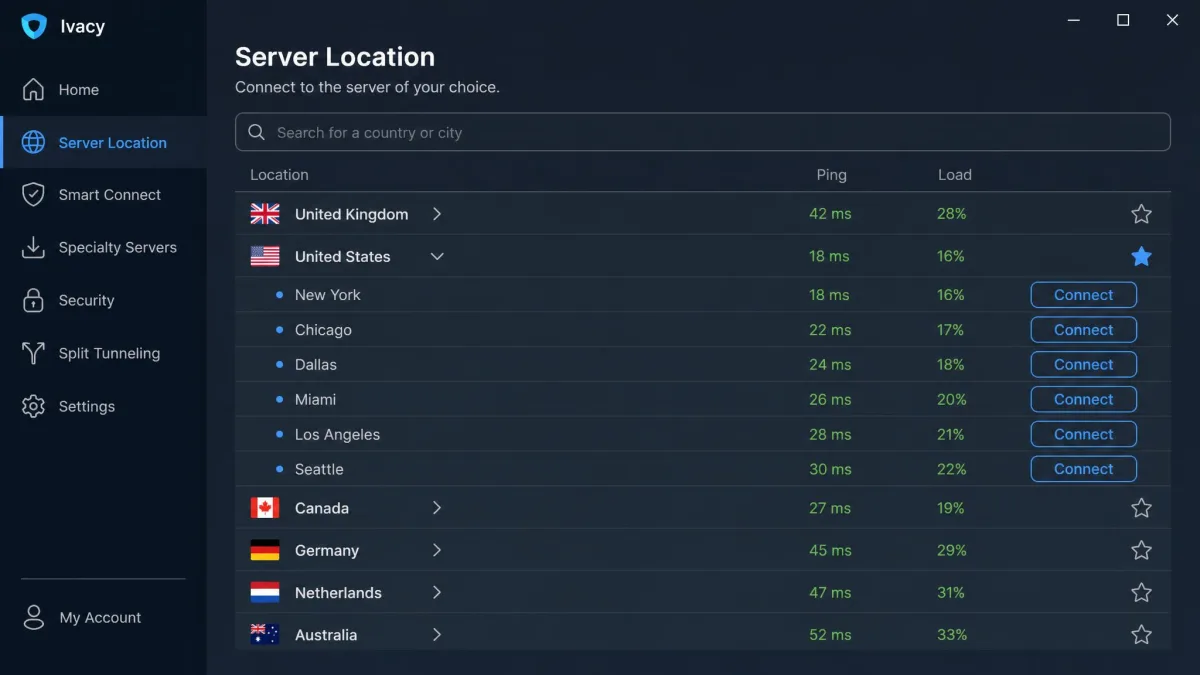
Ivacy runs a large network, with reported totals around 5,700 servers spread across roughly 65 to 70 countries. We say "around" and "roughly" on purpose. The published server count ranges between 5,700 and 6,000 or more depending on the source and the date, and country coverage falls between 65 and 70-plus, so treat the exact figures as approximate rather than fixed.
That network is big enough that you will almost always find a nearby server, which matters for speed. One thing to keep in mind is that some locations are virtual, meaning the server is not physically in the country it advertises. During leak testing on a US server, we saw the connection surface PureVPN as the ISP, a reminder that Ivacy shares infrastructure with its parent group.
Split Tunneling and Specialty Servers
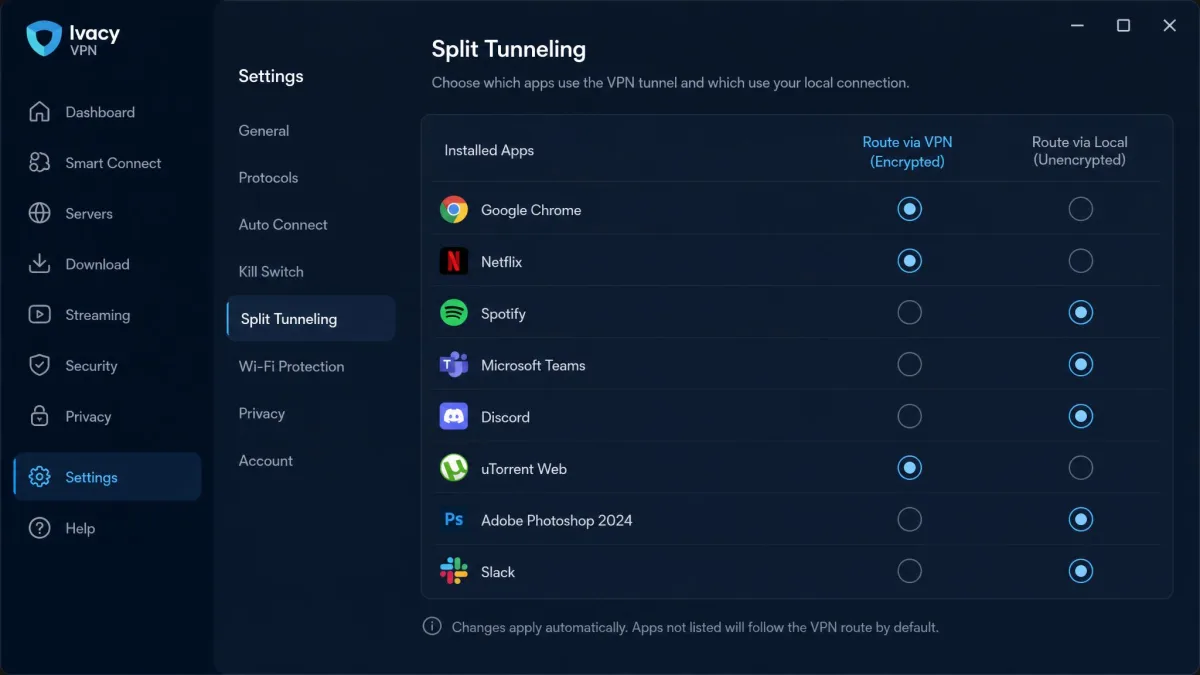
Split tunneling lets you route some apps through the VPN while others use your normal connection. It is genuinely useful when you want your bank app on the local network but your streaming app on a foreign server. Ivacy includes it, but only on Windows and Android, so Mac and iOS users miss out again.
The specialty servers are the other feature worth calling out. Ivacy labels servers for streaming and for torrenting, which takes the guesswork out of picking one. In our testing, the streaming-tagged servers connected to the right libraries far more consistently than random picks, so the labels are more than decoration.
The trade-off is depth of control. Ivacy's split tunneling covers whole apps rather than individual URLs, which is enough for most people but less granular than a few rivals offer. For everyday use, routing your streaming app one way and your local services another is exactly the kind of job it handles well.
Pricing and Plans
Pricing is Ivacy's strongest selling point, and also the area where the numbers are hardest to pin down. Its longest multi-year plans are advertised for around $1 to $1.20 a month, though the exact headline rate and the terms on offer shift with Ivacy's promotions. We have seen the per-month figure quoted at roughly $1.17 and $1.19 on a five-year deal, while some sources report that the five-year term has since been retired and the current floor sits closer to $2.14 a month on a two-year plan. The honest takeaway is that Ivacy is cheap by any measure, but you should read the checkout total for whatever term is live rather than trust a single advertised per-month number.
The standalone monthly plan is far less appealing, quoted somewhere in the $9.95 to $12.95 range depending on where you look. As with most VPNs, the monthly rate exists mainly to make the multi-year deal look better. If you are going to buy Ivacy at all, the long plan is the only one that makes financial sense. You can see the current tiers on Ivacy's pricing plans page.
One thing worth flagging about VPN pricing in general is the renewal trap. The eye-catching per-month figure applies to the upfront multi-year term, and the price at renewal is usually higher. That is not unique to Ivacy, but it means the true long-run cost is more than the headline number suggests. We factor that in when we call Ivacy cheap: it is genuinely inexpensive over the initial term, and still competitive at renewal, but the sticker price is the best-case figure rather than a permanent rate.

Before you commit to years of service, there is a cheaper way to try it, which we cover next.
Free vs Paid Add-ons (dedicated IP, port forwarding)
Ivacy does not offer a permanently free tier, but it does sell a low-cost trial. For $0.99 you get 7 days of full access, and there is also a 1-day free option to sample the service. That trial is the smart way to test whether Ivacy works for your streaming services and your connection before you lock into a long plan.
On top of the base subscription, Ivacy sells add-ons. A dedicated IP costs around $1.99 per month and gives you a static address that streaming and banking sites are less likely to block. Port forwarding is also available for users who need it for torrenting or hosting. These add-ons are optional, and most people will not need them, but they are priced reasonably when you do.
Money-Back Guarantee
Every paid plan is backed by a 30-day money-back guarantee, which is the industry standard. That window gives you enough time to run your own leak and speed tests and to confirm streaming access on your usual services. We always suggest treating the guarantee as your real trial period, since it covers a full month rather than a single week.
Between the $0.99 trial and the 30-day guarantee, you have two low-risk ways to test Ivacy before committing real money. We would use both, running the trial to check the basics and then leaning on the guarantee window to run the fuller speed, leak, and streaming tests on your own devices. A VPN that fits one person's setup can frustrate another, so testing on your hardware and your connection is always the smart move.
Security
Security is where Ivacy is mostly solid but not flawless. The encryption is strong and the protocol lineup is competitive on Windows, yet the platform gaps in the kill switch undercut the overall picture.
Encryption and Protocols
Ivacy uses 256-bit AES encryption, the same standard trusted across the industry, with ChaCha20 applied on WireGuard connections. That is exactly what we want to see and there is nothing to complain about on the encryption front.
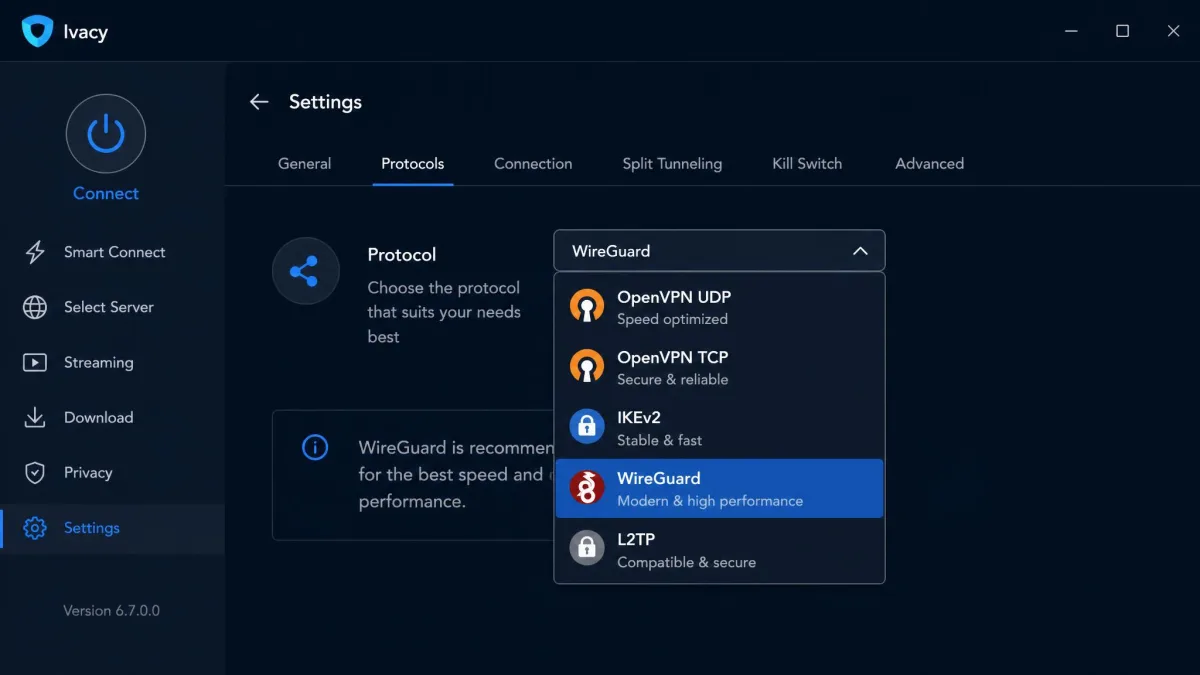
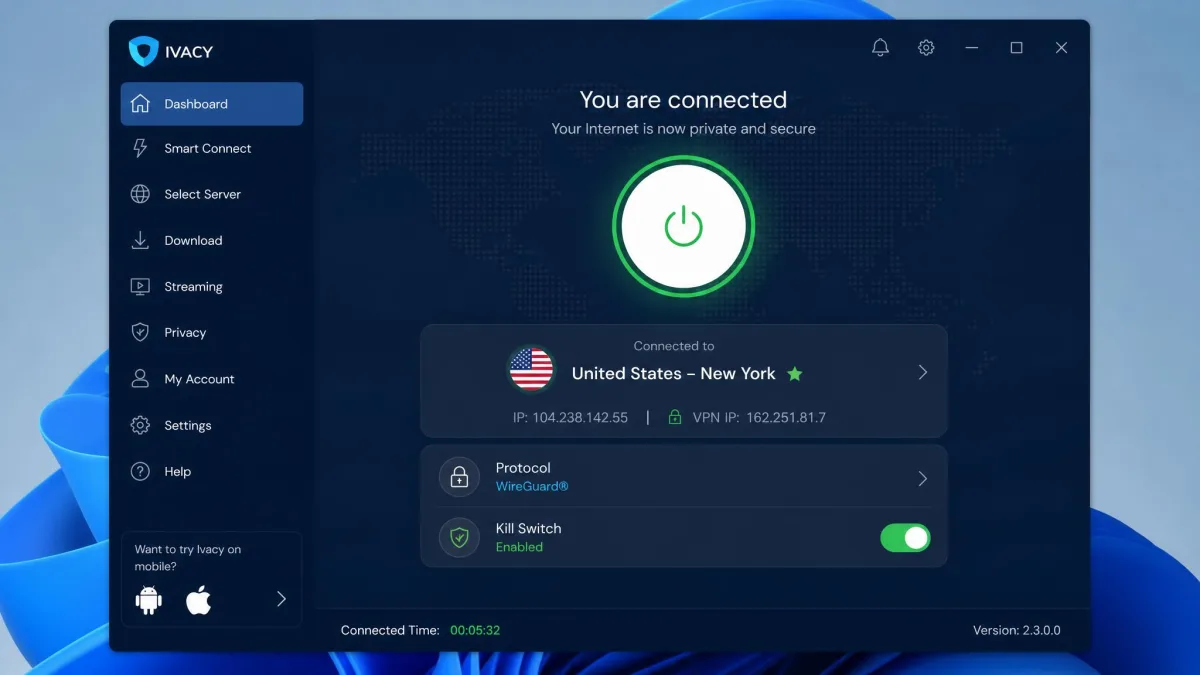
Protocol support is broad on Windows, covering OpenVPN over UDP and TCP, IKEv2, WireGuard, and L2TP/IPsec. The problem is the Mac and iOS apps, which are limited to older protocols and do not offer the same modern lineup. If you care about running WireGuard for its speed and efficiency, that matters, because you will not get the full choice on Apple platforms.
WireGuard is the protocol most people should default to for the best mix of speed and security. On Ivacy you get it on Windows and Android, but not on Mac or iOS, where the app falls back to older options.
For most people the protocol choice can stay on automatic, and Ivacy will pick a sensible default. Power users who want to force WireGuard for speed or OpenVPN for reliability can do so on Windows, and that flexibility is a genuine strength of the desktop client. The gap is entirely a platform story, not a fault of the underlying encryption, which is as strong as anyone's.
Kill Switch
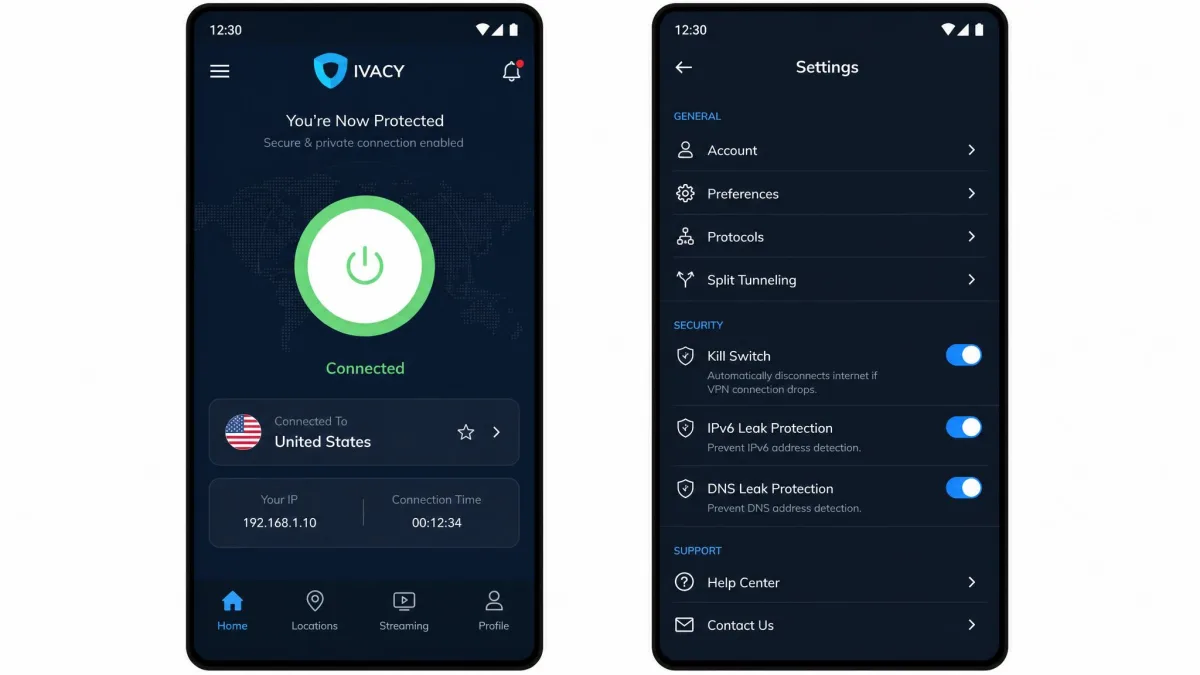
A kill switch cuts your internet if the VPN drops, preventing your real IP and traffic from leaking during the gap. It is one of the most important safety features a VPN can offer, and here Ivacy has a serious hole. There is no kill switch on Mac or iOS. It is available on Windows and Android, but Apple users are left exposed if the connection drops.
We should note one wrinkle. The state of the Mac kill switch is not fully settled, and it may vary by app version, but as things stand we treat it as absent on Mac and iOS. If Apple support matters to you, verify this yourself during the trial before you rely on it, because this is exactly the kind of feature that can change between builds.
There is a second catch even where the kill switch is supported. In testing it could glitch and leave the connection stuck offline after a reconnect, forcing a manual restart. It works, but it is not as smooth as we would like.
If you use a Mac or iPhone and privacy is the whole point of your VPN, the missing kill switch is a real risk. A dropped connection can briefly expose your real traffic before the app reconnects.
Privacy and Logging
Privacy is a mixed story. The written policy is strong and the jurisdiction is favorable, but the lack of an audit and the murky corporate picture keep us from full confidence.
Data-Logging Policy
Ivacy runs a no-logs policy and states that it does not log your browsing activity, connection logs, assigned VPN IPs, original IP addresses, or DNS queries. On paper that is a comprehensive no-logs commitment covering the data points that actually matter. You can read the specifics in the privacy policy linked from Ivacy's legal pages.
A written promise is only as good as the proof behind it, though, which is where the next point comes in.
We ran DNS and WebRTC leak tests on server after server using a public DNS leak test tool, and most connections came back clean, showing only the VPN's own DNS rather than our real ISP. That is the result you want, and it means the leak protection generally does its job. The exception, covered under jurisdiction and ownership, is the one connection where the underlying provider showed through.
Jurisdiction and Ownership
Ivacy is registered in Singapore under PGM Private Limited, which sits outside the 5, 9, and 14 Eyes intelligence-sharing alliances. That is a genuine plus, since Singapore has no mandatory data-retention law forcing VPNs to keep user records.
The ownership picture is less reassuring. The company is opaque about its corporate structure and executives, and its links to the PureVPN group raise questions we could not fully resolve. That does not prove anything is wrong, but transparency is part of trust in this category, and Ivacy offers less of it than the best providers.
Independent Audits
This is the biggest gap in Ivacy's privacy story. There is no published independent audit of its no-logs policy. The only third-party validation is an IoXT certification that applies to the Android app, which is not the same as a full privacy audit from a respected firm. Rivals like ExpressVPN have paid for repeated independent audits, and until Ivacy does the same, its no-logs claim rests on trust rather than proof.
Ivacy's no-logs promise reads well on paper, but without an independent audit it rests on trust rather than proof.
— From our hands-on review
When you compare VPNs on privacy, look for a recent independent audit by name, not just a "no-logs" label. An audited policy has been checked by outsiders, while an unaudited one is only a promise. Ivacy currently has the promise but not the check.
Speed and Performance
Speed is where Ivacy is most inconsistent. Close to home it is perfectly usable, but the further you reach, the worse it gets.
How We Tested
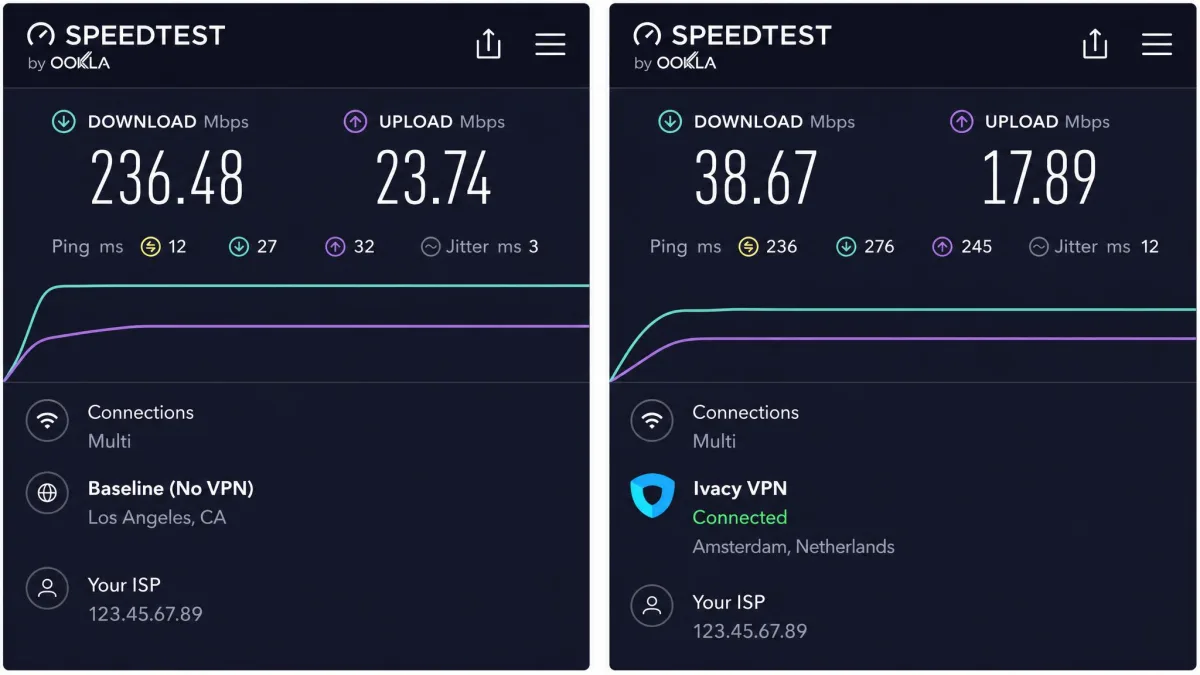
We measured Ivacy's speed the same way we test every VPN. First we recorded a baseline download and upload rate with no VPN active using Ookla Speedtest. Then we connected to a range of servers, from nearby cities to servers on the other side of the world, and re-ran the same test on each. We also ran DNS and WebRTC leak checks on every server to confirm the connection was not exposing our real details.
Speed Test Results
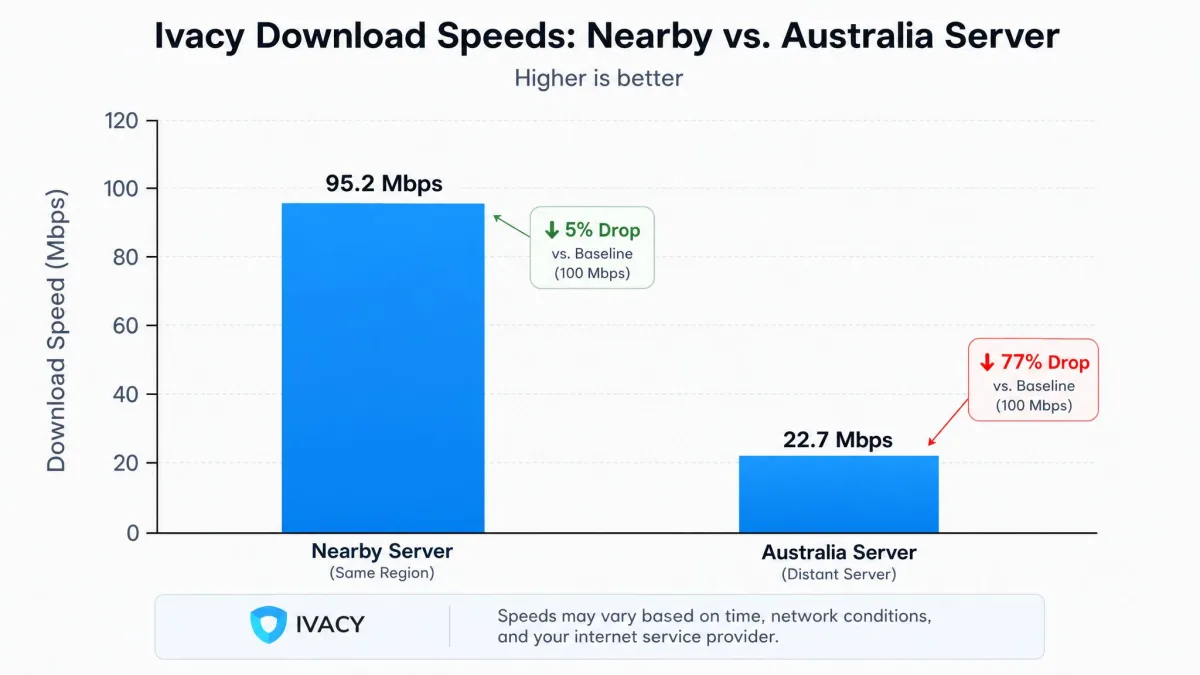
Nearby servers held up well, delivering speeds fast enough for 4K streaming, video calls, and large downloads without trouble. The picture changed on distant servers. We saw download-speed drops in the rough range of 58 to 72 percent on many connections, and even steeper losses of around 90 percent on far-off servers like Australia and Japan.
The honest summary is that Ivacy's speed is highly variable and depends heavily on distance and the specific server. A single percentage does not capture it, because one run to a nearby city looks great and the next run to another continent looks poor. If your main servers are close to you, you will be fine. If you routinely connect across the world, expect a significant hit.
One smaller annoyance is connection time. The client could be slow to establish a connection, sometimes taking 10 seconds or more before it settled, which adds friction when you connect and disconnect often.
For context, that variability is common among budget VPNs and not a dealbreaker for most uses. Browsing, email, and streaming from a nearby server all felt responsive. It is the long-haul connections and the occasional slow connect that keep Ivacy out of the speed conversation with the fastest premium services. If raw, consistent speed across the globe is your priority, this is the area where paying more buys you a noticeably better experience.
Streaming and Netflix Unblocking
Streaming is Ivacy's happiest story. On working connections, Netflix and other major libraries loaded reliably and played without buffering in our testing. This is the feature most people buy a cheap VPN for, and Ivacy delivers it well.
The dedicated streaming servers do most of the heavy lifting. Picking a streaming-labeled server rather than a random one gave us the most consistent access to geo-restricted libraries. We tested the services people ask about most and found the experience smooth, with quick load times and stable playback once connected.

The one thing to remember is that streaming access rides on your connection quality. Because speed drops on distant servers, the best streaming experience comes from a nearby streaming server for a close library, or a well-placed one for the region you want. Stick with the specialty servers and Ivacy is a strong streaming pick for the money.
Torrenting and P2P
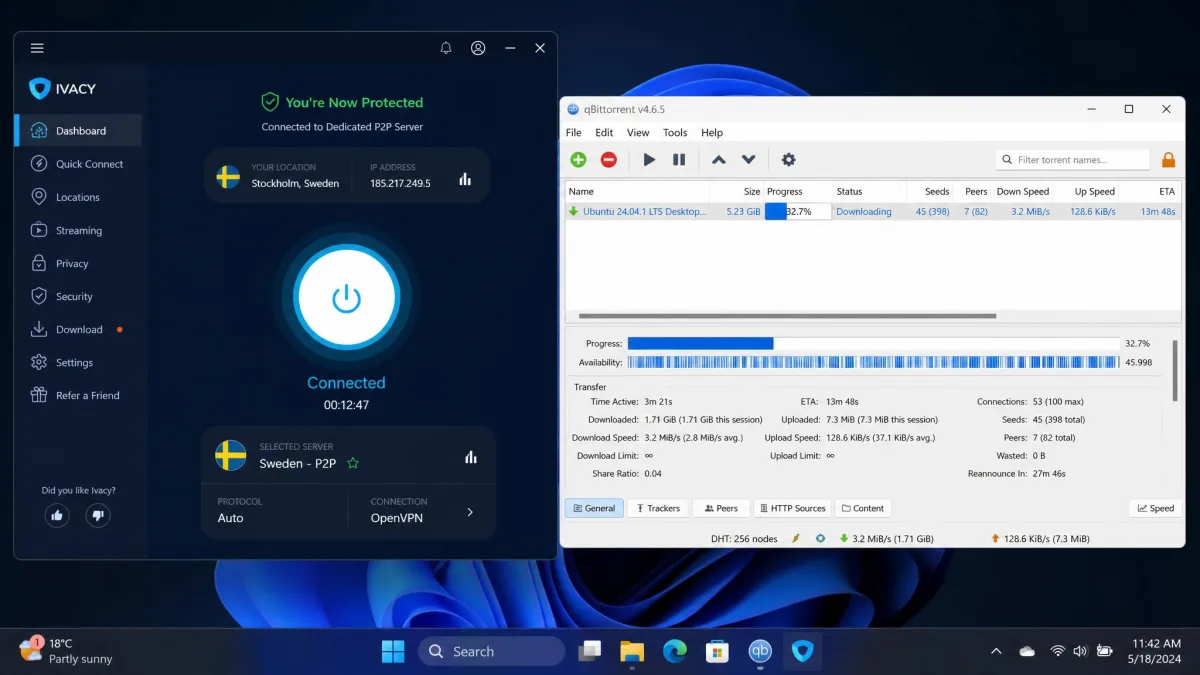
Ivacy supports P2P across its network and provides dedicated torrenting servers, which is more than some budget VPNs offer. Port forwarding is available as an add-on for users who want to improve peer connectivity, and the no-logs policy is reassuring for anyone who cares about privacy while torrenting.
The caveats mirror the rest of the review. On Mac and iOS the missing kill switch means a dropped connection could briefly expose your real IP mid-download, so we would only torrent on Windows or Android where the kill switch is present. Speed on distant torrenting servers can also sag, so pick a nearby dedicated P2P server for the best throughput.
Used sensibly, Ivacy is a capable torrenting VPN for the price. The combination of unlimited P2P, dedicated servers, optional port forwarding, and a no-logs policy covers the essentials most downloaders want. Just treat the platform rules as firm: stay on Windows or Android with the kill switch enabled, and keep to a nearby P2P server, and the experience is solid.
Apps and Ease of Use
Ivacy's apps are functional and easy to navigate, but the quality is uneven across platforms. The Windows and Android versions are the ones to trust.
Desktop Apps (Windows and Mac)
The Windows app is the fullest of the lot. It carries the complete protocol lineup, split tunneling, and the kill switch, and it is straightforward to use once you get past the occasionally slow connect times. We did hit one snag during setup, where Windows Defender repeatedly quarantined the Ivacy application during installation and testing. It was a false positive we could work around, but it is the kind of friction that unsettles less technical users.
The Mac app is the weaker sibling. It lacks the kill switch, is limited to older protocols, and drops split tunneling. It works for basic connect-and-stream use, but Mac owners are clearly getting a lesser version of the product, and that shapes our recommendation against Ivacy for Apple-first households.
Mobile Apps
The Android app is strong and mirrors the Windows feature set, including the kill switch and split tunneling, and it carries the IoXT certification. The iOS app shares the Mac app's limitations, with no kill switch and a reduced protocol choice. The pattern is consistent across Ivacy's lineup: Windows and Android are the platforms where you get the full, safer product.
If you split your life across an iPhone and a Windows PC, that unevenness is worth thinking through. Your desktop connection would be well protected while your phone would carry the weaker version. For an Android and Windows household, by contrast, you get Ivacy at its best on both devices. Matching the platform to the feature set is the single most important buying decision with this VPN.
Customer Support
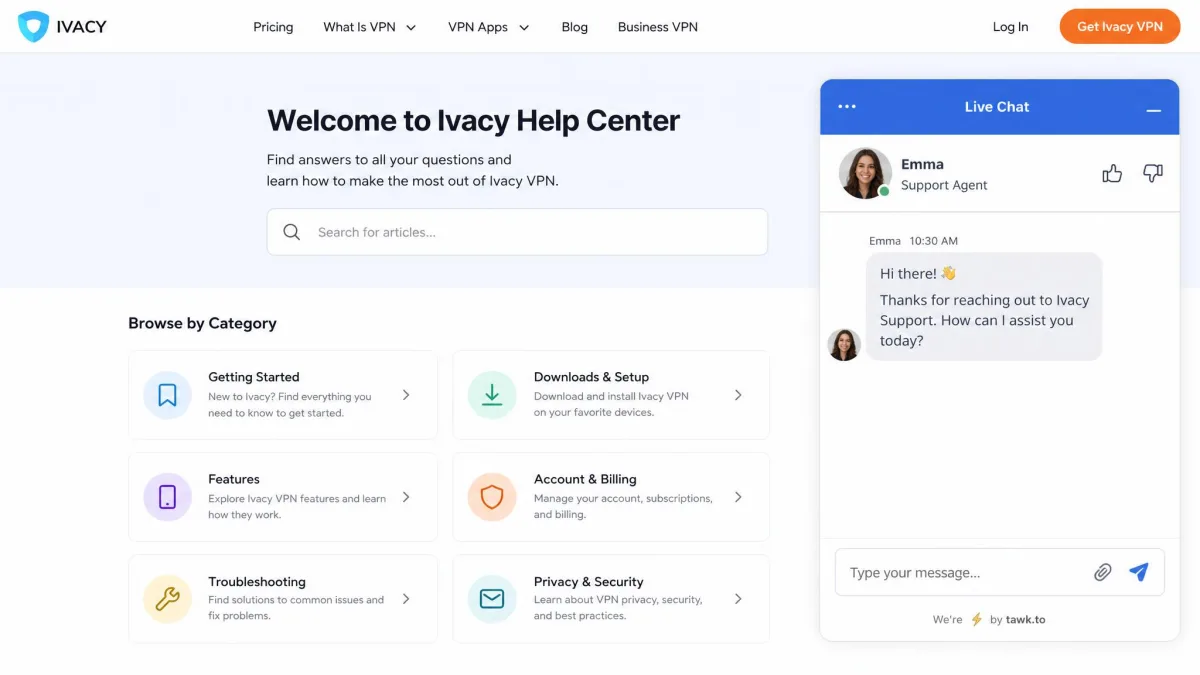
Support options are broad. Ivacy offers 24/7 live chat, a ticket system, video tutorials, and even TeamViewer remote assistance for setup help, which is more hands-on than most rivals provide. If you get stuck installing or configuring the VPN, there are plenty of ways to get help.
The quality of that help was less consistent. Live chat responded quickly, but the agents were not always helpful and sometimes gave conflicting answers to the same question. The breadth of support channels is genuinely useful, then, but the depth of the answers can be hit or miss. For simple setup problems you will be fine, and the remote-assistance option is a nice touch for beginners.
The video tutorials and knowledge base are worth checking before you open a chat, since many common setup questions are already answered there. When you do need a person, keep your question specific and be ready to confirm anything technical, because we found the first answer was not always the right one. None of this is unusual for a budget provider, but it is a step below the polished support of the premium names.
Ivacy vs Alternatives (comparison)
The clearest way to judge Ivacy is against a premium benchmark. We put it next to ExpressVPN, which sits at the opposite end of the price and polish spectrum.
| Product | Lowest price | Servers / countries | Kill switch on Mac | Logging | Tested speed |
|---|---|---|---|---|---|
|
from ~$1/mo (multi-year) | ~5,700 / ~65-70 | No | No-logs (unaudited) | Slower, variable |
 |
~$2.99/mo (2-year) | large network / 113 | Yes | No-logs (audited) | Faster |
The contrast is stark. Ivacy is cheaper and covers a comparable number of simultaneous devices at 10 each, and both unblock Netflix and both carry a 30-day money-back guarantee. But ExpressVPN offers a kill switch on every platform including Mac, an independently audited no-logs policy, wider country coverage at 113, and faster, steadier speeds in testing.
The decision comes down to priorities. If price is the deciding factor and you are on Windows or Android, Ivacy makes a strong case. If you want proven privacy, full Mac support, and consistent speed, ExpressVPN justifies its higher cost. You pay more for the polish, and for many users that polish is worth it.
The Verdict: Should You Buy Ivacy VPN?
Ivacy is a good budget VPN with a few real flaws that keep it out of the top tier. For the money, it delivers reliable streaming, strong encryption, a big server network, and long-term pricing that undercuts nearly everyone. Those are not small things, and for casual users on Windows or Android they add up to genuine value.
The flaws are just as real. The missing kill switch on Mac and iOS is a safety gap, the lack of an independent audit weakens the no-logs promise, and speeds fall off badly over long distances. The opaque ownership and the occasional support and app glitches round out a picture of a service that is good rather than great.
Our recommendation is conditional. Buy Ivacy if you want cheap, capable streaming and privacy on Windows or Android and you can test it first through the trial or the money-back window. Look at Ivacy alternatives instead if you rely on a Mac, need an audited privacy record, or want fast long-distance performance. At its price, though, Ivacy earns a place on the shortlist for budget-minded users who know its limits going in.