PureVPN is a long-running, budget-priced VPN that sells itself on a huge server network, a KPMG-audited no-logs policy, and headline prices that undercut most of the big names on the market. We put it through our usual speed, leak, and streaming benchmarks. Our verdict is that it is a genuinely cheap VPN with real strengths, held back by uneven reliability and a couple of results we did not like at all.
So is it a good VPN, or just a cheap one? The short answer is that PureVPN is good enough for everyday browsing and casual streaming if you buy on a long plan and go in with clear eyes. It is not the VPN we would hand someone who needs airtight privacy or consistent speed for gaming and heavy torrenting. This review walks through exactly what we found, where PureVPN earns its low price, and where the corners it cuts start to show.
We ran PureVPN across Windows and Android on our test connections over several days. We checked connection stability, DNS leaks, streaming access on Netflix, and how far speeds dropped as we moved from nearby to distant servers. Where our own results were inconclusive or a specific figure could not be pinned down, we say so plainly rather than dress it up. That is the same standard we hold every VPN to, and PureVPN's mixed scorecard is the honest result of it.
Verdict / Quick Summary
We tested PureVPN ourselves on Windows and Android over several days, buying our own access rather than taking a vendor-supplied account. Our scoring weighs privacy, speed, streaming, apps, and support, and we run leak and stability checks more than once before trusting a result.
PureVPN at a Glance
Here is the quick spec picture before we get into the detail. PureVPN covers the features most people shortlist a VPN for, and a few extras that usually cost more elsewhere.
- Lowest promoted price: around $1.99/mo on the longest plan, though the exact figure shifts with the current promo and renews higher.
- Monthly plan: $12.95/mo on the Standard tier.
- Servers: 6,000+ by PureVPN's own count, with third-party reviews citing 6,500+.
- Countries: 65+ on the official site, up to 78+ in some reviews.
- Simultaneous devices: up to 10 connections.
- Jurisdiction: a British Virgin Islands entity, operated out of Karachi, Pakistan.
- Logging: no-logs policy independently audited by KPMG.
- Money-back guarantee: 31 days, plus a $0.99 7-day trial.
- Protocols: WireGuard, OpenVPN, IKEv2, and SSTP.
The shape of that spec sheet tells you who PureVPN is chasing. The pricing, device count, and audited policy are pitched squarely at value-focused buyers who still want to see the privacy boxes ticked. It is a lot of VPN on paper for the money, and the rest of this review is about how much of it holds up in practice.
If you are new to VPNs and want the groundwork first, our explainer on what a VPN is and how it works covers the concepts we lean on throughout this review.
Pros and Cons
No VPN is all upside, and PureVPN's balance sheet is more mixed than most. The spec box above already lists the raw numbers, so the lists here are our judgments on what those numbers are worth in daily use.
Pros
- Value that genuinely undercuts premium rivals when you commit to a long plan
- Enough device coverage to protect a whole household on one subscription
- An audited privacy stance that carries more weight than an unverified promise
- Protocol choice broad enough to balance speed and compatibility on any network
- A refund window long enough to test the service properly before you are locked in
- Live chat that actually answers real setup questions, not scripted deflections
Cons
- Connections dropped or timed out for us during testing
- We reproduced a DNS leak even with leak protection enabled
- Speeds fall off sharply on distant servers
- A 2017 incident undercuts the no-logs story
- Cheap intro price renews at a much higher rate
- Billing is the weak spot: unexpected renewals, hard cancellation, and slow refunds
The tidy summary is that PureVPN's pros are about value and coverage, while its cons are about trust and consistency. Neither list cancels the other out. How you weigh them depends entirely on what you need a VPN to do.
Pricing and Plans
Pricing is where PureVPN makes its strongest case. The longest plan drops the effective monthly price to around $1.99/mo, which is cheaper than almost every big-name competitor we track. That headline figure depends on the plan length and whatever promotion is running when you buy, so treat it as a ballpark rather than a fixed number.
Buy month to month and the story changes completely. The one-month Standard plan runs $12.95/mo, which is squarely in line with the flat monthly rate the premium services charge. The lesson here is the same as with most VPNs: the cheap price only exists if you commit to a multi-year term up front. If you are not ready to commit for years, the value proposition largely evaporates, and you are better off shopping on features than on price.
There is also a low-cost paid trial. PureVPN's own 7-day trial offer lets you test the service for $0.99 before committing, which is a fair way to try it without paying for a full year. On top of that, every plan is backed by a 31-day money-back guarantee, so you can buy risk-free and claim a refund inside that window if it does not work out. Between the two, there is little excuse not to test PureVPN thoroughly before your money is truly locked in.
Watch the renewal. The low intro rate does not last: PureVPN's cheap first term renews at a much higher annual price, with figures around $69.95/year reported. The exact renewal amount varies by the plan you bought, so check what your account will actually be charged before the term ends.
The cheap trial and low first-year price are genuinely appealing, but they are also where buyers get caught out. The low entry cost leading into a surprise higher-cost renewal is one of the most common complaints we found, so set a calendar reminder before your term rolls over.
It is worth being clear about how this compares to the field. PureVPN's long-plan price genuinely undercuts NordVPN, ExpressVPN, and Surfshark at the low end, and it roughly matches CyberGhost, the other aggressive discounter. Where the math turns against you is the second term. A VPN that costs a couple of dollars a month in year one can jump to a much higher annual rate on renewal. Over three years that can leave you paying more than a rival that never went bargain-basement in the first place. If you plan to keep a VPN long term, price the renewal, not just the intro.
Payment options are broad, including cards, PayPal, and cryptocurrency, and crypto is the option to pick if you want to minimize the paper trail on the purchase itself. There is no permanent free tier, which is the right call in our view. Free VPNs almost always monetize your data or throttle you into upgrading, so a cheap paid plan with a real refund window is a better deal than most "free" services on the market.
Privacy, Logging and Audits
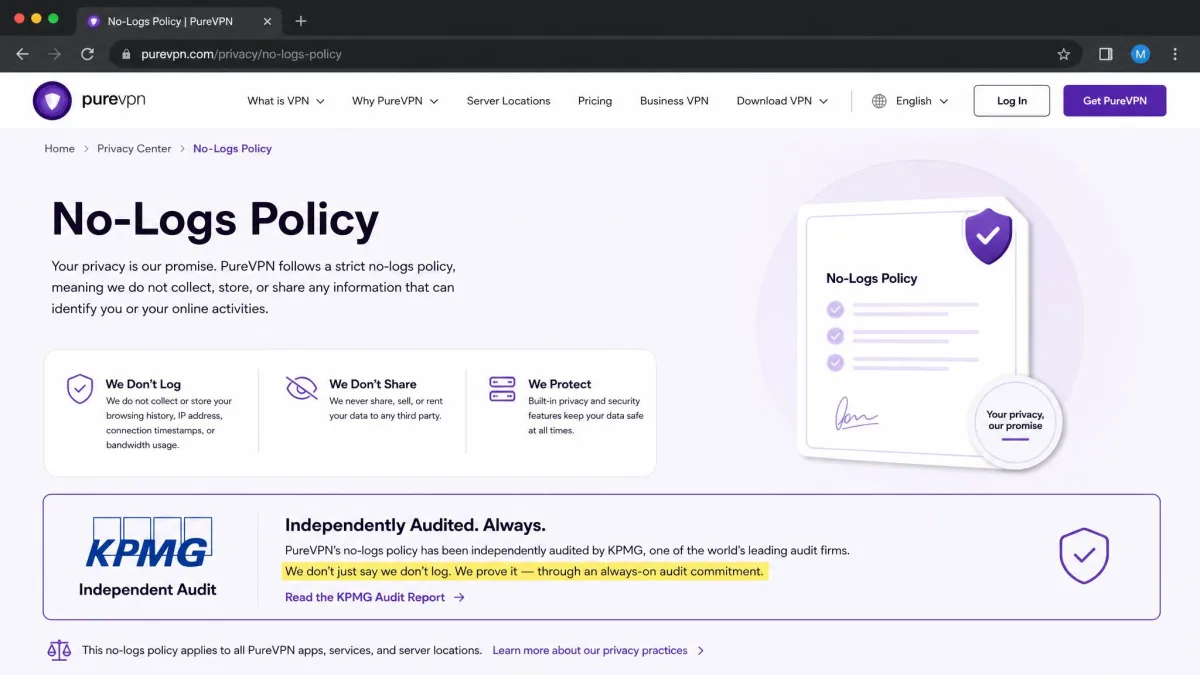
Privacy is where PureVPN's history makes the picture complicated. On paper it looks reassuring. The company runs a no-logs policy that has been independently audited by KPMG across multiple audits, with an "always-on" arrangement that lets the auditor run surprise checks. That is a stronger commitment than a one-off audit, and it is the single biggest reason to take PureVPN's privacy claims seriously today.
The complication is what happened before those audits. Back in 2017, PureVPN provided user-connecting logs to the FBI in a criminal case, despite marketing itself as a no-logs provider at the time. That is not ancient irrelevant history. It is the exact scenario a no-logs policy is supposed to prevent, and it happened. Any honest review has to put it on the table, because it is the difference between trusting a marketing promise and trusting a promise that has already been broken once.
Good to know: the 2017 case predates PureVPN's current audited policy. The KPMG audits are the company's answer to that episode, and an always-on audit is meaningfully harder to game than a scheduled one. Whether that fully rebuilds your trust is a personal call.
Our own take is that the audited policy is a real improvement, but the 2017 incident means we would not recommend PureVPN to anyone whose threat model involves resisting a legal request for their activity. For ordinary privacy, keeping your browsing away from your ISP and public Wi-Fi snoops, the audited no-logs stance is adequate. For journalists, activists, or anyone whose safety depends on a VPN's word, we would spend more elsewhere and treat the extra cost as insurance.
Jurisdiction adds one more wrinkle. PureVPN is now a British Virgin Islands entity, though it is operated out of Karachi, Pakistan, and older reviews still cite a Hong Kong base. The British Virgin Islands has no mandatory data-retention laws and sits outside the major intelligence-sharing alliances, which is favorable on paper. The day-to-day operation sitting elsewhere is worth knowing, though, because where a company is registered and where its staff actually handle data are not always the same thing.
Security Features and Protocols
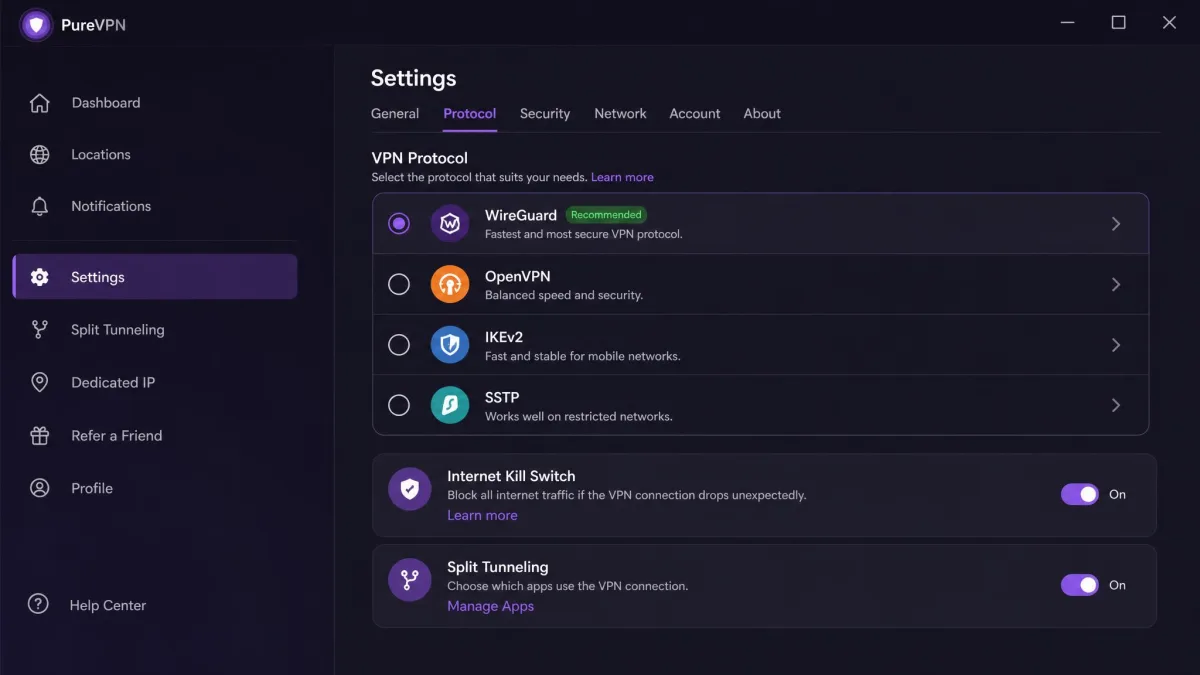
On raw security features, PureVPN is well equipped and does not feel like a budget product. It supports WireGuard, OpenVPN, IKEv2, and SSTP, which covers the modern fast option (WireGuard) and the battle-tested, widely trusted choice (OpenVPN) in one package. Most people should leave it on WireGuard for the best balance of speed and security, and only reach for OpenVPN when a network blocks the newer protocol.
Beyond protocols, the feature list is deep. You get split tunneling on Windows and Android, obfuscation or "stealth" mode for restrictive networks, and optional add-ons for a dedicated IP and port forwarding. There is also a P2P-optimized server set, plus a wider suite that bundles the PureKeep password manager, PurePrivacy, and PureEncrypt. A kill switch is present too, which is the feature that is supposed to cut your traffic if the VPN drops, and it matters a great deal given the drops we describe later.
That is a lot of capability for the price, and it is one of PureVPN's genuine selling points. A word of caution, though: a long feature sheet is not the same as a set of features that all work reliably. We would test the ones that matter to you during the money-back window rather than trusting the marketing sheet, because the gap between "listed" and "dependable" is exactly where a budget VPN tends to fall short.
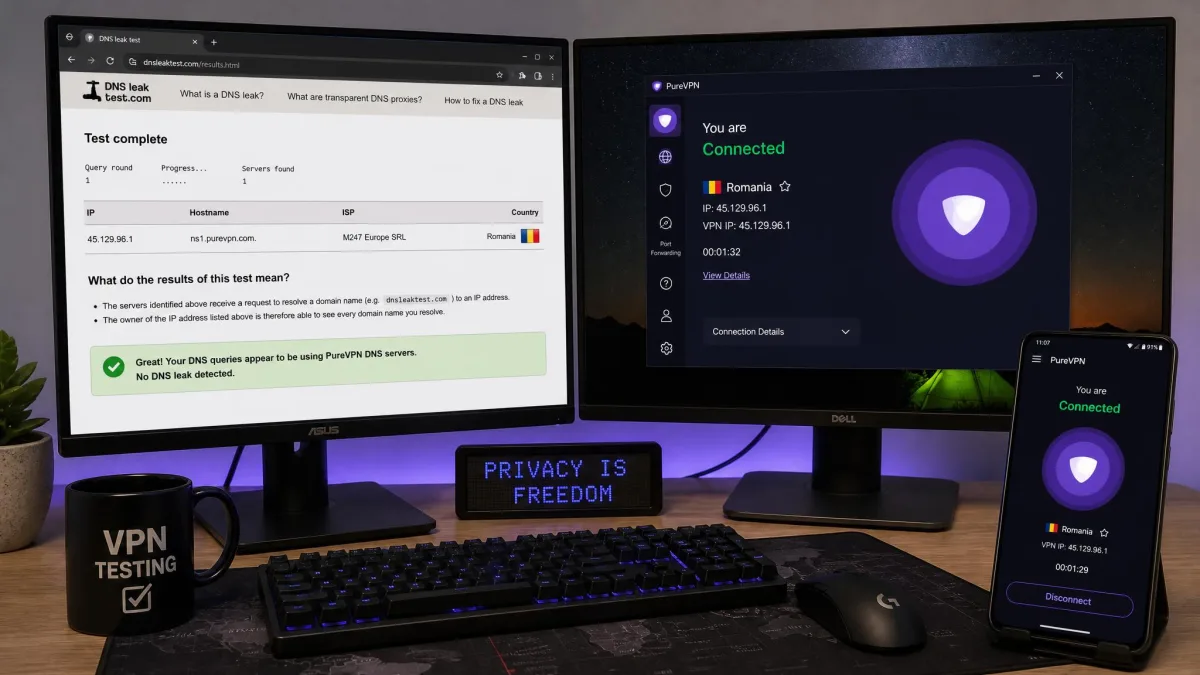
The one security result that concerned us was a leak. On otherwise stable connections, we ran a DNS leak test and saw DNS requests escaping outside the tunnel even with leak protection switched on. A VPN that leaks DNS is quietly exposing which sites you visit to your ISP or network operator, which undercuts the whole point of running a VPN in the first place. This is not a minor nitpick, and it weighed heavily on our score.
Watch out: if you use PureVPN for anything privacy-sensitive, run your own DNS leak test after connecting, and repeat it after reconnecting to a new server. We could reproduce a leak on a stable connection, so do not assume the toggle alone has you covered.
Speed and Performance
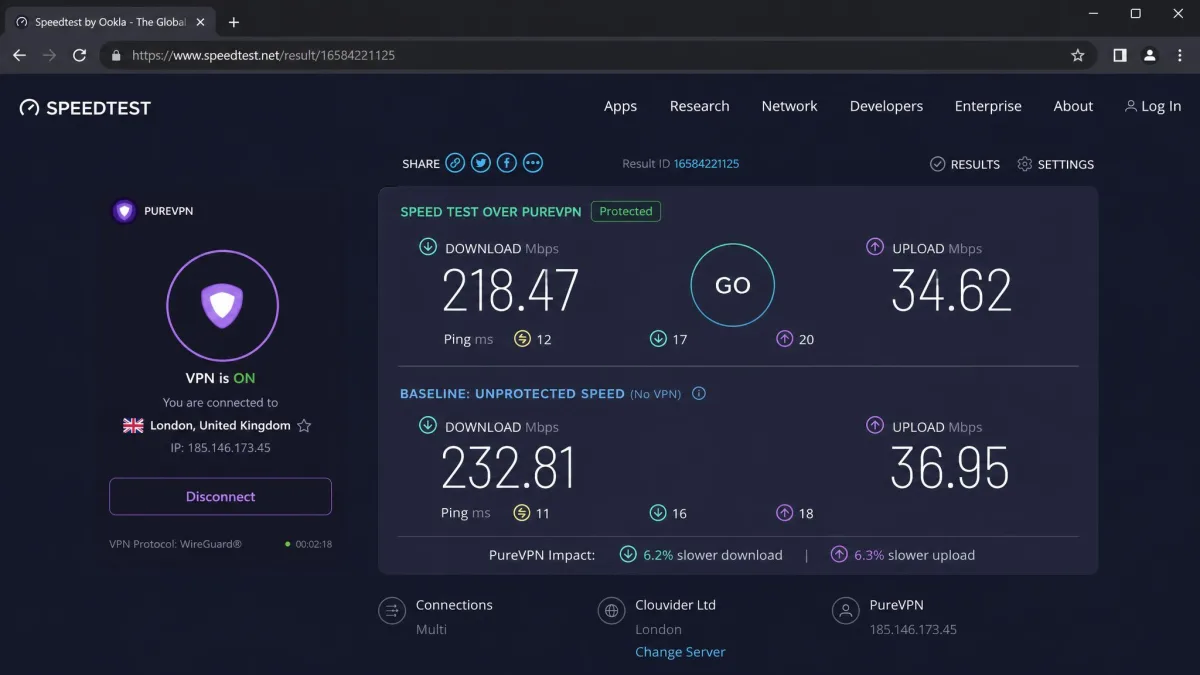
Speed is where PureVPN's results were the most uneven, and where the honest answer is "it depends." Speeds vary widely by location in our testing, with nearby servers holding up well and distant ones falling off noticeably. For local browsing and streaming, that is fine. For long-haul connections across continents, expect a real hit that you will feel on large downloads and video.
The pattern was consistent enough to describe plainly. On nearby servers we saw only a small dent in throughput, in the region of ten percent off our unprotected baseline. That is the kind of drop most people will never notice during normal use. Push out to a distant server on another continent and the loss widened considerably, closer to forty percent. At that point large downloads slow visibly and a high-definition stream can take longer to settle. That spread is the single most important thing to understand about PureVPN's speed: your experience is decided far more by which server you pick than by any average figure. The habit worth building is to connect to the closest server that still meets your needs.
We are deliberately not quoting a single headline retention percentage, because the figures diverge sharply and no one number holds up across sources. Measured WireGuard retention ranges widely, from roughly 65 percent in lab tests down to around 12 percent off a high-bandwidth line. The truth sits somewhere in that band, and it depends heavily on your platform, server distance, and connection. Platform seems to matter as much as distance here, with some tests showing a smaller loss on macOS than on Windows. A result on one operating system will not necessarily match what you see on another. Any single figure says more about the test setup than about what you will actually get. What we can say from our own use is simpler. PureVPN felt fast enough for HD video and general use on nearby servers, and sluggish enough on far-away ones that we would not pick it for latency-sensitive tasks like competitive gaming or large-file transfers.
The bigger performance problem was stability, not raw throughput. Connections dropped or timed out for us during testing, sometimes failing to reach the server we had selected. More worryingly, on at least one occasion the app showed a connected session while quietly dropping all traffic. That effectively means you are exposed while believing you are protected. That behavior is the reason the kill switch matters so much on this service, and it is why we tested reconnection more than once. A dropped tunnel now and then is an inconvenience on most VPNs. A tunnel that reports itself as up while passing nothing is a different class of problem, because nothing on screen prompts you to act. We got in the habit of glancing at our public IP after reconnecting rather than trusting the connection status alone, and we would suggest anyone relying on PureVPN for privacy do the same.
A VPN that reports "connected" while passing no traffic is worse than one that clearly fails, because you keep browsing thinking you are covered.
If consistent speed is your top priority, this is the area where the premium services justify their higher price. When it comes to steady, predictable performance, PureVPN was not the most reliable service we have tested, and the variability is worth factoring in before you buy. The counterpoint is that most people are not maxing out a gigabit line. For typical home broadband and everyday tasks the nearby-server speeds were perfectly usable. If your connection is a standard cable or fibre plan and your day is mostly browsing, email, and the occasional stream, the speed ceiling here is unlikely to be the thing that frustrates you. The stability quirks are the more realistic annoyance.
Servers and Server Locations
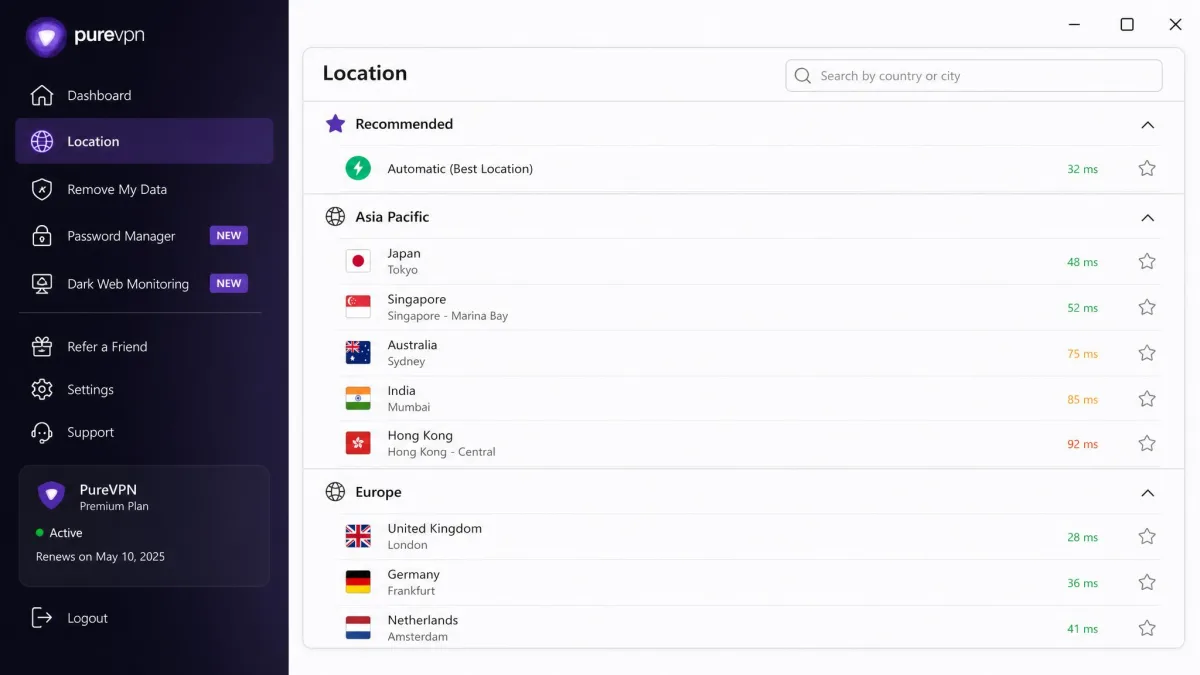
PureVPN's network is large, which is one of its headline strengths, but the exact size depends on who you ask. PureVPN's own site states 6,000+ servers, while third-party reviews cite 6,500+, and country counts range from 65+ officially to 78+ in some reviews. We are not going to pretend to a precise figure the sources disagree on. The safe read is "several thousand servers across roughly 65 to 78 countries."
For most users, the practical takeaway matters more than the raw count. PureVPN has servers in the places people actually want, including plenty across North America, Europe, and Asia, plus P2P-optimized locations for torrenting. That breadth means you can usually find a nearby server, which, as covered above, is exactly where PureVPN performs best. A dense network also helps with streaming, since if one server is blocked or congested there are usually several alternatives a click away. In practice, that redundancy is more useful day to day than the headline server total, because the number that matters is not how many servers exist worldwide but how many good ones sit close to you.
The server list is organized by country and searchable, so finding a specific location is quick even with thousands of entries to sort through. A large network like this does carry a mild trade-off worth naming. Not every server is equally maintained, so an individual location can be busier or slower than its neighbours, and it is normal to try two or three before settling on one that performs. That is not unique to PureVPN, but the speed variability we saw makes the habit of shopping around between nearby servers more worthwhile here than on a service with tighter, more uniform performance.
There is a dedicated IP available as a paid add-on, which is worth considering if you need a stable address for remote access or to avoid repeated login checks on banking sites. It is an extra cost on top of the subscription, so factor that in. Port forwarding is similarly an add-on rather than a bundled feature, which is a mild annoyance for power users who expect it included, but a fair trade at this price point for everyone else. The P2P-optimized servers are the part of the network we would steer torrenters toward, since they are set up for file sharing rather than fighting it, though the same connection-stability caveats from the performance section apply there as everywhere else on the service.
Streaming and Torrenting
Streaming is a make-or-break feature for a lot of VPN buyers, so we tested it directly. Netflix was accessible through PureVPN in our testing, but streaming quality was inconsistent: some servers played cleanly while others buffered enough to be annoying. The pattern matched the speed results, with nearby, lightly loaded servers giving the best experience and busy ones struggling to sustain a high-definition stream.
We are not publishing a definitive list of which streaming libraries unblock reliably, because results vary by server and our own attempts did not always agree from one session to the next. Most 2026 testing has PureVPN reaching Netflix in the US, UK, Canada, Japan, and Germany, along with Prime Video, Disney+, BBC iPlayer, Hulu, and Max. Which of those actually work depends on the region and the specific server you connect to. In practice the US and UK servers were the most dependable for unblocking, while a smaller regional library often took two or three server attempts before playback started. It is not universal, either. Unblocking was inconsistent enough in our testing that we treat Netflix access as likely rather than guaranteed. If a particular service is your reason for buying, test it during the money-back window before you commit, and note which specific server worked so you can return to it.
Good to know: streaming access with any VPN is a moving target. Services actively block VPN IP ranges, so a server that works today may not next month. PureVPN's large network helps here, since there are usually other servers to try when one stops unblocking.
For torrenting, PureVPN offers P2P-optimized servers and does not block file sharing, which is the baseline you want. The caveats are the ones already noted: the speed variability and the connection drops we saw make it a less confident torrenting pick than the fastest services. If you torrent large files regularly, the dropped-traffic behavior we ran into is a real concern, because a silent drop can expose your real IP mid-download if the kill switch does not catch it instantly.
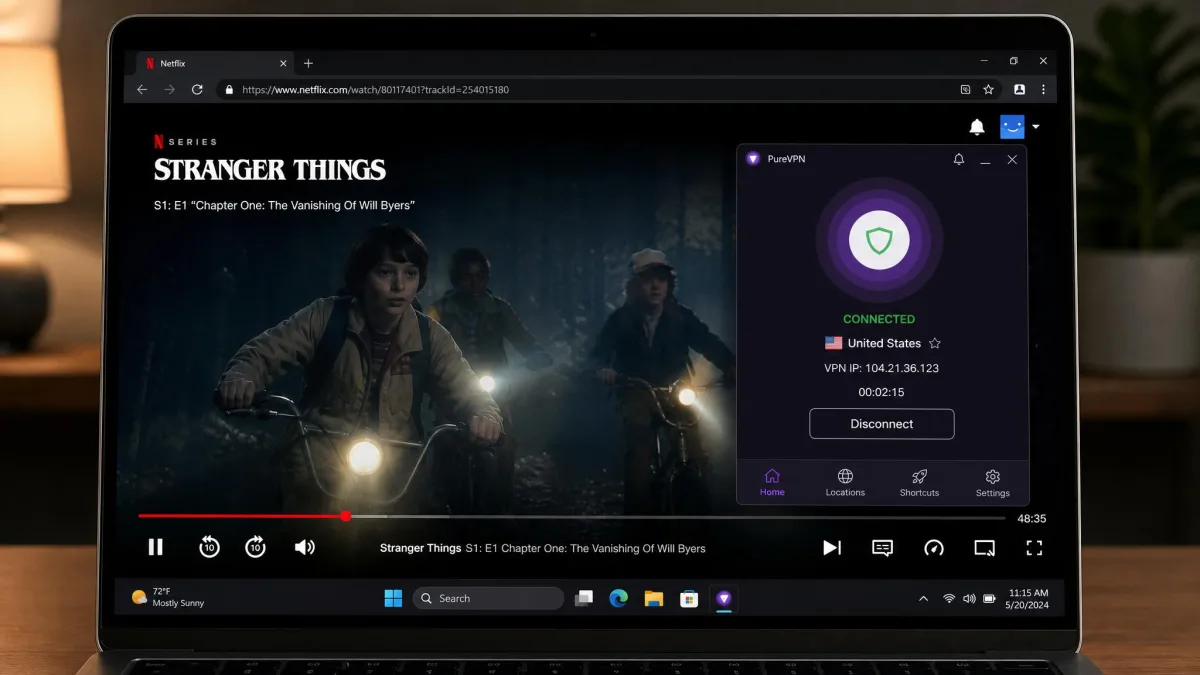
Our overall read on streaming and torrenting is that PureVPN is capable rather than class-leading. It will handle a casual movie night and light file sharing, but the inconsistency means we would not build a heavy streaming or seeding setup around it without testing the exact servers first.
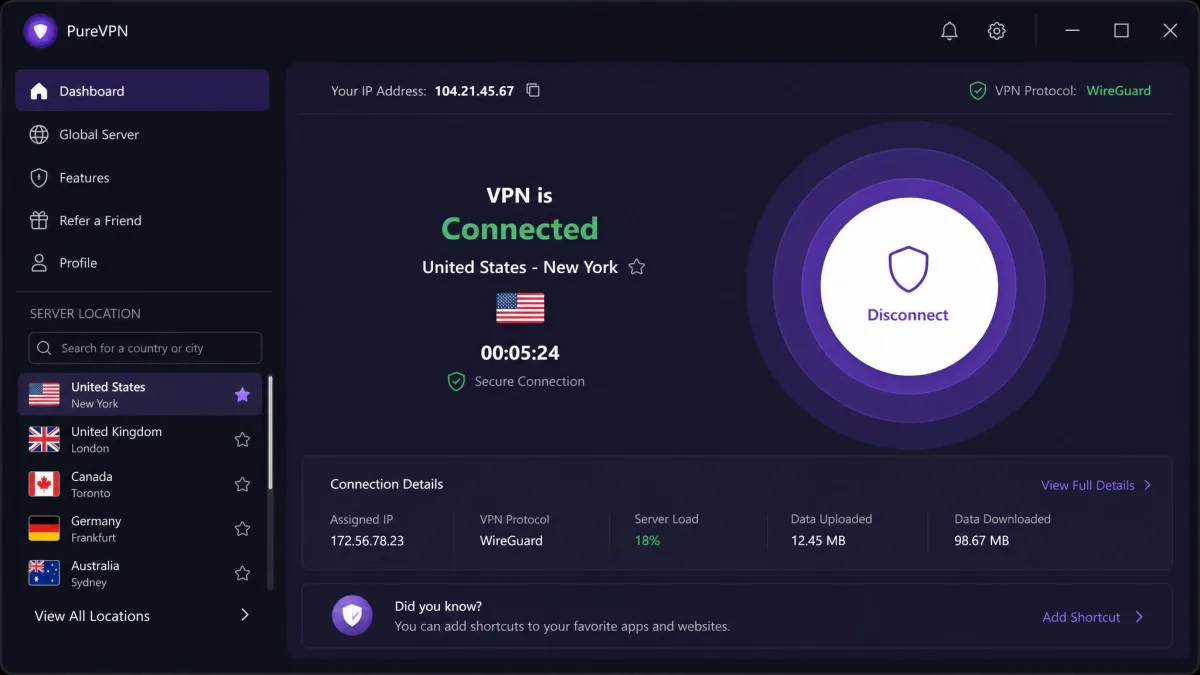
Apps and Ease of Use
PureVPN's apps have been redesigned, and the new look is a step forward. The desktop and mobile clients are clean and easy to navigate, with a big connect button, a searchable server list, and the main settings within easy reach. For a newcomer, getting connected takes seconds, and the layout does not bury the useful controls behind menus, which is more than we can say for some rivals. The recent-servers shortcut and the search box are the two touches we leaned on most, since once you know which nearby server performs well you want to get back to it without scrolling the whole country list.
That said, the polish is not skin deep everywhere. The redesigned apps look promising but could still feel unstable in our use, with occasional crashes and bugs. It never got in the way of basic connecting, but it did undercut our confidence, and it lines up with the connection-drop issues we saw on the performance side. A pretty interface sitting on shaky foundations is a fair summary of the current app experience. The crashes we hit were occasional rather than constant, and a relaunch cleared them. On a tool whose entire job is to run quietly in the background, though, needing to check on it is exactly the friction you are paying to avoid.
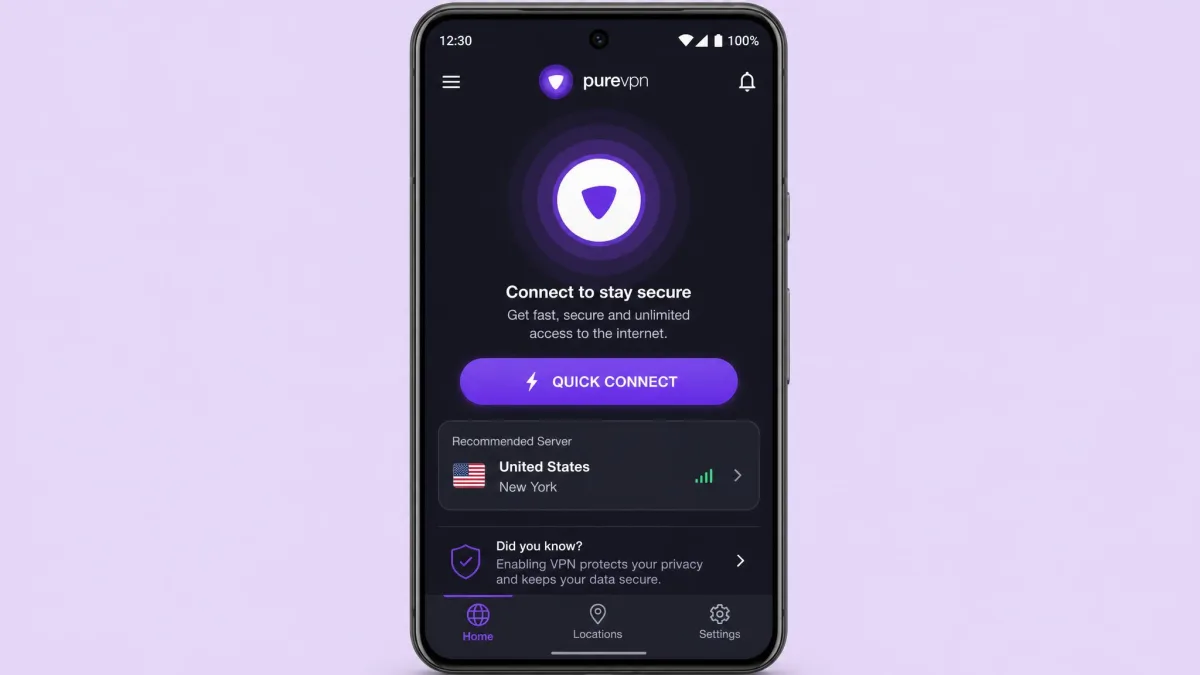
Across Windows and Android, the experience was consistent, and the availability of split tunneling on both platforms is a nice touch for keeping some apps off the VPN. Split tunneling is genuinely handy in daily use. It lets you route a streaming app or a browser through the VPN while a banking app or a local-network device stays on your normal connection, which sidesteps a lot of the "why won't this site load" headaches VPN newcomers run into. PureVPN also covers the other platforms and devices people expect, including macOS, iOS, browser extensions, and router support, and our step-by-step guide covers the router path if that is your goal. Router support is the route to protecting devices that cannot run a VPN app of their own, such as a smart TV or a console, and it also stretches the value of the connection limit since the router counts as a single device. Overall the apps are approachable and modern; they just need the underlying stability to match the fresh interface.
Customer Support
Support is a bright spot, at least on the front end. PureVPN offers 24/7 live chat, and in our experience it was available around the clock and often responded quickly to technical questions. For a budget VPN, having real-time help that actually answers is a meaningful advantage. When we had a setup question, we did not sit in a queue for long, and the agent stayed on the practical problem rather than reading from a script, which is not something we can say of every VPN's first-line chat.
The picture is not uniformly rosy, though. Billing is the weak spot: unexpected renewals, cancellation that is harder than it should be, and slow refund handling. Both things are true at once, so the takeaway is to lean on live chat for setup and troubleshooting, and to be proactive and documented about any cancellation or refund request. Screenshot your cancellation confirmation and note the date, because that record is your best friend if a refund stalls. The complaints cluster on the money side rather than the technical side, so the support you reach for a connection problem tends to land better than the support you reach to get out of a charge.
Good to know: PureVPN's overall standing with users is solid. On Trustpilot, its score sits at 4.4 out of 5 across roughly 17,925 reviews, with 85% of ratings at five stars. Aggregate scores hide the billing complaints, but they also show most customers are satisfied.
Beyond live chat, there is a searchable knowledge base and email or ticket support for issues that need a paper trail. The knowledge base is the faster route for common setup questions, since most of the answers a new user needs are already written up with screenshots, while tickets suit account and billing matters where you want everything in writing. Our advice is to match the channel to the problem. Use live chat when you want a quick answer to a connection or configuration question, and open a ticket, keeping copies of every message, whenever money or your account status is involved. That way you get the speed of chat where it helps and the documented trail where it protects you.
PureVPN vs Alternatives
To put PureVPN in context, here is how it stacks up against the four services people most often cross-shop it with. The pattern is clear: PureVPN competes hard on price and device count, while rivals pull ahead on network size, jurisdiction reputation, and, in our experience, reliability.
| Product | Buy | Lowest price | Servers | Devices | Jurisdiction | No-logs audit |
|---|---|---|---|---|---|---|
 |
Check price → | ~$1.99/mo | 6,000-6,500+ | 10 | British Virgin Islands | KPMG (always-on) |
 |
Read review | ~$3.49/mo | 9,300+ | 10 | Panama | Audited |
 |
Read review | ~$2.79/mo | 113 countries | 8 | British Virgin Islands | Audited |
 |
Read review | ~$2.19/mo | 11,690+ | 7 | Romania | Audited |
 |
Read review | ~$2.49/mo | ~4,500 | Unlimited | Netherlands | Audited |
On price, PureVPN wins outright at the low end, and its 10 simultaneous connections match NordVPN and beat ExpressVPN and CyberGhost. Where it slips is the intangible reliability that the premium services deliver more consistently, plus the cleaner privacy records its rivals carry. If price is the deciding factor, PureVPN is compelling. If you want the most dependable all-round performer, the alternatives make a strong case, and Surfshark's unlimited connections make it the obvious pick for a device-heavy household.
For the full detail on each, see our NordVPN review, how ExpressVPN compares, our CyberGhost VPN review, and our Surfshark VPN review. If privacy is your first concern, our Proton VPN review covers a service with a cleaner track record. And if your budget is the priority, our roundup of the best cheap VPNs we tested puts PureVPN next to its closest low-cost rivals.
Who Is PureVPN Best For?
This section is about fit, not another recommendation. PureVPN suits one buyer well and frustrates another, so the useful question is which one you are.
It is a good fit if you want a very cheap VPN for everyday browsing, casual streaming, and covering several devices in a household, and you are comfortable buying on a long plan to lock in the low rate. A student capping a monthly software budget, a family sharing one subscription across phones and laptops, or someone who mainly wants to shield public Wi-Fi sessions all sit squarely in that group.
It is a poor fit if you need consistently high speeds for gaming or heavy torrenting, or if your privacy needs are serious enough that the 2017 logging incident and the DNS leak we saw are dealbreakers. Remote workers on latency-sensitive tools and anyone whose safety depends on the VPN holding a secret both fall on the wrong side of that line. If you are shopping this tier, PureVPN's sister service is worth a look too; here is Ivacy VPN, PureVPN's sister service. And if you would rather try before you buy on a true free trial, we have rounded up VPNs with a free trial separately.
How We Tested PureVPN
We test VPNs the way we would use them, not the way a spec sheet describes them. For PureVPN, we bought our own access and ran the service across Windows and Android over several days rather than relying on a single quick session. Our aim is always to reproduce a result before we report it, which is why the DNS leak we mention above concerned us: it was not a one-off fluke but something we could trigger again.
Our checks focused on the things that decide whether a VPN is worth the money. We measured how far speeds dropped between nearby and distant servers, watched for connection drops and timeouts during normal use, ran DNS leak tests on stable connections, and tried Netflix across several servers to gauge streaming consistency. We also spent time in the apps themselves, since day-to-day stability matters as much as headline features, and we kept an eye on how the kill switch behaved when a connection faltered.
Where our results were inconclusive or a figure could not be corroborated, we said so instead of inventing precision. Speed retention numbers and a definitive streaming-library list both fell into that bucket, so we describe the pattern we observed and flag the specifics for verification rather than quote a number we cannot stand behind. We also read widely in user feedback to separate one-off gripes from patterns, which is how the billing-friction and support themes made it into this review.
Frequently Asked Questions
Is the kill switch on by default in PureVPN?
Is a "free PureVPN" download safe to install?
A PureVPN server that used to unblock Netflix stopped working. What now, and would a dedicated IP fix it?
Does the 2017 logging case still matter for a subpoena today?
Do I need port forwarding to seed torrents on PureVPN, and how does the kill switch behave mid-torrent?
Final Verdict
If we were buying PureVPN ourselves, we would treat the 31-day window as the real test rather than a formality, and we would spend the first evening doing three things: running a DNS leak check, deliberately dropping and reconnecting the tunnel to watch the kill switch, and testing the exact streaming server we cared about. Those are the spots where our score took its hits, and they are the ones most likely to decide whether it works for you.
What we would do differently in hindsight is skip PureVPN entirely for two use cases. If your priority is an unblemished privacy record, Proton VPN is the better-fit alternative and worth the higher price. If you need consistent long-haul speed for gaming or big transfers, a premium service will frustrate you less. For everyone else, the honest bottom line is the one in our verdict box: buy it as a cheap everyday VPN on a long plan, test it hard inside the refund window, and set that renewal reminder before it lapses.