IPVanish is a US-based VPN that sells itself on raw speed, unlimited device connections, and a network built for streaming and torrenting. The bottom line up front: it is a fast, capable service that works well for households and Fire TV users, but its US jurisdiction and a much-discussed 2016 logging incident mean privacy purists will want to weigh it carefully. This review walks through everything we put it through, from pricing and speed to the no-logs audits, streaming results, apps, and how it stacks up against NordVPN and Surfshark.
We spent our testing time treating IPVanish the way anyone shopping for a VPN would. We installed it across Windows, macOS, iOS, Android, and a Fire TV Stick. Then we ran speed and leak benchmarks on nearby and long-distance servers, tried to stream from several regions, and pushed torrents through its network. Along the way we looked hard at the two things that make or break a VPN: whether the privacy claims hold up, and whether the everyday experience is smooth enough to live with day after day.
A VPN is one of those purchases where the marketing page and the lived reality can drift a long way apart. Speed claims are measured under ideal conditions. Streaming support is a moving target. Privacy promises are easy to print and hard to verify. So rather than repeat the brochure, we focused on what actually happens when you connect, watch, download, and try to get your money back. That is the review below.
If you only want the short version, jump to the verdict. If you want the receipts, keep reading. We cover where IPVanish is genuinely strong, where it frustrates, and who it actually suits. For background on the technology itself, our guide on how a VPN works explains the fundamentals this review builds on.
IPVanish at a Glance (Verdict & Rating)
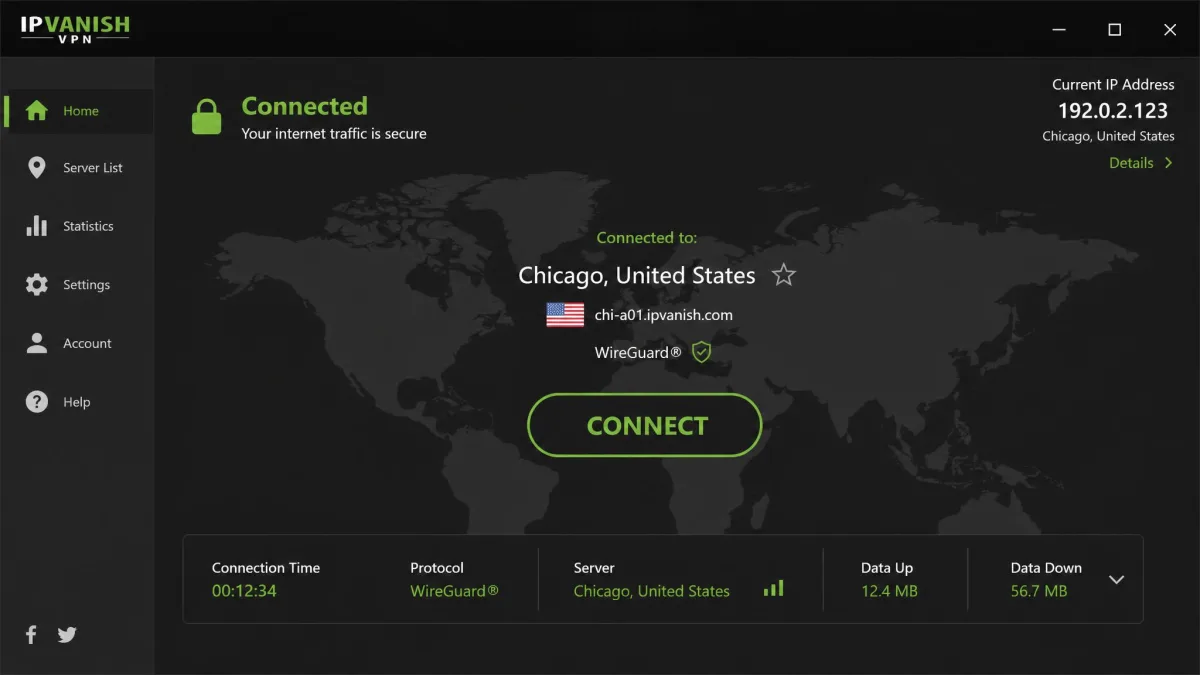
IPVanish earns a solid recommendation with clear caveats. It is fast on nearby servers, and it has now had its no-logs policy independently audited twice. What holds it back is the same thing that has followed it for years: a US home base and the shadow of a 2016 case where it handed connection logs to authorities under prior ownership. The product today is not that company. But trust is earned slowly in this category, and reputations linger longer than corporate structures.
For most people, IPVanish is a strong, well-priced choice, especially if you want to protect a whole household on one subscription. Privacy-first users who need a service outside surveillance alliances have better-matched options, and we say exactly where in the comparison section. The rating below reflects that split: high marks for speed, value, and features, tempered by the jurisdiction and reputation questions that no feature list can answer.
We test every VPN against the same real-world checks before it earns a recommendation: nearby and distant speed runs, IP, DNS and WebRTC leak tests across multiple continents, streaming attempts on several platforms, and a torrenting pass with SOCKS5. IPVanish held up where it counts on speed and leak protection. That hands-on result, not the marketing copy, is what shaped the rating you see here. Where the network stumbled, on occasional streaming inconsistency, we have said so plainly.

Pros and Cons
Every VPN is a set of trade-offs, and IPVanish is no exception. Here is the honest ledger from our testing before we get into the detail of each area.
Pros
- Fast speeds on nearby servers, with only a small drop from the baseline connection
- Unlimited simultaneous connections on a single subscription
- No-logs policy independently audited by Leviathan (2022) and Schellman (2025)
- Passed all IP, DNS, and WebRTC leak tests we ran across multiple continents
- P2P allowed on every server, with SOCKS5 proxy support for torrenting
- Easy, stable dedicated Fire TV app for streaming setups
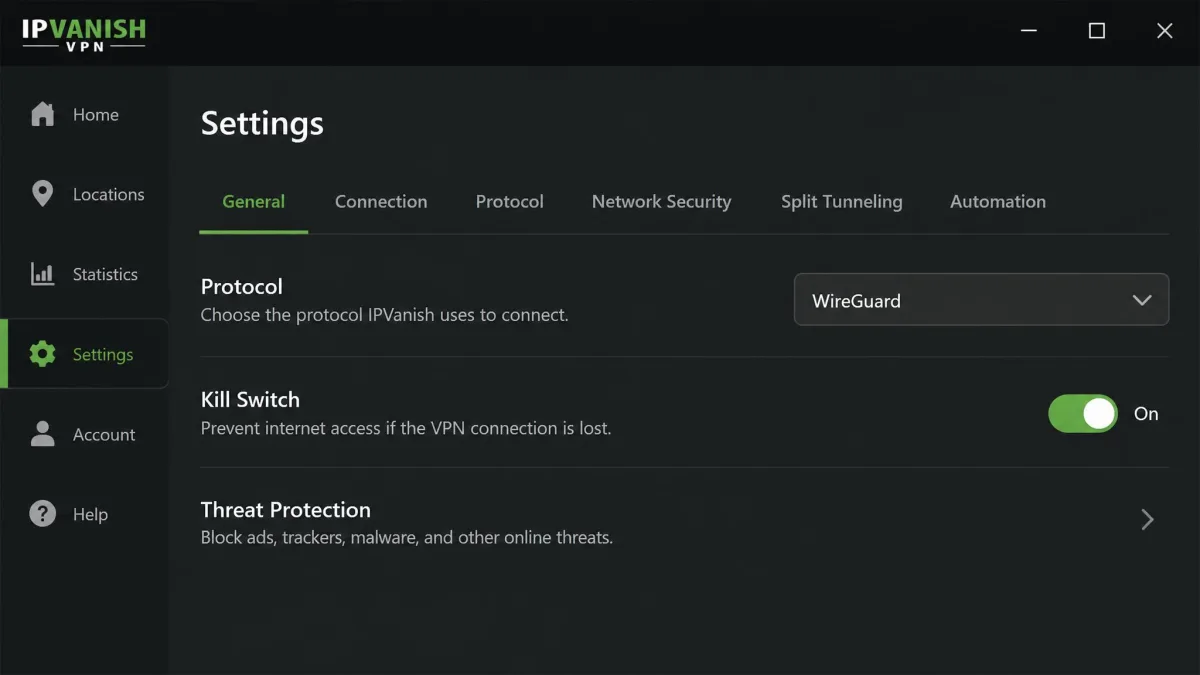
- Kill switch, split tunneling, and Threat Protection ad and malware blocking included
- Competitive intro pricing with unlimited devices for the whole household
Cons
- Headquartered in the United States, a Five Eyes and 14 Eyes member
- The 2016 logging incident still weighs on its privacy reputation
- Netflix and other streaming can be inconsistent depending on region
- No port forwarding for advanced torrenting setups
- No cryptocurrency payment option for anonymous sign-up
- Refunds can require persistent follow-up before they are granted
- Does not reliably work inside China
- Renewal price jumps sharply after the intro term
IPVanish Pricing and Plans
IPVanish keeps its pricing simple and aggressive. The headline deal in our checks was the 2-year Essential plan at $2.19 per month. That works out to $52.56 up front for the full term. It is one of the cheaper entry points among mainstream VPNs, and the unlimited-connections policy makes the per-device cost effectively tiny for a busy household. When a single plan covers every phone, laptop, tablet, and TV in the home, the value math shifts sharply in IPVanish's favor.
The catch is renewal. After the intro term, the Essential plan renews at $89.99 per year, a steep jump from the promotional rate. This is standard practice across the VPN industry. Still, it is worth marking your calendar so the renewal does not surprise you. Set a reminder a week before the term ends and you can decide, on your own timeline, whether to stay, renegotiate, or move on. Monthly billing runs roughly $12.99 to $14.99 depending on the tier and current promotion. As usual, the month-to-month option is far more expensive per month than committing to a longer term.
There is also a step up to the Advanced plan, which bundles extras like Threat Protection and additional privacy tools. For most users the Essential plan covers the core VPN experience. You can decide later whether the add-ons justify the difference. Our advice is to start on the plan that matches your actual needs rather than the top tier, since the core protection is identical across plans and the extras are easy to add later.
It is worth being clear-eyed about how VPN pricing works in general. The eye-catching per-month figure always assumes the longest commitment paid up front. The renewal is where providers make their margin back. IPVanish is no different, so the right way to read its price is as a low cost of entry that you should reassess at renewal rather than a permanent rate.
If you want to try IPVanish risk-free, start on iOS or Android. The mobile apps include a 7-day free trial, which lets you test speeds and streaming on your own network before you commit to a longer plan.
Refund Policy and Money-Back Guarantee
IPVanish offers a 30-day money-back guarantee, but with an important condition. It applies to annual and 2-year plans, not to monthly plans. If you sign up month-to-month and change your mind, you are not covered, which is another reason the longer plans make more sense for cautious buyers who want an exit. Practically speaking, the annual or 2-year plan is not just cheaper per month. It is the only route that comes with a safety net.
One thing worth flagging: getting a refund inside the guarantee window can require persistent follow-up before it is granted. The policy is real and honored, but do not expect a one-click reversal. Keep your sign-up date, note the exact date the window closes, and be ready to press the point with support if the first request stalls. Duplicate charge attempts can also crop up around cancellation, so check your statement in the days after you cancel and dispute anything that looks wrong.
None of this makes the guarantee worthless. It means you should treat it as a real protection that you may have to actively claim rather than one that resolves itself. Go in with records and a little patience and you will be fine.
Payment Methods
You can pay with major credit cards, PayPal, and Google Pay. What is missing is cryptocurrency. So if anonymous, untraceable sign-up matters to you, IPVanish cannot offer it. For a service already based in the US, the lack of a crypto option is a meaningful gap for the privacy-focused crowd, though most mainstream users will not notice or care. If you specifically want to sign up without linking a payment method to your identity, this is a point against IPVanish, and some rivals do accept crypto for exactly that reason.
Speed and Performance
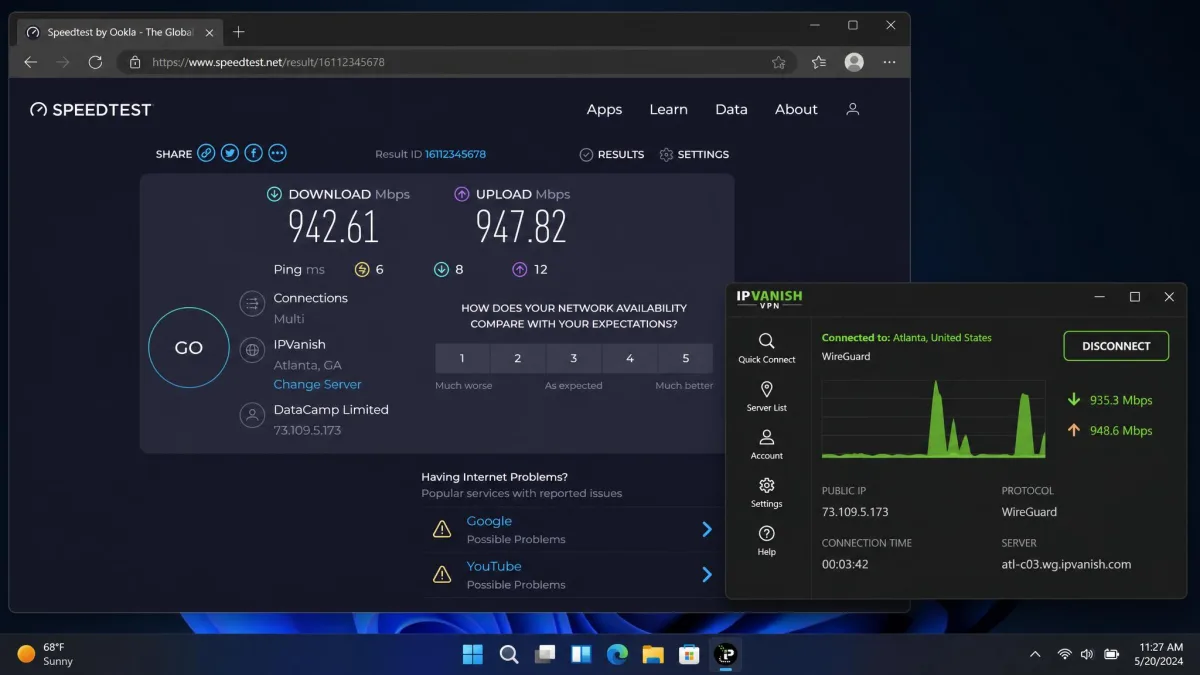
Speed is where IPVanish makes its strongest case, and our testing backed that up. On nearby servers, speeds hold up well, with only a small drop from the baseline connection. That is exactly what you want from a VPN. There is enough headroom that everyday browsing, HD streaming, and video calls feel no different from an unprotected connection. A VPN that halves your speed is one you will quietly stop using, and IPVanish avoids that trap on local servers.
The single biggest variable we found was protocol choice. WireGuard consistently delivered the fastest, most stable results. OpenVPN traded some speed for its long track record and broad compatibility. If your first impression of IPVanish feels slow, the fix is usually as simple as switching protocols in settings rather than blaming the network. We would go so far as to say a chunk of the negative speed impressions out there come down to leaving an older protocol selected by default.
Long-distance connections behave the way physics dictates. The further the server, the more latency and throughput loss you will see. Even so, intercontinental servers stayed usable for streaming and general browsing in our runs. Connecting from one continent to a server on another will always cost you more than a hop to the next city, and no VPN escapes that. What matters is that IPVanish's distant servers remained comfortably fast enough for HD video and browsing rather than degrading into a frustrating crawl.
Published speed figures vary widely across reviewers because results depend so heavily on baseline bandwidth, protocol, and distance. Treat any single number, including ours, as a snapshot rather than a promise. What is consistent is the shape of the result: strong nearby performance, protocol-sensitive throughput, and predictable falloff with distance. That is the profile of a genuinely fast VPN rather than one that merely claims to be.
For real-world use, the practical takeaway is simple. Pick the nearest server that meets your need, leave WireGuard on, and IPVanish will rarely be the bottleneck in your connection. Only when you deliberately reach across the world for a specific content library will you feel the network working.
If speeds disappoint, open settings and switch to WireGuard before anything else. It made the largest single difference in our runs, and it is the protocol we recommend leaving on by default for the best balance of speed and stability.
Servers and Server Locations
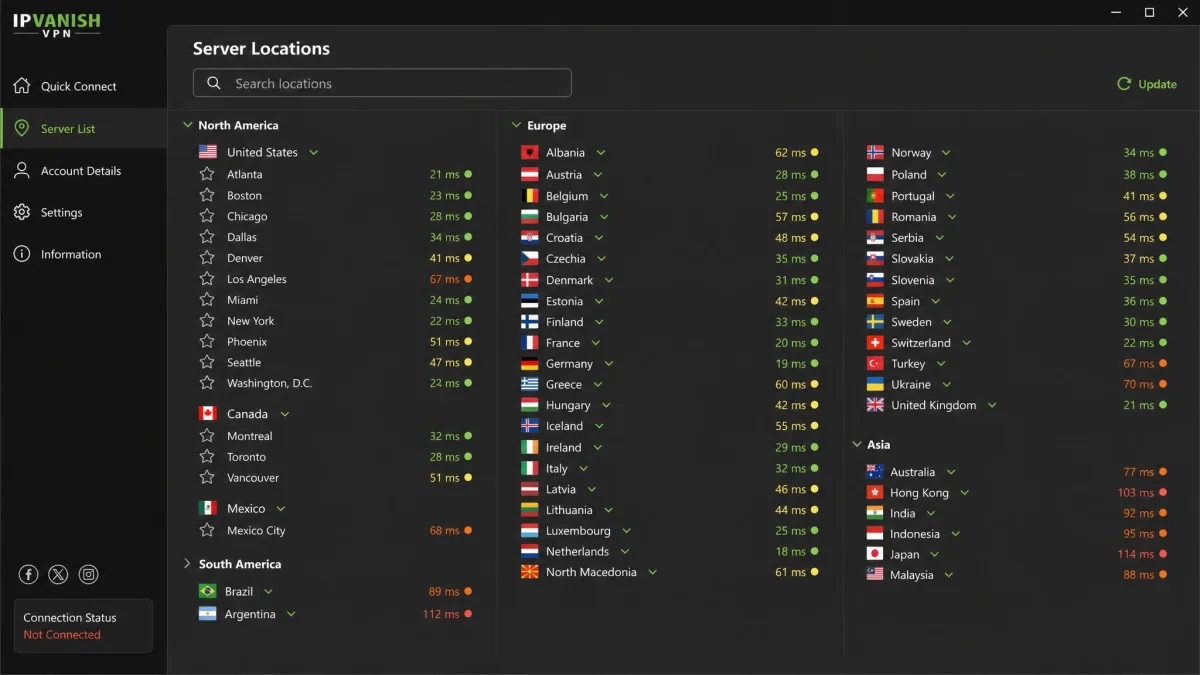
IPVanish runs a large network, though the exact size depends on who you ask. Published totals sit at roughly 3,200 or more servers, with sources disagreeing on the precise figure and the number drifting over time as the company adds and retires capacity. What is more consistent is the network's IP footprint of more than 40,000 IP addresses. That matters for streaming and for avoiding the blocklists that catch smaller providers. A large, rotating pool of IPs is one of the quiet reasons a VPN keeps working with streaming services that actively hunt for VPN traffic.
Coverage spans roughly 100 or more countries, again with sources conflating country counts and individual location counts. In practical terms, the network is broad enough that you will almost always find a nearby server for speed and plenty of overseas options for accessing region-locked content. We never found ourselves wishing for a location that simply was not there for everyday use, and the major regions across North America, Europe, Asia, and Oceania are all well represented.
IPVanish also owns much of its server infrastructure rather than renting it, which the company argues gives it tighter control over security. Owned infrastructure is not a guarantee of anything on its own. It does, though, reduce the number of third parties with physical access to the hardware, which is a reasonable point in its favor. Combined with the audited no-logs policy, it forms part of a coherent security story rather than a marketing slogan.
The one clear gap is China. IPVanish does not reliably work inside China, so if you travel there or need to bypass the Great Firewall, this is not the service to depend on. VPN access inside China is a specialist problem that even strong providers struggle with, and IPVanish does not solve it. If that is your primary use case, look elsewhere.
Privacy and Security
Privacy is the most nuanced part of any IPVanish review, and it deserves a careful look rather than a headline. The security fundamentals are strong. The reputation questions are real. Both things are true at once, and how you weigh them depends entirely on your threat model, which is a fancy way of saying it depends on who you are actually trying to keep your data away from.
No-Logs Policy and Independent Audits
IPVanish operates a no-logs policy, and crucially it no longer just asks you to take that on faith. The policy has been independently audited by Leviathan Security Group in 2022, with a follow-up no-logs audit by Schellman in 2025. Independent audits are the single most meaningful signal in this category. They put an outside firm's name behind a claim that a VPN company would otherwise be marking its own homework on.
Two audits over three years is a genuinely good record and puts IPVanish in the same tier as its audited rivals on paper. It also signals a pattern rather than a one-off. That matters more than a single audit that a company can commission once for a headline and never repeat. The question that remains is jurisdiction, which no audit can change, and that is where the conversation gets harder.
The 2016 Logging Incident and US Jurisdiction
Here is the history you should know. In 2016, IPVanish handed connection logs to US authorities in a criminal investigation, despite claiming a no-logs policy at the time. Ownership and policy have since changed, and the company that did this is not structurally the same as the one operating today. But the episode is the reason the US jurisdiction and the 2016 log-handover history remain the recurring privacy concerns raised against the service, and no amount of new ownership fully erases a documented case like that from a buyer's memory.
The fair way to hold both facts is this. The incident happened under different owners and before the current audited policy existed, so it is not evidence about today's systems. At the same time, it is a real demonstration that a US-based VPN can face legal pressure to produce data. That history is a legitimate reason for the privacy-conscious to prefer a provider on different ground.
IPVanish is headquartered in the United States, a member of the Five Eyes and 14 Eyes intelligence-sharing alliances. Combined with the 2016 incident, this means a US court could, in theory, compel data. The current audited no-logs policy is designed so there is nothing useful to hand over, but if your threat model includes state-level adversaries, a provider outside these alliances is the safer structural choice.
For most people, whose real concerns are advertisers, data brokers, public Wi-Fi snooping, and ISP tracking, the audited no-logs policy delivers the peace of mind they are actually shopping for. The threats that touch everyday users are commercial and opportunistic, not court orders. Against those, IPVanish is more than adequate. For journalists, activists, or anyone facing a serious adversary, jurisdiction still matters, and we point to alternatives in the comparison section.
Encryption, Protocols, and Kill Switch
On the technical side there is nothing to complain about. IPVanish supports WireGuard, OpenVPN, and IKEv2/IPSec, giving you a modern fast protocol plus proven fallbacks for networks that block the newer options. Encryption is AES-256 on OpenVPN and IKEv2, and ChaCha20 on WireGuard. Both are the current standards and effectively unbreakable in practice. If you want to understand why the WireGuard protocol has become the default recommendation, our explainer covers its design and speed advantages.
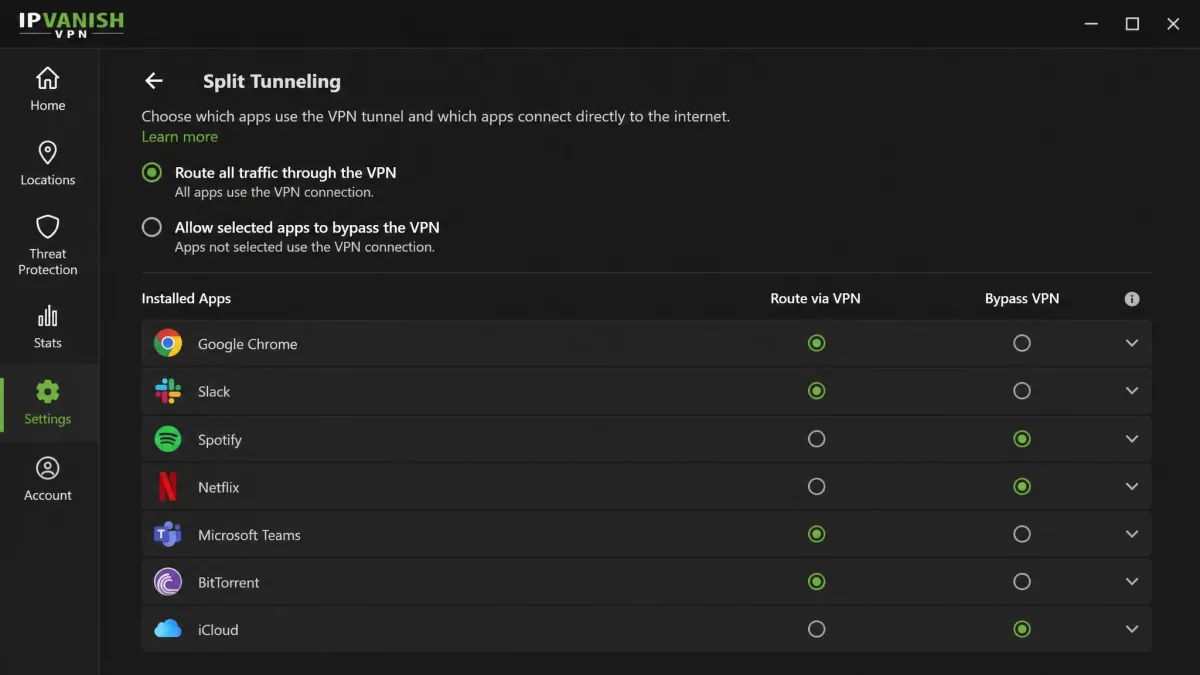
The security toolkit is complete. There is a kill switch that cuts your internet if the VPN drops, so your real IP never leaks during a reconnect. That is the sort of failsafe that matters most precisely when you are not watching. Split tunneling lets you route some apps through the VPN and others around it, which is handy when a banking app or a local service misbehaves behind a VPN. Threat Protection adds ad and malware blocking, Scramble obfuscation helps disguise VPN traffic on restrictive networks, and LAN blocking plus a SOCKS5 proxy round out a strong feature set. This is the full modern checklist, with nothing important missing except port forwarding.
Leak Test Results
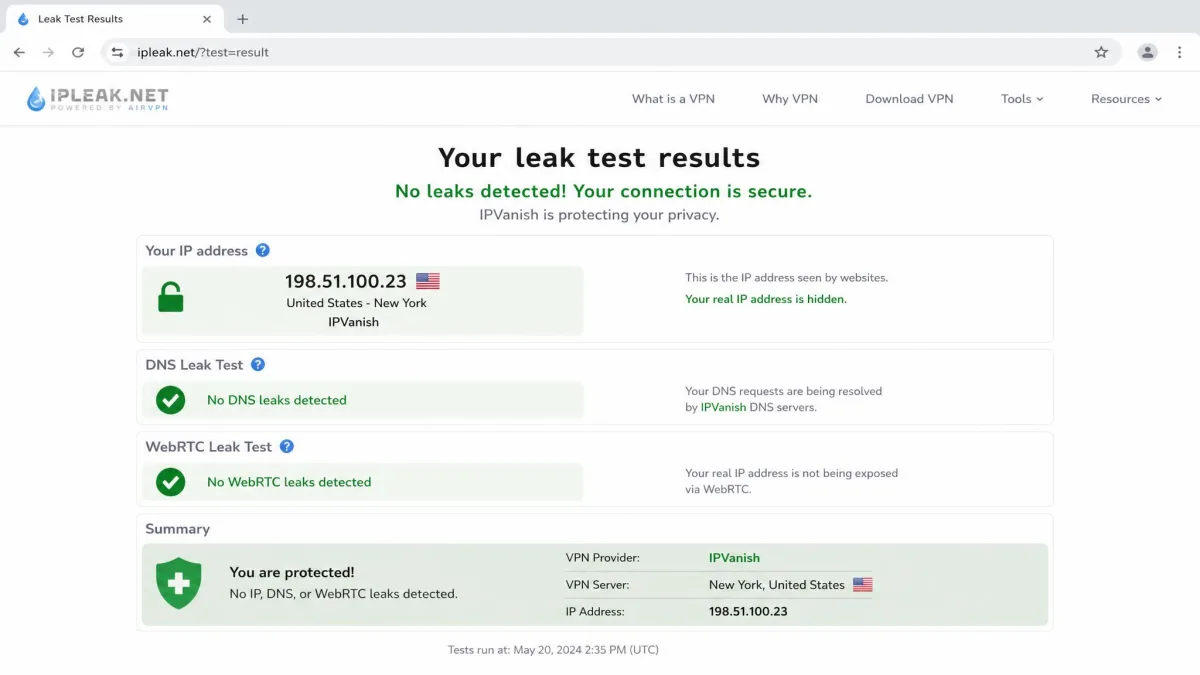
A VPN is only as good as its ability to keep your real identity hidden, and this is where IPVanish delivered cleanly. It passed IP, DNS, and WebRTC leak tests across multiple continents in our checks. That means your true IP address and DNS requests stayed inside the tunnel on every server we tried, which is the baseline every VPN must clear and not all of them do. A leak here would undo everything else the service gets right, so passing consistently is exactly what we needed to see, and IPVanish did.
Streaming and Unblocking (Netflix, Disney+, and More)
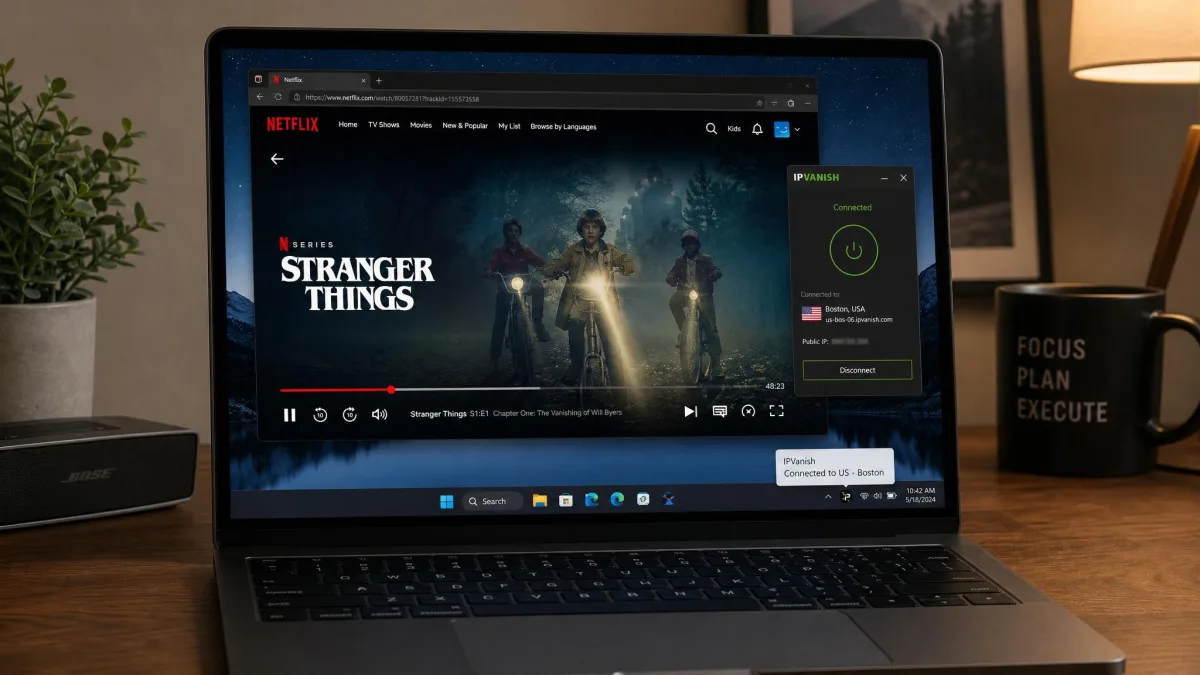
Streaming is where IPVanish is capable but not flawless. In current testing, Netflix, Disney+, Hulu, HBO Max, and BBC iPlayer all unblock, though BBC iPlayer quality can be inconsistent. That is a good result and covers the platforms most people care about most of the time. For a lot of households, this list alone is the entire reason they want a VPN, and IPVanish handles the common cases well.
The honest caveat is reliability. Netflix access has been unreliable at times, and we occasionally needed split tunneling to route streaming apps around the VPN when a service refused to load. Streaming reliability is a moving target for every VPN because the platforms actively fight back against VPN traffic, blocking known server IPs in waves. So the right expectation is that IPVanish works well most of the time and may need a server switch now and then rather than working perfectly on every attempt.
The practical routine that worked for us is simple. If a service throws a proxy error, switch to a different server in the same country and try again. Because IPVanish has a large IP pool, a fresh server usually gets you through. Keep split tunneling in mind as a fallback for a stubborn app that insists on seeing your real location for some functions while you route the rest through the VPN.
If streaming is your single most important use case and you want the most consistent experience with the least fiddling, this is one area where NordVPN and Surfshark have a slight edge, as the comparison shows. IPVanish is good enough that most people will be happy, but it is not the most bulletproof unblocker in the field, and we would rather say that than oversell it.
Torrenting and P2P Support
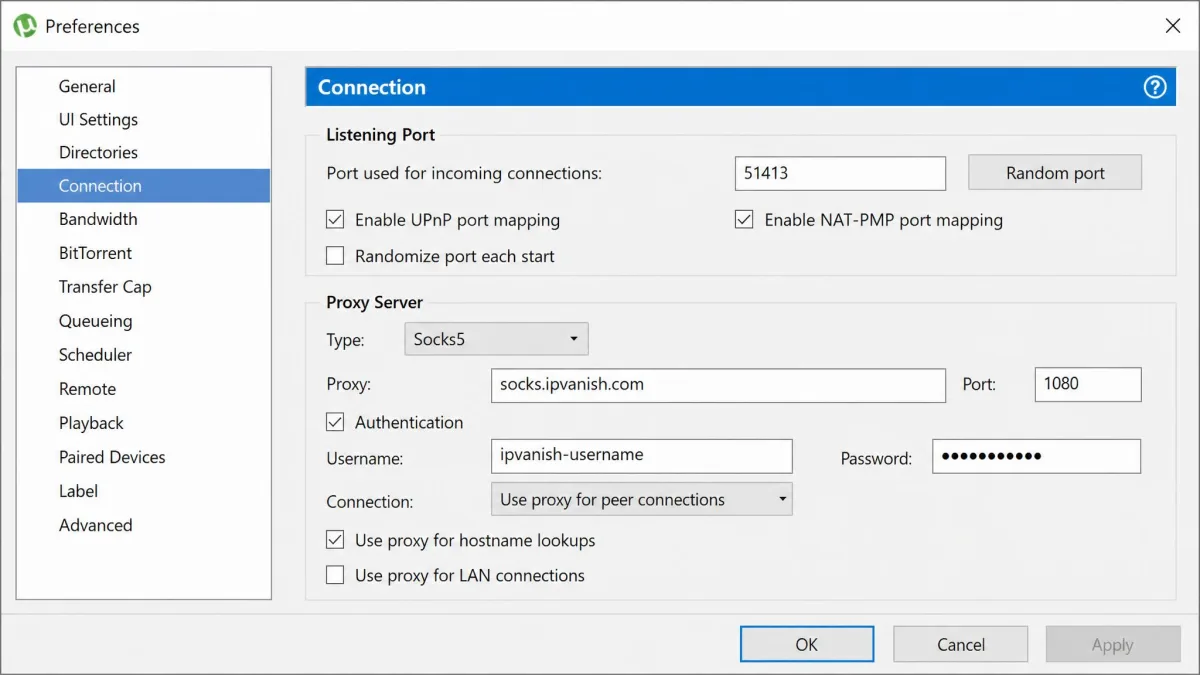
For torrenting, IPVanish is one of the more accommodating services we tested. P2P is allowed on every server, so you never have to hunt for a special P2P-enabled location. The SOCKS5 proxy support gives you a faster, lighter option for clients that support it. Combined with the reliable kill switch and clean leak results, that makes it well suited to torrenting and to anyone who wants their download activity kept private from their ISP.
Allowing P2P on the whole network is a bigger deal than it sounds. Some providers herd torrent traffic onto a handful of designated servers, which get crowded and slow. IPVanish letting you torrent anywhere means you can pick the fastest nearby server and keep your speeds up while you download, rather than accepting whatever the P2P-only servers happen to offer.
The one missing piece is port forwarding, which some advanced users rely on for better peer connectivity and seeding. If that feature is central to your setup, note its absence, because IPVanish simply does not provide it. For the vast majority of torrenting, though, IPVanish covers the essentials without fuss, and the combination of network-wide P2P, SOCKS5, and a dependable kill switch is a genuinely good foundation.
Unlimited simultaneous connections mean you can run the VPN on your torrenting machine, your phone, and your media box all at once without juggling logouts. For P2P specifically, enable the kill switch first so a dropped connection never exposes your real IP mid-download.
Apps and Device Compatibility (Windows, macOS, iOS, Android, Fire TV)
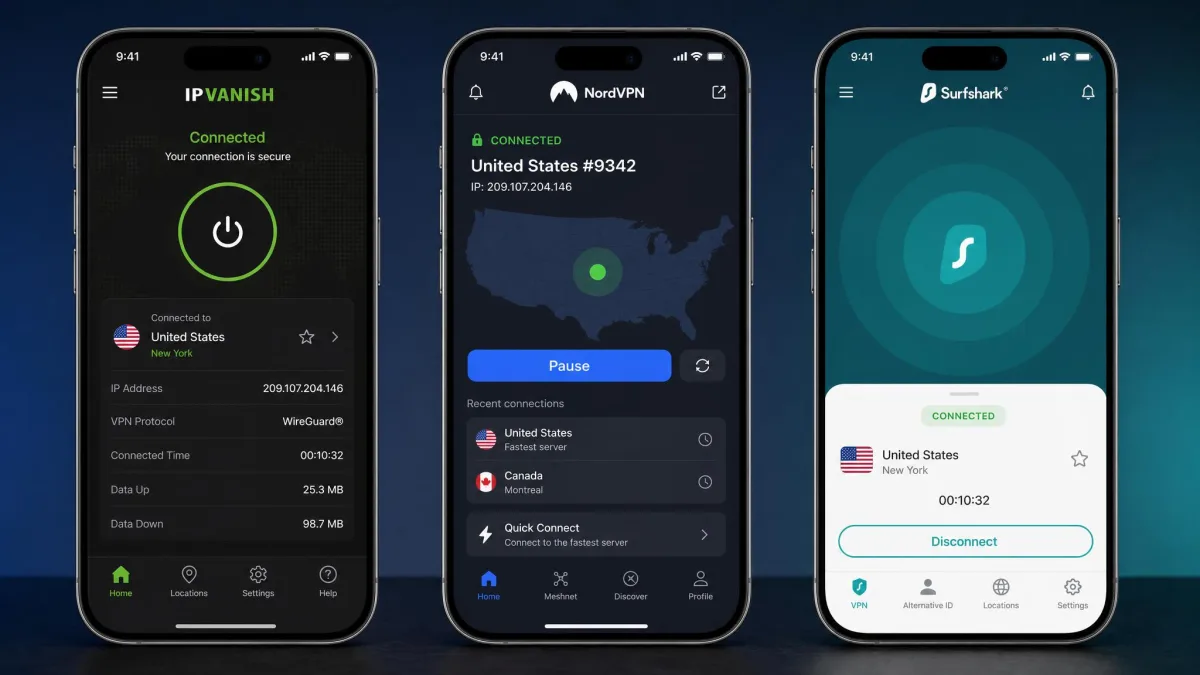
IPVanish covers the platforms that matter. We ran it on Windows, macOS, iOS, and Android, and the apps share a consistent layout that makes moving between devices painless. The desktop clients expose the full settings depth, including protocol selection, split tunneling, and the kill switch. The mobile apps keep things streamlined without hiding the important controls. Learn the app once and you know it everywhere, which is exactly how a cross-platform tool should feel.
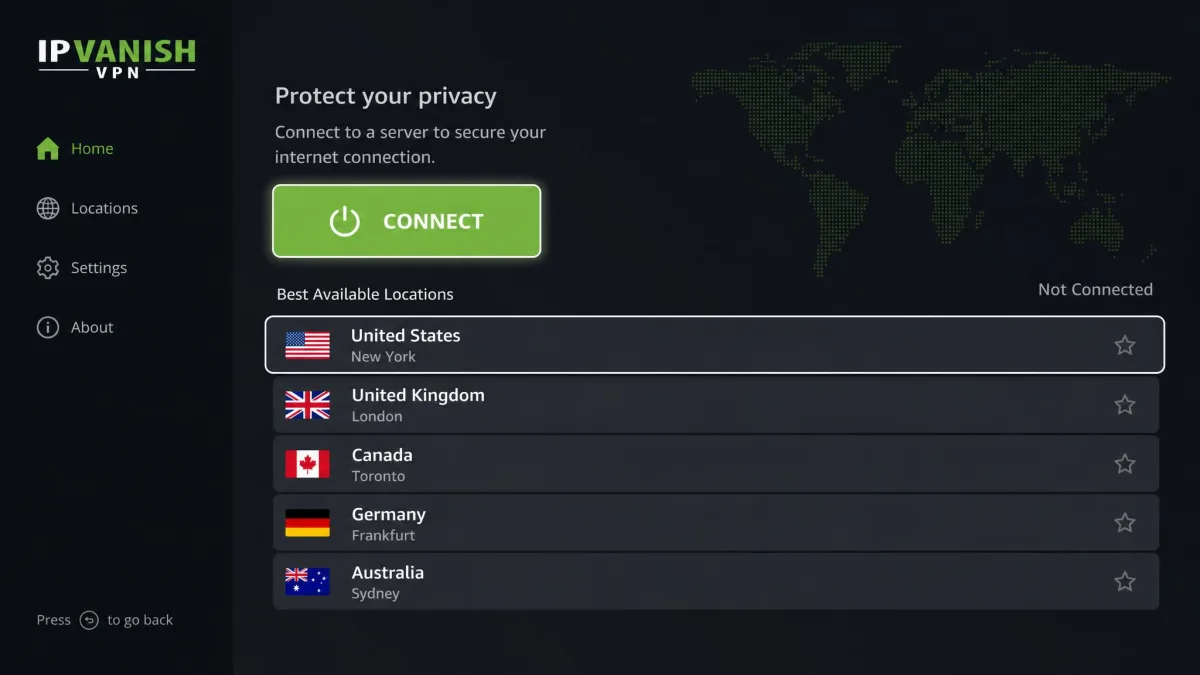
The standout is the dedicated Fire TV and Firestick app, which is why it features in our best VPN for Firestick roundup. It is easy to navigate and stable in daily use, which is not something we can say for every VPN's TV app, since many are clunky ports that fight the remote. IPVanish's version is built for the ten-foot interface and just works. This is a real advantage if your goal is protecting or unblocking content on a streaming stick, and it is one of the reasons we lean toward recommending IPVanish for living-room setups specifically.
The one limitation to know is that the kill switch does not extend to streaming devices. A dropped connection on Fire TV will not cut the stream the way it would on desktop. For most streaming that is a minor point, since a brief exposure while a show buffers is a low-stakes event, but it is worth knowing if you expect the same failsafe behavior everywhere.
Across everything, the unlimited simultaneous connections make IPVanish a strong fit for households running one subscription across many devices. There is no counting seats or logging out one device to add another, which quietly removes a daily annoyance that seat-limited services impose. In a modern home with several phones, laptops, tablets, and a TV or two, that single policy is one of IPVanish's most compelling everyday advantages, and it is a big part of why we recommend it for families.
Ease of Use and Setup
Getting started with IPVanish is straightforward. Sign up, download the app for your platform, log in, and click connect. For a first connection, the default settings are sensible enough that you do not need to touch anything. The apps auto-select a fast nearby server, and you are protected in seconds. Someone who has never used a VPN before can be up and running without reading a single help article, which is the right bar for a mainstream service.
Where the interface rewards a little exploration is the settings menu. Switching to WireGuard, turning on the kill switch, and setting up split tunneling are all a few taps away, and doing so early gives you the best experience. The learning curve is gentle, and nothing about the setup requires technical knowledge, which matters for a service aimed at everyday users who just want protection without a manual. The layout puts the connect button front and center and tucks the advanced controls a level down, which is the right balance between simplicity and depth.
If you want to protect an entire home network at the router level rather than per device, that is possible too, though it is a more advanced path than the app-based approach most people should start with. Setting up a VPN on a router covers every device on your network at once, including ones that cannot run the app themselves, but it is a project rather than a five-minute install, so we would only suggest it once you are comfortable with the basics.
Customer Support
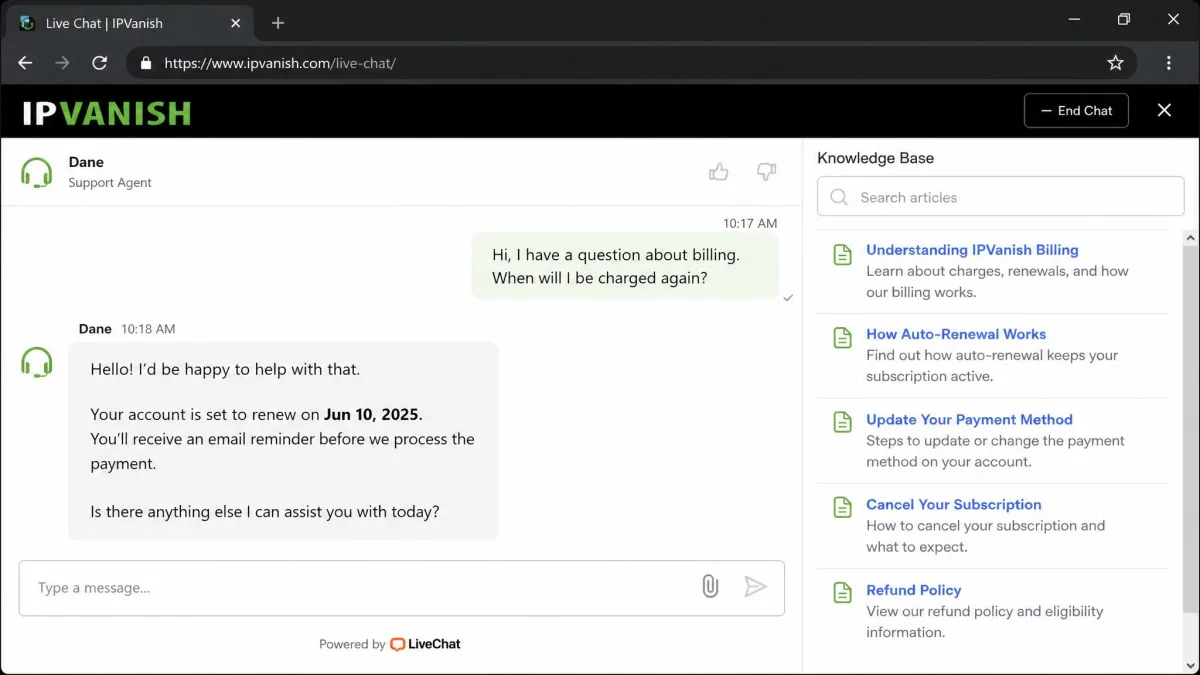
IPVanish offers 24/7 live chat and email support, plus a searchable knowledge base for the common questions. In practice, live chat is the fastest route to a human, and the knowledge base handles most setup and troubleshooting queries on its own. For the everyday questions of how to change a protocol or set up split tunneling, you rarely need to talk to anyone at all.
The area where support matters most is billing, and this is where our notes turn cautious. Refunds inside the guarantee window can require persistent follow-up before they are granted, and duplicate charge attempts can crop up around cancellation. None of this makes support unusable. It does mean you should keep records, be clear and firm in a refund request, and check your bank statement after canceling. Good support that you have to push is still worse than support that just works, and this is the one area where IPVanish falls short of the smooth experience it otherwise delivers.
Our practical advice is to handle any refund or cancellation in writing where you can, so you have a record of dates and what was agreed. If a first request stalls, restate it calmly and reference your original sign-up date and the guarantee terms. Most disputes resolve with a little persistence, but going in prepared saves frustration.
How IPVanish Compares to NordVPN and Surfshark
No VPN exists in a vacuum, and the two names buyers most often weigh against IPVanish are NordVPN and Surfshark. Here is how they line up on the factors that decide most purchases.
| Product | Buy | Price (2-yr, per mo) | Simultaneous connections | Servers | Streaming | No-logs audit | Refund |
|---|---|---|---|---|---|---|---|
|
Check price → | $2.19 | Unlimited | ~3,200+ | Works, occasionally inconsistent | Leviathan 2022, Schellman 2025 | 30-day |
 |
$3.49 | 10 | 9,300+ | Reliable | Independently audited | 30-day | |
 |
$2.49 | Unlimited | 4,500+ | Reliable | Deloitte 2025 | 30-day |
The read on this is clear. IPVanish is the cheapest of the three at the intro rate and matches Surfshark on unlimited connections, which makes both of them better value than NordVPN for big households. NordVPN counters with the largest server network by a wide margin, the most reliable streaming, and a home base in Panama, well outside the Eyes alliances. That is the privacy advantage IPVanish cannot match from the US. Surfshark splits the difference: unlimited devices like IPVanish, a Netherlands base inside the Nine Eyes, and more consistent streaming than IPVanish delivers.
Put simply, if privacy jurisdiction is your top priority, NordVPN's Panama base is the structural winner and worth the higher price. If you want the cheapest unlimited-device option and stream mostly mainstream platforms, IPVanish makes a strong case on value. Surfshark is the middle path for people who want reliable streaming and unlimited devices without dwelling too much on jurisdiction. All three carry the same 30-day refund window, so on that front there is nothing to separate them.
Where IPVanish wins outright is the combination of price and unlimited connections against a fast network with a clean leak record. Where it loses is the two things a US provider cannot fix with features: jurisdiction and the reputation baggage of 2016. That trade sits at the heart of every IPVanish buying decision.
Who Should Choose IPVanish?
IPVanish suits some users far better than others, and being honest about that saves you a refund fight later.
It is a strong choice if you run a busy household and want to protect every device on one subscription, since the unlimited connections remove any seat limit. It is a good fit if you use a Fire TV Stick and want a stable, easy TV app that does not fight the remote. It works well for torrenting thanks to P2P on all servers and SOCKS5 support. And it is a genuinely fast option for everyday browsing and HD streaming when you pick the right protocol, so anyone who cares first about speed and value will be well served.
It is a weaker choice if your privacy needs are serious enough that US jurisdiction is a dealbreaker, if you travel to China and need reliable access there, if port forwarding is central to your torrenting, or if you require cryptocurrency payment for anonymous sign-up. For those users, a provider outside the Eyes alliances is the better structural match, and paying a little more for that peace of mind is money well spent. Match the tool to your actual needs and IPVanish either fits neatly or clearly does not, which is exactly the clarity you want before you buy.
Final Verdict: Is IPVanish Worth It?
IPVanish is a fast, capable, and well-priced VPN that earns its place on any shortlist, with eyes open about the trade-offs. In our testing it delivered strong nearby speeds, passed every leak test, unblocked the major streaming services most of the time, and handled torrenting cleanly. The unlimited connections and the excellent Fire TV app make it especially appealing for households and streaming setups, and the intro pricing is among the most competitive around.
The reasons for pause are consistent and specific rather than vague. The US jurisdiction and the 2016 logging incident are legitimate concerns for privacy-first users, even though the current audited no-logs policy addresses the practical risk for most people. Streaming can be occasionally inconsistent, refunds can take persistence, and there is no crypto payment or port forwarding. These are real limitations, not dealbreakers for the mainstream user, and we have named each one so you can decide whether any applies to you.
Weighed together, IPVanish is worth it for the mainstream user who wants speed, value, and whole-home coverage and is comfortable with a US-based provider. If that description fits you, it delivers real peace of mind at a fair price and does the core job of a VPN well. If ironclad jurisdiction is your priority, look to a provider outside the surveillance alliances instead. You can check current pricing and plans at the official IPVanish site before you decide, and the mobile free trial or the 30-day guarantee gives you a low-risk way to confirm it fits your own network.