Finding a free VPN for Windows that is genuinely safe is harder than it should be. Most "free" services throttle your speeds to a crawl. Others cap your data after a day, or quietly fund themselves by selling your browsing history. We wanted to know which free plans actually hold up. So we installed each one on Windows 11 and put its free tier through daily browsing, a few streaming attempts, and leak and kill switch checks.
This guide ranks the five free VPNs we would trust on a Windows PC in 2026. Every pick runs on Windows 10 and Windows 11. Each one protects your connection with strong encryption, and each keeps a privacy policy we are comfortable recommending. We also flag the free services you should avoid. And we explain what "free" really costs you in speed and data, then answer the questions people ask before they install one.

We tested every VPN in this guide on a Windows 11 laptop. We used the free tier exactly as a new user would see it: same data caps, same server list, same speeds. No press accounts, no unlocked features.
Best Free VPNs for Windows at a Glance
If you only have a minute, here is the short version. Proton VPN is our top pick. It is the rare free plan with unlimited data and a security record we trust. Windscribe is the most flexible option, and it covers every device you own. hide.me is the other unlimited-data pick, and it leans hardest into privacy. PrivadoVPN is the one to try if you care about streaming. Hotspot Shield suits light, fast everyday browsing when you only need a VPN now and then.
| Product | Buy | Free data cap | Servers (free) | Max speed | Streaming | Kill switch | No-logs / audited |
|---|---|---|---|---|---|---|---|
|
Visit Site → | Unlimited | 10 countries | No cap, medium priority | No | Yes | Yes, audited |
 |
Visit Site | 10GB/mo (2GB no email) | ~10 to 11 locations | No throttle, crowded | Limited | Yes (firewall) | Yes, RAM-only |
 |
Visit Site | Unlimited | 8 countries | Full speed | Blocked | Yes | Yes, 2024 audit |
 |
Visit Site | 10GB/mo | ~12 to 13 locations | Full speed | Netflix yes, others no | Yes | Yes, not audited |
 |
Visit Site | 500MB/day | 1 US location | ~2Mbps throttled | Limited | Yes | Claimed |
Before the picks, a quick word on method. We installed each app on a Windows 11 laptop and used only the free tier, with no borrowed paid servers. We scored on real-world speed, a forced kill switch test, streaming access, the data cap, and privacy record. The full test rundown sits after the reviews, so the scores below arrive with the method already in view.
1. Proton VPN: Best Overall Free VPN for Windows
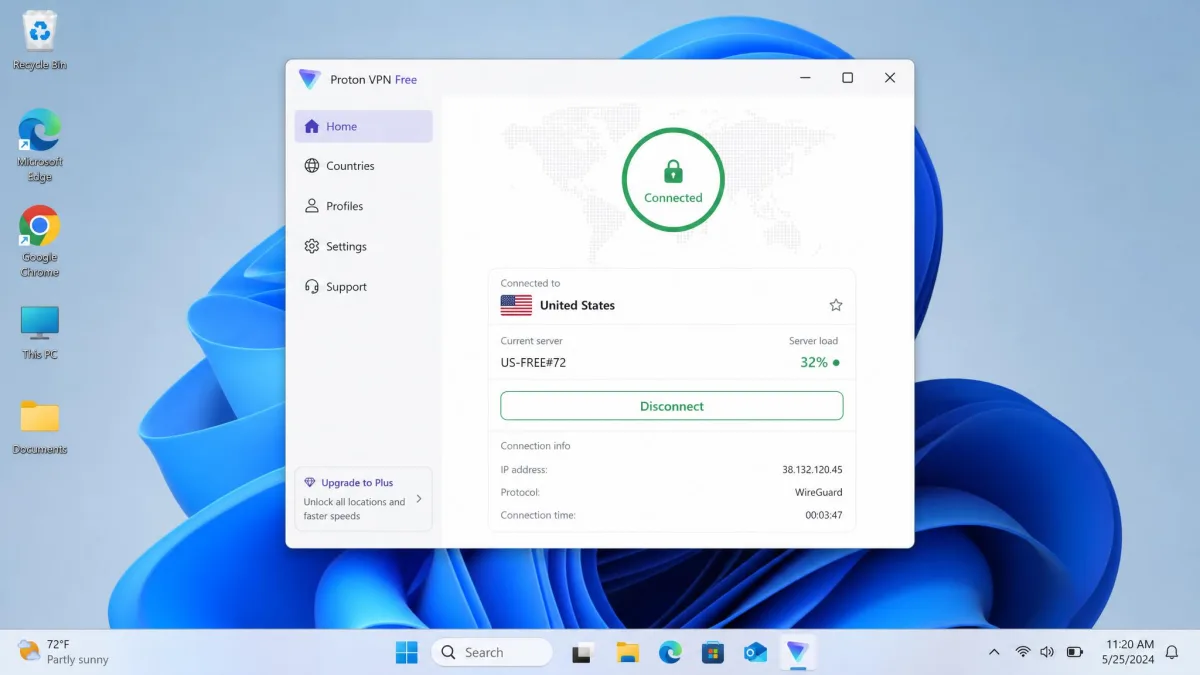
Proton VPN earns our top spot for one simple reason. It is the only free plan we tested that gives you unlimited data with no speed cap. It also comes from a company with a genuinely strong privacy record. In our testing on Windows 11, the free plan handled a full day of browsing, email, and research. It never hit a wall. That alone puts it ahead of almost every other free VPN, most of which cut you off after a few gigabytes.
The free tier auto-selects the fastest available server. It does not let you pick a specific location, so you trade a little control for simplicity. Speeds have improved sharply over the last year and felt quick for everyday work. They do slow during peak evening hours, when the free servers get busy. In practice, pages loaded and video calls held steady through the working day. The only real dip arrived after dinner, once the shared free servers filled up. The app itself is clean, and setup on Windows 10 and Windows 11 took only a couple of minutes. It runs on both x64 and ARM64 builds, so newer Snapdragon laptops are covered as well as older desktops. For the full picture, we go deeper in our Proton VPN review.
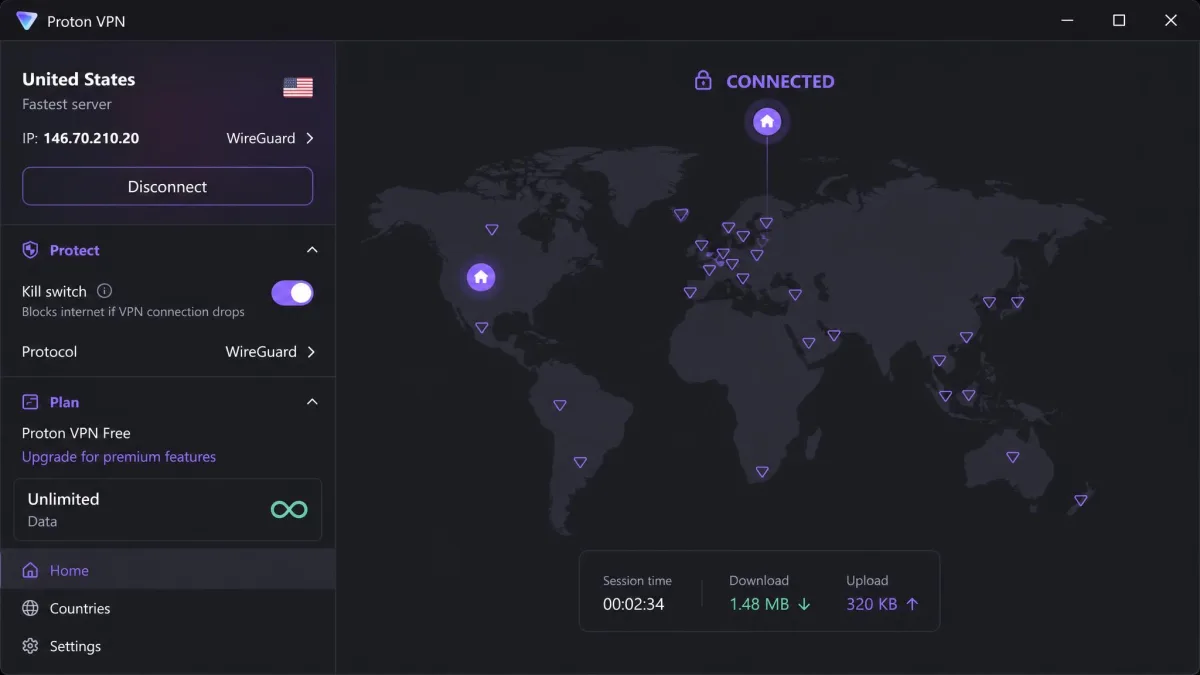
Where Proton VPN really separates itself is trust. Its no-logs policy has been independently audited. It offers a reliable kill switch, and it supports modern protocols including WireGuard and OpenVPN. There is also a Stealth protocol for networks that try to block VPN traffic. You can download it directly from Proton VPN free. The catch is a real one. The free servers do not work reliably for streaming or torrenting. Those stay behind the paid Plus plan, along with Secure Core multi-hop routing and the NetShield ad blocker. For the free tier, that leaves you with a fast, private, always-on connection and very little to complain about.
Pros and Cons
Pros
- Unlimited data on the free plan, with no monthly cap
- Independently audited no-logs privacy policy
- Kill switch and modern WireGuard and OpenVPN protocols
- Runs on Windows 10 and Windows 11, including ARM64
Cons
- Free servers do not support streaming or P2P
- Free plan covers only 1 device
- You cannot choose a specific server location on free
How the Free Plan Behaves Day to Day
The unlimited allowance changes how you use it. You stop thinking about a meter and simply leave it connected all day, which no capped plan here allows. Server selection is the trade. You cannot open a country list and pick your own exit point. The app assigns you the fastest of the 10 free countries, and it reassigns you if that server slows. Most days that is invisible. It only shows during the evening rush, when medium-priority free traffic waits behind paying users and pages take a beat longer to load.
Best For
Proton VPN is best for anyone who wants an always-on free VPN for privacy and general browsing. It suits the person who leaves a VPN running from morning to night and never wants to watch a data counter. If picking exact servers matters more to you than data freedom, look elsewhere.
2. Windscribe: Best Free VPN for Features and Flexibility
Where Proton VPN keeps its free plan simple, Windscribe hands you a toolbox. It is the most feature-rich free VPN we tested. The standout perk is unlimited simultaneous connections. During testing, one free Windscribe account covered a Windows laptop, a phone, and a tablet at once. No other free plan here allows that. For a household that wants basic protection on several devices without paying, it is a big deal.
The free plan gives you 10GB of data per month once you confirm an email address. Skip that step and you get 2GB. Speeds were fine on nearby servers, but they got more variable and dipped during busy times. The free servers are simply more crowded than the paid ones. Choosing a server in your own country, rather than across an ocean, took the edge off that in our checks. A little manual selection goes a long way here. That 10GB allowance also runs out fast if you stream or game, so it suits light use far better than heavy sessions. Our full Windscribe review covers the paid tiers too.
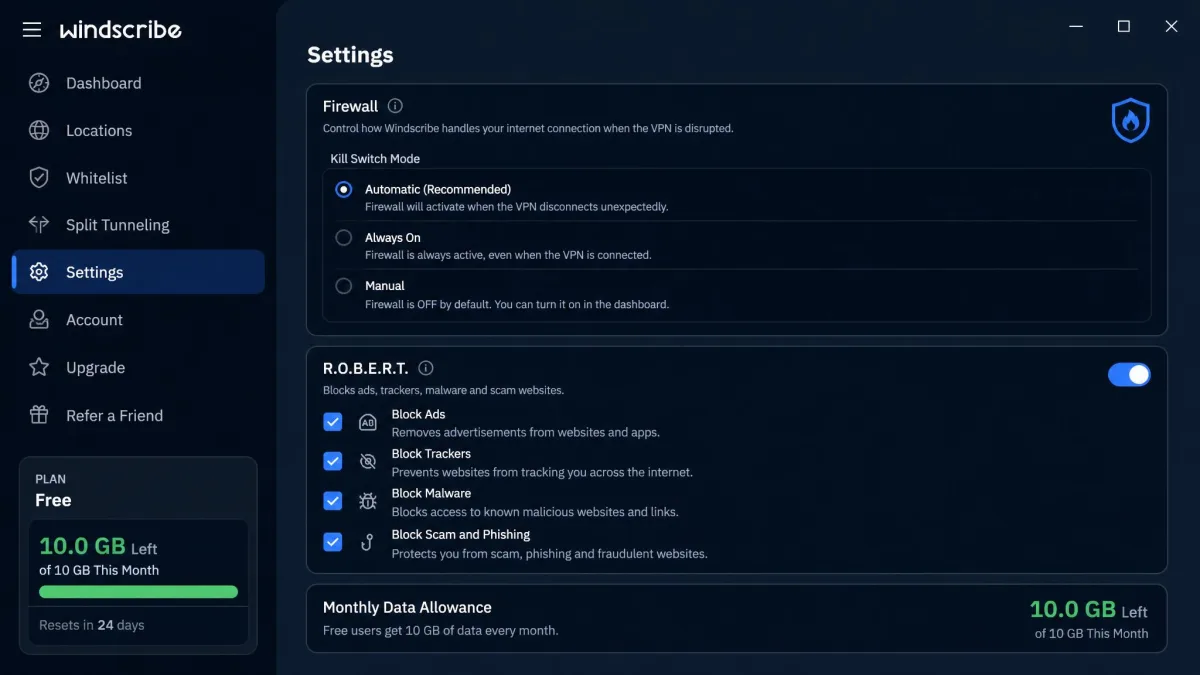
Windscribe packs in extras that free plans usually skip. You get a firewall-style kill switch with manual, automatic, and always-on modes. You also get the R.O.B.E.R.T. ad and tracker blocker, split tunneling, and RAM-only no-logs servers that wipe on every reboot. The free locations span the US, Canada, the UK, France, Germany, the Netherlands, Switzerland, and a handful more. That is real geographic choice. You can grab it from Windscribe. It is the most configurable option in this roundup, and the best free VPN for Windows if you like to tinker rather than hand everything to an automatic picker.
Pros and Cons
Pros
- Unlimited simultaneous connections on the free plan
- 10GB monthly data with a confirmed email
- Firewall kill switch plus R.O.B.E.R.T. ad and tracker blocker
- Split tunneling and RAM-only no-logs servers
Cons
- 10GB monthly cap runs out fast with streaming or gaming
- Speeds dip on crowded free servers at busy times
- Only 2GB per month without a confirmed email
How the 10GB Allowance Holds Up
The monthly cap is the number to watch, and how far it stretches depends entirely on your habits. Pure browsing and email barely touch it. A month of casual reading rarely clears half the allowance. Video is where it drains. An hour of standard-definition streaming can swallow a full gigabyte, so a couple of movie nights end the month early. The in-app counter tracks every megabyte, and it is worth glancing at midway through the month. Unlike Proton VPN, you also get a real server list, so you can pick a nearby location to steady the speed.
Best For
Windscribe is best for a household protecting several devices from one free account. It fits the person who owns a laptop, a phone, and a tablet and wants all of them covered without paying. It also rewards anyone who enjoys having settings to configure.
3. hide.me: Best Free VPN for Unlimited Data
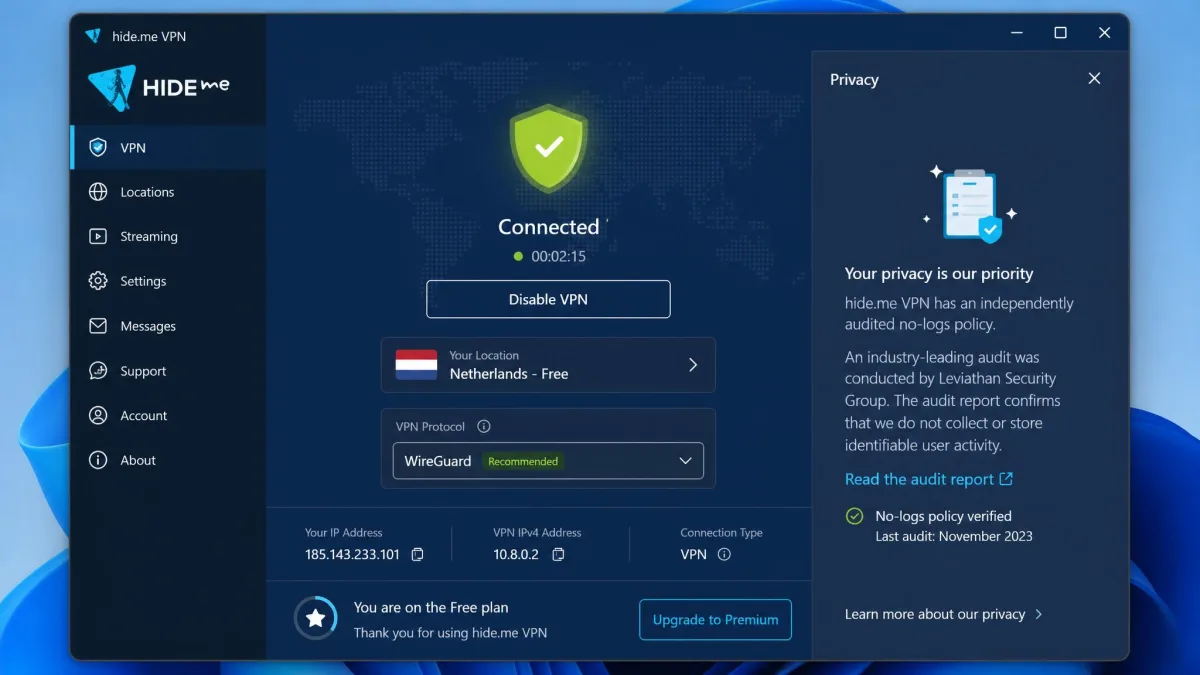
hide.me joins Proton VPN as one of only two free plans here with unlimited data, and that is the whole story with this pick. You can leave it running all day without watching a meter. Older listings sometimes still cite a 10GB monthly cap from the previous plan. The current free plan removed it, so if you see that figure, know it is out of date. The free app is clean and, importantly, ad-free. During testing it felt fast and unobtrusive. It ran quietly in the background and never nagged us to upgrade.
hide.me leans hardest into privacy, and it backs that up with proof. Its zero-logs policy was verified by an independent 2024 audit from Securitum. The no-logs claim is not just marketing. That audited record, paired with a clean free app, is what reassures privacy-focused users. You can download it from hide.me. The free plan supports strong protocols including WireGuard, OpenVPN, and IKEv2. So you can match the connection to your network. Use WireGuard for speed, or OpenVPN for reliability on restrictive networks. A working kill switch is included as well.
The trade-off is coverage and streaming. The free plan gives you servers in 8 countries and a single device connection. That country count was recently raised from 5, so older reviews list fewer. The free servers actively block streaming platforms and throttle torrenting through network-level restrictions. Those blocks are deliberate rather than incidental. No amount of server-switching on the free tier gets Netflix working. If you want a private, unlimited free VPN for browsing, hide.me is excellent. Our hide.me VPN review covers it in full. If streaming is your goal, look further down this list.
Pros and Cons
Pros
- Unlimited data on the free plan
- Zero-logs policy verified by a 2024 Securitum audit
- Clean, ad-free Windows app
- Kill switch and multiple modern protocols
Cons
- Free servers block streaming and throttle torrenting
- Only 8 free countries and 1 device on free
- Fewer locations than Windscribe or PrivadoVPN
Best For
hide.me is best for the privacy-first user who wants unlimited data without a subscription. It fits someone who browses, reads, and checks email all day and never touches streaming. It is the free VPN to choose when trust and data freedom matter more than server variety.
4. PrivadoVPN: Best Free VPN for Streaming
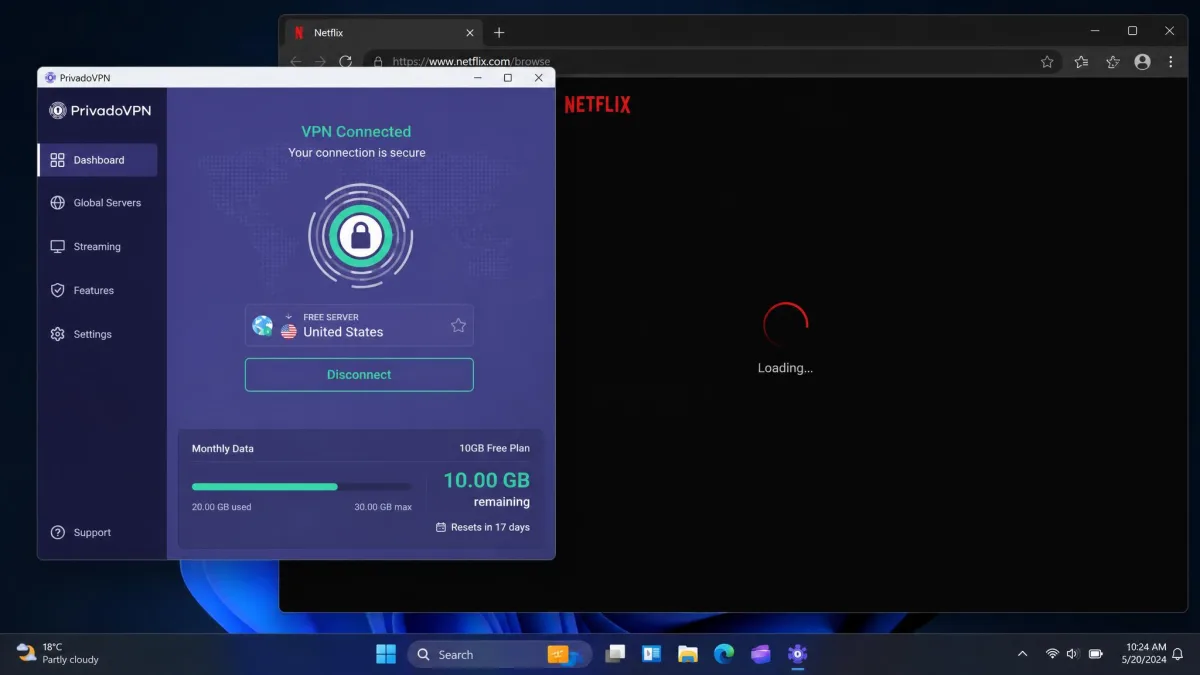
If Proton VPN and hide.me are the privacy picks, PrivadoVPN is the one to try when you actually want to watch something. It is the most streaming-friendly free plan we tested. In our testing, PrivadoVPN's free servers unblocked Netflix in many attempts. That is more than any other free VPN here managed reliably. It is worth a look if streaming is why you want a VPN in the first place.
Be realistic about the limits, though. Netflix often worked, but Prime Video and Hulu frequently detected and blocked the free servers. So streaming access is inconsistent rather than guaranteed. The free plan also caps you at 10GB of data per month. That disappears quickly during a movie or two. A single feature-length film in high definition can eat a large slice of the monthly budget on its own. PrivadoVPN works best for occasional streaming, not a nightly binge.
On the security side, PrivadoVPN holds up well for a free service. Its free kill switch worked reliably in our checks. It did not leak when we forced the connection to drop, which is exactly what a kill switch should do. You also get AES-256 encryption and split tunneling to route only the apps you choose through the tunnel. There is an ad blocker too, plus access to around 12 to 13 free server locations. That is the most generous free country list in this roundup. Its no-logs policy has not yet been independently audited, a point our PrivadoVPN review digs into. That is the main asterisk next to the more established names above. Download it from PrivadoVPN.
Pros and Cons
Pros
- Free servers unblock Netflix in many tests
- Reliable, leak-tight kill switch on the free plan
- Around 12 to 13 free server locations
- AES-256 encryption, split tunneling, and an ad blocker
Cons
- 10GB monthly cap disappears fast when streaming
- Prime Video and Hulu often block the free servers
- No-logs policy is not yet independently audited
How the 10GB Holds Up for Streaming
Here is the tension at the heart of this pick. It is the best free streamer, yet streaming is exactly what drains its cap fastest. High-definition video burns through data quickly, so the 10GB allowance covers only a handful of hours a month. In daily use that means rationing. You save the VPN for the one show that is region-locked, rather than leaving it on for a full evening. The generous server list helps, because a wide choice of exit countries makes it more likely one of them slips past a streaming block. But the meter is the ceiling, and it arrives fast.
Best For
PrivadoVPN is best for the viewer whose main reason for a VPN is the occasional region-locked show, especially on Netflix. It fits someone who can live inside a 10GB monthly budget and wants the widest free server list to improve their odds.
5. Hotspot Shield: Best Free VPN for Fast Everyday Browsing
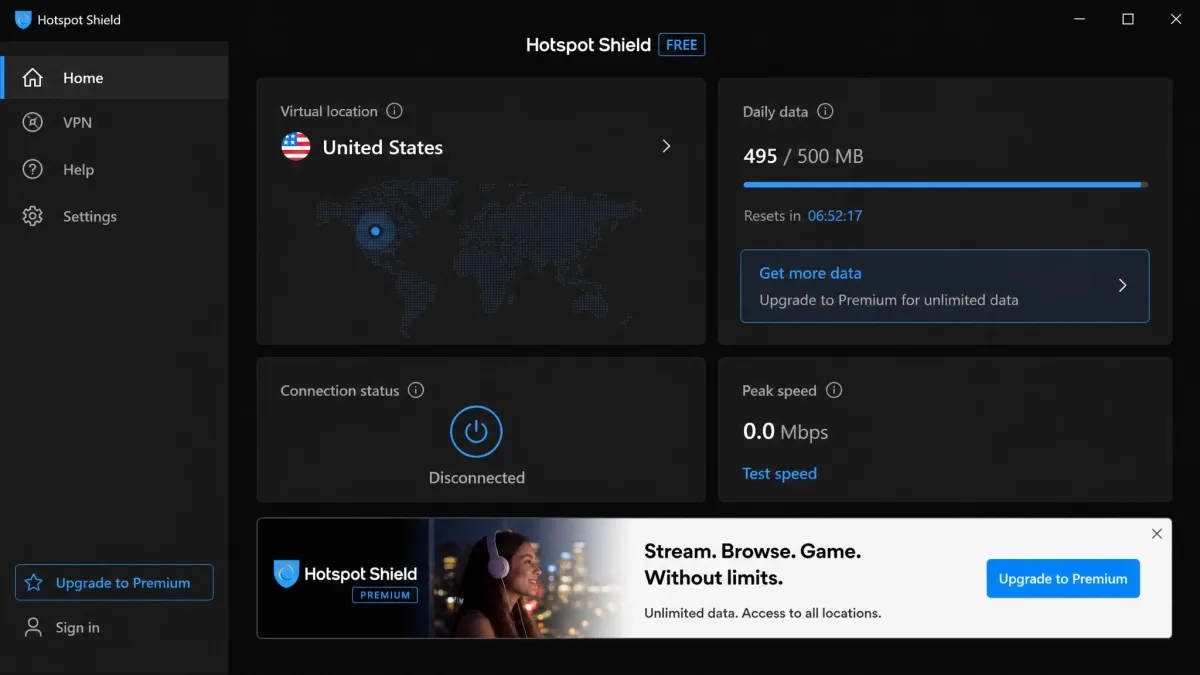
Hotspot Shield rounds out our list, and it is the most limited free plan here, so temper your expectations. Its free tier locks you to a single US server and 500MB per day. That gets old fast for streaming or long sessions. The vendor's marketing page advertises "unlimited bandwidth," but the free plan we tested measured a hard 500MB daily cap, throttled to roughly 2Mbps. Those bigger marketing figures describe the paid tiers. They are not the free one. The daily ceiling is the defining constraint, and it resets each morning, so this works as an on-and-off tool rather than something you leave running all day.
So why include it? For short, light bursts, it does the job with almost no setup. Its proprietary Hydra protocol is tuned for speed. Quick tasks like checking email on public Wi-Fi or reading a few pages felt responsive despite the throttle. The single US location also means there is no server list to think about. That keeps things simple when you just want a quick secure connection. The free tier is ad-supported. Watching ads is part of how you stretch that daily data allowance, so expect some interruptions.
Hotspot Shield includes a kill switch and covers one device on the free plan. It makes a no-logs claim for browsing activity, which we examine in our Hotspot Shield review. It is the pick for someone who only needs a VPN occasionally and values a fast, no-fuss connection over data freedom. For anything more than light daily use, one of the picks above will serve you far better.
Pros and Cons
Pros
- Fast, speed-tuned Hydra protocol for quick tasks
- Simple, near-instant setup on Windows
- Kill switch included on the free plan
- No-logs claim for browsing activity
Cons
- Just 500MB of data per day
- Throttled to about 2Mbps
- Only a single US server location, and it is ad-supported
Best of all, there is nothing to configure. With one US server and a daily cap, Hotspot Shield fits the person who wants a quick secure connection on public Wi-Fi and nothing more. If you want an always-on VPN, its daily cap will frustrate you within a week.
Side-by-Side Comparison of the Best Free Windows VPNs
Seen together, the trade-offs get clearer. Proton VPN and hide.me win on data freedom. Windscribe wins on device coverage and features. PrivadoVPN wins on streaming, and Hotspot Shield trades everything for a simple fast connection in short bursts. The table below lines up the numbers that matter most. Match a plan to how you actually use your PC.
| Product | Buy | Free data cap | Servers (free) | Streaming | Kill switch | No-logs / audited | Best for |
|---|---|---|---|---|---|---|---|
|
Visit Site → | Unlimited | 10 countries | No | Yes | Yes, audited | Best overall, unlimited data |
|
Visit Site | 10GB/mo (2GB no email) | ~10 to 11 locations | Limited | Yes | Yes, RAM-only | Features and unlimited devices |
|
Visit Site | Unlimited | 8 countries | Blocked | Yes | Yes, 2024 audit | Unlimited data plus privacy |
|
Visit Site | 10GB/mo | ~12 to 13 locations | Netflix yes, others no | Yes | Yes, not audited | Streaming |
|
Visit Site | 500MB/day | 1 US location | Limited | Yes | Claimed | Fast, light everyday use |
How We Tested and Chose These Free VPNs
We approached this the way any Windows user would. We installed each app on a Windows 11 laptop, signed up for the free tier, and used only the free features. No unlocked press accounts. No paid servers borrowed for a better score. If a data cap applied, we lived with it. If the free plan chose our server for us, we let it. The goal was to see exactly what a first-time user sees on day one, not a curated best case.
From there we scored each service on the things that decide whether a free VPN is worth keeping. Speed came first. A slow VPN gets uninstalled within a day. So we checked everyday responsiveness and watched how connections held up during busy evening hours, when free servers fill up. We tested the kill switch by forcing the connection to drop and watching whether traffic leaked. A kill switch that fails silently is worse than none at all. We tried common streaming platforms to see what the free servers could and could not reach. We also weighed the data cap, the number of free locations, and how many devices each free account could cover.
Privacy carried heavy weight too. We favored services with a clear no-logs policy. We gave extra credit to plans whose privacy claims have been checked by an independent audit rather than simply asserted. An audited no-logs policy is the difference between a promise and a proof. Securitum verified one for hide.me in 2024, and Proton VPN publishes one of its own. We also read the fine print for the quiet catches that separate a safe free VPN from a risky one, like ad-supported data models or vague logging language. And we checked how each app behaved on both Windows 10 and Windows 11, rather than assuming they were identical.
Whatever free VPN you choose, connect it once and run a quick DNS leak test in your browser before you rely on it. A working kill switch and a clean leak test are the two checks that tell you the protection is real.
Why Use a VPN on Windows 11 and 10?
A VPN routes your internet traffic through an encrypted tunnel to a remote server. That hides your real IP address and shields your data from anyone watching the network. If you want the technical version, this overview of how a VPN works walks through the mechanics. On a Windows PC, that protection matters in a handful of everyday situations. It is worth knowing which ones actually call for a VPN.
Public Wi-Fi is the big one. On an open network at a cafe or airport, anyone else on that network can potentially watch unencrypted traffic. A VPN keeps them from snooping on what you send and receive. It also stops your internet provider from logging every site you visit. That matters if you would rather your browsing history not become part of a marketing profile. And it lets you access content and services as if you were in another location, which is handy when a site is region-locked. For privacy-minded users, a VPN is simply a baseline layer of online security.
Windows has strong built-in defenses, but they solve a different problem. Windows Defender guards against malware on your machine. A VPN protects your connection as it crosses the network. One does not replace the other. Running both is the sensible setup, not a redundancy. Government security agencies recognize VPNs as a legitimate protection tool. This CISA guidance on VPNs is a useful primer on their role and their limits, including the reminder that a VPN protects the connection, not the device.
What Does "Free" Really Mean? Data Caps, Speeds, and Server Limits
"Free" is never quite free, so it helps to know what you are trading. With reputable free VPNs, the cost shows up as limits rather than hidden charges. Three limits shape your experience: data caps, speeds, and server access. Every free plan pulls one of those levers to keep the lights on.
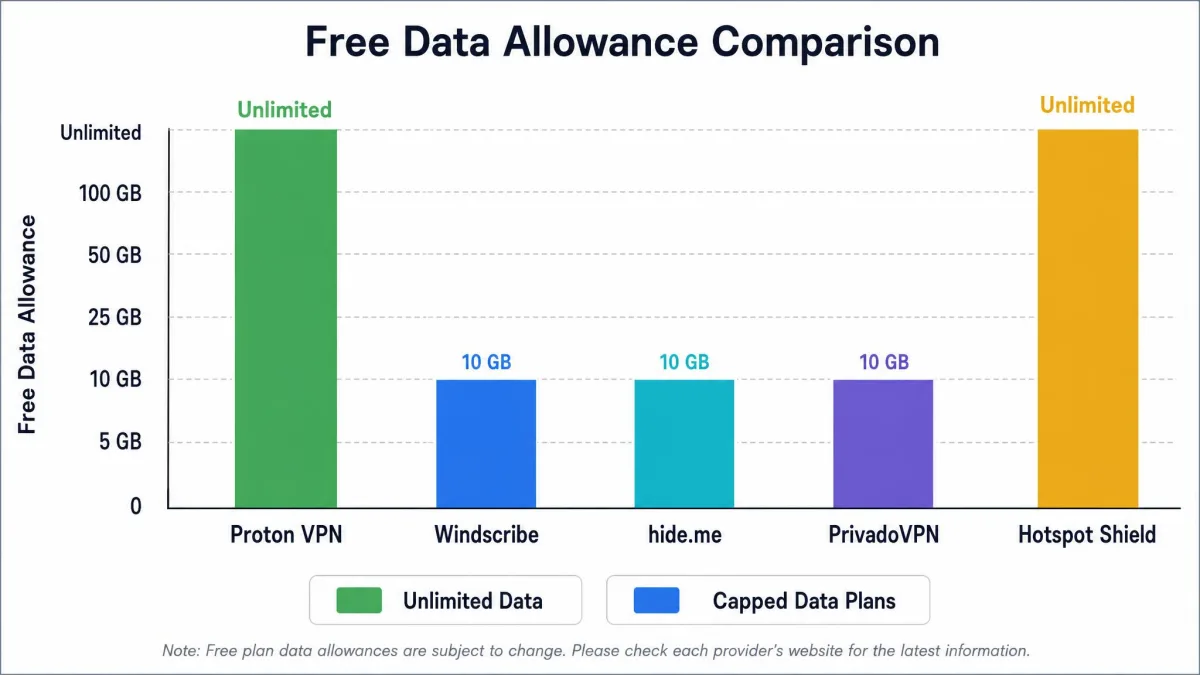
Data caps are the most common. hide.me and Proton VPN are the exceptions with unlimited free data. Windscribe gives you 10GB a month, PrivadoVPN the same, and Hotspot Shield just 500MB a day. Which cap you can live with depends entirely on how you use your PC. Browsing and email sip data. Video and downloads gulp it. Speed is the next lever. Free servers are shared with many more users than paid ones, so they get crowded and slow at peak times. Some services, like Hotspot Shield, throttle the free tier outright to a fixed ceiling.
Server access is the third. Free plans open only a slice of the full network. You get fewer countries, and on some services like Proton VPN and Hotspot Shield, no choice of which server you land on. Free servers also tend to block streaming to push you toward a paid upgrade. That is why every plan here restricts it in some form. None of these limits make a free VPN unsafe. They just define what it is good for: privacy and light browsing rather than heavy, high-bandwidth use. Once you match the limit to your habits, a free plan stops feeling like a compromise.
Free vs. Paid VPNs for Windows
A good free VPN covers the basics. But it is worth being honest about where a paid plan pulls ahead. The gap is not really about safety with the services in this guide. It is about performance, access, and convenience. If your needs are light, free is genuinely enough. If they are not, paying a few dollars a month removes almost every limit above. The lowest tiers from these same providers are inexpensive.
Paid plans lift the data caps. They open the full server network across dozens of countries, and they unlock reliable streaming and torrenting. You get faster, less crowded servers and more simultaneous device connections. You also get premium extras like ad blocking, multi-hop routing, and dedicated streaming servers. Take Proton VPN. Its paid Plus plan is what adds streaming, P2P, Secure Core, and the NetShield ad blocker on top of the free foundation. With a free plan you accept a data ceiling and slower peak-hour speeds in exchange for paying nothing. For many people, that is a fair trade.
People sometimes ask whether a free proxy does the same job. It does not. A proxy can reroute a single app or browser and mask your IP address. But it usually skips the strong, system-wide encryption a VPN applies to all your traffic. That means your other apps stay exposed while a proxy is running. For real security on Windows, a proper VPN beats a proxy. And a trustworthy free VPN beats a sketchy free proxy every time.
If you find yourself hitting a free data cap every few days, that is the signal to consider a cheap paid plan rather than juggling two free apps. The lowest paid tiers from these same providers remove the caps for the price of a coffee each month.
Risks of Free VPNs and How to Stay Safe
Here is the part that matters most. The wrong free VPN is worse than no VPN at all. A VPN sees all of your traffic. So a dishonest one is in a perfect position to abuse that access. This is exactly why we only recommend services with a clear privacy policy and, ideally, an independent audit. The provider you trust with your traffic is the single most important decision in this whole category.
The biggest risk is data logging and selling. Some free VPNs, especially unknown ones, fund themselves by collecting your browsing information. They sell it to advertisers or data brokers, which defeats the entire purpose. Others inject ads or bundle tracking. In the worst cases, they carry malware that arrives with the installer. Weak or absent encryption is another red flag. So is a vague privacy policy that does not clearly say the service keeps no logs. If a policy is written to sound reassuring without committing to anything, treat that as a warning.
Avoid any free VPN that cannot point to a clear no-logs policy, or that asks for unnecessary permissions, payment details for a "free" plan, or bundles extra software during install. If the business model is not obvious, you are likely paying with your data.
Staying safe is mostly about sticking to reputable names. Choose a service with a published, ideally audited, no-logs policy, like the picks in this guide. Confirm the app has a working kill switch, so your traffic is never exposed if the connection drops. Test it once yourself rather than trusting the toggle blindly. Download only from the official site or the provider's own store listing, never a mirror or a bundled download page. Then run a quick leak test after you connect. Do those four things and a free VPN is a safe, useful layer of protection rather than a liability.
Free Windows VPNs to Avoid
Not every free VPN made our list, and a few deserve an active warning. As a rule, avoid free VPNs with no clear company information, no stated no-logs policy, or a history of security incidents. The app stores are full of anonymous free VPNs promising unlimited everything. Those "too good to be true" offers are often the ones monetizing your data behind the scenes.
Be especially wary of free VPNs that advertise unlimited free data, unlimited speed, and dozens of countries all at once, with no visible way of paying the bills. Running a global server network is expensive. A truly free service has to recoup that cost somewhere. With our recommended picks, the cost is transparent limits or an optional paid upgrade. With the ones to avoid, the cost is usually your privacy, collected quietly and sold on.
We also steer clear of free browser-based VPN extensions that call themselves full VPNs. Many only protect your browser tab, not your whole PC. So anything outside that one browser travels unprotected. Some of the most-installed free extensions have poor privacy track records as well. If a free service will not tell you plainly who runs it and how it makes money, treat that silence as your answer and move on.
How to Set Up a Free VPN on Windows
Getting a free VPN running on Windows 10 or Windows 11 is genuinely easy. It takes only a few minutes. The steps are the same across every pick in this guide. So once you have done it with one, you can switch services without relearning anything.
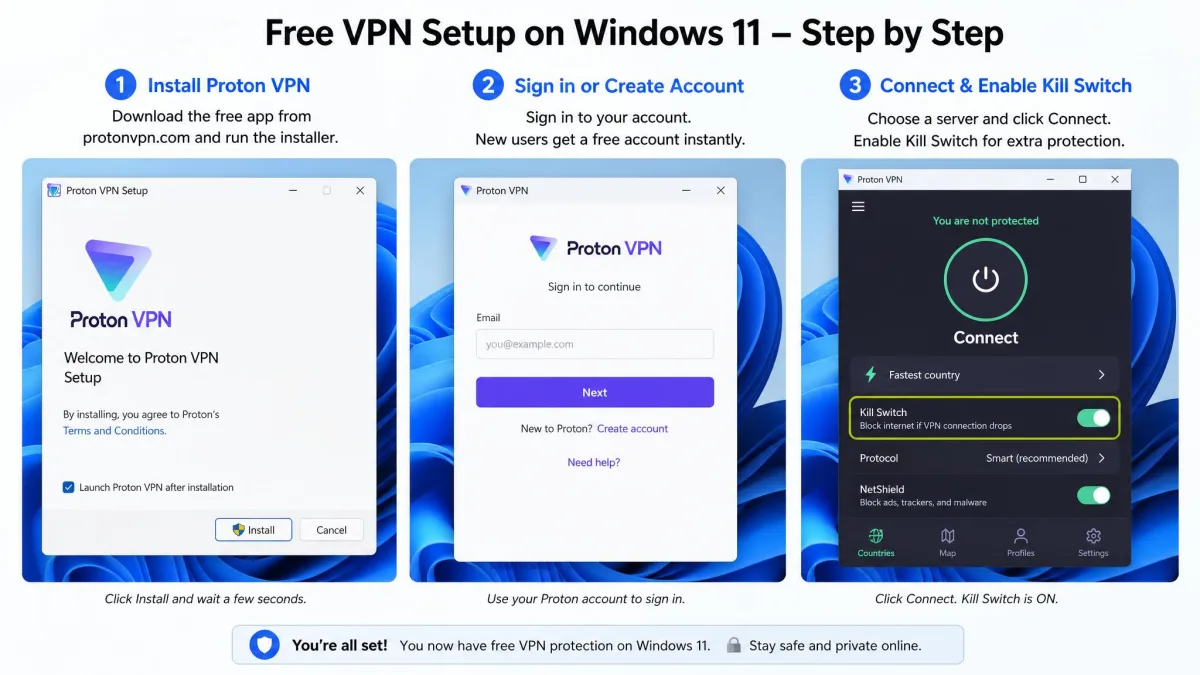
Start by downloading the app from the provider's official website. Run the installer and follow the prompts. Create a free account, which usually means confirming an email address. Remember that with Windscribe, a confirmed email is what unlocks the full 10GB monthly allowance instead of the 2GB starter amount. Open the app and sign in, then click the main connect button. Most free plans will pick the fastest server for you, so you often do not need to choose a location at all.
Before you rely on it, take two quick steps. Turn on the kill switch in the app's settings, so your connection is protected if the VPN ever drops. Then run a DNS leak test in your browser to confirm your real IP address is hidden. That is the whole process. From there the VPN runs quietly in the background. You can disconnect or switch servers whenever you like.
Final Verdict: The Best Free VPN for Windows
After testing all five on Windows 11, Proton VPN is the free VPN we would install first. We would recommend it to almost anyone. Unlimited data and an independently audited no-logs policy are a combination no other free plan here matches. Day to day, that is worth more than any single flashy feature. It is the safest, most sustainable free choice for everyday browsing on a PC.
The runners-up each own a lane. Windscribe is the pick if you want to cover several devices from one free account and enjoy features to configure. hide.me is the other unlimited-data option, and the choice for privacy purists. PrivadoVPN is the one to try if you mainly want to stream. Hotspot Shield suits quick, light sessions where you just need a fast connection for a few minutes. Match the plan to your habits and any of them will serve you well.