![Can Your Internet Provider See Your History With a VPN? [2026]](can-internet-provider-see-history-with-vpn.webp)
No, your internet provider cannot see your browsing history when a VPN is active and working correctly. It can see that you are connected to a VPN server, when the connection starts and stops, and how much data you move, but not the websites you visit or the searches you run. That single fact is the reason most people install a VPN in the first place.
The catch is the phrase "working correctly." A VPN protects your history only while the encrypted tunnel holds and no traffic slips around it. When a DNS request escapes the tunnel or the connection drops without a safety net, your ISP can quietly log the domains you looked up. In this guide we'll walk through exactly what your provider sees with and without a VPN, how the encryption actually works, and the leaks that undo it.
We'll also cover the questions that trip people up: whether your ISP can tell you are using a VPN at all, what your VPN provider itself can see, and why incognito mode does nothing to hide you from your network.
The short answer: what your ISP sees with a VPN
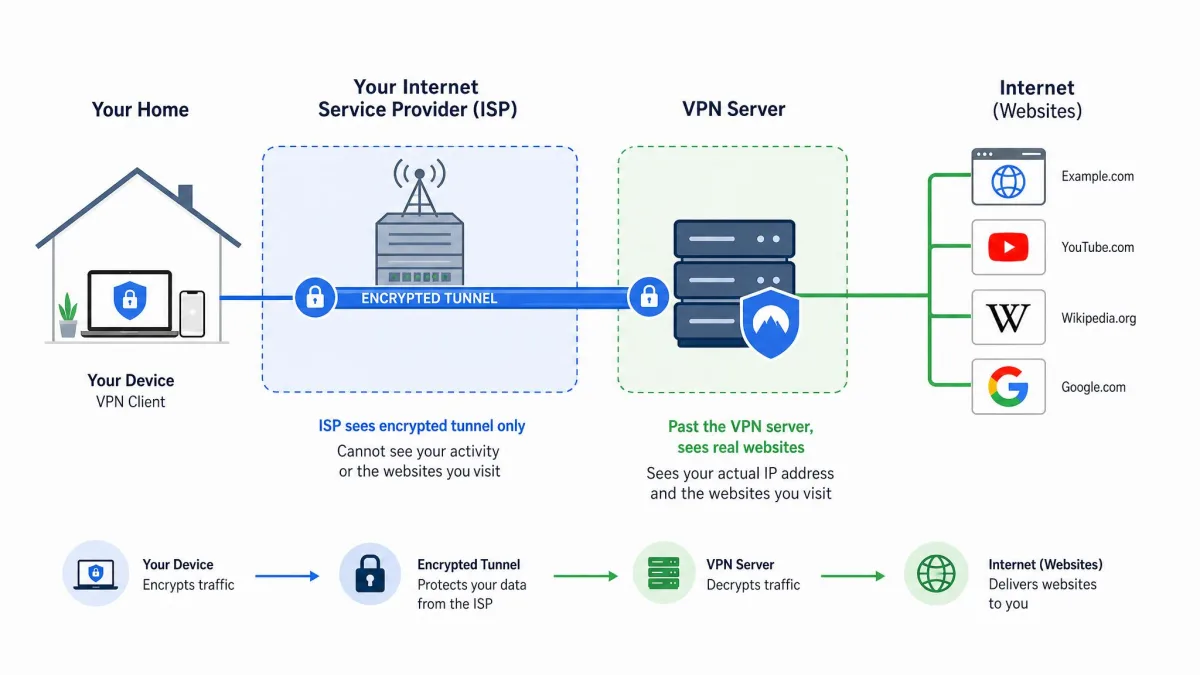
When a VPN is running, your traffic leaves your device already encrypted and travels through a tunnel to the VPN server before it reaches the wider internet. Your ISP still carries that traffic, because it carries everything on your connection, but it can no longer read what is inside.
Here is what your provider can still observe with a VPN active. It sees that you are connected to a VPN server, and it sees that server's IP address. From that address it can estimate the server's approximate location and often guess which VPN company it belongs to. It also sees the timestamps for when your session starts and ends, and the total volume of data you upload and download.
Here is what it can no longer see. It cannot see which websites you visit, the specific pages or URLs you open, the searches you type, or the files you download. Your real IP address is replaced by the VPN server's IP for every site you reach, so from the outside your activity looks like the server's, not yours.
That is the core answer. Everything below explains the boundaries of it, because a VPN changes what your ISP sees without making you invisible on the network.
What your ISP can see WITHOUT a VPN
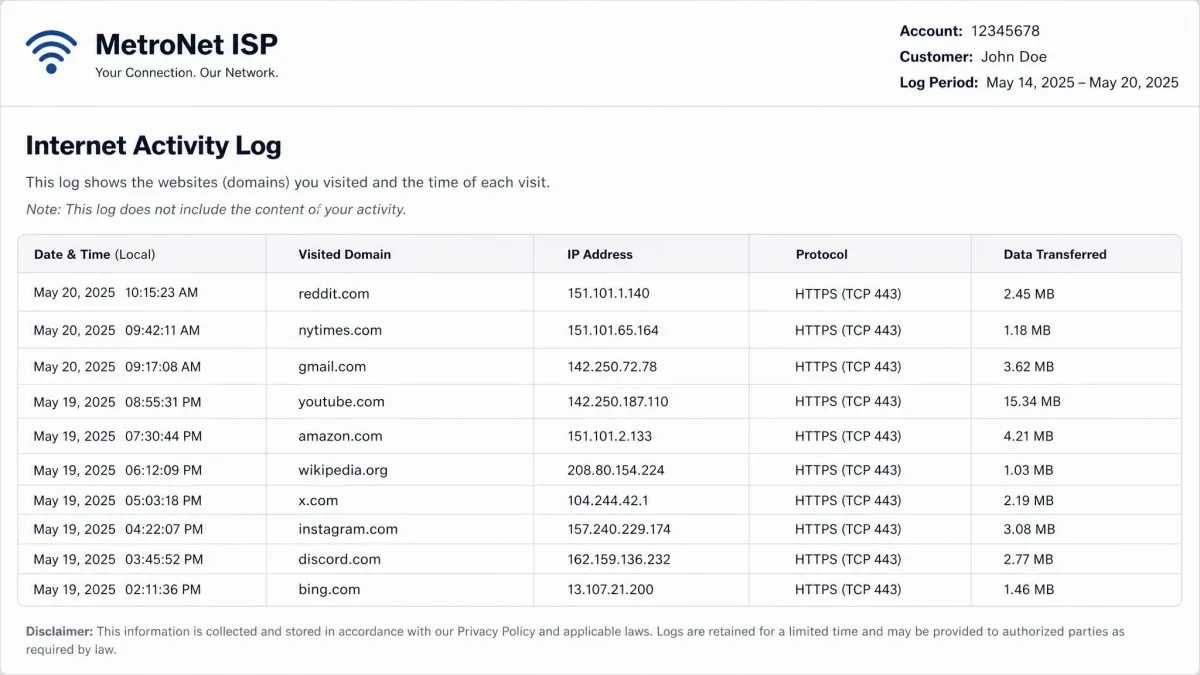
Without a VPN, your internet provider sits directly between you and every site you reach, and it can see a great deal. It can log every domain you visit, such as reddit.com or nytimes.com, each one stamped with the date and time. It sees the IP addresses your device connects to, your DNS queries, and the amount of data each connection uses.
This surprises people who assume that HTTPS solves the problem. HTTPS encrypts the content of a page, so your ISP cannot read the article you are reading or the password you type. It does not hide the destination. Through your DNS lookups and the connection itself, your provider still sees the domain you connect to, just not the specific page within it.
In practice that means an ISP without a VPN in the way can build a detailed picture of your habits: the sites you frequent, when you use them, and how often. If you want to understand why that matters, the Electronic Frontier Foundation's work on digital privacy protections lays out how much can be inferred from browsing metadata alone.
HTTPS and a padlock icon in your address bar protect the contents of your session. They do not hide which website you are visiting from the network you are on. Those are two different layers of privacy.
What your ISP CAN and CANNOT see WHEN you use a VPN
A VPN closes the gap that HTTPS leaves open. It hides not just the content of your sessions but the destinations too, because your ISP can no longer see past the encrypted tunnel to the sites on the other side. To understand why, it helps to look at how the tunnel is built.
How the encrypted VPN tunnel works
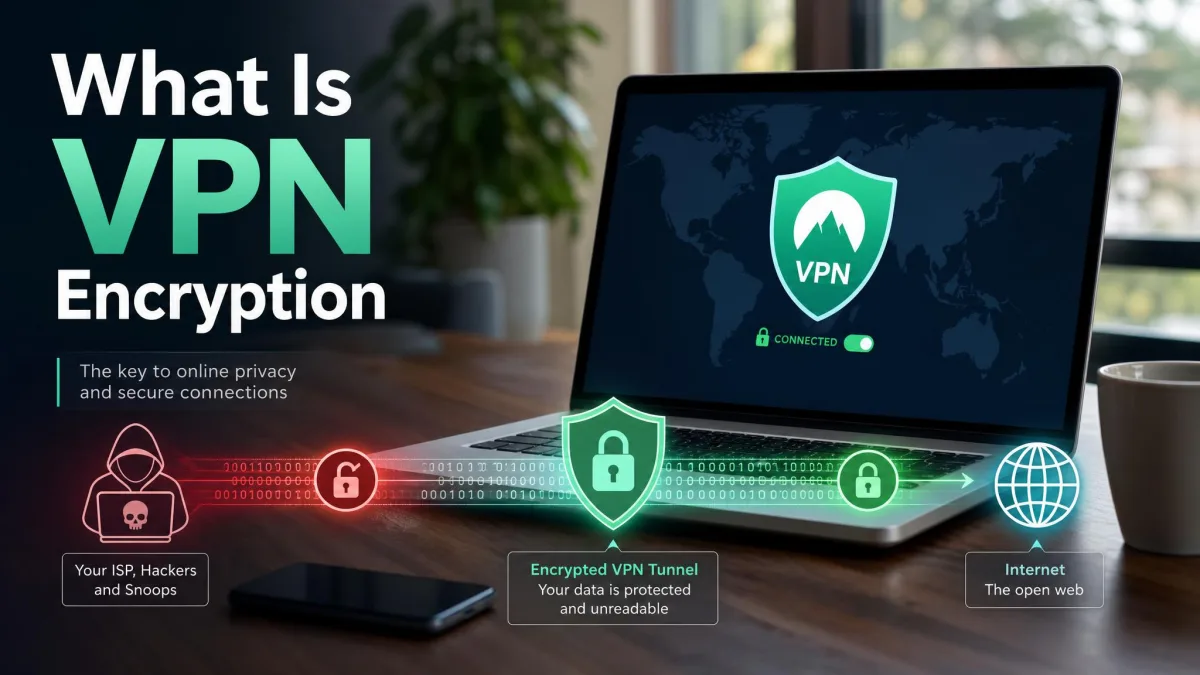
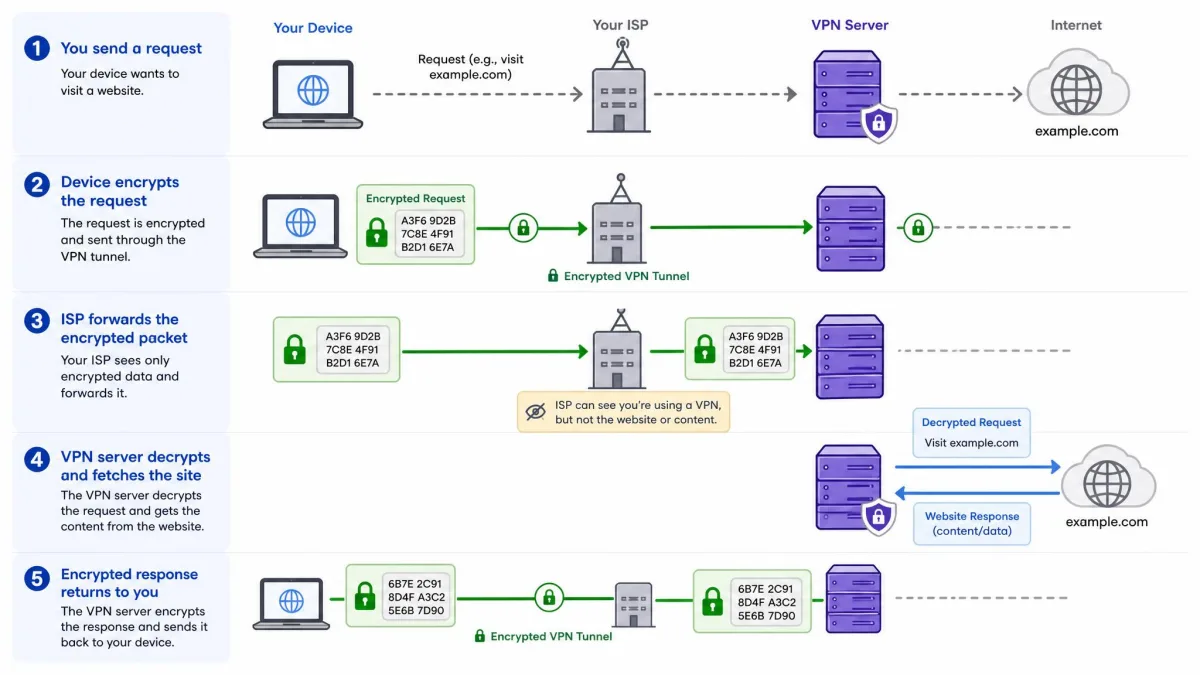
When you connect to a VPN, your device and the VPN server agree on a set of encryption keys and open an encrypted tunnel between them. Every request you make, including the DNS lookups that translate a website name into an address, is wrapped in that encryption before it leaves your device. Common protocols such as OpenVPN handle this handshake and the ongoing encryption of your traffic.
Your ISP still moves these packets along, because it is the road your data travels on. What it receives now is a stream of encrypted data addressed to the VPN server, with no readable destination or content inside. The VPN server decrypts your request, fetches the site on your behalf, and sends the encrypted reply back through the tunnel. Your provider sees the conversation happening but cannot read a word of it.
Does HTTPS alone protect your history?
No, and this is the distinction that matters most. HTTPS encrypts what happens on a website, but the request to reach that website still reveals the domain to your ISP. Even on a fully HTTPS site, your provider sees that you connected to the domain, through both the DNS query and the connection destination, even though it cannot read the specific page you loaded.
A VPN removes that last leak because the DNS query and the destination both travel inside the encrypted tunnel. HTTPS protects a single site's content; a VPN protects the entire record of where you went. That is why "just use HTTPS" is not a substitute for a VPN when your goal is to keep your browsing history from your ISP.
Can your ISP detect that you are using a VPN?
Yes. Hiding your browsing history and hiding the fact that you use a VPN are two different things, and a standard VPN does the first, not the second. Your ISP has a few reliable ways to tell that a tunnel is running.
First, VPN companies operate large ranges of server IP addresses that are publicly known, so a connection to one of those addresses is a strong signal. Second, VPN traffic often uses distinctive ports and protocols; OpenVPN's default port is UDP 1194, for example, which stands out to anyone watching. Third, providers can use deep packet inspection to recognize the shape of an encrypted tunnel without ever decrypting its contents.
VPN traffic also carries a recognizable signature. The packets tend to be uniform in size and timing, which makes the tunnel stand out under traffic analysis even when the destination is hidden. So your ISP can usually tell that you are connected to a VPN. What it still cannot tell is what you are doing inside that connection.
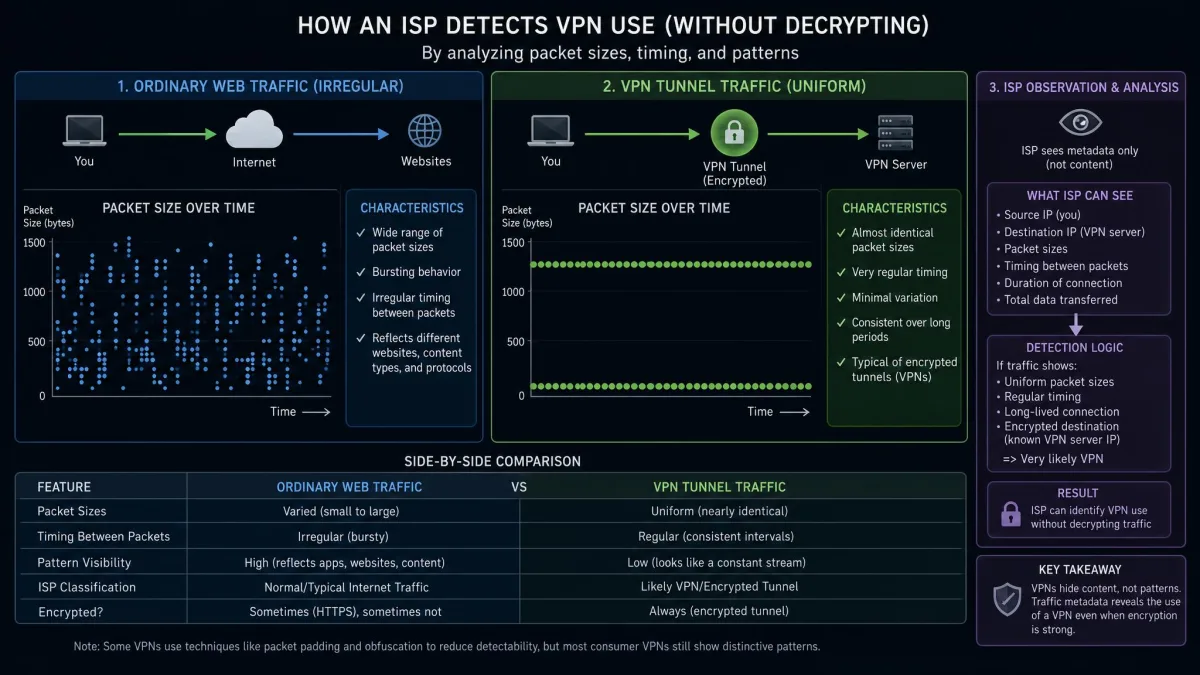
Being able to detect a VPN is not the same as being able to see through one. Your ISP knowing you use a VPN reveals nothing about the sites you visit, and in most countries using a VPN is completely ordinary.
What your VPN provider can see (and no-logs policies)
A VPN moves the point of trust rather than removing it. Once your ISP is shut out, the VPN provider takes the position your ISP used to hold, standing between you and the internet. Technically, it can see your real IP address and the destinations you visit, because it decrypts your traffic to send it onward. That is exactly why the provider's logging policy is the thing that matters.
A no-logs policy is a promise that the provider does not record which sites you visit or store logs that could tie activity back to you. The problem is that a promise on a marketing page carries no independent weight. Any company can claim it keeps no logs.
A self-declared no-logs policy proves nothing on its own. Trust it only when an independent, named third-party audit firm has verified the claim and published its findings.
How to verify a no-logs claim
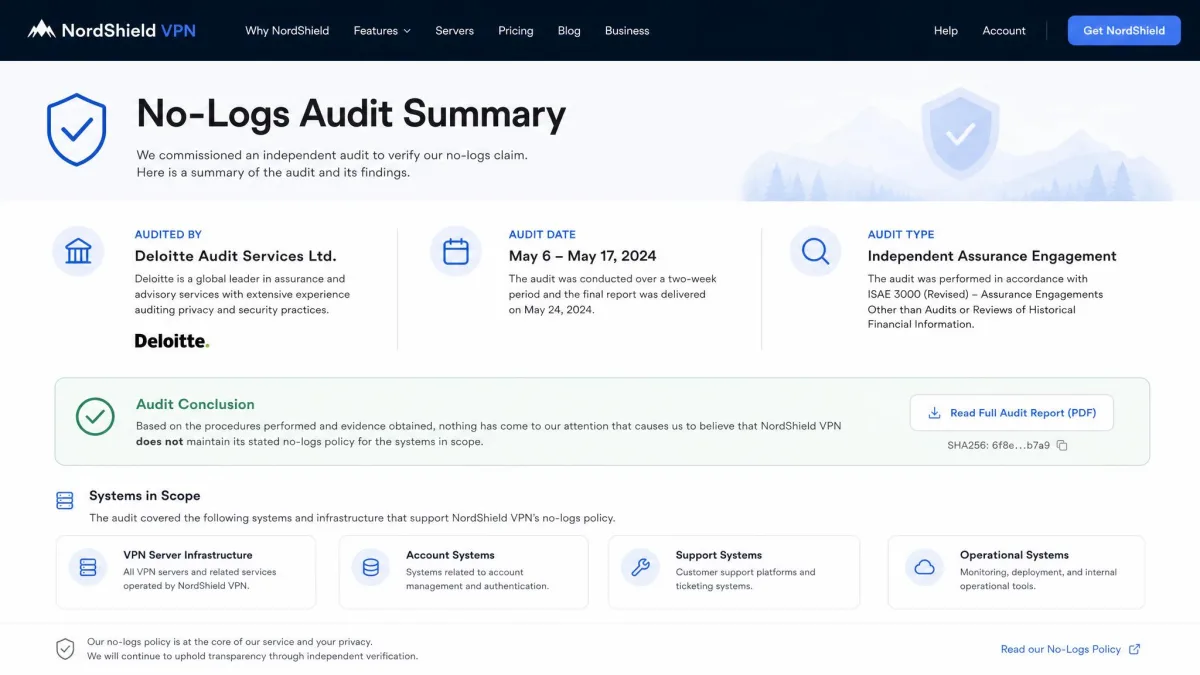
Look for an audit conducted by a recognized outside firm, not a statement written by the provider itself. A credible audit names the firm, states when it was carried out, and describes what was examined, whether that is the server configuration, the source code, or the company's internal data-handling. Providers that have been audited usually publish or link the report, so its absence is telling.
It is also worth reading which data the provider admits to keeping even under a no-logs policy. Some retain aggregate connection totals or diagnostic data that do not identify individual sites. The goal is not zero information, which is rarely realistic, but a verified guarantee that your browsing destinations are never recorded.
DNS leaks: the most common way your history still leaks
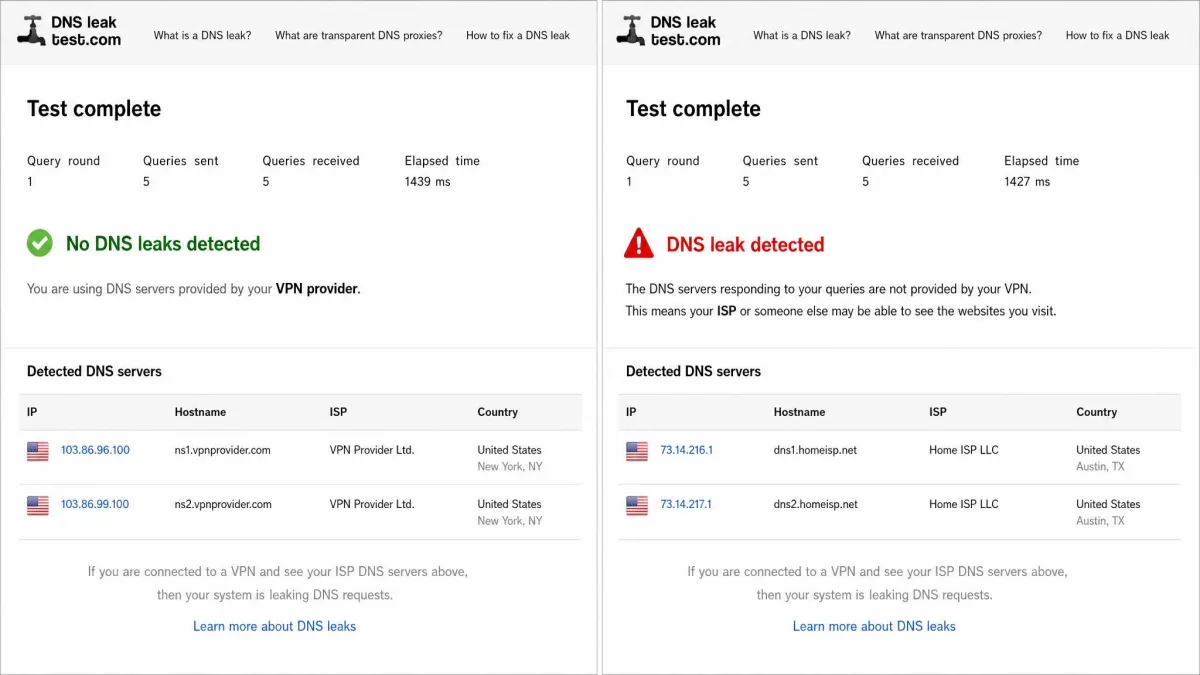
Here is where a VPN most often falls short in practice. A DNS leak happens when your DNS requests travel to your ISP's DNS servers instead of through the encrypted tunnel, even though the VPN appears to be connected. When that happens, your ISP sees exactly which domains you looked up, which defeats the entire point of the tunnel.
Leaks have several common causes. Since Windows 8, Microsoft's Smart Multi-Homed Named Resolution sends DNS requests across every network interface at once rather than only the VPN tunnel, which routinely produces leaks. Split-tunnel configurations can route some traffic outside the VPN by design, and IPv6 or Teredo traffic can slip past a tunnel that only handles IPv4.
What makes leaks dangerous is that they are invisible unless you check. A VPN can pass a DNS leak test the moment you connect, then start leaking after you reconnect, switch networks, or wake the machine from sleep, so it is worth re-testing after each reconnect. Leaks also tend to reappear after an OS update resets network behavior, on public hotspots that force their own DNS, and on router setups that do not push DNS through the tunnel.
The good news is that checking takes almost no effort. A DNS leak test runs in a browser in a minute or two using a site such as dnsleaktest.com, and a failing result is obvious: it lists your home ISP's DNS servers instead of the VPN's. If you see your provider's name in the results, your history is leaking.
Kill switch and how to prevent leaks
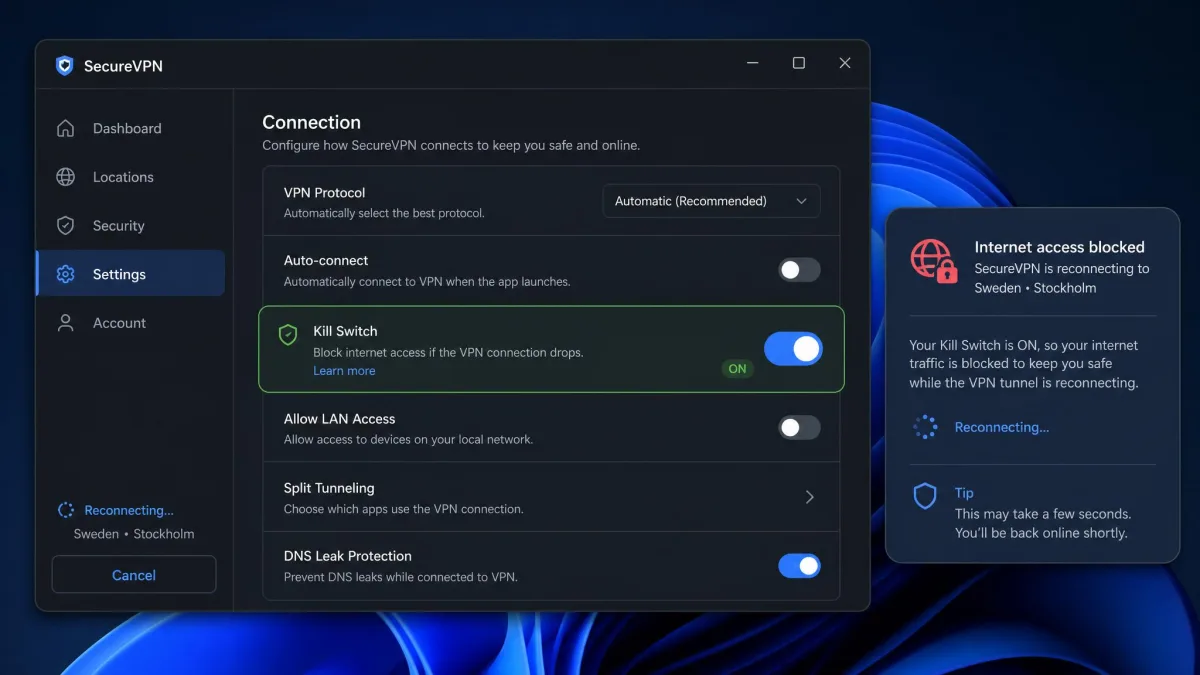
The single most useful safeguard is a kill switch. A kill switch blocks all internet access the instant the VPN connection drops, so your traffic and DNS never fall back to the ISP unprotected during the seconds it takes to reconnect. In real use, the most common failure is not weak encryption but poor endpoint handling: the tunnel drops, the app fails to cut the connection fast enough, and traffic briefly reaches the ISP exposed.
That is why a "Kill Switch Enabled" toggle is not proof that the feature works. The reliable check is to force the VPN to drop, by killing the connection or the app, and watch whether your internet is actually cut. If pages still load after the tunnel fails, the kill switch is not doing its job.
Do not trust a kill switch just because the toggle is on. Test it by forcing the VPN to disconnect and confirming that your internet access stops until the tunnel comes back.
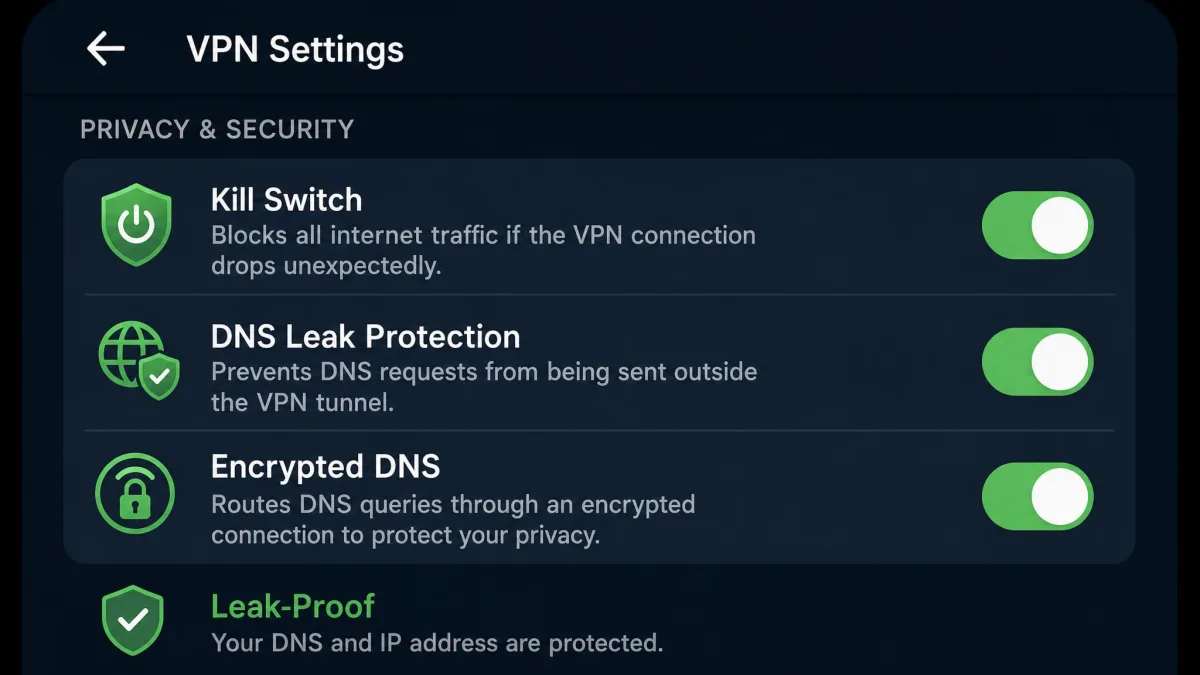
Beyond the kill switch, leaks are prevented by routing DNS through the tunnel, enabling the VPN's DNS-leak protection, using encrypted DNS such as DNS over HTTPS or DNS over TLS, and disabling IPv6 or Teredo where it bypasses the tunnel. When a leak or connection problem does appear, disconnecting and reconnecting or switching to a different server usually restores protection, since individual servers occasionally get overloaded or unstable.
Can your WiFi provider, router admin, or employer see your history with a VPN?
The same principle that shields you from your ISP shields you from everyone else on the local path. Your WiFi provider, the admin of the router you connect through, and your employer all sit on the network between your device and the internet, in the same position as your ISP. With a working VPN, they see encrypted traffic to a VPN server and nothing more.
That means the owner of a coffee-shop or hotel network, or a family member who administers your home router, cannot see the specific sites you visit while your VPN is active. They can still see that a device is connected and that it is using a VPN, along with the data volume, but not the destinations.
Workplaces deserve a note of caution. If your employer manages the device itself, with monitoring software installed on the machine, a VPN does not help, because that software can observe your activity before it is ever encrypted. A VPN protects traffic on the network; it does not protect you from software running inside your own device.
On a company-managed device with monitoring software installed, a VPN will not hide your activity. Endpoint monitoring reads your screen and keystrokes before any traffic reaches the tunnel.
Does incognito mode stop your ISP from seeing your history?
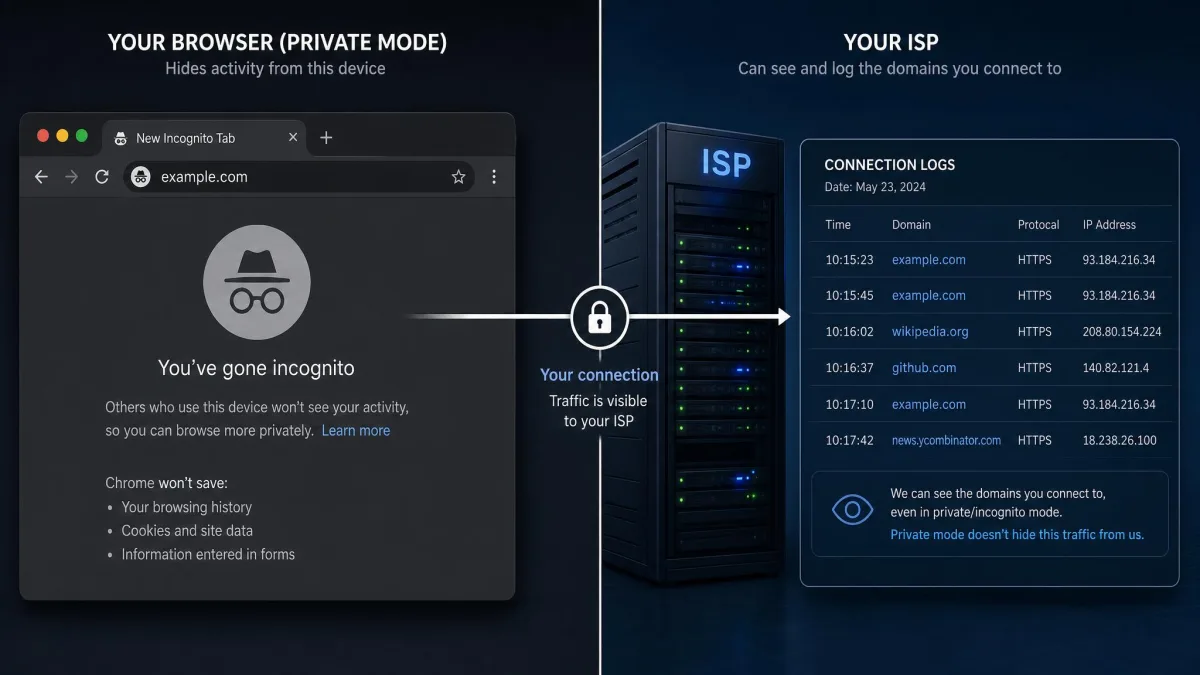
No. This is one of the most common misunderstandings about online privacy. Incognito or private mode only clears local history on your own device, so the browser does not save the pages you visit, your cookies, or form entries after you close the window.
Your ISP still receives and can log every DNS query and domain connection you make during an incognito session, exactly as it would in a normal window. Private browsing hides your activity from other people who use the same computer. It does nothing to hide it from your network. Only a VPN, which encrypts the traffic itself, keeps your destinations away from your ISP.
Is it legal for ISPs to track your browsing (and for you to use a VPN)?
In the United States, yes, ISPs are largely free to track your browsing, and that freedom grew after a 2017 decision. In 2017 Congress voted to repeal the FCC's broadband privacy rules, which allowed US ISPs to collect and sell customers' browsing history, location, and app-usage data to advertisers without asking for opt-in consent. For a plain-language overview of where you stand, the FCC still publishes guidance on your ISP and your privacy rights.
Using a VPN to keep that data private is itself perfectly legal. A VPN is legal in the US and in most countries around the world, and using one to protect your browsing history is an ordinary, legitimate choice. A small number of countries restrict or ban VPN use, so if you travel it is worth checking local rules before you rely on one.
Legal tracking is still tracking. The fact that an ISP is permitted to log and sell browsing data in the US is exactly why many people choose to encrypt that data with a VPN.
Alternatives to a VPN (Tor, DNS change, HTTPS proxies, private search)
A VPN is the most complete way to hide your browsing from your ISP, but it is not the only tool, and each alternative covers less ground. It helps to know what each one actually does before you rely on it.
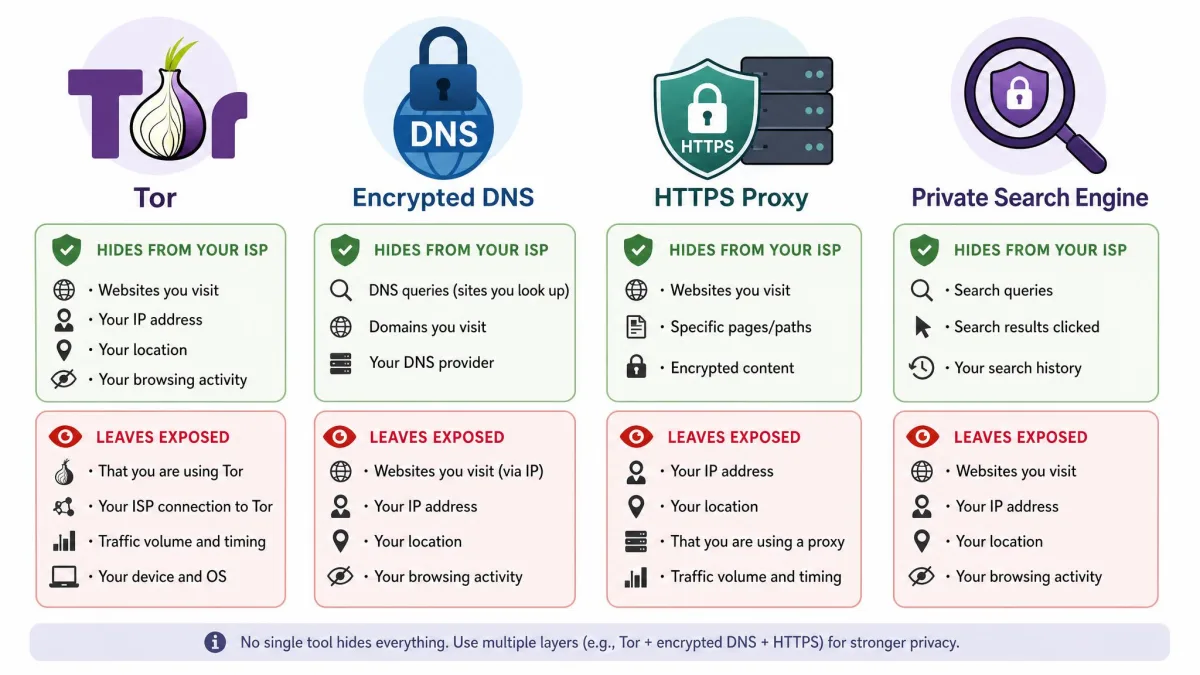
Tor routes your traffic through several volunteer-run relays using onion routing, which makes it very hard to trace an activity back to you. It is powerful for anonymity but noticeably slower than a VPN, which makes it a poor fit for streaming or large downloads. Changing your DNS resolver, or using encrypted DNS, hides your DNS lookups from your ISP but does not encrypt the rest of your traffic, so the connection destinations can still be visible.
HTTPS proxies can route a single application's traffic through another server, but they typically protect only that app rather than your whole device, and their encryption and trustworthiness vary widely. Privacy-focused search engines keep the search company itself from building a profile on you, but they do nothing to hide your activity from your ISP, since the connection still runs across your provider's network.
The honest summary is that these tools solve narrower problems. If your goal is to keep your full browsing history away from your ISP across every app on your device, a full VPN tunnel remains the most reliable option, with the others filling specific gaps rather than replacing it.
At a glance: what your ISP sees with a VPN vs without
The table below sums up the difference a working VPN makes, line by line.
| What your ISP can see | Without a VPN | With a VPN active |
|---|---|---|
| Sites and domains you visit | Visible, logged with timestamps | Hidden |
| Search queries | Visible on non-encrypted lookups | Hidden |
| Downloads and specific files | Visible (domain and size) | Hidden |
| That you use a VPN | Not applicable | Visible |
| Data volume (upload/download) | Visible | Visible |
| Connection times | Visible | Visible |
| Your real IP and destination IPs | Visible | Replaced by VPN server IP |
Frequently asked questions
Can my ISP see the sites I visit with a VPN?
Does a VPN completely hide my browsing history?
Can my ISP tell I'm using a VPN?
Does incognito mode hide my history from my ISP?
What is a DNS leak and how do I check for one?
Is a free VPN good enough to hide my history from my ISP?
Is it legal for my ISP to track my browsing?
Can my WiFi or router owner see my history with a VPN on?
Conclusion: keeping your browsing private from your ISP
The direct answer is reassuring: with a working VPN, your ISP cannot see your browsing history, only that you are connected, when, and how much data you use. The encrypted tunnel closes the gap that HTTPS alone leaves open, and it extends that protection to your WiFi provider, router admin, and network alike.
The word that carries the weight is "working." A VPN protects your history only while the tunnel holds and nothing leaks around it, which is why DNS-leak protection, a tested kill switch, and an independently audited no-logs policy are the details worth checking. Run a DNS leak test after you connect and again after you switch networks or wake from sleep, and confirm that your kill switch actually cuts the connection when the tunnel drops.
Do those few things and a VPN delivers on its core promise. Your provider is left with a record that you connected to a VPN and moved some data, and nothing at all about where you went online.