iTop VPN is a budget consumer VPN with a genuinely free tier, a large server network, and beginner-friendly apps for Windows, macOS, iOS, and Android. It is cheap, easy to install, and fine for casual browsing. It is also unaudited, missing WireGuard, and slower than its price-matched rivals in our testing. So is it safe and worth it in 2026? Our short answer: iTop VPN is a reasonable pick if you want a low-cost VPN for light streaming and everyday privacy, but security-focused users and heavy streamers will be better served elsewhere.
We spent time running iTop VPN across free and premium plans, measuring speed on a fast home line, checking for DNS and WebRTC leaks, and testing which streaming services it could reach. The picture that emerged is consistent: iTop does the basics competently and undercuts almost everyone on price, yet it asks you to trust claims it has never had independently verified. This review walks through the pricing, the privacy and logging policy, the security stack, our speed numbers, and where iTop lands against NordVPN and CyberGhost.
We approach every VPN the same way: connect on a fast home line, watch what happens to speed at different server distances, run leak tests to confirm the tunnel holds, and try the streaming and torrenting jobs people actually buy a VPN for. A low price does not earn a recommendation on its own. It has to survive contact with real use. iTop survives that contact for casual users and stumbles for demanding ones, and the sections below show exactly where the line falls.
Verdict at a Glance
iTop VPN earns its place as a value option rather than a top-tier recommendation. The free plan is real and usable within a tight daily data cap. The premium plan is inexpensive on long terms, and the apps are among the easiest we have used. The trade-offs are meaningful, though. There is no WireGuard, the custom proxy protocol and no-logs claim have never been audited, and the company is headquartered in Hong Kong, which raises questions some privacy-conscious buyers will not want to gloss over.
Put simply, iTop is a competent budget tool that has not proven its most important claims. If your bar is "encrypt my traffic on public Wi-Fi and let me watch a few shows," it clears it easily. If your bar is "verified privacy and gigabit-class speed," it does not, and no amount of low pricing changes that.
iTop VPN Pros and Cons
Before the detail, here is the balance sheet we arrived at after hands-on use. The strengths are around cost and simplicity. The weaknesses cluster around trust and protocol maturity.
Pros
- Very cheap on the longest subscription terms
- A genuinely free tier for casual use
- Beginner-friendly apps across Windows, macOS, iOS, and Android
- Unblocks several major streaming services on premium
- Split tunneling and a useful set of extra tools
Cons
- Custom proxy protocol that has never been audited
- No WireGuard support
- No-logs policy has never had an independent audit
- Email-only support that can be slow to respond
iTop VPN Pricing and Plans (Free vs Premium)
iTop VPN sells the usual tiered subscription, and the value swings hard toward the longest commitment. The 12-month plan works out to $3.99 per month, billed at $47.99 up front. The cheapest rate drops to $1.66 per month on the longest 36-month plan, which is where iTop undercuts nearly every mainstream rival. The standard monthly rate hovers between roughly $11.99 and $12.99, because iTop's headline price shifts with rotating promotions.
One quirk is worth flagging before you buy. In our look at the plan ladder, the 24-month and 36-month options can end up costing about the same total, which makes the shorter of the two poor value. If you are committing for two years anyway, check whether the three-year term costs the same and buy that instead.
Every paid purchase is covered by a 30-day money-back guarantee on direct purchases, and iTop sends a 7-day notice before it charges an automatic renewal. That renewal warning is a small courtesy many rivals skip, and it gives you time to cancel before the card is billed.

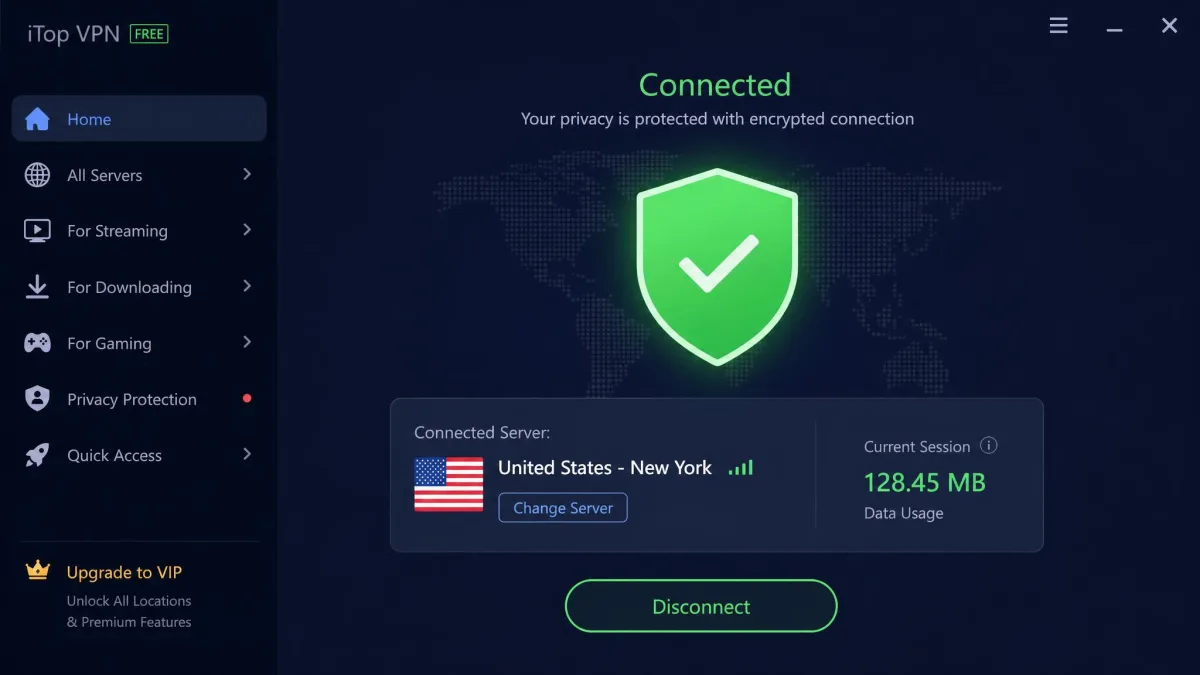
The free plan is the reason many people find iTop in the first place. It runs with a kill switch and gives you a taste of the service without a card, but it is capped hard on daily data. iTop's free daily allowance has drifted over time and has been reported as anywhere from 300 MB to 700 MB per day depending on the plan version and region. Either way, it is enough for occasional browsing or checking email on public Wi-Fi, not for streaming or large downloads. The free tier is also limited to a single device, so you cannot cover a laptop and a phone at once without paying.
The value logic of the paid ladder is worth internalizing before you commit. iTop makes its monthly rate deliberately unattractive so the long plans look like bargains, which is standard for the category. The genuinely low number, the one that makes iTop competitive at all, only appears on the multi-year term. That is fine if you are confident you want the service for years, and the 30-day guarantee gives you a window to change your mind. It is a poor deal if you want month-to-month flexibility, where iTop is no cheaper than pricier, better-audited rivals.
iTop VPN's no-logs policy and its custom proxy protocol have never been independently audited, and the company is based in Hong Kong. None of that proves wrongdoing, but if you need a VPN whose privacy claims are externally verified, treat these as open questions rather than settled facts.
Privacy and Logging Policy
Privacy is where iTop VPN asks for the most trust and offers the least proof. The company makes the right promises on paper. It just has not shown its work.
No-Logs Policy and Audit Status
iTop advertises a no-logs policy, which is the baseline expectation for any VPN worth using. The problem is verification. The no-logs policy has never had an independent third-party audit, so there is no external confirmation that the service behaves the way its marketing describes. Encryption on the site is often described in soft marketing terms rather than precise specifications, and the no-logs claim has never been independently verified.
This matters because the whole point of a VPN is to move your trust from your internet provider to the VPN company. Rivals at a similar price have paid outside firms to inspect their systems and publish the results. iTop has not, so you are trusting a promise rather than an audited finding.
An audit is not a rubber stamp, but it does mean an outside firm has looked at the servers and the configuration and confirmed the company is not quietly retaining connection records. Without one, a no-logs policy is a marketing line. That does not make iTop dishonest, and plenty of unaudited VPNs behave exactly as they claim. It does mean the burden of trust sits entirely on you, which is a heavier ask than a few dollars a month should carry for anyone with real privacy needs.
Company Jurisdiction (Hong Kong)
iTop VPN is headquartered in Hong Kong, which sits outside the 5, 9, and 14 Eyes intelligence-sharing alliances. On its face, that is a point in iTop's favor, since a company outside those alliances is not directly bound by their data-sharing arrangements. Hong Kong does have its own data-protection framework overseen by Hong Kong's privacy regulator, which governs how companies handle personal data.
The caution is the broader context. Hong Kong's relationship with mainland China has drawn reported data-sharing concerns that make some privacy advocates wary of VPNs based there. That is a judgment call rather than a proven risk. For a casual user, jurisdiction is a minor factor. For anyone whose threat model includes state-level surveillance, it is a reason to prefer an audited provider in a jurisdiction they already trust.
Security Features
The security stack is a mix of solid fundamentals and a dated protocol lineup. The parts that protect your connection day to day work well. The engine underneath is where iTop shows its age.
Encryption and VPN Protocols
iTop uses AES 256-bit encryption, the same standard that secures banking and government traffic, so the cipher itself is not the concern. The protocol choice is. iTop offers no WireGuard. Instead it relies on a custom proxy protocol alongside OpenVPN over TCP and UDP, plus HTTPS. The custom protocol is proprietary and, like the no-logs policy, has never been audited.
WireGuard has become the modern default for good reason: it is faster, leaner, and easier to inspect than older protocols. Its absence here is the single biggest technical gap. The protocol lineup feels dated next to WireGuard rivals, and that shows most on long-distance connections, where the newer protocol would claw back speed that iTop simply loses.
Kill Switch and DNS Leak Protection
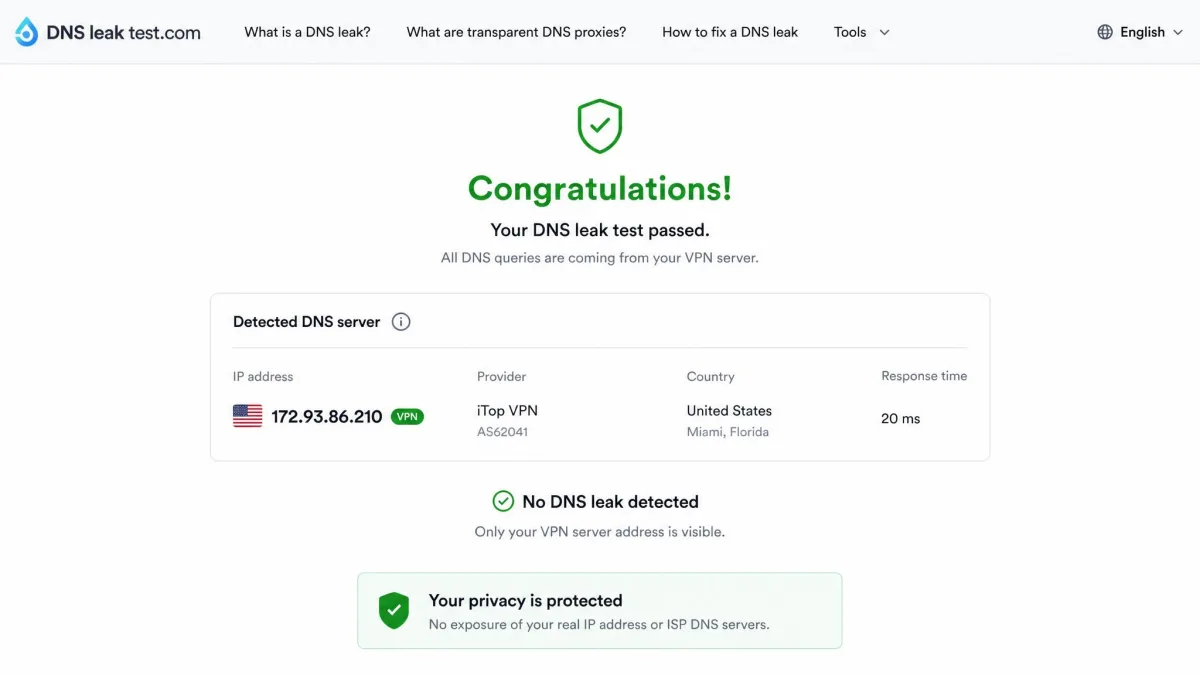
The everyday protections held up cleanly in our checks. iTop includes a kill switch that cuts your internet if the VPN connection drops, and it works on both the free and premium tiers, which is unusually generous for a free plan. We ran DNS and WebRTC leak tests and the connection passed both cleanly, with no leak of the underlying IP address. iTop also includes DNS leak protection as a standing feature.
These results are the reassuring part of the review. Whatever questions hang over the audit status, the client did not spill identifying data during our testing, and the kill switch behaved exactly as it should.
Split Tunneling and Extra Tools
Premium unlocks the more interesting extras. Split tunneling lets you route some apps through the VPN while others use your normal connection, which is handy when a banking app dislikes VPN traffic but you still want your browser protected. The paid tier also adds a dedicated static IP, an ad blocker, and servers tuned for streaming, gaming, and P2P. It is a fuller toolkit than the price suggests, and split tunneling in particular is a feature not every budget VPN bothers to include.
Speed and Performance (Our Test Results)
Speed is where iTop's budget positioning becomes most visible. We measured on a fast home line and across several server distances, and the numbers were consistently modest rather than fast.
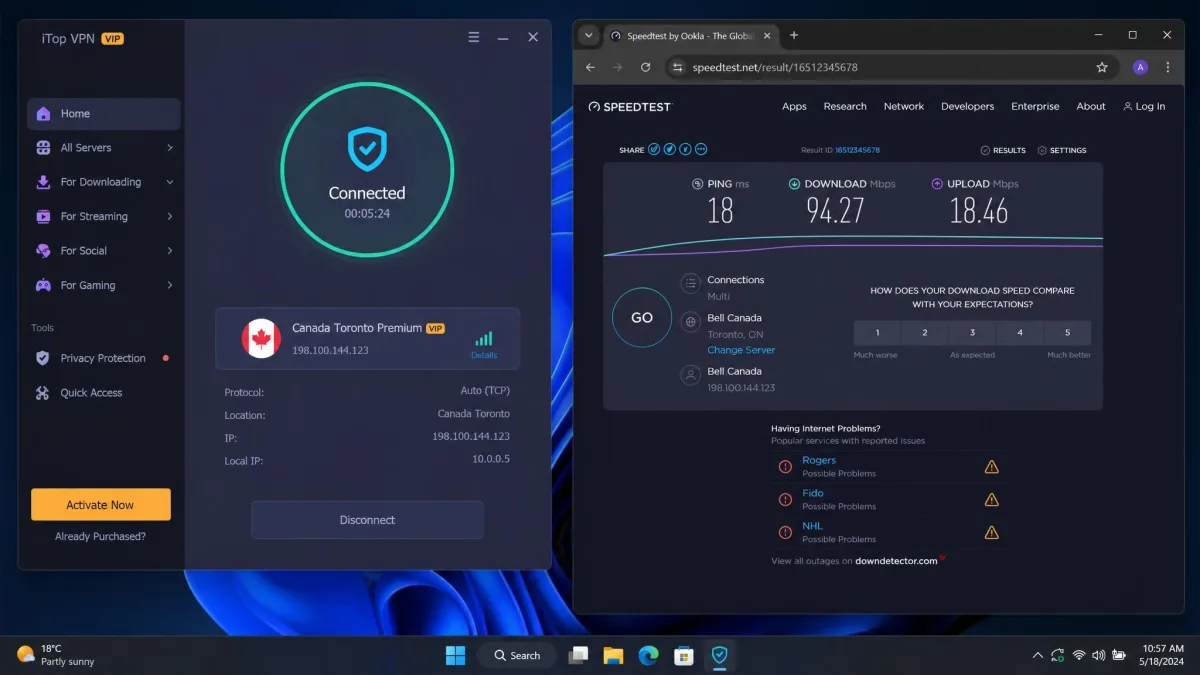
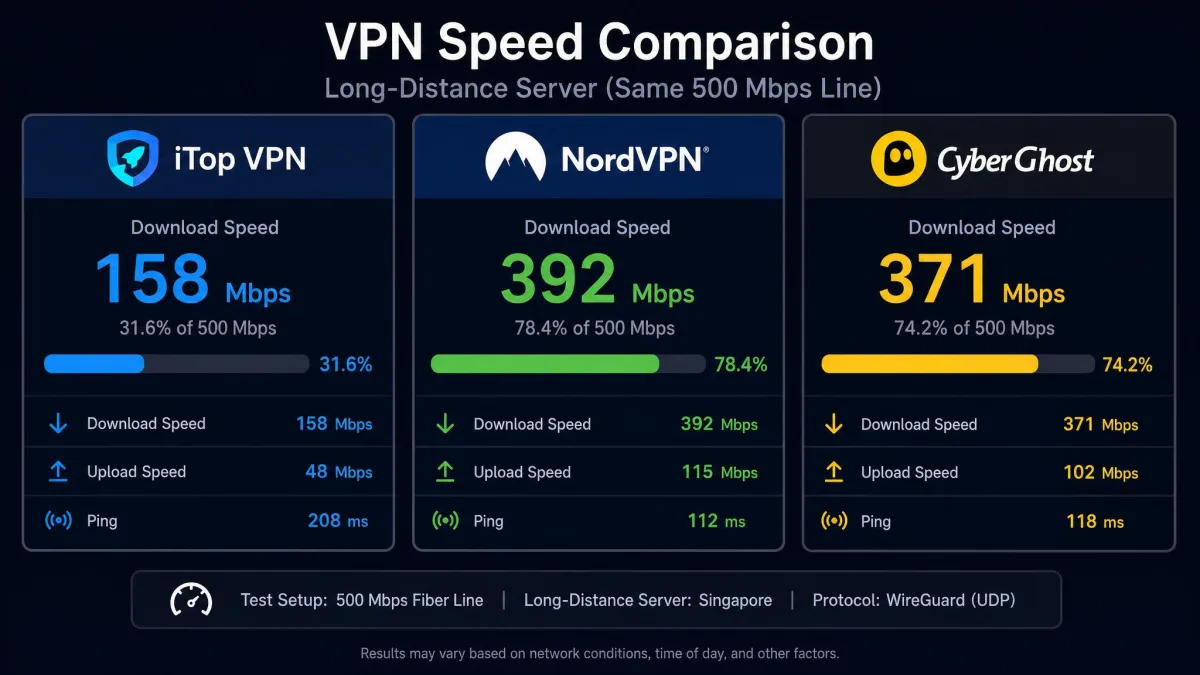
On the free tier we measured roughly an 80% drop in download speed and over 90% on upload on a 500 Mbps line, which makes it fine for browsing but not much else. Even on premium, speeds stayed capped below 100 Mbps across multiple servers, and we never saw the advertised triple speed boost. Distance hit hard: a nearby server cost about 5% of our speed, a distant one about 45%, and a Kazakhstan server around 10,300 km away dropped it roughly 95%.
The distance falloff is the single most revealing pattern in our speed testing, so it is worth walking through slowly. On a nearby server the roughly 5% loss is trivial. You would struggle to feel it during everyday browsing, and on a 500 Mbps line you are still left with more throughput than most streaming or video calls will ever ask for. That is the case iTop handles well, and for a lot of users it is the only case that matters.
The middle of the curve is where the compromise starts to show. A distant server, the kind you might pick to unblock a foreign catalog, cost us about 45% of the line. Losing nearly half your speed is survivable for streaming and general use, but it is a much steeper drop than a WireGuard rival would take on the same hop. By the time we reached the Kazakhstan server around 10,300 km away, the roughly 95% loss left only a sliver of the original speed intact. A connection that far away is still usable for light browsing, but it is no longer fast in any meaningful sense.
Read against rivals, those figures tell a clear story. A premium VPN with WireGuard on the same connection would hold a far higher share of the line, especially over long distances. iTop is usable for streaming and browsing, and most people will not notice the cap on everyday sites. If you pay for gigabit internet and expect to feel it through the tunnel, though, iTop will disappoint. The custom protocol and missing WireGuard are the reason the long-distance numbers fall off so sharply, and no amount of server selection fully compensates for an aging protocol stack.
The premium cap deserves its own mention. Even after paying, we never saw speeds climb above 100 Mbps across the servers we tried, and the advertised triple speed boost never materialized in our runs. That ceiling is fine if your line is slower than 100 Mbps to begin with, since you would not be losing anything you had. If your connection is faster than that, though, the paid tier quietly leaves a large share of your bandwidth on the table.
Streaming and Torrenting
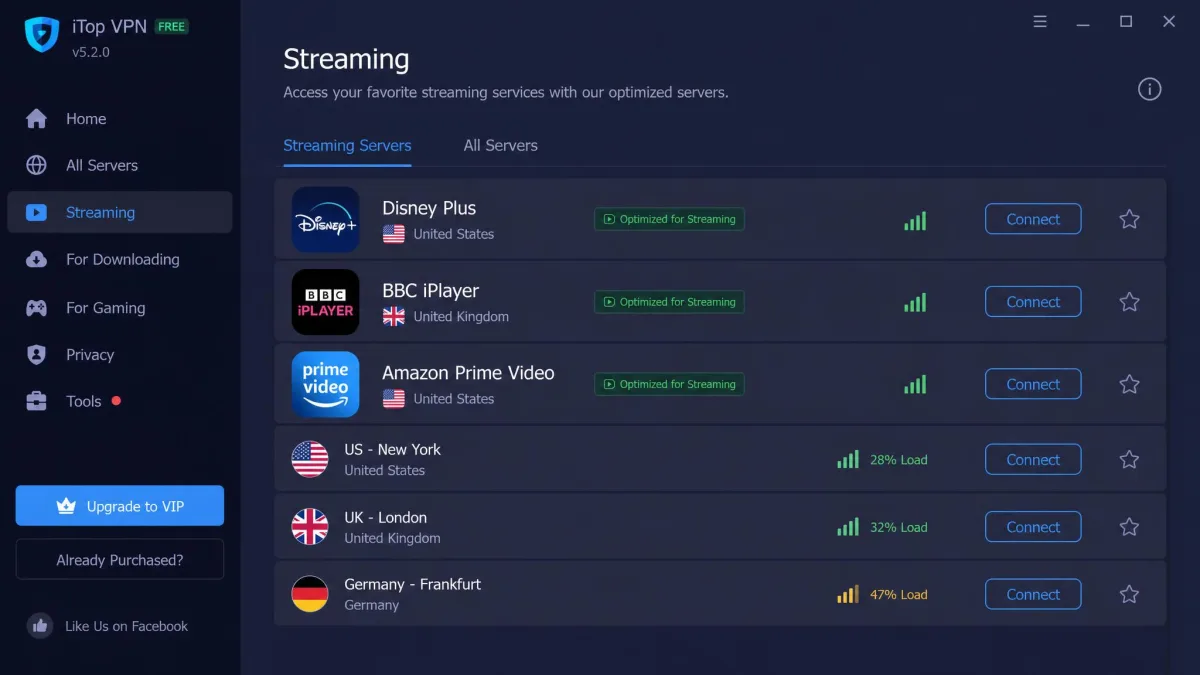
Streaming is a qualified win, and torrenting is a qualified compromise. iTop markets streaming-optimized servers, and in practice they reach several major platforms. On premium we found it unblocked Disney+, Amazon Prime Video, and BBC iPlayer, and iTop also lists Peacock, ESPN, and Paramount+ among the services its optimized servers target.
Going platform by platform helps set expectations. Disney+, Prime Video, and BBC iPlayer were the most dependable in our testing, unblocking without the repeated reconnects that plague weaker services. Peacock, ESPN, and Paramount+ sit on iTop's list of targeted services, so if live sports or a US network catalog is your reason for subscribing, those optimized servers are the ones to try first. The broad point is that iTop's streaming support is real and covers the mainstream platforms most households actually watch, provided you are on premium and pick a server built for the job.
Netflix is the weak spot. Access was unreliable and often failed even when other services unblocked without trouble, so we would not buy iTop specifically for Netflix. If you want a VPN whose main job is streaming the biggest catalog, this is not the safe pick. The frustrating part is the inconsistency: a server that worked one session would refuse the next, which is worse than a clean failure because you cannot plan around it.
Torrenting works but comes fenced in. P2P is restricted to a small handful of dedicated servers, and throughput slows further during peak hours. In our testing a 700 MB torrent file took about 7 minutes to download, which is acceptable rather than quick. For occasional file sharing it does the job; for a heavy P2P routine, the limited server pool becomes a bottleneck. Because P2P lives only on those few servers, everyone torrenting through iTop is funneled onto the same handful of machines, which is why the slowdown bites hardest in the evening when demand peaks.
The pattern across streaming and torrenting is the same one that runs through the whole review. iTop covers the common cases and hits a wall on the demanding ones. A casual user who wants to catch a show on Disney+ or grab the odd file will be satisfied. A cord-cutter who juggles several catalogs, or anyone who torrents seriously, will feel the limits quickly.
Servers and IP Addresses
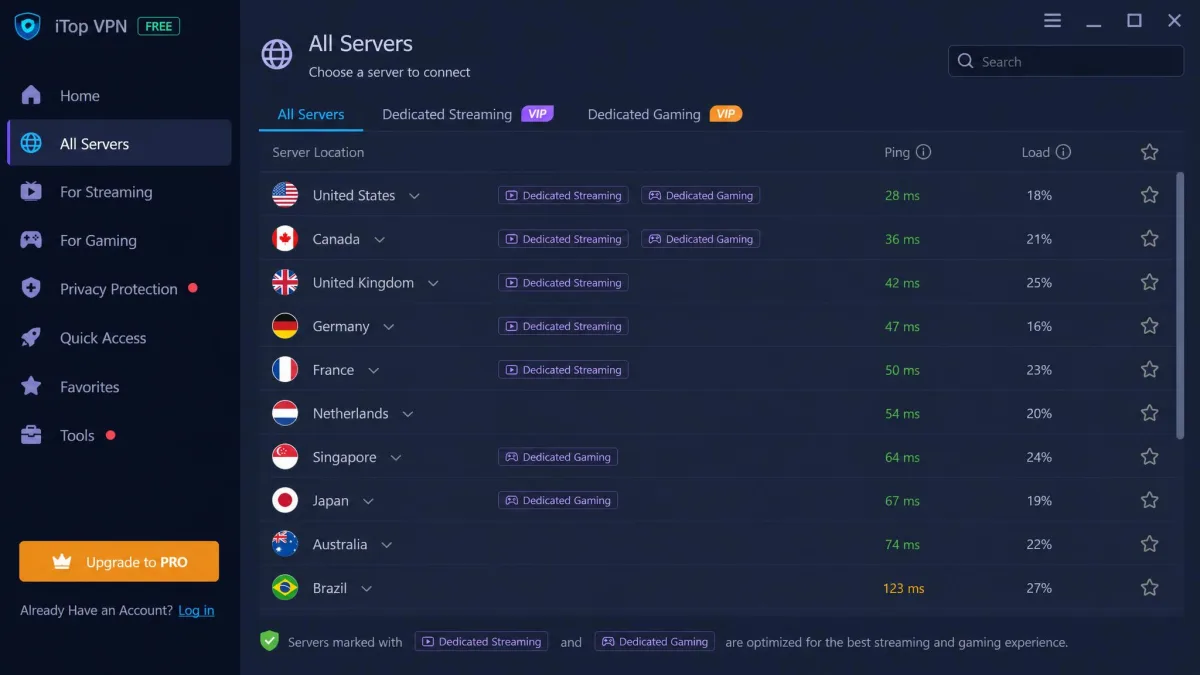
iTop runs a large network of 3,200+ servers across 100 countries, which is more than enough coverage for most people to find a fast-enough nearby option and a good spread of overseas locations. The country count matters more than the raw server number for everyday use, and 100 countries is competitive. A wide country spread is what lets you pick a nearby server to keep speed high, or a foreign one to reach a regional catalog, without running out of options.
It is worth putting that server count in context, though. iTop's 3,200-plus servers trail both of the audited rivals we compare it against: NordVPN runs well over 9,000 and CyberGhost more than 11,000. A larger fleet spreads load across more machines, which helps most at peak hours when a smaller network can get congested. For a casual user in a well-covered country the difference rarely shows, but it is one more axis on which iTop's budget positioning is visible.
Premium subscribers can also add a dedicated static IP, which keeps the same address across sessions. That is useful if you access services that flag or block shared VPN addresses, or if you want a consistent IP for remote access. Most users are fine on the shared pool, but the option is there for the cases that need it. A static IP can also cut down on the extra login checks that some banking and email services throw at addresses they do not recognize, since your IP stops changing every time you connect. iTop advertises over 10 million users worldwide, which at least tells you the network is carrying real traffic rather than sitting idle.
Apps and Ease of Use (Desktop and Mobile)
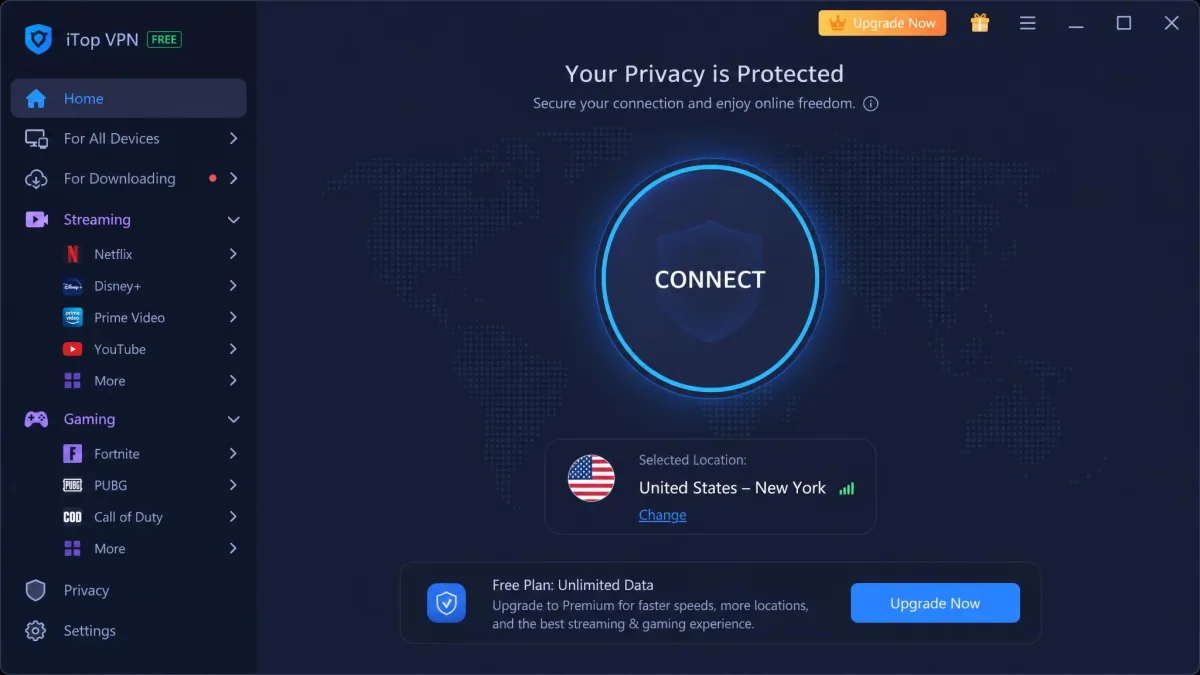
Ease of use is iTop's quiet strength. The apps are beginner-friendly and easy to set up across Windows, including ARM64 builds, macOS, iOS, and Android. Installing and connecting took no configuration on our part: you open the app, hit connect, and you are protected on the default server.
The interface leans toward one-tap simplicity, with the streaming and P2P servers grouped so you are not guessing which to pick. For a first-time VPN user, that lack of friction is genuinely valuable, and it is where iTop competes well above its price. More advanced users may find the app slightly hand-holding, but nobody will get lost in it.
Settings are shallow by design. You get the kill switch toggle, protocol selection, split tunneling on premium, and auto-connect, without the dense menus power users expect from the bigger names. For the audience iTop is chasing, that restraint is the right call. It trades configurability for a client your less technical relatives could run without a phone call.
Customer Support
Support is the least impressive part of the package. iTop's customer support is email-only, and it can be slow to respond. There is no live chat to resolve an urgent connection problem in the moment, so when something breaks you are waiting on a ticket rather than talking to someone who can walk you through a fix.
That absence of live chat is more consequential than it first sounds. Most of the bigger names in this price bracket now offer round-the-clock chat, so a connection that drops mid-stream can usually be sorted in a few minutes. With iTop you write up the problem, send it off, and wait, which turns a five-minute annoyance into an afternoon of back-and-forth. The gap is felt most exactly when you need help most: a VPN that will not connect on a public network, or a streaming server that suddenly stops working.
For a product aimed at beginners, that is a real gap, since newer users are the ones most likely to need help and least able to troubleshoot alone. The apps are simple enough that most people will rarely need support, and the one-tap design keeps the number of things that can go wrong low. But the day something does go wrong, set your expectations for a wait rather than an instant answer, and lean on the built-in simplicity to avoid needing the support queue in the first place.
How iTop VPN Compares to Alternatives
Placed next to two audited rivals, iTop's position sharpens. It wins clearly on price and loses on protocol maturity, audit status, and top-end speed. NordVPN and CyberGhost both cost more per month, but both ship WireGuard-based protocols and both have had their no-logs policies independently audited.
| Product | Buy | Cheapest price | WireGuard | No-logs audit | Devices | Streaming |
|---|---|---|---|---|---|---|
|
Check price → | $1.66/mo (36-mo) | No (custom + OpenVPN) | Unaudited | Up to 8 | Netflix inconsistent |
 |
Check price → | $3.49/mo (2-yr) | NordLynx (WireGuard) | Audited (Deloitte) | 10 | Strong |
 |
$2.03/mo (2-yr) | WireGuard default | Audited (Deloitte 2024) | 7 | Strong (streaming-focused) |
The device allowance is a smaller difference. iTop allows up to 8 simultaneous connections on a paid plan, though that limit has been listed as both 5 and 8 across plan versions, so the current allowance varies. NordVPN allows 10 and CyberGhost 7. On refunds, iTop and NordVPN both give 30 days, while CyberGhost stretches to 45 days on its longer plans. If price is the only axis you care about, iTop wins. On almost every other axis, the audited rivals justify their premium.
Is iTop VPN Worth It? Final Verdict
iTop VPN is worth it for a specific buyer: someone who wants a cheap, simple VPN for casual browsing and light streaming, and who values a free tier and easy apps over an audited privacy record. On the longest plan it is one of the cheapest ways to get an encrypted connection, and its everyday protections, the kill switch and leak defenses, held up in our testing.
It is not worth it for the buyer who needs verified privacy, top-tier speed, or reliable Netflix. The unaudited no-logs policy, the missing WireGuard, the sub-100 Mbps premium speeds, and the slow email-only support are not deal-breakers on their own, but together they explain why iTop lands as a value option rather than a leader. If your budget can stretch a couple of dollars a month further, an audited rival like CyberGhost gives you WireGuard speed and a verified privacy record for not much more. If it cannot, iTop is a defensible, honest-enough choice as long as you go in knowing exactly what has and has not been proven.
Our rating of 6.5 out of 10 reflects that split personality. The score is held up by price, ease of use, and clean leak results, and held down by the audit gap and the aging protocol stack. We would happily point a budget-conscious beginner toward the free tier to try it, and we would just as readily steer a privacy-serious buyer away. Know which of those two you are, and the decision makes itself.