Browsec VPN is a lightweight, browser-first VPN. It runs mainly as a Chrome, Firefox, Edge, or Opera extension, with companion apps for Android and iOS. It has been around since 2012 and now claims roughly 8 million users worldwide, so it is not some fly-by-night tool. But popularity and quality are different things. After putting it through our usual speed, leak, and streaming checks, our answer to the "is it worth it?" question is a heavily qualified one.
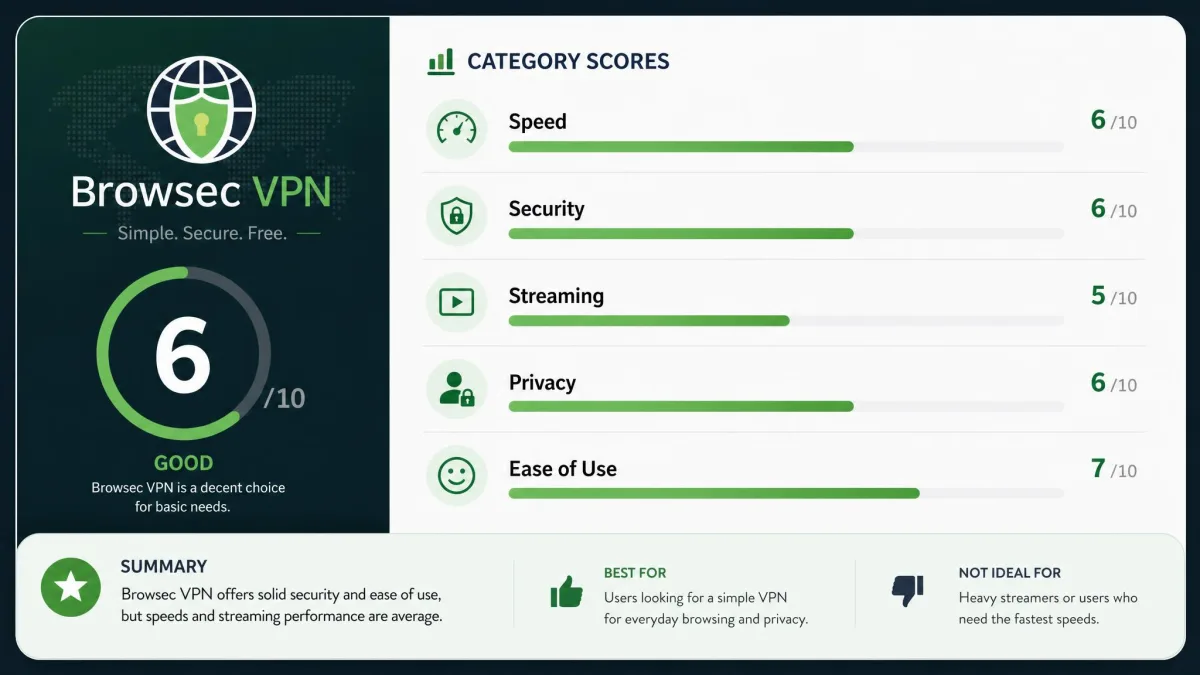
The short version: Browsec is genuinely easy to use. Its free tier asks for nothing, which makes it a fine casual pick for unblocking the odd website. As a serious privacy tool, though, it carries two problems that are hard to look past, and we walk through both below. Here is where it lands for us before we get into the detail.
Browsec VPN Quick Verdict
We test every VPN the same way. We run download and upload benchmarks from several countries, check for DNS and WebRTC leaks, and try to stream region-locked catalogues on real accounts before we form a verdict. Browsec went through all of it on both the browser extension and the mobile app.
Browsec VPN Pros and Cons
Before the deep dive, here is the balance sheet as we see it after testing. The pros are real. The cons are the kind that matter if privacy is your main reason for using a VPN.
Pros
- Genuinely free tier with unlimited data and no signup
- Installs in seconds and is very easy to use
- Usable premium speeds for everyday browsing
- AES-256 encryption and WebRTC leak protection
- Unblocks BBC iPlayer reliably in our tests
Cons
- Based in Russia, with no independent security audit
- Streaming on Netflix and other services is inconsistent
- No native desktop app, so only browser traffic is protected on a PC
- Short 7-day money-back window
- Free servers can slow to a crawl
Pricing and Payment Options
Browsec keeps its pricing simple. There is one free plan and one premium subscription billed over different terms. There is no confusing ladder of tiers here, which we appreciate.
Free vs Premium Plans
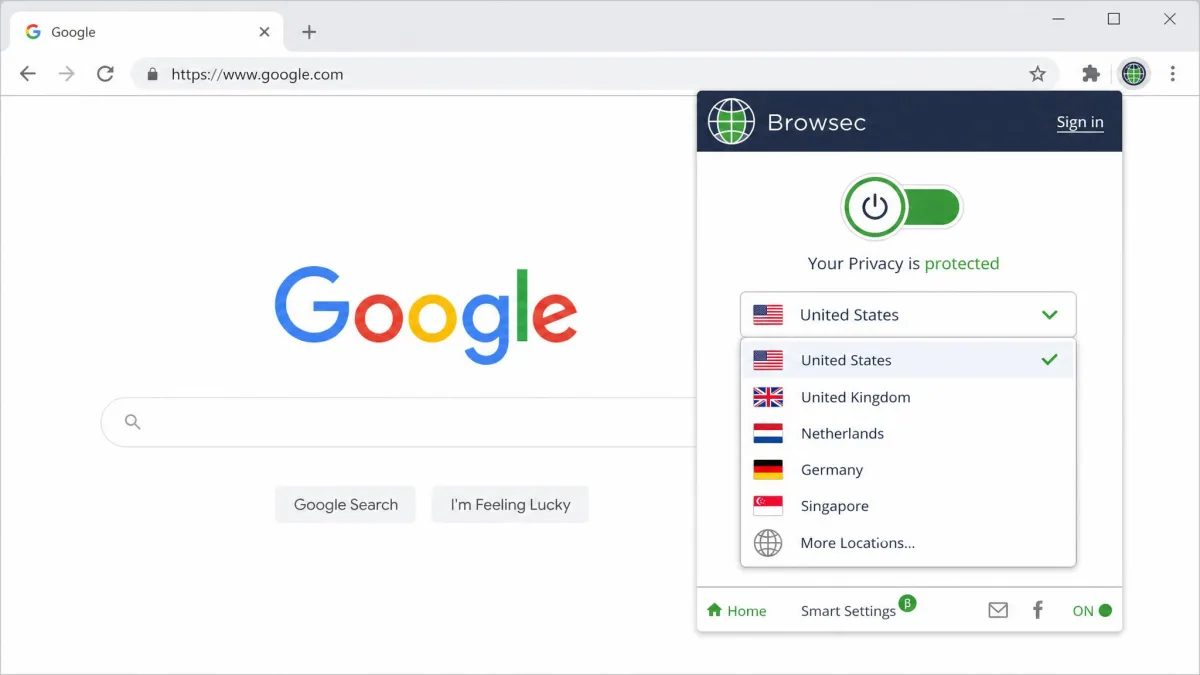
The free plan is the headline feature. It gives you unlimited traffic across 4 server locations: the US, UK, Singapore, and the Netherlands. You do not need to create an account or hand over an email to use it. That is unusually generous. Most free VPNs cap your data or throttle you into uselessness, but Browsec limits you by location and speed rather than by gigabytes.
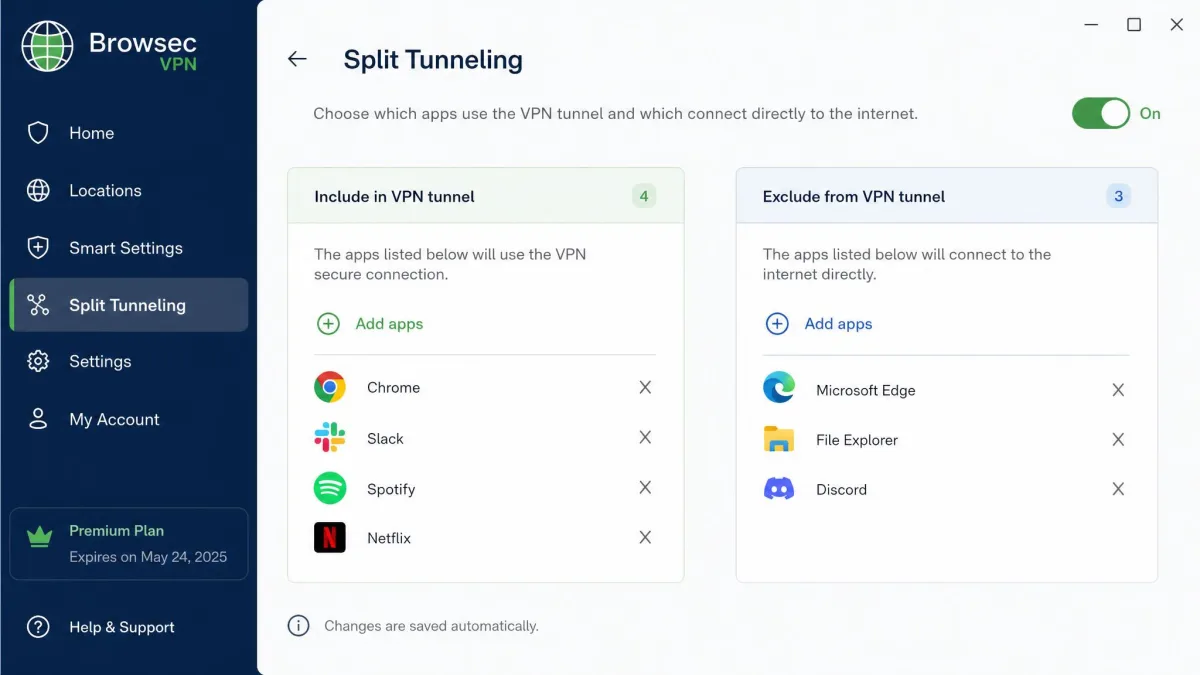
Premium removes those limits. You unlock the full server network, faster "premium" servers, and features like split tunneling. It is the version you would want if you plan to lean on Browsec daily rather than for the occasional unblock.
Browsec's free plan is one of the few that never asks for a credit card or an email address. That is great for privacy and convenience. Just remember the free servers are the slow ones, so it is a taster, not the full experience.
Money-Back Guarantee and Payment Methods (PayPal, Credit Card)
Premium costs $6.99 per month if you pay monthly. Commit to a year and the price drops to around $3.07 per month, billed as $39.99 up front. The two-year plan works out to roughly $2.76 per month, or $71.99 every two years. Those discounted rates shift with promotions, so check the current figure on Browsec's pricing page before you buy rather than trusting an old screenshot.
You can pay with credit and debit cards, PayPal, and a range of regional local payment providers. Checkout is not a problem in most countries. What does give us pause is the refund policy. Browsec offers a 7-day money-back guarantee, which is short next to the 30-day standard most rivals honour. Refunds also require a written explanation, so it is not the frictionless "changed my mind" window you get elsewhere.
| Plan | Price | Billed | Notes |
|---|---|---|---|
| Monthly | $6.99/mo | Every month | Most flexible, most expensive |
| 1-Year | ~$3.07/mo | $39.99/year | Best balance of price and commitment |
| 2-Year | ~$2.76/mo | $71.99/2 years | Cheapest per month, promo-driven |
Speed and Performance
Speed is where Browsec splits sharply into two products: the premium servers and the free ones. They behave so differently that a single "how fast is it" answer would be misleading.
Speed Test Results
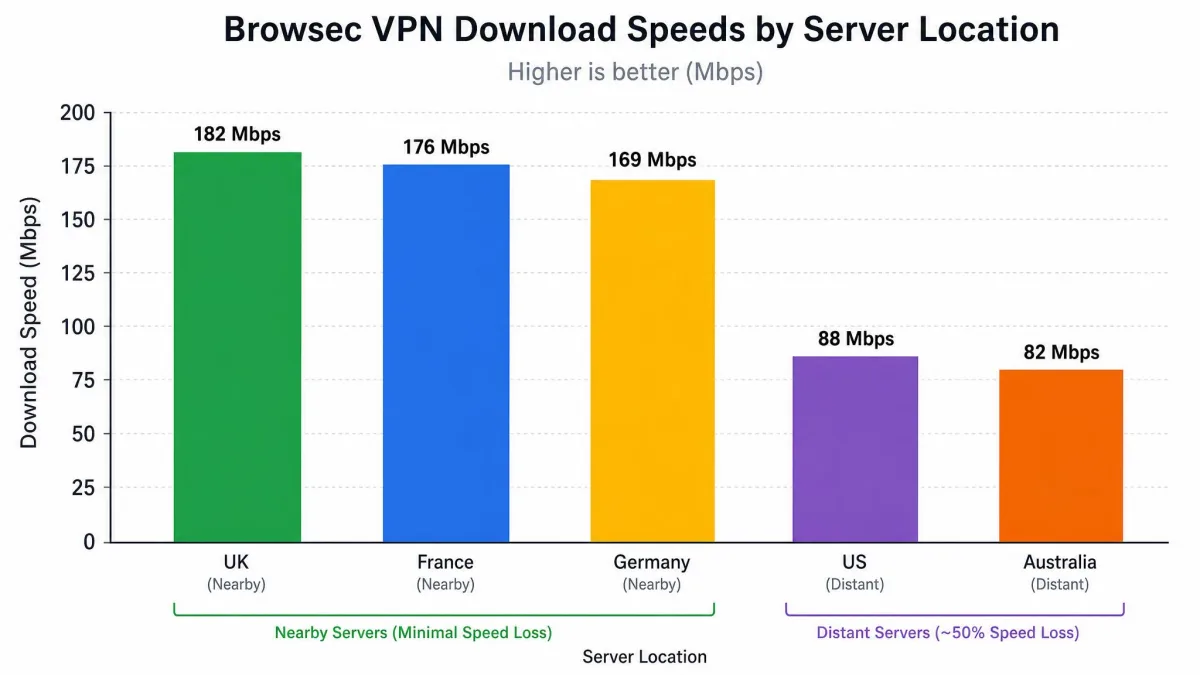
On premium servers, performance is solid. We saw download speeds around 87 Mbps. That is comfortably enough for HD streaming, video calls, and general browsing without the connection feeling sluggish. The free servers are a different story. On some free locations, speeds dropped under 2 Mbps, a loss of up to 97% against our baseline. That is barely usable for anything beyond loading a text-heavy page.
Distance to the server matters a lot too. Nearby UK and French servers held on to most of our baseline speed. More distant Germany, US, and Australia servers lost between 50% and 69% of download speed. That is a wider swing than we like to see, so if speed is critical, connect to the closest premium server you can.
Is It Fast Enough for Streaming and Gaming?
For streaming, premium speeds are more than enough on paper. HD video needs only around 5 Mbps, and 87 Mbps clears that with huge headroom. The catch is unblocking, not raw speed, which we cover in the streaming section below.
For gaming, the picture is weaker. Browsec runs as a browser extension on desktop, so it does not route a game client's traffic at all. Only what happens inside your browser is covered. On mobile the app can cover the whole device, but the added latency on distant servers makes competitive gaming a poor fit. Casual browser games are fine. Anything latency-sensitive is not what this tool is for.
Server Network and Locations
We could not pin the server count down. Estimates run from roughly 600 servers to 1,482, across 42 to 46 countries, and the totals drift with promotions. Treat the network size as approximate rather than a fixed spec.
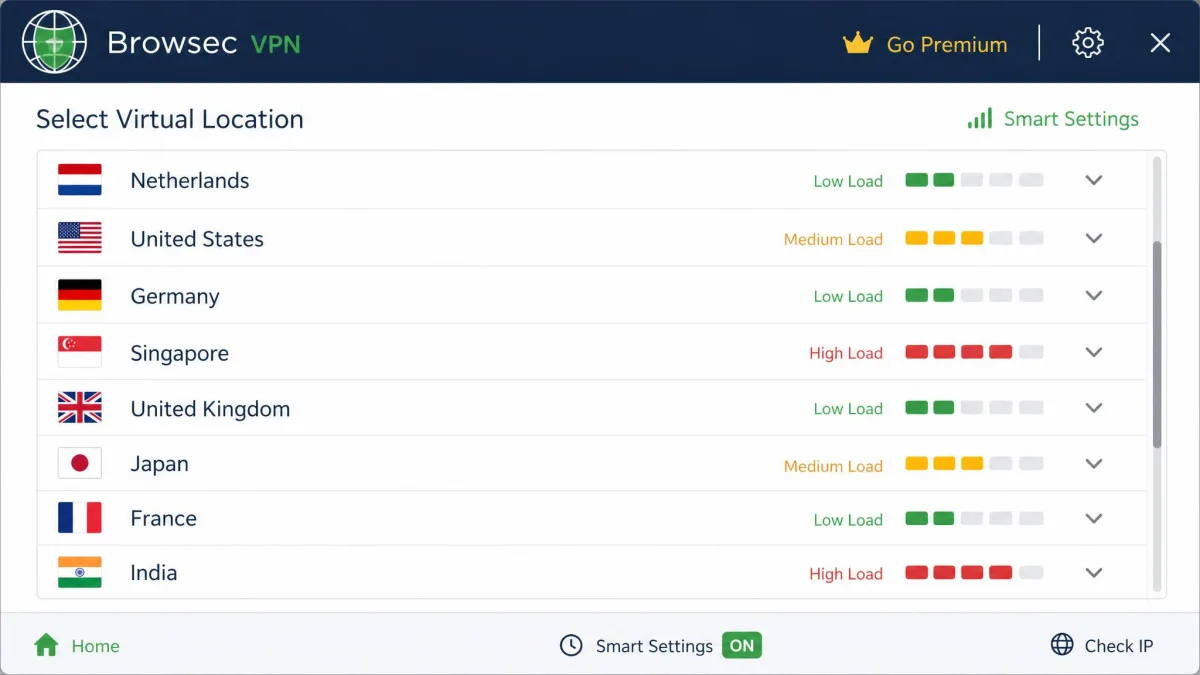
Whatever the exact count, the practical coverage is decent for a browser VPN. It spans the major regions most people want. In our testing the network leaned heavily toward North America and Western Europe. We had plenty of city-level choices in the US, UK, Germany, France, and the Netherlands. Asia-Pacific coverage was thinner but present, with usable exits in Singapore, Japan, and Australia. Those were the locations most free users will reach for. Each entry in the list carries a load indicator bar. We found it genuinely useful for steering away from congested servers before connecting rather than after.
It is not in the same league as the biggest networks. We also hit reliability gaps. South American servers in Brazil and Chile failed to connect reliably during our testing. The connection dropped before it fully established, and repeated attempts did not always fix it. Coverage across Africa and the Middle East is sparse to non-existent. If your reason for a VPN is reaching or appearing in one of those regions, Browsec is a weak fit. If you specifically need a stable South American exit, test it inside the refund window first.
Streaming and Unblocking
Streaming is the most inconsistent part of Browsec. It is also the area where our own test runs disagreed with each other the most.
Netflix, BBC iPlayer, and Other Services
BBC iPlayer was the bright spot. Browsec unblocked iPlayer reliably for us, which is often one of the harder catalogues to crack. That is a genuine win for UK content. Netflix was the opposite. Across runs, results were hit-or-miss. Sometimes a US or UK Netflix library loaded, and sometimes we hit the proxy error screen on the same server minutes later. We tried both the US and UK Netflix catalogues on premium servers, and neither held up across repeated sessions. Amazon Prime Video fared a little better on one run and then failed on the next. Disney+ and Hulu were similarly unreliable and failed more often than they worked.
The honest summary is that Browsec can unblock some services some of the time. It is not a dependable streaming VPN. The variability was not tied to a single stubborn server either. The same location would swing from working to blocked within a single evening. If a specific catalogue is your main reason for subscribing, that unpredictability is a real problem. It is worth testing your service inside the short refund window before committing.
BBC iPlayer worked consistently for us, but Netflix, Disney+, and Hulu did not. If streaming a particular service is your goal, do not assume it will keep working. The same server that unblocks it one day can be blocked the next.
Security Features
On paper, Browsec covers the security basics. The important caveats are less about the encryption itself and more about what the browser extension actually protects.
Encryption and Protocols
Browsec uses AES-256 encryption, the same standard the big-name VPNs rely on. The encryption strength is not a concern. Protocols are more platform-dependent. The mobile apps use IPSec IKEv2 and Browsec's own XRay protocol. The browser extension is different. It runs an HTTP proxy over TLS rather than a full VPN protocol, so it is a proxy at heart, not a system-wide tunnel. That distinction matters. On a computer, only your browser traffic is encrypted, and everything else leaves your machine unprotected.
Kill Switch and Leak Protection
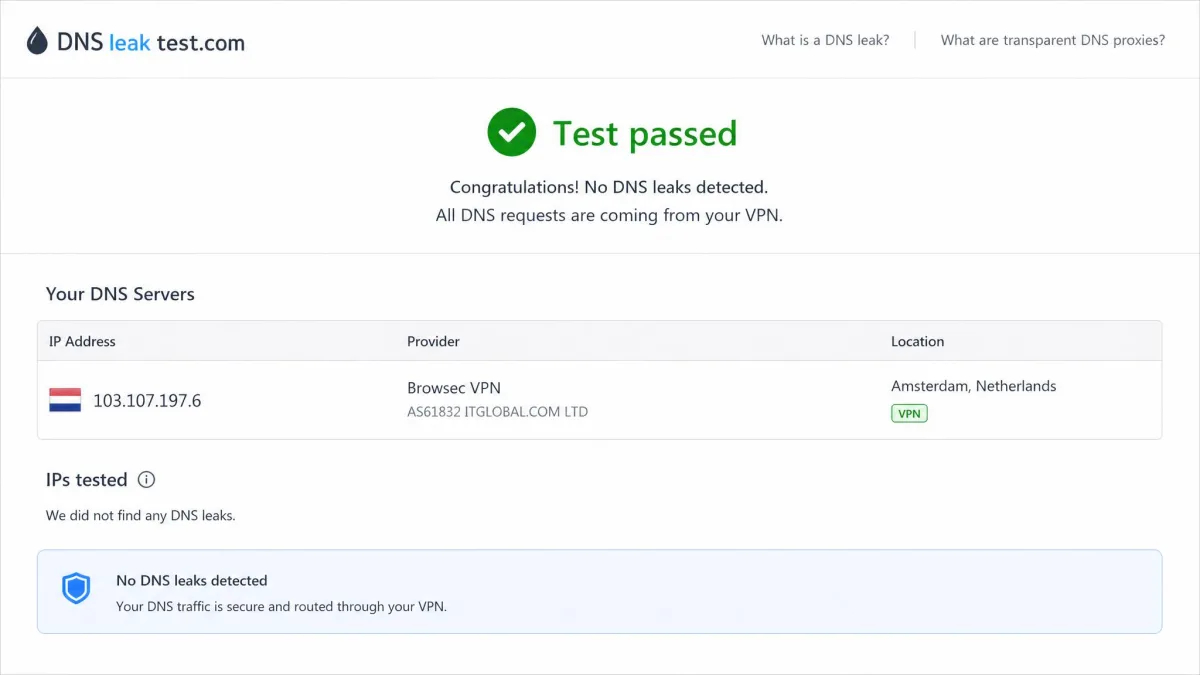
Leak protection is one of Browsec's stronger points. It includes WebRTC and MITM leak protection, and it passed our DNS leak testing without exposing our real DNS requests. The kill switch is a different matter. The browser extension has no kill switch we could rely on. If the proxy drops, your browser can fall back to your real connection without warning. Do not count on a kill switch here unless you have confirmed it on your specific device.
Privacy and Logging (Russian Jurisdiction)
This is the section that decides Browsec for a lot of people. It is where our recommendation gets its biggest asterisk.
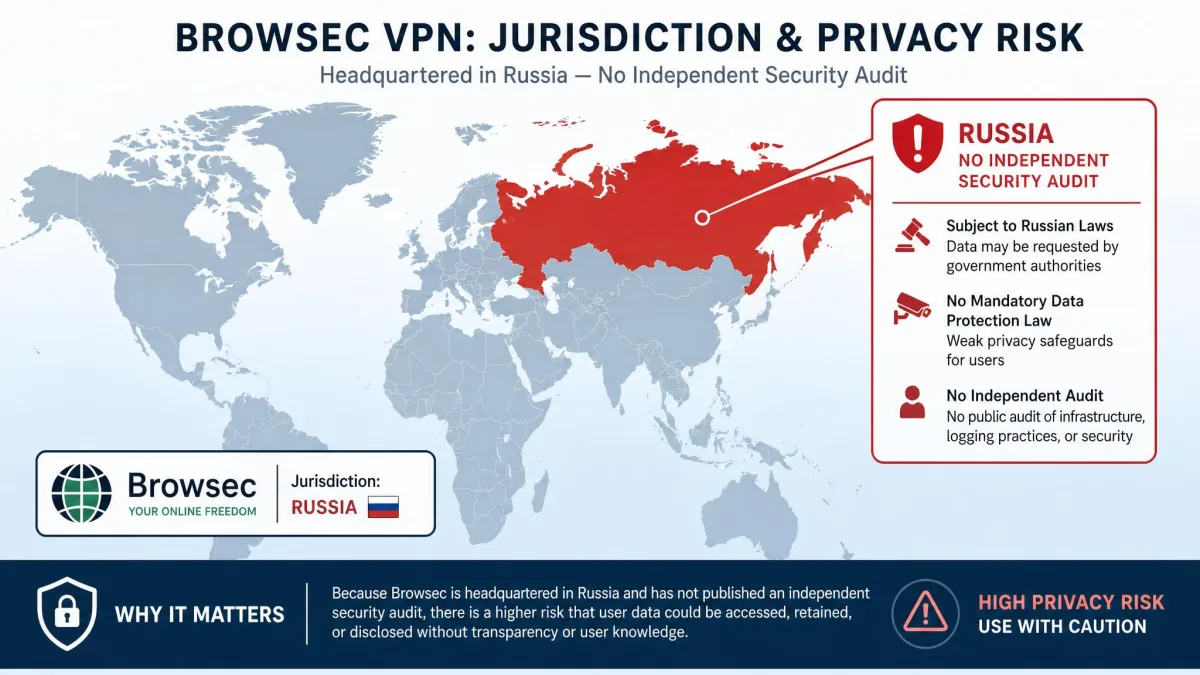
Browsec has Russian origins and is Russia-based, which means it can be compelled to share data if required to by law. For a tool whose entire job is privacy, that jurisdiction is a serious mark against it. It sits outside the privacy-friendly countries most trusted VPNs choose deliberately. On top of that, Browsec has not published an independent security audit, so its no-logging and security claims have not been verified by an outside firm. For privacy-focused use we cannot recommend it, and the Russian base plus the missing audit are exactly why.
Browsec is based in Russia and can be legally compelled to hand over data, and it has never passed an independent security audit. If your threat model includes surveillance, censorship, or protecting sensitive activity, this combination is a genuine reason to choose a VPN based in a privacy-friendly jurisdiction instead.
None of this means Browsec is malware or that it is secretly harvesting everyone's traffic. We have no evidence of that. It means the trust you would normally extend to a privacy tool has not been independently earned here. For a security product, that gap is hard to ignore.
Torrenting and P2P Support
Browsec does not clearly support P2P, and the way it is built explains why. On desktop you are limited to the browser extension. A torrent client runs outside the browser entirely, so it would not pass through Browsec at all, even if the servers allowed P2P. That alone rules the desktop setup out for torrenting.
On mobile, the app covers the whole device, so P2P at least has a path through the tunnel. That is the only place where torrenting is plausible. Even there, the coverage is undermined by the kill switch. Without one you can count on, a dropped mobile connection could expose your real IP mid-transfer. That is exactly the risk a torrenting VPN is supposed to remove.
If torrenting is a priority for you, Browsec is not the tool to build a workflow around. Its unclear P2P stance, the short refund window, and the Russian jurisdiction all point the other way. A purpose-built P2P VPN will save you the guesswork.
Does Browsec VPN Work in China?
No. Browsec does not work in China, so it is not a viable option for travellers or residents trying to get past the Great Firewall. China actively blocks most VPN protocols, and only a handful of services invest in the obfuscation needed to stay ahead of it. Browsec is not one of them. If China access is your goal, look at a VPN that specifically advertises working there.
Ease of Use and Setup
If there is one thing Browsec unambiguously nails, it is ease of use. This is the friendliest VPN experience we tested for total beginners.
Browser Extensions and Mobile Apps
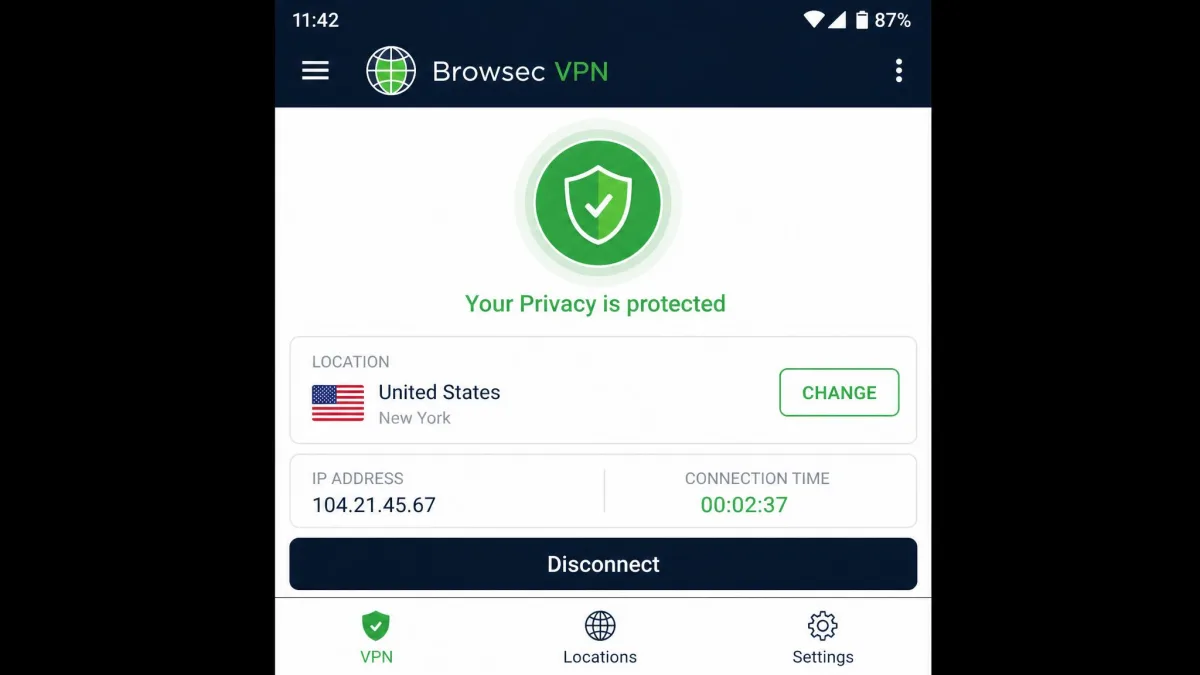
The browser extension installs in seconds. You add it from your browser's store, click the toolbar icon, pick a location, and you are connected. On the free tier you never create an account or confirm an email. That near-frictionless setup is a real strength for anyone who finds full VPN clients intimidating.
The mobile apps for Android and iOS are equally straightforward, and they cover your whole device rather than just a browser. The important limitation is on desktop. There is no native desktop client, so on a Windows or Mac computer you are limited to the browser extension. That extension proxies only your browser traffic, not your whole system. It is fine for casual browsing but a real gap if you expected system-wide protection.
Device Compatibility and Simultaneous Connections
Browsec runs on the major browsers (Chrome, Firefox, Edge, and Opera) plus Android and iOS. On premium, you can connect 5 simultaneous devices. That is enough for a typical personal setup of a laptop, a phone, and a tablet. The free version is more relaxed here and allows unlimited devices, since it is limited by location and speed instead. Just remember the desktop story: "compatible with your computer" means a browser extension, not a full app.
Customer Support
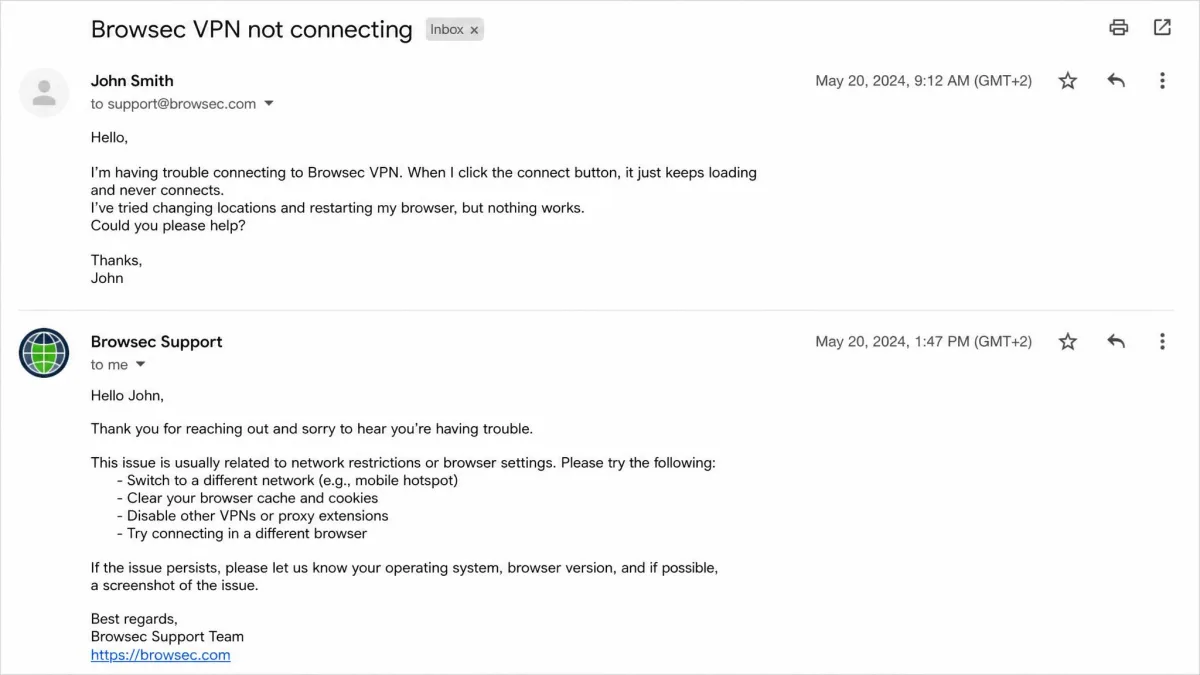
Support is functional but thin. Browsec offers email support that responded reasonably quickly in our experience. Replies generally arrived within about 4 to 6 hours, and faster in some cases. That is fine for non-urgent issues. What is missing is live chat. There is no way to get instant help when a connection problem is blocking you right now.
The knowledge base is also fairly thin. It covers the obvious ground, such as installing the extension, switching locations, and the basics of the free versus premium split. It thins out quickly once your question gets specific. When we went looking for clear answers on kill switch behaviour or torrenting support, the help pages simply did not settle it. There is no in-app troubleshooter and no community forum to fall back on either, so email is effectively your only channel. For a casual free user that is acceptable, since most problems are self-explanatory. For a paying subscriber used to 24/7 chat and a deep searchable help centre, it feels bare. The lack of an instant channel is felt most in exactly the moments a VPN tends to fail, when a connection drops mid-task.
Browsec VPN Alternatives
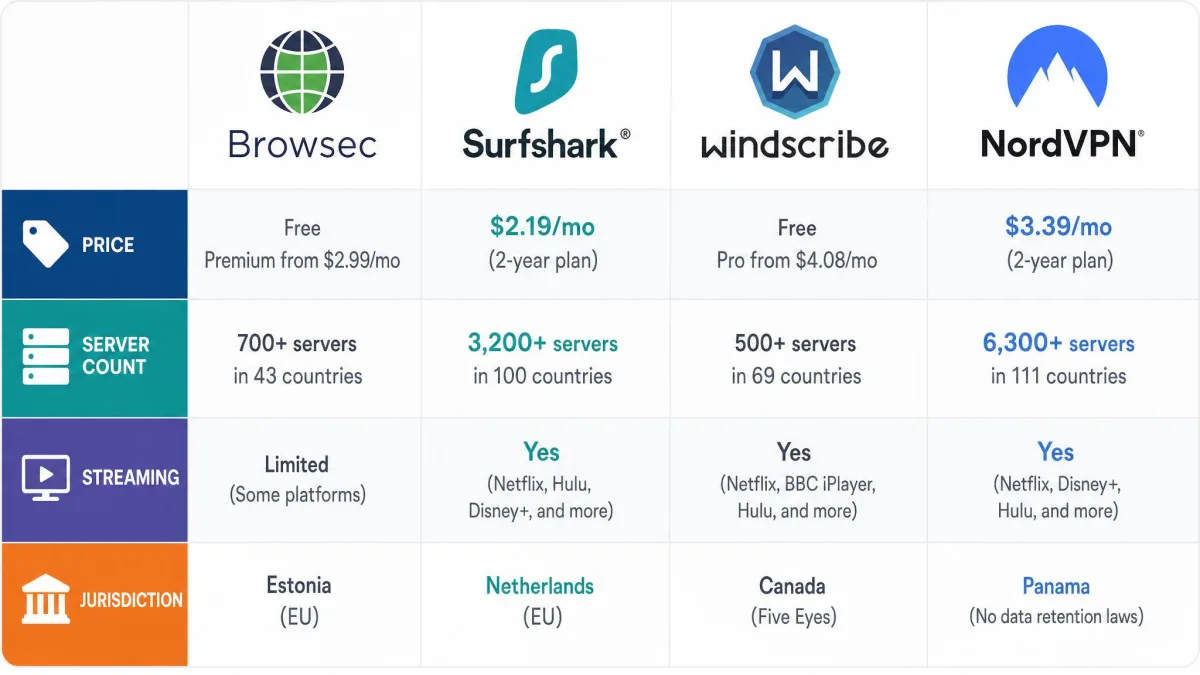
If Browsec's weak spots are dealbreakers for you, and for privacy-minded users they should be, a few alternatives cover the same needs with fewer compromises. Surfshark is the closest all-round upgrade, with a far larger network, reliable streaming, and a privacy-friendly Netherlands base for a similar low price. Windscribe is the better free pick if you want a generous no-cost tier from a service that also handles P2P. NordVPN is the premium choice when you want the biggest network and the most consistent unblocking, backed by a Panama jurisdiction.
| Product | Cheapest price | Servers | Streaming | Jurisdiction |
|---|---|---|---|---|
| Browsec VPN | $2.76/mo (2-yr) | ~1,482 (46 countries) | Inconsistent | Russia |
| Surfshark | $2.49/mo (2-yr) | 4,500+ (100 countries) | Reliable | Netherlands |
| Windscribe | ~$5.75/mo (1-yr) | 3,000+ (69+ countries) | Reliable | Canada |
| NordVPN | $3.49/mo (2-yr) | 9,300+ (137 countries) | Reliable | Panama |
Surfshark and NordVPN also back their plans with a 30-day money-back guarantee, four times longer than Browsec's window, so you get a fair chance to test them properly. If a truly free browser extension is what pulled you toward Browsec in the first place, Windscribe's 10 GB monthly free plan is the closest like-for-like swap with a stronger jurisdiction.
Final Verdict: Do We Recommend Browsec VPN?
Whether we recommend Browsec depends entirely on what you want from it, so our answer splits in two.
As a free, casual unblocker, it is one of the easier tools to like. The no-signup free tier, the seconds-long install, and reliable BBC iPlayer access make it a reasonable choice for someone who occasionally wants to reach a region-locked site and does not want to think hard about VPN settings. If that is you, and you understand the free servers are slow, Browsec earns its place on the shortlist.
As a serious privacy or streaming tool, we cannot recommend it over the alternatives above. The trust problem is the deciding factor. Add the inconsistent Netflix results, the browser-only desktop coverage, and the stingy refund window, and for roughly the same monthly price a well-audited VPN in a privacy-friendly country simply gives you more. Browsec is worth it for casual, low-stakes use. For anything more, spend the same money more wisely.
Frequently Asked Questions
Is Browsec VPN safe to use?
Is Browsec VPN free?
How can I improve my chances of streaming with Browsec?
What data could Browsec be compelled to hand over?
Is Browsec VPN worth it in 2026?
Browsec has been operating since 2012 and has built up a large user base, with roughly 4 million downloads and more than 25,000 reviews on the Browsec VPN listing on Google Play. That longevity counts for something, and it explains why the free extension remains popular for quick, low-stakes unblocking. Just go in knowing exactly what it is and what it is not.