Norton Family and OurPact are two of the better-known parental control apps, and they solve the same problem from opposite ends. Norton Family is a broad supervision suite built around web filtering, screen time, and detailed activity reports, and it runs on Windows as well as phones. OurPact is a mobile-first app-blocking tool that lives and dies on iPhone and Android, with sharp location tracking and instant block controls but a thinner filtering story.
If you want the short answer before the detail: for most families we would choose Norton Family. It covers more devices, costs less per year, and gives you far more visibility into what a child is actually doing online. OurPact earns its place when your household is entirely iOS and Android and your main goal is blocking apps and knowing where your kids are. We spent time with both across real family devices, and the rest of this comparison walks through where each one pulls ahead.
Norton Family vs OurPact at a Glance
Here is the quick verdict. Norton Family wins on breadth, price, and reporting, and it is the only one of the two that supervises a Windows computer. OurPact wins on app-level control and location, and its instant block button is genuinely satisfying to use when you need a device to go quiet at the dinner table. Neither app is a spy tool, and neither reads messages, so if that is your goal you are shopping in the wrong aisle.
The table below lines the two up on the criteria that decide most purchases. Prices, limits, and platform coverage are current as of this writing.
| Product | Buy | Price | Screen-time limits | App blocking | Web filtering | Location tracking | Activity reports | Platform support | Free tier |
|---|---|---|---|---|---|---|---|---|---|
 |
Check price → | $49.99/yr | Schedules and daily limits, no per-app limits | Windows and Android only, not iOS | Roughly 45 categories, Norton browser only on iOS | Geofencing plus 30-day history | Detailed reports, search terms, video | Windows, Android, iOS, no macOS | 30-day trial |
 |
Check price → | $6.99/mo | Daily limits, schedules, instant block | Block and allow individual apps, App Rules | Adult-content blocking, basic | Live GPS, history, geofence around 200m | Screenshots on Premium+ only | iOS and Android only | 14-day trial, limited free plan |
Features Head-to-Head
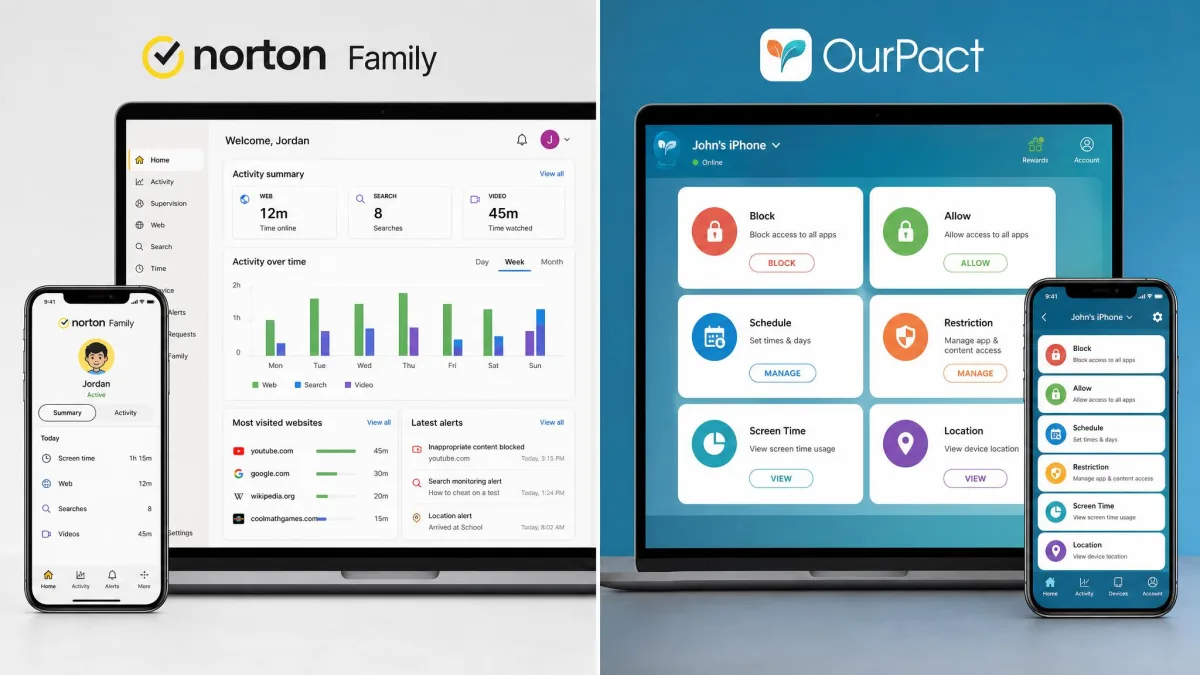
Both apps cover the core parental control checklist, but they weight it differently. Norton Family reads like a supervision and reporting platform. OurPact reads like a remote control for a child's phone. The sections below break the feature set down the way most parents actually evaluate it.
Screen Time Limits and Scheduling
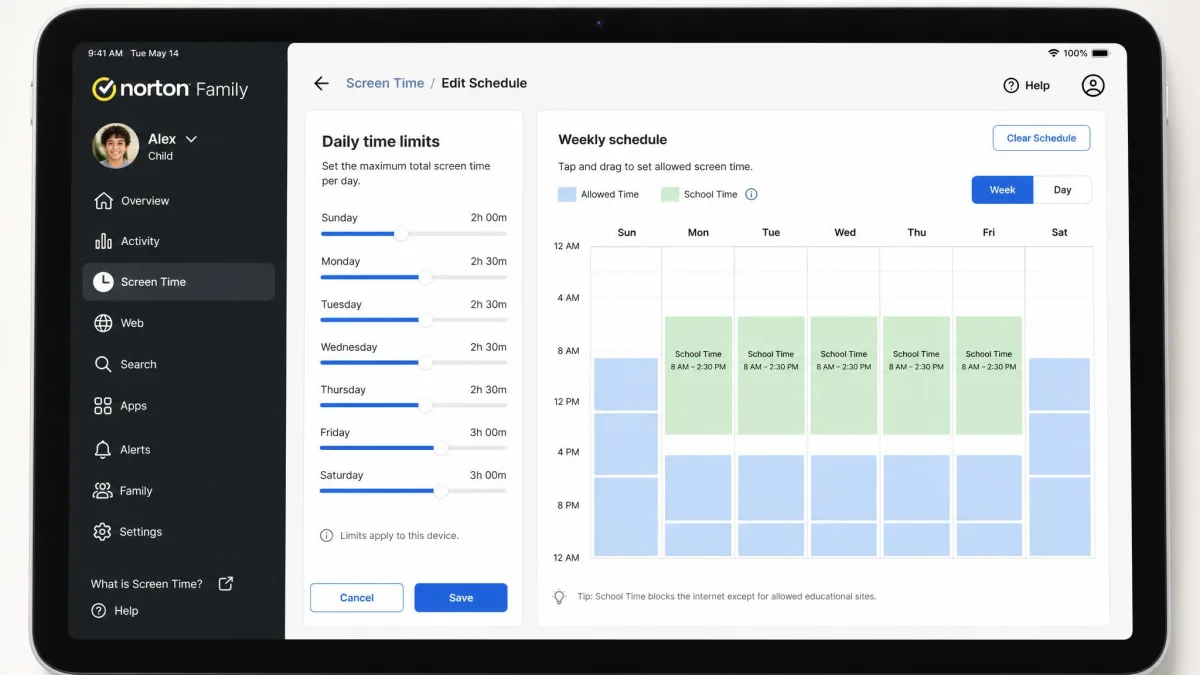
Norton Family gives you daily time limits and detailed schedules, including a School Time mode that locks a device down to approved sites during class hours and an Instant Lock button for when you need the screen off now. What it cannot do is set a time limit on a single app. You can block an app entirely or leave it open, but you cannot give a child 30 minutes of a game and then have it close on its own.
OurPact handles scheduling well and adds instant block and instant allowance controls that feel immediate in daily use. It is built for the "screens off at bedtime" routine, and it does that reliably. The catch is enforcement. In our testing, screen-time enforcement was OurPact's weakest area: blocks could fail to reapply after an iOS update, and the underlying VPN profile that enforces limits sometimes disconnected on its own, quietly cutting off enforcement without any warning to the parent.
OurPact enforces screen time on iOS through a VPN configuration profile. That is normal for the category, but it means a child who removes the profile, or an iOS update that drops it, can suspend enforcement until you notice and reapply it.
App Blocking and Management
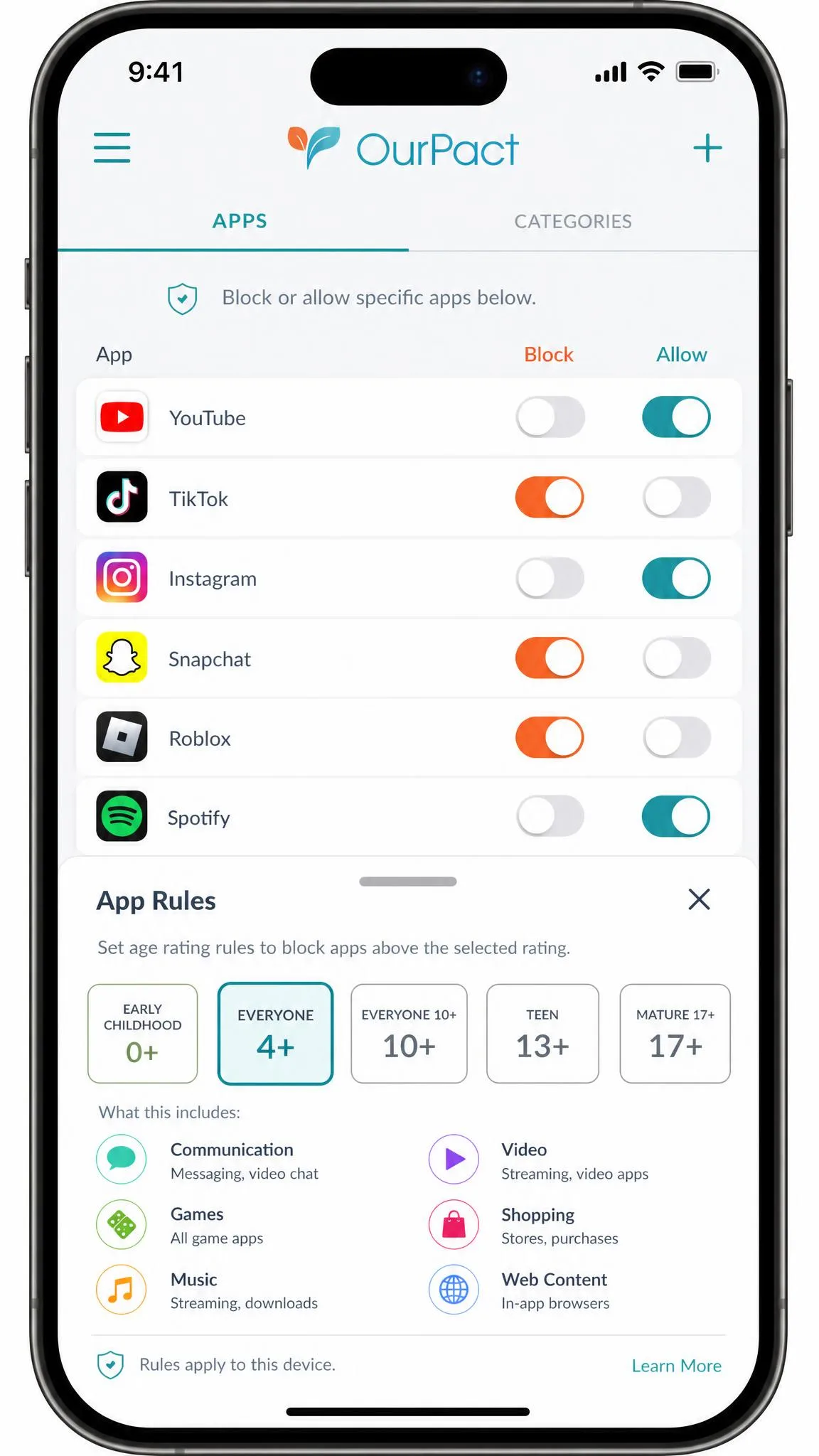
This is OurPact's home turf. You block and allow individual apps from a clean grid, and App Rules can gate apps by their store age rating so a new download is caught automatically. On iOS it can also prevent app deletion and block in-app purchases, though we saw the in-app purchase toggle switch itself back off more than once, which is the kind of quiet regression that erodes trust.
Norton Family's App Supervision blocks apps too, but only on Windows and Android. On iPhone there is no app blocking at all, which is a real gap if your child carries an iOS device. Norton also treats apps as all-or-nothing: block it or allow it, with no middle ground.
Web Content Filtering
Norton Family is the stronger web filter of the two. It sorts sites into roughly 45 categories (sources list the exact count as both 45+ and 47, so the precise number varies) and lets you allow, warn, or block each one, with search-term logging on top. That granularity is genuinely useful. The important caveat is that on iPhone the filtering only works inside Norton's own browser, and across platforms it can be sidestepped with a VPN or an alternative browser by a determined kid.
OurPact's filtering is basic by comparison. It blocks adult content and flags harmful material, but it does not offer the category-by-category control Norton does. If web filtering is the main reason you are buying, Norton is the clearer choice.
Norton Family is the stronger filter, but no filter is a wall. On any platform, a VPN or a second browser can walk around it, so treat filtering as one layer, not the whole fence.
Location Tracking and Geofencing
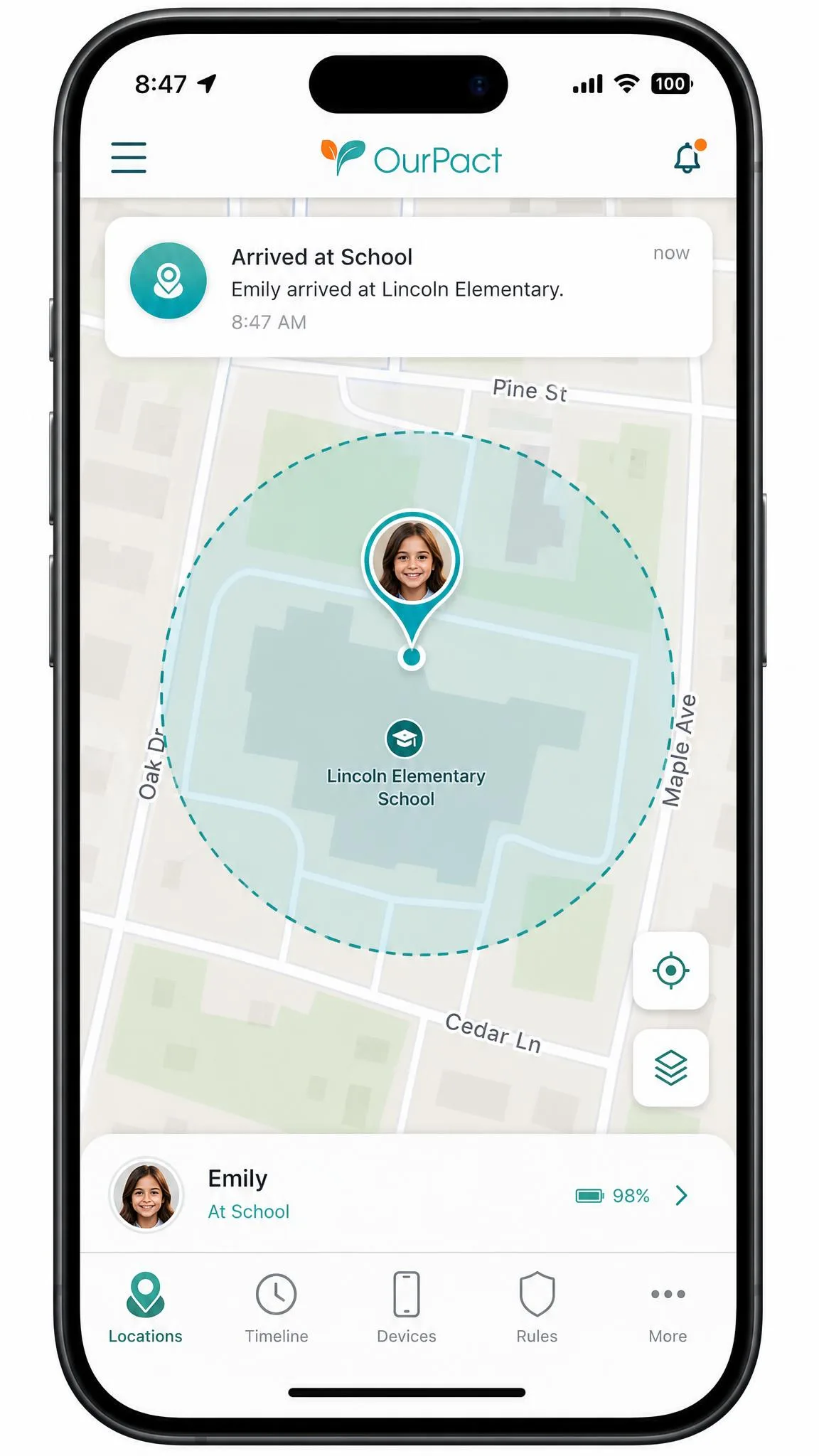
Both apps track location and both support geofencing, and this is one of the few areas where OurPact clearly matches or beats Norton. OurPact offers live GPS, location history, and arrival and departure alerts on a geofence of around a 200-meter radius. In testing, location and geofencing were OurPact's most dependable features, holding up even when its screen-time enforcement wobbled.
Norton Family pairs geofencing with 30-day location history, and in our testing its location tracking and geofence alerts were reliable and real-time without feeling overly invasive. Either app will tell you when a child arrives at or leaves school. If location is your single most important feature, OurPact's tracking is a small step ahead, but the gap is narrow.
Activity Reports and Monitoring
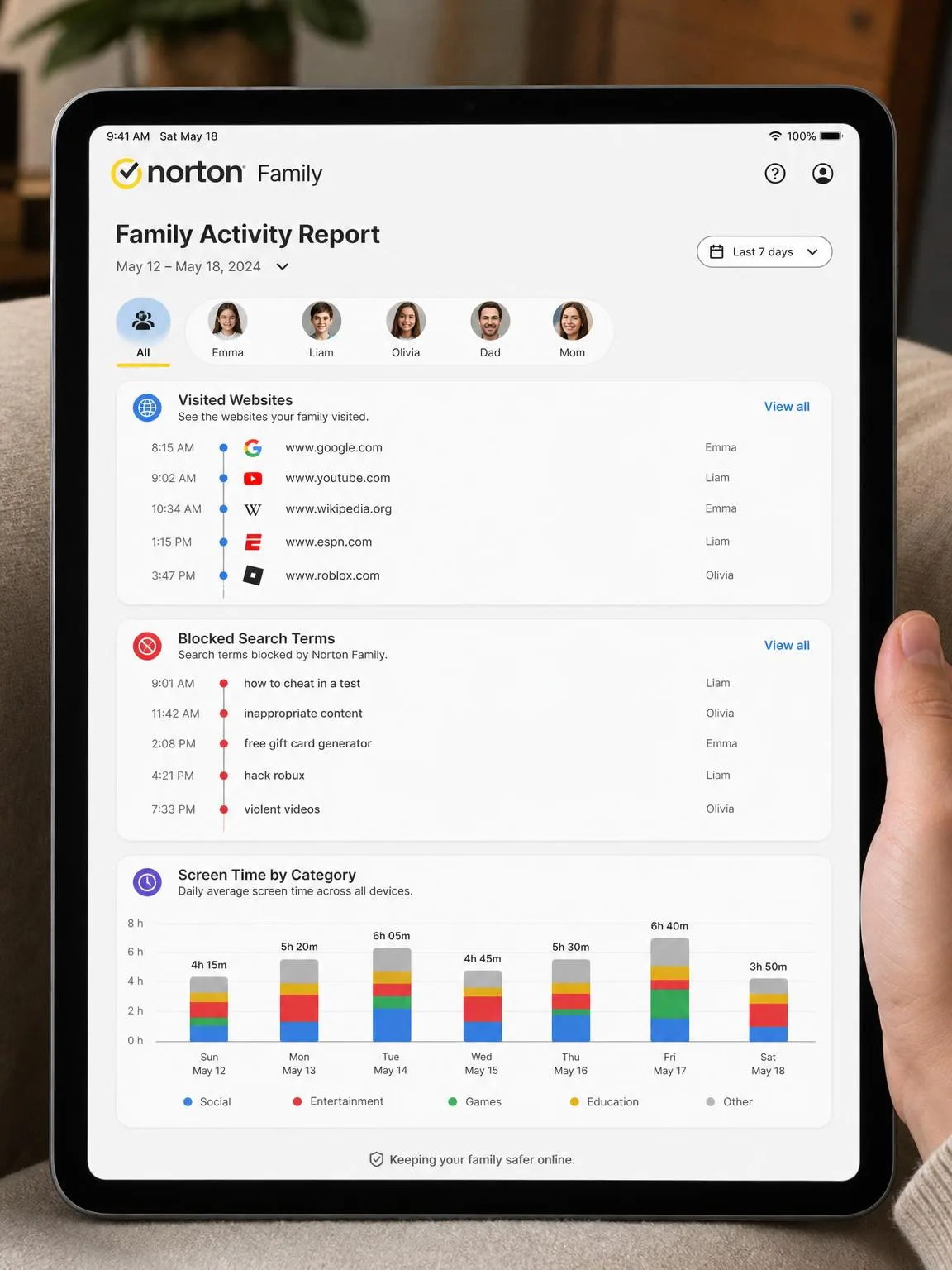
Norton Family is built for the parent who wants a record. It produces detailed activity reports covering visited sites, search terms, and video watched on YouTube and Hulu on Windows, and it can email you alerts. This is the visibility that makes Norton feel like supervision rather than just control.
OurPact's monitoring is thinner and gated behind its top tier. Its main window into activity is View, which captures periodic screenshots, and that is only available on Premium+. There is no equivalent to Norton's site-and-search reporting. Neither app monitors texts, social media, or chat apps, so a teen determined to hide activity can move to platforms neither one sees.
Alerts and Notifications
Norton Family sends email alerts and lets a child file an Access Request to appeal a blocked site, which turns a hard block into a conversation. Parents can respond from the mobile app. OurPact leans on push notifications for block status and location events. Both are adequate; Norton's Access Request appeals are the more thoughtful touch for families that prefer dialogue over lockdown.
Pricing and Plans Compared
On price, Norton Family is the simpler and cheaper story. It costs $49.99 for the first year and covers up to 15 child accounts across unlimited devices. Norton confirms only the first-year price. It does not publish a fixed renewal amount, and its terms warn that the renewal may be higher than the intro rate and is subject to change, with the exact figure emailed to subscribers before it hits. Budget for year two costing at least as much, and possibly more.
OurPact is priced per month and per tier. Premium runs $6.99 per month or $69.99 per year, and Premium+, which adds the View screenshot feature, is $9.99 per month or $99.99 per year, covering up to 20 child devices. Reviews also mention a cheaper Plus tier around $1.99 per month, but OurPact's plan lineup has been shifting and the current pricing page does not always show it, so we would not count on it. Add it up and OurPact costs more per year than Norton Family for most households, and you pay extra to unlock its best monitoring feature.
Free versus paid is worth a word. Norton gives you a 30-day free trial and no permanent free tier. OurPact offers a 14-day trial, and support documents describe a limited permanent free plan with a handful of manual blocks and grants per month, though the pricing page currently markets only the trial, so the free tier is not something to rely on.
Platform and Device Support (iOS, Android, Windows)
Platform coverage may be the single most decisive difference between these two apps. Norton Family runs on Windows 7 SP1 and later, Android 8 and up, and iOS, but not macOS. OurPact runs on iOS and Android only, with no Windows or Mac child monitoring at all.
If any child in your house uses a Windows laptop for school or gaming, OurPact simply cannot see it, and Norton becomes the default choice. But do not assume Norton is equally strong everywhere it runs. In our testing, Norton Family does far less on iPhone than on Android: web filtering only works inside the Norton browser, and App Supervision is unavailable on iOS entirely. OurPact, for its part, behaves noticeably differently between its iOS and Android apps, with different menus and different reliability, so the same plan can feel like two products depending on the device.
Match the app to your child's main device before you match it to a feature list. Norton Family is strongest on Windows and Android and weakest on iPhone; OurPact is iOS and Android only. The right pick often comes down to what hardware is actually in the house.
Ease of Setup and Use
Norton Family is the smoother setup. You create a parent account, install the app on each child device, assign it to a child, and set rules from a clean web dashboard or the parent mobile app. Most families can be up and running in a few minutes per device.
OurPact asks more of you up front. In testing, initial pairing was heavy: it could take around 30 minutes and required a computer, a USB cable, and enabling USB debugging on Android before the app would fully enforce its rules. Once running, OurPact's daily controls are pleasant, but the app has some quiet reliability quirks. Settings occasionally reverted to "Always Allow" on their own, and support is email-only with replies that can take up to seven days, with no phone line to call when something breaks.
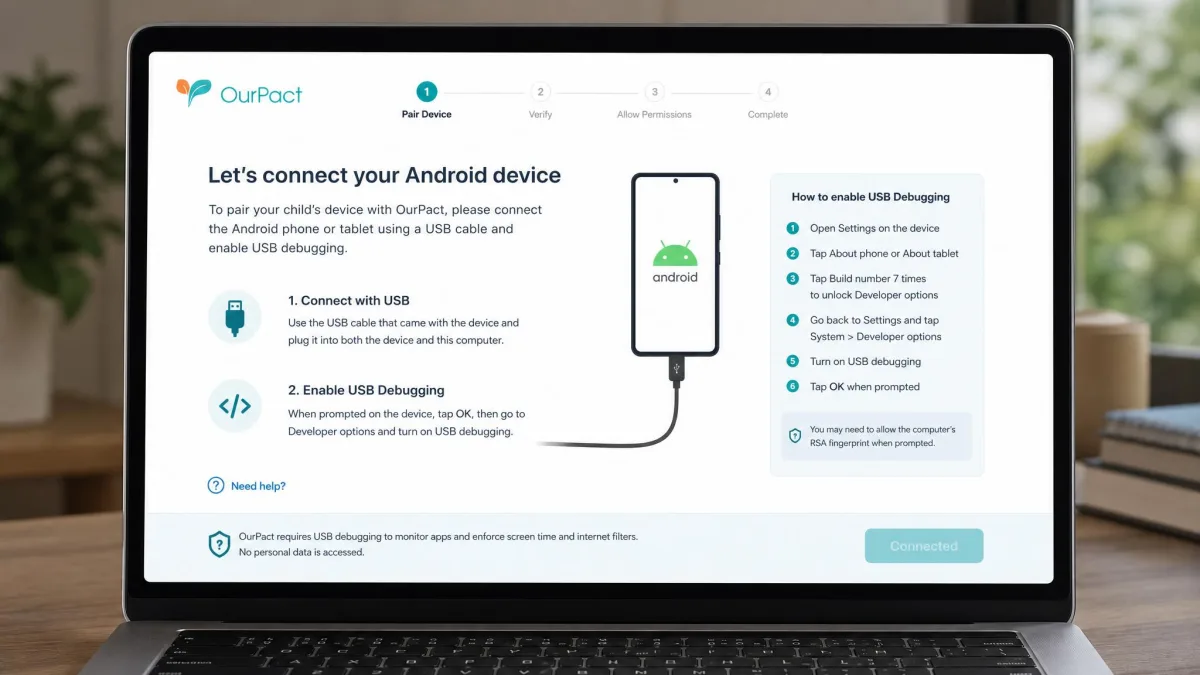
Across the family devices we set up, Norton Family's day-one experience was the calmer one, while OurPact rewarded patience: the pairing was fiddly, but its instant block and location tools were the features we reached for most once it was running.
Norton Family: Pros and Cons
Norton Family is the broad, report-heavy supervision tool, and its trade-offs follow from that identity.
Pros
- Wide platform coverage including Windows, plus up to 15 children on unlimited devices
- Lower first-year price at $49.99 with a 30-day free trial
- Strong web filtering with roughly 45 categories and search-term logging
- Detailed activity reports and reliable, real-time geofencing
- Access Request appeals suit families that prefer dialogue over hard lockdown
Cons
- No text, social-media, or chat monitoring
- Does much less on iPhone: no App Supervision, filtering only in the Norton browser
- Cannot set time limits on individual apps, only block them
- Filtering can be bypassed with a VPN or a different browser
Norton Family is the app we would hand to a parent of younger or grade-school kids who wants clear web filtering, a full record of activity, and coverage that includes the family PC.
OurPact: Pros and Cons
OurPact is the mobile app-blocker and locator, and it is best judged on those terms rather than as a full supervision suite.
Pros
- Excellent app blocking with per-app control and age-rating App Rules
- Instant block and instant allowance controls that work well day to day
- Dependable live GPS, location history, and geofencing
- iOS extras like app-deletion prevention and in-app purchase blocking
- Covers up to 20 child devices
Cons
- iOS and Android only, with no Windows or Mac support
- Screen-time enforcement is the weakest area and can drop after iOS updates
- Costs more per year, and screenshots require the Premium+ tier
- Slow, USB-cable setup and email-only support with up to seven-day replies
- Settings can revert on their own, including the in-app purchase toggle
OurPact makes the most sense for an all-iPhone or all-Android family whose priority is switching apps on and off and always knowing where the kids are.
Which Should You Choose?
For most families, Norton Family is the better buy. It costs less for the first year, covers more children and more devices, includes Windows, and gives you the reporting that turns supervision into an informed conversation. It is the natural pick if you want web filtering and activity visibility, and it fits the household that manages screens through open dialogue rather than a total lockdown.
Choose OurPact if your home is entirely iOS and Android and your main goals are blocking apps and tracking location. Its app grid and instant controls are better than Norton's, and its location tracking is a touch more dependable. Just go in knowing the setup is slow, screen-time enforcement can slip, and there is no Windows support.
A few edge cases. For a young child on an iPhone, Norton's iOS limitations bite, so OurPact's app blocking may serve you better there. For a tech-savvy teen, neither app monitors messages or social media, and both can be worked around, so pair whichever you pick with an honest conversation. If you are also weighing rivals, tools like Qustodio and Bark push harder on social and message monitoring, which is worth knowing before you commit.