Choosing a parental control app means balancing real oversight against your kids' need for a little privacy, and the two names that come up most often are Net Nanny and Norton Family. Both promise to filter the web, cap screen time, and keep you looped in on what your child is doing online, but they get there in very different ways. We put both through their paces to help you decide which one actually fits your household.
This comparison walks through pricing, web filtering, monitoring, app blocking, screen time, location features, and setup, then closes with a clear verdict. If you're short on time, the summary below tells you where each app pulls ahead.
Net Nanny vs Norton Family at a Glance
Net Nanny built its reputation on aggressive, category-based web filtering that reacts in real time. Norton Family, part of the wider Norton security family, leans toward a calmer "house rules" approach that favors conversation over lockdown. Neither is perfect, and the right pick depends heavily on which devices your family uses and how much monitoring you actually want.
Quick comparison table
Here's the head-to-head at a glance, with the details we unpack throughout the guide.
| Product | Buy | Price | Web filtering | Screen time | App blocking | Monitoring | Location / geofencing | Platforms | Ease of use |
|---|---|---|---|---|---|---|---|---|---|
 |
Check price → | $49.99/yr | 45+ category filtering | Screen time limits and scheduling | Yes, not on iOS | Search and video supervision, no DM or text reading | Geofencing with safe-zone alerts | Windows, Android, iOS (no macOS child device) | Conversation-focused, slower updates |
 |
Check price | $54.99/yr (5 devices) | Category filtering, mask/warn/block | Custom limits and scheduling | Yes, limited on iOS | Safe search, no DM or text reading | No geofencing | Windows, macOS, iOS, Android, Kindle Fire | Clunky, dated interface |
Bottom line up front (who wins)
For most families, Norton Family is the better all-round value. One $49.99 subscription covers up to 15 child profiles with unlimited device installs, it includes geofencing, and its core web filter held up reliably when we tested it. Net Nanny still wins on pure filtering muscle and reaches devices Norton ignores, including macOS and Kindle Fire, so it's the pick if your household runs Apple laptops or you want the tightest content controls available.
Pricing and Plans
Price is where these two diverge fast, and the sticker number doesn't tell the whole story. You have to look at how many children and devices each plan actually covers.
Net Nanny sells by device count. Its single-desktop plan runs $39.99 per year for one Windows or macOS computer, while the five-device Family Protection Pass is $54.99 per year, and the twenty-device pass is $89.99 per year. Those are the figures on Net Nanny's official pricing at the time of writing. There's no free trial, only a 14-day money-back guarantee, so you commit upfront and claim a refund if it doesn't work out.
Net Nanny does not offer a free trial. You pay first and rely on the 14-day money-back guarantee if you change your mind. There's also no in-app cancellation, so a refund means emailing support directly.
Norton Family takes a simpler line. It's $49.99 per year flat, and that covers up to 15 child profiles with unlimited device installs. Norton also includes a genuine 30-day free trial plus a 60-day money-back guarantee, so you get two full months of cushion to decide.
For a one-child, one-laptop household, Net Nanny's $39.99 single-desktop plan is the cheapest entry point. But the moment you add a second or third child, Norton Family's flat $49.99 pulls decisively ahead on cost per kid.
Web and Content Filtering
Filtering is the feature most parents care about first, and it's the area where Net Nanny has historically earned its name.
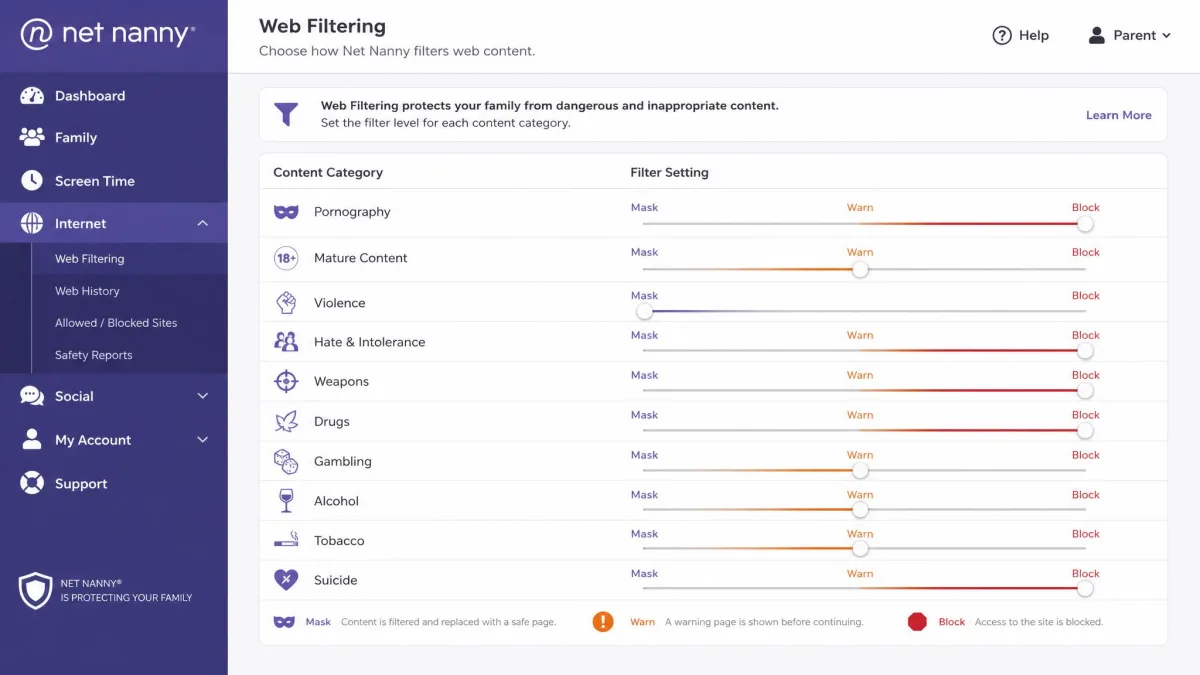
Net Nanny scans page content in real time and sorts it into categories, then lets you choose how to respond to each one. Instead of a blunt block-or-allow switch, you can mask specific content, warn your child before they proceed, or block a category outright. In our testing the content filter was genuinely fast, reacting to a flagged page in under half a second, which matters when a determined kid is clicking quickly. We go deeper on how it holds up across platforms in our hands-on Net Nanny review.
Norton Family filters across more than 45 categories, covering the usual suspects like sexual content, drugs, hate speech, and bullying. Its web filter worked reliably for us across everyday browsing, and while it doesn't offer Net Nanny's mask-or-warn nuance, the category coverage is broad and the defaults are sensible. Where Net Nanny optimizes for the granular control of a power user, Norton keeps things approachable for a parent who just wants safe defaults out of the box.
Net Nanny's mask, warn, or block actions give you finer control than a simple on-off switch, while Norton's 45-plus categories cover the essentials with less fuss.
One caveat worth knowing: Net Nanny installs a security certificate to inspect encrypted traffic, and in some cases that certificate isn't trusted by every browser and can break Firefox. If your child's main browser is Firefox, test the filter early rather than assuming it just works.
Monitoring: Text, Social Media, and Activity Reports
If you're hoping to read your child's messages, set your expectations now, because neither of these apps does that.
Net Nanny's social media monitoring is limited to forcing safe search and blocking apps outright. It does not read direct messages or posts on Facebook, Instagram, or Snapchat, so you see that an app was used, not what was said inside it. We also found the social features fiddly to enable, and getting them working during setup took more patience than it should have.
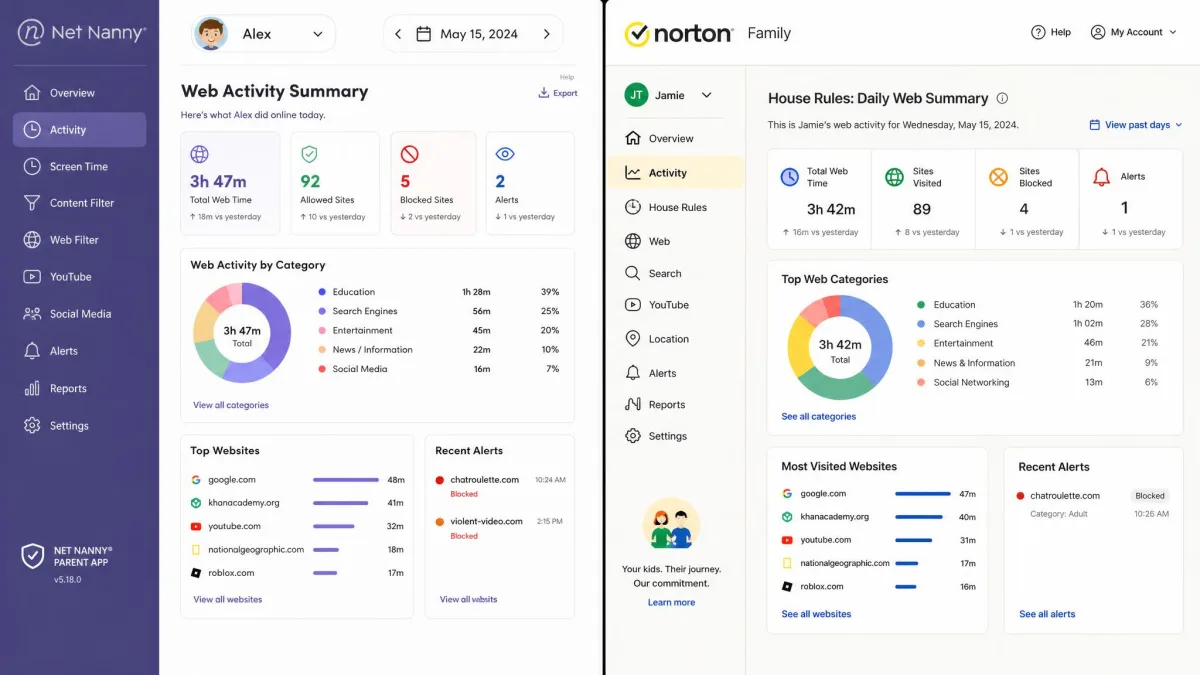
Norton Family is in the same boat on messaging. It does not monitor text messages, phone calls, or social media DMs. What it does well is supervision reporting: it tracks web searches and watched videos, then rolls everything into activity reports that show you patterns over time. That reporting is the heart of Norton's approach, which is built around starting conversations rather than surveilling every keystroke.
If message-level monitoring is your priority, neither app will satisfy you. Both stop at web activity, searches, and app usage. Reading DMs or texts requires a dedicated monitoring tool in a different category entirely.
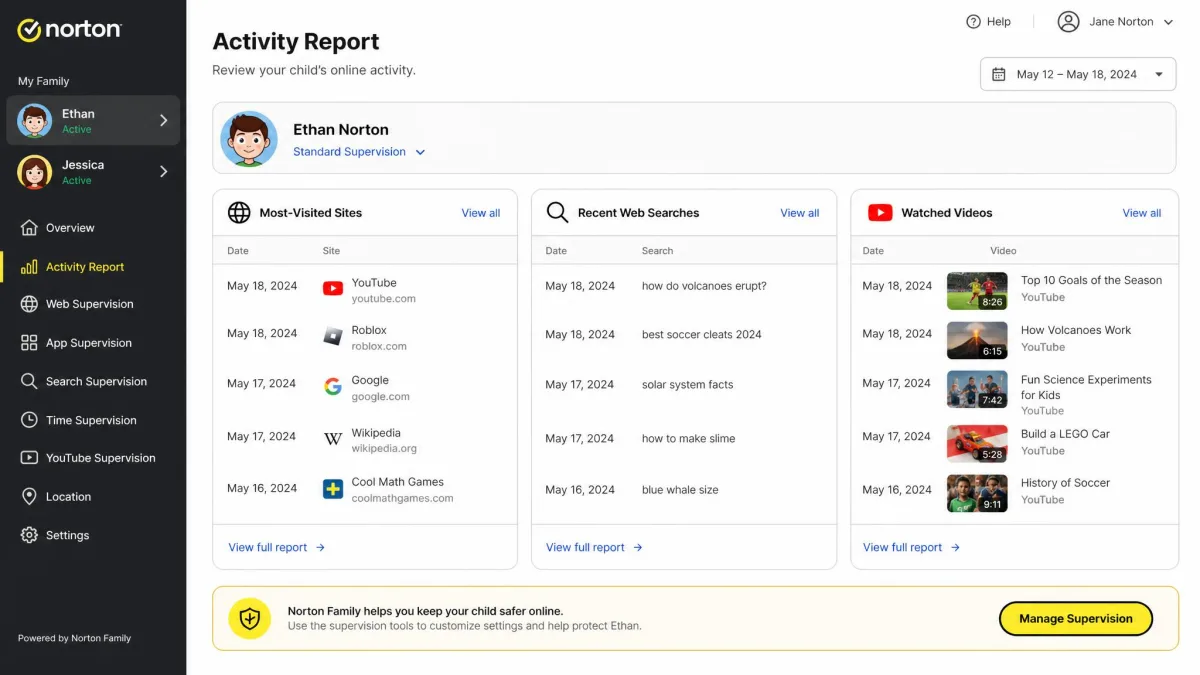
For a fair number of families, activity-level insight is exactly the right amount of oversight, and Norton's reports are the clearer of the two.
App Blocking and Management
App control is where the platform you're on suddenly matters a great deal, so read this section with your child's device in mind.
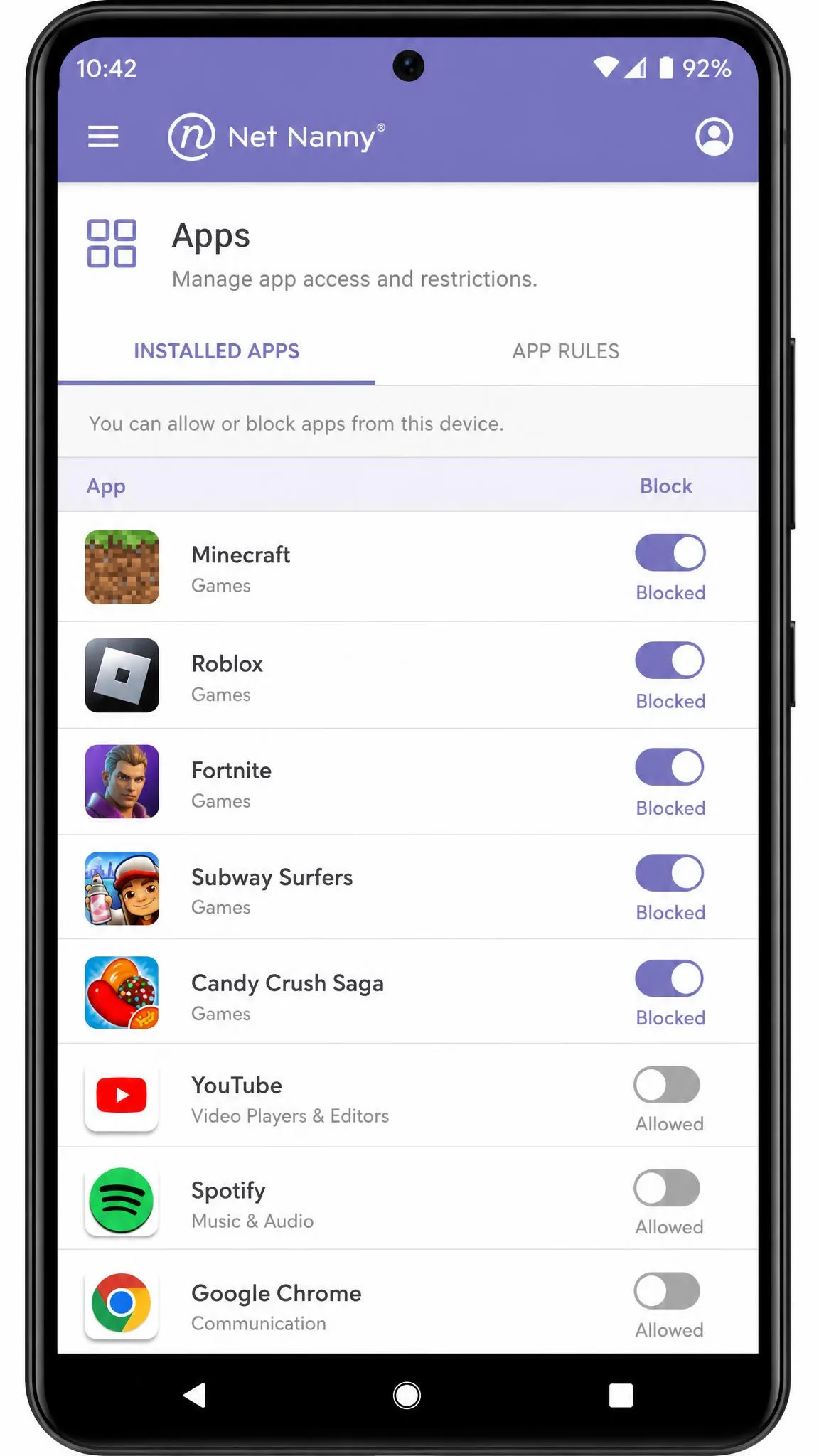
Net Nanny supports app blocking, and it's solid on Windows and Android, where you can block specific apps and pause the internet on demand. On iOS the app-blocking capability is more limited, a restriction that comes down to how Apple lets third-party tools operate rather than any failing unique to Net Nanny.
Norton Family also blocks apps, but with a sharper platform gap: app blocking simply isn't available on iOS at all. On Android it works, though there's a catch we'll flag below. If your child's primary device is an iPhone, Net Nanny's limited app blocking still beats Norton's absent app blocking, and that difference alone can decide the matchup for an Apple household.
On Android, a child can stop the Norton Family app from running in the background, which halts monitoring until someone notices. It's worth checking the app is still active from time to time rather than assuming it's always on.
Screen Time and Scheduling
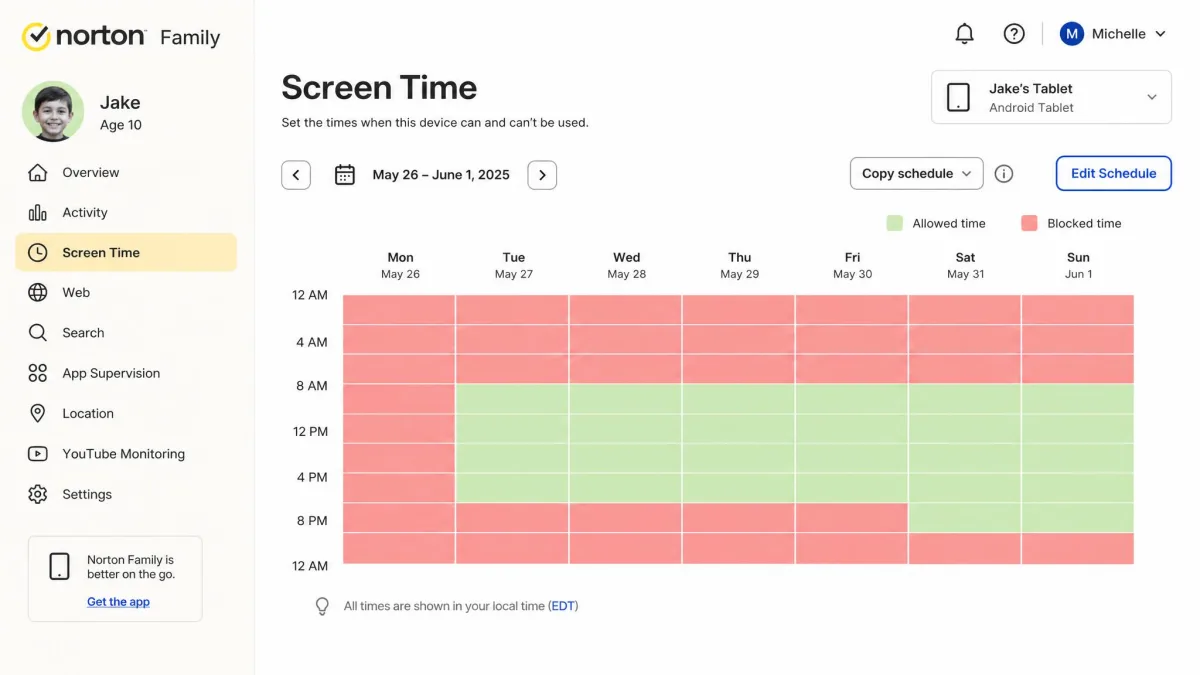
Both apps let you cap how long a device is used and set schedules for when it can be used, and this is a near-even round on paper.
Net Nanny offers customizable daily limits and a scheduling grid, so you can block usage during homework hours or after bedtime while allowing a set amount of free time. When it works, it's flexible. The honest caveat is reliability: in day-to-day use Net Nanny has been reported to ignore set time limits, occasionally freeze a device, and show dashboard reporting that doesn't match reality. Those glitches undercut an otherwise capable scheduling system.
Norton Family provides screen time limits and scheduling in the same broad shape, wrapped in its house-rules dashboard. Its changes aren't instant, though. New settings and new-device setup take time to apply rather than updating the moment you tap save, so if you tighten a limit at 8 p.m. expecting it to hit immediately, give it a little while to propagate.
Location Tracking and Geofencing
Here the two apps genuinely part ways, and it's a clean win for one side.
Norton Family includes location tracking with geofencing, so you can draw a safe zone around home or school and get an alert when your child leaves it. In our testing Norton's core features, the web filter and geofencing among them, worked reliably, which makes this a dependable reason to pick it if knowing where your kid is matters to you.
Net Nanny, by contrast, has no geofencing at all. It can surface location information, but there are no boundary alerts, and even the location pings we saw lagged noticeably, averaging around a 55-second delay in real-world GPS checks. If location safety is high on your list, this is the single clearest advantage in the whole comparison, and it belongs to Norton.
Alerts, Remote Control, and the Parent Dashboard
The dashboard is where you'll actually live day to day, so how each one feels matters as much as its feature list.
Net Nanny's parent dashboard centralizes alerts, reporting, and remote controls like the internet pause, and the basic controls are simple enough to operate once you're in. The interface itself feels dated and a little clunky, and it's the part of the experience that has aged least gracefully. It does the job, but it doesn't feel modern.
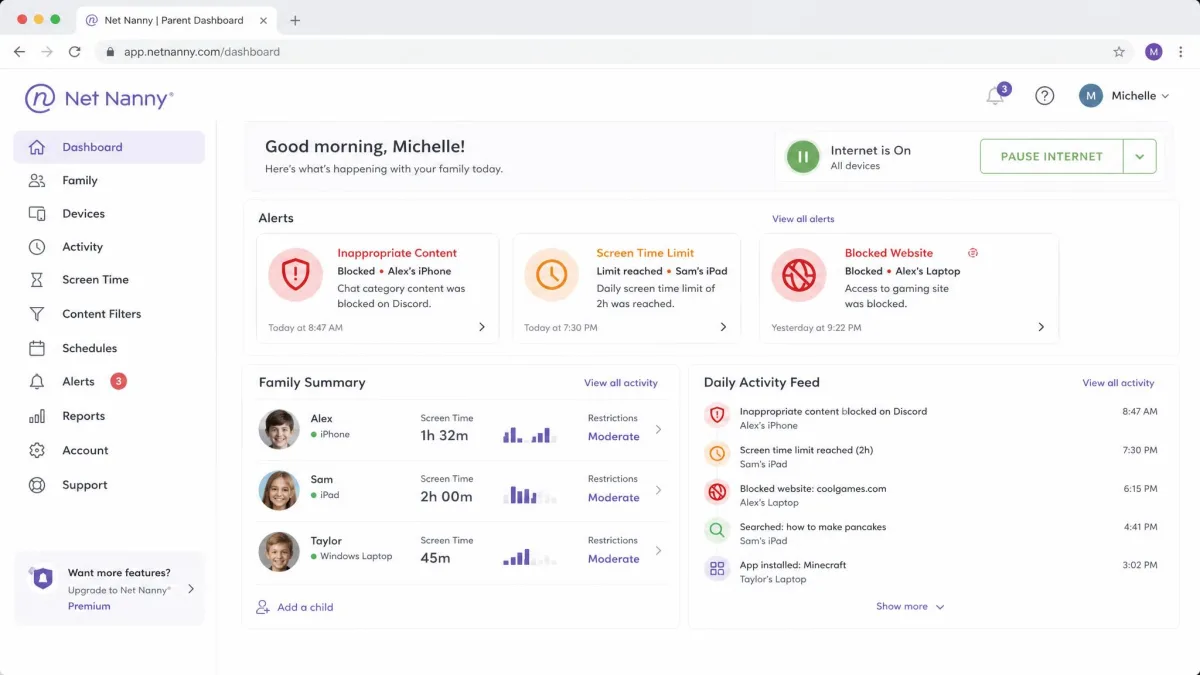
Norton Family's dashboard is organized around house rules and email or text alerts, and it deliberately leans toward guiding conversations rather than imposing a total device lockdown. That's a philosophy as much as a design choice. The trade-off is that Norton lacks the deeper app management and social controls of more comprehensive tools, so you're getting a calmer, cleaner console that does a little less. Where Net Nanny hands you more switches inside an older frame, Norton hands you fewer switches inside a friendlier one.
Pros
- Fast, granular content filtering with mask, warn, and block actions
- Widest device reach, including macOS and Kindle Fire
- Internet pause and flexible scheduling when it runs smoothly
Cons
- No geofencing or boundary alerts
- Dated, clunky interface and fiddly social setup
- Reliability complaints, including ignored time limits and inaccurate reports
Those are Net Nanny's headline strengths and weaknesses. Norton Family's balance sheet looks different.
Pros
- Flat $49.99 covers up to 15 children with unlimited installs
- Geofencing with safe-zone alerts
- Clear activity reports and a 30-day trial plus 60-day guarantee
Cons
- No app blocking on iOS and thin iOS coverage overall
- Doesn't monitor texts, calls, or social DMs
- Settings and new-device changes take time to apply
Device Compatibility and Supported Platforms
Compatibility can quietly settle this whole decision before you even compare features, so match this section to the hardware in your home.
Net Nanny covers the widest spread: Windows, macOS, iOS, and Kindle Fire, plus Android. We'd flag Android as partial rather than full, since its Android build is noticeably more limited than its Windows and iOS versions, but the breadth is still the widest here. Crucially, Net Nanny is the only one of the two that monitors a macOS child device.
Norton Family runs on Windows, Android, and iOS, and it does not monitor macOS as a child device. Its iOS coverage is also thin: app blocking is unavailable, and web filtering only runs through a VPN or browser workaround rather than natively. If your child's main machine is a MacBook, that alone rules Norton out and points you straight to Net Nanny.
The quick platform rule: pick Net Nanny if you need macOS or Kindle Fire coverage. Pick Norton Family if your kids are on Windows and Android, where its features are strongest and its value is highest.
Ease of Use and Setup
A parental control app only protects your family if you can actually get it configured, so setup friction is a real feature, not a footnote.
Net Nanny's basic controls are simple to operate, but the setup experience is where frustration creeps in. Getting the social media features to work can be difficult, and configuration has been known to trap people in loops and server glitches, with some spending over an hour just getting it running. The interface's dated feel doesn't help the first-run experience.
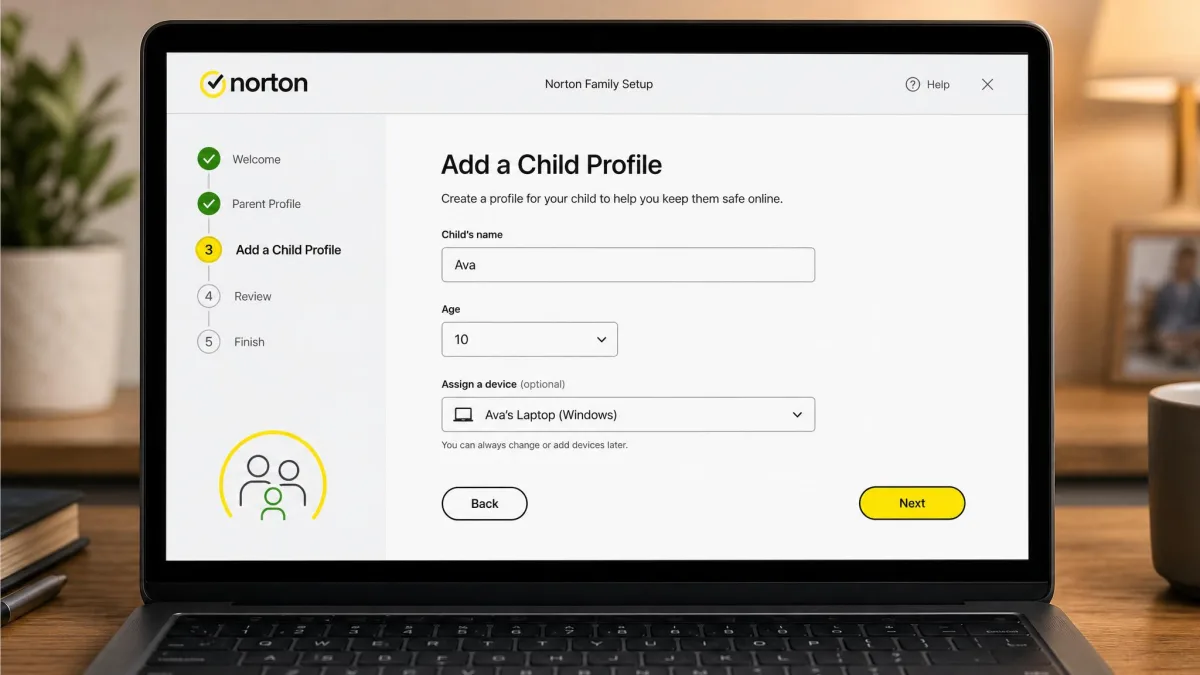
Norton Family is generally smoother to set up, and its house-rules dashboard is approachable for a non-technical parent. The main quirk is patience: because changes and new-device setup take time to apply, the app can feel unresponsive when you're expecting instant results. That's a very different kind of friction from Net Nanny's, and on balance the easier one to live with.
Net Nanny: Pros and Cons
Net Nanny is the choice for parents who want the tightest content filtering and the broadest device coverage, and who are willing to trade a polished interface for that reach. Its filtering is fast and genuinely granular, and it's the only option here that handles a macOS or Kindle Fire child device.
The costs are real, though. There's no geofencing, the interface feels behind the times, setup can fight you, and reliability complaints, reflected in a widely reported 2.1 out of 5 aggregate Trustpilot score, point to cross-platform stability problems. If you buy Net Nanny, buy it for the filtering and the platform breadth, and test it thoroughly inside the 14-day window.
Norton Family: Pros and Cons
Norton Family is the better value pick for a typical multi-kid, Windows-and-Android household. One flat subscription covers up to 15 children with unlimited installs, geofencing is built in, and its core web filter and location features held up reliably in our testing. The trial-and-guarantee cushion is the most generous of the two by a wide margin.
Its weaknesses are concentrated on Apple hardware and depth. There's no app blocking on iOS, no macOS child monitoring, and no message-level insight, and its Android agent can be stopped by a savvy kid. For families outside the Apple ecosystem who want sensible defaults over deep control, none of that is a dealbreaker.
Verdict: Which Should You Choose?
If we had to hand one app to the average family, it would be Norton Family. The math is hard to argue with: $49.99 covers up to 15 kids with unlimited devices, geofencing is included, the trial and guarantee are generous, and the features that matter most held up when we leaned on them. It does less than Net Nanny in a few areas, but it does the essentials reliably and it does them cheaply per child.
Net Nanny earns its place for a narrower audience. If you run Apple laptops, need Kindle Fire coverage, or simply want the most aggressive, granular content filtering money can buy, it's the stronger tool, provided you can live with a dated interface and some setup patience. Match the app to your devices first, then to your monitoring style, and the winner for your household usually picks itself.