Kaspersky Safe Kids is a low-cost parental control app built around web and content filtering, app rules, screen time schedules and GPS, with a genuinely usable free tier. FamiSafe, from Wondershare, is a pricier monitoring suite that adds live screen viewing, social app scanning, location history and driving reports on top of the same filtering basics. If you mostly want to block bad websites and cap screen time on a budget, Kaspersky is the sensible buy. If you want to see what your child is actually doing inside their apps, FamiSafe is the one with the features.
Both are popular products with real gaps. Kaspersky's iOS build is the weakest part of the package, and the company's US retreat makes buying it awkward for American parents. FamiSafe covers more ground but costs several times as much and carries a poor public reputation for support. Here is how the two compare on the things that decide it.
Kaspersky Safe Kids vs FamiSafe at a Glance
| Product | Kaspersky Safe Kids | FamiSafe |
|---|---|---|
| Starting price | About $14.99 per year, varies by region | $59.99/year, $19.99/quarter, $9.99/month |
| Free plan | Yes, filtering, app management and basic screen time | Free plan limited to 1 device, demo data in places |
| Trial and refund | 30-day money-back guarantee | 3-day free trial on yearly, 7-day money-back guarantee |
| Web and content filtering | Yes, accurate, still works in incognito | Yes, web filter plus browser history |
| Screen time limits | Yes, daily limits and device schedules | Yes, daily limits and schedules |
| App blocking | Yes on Android, iOS blocks by age rating only | Yes, app rules across supported platforms |
| GPS and geofencing | Yes on the paid tier, geofence alerts can drop | Yes, plus location history, driving reports and SOS |
| Social media and message monitoring | Alerts only, no conversation content | Yes, 30+ apps with keyword and slang detection |
| YouTube monitoring | YouTube safe search and search monitoring | YouTube and TikTok watch history |
| Device limit | Up to 500 devices and 100 child profiles | 5 to 10 devices depending on plan |
| Supported platforms | Windows, macOS, Android, iOS | iOS, Android, Windows, Mac, Chromebook, Kindle Fire |
| Activity reports and alerts | Yes, real-time alerts are paid only | Yes, detailed reports and real-time alerts |
We compared these two the way a parent would use them, feature by feature on Android, iOS and Windows, weighing filtering accuracy, screen time controls, location tracking and how hard each app is to remove.
Pricing and Free Plans Compared
Price is the clearest difference between these two products, and it is not close.
Kaspersky Safe Kids pricing
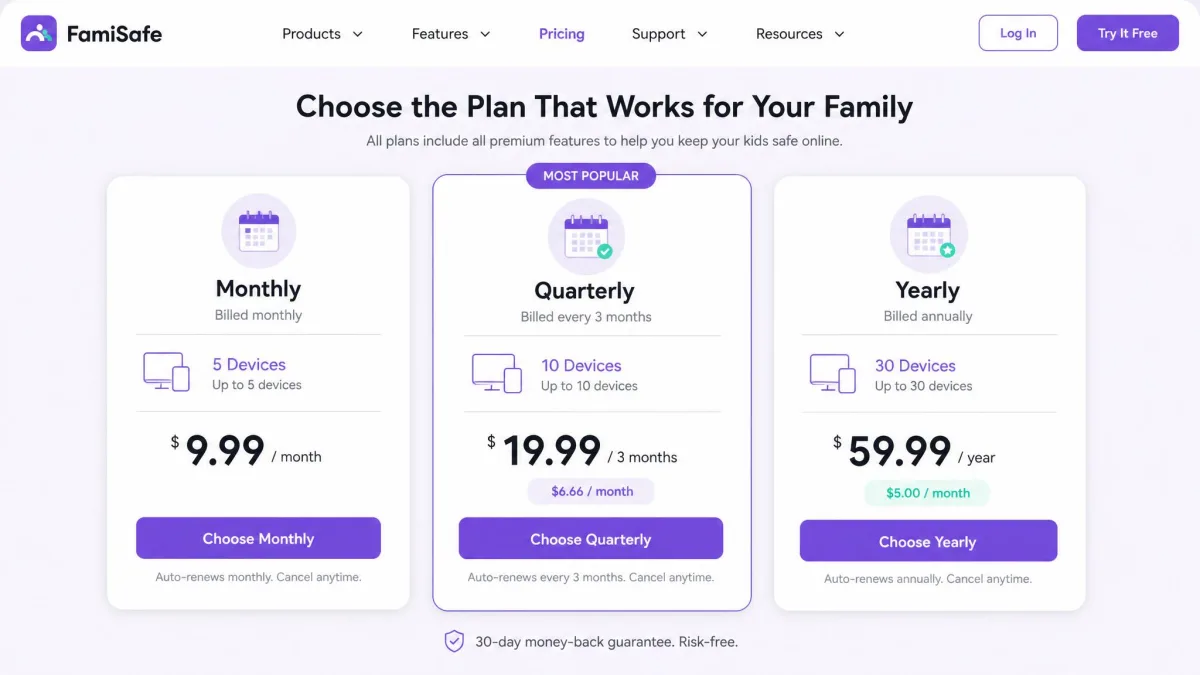
Kaspersky's Premium tier is widely listed at around $14.99 per year, though the advertised annual price shifts by storefront and region, and first-year pricing differs from the renewal rate. Whichever listing you land on, it sits far below what most parental control software charges. Purchases are covered by a 30-day money-back guarantee, which gives you a full school-term-sized window to decide.
The free tier is unusually generous. It covers web filtering, app management, basic screen-time management and YouTube safe search, which is most of what a parent of a younger child needs. What the free tier leaves out is GPS tracking, battery alerts, social network monitoring and real-time alerts, so the moment you want to know where your child is, you are paying.
Coverage on a paid account is described as up to 500 devices and profiles for 100 children, but some listings describe it simply as unlimited, so the practical cap depends on the plan sold in your region. Either way, no normal family will reach it.
FamiSafe pricing
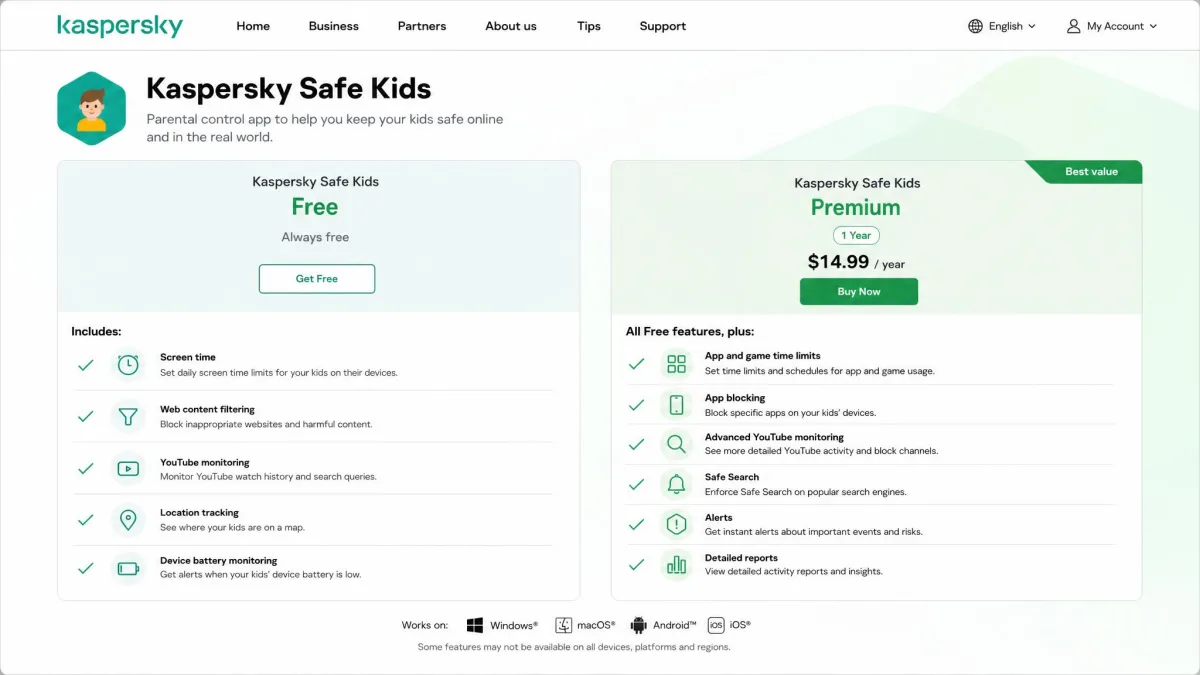
FamiSafe sells three plans: $9.99 per month covering up to 5 devices, $19.99 per quarter which works out to about $6.66 a month, and $59.99 per year, roughly $4.99 a month. FamiSafe by Wondershare lists the yearly plan as covering up to 10 devices, though device allowances on each tier have been revised more than once, so the number attached to a given plan changes between listings.
There is a 3-day free trial on the yearly plan and a 7-day money-back guarantee, both noticeably tighter than Kaspersky's 30 days. A free plan exists, but it covers 1 device with limited features and shows demo data in some monitoring views, so treat it as a product tour rather than a usable free option.
Which offers better value
On raw price, Kaspersky wins outright. FamiSafe's cheapest route costs roughly four times as much per year, and its refund window is a quarter the length. That said, value depends on what you need. A parent who only wants safe browsing and a bedtime cutoff is paying FamiSafe for a monitoring stack they will never open. A parent of a teenager who wants chat screenshots, keyword alerts and a record of where the car went on Saturday night is buying something Kaspersky simply does not sell.
The value case for Kaspersky holds right up until the child device is an iPhone, and then the whole decision turns on one weak feature.
Feature-by-Feature Comparison
Both apps cover the same core: filtering, screen time, app rules, location and reports. The differences are in depth, and in which platforms get the full set.
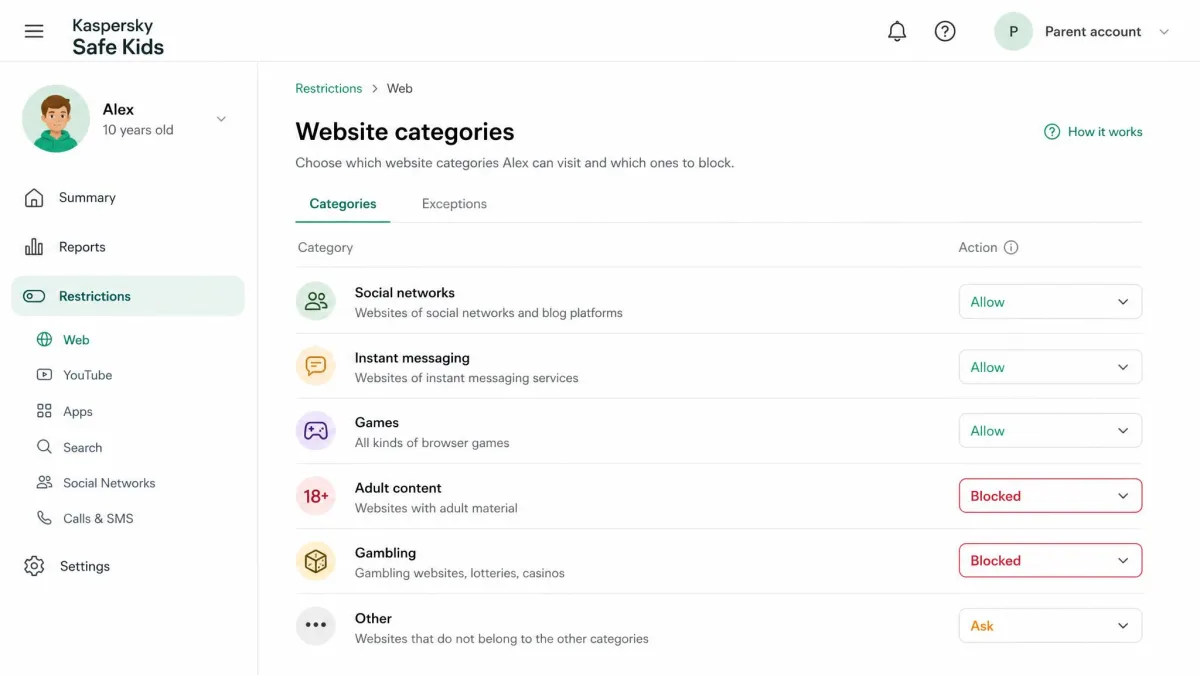
Web and content filtering
Filtering is the one area where Kaspersky feels older and better. Its website monitoring is accurate in daily use, category blocking behaves predictably, and it keeps filtering and logging when a child switches to incognito browsing, which is the first workaround most kids find. Kaspersky has held AV-TEST approved ratings for seven consecutive years and states that it has blocked 106 million harmful websites, and that pedigree shows in how few obvious misses the filter makes.
FamiSafe's web filter blocks by category too, and pairs it with full browser history, so you can check what was visited as well as what was stopped. History is a useful addition for older children, where the point is less about hard blocking and more about knowing what they searched for.
Screen time limits and scheduling
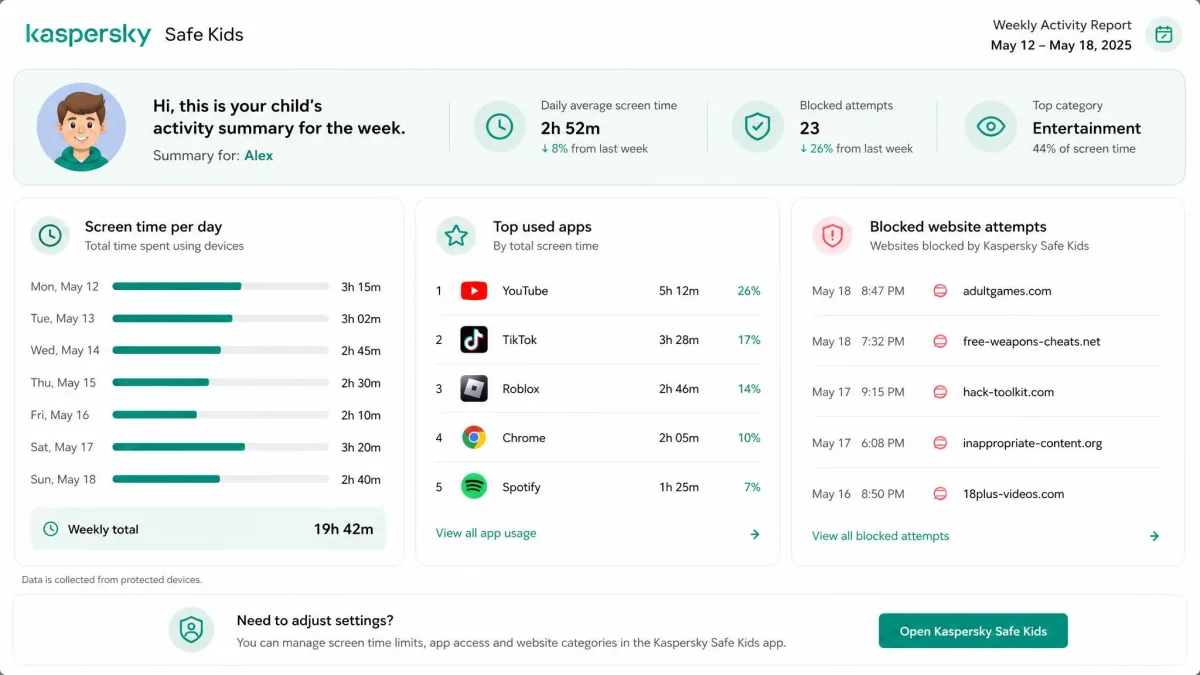
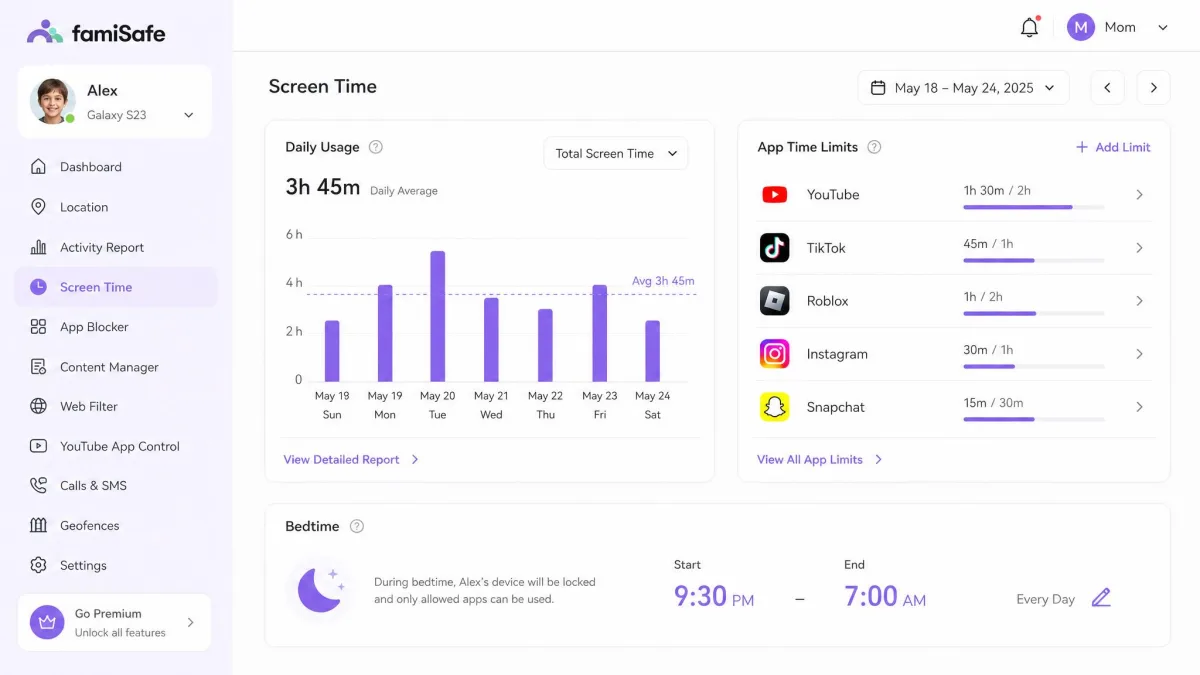
Both products let you set a daily allowance and a schedule, and both will lock the device outside permitted hours. Kaspersky's controls are the simpler of the two, built around age-preset profiles for ages 3-5, 6-12 and 13-18 that apply a sensible starting configuration in one tap. If you have never set up a parental control app before, that preset removes most of the guesswork.
FamiSafe splits screen time by app as well as by device, so you can allow a messaging app during homework hours while games stay locked. Screen time management is one of its strongest features in daily use.
App blocking and app usage reports
On Android, both apps block individual apps cleanly. Kaspersky's app blocking works well and includes a request-permission path, so a child can ask for access to a blocked app instead of just meeting a wall, and you approve or refuse from the parent app. That small feature prevents a lot of arguments.
On iPhone the picture changes. Kaspersky's app filtering only blocks by public age rating, so individual apps cannot be blocked manually, and in practice it often fails to restrict games, block installed apps or stop new installs. That gap is the single most frequent complaint about the product.
If your child uses an iPhone and app blocking is your main reason for buying, Kaspersky Safe Kids is the wrong tool. Its iOS app controls work by age rating only, and they let plenty through.
Location tracking and geofencing
Kaspersky's location tracking is dependable once you are on the paid tier, but two limits matter. A saved geofencing alert can disappear after you save it, so check that your safe zones are still listed a day later. And the location view shows only your child's current position, with no location history in the mobile apps, so you can find where they are but not where they have been.
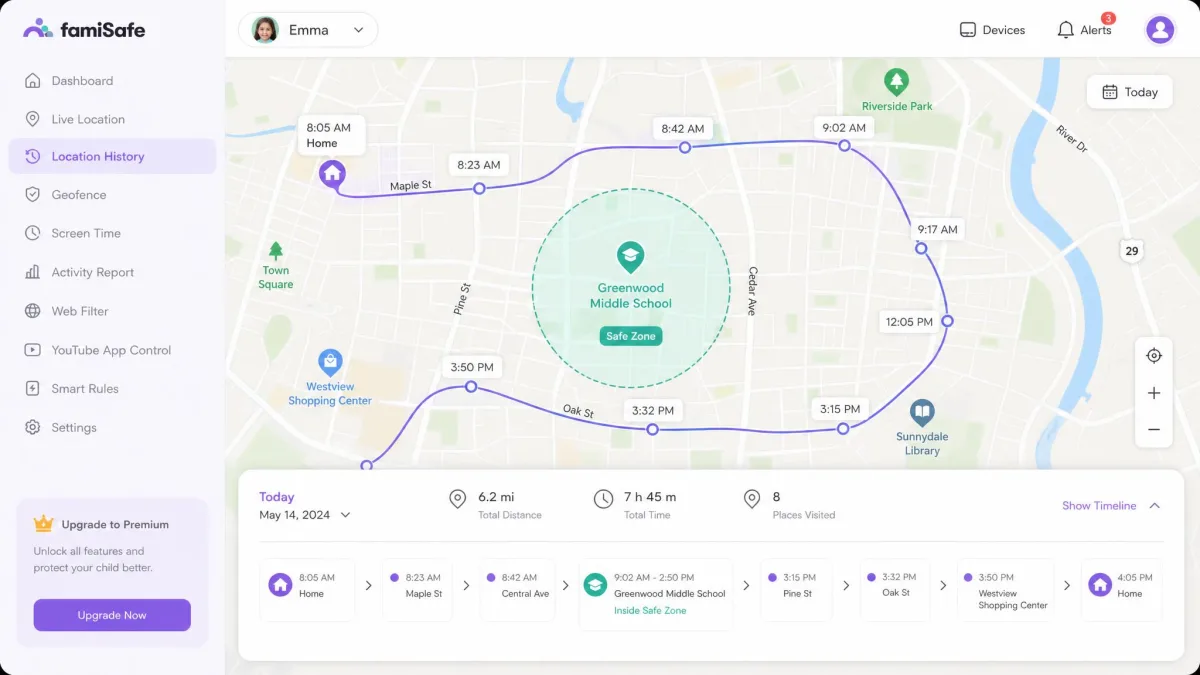
FamiSafe is a full location product by comparison: real-time GPS with location history, geofenced safe zones, driving reports and SOS alerts. Location tracking is among the features it does best. The tradeoff is battery. Continuous location monitoring drains the child's device noticeably, though the parent app itself is light, measured at roughly 0.94% impact against the 3-4% typical of social apps. Location data can also lag behind reality, with sync delays worst in areas where Google Maps coverage is weak.
Social media and message monitoring
This is the widest gap in the comparison. Kaspersky can tell you that tracked social apps were used and can raise alerts, but it shows no conversation content: posts and messages inside those apps stay invisible to the parent. Call and text monitoring exists, but only on Android.
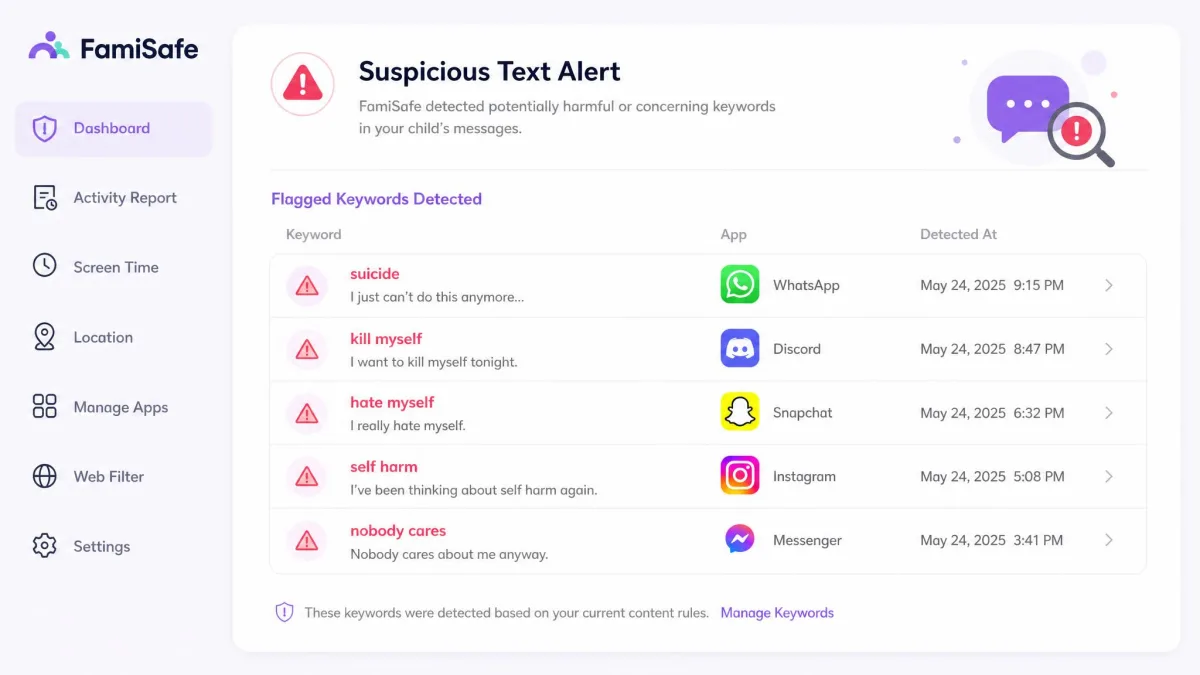
FamiSafe detects social activity across 30+ supported apps with AI risk analysis, tracks calls and messages, captures chat and app screenshots, flags explicit pictures, and lets you set custom keyword and teen-slang alerts. It also has a live Screen Viewer and one-way audio. If you have decided you need to see what your child sends, FamiSafe is the only one of the two that shows it.
Message and social monitoring is legally sensitive in some regions, and it works best when a child knows the app is there.
Alerts, activity reports and real-time notifications
Both send activity reports, and both cover YouTube: Kaspersky offers YouTube safe search plus search monitoring, while FamiSafe logs YouTube and TikTok watch history. FamiSafe's reports are the more detailed of the two, and its real-time notifications arrive on every paid plan. Kaspersky gates real-time alerts and battery alerts behind the paid tier, so the free version tells you what happened after the fact rather than as it happens.
Platform and Device Support: Android, iOS, Windows and Mac
Those feature gaps only matter on hardware the app can reach, and here the two diverge again. Kaspersky Safe Kids runs on Windows, macOS, Android and iOS. The Windows requirement is Windows 7 or later with 1GB RAM and an internet connection, although the listed macOS range stops at macOS 14, so support for later macOS releases is not stated alongside it.
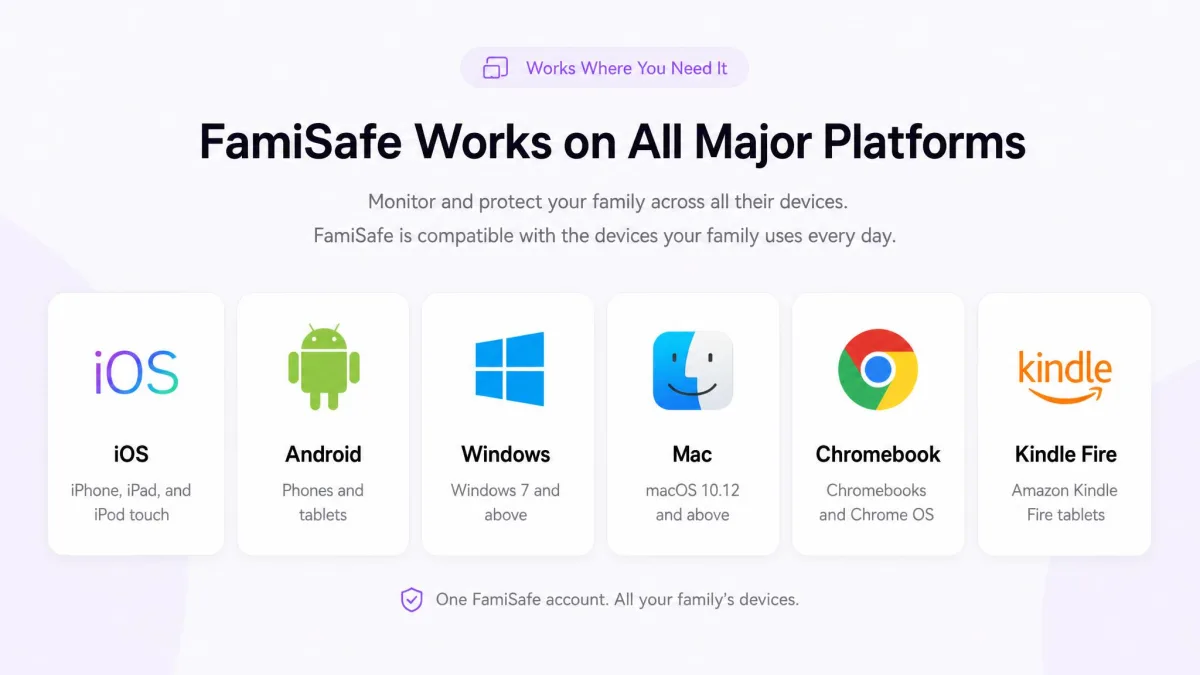
FamiSafe covers more ground: iOS, Android, Windows, Mac, Chromebook, a Chrome extension and Kindle Fire. If your household runs a school-issued Chromebook or a Fire tablet, FamiSafe is the only one of the two that will manage it.
One practical wrinkle outweighs the feature list for American readers. Kaspersky exited the U.S. market after the Commerce Department sale ban took effect on July 20, 2024, and Google pulled its Android apps from the Play Store in early October 2024. That prohibition remains in force: since September 29, 2024, Kaspersky has been barred from selling software to U.S. customers and from shipping updates to existing installs. Safe Kids is therefore absent from the US Play Store, and an Android install has to come from Kaspersky's official Safe Kids page instead. There is also no U.S. retail price to quote, since the product cannot lawfully be sold to U.S. customers and the $14.99 to $35.99 a year figures still circulating come from other regions and key resellers. In practice, a U.S. purchase means a foreign storefront or a third-party key, and existing installs go without updates.
Setup and Ease of Use for Parents
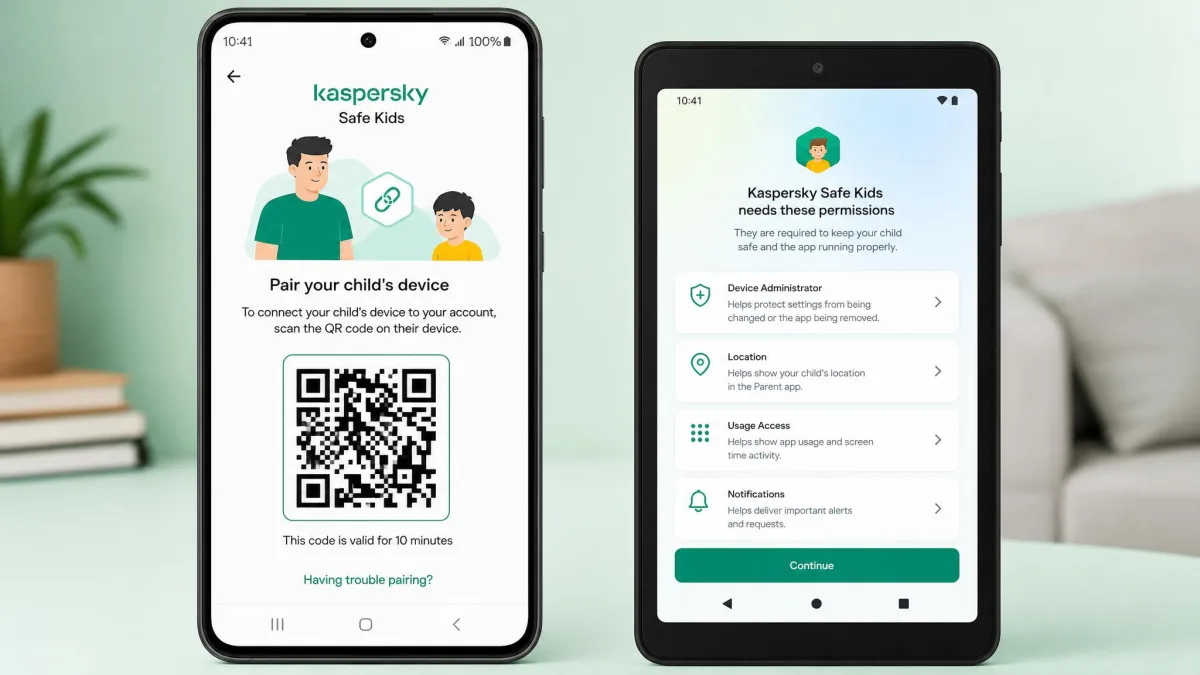
That platform split shows up again on the first evening, before you have monitored anything at all. Kaspersky's Android setup is close to effortless: scan a QR code from the parent app, install the child app, grant admin permissions and you are running. Most parents will be finished inside ten minutes. The iOS route is far more involved and requires creating a separate child Apple ID before anything works, which is the step that stalls people. Budget an afternoon if you are setting up an iPhone for the first time.
FamiSafe's first-run setup is generally quick, and the parent dashboard is well organised for the amount it has to show. Installing and fully uninstalling it, though, is fiddly, and real-time syncing bugs recur. An install can also leave other apps unresponsive with black screens on phones and laptops, and the phone can feel slower afterwards.
Support is the other half of ease of use, and it is where FamiSafe is weakest. Customer support can be slow to respond, and response time is the single most common complaint about the service.
Set both apps up on the child's device while it is charging and connected to Wi-Fi, then check the parent dashboard the next morning. Both products need one real day of use before their reports look like anything.
Can Kids Bypass or Delete Either App?
Kaspersky handles this well. Safe Kids cannot be uninstalled, and its device settings cannot be changed, without the parent's login credentials, and the filter keeps working in incognito mode. A determined teenager will still try a factory reset or a second browser, but the ordinary routes are closed.
FamiSafe splits along platform lines. On Android and other non-iOS child devices, uninstalling it requires the FamiSafe account password, the PIN set in the parent app, or the uninstall password. On iOS there is no uninstall protection at all, so a child can delete the app outright without asking. A child on an iPhone can simply remove it, while the same child on Android hits the PIN prompt. Removing FamiSafe cleanly is fiddly even when you want to, which cuts both ways.
No parental control app survives a factory reset. If a child resets their phone, both products go with it, and you will only notice because the device stops reporting. Treat a silent device as the alert.
Where Kaspersky Safe Kids Wins
Pros
- Costs a fraction of what FamiSafe charges, and the free tier is genuinely usable
- Filters accurately and keeps working when the child browses in incognito mode
- Cannot be uninstalled or reconfigured without the parent's login credentials
- Age presets for 3-5, 6-12 and 13-18 make first-time setup fast
- Gives you a 30-day money-back window instead of a week
Cons
- App blocking on iPhone works by age rating only and lets a lot through
- Shows no conversation content, so you learn that an app was used, not what was said
- Location has no history view, and a saved geofence alert can vanish
- Call and text monitoring is limited to Android
- Left the US market in 2024, so Android installs come from the vendor site
Where FamiSafe Wins
Pros
- Monitors 30+ social apps with keyword, slang and explicit-image alerts
- Adds location history, geofenced safe zones, driving reports and SOS alerts
- Covers Chromebook and Kindle Fire as well as the four main platforms
- Live Screen Viewer shows what is on the child's screen right now
- Includes real-time alerts and detailed reports on every paid plan
Cons
- Costs roughly four times what Kaspersky charges per year
- Drains the child's device battery while location monitoring runs
- Answers support requests slowly, and that is the complaint users raise most often
- Installs and uninstalls awkwardly, and sync bugs recur
- Is rated Poor at 2 / 5 by Trustpilot, well below Kaspersky's 4.3
Which Should You Choose?
Choose Kaspersky Safe Kids if...
You want reliable web filtering, app controls and screen time limits on Android or Windows, and you do not need to see your child's messages. It suits younger children best, where blocking matters more than monitoring, and the free tier lets you find out whether the whole idea works for your family before you spend anything. Start free, then upgrade only when you want GPS.

Choose FamiSafe if...
Your child is a teenager, the questions you have are about who they are talking to rather than which sites they visit, and you are willing to pay several times more to get answers. It is also the pick if your household runs Chromebooks or Kindle Fire tablets, or if location history and driving reports matter to you. Go in knowing that support is slow, and that battery use on the child's phone is a genuine cost.
Alternatives Worth Considering
If neither one fits, the field is crowded and worth a look before you commit. Google Family Link is free, handles app approval and screen time on Android well, and costs nothing to try. Qustodio and Net Nanny both filter more aggressively than either product here, and Bark takes the FamiSafe approach to message monitoring with a lighter touch.
We have compared Safe Kids against most of them directly: see Kaspersky Safe Kids vs Qustodio, Kaspersky Safe Kids vs Bark and Kaspersky Safe Kids vs Net Nanny. For a longer look at either product on its own, read our Kaspersky Safe Kids review or our FamiSafe review.