Netflix's proxy error ends a movie night before it starts: a screen says you seem to be using a VPN or proxy. ExpressVPN works with Netflix. On our streaming devices, the US, UK, Canadian and Japanese libraries loaded on the first attempt. 4K playback held steady on all four.
Below, we cover setup inside the ExpressVPN app and the best server for each library, then show how to connect your favorite devices and what to do when Netflix pushes back.
The Short Answer
Beyond those four, ExpressVPN opened Netflix libraries around the world, including Germany, France, Brazil, India and South Korea. Only Mexico and Switzerland refused to load for us.
The catch is that Netflix blocks individual VPN servers from time to time. A location that worked yesterday can show the proxy error today. When that happened to us, moving to another server in the same country cleared it.
ExpressVPN is a paid service with no free tier. The 2-year Basic plan was listed at $2.99 a month when we checked, though that promotional rate changes with each sale and bonus-month offer. New subscriptions bought directly from ExpressVPN come with a 30-day money-back guarantee.

How to Use ExpressVPN With Netflix
If you want the general method that works with any provider, our guide on how to use a VPN on Netflix covers it. The steps below are specific to the ExpressVPN app, its location picker and the settings that matter for streaming.
Step 1: Subscribe and Install the ExpressVPN App
- Choose a plan on ExpressVPN's site and create your account.
- Download the ExpressVPN app on each device you stream on.
- Sign in, then allow the VPN configuration when the app asks.
ExpressVPN sells three tiers: Basic, Advanced and Pro. They differ in extras, such as tracker blocking on Advanced and a dedicated IP on Pro. They also differ in how many devices can connect at once. Basic covers 10 simultaneous connections, Advanced covers 12 and Pro covers 14. For Netflix alone, Basic is enough for most households.
Step 2: Connect to a Server in the Library's Country
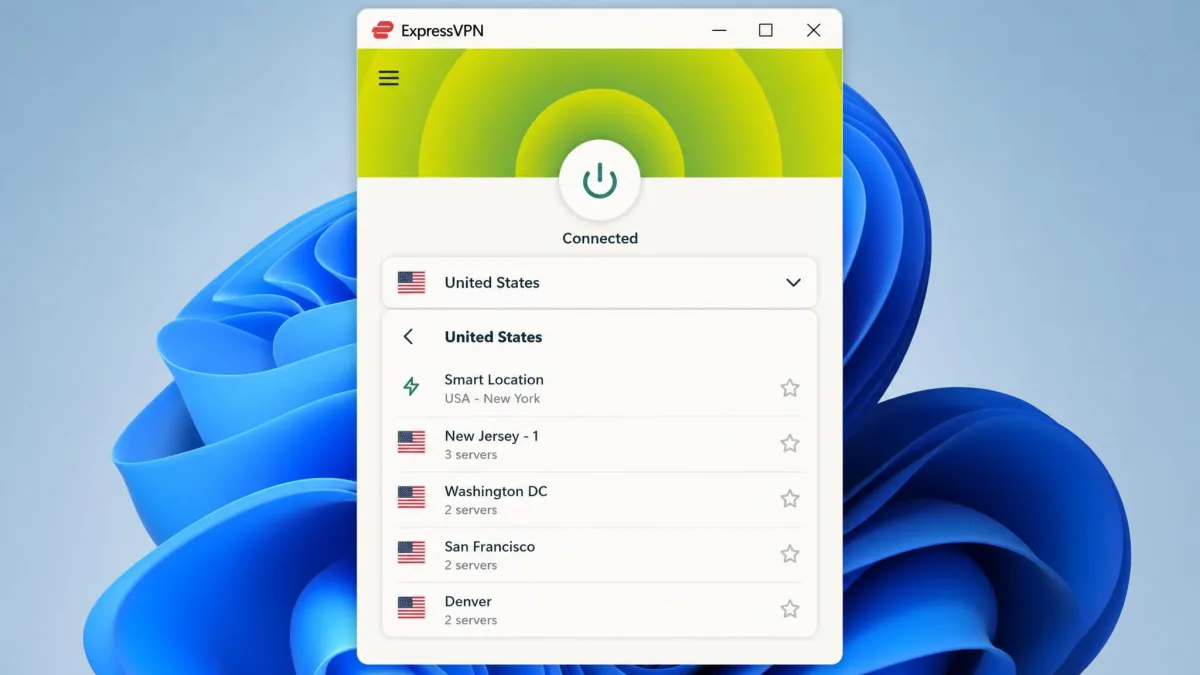
- Open the location list in the app instead of using Smart Location.
- Search for the country whose Netflix library you want.
- Choose a specific city server rather than the country-level default.
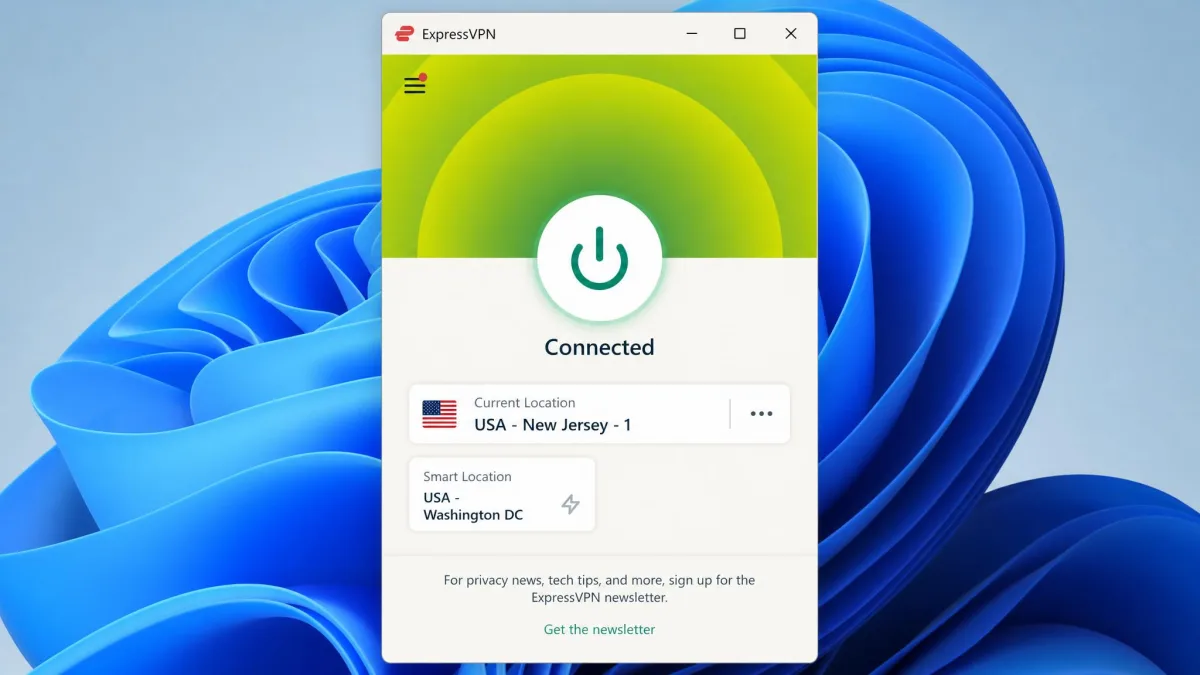
- Connect and wait until the app shows a Connected status.
Smart Location is built to pick a server close to you, and it doesn't always choose the fastest one. That makes it a poor fit for a foreign library. Even at home, we got better streaming speeds by choosing a nearby city manually.
For US Netflix, picking plain "United States" tended to drop us on a New York server that Netflix had flagged. New Jersey - 1 loaded the US library right away. If one US city fails, try another. ExpressVPN's support page suggests Washington DC, San Francisco, New Jersey - 3, Los Angeles - 3 and Denver.
Step 3: Open Netflix and Start Streaming
- Force-close the Netflix app if it was already running.
- Reopen Netflix and sign in to your account.
- Search for a title that only that country's library carries.
That last check matters. The Netflix app holds onto its old location until you force-close it or sign out and back in. A stale session can make it look like the VPN failed when it didn't. Searching for a region-only title confirms the library changed before you settle in to binge-watch your favorite shows.
ExpressVPN Netflix Libraries and the Best Server for Each
The table below lists the libraries we unlocked, the server location that worked for each, and how playback held up on the Lightway protocol.
| Library | Server to pick | Unblocked | Stream quality |
|---|---|---|---|
| US | New Jersey - 1 | Yes | 4K, first attempt |
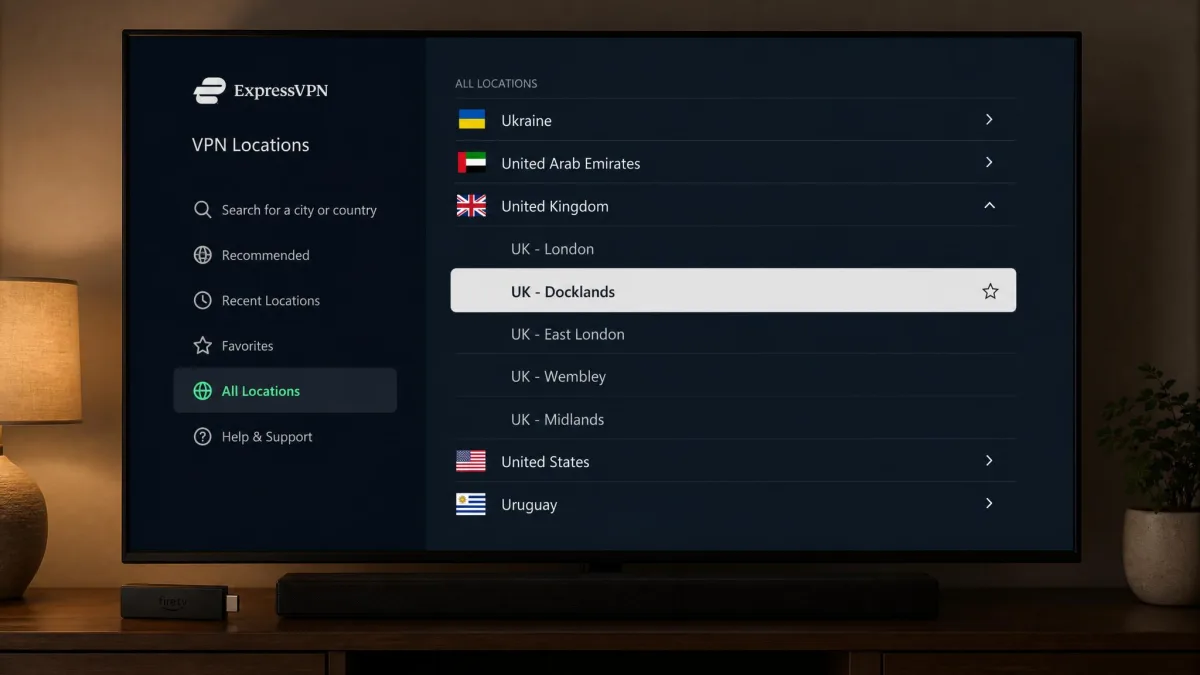
| UK | Docklands | Yes | 4K, about 7% speed loss |
| Canada | Toronto | Yes | 4K, about 5% speed loss |
| Japan | Tokyo | Yes | 4K, about 17% speed loss |
| Australia | Sydney | Yes | 4K, about 17% speed loss |
| Germany | Germany location list | Yes | 4K, about 13% speed loss |
| France, Italy, Spain, Netherlands, Poland, Turkey | That country's location list | Yes | Loads, speed not benchmarked |
| Brazil, India, Singapore, South Korea, Hong Kong, Indonesia | That country's location list | Yes | Loads, speed not benchmarked |
| Mexico, Switzerland | None worked | No | Not available |
Even the 17% speed loss to Japan and Australia left plenty of headroom for 4K, which we cover in the speed section below. For libraries where we don't name a city, start with any server in that country's list and move down it if one stalls. The status of these ExpressVPN Netflix servers changes over time, so treat the table as a starting map, not a promise.
Using ExpressVPN With Netflix on Your Devices
ExpressVPN runs on almost every device you'd stream Netflix on, but the method depends on whether the device can run the app. Phones, computers, Apple TV, Android TV and Fire TV get the full app. Samsung and LG smart TVs and game consoles use MediaStreamer or a router instead.
Smart TVs, Fire TV, and Apple TV
ExpressVPN has native apps for Apple TV (tvOS 17 and later), Android TV and Amazon Fire TV or Fire Stick. On these, you install the app from the device's store and follow the same three steps above. Samsung and LG smart TVs have no ExpressVPN app, so they need MediaStreamer or a VPN router. Our guide on using a VPN on your TV walks through both routes.
Fire TV was the fussiest device we used. Fewer servers got past Netflix on the Fire TV app than in a desktop browser. A blocked server showed error tvq-pb-101 (1.10.5059) instead of the usual proxy message. Netflix flagged Fire TV connections more often than those on our other devices. When you see that code, switch cities and force-close the Netflix app before trying again. For the install itself, follow our walkthrough on how to use a VPN on a Firestick.
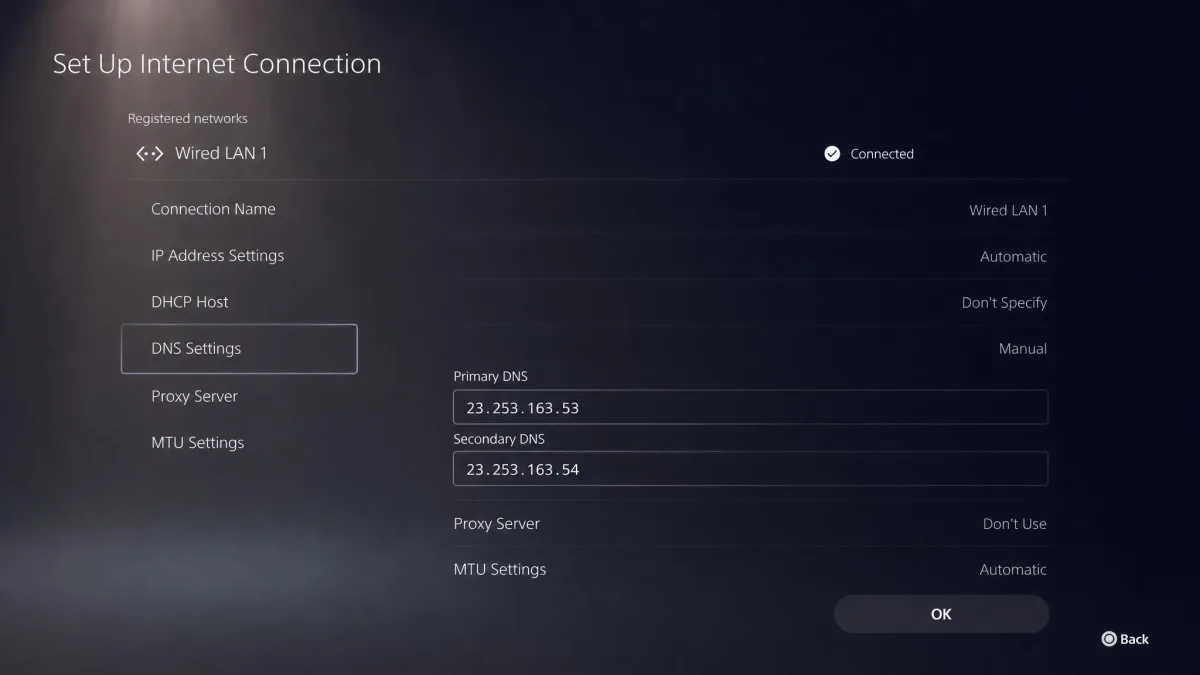
Game Consoles and MediaStreamer (Smart DNS)
MediaStreamer is ExpressVPN's Smart DNS service for devices that can't run a VPN app. It supports PlayStation 3, 4 and 5, Xbox 360, One and Series X, Nintendo Switch and Switch 2, and Samsung and LG smart TVs. It isn't a VPN, though. It doesn't encrypt your traffic, and ExpressVPN says plainly that it doesn't give you a VPN's privacy and security benefits. You also can't switch locations with MediaStreamer the way you do in the app, and what it unlocks depends on the region its DNS is tuned for.
ExpressVPN's MediaStreamer setup guide breaks the process into three steps:
- Register your home IP address on the ExpressVPN website's DNS settings page.
- Open Network & smart home > MediaStreamer in your account and copy MediaStreamer IP #1 and #2.
- Enter those two addresses as the DNS servers on your TV or console.
On an LG smart TV, the whole setup took us under 5 minutes.
A few things can break MediaStreamer later. If your ISP gives you a dynamic IP, you have to re-register it each time it changes. Auto-registration also drops your IP after 30 days without account activity. The MediaStreamer DNS addresses can also change occasionally, so a console that suddenly stops streaming may need updated DNS. If it still misbehaves, turn off IPv6 on the device or router, which cleared up conflicts on our consoles and TVs.
Phones, Tablets, and Computers
Android phones, iPhones, iPads, Windows PCs and Macs all run the full app, which makes them the easiest place to use ExpressVPN with Netflix. On desktop, browser extensions for Chrome, Firefox, Edge, Vivaldi, Chromium and Brave let you connect from the browser. That helps when a Netflix app on the computer is being stubborn.
Phones need one extra check. A DNS leak on a phone can expose your real location and make Netflix show the wrong library. We saw this more often on phones than on PCs. Fix 6 below explains how to test for it.
Is ExpressVPN Fast Enough for Netflix in 4K?
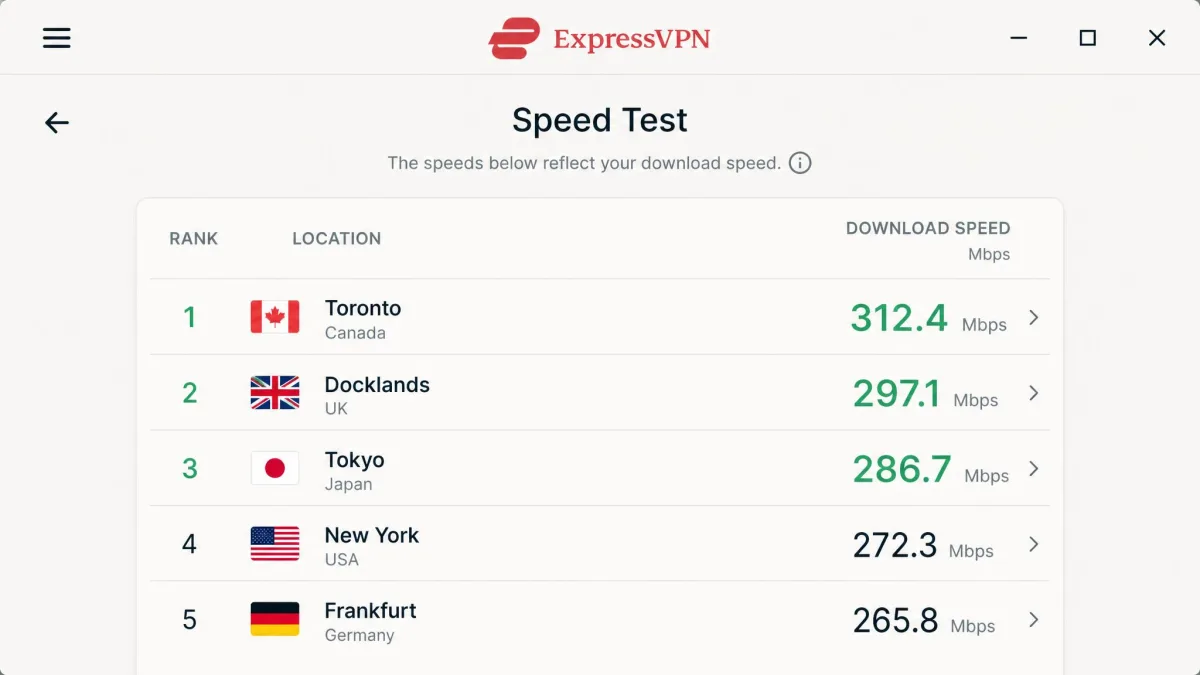
Yes, with a lot of room to spare. Netflix recommends 15 Mbps or higher for 4K, and our Netflix-library servers all held above 300 Mbps: Toronto ran at 339 Mbps, Docklands at 324 Mbps, Tokyo at 310 Mbps and Sydney at 302 Mbps.
Even the slowest of those is about twenty times what a single 4K stream needs. In practice, titles loaded almost instantly and played in smooth 4K with no buffering wheel. Distant libraries stayed fast too, with only a brief loading pause when we skipped ahead in a show.
Lightway gave us the smoothest 4K results of ExpressVPN's protocols, so it should be your default for streaming. ExpressVPN also sets no bandwidth caps or data limits, which matters if you binge-watch whole seasons. Because the VPN encrypts your connection, your internet provider can't see that the traffic is Netflix. That helps if your provider throttles video streaming.
Is ExpressVPN the Best VPN for Netflix?
It is one of the easiest to recommend for Netflix, because it gets the basics right without much fiddling. You get servers in 113 countries, native apps for the big streaming devices, fast Lightway connections and 24/7 live chat when a server gets flagged. It also streamed Disney+, Prime Video, BBC iPlayer, Hulu and Max reliably in HD and UHD without server changes.
The weak spot is cost. Once the first term ends, Basic renews at $99.95 a year, so the intro deal is the cheapest way in.
For the full verdict on security, pricing and apps, read our full ExpressVPN review. To see how it stacks up against rivals, our ranking of the best VPNs for Netflix covers that comparison.
ExpressVPN Not Working With Netflix? How to Fix It
When Netflix stops loading, the cause is usually a flagged server or a stale app session. Work through these fixes in order, starting with the quickest.
1. Switch to Another Server Location
Open the ExpressVPN location list, choose a different city in the same country, and reconnect. When Netflix threw a proxy error on a flagged server, this cleared it for us within a minute or two. Our guide on how to change your VPN location explains the process across apps and devices.
2. Change to the Lightway Protocol
On a phone, open the Profile menu > VPN protocol and choose Lightway - UDP or Lightway - TCP. On Windows, open the Profile tab > VPN Protocol and select Lightway. UDP suits most networks, while TCP can be faster on some, so try both if the first one struggles. ExpressVPN's Lightway protocol page explains how the protocol is built for faster connections.
3. Sign Out of Netflix and Restart the App or Device
Sign out inside the Netflix app, restart the device, and sign back in. Do this each time you change locations, because the app keeps your old region until it restarts.
4. Clear Cookies and Cache or Use a Private Window
If a browser keeps showing your home catalog, clear its cookies and cache or open Netflix in a private window. That fixed a library that kept reverting to our home region. See our guide on how to clear your cache for the steps in each browser.
5. Update the ExpressVPN App
Open your device's app store or the ExpressVPN download page and install the latest version. Old builds can miss protocol and server fixes, so update before trying anything more involved.
6. Check for IP and DNS Leaks
With ExpressVPN connected, run a leak test and confirm it shows the VPN server's location, not your own. If it shows your real ISP, reconnect and test again. Then keep Network Lock, ExpressVPN's kill switch, turned on so traffic can't slip outside the tunnel. Our guide on how to test for DNS leaks walks through the free tools.
7. Contact ExpressVPN Support
Open live chat from the ExpressVPN app or website. Support is available 24/7, and it helps to tell the agent which library you want and which servers you've already tried.
Why Netflix Blocks VPNs, and Is It Legal?
Netflix blocks VPNs because it licenses shows country by country. Its Terms of Use say you may access content "primarily within the country in which you have established your account and only in geographic locations where we offer your subscription plan and have licensed such content."
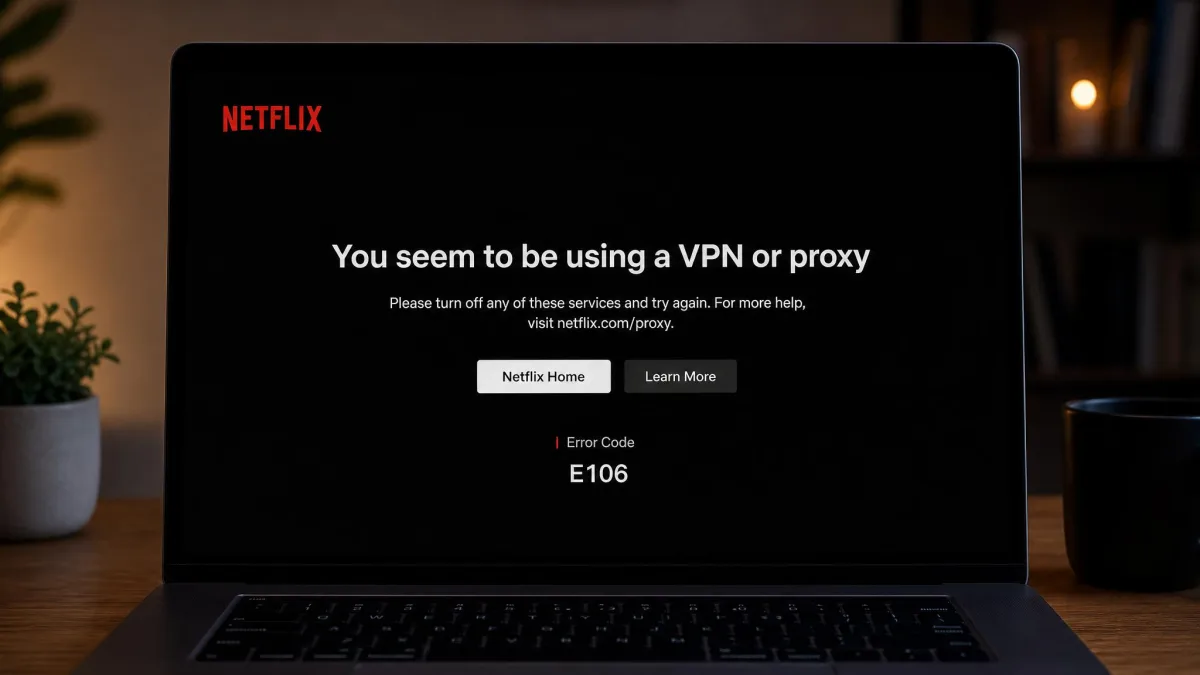
When Netflix detects a VPN or proxy server, it shows error E106. Netflix's help page on the proxy error quotes the message in full: "You seem to be using a VPN or proxy. Please turn off any of these services and try again." Older devices show the legacy code M7111-5059 with slightly different wording about an unblocker or proxy. Our guide on how to make a VPN undetectable explains how services spot VPN traffic in the first place.
Using a VPN is legal in most countries, and Netflix's terms don't mention VPNs by name. The terms do include the location clause above and a separate clause against getting around content protections.
Streaming another country's library can breach Netflix's terms of service even where VPNs are legal. Read the terms and decide for yourself before you connect.
FAQ
Why won't ExpressVPN unblock US Netflix?
Which Netflix regions can ExpressVPN unblock?
Is ExpressVPN fast enough for Netflix in 4K?
Do Express VPN and Netflix work together on a smart TV or games console?
Is it illegal to use a VPN for Netflix?
Can I watch Netflix for free with ExpressVPN?
How do I fix the Netflix proxy error with ExpressVPN?
Can I share my Netflix account while using ExpressVPN?
Bottom Line
ExpressVPN works with Netflix, and it made the job easy on our streaming devices. Pick a specific city server instead of the country default, use Lightway, and force-close the Netflix app after every location change. Those three habits cover most problems. Fire TV is the one device that needs extra patience. Samsung and LG TVs and game consoles rely on MediaStreamer, which works without the app but doesn't encrypt anything. If Netflix shows the proxy error, switch to another server in the same country first. With that routine, you can watch your favorite shows from anywhere, and the 30-day money-back guarantee lets you try it first.