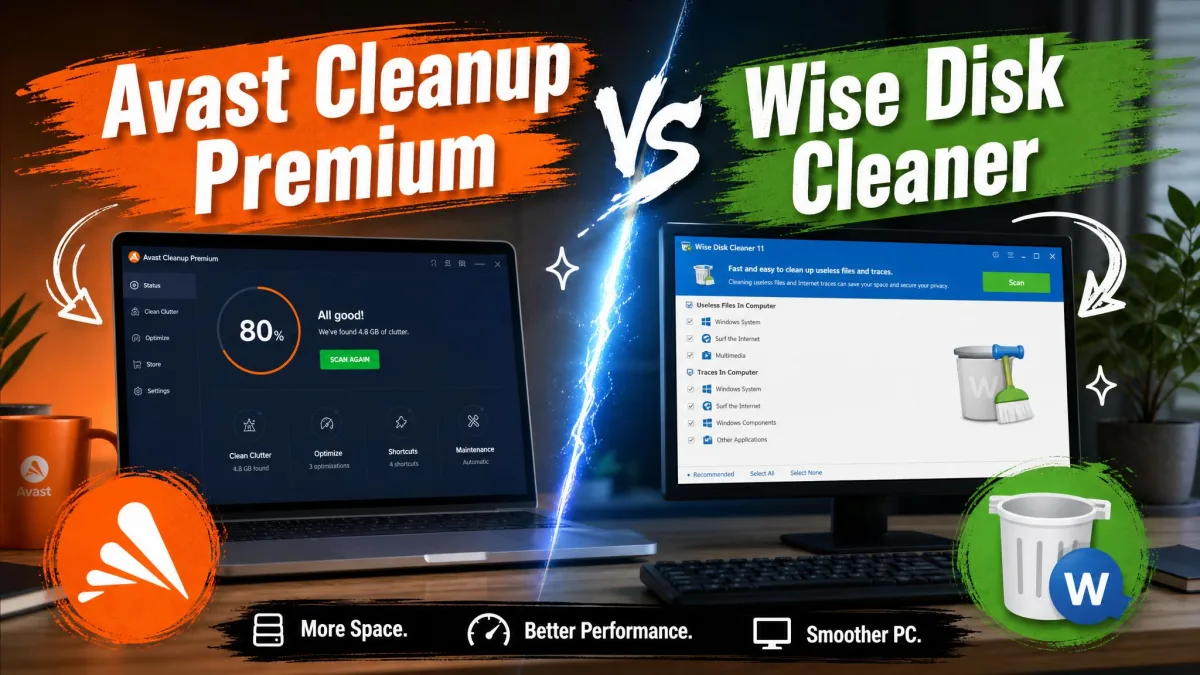
Avast Cleanup Premium is a paid, all-in-one Windows maintenance suite that bundles junk cleaning, registry repair, bloatware removal and background app suspension behind one dashboard. Wise Disk Cleaner is a free, Windows-only utility that does one job, clearing junk files and privacy traces off your drive, and does it quickly. That difference in ambition explains almost every result below. On our test machine Wise freed more space in less time and cost nothing, while Avast justified its price through maintenance work that Wise never attempts at all. If you want to free up disk space this afternoon, Wise is the faster answer. If you want one program handling maintenance in the background for a year, the paid suite starts to make sense. Here is how each one performed, and where the money actually goes.
Avast Cleanup Premium vs Wise Disk Cleaner at a Glance
Both tools attack the same visible symptom, a drive filling with temporary files, caches and installer leftovers, but they solve it at different scales. Avast Cleanup Premium sells a maintenance service: install it, let Automatic Maintenance run, and the PC is supposedly looked after. Wise Disk Cleaner sells nothing at all, because it is completely free, and it expects you to press Clean yourself or schedule it.
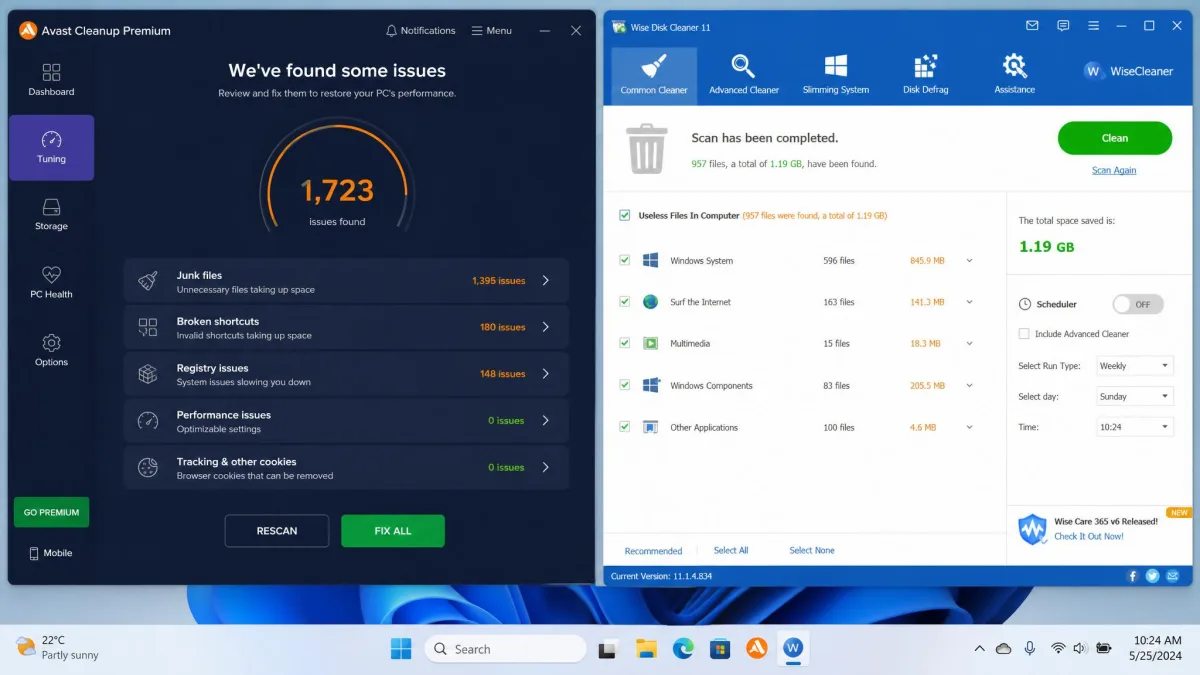
Our scoring reflects that split. Avast Cleanup earned 7 out of 10 in our hands-on testing, held back by what it charges to keep going rather than by what it does. Wise Disk Cleaner earned 8.2 out of 10, losing points for opacity rather than for results.
Quick Verdict: Which One Should You Buy?
Side-by-Side Comparison Table
The table below sets out how each tool handles the jobs buyers actually shop for, from price through to platform support.
| Criterion | Avast Cleanup Premium | Wise Disk Cleaner |
|---|---|---|
| Price (annual / free tier) | $65.99/year on renewal, discounted first year | Free |
| Free version available | No, 30-day trial only | Yes, fully free |
| Junk-file cleaning | Yes, Disk Cleaner | Yes, Common and Advanced Cleaner |
| Registry cleaning | Yes, dedicated Registry Cleaner with pre-repair backup | Limited, no standalone registry repair module |
| Disk defrag | No | Yes, with SSD TRIM |
| Bloatware removal | Yes | No, System Slimming removes Windows components instead |
| Sleep Mode / background suspension | Yes | No |
| Browser cleaner | Yes, 25+ browsers | Yes, cache, history and cookies |
| Duplicate finder | Yes, duplicate photo finder | No |
| Automatic scheduling | Yes, Automatic Maintenance | Yes, AutoClean daily, weekly, monthly, logon or idle |
| Platforms (Windows/Mac/Android) | Windows, Mac, Android, iOS | Windows only |
| Support channels | 24/7 live chat, email, Help Center, forum | Knowledge base, tutorials, FAQ, feedback center |
| Best for | Non-technical users wanting one all-in-one dashboard | Users wanting fast, free, focused disk cleaning |
Pricing and Value: Paid Suite vs Free Cleaner
Price is the least ambiguous part of this comparison, and it is where most buyers make their decision before reading another word.
Avast Cleanup Premium Pricing and Subscription Tiers
Avast Cleanup Premium renews at $65.99 per year for a single Windows PC, and the 10-device plan renews at $79.99 per year. The first-year price is far lower, somewhere around $29.88 to $32.99 for one PC, though that intro figure moves with regional promotions and is not the rate you will actually pay in year two. Avast offers a 30-day free trial with no credit card required, plus a 30-day money-back guarantee if you buy and change your mind.
The renewal is the sticking point. Paying roughly double in year two is the single most common reason we hear from readers who cancel, and it is the main reason this suite lands at 7 out of 10 rather than higher.
Run the 30-day trial alongside Wise Disk Cleaner before you pay anything. If Wise clears the space you needed and the PC feels fine, the subscription is buying you convenience rather than capability.
Wise Disk Cleaner Free vs Wise Disk Cleaner Pro
There is no Wise Disk Cleaner Pro. Every module in the app, including Advanced Cleaner, System Slimming, Disk Defrag and the AutoClean scheduler, is free with no locked features and no upgrade nag inside the cleaning workflow. The paid product in the WiseCleaner range is Wise Care 365 Pro, a broader suite that costs $29.96 per year for three PCs and adds privacy, registry and system tuning tools around the same cleaning engine.
So the honest framing is free tool versus bigger paid sibling, not free tier versus pro tier. Wise Disk Cleaner does show occasional prompts for other Wise tools, which is how a free product pays for itself, but nothing you need is behind them.
Which Delivers Better Value for Money?
On pure cost per gigabyte freed, Wise wins outright, because the denominator is zero. Avast's value case rests on features Wise never attempts, and on the assumption that you would rather not think about maintenance at all. Convenience is the stronger half of that case. Raw performance is where Avast holds up best in our scoring, and value for money is where the renewal quietly undoes the argument.
Disk Cleaning and Junk File Removal
This is the job both products were bought to do, so it carries the most weight in our scoring.
How Avast Cleanup Premium Cleans Your Drive
Avast's Disk Cleaner sits inside the tuning dashboard alongside every other module, and that dashboard is the suite's strongest asset. A full cleanup runs from one screen in about a minute with no configuration, which is exactly what a non-technical user wants. You press Scan, you read a summary, you press Clean.
Avast markets recoverable space in the range of 22 to 68 GB, but that range is a best-case ceiling on a badly clogged machine rather than what a maintained PC will free. In our testing the space and speed gains were modest but measurable, and most visible on older machines carrying years of startup bloat.
How Wise Disk Cleaner Cleans Your Drive
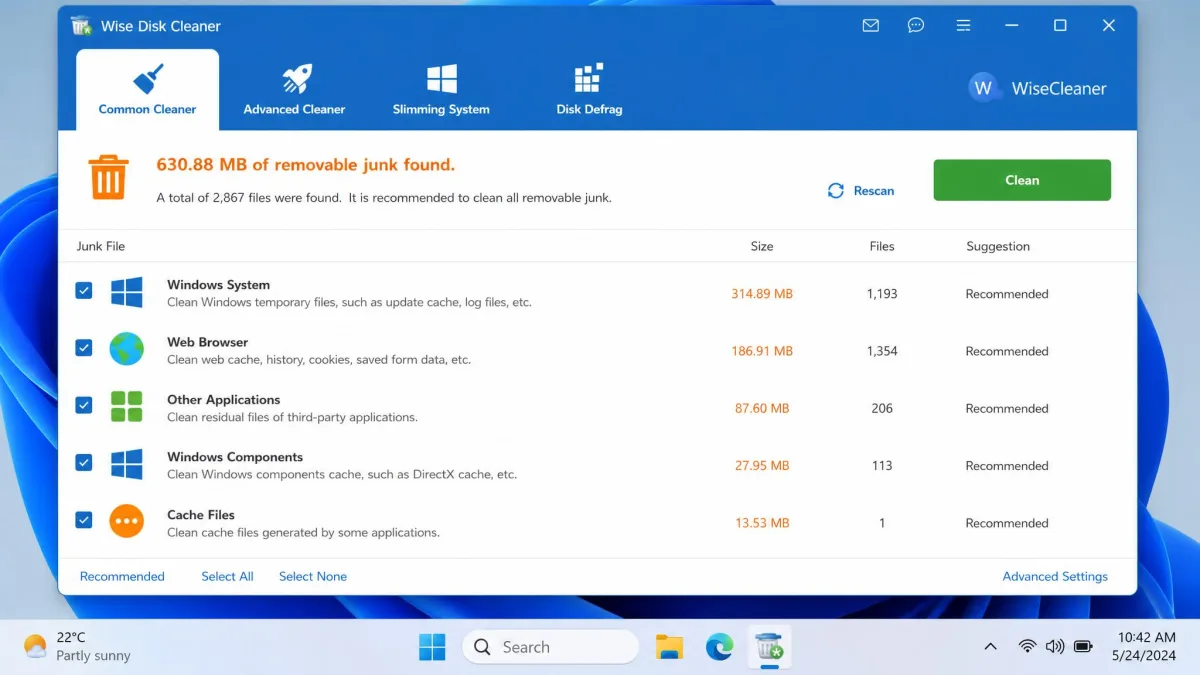
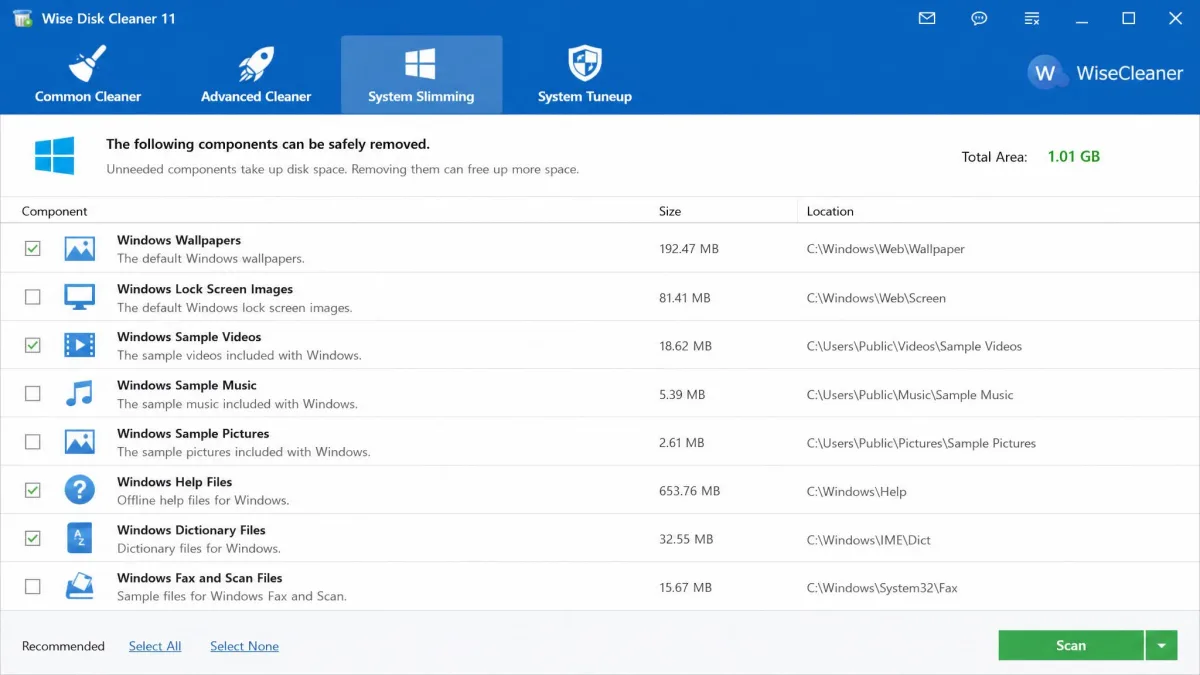
Wise splits the work across three tabs. Common Cleaner handles the safe, obvious targets: Windows temporary files, browser cache, system logs and recycle bin contents. Advanced Cleaner hunts specific junk types including .chk, .tmp and .dmp files. System Slimming strips out Windows components you may never use.
Deep scans finish in seconds rather than minutes, and the whole clean is done inside two minutes, though total run time scales with how much junk has piled up and with drive speed. Advanced Cleaner is aggressive enough to flag files worth keeping, so the results list needs a read before you press Clean.
System Slimming removes real Windows components, not junk. It is the one module in either product that can break something if you run it without reading the list first, so uncheck anything you do not recognize.
How Much Space Each One Actually Freed in Our Test
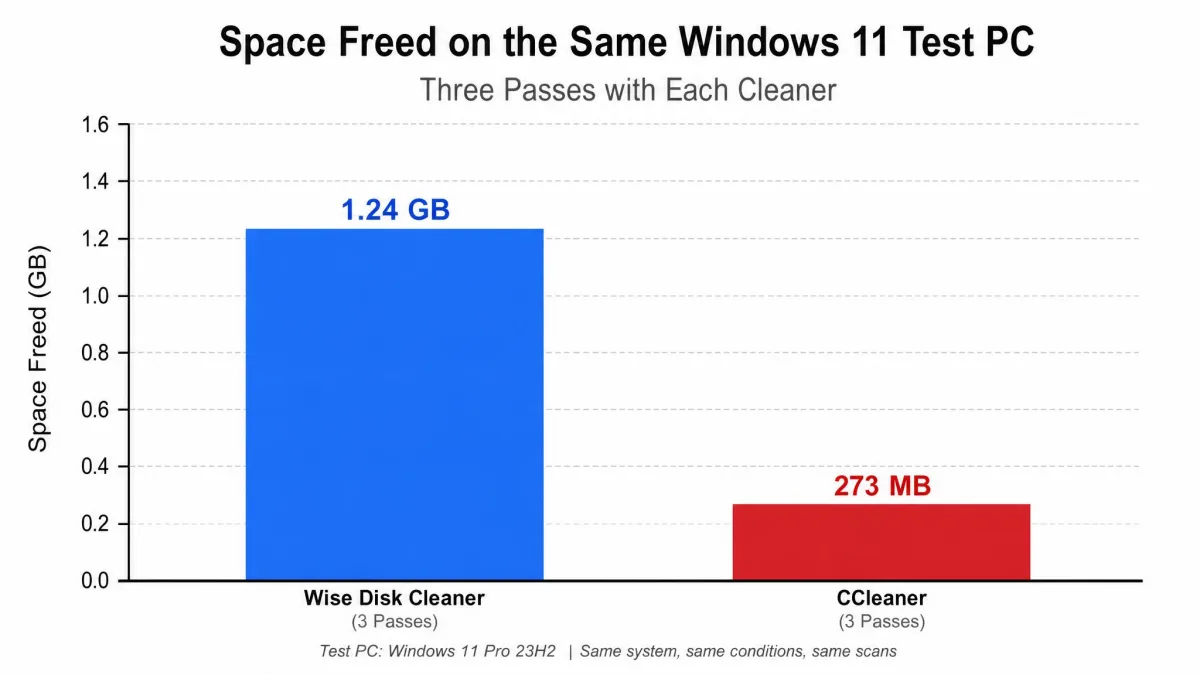
On our Windows 11 test PC running Wise build 11.3.6, Common Cleaner freed 630.88 MB and Advanced Cleaner found a further 169.8 MB, a first-two-passes subtotal of just over 800 MB. System Slimming then reclaimed roughly 460 MB more, which took the total to just over 1.2 GB from a machine that was not especially neglected. For context on the same machine, CCleaner freed 273 MB.
Avast's cleaning results landed in a similar band without pulling ahead. Nothing we saw suggests the paid engine finds materially more junk than the free one, which matters a great deal when you are weighing an annual subscription against a free download.
Wise Disk Cleaner freed just over 1.2 GB on our Windows 11 test PC. CCleaner freed 273 MB on the same machine.
— From our Windows 11 bench results
Registry Cleaning
Registry handling is the clearest capability gap between these two, and also the feature we would most encourage you to ignore.
Avast's Registry Cleaner
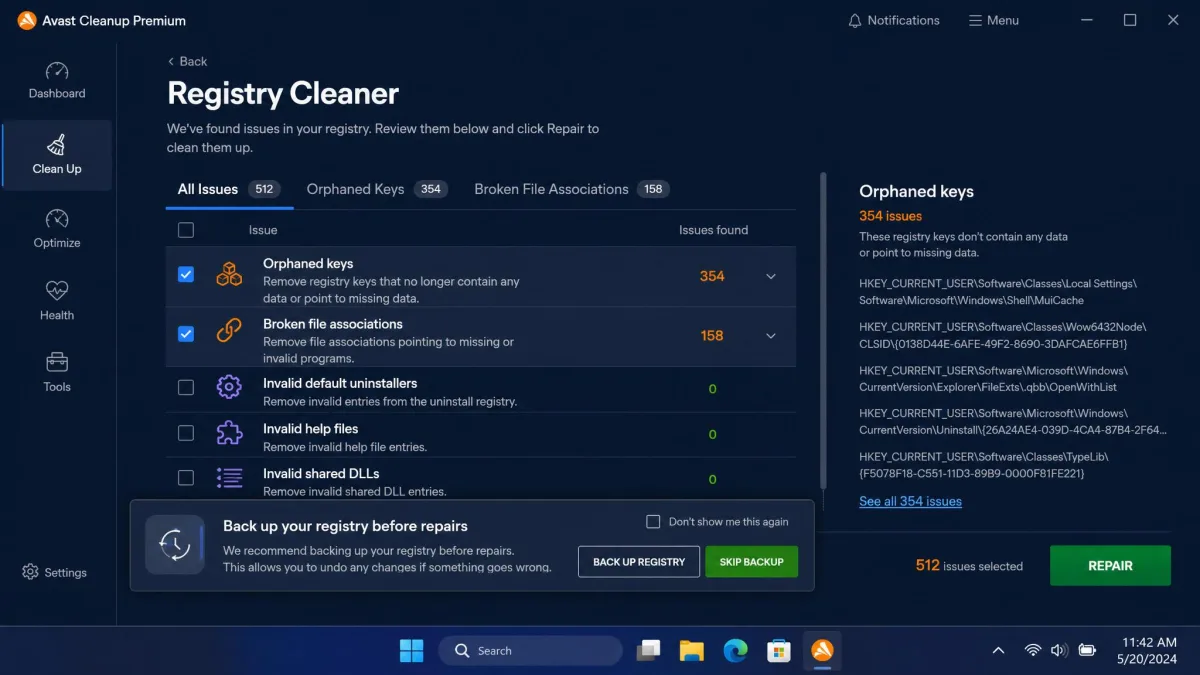
Avast ships a dedicated Registry Cleaner that scans for orphaned keys, broken file associations and leftover uninstall entries. It backs up the registry before each repair, which is the correct behavior and more than many rivals bother with. Worth knowing: that backup covers registry changes only, and nothing else Avast deletes comes back after an uninstall.
Wise Disk Cleaner and the Registry (What It Does and Doesn't Do)
Wise Disk Cleaner has no standalone registry repair module. It cleans junk, privacy traces and browser cache, and any registry work is limited to leftover entries touched by that junk cleaning. If you specifically want registry repair from the WiseCleaner range, that lives in Wise Care 365, not here.
The Case Against Registry Cleaners
Registry cleaning has been a marketing feature more than a performance feature for at least a decade. Modern Windows does not slow measurably because of orphaned keys, and Microsoft has never published guidance recommending third-party registry cleaning. The realistic upside is a tidier registry, the realistic downside is a broken file association, and the backup is what stands between you and an afternoon of troubleshooting.
Performance and Speed-Up Features
Cleaning frees space. Speeding up a PC is a different problem, and the two products approach it from opposite directions.
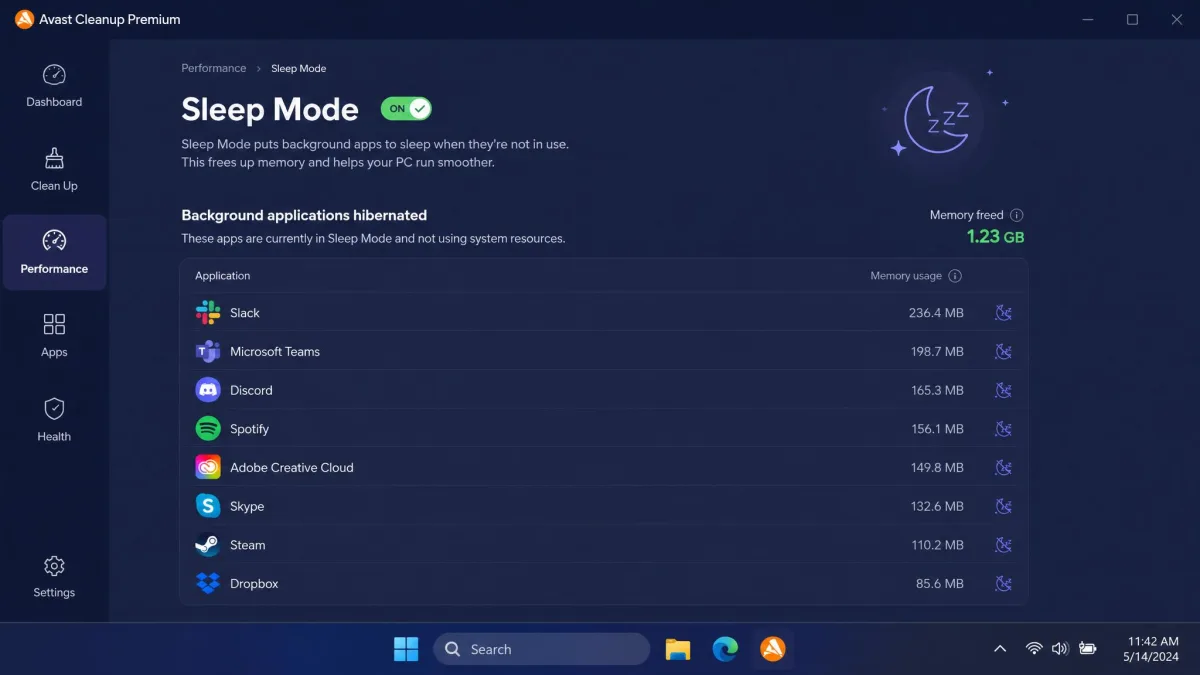
Avast Sleep Mode and Background App Suspension
Sleep Mode is Avast's genuine differentiator, and it is the one module in the suite we sat with long enough to form a firm opinion about. We left it running on a working laptop through an ordinary week, the sort of week where a chat client, a note app, a vendor updater and a couple of half-forgotten utilities all idle in the tray while you get on with something else. Once the hibernation list had populated, Sleep Mode suspended those background applications and woke each one only when we opened it, and the memory pressure on the machine dropped noticeably. On a healthy PC that has just been set up, the same feature changes very little, because there is nothing idling for it to suspend in the first place.
Wise Disk Cleaner's Disk Defrag and Slimming
Wise counters with Disk Defrag, which includes SSD TRIM support so it does not blindly defragment solid-state drives, plus System Slimming. Neither is scheduled automatically, so defrag runs have to be started by hand. Wise also gives no detail about the system files it disables during startup optimization, so those choices are made blind, and that opacity is the main reason it does not score higher with us.
Measured Boot-Time and Responsiveness Results
The only measured startup figures in this comparison are Avast's own benchmarks, and they need reading carefully. Avast's performance test reports a 53% quicker startup on an old Core 2 Duo desktop, 336 seconds down to 159 seconds, and a 62% quicker startup on a Core i7 gaming PC, 76 seconds down to 29 seconds. Both figures come from heavily clogged test machines, and the gain scales with how many third-party startup items were running beforehand, so neither percentage is a number to expect on a PC you already look after. Wise publishes nothing comparable. Its System Slimming documentation lists the Windows components it can remove without any before-and-after startup measurement, so the boot-time payoff there has to be judged by feel. Our own view after running both: the responsiveness change on a well-maintained PC is small either way, and startup app management, which Avast handles more transparently, does more for boot time than either cleaner's disk work.
Extra Tools Beyond Cleaning
Everything in this section is Avast territory, and it is the honest answer to what the subscription buys.
Bloatware and Unwanted App Removal
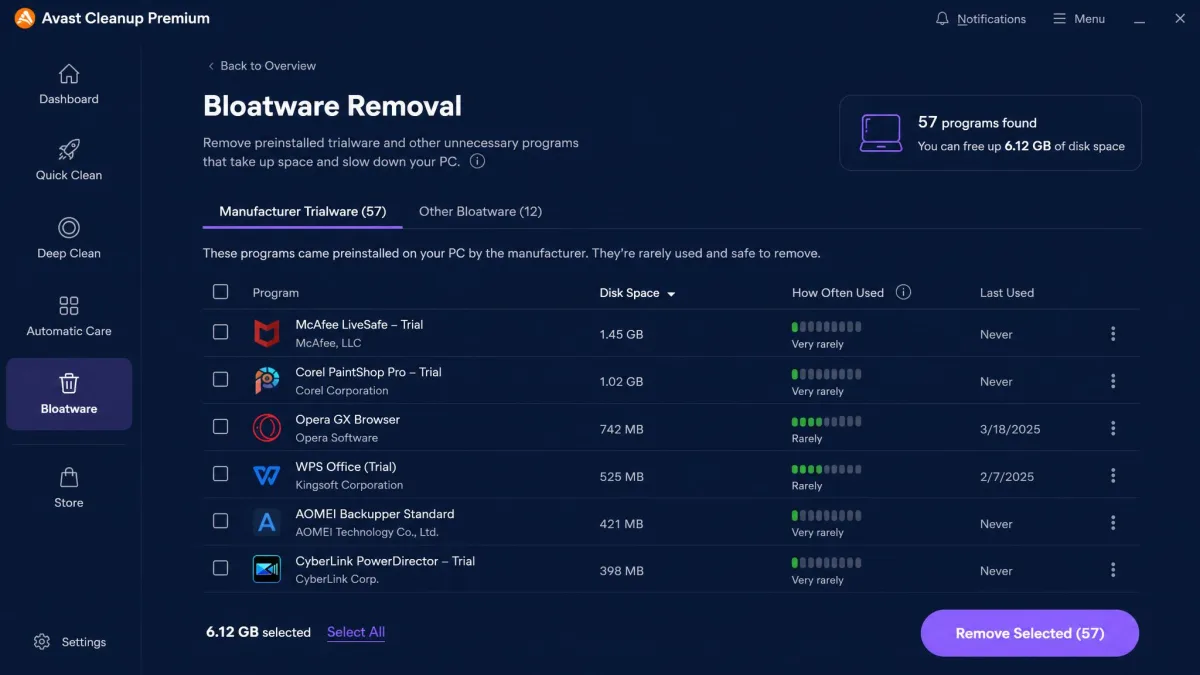
Avast scans installed software and flags manufacturer trialware, toolbars and rarely used programs, sorting them by how much space they occupy and how often you launch them. On a new laptop shipped with vendor extras, this is the module that pays for the first cleanup. Wise Disk Cleaner offers nothing equivalent, because System Slimming targets Windows components rather than third-party bloatware.
Shortcut Cleaner
Avast's Shortcut Cleaner sweeps broken desktop shortcuts, dead Start menu entries and stale recent-file lists left behind by uninstalled programs. It is a small feature and it will not speed anything up, but it removes the visual debris that makes an old PC feel older. Wise does not include a shortcut cleaner.
Browser Cleaner and Privacy Traces
Avast's Browser Cleaner clears cookies, cached data and browsing history across 25+ browsers, which covers essentially anything you might have installed. Wise clears cache, history and cookies for the mainstream browsers as part of Common Cleaner. For most people that is the same outcome; for anyone running niche browsers, Avast covers more ground.
Duplicate and Similar Photo Finder
Avast includes a photo tool that finds exact duplicates and visually similar shots, then suggests which copy to keep. On a machine holding years of phone backups this frees more space than any junk clean. Wise has no duplicate finder at all.
Automatic Maintenance and Scheduling
Those extra modules are where the paid suite pulls clear, so scheduling ought to be where it stays clear. It is not, and this is the section where the free tool quietly draws level.
Avast's Automatic Maintenance
Automatic Maintenance runs the cleaning modules on a schedule and reports what it did. It works, and it is the feature that most justifies calling the product a service rather than a tool. The trade-off is noise: notifications arrive frequently, deep scans can run long, and the suite surfaces occasional upsell prompts pushing other Avast products during normal use.
Wise Disk Cleaner's Scheduler
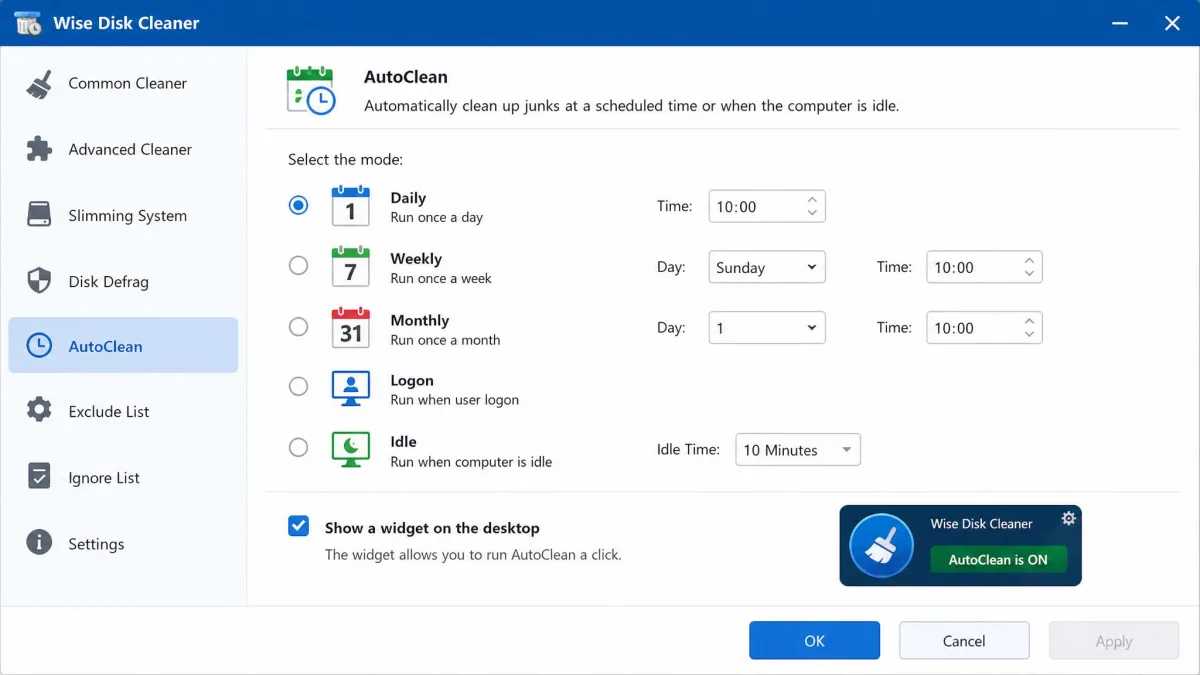
Wise's AutoClean runs daily, weekly, monthly, at logon or when the PC is idle, and pairs with a desktop widget that cleans in one click without opening the app. That combination makes the free tool the more hands-off of the two in day to day use, which is not the result most buyers would predict.
Ease of Use and Interface
Avast Cleanup Premium's Dashboard
The tuning dashboard is the best thing about the paid suite. Every module is one click from the home screen, results are written in plain language, and you never need to know what a .dmp file is. Avast's documentation is thorough enough that a routine cleanup never requires opening a support ticket, backed by 24/7 live chat, email, a Help Center and a community forum.
Wise Disk Cleaner's Interface
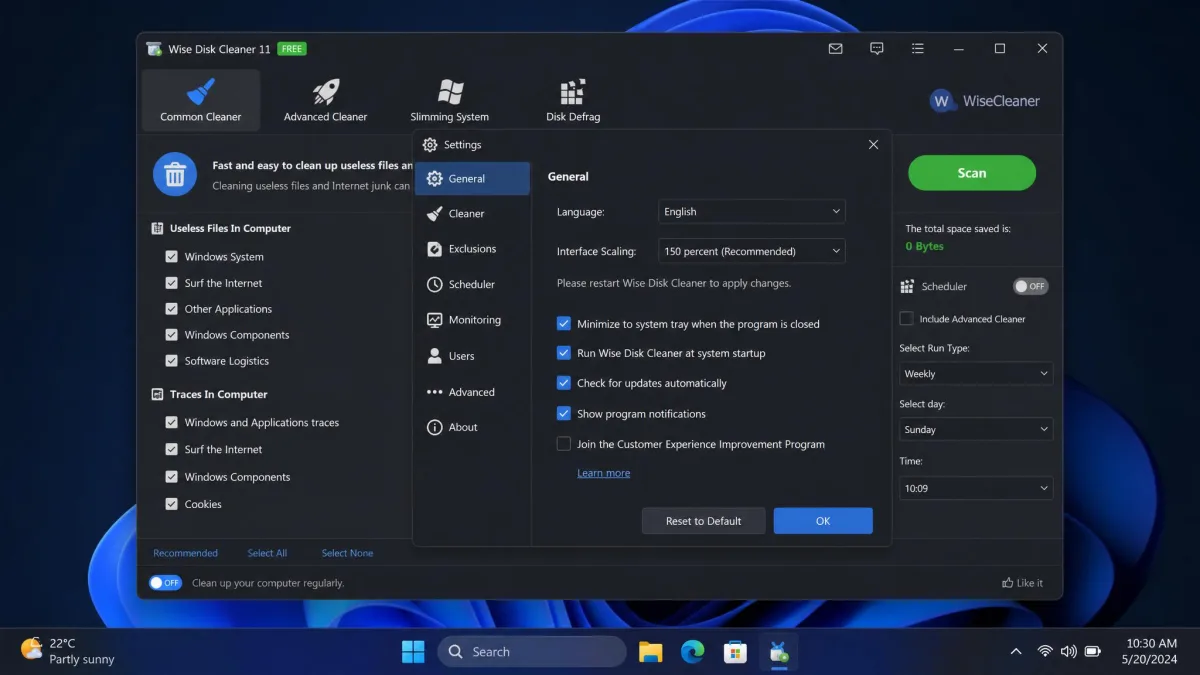
Wise uses a tabbed layout that assumes slightly more confidence. It installs small, stays light on CPU and RAM, and offers light and dark modes with interface scaling from 100% to 200%, which is a genuine accessibility win on a high-resolution laptop. Support runs through a knowledge base, video tutorials, an FAQ and a Support and Feedback Center, with replies typically inside one working day, though turnaround on free-product support varies with ticket volume. The built-in AI chatbot has limited functionality next to dedicated assistants.
Which Is Friendlier for Beginners?
Avast, without much argument. Wise asks you to read a results list and decide, and two of its modules genuinely reward caution. Avast asks you to press one button. If you are setting up a PC for a relative who will not read anything, that difference matters more than the price.
Pros and Cons
Avast Cleanup Premium Pros and Cons
Pros
- One dashboard runs a full cleanup in about a minute with no configuration
- Sleep Mode meaningfully reduces memory pressure from background apps
- Bloatware removal, Shortcut Cleaner and a duplicate photo finder that Wise does not match
- Browser Cleaner covers 25+ browsers
- 30-day trial with no card required, plus a 30-day money-back guarantee
- Windows, Mac, Android and iOS coverage
Cons
- Renewal at $65.99 per year roughly doubles the first-year price
- Frequent notifications and upsell prompts for other Avast products
- Deep scans can run long
- No disk defrag
- Cleaning results are not measurably better than the free competition
Wise Disk Cleaner Pros and Cons
Pros
- Completely free with no locked modules
- Freed just over 1.2 GB across three passes on our Windows 11 test machine
- A full clean finishes inside two minutes
- AutoClean scheduling plus a one-click desktop widget
- Disk Defrag with SSD TRIM support
- Light on CPU and RAM, with dark mode and 100% to 200% interface scaling
Cons
- Windows only, with no macOS or mobile build
- Advanced Cleaner flags files worth keeping, so results need reviewing
- System Slimming can break Windows features if run carelessly
- No detail about which system files startup optimization disables
- No bloatware removal, Sleep Mode or duplicate finder
- Occasional prompts for other Wise tools
Safety, Privacy and System Risk
Is Avast Cleanup Safe and What Data Does It Collect?
Avast Cleanup is legitimate software from an established vendor, and the registry backup before each repair shows the right instincts. Data collection deserves a closer look, though. The app carries individual toggles for sharing app-usage data with Avast for product development, for sharing anonymized analytical data with third-party analytics tools, and for sharing data so Avast can offer you upgrades and third-party products. Those toggles are on by default and live in the settings menu rather than the setup flow, so opting out is a deliberate extra step you have to go looking for. The company's history here is the reason we bother mentioning it. The FTC fined Avast $16.5 million in February 2024 over the collection and sale of browsing data, gathered from 2014 through 2020 through its Jumpshot subsidiary and resold with a unique user ID, the URL visited, a timestamp and whether the page had been seen before attached. Avast wound Jumpshot down in January 2020. Avast Cleanup is not that product and no per-field list of what it transmits today is published, but the settings screen is worth ten minutes before you let the suite run unattended. Remember too that uninstalling does not restore anything the app deleted outside the registry.
Is Wise Disk Cleaner Safe to Use?
Wise Disk Cleaner is safe in its Common Cleaner default state, which only targets caches and temporary files. Risk enters with the other two modules, and the risk is your click rather than the software. Review the Advanced Cleaner list, and treat System Slimming as an expert tool.
Do You Even Need a PC Cleaner in 2026?
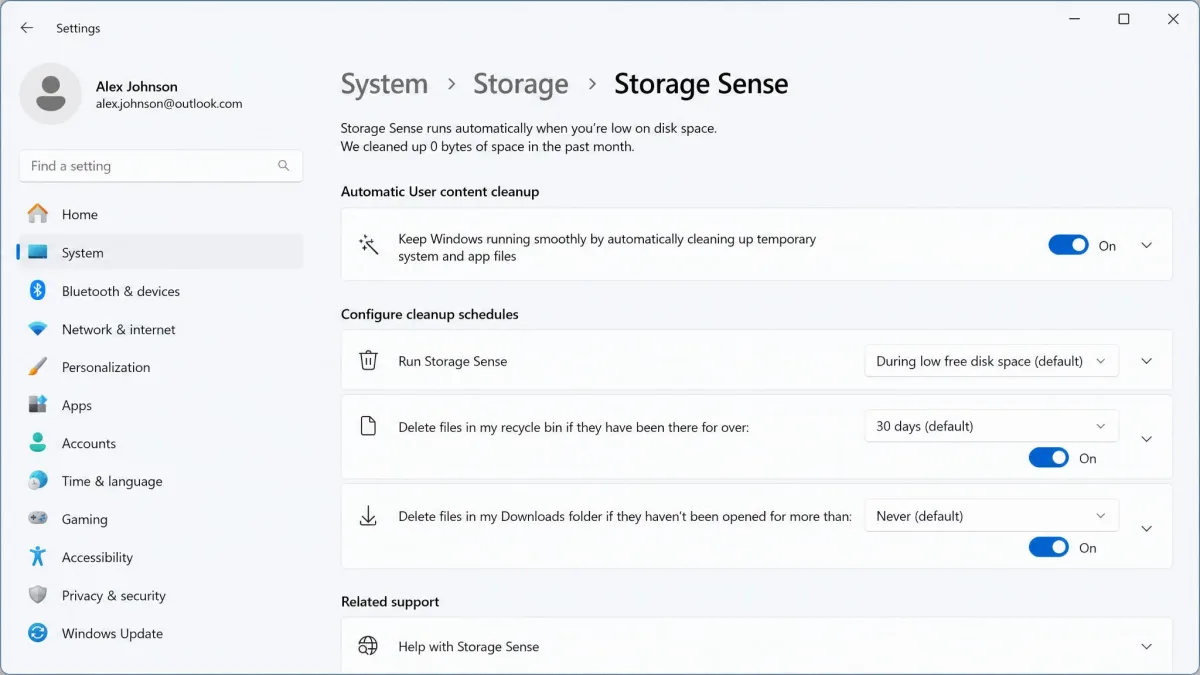
Windows now does much of this itself. Windows Storage Sense clears temporary files, empties the recycle bin on a schedule and manages downloads automatically, for free, with no installation.
So the honest test is whether a third-party cleaner adds anything beyond that. Wise adds deeper junk detection and defrag, and costs nothing, so the answer is easy. Avast adds maintenance work that Microsoft's own tools do not attempt, and charges a subscription for it, so the answer depends entirely on whether you will actually use what you are renting.
How Both Compare to CCleaner and Other Alternatives
CCleaner is the obvious third name, and it freed 273 MB where Wise freed just over 1.2 GB on the same machine, which is not a flattering comparison for the market leader. We break the full head to head down in our CCleaner vs Wise Disk Cleaner comparison, and Avast's side of that matchup in Avast Cleanup Premium vs CCleaner.
Wise Care 365 is the natural upgrade from Wise Disk Cleaner at $29.96 per year for three PCs, adding the registry and privacy tools the free cleaner leaves out, at under half Avast's renewal. AVG TuneUp shares Avast's engine and its Sleep Mode, so the choice there comes down to price on the day, which we cover in Avast Cleanup Premium vs AVG TuneUp.
Which Should You Choose?
Choose Avast Cleanup Premium If...
You want maintenance handled rather than performed. You are setting up a PC for someone who will never open a results list. You have a laptop full of manufacturer bloatware, a photo library full of duplicates, and a habit of leaving twenty background apps running. You also want Mac or Android coverage, and you are comfortable paying every year for that convenience.

Choose Wise Disk Cleaner If...
You want to free up disk space now, for nothing, on a Windows PC. You are comfortable reading a list before you delete. You value speed, a small install footprint and a scheduler that cleans in the background without you opening the app. Most readers land here, and there is no trial to expire.

Frequently Asked Questions
Can I install the free Wise Disk Cleaner on a work or business PC?
Is Avast Cleanup safe to run on a work laptop?
Can you run Avast Cleanup Premium and Wise Disk Cleaner together?
Does Avast Cleanup actually speed up your PC?
Should I turn Storage Sense off if I schedule AutoClean?
Final Verdict
The scores are the shortest version of this comparison: Wise Disk Cleaner takes 8.2 out of 10, Avast Cleanup Premium takes 7 out of 10, and the gap between them is narrower than the gap in what they ask you to pay. What really separates the two is the character of their flaws. Wise's weaknesses are honesty problems rather than capability problems, because two of its modules act on your PC without telling you enough about what they are doing. Avast's weaknesses are commercial rather than technical, since almost nothing it does poorly happens inside the software itself.
That framing is also what would change our recommendation. If WiseCleaner ever documents what startup optimization disables, its score rises without a line of new code. If Avast holds the second-year price nearer the first, the suite becomes an easy recommendation for anyone setting up a family PC. We revisit both products every year, and those two things are what we will be looking for next time.