
Wondering what actually happens when you clear your cache? In short, it deletes the temporary files your browser and apps have saved, then forces them to download the freshest version of a site the next time you visit. That one action can fix broken pages, free up space, and clear out stale content that refuses to refresh. Below we cover what the cache is, what clearing it really does, and when it helps versus when you can leave it alone.
What Is Cache? (And Why Your Device Stores It)
A cache is local storage where your browser or an app saves pieces of a website, including images, fonts, scripts, code, and page layouts. It keeps those copies so return visits load faster without re-downloading everything from scratch.
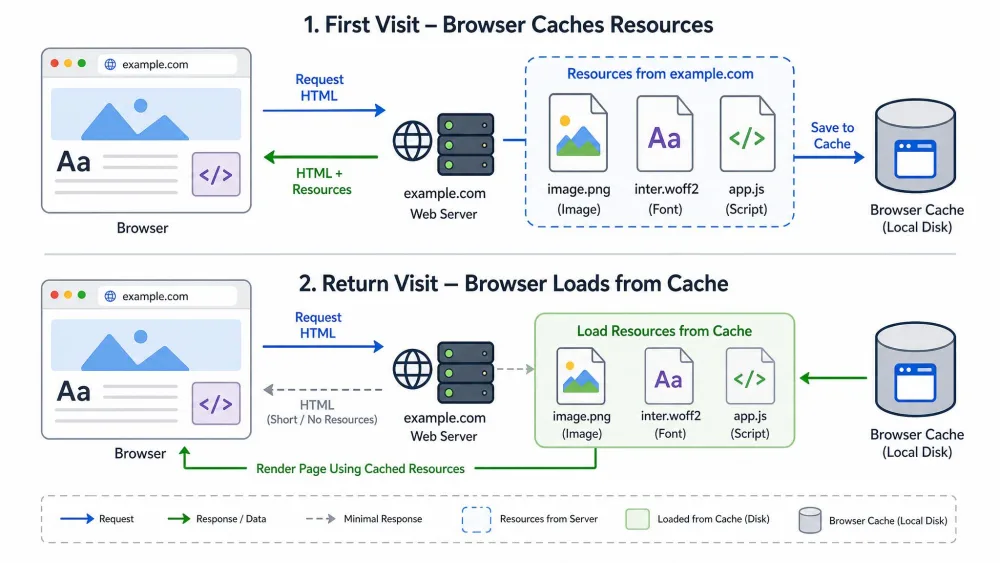
Here is how it works behind the scenes. On your first visit, the browser downloads everything the page needs, and files marked as cacheable get stored on your device. On return visits, the browser pulls those pieces from your disk instead of fetching them again, which is why a site you visit often tends to load quickly. Over time those files add up, and a busy cache can grow to several hundred megabytes or even gigabytes.
What Does Clearing the Cache Actually Do?
Clearing the cache deletes those temporary stored files. The next time you open a site, the browser downloads the most up-to-date version of its assets fresh, rather than serving you older saved copies.
That refresh is the whole point. When outdated cached files conflict with a site's latest updates, you get broken layouts, buttons that will not respond, and content that will not refresh. Clearing wipes the stale copies so the site rebuilds cleanly. In our experience, the most reliable payoff is fixing a specific, visible problem like this, not a general speed boost.
What Gets Deleted (and What Doesn't)
The cache clear removes stored site assets and nothing more. It does not touch your saved passwords, bookmarks, or downloads. It does not even log you out, because your login state lives in cookies, not in the cache. Afterward your device rebuilds the cache as you revisit sites, and browsers also purge old files on their own, so an empty cache never stays empty for long.
Does Clearing Cache Speed Things Up?
Sometimes, but less dramatically than people expect. A cache bloated to gigabytes of old files can create noticeable browser drag, and clearing it helps there. For everyday browsing, though, a clear rarely delivers a dramatic speed improvement.
Right after you clear, the first visit to a site loads slightly slower, because the browser has to re-download everything fresh. Speed returns to normal on the very next load, so this is a one-time cost, not a lasting slowdown.
Cache vs. Cookies: What's the Difference?
Cache and cookies are easy to confuse, but they store different things. The cache holds generic downloaded files that speed up loading, and those copies are impersonal and shared across visits. Cookies are small files created by the sites you visit, and they store personal data like your logins, preferences, and tracking info. The difference shows up when you clear each one: wipe the cache and you force fresh downloads, but wipe cookies and you erase login sessions, so you have to sign back in.
| Attribute | Cache | Cookies |
|---|---|---|
| What it stores | Copies of page assets: images, fonts, scripts, code, layouts | Personal data: logins, preferences, location, tracking info |
| What clearing removes | Stored temporary site files, forcing a fresh re-download | Login sessions and saved site preferences |
| Effect on speed | Next visit to a site is slightly slower once, then normal | Little direct speed effect, mainly re-login prompts |
| Are you logged out? | No, login state is not in the cache | Yes, you will need to log back in |
When You Should (and Shouldn't) Clear Your Cache
Clear your cache when something is visibly wrong. A page that looks broken, a layout that will not load right, or content stuck on an old version all tend to snap back to normal after a clear. It is also worth clearing to free up space once your cache has grown into the gigabytes. The rest of the time, you can skip it. If a site simply feels a little slow, clearing is rarely the fix, and you will lose the loading speed the cache was providing on sites you visit daily.
Before you wipe everything, try snoozing or reloading the problem tab first, or reinstalling a single misbehaving app. That often fixes the issue without clearing the whole cache. Keep the cache for sites you visit daily, and clear it for one-off troubleshooting.
How to Clear Your Cache on Any Device
The steps differ slightly per browser, but the idea is the same everywhere: open the clear-data settings, pick what to remove, and confirm.
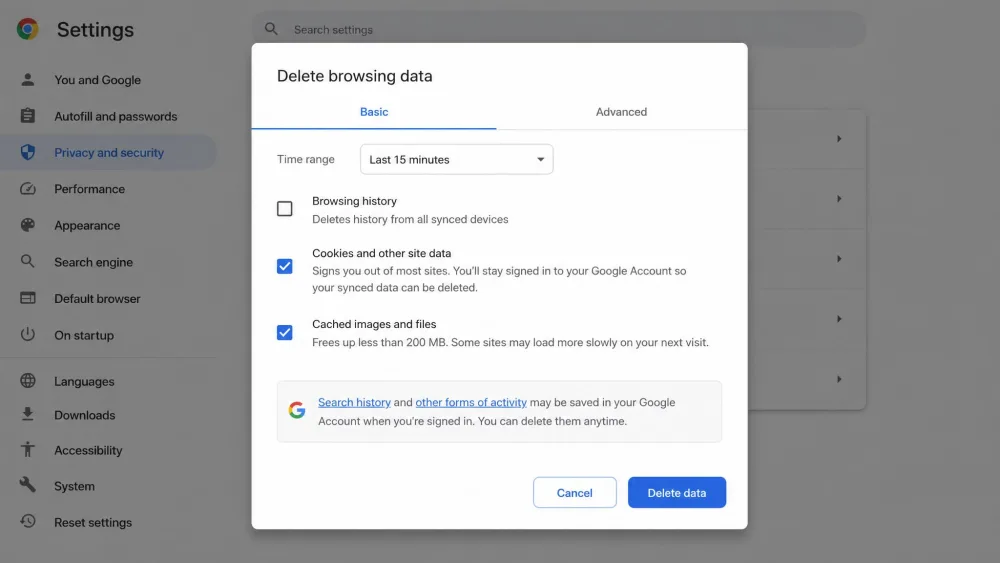
- Chrome: Follow our guide to clearing cache in Chrome, or check Google Chrome's cache guide. Chrome's Delete browsing data dialog defaults to a 15 minutes time range, and keeps "Cached images and files" separate from "Cookies and other site data."
- Firefox: Use our how to clear your browser cache walkthrough, or read the Firefox cache support page.
- Safari on Mac: Start with our clear cache on any device guide, then confirm the steps for Safari on Mac.
- Windows and Edge: See our how to clear cache on Windows guide, or the official Microsoft Edge support. In Edge you clear via Settings, then Privacy, then Clear browsing data, or press Ctrl+Shift+Del.
One friction point worth knowing: on iOS Safari, clearing history, cookies, and cache is combined into a single action. You cannot dump the cache while keeping your logins, so expect to sign back in afterward.
How Often Should You Clear Your Cache?
There is no schedule to keep. Clearing on a fixed timetable is mostly wasted effort, because the cache rebuilds itself as you browse and browsers auto-purge old files on their own. The practical habit is simple: clear only when something is glitchy or when you genuinely need to free up space.