You've narrowed your GPS location changer down to two names, and now you're stuck. WooTechy iMoveGo and PoGoskill both promise one-click teleporting, a joystick, and no jailbreak, and both plaster the same Pokemon GO screenshots across their homepages.
The differences that matter are buried in the pricing table, the device ceiling, and the fine print on refunds. So we pulled the published figures for both apps, lined up the features side by side, and worked out who each one is actually for.
Here's the short version before the detail: iMoveGo is the better long-term buy, and PoGoskill is the cheaper way to spoof for a week.
iMoveGo vs PoGoskill at a Glance
Both apps are location changers that run on a Windows or Mac computer and push a fake GPS position to a connected phone. Feature lists overlap heavily, so price and device support do most of the deciding.
| Product | Buy | Monthly | Quarterly | Lifetime | Free trial | iOS | Android | Jailbreak or root | Joystick | Routes | Speed control | Devices | Cooldown timer | Refund | Support |
|---|---|---|---|---|---|---|---|---|---|---|---|---|---|---|---|
 |
Check price → | $14.99VIP | $29.99VIP | $89.99VIP, $119.99 SVIP | 5 changes, 1 hour joystick | Yes, SVIP tier | Android 16 and later | Not required | 360-degree | Two-Spot, Multi-Spot | 3.6 to 120 km/h | Up to 10 | Yes | 30-day guarantee | Email and support site |
 |
Check price | $14.99iOS app | $19.95PC | Offered, price varies | 1 hour on PC | iOS 12.5 and later | Android 4 to Android 16 | Not required | Yes | Two-spot, multi-spot | Walk, cycle, drive presets | Up to 15, tier dependent | Yes | 30-day, conditions apply | Email, support site, Trustpilot 4.7 |
Full current tiers live on iMoveGo's official product page and on the PoGoskill GPS Location Changer homepage, both of which run promotional pricing.
Core Location Spoofing: Accuracy and Setup Speed
That table hides the part that costs you an evening, which is getting either app running in the first place. Neither one changes location on the handset by itself. You install a desktop client, connect the phone, and the computer feeds the spoofed coordinates while the app runs.
Setting up iMoveGo
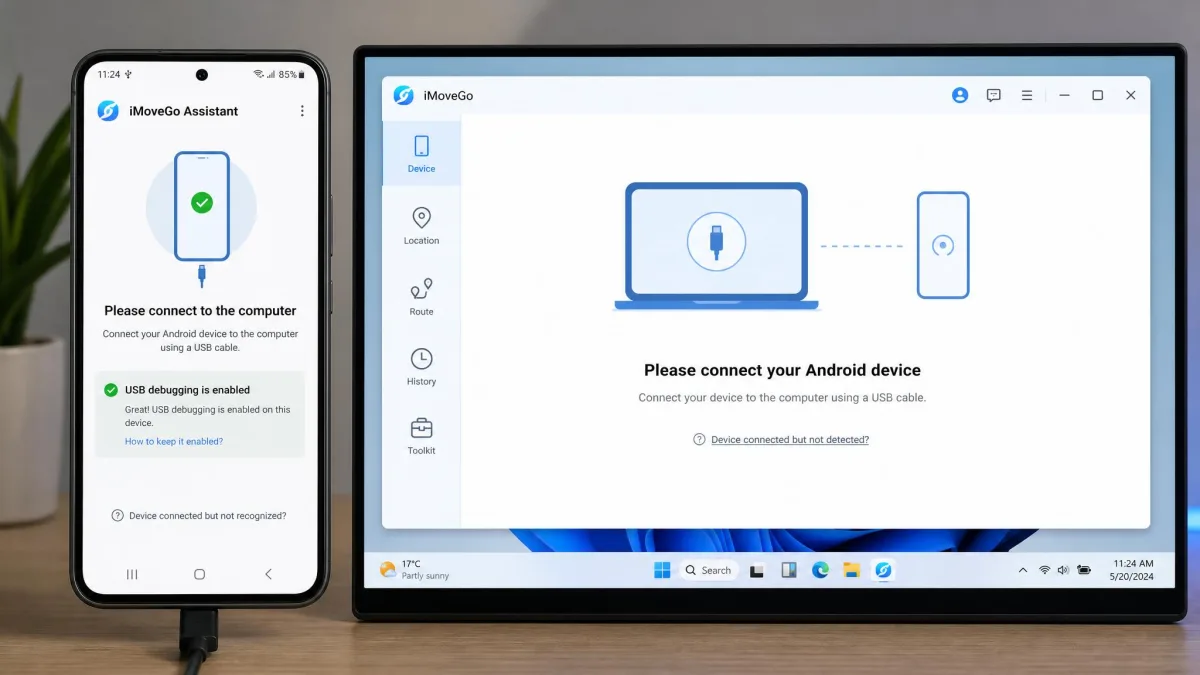
iMoveGo installs on the desktop first, then connects your phone over USB or Wi-Fi. On Android 10 and newer, an iMoveGo Assistant app is pushed to the handset automatically as part of that connection.
One thing to expect: when an Android device connects, a modified Pokemon GO build installs automatically, and that can feel intrusive the first time it happens.
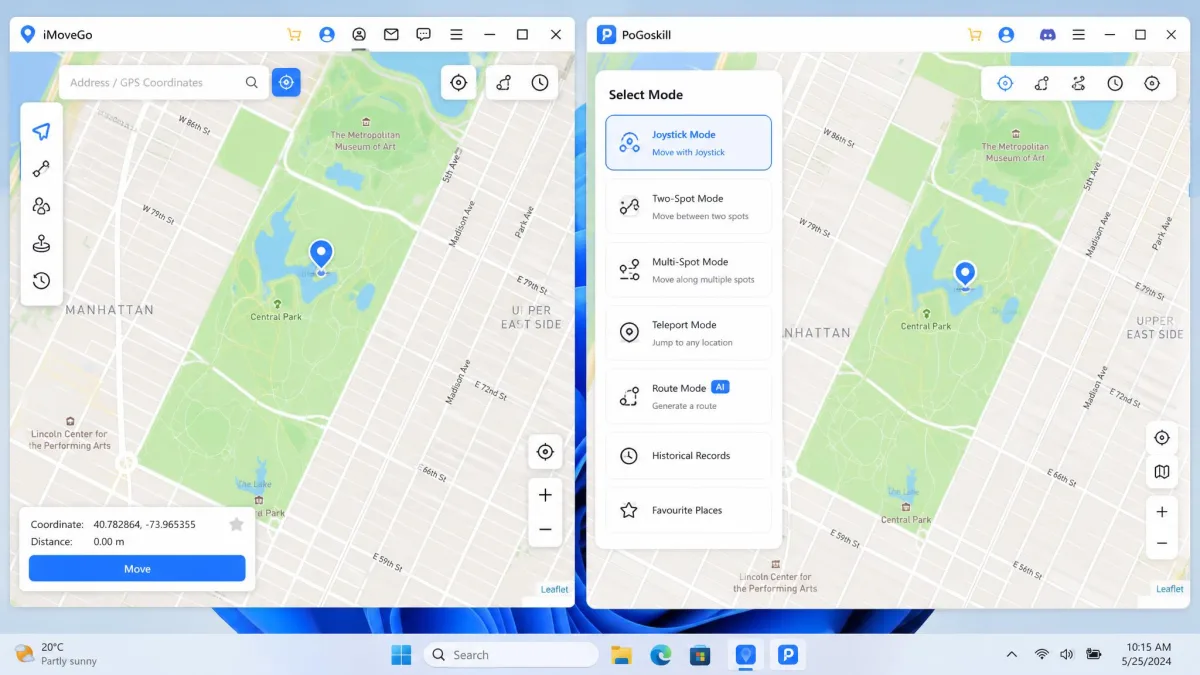
Once you're connected, the mode picker offers Teleport, Jump, Dual-Point, Multi-Point and Joystick. It reads clearly enough once you know the vocabulary, though it isn't obvious to a first-time spoofer.
Location switching can lag noticeably when you jump between distant points, so give it a beat before assuming the change failed.
Setting up PoGoskill
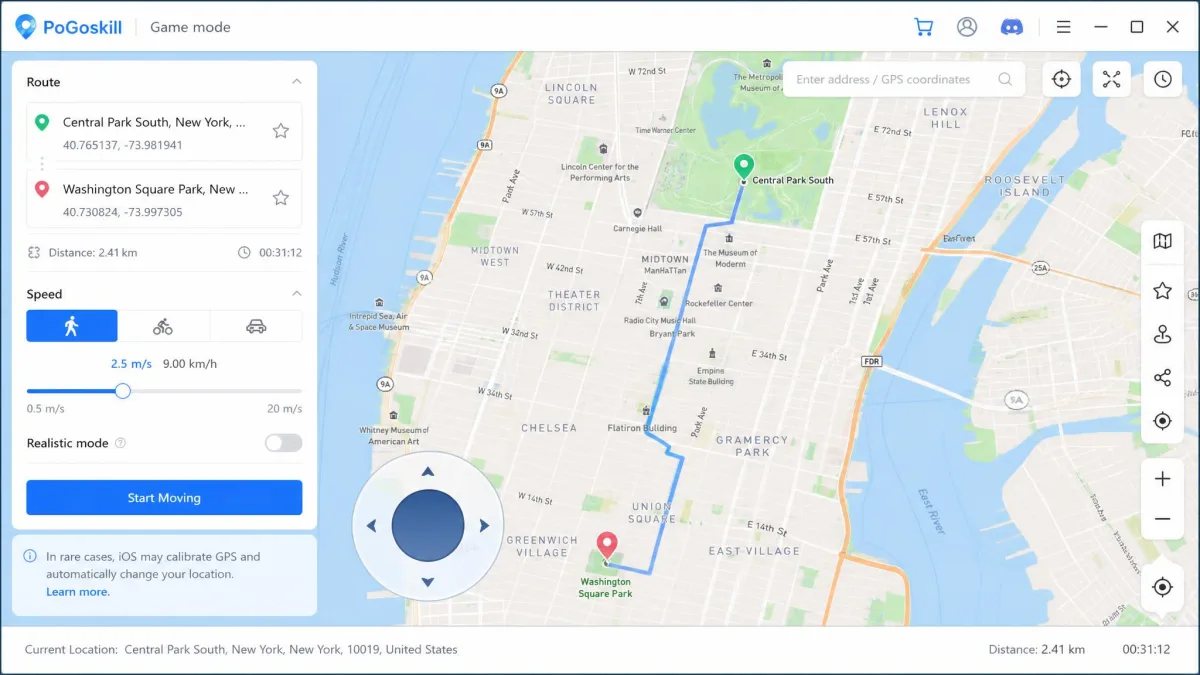
PoGoskill follows the same desktop-plus-cable pattern. Install on Windows or Mac, connect over USB or Wi-Fi, choose General or Game mode, then drop a pin on the map.
The desktop client supports Windows 11 through XP and macOS 10.13 or later, which is a wide net for older hardware.
There's a catch on Apple: there is no native iPhone app, and iOS users go through a workaround flow that the purchase page doesn't spell out. Budget extra time if iPhone is your only device.
Connect over USB for the first session on either app. Wi-Fi pairing is more convenient, but a cable removes one variable while you're still learning which mode does what.
Joystick and Movement Simulation
Once both clients are talking to your phone, the question becomes how convincingly they move it. This is where the two apps look most alike on paper and feel different in practice.
Route simulation and speed control
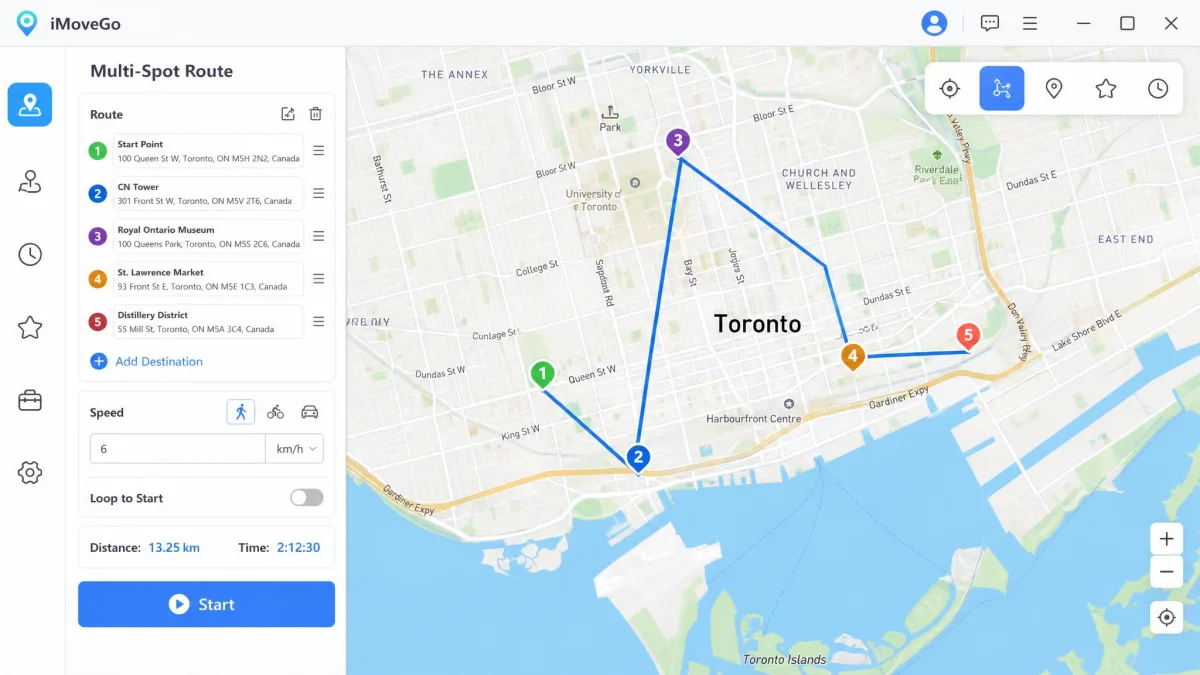
Both support two-spot and multi-spot routing, both import and export GPX files, and both let you loop a route. iMoveGo's Two-Spot and Multi-Spot planning holds up well for longer, multi-waypoint walks, which matters if you want a route running unattended.
iMoveGo publishes an exact speed range, from 3.6 km/h up to 120 km/h, so you can dial a pace precisely. PoGoskill gives you walking, cycling and driving presets instead, which is simpler but less granular.
Joystick responsiveness
iMoveGo's joystick is a full 360-degree control with pause and resume, plus historical records and a favorites list so you can return to a saved spot with one click.
PoGoskill's joystick and its support team are its two strongest assets. If freehand movement is the thing you'll use daily, PoGoskill's control is the more polished of the two.
Pokemon GO Performance: Raids, PokeStops and Cooldown
Smooth movement only counts for so much if the app is blind to the game around it, and here PoGoskill has the more game-aware feature set. It ships a dedicated Pokemon GO Game Mode with PokeStop and Gym detection built in, so you can see what's worth walking to before you move.
iMoveGo counters with built-in maps aimed at AR games and a cooldown timer of its own. Both apps track cooldown, which is the single feature you cannot skip if you plan to teleport between regions.
The practical difference is that PoGoskill surfaces game objects on its map while iMoveGo mostly hands you a clean map and a timer. Neither guarantees a raid lobby fills.
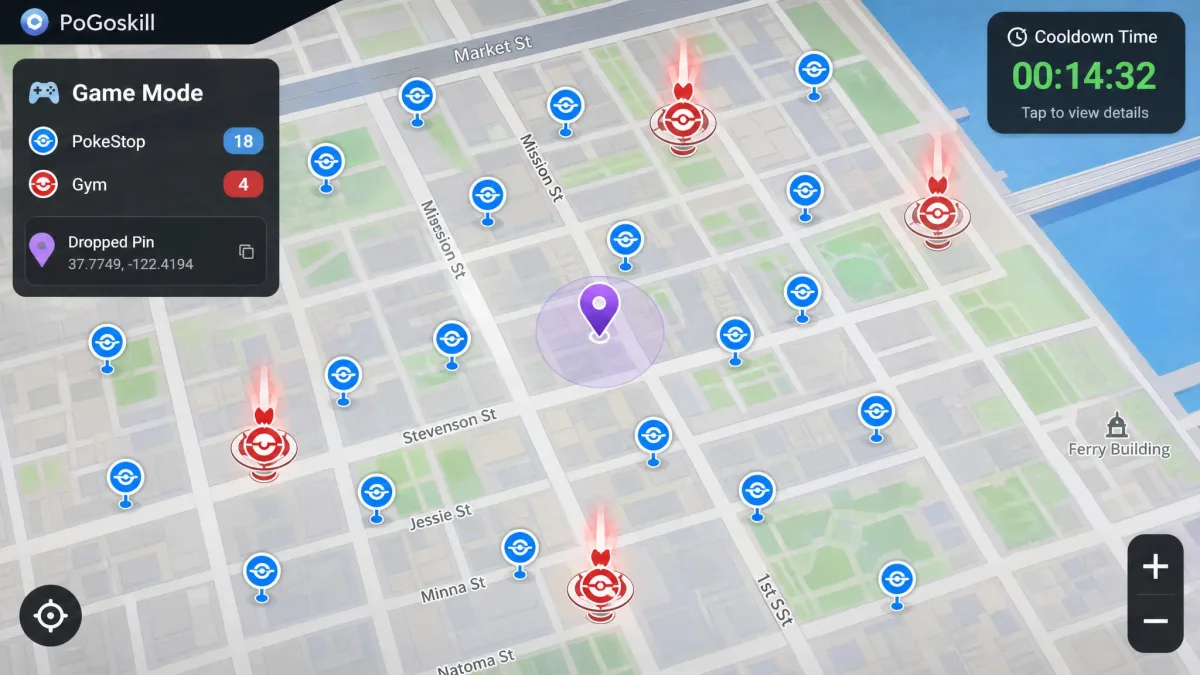
Cooldown is the enforced wait between a location jump and your next in-game action. Ignoring it is the fastest way to trip a soft ban, and both apps time it for you if you let them.
Device Compatibility: iOS, Android, Jailbreak and Root
Game features are moot if the app won't touch your handset at all, and compatibility is where these two diverge hardest. Neither requires jailbreak or root, which is the baseline expectation in 2026 and both meet it.
PoGoskill claims the wider compatibility window: iOS 12.5 and later, and Android 4 through Android 16. If you're spoofing on an old spare handset, that range is the deciding factor.
iMoveGo lists Android 16 and later on the Android side and puts iOS support behind its SVIP tier. Confirm your iOS version against the current system-requirements list before buying, because iOS 26 support is in flux and the official page and third-party testing disagree.
You can check the Android build and its permissions on PoGoskill's Google Play listing before you install anything.
One shared limitation applies to both: they are desktop-tethered, so neither is something you can start or fix from the phone alone once you're out of the house.
Pricing: Subscription Plans and Free Trials Compared
Assuming both apps will run on your phone, pricing is the clearest split between them, and it's where most buyers should make the call.
iMoveGo pricing
iMoveGo's VIP 1-Month plan is $14.99 and covers 5 devices. The VIP 1-Quarter plan is $29.99, and VIP Lifetime is $89.99 for the same 5-device allowance.
Stepping up to SVIP raises the ceiling to 10 devices and adds iOS support. SVIP 1-Month runs $19.99 and SVIP Lifetime is $119.99.
The free version isn't a trial in the usual sense. It's capped at 5 location changes and 1 hour of joystick movement, which is enough to confirm your phone connects and not much more.
PoGoskill pricing
PoGoskill splits pricing by platform. The iOS app is billed at $14.99 per month and the Android app at $6.99 per week, which is the cheapest entry point in this comparison by a wide margin.
The PC version is listed at $19.95 per quarter. PoGoskill's desktop pricing shifts between promotional tiers, so the checkout total can differ from the headline figure. A lifetime tier exists, but no price for it appears on the official homepage, so treat any lifetime figure you see quoted elsewhere as unconfirmed.
PoGoskill's free trial is limited to 1 hour on the PC version. That's short enough that it works mainly as a gateway to the weekly or monthly subscription rather than a genuine evaluation.
Which is better value
Spoofing for one weekend? PoGoskill's weekly Android tier wins outright, and nothing iMoveGo offers competes at that end of the market.
Spoofing for a year or more? iMoveGo's lifetime plan pays for itself against roughly six months of PoGoskill's iOS subscription, and it covers a household of phones instead of one.

Safety, Ban Risk and Account Security
Price is the easy part of this decision. The harder part is what you're risking, so let's be plain about it. Spoofing your location in Pokemon GO breaks the game's rules, and no software can make that risk disappear.
Both apps operate against Niantic's Terms of Service, which prohibit falsifying your location. Warnings, temporary suspensions and permanent bans are all on the table, and no credible source quantifies the odds for either tool. Never spoof on an account you'd be upset to lose.
What you can control is behaviour. Respect the cooldown timer, keep speeds plausible, avoid jumping continents mid-session, and don't run a route at driving speed through a park.
There's a second security angle worth naming, and it has nothing to do with Niantic. Trustpilot's one-star reviews of PoGoskill cluster on lifetime licences being blocked weeks after purchase, so keep your receipt and your order reference somewhere you can find them.
Ease of Use and Interface
Risk management aside, you still have to live with the software daily. iMoveGo's interface packs more into the window: five movement modes, a speed slider, GPX tools, records and favorites. That density is useful once you're fluent and confusing on day one.
PoGoskill's General and Game mode split is easier to grasp cold. You pick a mode, drop a pin, and go.
If this is your first location changer, PoGoskill gets you moving faster. If you expect to run routes regularly, iMoveGo's extra controls earn their space.
Support, Updates and Reliability
Neither app's reliability is entirely its own to control. Both are tied to the platform release cycle, compatibility can break after a major iOS or Android update, and behaviour varies by handset model, so a tool that worked last month is not guaranteed to survive the next point release.
PoGoskill's weak spot is authorization. Login authorization failures happen, and they are painful when they land during a timed in-game event.
On support channels, PoGoskill has the visible advantage. Its customer service draws consistent praise, and approved refunds are processed within 2-4 business days. iMoveGo publishes a support site and email route but no response-time commitment.
Refunds deserve a closer look. Both advertise a 30-day money-back guarantee, but PoGoskill's is limited to qualifying circumstances such as duplicate purchases within 48 hours, the wrong product, or unresolved technical faults. Requests can be refused when support judges the product to be working as advertised.
What Real Users Say: Review Scores and Community Feedback
PoGoskill holds a TrustScore of 4.7 out of 5 across 98 reviews, with 92% rated five stars and 6% rated one star. You can read PoGoskill's Trustpilot reviews in full.
Praise clusters around two things: fast, helpful customer support and the joystick. The one-star minority is small but consistent, and it centres on blocked licences and refunds.
No comparable aggregate score exists for iMoveGo, which makes its reputation harder to read from the outside. That absence isn't a mark against it, but it does mean you're relying on the 30-day guarantee rather than a crowd verdict.
Pros and Cons of Each App
iMoveGo pros and cons
Pros
- One lifetime licence covers a household of phones, with a higher device ceiling on the SVIP tier
- Precise speed control from 3.6 km/h to 120 km/h
- Two-Spot and Multi-Spot routing holds up on long multi-waypoint walks
- Straightforward 30-day money-back guarantee
- GPX import and export, favorites and historical records
Cons
- Auto-installs a modified Pokemon GO build on connected Android devices
- Location switching lags when jumping between distant points
- Interface is not obvious to a first-time spoofer
- iOS support sits behind the pricier SVIP tier
- iOS 26 compatibility is disputed between the vendor and third-party testing
Our full iMoveGo review goes deeper on the desktop client.
PoGoskill pros and cons
Pros
- Cheapest entry point of the two, thanks to a weekly Android tier
- Widest compatibility window: iOS 12.5 and later, Android 4 through Android 16
- Dedicated Pokemon GO Game Mode with PokeStop and Gym detection
- Well-regarded joystick and a 4.7 Trustpilot score
- Refunds processed in 2-4 business days when approved
Cons
- No native iPhone app, so iOS users need an undocumented workaround
- Refund policy is conditional and requests can be declined
- Free trial of 1 hour is too short for a real evaluation
- Login authorization failures on sign-in
- Lifetime pricing is not published on the official site
Our standalone PoGoskill review covers the Game mode in detail.
Alternatives Worth Considering (PGSharp, iAnyGo, iSpoofer)
Neither app is the only way to move a pin, and our ranking of the best Pokemon GO spoofers covers ten options. Two of these three come up constantly in the same searches.
PGSharp is the Android-only option that skips the desktop entirely. It's a modified game client rather than a location changer, which makes it convenient and puts it closer to the line Niantic enforces.
iAnyGo from Tenorshare is the closest structural match to iMoveGo: desktop client, joystick, route modes, no jailbreak. Worth pricing against iMoveGo's lifetime tier if you want a second quote.
iSpoofer is worth naming mainly so you don't waste time chasing it. The Pokemon GO version was shut down after legal action from Niantic, and any download claiming to be it should be treated with suspicion.
Is iMoveGo or PoGoskill safer for my Pokemon GO account?
Do either require jailbreak or root?
What happens to my licence if I change computers?
Which works better on iOS 18 or Android 15?
What happens to my subscription if Niantic patches the spoofing method?
How do I restore my real location?
Final Verdict
There is a third answer worth stating before the summary, which is neither of them. If the account you'd be spoofing on carries years of progress, no feature in this comparison offsets a permanent ban, and the sensible move is a throwaway account or nothing at all. If you want to spoof on Android without a laptop in the equation at all, PGSharp solves a problem neither of these apps addresses, at a higher risk.
One condition would flip our pick outright: if iMoveGo's Android floor excludes your handset, or iPhone is your only device and you'd rather not pay for the SVIP tier, then the value maths stops mattering and PoGoskill's compatibility range decides it for you. Short of that, the lifetime licence and the wider device allowance settle it.