
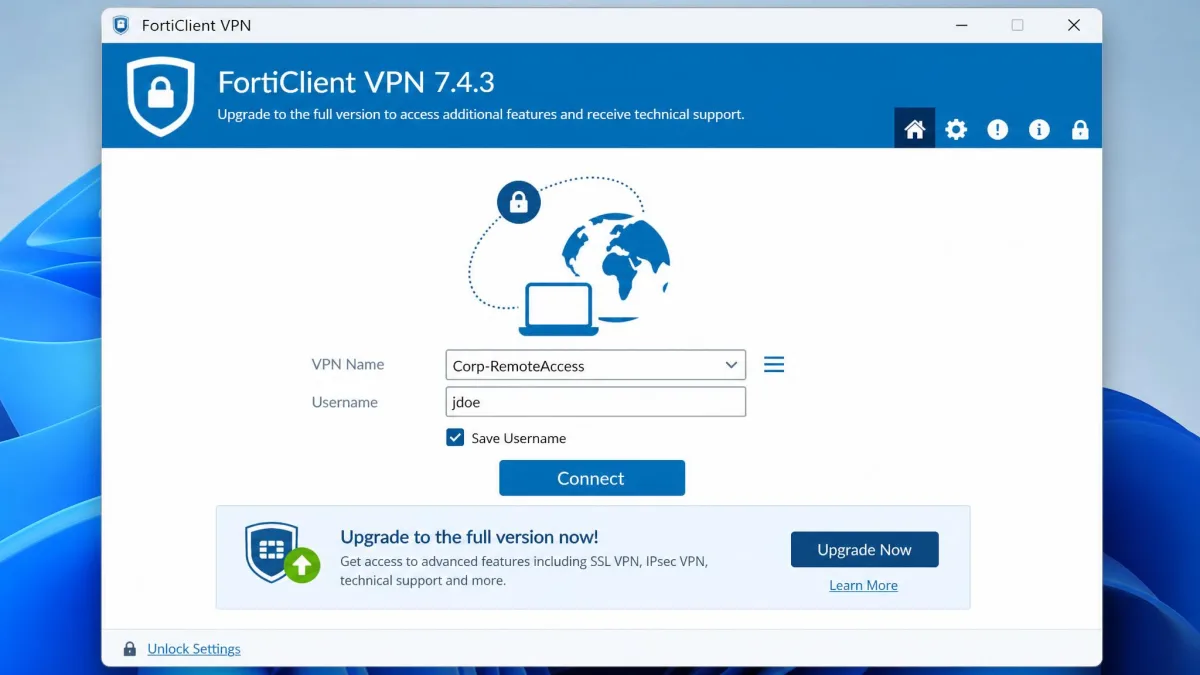
FortiClient's free VPN-only client has had no new build since version 7.4.3, the full client needs paid EMS (Fortinet's Endpoint Management Server) licensing, and without a FortiGate firewall on the other end it is a heavy install that does very little. If you connect to a work FortiGate, the best replacement is already on your laptop: the built-in IKEv2 client in Windows and macOS. IPsec is the encrypted tunnel standard, IKEv2 is the protocol that negotiates it, and the built-in client costs nothing.
If you used FortiClient for personal privacy, Proton VPN is the best free alternative. We judged every option on which FortiGate VPN types it can reach, whether it has a free tier, and how it behaves on everyday connections. This builds on what we found in our FortiClient VPN review.
Quick comparison: the best FortiClient VPN alternatives
Only the first two rows talk to a FortiGate directly. The other work tools replace the gateway as well as the client.
| Alternative | Buy | Best for | Free plan | Starting price | Platforms | Works with a FortiGate? |
|---|---|---|---|---|---|---|
 |
FortiGate IPsec users | Yes (built into the OS) | Free | Windows, macOS, iOS, Android | Yes (IPsec IKEv2 dial-up) | |
 |
Linux on FortiGate SSL VPN | Yes (GPL-3.0) | Free | Linux, macOS, FreeBSD | Yes (SSL VPN, FortiOS before 7.6.3) | |
 |
Self-hosted VPN setups | Yes (open source) | Free | Windows, macOS, Linux, iOS, Android, BSD | No (replaces the gateway) | |
 |
Standard OpenVPN servers | Yes (Access Server free for 2 connections) | Access Server $7 per connection per month | Windows, macOS, iOS, Android | No (replaces the gateway) | |
 |
Replacing the corporate VPN model | Yes (6 users, unlimited devices) | Standard $8 per user per month | Windows, macOS, Linux, iOS, Android | No (replaces the gateway) | |
 |
Cisco environments | No (25-user minimum) | Partner quote | Windows, macOS, Linux, iOS, Android | No (needs a Cisco headend) | |
 |
Palo Alto gateways | Basic VPN needs no licence (Windows, macOS) | Partner quote per firewall | Windows, macOS; mobile and Linux need a subscription | No (needs a Palo Alto firewall) | |
 |
Managed business VPN for small teams | No free plan | Lite $8 per user per month, annual | Windows, macOS, Linux, iOS, Android | No (own gateways) | |
 |
Check price | Free personal privacy | Yes (1 device, 10 countries) | Plus $9.99 per month | Windows, macOS, Linux, iOS, Android, TV | No (consumer VPN) |
 |
Check price | Paid personal privacy | No (30-day money-back) | Basic $14.99 per month | Windows, macOS, Linux, iOS, Android, TV | No (consumer VPN) |
 |
Baseline | Yes (frozen at 7.4.3) | Free | Windows, macOS, Linux, iOS, Android | Yes (SSL VPN and IPsec) |
Why people look for a FortiClient alternative
Most people looking for a replacement are reacting to Fortinet's product changes, everyday friction with the client, or both.
The free VPN-only client is being retired
Fortinet has published no formal end-of-life notice; it has just stopped shipping new free builds. Fortinet's FortiClient 7.4.4 release notes name 7.4.3 as the last free VPN-only agent, and the notes through 7.4.7 say no feature updates were made to it, so no new build was released. Fortinet tells free users to keep running 7.4.3, so "retired" describes what happens in practice, not an announced date.
The same notes drop IKEv1. Starting from FortiClient 7.4.4, released in September 2025, FortiClient no longer supports IKEv1 for IPsec VPN on Windows, macOS or Linux. A team already forced into an IKEv2 migration has good reason to ask whether it needs FortiClient at all.
EMS licensing, heavy installs and SSL VPN security history
Anything beyond the free client needs paid licences. Fortinet sells them through partners on quote, so per-endpoint prices vary by reseller, term and seat count.
The install is the other complaint. The full client is heavy on macOS, its Linux interface lags, and it can conflict with other EDR agents. In our time with it, FortiClient dropped the tunnel whenever a laptop locked or sat idle, which meant repeated sign-ins through the day. Connections can also stall at 98% after authentication succeeds, usually because of the virtual adapter, routes, DNS, IPv6 or a conflicting agent such as Zscaler. FortiGate's SSL VPN also cannot assign addresses with DHCP lease times, a limit that has pushed some IT teams toward other gateways.
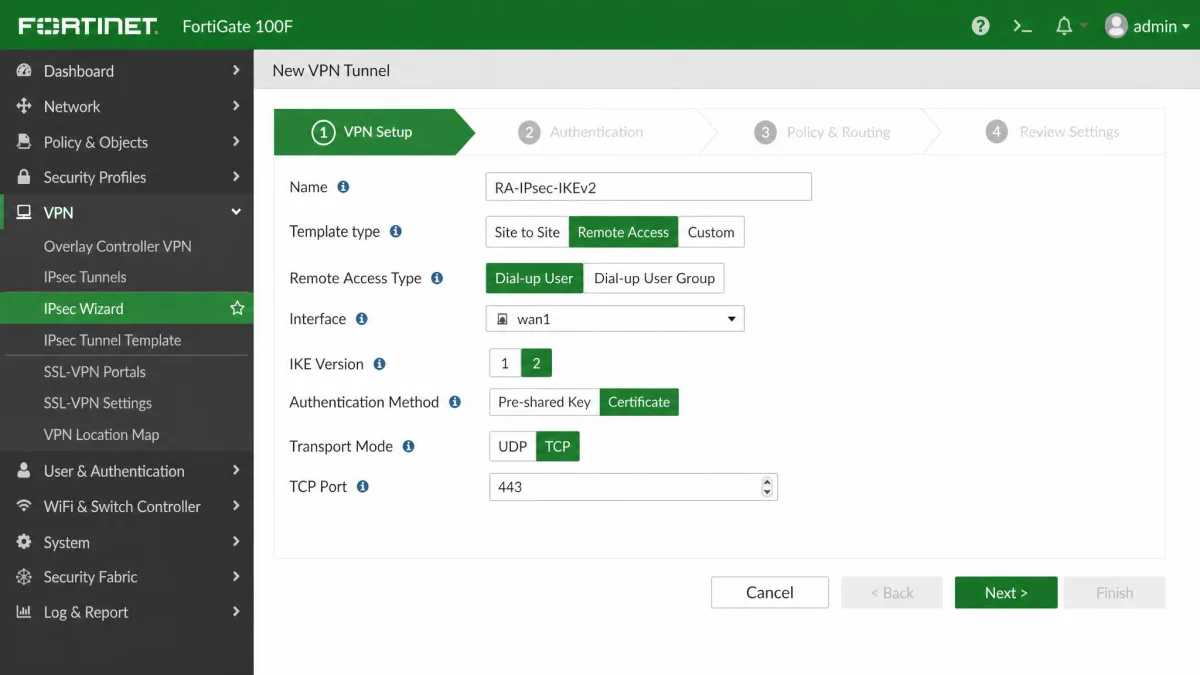
SSL VPN, the TLS-based remote-access mode FortiClient long relied on, carries a security history as well. Fortinet disclosed CVE-2022-42475 as exploited in the wild in December 2022, and CVE-2024-21762, an unauthenticated remote code execution flaw in FortiOS SSL VPN, joined CISA's Known Exploited Vulnerabilities catalog in February 2024. FortiOS 7.6.3, released in April 2025, then removed SSL VPN tunnel mode on every FortiGate model in favour of IPsec VPN, which can run over TCP port 443. Small 2GB RAM models had lost SSL VPN even earlier.
None of this makes FortiClient a bad client. We still score it 8.8/10, because setup is easy once IT supplies a profile and it pairs tightly with FortiGate firewalls.
Best FortiClient alternatives for connecting to work networks
Work users have fewer real options than most lists suggest. Only the first two clients below can reach a FortiGate; the rest suit teams ready to swap the gateway too, a move our guide to the best VPN for business covers in more depth.
Native Windows and macOS IKEv2 client - Best free option for FortiGate users
The built-in client is the zero-cost answer for anyone whose FortiGate runs IPsec. It ships free in Windows, macOS, iOS and Android, and IT only needs an IPsec VPN dial-up tunnel set to IKEv2.
Its limits are specific. It cannot reach an SSL VPN portal, and it lacks FortiClient's SAML sign-in for dial-up IPsec, EMS posture checks, and ZTNA (zero trust network access, which verifies the user and device before each app session). When we pointed the macOS client at a FortiGate, it took only a default route, so all traffic went through the tunnel until we enabled the split-tunnel attribute in its network-extension preferences. It also received no DNS search suffix, so internal short names needed manual resolver entries. Our explainer on split tunnel vs full tunnel covers why that matters.
Pick the native client if your FortiGate already runs IKEv2 and you can live without EMS.
OpenConnect (openfortivpn) - Best for Linux users on FortiGate SSL VPN before FortiOS 7.6.3
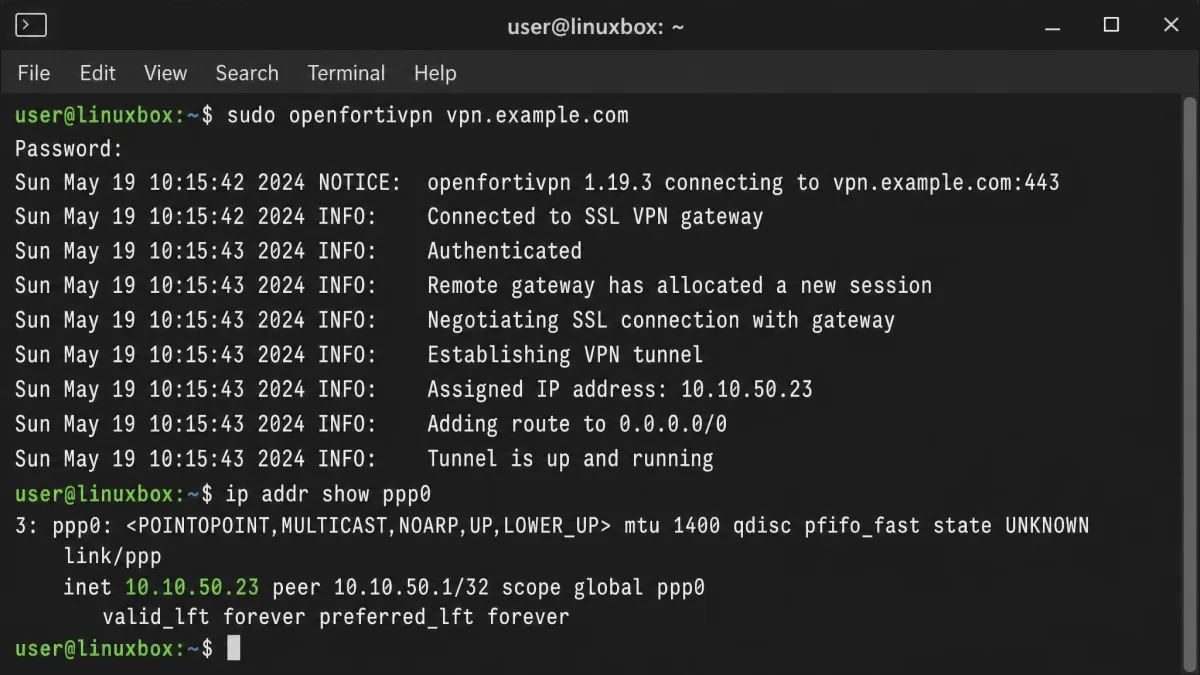
openfortivpn, an open-source client for FortiGate SSL VPN, is free under GPL-3.0 and runs on Linux, macOS and FreeBSD. It speaks Fortinet's PPP-over-TLS SSL VPN tunnel mode, not IPsec, so it only works with FortiGates on firmware older than FortiOS 7.6.3.
On Linux, openfortivpn connected faster and held the tunnel more reliably than Fortinet's own client, which can crash and take minutes to connect or disconnect. One quirk showed up immediately: Docker networks could not reach VPN resources until we restarted the Docker service after connecting. SAML login arrived in openfortivpn 1.23.0, while Ubuntu 24.04 still packages 1.21.0, so SAML users may need to build from source.
OpenConnect has supported Fortinet SSL VPN since OpenConnect 9.00 in March 2021. It lacks Fortinet's newer v2 wire protocol, and its reconnect after a dropped session is unreliable.
Pick openfortivpn if you run Linux against a FortiGate that still offers SSL VPN.
WireGuard - Best for self-hosted VPN setups
WireGuard moves you off FortiGate remote access entirely. It is free and open source, cannot connect to a FortiGate, and needs your own server; our explainer on what WireGuard is covers the protocol.
In our use it was noticeably faster than OpenVPN because it runs in the kernel. Raw WireGuard has no management layer, though: no web UI, no user database and no dynamic IP assignment. Every peer is configured by hand or through a wrapper such as wg-easy, access is tied to static key pairs with no SSO or MFA, and Linux has no end-user GUI beyond third-party wrappers.
Pick WireGuard if you control both ends of the tunnel.
OpenVPN Connect - Best for standard OpenVPN servers
OpenVPN Connect is built for an OpenVPN server, not a FortiGate. Fortinet's SSL VPN is a proprietary PPP-over-TLS protocol, so OpenVPN Connect cannot talk to it; our guide to what OpenVPN is explains the difference.
The client is free on Windows, macOS, Android and iOS. OpenVPN Access Server is free for up to 2 connections, and the Growth plan costs $7 per connection per month from 10 connections. Setup was light: we imported the .ovpn profile and connected, although an Access Server with a self-signed certificate triggered browser and certificate warnings first. Capterra rates Access Server 4.5/5 from 202 reviews.
Pick OpenVPN Connect if your organisation already runs an OpenVPN server.
Tailscale - Best for replacing the corporate VPN model
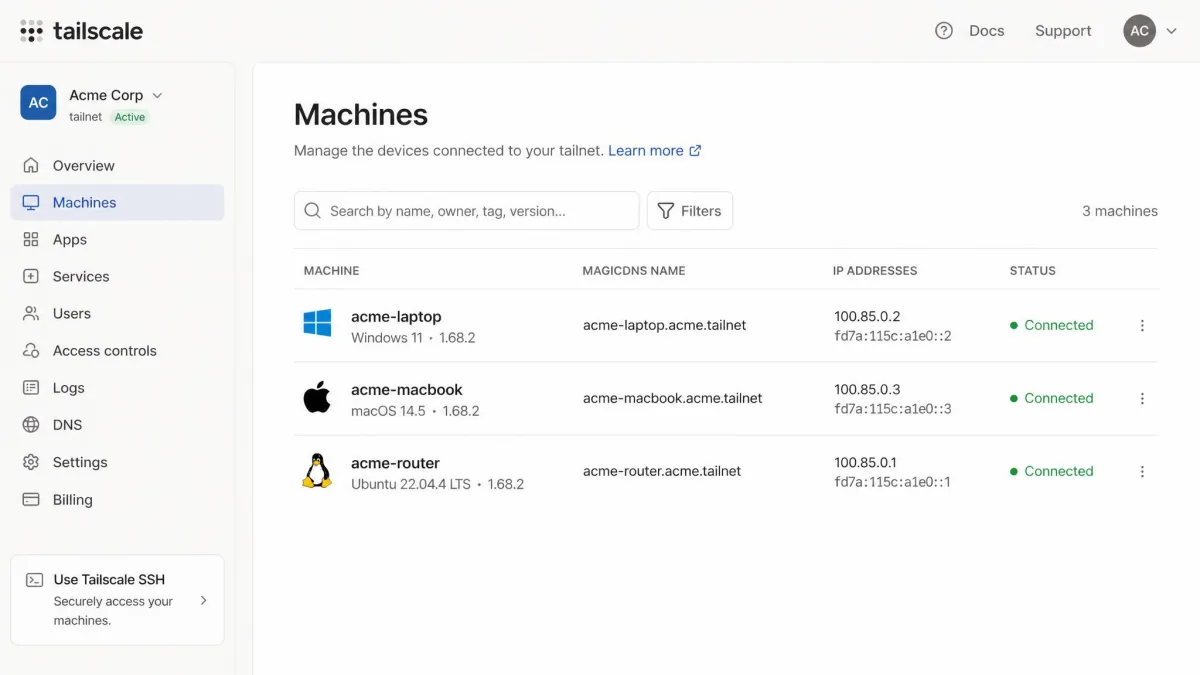
Tailscale drops the central gateway altogether. It builds a WireGuard-based mesh where devices connect directly, with SSO login and identity-based access rules. Tailscale's free Personal plan covers up to 6 users and unlimited user devices, limits that took effect on April 8, 2026, replacing the old 3-user, 100-device cap. Standard costs $8 per user per month, though older listings still show the retired $6 Starter tier.
We had Tailscale working in minutes: install the client, sign in with SSO, and devices connect without opening inbound ports. MagicDNS let us reach machines by name. Direct peer-to-peer links were fast, but large transfers slowed down whenever traffic fell back to a relay, and access policies grow complex as an organisation scales. Our Tailscale vs OpenVPN comparison goes deeper on that trade-off.
Pick Tailscale if you want to retire the VPN gateway rather than replace it.
Cisco Secure Client (AnyConnect) - Best for Cisco environments
Cisco Secure Client only makes sense where the firewall is Cisco, since it needs an ASA or Firepower headend. Advantage and Premier licences are sold per unique user with a 25-user minimum on 12- to 60-month terms. Cisco prices them through partners and its Global Price List, and discounts vary widely by tier, term and seat count, so roughly $90 to $120 per user for three years at list is only a starting point.
Secure Client held connections well across changing networks and long days on the road. It still disconnected without warning when idle or asleep, missed captive portals on public Wi-Fi, and Windows updates could break its virtual adapter. Capterra rates it 4.6/5 from 979 reviews.
Pick Cisco Secure Client if your gateway is already Cisco.
Palo Alto GlobalProtect - Best for Palo Alto gateways
GlobalProtect plays the same role for Palo Alto firewalls. Basic remote access needs no GlobalProtect licence on Windows and macOS. An annual gateway subscription per firewall, priced through partners with no public list price, adds host checks, the mobile and Linux apps, and split tunnelling by domain or app.
For end users it is simple: sign in to the app and the laptop is on the VPN. Connections can drop when switching networks, a manual reconnect took up to a minute, and bandwidth-heavy apps such as Outlook could slow down or crash over the tunnel. Capterra rates it 4.4/5 from 25 reviews.
Pick GlobalProtect if you are moving to a Palo Alto firewall.
NordLayer - Best managed business VPN for small teams
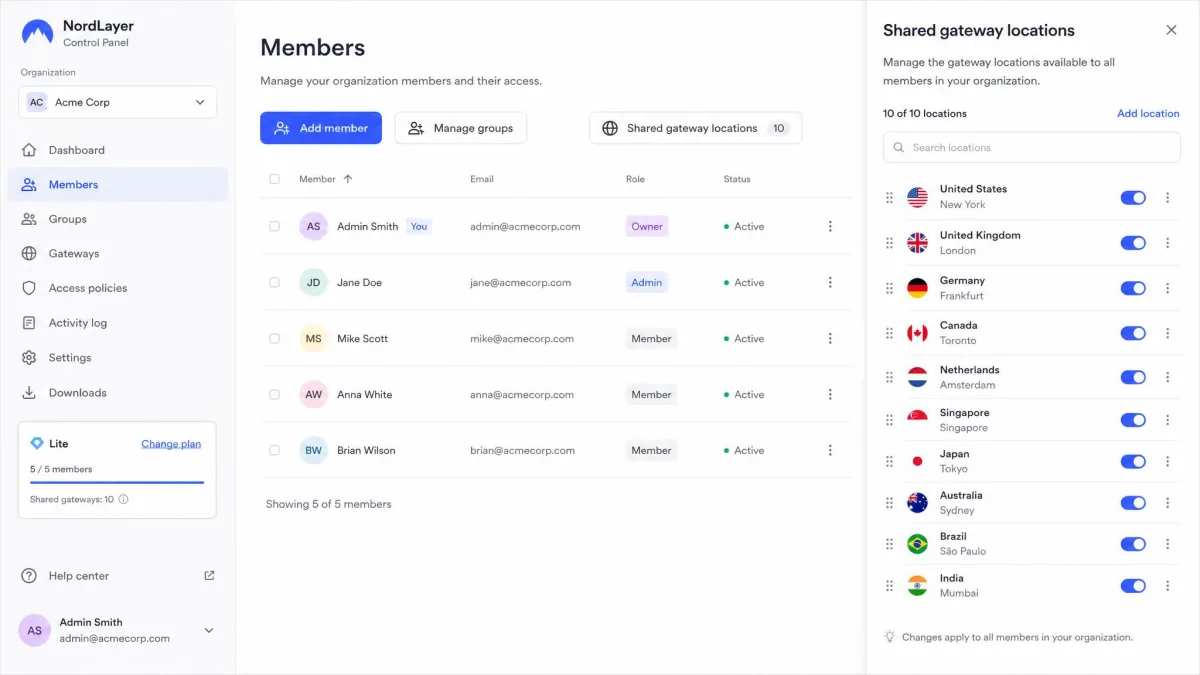
NordLayer suits a small team that wants no firewall to manage at all. It is a hosted business VPN with an admin dashboard, the WireGuard-based NordLynx protocol, MFA, and Okta and Entra ID sign-in. There is no free plan. Lite costs $8 per user per month billed annually with a 5-user minimum, and every plan carries a 14-day money-back guarantee. Core ($11) and Premium ($14) add dedicated gateways for $40 a month extra, though NordLayer's upper-tier pricing has shifted between plan revisions.
Onboarding used an organisation ID and a clear dashboard, and live chat replied quickly. Lite shares gateways with other customers, and it adds little over consumer NordVPN while costing more per user.
Pick NordLayer if you want a business VPN without running a gateway.
Best FortiClient alternatives for personal privacy
FortiClient was never a consumer privacy VPN. It connects you to an organisation's gateway rather than a network of servers worldwide, so personal users are switching category, not just client.
Proton VPN - Best free personal alternative
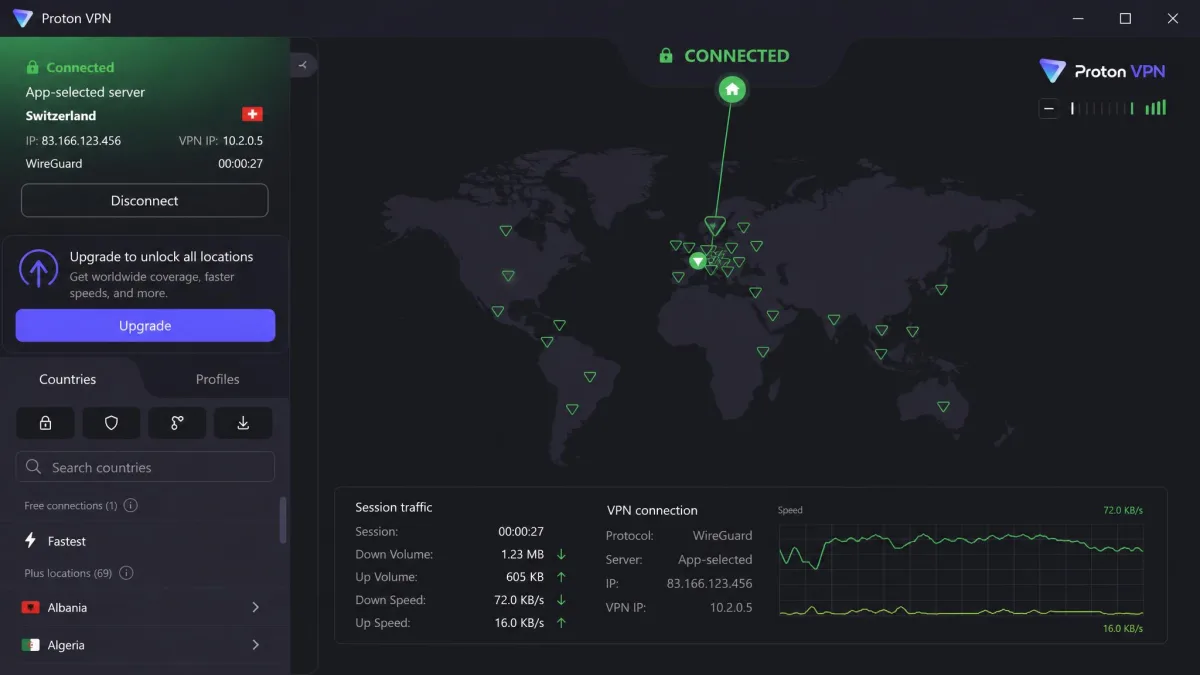
Proton VPN has the free plan we recommend most, and our Proton VPN review scores it 9.0/10. The free tier needs no credit card, runs on one device, and connects to servers in 10 countries that the app picks for you. Data is unlimited, but streaming, torrenting and split tunnelling are paid features. VPN Plus costs $9.99 per month; the 2-year plan runs about $2.99 to $3.49 per month depending on Proton's current promotion, with a 30-day money-back guarantee.
On standard servers, Proton cut our download speeds by no more than about 8% and uploads by about 4%. Secure Core double-hop connections slowed things noticeably, and the apps were simple to navigate on every platform.
Pick Proton VPN if you want privacy without paying.
NordVPN - Best paid personal alternative
Where Proton wins on its free tier, NordVPN wins on paid extras, and our NordVPN review also scores it 9.0/10. There is no free plan, but a 30-day money-back guarantee covers the Basic plan at $14.99 per month. The 2-year plan runs about $3.49 per month, a figure that shifts by a few cents with NordVPN's frequent sales, and one subscription covers 10 devices.
NordVPN's standard connections cost us only about 5% of download and upload speed. Double VPN was different, cutting speeds by as much as 80%. The kill switch is configurable, and the app warned us before joining unsafe Wi-Fi.
Pick NordVPN if you want the faster paid option across a household of devices.
How we picked these alternatives
We sorted every candidate by the FortiGate VPN type it can reach: IPsec IKEv2, SSL VPN, or neither. We then weighed free-tier availability, platform support and cost as a team grows. For the personal lane we used our own review scores, and for business tools we add Capterra ratings where they help.
Before you switch: do you actually need FortiClient?
For many FortiGate users, the answer is no. The built-in client covers plain remote access once IT prepares the gateway.
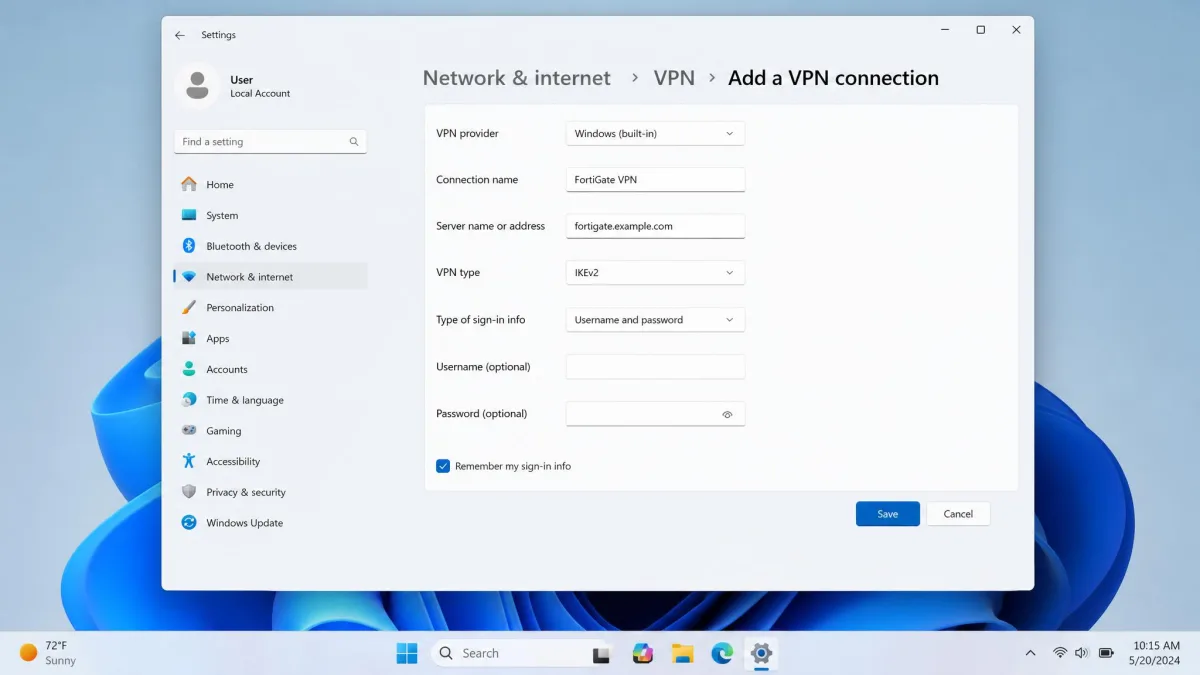
Connect to a FortiGate with your built-in IKEv2 client
IT does most of the work first. The FortiGate needs an IKEv2 dial-up tunnel, ideally with certificate authentication plus MFA. Fortinet's IKEv2 dial-up configuration guide issues a certificate to every user from AD Certificate Services and uses NPS as the RADIUS server for EAP-TLS. On FortiOS 7.6.3 and later, IT can also run the tunnel over TCP port 443 for networks that block standard IPsec ports.
Once IT sends the server address and your certificate, the client side is quick:
- Install the user certificate IT provided.
- On Windows, open Settings → Network & internet → VPN, then select Add VPN.
- Choose Windows (built-in) as the provider, enter the FortiGate address, set the VPN type to IKEv2, and save.
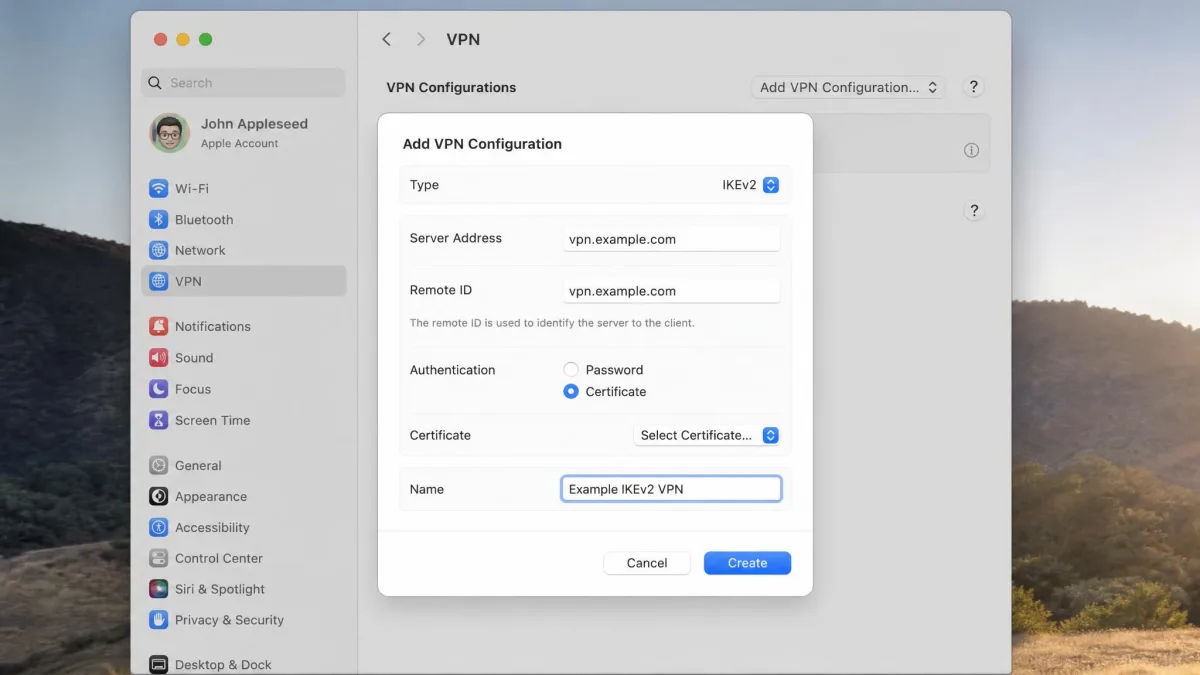
- On a Mac, open System Settings → VPN, click Add VPN Configuration, and choose IKEv2.
- Enter the server address, remote ID and certificate, then connect.
FortiClient Standalone vs EMS
If you do need FortiClient, there are two paid routes. FortiClient Standalone is the unmanaged option, with IPsec VPN, FortiToken MFA, FortiIdentity Cloud user management and email support, sold per user with a 50-user minimum direct or 5 users through the FortiCloud Marketplace. EMS adds centrally provisioned VPN profiles, ZTNA, endpoint protection, 24x7 support and FortiAnalyzer integration.
You also need FortiClient for SAML sign-in on dial-up IPsec. Plan for one extra step: FortiClient's MFA works with FortiToken rather than a standard authenticator app, which adds another app to install.
How to choose the right FortiClient alternative
Start with the gateway, not the client. If your FortiGate runs IPsec IKEv2, try the built-in client first. If it still runs SSL VPN and your team uses Linux, openfortivpn buys time until the firmware upgrade. If the firewall itself is going, the choice becomes a network project rather than a software swap.