
If your VPN connects fine at home and refuses to connect once you land in Russia, the problem is rarely your password. Russian networks filter VPN traffic, and a VPN that works on one provider's network can fail on another.
We built this shortlist around the tools that give you something to try when the default connection fails: obfuscation modes, alternate protocols, and clear recovery steps. Obfuscation means disguising VPN traffic so it looks like ordinary web traffic, which makes it harder for filters to spot. No VPN can guarantee access in Russia. We could not verify a current nationwide success rate for any provider, and we flag gaps in the evidence.
Install and test everything before you travel. Some app stores are unavailable inside Russia, and payment can be a problem once you are there.
Best VPNs for Russia at a glance
All five options below offer some way to disguise traffic or change protocols. None is guaranteed to work on every Russian ISP or mobile network, and prices below are the ones we observed on 8 November 2026.
| Product | Buy | Obfuscation / recovery | Price | Free access | Devices | Refund |
|---|---|---|---|---|---|---|
 |
Check price → | StealthVPN (not on iOS) | $30.00monthly, $180 annually | No verified free plan | 5 | Final sales, no refunds |
 |
QUIC, Shadowsocks, LWO | EUR 5per month | No free plan | 5 | 14-day, cash excluded | |
 |
Built-in AmneziaWG, Stealth, WStunnel | $9monthly, $69 annually | 10GB per month, or 2GB | Unlimited personal | Conditional, initial payment only | |
 |
Stealth (TLS over TCP) | $83.76for 24 months intro | Unlimited-data Free plan | Free 1, Plus 10 | 30-day | |
 |
Lightway, Russia reachability disputed | $83.72for 28 months intro | None verified | Basic 10 | 30-day for new users |
Reachability changes with your ISP, network type (home Wi-Fi versus mobile data), the server you pick, and blocking updates. Treat any list of "VPNs that work in Russia", including ours, as a dated snapshot and keep a second option installed.
How we evaluate VPNs for Russia
We scored each provider on documented evidence: obfuscation and recovery options, connection limits, price and renewal terms, refund conditions, free-plan limits, logging and kill switch details, and platform support. We pulled the details from each vendor's pricing, help and download pages on 8 November 2026, and checked them against published reviews.
For how the apps feel, we drew on documented hands-on findings, such as which interfaces are easy to use and which settings confuse beginners. We did not run connection tests from a Russian network. We do not publish Russian success rates because we could not reliably reproduce those results for any provider.
The 5 VPNs to consider for Russia
The numbered order reflects the evidence we could verify, not a claim that one provider reliably beats Russian filtering. Where the evidence conflicts, we say which side we weigh more heavily and why.
1. Astrill VPN
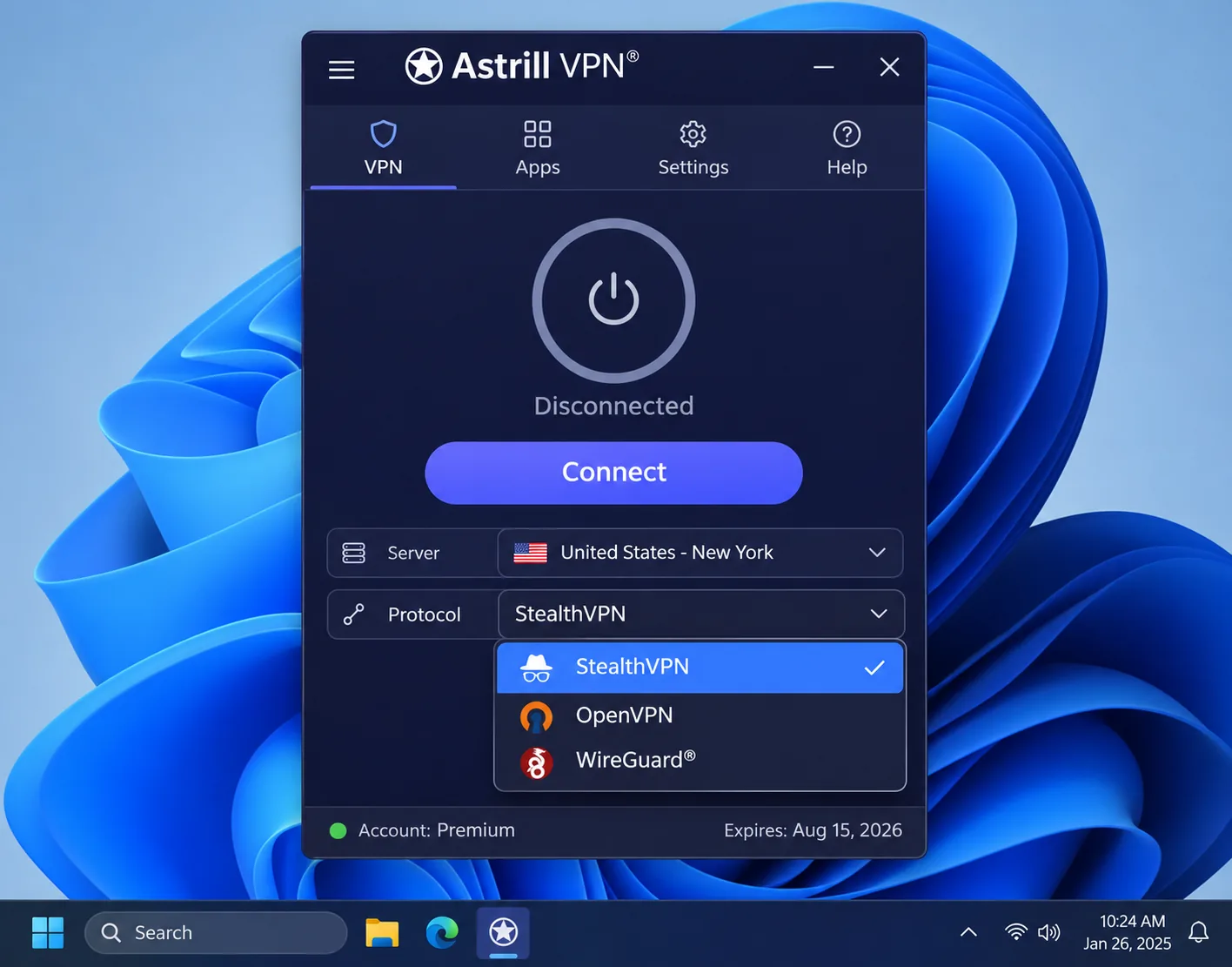
Astrill earns the first slot because of its StealthVPN protocol, which is built for restrictive networks. StealthVPN can work in Russia, but filtering and platform support vary, so read that as a reason to test it rather than a promise.
The feature list is deep: OpenWeb, OpenVPN, StealthVPN and WireGuard, plus app and site filtering, Smart Mode, a desktop kill switch (App Guard), DNS protection, port forwarding, and optional dedicated IPs. StealthVPN supports TCP and UDP and needs Astrill's own software. It runs on Windows, macOS, Linux, Android and some routers, but not on iOS, which matters if your phone is your main device.
The cost is the catch. Astrill charges $30.00 billed monthly, $180.00 each year on the annual plan, or $300.00 every two years, which works out to $12.50 per month. That is far above the rest of this list. You get 5 simultaneous devices within one household, and only one router at a time.
The refund picture is murky. Astrill's FAQ denies free trials in one answer and describes a 7-day trial in another, and it calls purchases final and nonrefundable. Assume you cannot get your money back.
Using it feels dated. The desktop apps look clunky, and OpenVPN connects slowly and requires you to disconnect before changing servers. The built-in speed test can overestimate your actual speed. Mobile apps offer fewer controls than desktop ones.
Astrill keeps active-session metadata (IP, connection time, device type and app version) until you disconnect. It also keeps recent connection records without the IP. That is not a zero-metadata policy, so weigh it if your threat model is strict. Our Astrill review covers the rest of the product.
2. Mullvad
Mullvad is the low-commitment option. It costs EUR 5 per month for any purchase length, with no long-contract discount to lock you in, and covers 5 devices per account. A 14-day money-back guarantee applies, though cash payments are excluded. There is no free plan, so that guarantee is a refund window and nothing more.
Signup uses an account number, and you can pay by cash, card, PayPal, bank transfer or cryptocurrency. You do not need to provide an email address during setup, which suits anyone who does not want a mailbox tied to a VPN account. The apps offer WireGuard, multihop, Shadowsocks, traffic obfuscation, split tunneling and an integrated kill switch, and the vendor says it keeps no activity logs. The Windows app needs Windows 10 or later, 64-bit only. There is no port forwarding.
The Russia story is honest and mixed. Most Mullvad servers are blocked in Russia, that Wi-Fi may connect more readily than mobile data, and that it does not bypass whitelists. It also says Russian iOS App Store distribution and in-app purchases are unavailable. QUIC can connect in Russia, but you may need to try several servers to find a stable one.
If a connection fails, Mullvad's recovery advice is specific. Switch off DAITA and multihop while you troubleshoot. Under VPN settings, Anti-censorship, try QUIC, Shadowsocks on port 443, or LWO on port 53, using different European servers. We cover the obfuscation side in more depth in our guide to the Mullvad stealth protocol, and our Mullvad VPN review goes into the rest of the service.
Streaming is a weak spot. US Netflix access can fail, though some UK and Australian platforms work. There is no live chat, which makes urgent troubleshooting less convenient when you are mid-trip.
3. Windscribe
Windscribe is the one to try if you want a real connection test before paying. Its free plan gives you 10GB per month once you confirm your email and keep promotional emails on, and 2GB per month without confirmation or after you unsubscribe. The English help page lists 10 free countries, while a localized help page lists 11, so check the current list in the app.
Streaming eats that allowance quickly, so treat the free plan as a way to test connectivity and handle light browsing.
Pro costs $9.00 monthly or $69 every 12 months, which is $5.75 per month, and subscriptions auto-renew. Pro adds unlimited data and R.O.B.E.R.T. filtering. Personal connections are unlimited. The refund terms are narrow: only the initial payment is covered, and you must have an unresolved technical issue and usage below 10GB. The terms say 7 business days in one place and 7 days in another, so assume the shorter window.
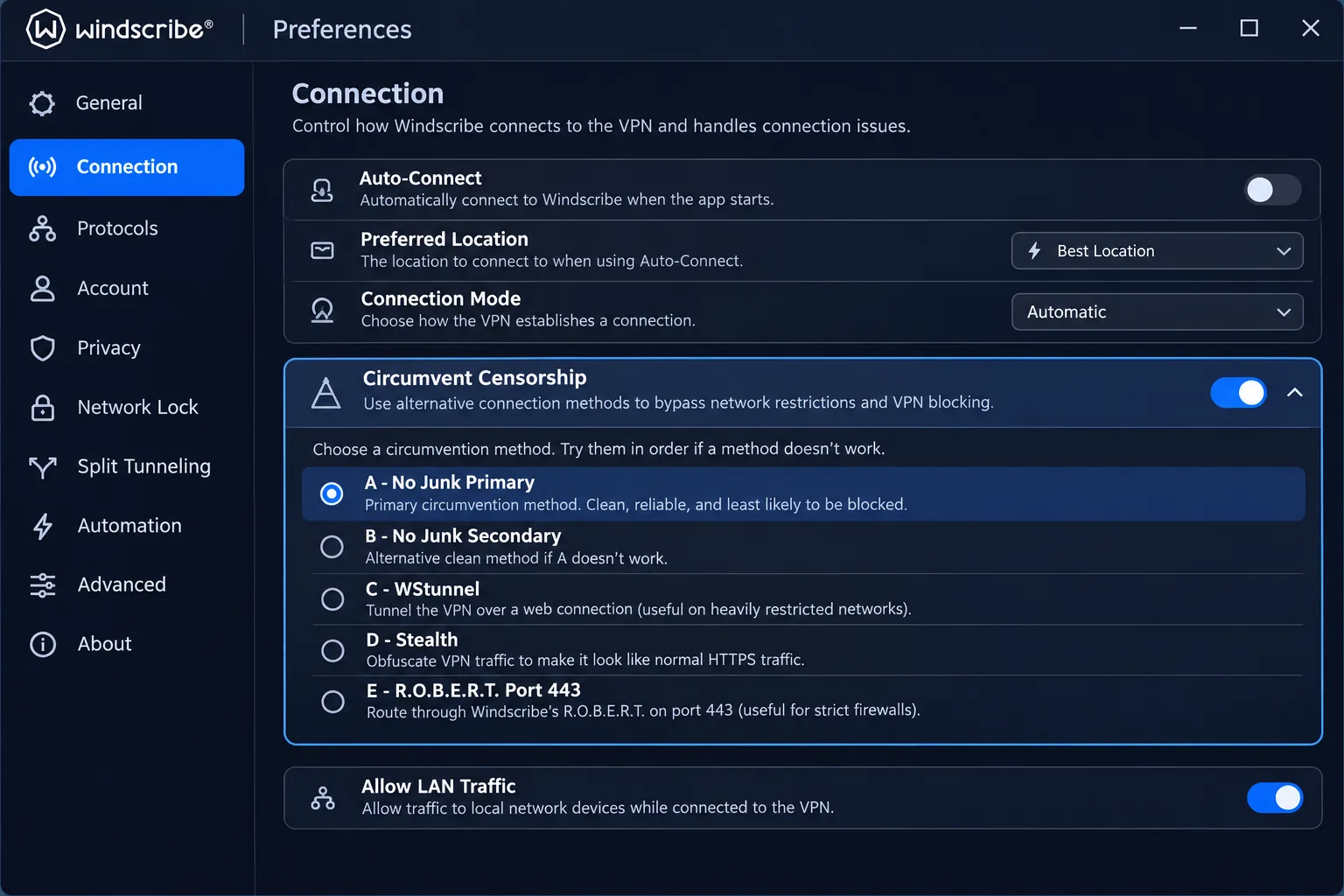
For Russia, the useful feature is built-in AmneziaWG. Windscribe's AmneziaWG needs desktop version 2.21.3 or later, Android 3.98.2061 or later, or iOS 3.9.13 or later. On desktop, open Preferences, then Connection, then Circumvent Censorship. Start with "A - No Junk Primary" and use WireGuard. On mobile, select Manual connection mode. If it fails, try the next profile and other locations. Stealth and WStunnel are fallbacks. The Windows build is 64-bit x86 for Windows 10 and later.
The app has many settings, with advanced options that can overwhelm beginners, though the everyday screens remain manageable. Ad and tracker filtering is useful during ordinary browsing. See our Windscribe review for the full picture.
4. Proton VPN
Windscribe caps its free allowance, but Proton VPN does not. It is the only option here that pairs an unlimited-data free tier with obfuscation. The Free plan has unlimited data and no artificial speed cap, but it assigns a random country and offers fewer locations than Plus. It supports 1 device at a time, while VPN Plus supports 10.
Stealth is the feature that matters for Russia. Stealth disguises VPN traffic with TLS over TCP, and it is included on Free and paid plans. That is a statement about design, not proof it connects from every Russian ISP. In the app, Stealth is easy to find, and instructions cover Windows, Android, iOS and macOS. On Linux, support depends on the app and the Proton Protocols setting: Linux is absent from the introductory platform list but included in the setup steps.
Plus currently costs $83.76 for the first 24 months, equivalent to $3.49 per month, then renews at $83.88 every 12 months. That is an introductory price and promotional prices change. A 30-day money-back guarantee applies, subject to Proton's terms.
Some everyday behavior is worth knowing before you rely on it. OpenVPN can feel substantially slower than WireGuard. NetShield filtering can interfere with streaming, and switching it off can fix playback trouble. Profiles let you save a preferred server, protocol and app combination, which saves time when you are reconnecting after a drop.
Proton also publishes open-source apps and a no-activity-logging policy, and includes a kill switch and Secure Core multihop. Our related write-up, does Proton VPN work in China, covers a similar censorship environment.
5. ExpressVPN
ExpressVPN is the easiest to use and the hardest to recommend for Russia. A prominent connect button and uncluttered menus make first use simple. Lightway Turbo on Windows performs better than standard Lightway in broader speed testing, though that is an international result and not a Russian one.
The Russia evidence is conflicting. Connections from Russia can fail repeatedly, and filtering can block them altogether, although some rankings still place it near the top. We could not confirm a current per-platform obfuscation setup or a working Russian server list from the vendor, so we rank it last in this group.
The Basic plan has a 30-day money-back guarantee for new users and supports 10 simultaneous devices. Higher tiers support 12 and 14. ExpressVPN's advertised price for Basic is $2.99 per month equivalent, which is $83.72 for the first 28 months and then $99.95 annually, plus tax where it applies. Renewal costs more per month than the first term.
The product also offers the Lightway protocol, post-quantum protection, ad, tracker and malicious-site blocking, and dedicated IPs on some tiers. It is a good general-purpose VPN. For Russia, treat it as a fallback rather than your first choice.
Other options and claims to check
Three more names come up whenever people discuss Russia. None earned a numbered slot, but each deserves a clear answer.
Does NordVPN work in Russia?
We cannot give an unqualified yes. NordVPN removed its Russian servers rather than meet censorship demands. NordVPN announced the removal for April 1, 2019 after refusing Roskomnadzor's filtering demands. That history is about servers inside Russia, not about whether the app connects from inside the country.
On connectivity, results conflict. NordWhisper can fail against Russian filtering, and positive rankings elsewhere do not match that. Results vary by Russian network.
NordVPN's own restricted-network guidance starts with NordWhisper, then moves to Obfuscated servers under All locations. Obfuscated servers require Auto or NordWhisper selection, and OpenVPN TCP is a later, separate step. It supports 10 devices and a 30-day refund. The checkout we viewed showed British pounds: GBP 56.85 for the first 15 months, then GBP 104.28 a year. It does not confirm a dollar or Russian price.
Day to day, Quick Connect and the server list are straightforward. Useful settings differ between operating systems, and keyboard-only navigation can be limiting.
Amnezia and self-hosted VPN alternatives
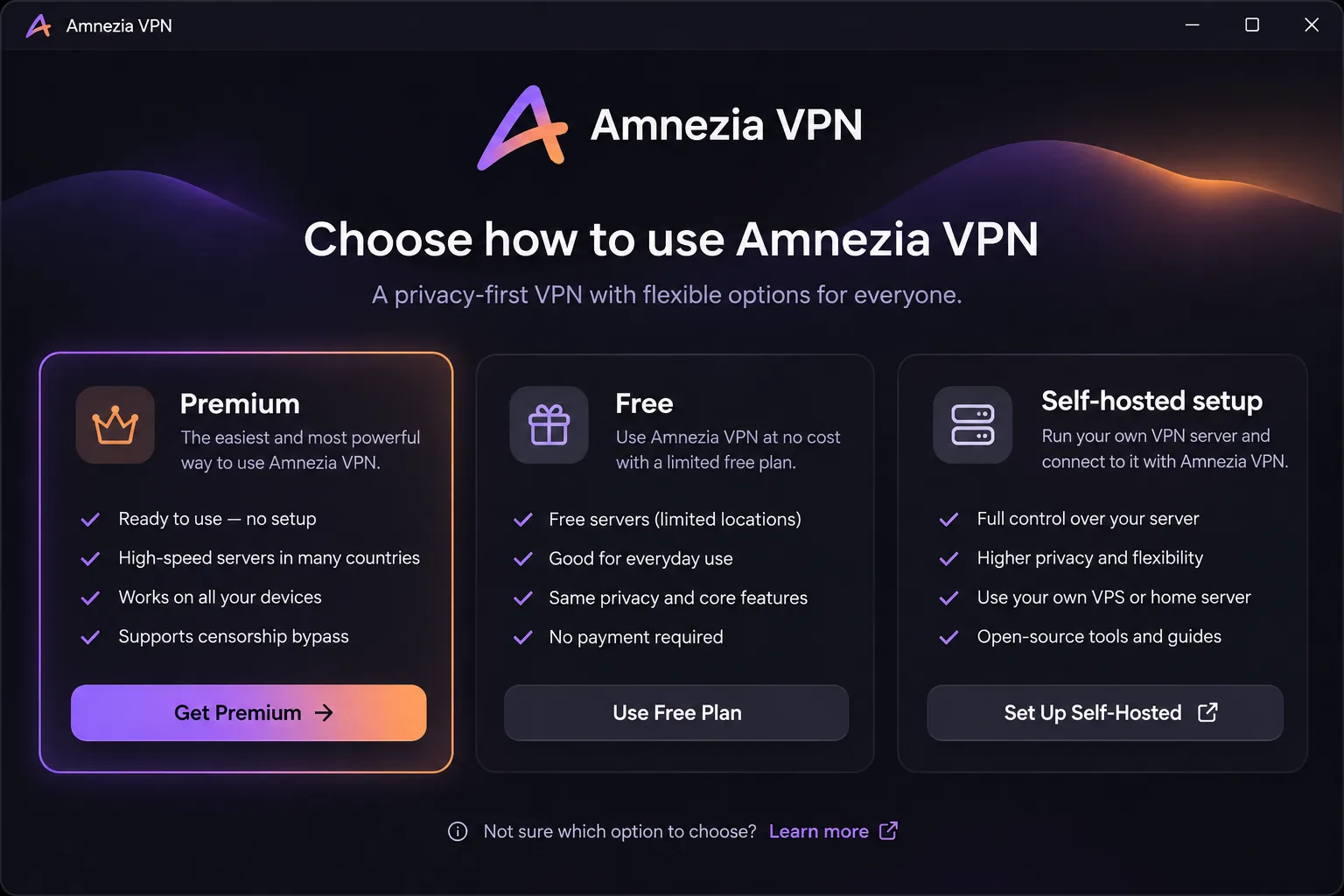
Amnezia focuses on overcoming censorship and consists of three distinct products. Premium is advertised from $3.3 per month and supports 7 devices, though we could not confirm the term, renewal or refund details. Free is limited to 8 Mbps, targets selected blocked services, excludes YouTube and does not let you choose a location. The self-hosted app deploys a VPN to a server you rent, with open-source code, split tunneling and a kill switch.
Premium advertises AmneziaWG and XRay VLESS Reality, and Free advertises AmneziaWG. Premium apps are approachable but too basic for heavy customization, and they can sustain streaming and file transfers on ordinary international connections.
Self-hosting gives you control, but you take on server patching, backups and key management. The hosting bill depends on your provider and we have not priced it. Our Amnezia VPN review goes deeper.
Surfshark and CyberGhost: evidence and limitations
Surfshark offers unlimited simultaneous devices, Bypasser split tunneling, Dynamic MultiHop, rotating IPs, ad blocking and Alternative ID, and a 30-day money-back guarantee. Its restricted-network option is called NoBorders. Having that feature does not establish current Russia-wide reachability, and we found no reproduced nationwide connection result, so we left it out of the five.
The price we found was a temporary yen promotion: JPY 298 per month or JPY 8046 for the first 27 months. The renewal total and Russian payment eligibility remain unconfirmed. The app makes server selection and the main controls easy to find, and customer service is helpful with routine issues. Streaming access is less consistent than its general speed.
CyberGhost is a different case. It offers virtual Russian IPs, and we found no dedicated obfuscation feature. A Russian IP helps if you are abroad and want a Russian-looking address. It does not show that the service gets around Russian censorship from inside the country.
It costs $12.99 for a monthly plan that renews at that amount, supports 7 devices, and offers a 45-day refund on longer plans (14 days on monthly). The long-term offer shows $2.19 per month, $61.32 up front and $61.32 on renewal, but the checkout mixes 26-, 27- and 28-month labels, so confirm the term before you pay. Smart Rules can connect automatically when you open a chosen app. Managing registered devices is frustrating compared with services that have more flexible limits.
How to choose a VPN for Russia
Start with what happens when the default connection fails. Price and speed matter, but a fast VPN that cannot connect has no value on a filtered network.
Obfuscation, protocols, and connection reliability
Russian filtering uses lists of known VPN server IPs and deep packet inspection, which analyzes traffic patterns to flag VPN connections. As Mullvad's documentation notes, obfuscation changes how traffic looks but cannot defeat every IP block or mobile whitelist.
So you want several protocols to cycle through, such as Stealth, AmneziaWG, Shadowsocks or QUIC, plus multiple server locations. One disguised protocol leaves little flexibility. Prefer providers that document a recovery sequence, as Mullvad, NordVPN and Windscribe do, because you will need one.
Privacy, kill switch, and leak protection
Reconnects are common on filtered networks, so pick a provider with a kill switch. It blocks your traffic if the VPN drops. Check that it works on your platform: Astrill's App Guard is a desktop feature, and mobile apps offer fewer controls. Mullvad, Proton, CyberGhost and Amnezia all list a kill switch.
Read the logging policy closely. Mullvad and Proton say they keep no activity logs, while Astrill retains limited session and connection metadata. Anonymous signup using Mullvad's account-number approach reduces the information tying your identity to the service.
Price, payment methods, and refund conditions
Compare renewal prices, not headline offers. Proton, ExpressVPN and CyberGhost all advertise introductory pricing that rises on renewal.
Separate a free plan from a refund offer. A free plan, such as Proton Free or Windscribe's allowance, costs nothing. A refund window means you pay first and ask for money back later, and the conditions differ by provider, as the table shows.
Payment is the open question. Advertised global payment methods do not confirm that Russian-issued cards work, that PayPal is available in Russia, or that a subscription will activate from a Russian network. Pay and activate before you travel.
How to download and use a VPN in Russia
Preparation matters more than the app you pick.
Prepare your apps and backup connection before travel
Install your chosen apps on every device, favoring one with Stealth or AmneziaWG and one with Shadowsocks or QUIC. Sign in and test each while you are still abroad. Keep installers on a laptop, since app stores may not serve you inside Russia.
Proton Free and Windscribe's free allowance give you two different disguises at no cost. Write down the recovery steps from each provider's help page before you go.
Configure the recommended protocol and test the connection
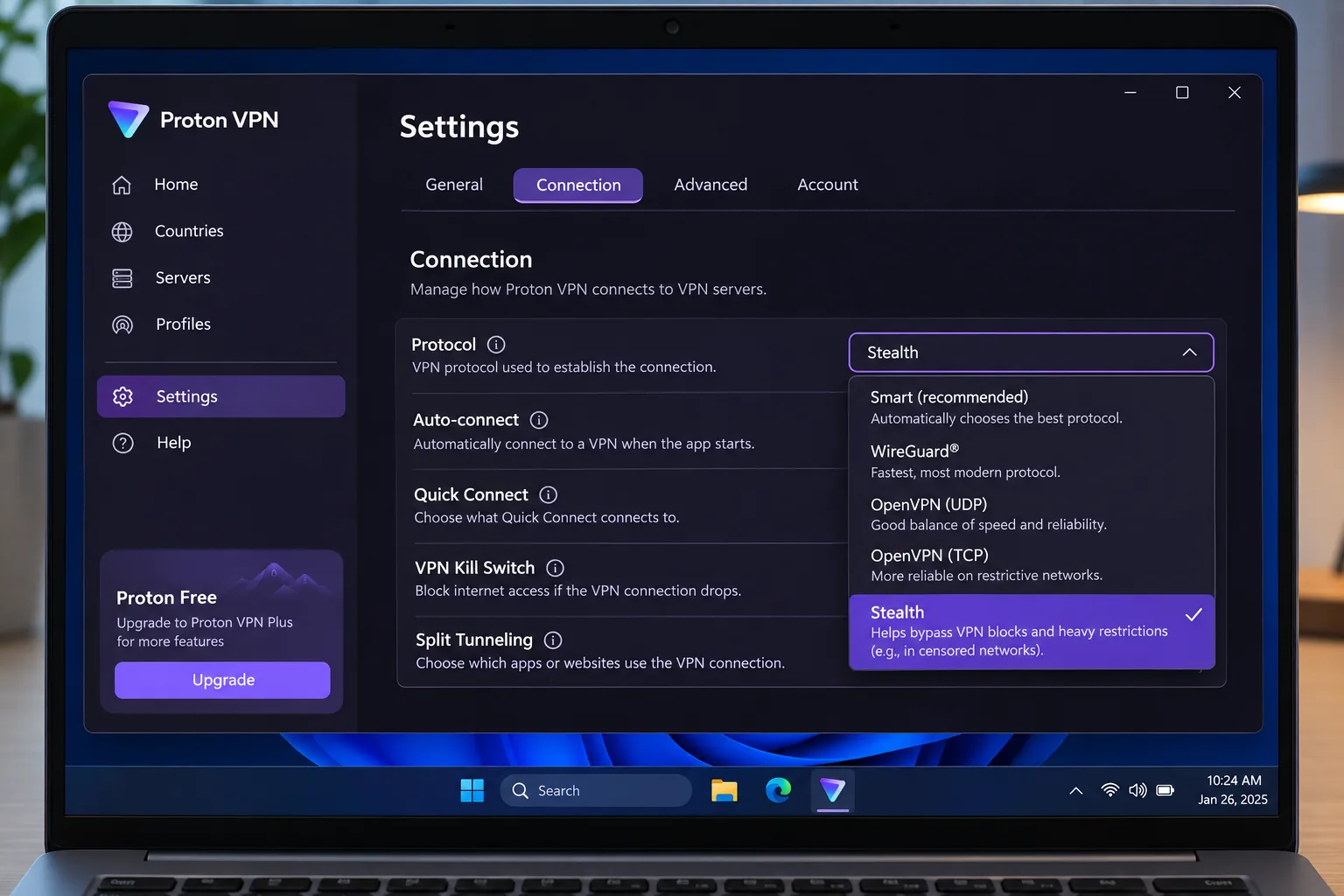
Set a disguise protocol before you rely on the connection. In Proton, enable Stealth. In Windscribe, use Circumvent Censorship with the AmneziaWG profile. In Mullvad, open VPN settings, then Anti-censorship. In NordVPN, begin with NordWhisper.
Then test properly. Connect, check that your IP address has changed, and confirm that a site you need loads. Try both Wi-Fi and mobile data, because results often differ between them.
What to try if your VPN stops connecting
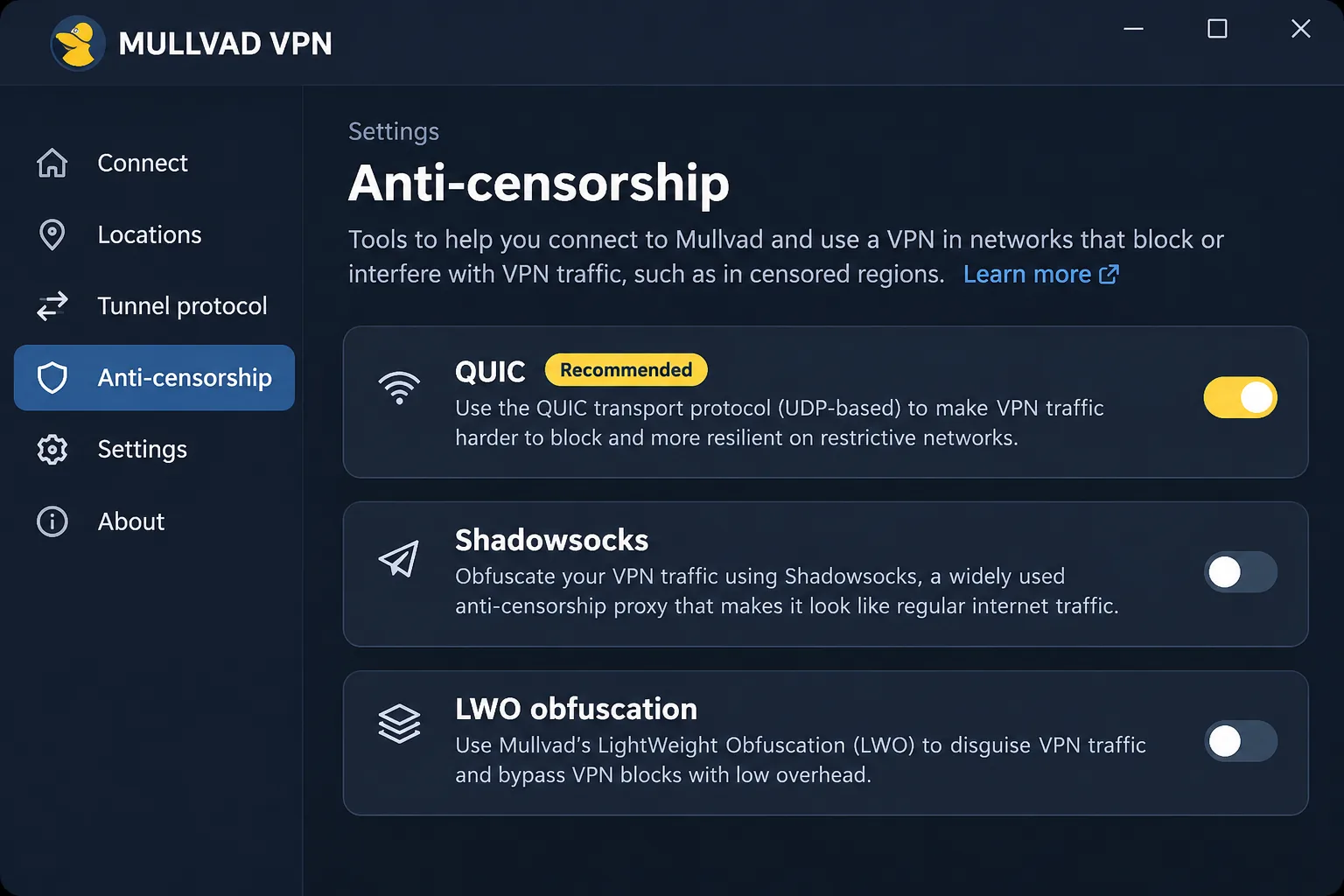
Work through these in order:
- Switch to a different obfuscation protocol or profile.
- Pick a different server in a different country, preferably in Europe.
- Turn off extras such as multihop and DAITA while you troubleshoot.
- Move between Wi-Fi and mobile data.
- Try a different provider's app.
Mullvad's recovery order and Windscribe's "try the next profile" step both follow this logic. If every provider fails on one network, a self-hosted server may succeed where shared server IPs have been listed.
Are VPNs legal in Russia, and what are the risks?
We are not lawyers, and we could not verify the full current statutory framework. We can point to restrictions on conduct documented by Human Rights Watch. The findings support restrictions on VPN advertising and on searches for prohibited content, and they do not support a simple blanket ban on VPN use. They also do not make VPN use unrestricted.
From September 2025, users can be fined for intentionally searching for extremist content, including through VPNs, according to Human Rights Watch's report on VPN restrictions. Legal exposure depends on conduct and content, not simply on having an app installed.
Check current rules before you travel, and do not treat this article as legal advice. Rules and enforcement change, and a VPN does not shield you from consequences for what you search for or post.
How Russian internet restrictions affect VPNs
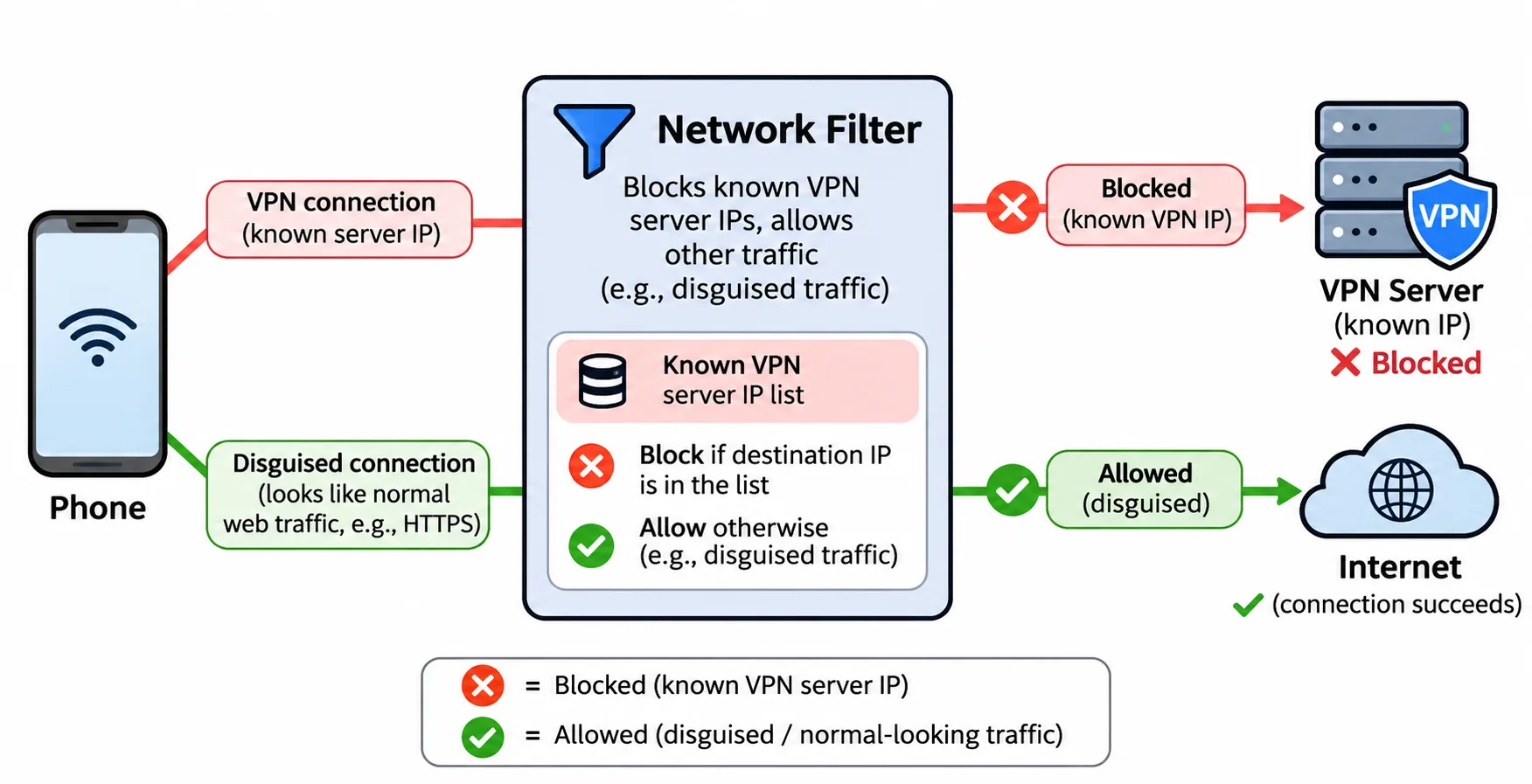
Russia has built a heavy censorship system, and VPNs are a main target. The same Human Rights Watch report says Roskomnadzor confirmed 469 VPN services blocked in February 2026. Freedom House's 2024 Russia internet-freedom report rated the country 20/100, Not Free, for the period from June 2023 to May 2024.
Those two dated figures explain why providers keep changing. Blocking targets IP addresses, protocols and sometimes whole mobile networks, and obfuscation cannot overcome every block.
Which Russia VPN should you choose?
Choose by your situation.
- Willing to pay for a purpose-built option: Astrill VPN, if StealthVPN works on your network and you do not need iOS. Accept the price and the final-sale terms.
- Want a low-commitment paid plan with anonymous signup: Mullvad, with documented recovery steps. Expect to cycle servers.
- Want to test before you pay: Windscribe's free allowance with AmneziaWG, or Proton Free with Stealth for unlimited data.
- Already use ExpressVPN: it is not our lead option for Russia.
If you can only prepare one thing, prepare a second VPN that uses a different protocol. That choice matters more than any provider ranking.







