"Stealth" is the name Proton VPN gives its obfuscated protocol, and Mullvad has no feature called Stealth. What people mean by the Mullvad VPN stealth protocol is WireGuard obfuscation under the app's Anti-censorship settings: four obfuscation methods (QUIC, LWO, Shadowsocks and UDP-over-TCP) plus Automatic mode and a custom WireGuard port, which disguise VPN traffic so deep packet inspection (DPI) firewalls can't easily flag it.
Below, we explain how each method works, which one suits your network, and how to switch it on. For speed, privacy and pricing beyond obfuscation, our Mullvad VPN review covers the whole service.
Does Mullvad VPN Have a Stealth Protocol?
Not by that name. Proton's Stealth, launched in 2022, is a protocol you pick from a menu, and NordVPN's NordWhisper works the same way. Mullvad keeps WireGuard as the protocol and layers obfuscation on top of it as a separate setting.
Mullvad's own app text puts it plainly: obfuscation "hides the WireGuard traffic inside another protocol" to help users get past censorship where a plain WireGuard connection would be blocked. So Mullvad has a stealth mode in everything but name, and it lives in the Anti-censorship settings.
Mullvad's Anti-Censorship Methods Explained
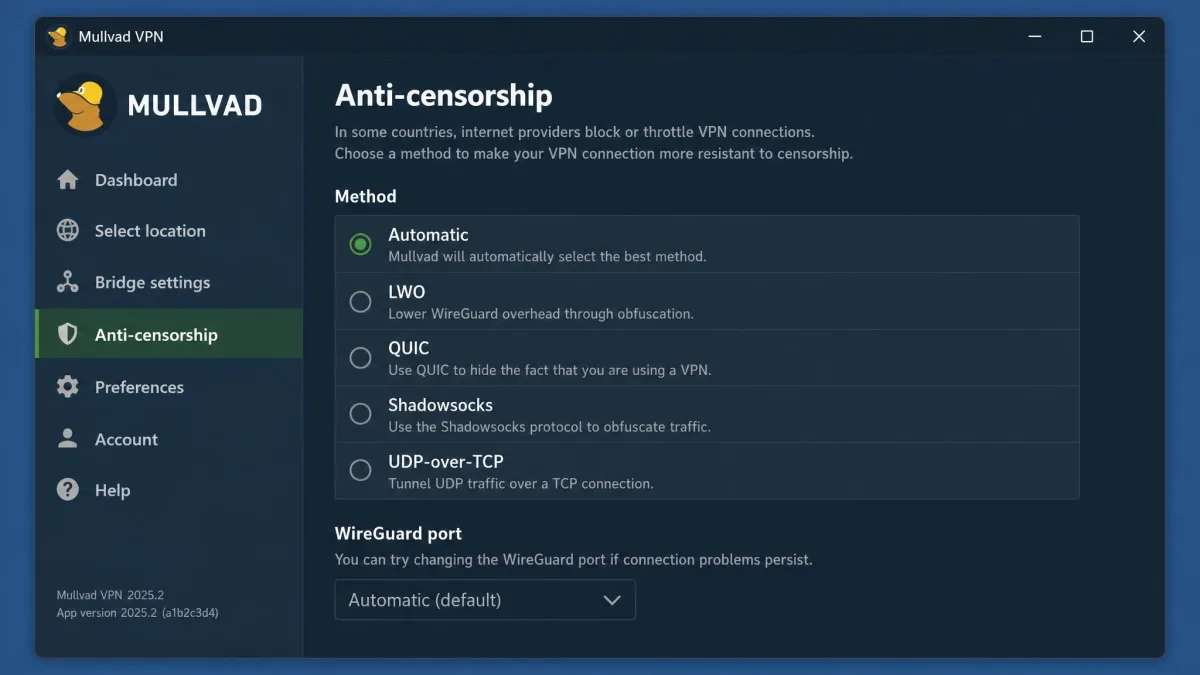
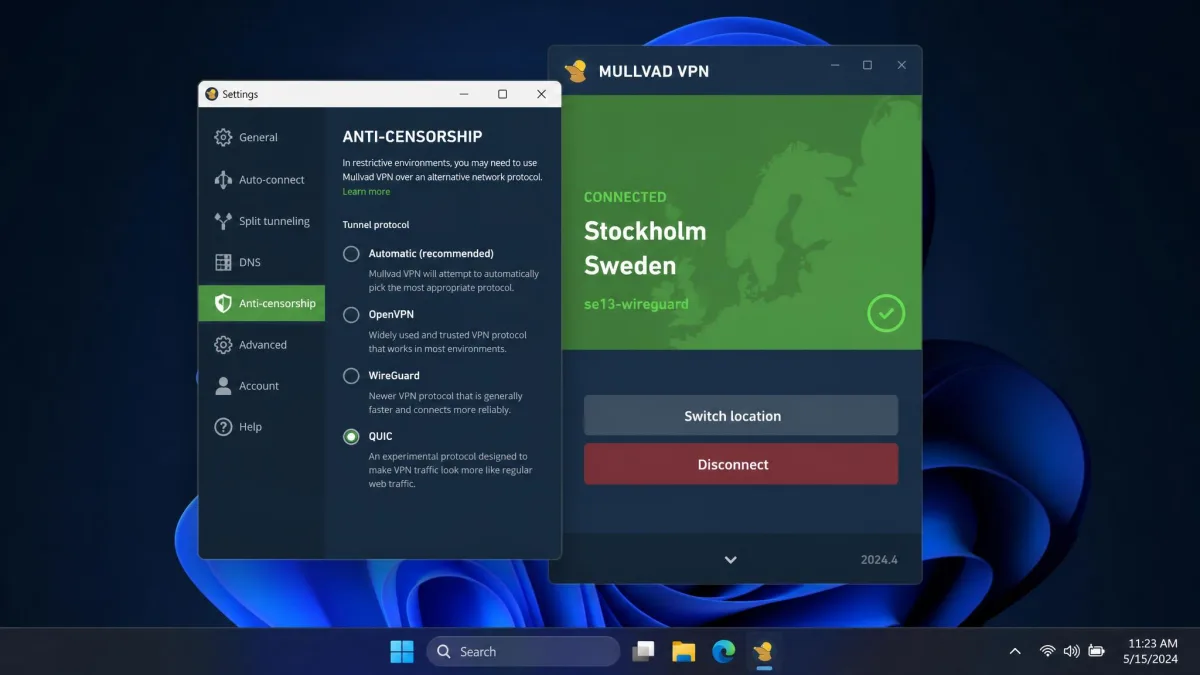
The Anti-censorship screen offers six choices. Four are true obfuscation methods: LWO, QUIC, Shadowsocks and UDP-over-TCP. The other two, Automatic and WireGuard port, decide how the app reaches a server rather than disguising the traffic itself, a split that Mullvad's guide to using the app in restrictive locations also follows.
Automatic Mode
Automatic is the default, and when it is selected the app "will attempt all methods until one works." On desktop and Android, the default order is a random port, IPv6 if configured, LWO, Shadowsocks, QUIC, UDP-over-TCP and finally UDP-over-TCP over IPv6, looping back to the start if nothing connects. On iOS it runs a random port, then Shadowsocks, QUIC, UDP-over-TCP and LWO.
Mullvad's open-source app repository documents this order, and LWO has been the third default attempt since desktop 2026.3 and Android 2026.6. On an ordinary home or office network, we have never needed to touch these settings because Automatic handles it. On a blocked network, a few failed attempts usually appear before the tunnel comes up, which is the app cycling methods rather than a fault.
WireGuard Port
This setting adds no disguise. It moves plain WireGuard to a different port, which helps on networks that block only certain ports.
Since version 2026.1 on desktop and Android, the WireGuard port no longer affects the port LWO uses. On Android, the port option is disabled while an obfuscation method is selected.
QUIC (WireGuard Over MASQUE)
QUIC is a fast, UDP-based transport that Google created in 2012; the IETF later standardized it as RFC 9000, and it now carries much of the web as HTTP/3. Mullvad wraps WireGuard inside QUIC using MASQUE, the IETF standard for proxying UDP over HTTP, and sends it on UDP port 443.
Mullvad's QUIC option doesn't make the encryption any stronger. To a firewall, the connection simply looks like ordinary HTTPS web traffic, and state-level censors rarely block HTTP outright.
QUIC reached desktop in September 2025 with app 2025.9. Mullvad brought QUIC obfuscation to Android and iOS in October 2025, starting with Android 2025.8 and a recent version of the iOS app, and noted there are "no performance or privacy benefits" to enabling it on an open network.
LWO (Lightweight WireGuard Obfuscation)
LWO, announced in November 2025, scrambles the header of each WireGuard packet so it is harder to fingerprint as VPN traffic. It is computationally cheap, uses random ports and draws less power than Shadowsocks. It arrived in desktop 2025.13 and Android 2025.9, and it reached iOS in 2026.2.
Early LWO builds carried noticeable overhead. Desktop 2026.3 optimized it, giving a 1.5 to 3 times speedup in Mullvad's benchmarks, and added an LWO port setting. In daily use, LWO and QUIC feel lighter and faster to us than Shadowsocks.
Shadowsocks
Shadowsocks is a lightweight proxy protocol long used to slip past censorship firewalls. Mullvad launched Shadowsocks obfuscation for WireGuard in October 2024 in desktop 2024.6 and Android 2024.7, and iOS followed in 2024.11.
At launch, the app switched to Shadowsocks after failing to reach a server three times. LWO and QUIC have since joined the retry list, so Shadowsocks is now the fourth default attempt on desktop and Android and the second on iOS.
Forcing Shadowsocks manually shrinks the usable server list. On desktop, many locations show "No servers match your settings" until you pick a compatible server. Early builds could also drop the connection when a phone moved from Wi-Fi to mobile data; Mullvad said this was not a leak risk and shipped roaming fixes in later releases.
UDP-over-TCP
UDP-over-TCP is the oldest of the four methods, and it has been on iOS since 2023.8. It wraps WireGuard's UDP packets inside a TCP connection on port 80, 443 or 5001 on desktop, and 443 or 80 on iOS.
It adds noticeable overhead and latency. Its strength is that it tends to get a connection through when a network blocks UDP entirely.
Why WireGuard Needs Obfuscation
WireGuard is fast and lean, but its packets have a recognizable shape. DPI, which inspects the patterns inside data packets rather than just their addresses, can fingerprint plain WireGuard and drop it. Our explainer on what WireGuard is covers the protocol itself.
That matters more now because Mullvad retired OpenVPN in January 2026 to focus entirely on WireGuard. The desktop app had already dropped OpenVPN in 2025.14, so WireGuard is the only protocol left, and obfuscation is the only way to make a Mullvad connection look like something else.
Which Obfuscation Method Should You Use?
| Method | How it disguises traffic | Speed/overhead | Best for | Platforms available |
|---|---|---|---|---|
| Automatic | Tries plain WireGuard, then each method in turn until one connects | None until a fallback kicks in | Almost everyone; the default | Windows, macOS, Linux, Android, iOS |
| WireGuard port | No disguise; moves plain WireGuard to another port | None | Networks that block only certain ports | Windows, macOS, Linux, Android, iOS |
| QUIC | WireGuard inside QUIC/HTTP/3 via MASQUE on UDP 443 | Low to moderate | DPI firewalls that allow web traffic | Desktop 2025.9+, Android 2025.8+, recent iOS |
| LWO | Scrambles each WireGuard packet header | Lowest; lower power use | Phones, laptops on battery, WireGuard fingerprinting | Desktop 2025.13+, Android 2025.9+, iOS 2026.2+ |
| Shadowsocks | Proxies WireGuard through Shadowsocks | Higher than LWO and QUIC | Long-standing censorship systems | Desktop 2024.6+, Android 2024.7+, iOS 2024.11+ |
| UDP-over-TCP | Wraps WireGuard's UDP in TCP (ports 80, 443 or 5001 on desktop; 80 or 443 on iOS) | Highest overhead and latency | Networks that block UDP entirely | Windows, macOS, Linux, Android, iOS |
Leave Automatic on for home, office and most travel. Pick a method manually only when you know what the network blocks.
If a firewall blocks certain ports but not VPN traffic in general, change the WireGuard port first. If it flags VPNs yet lets web browsing through, choose QUIC, since its traffic looks like HTTPS on port 443.
On a phone or a laptop running on battery, try LWO first because it costs the least power. If the network blocks UDP altogether, QUIC and LWO can't help, so switch to UDP-over-TCP and accept the slower speeds.
How to Turn On Obfuscation in the Mullvad App
Older Mullvad blog posts describe a "WireGuard Settings → Obfuscation" path, but current apps have moved the options into a single Anti-censorship view.
Windows, macOS and Linux
Open Settings, then go to VPN settings → Anti-censorship. Choose a method under Method, and use each method's own settings view if you need to set a port.
On Linux or in a terminal, use the mullvad anti-censorship command, which replaced mullvad obfuscation in desktop 2026.1.
Android and iOS
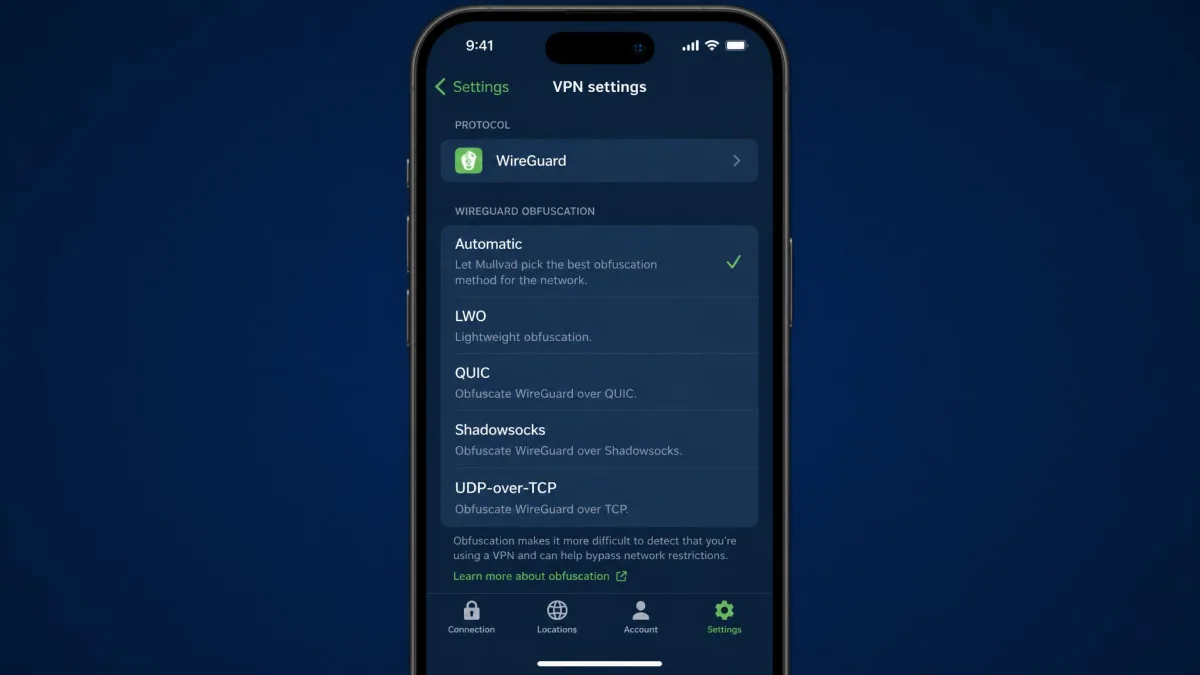
On Android, open Settings, then go to VPN settings → Anti-censorship and pick a method. On iOS, open Settings, then go to VPN settings → WireGuard obfuscation, which newer versions call Anti-censorship.
The iOS menu may show either label depending on your app version, because Mullvad is moving all its apps to the single "Anti-censorship" name. With Shadowsocks selected on Android or iOS, the location list shows only servers that support port 443.
Mullvad Obfuscation vs Proton VPN Stealth and NordWhisper
All three aim to make VPN traffic look like ordinary web browsing. Proton's Stealth runs a WireGuard-based connection through an obfuscated TLS tunnel over TCP, so it resembles a common HTTPS connection. It is available on every Proton plan, including Free, and our Proton VPN review covers the rest of that service.
NordWhisper, launched in January 2025, is a proprietary protocol that carries data inside standard HTTP(S) web traffic using what NordVPN calls web tunnel technology. NordVPN itself says it "isn't expected to win any connection-speed races." It launched on Windows, Android and Linux and later reached iPhone and Mac, and NordVPN has added platforms in stages, so the current list may be wider.
Mullvad's difference is structural. Instead of one named protocol, it gives you four obfuscation methods and an Automatic mode that cycles through them for you.
Does Mullvad Work in China and Russia?
VPN use is restricted in several countries, so check local rules before you connect. Obfuscation improves the odds of a connection, but it does not guarantee one.
In China, the Great Firewall blocks every Mullvad server in Asia, and Mullvad recommends servers in US cities combined with the different obfuscation methods. As of August 2026, Mullvad works only partly there: roughly half of obfuscated connection attempts succeed, and speeds are low enough to be barely usable. No method has a clear track record inside China, so go through them one at a time. Our guide to the best VPN for China compares providers with a stronger record there.
In Russia, Roskomnadzor blocks most Mullvad servers. Try servers in European countries with QUIC or Shadowsocks, and note that the iOS app has been removed from the Russian App Store.
In censored regions, picking a working server in advance and not switching often makes connections more dependable. On macOS, obfuscated connections run without noticeable issues, while on iOS in heavily censored networks the tunnel can need repeated server changes to stay active. If Mullvad's website is blocked, download the app from its GitHub releases page and create an account through Mullvad's onion address in Tor Browser.
Using Multihop With Obfuscation
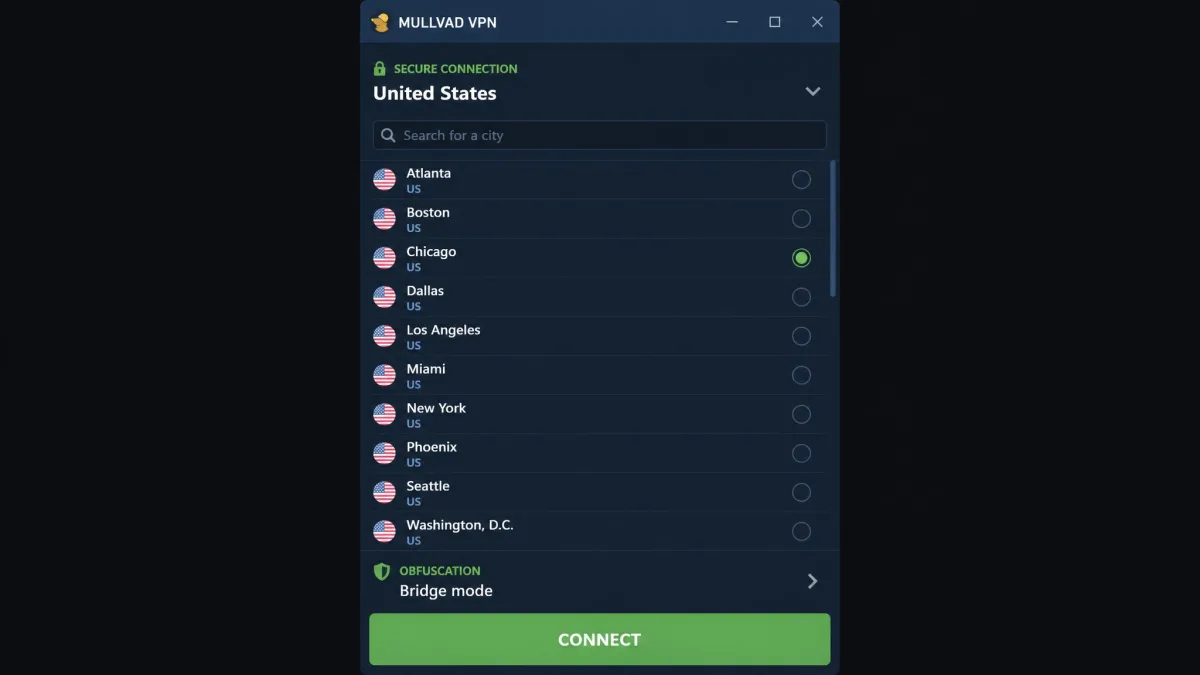
Multihop routes you through a reachable entry server and out through an exit anywhere else. If your chosen location doesn't support the selected anti-censorship method, the app uses multihop automatically through a compatible server, and iOS 2026.4 made "When needed" the default multihop setting.
One combination misbehaved: LWO failed to connect with multihop and DAITA on and quantum-resistant tunnels off. Android 2026.9 fixed it, while the desktop fix was still listed as unreleased at the time of writing.
Trade-Offs: Speed, Battery and DAITA
Mullvad's app warns that these methods "do not improve performance, and may increase system utilization and battery consumption." Without obfuscation, a nearby Mullvad server holds close to full line speed, about 92 of 95 Mbps in a July 2026 test. LWO sits at the light end of the scale and UDP-over-TCP at the heavy end.
DAITA, Mullvad's traffic-analysis defense, adds network noise and makes all packets the same size. With it on, packet sizes and timing look noticeably more uniform, at the cost of extra data, speed and battery. Getting DAITA and multihop to work together takes a few attempts, mainly because the app explains each feature in technical language.
FAQ
Is Mullvad QUIC the same as Proton VPN Stealth?
Which Mullvad obfuscation works best in China?
Does obfuscation slow Mullvad down?
Does Mullvad still support OpenVPN?
Is Shadowsocks or QUIC better on Mullvad?
Do I need to turn obfuscation on, or is Automatic enough?
Bottom Line
Mullvad has no Stealth button, but its Anti-censorship settings do the same job with more choice, making Automatic the right setting for almost everyone. None of these methods makes Mullvad faster or more private, and in places like China they raise the odds of a connection rather than promise one.