
A CDN cache is a store of copied web content held on a network of edge servers spread around the world, kept there so a request can be answered from a machine close to the user instead of the origin. When we served the same file from CDN edge nodes as far apart as Japan and Canada, both responses landed at around 0.1 seconds, a good illustration of how the edge flattens geographic distance. That is the whole point of caching at the edge: put the content closer to the user, and the round-trip shrinks.
This guide explains what a CDN cache holds, how a request travels from origin to edge, and why a cache hit feels instant while a cache miss does not. We tested caching against real responses, read the cache-status headers a CDN returns, and watched what happens right after a purge. Along the way we cover how CDN caching differs from browser and server caching, the headers that control it, and the mistakes that quietly break it.
What is a CDN cache?
A CDN cache is the storage layer inside a content delivery network that holds copies of your cacheable responses on edge servers, also called Points of Presence or PoPs, positioned near your users. Instead of every visitor pulling a file all the way from your origin server, the CDN answers from the nearest edge that already holds a fresh copy.
For a vendor-side primer on how a CDN caches content, the mechanics line up with what we cover here. A useful analogy is a chain of local warehouses. The origin is the central factory, and the CDN edge locations are regional warehouses stocked with the most-requested goods. A shopper collects from the warehouse down the road rather than waiting on a shipment from the factory. The content is the same; the distance it travels is far shorter.
What sits in that cache is a copy of a response, not the live application. Static assets like images, CSS, JavaScript, and fonts are the obvious candidates, but cacheable HTML, media, and even some API responses can live there too. Each copy carries a freshness lifetime, so the edge knows how long it may serve the stored version before checking back with the origin.
"Cache" and "CDN" are not the same thing. Caching is the general technique of storing a copy of something to reuse it. A CDN is a distributed network that applies caching at the edge, across many locations, for a global audience. Every CDN caches, but not every cache is a CDN.
How does CDN caching work?
CDN caching works by intercepting a request at an edge server, checking whether a fresh copy of the response is already stored there, and serving it directly if so. Only when the edge has no usable copy does the request travel onward to your origin. This is why a well-tuned CDN answers the large majority of traffic without ever touching your servers.
The origin-to-edge request flow
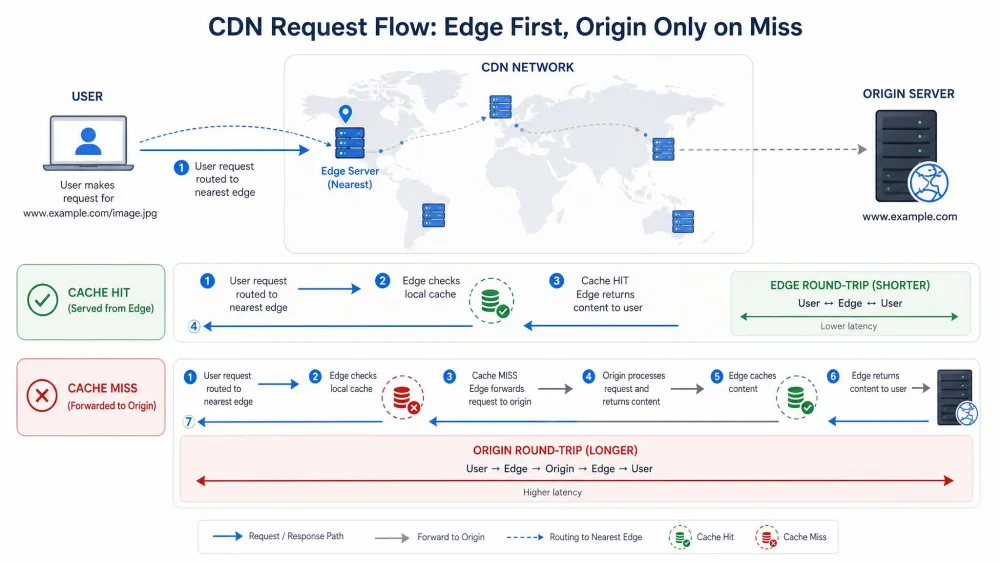
When a user requests a page, DNS routing sends them to the closest edge location rather than to your origin. The edge inspects the request and looks in its local cache for a matching, still-fresh response, keyed by details like the URL and sometimes query strings or headers.
If the edge has that response, it returns it immediately. If it does not, the edge forwards the request to the origin, receives the response, stores a copy according to the caching rules, and then serves it to the user. Every later request for the same resource from that region can now be answered locally until the copy expires. Modern CDNs layer extra tricks on top of this, such as tiered or reserve caching, TLS termination at the edge, and edge compute that runs logic before a request ever reaches your origin.
Cache hit vs cache miss
A cache hit means the edge already holds a fresh copy and serves it straight from storage, which is the fast path. A cache miss means the edge has nothing usable, so it fetches from the origin, stores the result, and only then responds. The first visitor to a region after content expires effectively pays for the miss; everyone after them enjoys the hit.
The share of requests answered from the edge is the cache hit ratio, and it is the single number that tells you whether caching is doing its job. In our experience static assets can reach roughly 95%+ hit ratios with sensible TTLs, and well-optimized sites tend to target above 80-90% overall. Treat those as well-tuned goals rather than guarantees, because the ratio depends entirely on your content mix and how long you allow copies to live.
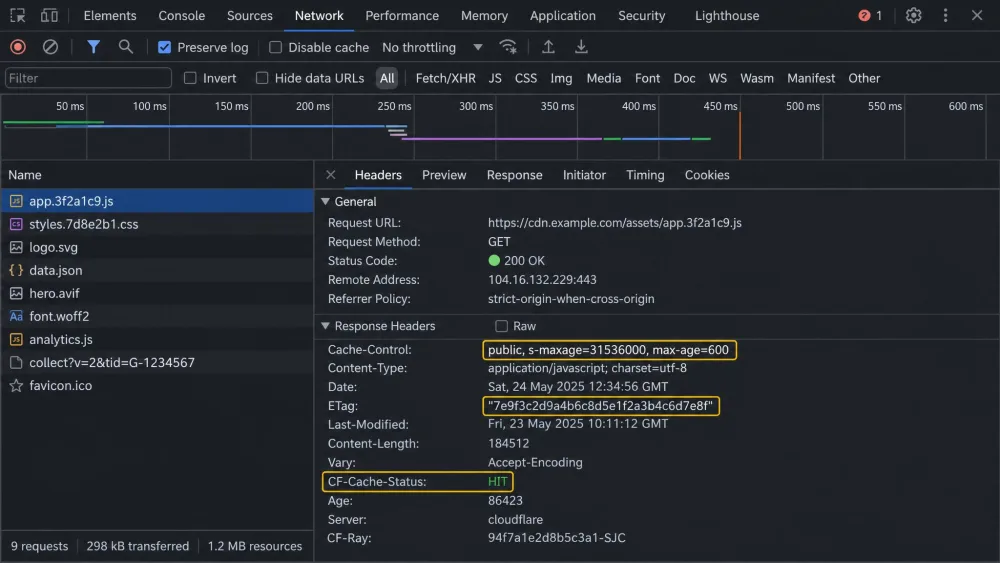
The Age response header tells you how many seconds a cached response has been sitting at the edge. On a repeat request, a climbing Age value is direct evidence that you are getting a cache hit rather than a fresh fetch from origin.
CDN cache vs browser cache vs server cache
The clearest way to understand a CDN cache is to place it beside the two other caches every website already uses. A browser cache stores files on one user's own device for their repeat visits. An origin or server cache holds rendered pages, database query results, and object data on or next to the origin. A CDN cache sits between them, shared across many users near an edge. They solve different problems, and knowing which does what keeps you from expecting one to cover for another. For the underlying rules they all obey, MDN's guide to how HTTP caching works is the reference we keep open.
How they differ
| Criteria | CDN cache | Browser cache | Origin/server cache |
|---|---|---|---|
| What it stores | Copies of cacheable responses: static assets, media, cacheable API and HTML | Files from that one user's past visits | Rendered pages, DB query results, object and opcode data |
| Where it lives | Edge servers and PoPs distributed worldwide | On the end user's own device | On or beside the origin server |
| Scope/coverage | Shared across all users near an edge | A single user, single device and browser | Shared across all requests hitting the origin |
| Who controls it | Site owner via Cache-Control/s-maxage plus CDN cache rules |
The browser, guided by response headers | The application or server operator |
| Best for | Cutting latency and origin load for a global audience | Instant repeat views for a returning visitor | Avoiding expensive recomputation and DB work at the source |
Why you often need more than one
These layers stack rather than compete. A returning visitor gets an instant repeat view from their browser cache. A new visitor in the same region gets a fast response from the CDN edge. A request that reaches the origin, perhaps for something uncacheable, still benefits from a server cache that avoids rebuilding the page from scratch.
A common and costly assumption is that a CDN removes the need for caching at the source. It does not. In our testing, a CDN is not a substitute for proper caching, and if server-side caching is not set up first, the origin still struggles under load even with a CDN in front of it. The layers are partners, and each one covers a gap the others leave open.
What are the benefits of CDN caching?
The benefits of CDN caching come down to distance, load, and consistency: answering from the edge shortens the round-trip, spares your origin from repetitive work, and steadies performance for a global audience. The gains are conditional rather than automatic, which is worth keeping in mind as we go through them.
Faster load times and TTFB
Serving content closer to the user is the most direct win. When a response comes from an edge a few network hops away instead of a server on another continent, the time to first byte drops and the page starts rendering sooner. Vendor figures for latency reduction cite ranges up to roughly 50-80%, but that number depends heavily on how far the user sits from the edge versus the origin, so treat it as illustrative rather than a fixed constant. Our own edge-to-edge measurements landing near 0.1 seconds from opposite sides of the world show the effect clearly, even if the exact percentage varies by network.
Lower origin load and better stability
Every cache hit is a request your origin never has to serve. During a traffic spike that offloading is what keeps a site standing. CDN caching can shoulder roughly 70-90% of origin traffic at peak in a cacheable workload, though the exact share swings with how cacheable your content is and how long your TTLs allow copies to live. The practical result is a smaller, cheaper origin that stays responsive when demand surges, because the edge absorbs the repetitive load.
Impact on Core Web Vitals
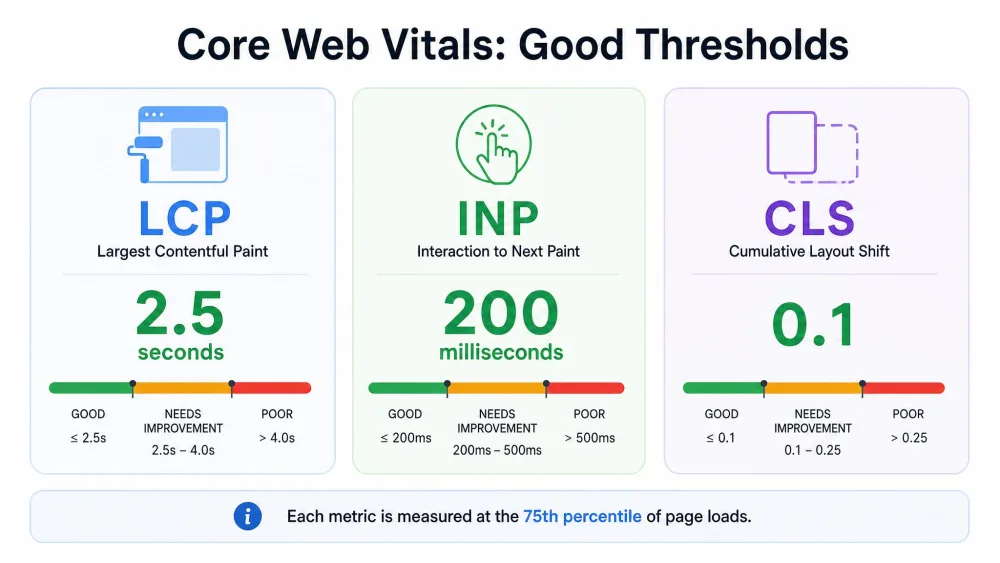
Faster, more consistent delivery feeds directly into Core Web Vitals, Google's user-experience metrics. A good Largest Contentful Paint is 2.5 seconds or less, a good Interaction to Next Paint is 200 milliseconds or less, and a good Cumulative Layout Shift is 0.1 or less. These thresholds are assessed at the 75th percentile of page loads, which means your slowest real users matter, not just your median. Because a CDN cache improves delivery specifically for distant and first-time visitors, it tends to lift exactly the long-tail loads that the 75th percentile captures.
What types of content can a CDN cache?
Not everything belongs in a shared edge cache, and knowing where the line sits is half the battle. The safest, highest-value content is static and identical for every user. The trickier material is anything that changes per request or per person.
Static assets
Static assets are the ideal cache candidates. Images, CSS, JavaScript bundles, fonts, and downloadable files rarely change between requests, so they can live at the edge for long periods and be served on hit after hit. Because their content is fixed, you can give them long freshness lifetimes and reach the high hit ratios that make caching worthwhile.
Semi-dynamic and API responses
Between fully static and fully personal sits a large middle ground. HTML that is the same for all visitors, product listings, and read-heavy API responses can often be cached for short windows, sometimes only seconds, and still cut origin load dramatically. The key is scoping the cache key correctly so that two genuinely different responses do not collide. Anything personalized, such as a logged-in dashboard or a cart, should not sit in a shared edge cache. In our testing those routes need private or no-store handling, or very careful cache-key scoping, or users can end up seeing each other's data.
Media and video
Large media is where edge caching pays off most, because the files are big and the distance penalty is severe. Images, audio, and video segments cache well and stream far more smoothly when delivered from a nearby PoP. A freecodecamp walkthrough of a news site caching its article images and videos on worldwide edge servers is a textbook case: heavy assets, global audience, minimal latency once cached.
How is CDN caching controlled? Cache headers and rules
CDN caching is controlled by a combination of HTTP response headers your origin sends and cache rules you configure on the CDN itself. The headers are the standardized language every cache understands; the CDN's own rules let you override or extend that behaviour per path. Both draw on the HTTP caching specification (RFC 9111), the current standard, published in June 2022, which obsoletes the earlier RFC 7234.
Cache-Control
The Cache-Control header is the primary control. Its max-age directive, expressed in seconds, sets how long a response stays fresh: max-age=86400 equals one day, max-age=604800 equals one week, and max-age=31536000 equals one year, commonly paired with immutable for versioned static assets so caches skip needless revalidation. The s-maxage directive sets freshness specifically for shared caches like CDNs and proxies, overriding max-age and Expires for them while private browser caches ignore it.
Other directives decide storage itself. The public value allows storage in a shared cache such as a CDN, while private restricts a response to the browser cache only. It helps to know that no-cache does not mean "do not store"; it means a response may be stored but must be revalidated with the origin before reuse. To forbid storage outright you use no-store. There is also stale-while-revalidate, which lets a cache serve a stale response immediately while it revalidates in the background, hiding the refresh from the user.
ETag and Last-Modified
Freshness is not the whole story. When a copy's lifetime expires, the cache does not have to re-download the whole response; it can revalidate. An ETag is a content fingerprint the origin returns, and Last-Modified is a timestamp. On revalidation the cache asks whether the resource has changed, and if not, the origin replies with a tiny "not modified" status instead of resending the payload. When no explicit freshness is provided at all, a common heuristic is to treat up to 10% of the time since Last-Modified as the freshness window.
Cache rules and TTL
On top of headers, CDNs expose their own cache rules and TTL settings that can match paths, set edge lifetimes, and decide what forms the cache key. TTL, or time to live, is simply how long the edge keeps a copy before treating it as stale. Getting these values right is the crux of good caching, and getting them wrong is the most common failure we see.
Misconfigured TTLs are the usual culprit behind cache trouble. Set the lifetime too long and users get stale content after you have updated it; set it too short and the origin gets hammered with revalidation requests, undoing much of the benefit. Match the TTL to how often the content actually changes, not to a round number that felt safe.
Cache invalidation and purging
Sometimes content changes before its TTL expires, and you need the edge to drop the old copy now. That deliberate removal is invalidation, usually delivered as a purge. It is the counterpart to freshness rules: TTLs handle the routine expiry, purges handle the exceptions.
Manual and API-driven purges
Most CDNs let you purge a single URL, a group of paths, or the entire cache, either from a dashboard or through an API you can wire into a deploy pipeline. API-driven purges are the norm for automated workflows, so a new release can clear the affected assets the moment it ships.
Purging is not instant or free, though. Right after a purge you hit a cold-cache window where the origin briefly spikes as every edge refetches the content, and the invalidation does not necessarily land across every PoP at the same moment. Purging the whole cache at once, rather than only what changed, turns that spike into a stampede, which is why targeted purges are the safer habit.
Cache busting and content versioning
The cleaner alternative to purging is to avoid it. Cache busting means changing the file's URL whenever its content changes, usually by adding a fingerprint or version to the name, such as app.9f2c.js. Because the URL is new, the edge treats it as a brand-new resource and fetches it once, while the old URL simply ages out. This is why versioned static assets pair so naturally with a one-year max-age and immutable: the content at a given URL never changes, so it can be cached as long as possible and replaced by shipping a new URL.
Common CDN caching limitations and pitfalls
A CDN is not an automatic win in every setup, and it helps to name the traps before you fall into them. The failures we see most often are configuration mistakes, not flaws in the technology.
The first is assuming a CDN always makes a site faster. In our testing a CDN can actually hurt performance when the latency between your origin and the CDN is high, because every cache miss then pays a longer trip before the edge can even store the copy. The second is over-optimizing with too many asset subdomains, such as cdn1, cdn2, and cdn3, which backfires by forcing extra DNS lookups that slow the very page loads you were trying to speed up.
A third pitfall is treating a single free CDN as infrastructure that cannot fail. A single CDN can become a single point of failure; if it goes down, the site can break, so keeping a local fallback, for example serving a critical library from your own server, is worth the small effort. Finally, caching personalized responses in a shared edge cache is the mistake with the worst consequences, because it can leak one user's data to another. Those routes belong behind private or no-store handling.
Cache poisoning is a security pitfall, not just a performance one. It happens when an attacker manipulates a request so the cache stores a harmful or wrong response and then serves it to everyone. The defences are careful cache-key design that ignores untrusted inputs, strict handling of unkeyed headers, and normalizing requests before they are cached.
Best practices for effective CDN caching
Good caching is mostly discipline. Set up server-side caching at the origin first, then layer the CDN on top, so the origin stays healthy even during a cold-cache window. Give static, versioned assets long lifetimes with immutable, and reserve short TTLs for content that genuinely changes often.
Use s-maxage to control shared edge freshness separately from what browsers do, and mark anything user-specific as private or no-store so it never reaches a shared cache. Lean on cache busting through versioned URLs instead of frequent full purges, and when you do purge, target only what changed. Keep an eye on your cache hit ratio over time, because a slow decline usually means a rule or a header quietly stopped matching.
How to check if CDN caching is working
The fastest way to confirm caching is working is to read the cache-status header on the response. Cloudflare exposes CF-Cache-Status with values like HIT or MISS, and Vercel uses x-vercel-cache the same way. When we validate a setup we request a resource twice and watch that header flip to HIT, while the Age header climbs on the repeat request to show the copy is aging at the edge rather than being refetched.
Beyond the headers, a synthetic monitoring tool or a simple check from several geographic locations tells you whether distant users are actually being served from a nearby edge. If the status header stays on MISS, the response is not cacheable as configured, and the usual causes are a no-store or private directive, a Set-Cookie on the response, or a cache key fragmented by query strings. Fix the header or the rule, and the HIT should follow.
Conclusion
A CDN cache keeps copies of your content on edge servers close to your users, so most requests are answered near the visitor instead of at your origin. As one of three caching layers, alongside the browser cache and the server cache, it earns its place by cutting latency, offloading the origin during spikes, and lifting the slow-tail loads that Core Web Vitals measure. The mechanics are standardized through headers like Cache-Control, max-age, and s-maxage, and the failures are almost always configuration: TTLs set wrong, personalized content cached unsafely, or a CDN dropped in front of an origin that was never properly cached. Set the layers up in the right order, watch the cache-status headers, and the edge does the rest.
Frequently asked questions
What is the difference between CDN caching and browser caching?
How long does a CDN cache content for (TTL)?
Cache-Control. Versioned static assets are often cached for a year with max-age=31536000 and immutable, while frequently changing HTML or API responses may be cached for only seconds. When no explicit freshness is given, caches fall back to a heuristic of up to 10% of the time since the content was last modified.Can a CDN cache dynamic or personalized content?
private or no-store handling, or very careful cache-key scoping.