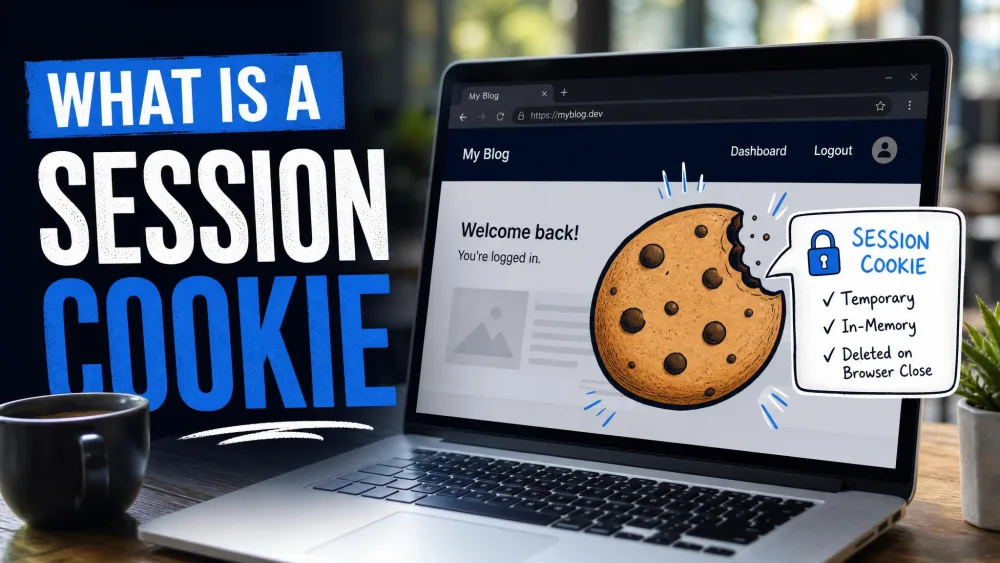
A session cookie is a temporary cookie your browser keeps in memory only for as long as you are on a site. It holds a short session ID, not your personal details, and it disappears when the session ends. That is the whole idea in one sentence, and the rest of this guide unpacks it.
Session cookies play a crucial role in almost every site you use. They keep you logged in as you move between pages, they hold a shopping cart together, and they remember where you are in a multi-step form. You never see them, but a lot of ordinary browsing would break without them.
Below we explain how a session cookie works, where it sits in the browser, how it compares with the persistent cookie, and the security attributes that keep it safe. We also answer the question most readers arrive with: does a session cookie need consent under GDPR?
What Is a Session Cookie?
A session cookie is a cookie with no set expiry. In technical terms, it has no Max-Age and no Expires attribute, so the browser treats it as temporary and removes it when the current session is over. You can read the full attribute list in the MDN Web Docs on HTTP cookies, which is the clearest reference we point people to.
The contents are deliberately small. A session cookie normally holds only a session ID, a random string the server uses to recognize you. Your name, email, and payment details stay on the server, not in the cookie. The cookie is really just a claim ticket, and the server holds the matching stub.
Session cookie vs persistent cookie (quick definition)
The quick way to tell them apart is lifespan. A session cookie is temporary and vanishes at the end of your visit. A persistent cookie carries an expiry date and stays on your device until that date arrives or you clear it by hand. We compare the two in full detail further down.
How Do Session Cookies Work?
Cookies follow a simple request-and-response pattern defined by RFC 6265, the HTTP State Management spec. When you first visit a site, the server sends a small Set-Cookie header in its response. Your browser stores that cookie and sends it back on every later request to the same site. That back-and-forth is what lets a stateless protocol feel like a continuous conversation.
The session ID lifecycle (create, send, retrieve, delete)
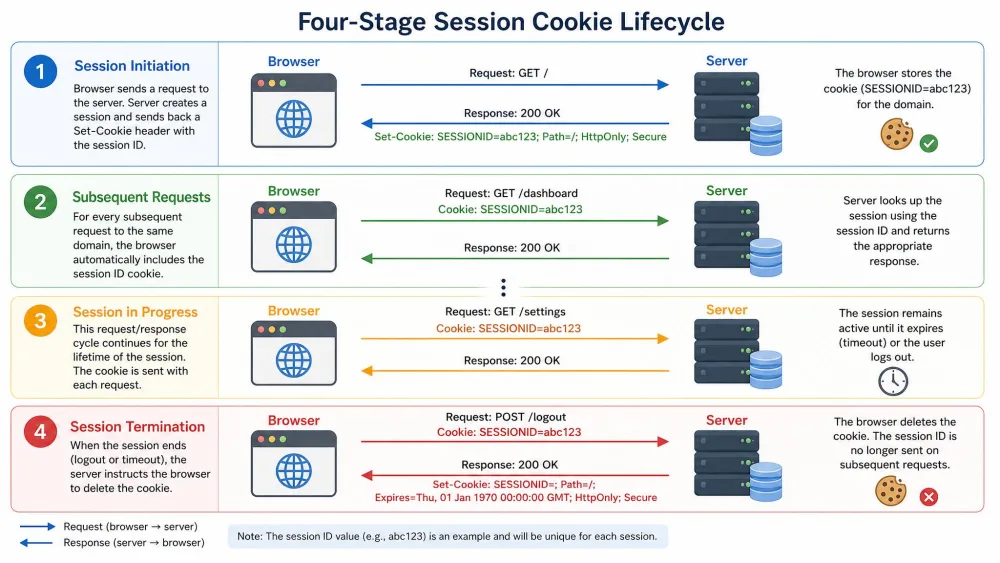
The lifecycle has four clear stages, and it repeats every visit.
First, the server creates a session and generates a unique session ID. Second, it sends that ID to your browser using Set-Cookie, with no expiry attribute attached. Third, your browser returns the cookie on each request, so the server can look up your session and know it is still you. Fourth, the browser deletes the cookie when the session ends.
That deletion step is the defining behavior. Under RFC 6265 section 5.3, when the current session is over, the browser must remove every cookie whose persistent flag is false. A session cookie is exactly that kind of cookie, so it is first in line to go.
Where are session cookies stored?
Session cookies live in the browser's temporary memory, the RAM, rather than being written to disk. That is why they disappear so cleanly. When the browser process closes, the memory is cleared, and the cookie goes with it. A persistent cookie, by contrast, is saved to your device's storage and survives a restart.
There is a server-side half to the story. The session ID usually points to a server-side session store, where the real data for your visit is kept. The cookie stays tiny and safe to send, while the sensitive parts never leave the server. This setup varies from site to site, so treat it as the general pattern rather than a fixed rule.
What Is the Purpose of Session Cookies?
The purpose of a session cookie is continuity. HTTP does not remember anything between requests on its own, so a site needs some way to know that the person loading the checkout page is the same person who filled the cart two clicks earlier. The session cookie is that thread of memory, and it lasts exactly one visit.
Common uses (login, shopping cart, forms, live chat, personalization)
You meet session cookies constantly, usually without noticing. The most common jobs are:
- Login and authentication state. A session cookie keeps you signed in as you move around a site during a visit. Close the browser and you are signed out, because the cookie was in memory, not on disk.
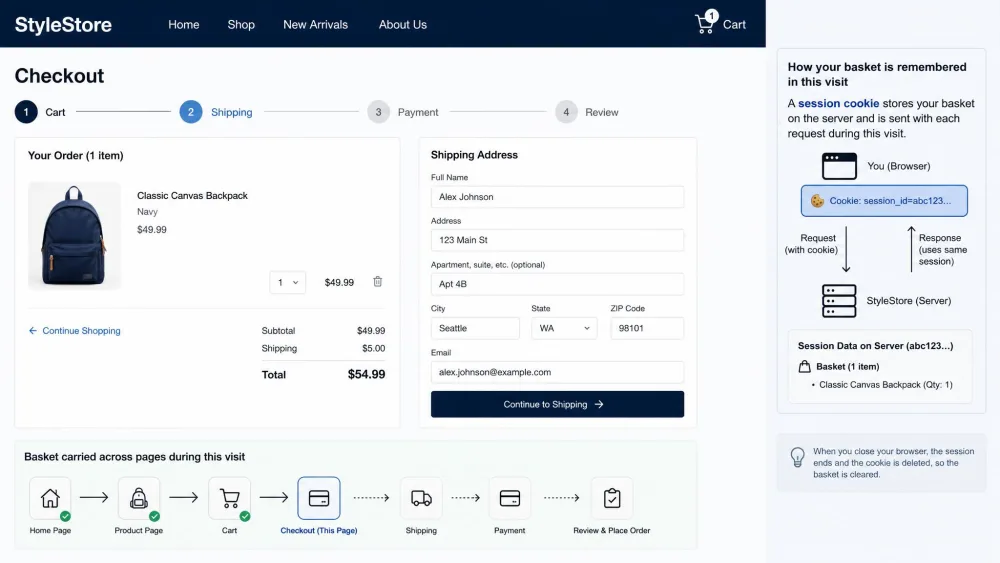
- Shopping carts. Without a session cookie, items you add to a basket would disappear by the time you reach checkout. The cart only holds together because the cookie carries your selections from page to page.
- Multi-step forms. Long forms and checkout flows use a session cookie to remember your progress across each step.
- Live chat. A support chat widget uses one to keep your conversation attached to you as you browse.
- Temporary preferences. A language choice or a display setting can ride along in a session for the length of a single visit.
Session Cookie Examples
Picture an online store. You land on the homepage, and the server sets a session cookie with a fresh session ID. You add headphones to your cart, and the server records that against your session ID. As you browse, each request carries the same cookie, so the store keeps showing one item in your basket. Close the browser before buying, reopen the store later, and the cart is empty, because the session cookie is gone.
Signing in works the same way. Log into a webmail account and the site sets a session cookie to mark you as authenticated. Every page you open sends the cookie back, so you are not asked to log in again on each click. A banking site does this too, which is why you get signed out when you close the tab.
Session Cookies vs Persistent Cookies
The clearest way to understand a session cookie is to set it beside its opposite. A persistent, or permanent, cookie has a Max-Age or Expires attribute, which gives it a fixed lifetime. RFC 6265 sets its persistent flag to true, so the browser keeps it after the session ends. It is written to your hard drive and stays there until it expires or you erase it, and depending on the date the site chooses, that can be days, months, or even years.
Persistent cookies also carry more. They often remember logins across visits, save your preferences, and support analytics and ad tracking, and they can be first-party or third-party. That wider role is why they attract more privacy attention than the humble session cookie.
Comparison table: lifespan, storage, personal data, GDPR consent, use cases
| Attribute | Session cookies | Persistent cookies |
|---|---|---|
| Lifespan / expiry | Deleted at session end, with no Max-Age or Expires |
Fixed lifetime via Max-Age or Expires, from days to years |
| Storage location | Browser temporary memory (RAM) | Written to disk on your device |
| Personal data stored | Typically only a session ID, no personal data | Can store identifiers, preferences, and tracking data |
| GDPR consent required | No, usually strictly necessary, though sites should still explain them | Usually yes for statistics and marketing cookies |
| Common use cases | Login state, shopping cart, multi-step forms, live chat | Remembered logins, saved preferences, analytics, ad tracking |
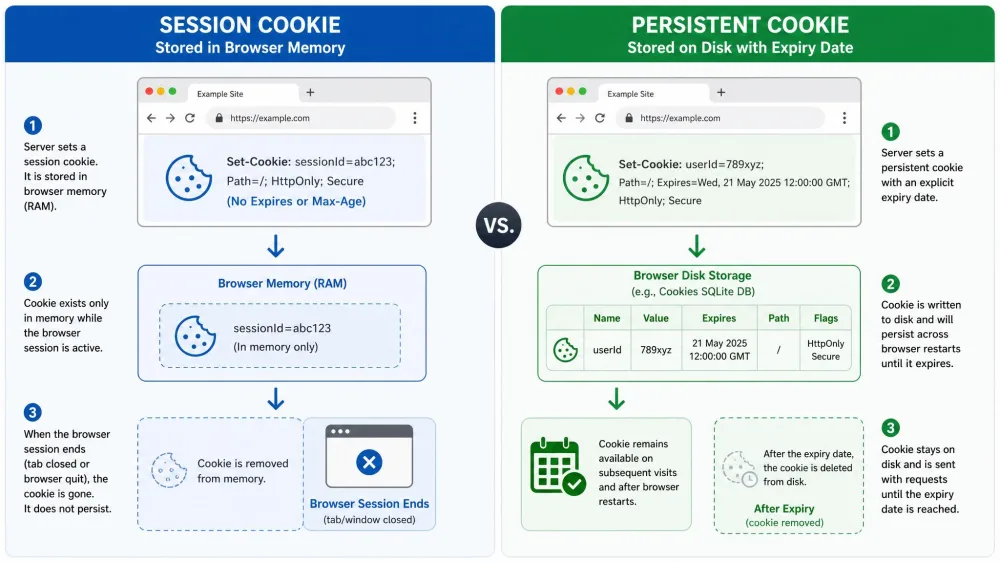
One small note on the spec, in case you ever read a cookie's raw attributes. If a cookie sets both Max-Age and Expires, Max-Age wins under RFC 6265 section 4.1.2.2. That rule only matters for persistent cookies, since a session cookie sets neither.
Are Session Cookies Secure?
Session cookies are safe by design in one important way: they hold a session ID rather than your personal data, and they do not linger on disk. That said, the session ID itself is valuable, because anyone holding it can act as you for the length of the session. So security comes down to protecting that ID in transit and in the browser.
Session hijacking and CSRF risks
The main threat is session hijacking. In a hijacking attack, someone steals your session ID and uses it to impersonate you while you are logged in, which can mean taking over a bank or e-commerce account. A stolen ID is as good as a stolen password for the length of the session, so this is the risk the security attributes below are built to stop.
Cross-site request forgery, or CSRF, is a related problem. Here an attacker tricks your browser into sending a request you did not intend, riding on a cookie your browser attaches automatically. The SameSite attribute is the main defense against it.
Never share a URL that contains a session ID, and be careful on public Wi-Fi with sites that do not use HTTPS. A session ID sent in the clear can be captured and reused, and that is the classic route into a hijacked account.
HttpOnly, Secure, and SameSite best practices
Three cookie attributes do most of the protective work, and you can read more on each in the cookie security best practices on MDN.
- HttpOnly stops JavaScript from reading the cookie through
document.cookie. That closes off the most common way a cross-site scripting, or XSS, attack tries to steal a session ID. - Secure means the cookie is only sent over encrypted HTTPS requests, so it never travels in plain text where it could be intercepted.
- SameSite controls whether the cookie is sent on cross-site requests. It has three values,
Strict,Lax, andNone, andNonemust be paired withSecure. This is the attribute that blunts CSRF.
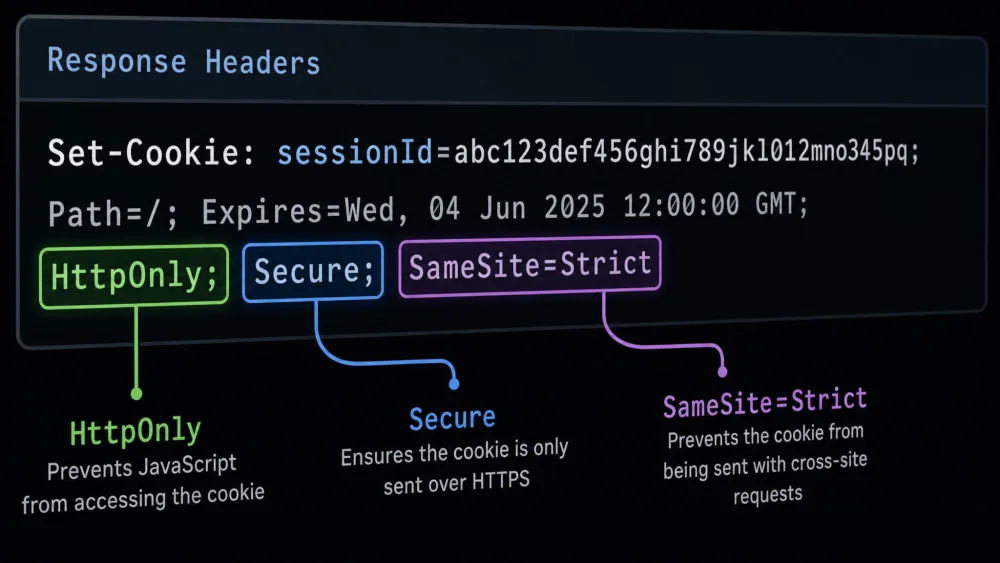
A well-built site sets all three on its session cookies. As a user you cannot force this, but you can favor sites on HTTPS and keep your browser updated.
Are Session Cookies GDPR Compliant? Do They Need Consent?
For most session cookies, the short answer is that they do not need consent, but a site should still tell people about them. Session cookies typically fall under strictly necessary cookies, the category that keeps a site working, and that category is exempt from the GDPR consent requirement. You can read the official position in the GDPR cookie rules.
The exemption is not a free pass. Even for a strictly necessary cookie, transparency still applies, so a site should explain in its cookie or privacy notice what the cookie does and why. That is why you often see session cookies listed in a policy even when there is no consent checkbox for them.
Strictly necessary means the site cannot function without the cookie, for example keeping you logged in or holding your cart. That is the test that usually exempts a session cookie from consent, not the fact that it is a session cookie by itself.
There is an important limit. The exemption depends on the cookie's purpose, not just its lifespan. A session cookie used purely for analytics or marketing may not qualify as strictly necessary, and it can still trigger a consent requirement depending on the purpose and the jurisdiction. Treat "no consent required" as the typical case for genuine functional session cookies, not a universal rule.
How to Check If a Website Uses Session Cookies
You do not have to take a site's word for it. You can inspect the cookies any site sets, live, in a couple of minutes, and a session cookie is easy to spot once you know the tell.
Method 1: Browser developer tools
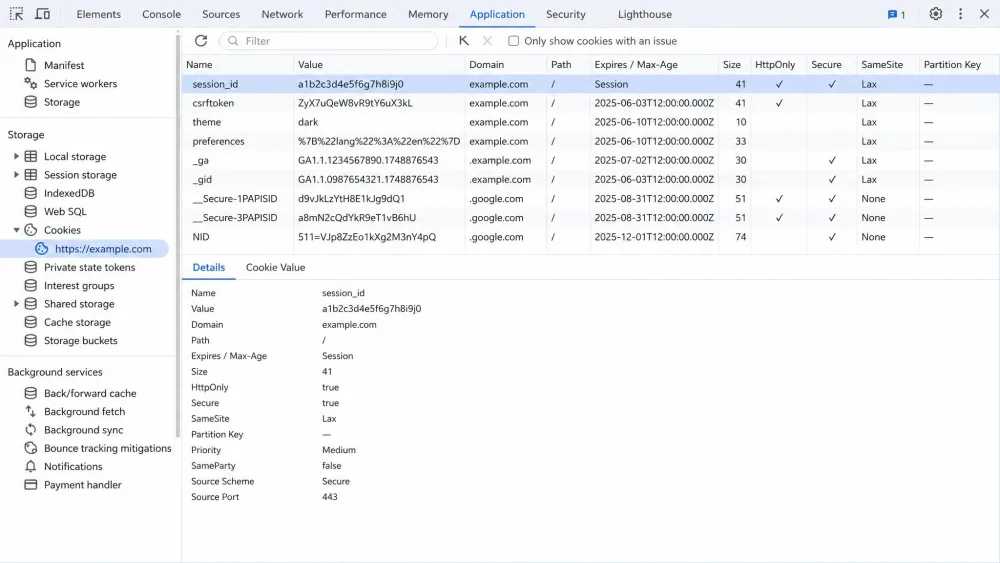
The most reliable method is your browser's built-in tools. We opened Chrome DevTools on a live site to see exactly this. Press F12 to open DevTools, then go to the Application tab, and select Cookies under Storage. You will see a table of every cookie the site has set, with a column for expiry. The session cookie is the row whose expiry reads "Session" instead of a date, because it carries no Expires or Max-Age value. Firefox offers the same view through its Storage Inspector.
Method 2: Cookie scanner
If you would rather not open developer tools, an online cookie scanner does the work for you. You enter a site's address, and the scanner reports the cookies it finds, grouped by type and lifespan. Scanners are handy for a quick audit of a whole site, though the DevTools method is better when you want to watch a single cookie appear as you log in or add to a cart.
How to Clear or Manage Session Cookies
In normal use, you rarely need to clear session cookies by hand, because they clear themselves. Closing the browser ends the session and removes them.
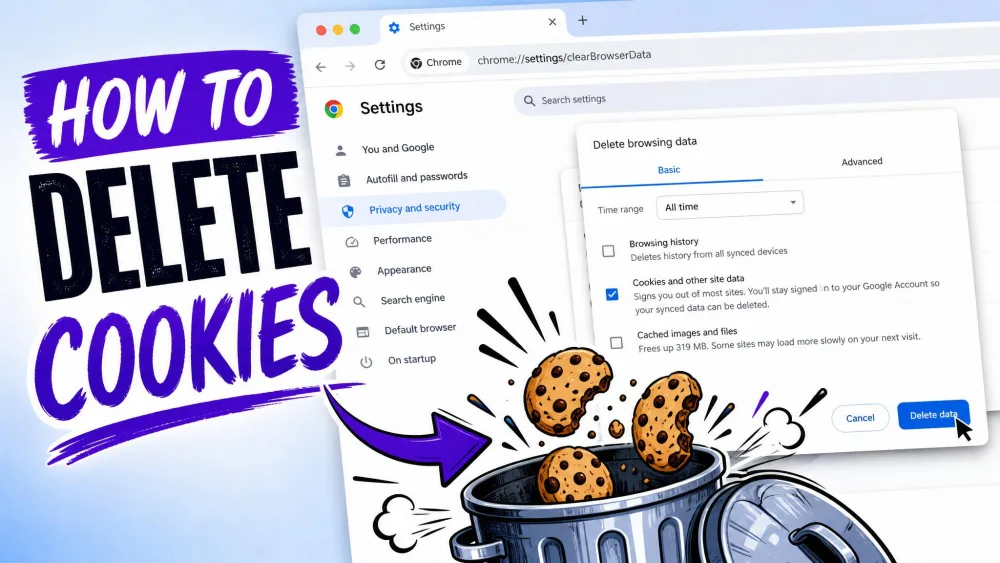
When you do want to clear cookies deliberately, every major browser has the controls under its privacy or history settings, usually as "Clear browsing data." From there you can remove cookies for all sites or just one. You can also block or limit cookies per site, and a private or incognito window keeps its cookies only until you close it.
One practical gotcha is worth knowing. Browsers with a "continue where you left off" or session-restore feature can quietly keep session cookies alive across a restart. So "deleted when you close the browser" is the norm, not an absolute guarantee. If you want a clean slate, close the browser fully or clear cookies by hand.
Frequently Asked Questions
How do session cookies work?
Set-Cookie header with no expiry. Your browser returns that cookie on every request, so the server keeps recognizing you. When the session ends, the browser deletes the cookie.